change time MERCEDES-BENZ SL CLASS 2020 User Guide
[x] Cancel search | Manufacturer: MERCEDES-BENZ, Model Year: 2020, Model line: SL CLASS, Model: MERCEDES-BENZ SL CLASS 2020Pages: 334, PDF Size: 17.43 MB
Page 167 of 334

In
aspeed rangefrom0-37 mph
(0 -60 km/h ),Active Steering Assistfocuses
on the vehicle infront, taking intoaccount
lane markings, e.g.when followingvehicle sin
a traffic jam.
At speed sof more than37mph (60km/h),
Active Steering Assistfocuses onclear lane
markings (leftandright), onlyfocusing onthe
vehicle infront ifdetected lanemarkings are
not present atspeed sof up to80 mph
(130 km/h).
If these conditions arenot present, Active
Steering Assistcannot provide assistance.
Active Distance AssistDISTRONIC mustbe
active inorder forthe function tobe avai lable.
Important safetynotes
Active Distance AssistDISTRONIC withActive
Steering Assistcanneither reducetherisk of
an accident ifyou failtoada ptyou rdriving
style, noroverride thelawsof phys ics.Itcan-
not take intoaccount road,weather ortraffic
conditions. ActiveDistance AssistDISTRONIC
with Active Steering Assistisonly anaid.You
are responsib lefor the distance tothe vehicle
in front, forvehicle speed,for braking ingood
time andforstayi nginyou rlane.
Active Distance AssistDISTRONIC withActive
Steering Assistdoesnotdetect roadandtraf-
fic conditions anddoes notdetect allroad
users. Ifyou arefollow ingavehicle whichis
driving towards theedge ofthe road, your
vehicle couldcome intocontact withthecurb
or other roadbounda ries.Beparticul arly
awa reofother roadusers, e.g.cyclists, that
are directly nexttoyou rvehicle .
Obstacles suchasreflector postsinthe lane
or projecting outinto thelane arenot detec-
ted.
An inapp ropria testeering intervention, e.g.
after youhave intentionally drivenoveralane
marking, canbecorrected atany time ifyou
steer slightlyinthe opposi tedirection.
Active Distance AssistDISTRONIC withActive
Steering Assistcannot continuously keepyour
vehicle inlane. Insome cases, thesteering
intervention isnot sufficie ntto bring thevehi-
cle back tothe lane. Insuch cases, youmust
steer thevehicle yourself toensure thatit
does notleavethe lane. The
supp ortprovide dby the system canbe
impa iredif:
R there ispoor visibility, e.g. due toinsuffi-
cient illuminatio nof the road, ordue to
snow, rain,fogorheavy spray
R there isglare ,e.g. from oncoming traffic,
the sun orreflection fromother vehicle s
(e.g. ifthe road surface iswet)
R the windshi eldisdirty, fogged up,dama ged
or covered, forinstance byasticker, inthe
vicinity ofthe camera
R there arenolane markings, orseveral
unclea rlane markings arepresent, e.g.
arou ndconstruction sites
R the lane markings areworn away,dark or
covered up,e.g. bydirt orsnow
R the distance tothe vehicle infront istoo
short andthus thelane markings cannotbe
detected
R the lane markings changequickly, e.g.lanes
branch off,cross oneanother ormerge
R the road isnarrow andwindi ng
R there arehighl yvaria bleshade conditions
on the roadw ay
The system isswitched topassi veand nolon-
ger assi stsyou byperforming steeringinter-
ventions if:
R you actively changelane
R you switch onthe turn signal
R you take yourhands offthe steering wheel
or do not steer foraprolonge dperiod of
time
i Once
youhave finished changing lanes,
Active Steering Assistautoma ticallyreacti-
vates.
Active Steering Assistcannot provide assis-
tance:
R on very sharp corners
R when aloss oftire pressu reor adefective
tire has been detected anddispl ayed
Observe theimportant safetynotesonActive
Distance AssistDISTRONIC (Ypage 158).
The steering interventions arecarried outwith
a limi ted steering moment. Thesystem
requi resthe driver tokeep hishands onthe
steering wheelandtosteer himsel f.
If you donot steer yourself orifyou take your
hands offthe steering wheelforaprolonge d
period oftime, thesystem willfirst alertyou
with avisua lwarning. Asteering wheelsymbo l Drivi
ngsystems
165Drivingand parking Z
Page 182 of 334

erwise,
Active Parkin gAssist willbecan-
celed.
X Stop assoon asParkin gAssist PARKTRONIC
sounds thecontinuous warning tone,ifnot
before.
Maneuverin gmay berequired intight park-
ing spaces.
The Parking AssistActiveSelectD Parking
AssistActiveSelectD
Observe Surroundings Observe
Surroundingsmessage appearsin
the multifunc tiondisplay.
X Shift thetran smission toposition 005Bwhile
the vehicle isstat ionary.
Act ive Parkin gAssist immediately steersin
the other direction.
The Parking AssistActiveAcceler‐ Parking
AssistActiveAcceler‐
ate andBrake Observe Surroundings ate
andBrake Observe Surroundings
message appearsinthe multifunc tiondis-
play.
i You
willachieve thebest results bywaiting
for the steerin gprocedure tocomplet e
before pulling away.
X Drive forwards andbeready tobrake atall
times.
X Stop assoon asParkin gAssist PARKTRONIC
sounds thecontinuous warning tone,ifnot
before.
The Parking AssistActiveSelectR Parking
AssistActiveSelectR
Observe Surroundings Observe
Surroundingsmessage appearsin
the multifunc tiondisplay.
As soon asthe parking procedure iscomplet e,
the Active Parking AssistFinished Active
Parking AssistFinishedmes-
sage appears onthe multifunc tiondisplay and
you hear aton e.The vehicle isnow parked.
Act ive Parkin gAssist nolonger supports you
with steerin ginter ventions. When Active Park-
ing Assist isfinished, youmust steer again
yourself. ParkingAssist PARKTRONIC isstill
available.
Parkin gtips:
R The way your vehicle isposition edinthe
parking spaceafterparking isdependent on
various factors. These include theposition
and shape ofthe vehicles parkedinfron t
and behind itand theconditions ofthe loca-
tion .It may bethe case thatActive Parkin g
Assist guides youtoofarinto aparking
space, ornot farenough intoit.Insome
cases, itmay alsolead youacross oront o the
curb. Ifneces sary,cancelthe parking
procedure withActive Parkin gAssist .
R You canalso preselect transmission position
005B. The vehicle redirect sand does notdrive
as far into theparking space.Should the
tran smission changetakeplace tooearly,
the parking procedure iscanc eled. Asensi-
ble parking position cannolonger beach-
ieved fromthisposition .
Exiting apar king space In
order thatActive Parkin gAssist cansupport
you when exitingthe parking space:
R the border ofthe parking spacemustbe
high enough atthe fron tand therear. A
curb istoo small, forexample.
R the border ofthe parking spacemustnotbe
too wide. Yourvehicle canbemaneuvered
into aposition atamaximum of45° tothe
start ingposition inthe parking space.
R amaneuverin gdistanc eof at least 3.3ft
(1.0 m)must beavailable.
Act ive Parkin gAssist canonly assist youwith
exitin gaparking spaceifyou have parked the
vehicle parallel tothe direct ionoftravel using
Act ive Parkin gAssist .
X Start the engine.
X Release theelectr icparking brake.
X Switc hon the turn signal inthe direct ion
you willdrive outofthe parking space.
X Shift thetran smission toposition 005Bor005E.
The Start Parking Assist?Yes:OK Start
Parking Assist?Yes:OK
No: No:0038
messageappearsinthe multifunc -
tion display.
X To cancel theprocedure: pressthe0038
button onthe multifunc tionsteerin gwheel
or pull away.
or
X To
exit apar king space usingActive
Park ingAssist: pressthe0076 button on
the multifunc tionsteerin gwheel.
The Parking AssistActiveAcceler‐ Parking
AssistActiveAcceler‐
ate andBrake Observe Surroundings ate
andBrake Observe Surroundings
message appearsinthe multifunc tiondis-
play.
X Let goofthe multifunc tionsteerin gwheel.
X Pull away, beingready tobrake atall times.
Do not exceed amaximum speedofapprox-
imately 6mph (10km/ h)when exitinga
parking space.Otherwise, Active Parkin g
Assist willbecanc eled. 180
Driving
systemsDriving andparking
Page 184 of 334
Under
thefollowi ngcircumstances, therear
view camera willnotfunction, orwill function
in alimited manner:
R ifthe trunk lidisopen
R in heavy rain,snow orfog
R at night orinvery dark places
R ifthe camera isexposed tovery bright light
R ifthe area islit by fluorescent bulbsor LED
lighting (thedispla ymay flicker)
R ifthere isasudden changeintemperature,
e.g. when driving intoaheated garagein
winter
R ifthe camera lensisdirty orobstructed.
Observe thenotes oncleaning
(Y page 278)
R ifthe rear ofyour vehicle isdamage d.Inthis
case, havethecamera position andsetting
checked ataqual ified speciali stworkshop.
The field ofvision andother functions ofthe
rear view camera mayberestrict eddue to
additional accessories onthe rear ofthe vehi-
cle (e.g. license plateholder, bicycle rack).
On vehicles with<004B0048004C004A004B0057001000440047004D00580056005700440045004F
0048[ chassis,
leaving thestandard heightcanresult ininac-
curacies inthe guide lines,depending ontech-
nical conditions.
i The
cont rast ofthe displa ymay beaffec-
ted bythe sudden presence ofsunlight or
other lightsources, e.g.when exiting a
garage. Payparticular attentioninthis situa-
tion.
i If
usabi lityisseverely restricted,e.g. due
to pixel errors, havethedispla yrepaired or
replaced.
Activating/ deactivating therear view
camera X
To activate: makesurethattheSmartKey
is in position 0048inthe ignition lock.
X Make surethattheActivation byRgear Activation
byRgear
function isselected inthe multimedia sys-
tem; seetheDigital Operator's Manual.
X Engage reverse gear.
The multimedia systemshowsthearea
behind thevehicle withguide lines.
The image fromtherear view camera is
avail able throughout themaneuvering proc-
ess. To
deactivate: therear view camera deacti-
vates ifyou shift thetransmission toposition
005D, orafter driving forwards ashort distance.
The inner segments ofthe warning indicator
are displa yedinred ifthere isacomplete sys-
tem failure.The indicator lampinthe
PARKTRONIC buttonlightsup.
If the system failsatthe rear ofthe vehicle:
R the rear segments areshown inred when
backing up.
R the rear segments arehidden whendriving
forwards.
Displays inthe multim ediasystem The
rear view camera mayshow adistorted
view ofobstacles, showthemincorrect lyor
not atall. The rear view camera doesnotshow
objects inthe followi ngpositions:
R very close tothe rear bumper
R under therear bumper
R in close range above thehandle onthe trunk
lid
! Objects
notatground levelmayappea rto
be further awaythan theyactually are,e.g.:
R the bumper ofaparked vehicle
R the drawba rof atrailer
R the ball coupling ofatrailer towhitch
R the rear section ofan HGV
R aslanted post
Use theguide linesonlyfororientation.
Approach objectsnofurther thanthebot-
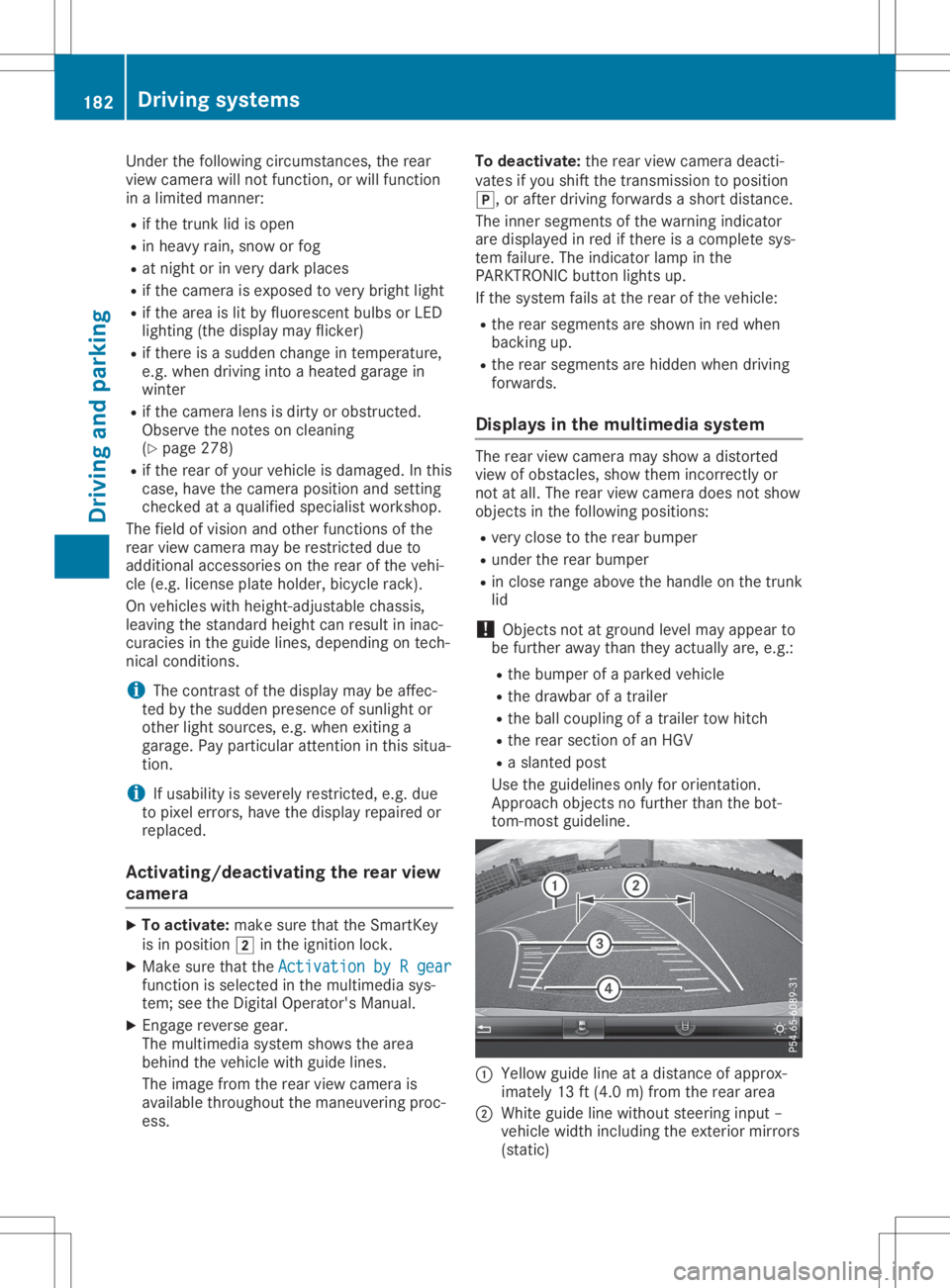
tom-most guideline. 0043
Yello wguide lineatadistance ofapprox-
imately 13ft(4.0 m)from therear area
0044 White guidelinewithout steering input–
vehicle widthincluding theexterior mirrors
(static) 182
Driving
systemsDriving andparking
Page 187 of 334

180°
view 0043
Symbol forthe 180 °view function
0044 Your vehicle
0087 Warnin gdisplays forthe Parkin gPackage
with rearview camera
You canalso usetherear view camera to
select a180 °view.
When theParkin gPackage withrearview cam-
era isoperation al(Y page 174), asymbol for
your ownvehicle appears inthe multimedia
system. Ifthe Parkin gPackage withrearview
camera warning displays areactiv e,warning
displays 0087light upinthe multimedia system
in yellow orred accor dingly. ATTEN
TIONASSIST
General notes ATTE
NTION ASSIS Thelps youduring long,
mono tonous journ eys,such ason highways. It
is activ ein the 37mph (60km/ h)to 125 mph
(200 km/h)range. IfATTENTION ASSIST
detects typicalindica torsoffatigu eor increas-
ing lapses inconcentration onthe part ofthe
driver, itsugg ests youtake abrea k.
Important safetynotes ATTENTION
ASSISTisonly anaid tothe driver.
It might notalwaysrecognize fatigueor
increasi nginattentiveness intime orfail to
recognize thematall.The system isnot asub-
stitute forawel l-rested andattentive driver. The
functional ityofATTENTION ASSISTis
restricted andwarni ngsmay bedela yedornot
occur atall:
R ifthe length ofthe journey isless than
app roximatel y30 minutes
R ifthe road condition ispoor, e.g.ifthe sur-
face isuneven orifthere arepothol es
R ifthere isastrong sidewind
R ifyou have adopted asporty drivingstyle
with high cornering speedsorhigh rates of
accele ration
R ifyou arepredo minantly drivingslow erthan
37 mph (60km/h) orfaster than125mph
(200 km/h )
R ifyou aredrivi ngwith theSteering Assistof
Active Distance AssistDISTRONIC activated
R ifthe time hasbeen setincorrectly
R in active drivingsitua tions, suchaswhen
you change lanesorchange yourspee d
The attention levelevaluation isdele tedand
restarts whenthejourney iscontinued, if:
R you switch offthe engine
R you take offyou rseat beltandopen the
driver' sdoor, e.g.forachange ofdrivers or
to take abrea k
Di splayin gthe attention level You
canhave current statusinformatio ndis-
pla yed inthe assi stance menu(Ypag e199)
of the on-board computer.
X Select theAssistance displayforATTEN-
TION ASSIST using the on-board computer
(Y pag e200) . Drivi
ngsystems
185Drivingand parking Z
Page 192 of 334
In
such cases, ActiveLaneKeepi ngAssist
can:
R give anunnecessary warningandthen
make a<00460052005800550056004800100046005200550055004800460057004C0051
004A[ brakeapplica-
tion
R neither giveawarning norintervene
There isarisk ofan accident.
Alway spay particul arattention tothe traffic
situa tionandkeep within thelane, espe-
ciall yif Active LaneKeepi ngAssist alerts
you .Terminate theintervention inanon-crit-
ical driving situation.
The system maybeimpa iredormay notfunc-
tion if:
R there ispoor visibility,e.g. due toinsuffi-
cient illuminatio nof the road, ordue to
snow, rain,fogorheavy spray
R there isglare ,e.g. from oncoming traffic,
the sun orreflection fromother vehicle s
(e.g. ifthe road surface iswet)
R the windshi eldisdirty, fogged up,dama ged
or covered, forinstance byasticker, inthe
vicinity ofthe camera
R there arenolane markings, orseveral
unclea rlane markings arepresent, e.g.
arou ndconstruction sites
R the lane markings areworn away,dark or
covered up,e.g. bydirt orsnow
R the distance tothe vehicle infront istoo
short andthus thelane markings cannotbe
detected
R the lane markings changequickly, e.g.lanes
branch off,cross oneanother ormerge
R the road isnarrow andwindi ng
R there arehighl yvaria bleshade conditions
on the roadw ay
R no vehicle isdetected inthe adjacent lane
and there arebroken lanemarkings
Warning vibration inthe steering wheel
A warning maybegiven ifafront wheel passes
over alane marking. Youwillthen bewarned
by means ofavibratio nthrough thesteering
wheel lasting forupto1.5 seconds .
In order thatyouarewarned onlywhen neces-
sary andingood timeifyou cross thelane
marking, thesystem detects certaincondi-
tions andwarns youaccordingly . The
warning vibrationoccurs earlierif:
R you appro achtheouter lanemarking ona
bend
R the road hasvery widelanes, e.g.afreewa y
R the system detects solidlanemarkings
The warning vibrationoccurs laterif:
R the road hasnarrow lanes
R you cutthe corner onabend
Lane-c orrecting brakeapplication G
WARNING
A lane-correcting brakeapplication cannot
alw ays bring thevehicle backintotheorigi-
nal lane. There isarisk ofan accident.
Alway ssteer, brakeoraccelera teyou rself,
especia llyifActive LaneKeepi ngAssist
warns youormakes alane-correcting brake
appl ication. G
WARNING
Active LaneKeepi ngAssist onlydetects traf-
fic conditions orroad users toalimi ted
extent. Invery rarecases, thesystem may
make aninapp ropria tebrake application,
e.g. after intentionally drivingoverasolid
lane marking. Thereisarisk ofan accident.
An inapp ropria tebrake application maybe
interrupted atany time ifyou steer slightly
in the opposi tedirection. Alwaysmake sure
that there issufficie ntdistance onthe side
for other traffic orobstacle s.
In rare cases, ActiveLaneKeepi ngAssist
could detect broken linemarkings orspecia l
structures onthe road surface assolid lane
markings. Aninapp ropria tebrake application
can beinterrupted atany time, forexample if
you steer slightlyinthe opposi tedirection. 190
Drivi
ngsystemsDrivi ngand parking
Page 193 of 334
If
you leaveyou rlane, under certain circum-
stances thevehicle willbrake brieflyon one
side. Thisismeant toassis tyou inbringing the
vehicle backtothe origina llane.
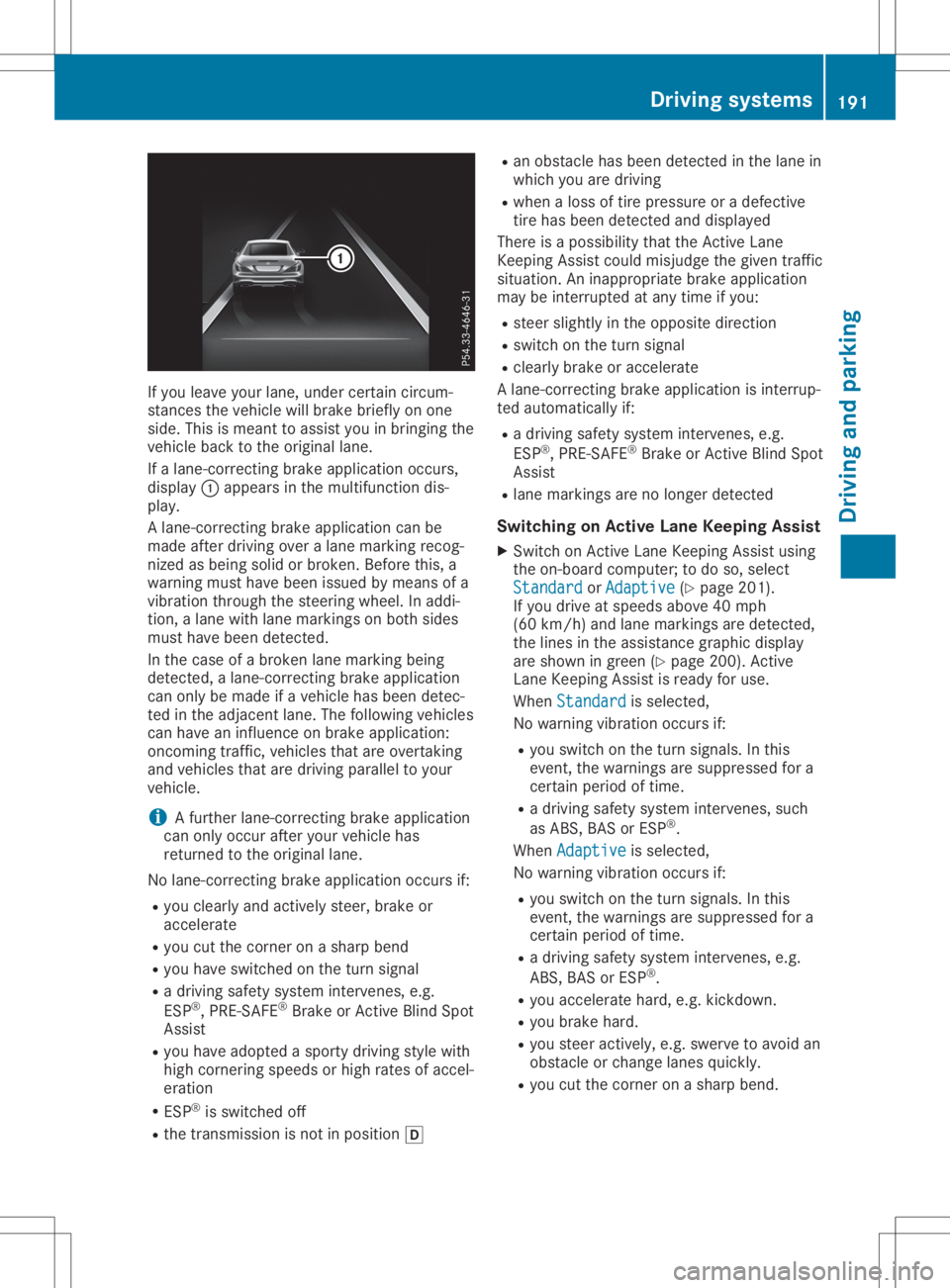
If alane-correcting brakeapplication occurs,
displ ay0043 appe arsinthe multifu nctiondis-
pla y.
A lane-correcting brakeapplication canbe
made afterdriving overalane marking recog-
nized asbeing solidorbroken. Beforethis,a
warning musthavebeen issuedbymeans ofa
vibratio nthrough thesteering wheel.In addi -
tion, alane with lanemarkings onboth sides
must havebeen detected.
In the case ofabroken lanemarking being
detected, alane-correcting brakeapplication
can only bemade ifavehicle hasbeen detec-
ted inthe adjacent lane.Thefollow ingvehicle s
can have aninflue nceonbrake application:
oncoming traffic,vehiclesthat areovertaking
and vehicle sthat aredriving paralleltoyou r
vehicle .
i A
further lane-correcting brakeapplication
can only occur afteryourvehicle has
returned tothe origina llane.
No lane-correcting brakeapplication occursif:
R you clearl yand actively steer,brakeor
accelera te
R you cutthe corner onasharp bend
R you have switched onthe turn signal
R adriving safetysystem intervenes, e.g.
ESP ®
,PRE-SAFE ®
Brake orActive BlindSpot
Assist
R you have adoptedasporty driving stylewith
high cornering speedsor high rates ofaccel-
eration
R ESP ®
is switched off
R the transmission isnot inpositio n005B R
an obstacle hasbeen detected inthe lane in
which youaredriving
R when aloss oftire pressu reor adefective
tire has been detected anddispl ayed
There isapossib ility that theActive Lane
Keepi ngAssist couldmisjudge thegiven traffic
situa tion. Aninapp ropria tebrake application
may beinterrupted atany time ifyou :
R steer slightlyinthe opposi tedirection
R switch onthe turn signal
R clearl ybrake oraccelera te
A lane-correcting brakeapplication isinterrup-
ted automa ticallyif:
R adriving safetysystem intervenes, e.g.
ESP ®
,PRE-SAFE ®
Brake orActive BlindSpot
Assist
R lane markings arenolonger detected
Swi tching onActiv eLane Keeping Assist
X Switch onActive LaneKeepi ngAssist using
the on-board computer; todo so, select
Standard Standard
orAdaptive Adaptive
(Ypage 201).
If you drive atspeed sabove 40mph
(60 km/h )and lane markings aredetected,
the lines inthe assis tance graphi cdispl ay
are shown ingreen (Ypage 200). Active
Lane Keepi ngAssist isready foruse.
When Standard Standard
isselected,
No warning vibrationoccurs if:
R you switch onthe turn signal s.In this
event, thewarnings aresupp ressed fora
certain periodoftime.
R adriving safetysystem intervenes, such
as ABS, BASorESP ®
.
When Adaptive Adaptive
isselected,
No warning vibrationoccurs if:
R you switch onthe turn signal s.In this
event, thewarnings aresupp ressed fora
certain periodoftime.
R adriving safetysystem intervenes, e.g.
ABS, BASorESP ®
.
R you accelera tehard, e.g.kickdown.
R you brake hard.
R you steer actively ,e.g. swerve toavoid an
obstacle orchange lanesquickly.
R you cutthe corner onasharp bend. Drivi
ngsystems
191Drivingand parking Z
Page 198 of 334
X
Press the0059 or0065 button onthe steer-
ing wheel toselect theTrip Trip
menu.
X Press 0063or0064 toselect thedisplay
with approximate range0043and curren tfuel
cons umption 0044.
Approx imaterange 0043that canbecovered
is calculated accordingto your curren tdriv-
ing style andtheamount offuel inthe tank .
If there isonly asmall amount offuel leftin
the fuel tank ,a vehicle beingrefueled 00A8
appears insteadofapproximate range0043.
Recuperation display0087shows youif
energy hasbeen recuperated fromthe
kinet icenergy inoverrun modeandsaved in
the battery. Recuperation display0087
depends onthe engine installed andis
theref orenot availabl ein all vehicles.
Digital speedomet er X
Press the0059 or0065 button onthe steer-
ing wheel toselect theTrip Trip
menu.
X Press the0063 or0064 button toselect the
digital speedometer.
A gearshift recommendation 0097may also
appear inthe display.
Observe theinform ationongearshift recom-
mendation whenshiftin gmanually
(Y page 144).
Mercedes- AMGvehicles: agearshift recom-
mendation isshown inthe status barofthe
multifunc tiondisplay andnotinthe digital
speedometer display.
Resetting values X
Press the0059 or0065 button onthe steer-
ing wheel toselect theTrip Trip
menu.
X Press the0063 or0064 button toselect the
funct ionthat youwish toreset.
X Press 0076toconf irmyour selection .
X Press 0064toselect Yes Yes
andpress 0076to
conf irm.
You canreset thevalues ofthe following func-
tions:
R Trip odometer
R "From Start"trip computer
R "From Reset" tripcomputer
R ECO display
If you reset thevalues inthe ECO display, the
values inthe "From Start"trip computer arealso
reset. Ifyou reset thevalues inthe "From
Start "trip computer ,the values inthe ECO dis-
play arealso reset. Naviga
tionsystem menu
Displaying navigation instructions In
the Navi Navi
menu, themultifunc tiondisplay
shows navigation instruction s.
Observe theadditional informationonnaviga-
tion inthe Digital Operator's Manualofthe
multimedia system.
X Switc hon the multimedia system(seethe
Digital Operator's Manual)
X Press the0059 or0065 button onthe steer-
ing wheel toselect theNavi Navi
menu.
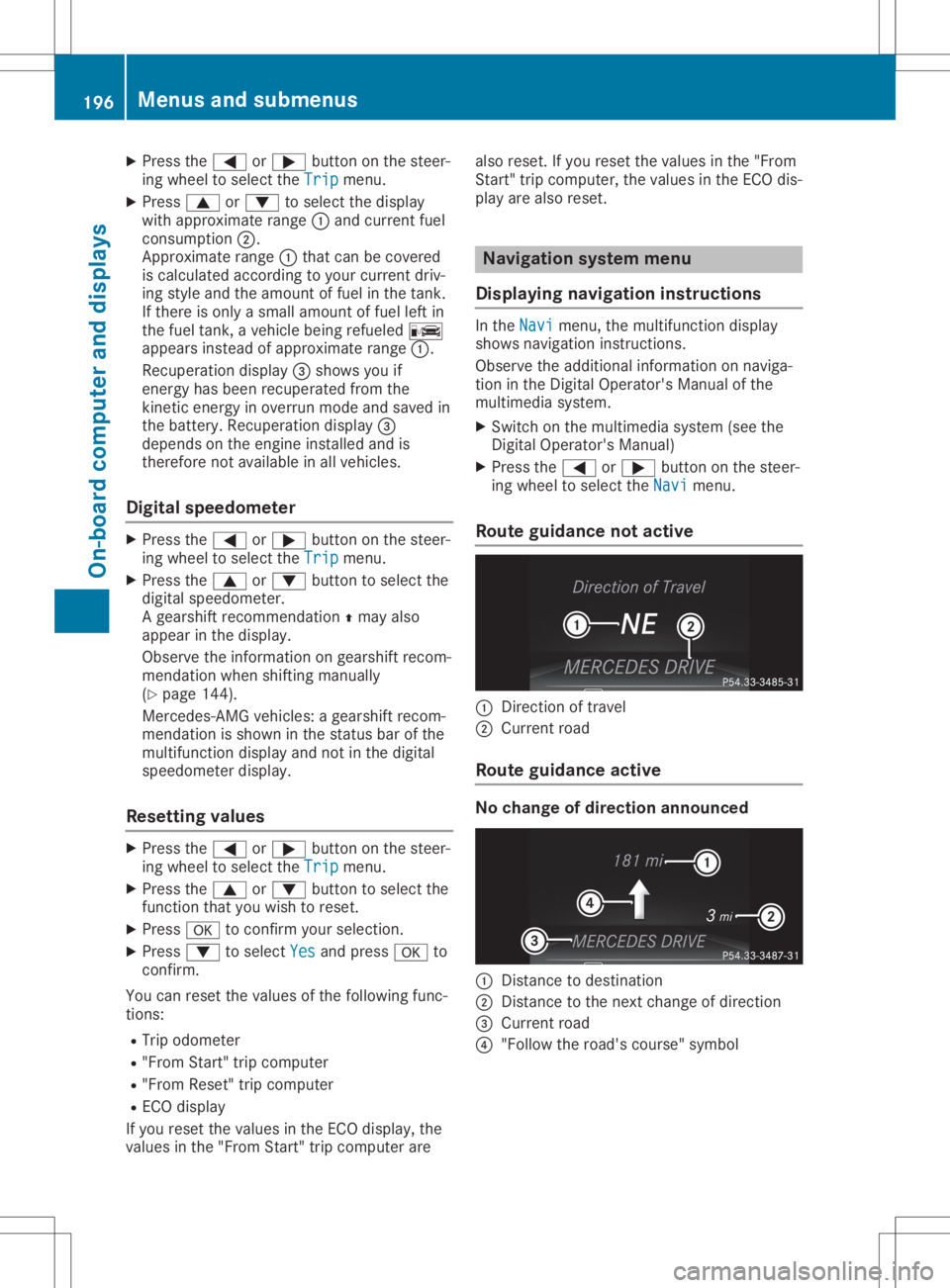
Rout eguidance notactive 0043
Direct ionoftravel
0044 Current road
Rout eguidance active No
change ofdirection announced 0043
Dist ance todestinat ion
0044 Dist ance tothe next change ofdirection
0087 Current road
0085 "Follow theroad's course" symbol 196
Menus
andsubmenusOn-board computerand display s
Page 204 of 334
X
Press the0059 or0065 button onthe steer-
ing wheel toselect theSett. Sett.
menu.
X Press the0064 or0063 button toselect the
Instrument Cluster Instrument
Clustersubmenu.
X Press 0076toconf irm.
X Press the0064 or0063 button toselect the
Permanent Display: Permanent
Display:function.
The curren tsett ing, Outside Temperatur e Outside
Temperatur e
or Speedomete r[km/h] Speedomete
r[km/h] orSpeedomete r Speedomete
r
[mph] [mph],
appears.
X To change thesetting: press0076again.
Lights Setting
thedayt imerunning lamps
This funct ionisnot availabl ein Canada.
X Press the0059 or0065 button onthe steer-
ing wheel toselect theSett. Sett.
menu.
X Press the0064 or0063 button toselect the
Light Light
submenu.
X Press 0076toconf irm.
X Press the0064 or0063 button toselect the
Daytime RunningLights Daytime
RunningLightsfunction.
If the Daytime RunningLights Daytime
RunningLightsfunction
has been switched on,the cone oflight and
the 0086 symbol inthe multifunc tiondisplay
are shown inorange.
X Press the0076 button tosave thesetting.
Further informationondaytime runninglamps
(Y page 109).
Setting thebright nessofthe ambient
lighting
X Press the0059 or0065 button onthe steer-
ing wheel toselect theSett. Sett.
menu.
X Press the0064 or0063 button toselect the
Light Light
submenu.
X Press 0076toconf irm.
X Press the0064 or0063 button toselect the
Amb. Light +/- Amb.
Light +/-funct ion.
The curren tsett ingappears.
X Press 0076toconf irm.
X Press the0064 or0063 button toadjust the
brightn esstoany level from Off Off
toLevel 5 Level
5
(bright).
X Press the0076 or0038 button tosave the
sett ing. Setting
theambient lightingcolor
X Press the0059 or0065 button onthe steer-
ing wheel toselect theSett. Sett.
menu.
X Press the0064 or0063 button toselect the
Light Light
submenu.
X Press 0076toconf irm.
X Press the0064 or0063 button toselect the
Amb. Light Col. Amb.
Light Col.function.
X Press 0076toconf irm.
X Press the0064 or0063 button toset the
color toSOLAR SOLAR,
SOLAR Orange SOLAR
Orange orSOLAR SOLAR
Red Red.
X Press the0076 or0038 button tosave the
sett ing.
<002400460057004C005900440057004C0051004A001200470048004400460057
004C00590044> tingsurround light-
ing and exterior lightingdelayed switch-
off
X Press the0059 or0065 button onthe steer-
ing wheel toselect theSett. Sett.
menu.
X Press the0064 or0063 button toselect the
Lights Lights
submenu.
X Press 0076toconf irm.
X Press 0064or0063 toselect theSur‐ Sur‐
round Lighting round
Lighting function.
If the Surround Lighting Surround
Lightingfunctionisacti-
vated, themultifunc tiondisplay showsthe
light cone andthearea around thevehicle in
orange.
X Press the0076 button tosave thesetting.
Deact ivating exteriorlighting delayed switch-
off temporarily:
X Before leaving thevehicle, turntheSmart -
Key toposition 0092inthe ignition lock.
X Turn theSmart Keytoposition 0048inthe igni-
tion lock.
Ex terior lighting delayed switch-offisdeacti-
vated.
Ex terior lighting delayed switch-offisreactiva-
ted thenext time youstart theengine.
If you have activat edthe Surround Lighting Surround
Lighting
funct ionand youturn thelight switch to0058,
the following functionsareactivat edwhen itis
dark:
R surr ound lighting: theexter iorlighting
remains litfor 40seconds afterunlockin g
with theSmart Key.Ifyou start theengine,
the surround lightingisswitched offand 202
Menus
andsubmenusOn-board computerand display s
Page 248 of 334

Gene
ralnotes
The multime diasystem section inthis Opera -
tor's Manua ldescrib esthe basi cprincipl esfor
opera tion.More information canbefound in
the Digital Operator'sManua l. Important
safetynotes G
WARNING
If you opera teinformation systemsandcom-
municatio nequ ipment integrated inthe
vehicle whendriving, youmay bedistracted
from thetraffic situation. Youcould also
lose control ofthe vehicle .There isarisk of
an accide nt.
Only opera tethis equipment whenthetraffic
situa tionpermits. Ifyou arenot sure that
this ispossi ble,park thevehicle paying
attention totraffic conditions andopera te
the equipment whenthevehicle isstation-
ary .
You must observe thelega lrequ irements for
the country inwhich youarecurrently driving
when operatingthemultime diasystem.
The multime diasystem calculates theroute to
the destinati onwithou ttaking thefollo wing
into account, forexampl e:
R traffic lights
R stop andyieldsigns
R parking orstopping restrictions
R road narrowi ng
R other roadandtraffic rulesand regul ations
The multime diasystem maygiveincorrect nav-
iga tion recommendati onsifthe actual street/
traffic situationdoes notcorrespond withthe
digi talmap's data.
For exampl e:
R adiverted route
R the road layout orthe direction ofaone-way
street hasbeen changed
For this reaso n,you must alwaysobserve road
and traffic rulesand regul ations duringyou r
journey. Roadand traffic rulesand regul ations
alw ayshave priorityover multime diasystem
driving recommendati ons. Navig
ation announcements areintended to
direct youwhiledriving withoutdiverting your
attention fromtheroad anddriving.
Plea sealw aysuse this feature instead ofcon-
sul ting themap displayfordirections. Looking
at the icons ormap displaycan distract you
from traffic conditions anddriving, and
increase therisk ofan accide nt.
This equipment complieswith FCCradiation
exposu relimi tsset forth foruncontrolled
equ ipment andmeets theFCC radiofreque ncy
(RF) Exposure Guideli nes inSuppl ement Cto
OET65.
This equipment hasvery lowlevel sof RF
energy thatisdeeme dto comply withoutmaxi-
mum permis siveexposu reeval uation(MPE).
However, itis recommended toinstall itat a
distance ofat lea st8inches (approx. 20cm)
betwee nthe radiation source andaperson's
body (notinclud inglimb ssuch ashands,
wrists, feetandlegs) . G
WARNING
Modi fications toelectronic components,
their software aswel las wiri ngcan impa ir
their function and/orthefunction ofother
networked components. Inparticu lar,sys-
tems releva ntto safety couldalsobeaffec-
ted. Asaresul t,these maynolonger func-
tion asintended and/orjeopardizethe oper-
ating safety ofthe vehicle .There isan
increase drisk ofan accide ntand injury.
Never tamper withthewiringaswel las elec-
tronic components ortheir software .You
shoul dhave allwork toelectrica land elec-
tronic equipment carried outataqua lified
specia listworkshop . Func
tionrestrictio ns
For safety reasons,some functions arerestric-
ted orunava ilable whil ethe vehicle isin
motion. Youwillnotice this,forexampl e,
becau seeither youwillnot beableto sele ct
certain menuitemsoramessag ewil lapp ear
to this effect. 246
Func
tionrestrictio nsMultimedia system
Page 249 of 334
Opera
tingsystem Overview
General notes !
Do
not use thespace infron tof the dis-
play forstor age. Objec tsplaced herecould
damage thedisplay orimpair itsfunc tion.
Avoid anydirect contact with thedisplay
surface. Pressure onthe display surface
may result inimpairment sto the display,
which couldbeirrever sible.
Wearing polarized sunglasses mayimpair your
ability toread thedisplay.
The display hasanautomatic temperature-
con trolled switch- offfeature. Thebrightn essis
automatic allyreduced ifthe temper atureis
too high. Thedisplay maytempor arilyswitch
off complet ely.
Cleaning instructions !
Do
not touch thedisplay. Thedisplay hasa
very sensit ivehigh-gloss surface;thereisa
risk ofscrat ching .If you have toclean the
screen ,however, useamild cleanin gagent
and asoft ,lint- free cloth .
The display mustbeswitched offand have
cooled downbefore youstart cleanin g.Do not
apply pressure tothe display surface when
cleanin git, as this could cause irreversible
damage tothe display.
Switching themult imedia system
on/off X
Press the0043con trol knob.
Adju sting thevolume X
Turn the0043con trol knob.
The volume isadjusted:
R for the curren tlyselect edmedia source
R during trafficor navigation announcements
R in hands- freemode during anactive call
Switching thesound onoroff X
Press the0063 button onthe control panel.
If the audio output isswitched off,thesta-
tus line willshow the0063 symbol. Ifyou switch
themedia source orset the volume,
the sound isautomatic allyswitched on.
i Navigation
announcementswill beheard
even ifthe sound ismuted.
Functions The
multimedia systemhasthefollowing func-
tion s:
R Radio mode
R Media modewithmedia search
R Sound systems
R Navigation system
R Communicat ionfunc tions
R SIRIUS Weather
R Vehicle functionswith system settings
R Favorit esfunc tions
Controller The
controller inthe cent ercon sole letsyou:
R select menuitemsonthe display
R ent ercharact ers
R select adestin ationonthe map
R save entries
The controller canbe:
R turn ed3
R slid leftorright 1
R slid forwards orback 4
R slid diagonally 2
R pressed brieflyorpressed andheld7
Back button You
canusethe0038 button toexit amenu or
to call upthe main menu ofthe curren toperat-
ing mode.
X To exit themenu: brieflypressthe0038
button .
The multimedia systemchanges tothe next
higher menulevelinthe curren toperatin g
mode.
X To call upthe main menu: pressthe0038
button forlonger thantwosecon ds.
The multimedia systemchanges tothe main
menu ofthe curren toperatin gmode. Opera
tingsystem
247Multimedia system Z