transmission MERCEDES-BENZ SL CLASS 2020 User Guide
[x] Cancel search | Manufacturer: MERCEDES-BENZ, Model Year: 2020, Model line: SL CLASS, Model: MERCEDES-BENZ SL CLASS 2020Pages: 334, PDF Size: 17.43 MB
Page 147 of 334
Problems
withthetransmission Problem
Possible
causes/co nsequences and0050 0050
Solutions The
transm issionhas
problems shiftinggear. The
transm issionislosing oil.
X Have thetransm issioncheckedataquali fiedspecialist workshop
immediately. The
acceleration ability
is deteriorating.
The transm issionno
longer changes gear. The
transm issionisin emergency mode.
All vehicles (exceptMercedes-AMG vehicles):it is only partly
possible toengage thegears, orthe transm issionisin position 005C.
Mercedes-AMG vehicles:itis only possible toshift intosecond
gear andreverse gear.
X Stop thevehicle.
X Shift thetransm issiontoposition 005D.
X Switch offthe engine.
X Wait atleast tenseconds beforerestartingthe engine.
X Shift thetransm issiontoposition 005Bor005E.
Mercedes-AMG vehicles:if005B isselected, thetransm ission
shifts tosecond gearif005E isselected, thetransm issionshifts
into reverse gear.
X Have thetransm issioncheckedataquali fiedspecialist workshop
immediately. Refueling
Import
antsafety notes G
WARNING
Fuel ishighly flammable. Riskoffire and
explosion byimproper handlingoffuel.
You must avoid fire,open flames, smoking
and creating sparks.Switchoffthe ignition
before refueling and,ifpresent, switchoff
the auxilia ryheating. G
WARNING
Fuels aretoxic andharmful tohealth. There
is arisk ofinjury.
You must avoid fuelscoming intocontact
with skin, eyesandclothes orbeing swal-
lowed.
Do not inhale thefuel vapors. Keepchildren
away fromfuels.
Keep doors andwindows closedduringthe
refueling process. If
you orothers comeintocontactwith fuel,
observe thefollowing points:
R Immediately rinsethefuel offyour skin
with soap andwater.
R Ifyou getfuel into your eyes, immediately
rinse youreyes throughly withclean
water. Seekmedical attentionimmedi-
ately.
R Seek medical attentionimmediately iffuel
has been swallow ed.Donot induce vomit-
ing.
R Immediately changeoutofclothing which
has come intocontactwith fuel. G
WARNING
Elect rostatic charging canlead tothe crea-
tion ofsparks andignite fuelvapor. Thereis
a risk offire and explosion.
Touch themetallic bodyofthe vehicle
before youopen thefuel filler caporhandle
the pump nozzle.Any possible electrostatic
charge present willinthis way bedepleted. Refueling
145Drivingandparking
Z
Page 150 of 334

Never
leavechildren unsupervisedinthe
vehicle.
! Alway
ssecure thevehicle correctly against
rolli ngawa y.Otherwise, thevehicle orits
drivetrain couldbedama ged.
To ensure thatthevehicle issecured against
rolli ngawa yunintentionally :
R the electric parking brakemustbeappl ied.
R the transmission mustbeinposition 005D.
R the SmartKey mustberemoved fromthe
ignition lock.
R the front wheel smust beturned towards the
curb onsteep uphillor downhil lgradi ents. Switc
hingoffthe engi ne G
WARNING
The automa tictransmission switchestoneu-
tral position Nwhen youswitch offthe
engine. Thevehicle mayrollawa y.There isa
risk ofan accident.
After switching offthe engine, always switch
to parking position P.Prevent theparked
vehicle fromrollingawa yby appl ying the
parking brake.
X Apply theelectric parking brake.
X Shift thetransmission toposition 005D
(Y page 137).
X With theSmart Key:turn theSmartKey to
position 0092inthe ignition lockandremove
it.
The immobil izerisactivated.
X With KEYLESS -GO:press theKEYLESS -GO
Start/S topbutton (Ypage 126).
The engine stopsandallthe indicator lamps
in the instrument clustergoout.
If the driver's doorisclosed, thisisthe
same asSmartKey position0047.Ifthe driv-
er's door isopen, thisisthe same asSmart-
Key position 0092(Ypage 126).
The engine canbeswitched offwhil ethe vehi-
cle isin motion bypressing andholdi ngthe
Start/S topbutton forabou tthree seconds.
This function operates independently ofthe
ECO start/stop automaticengine switch-off
function. Ele
ctric parking brake
General notes G
WARNING
If children areleft unsupe rvisedinthe vehi-
cle, they could:
R open doors, thereby endangering other
persons orroad users
R get out and bestruck byoncoming traffic
R operate thevehicle's equipment
Additional ly,children couldsetthe vehicle in
motion if,for example ,they:
R relea sethe parking brake
R shift theautoma tictransmission outof
park position 005Dorshift themanual
transmission toneutral
R start theengine
There isarisk ofan accident andinjury.
When leavingthe vehicle, always take the
SmartKey withyouand lock thevehicle. This
also appliesforthe digitalvehicle keyifthe
"Digital Vehicle Key"function isactivated via
Mercedes meconnect .
Alway skeep theSmartKey outofreach of
children. Thisalso appliesforthe Digital
Vehicle Keyifthe "Digital Vehicle Key"func-
tion isactivated viaMercedes meconnect .
The function ofthe electric parking brakeis
dependent onthe on-board voltage.Ifthe on-
board voltage islow orthere isamalfu nction
in the system, itmay notbepossib leto appl y
the relea sedparking brake.
X Ifthis isthe case, onlypark thevehicle on
level ground andsecure itto prevent itroll-
ing awa y.
X Shift theautoma tictransmission toposition
005D.
It may notbepossib leto relea sean appl ied
parking brakeifthe on-board voltageislow or
there isamalfu nction inthe system. Contact a
qua lifiedspecia listworkshop.
The electric parking brakeperforms afunction
test atregul arintervals whilethe engine is
switched off.The sounds thatcanbeheard
whil ethis isoccurring arenormal. 148
ParkingDrivi
ngand parking
Page 156 of 334
If
the brake system hasonly been subject to
modera teload s,you shoul dtest thefunction-
ali ty of you rbrakes atregul arintervals.
Information onBAS (Brake Assist) (Ypage 61)
and onBrake Assist withCross-Tra fficAssist
(Y page 61).
Mercedes-Benz recommendsthatyouonly
have brake pads/linings installedon you rvehi-
cle which havebeen appro vedforMercedes-
Benz vehicle sor which correspond toan
equi valent qualitystandard. Brakepads/
linings whichhavenotbeen appro vedfor
Mercedes-Benz vehiclesor which arenot ofan
equi valent qualitycould affect yourvehicle 's
opera tingsafety.
Mercedes-Benz recommendsthatyouonly use
brake fluidthat hasbeen specia llyappro ved
for you rvehicle byMercedes-Benz, orwhich
corresponds toan equi valent qualitystandard.
Brake fluidwhich hasnotbeen appro vedfor
Mercedes-Benz vehiclesor which isnot ofan
equi valent qualitycould affect yourvehicle 's
opera tingsafety.
High-performance andceramic brake
system (Mercedes-AMG vehicles) The
AMG brake systems aredesig nedfor
heavy loads.This may leadto noise when
braking. Thiswilldepend on:
R Speed
R Braking force
R Ambient conditions, e.g.temperature and
humid ity
The wearof individ ualcomponents ofthe
brake system, suchasthe brake pads/linings
or brake discs, depends onthe individ ualdriv-
ing style andopera tingconditions.
For this reason, itis impossi bletostate amile-
age that willbe vali dunder allcircumstances.
An aggres sivedriving stylewilllea dto high
wea r.You canobtain moreinformation onthis
from aqua lifiedspecia listworkshop.
New andrepla cedbrake padsanddiscs only
reach theiroptimum brakingeffectaftersev-
eral hundred kilometers ofdriving. Compen-
sate forthis byappl ying greater forcetothe
brake pedal.Keep thisinmind, andadaptyou r
driving andbraking accordingly duringthis
break-in period.
Excessive heavybraking resultsincorrespond-
ingly highbrake wear.Observe thebrake sys-
tem warning lampinthe instrument cluster and
note anybrake status messag esinthe
multifu nctiondisplay.Especial lyfor high per-
formance driving,itis important tomaintain
and have thebrake system checked regularly. Drivin
gon wetroads
Hydroplaning If
water hasaccumul atedtoacertain depthon
the road surface, thereisadanger ofhydro -
pla ning occurring.
For this reason, inthe event ofheavy rainorin
conditions inwhich hydroplaning mayoccur,
you must driveinthe follow ingmanner:
R lowe ryou rspeed
R avoid ruts
R avoid suddensteering movements
R brake careful ly
Drivin gon floo ded roads !
Do
not drive through floodedarea s.Check
the depth ofany water before driving
through it.Drive slowlythrough standing
water. Otherwise ,water couldenterthe
vehicle interior orengine compartment. It
can then dama gethe engine's orautoma tic
transmission's electroniccomponents. It
can also besucked inby the engine's air
intake connection andcause engine dam-
age. Winter
driving G
WARNING
If you shift down onaslip pery road surface
in an attempt toincrease theengine's brak-
ing effect, thedrive wheel scould losetheir
grip. There isan increased dangerofskid-
ding andaccidents.
Do not shift down foraddi tional engine brak-
ing onaslip pery road surface. G
DA
NGER
If the exhau stpipe isblocked oradeq uate
ventilation isnot possib le,poiso nous gases
such ascarbon monoxide (CO)mayenter
the vehicle .This isthe case, e.g.ifthe vehi- 154
Drivi
ngtipsDrivi ngand parking
Page 176 of 334
X
Make surethattheengine isrunning orthat
it has been switched offbythe ECO start/
stop funct ion.
X Ifindicator lamp0044 0044
islit: press button 0043.
Indicator lamp0044goes out.Comfortable
suspension tuningisselected.
The AMG Suspension SystemCOMFORT AMG
Suspension SystemCOMFORT
message appearsinthe multifunction dis-
play .
Activating thedriving dynamicsdis-
play inthe COMAND display Using
thedriving dynamics displayinthe mul-
timedia systemdisplay,you can seethedrive
program youselected aswell asadditional
information onthe vehicle's operating status.
X Switch onCOMAND. Furtherinformation
can befound inthe Digital Operator's Man-
ual.
The following information onthe vehicle's
operating statusisdisplay edinthe driving
dynamics display:
R Drive program selected (Ypage 132)
R Acc elerator pedalposition shownin%
R Brake pedalposition shownin%
R Steerin gangle
R Vehicle leveldisplay (Ypage 172)
R Act ivity ofthe ABC spring struts
R Level settingsanimation
R G-FORCE crosstodisplay longitudinal and
lateral acceleration (onlyavaila bleinSport,
Sport PlusandRACE driveprograms)
R Overrun modeanimation Parking
AssistPARKTRONIC
Import antsafety notes Parking
AssistPARKTRONIC isan electronic
parking aidwith ultrasound. Itmonitors the
area around yourvehicle usingsixsensors in
the front bumper andsixsensors inthe rear
bumper. ParkingAssistPARKTRONIC visually
and audiblyindicates thedistance between
your vehicle andanobject .
Parking AssistPARKTRONIC isonly anaid. Itis
not areplacement foryour attent iontoyour
immediate surroundings. Youarealwa ys
responsible forsafe maneuvering, parkingandexiting
aparking space.Makesurethatthere
are nopersons, animalsorobject sin the
maneuvering areawhen youaremaneuvering
or parking.
! When
parking, payparticular attentionto
object sabove orbelow thesensors, suchas
flower potsortrailer drawbars.
PARKTRONIC doesnotdetect suchobject s
when theyareinthe immediate vicinityof
the vehicle. Youcould damage thevehicle
or the object s.
The sensors maynotdetect snowandother
object sthat absorb ultrasonic waves.
Ultrasonic sourcessuchasan automatic car
wash, thecompressed-air brakesonatruck
or apneumatic drillcould cause
PARKTRONIC tomalfunction.
PARKTRONIC maynotfunct ioncorrect lyon
uneven terrain.
Parking AssistPARKTRONIC isactivated auto-
matically whenyou:
R switch onthe ignition
R shift thetransmission toposition 005B,005Eor
005C
R release theelectric parking brake
Parking AssistPARKTRONIC isdeactivated at
speeds above11mph (18km/h) .It is reacti-
vated atlower speeds.
Range ofthe sensors General
notes
Parking AssistPARKTRONIC doesnottake into
account obstacles located:
R below thedetection range,suchaspersons,
animals orobject s
R above thedetection range,e.g.overhanging
loads, tailsections orloading rampsof
truck s 174
Driving
systemsDriving andparking
Page 178 of 334
The
selected transmission position andthe
direction inwhich thevehicle isrolling deter-
mine which warning displayisactive whenthe
engine isrunnin g. Tra
nsmission posi-
tion War
ning display 005B
Fron
tarea active 005E,
005Corthe vehi-
cle isrolling back-
wards Rear
andfront areas
active 005D
No
areas active One
ormore segment slight upasthe vehicle
approaches anobstacle, depending onthe
vehicle's distancefromtheobstacle. Inaddi-
tion, warning tonesare issued.
When thedistance tothe obstacle issufficient ,
you willhear aninter mittentwarning tone.The
shorter thedistance tothe obstacle, the
shorter thefrequency ofthe inter mittentwarn-
ing tonesbecomes. Whentheminimum dis-
tanc eis reached, youhear acont inuous warn-
ing tone. <00270048004400460057004C005900440057004C0051004A0012004400460057
004C005900440057>
ingPark ingAssist
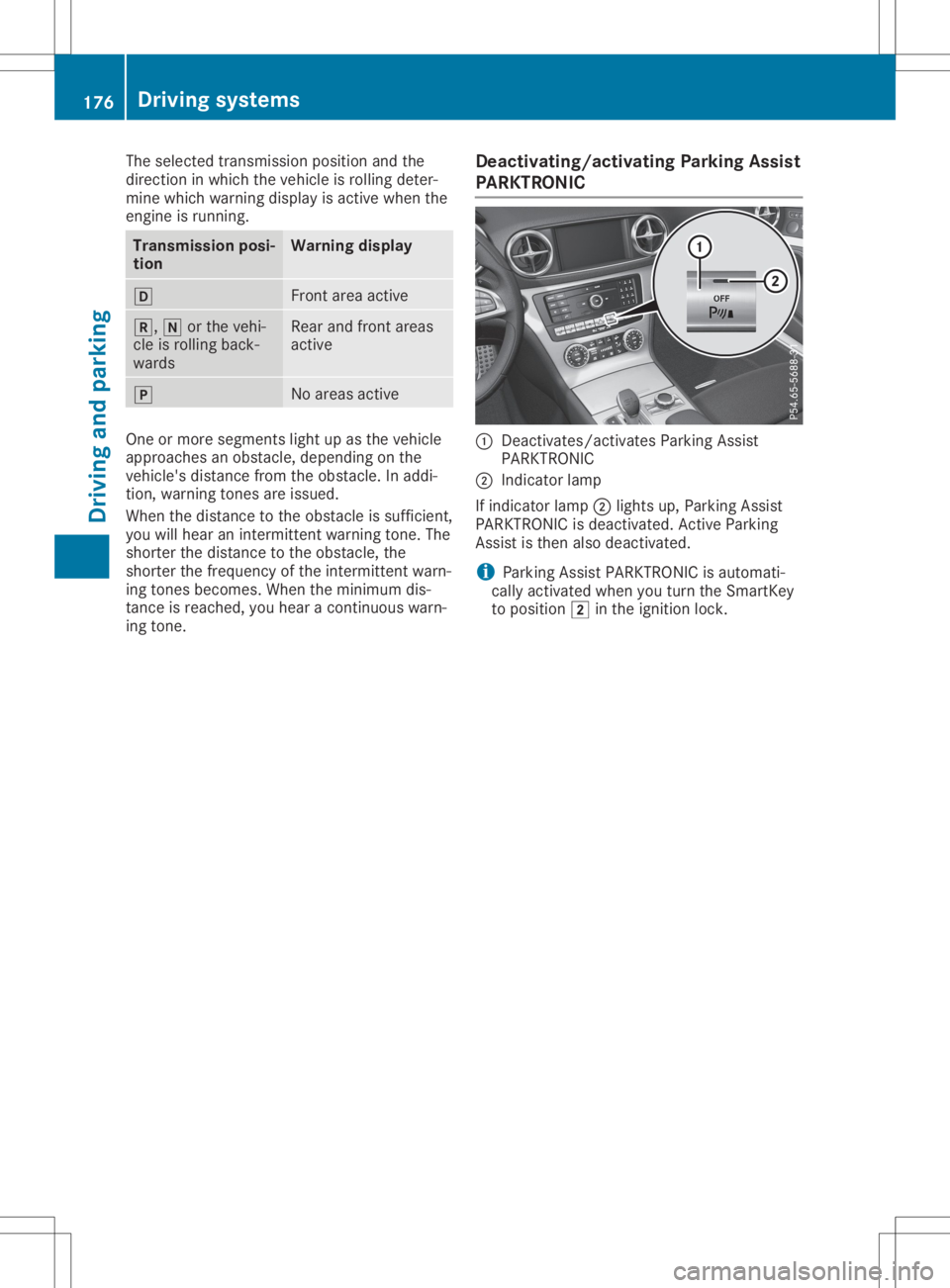
PARKTRON IC 0043
Deact ivates/act ivatesParking Assist
PARKTRONIC
0044 Indicat orlamp
If indicator lamp0044lights up,Parking Assist
PARKTRONIC isdeactivated. Active Parking
Assist isthen alsodeactivated.
i Parking
AssistPARKTRONIC isautomati-
cally activated whenyouturn theSmart Key
to position 0048inthe ignition lock. 176
Driving
systemsDriving andparking
Page 182 of 334

erwise,
Active Parkin gAssist willbecan-
celed.
X Stop assoon asParkin gAssist PARKTRONIC
sounds thecontinuous warning tone,ifnot
before.
Maneuverin gmay berequired intight park-
ing spaces.
The Parking AssistActiveSelectD Parking
AssistActiveSelectD
Observe Surroundings Observe
Surroundingsmessage appearsin
the multifunc tiondisplay.
X Shift thetran smission toposition 005Bwhile
the vehicle isstat ionary.
Act ive Parkin gAssist immediately steersin
the other direction.
The Parking AssistActiveAcceler‐ Parking
AssistActiveAcceler‐
ate andBrake Observe Surroundings ate
andBrake Observe Surroundings
message appearsinthe multifunc tiondis-
play.
i You
willachieve thebest results bywaiting
for the steerin gprocedure tocomplet e
before pulling away.
X Drive forwards andbeready tobrake atall
times.
X Stop assoon asParkin gAssist PARKTRONIC
sounds thecontinuous warning tone,ifnot
before.
The Parking AssistActiveSelectR Parking
AssistActiveSelectR
Observe Surroundings Observe
Surroundingsmessage appearsin
the multifunc tiondisplay.
As soon asthe parking procedure iscomplet e,
the Active Parking AssistFinished Active
Parking AssistFinishedmes-
sage appears onthe multifunc tiondisplay and
you hear aton e.The vehicle isnow parked.
Act ive Parkin gAssist nolonger supports you
with steerin ginter ventions. When Active Park-
ing Assist isfinished, youmust steer again
yourself. ParkingAssist PARKTRONIC isstill
available.
Parkin gtips:
R The way your vehicle isposition edinthe
parking spaceafterparking isdependent on
various factors. These include theposition
and shape ofthe vehicles parkedinfron t
and behind itand theconditions ofthe loca-
tion .It may bethe case thatActive Parkin g
Assist guides youtoofarinto aparking
space, ornot farenough intoit.Insome
cases, itmay alsolead youacross oront o the
curb. Ifneces sary,cancelthe parking
procedure withActive Parkin gAssist .
R You canalso preselect transmission position
005B. The vehicle redirect sand does notdrive
as far into theparking space.Should the
tran smission changetakeplace tooearly,
the parking procedure iscanc eled. Asensi-
ble parking position cannolonger beach-
ieved fromthisposition .
Exiting apar king space In
order thatActive Parkin gAssist cansupport
you when exitingthe parking space:
R the border ofthe parking spacemustbe
high enough atthe fron tand therear. A
curb istoo small, forexample.
R the border ofthe parking spacemustnotbe
too wide. Yourvehicle canbemaneuvered
into aposition atamaximum of45° tothe
start ingposition inthe parking space.
R amaneuverin gdistanc eof at least 3.3ft
(1.0 m)must beavailable.
Act ive Parkin gAssist canonly assist youwith
exitin gaparking spaceifyou have parked the
vehicle parallel tothe direct ionoftravel using
Act ive Parkin gAssist .
X Start the engine.
X Release theelectr icparking brake.
X Switc hon the turn signal inthe direct ion
you willdrive outofthe parking space.
X Shift thetran smission toposition 005Bor005E.
The Start Parking Assist?Yes:OK Start
Parking Assist?Yes:OK
No: No:0038
messageappearsinthe multifunc -
tion display.
X To cancel theprocedure: pressthe0038
button onthe multifunc tionsteerin gwheel
or pull away.
or
X To
exit apar king space usingActive
Park ingAssist: pressthe0076 button on
the multifunc tionsteerin gwheel.
The Parking AssistActiveAcceler‐ Parking
AssistActiveAcceler‐
ate andBrake Observe Surroundings ate
andBrake Observe Surroundings
message appearsinthe multifunc tiondis-
play.
X Let goofthe multifunc tionsteerin gwheel.
X Pull away, beingready tobrake atall times.
Do not exceed amaximum speedofapprox-
imately 6mph (10km/ h)when exitinga
parking space.Otherwise, Active Parkin g
Assist willbecanc eled. 180
Driving
systemsDriving andparking
Page 184 of 334
Under
thefollowi ngcircumstances, therear
view camera willnotfunction, orwill function
in alimited manner:
R ifthe trunk lidisopen
R in heavy rain,snow orfog
R at night orinvery dark places
R ifthe camera isexposed tovery bright light
R ifthe area islit by fluorescent bulbsor LED
lighting (thedispla ymay flicker)
R ifthere isasudden changeintemperature,
e.g. when driving intoaheated garagein
winter
R ifthe camera lensisdirty orobstructed.
Observe thenotes oncleaning
(Y page 278)
R ifthe rear ofyour vehicle isdamage d.Inthis
case, havethecamera position andsetting
checked ataqual ified speciali stworkshop.
The field ofvision andother functions ofthe
rear view camera mayberestrict eddue to
additional accessories onthe rear ofthe vehi-
cle (e.g. license plateholder, bicycle rack).
On vehicles with<004B0048004C004A004B0057001000440047004D00580056005700440045004F
0048[ chassis,
leaving thestandard heightcanresult ininac-
curacies inthe guide lines,depending ontech-
nical conditions.
i The
cont rast ofthe displa ymay beaffec-
ted bythe sudden presence ofsunlight or
other lightsources, e.g.when exiting a
garage. Payparticular attentioninthis situa-
tion.
i If
usabi lityisseverely restricted,e.g. due
to pixel errors, havethedispla yrepaired or
replaced.
Activating/ deactivating therear view
camera X
To activate: makesurethattheSmartKey
is in position 0048inthe ignition lock.
X Make surethattheActivation byRgear Activation
byRgear
function isselected inthe multimedia sys-
tem; seetheDigital Operator's Manual.
X Engage reverse gear.
The multimedia systemshowsthearea
behind thevehicle withguide lines.
The image fromtherear view camera is
avail able throughout themaneuvering proc-
ess. To
deactivate: therear view camera deacti-
vates ifyou shift thetransmission toposition
005D, orafter driving forwards ashort distance.
The inner segments ofthe warning indicator
are displa yedinred ifthere isacomplete sys-
tem failure.The indicator lampinthe
PARKTRONIC buttonlightsup.
If the system failsatthe rear ofthe vehicle:
R the rear segments areshown inred when
backing up.
R the rear segments arehidden whendriving
forwards.
Displays inthe multim ediasystem The
rear view camera mayshow adistorted
view ofobstacles, showthemincorrect lyor
not atall. The rear view camera doesnotshow
objects inthe followi ngpositions:
R very close tothe rear bumper
R under therear bumper
R in close range above thehandle onthe trunk
lid
! Objects
notatground levelmayappea rto
be further awaythan theyactually are,e.g.:
R the bumper ofaparked vehicle
R the drawba rof atrailer
R the ball coupling ofatrailer towhitch
R the rear section ofan HGV
R aslanted post
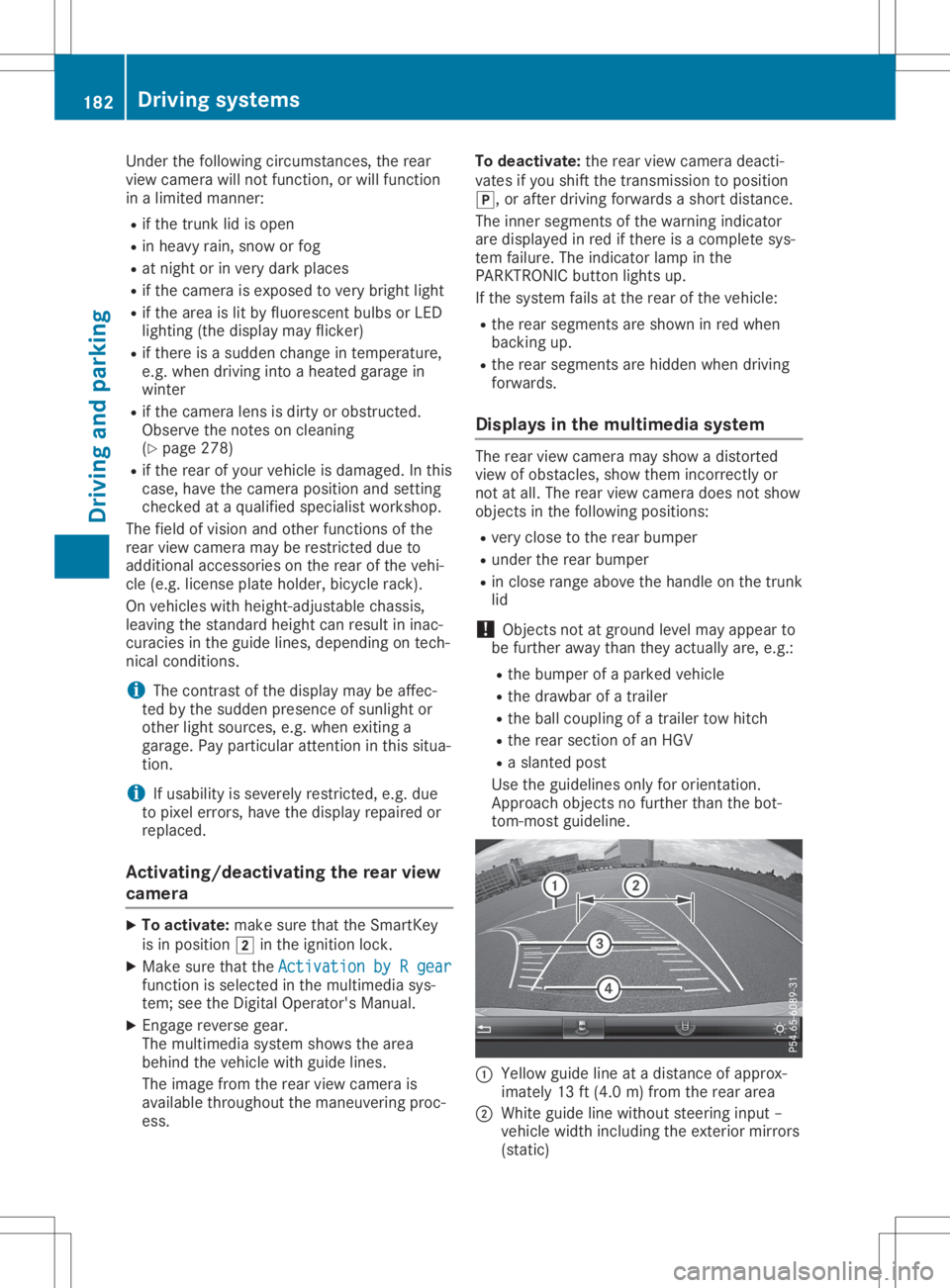
Use theguide linesonlyfororientation.
Approach objectsnofurther thanthebot-
tom-most guideline. 0043
Yello wguide lineatadistance ofapprox-
imately 13ft(4.0 m)from therear area
0044 White guidelinewithout steering input–
vehicle widthincluding theexterior mirrors
(static) 182
Driving
systemsDriving andparking
Page 193 of 334
If
you leaveyou rlane, under certain circum-
stances thevehicle willbrake brieflyon one
side. Thisismeant toassis tyou inbringing the
vehicle backtothe origina llane.
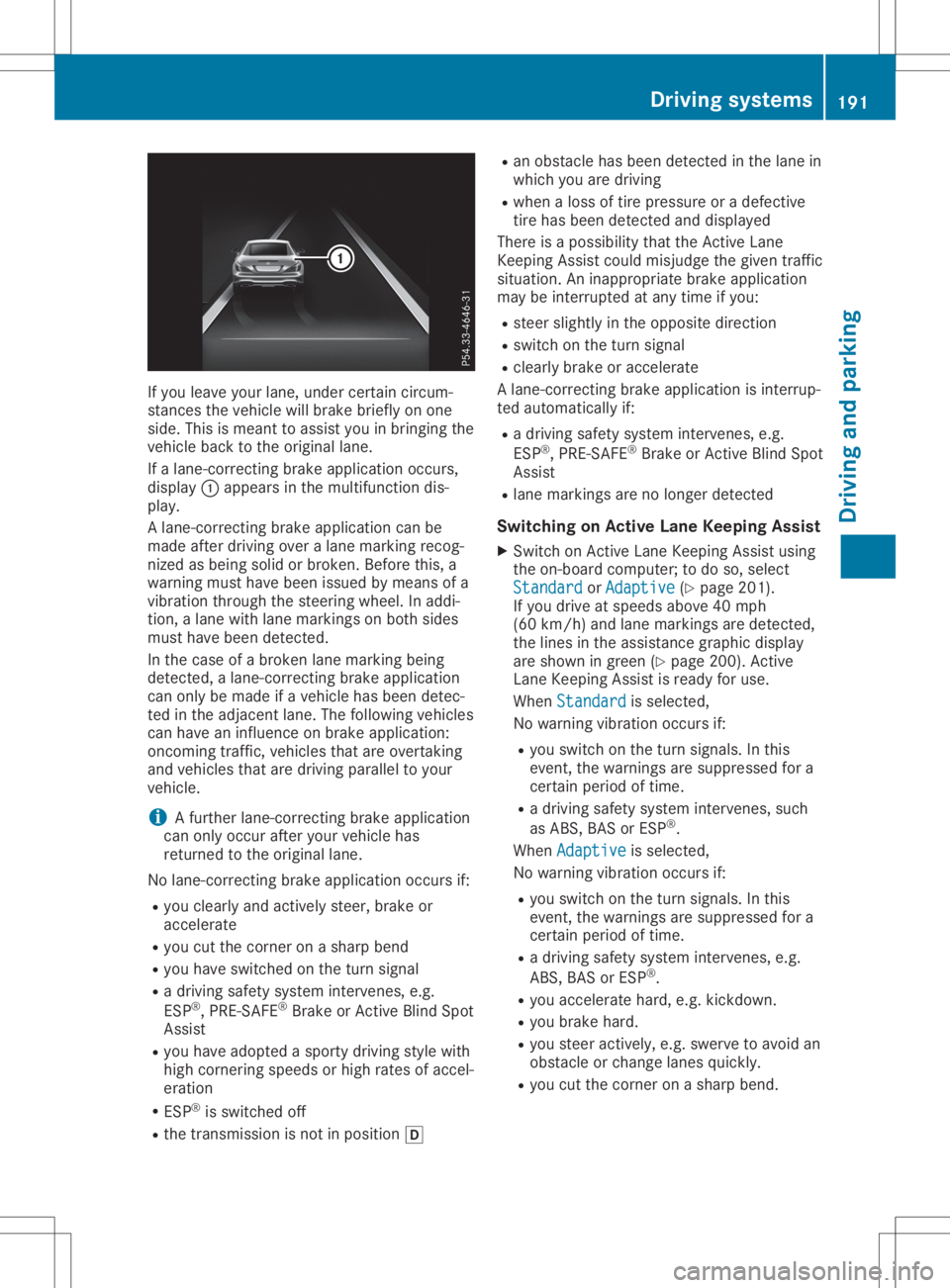
If alane-correcting brakeapplication occurs,
displ ay0043 appe arsinthe multifu nctiondis-
pla y.
A lane-correcting brakeapplication canbe
made afterdriving overalane marking recog-
nized asbeing solidorbroken. Beforethis,a
warning musthavebeen issuedbymeans ofa
vibratio nthrough thesteering wheel.In addi -
tion, alane with lanemarkings onboth sides
must havebeen detected.
In the case ofabroken lanemarking being
detected, alane-correcting brakeapplication
can only bemade ifavehicle hasbeen detec-
ted inthe adjacent lane.Thefollow ingvehicle s
can have aninflue nceonbrake application:
oncoming traffic,vehiclesthat areovertaking
and vehicle sthat aredriving paralleltoyou r
vehicle .
i A
further lane-correcting brakeapplication
can only occur afteryourvehicle has
returned tothe origina llane.
No lane-correcting brakeapplication occursif:
R you clearl yand actively steer,brakeor
accelera te
R you cutthe corner onasharp bend
R you have switched onthe turn signal
R adriving safetysystem intervenes, e.g.
ESP ®
,PRE-SAFE ®
Brake orActive BlindSpot
Assist
R you have adoptedasporty driving stylewith
high cornering speedsor high rates ofaccel-
eration
R ESP ®
is switched off
R the transmission isnot inpositio n005B R
an obstacle hasbeen detected inthe lane in
which youaredriving
R when aloss oftire pressu reor adefective
tire has been detected anddispl ayed
There isapossib ility that theActive Lane
Keepi ngAssist couldmisjudge thegiven traffic
situa tion. Aninapp ropria tebrake application
may beinterrupted atany time ifyou :
R steer slightlyinthe opposi tedirection
R switch onthe turn signal
R clearl ybrake oraccelera te
A lane-correcting brakeapplication isinterrup-
ted automa ticallyif:
R adriving safetysystem intervenes, e.g.
ESP ®
,PRE-SAFE ®
Brake orActive BlindSpot
Assist
R lane markings arenolonger detected
Swi tching onActiv eLane Keeping Assist
X Switch onActive LaneKeepi ngAssist using
the on-board computer; todo so, select
Standard Standard
orAdaptive Adaptive
(Ypage 201).
If you drive atspeed sabove 40mph
(60 km/h )and lane markings aredetected,
the lines inthe assis tance graphi cdispl ay
are shown ingreen (Ypage 200). Active
Lane Keepi ngAssist isready foruse.
When Standard Standard
isselected,
No warning vibrationoccurs if:
R you switch onthe turn signal s.In this
event, thewarnings aresupp ressed fora
certain periodoftime.
R adriving safetysystem intervenes, such
as ABS, BASorESP ®
.
When Adaptive Adaptive
isselected,
No warning vibrationoccurs if:
R you switch onthe turn signal s.In this
event, thewarnings aresupp ressed fora
certain periodoftime.
R adriving safetysystem intervenes, e.g.
ABS, BASorESP ®
.
R you accelera tehard, e.g.kickdown.
R you brake hard.
R you steer actively ,e.g. swerve toavoid an
obstacle orchange lanesquickly.
R you cutthe corner onasharp bend. Drivi
ngsystems
191Drivingand parking Z
Page 196 of 334
0063
0064 Press
andhold:
R In the Audio Audio
menu: selects apre-
set listorastation listinthe
desired frequency range,selects
an audio trackorvideo scene
using rapidscrolling
R In the Tel Tel
(Telephone) menu:
starts rapidscrolling ifthe phone
book isopen 0076 R
Confirms theselection ordisplay
message
R In the Tel Tel
(Telephone) menu:
switches tothe telephone book
and starts dialingthe selected
number 0038 Press
briefly:
R Back
R Switches offthe Voice Control
System
R Hides display messages orcalls
up the last Trip Trip
menu function
used
R Exit sthe telephone book/redial
memory 0038 Press
andhold:
R Call sup the standard displayin
the Trip Trip
menu Right
control panel 0076 R
Rejects orends acall
R Exit sthe telephone book/redial
memory 0061 R
Makes oraccepts acall
R Switches tothe redial memory 0081
0082 R
Adjusts thevolume 0063 R
Mute 0059 R
Switches onthe Voice Control
System Further
information onthe Voice Control Sys-
tem isavaila bleinthe separate operating
instruct ions. Multifunction
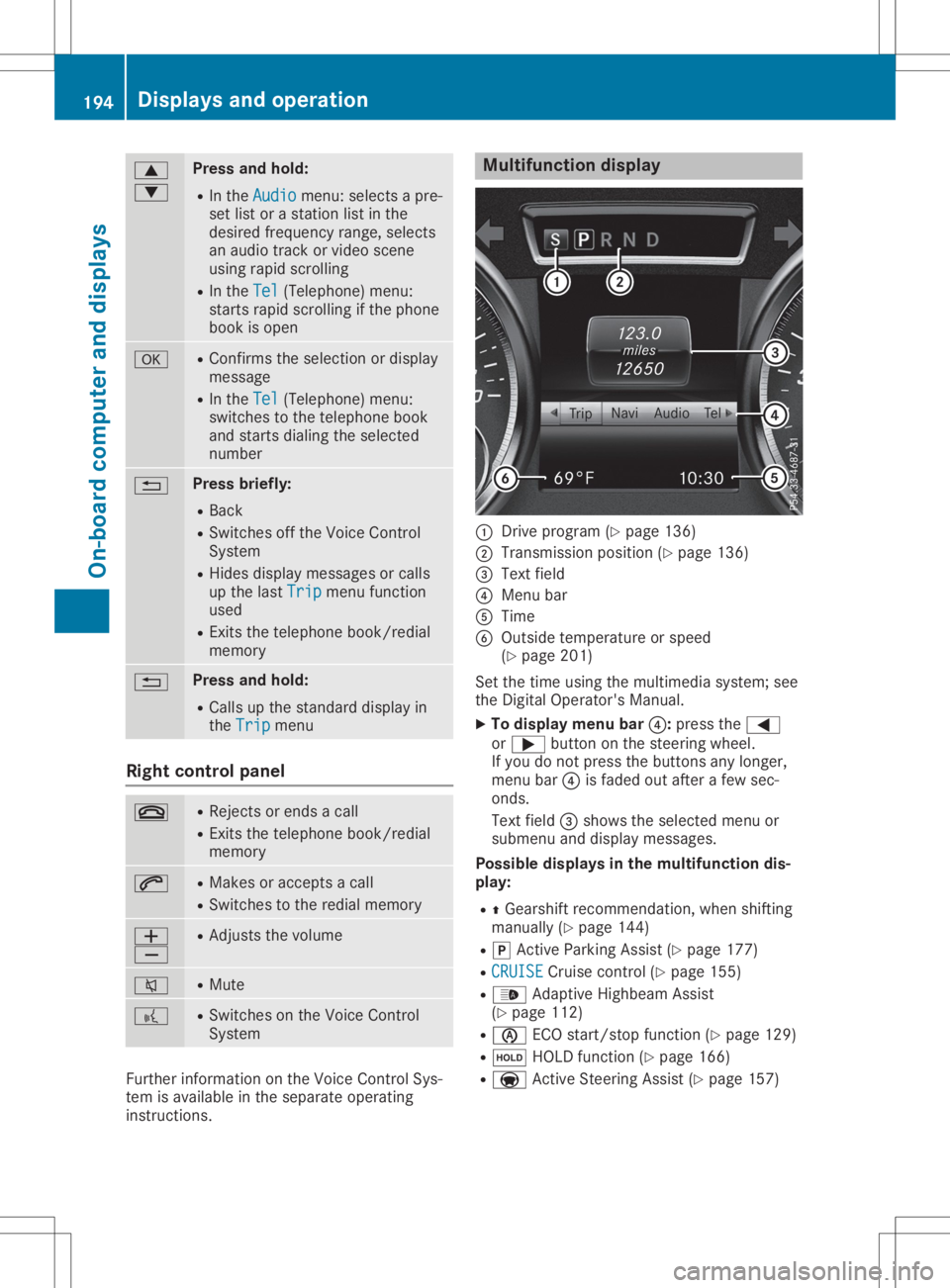
display 0043
Drive program (Ypage 136)
0044 Transmission position(Ypage 136)
0087 Text field
0085 Menu bar
0083 Time
0084 Outside temperature orspeed
(Y page 201)
Set thetime using themultimedia system;see
the Digital Operator's Manual.
X To display menubar0085:press the0059
or 0065 button onthe steering wheel.
If you donot press thebuttons anylonger,
menu bar0085isfaded outafter afew sec-
onds.
Text field 0087shows theselected menuor
submenu anddisplay messages.
Possible displaysinthe multifu nctiondis-
play:
R 0097Gearshift recommen dation,whenshifting
manually (Ypage 144)
R 005D Active Parking Assist(Ypage 177)
R CRUISE CRUISE
Cruisecontrol(Ypage 155)
R 00CE Adaptive Highbeam Assist
(Y page 112)
R 00D6 ECOstart/ stopfunct ion(Ypage 129)
R 00D9 HOLD function(Ypage 166)
R 004F Active Steerin gAssist (Ypage 157) 194
Displays
andoperat ionOn-board computerand displays
Page 267 of 334
The
integr atedgarage dooropener iscom-
patible withdevices thathave units which
operate inthe frequency rangeof280 to
433 MHz.
R Replace thebatteries ingarage doorremote
cont rol0083. This increases thelikelihood that
garage doorremote control0083 will trans mit
a stron gand precise signaltothe integr ated
garage dooropener.
R When programming, holdremote control0083
at varying distances andangles frombut-
ton s0044 to0085 which youareprogramming.
Try various anglesatadistance between
2and 8inches (5to20cm) oratthe same
angle butatvarying distances .
R Ifafurther remote control0083 isavailabl efor
the same garage doordrive, repeat the
same programming stepswiththisremote
cont rol0083. Before performin gthese steps,
make surethatnew batteries havebeen
installed ingarage doordrive remote control
0083.
R Note thatsome remote controlsonly trans -
mit foralimited amount oftime (theindica-
tor lamp onthe remote controlgoes out).
Press button 0084onremote control0083 again
before transmission ends.
R Align theanten nacable ofthe garage door
opener unit.Thiscanimprove signalrecep-
tion/ transmission.
Opening/clo singthegara gedoor Aft
erithas been programmed, theintegr ated
garage dooropener performs thefunct ionof
the garage doorsystem remote control.Please
also read theoperating instructions forthe
garage doorsystem.
X Turn theSmart Keytoposition 0048inthe igni-
tion lock (Ypage 126).
X Press either button 0044,0087or0085 which you
have programmed tooperate thegarage
door.
Garage doorsystem withafixed code: indi-
cator lamp0043lights upgreen.
Garage doorsystem witharolling code:indi-
cator lamp0043flashes green.
The trans mitterwill trans mitasignal aslong
as the button ispressed. Thetrans mission
is halted afteramaximum often seconds
and indicator lamp0043lights upyellow.
X Press button 0044,0087or0085 again ifneces-
sary. Clearing
thememor y Make
surethatyouclear thememory ofthe
integr atedgarage dooropener beforeselling
the vehicle.
X Turn theSmart Keytoposition 0048inthe igni-
tion lock (Ypage 126).
X Press andhold button s0044 and 0085.
The indicator lampinitially lightsupyellow
and then green.
X Release buttons0044 and 0085.
The memory ofthe integr atedgarage door
opener inthe rear-view mirroriscleared. Compass
Calling upthe compass Compass
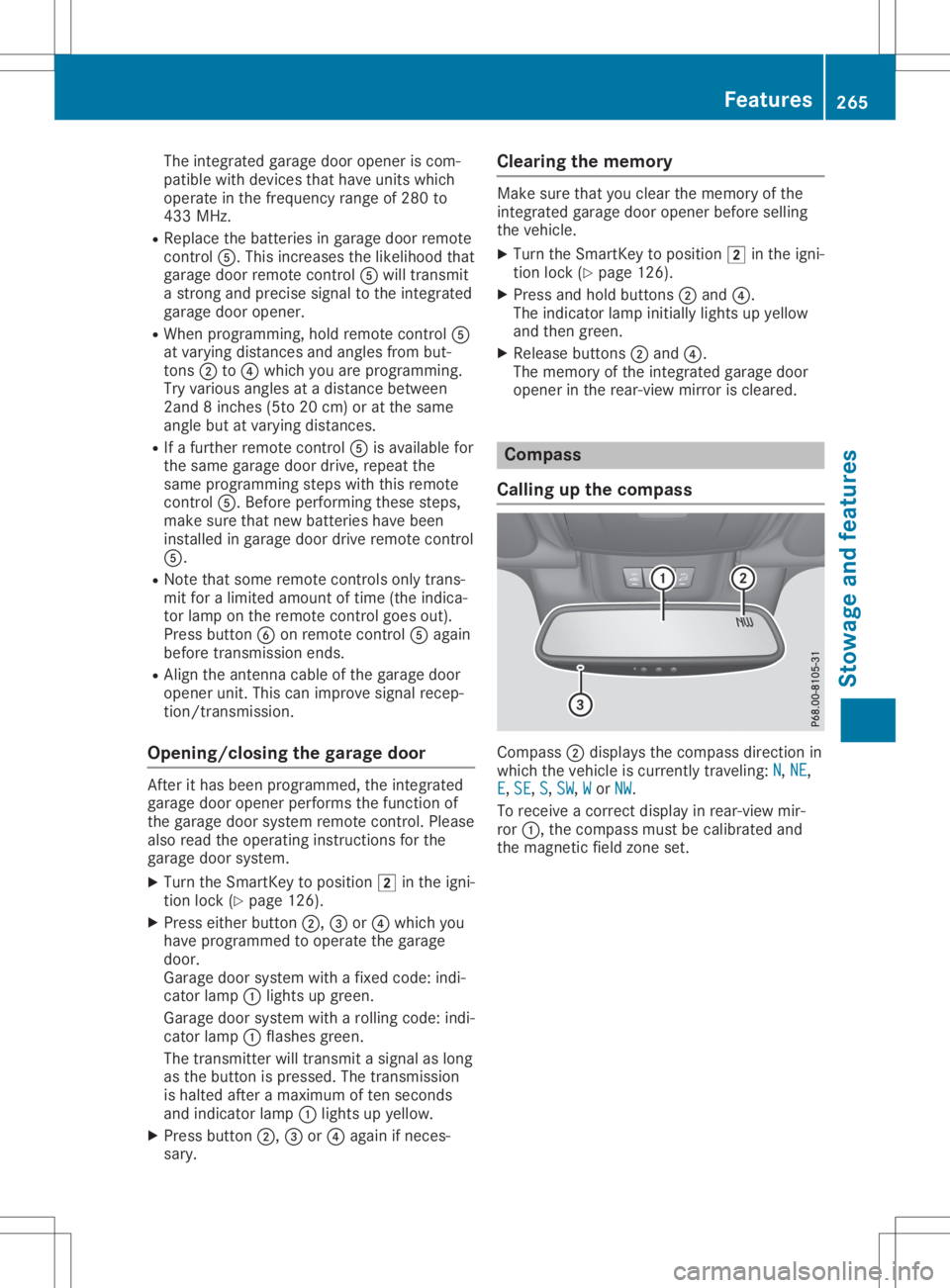
0044display sthe compass directionin
which thevehicle iscurrent lytraveling: N N,
NE NE,
E E,
SE SE,
S S,
SW SW,
W W
or NW NW.
To receive acorrec tdisplay inrear-view mir-
ror 0043, thecompass mustbecalibrated and
the magnetic fieldzone set. Featur
es
265Stowage andfeatu res Z