heating MERCEDES-BENZ SL-CLASS ROADSTER 2013 Owners Manual
[x] Cancel search | Manufacturer: MERCEDES-BENZ, Model Year: 2013, Model line: SL-CLASS ROADSTER, Model: MERCEDES-BENZ SL-CLASS ROADSTER 2013Pages: 572, PDF Size: 9.23 MB
Page 15 of 572
H
Handbrake see Parking brake
HANDS-FREE ACCESS .......................... 80
Harman/kardon ®
Logic 7 ®
surround sound system see Surround sound (harman/
kardon ®
surround sound system)
Hazard warning lamps ......................113
Head bags Display message ............................ 232
Operation ......................................... 42
Heading up (navigation) ...................344
Headlamps Adding fluid to cleaning system .....499
Cleaning system (function) ............ 113
Cleaning system (notes) ................564
Fogging up ..................................... 115
see Automatic headlamp mode
Head level heating (AIRSCARF) ........101
Head restraints see NECK-PRO head restraints
Heating
see Climate control
High-beam headlamps
Display message ............................ 236
Switching Adaptive Highbeam
Assist on/off ................................. 115
Switching on/off ........................... 112
Hill start assist .................................. 138
HOLD function Display message ............................ 242
Function/notes ............................. 176
Home address
Entering and saving .......................304
Selecting from the destination
memory ......................................... 304
Hood
Closing ........................................... 497
Display message ............................ 251
Opening ......................................... 496
Hydroplaning ..................................... 161 I
Ignition lock see Key positions
Immobilizer .......................................... 65
Incident (traffic report) ..................... 333
Indicator lamps see Warning and indicator lamps
Indicators
see Turn signals
Inspection
see ASSYST PLUS
Instrument cluster
Overview ........................................ 205
Warning and indicator lamps .........255
Instrument cluster lighting .............. 205
Instrument lighting see Instrument cluster lighting
Interface (USB, iPod ®
)
see Media Interface
Interior lighting
Automatic control .......................... 116
Delayed switch-off (on-board
computer) ...................................... 218
Emergency lighting ........................ 116
Manual control ............................... 116
Overview ........................................ 115
Reading lamp ................................. 115
Setting the brightness of the
ambient lighting (on-board
computer) ...................................... 216
Setting the color of the ambient
lighting (on-board computer) ......... 217
Intermediate stop
Deleting ......................................... 308
Entering ......................................... 307
Internet
Calling up the carousel view .......... 402
Conditions for access .................... 385
Entering the URL ............................ 402
Favorites manager ......................... 408
Favorites menu .............................. 408
Menu functions .............................. 405
Opening favorites .......................... 407
Selecting favourites ....................... 403 Index
13
Page 22 of 572
Setting route options (avoiding:
highways, toll roads, tunnels,
ferries) ...........................................
297
Setting the route type (short
route, fast
route, dynamic route or
economic route) ............................ 297
Starting calculation ........................ 303
Route demonstration ........................329
Route guidance Canceling ....................................... 326
Continuing ..................................... 326
Destination reached ...................... 326
General notes ................................ 321
Lane recommendations .................323
Off-road ......................................... 331
Traffic reports ................................ 333S
Safety Children in the vehicle .....................54
Child restraint systems ....................54
Occupant Classification System
(OCS) ............................................... 43
Safety notes
Audio CD/DVD and MP3 mode ..... 421
Using the telephone ....................... 357
Video DVD mode
...........................453
Safety systems
see Driving safety systems
SatRadio
Displaying information ...................420
Notes ............................................. 416
Registering .................................... 416
Selecting a category ...................... 418
Switching to ................................... 417
Saving the crosshair position ..........343
SD memory card Ejecting .......................................... 424
Inserting ........................................ 424
Search & Send ................................... 320
Seat belts Adjusting the driver's and front-
passenger seat belt .........................52
Belt force limiters ............................ 53
Cleaning ......................................... 506
Correct usage .................................. 50
Emergency Tensioning Devices ........ 53 Fastening
......................................... 51
Important safety guidelines .............49
Releasing
......................................... 52
Safety guidelines ............................. 38
Seat belt guide ................................. 99
Switching belt adjustment on/off
(on-board computer) ...................... 219
Warning lamp ................................. 256
Warning lamp (function) ................... 52
Seats
Active multicontour seat ................ 287
Adjusting (electrically) .....................98
Adjusting the 4-way lumbar
support .......................................... 287
Balance (seat heating) ...................288
Belt guide ......................................... 99
Cleaning the cover ......................... 505
Correct driver's seat position ........... 96
Important safety notes .................... 97
Massage function .......................... 288
Multicontour seat .......................... 286
Overview .......................................... 97
Resetting settings ..........................288
Seat functions (COMAND) ............. 286
Seat heating problem .................... 100
Seat ventilation problem ................ 101
Selecting for adjustment
(COMAND) ..................................... 286
Sliding forward/back ....................... 99
Storing settings (memory
function) ........................................ 105
Switching AIRSCARF on/off ..........101
Switching seat heating on/off ....... 100
Switching seat ventilation on/off ..100
Selecting a province .........................299
Selecting a state ............................... 299
Selecting stations Radio ............................................. 413
Selector lever
Cleaning ......................................... 505
Positions ........................................ 143
Sending DTMF tones .........................366
Sensors (cleaning instructions) .......504
Service see ASSYST PLUS
Service Center
see Qualified specialist workshop
Service menu (on-board computer) . 21520
Index
Page 76 of 572
Problem Possible causes/consequences and
M SolutionsThe engine cannot be
started using the
SmartKey. the on-board voltage is too low.
X
Switch off non-essential consumers, e.g. seat heating or interior
lighting, and try to start the engine again.
If this does not work:
X Check the starter battery and charge it if necessary
(Y page 515).
or
X Jump-start the vehicle (Y page 516).
or
X Consult a qualified specialist workshop. The engine cannot be
started
using
KEYLESS-
GO. The SmartKey is in
the vehicle. A door is open. Therefore, the SmartKey cannot be detected as
easily.
X
Close the door and try to start the vehicle again. There is interference from a powerful source of radio waves.
X
Start your vehicle with the SmartKey in the ignition lock. Doors
Important safety notes
G
WARNING
When leaving the vehicle, always remove the
SmartKey from the ignition lock. Always take
the SmartKey with you and lock the vehicle.
Do not leave children unsupervised in the
vehicle, even if they are secured in a child
restraint system,
and do not give them access
to an unlocked vehicle. A child's unsupervised
access to a vehicle could result in an accident
and/or serious personal injury. They could:
R injure themselves on vehicle parts
R be seriously or fatally injured by extreme
heat or cold
R injure themselves or have an accident with
vehicle equipment that may still be in
operation even after the SmartKey has
been removed from the ignition, such as the
seat adjustment, steering wheel
adjustment or memory function. If children open a door, they could cause
severe
or
even fatal injury to other persons; if
they get out of the vehicle, they could injure
themselves when doing so or be seriously or
even fatally injured by any passing traffic.
Do not expose the child restraint system to
direct sunlight. The child restraint system's
metal parts, for example, could become very
hot, and a child could be burned on these
parts. G
WARNING
Do not carry heavy or hard objects in the
passenger compartment unless they are
firmly secured in place.
Unsecured or improperly positioned cargo
increases a child's risk of injury in the event
of:
R strong braking maneuvers
R sudden changes of direction
R an accident74
Doors
Opening/closing
Page 99 of 572
Seats
Important safety notes
G
WARNING
The seats can still be adjusted when there is
no key in the ignition lock. For this reason,
children should never be left unsupervised in
the vehicle. They could otherwise become
trapped when adjusting the seat. G
WARNING
Make sure that the back of your head is
supported at eye level by the central area of
the head restraint. If your head is not
supported correctly
by the head restraint, you
could suffer a severe neck injury in the event
of an accident. Never drive if the head
restraints are not engaged and set correctly. G
WARNING
In order to avoid possible loss of vehicle
control, all seat, head restraint, steering
wheel and rear view mirror adjustments, as
well as fastening of seat belts, must be done
before setting the vehicle in motion. G
WARNING
Do not adjust the driver's seat while driving.
Adjusting the seat while driving could cause
the driver to lose control of the vehicle.
Never travel
in a moving vehicle with the seat
backrest in an excessively reclined position as
this can be dangerous. You could slide under
the seat belt in a collision. If you slide under
it, the seat belt would apply force at the
abdomen or neck. This could cause serious or
fatal injuries. The seat backrest and seat belts
provide the best restraint when the wearer is
in a position that is as upright as possible and
seat belts are properly positioned on the
body. G
WARNING
Your seat belt must be adjusted so that you
can correctly fasten your seat belt. Observe the following points:
R
adjust the
seat backrest until your arms are
slightly angled when holding the steering
wheel.
R adjust the seat to a comfortable seating
position that still allows you to reach the
accelerator/brake pedal safely. The
position should be as far back as possible
with the driver still able to operate the
controls properly.
R adjust the head restraint so that it is as
close to the head as possible and the center
of the head restraint supports the back of
the head at eye level.
R never place hands under the seat or near
any moving parts while a seat is being
adjusted.
Failure to do so could result in an accident
and/or serious personal injury. G
WARNING
Children 12 years old and under must be
seated and
properly secured in an appropriate
infant restraint, toddler restraint, or booster
seat recommended for the size and weight of
the child. Additional information can be found
under "Children in the vehicle".
A child's risk of serious or fatal injuries is
significantly increased if the child restraints
are not properly secured in the vehicle and/
or the child is not properly secured in the child
restraint.
! To avoid damage to the seats and the seat
heating, observe the following information:
R keep liquids from spilling on the seats. If
liquid is spilled on the seats, dry them as
soon as possible.
R if the seat covers are damp or wet, do not
switch on the seat heating. The seat
heating should also not be used to dry
the seats.
R clean the seat covers as recommended;
see "Interior care". Seats
97
Seats, steering wheel and mirrors Z
Page 100 of 572
R
do not transport heavy loads on the
seats. Do
not place sharp objects on the
seat cushions, e.g. knives, nails or tools.
The seats should only be occupied by
passengers, if possible.
R when the seat heating is in operation, do
not cover the seats with insulating
materials, e.g. blankets, coats, bags,
seat covers, child seats or booster seats.
! Make sure that there are no objects in the
footwell or behind the seats when resetting
the seats. There is a risk that the seats
and/or the objects could be damaged.
i The head restraints cannot be removed.
For more information, contact a qualified
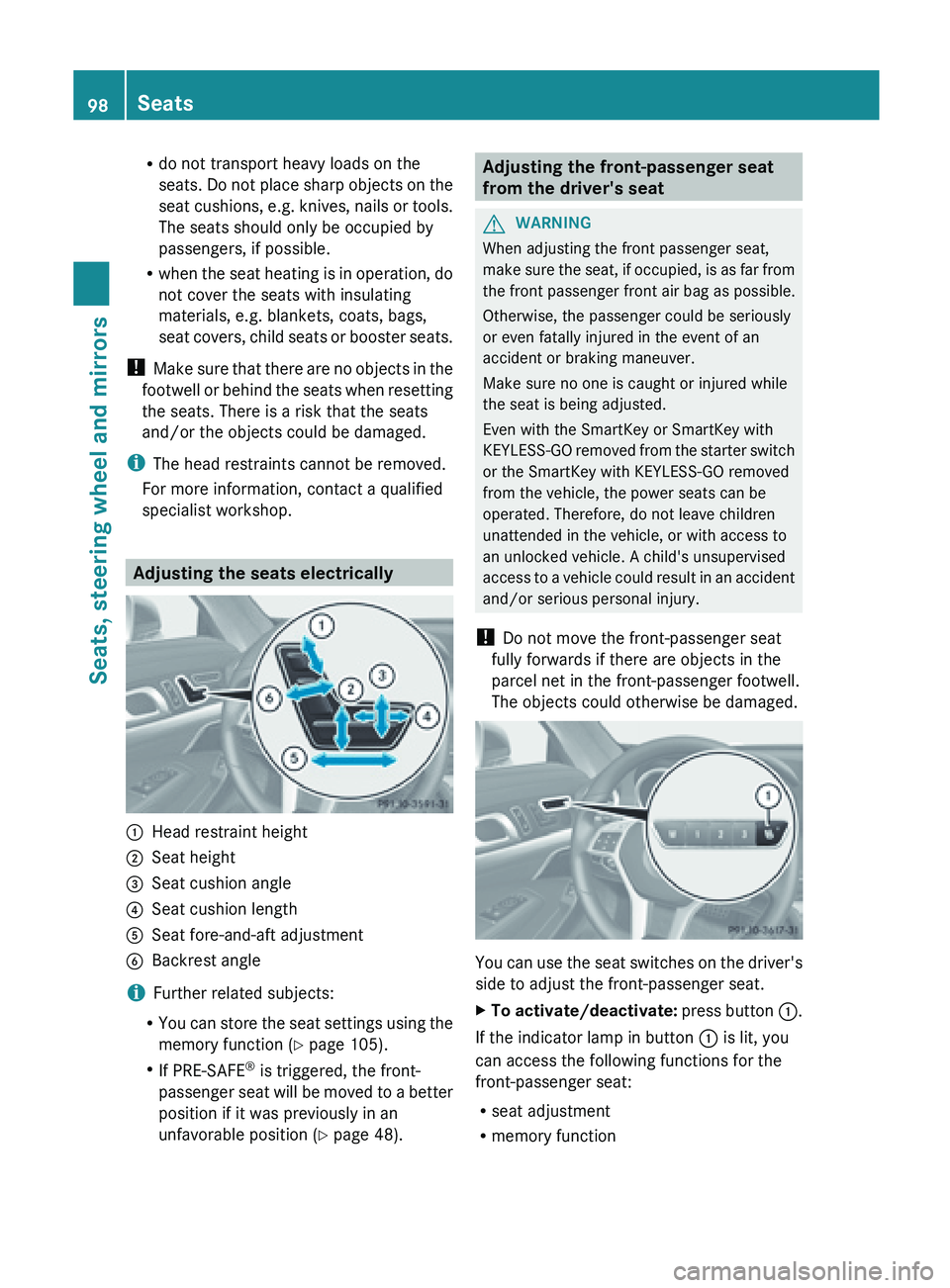
specialist workshop. Adjusting the seats electrically
:
Head restraint height
; Seat height
= Seat cushion angle
? Seat cushion length
A Seat fore-and-aft adjustment
B Backrest angle
i Further related subjects:
R You can
store the seat settings using the
memory function ( Y page 105).
R If PRE-SAFE ®
is triggered, the front-
passenger seat will be moved to a better
position if it was previously in an
unfavorable position ( Y page 48). Adjusting the front-passenger seat
from the driver's seat
G
WARNING
When adjusting the front passenger seat,
make sure
the seat, if occupied, is as far from
the front passenger front air bag as possible.
Otherwise, the passenger could be seriously
or even fatally injured in the event of an
accident or braking maneuver.
Make sure no one is caught or injured while
the seat is being adjusted.
Even with the SmartKey or SmartKey with
KEYLESS-GO removed from the starter switch
or the SmartKey with KEYLESS-GO removed
from the vehicle, the power seats can be
operated. Therefore, do not leave children
unattended in the vehicle, or with access to
an unlocked vehicle. A child's unsupervised
access to a vehicle could result in an accident
and/or serious personal injury.
! Do not move the front-passenger seat
fully forwards if there are objects in the
parcel net in the front-passenger footwell.
The objects could otherwise be damaged. You can use the seat switches on the driver's
side to adjust the front-passenger seat.
X
To activate/deactivate: press
button :.
If the indicator lamp in button : is lit, you
can access the following functions for the
front-passenger seat:
R seat adjustment
R memory function98
Seats
Seats, steering wheel and mirrors
Page 102 of 572
Adjusting the active multicontour
seat
You can
set the active the active multicontour
seat using COMAND (Y page 287). Adjusting the 4-way lumbar support
You can adjust the 4-way lumbar support
using COMAND (
Y page 287).
Switching the seat heating on/off
Activating/deactivating The three red indicator lamps in the button
indicate the heating level you have selected.
The system automatically switches down
from level
3 to level 2 after approximately
eight minutes.
The system automatically switches down
from level 2
to level 1 after approximately ten
minutes.
The system automatically switches off
approximately 20 minutes after it is set to
level 1.
You can set the distribution of the heated
sections of the seat cushion and backrest
using COMAND (Y page 288).
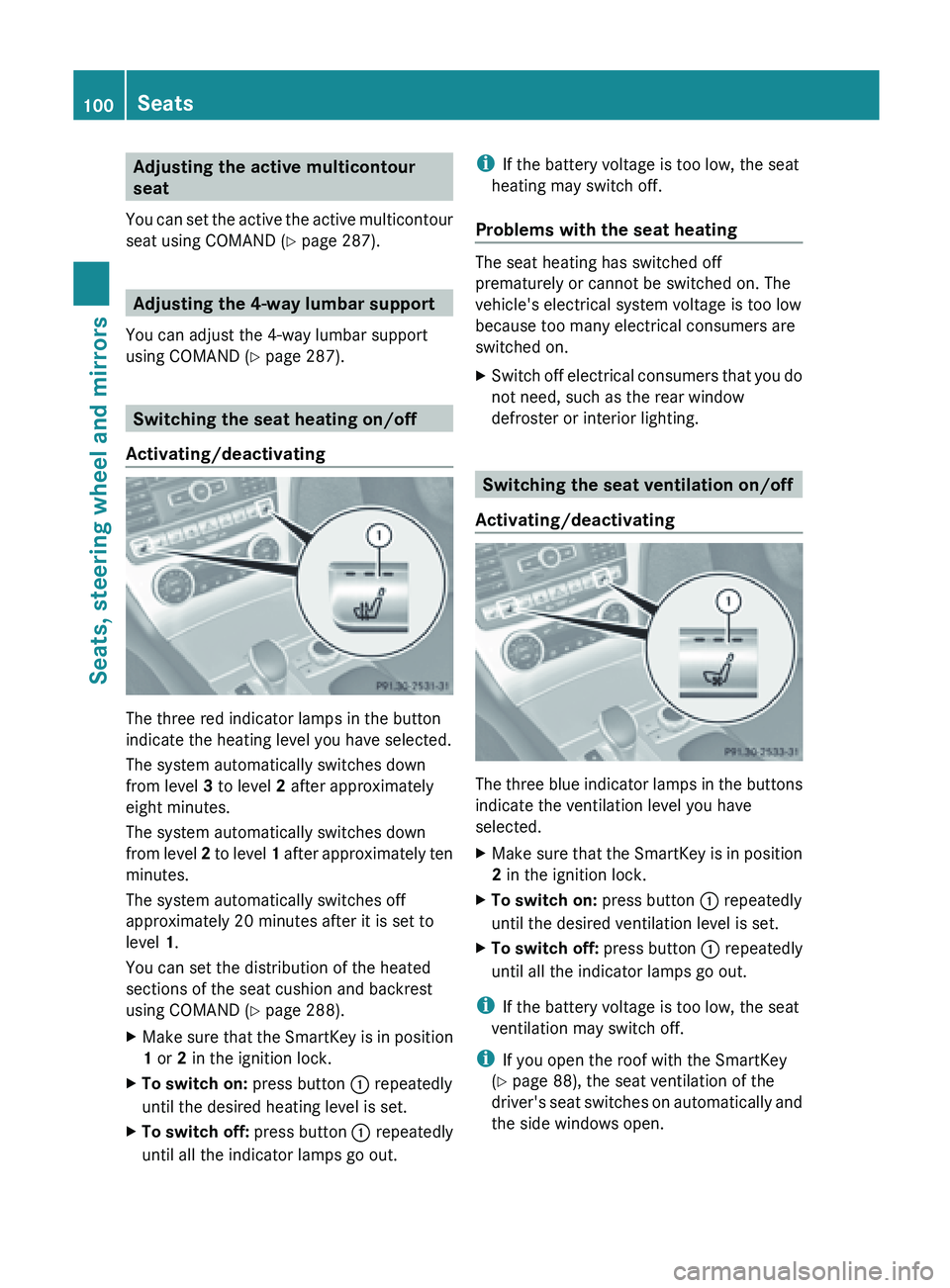
X Make sure that the SmartKey is in position
1 or 2 in the ignition lock.
X To switch on: press button : repeatedly
until the desired heating level is set.
X To switch off: press button : repeatedly
until all the indicator lamps go out. i
If the battery voltage is too low, the seat
heating may switch off.
Problems with the seat heating The seat heating has switched off
prematurely or cannot be switched on. The
vehicle's electrical system voltage is too low
because too many electrical consumers are
switched on.
X
Switch
off electrical consumers that you do
not need, such as the rear window
defroster or interior lighting. Switching the seat ventilation on/off
Activating/deactivating The three blue indicator lamps in the buttons
indicate the ventilation level you have
selected.
X Make sure that the SmartKey is in position
2 in the ignition lock.
X To switch on: press button : repeatedly
until the desired ventilation level is set.
X To switch off: press button : repeatedly
until all the indicator lamps go out.
i If the battery voltage is too low, the seat
ventilation may switch off.
i If you open the roof with the SmartKey
(Y page 88), the seat ventilation of the
driver's seat
switches on automatically and
the side windows open. 100
Seats
Seats, steering wheel and mirrors
Page 103 of 572
Problems with the seat ventilation
The seat ventilation has switched off
prematurely or cannot be switched on. The
vehicle's electrical system voltage is too low
because too many electrical consumers are
switched on.
X
Switch off electrical consumers which you
do not need, such as the rear window
defroster or interior lighting. AIRSCARF
Activating/deactivating G
WARNING
Very hot air can flow out of the AIRSCARF
vents in the head restraints when AIRSCARF
is in operation. This can cause burns on
unprotected skin near the AIRSCARF vents.
Lower the heating output in good time, when
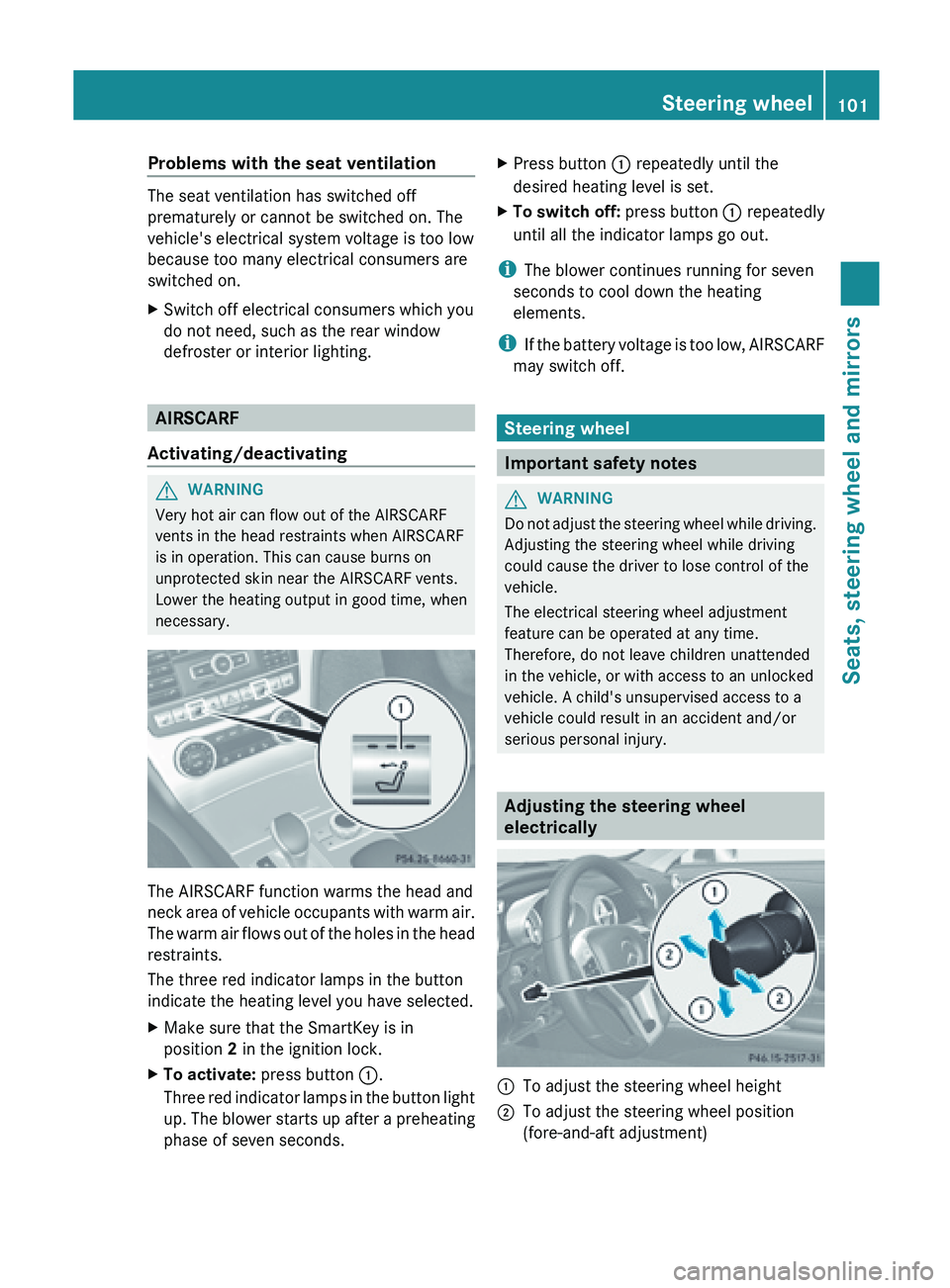
necessary. The AIRSCARF function warms the head and
neck
area
of vehicle occupants with warm air.
The warm air flows out of the holes in the head
restraints.
The three red indicator lamps in the button
indicate the heating level you have selected.
X Make sure that the SmartKey is in
position 2 in the ignition lock.
X To activate: press button :.
Three red
indicator lamps in the button light
up. The blower starts up after a preheating
phase of seven seconds. X
Press button : repeatedly until the
desired heating level is set.
X To switch off: press button : repeatedly
until all the indicator lamps go out.
i The blower continues running for seven
seconds to cool down the heating
elements.
i If the
battery voltage is too low, AIRSCARF
may switch off. Steering wheel
Important safety notes
G
WARNING
Do not adjust the steering wheel while driving.
Adjusting the steering wheel while driving
could cause the driver to lose control of the
vehicle.
The electrical steering wheel adjustment
feature can be operated at any time.
Therefore, do not leave children unattended
in the vehicle, or with access to an unlocked
vehicle. A child's unsupervised access to a
vehicle could result in an accident and/or
serious personal injury. Adjusting the steering wheel
electrically
:
To adjust the steering wheel height
; To adjust the steering wheel position
(fore-and-aft adjustment) Steering wheel
101
Seats, steering wheel and mirrors Z
Page 132 of 572
Activating/deactivating air-
recirculation mode
G
WARNING
At low outside temperatures, only switch over
to air-recirculation mode for brief periods.
Otherwise, the windows could fog up, thus
impairing visibility and endangering yourself
and others. This may prevent you from
observing the traffic conditions and thereby
cause an accident. X
Turn the SmartKey to position 2 in the
ignition lock.
X To activate: press the g button.
The indicator
lamp in the g button lights
up.
i Air-recirculation mode is automatically
activated at high levels of pollution or at
high outside temperatures. When air-
recirculation mode is activated
automatically, the indicator lamp in the
g button is not lit.
Outside air
is added after about 30minutes.
X To switch off: press the g button.
The indicator
lamp in the g button goes
out. i
Air-recirculation mode deactivates
automatically:
R after approximately five minutes at
outside temperatures below
approximately 41 ‡ (5 †)
R after approximately five minutes if
cooling with air dehumidification is
deactivated
R after approximately
30 minutes at
outside temperatures above
approximately 41 ‡ (5 †) Activating/deactivating the residual
heat function
The residual
heat function is only available on
vehicles for Canada. It
is possible to make use of the residual heat
of the engine to continue heating the
stationary vehicle for up to 30 minutes after
the engine
has been switched off. The heating
time depends on the temperature that has
been set.
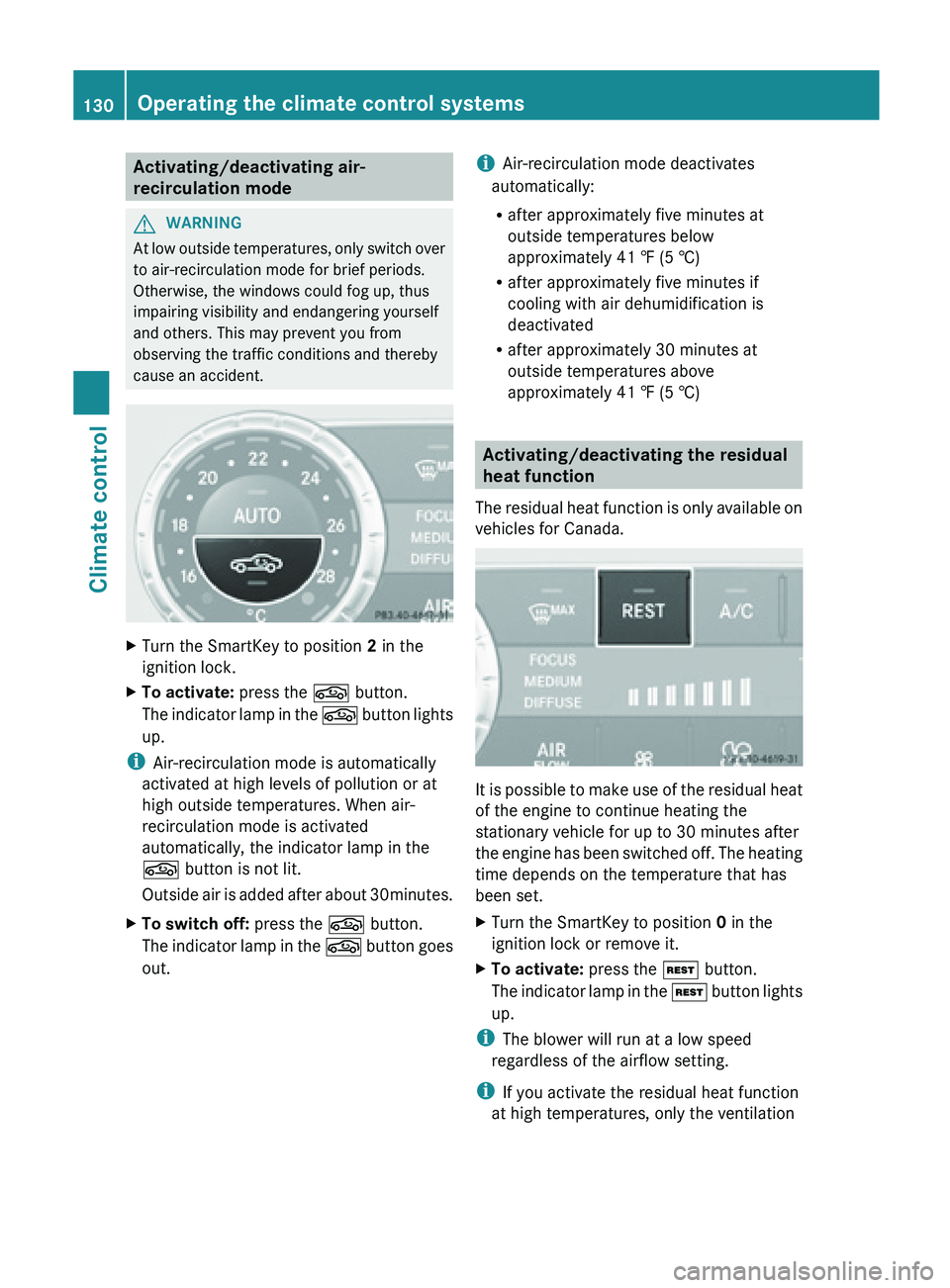
X Turn the SmartKey to position 0 in the
ignition lock or remove it.
X To activate: press the Ì button.
The indicator
lamp in the Ì button lights
up.
i The blower will run at a low speed
regardless of the airflow setting.
i If you activate the residual heat function
at high temperatures, only the ventilation 130
Operating the climate control systems
Climate control
Page 133 of 572
will be activated. The blower runs at
medium speed.
X To switch off: press the Ì button.
The indicator
lamp in the Ì button goes
out.
Residual heat is deactivated automatically:
R after approximately 30 minutes
R when the ignition is switched on
R if the battery voltage drops
R if the coolant temperature is too low Setting the air vents
Important safety notes
G
WARNING
Very hot or very cold air can flow from the air
vents. This could cause burns or frostbite to
bare skin in the immediate vicinity of the
vents. Keep bare skin away from these air
vents. If
necessary, direct the airflow away to
a different area of the vehicle interior.
In order to ensure the direct flow of fresh air
through the air vents into the vehicle interior,
please observe the following notes:
R keep the air inlet grille on the hood and in
the engine compartment on the front-
passenger side free of blockages, such as
ice, snow or leaves.
R never cover the air vents or air intake grilles
in the vehicle interior.
i You can move the adjusters for the air
vents vertically or horizontally to set the
direction of the airflow.
i For optimal climate control in the vehicle,
open the air vents completely and set the
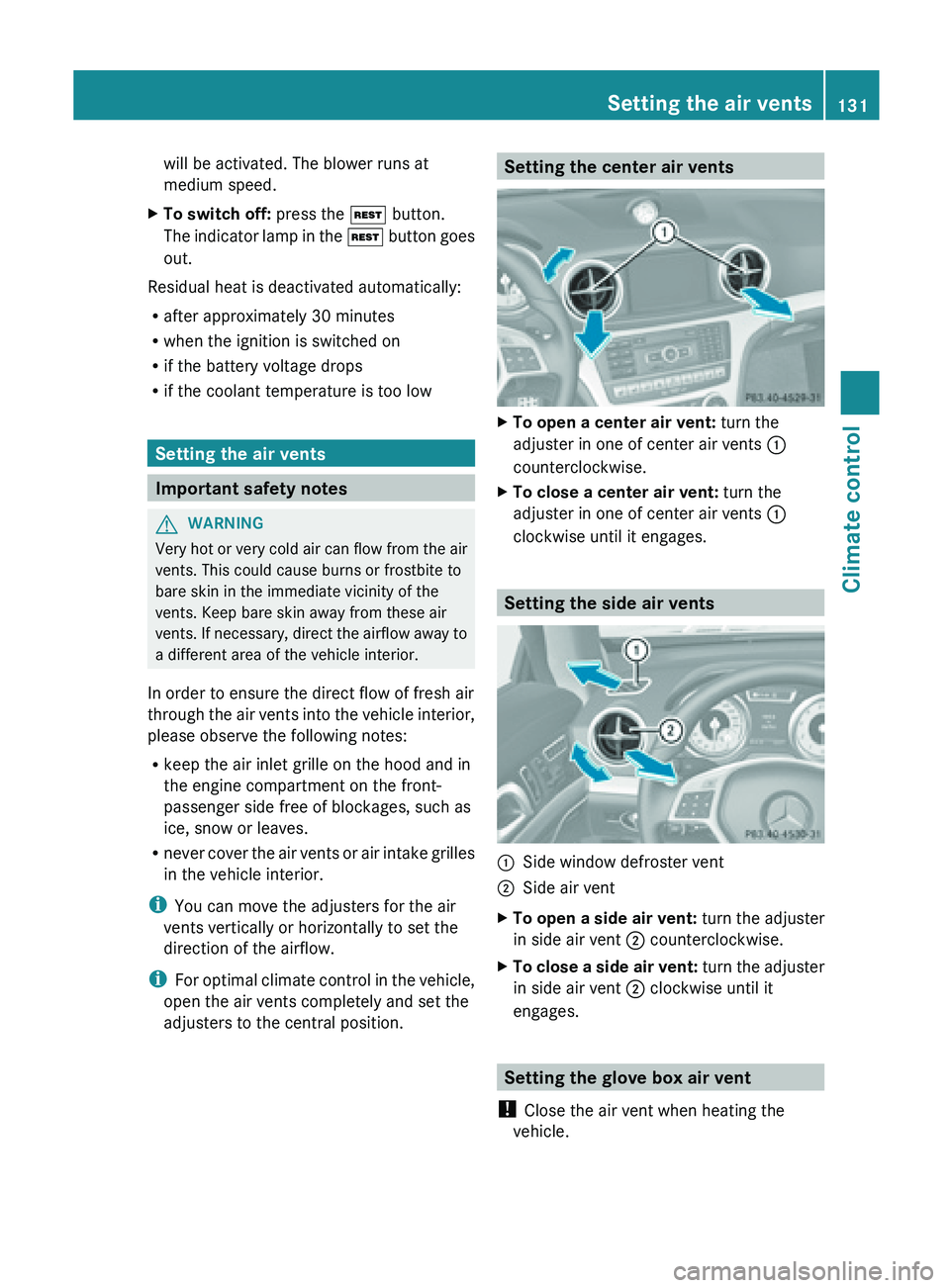
adjusters to the central position. Setting the center air vents
X
To open a center air vent: turn the
adjuster in one of center air vents :
counterclockwise.
X To close a center air vent: turn the
adjuster in one of center air vents :
clockwise until it engages. Setting the side air vents
:
Side window defroster vent
; Side air vent
X To open a side air vent: turn the adjuster
in side air vent ; counterclockwise.
X To close a side air vent: turn
the adjuster
in side air vent ; clockwise until it
engages. Setting the glove box air vent
! Close the air vent when heating the
vehicle. Setting the air vents
131
Climate control Z
Page 160 of 572
Exhaust check
G
WARNING
Inhalation of exhaust gas is hazardous to your
health. All exhaust gas contains carbon
monoxide (CO), and inhaling it can cause
unconsciousness and possible death.
Do not
run the engine in confined areas (such
as a garage) which are not properly ventilated.
If you think that exhaust gas fumes are
entering the vehicle while driving, have the
cause determined and corrected
immediately. If you must drive under these
conditions, drive only with at least one
window fully open at all times.
Certain engine systems are designed to keep
the level of poisonous components in exhaust
fumes within legal limits.
These systems only work at peak efficiency if
they are serviced exactly in accordance with
the manufacturer's specifications. All work
on the engine must be carried out by qualified
and authorized Mercedes-Benz technicians.
The engine settings must not be changed
under any circumstances. Furthermore, all
specific service work must be carried out at
regular intervals and in accordance with the
Mercedes-Benz service requirements. Details
can be found in the Maintenance Booklet. Brakes
Important safety notes G
WARNING
On slippery road surfaces, never downshift in
order to obtain braking action. This could
result in
drive wheel slip and reduced vehicle
control. Your vehicle's ABS will not prevent
this type of loss of control. G
WARNING
Make sure that you do not endanger other
road users when you apply the brakes. Downhill gradients !
On long, steep gradients, you must
reduce the load on the brakes. In order to
use engine
braking effect, restrict the shift
range in good time. This helps you to avoid
overheating the brakes and wearing them
out excessively.
When making use of the engine braking
effect, it is possible that a drive wheel may
not turn for some time, e.g. in the case of
suddenly changing or slippery road surface
conditions. This could cause damage to the
drive train. This type of damage is not
covered by the Mercedes-Benz warranty.
Heavy and light loads G
WARNING
Depressing the brake pedal constantly results
in excessive
and premature wear to the brake
pads.
It may also cause the brakes to overheat,
seriously impairing their effectiveness. It may
then not be possible to stop the vehicle in
sufficient time to avoid an accident.
If the brakes have been subjected to a heavy
load, do not stop the vehicle immediately, but
drive on for a short while. This allows the
airflow to cool the brakes more quickly.
Wet roads G
WARNING
After driving in heavy rain for some time
without applying
the brakes or through water
deep enough to wet brake components, the
first braking action may be somewhat
reduced. You have to depress the brake pedal
more firmly. Maintain a safe distance from
vehicles in front.
After driving on a wet road or having the
vehicle washed, brake firmly while paying
attention to the traffic conditions. This will
warm up the brake discs, thereby drying them 158
Driving tips
Driving and parking