battery MERCEDES-BENZ SL-CLASS ROADSTER 2014 Owners Manual
[x] Cancel search | Manufacturer: MERCEDES-BENZ, Model Year: 2014, Model line: SL-CLASS ROADSTER, Model: MERCEDES-BENZ SL-CLASS ROADSTER 2014Pages: 284, PDF Size: 45.52 MB
Page 7 of 284
Assistance display (on-board
computer)
.......................................... 161
Assistance menu (on-board
computer) .......................................... 161
ASSYST PLUS Displaying a service message ........221
Hiding a service message ..............220
Resetting the service interval
displa y........................................... 221
Service message ............................ 220
Special service requirements ......... 221
ATA (Anti-Theft Alarm system)
Activating/deactivating ...................75
Function .......................................... .75
Switching off the alarm ....................75
ATTENTION ASSIST
Activating/deactivating .................161
Display message ............................ 163
Function/notes ............................. 148
Audio menu (on-board computer) ....161
Authorized Centers see Qualified specialist workshop
Authorized Mercedes-Benz Center
see Qualified specialist workshop
Authorized workshops
see Qualified specialist workshop
AUTO lights
Display message ............................ 163
Automatic engine start (ECO start/
stop function) .................................... 125
Automatic engine switch-off (ECO
start/stop function) ..........................125
Automatic headlamp mode ......107, 108
Automatic transmission Accelerator pedal position .............126
Automatic drive program ...............126
Changing gea r............................... 126
Display message ............................ 163
Driving tips .................................... 126
Emergency running mode ..............126
Kickdown ....................................... 126
Manual drive program ....................126
Manual drive program (vehicles
with Sports package AMG) ............126
Overview ........................................ 126
Problem (malfunction) ...................126
Program selector button ................126
Pulling away ................................... 124Selector lever
................................ 126
Starting the engine ........................123
Steering wheel paddle shifters ......126
Transmission position displa y........ 126
Transmission positions ..................126
Automatic transmission
emergency mode ............................... 126 B
Back button ....................................... 197
BAS (Brake Assist System) .................67
BAS PLUS (Brake Assist System
PLUS) .................................................... 68
Battery (SmartKey) Checking .......................................... 80
Important safety notes ....................80
Replacing ......................................... 81
Battery (vehicle)
Charging ........................................ 233
Important safety notes ..................231
Jump starting ................................. 235
Overview ........................................ 231
Blind Spot Assist
see Active Blind Spot Assist
Bluetooth ®
see also Digital Operator's Manual 188
Bottle holder ...................................... 206
Brake Assist see BAS (Brake Assist System)
Brake fluid
Display message ............................ 167
Notes ............................................. 276
Brake lamps
Display message ............................ 163
Brakes
ABS .................................................. 67
BAS .................................................. 67
BAS PLUS ........................................ 68
Brake fluid (notes) .........................276
Display message ............................ 164
Driving tips .................................... 131
High-performance brake system ....131
Important safety notes ..................131
Maintenance .................................. 131
Warning lamp ................................. 177 Index
5
Page 18 of 284
Switching seat heating on/of
f....... 101
Switching seat ventilation on/off ..101
Selector lever
Positions ........................................ 126
Sensors (cleaning instructions) .......222
Service menu (on-board
computer) .......................................... 161
Service products Brake fluid ..................................... 276
Coolant (engine) ............................ 277
Engine oil ....................................... 276
Fuel ................................................ 275
Important safety notes ..................275
Refrigerant (air-conditioning
system) .......................................... 278
Washer fluid .................................. .278
Service work
see ASSYST PLUS
Settings
Factory (on-board computer) .........161
Menu overview .............................. 192
On-board computer .......................161
Setting the air distribution ...............116
Setting the airflow ............................116
Setting the date/time format see also Digital Operator's Manual 188
Setting the language
see also Digital Operator's Manual 188
Setting the time
see also Digital Operator's Manual 188
SETUP (on-board computer) .............161
Side impact air bag .............................49
Side marker lamp (display
message) ............................................ 163
Side windows Cleaning ......................................... 222
Important safety information .....89, 90
Opening/closing (all) .......................90
Opening/closing (front) ...................90
Overview .......................................... 89
Problem (malfunction) .....................91
Resetting ......................................... 90
SIRIUS services
see also Digital Operator's Manual 188
SmartKey
Changing the battery .......................81
Changing the programming .............79Checking the battery
.......................80
Display message ............................ 163
Door central locking/unlocking .......78
Important safety notes ....................78
Loss ................................................. 82
Mechanical key ................................ 80
Opening/closing the roof ................93
Overview .......................................... 78
Positions (ignition lock) .................121
Problem (malfunction) .....................82
Starting the engine ........................123
SMS
see also Digital Operator's Manual 188
Sockets
Front-passenger footwell ...............206
Points to observe before use .........206
Trunk ............................................. 206
Under the armrest .........................206
Specialist workshop ............................ 30
Special seat belt retractor .................. 66
Speed, controlling see Cruise control
Speedometer
Digital ............................................ 161
In the Instrument cluster .................35
Segments ...................................... 160
Selecting the unit of
measurement ................................ 161
SPORT handling mode
Activating/deactivating (AMG
vehicles) .......................................... 71
Warning lamp ................................. 180
SRS
see SRS (Supplemental Restraint
System)
SRS (Supplemental Restraint
System)
Display message ............................ 168
Introduction ..................................... 45
Warning lamp ................................. 182
Warning lamp (function) ................... 45
Standing lamps
Display message ............................ 163
Switching on/off ........................... 108
Start/stop function
see ECO start/stop function
Starting (engine) ................................ 123
STEER CONTROL .................................. 7416
Index
Page 21 of 284
Removing the towing eye
...............239
With the rear axle raised ................239
Towing away
With both axles on the ground .......239
Tow-starting
Emergency engine starting ............240
Important safety notes ..................237
Traffic reports
see also Digital Operator's Manual 188
Transmission
Selector lever ................................ 126
see Automatic transmission
Transporting the vehicle ..................240
Trim pieces (cleaning instructions) .223
Trip computer (on-board
computer) .......................................... 161
Trip odometer Calling up ....................................... 161
Resetting (on-board computer) ......161
Trunk
Emergency release ..........................89
Important safety notes ....................84
Locking separately ...........................88
Opening/closing (automatically
from inside) ...................................... 88
Opening/closing (automatically
from outside) ................................... 86
Opening/closing (from outside,
HANDS-FREE ACCESS) ....................86
Opening/closing (manually from
outside) ............................................ 85
Overview .......................................... 84
Trunk lid
Display message ............................ 163
Opening/closing .............................. 84
Opening dimensions ......................279
Power closing feature ......................84
Trunk load (maximum) ......................279
Trunk partition Display message ............................ 163
General notes .................................. 93
Installing .......................................... 94
Opening/closing .............................. 94
Removing ......................................... 94
Turn signals
Display message ............................ 163
Switching on/off ........................... 108Type identification plate
see Vehicle identification plate U
Umbrella holder ................................. 204
Unlocking Emergency unlocking .......................84
From inside the vehicle (central
unlocking button) ............................. 84 V
Vanity mirror (in the sun visor) ........206
Vehicle Correct use ...................................... 31
Data acquisition ............................... 32
Display message ............................ 175
Equipment ....................................... 27
Individual settings ..........................161
Limited Warranty ............................. 31
Loading .......................................... 253
Locking (in an emergency) ...............84
Locking (SmartKey) .......................... 78
Lowering ........................................ 267
Maintenance .................................... 28
Parking for a long period ................ 131
Pulling away ................................... 124
Raising ........................................... 265
Reporting problems .........................31
Securing from rolling away ............264
Towing away .................................. 237
Tow-starting ................................... 237
Transporting .................................. 240
Unlocking (in an emergency) ...........84
Unlocking (SmartKey) ......................78
Vehicle data ................................... 279
Vehicle battery
see Battery (vehicle)
Vehicle data ....................................... 279
Vehicle dimensions ...........................279
Vehicle emergency locking ................84
Vehicle identification number see VIN
Vehicle identification plate ..............274 Index
19
Page 32 of 284
In situations like this, the body, the
undercarriage, chassis parts, wheels or
tires could be damaged without the
damage being visible. Components
damaged in this way can unexpectedly fail
or, in the case of an accident, no longer
withstand the strain they are designed to.
If the underbody paneling is damaged,
combustible materials such as leaves,
grass or twigs can gather between the
underbody and the underbody paneling. If
these materials come in contact with hot
parts of the exhaust system for an
extended period, they can catch fire.
Have the vehicle checked and repaired
immediately at a qualified specialist
workshop. If on continuing your journey
you notice that driving safety is impaired,
pull over and stop the vehicle immediately,
paying attention to road and traffic
conditions. In such cases, visit a qualified
specialist workshop. Declarations of conformity
Vehicle components which receive
and/or transmit radio waves USA:
"The wireless devices of this vehicle
comply with Part 15 of the FCC Rules.
Operation is subject to the following two
conditions: 1) These devices may not cause
harmful interference, and 2) These devices
must accept any interference received,
including interference that may cause
undesired operation. Changes or
modifications not expressly approved by the
party responsible for compliance could void
the user’s authority to operate the
equipment."
Canada: "The wireless devices of this vehicle
comply with Industry Canada license-exempt
RSS standard(s). Operation is subject to the
following two conditions: (1) These devices
may not cause interference, and (2) These
devices must accept any interference, including interference that may cause
undesired operation of the device." Diagnostics connection
The diagnostics connection is only intended
for the connection of diagnostic equipment at
a qualified specialist workshop. G
WARNING
If you connect equipment to the diagnostics
connection in the vehicle, it may affect the
operation of the vehicle systems. As a result,
the operating safety of the vehicle could be
affected. There is a risk of an accident.
Do not connect any equipment to a
diagnostics connection in the vehicle. G
WARNING
Objects in the driver's footwell can restrict the
pedal travel or obstruct a depressed pedal.
The operating and road safety of the vehicle
is jeopardized. There is a risk of an accident.
Make sure that all objects in the vehicle are
stowed correctly, and that they cannot enter
the driver's footwell. Install the floormats
securely and as specified in order to ensure
sufficient clearance for the pedals. Do not use
loose floormats and do not place floormats on
top of one another.
! If the engine is switched off and
equipment on the diagnostics connection
is used, the starter battery may discharge.
Connecting equipment to the diagnostics
connection can lead to emissions monitoring
information being reset, for example. This
may lead to the vehicle failing to meet the
requirements of the next emissions test
during the main inspection. Qualified specialist workshop
An authorized Mercedes-Benz Center is a
qualified specialist workshop. It has the
necessary specialist knowledge, tools and 30
Introduction
Page 77 of 284
Theft deterrent locking system
Immobilizer
X To activate with the SmartKey: remove
the SmartKey from the ignition lock.
X To activate with KEYLESS-GO: switch the
ignition off and open the driver's door.
X To deactivate: switch on the ignition.
The immobilizer prevents your vehicle from
being started without the correct SmartKey.
When leaving the vehicle, always take the
SmartKey with you and lock the vehicle. The
engine can be started by anyone with a valid
SmartKey that is left inside the vehicle.
i The immobilizer is always deactivated
when you start the engine.
In the event that the engine cannot be
started when the starter battery is fully
charged, the immobilizer may be faulty.
Contact an authorized Mercedes-Benz
Center or call 1-800-FOR-MERCedes (in
USA) or 1-800-387-010 0(in Canada). ATA (anti-theft alarm system)
X
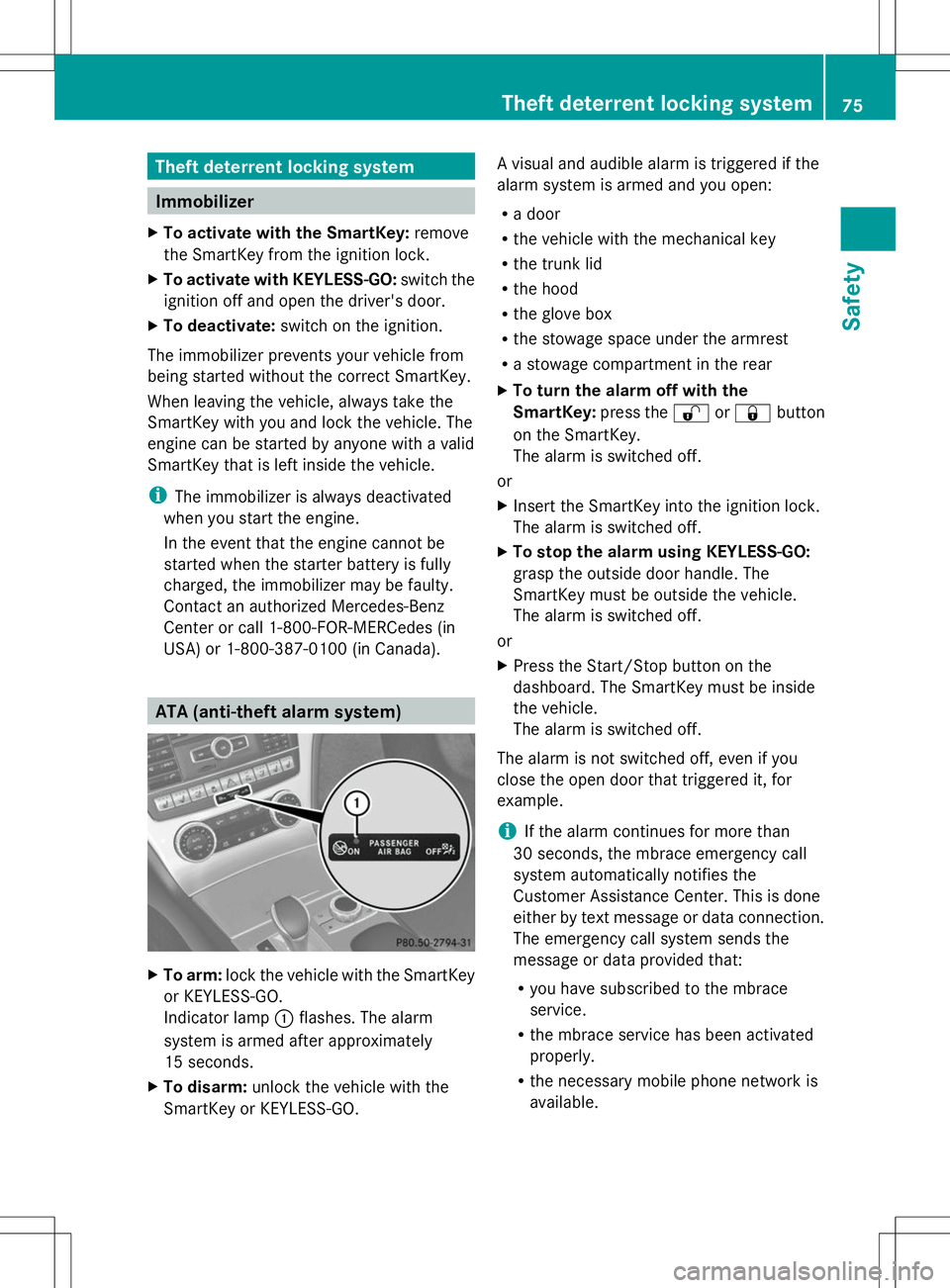
To arm: lock the vehicle with the SmartKey
or KEYLESS-GO.
Indicator lamp :flashes. The alarm
system is armed after approximately
15 seconds.
X To disarm: unlock the vehicle with the
SmartKey or KEYLESS-GO. A visual and audible alarm is triggered if the
alarm system is armed and you open:
R
a door
R the vehicle with the mechanical key
R the trunk lid
R the hood
R the glove box
R the stowage space under the armrest
R a stowage compartment in the rear
X To turn the alarm off with the
SmartKey: press the%or& button
on the SmartKey.
The alarm is switched off.
or
X Insert the SmartKey into the ignition lock.
The alarm is switched off.
X To stop the alarm using KEYLESS-GO:
grasp the outside door handle. The
SmartKey must be outside the vehicle.
The alarm is switched off.
or
X Press the Start/Stop button on the
dashboard. The SmartKey must be inside
the vehicle.
The alarm is switched off.
The alarm is not switched off, even if you
close the open door that triggered it, for
example.
i If the alarm continues for more than
30 seconds, the mbrace emergency call
system automatically notifies the
Customer Assistance Center. This is done
either by text message or data connection.
The emergency call system sends the
message or data provided that:
R you have subscribed to the mbrace
service.
R the mbrace service has been activated
properly.
R the necessary mobile phone network is
available. Theft deterrent locking system
75Safety Z
Page 82 of 284
Mechanical key
General notes If the vehicle can no longer be locked or
unlocked with the SmartKey, use the
mechanical key.
If you use the mechanical key to unlock and
open the driver's door or the trunk lid, the
anti-theft alarm system will be triggered
(Y page 75).
There are several ways to turn off the alarm:
X To turn the alarm off with the
SmartKey: press the%or& button
on the SmartKey.
or
X Insert the SmartKey into the ignition lock.
or
X To disarm the alarm with KEYLESS-GO:
press the Start/Stop button in the ignition
lock. The SmartKey must be in the vehicle.
or
X Lock or unlock the vehicle using KEYLESS-
GO. The SmartKey must be outside the
vehicle.
If you unlock the vehicle using the mechanical
key, the fuel filler flap will not be unlocked
automatically.
X To unlock the fuel filler flap: insert the
SmartKey into the ignition lock.
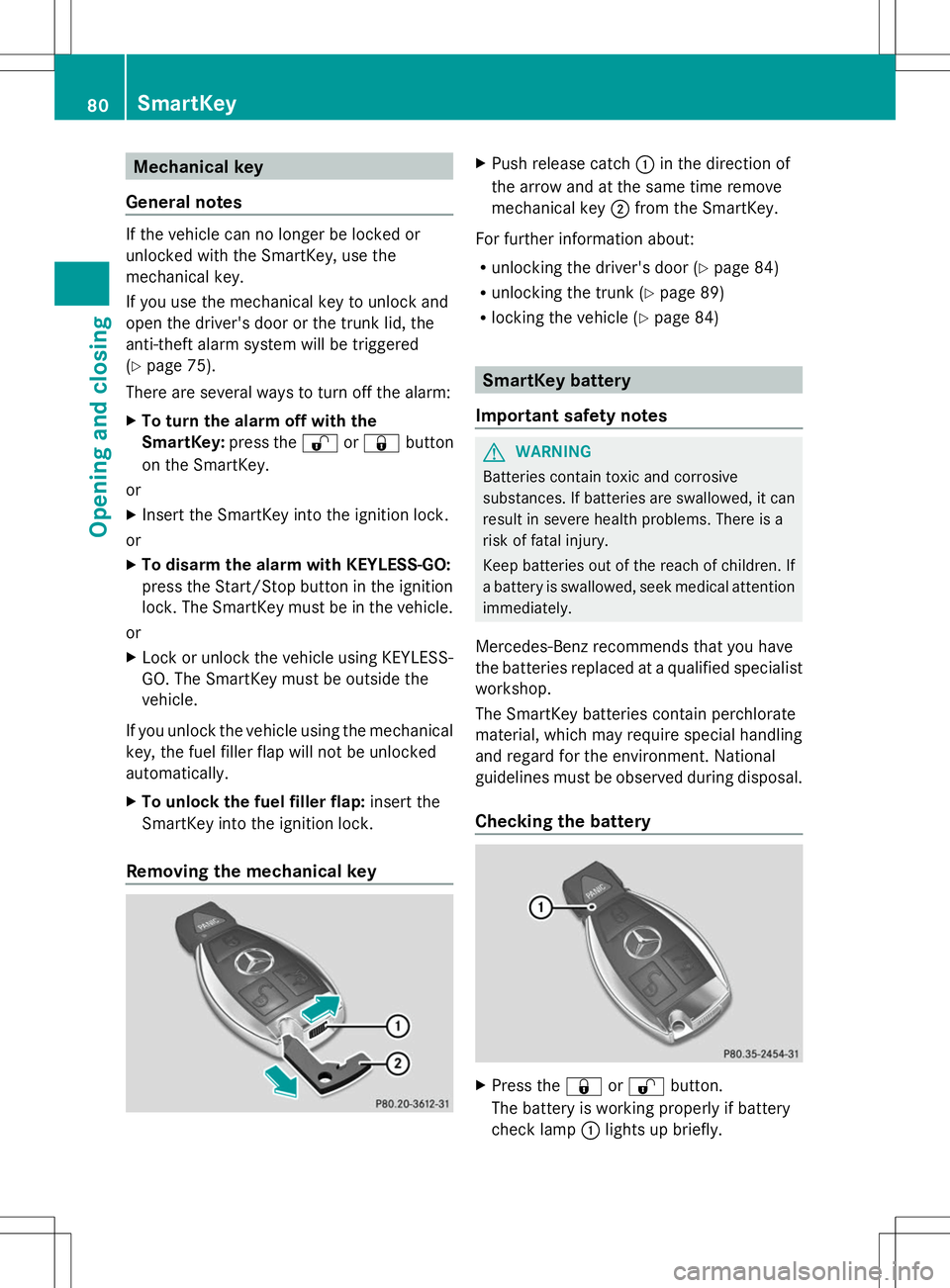
Removing the mechanical key X
Push release catch :in the direction of
the arrow and at the same time remove
mechanical key ;from the SmartKey.
For further information about:
R unlocking the driver's door (Y page 84)
R unlocking the trunk (Y page 89)
R locking the vehicle (Y page 84) SmartKey battery
Important safety notes G
WARNING
Batteries contain toxic and corrosive
substances. If batteries are swallowed, it can
result in severe health problems. There is a
risk of fatal injury.
Keep batteries out of the reach of children. If
a battery is swallowed, seek medical attention
immediately.
Mercedes-Benz recommends that you have
the batteries replaced at a qualified specialist
workshop.
The SmartKey batteries contain perchlorate
material, which may require special handling
and regard for the environment. National
guidelines must be observed during disposal.
Checking the battery X
Press the &or% button.
The battery is working properly if battery
check lamp :lights up briefly. 80
SmartKeyOpening and closing
Page 83 of 284
The battery is discharged if battery check
lamp
:does not light up briefly.
X Change the battery (Y page 81).
i If the SmartKey battery is checked within
the signal reception range of the vehicle,
pressing the &or% button:
R locks or
R unlocks the vehicle
i You can get a battery at any qualified
specialist workshop.
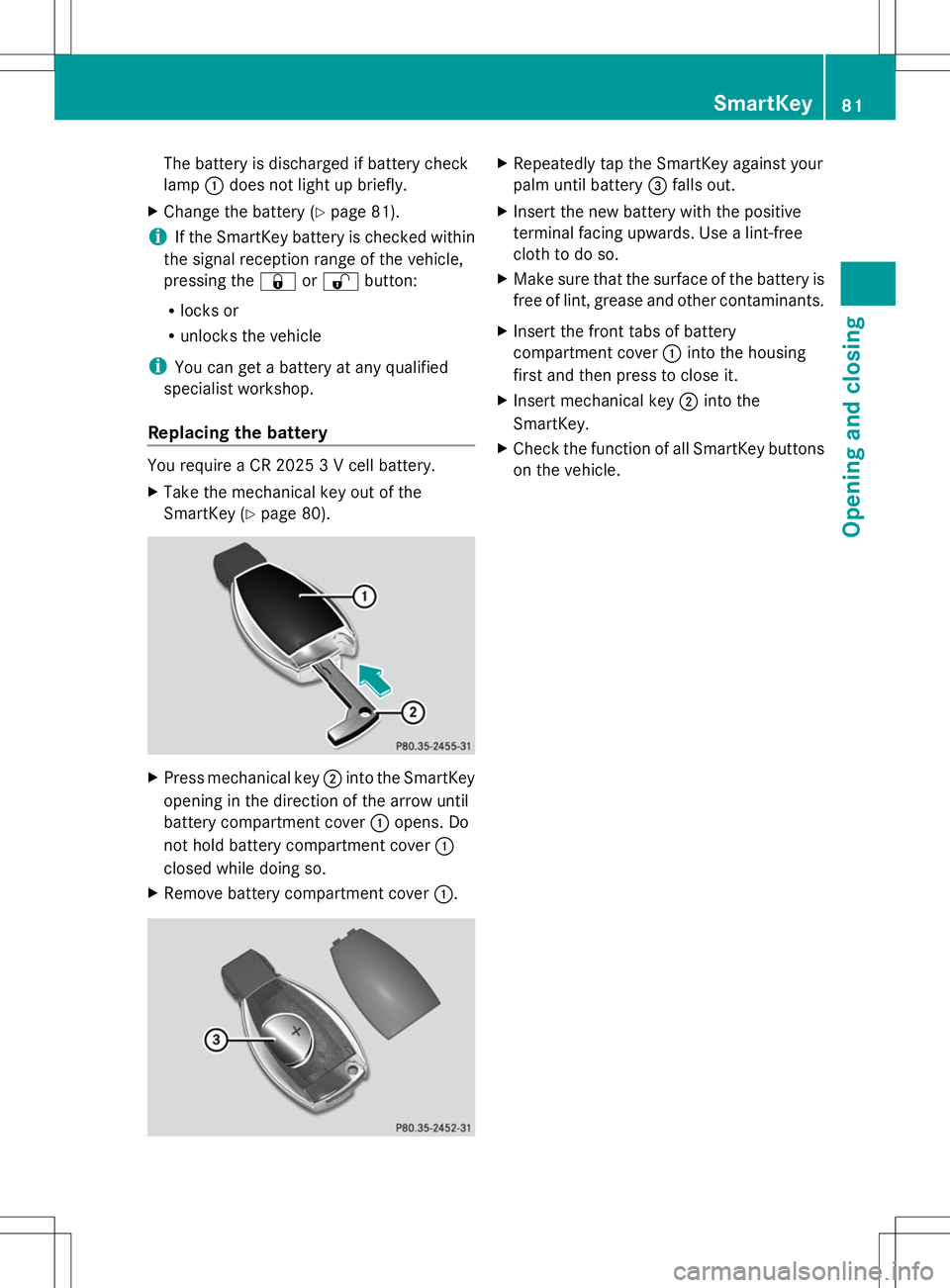
Replacing the battery You require a CR 2025 3 V cell battery.
X
Take the mechanical key out of the
SmartKey (Y page 80). X
Press mechanical key ;into the SmartKey
opening in the direction of the arrow until
battery compartment cover :opens. Do
not hold battery compartment cover :
closed while doing so.
X Remove battery compartment cover :. X
Repeatedly tap the SmartKey against your
palm until battery =falls out.
X Insert the new battery with the positive
terminal facing upwards. Use a lint-free
cloth to do so.
X Make sure that the surface of the battery is
free of lint, grease and other contaminants.
X Insert the front tabs of battery
compartment cover :into the housing
first and then press to close it.
X Insert mechanical key ;into the
SmartKey.
X Check the function of all SmartKey buttons
on the vehicle. SmartKey
81Opening and closing Z
Page 84 of 284
Problems with the SmartKey
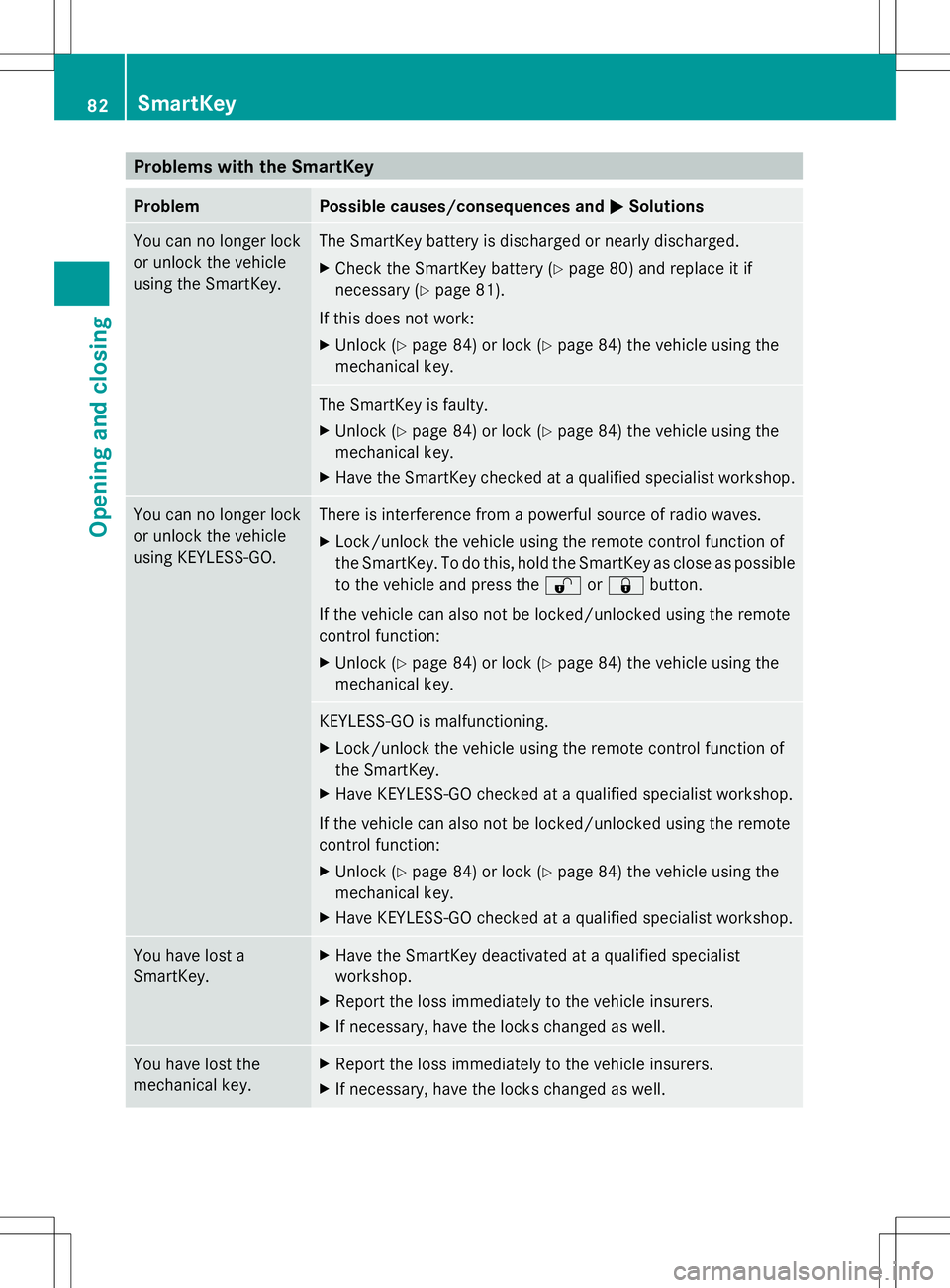
Problem Possible causes/consequences and
M
MSolutions You can no longer lock
or unlock the vehicle
using the SmartKey. The SmartKey battery is discharged or nearly discharged.
X
Check the SmartKey battery (Y page 80) and replace it if
necessary (Y page 81).
If this does not work:
X Unlock (Y page 84) or lock (Y page 84) the vehicle using the
mechanical key. The SmartKey is faulty.
X
Unlock (Y page 84) or lock (Y page 84) the vehicle using the
mechanical key.
X Have the SmartKey checked at a qualified specialist workshop. You can no longer lock
or unlock the vehicle
using KEYLESS-GO. There is interference from a powerful source of radio waves.
X
Lock/unlock the vehicle using the remote control function of
the SmartKey. To do this, hold the SmartKey as close as possible
to the vehicle and press the %or& button.
If the vehicle can also not be locked/unlocked using the remote
control function:
X Unlock (Y page 84) or lock (Y page 84) the vehicle using the
mechanical key. KEYLESS-GO is malfunctioning.
X
Lock/unlock the vehicle using the remote control function of
the SmartKey.
X Have KEYLESS-GO checked at a qualified specialist workshop.
If the vehicle can also not be locked/unlocked using the remote
control function:
X Unlock (Y page 84) or lock (Y page 84) the vehicle using the
mechanical key.
X Have KEYLESS-GO checked at a qualified specialist workshop. You have lost a
SmartKey. X
Have the SmartKey deactivated at a qualified specialist
workshop.
X Report the loss immediately to the vehicle insurers.
X If necessary, have the locks changed as well. You have lost the
mechanical key. X
Report the loss immediately to the vehicle insurers.
X If necessary, have the locks changed as well. 82
SmartKeyOpening and closing
Page 85 of 284
Problem Possible causes/consequences and
M
MSolutions The engine can no
longer be started using
the SmartKey. The on-board voltage is too low.
X
Switch off non-essential consumers, e.g. seat heating or interior
lighting, and try to start the engine again.
If this does not work:
X Check the starter battery and charge it if necessary
(Y page 233).
or
X Jump-start the vehicle (Y page 235).
or
X Consult a qualified specialist workshop. The engine can no
longer be started using
KEYLESS-GO. The
SmartKey is in the
vehicle. The vehicle is locked.
X
Unlock the vehicle and try to start the vehicle again. There is interference from a powerful source of radio waves.
X
Start your vehicle with the SmartKey in the ignition lock. Doors
Important safety notes
G
WARNING
If children are left unsupervised in the vehicle,
they could:
R open the doors, thus endangering other
people or road users.
R get out and disrupt traffic.
R operate the vehicle's equipment.
Additionally, children could set the vehicle in
motion if, for example, they:
R release the parking brake.
R shift the automatic transmission out of
parking position P.
R shift the manual transmission into neutral.
R starting the engine.
There is a risk of an accident and injury.
When leaving the vehicle, always take the
SmartKey with you and lock the vehicle. Never
leave children or animals unattended in the
vehicle. Always keep the SmartKey out of
reach of children. G
WARNING
If children are left unsupervised in the vehicle,
they could:
R open the doors, thus endangering other
people or road users.
R get out and disrupt traffic.
R operate the vehicle's equipment.
Additionally, children could set the vehicle in
motion if, for example, they:
R release the parking brake.
R shifting the automatic transmission out of
park position P
R Start the engine.
There is a risk of an accident and injury.
When leaving the vehicle, always take the
SmartKey with you and lock the vehicle. Never
leave children or animals unattended in the
vehicle. Always keep the SmartKey out of
reach of children. Doors
83Opening and closing Z
Page 91 of 284
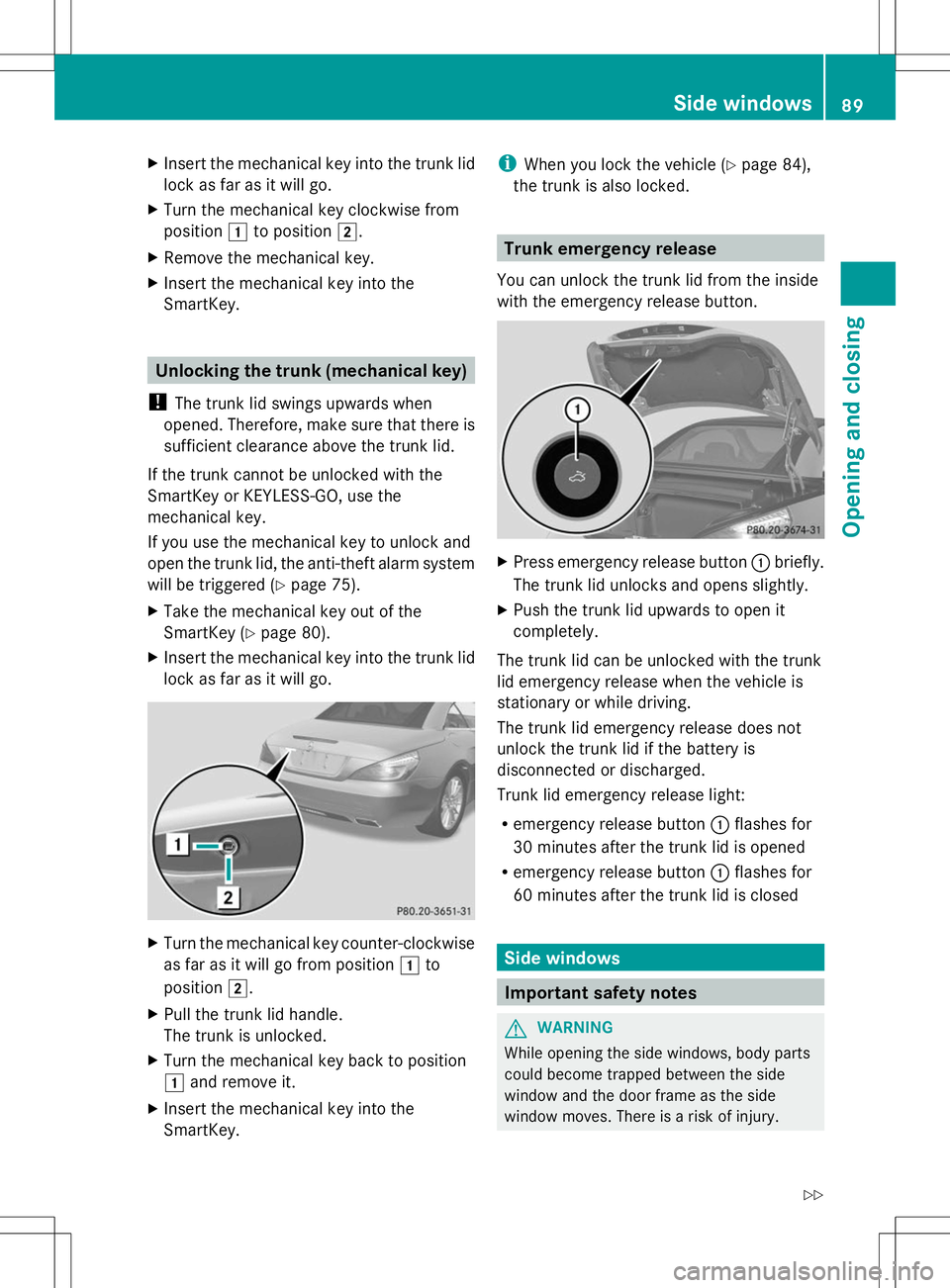
X
Insert the mechanical key into the trunk lid
lock as far as it will go.
X Turn the mechanical key clockwise from
position 1to position 2.
X Remove the mechanical key.
X Insert the mechanical key into the
SmartKey. Unlocking the trunk (mechanical key)
! The trunk lid swings upwards when
opened. Therefore, make sure that there is
sufficient clearance above the trunk lid.
If the trunk cannot be unlocked with the
SmartKey or KEYLESS-GO, use the
mechanical key.
If you use the mechanical key to unlock and
open the trunk lid, the anti-theft alarm system
will be triggered (Y page 75).
X Take the mechanical key out of the
SmartKey (Y page 80).
X Insert the mechanical key into the trunk lid
lock as far as it will go. X
Turn the mechanical key counter-clockwise
as far as it will go from position 1to
position 2.
X Pull the trunk lid handle.
The trunk is unlocked.
X Turn the mechanical key back to position
1 and remove it.
X Insert the mechanical key into the
SmartKey. i
When you lock the vehicle (Y page 84),
the trunk is also locked. Trunk emergency release
You can unlock the trunk lid from the inside
with the emergency release button. X
Press emergency release button :briefly.
The trunk lid unlocks and opens slightly.
X Push the trunk lid upwards to open it
completely.
The trunk lid can be unlocked with the trunk
lid emergency release when the vehicle is
stationary or while driving.
The trunk lid emergency release does not
unlock the trunk lid if the battery is
disconnected or discharged.
Trunk lid emergency release light:
R emergency release button :flashes for
30 minutes after the trunk lid is opened
R emergency release button :flashes for
60 minutes after the trunk lid is closed Side windows
Important safety notes
G
WARNING
While opening the side windows, body parts
could become trapped between the side
window and the door frame as the side
window moves. There is a risk of injury. Side windows
89Opening and closing
Z