trunk MERCEDES-BENZ SL-CLASS ROADSTER 2014 Owners Manual
[x] Cancel search | Manufacturer: MERCEDES-BENZ, Model Year: 2014, Model line: SL-CLASS ROADSTER, Model: MERCEDES-BENZ SL-CLASS ROADSTER 2014Pages: 284, PDF Size: 45.52 MB
Page 11 of 284
Driving on flooded roads
................131
Driving on wet roads ......................131
Exhaust check ............................... 131
Fuel ................................................ 131
General .......................................... 131
Hydroplaning ................................. 131
Icy road surfaces ........................... 131
Limited braking efficiency on
salted road s................................... 131
Symmetrical low bea m.................. 106
Wet road surface ........................... 131
DVD audio
Operating (on-board
computer) ...................................... 161
see also Digital Operator's Manual 188
DVD video
Operating (on-board
computer) ...................................... 161
see also Digital Operator's Manual 188 E
EASY-ENTRY feature Activating/deactivating .................161
Function/notes ............................. 102
EASY-EXIT feature
Function/notes ............................. 102
Switching on/off ........................... 161
EBD (electronic brake force
distribution)
Display message ............................ 166
Function/notes ................................ 72
ECO display
Function/notes ............................. 131
ECO start/stop function
Automatic engine start ..................125
Automatic engine switch-off ..........125
Deactivating/activating .................125
General information .......................125
Important safety notes ..................125
Introduction ................................... 125
Electronic Stability Program
see ESP ®
(Electronic Stability Program)
Emergency release
Driver's door .................................... 84
Trunk ............................................... 89
Vehicle ............................................. 84Emergency Tensioning Devices
Function .......................................... .62
Safety guideline s............................. 45
Emissions control
Service and warranty information ....27
Engine
Check Engine warning lamp ........... 175
Display message ............................ 172
ECO start/stop function ................125
Engine number ............................... 274
Irregular running ............................ 126
Jump-starting ................................. 235
Starting problems ..........................126
Starting the engine with the
SmartKey ....................................... 123
Starting with KEYLESS-GO .............123
Switching off .................................. 131
Tow-starting (vehicle) ..................... 240
Engine electronics
Problem (malfunction) ...................126
Engine oil
Adding ........................................... 218
Additives ........................................ 276
Checking the oil level ..................... 217
Checking the oil level using the
dipstick .......................................... 217
Display message ............................ 163
Filling capacity ............................... 276
Notes about oil grades ................... 276
Notes on oil level/consumption ....217
Temperature (on-board
computer) ...................................... 161
Viscosity ........................................ 276
Entering a city
see also Digital Operator's Manual 188
Entering an address
see also Digital Operator's Manual 188
ESP ®
(Electronic Stability
Program) AMG menu (on-board
computer) ...................................... 161
Deactivating/activating (AMG
vehicles) .......................................... 71
Deactivating/activating (notes;
except AMG vehicles) ......................70
Display message ............................ 164
ETS .................................................. 69
Function/notes ................................ 69 Index
9
Page 14 of 284
Light function, active
Display message ............................ 163
Lighting
Light switch ................................... 106
Lights
Activating/deactivating the
interior lighting delayed switch-
off.................................................. 161
Active light function .......................109
Automatic headlamp mode .... 107, 108
Cornering light function .................108
Driving abroad ............................... 106
Hazard warning lamps ...................106
High beam flasher .......................... 108
High-beam headlamps ...................108
Low-beam headlamps ............107, 108
Parking lamps ................................ 108
Setting the brightness of the
ambient lighting (on-board
computer) ...................................... 161
Setting the color of the ambient
lighting (on-board computer) .........161
Standing lamps .............................. 108
Switching Adaptive Highbeam
Assist on/off ................................. 161
Switching the daytime running
lamps on/off (on-board
computer) ...................................... 161
Switching the exterior lighting
delayed switch-off on/off (on-
board computer) ............................ 161
Switching the spotlight on/off .......161
Switching the surround lighting
on/off (on-board computer) ..........161
Turn signals ................................... 108
see Replacing bulbs
Light sensor (display message) .......163
Loading aid (trunk) Raising/lowering the roof ..............204
Locking
see Central locking
Locking (doors)
Automatic ........................................ 84
Emergency locking ........................... 84
From inside (central locking
button) ............................................. 84
Locking centrally
see Central locking Locking verification signal (on-
board computer)
............................... 161
Low-beam headlamps Display message ............................ 163
Setting for driving abroad
(symmetrical) ................................. 106
Switching on/off ...................107, 108
Luggage cover
see Trunk partition
Lumbar support
Adjusting the 4-way lumbar
support .......................................... 101 M
MAGIC SKY CONTROL .........................97
Malfunction message see Display messages
Matte finish (cleaning instructions) 222
mbrace Call priority .................................... 211
Display message ............................ 163
Downloading destinations
(COMAND) ..................................... 207
Downloading routes .......................207
Emergency call .............................. 208
General notes ................................ 207
Geo fencing ................................... 207
Locating a stolen vehicle ...............207
MB info call button ........................210
Remote vehicle locking ..................207
Roadside Assistance button ..........209
Search & Send ............................... 207
Self-test ......................................... 207
Speed alert .................................... 207
System .......................................... 207
Triggering the vehicle alarm ........... 207
Vehicle remote malfunction
diagnosis ....................................... 207
Vehicle remote unlocking ..............207
Mechanical key
Function/notes ................................ 80
Locking vehicle ................................ 84
Unlocking the driver's door ..............84
Memory card (audio) .........................161
Memory function ............................... 103
Message memory (on-board
computer) .......................................... 16312
Index
Page 17 of 284
Rear-view mirror
Dipping (automatic) .......................102
Rear window defroster
Problem (malfunction) ...................116
Switching on/off ........................... 116
Refrigerant (air-conditioning
system)
Important safety notes ..................278
Refueling
Fuel gauge ....................................... 35
Important safety notes ..................127
Refueling proces s.......................... 128
see Fuel
Remote control
Programming (garage door opener) 212
Replacing bulbs
General notes ................................ 110
Reporting safety defects ....................31
Reserve (fuel tank) see Fuel
Reserve fuel
Display message ............................ 163
Warning lamp ................................. 175
see Fuel
Residual heat (climate control) ........116
Restraint system see SRS (Supplemental Restraint
System)
Reverse gear (selector lever) ...........126
Reversing feature Side windows ................................... 90
Trunk lid .......................................... .85
Reversing lamps (display message) 163
Roadside Assistance (breakdown) ....28
Roll bar Display message ............................ 168
Operation ........................................ .51
Roller sunblind .................................... 97
Roof Display message ............................ 163
Important safety notes ....................91
Opening/closing (with roof switch) .. 92
Opening/closing (with SmartKey) ....93
Overview .......................................... 91
Problem (malfunction) .....................98
Relocking ......................................... 93Roof lining and carpets (cleaning
guidelines)
......................................... 223
Roof switch .......................................... 92
Route (navigation) see Route guidance (navigation)
Route guidance
see also Digital Operator's Manual 188
Route guidance (navigation) ............161 S
Safety Children in the vehicle .....................62
Child restraint systems ....................62
Occupant Classification System
(OCS) ............................................... 51
Safety system
see Driving safety systems
SD memory card
see also Digital Operator's Manual 188
Search & Send
see also Digital Operator's Manual 188
Seat belts
Adjusting the driver's and front-
passenger seat belt .........................60
Belt force limiters ............................ 62
Cleaning ......................................... 223
Correct usage .................................. 59
Emergency Tensioning Devices ....... .62
Fastening ......................................... 60
Important safety guidelines .............58
Releasing ......................................... 61
Safety guidelines ............................. 45
Switching belt adjustment on/off
(on-board computer) ......................161
Warning lamp ................................. 176
Warning lamp (function) ................... 61
Seats
Adjusting (electrically) ...................101
Adjusting the 4-way lumbar
support .......................................... 101
Adjusting the head restraint ..........101
Cleaning the cover .........................223
Correct driver's seat position ........100
Important safety notes ..................100
Seat heating problem ....................102
Storing settings (memory function) 103
Switching AIRSCARF on/off ..........101 Index
15
Page 18 of 284
Switching seat heating on/of
f....... 101
Switching seat ventilation on/off ..101
Selector lever
Positions ........................................ 126
Sensors (cleaning instructions) .......222
Service menu (on-board
computer) .......................................... 161
Service products Brake fluid ..................................... 276
Coolant (engine) ............................ 277
Engine oil ....................................... 276
Fuel ................................................ 275
Important safety notes ..................275
Refrigerant (air-conditioning
system) .......................................... 278
Washer fluid .................................. .278
Service work
see ASSYST PLUS
Settings
Factory (on-board computer) .........161
Menu overview .............................. 192
On-board computer .......................161
Setting the air distribution ...............116
Setting the airflow ............................116
Setting the date/time format see also Digital Operator's Manual 188
Setting the language
see also Digital Operator's Manual 188
Setting the time
see also Digital Operator's Manual 188
SETUP (on-board computer) .............161
Side impact air bag .............................49
Side marker lamp (display
message) ............................................ 163
Side windows Cleaning ......................................... 222
Important safety information .....89, 90
Opening/closing (all) .......................90
Opening/closing (front) ...................90
Overview .......................................... 89
Problem (malfunction) .....................91
Resetting ......................................... 90
SIRIUS services
see also Digital Operator's Manual 188
SmartKey
Changing the battery .......................81
Changing the programming .............79Checking the battery
.......................80
Display message ............................ 163
Door central locking/unlocking .......78
Important safety notes ....................78
Loss ................................................. 82
Mechanical key ................................ 80
Opening/closing the roof ................93
Overview .......................................... 78
Positions (ignition lock) .................121
Problem (malfunction) .....................82
Starting the engine ........................123
SMS
see also Digital Operator's Manual 188
Sockets
Front-passenger footwell ...............206
Points to observe before use .........206
Trunk ............................................. 206
Under the armrest .........................206
Specialist workshop ............................ 30
Special seat belt retractor .................. 66
Speed, controlling see Cruise control
Speedometer
Digital ............................................ 161
In the Instrument cluster .................35
Segments ...................................... 160
Selecting the unit of
measurement ................................ 161
SPORT handling mode
Activating/deactivating (AMG
vehicles) .......................................... 71
Warning lamp ................................. 180
SRS
see SRS (Supplemental Restraint
System)
SRS (Supplemental Restraint
System)
Display message ............................ 168
Introduction ..................................... 45
Warning lamp ................................. 182
Warning lamp (function) ................... 45
Standing lamps
Display message ............................ 163
Switching on/off ........................... 108
Start/stop function
see ECO start/stop function
Starting (engine) ................................ 123
STEER CONTROL .................................. 7416
Index
Page 19 of 284
Steering (display message)
..............175
Steering wheel Adjusting (electrically) ...................102
Button overview ............................... 37
Buttons (on-board computer) ......... 160
Important safety notes ..................102
Paddle shifters ............................... 126
Storing settings (memory function) 103
Steering wheel (cleaning
instructions) ...................................... 223
Steering wheel paddle shifters ........126
Stopwatch (RACETIMER) ................... 161
Stowage areas ................................... 204
Stowage compartments Armrest (under) ............................. 204
Center console .............................. 204
Cup holders ................................... 206
Display message) ........................... 163
Eyeglasses compartment ...............204
Glove box ...................................... .204
Important safety information .........204
Stowage net ................................... 204
Stowage net ....................................... 204
Stowage space Center console (rear) .....................204
Umbrella holder ............................. 204
Stowage well beneath the trunk
floor .................................................... 206
Sun visor ............................................ 206
Surround lighting (on-board
computer) .......................................... 161
Suspension tuning Active Body Control (AMG vehicles) 144
Active Body Control (except AMG
vehicles) ........................................ 142
SETUP (on-board computer) ..........161
Switching air-recirculation mode
on/off ................................................. 116
Switching off the alarm (ATA) ............75
Systems settings (COMAND) see also Digital Operator's Manual 188 T
Tachometer ........................................ 160
Tail lamps Display message ............................ 163
see Lights Tank content
Fuel gauge ....................................... 35
Technical data
Capacities ...................................... 275
Information .................................... 274
Tires/wheels ................................. 268
Vehicle data ................................... 279
TELEAID
Call priority .................................... 211
Downloading destinations
(COMAND) ..................................... 207
Downloading routes .......................207
Emergency call .............................. 208
Geo fencing ................................... 207
Locating a stolen vehicle ...............207
MB info call button ........................210
Remote vehicle locking ..................207
Roadside Assistance button ..........209
Search & Send ............................... 207
Self-test ......................................... 207
Speed alert .................................... 207
System .......................................... 207
Triggering the vehicle alarm ........... 207
Vehicle remote malfunction
diagnosis ....................................... 207
Vehicle remote unlocking ..............207
Tele Aid
General notes ................................ 207
Telephone
Accepting a call ............................. 161
Menu (on-board computer) ............161
Number from the phone book ....... .161
Redialing ........................................ 161
Rejecting/ending a call .................161
see also Digital Operator's Manual 188
Telephone compartment ................204
Temperature
Coolant .......................................... 160
Coolant (on-board computer) ......... 161
Engine oil (on-board computer) ...... 161
Outside temperature ..................... .160
Setting (climate control) ................116
Theft deterrent systems
ATA (Anti-Theft Alarm system) .........75
Immobilizer ...................................... 75
Timing (RACETIMER) .........................161
TIREFIT kit .......................................... 228 Index
17
Page 21 of 284
Removing the towing eye
...............239
With the rear axle raised ................239
Towing away
With both axles on the ground .......239
Tow-starting
Emergency engine starting ............240
Important safety notes ..................237
Traffic reports
see also Digital Operator's Manual 188
Transmission
Selector lever ................................ 126
see Automatic transmission
Transporting the vehicle ..................240
Trim pieces (cleaning instructions) .223
Trip computer (on-board
computer) .......................................... 161
Trip odometer Calling up ....................................... 161
Resetting (on-board computer) ......161
Trunk
Emergency release ..........................89
Important safety notes ....................84
Locking separately ...........................88
Opening/closing (automatically
from inside) ...................................... 88
Opening/closing (automatically
from outside) ................................... 86
Opening/closing (from outside,
HANDS-FREE ACCESS) ....................86
Opening/closing (manually from
outside) ............................................ 85
Overview .......................................... 84
Trunk lid
Display message ............................ 163
Opening/closing .............................. 84
Opening dimensions ......................279
Power closing feature ......................84
Trunk load (maximum) ......................279
Trunk partition Display message ............................ 163
General notes .................................. 93
Installing .......................................... 94
Opening/closing .............................. 94
Removing ......................................... 94
Turn signals
Display message ............................ 163
Switching on/off ........................... 108Type identification plate
see Vehicle identification plate U
Umbrella holder ................................. 204
Unlocking Emergency unlocking .......................84
From inside the vehicle (central
unlocking button) ............................. 84 V
Vanity mirror (in the sun visor) ........206
Vehicle Correct use ...................................... 31
Data acquisition ............................... 32
Display message ............................ 175
Equipment ....................................... 27
Individual settings ..........................161
Limited Warranty ............................. 31
Loading .......................................... 253
Locking (in an emergency) ...............84
Locking (SmartKey) .......................... 78
Lowering ........................................ 267
Maintenance .................................... 28
Parking for a long period ................ 131
Pulling away ................................... 124
Raising ........................................... 265
Reporting problems .........................31
Securing from rolling away ............264
Towing away .................................. 237
Tow-starting ................................... 237
Transporting .................................. 240
Unlocking (in an emergency) ...........84
Unlocking (SmartKey) ......................78
Vehicle data ................................... 279
Vehicle battery
see Battery (vehicle)
Vehicle data ....................................... 279
Vehicle dimensions ...........................279
Vehicle emergency locking ................84
Vehicle identification number see VIN
Vehicle identification plate ..............274 Index
19
Page 44 of 284
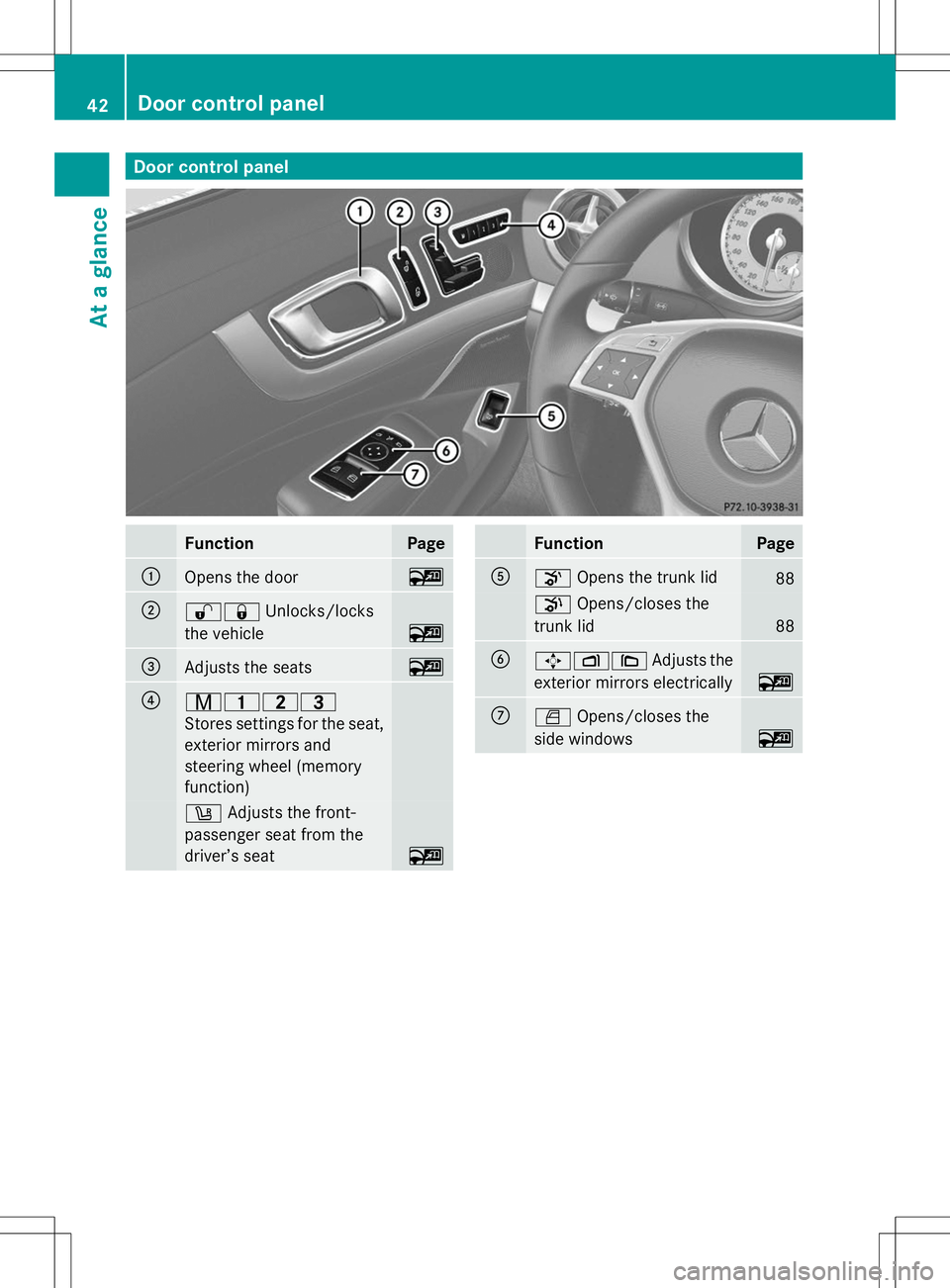
Door control panel
Function Page
:
Opens the door ~
;
%&
Unlocks/locks
the vehicle ~
=
Adjusts the seats ~
?
r45=
Stores settings for the seat,
exterior mirrors and
steering wheel (memory
function)
w
Adjusts the front-
passenger seat from the
driver’s seat ~ Function Page
A
o
Opens the trunk lid 88
p
Opens/closes the
trunk lid 88
B
7Z\
Adjusts the
exterior mirrors electrically ~
C
W
Opens/closes the
side windows ~42
Door cont
rol panelAt a glance
Page 77 of 284
Theft deterrent locking system
Immobilizer
X To activate with the SmartKey: remove
the SmartKey from the ignition lock.
X To activate with KEYLESS-GO: switch the
ignition off and open the driver's door.
X To deactivate: switch on the ignition.
The immobilizer prevents your vehicle from
being started without the correct SmartKey.
When leaving the vehicle, always take the
SmartKey with you and lock the vehicle. The
engine can be started by anyone with a valid
SmartKey that is left inside the vehicle.
i The immobilizer is always deactivated
when you start the engine.
In the event that the engine cannot be
started when the starter battery is fully
charged, the immobilizer may be faulty.
Contact an authorized Mercedes-Benz
Center or call 1-800-FOR-MERCedes (in
USA) or 1-800-387-010 0(in Canada). ATA (anti-theft alarm system)
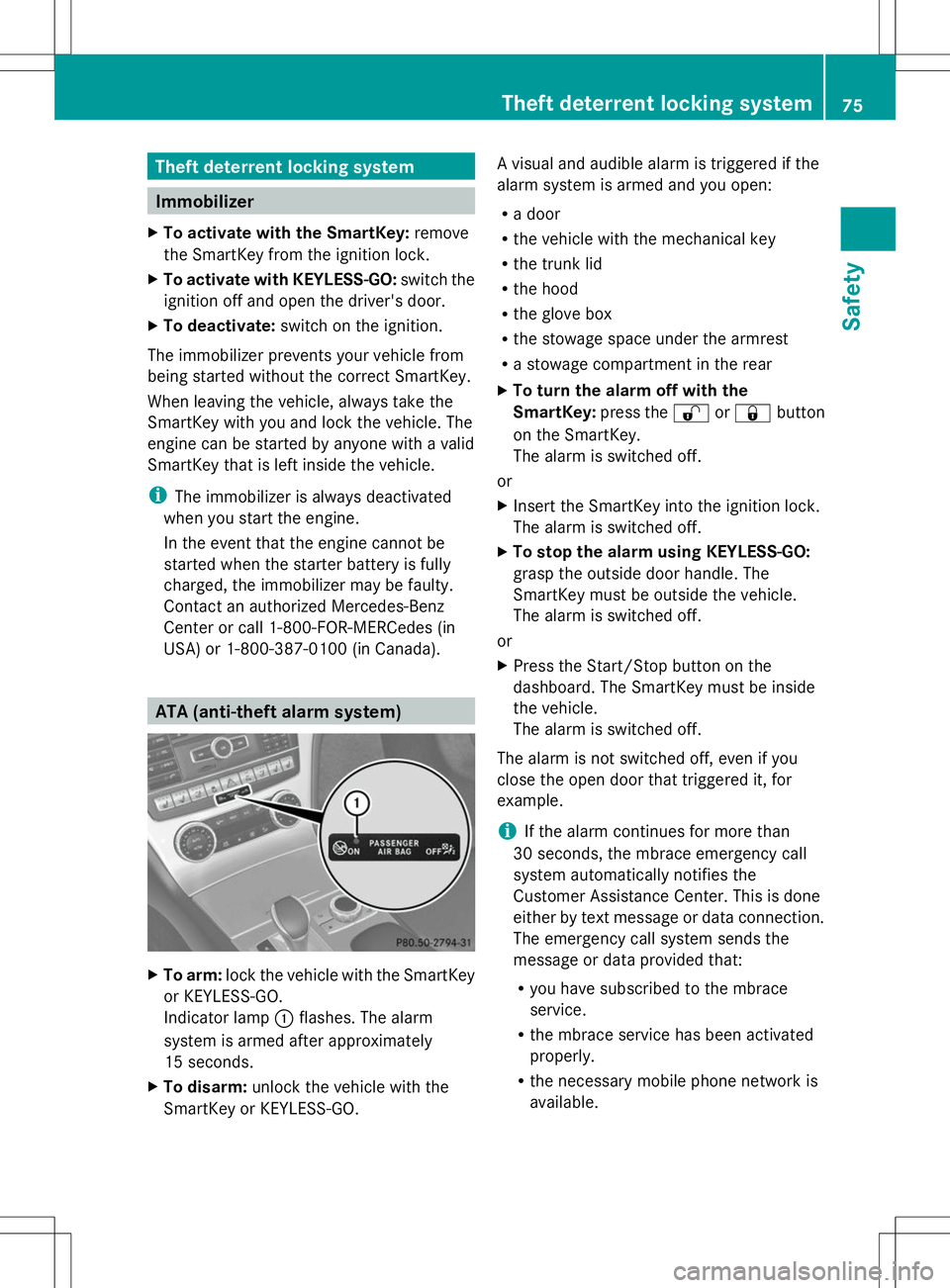
X
To arm: lock the vehicle with the SmartKey
or KEYLESS-GO.
Indicator lamp :flashes. The alarm
system is armed after approximately
15 seconds.
X To disarm: unlock the vehicle with the
SmartKey or KEYLESS-GO. A visual and audible alarm is triggered if the
alarm system is armed and you open:
R
a door
R the vehicle with the mechanical key
R the trunk lid
R the hood
R the glove box
R the stowage space under the armrest
R a stowage compartment in the rear
X To turn the alarm off with the
SmartKey: press the%or& button
on the SmartKey.
The alarm is switched off.
or
X Insert the SmartKey into the ignition lock.
The alarm is switched off.
X To stop the alarm using KEYLESS-GO:
grasp the outside door handle. The
SmartKey must be outside the vehicle.
The alarm is switched off.
or
X Press the Start/Stop button on the
dashboard. The SmartKey must be inside
the vehicle.
The alarm is switched off.
The alarm is not switched off, even if you
close the open door that triggered it, for
example.
i If the alarm continues for more than
30 seconds, the mbrace emergency call
system automatically notifies the
Customer Assistance Center. This is done
either by text message or data connection.
The emergency call system sends the
message or data provided that:
R you have subscribed to the mbrace
service.
R the mbrace service has been activated
properly.
R the necessary mobile phone network is
available. Theft deterrent locking system
75Safety Z
Page 79 of 284
Useful information
..............................78
SmartKey ............................................. 78
Doors .................................................... 83
Trunk .................................................... 84
Side windows ...................................... 89
Roof ...................................................... 91 77Opening and closing
Page 80 of 284
Useful information
i This Operator's Manual describes all
models and all standard and optional
equipment of your vehicle available at the
time of publication of the Operator's
Manual. Country-specific differences are
possible. Please note that your vehicle may
not be equipped with all features
described. This also applies to safety-
related systems and functions.
i Read the information on qualified
specialist workshops: (Y page 30).SmartKey
Important safety notes
G
WARNING
If children are left unsupervised in the vehicle,
they could:
R open the doors, thus endangering other
people or road users.
R get out and disrupt traffic.
R operate the vehicle's equipment.
Additionally, children could set the vehicle in
motion if, for example, they:
R release the parking brake.
R shifting the automatic transmission out of
park position P
R Start the engine.
There is a risk of an accident and injury.
When leaving the vehicle, always take the
SmartKey with you and lock the vehicle. Never
leave children or animals unattended in the
vehicle. Always keep the SmartKey out of
reach of children. G
WARNING
If persons, particularly children are subjected
to prolonged exposure to extreme heat or
cold, there is a risk of injury, possibly even
fatal. Never leave children unattended in the
vehicle. G
WARNING
If you attach heavy or large objects to the
SmartKey, the SmartKey could be
unintentionally turned in the ignition lock. This
could cause the engine to be switched off.
There is a risk of an accident.
Do not attach any heavy or large objects to
the SmartKey. Remove any bulky key rings
before inserting the SmartKey into the
ignition lock.
! Keep the SmartKey away from strong
magnetic fields. Otherwise, the remote
control function could be affected.
Strong magnetic fields can occur in the
vicinity of powerful electrical installations.
Do not keep the SmartKey:
R with electronic devices, e.g. a mobile
phone or another SmartKey
R with metallic objects, e.g. coins or metal
foil
R inside metallic objects, e.g. a metal case
This can affect the functionality of the
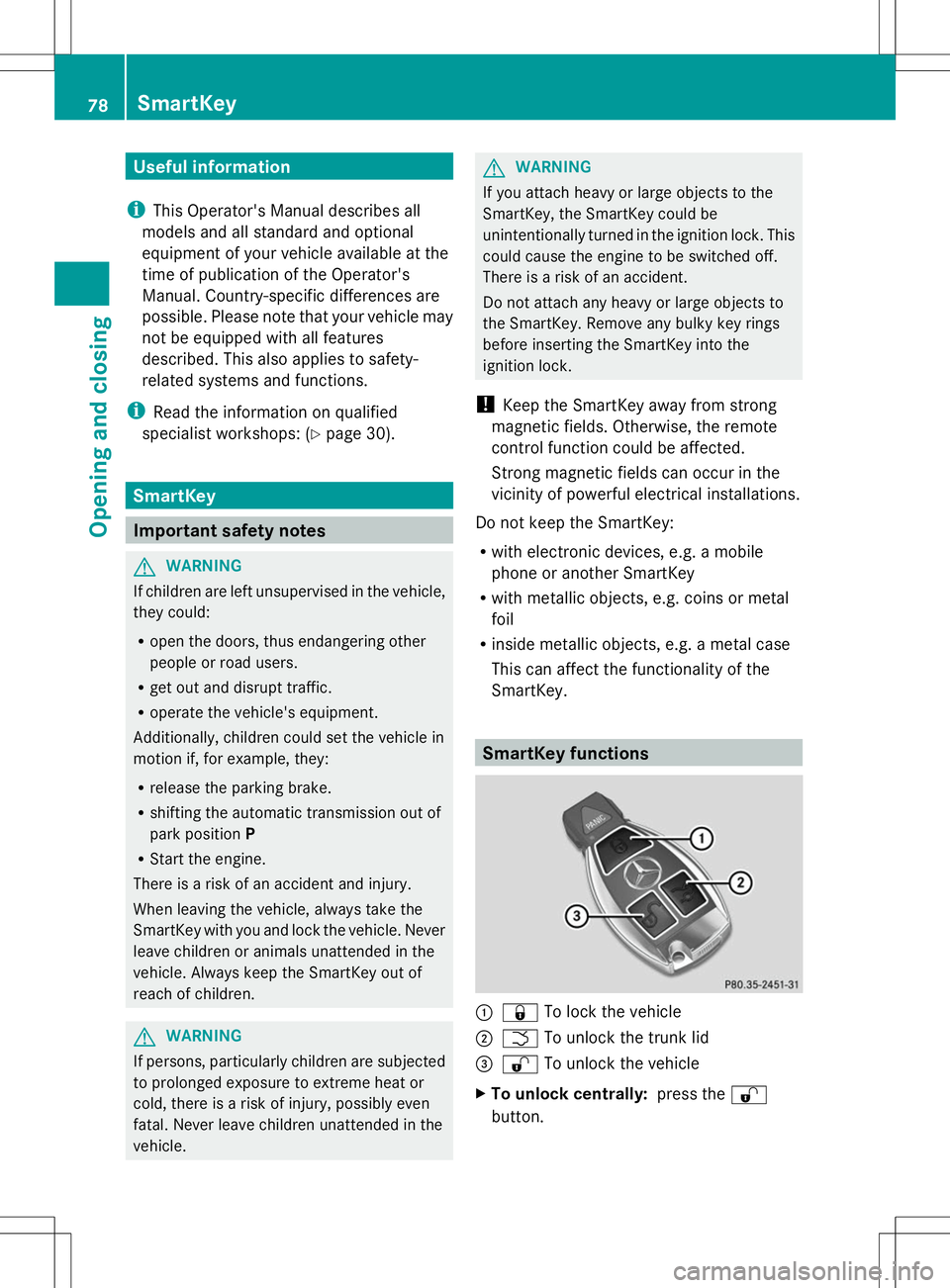
SmartKey. SmartKey functions
:
& To lock the vehicle
; F To unlock the trunk lid
= % To unlock the vehicle
X To unlock centrally: press the%
button. 78
SmartKeyOpening and closing