buttons MERCEDES-BENZ SL-CLASS ROADSTER 2014 Owners Manual
[x] Cancel search | Manufacturer: MERCEDES-BENZ, Model Year: 2014, Model line: SL-CLASS ROADSTER, Model: MERCEDES-BENZ SL-CLASS ROADSTER 2014Pages: 284, PDF Size: 45.52 MB
Page 8 of 284
Breakdown
see Flat tire
see Towing away
Buttons on the COMAND controller 197C
California Important notice for retail
customers and lessees ....................28
Calling up a malfunction
see Display messages
Car
see Vehicle
Care
Carpets .......................................... 223
Car wash ........................................ 222
Display ........................................... 223
Exterior lights ................................ 222
Gear or selector lever ....................223
Interior ........................................... 223
Matte finish ................................... 222
Night View Assist Plus ...................223
Notes ............................................. 221
Paint .............................................. 222
Plastic trim .................................... 223
Power washer ................................ 222
Rear view camera .......................... 222
Roof lining ...................................... 223
Seat belt ........................................ 223
Seat cover ..................................... 223
Sensors ......................................... 222
Tail pipes ....................................... 222
Trim pieces .................................... 223
Washing by hand ........................... 222
Wheels ........................................... 222
Windows ........................................ 222
Wiper blades .................................. 222
Wooden trim .................................. 223
Car keys
see SmartKey
Car wash (care) ................................. 222
CD see also Digital Operator's Manual 188
CD player/CD changer (on-board
computer) .......................................... 161Center console
Lower section .................................. 39
Lower section (AMG vehicles) ..........40
Upper section .................................. 38
Central locking
Automatic locking (on-board
computer) ...................................... 161
Locking/unlocking (SmartKey) ........78
Children
In the vehicle ................................... 62
Restraint systems ............................ 62
Special seat belt retractor ...............66
Child seat
LATCH-type (ISOFIX) child seat
anchors ............................................ 65
Cigarette lighter ................................ 206
Cleaning Mirror turn signal ........................... 222
Clear button ....................................... 197
Climate control Automatic climate control (dual-
zone) .............................................. 115
Controlling automatically ...............116
Cooling with air dehumidification ..116
Defrosting the windows .................116
Defrosting the windshield ..............116
Important safety notes ..................114
Indicator lamp ................................ 116
Maximum cooling .......................... 116
Overview of systems ......................114
Problems with cooling with air
dehumidification ............................ 116
Problem with the rear window
defroster ........................................ 116
Refrigerant ..................................... 278
Refrigerant filling capacity .............279
Setting the air distribution .............116
Setting the airflow .........................116
Setting the air vents ......................116
Setting the climate mode (AIR
FLOW) ............................................ 116
Setting the temperature ................116
Switching air-recirculation mode
on/off ............................................ 116
Switching on/off ........................... 116
Switching residual heat on/off ......116 6
Index
Page 19 of 284
Steering (display message)
..............175
Steering wheel Adjusting (electrically) ...................102
Button overview ............................... 37
Buttons (on-board computer) ......... 160
Important safety notes ..................102
Paddle shifters ............................... 126
Storing settings (memory function) 103
Steering wheel (cleaning
instructions) ...................................... 223
Steering wheel paddle shifters ........126
Stopwatch (RACETIMER) ................... 161
Stowage areas ................................... 204
Stowage compartments Armrest (under) ............................. 204
Center console .............................. 204
Cup holders ................................... 206
Display message) ........................... 163
Eyeglasses compartment ...............204
Glove box ...................................... .204
Important safety information .........204
Stowage net ................................... 204
Stowage net ....................................... 204
Stowage space Center console (rear) .....................204
Umbrella holder ............................. 204
Stowage well beneath the trunk
floor .................................................... 206
Sun visor ............................................ 206
Surround lighting (on-board
computer) .......................................... 161
Suspension tuning Active Body Control (AMG vehicles) 144
Active Body Control (except AMG
vehicles) ........................................ 142
SETUP (on-board computer) ..........161
Switching air-recirculation mode
on/off ................................................. 116
Switching off the alarm (ATA) ............75
Systems settings (COMAND) see also Digital Operator's Manual 188 T
Tachometer ........................................ 160
Tail lamps Display message ............................ 163
see Lights Tank content
Fuel gauge ....................................... 35
Technical data
Capacities ...................................... 275
Information .................................... 274
Tires/wheels ................................. 268
Vehicle data ................................... 279
TELEAID
Call priority .................................... 211
Downloading destinations
(COMAND) ..................................... 207
Downloading routes .......................207
Emergency call .............................. 208
Geo fencing ................................... 207
Locating a stolen vehicle ...............207
MB info call button ........................210
Remote vehicle locking ..................207
Roadside Assistance button ..........209
Search & Send ............................... 207
Self-test ......................................... 207
Speed alert .................................... 207
System .......................................... 207
Triggering the vehicle alarm ........... 207
Vehicle remote malfunction
diagnosis ....................................... 207
Vehicle remote unlocking ..............207
Tele Aid
General notes ................................ 207
Telephone
Accepting a call ............................. 161
Menu (on-board computer) ............161
Number from the phone book ....... .161
Redialing ........................................ 161
Rejecting/ending a call .................161
see also Digital Operator's Manual 188
Telephone compartment ................204
Temperature
Coolant .......................................... 160
Coolant (on-board computer) ......... 161
Engine oil (on-board computer) ...... 161
Outside temperature ..................... .160
Setting (climate control) ................116
Theft deterrent systems
ATA (Anti-Theft Alarm system) .........75
Immobilizer ...................................... 75
Timing (RACETIMER) .........................161
TIREFIT kit .......................................... 228 Index
17
Page 27 of 284
X
To open up warning notes,
environmental notes and malfunction
information: when scrolling through the
text, the cursor jumps automatically to the
drop down warnings, environmental
information and malfunction information.
When you have selected the note, press
W the COMAND controller.
The warning note, environmental note or
malfunction information opens up on the
same page.
X To navigate away from the Digital
Operator's Manual: press and hold the
% back button next to the COMAND
controller.
A window opens and you are asked if you
would like to exit the browser.
X Confirm with "Yes".
The overview of COMAND functions opens.
X Switching functions from the Digital
Operator's Manual to COMAND using
the COMAND function buttons: press the
$, %,horØ button in
COMAND.
The desired menu opens.
X To go back to the Digital Operator's
Manual: use the COMAND controller to
select the ®symbol in the menu bar and
press Wto confirm.
The last page called up in the Digital
Operator's Manual is opened.
i For safety reasons, the "Digital Operator's
Manual" function is switched off while you
are driving. Digital Operator's Manual
25
Page 43 of 284
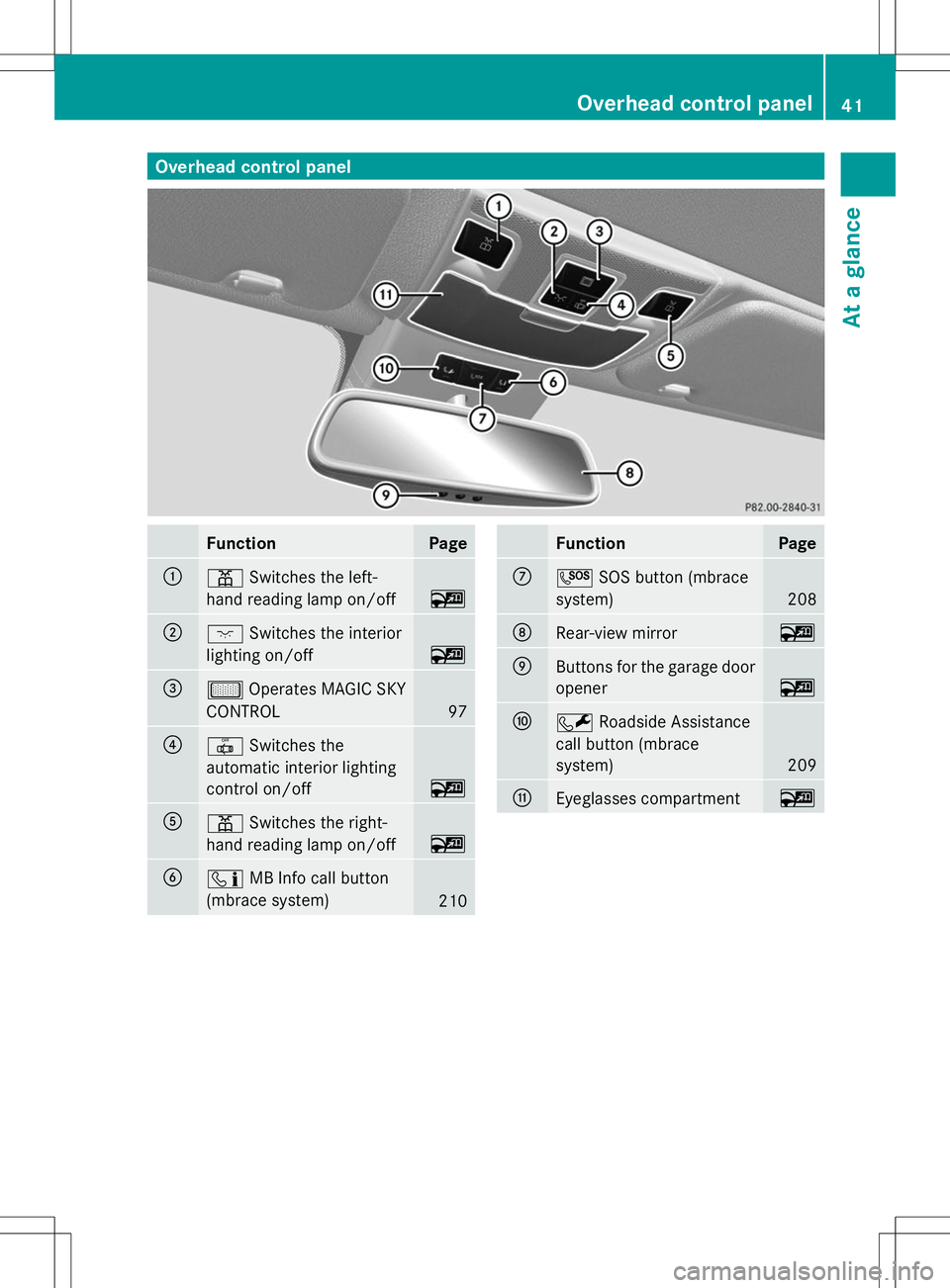
Overhead control panel
Function Page
:
p
Switches the left-
hand reading lamp on/off ~
;
c
Switches the interior
lighting on/off ~
=
µ
Operates MAGIC SKY
CONTROL 97
?
|
Switches the
automatic interior lighting
control on/off ~
A
p
Switches the right-
hand reading lamp on/off ~
B
ï
MB Info call button
(mbrace system) 210 Function Page
C
G
SOS button (mbrace
system) 208
D
Rear-view mirror ~
E
Buttons for the garage door
opener
~
F
F
Roadside Assistance
call button (mbrace
system) 209
G
Eyeglasses compartment ~Overhead control panel
41At a glance
Page 83 of 284
The battery is discharged if battery check
lamp
:does not light up briefly.
X Change the battery (Y page 81).
i If the SmartKey battery is checked within
the signal reception range of the vehicle,
pressing the &or% button:
R locks or
R unlocks the vehicle
i You can get a battery at any qualified
specialist workshop.
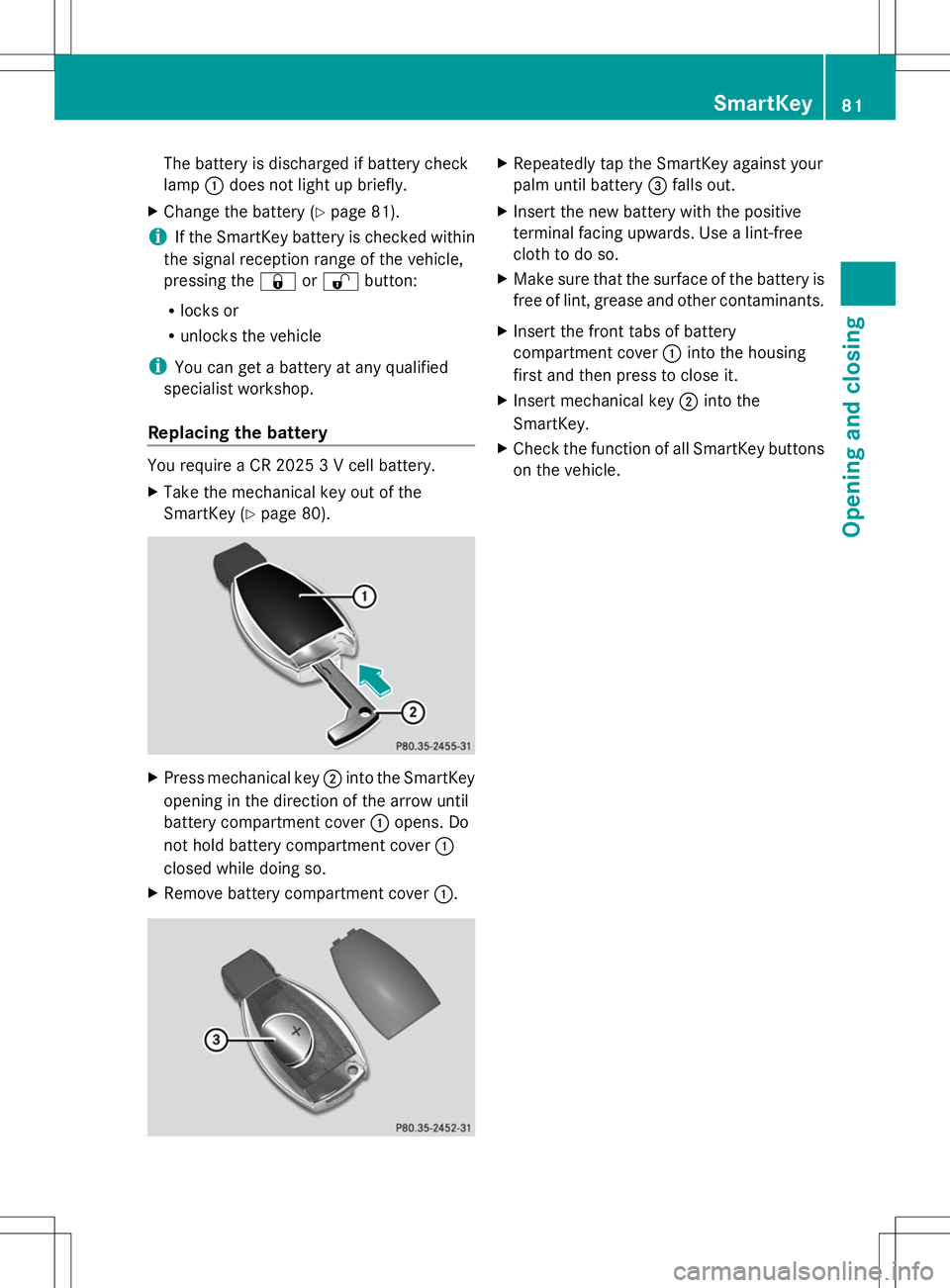
Replacing the battery You require a CR 2025 3 V cell battery.
X
Take the mechanical key out of the
SmartKey (Y page 80). X
Press mechanical key ;into the SmartKey
opening in the direction of the arrow until
battery compartment cover :opens. Do
not hold battery compartment cover :
closed while doing so.
X Remove battery compartment cover :. X
Repeatedly tap the SmartKey against your
palm until battery =falls out.
X Insert the new battery with the positive
terminal facing upwards. Use a lint-free
cloth to do so.
X Make sure that the surface of the battery is
free of lint, grease and other contaminants.
X Insert the front tabs of battery
compartment cover :into the housing
first and then press to close it.
X Insert mechanical key ;into the
SmartKey.
X Check the function of all SmartKey buttons
on the vehicle. SmartKey
81Opening and closing Z
Page 102 of 284
Useful information
i This Operator's Manual describes all
models and all standard and optional
equipment of your vehicle available at the
time of publication of the Operator's
Manual. Country-specific differences are
possible. Please note that your vehicle may
not be equipped with all features
described. This also applies to safety-
related systems and functions.
i Read the information on qualified
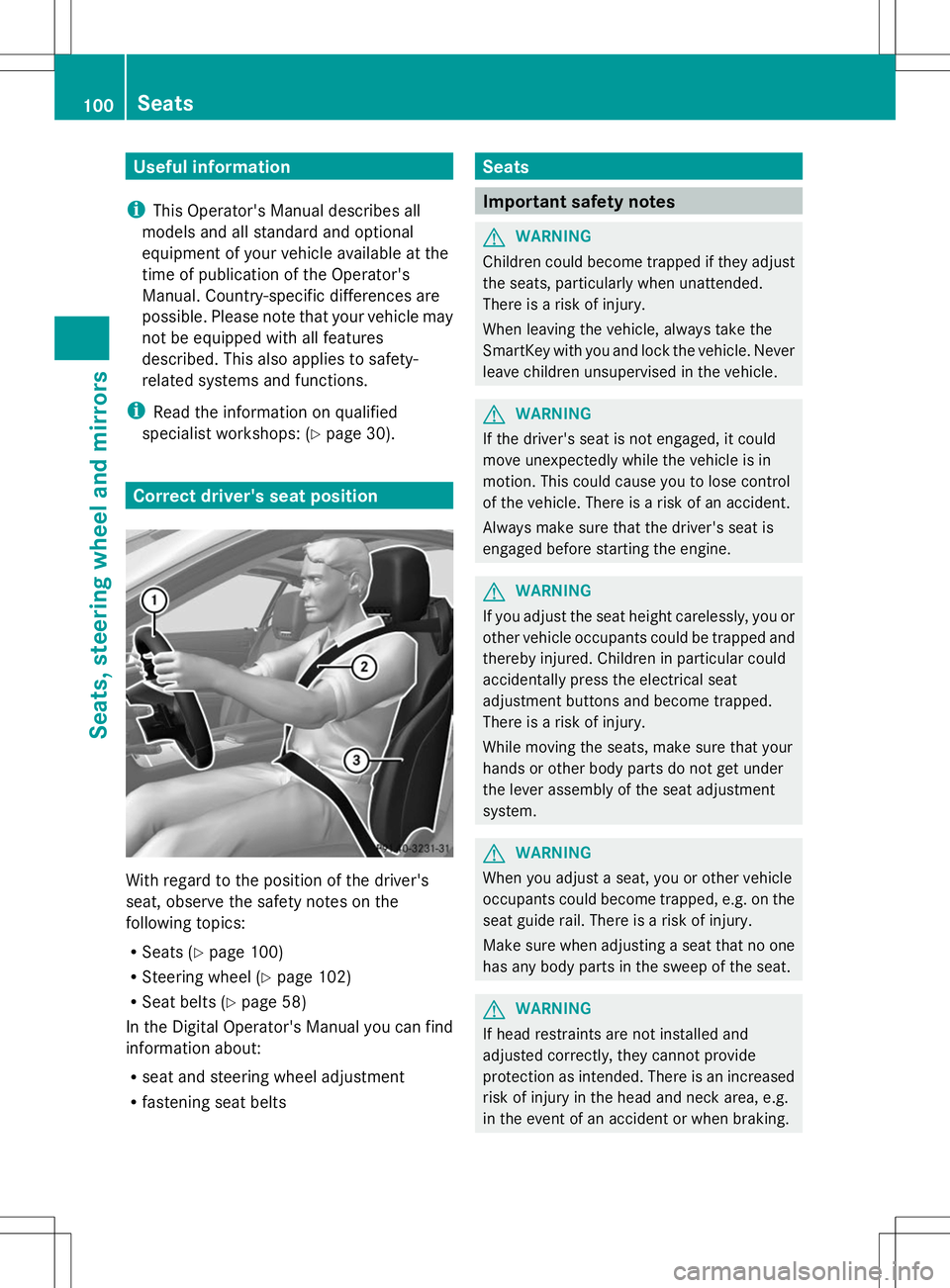
specialist workshops: (Y page 30).Correct driver's seat position
With regard to the position of the driver's
seat, observe the safety notes on the
following topics:
R Seats (Y page 100)
R Steering wheel (Y page 102)
R Seat belts (Y page 58)
In the Digital Operator's Manual you can find
information about:
R seat and steering wheel adjustment
R fastening seat belts Seats
Important safety notes
G
WARNING
Children could become trapped if they adjust
the seats, particularly when unattended.
There is a risk of injury.
When leaving the vehicle, always take the
SmartKey with you and lock the vehicle. Never
leave children unsupervised in the vehicle. G
WARNING
If the driver's seat is not engaged, it could
move unexpectedly while the vehicle is in
motion. This could cause you to lose control
of the vehicle. There is a risk of an accident.
Always make sure that the driver's seat is
engaged before starting the engine. G
WARNING
If you adjust the seat height carelessly, you or
other vehicle occupants could be trapped and
thereby injured. Children in particular could
accidentally press the electrical seat
adjustment buttons and become trapped.
There is a risk of injury.
While moving the seats, make sure that your
hands or other body parts do not get under
the lever assembly of the seat adjustment
system. G
WARNING
When you adjust a seat, you or other vehicle
occupants could become trapped, e.g. on the
seat guide rail. There is a risk of injury.
Make sure when adjusting a seat that no one
has any body parts in the sweep of the seat. G
WARNING
If head restraints are not installed and
adjusted correctly, they cannot provide
protection as intended. There is an increased
risk of injury in the head and neck area, e.g.
in the event of an accident or when braking. 100
SeatsSeats, steering wheel and mirrors
Page 163 of 284
?
Left control panel
A Back button
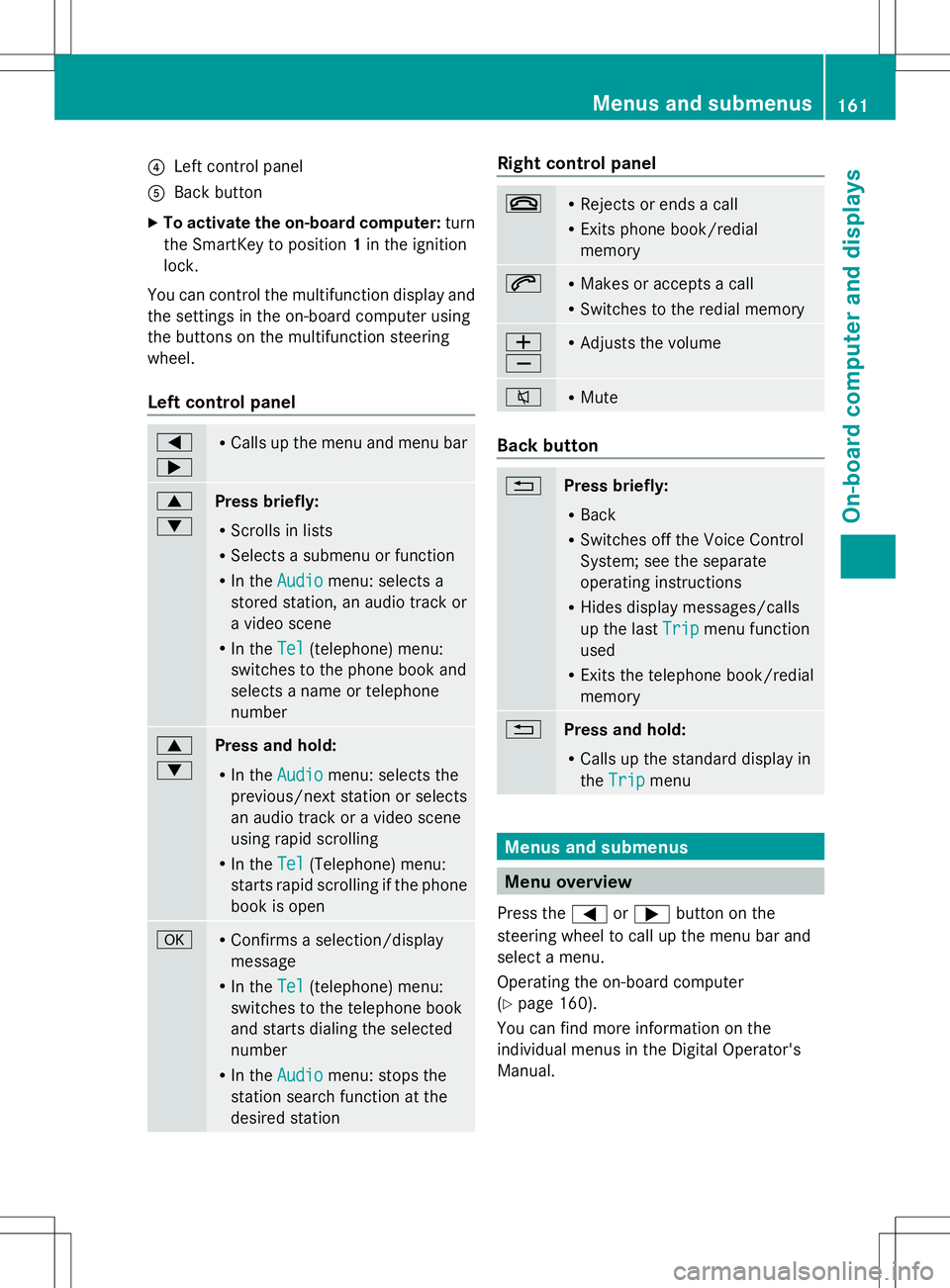
X To activate the on-board computer: turn
the SmartKey to position 1in the ignition
lock.
You can control the multifunction display and
the settings in the on-board computer using
the buttons on the multifunction steering
wheel.
Left control panel =
; R
Calls up the menu and menu bar 9
:
Press briefly:
R
Scrolls in lists
R Selects a submenu or function
R In the Audio Audio menu: selects a
stored station, an audio track or
a video scene
R In the Tel Tel(telephone) menu:
switches to the phone book and
selects a name or telephone
number 9
:
Press and hold:
R
In the Audio Audio menu: selects the
previous/next station or selects
an audio track or a video scene
using rapid scrolling
R In the Tel Tel(Telephone) menu:
starts rapid scrolling if the phone
book is open a R
Confirms a selection/display
message
R In the Tel Tel(telephone) menu:
switches to the telephone book
and starts dialing the selected
number
R In the Audio Audio menu: stops the
station search function at the
desired station Right control panel
~ R
Rejects or ends a call
R Exits phone book/redial
memory 6 R
Makes or accepts a call
R Switches to the redial memory W
X R
Adjusts the volume 8 R
Mute Back button
%
Press briefly:
R
Back
R Switches off the Voice Control
System; see the separate
operating instructions
R Hides display messages/calls
up the last Trip Tripmenu function
used
R Exits the telephone book/redial
memory %
Press and hold:
R
Calls up the standard display in
the Trip Trip menu Menus and submenus
Menu overview
Press the =or; button on the
steering wheel to call up the menu bar and
select a menu.
Operating the on-board computer
(Y page 160).
You can find more information on the
individual menus in the Digital Operator's
Manual. Menus and submenus
161On-board computer and displays Z
Page 192 of 284
R
Gracenote ®
is a registered trademark of
Gracenote, Inc.
R ZAGATSurvey ®
and related brands are
registered trademarks of ZagatSurvey,
LLC. Function restrictions
For safety reasons, some COMAND functions
are restricted or unavailable while the vehicle
is in motion. You will notice this, for example
because either you will not be able to select
certain menu items or COMAND will display
a message to this effect. COMAND operating system
Overview
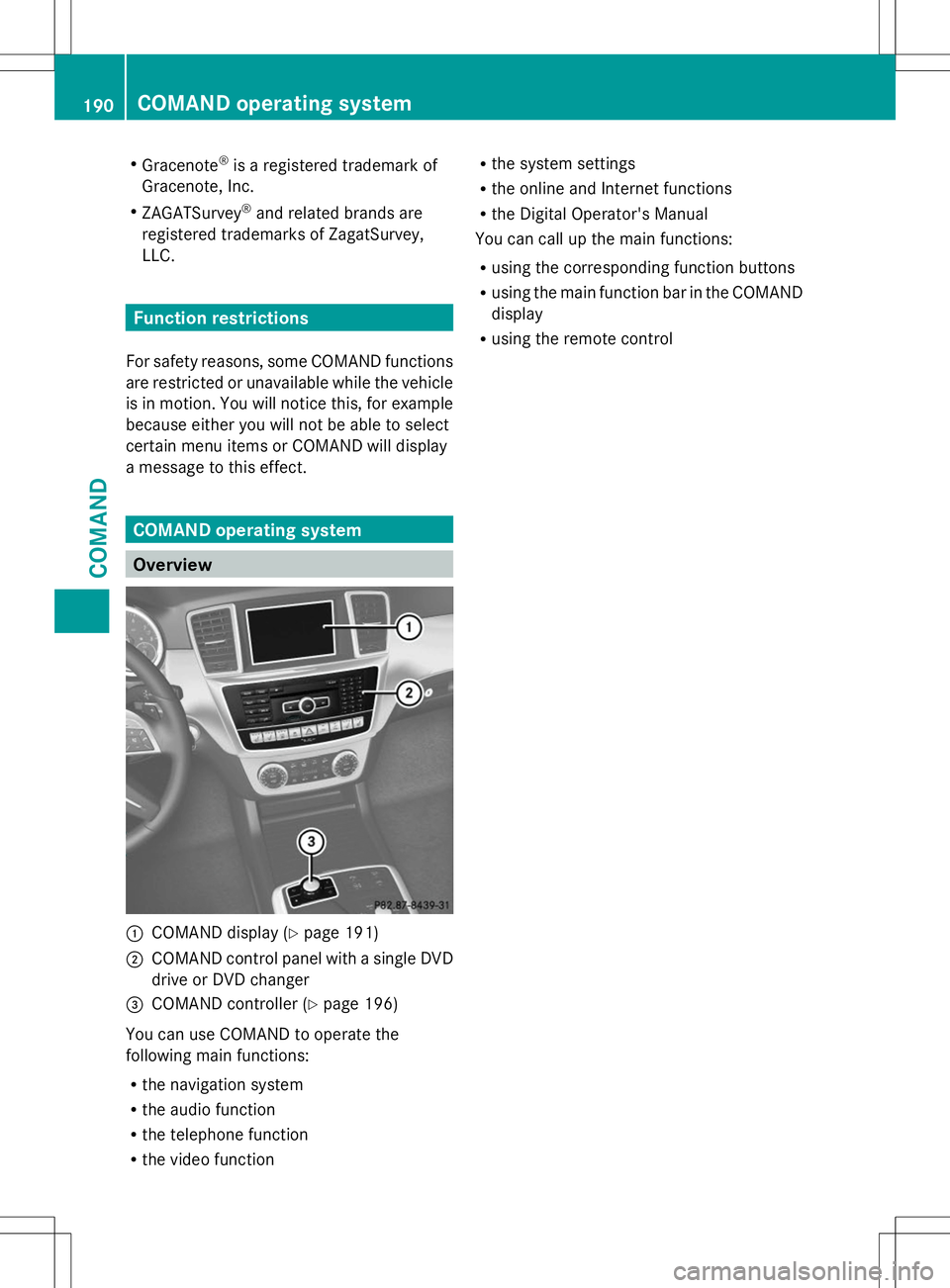
:
COMAND display (Y page 191)
; COMAND control panel with a single DVD
drive or DVD changer
= COMAND controller (Y page 196)
You can use COMAND to operate the
following main functions:
R the navigation system
R the audio function
R the telephone function
R the video function R
the system settings
R the online and Internet functions
R the Digital Operator's Manual
You can call up the main functions:
R using the corresponding function buttons
R using the main function bar in the COMAND
display
R using the remote control 190
COMAND operating systemCOMAND
Page 199 of 284
The COMAND controller can be:
R
pressed briefly or pressed and held W
R turned clockwise or counter-clockwise
cVd
R slid left or right XVY
R slid forwards or backwards ZVÆ
R slid diagonally aVb
Example of operation In the instructions, operating sequences are
described as follows:
X Press the $button.
Radio mode is activated.
X Select Radio
Radio by sliding VÆand turning
cVd the COMAND controller and press
W to confirm.
X Confirm Station List
Station List by pressingW.
The station list appears. Buttons on the COMAND controller
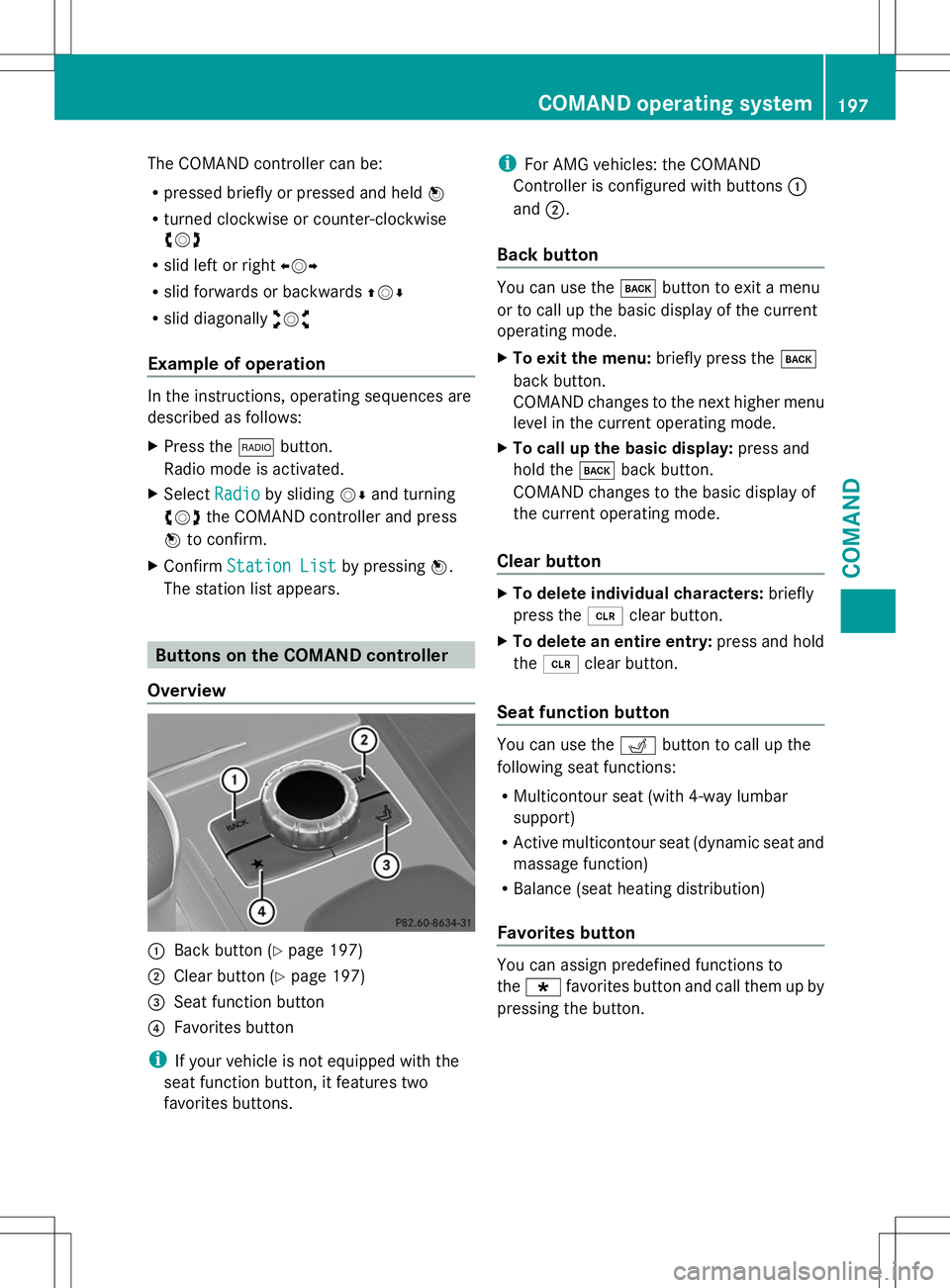
Overview :
Back button (Y page 197)
; Clear button (Y page 197)
= Seat function button
? Favorites button
i If your vehicle is not equipped with the
seat function button, it features two
favorites buttons. i
For AMG vehicles: the COMAND
Controller is configured with buttons :
and ;.
Back button You can use the
kbutton to exit a menu
or to call up the basic display of the current
operating mode.
X To exit the menu: briefly press thek
back button.
COMAND changes to the next higher menu
level in the current operating mode.
X To call up the basic display: press and
hold the kback button.
COMAND changes to the basic display of
the current operating mode.
Clear button X
To delete individual characters: briefly
press the 2clear button.
X To delete an entire entry: press and hold
the 2 clear button.
Seat function button You can use the
Tbutton to call up the
following seat functions:
R Multicontour seat (with 4-way lumbar
support)
R Active multicontour seat (dynamic seat and
massage function)
R Balance (seat heating distribution)
Favorites button You can assign predefined functions to
the
; favorites button and call them up by
pressing the button. COMAND operating system
197COMAND Z
Page 210 of 284
R
The indicator lamp in one or more of the
following buttons continues to light up red
after the system self-diagnosis:
- SOS button
- F Roadside Assistance call button
- ï MB Info call button
R After the system self-diagnosis, the
Inoperative
Inoperative orService Not Service Not
Activated
Activated message appears in the
multifunction display.
If a malfunction is indicated as outlined
above, the system may not operate as
expected. In the event of an emergency, help
will have to be summoned by other means.
Have the system checked at the nearest
authorized Mercedes-Benz Center or contact
the following service hotlines:
R USA: Mercedes-Benz Customer Assistance
Center at
1-800-FOR-MERCedes (1-800-367-6372)
or 1-866-990-9007
R Canada: Customer Service at
1-888-923-8367
Emergency call Important safety notes
G
WARNING
It can be dangerous to remain in the vehicle,
even if you have pressed the SOS button in an
emergency if:
R you see smoke inside or outside of the
vehicle, e.g. if there is a fire after an
accident
R the vehicle is on a dangerous section of
road
R the vehicle is not visible or cannot easily be
seen by other road users, particularly when
dark or in poor visibility conditions
There is a risk of an accident and injury.
Leave the vehicle immediately in this or
similar situations as soon as it is safe to do
so. Move to a safe location along with other
vehicle occupants. In such situations, secure the vehicle in accordance with national
regulations, e. g. with a warning triangle.
You must have a license agreement to
activate the mbrace service. Make sure that
your system is activated and operational. To
register, press the ïMB Info call button.
If any of the steps mentioned are not carried
out, the system may not be activated.
If you have questions about the activation,
contact one of the following telephone
hotlines:
R USA: Mercedes-Benz Customer Assistance
Center at
1-800-FOR-MERCedes (1-800-367-6372)
or 1-866-990-9007
R Canada: Customer Service at
1-888-923-8367
General notes
An emergency call is dialed automatically if
an air bag or Emergency Tensioning Device is
triggered.
i You cannot end an automatically
triggered emergency call yourself.
An emergency call can also be initiated
manually.
As soon as the emergency call has been
initiated, the indicator lamp in the SOS button
flashes. The multifunction display shows the
Connecting Call Connecting Call message.
The audio output is muted.
Once the connection has been made, the
Call Connected Call Connected message appears in the
multifunction display.
All important information on the emergency
is transmitted, for example:
R Current location of the vehicle (as
determined by the GPS system)
R Vehicle identification number
R Information on the severity of the accident
Shortly after the emergency call has been
initiated, a voice connection is automatically
established between the Customer
Assistance Center and the vehicle occupants. 208
FeaturesStowage and features