center console MERCEDES-BENZ SL-CLASS ROADSTER 2014 Owners Manual
[x] Cancel search | Manufacturer: MERCEDES-BENZ, Model Year: 2014, Model line: SL-CLASS ROADSTER, Model: MERCEDES-BENZ SL-CLASS ROADSTER 2014Pages: 284, PDF Size: 45.52 MB
Page 8 of 284
Breakdown
see Flat tire
see Towing away
Buttons on the COMAND controller 197C
California Important notice for retail
customers and lessees ....................28
Calling up a malfunction
see Display messages
Car
see Vehicle
Care
Carpets .......................................... 223
Car wash ........................................ 222
Display ........................................... 223
Exterior lights ................................ 222
Gear or selector lever ....................223
Interior ........................................... 223
Matte finish ................................... 222
Night View Assist Plus ...................223
Notes ............................................. 221
Paint .............................................. 222
Plastic trim .................................... 223
Power washer ................................ 222
Rear view camera .......................... 222
Roof lining ...................................... 223
Seat belt ........................................ 223
Seat cover ..................................... 223
Sensors ......................................... 222
Tail pipes ....................................... 222
Trim pieces .................................... 223
Washing by hand ........................... 222
Wheels ........................................... 222
Windows ........................................ 222
Wiper blades .................................. 222
Wooden trim .................................. 223
Car keys
see SmartKey
Car wash (care) ................................. 222
CD see also Digital Operator's Manual 188
CD player/CD changer (on-board
computer) .......................................... 161Center console
Lower section .................................. 39
Lower section (AMG vehicles) ..........40
Upper section .................................. 38
Central locking
Automatic locking (on-board
computer) ...................................... 161
Locking/unlocking (SmartKey) ........78
Children
In the vehicle ................................... 62
Restraint systems ............................ 62
Special seat belt retractor ...............66
Child seat
LATCH-type (ISOFIX) child seat
anchors ............................................ 65
Cigarette lighter ................................ 206
Cleaning Mirror turn signal ........................... 222
Clear button ....................................... 197
Climate control Automatic climate control (dual-
zone) .............................................. 115
Controlling automatically ...............116
Cooling with air dehumidification ..116
Defrosting the windows .................116
Defrosting the windshield ..............116
Important safety notes ..................114
Indicator lamp ................................ 116
Maximum cooling .......................... 116
Overview of systems ......................114
Problems with cooling with air
dehumidification ............................ 116
Problem with the rear window
defroster ........................................ 116
Refrigerant ..................................... 278
Refrigerant filling capacity .............279
Setting the air distribution .............116
Setting the airflow .........................116
Setting the air vents ......................116
Setting the climate mode (AIR
FLOW) ............................................ 116
Setting the temperature ................116
Switching air-recirculation mode
on/off ............................................ 116
Switching on/off ........................... 116
Switching residual heat on/off ......116 6
Index
Page 9 of 284
Switching the rear window
defroster on/of
f............................ 116
Switching the ZONE function on/
off .................................................. 116
Cockpit
Overview .......................................... 34
see Instrument cluster
COMAND
Display ........................................... 191
Examples of operation ...................197
Menu overview .............................. 192
COMAND controller ...........................196
COMAND control panel .....................195
COMAND display Driving conditions menu (AMG
vehicles) ........................................ 144
Driving conditions menu (except
AMG vehicles) ................................ 143
Combination switch ..........................108
Connecting a USB device see also Digital Operator's Manual 188
Consumption statistics (on-board
computer) .......................................... 161
Convenience telephony see also Digital Operator's Manual 188
Coolant (engine)
Checking the level .........................219
Display message ............................ 172
Filling capacity ............................... 277
Important safety notes ..................277
Temperature (on-board
computer) ...................................... 161
Temperature gauge ........................ 160
Warning lamp ................................. 183
Cooling
see Climate control
Copyright ............................................. 32
Cornering light function Display message ............................ 163
Function/notes ............................. 108
Crash-responsive emergency
lighting ............................................... 110
Cruise control Cruise control lever .......................133
Deactivating ................................... 133
Display message ............................ 163
Driving system ............................... 132Function/notes
............................. 132
Important safety notes ..................132
Selecting ........................................ 133
Setting a speed .............................. 133
Storing and maintaining current
speed ............................................ .133
Cup holder
Center console .............................. 206
Important safety notes ..................206
Customer Assistance Center (CAC) ...31
Customer Relations Department .......31 D
Dashboard lighting see Instrument cluster lighting
Data
see Technical data
Daytime running lamps
Display message ............................ 163
Function/notes .....................107, 108
Switching on/off (on-board
computer) ...................................... 161
Dealerships
see Qualified specialist workshop
Declarations of conformity ................. 30
Delayed switch-off Exterior lighting (on-board
computer) ...................................... 161
Interior lighting .............................. 161
Diagnostics connection ......................30
Digital Operator's Manual Contents .......................................... 24
Installation ....................................... 21
Introduction ..................................... 21
Keyword search ............................... 23
Operating notes ............................... 22
Visual search ................................... 22
Digital speedometer .........................161
Display (cleaning instructions) ........223
Display messages ASSYST PLUS ................................ 220
Calling up (on-board
computer) ...................................... 163
Driving systems ............................. 173
Engine ............................................ 172
General notes ................................ 163
Hiding (on-board computer) ...........163 Index
7
Page 19 of 284
Steering (display message)
..............175
Steering wheel Adjusting (electrically) ...................102
Button overview ............................... 37
Buttons (on-board computer) ......... 160
Important safety notes ..................102
Paddle shifters ............................... 126
Storing settings (memory function) 103
Steering wheel (cleaning
instructions) ...................................... 223
Steering wheel paddle shifters ........126
Stopwatch (RACETIMER) ................... 161
Stowage areas ................................... 204
Stowage compartments Armrest (under) ............................. 204
Center console .............................. 204
Cup holders ................................... 206
Display message) ........................... 163
Eyeglasses compartment ...............204
Glove box ...................................... .204
Important safety information .........204
Stowage net ................................... 204
Stowage net ....................................... 204
Stowage space Center console (rear) .....................204
Umbrella holder ............................. 204
Stowage well beneath the trunk
floor .................................................... 206
Sun visor ............................................ 206
Surround lighting (on-board
computer) .......................................... 161
Suspension tuning Active Body Control (AMG vehicles) 144
Active Body Control (except AMG
vehicles) ........................................ 142
SETUP (on-board computer) ..........161
Switching air-recirculation mode
on/off ................................................. 116
Switching off the alarm (ATA) ............75
Systems settings (COMAND) see also Digital Operator's Manual 188 T
Tachometer ........................................ 160
Tail lamps Display message ............................ 163
see Lights Tank content
Fuel gauge ....................................... 35
Technical data
Capacities ...................................... 275
Information .................................... 274
Tires/wheels ................................. 268
Vehicle data ................................... 279
TELEAID
Call priority .................................... 211
Downloading destinations
(COMAND) ..................................... 207
Downloading routes .......................207
Emergency call .............................. 208
Geo fencing ................................... 207
Locating a stolen vehicle ...............207
MB info call button ........................210
Remote vehicle locking ..................207
Roadside Assistance button ..........209
Search & Send ............................... 207
Self-test ......................................... 207
Speed alert .................................... 207
System .......................................... 207
Triggering the vehicle alarm ........... 207
Vehicle remote malfunction
diagnosis ....................................... 207
Vehicle remote unlocking ..............207
Tele Aid
General notes ................................ 207
Telephone
Accepting a call ............................. 161
Menu (on-board computer) ............161
Number from the phone book ....... .161
Redialing ........................................ 161
Rejecting/ending a call .................161
see also Digital Operator's Manual 188
Telephone compartment ................204
Temperature
Coolant .......................................... 160
Coolant (on-board computer) ......... 161
Engine oil (on-board computer) ...... 161
Outside temperature ..................... .160
Setting (climate control) ................116
Theft deterrent systems
ATA (Anti-Theft Alarm system) .........75
Immobilizer ...................................... 75
Timing (RACETIMER) .........................161
TIREFIT kit .......................................... 228 Index
17
Page 28 of 284
Protection of the environment
General notes
H
Environmental note
Daimler's declared policy is one of
comprehensive environmental protection.
The objectives are for the natural resources
that form the basis of our existence on this
planet to be used sparingly and in a manner
that takes the requirements of both nature
and humanity into account.
You too can help to protect the environment
by operating your vehicle in an
environmentally responsible manner.
Fuel consumption and the rate of engine,
transmission, brake and tire wear are affected
by these factors:
R operating conditions of your vehicle
R your personal driving style
You can influence both factors. You should
bear the following in mind:
Operating conditions:
R avoid short trips as these increase fuel
consumption.
R always make sure that the tire pressures
are correct.
R do not carry any unnecessary weight.
R remove roof racks once you no longer need
them.
R a regularly serviced vehicle will contribute
to environmental protection. You should
therefore adhere to the service intervals.
R always have service work carried out at a
qualified specialist workshop.
Personal driving style:
R do not depress the accelerator pedal when
starting the engine.
R do not warm up the engine when the vehicle
is stationary.
R drive carefully and maintain a safe distance
from the vehicle in front.
R avoid frequent, sudden acceleration and
braking. R
change gear in good time and use each gear
only up to Ôof its maximum engine speed.
R switch off the engine in stationary traffic.
R keep an eye on the vehicle's fuel
consumption. Environmental concerns and
recommendations
Wherever the operating instructions require
you to dispose of materials, first try to
regenerate or re-use them. Observe the
relevant environmental rules and regulations
when disposing of materials. In this way you
will help to protect the environment. Genuine Mercedes-Benz parts
H
Environmental note
Daimler AG also supplies reconditioned major
assemblies and parts which are of the same
quality as new parts. They are covered by the
same Limited Warranty entitlements as new
parts.
! Air bags and Emergency Tensioning
Devices, as well as control units and
sensors for these restraint systems, may be
installed in the following areas of your
vehicle:
R doors
R door pillars
R door sills
R seats
R cockpit
R instrument cluster
R center console
Do not install accessories such as audio
systems in these areas. Do not carry out
repairs or welding. You could impair the
operating efficiency of the restraint
systems. 26
Introduction
Page 35 of 284
Dashboard
........................................... 34
Instrument cluster ..............................35
Multifunction steering wheel .............37
Center console .................................... 38
Overhead control panel ......................41
Door control panel .............................. 42 33At a glance
Page 40 of 284
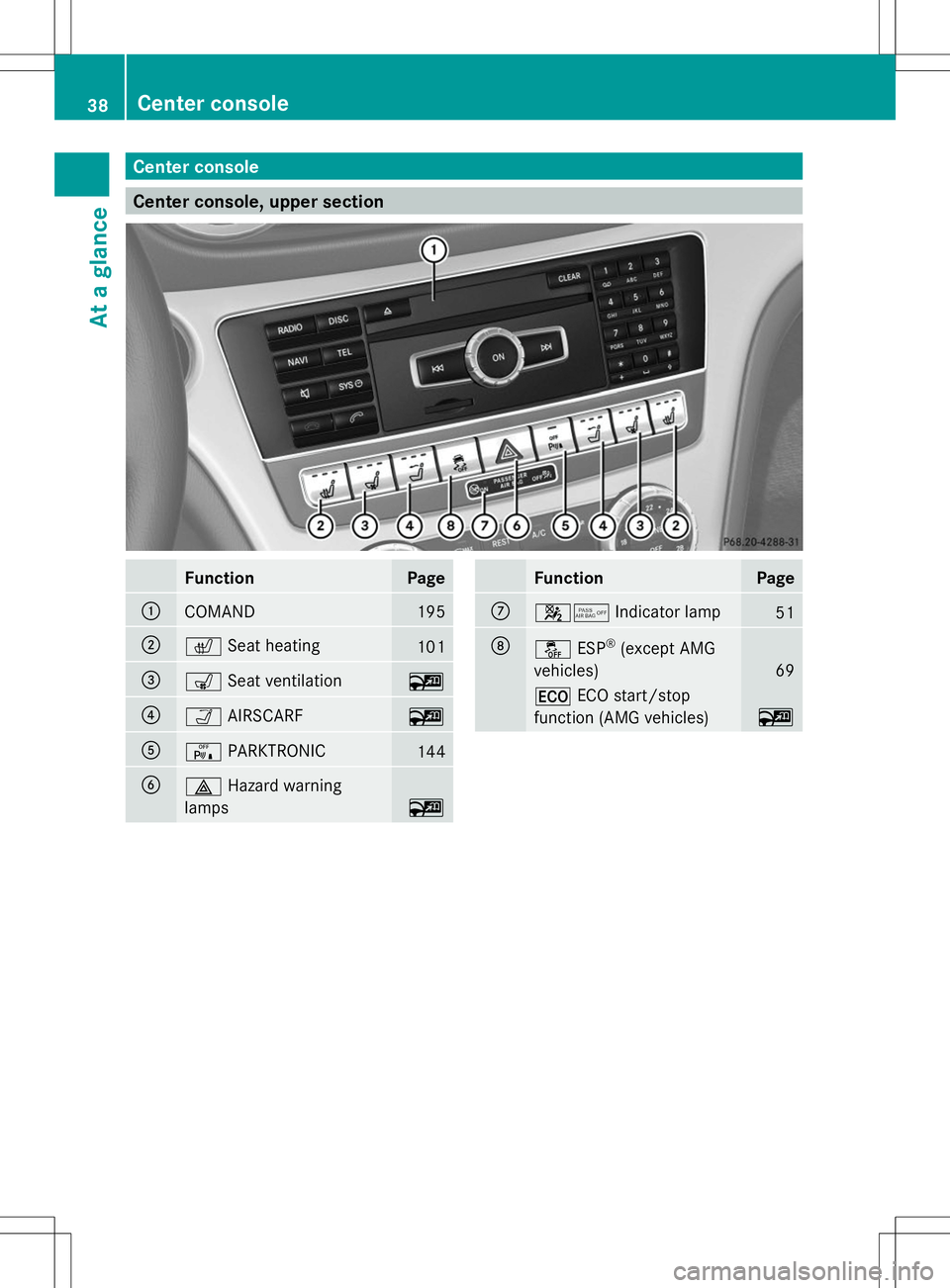
Center console
Center console, upper section
Function Page
:
COMAND 195
;
c
Seat heating 101
=
s
Seat ventilation ~
?
Ò
AIRSCARF ~
A
c
PARKTRONIC 144
B
£
Hazard warning
lamps ~ Function Page
C
45
Indicator lamp 51
D
å
ESP®
(except AMG
vehicles) 69
¤
ECO start/stop
function (AMG vehicles) ~38
Center consoleAt a glance
Page 41 of 284
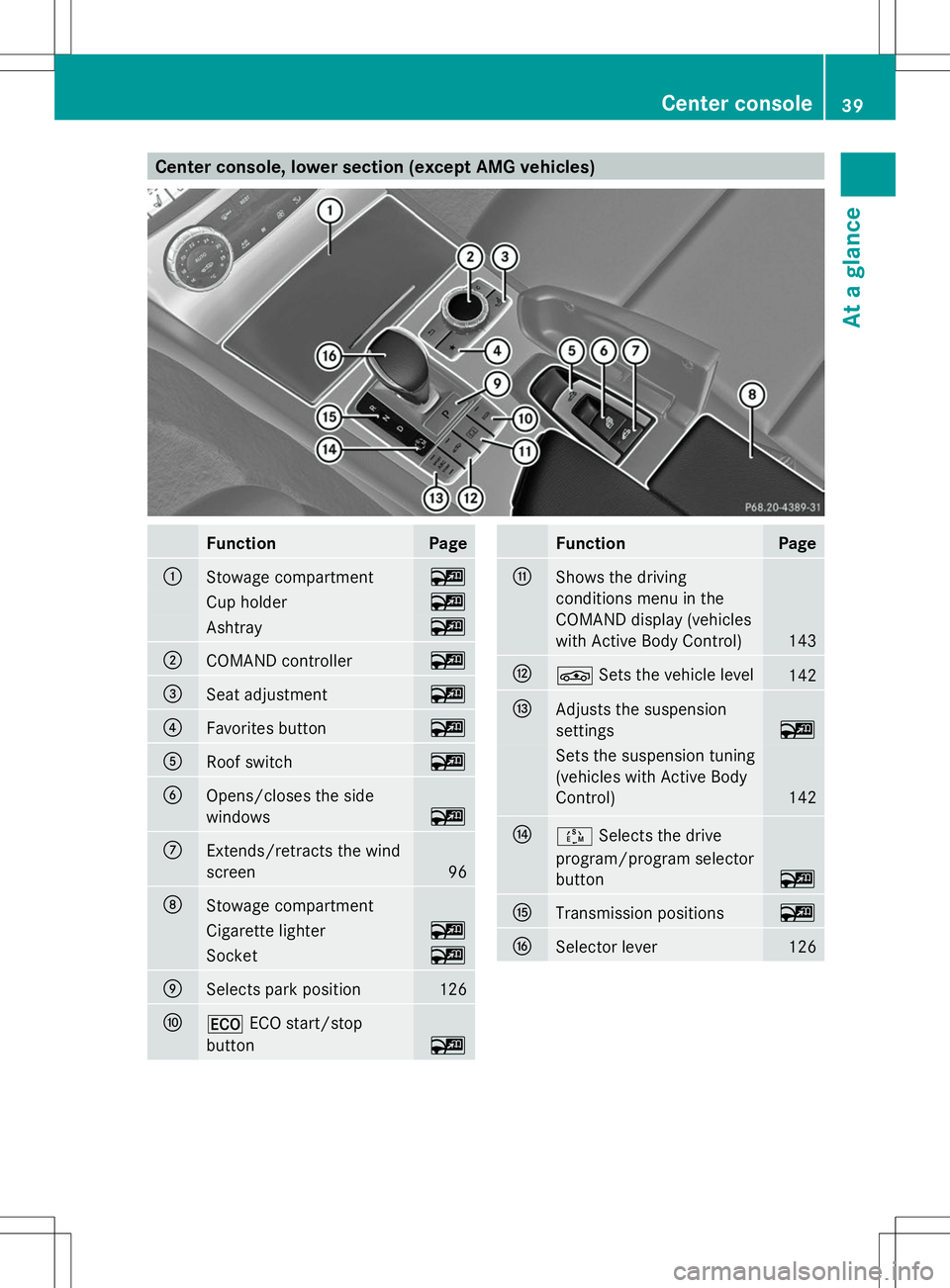
Center console, lower section (except AMG vehicles)
Function Page
:
Stowage compartment ~
Cup holder ~
Ashtray ~
;
COMAND controller ~
=
Seat adjustment ~
?
Favorites button ~
A
Roof switch ~
B
Opens/closes the side
windows ~
C
Extends/retracts the wind
screen
96
D
Stowage compartment
Cigarette lighter ~
Socket ~
E
Selects park position 126
F
¤
ECO start/stop
button ~ Function Page
G
Shows the driving
conditions menu in the
COMAND display (vehicles
with Active Body Control)
143
H
É
Sets the vehicle level 142
I
Adjusts the suspension
settings
~
Sets the suspension tuning
(vehicles with Active Body
Control)
142
J
Ú
Selects the drive
program/program selector
button ~
K
Transmission positions ~
L
Selector lever 126Center console
39At a glance
Page 42 of 284
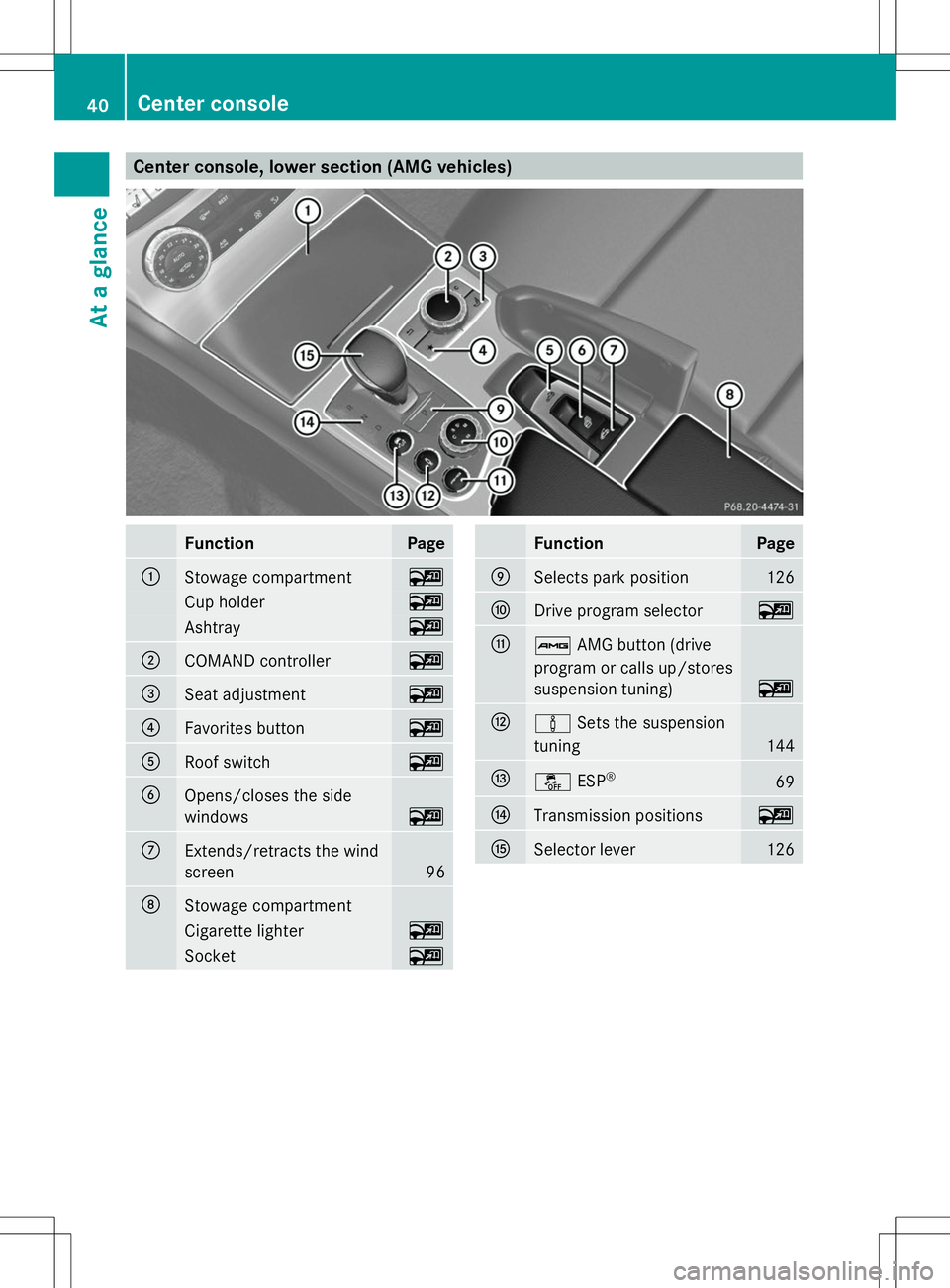
Center console, lower section (AMG vehicles)
Function Page
:
Stowage compartment ~
Cup holder ~
Ashtray ~
;
COMAND controller ~
=
Seat adjustment ~
?
Favorites button ~
A
Roof switch ~
B
Opens/closes the side
windows
~
C
Extends/retracts the wind
screen
96
D
Stowage compartment
Cigarette lighter ~
Socket ~ Function Page
E
Selects park position 126
F
Drive program selector ~
G
ß
AMG button (drive
program or calls up/stores
suspension tuning) ~
H
à
Sets the suspension
tuning 144
I
å
ESP® 69
J
Transmission positions ~
K
Selector lever 12640
Center consoleAt a glance
Page 51 of 284
determined by the Occupant Classification
System (OCS) (Y
page 51).
The lighter the passenger-side occupant, the
higher the vehicle deceleration rate required
(predicted at the start of the impact) for
second-stage inflation of the front-passenger
front air bag. In the second stage, the front
air bags are inflated with the maximum
amount of propellant gas available.
The front air bags are not deployed in
situations where a low impact severity is
predicted. You will then be protected by the
fastened seat belt.
The front-passenger front air bag will only
deploy if:
R the system, based on the OCS weight
sensor readings, detects that the front-
passenger seat is occupied
R the PASSENGER AIR BAG OFF indicator
lamp on the center console is not lit
(Y page 51)
R the air bag control unit predicts a high
impact severity
Knee bags i
Observe the "Important safety notes"
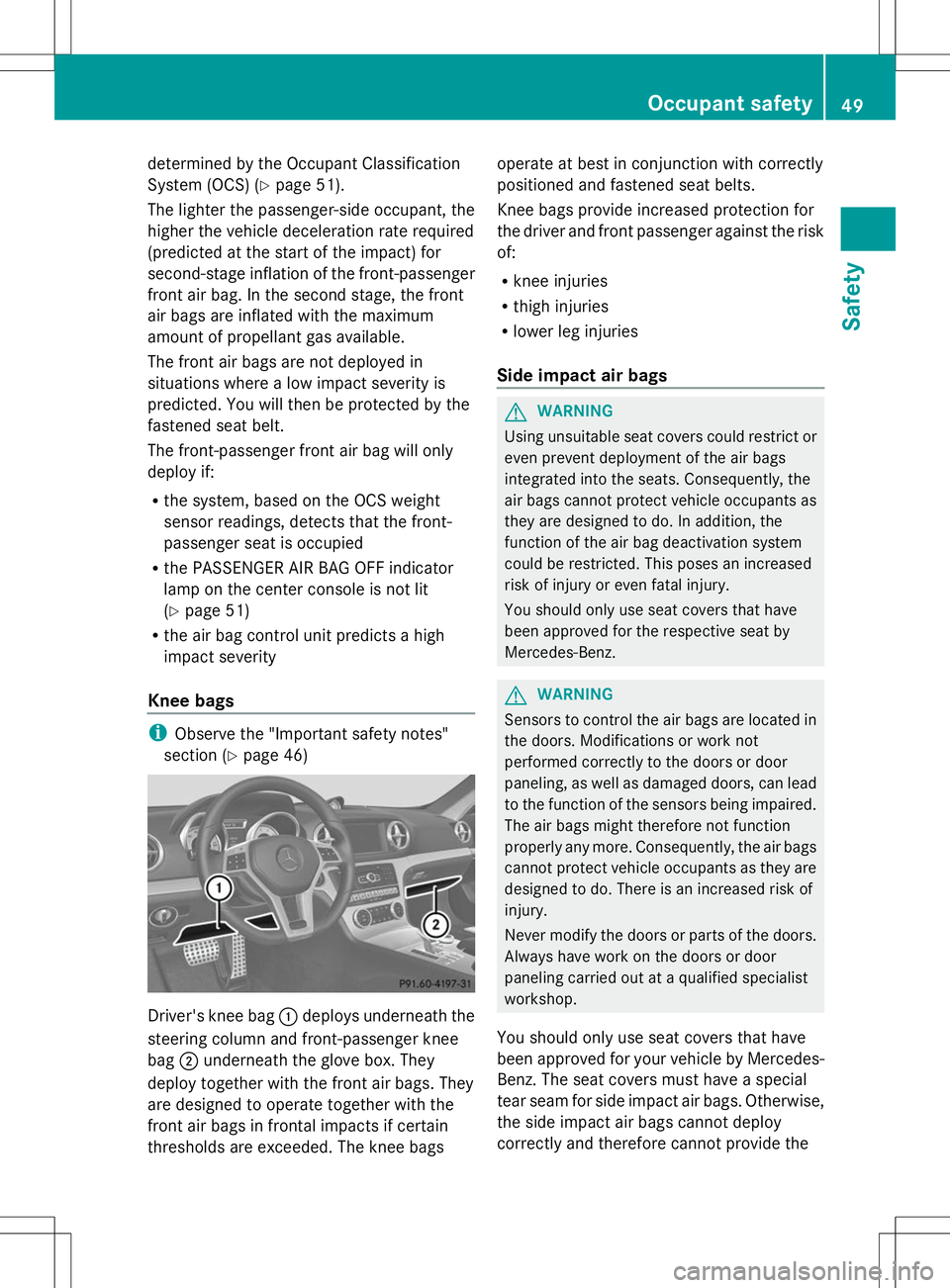
section (Y page 46) Driver's knee bag
:deploys underneath the
steering column and front-passenger knee
bag ;underneath the glove box. They
deploy together with the front air bags. They
are designed to operate together with the
front air bags in frontal impacts if certain
thresholds are exceeded. The knee bags operate at best in conjunction with correctly
positioned and fastened seat belts.
Knee bags provide increased protection for
the driver and front passenger against the risk
of:
R
knee injuries
R thigh injuries
R lower leg injuries
Side impact air bags G
WARNING
Using unsuitable seat covers could restrict or
even prevent deployment of the air bags
integrated into the seats. Consequently, the
air bags cannot protect vehicle occupants as
they are designed to do. In addition, the
function of the air bag deactivation system
could be restricted. This poses an increased
risk of injury or even fatal injury.
You should only use seat covers that have
been approved for the respective seat by
Mercedes-Benz. G
WARNING
Sensors to control the air bags are located in
the doors. Modifications or work not
performed correctly to the doors or door
paneling, as well as damaged doors, can lead
to the function of the sensors being impaired.
The air bags might therefore not function
properly any more. Consequently, the air bags
cannot protect vehicle occupants as they are
designed to do. There is an increased risk of
injury.
Never modify the doors or parts of the doors.
Always have work on the doors or door
paneling carried out at a qualified specialist
workshop.
You should only use seat covers that have
been approved for your vehicle by Mercedes-
Benz. The seat covers must have a special
tear seam for side impact air bags. Otherwise,
the side impact air bags cannot deploy
correctly and therefore cannot provide the Occupant safety
49Safety Z
Page 94 of 284
!
When opening and closing the roof, make
sure that:
R there is sufficient clearance, as the roof
swings upwards.
R there is sufficient clearance behind the
vehicle, as the trunk lid swings
backwards beyond the bumper.
R the trunk is only loaded to below the
trunk partition.
R the trunk partition is not pushed up by
the load.
R the trunk partition is closed.
R the trunk lid is closed.
R the outside temperature is above 5 ‡
(Ò15 †).
You could otherwise damage the roof,
trunk and other parts of the vehicle.
i The vehicle's dimensions when opening/
closing the roof (Y page 279).
i Make sure that the roof and rear window
are clean and dry before opening the roof.
Otherwise, water or dirt could enter the
vehicle interior or trunk. Opening and closing using the roof
switch
Important safety notes G
WARNING
When opening or closing the roof, body parts
could be trapped by, for example, the roof
mechanism, trunk lid or side windows. There
is a risk of injury.
When raising or lowering the roof, make sure
that no body parts are in the vicinity of moving
components. If someone becomes trapped,
release the button. Opening and closing X
Secure the vehicle against rolling away
(Y page 130).
X Close the trunk partition (Y page 94).
X Close the trunk lid.
X Turn the SmartKey to position 2in the
ignition lock.
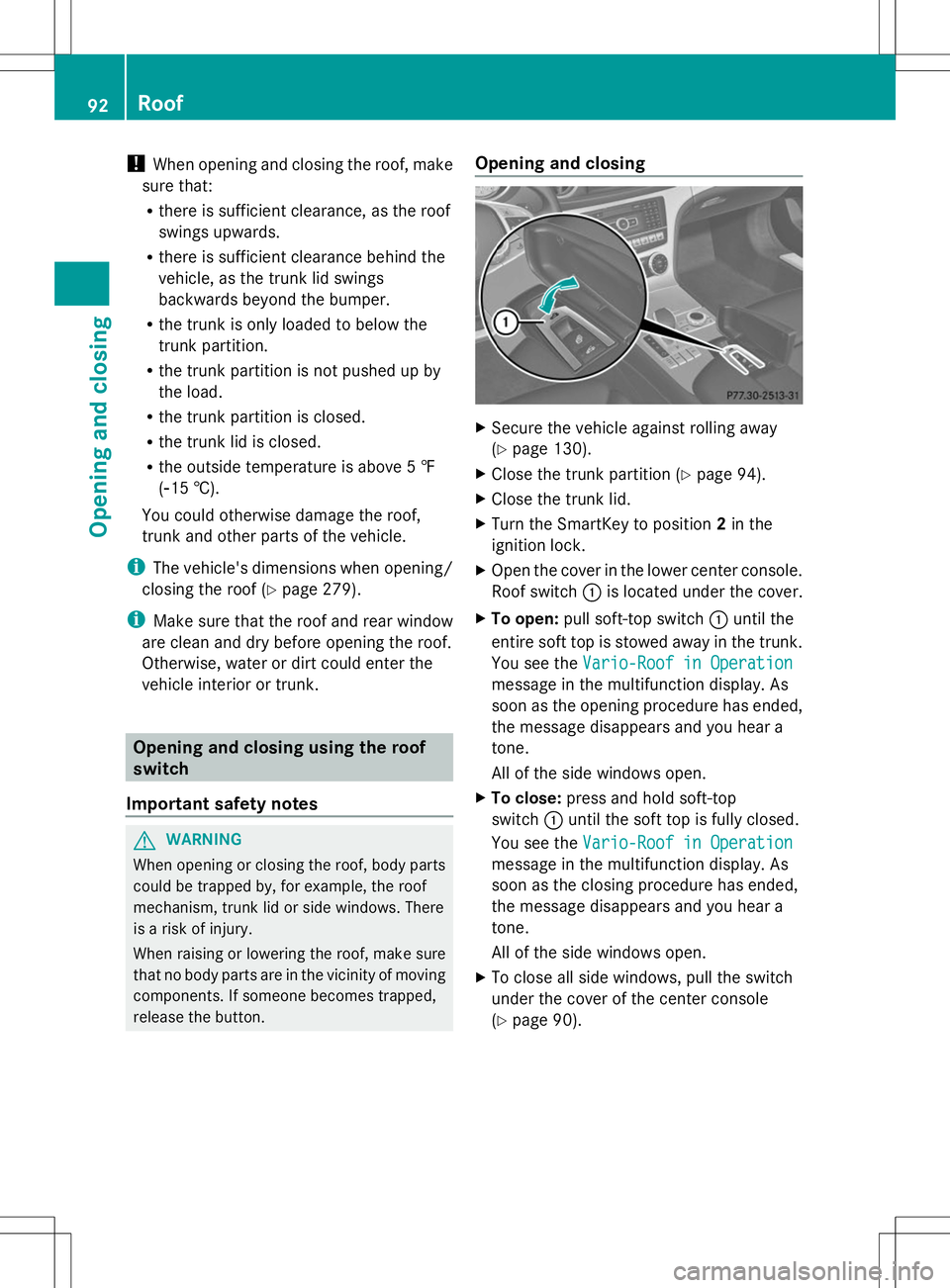
X Open the cover in the lower center console.
Roof switch :is located under the cover.
X To open: pull soft-top switch :until the
entire soft top is stowed away in the trunk.
You see the Vario-Roof in Operation
Vario-Roof in Operation
message in the multifunction display. As
soon as the opening procedure has ended,
the message disappears and you hear a
tone.
All of the side windows open.
X To close: press and hold soft-top
switch :until the soft top is fully closed.
You see the Vario-Roof in Operation Vario-Roof in Operation
message in the multifunction display. As
soon as the closing procedure has ended,
the message disappears and you hear a
tone.
All of the side windows open.
X To close all side windows, pull the switch
under the cover of the center console
(Y page 90). 92
RoofOpening and closing