navigation system MERCEDES-BENZ SL-CLASS ROADSTER 2016 Owner's Manual
[x] Cancel search | Manufacturer: MERCEDES-BENZ, Model Year: 2016, Model line: SL-CLASS ROADSTER, Model: MERCEDES-BENZ SL-CLASS ROADSTER 2016Pages: 614, PDF Size: 15.67 MB
Page 310 of 614
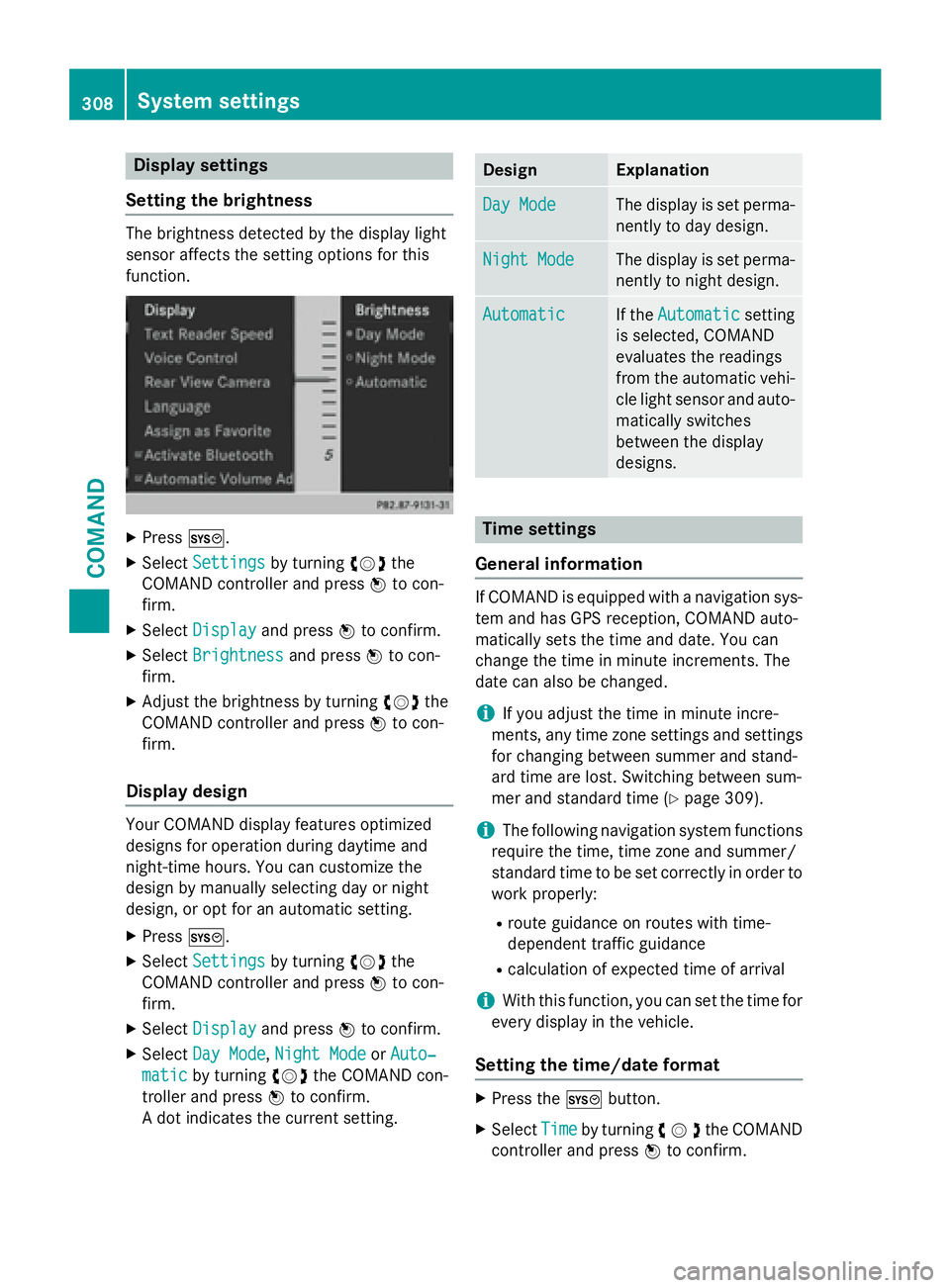
Display settings
Setting th ebrightness
The brightness detecte dby th edisplay ligh t
sensor affects th esetting option sfo rthis
function .
XPressW.
XSelectSettingsby turnin gcVd the
COMAN Dcontroller and press Wto con-
firm.
XSelec tDispla yand press Wto confirm .
XSelectBrightnes sand pressWto con-
firm.
XAdjust th ebrightness by turnin gcVd the
COMAN Dcontroller and press Wto con-
firm.
Display design
Your COMAN Ddisplay feature soptimize d
design sfo roperation durin gdaytime and
night-time hours. You can customiz eth e
design by manually selecting day or night
design ,or opt fo ran automatic setting .
XPressW.
XSelectSettingsby turnin gcVd the
COMAN Dcontroller and press Wto con-
firm.
XSelec tDispla yand press Wto confirm .
XSelectDay Mod e,Night Mod eorAuto‐
maticby turnin gcVd theCOMAN Dcon-
trolle rand press Wto confirm .
A dot indicates th ecurren tsetting .
DesignExplanation
Day Mod eThe display is set perma-
nently to day design .
Night ModeThe display is set perma-
nently to night design .
AutomaticIf theAutomaticsetting
is selected, COMAN D
evaluates th ereadings
from th eautomatic vehi-
cl eligh tsensor and auto-
matically switches
between th edisplay
designs.
Time settings
General information
If COMAN Dis equipped wit h anavigation sys-
te m and has GPS reception ,COMAN Dauto-
matically set sth etime and date. You can
chang eth etime in minut eincrements. The
dat ecan also be changed.
iIf you adjust th etime in minut eincre-
ments ,any time zone setting sand setting s
fo rchangin gbetween summer and stand -
ard time are lost. Switchin gbetween sum -
mer and standard time (
Ypage 309).
iThe following navigation system function s
require th etime, time zone and summer /
standard time to be set correctl yin order to
wor kproperly:
Rrout eguidanc eon routes wit htime-
dependen ttraffic guidanc e
Rcalculation of expecte dtime of arrival
iWit hthis function ,you can set th etime fo r
every display in th evehicle.
Setting th etime/date forma t
XPress theW button.
XSelectTim eby turnin gcVd the COMAND
controller and press Wto confirm.
308System settings
COMAND
Page 312 of 614
XSelectSet Time Manuallyand press W
to confirm.
XSet the time by turning cVdthe COMAND
controller and press Wto confirm.
The time is accepted.
Text reader settings
XPress the Wbutton.
XSelect Systemby turning cVdthe
COMAND controller and press Wto con-
firm.
XSelect Text Reader Speedand press W
to confirm.
A list appears. The #dot indicates the cur-
rent setting.
XSelect a setting by turning cVdthe
COMAND controller and press Wto con-
firm.
Voice Control System settings
Opening/closing the help window
The help window provides information in addi-
tion to the audible instructions during indi-
vidualization and during the subsequent voice
control.
XPress W.
XSelect Systemby turning cVdthe
COMAND controller and press Wto con-
firm.
XSelect Voice Controland press Wto
confirm.
XSelect Help Windowand press Wto con-
firm.
You have switched the help window on O
or off ª.
Individualization
Using individualization, you can fine-tune the
Voice Control System to your own voice and thus improve voice recognition. See the sep-
arate operating instructions.
Bluetooth®settings
General information about Bluetooth
®
Bluetooth®-capable devices, e.g. mobile
phones, have to comply with a certain profile
in order to be connected to COMAND. Every
Bluetooth
®device has its own specific Blue-
tooth®name.
Bluetooth
®technology is a standard for
short-range wireless data transmissions up to
approximately 10 meters. Bluetooth
®allows,
for example, the exchange of vCards.
Bluetooth®is a registered trademark of Blue-
tooth Special Interest Group (SIG) Inc.
Activating/deactivating Bluetooth®
XPress W.
The system menu appears.
XSelect Settingsby turning cVdthe
COMAND controller and press Wto con-
firm.
XSelect ActivateBluetoothand press W
to confirm.
This switches Bluetooth
®on O or off ª.
Setting the system language
This function allows you to determine the lan-
guage for the menu displays and the naviga-
tion announcements. The selected language
affects the characters available for entry.
The navigation announcements are not avail-
able in all languages. If a language is not avail-
310System settings
COMAND
Page 313 of 614
able, the navigation announcements will be in
English.
When you set the system language, the lan-
guage of the Voice Control System will
change accordingly. If the selected language
is not supported by the Voice Control System,
English will be selected.
XPress theWbutton.
XSelect Systemby turning cVdthe
COMAND controller and press Wto con-
firm.
XSelect Languageand press Wto confirm.
The list of languages appears. The #dot
indicates the current setting.
XSelect the language by turning cVdthe
COMAND controller and press Wto con-
firm.
COMAND loads the selected language and
sets it.
Assigning a favorites button
XTo assign a favorites button: press the
W button.
XSelect Systemby turning cVdthe
COMAND controller and press Wto con-
firm.
XSelect AssignasFavoriteand press W
to confirm.
The list of predefined functions appears.
The dot #indicates the currently selected
function.
XSelect the function by turning cVdthe
COMAND controller and press Wto con-
firm.
The favorites button is assigned the selec-
ted function.
XExample: to call up a favorite: press the
g favorites button.
This calls up the predefined function. You can select the following predefined func-
tions in a menu:
RSplitView on/off: you can switch the
screen view for the front passenger on or
off.
RDisplay On/Off: you can switch the dis-
play off or on.
RFull Screen: 'Clock': you can call up
the full screen with the clock.
R® Menu: you can call up the online and
Internet functions.
R360°Camera: you can call up the picture of
the 360° camera.
RFull screen: 'Map': you can call up the
full screen with the map.
RSpoken Driving Tip: you can call up the
current driving recommendation.
RDisplayTrafficMessages: you can call
up traffic reports.
RNavigate Home: you can start route guid-
ance to your home address if you have
already entered and saved the address
(
Ypage 329).
RDetour Menu: you can call up the Detour
menu and then block a section of the route
and recalculate the route (
Ypage 351).
RCompassScreen: you can call up the com-
pass.
Importing/exporting data
General notes
!Never remove the stick or card when writ-
ing data to the USB stick or the memory
card. You may otherwise lose data.
System settings311
COMAND
Z
Page 315 of 614
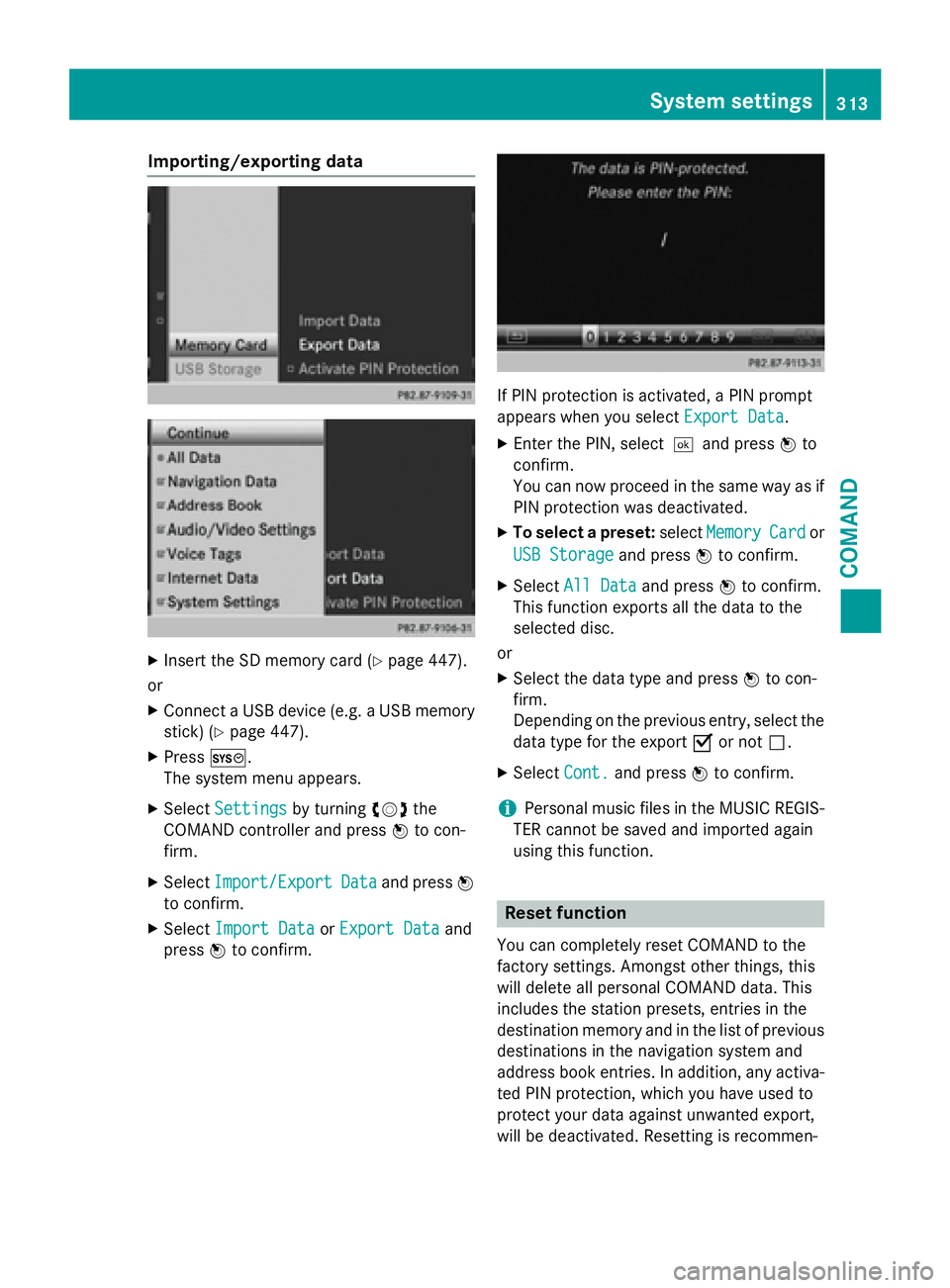
Importing/exporting data
XInsert the SDmemory card (Ypage 447).
or
XConnect a USB device (e.g. a USB memory
stick) (
Ypage 447).
XPress W.
The system menu appears.
XSe lect Settingsbyturning cVdthe
COMAND controller and press Wto con-
firm.
XSe lect Import/ExportDataand press W
to confirm.
XSe lect Import DataorExport Dataand
press Wto confirm.
IfPIN protection isact ivat ed, a PIN prompt
appears when you select Export Data
.
XEnter the PIN, select¬and press Wto
confirm.
You can now proceed inthe same way as if
PIN protection was deactivated.
XTo select a preset: selectMemoryCardor
USB Storage
and press Wto confirm.
XSelect All Dataand press Wto confirm.
This function exports all the data to the
selected disc.
or
XSe lect the data type and press Wto con-
firm.
Depending on the previo us entry, select the
data type for the export Oor not ª.
XSelect Cont.and press Wto confirm.
iPersonal music files inthe MUSIC REGIS-
TER cannot besaved and imported again
using th isfunction.
Reset function
You can complete lyreset COMAND to the
factory settings. Amongst other things, th is
will delete all personal COMAND data. This
includes the station presets, entries inthe
destination memory and inthe listof pre vious
destinations inthe navigation system and
address book entries. Inaddition, any act iva-
ted PIN protection, which you have used to
protect your data against unwanted export,
will be deactivated. Resetting isrecommen-
System settings313
COMAND
Z
Page 322 of 614
For further information on the rear view cam-
era, see the vehicle Operator's Manual.
XPress theWbutton.
The system menu appears.
XSelect Settingsby turning cVdthe
COMAND controller and press Wto con-
firm.
XSelect RearViewCameraand press Wto
confirm.
XSelect Activation by R gearand press
W to confirm.
The function is switched on Oor off ª,
depending on the previous status.
Night View Assist Plus
On vehicles with Night View Assist Plus you
can have the image from Night View Assist
Plus shown on the COMAND display.
XSwitch on COMAND (Ypage 297).
XActivate Night View Assist Plus, see the
separate operating instructions.
The image from Night View Assist Plus
appears in the COMAND display.
XTo adjust the brightness: selectBright‐
nessby turning cVdthe COMAND con-
troller and press Wto confirm.
XTurn cVd the COMAND controller and
press Wto confirm.
XSwitching automatic activation on/off:
select Night
ViewAssistAuto.Acti‐
vationand press Wto confirm.
Switch the option on Oor off ª.
Option switched on: while using other func-
tions e.g. the navigation system, Night View Assist Plus is active in the background. In
the dark, in unlit surroundings and at
speeds in excess of 37 mph (60 km/h), the
Night View image is automatically dis-
played as soon as pedestrians or animals
are detected.
XTo switch off the display: selectBackand
press Wto confirm or press the kbut-
ton.
Navigation
Your COMAND equipment
These operating instructions describe all the
standard and optional equipment for your
COMAND system, as available at the time of
going to print. Country-specific differences
are possible. Please note that your
COMAND system may not be equipped with
all the features described.
Introduction
Important safety notes
GWARNING
If you operate information systems and com-
munication equipment integrated in the vehi-
cle while driving, you will be distracted from
traffic conditions. You could also lose control
of the vehicle. There is a risk of an accident.
Only operate the equipment when the traffic
situation permits. If you are not sure that this
is possible, park the vehicle paying attention
to traffic conditions and operate the equip-
ment when the vehicle is stationary.
You must observe the legal requirements for
the country in which you are currently driving
when operating COMAND.
COMAND calculates the route to the destina-
tion without taking account of the following,
for example:
Rtraffic lights
Rstop and yield signs
Rmerging lanes
Rparking or stopping in a no parking/no
stopping zone
Rother road and traffic rules and regulations
Rnarrow bridges
320Navigation
COMAND
Page 323 of 614
COMAND can give incorrect navigation com-
mands if the actual street/traff icsituation
does not correspond with the digital map's
data. Dig ital maps donot cover all areas nor
all routes inan area. For example, a route may
have been diverted or the direction of a one-
way street may have changed.
For th isreason, you must always observe
road and traff icrules and regulations during
your journey. Road and traffic rules and reg-
ulations always have priority over the sys-
tem's driving recommendations.
Navigation announcements are intended to
dire ct you whiledriving without diverting your
attention from the road and driving.
Please always use this feature instead of con-
sulting the map display for directions. Look-
ing at the icons or map display can distract
you from traffic cond itions and driving, and
increase the risk of an accident.
General notes
Operational readiness of the navigation
system
The navigation system must determine the
position of the vehicle before first use or
whenever operational status isrestored.
Therefore, you may have to drive for a while
before precise route guidance ispossible.
GPS reception
Among other things, correct functioning of
the navigation system depends on GPS recep-
tion. Incertain situations, GPS reception may
be impaired, there may beinterference or
there may beno reception at all,e.g. in tun-
ne lsor parking garages.
iUsing roof carriers may impair the correct
functioning of a roof antenna (phone, sat-
ellit e radio, GPS).
Entry restriction
On veh icles for certain countries, there isa
restriction on entering data.
The restriction isactive from a vehicle speed
of above approximately 3 mph (5 km/h).As soon as the speed falls below approximately
2 mph (3 km/h), the restriction becomes
inactive.
When the restriction is active, certain entries
cannot be made. This will be indicated by the
fact that certain menu items are grayed out
and cannot be selected.
The following entries are not possible, for
example:
Rentering the destination city and street
Rentering a destination via the map
Rentering POIs in the vicinity of a city or via a
name search
Rediting entries
Rusing the number keypad for direct entry
Other entries are possible, such as entering
points of interest in the vicinity of the desti-
nation or current position.
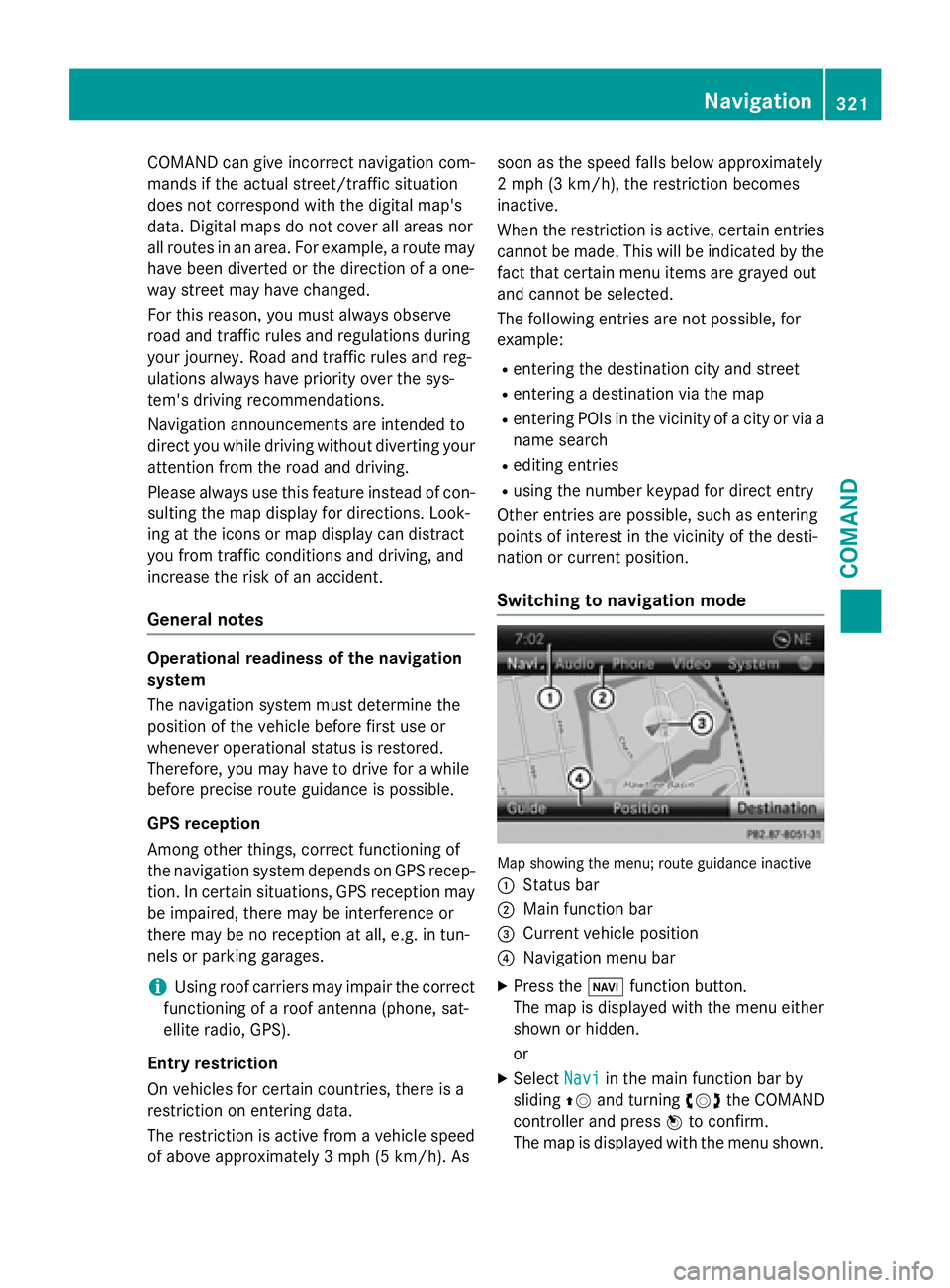
Switching to navigation mode
Map showing the menu; route guidance inactive
:
Status bar
;Main function bar
=Current vehicle position
?Navigation menu bar
XPress the Øfunction button.
The map is displayed with the menu either
shown or hidden.
or
XSelect Naviin the main function bar by
sliding ZVand turning cVdthe COMAND
controller and press Wto confirm.
The map is displayed with the menu shown.
Navigation321
COMAND
Z
Page 325 of 614
You can select the following route types:
RFast Route: COMAND calculates a route
with the shortest (minimized) journey time.
RDynamic Traffic Route: is the same
route type as Fast Route
. In addition,
COMAND takes into account any relevant
traffic reports received during route guid-
ance. The navigation system can help you
avoid a traffic jam, for example, by recal-
culating the route.
RDynamic TRF. Route Only After
Request: is the same route type as
Dynamic Traffic Route
. After recalcu-
lating the route, COMAND asks you
whether you want to adopt the new route or
whether you want to continue along the
original route.
REco Route: the Eco Route(economical
route) is a variant of the Fast Route
type.
COMAND will attempt to minimize the jour-
ney distance at the expense of a slightly
increased journey time.
RShortRoute: COMAND calculates a route
with the shortest possible (minimized)
route distance.
iThe route calculated may, for example,
include ferry connections, even if the
Avoid Ferries
route option is switched
on.
In some cases, COMAND may not be able
to take all the selected route options into
account, e.g. when calculating particularly
long routes.
XTo exit the menu: slideXVY the COMAND
controller.
Setting the number of persons in the
vehicle for the use of carpool lanes
For route calculation, you can take HOV or
carpool lanes into account.
If you use HOV or carpool lanes, please
observe the applicable laws as well as the
local and time limitation conditions. Carpool lanes may only be used under certain
conditions. They can normally be used when
there are two people in the vehicle. However,
there are also carpool lanes which can only be
used when there are three or more people in
the vehicle. In California, lone drivers can use
a carpool lane if their vehicle's emission level
or fuel consumption is below a fixed thresh-
old.
Carpool lanes may be reserved for specific
times (e.g. during the peak period).
Carpool lanes are identified by HOV symbols
on special road signs and by markings on the
road. The road signs may also include the
designation
CARPOOL
. The lanes are arranged
as a separate lane next to the others or are
built as a physically separate lane.
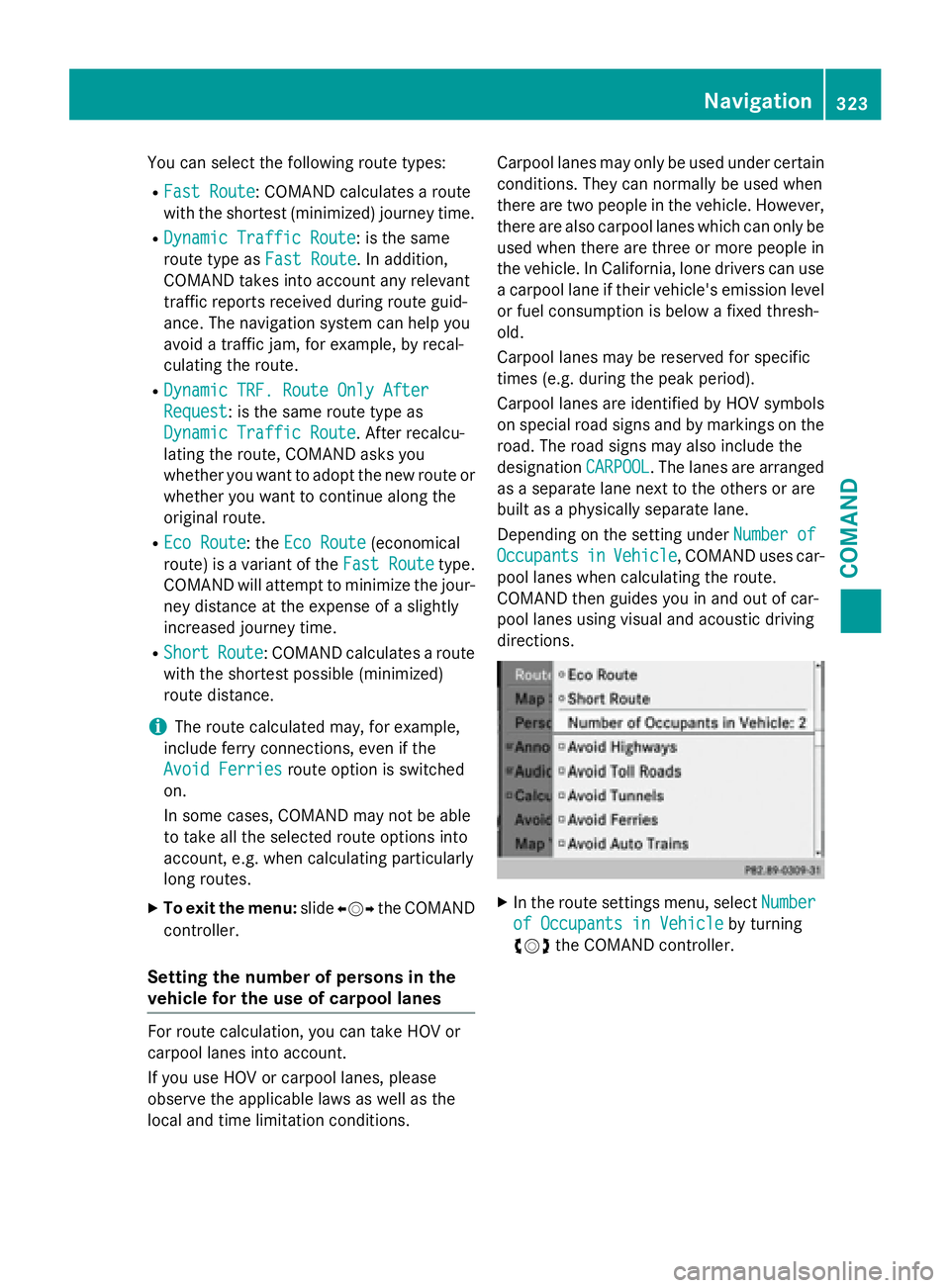
Depending on the setting under Number of
OccupantsinVehicle, COMAND uses car-
pool lanes when calculating the route.
COMAND then guides you in and out of car-
pool lanes using visual and acoustic driving
directions.
XIn the route settings menu, select Number
of Occupants in Vehicleby turning
cVd the COMAND controller.
Navigation323
COMAND
Z
Page 326 of 614
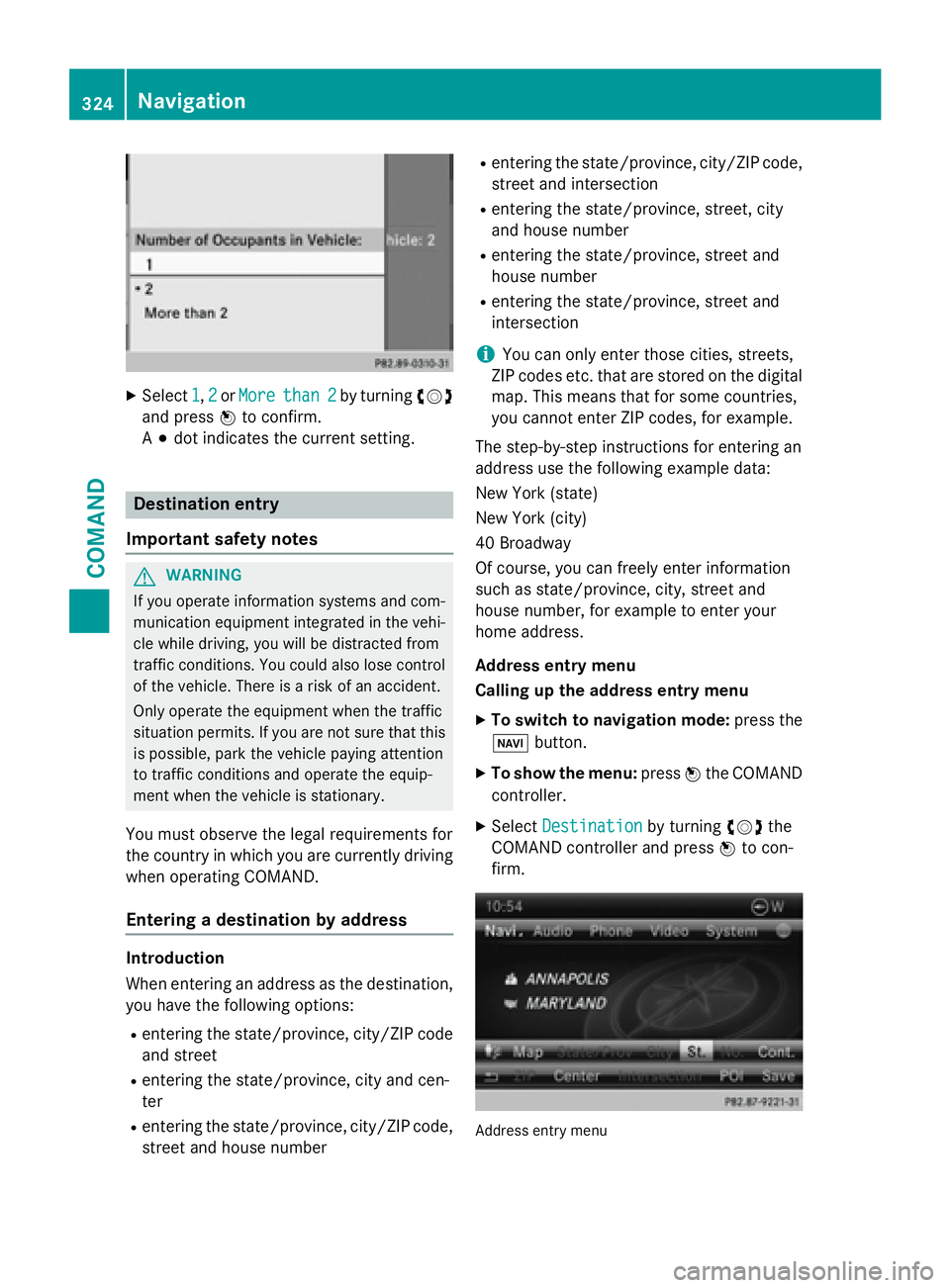
XSelect1,2or Morethan 2by turning cVd
and press Wto confirm.
A # dot indicates the current setting.
Destination entry
Important safety notes
GWARNING
If you operate information systems and com-
munication equipment integrated in the vehi-
cle while driving, you will be distracted from
traffic conditions. You could also lose control
of the vehicle. There is a risk of an accident.
Only operate the equipment when the traffic
situation permits. If you are not sure that this
is possible, park the vehicle paying attention
to traffic conditions and operate the equip-
ment when the vehicle is stationary.
You must observe the legal requirements for
the country in which you are currently driving
when operating COMAND.
Entering a destination by address
Introduction
When entering an address as the destination,
you have the following options:
Rentering the state/province, city/ZIP code
and street
Rentering the state/province, city and cen-
ter
Rentering the state/province, city/ZIP code,
street and house number
Rentering the state/province, city/ZIP code,
street and intersection
Rentering the state/province, street, city
and house number
Rentering the state/province, street and
house number
Rentering the state/province, street and
intersection
iYou can only enter those cities, streets,
ZIP codes etc. that are stored on the digital
map. This means that for some countries,
you cannot enter ZIP codes, for example.
The step-by-step instructions for entering an
address use the following example data:
New York (state)
New York (city)
40 Broadway
Of course, you can freely enter information
such as state/province, city, street and
house number, for example to enter your
home address.
Address entry menu
Calling up the address entry menu
XTo switch to navigation mode: press the
Ø button.
XTo show the menu: pressWthe COMAND
controller.
XSelect Destinationby turning cVdthe
COMAND controller and press Wto con-
firm.
Address entry menu
324Navigation
COMAND
Page 332 of 614
XSelectYesand press Wto confirm.
After selecting Yes
, theDatasaved.mes-
sage appears.
Selecting a destination from the desti-
nation memory (e.g. My Address)
Introduction
The destination memory always contains an
entry named "My Address". You may wish to
assign your home address to this entry, for
example (
Ypage 329), and select it for route
guidance. This entry is always located at the
top of the list in the destination memory.
XTo switch to navigation mode: press the
Ø button.
XTo show the menu: pressWthe COMAND
controller.
XSelect Destinationin the navigation sys-
tem menu bar by turning cVdthe
COMAND controller and press Wto con-
firm.
XSelect From Memoryand press Wto con-
firm.
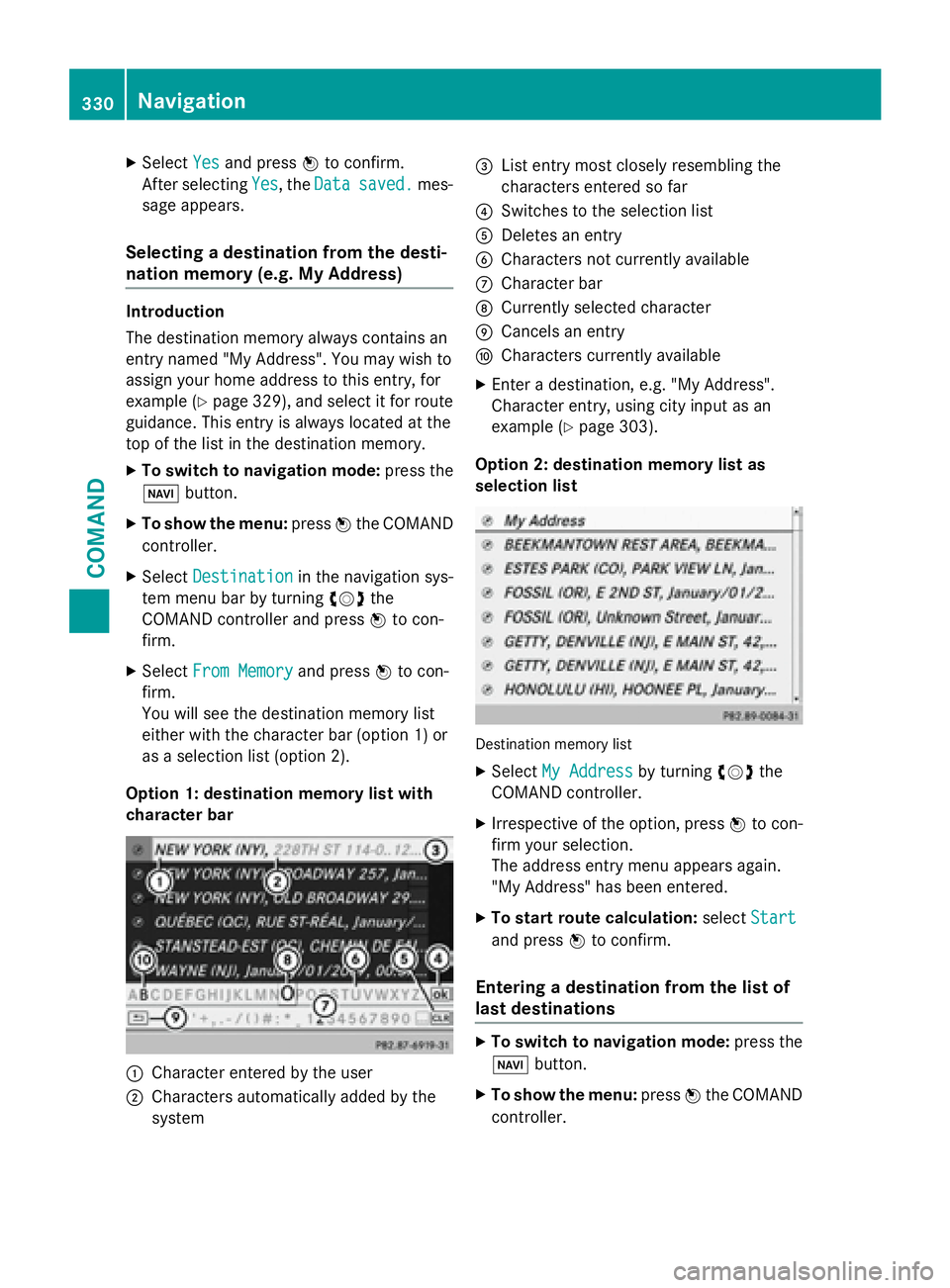
You will see the destination memory list
either with the character bar (option 1) or
as a selection list (option 2).
Option 1: destination memory list with
character bar
:Character entered by the user
;Characters automatically added by the
system
=List entry most closely resembling the
characters entered so far
?Switches to the selection list
ADeletes an entry
BCharacters not currently available
CCharacter bar
DCurrently selected character
ECancels an entry
FCharacters currently available
XEnter a destination, e.g. "My Address".
Character entry, using city input as an
example (
Ypage 303).
Option 2: destination memory list as
selection list
Destination memory list
XSelect My Addressby turning cVdthe
COMAND controller.
XIrrespective of the option, press Wto con-
firm your selection.
The address entry menu appears again.
"My Address" has been entered.
XTo start route calculation: selectStart
and press Wto confirm.
Entering a destination from the list of
last destinations
XTo switch to navigation mode: press the
Ø button.
XTo show the menu: pressWthe COMAND
controller.
330Navigation
COMAND
Page 339 of 614
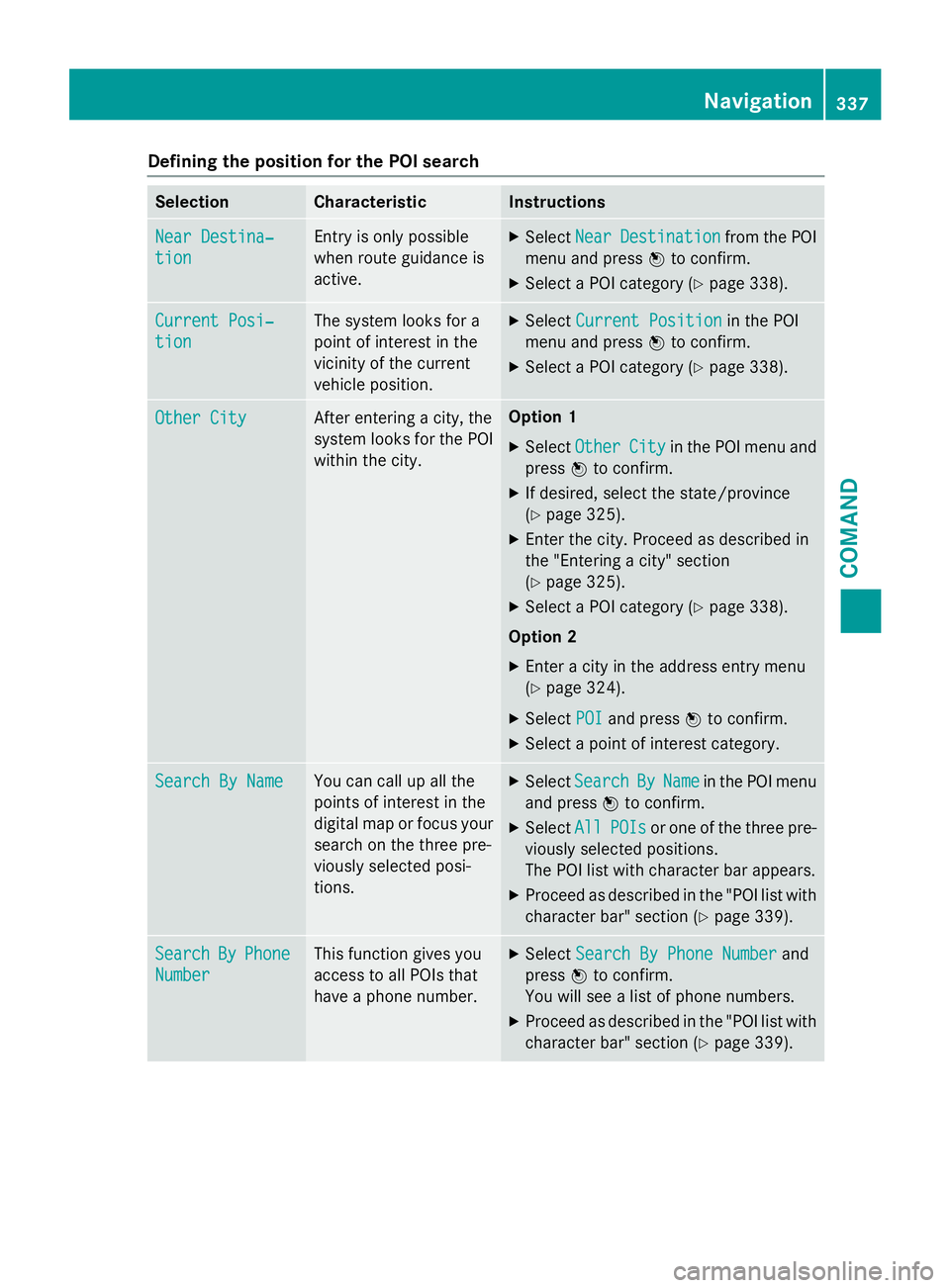
Defining theposition for th ePOI searc h
SelectionCharacteristicInstructions
NearDestina‐
tio n
Entr yis only possible
when rout eguidanc eis
active .XSelectNea rDestinationfrom th ePOI
men uand press Wto confirm .
XSelect aPOI category (Ypage 338).
CurrentPosi‐
tio n
The system looks fo r a
poin tof interes tin th e
vicinit yof th ecurren t
vehicle position .XSelectCurren tPositionin th ePOI
men uand press Wto confirm .
XSelect aPOI category (Ypage 338).
Other CityAfterenterin g acity, th e
system looks fo rth ePOI
within th ecity.Option 1
XSelectOtherCit yin th ePOI men uand
press Wto confirm .
XIf desired, selec tth estate/province
(
Ypage 325).
XEnte rth ecity. Proceed as described in
th e"Entering acity" section
(
Ypage 325).
XSelec t aPOI category (Ypage 338).
Option 2
XEnter acity in th eaddress entr ymen u
(
Ypage 324).
XSelec tPOIand press Wto confirm .
XSelect apoin tof interes tcategory.
Search By Nam eYou can callup all th e
points of interes tin th e
digita lmap or focus your
search on th ethree pre -
viously selecte dposi-
tions.XSelec tSearchByNam ein th ePOI men u
and press Wto confirm .
XSelectAllPOI sor on eof th ethree pre -
viously selecte dpositions.
The POI list wit hcharacte rbar appears .
XProceed as described in th e"POI list wit h
characte rbar "section (
Ypage 339).
SearchByPhone
Number
Thisfunction gives you
access to all POI sthat
hav e a phone number .XSelectSearch By Phone Numberand
press Wto confirm .
You will see alist of phone numbers.
XProceed as described in th e"POI list wit h
characte rbar "section (
Ypage 339).
Navigation337
COMAND
Z