remote control MERCEDES-BENZ SL-CLASS ROADSTER 2016 Owners Manual
[x] Cancel search | Manufacturer: MERCEDES-BENZ, Model Year: 2016, Model line: SL-CLASS ROADSTER, Model: MERCEDES-BENZ SL-CLASS ROADSTER 2016Pages: 614, PDF Size: 15.67 MB
Page 17 of 614
Fogged up headlamps .................... 128
Hazard warning lamps ................... 126
High beam flasher .......................... 125
High-beam headlamps ................... 125
Light switch ................................... 122
Low-beam headlamps .................... 123
Parking lamps ................................ 124
Setting the brightness of the
ambient lighting (on-board com-
puter) ............................................. 233
Setting the color of the ambient
lighting (on-board computer) ......... 233
Standing lamps .............................. 124
Switching the daytime running
lamps on/off (on-board com-
puter) ............................................. 233
Switching the exterior lighting
delayed switch-off on/off (on-
board computer) ............................ 234
Switching the spotlight on/off ....... 233
Switching the surround lighting
on/off (on-board computer) .......... 234
Turn signals ................................... 125
see Interior lighting
see Replacing bulbs
List of access data
New provider ................................. 415
List of mobile phone network pro-
viders
Empty ............................................ 413
With the selected provider ............. 414
Loading aid (trunk)
Raising/lowering the roof .............. 516
Locking
see Central locking
Locking (doors)
Automatic ........................................ 89
Emergency locking ........................... 90
From inside (central locking but-
ton) .................................................. 89
Locking centrally
see Central locking
Locking verification signal (on-
board computer) ............................... 235
Low-beam headlamps
Display message ............................ 252
Switching on/off ........................... 123 Luggage cover
see Trunk partition
Lumbar support
Adjusting (COMAND) ..................... 317
M
M+S tires ............................................ 570
MAGIC SKY CONTROL ....................... 105
Malfunction message
see Display messages
Map (navigation)
Adjusting the scale ........................ 367
Arrival time/distance to the des-
tination .......................................... 370
City model ..................................... 371
Geo-coordinate display .................. 370
Heading ......................................... 368
Information in the display .............. 370
Map settings .................................. 368
Moving ........................................... 367
North orientation ........................... 368
Notes ............................................. 367
Point of interest symbols ............... 369
Road display .................................. 370
Saving the crosshair position ......... 367
Showing the map data version ....... 376
Topographical map ........................ 371
Updating ........................................ 377
Updating process ........................... 377
Matte finish (cleaning instruc-
tions) .................................................. 544
mbrace
Call priority .................................... 525
Display message ............................ 246
Downloading destinations
(COMAND) ..................................... 525
Downloading routes ....................... 528
Emergency call .............................. 522
General notes ................................ 521
Geo fencing ................................... 529
Locating a stolen vehicle ............... 527
MB info call button ........................ 524
Remote fault diagnosis .................. 528
Remote vehicle locking .................. 527
Roadside Assistance button .......... 524
Search & Send ............................... 526
Self-test ......................................... 522
Index15
Page 22 of 614
RACE START (Mercedes-AMG vehi-
cles).................................................... 192
RACETIMER (on-board computer) .... 237
Radio
Overview ........................................ 437
Selecting a station ......................... 228
Setting a station ............................ 438
Sound settings (balance, bass,
treble) ............................................ 298
Storing stations .............................4 39
Switching HD Radio on/off ............ 437
Switching on .................................. 437
Switching wavebands .................... 438
Radio-wave reception/transmis-
sion in the vehicle
Declaration of conformity ................ 34
Read-aloud function .......................... 361
Reading lamp ..................................... 128
Reading out
Traffic reports on the route ............ 361
Real-time traffic reports ................... 357
Rear fog lamp
Display message ............................ 254
Rear lamps
see Lights
Rear Seat Entertainment System
Active COMAND source ................. 498
Adjusting sound settings ...............4 89
Adjusting the brightness ................ 489
Adjusting the color ........................ 489
Adjusting the contrast ................... 489
AUX mode ...................................... 500
CD/DVD audio and MP3 mode ...... 491
Changing the batteries .................. 487
Changing the picture format .......... 490
Cordless headphones .................... 486
Multiple users ................................ 489
Operating with the headphones ..... 488
Picture settings .............................. 489
System settings .............................4 90
Using the main loudspeaker .......... 488
Video DVD mode ........................... 494
Rear view camera
Cleaning instructions ..................... 546
Displaying the image ..................... 319
Function/notes .............................2 06
Switching on/off ........................... 207 Rear window defroster
Problem (malfunction) ................... 146
Switching on/off ........................... 145
Rear-compartment screens .............. 484
Rear-view mirror
Dipping (automatic) .............. ......... 117
Re
ceiving vCards ............................... 409
Redialing (telephone) ........................ 390
Refrigerant (air-conditioning sys-
tem)
Important safety notes .................. 608
Refueling
Fuel gauge ....................................... 41
Important safety notes .................. 168
Refueling process .......................... 169
see Fuel
Remote control
Button lighting ............................... 485
Programming (garage door
opener) .......................................... 530
Rear Seat Entertainment System ... 484
Replacing bulbs
General notes ................................ 129
Reporting safety defects .................... 35
Rescue card ......................................... 36
Reserve (fuel tank)
see Fuel
Reserve fuel
Display message ............................ 258
Warning lamp ................................. 278
see Fuel
Reset function ................................... 313
Resetting (factory settings) ............. 313
Residual heat (climate control) ........146
Restraint system
Display message ............................ 249
Introduction ..................................... 50
Warning lamp ................................. 277
Warning lamp (function) ................... 51
Reverse gear (selector lever) ........... 159
Reversing feature
Side windows ................................... 97
Trunk lid ...........................................9 1
Reversing lamps (display mes-
sage) ................................................... 254
Roadside Assistance (breakdown) .... 32
20Index
Page 23 of 614
Roll barDisplay message ............................ 248
Operation ......................................... 64
Roller sunblind .................................. 104
Roof
Display message ............................ 268
Important safety notes .................. 100
Opening/closing (with roof
switch) ........................................... 101
Opening/closing (with Smart-
Key) ............................................... 102
Overview ........................................ 100
Problem (malfunction) ................... 106
Relocking ....................................... 102
Roof lining and carpets (cleaning
guidelines) ......................................... 548
Roof switch ........................................ 101
Route
Estimated time of arrival ................ 352
Route (navigation)
Calling up the "Routes" menu ........ 354
Displaying the distance to the des-
tination .......................................... 352
Recording ...................................... 354
Route overview .............................. 353
Selecting an alternative route ........ 351
Setting route options (avoiding:
highways, toll roads, tunnels, fer-
ries) ............................................... 322
Setting the route type (short
route, fast route, dynamic route or
economic route) ............................ 322
Starting calculation ........................ 329
Route demonstration ........................ 353
Route guidance
Canceling ....................................... 351
Continuing ..................................... 351
Destination reached ...................... 351
General notes ................................ 346
Lane recommendations ................. 348
Off-road ......................................... 356
Traffic reports ................................ 357
S
SafetyChildren in the vehicle ..................... 68 Safety notes
Audio CD and MP3 mode ............... 446
Using the telephone ....................... 381
Video DVD mode ........................... 475
Safety system
see Driving safety systems
Satellite radio
Displaying information ................... 445
Registering .................................... 442
Switching to ................................... 442
SatRadio
Notes ............................................. 441
Selecting a category ...................... 443
Saving the crosshair position .......... 367
Screen
Selecting for the remote control .... 484
SD memory card
Ejecting .......................................... 447
Inserting ........................................ 447
Search & Send ................................... 345
Seat belts
Adjusting the driver's and front-
passenger seat belt ......................... 55
Cleaning ......................................... 548
Correct usage .................................. 53
Fastening ......................................... 54
Important safety guidelines ............. 52
Introduction ..................................... 52
Releasing ......................................... 55
Seat belt guide ............................... 111
Switching belt adjustment on/off
(on-board computer) ...................... 235
Warning lamp ................................. 271
Warning lamp (function) ................... 55
Seats
Active multicontour seat ................ 316
Adjusting (electrically) ................... 110
Adjusting the head restraint .......... 111
Adjusting the lumbar support
(COMAND) ..................................... 317
Balance (seat heating) ................... 318
Belt guide ...................................... 111
Cleaning the cover ......................... 548
Correct driver's seat position ........ 108
Important safety notes .................. 109
Multicontour seat .......................... 316
Overview ........................................ 109
Resetting settings .......................... 319
Index21
Page 26 of 614
Switching the hands-free micro-
phone on/off.....................................3 90
Switching wavebands (radio) ........... 438
System settings
Bluetooth
®..................................... 310
Date ............................................... 308
Language ....................................... 310
Text reader speed .......................... 310
Time ............................................... 308
Time zone ...................................... 309
Voice Control System .................... 310
T
Tachometer ........................................ 223
Tail lamps
Display message ............................ 253
see Lights
Tank content
Fuel gauge ....................................... 41
Technical data
Capacities ...................................... 603
Information ....................................6 00
Tires/wheels ................................. 593
Vehicle data ................................... 608
TELEAID
Call priority ....................................5 25
Downloading destinations
(COMAND) ..................................... 525
Downloading routes ....................... 528
Emergency call .............................. 522
General notes ................................ 521
Geo fencing ................................... 529
Locating a stolen vehicle ...............5 27
MB info call button ........................ 524
Remote vehicle locking .................. 527
Roadside Assistance button .......... 524
Search & Send ............................... 526
Self-test ......................................... 522
Speed alert ....................................5 29
System .......................................... 522
Triggering the vehicle alarm ........... 529
Vehicle Health Check .................... 528
Vehicle remote unlocking .............. 527
Telephone
Accepting a call (multifunction
steering wheel) .............................. 230
Accepting/ending a call ................ 389 Adjusting the volume for calls ....... 298
Calling (outgoing call) .................... 389
Calling via speed dial ..................... 390
Conference connection .................. 392
Connecting a mobile phone (gen-
eral information) ............................ 383
De-authorizing a mobile phone ...... 387
Display message ............................ 268
Ending an active call ...................... 392
Entering a number ......................... 389
Entering phone numbers ................ 389
External authorization (Blue-
tooth
®) ........................................... 386
Function restrictions ...................... 382
General notes ................................ 381
Incoming call ................................. 389
Making a ca
ll ................................. 392
Menu (on-board computer) ............ 229
Number from the phone book ........ 230
Operating options .......................... 382
Overview of functions .................... 390
Reception and transmission vol-
ume ............................................... 388
Redialing ........................................ 230
Rejecting a call .............................. 389
Rejecting/accepting a waiting
call ................................................. 391
Rejecting/ending a call ................. 230
Safety notes .................................. 381
Sending DTMF tones ...................... 391
Single call ...................................... 390
Switching hands-free microphone
on/off ............................................ 390
Text messages (SMS) .................... 400
Toggling ......................................... 392
Using the telephone ....................... 389
see Bluetooth
®
Telephone basic menu
Bluetooth®interface ...................... 387
Telephone number
Entering ......................................... 389
Temperature
Coolant .......................................... 223
Coolant (on-board computer,
Mercedes-AMG vehicles) ............... 236
Engine oil (on-board computer,
Mercedes-AMG vehicles) ............... 236
24Index
Page 84 of 614
Useful information
i
This Operator's Manual describes all
models and all standard and optional equip-
ment of your vehicle available at the time of
publication of the Operator's Manual.
Country-specific differences are possible.
Please note that your vehicle may not be
equipped with all features described. This
also applies to safety-related systems and
functions.
iRead the information on qualified special-
ist workshops (
Ypage 34).
SmartKey
Important safety notes
GWARNING
If children are left unsupervised in the vehicle,
they could:
Ropen the doors, thus endangering other
people or road users.
Rget out and disrupt traffic.
Roperate the vehicle's equipment.
Additionally, children could set the vehicle in
motion if, for example, they:
Rrelease the parking brake.
Rshifting the automatic transmission out of
park position P
RStart the engine.
There is a risk of an accident and injury.
When leaving the vehicle, always take the
SmartKey with you and lock the vehicle. Never
leave children or animals unattended in the
vehicle. Always keep the SmartKey out of
reach of children.
GWARNING
If you attach heavy or large objects to the
SmartKey, the SmartKey could be uninten-
tionally turned in the ignition lock. This could
cause the engine to be switched off. There is a risk of an accident.
Do not attach any heavy or large objects to theSmartKey. Remove any bulky key rings before
inserting the SmartKey into the ignition lock.
!Keep the SmartKey away from strong
magnetic fields. Otherwise, the remote
control function could be affected.
Strong magnetic fields can occur in the
vicinity of powerful electrical installations.
Do not keep the SmartKey:
Rwith electronic devices, e.g. a mobile
phone or another SmartKey.
Rwith metallic objects, e.g. coins or metal
foil.
Rinside metallic objects, e.g. a metal case.
This can affect the functionality of the
SmartKey.
SmartKey functions
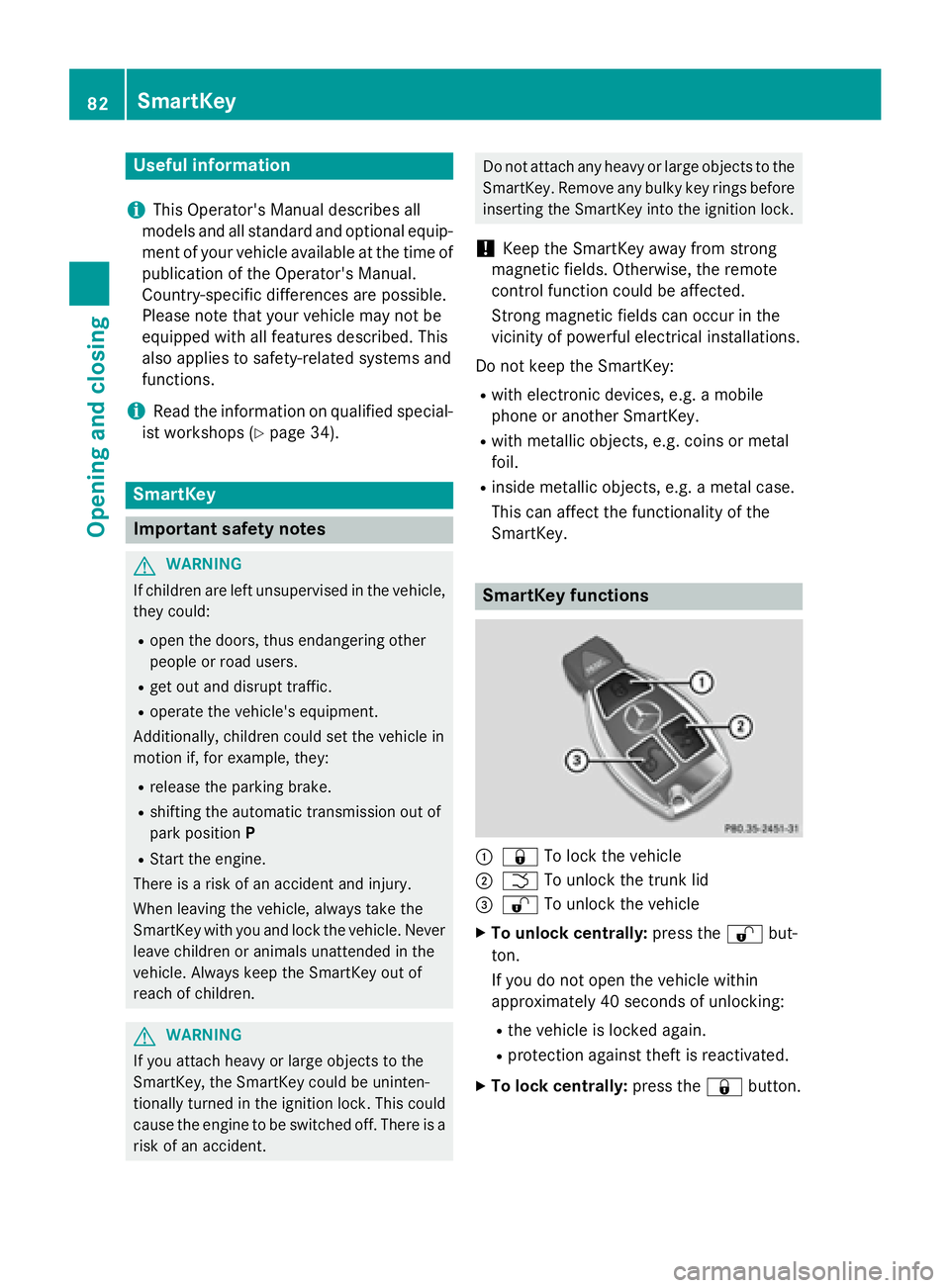
:& To lock the vehicle
;FTo unlock the trunk lid
=%To unlock the vehicle
XTo unlock centrally: press the%but-
ton.
If you do not open the vehicle within
approximately 40 seconds of unlocking:
Rthe vehicle is locked again.
Rprotection against theft is reactivated.
XTo lock centrally: press the&button.
82SmartKey
Opening and closing
Page 89 of 614
Problems with the SmartKey
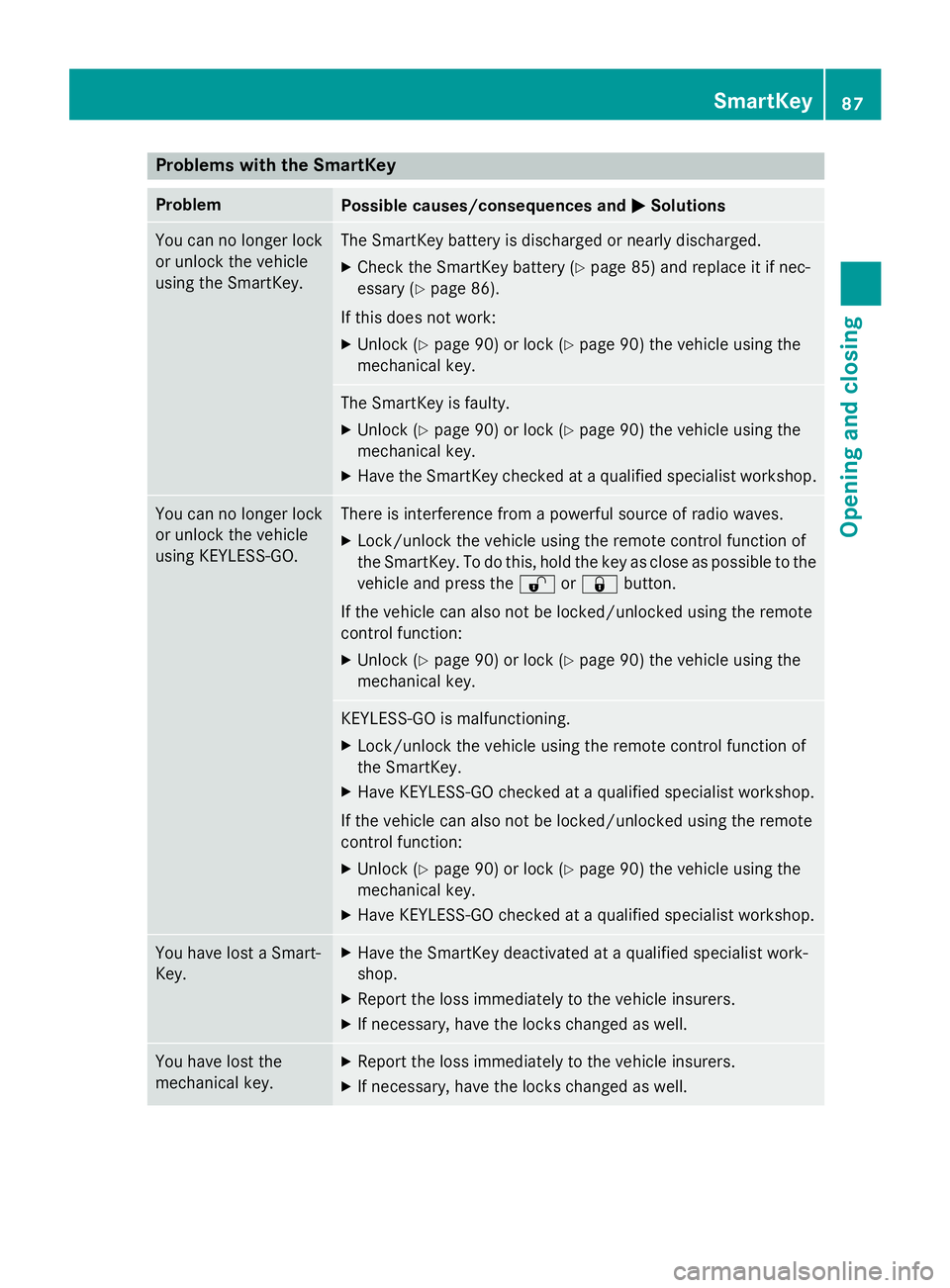
ProblemPossible causes/consequences andMSolutions
You can no longer lock
or unlock the vehicle
using the SmartKey.The SmartKey battery is discharged or nearly discharged.
XCheck the SmartKey battery (Ypage 85) and replace it if nec-
essary (
Ypage 86).
If this does not work:
XUnlock (Ypage 90) or lock (Ypage 90) the vehicle using the
mechanical key.
The SmartKey is faulty.
XUnlock (Ypage 90) or lock (Ypage 90) the vehicle using the
mechanical key.
XHave the SmartKey checked at a qualified specialist workshop.
You can no longer lock
or unlock the vehicle
using KEYLESS-GO.There is interference from a powerful source of radio waves.
XLock/unlock the vehicle using the remote control function of
the SmartKey. To do this, hold the key as close as possible to the
vehicle and press the %or& button.
If the vehicle can also not be locked/unlocked using the remote
control function:
XUnlock (Ypage 90) or lock (Ypage 90) the vehicle using the
mechanical key.
KEYLESS-GO is malfunctioning.
XLock/unlock the vehicle using the remote control function of
the SmartKey.
XHave KEYLESS-GO checked at a qualified specialist workshop.
If the vehicle can also not be locked/unlocked using the remote
control function:
XUnlock (Ypage 90) or lock (Ypage 90) the vehicle using the
mechanical key.
XHave KEYLESS-GO checked at a qualified specialist workshop.
You have lost a Smart-
Key.XHave the SmartKey deactivated at a qualified specialist work-
shop.
XReport the loss immediately to the vehicle insurers.
XIf necessary, have the locks changed as well.
You have lost the
mechanical key.XReport the loss immediately to the vehicle insurers.
XIf necessary, have the locks changed as well.
SmartKey87
Opening and closing
Z
Page 290 of 614
You can use COMAND to operate the follow-
ing main functions:
Rthe navigation system
Rthe audio function
Rthe telephone function
Rthe video function
Rthe system settings
Rthe online and Internet functions
Rthe Digital Operator's Manual
(available depending on the vehicle model)
You can call up the main functions:
Rusing the corresponding buttons
Rusing the main function bar in the COMAND
display
Rusing the remote control
COMAND display
General notes
!Do not use the space in front of the dis-
play for storage. Objects placed here could damage the display or impair its function.
Avoid any direct contact with the display
surface. Pressure on the display surface
may result in impairments to the display,
which could be irreversible.
Wearing polarized sunglasses may impair
your ability to read the display.
The display has an automatic temperature-
controlled switch-off feature. The brightness
is automatically reduced if the temperature is
too high. The display may temporarily switch
off completely.
288At a glance
COMAND
Page 307 of 614
or
XSelect the2symbol in the character bar
and press and hold Wthe COMAND con-
troller until the entire entry is deleted.
XTo cancel an entry: select the&symbol
in the bottom left of the character bar and
press Wto confirm.
or
XPress the kback button.
The address entry menu appears.
XTo accept the first list entry: press and
hold Wthe COMAND controller until the
address entry menu appears.
The accepted list entry is shown there.
Calling up the list as a selection list
You can switch from the list of cities with the
character bar to the list of cities as a selection
list at any point during character entry.
XSlide ZVthe COMAND controller repeat-
edly until the city list appears as a selection
list.
Select the desired city from the selection
list.
or
XSelect ¬in the character bar by turning
cVd the COMAND controller and press W
to confirm.
If there are several entries for a city or if sev-
eral cities of the same name are stored, then ¬ is highlighted in the character bar.
XPress Wthe COMAND controller.
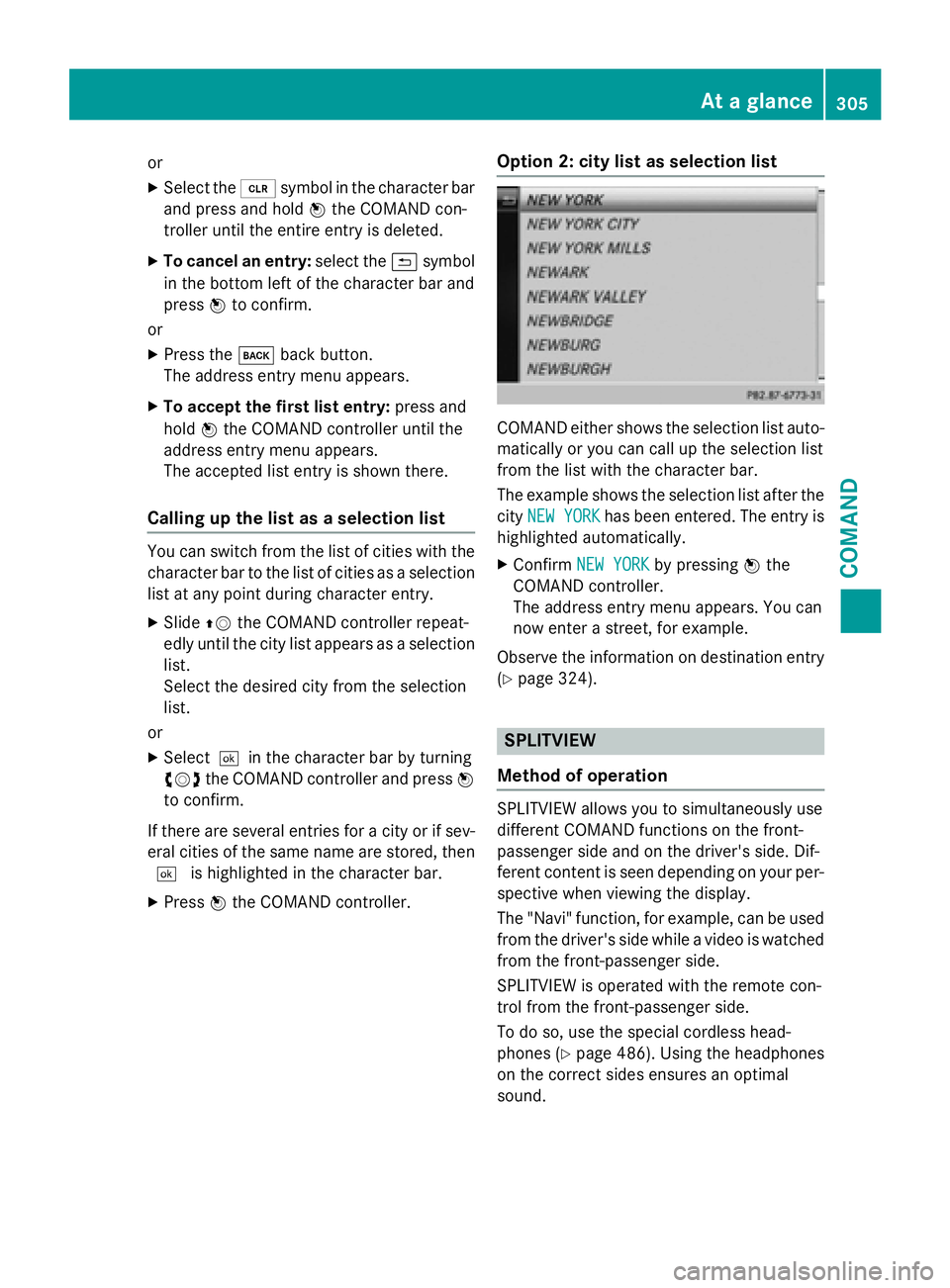
Option 2: city list as selection list
COMAND either shows the selection list auto-
matically or you can call up the selection list
from the list with the character bar.
The example shows the selection list after the
city NEW YORK
has been entered. The entry is
highlighted automatically.
XConfirm NEW YORKby pressing Wthe
COMAND controller.
The address entry menu appears. You can
now enter a street, for example.
Observe the information on destination entry
(
Ypage 324).
SPLITVIEW
Method of operation
SPLITVIEW allows you to simultaneously use
different COMAND functions on the front-
passenger side and on the driver's side. Dif-
ferent content is seen depending on your per-
spective when viewing the display.
The "Navi" function, for example, can be used
from the driver's side while a video is watched
from the front-passenger side.
SPLITVIEW is operated with the remote con-
trol from the front-passenger side.
To do so, use the special cordless head-
phones (
Ypage 486). Using the headphones
on the correct sides ensures an optimal
sound.
At a glance305
COMAND
Z
Page 308 of 614
You can connect your own headphones to a
special headphones jack. You can use the
remote control to operate them.
Points to remember
RYou can only adjust the volume for the
headphones supplied, directly on the head-
phones.
ROnly entertainment functions, i.e. audio,
TV, video and Internet, for example, may be
used with SPLITVIEW.
RDifferent media can be used on the driver
and front-passenger sides as long as they
use different media sources. Example: if a
medium from the single DVD drive is being
played on the driver's side, then another
medium that is also played from the single
DVD drive cannot be played separately on
the front-passenger side. However, other
media can be used at the same time on the
front-passenger side, including radio,
memory card, MUSIC REGISTER, Media
Interface, USB or AUX.
RIf you use the same medium on both sides, you can both carry out the respective set-
tings.
RInternet use is only available at any one
time to the driver or the front passenger.
A corresponding message appears on the
display.
RInternet can only be used, if it is set and
connected via a telephone on the driver's
side.
RThe multifunction steering wheel can only
be used for functions which relate to the
driver's side.
Switching SPLITVIEW on/off
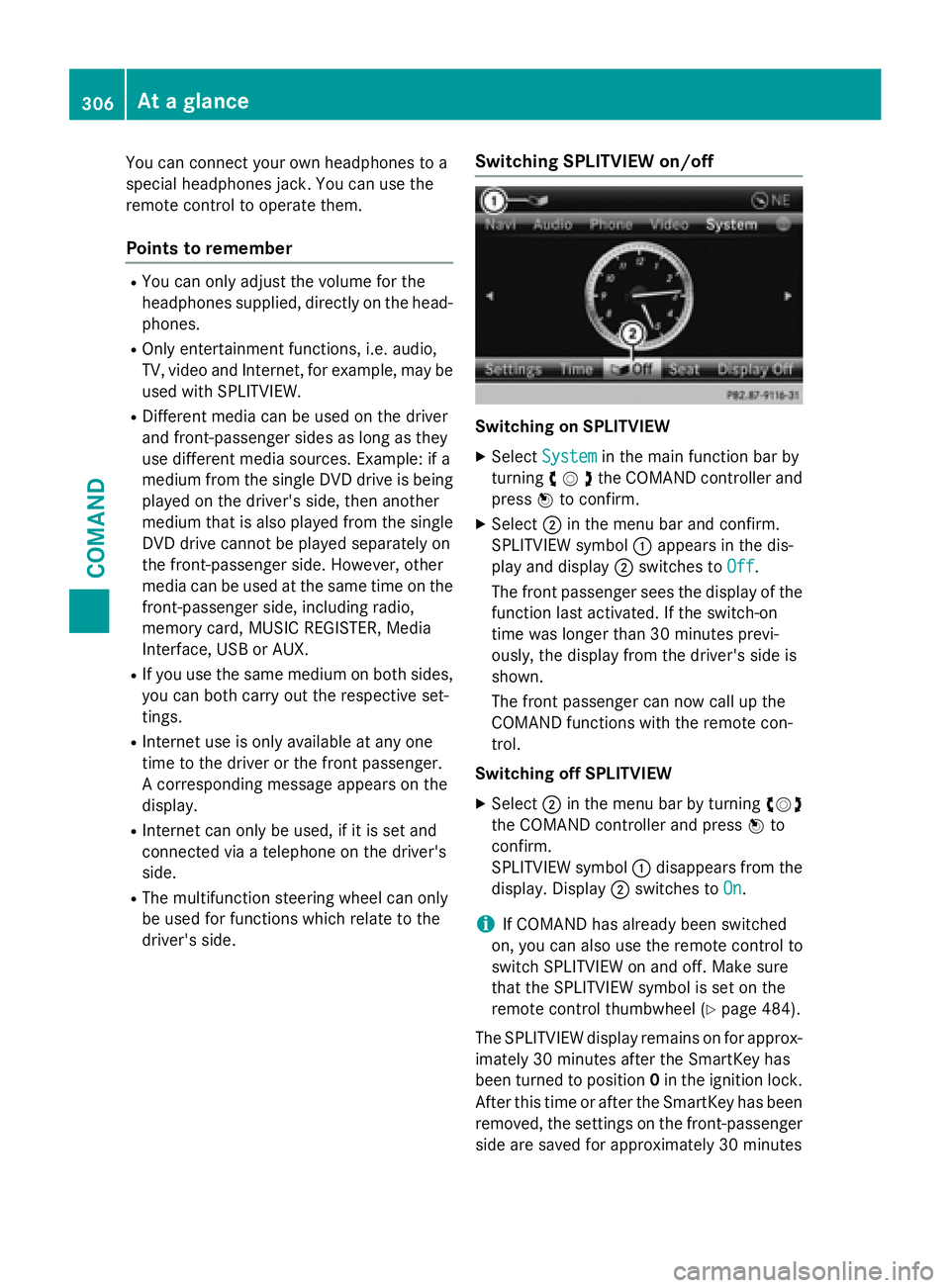
Switching on SPLITVIEW
XSelect Systemin the main function bar by
turning cVdthe COMAND controller and
press Wto confirm.
XSelect ;in the menu bar and confirm.
SPLITVIEW symbol :appears in the dis-
play and display ;switches to Off
.
The front passenger sees the display of the
function last activated. If the switch-on
time was longer than 30 minutes previ-
ously, the display from the driver's side is
shown.
The front passenger can now call up the
COMAND functions with the remote con-
trol.
Switching off SPLITVIEW
XSelect ;in the menu bar by turning cVd
the COMAND controller and press Wto
confirm.
SPLITVIEW symbol :disappears from the
display. Display ;switches to On
.
iIf COMAND has already been switched
on, you can also use the remote control to
switch SPLITVIEW on and off. Make sure
that the SPLITVIEW symbol is set on the
remote control thumbwheel (
Ypage 484).
The SPLITVIEW display remains on for approx-
imately 30 minutes after the SmartKey has
been turned to position 0in the ignition lock.
After this time or after the SmartKey has been
removed, the settings on the front-passenger side are saved for approximately 30 minutes
306At a glance
COMAND
Page 309 of 614
longer. After this period, reactivation on the
front-passenger side means that the settings
from the driver's side will be used.
Transferring the driver's website
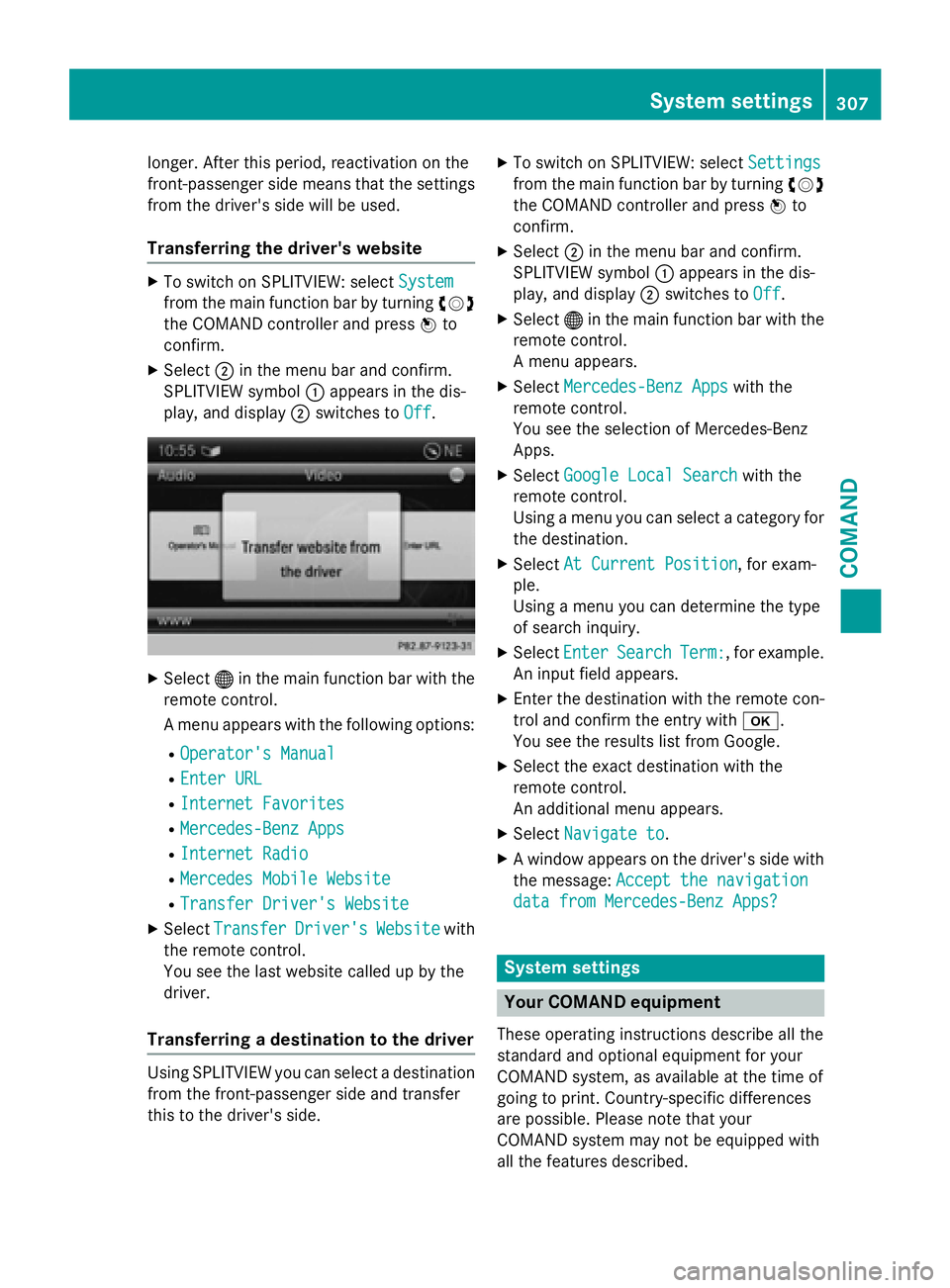
XTo switch on SPLITVIEW: selectSystem
from the main function bar by turning cVd
the COMAND controller and press Wto
confirm.
XSelect ;in the menu bar and confirm.
SPLITVIEW symbol :appears in the dis-
play, and display ;switches to Off
.
XSelect®in the main function bar with the
remote control.
A menu appears with the following options:
ROperator's Manual
REnter URL
RInternet Favorites
RMercedes-Benz Apps
RInternet Radio
RMercedes Mobile Website
RTransfer Driver's Website
XSelect TransferDriver'sWebsitewith
the remote control.
You see the last website called up by the
driver.
Transferring a destination to the driver
Using SPLITVIEW you can select a destination
from the front-passenger side and transfer
this to the driver's side.
XTo switch on SPLITVIEW: select Settings
from the main function bar by turning cVd
the COMAND controller and press Wto
confirm.
XSelect ;in the menu bar and confirm.
SPLITVIEW symbol :appears in the dis-
play, and display ;switches to Off
.
XSelect®in the main function bar with the
remote control.
A menu appears.
XSelect Mercedes-Benz Appswith the
remote control.
You see the selection of Mercedes-Benz
Apps.
XSelect Google Local Searchwith the
remote control.
Using a menu you can select a category for
the destination.
XSelect At Current Position, for exam-
ple.
Using a menu you can determine the type
of search inquiry.
XSelect EnterSearchTerm:, for example.
An input field appears.
XEnter the destination with the remote con-
trol and confirm the entry with b.
You see the results list from Google.
XSelect the exact destination with the
remote control.
An additional menu appears.
XSelect Navigate to.
XA window appears on the driver's side with
the message: Accept the navigation
data from Mercedes-Benz Apps?
System settings
Your COMAND equipment
These operating instructions describe all the
standard and optional equipment for your
COMAND system, as available at the time of
going to print. Country-specific differences
are possible. Please note that your
COMAND system may not be equipped with
all the features described.
System settings307
COMAND
Z