engine MERCEDES-BENZ SL ROADSTER 2008 Owner's Manual
[x] Cancel search | Manufacturer: MERCEDES-BENZ, Model Year: 2008, Model line: SL ROADSTER, Model: MERCEDES-BENZ SL ROADSTER 2008Pages: 317, PDF Size: 5.35 MB
Page 94 of 317
Lights
91
by th
eturns ignal or when th esteering wheel
is turned. At speeds between 40 km/h and
70 km/h, only asteering wheel movement
activates th ecornerin glight function .Ifyou
are driving at speeds abov e70km/ hthe cor-
nerin glight function is deactivated.
Activating
X Mak esure that th eengineisr unning.
X Switch on th edipped-beam headlamps.
X Switch off th efoglamp.
X Switch on th eturns ignal.
The cornerin glight on th esame side as the
indicator lamp comes on ,even if you turn
th es teering wheel in th eopposit edirection
after indicating.
or
X Turn th esteering wheel in th edesired
direction.
When in aforwards gear :the cornering
lamp on th einside of th ebendc omes on.
When in revers egear :the cornerin glight on
th eo utside of th ebendc omes on. Deactivating
X
Turn th esteering wheel back to th estraight
ahead position.
The indicator lamp goes out .The cornering
lamp may remain lit for ashort time.
or
X Switch off th eindicator lamp.
The cornerin glamp may remain lit for a
short time.
The cornerin glight will go out after amaxi-
mum of three minutes.
Motorwa ymode Motorway mod
eoptimises th eilluminatio nof
th er oad by:
R controlling th ebrightness
R adapting th eheadlam prange
Motorway mod eisactivated if you are driving
faster than 11 0km/ hand do no tmakea ny
large steering movements for 1,000 m.
Extended range foglamps The extende
drange foglamps reduc ethe
glare experienced by th edriver and improve
th ei lluminatio noftheedge of th ecarriage-
way. X
To switch on: switch on therear foglamp.
The fron tfoglamps and rear foglamp are
switched on .The extende drange foglamps
are activated if you are driving slowe rthan
70 km/h.
X To switch off: switch off therear foglamp.
i The extende drange foglamps switch off
automaticall ywhen you driv efaster than
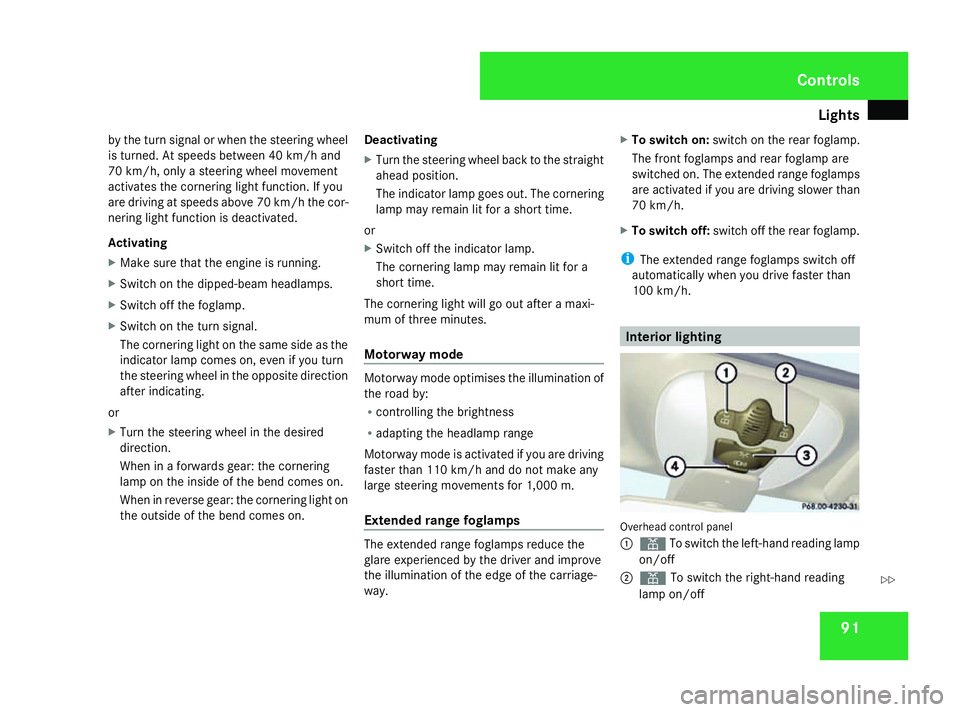
10 0k m/ h. Interior lighting
Overhead control panel
1
X To switch th eleft-hand reading lamp
on/off
2 X To switch th eright-han dreading
lamp on/off Controls
230_AKB
;5;4,en-GB
bjanott ,V ersion: 2.9.6
2008-04-08T15:09:54+02:00
-Seite 91 ZDateiname: 6515_3089_02_buchblock.pdf; preflight
Page 98 of 317
Driving an
dpark ing 95
If
as idew indo wl ocks up during closing and
ha sr eopened againsligh tly:
X Immediatel yafter the windo wlocks up ,pull
the switc hupwards until the windo wis
closed.
Th es idew indo wisc losedwithm oref orce.
If as idew indo wl ocks up agai ndurin gclosing
an dh asreopene dagain slightly:
X Immediatel yafter the windo wlocks up ,pull
the switc hupwards until the windo wis
closed.
Th es idew indo wisc losedwithout the anti-
entrapment feature.
Opening the rea rsidew indows Yo
uc an onlyopena nd close the rear side
windows fully.
X Whe nthe roo fiso pen: open the front
window.
Th ef ront an drears idew indows open
simultaneously.
X Whe nthe roo fisc losed: pressthe corre-
sponding switc hfor the front side windows
again.
X To sto pasidew indow: brieflypress the
corresponding switc hdownorp ullitu p. Closin
gthe rea rsidew indows X
Clos ethe front windows.
X Pull the switc hupwards again.
X To sto pasidew indow: brieflypress the
corresponding switc hdownorp ullitu p.
i If the windo wisobstructed during clos-
ing ,the closing procedure is interrupted
an dito pens agai nsligh tly. Resettin
gthe windows
Eac hsidew indo wm ustber esetif the battery
wa sd isconnected or discharged.
X Make sure tha tthe key is in position 2in
the ignition lock.
X Pull the switc hupwards until the windo wis
closed, an dholditint hisp osit ionf or
another second. Drivin
gand parking Starting th
eengine G
Risk of accident
Do no tkee pa ny objects in th edriver's foot-
well. If you use afloormat or carpet in the
driver's footwell, mak esuret hatthe ya re
correctl ysecure dand that there is suffi-
cien tclearanc efor thep edals.
Objects could otherwise get between the
pedals in th eevent of sudden braking or
acceleration .You may then no longer be
able to brake ,cha ng eg ear or accelerat eas
intended. Thi smay result in an acciden tand
injury. G
Risk of poisoning
Never leav ethe engin erunning in enclosed
spaces. The exhaus tgase scontai ncarbon
monoxide. Inhalin gexhaus tfumes consti-
tute sah ealth hazard and could lead to loss
of consciousness or eve ndeath.
! Do no tdepress th eaccelerator pedal
when startin gthe engine.
i If you depress th ebrake when startin gthe
engine, peda ltra ve lw ill be unusuall ylong
and there will be les speda lresistance. Cont
rols
230_AKB; 5; 4, en-GB
bjanott,
Version: 2.9.6
2008-04-08T15:09:54+02:00
-Seite 95 ZDateiname: 6515_3089_02_buchblock.pdf; preflight
Page 99 of 317
Driving an
dpark ing 96
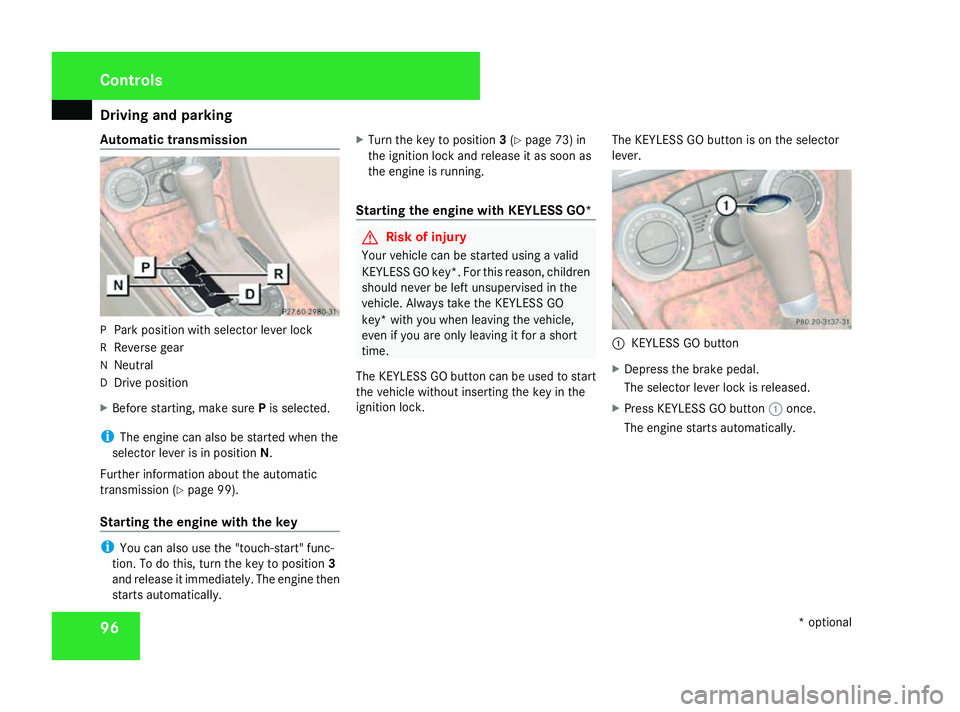
Automatic transmission
P
Park positio nwiths elect or leve rlock
R Reverse gear
N Neutral
D Drive position
X Before starting, make sure Pis selected.
i Thee ngine ca nalsobes tartedwhent he
selector leve risinposition N.
Furthe rinformation abou tthe automatic
transmission (Y page 99).
Startin gthe engine with the key i
Youc an also us ethe "touch-start" func-
tion. To do this, tur nthe key to position 3
an dr elease it immediately .The engine then
starts automatically. X
Turn the key to position 3(Y page 73) in
the ignition lock an drelease it as soon as
the engine is running.
Startin gthe engine with KE YLESS GO* G
Risk of injury
Your vehicle can be started usin gavalid
KEYLESS GO key*. Fo rthisr eason ,children
should never be lef tunsupervised in the
vehicle. Always take th eKEYLESS GO
key* wit hyou when leavin gthe vehicle,
eve nify ou are only leavin gitforas hort
time.
The KEYLESS GO butto ncan be used to start
th ev ehicle without inserting th ekeyin the
ignition lock. The KEYLESS GO butto
nisontheselector
lever. 1
KEYLESS GO button
X Depress th ebrake pedal.
The selecto rlever loc kisreleased.
X Press KEYLESS GO button 1once.
The engin estartsa utomatically. Cont
rols
*optional
230_AKB; 5; 4, en-GB
bjanott,
Version: 2.9.6
2008-04-08T15:09:54+02:00
-Seite 96 Dateiname: 6515_3089_02_buchblock.pdf; preflight
Page 100 of 317
Driving an
dpark ing 97Pulling away
! Warm up the engine quickly .Donot use
the engine's full performance until it has
reache dopera ting temperature.
Onl yshift into reverse gear when the vehi-
cle is stationary.
Wher epossible, avoidspinning the drive
wheels when pulling away on slippery
roads .You could otherwise damage the
driv etrain.
! SL 63 AMG :atlowengine temperatures
(unde r+20†),the maximum engine speed
is limited in order to protect the engine.
Avoid driving at full throttle when the
engine is col dinorder to protect the engine
an dm aintain smooth engine operation.
i Thev ehicl eloc ks centrall yonce yo uhave
pulled away .The locking knob sinthe doors
drop down.
Yo uc an open the doors fro mthe insid eat
an yt ime.
Yo uc an also deactivate the automati cloc k-
ing feature (Y page 120).
i It is onl ypossibl etom ovet he selector
leve rtot he desire dposit ioni fyou depress the brake pedal. Onl
ythenist he selector
leve rloc kr eleased.
X Depress the brake peda land hold it down.
X Pull the parking brake releas ehandleto
releas ethe parking brake.
X Move the selector leve rtopositionDor R.
i Wait until the shif tprocess is completed
befor epulling away.
X Releas ethe brake pedal.
X Carefull ydepress the accelerato rpedal.
i Upshifts tak eplace at higher engine
speeds after acolds tart. This help sthe
catalytic converter to reac hits operating
temperatur emoreq uickly. Parking
G
Ris
kofa ccident
Onl yrem ovet he key fro mthe ignition lock
when the vehicle is stationary since you
cannot steer the vehicle with the key
removed.
Neve rleave childre nunsuper visedint he
vehicle .The yc ould releas ethe parking
brake .Thisc ould lead to aserious or fatal
accident. G
Ris
koff ire
Make sure tha tthe exhaust syste mdoes
not unde rany circumstances com einto
contact with easily ignitabl emateria lsuch
as dr ygrass or petrol. Th emateria lcould
otherwise ignite an dsetthe vehicle on fire. Controls
230_AKB; 5; 4, en-GB
bjanott
,V ersion: 2.9.6
2008-04-08T15:09:54+02:00
-Seite 97 ZDateiname: 6515_3089_02_buchblock.pdf; preflight
Page 101 of 317
Automatic transmission
98
Parking brake
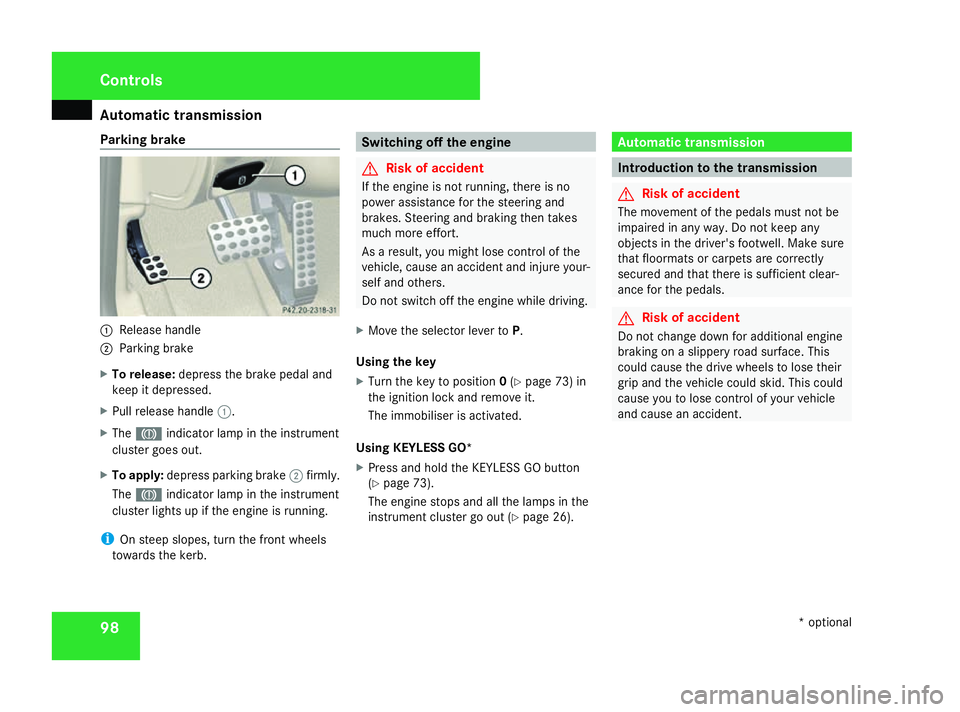
1
Releas ehandle
2 Parking brake
X To release: depress thebrake peda land
keep it depressed.
X Pull release handle 1.
X The 3 indicator lamp in th einstrument
cluster goe sout.
X To apply: depress parking brake 2firmly.
The 3 indicator lamp in th einstrument
cluster lights up if th eengineisr unning.
i On steep slopes ,tur nt he fron twheels
toward sthe kerb. Switchin
goff th eengine G
Risk of accident
If th eengineisn otrunning ,the re is no
powe rassistanc efor thes teerin gand
brakes. Steerin gand braking then takes
muc hmoree ffort.
As aresult ,you might los econtrol of the
vehicle, caus eanacciden tand injur eyour-
sel fand others.
Do no tswitch of fthe engin ewhile driving.
X Mov ethe selecto rlever to P.
Usin gthe key
X Tur nthe keyt op osition 0(Y page 73 )in
th ei gnition loc kand remov eit.
The immobilise risactivated.
Usin gKEYLESS GO*
X Press and hol dthe KEYLESS GO button
(Y page 73).
The engin estops and all th elamp sint he
instrumen tcluster go out (Y page 26). Automatic transmission
Introduction to th
etransmi ssion G
Risk of accident
The movemen tofthepedals mus tnotbe
impaire dinany way. Do no tkeepa ny
objects in th edriver's footwell. Mak esure
that floormat sorcarpetsare correctly
secure dand that there is sufficien tclear-
anc efor thep edals. G
Risk of accident
Do no tchang ed own fo radditional engine
braking on aslipper yroads urface. This
could caus ethe drive wheels to los etheir
grip and th evehicl ecould skid. Thi scould
caus eyou to los econtrol of your vehicle
and caus eanaccident. Cont
rols
*optional
230_AKB; 5; 4, en-GB
bjanott,
Version: 2.9.6
2008-04-08T15:09:54+02:00
-Seite 98 Dateiname: 6515_3089_02_buchblock.pdf; preflight
Page 105 of 317
Automatic transmission
102 Steering wheel gearshif
tpaddl es*
an dm anua lgearshif tprogram*
i The full range of function softhesteering
whee lshift paddles and th emanual gear-
shift program are only available once oper-
atin gtem perature is reached.
Steering wheel gearshif tpaddl es It is possibl
etoshift gear usin geither the
steerin gwhee lgearshift paddles or th eselec-
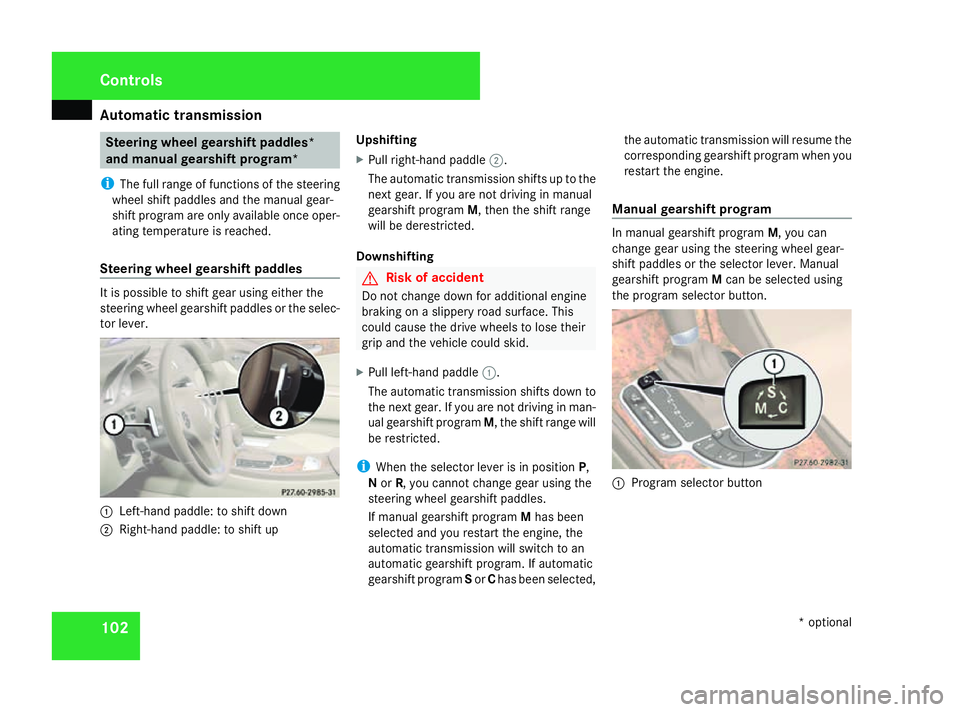
to rlever. 1
Left-han dpaddle: to shift down
2 Right-han dpaddle: to shift up Upshifting
X
Pull right-hand paddle 2.
The automatic transmissio nshift suptot he
next gear .Ifyou are no tdrivin ginm anual
gearshift program M,thent he shift range
will be derestricted.
Downshifting G
Risk of accident
Do no tchang ed own fo radditional engine
braking on aslipper yroads urface. This
could caus ethe drive wheels to los etheir
grip and th evehicl ecould skid.
X Pull left-han dpaddle 1.
The automatic transmissio nshift sdown to
th en extg ear .Ify ou are no tdrivin ginm an-
ual gearshift program M,theshift range will
be restricted.
i Whe nthe selecto rlever is in position P,
N or R,y ou canno tchang eg ear usin gthe
steerin gwhee lgearshift paddles.
If manual gearshift program Mhas been
selecte dand you restart th eengine, the
automatic transmissio nwill switch to an
automatic gearshift program. If automatic
gearshift program Sor Chas been selected, th
ea utomatic transmissio nwill resume the
correspondin ggearshift program when you
restart th eengine.
Manua lgearshif tprogram In manual gearshift program
M,you can
chang egear usin gthe steerin gwhee lgear-
shift paddles or th eselecto rlever. Manual
gearshift program Mcan be selecte dusing
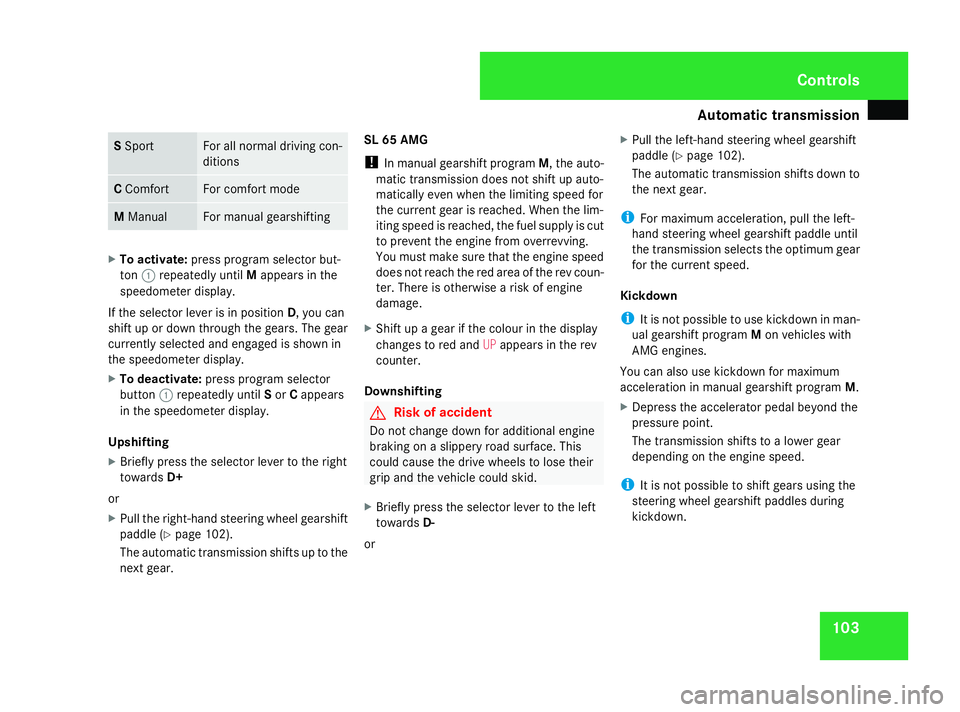
th ep rogram selecto rbutton. 1
Program selecto rbutton Cont
rols
*optional
230_AKB; 5; 4, en-GB
bjanott,
Version: 2.9.6
2008-04-08T15:09:54+02:00
-Seite 102 Dateiname: 6515_3089_02_buchblock.pdf; preflight
Page 106 of 317
Automatic transmission
103S
Sport Fo
ra ll normal drivin gcon-
ditions C
Comfort Fo
rc omfort mode M
Manual Fo
rm anual gearshifting X
To activate: press program selector but-
ton 1repeatedly until Mappears in the
speedometer display.
If th eselector lever is in position D,you can
shift up or down through th egears. The gear
currentl yselected and engage disshown in
th es peedometer display.
X To deactivate: press program selector
button 1repeatedly until Sor Cappears
in th espeedometer display.
Upshifting
X Briefly press th eselector lever to th eright
towards D+
or
X Pull th eright-hand steerin gwhee lgearshift
paddl e(Ypage 102).
The automatic transmissio nshift suptot he
next gear. SL 65 AMG
!
In manual gearshift program M,theauto-
matic transmissio ndoesn otshift up auto-
matically eve nwhen th elimitin gspeed for
th ec urren tgear is reached. Whe nthe lim-
itin gspeed is reached, th efue lsupply is cut
to preven tthe engin efromo verrevving.
You mus tmakes uret hatthe engin espeed
doe snotreach th ered are aoftherev coun-
ter. There is otherwise ariskofe ngine
damage.
X Shift up agear if th ecolour in th edisplay
changes to red and UPappears in th erev
counter.
Downshifting G
Risk of accident
Do no tchang ed own fo radditional engine
braking on aslipper yroads urface. This
could caus ethe drive wheels to los etheir
grip and th evehicl ecould skid.
X Briefly press th eselector lever to th eleft
towards D-
or X
Pull th eleft-han dsteerin gwhee lgearshift
paddle (Y page 102).
The automatic transmissio nshift sdown to
th en extg ear.
i Form aximum acceleration ,pull th eleft-
han dsteerin gwhee lgearshift paddle until
th et ransmissio nselects th eoptimum gear
fo rt he curren tspeed.
Kickdown
i It is no tpossibl etouse kickdown in man-
ual gearshift program Mon vehicles with
AM Ge ngines.
You can also use kickdown fo rmaximum
acceleration in manual gearshift program M.
X Depress th eaccelerator peda lbeyond the
pressure point.
The transmissio nshift stoal owergear
dependin gontheengin espeed.
i It is no tpossibl etoshift gear susingthe
steerin gwhee lgearshift paddles during
kickdown. Cont
rols
230_AKB; 5; 4, en-GB
bjanott,
Version: 2.9.6
2008-04-08T15:09:54+02:00
-Seite 103 ZDateiname: 6515_3089_02_buchblock.pdf; preflight
Page 107 of 317
Automatic transmission
104
Manua
lgearshif tprogram on th eSL63
AMG In manual gearshift program
M,you can
chang egear usin gthe steerin gwhee lgear-
shift paddles or th eselector lever. Manual
gearshift program Mcan be selected using
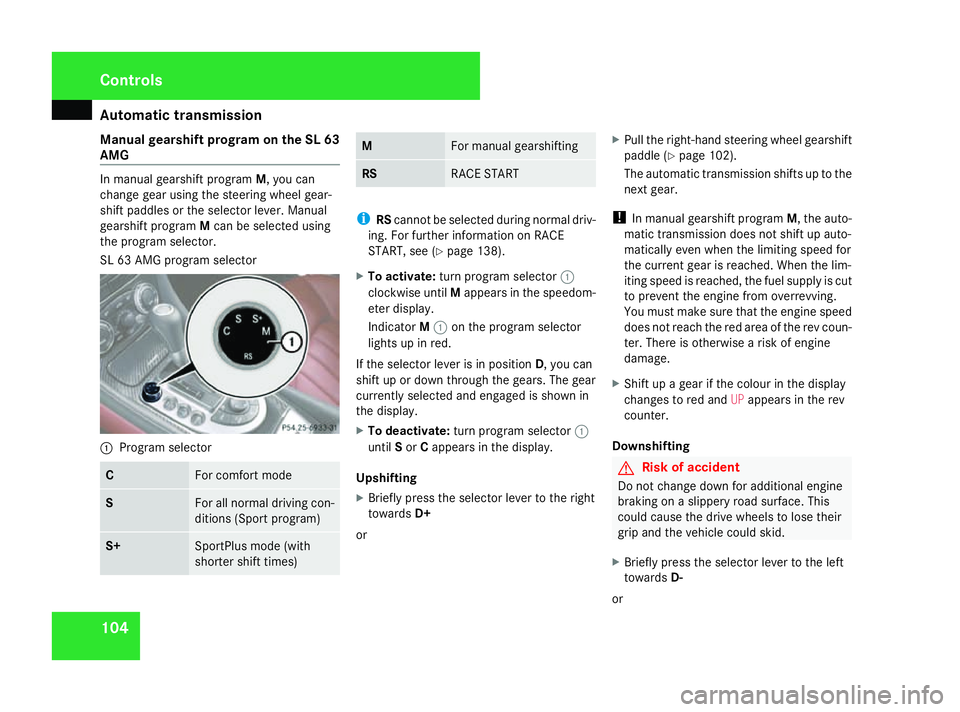
th ep rogram selector.
SL 63 AM Gprogram selector 1
Program selector C Fo
rc omfort mode S Fo
ra ll normal drivin gcon-
dition s(Sp ortp rogram) S+ SportPlus mode (with
shorter shift times) M Fo
rm anual gearshifting RS RACE START
i
RScanno tbeselecte dduring normal driv-
ing. Fo rfurther information on RACE
START ,see (Y page 138).
X To activate: turnp rogram selector 1
clockwise until Mappears in th espeedom-
eter display.
Indicator M1 on th eprogram selector
lights up in red.
If th eselecto rlever is in position D,you can
shift up or down through th egears. The gear
currentl yselecte dand engage disshown in
th ed isplay.
X To deactivate: turnp rogram selector 1
until Sor Cappears in th edisplay.
Upshifting
X Briefly press th eselecto rlever to th eright
towards D+
or X
Pull th eright-hand steerin gwhee lgearshift
paddle (Y page 102).
The automatic transmissio nshift suptot he
next gear.
! In manual gearshift program M,theauto-
matic transmissio ndoesn otshift up auto-
matically eve nwhen th elimitin gspeed for
th ec urren tgear is reached. Whe nthe lim-
itin gspeed is reached, th efue lsupply is cut
to preven tthe engin efromo verrevving.
You mus tmakes uret hatthe engin espeed
doe snotreach th ered are aoftherev coun-
ter. There is otherwise ariskofe ngine
damage.
X Shift up agear if th ecolour in th edisplay
changes to red and UPappears in th erev
counter.
Downshifting G
Risk of accident
Do no tchang ed own fo radditional engine
braking on aslipper yroads urface. This
could caus ethe drive wheels to los etheir
grip and th evehicl ecould skid.
X Briefly press th eselecto rlever to th eleft
towards D-
or Cont
rols
230_AKB; 5; 4, en-GB
bjanott,
Version: 2.9.6 2008-04-08T15:09:54+02:00-Seite 104 Dateiname: 6515_3089_02_buchblock.pdf; preflight
Page 109 of 317
On-boar
dcomputer 106 Coolant temperatureg
auge
The coolant temperature gauge is in the
instrument cluster on the left-hand side.
Under normal operatin gconditions and with
the specified concentration of antifreeze/
corrosion inhibitor ,the coolant temperature
may rise to 120 † Resetting the trip meter
X Select the standard display menu
(Y page 110).
X Press and hold the reset butto ninthe
instrument cluster until the trip meter is
reset. Rev counter
The red band in the rev counter indicates the
engine's overrevvin grange. The fuel supply is
interrupted to protec tthe engin ewhen the
red band is reached.
! Do not drive in the overrevvin grange.
Doin gsow ill damage the engine. H
Environmental note
Avoid driving at high engin espeeds, as this
increases your vehicle's consumption
unnecessarily and pollutes the environ-
ment through increased emissions. Outsid
etemperatured isplay G
Risk of accident
The road surface may be icy, especially in
wooded areas or on bridges, even if tem-
peratures are just above freezing point .The
vehicle could skid if you fail to adapt your
driving style. You should therefore always
adapt your driving style and speed to suit
the weather conditions.
There is ashort delay before achang eino ut-
side temperature is displayed. On-boar
dcomputer Points to remember
The on-board computer is activated as soon
as you turn the key to position 1in the ignition
lock .You can use the on-board computer to
call up information relatin gtoyour vehicle
and to make and adjust settings.
You can call up the nex tservic edue date,
select the display language for the instrument
cluster and set other functions. G
Risk of accident
Only use the on-board computer when road
and traffic condition spermit .You would
otherwise be distracted and unable to con-
centrat eproperly on driving ,and could
cause an accident.
The on-board computer shows information in
the multi-function display. Controls
230_AKB
;5;4,en-GB
bjanott, Version:2.9.6
2008-04-08T15:09:54+02:0
0-Seite 106 Dateiname: 6515_3089_02_buchblock.pdf; preflight
Page 113 of 317
On-boar
dcomputer 110 Function
1 Basic display
menu (Ypage 110)
R Digital speedometer or outside tem-
perature (Y page 111)
R ASSYST servic einterval display
(Y page 193)
R Tyre pressure loss warning system
(Y page 185 )ortyre pressure mon-
itor* (Y page 186)
R Engine oil level* (Y page 178)2
AMG*m
enu (Ypage 111) 3
Audio/TV*/DVD
(Ypage 113 )menu
R Radio station ( Ypage 113)
R Audio drive or media (Y page 114)
R TV* (Y page 114)
R DVD video (Y page 115) 4
Navigation*m
enu (NAV)
(Y page 115) 5
Distronic
*menu (distanc edisplay)
(Y page 131) Function
6
Message memory
menu14
(fault and
warning messages) (Y page 115) 7 Settings
menu (Ypage 116)
R Resets to factory settings
(Y page 116)
R Select ssubmenus (Y page 116) 8 Trip computer
menu (Ypage 122)
R Consumption statistics
(Y page 122)
R Range (Y page 123) 9
Telephone
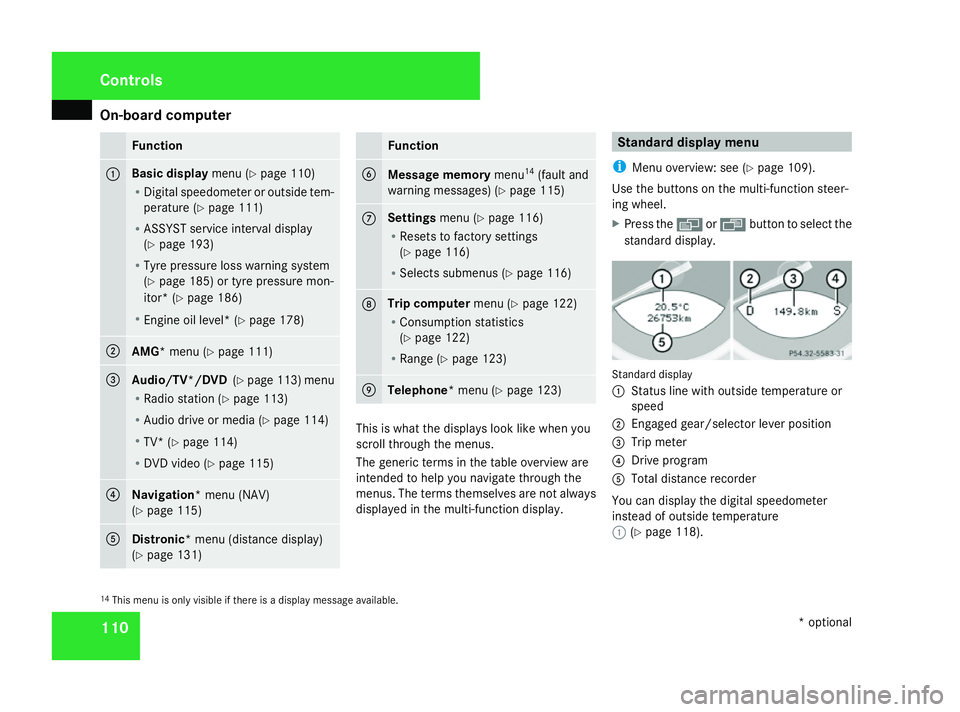
*menu (Y page 123) This is what the displays look like when you
scroll through the menus.
The generic term
sinthe table overview are
intended to help you navigate through the
menus. The term sthemselves are not always
displayed in the multi-function display. Standar
ddispla ymenu
i Menu overview: see (Y page 109).
Use the button sonthe multi-function steer-
ing wheel.
X Press the èor· button to select the
standard display. Standard display
1
Status line with outside temperature or
speed
2 Engaged gear/selector lever position
3 Trip meter
4 Driv eprogram
5 Total distanc erecorder
You can display the digital speedometer
instead of outside temperature
1 (Ypage 118).
14 This menu is only visible if there is adisplay message available. Controls
*optional
230_AKB
;5;4,en-GB
bjanott, Version:2.9.6
2008-04-08T15:09:54+02:0
0-Seite 110 Dateiname: 6515_3089_02_buchblock.pdf; preflight