engine MERCEDES-BENZ SL ROADSTER 2008 User Guide
[x] Cancel search | Manufacturer: MERCEDES-BENZ, Model Year: 2008, Model line: SL ROADSTER, Model: MERCEDES-BENZ SL ROADSTER 2008Pages: 317, PDF Size: 5.35 MB
Page 58 of 317
Driving safet
ysystems 55
i
Onlyusewheels with the recommended
tyr es izes .O nlyt henw illE SP ®
function
properly.
Tractio ncontrol Tractio
ncontrol is part of ESP ®
.
Tractio ncontrol brakes the drive wheels indi-
vidually if the yspin. This enables yo utopull
away and accelerate on slippery surfaces ,for
exampl eifthe roa dsurface is slippery on one
side.
Tractio ncontrol remains activ ewheny ou
deactivate ESP ®
. G
Ris
kofa ccident
Tractio ncontrol cannot reduc ethe risk of
an accident if yo udrive too fast. Traction
control cannot override the laws of physics.
Activating/deactivating ESP ®
,( exce pt
SL 63 AMG) ESP
®
is activate dautomaticall ywhent he
engine is running. It ma
ybeb esttod eactivate ESP ®
in the fol-
lowing situations:
R when using sno wchains
R in deep snow
R on sand or gravel G
Ris
kofa ccident
Activate ESP ®
as soon as the situations
describe dabove no longe rapply .ESP ®
will
otherwis enot be able to stabilise the vehi-
cle if the vehicl estarts to ski dorawheel
starts to spin.
If yo udeact ivate ESP ®
:
R ESP ®
no longe rimp roves driving stability.
R engine torque is not limited and the drive
wheels ar eabletos pin. Th espinning
wheels produce acutting effect for better
traction.
R tractio ncontrol is still activated.
R ESP ®
still provide ssuppo rt when you
brake.
i If ESP ®
is deactivate dand one or more
wheels start to spin, the vwarning lamp
in the instrumen tcluste rflashes .Insuch situations ESP
®
will not stabilise the vehi-
cle. 1
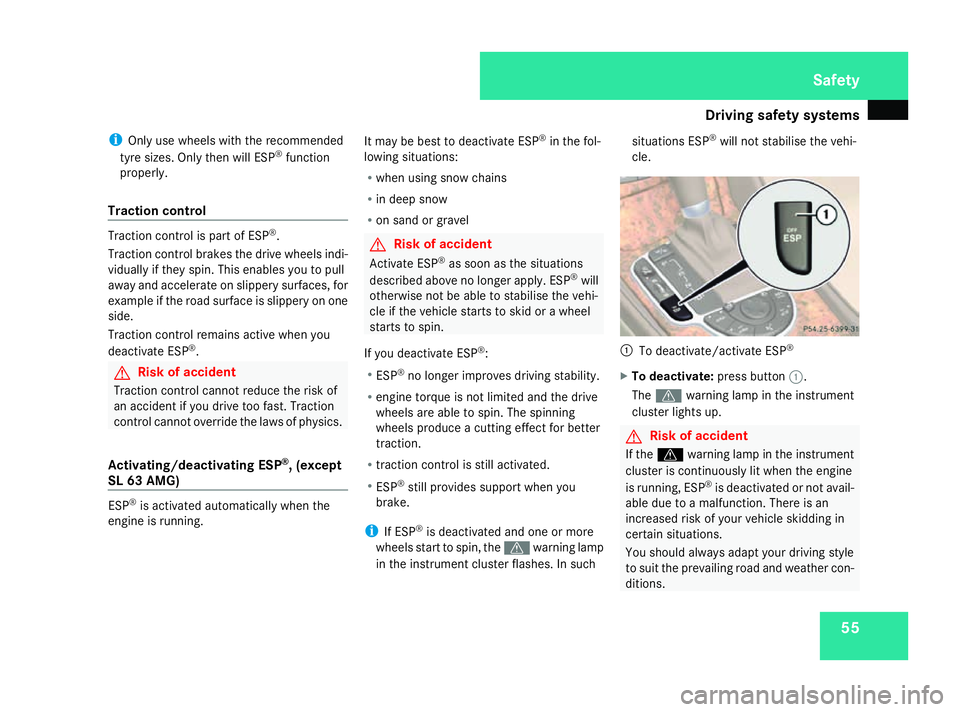
To deactivate/activate ESP ®
X To deactivate: press button1.
The v warning lamp in the instrument
cluste rlight sup. G
Ris
kofa ccident
If the v warning lamp in the instrument
cluste riscontinuously li twhent he engine
is running ,ESP ®
is deactivate dornot avail-
able du etoam alfunction. There is an
increase driskofy ourv ehicl eskidding in
certai nsituations.
Yo us houl dalway sadapt your driving style
to suit the prevailing roa dand weather con-
ditions. Safety
230_AKB; 5; 4, en-GB
bjanott,
Version: 2.9.6 2008-04-08T15:09:54+02:00-Seite 55 ZDateiname: 6515_3089_02_buchblock.pdf; preflight
Page 59 of 317
Driving safet
ysystems 56
X
To activate: press button 1.
The v warning lamp in the instrument
cluste rgoeso ut.
SL 63 AMG Activating/deactivating ESP
®
Sport
ESP ®
is activate dautomaticall ywhent he
engine is running.
It ma ybeb esttoa ctivate ESP ®
Sport in the
following situations:
R when using sno wchains
R in deep snow
R on sand or gravel
Otherwise, yo ushoul donlyu seESP ®
Sport
on designated race circuits. G
Ris
kofa ccident
Deactivate ESP ®
Sport and activate ESP ®
as soon as the situations describe dabove
no longe rapply .ESP ®
Sport will otherwise
onl ybea bletos tabilise the vehicl etoa
limited degre eifthe vehicl estarts to skid
or aw heel starts to spin. If yo
uactivate ESP ®
Sport:
R ESP ®
onl yimp roves driving stability to a
limited degree.
R engine torque is onl yrestricted to alimit ed
degre eand the drive wheels ar eableto
spin. Th espinning wheels produce acut-
ting effect for better traction.
R tractio ncontrol is still activated.
R ESP ®
still provide ssuppo rt when yo ubrake
firmly.
i If ESP ®
Sport is activate dand one or more
wheels start to spin, the vwarning lamp
in the instrumen tcluste rflashes .ESP ®
only
stabilise sthe vehicl etoalimited degree. 1
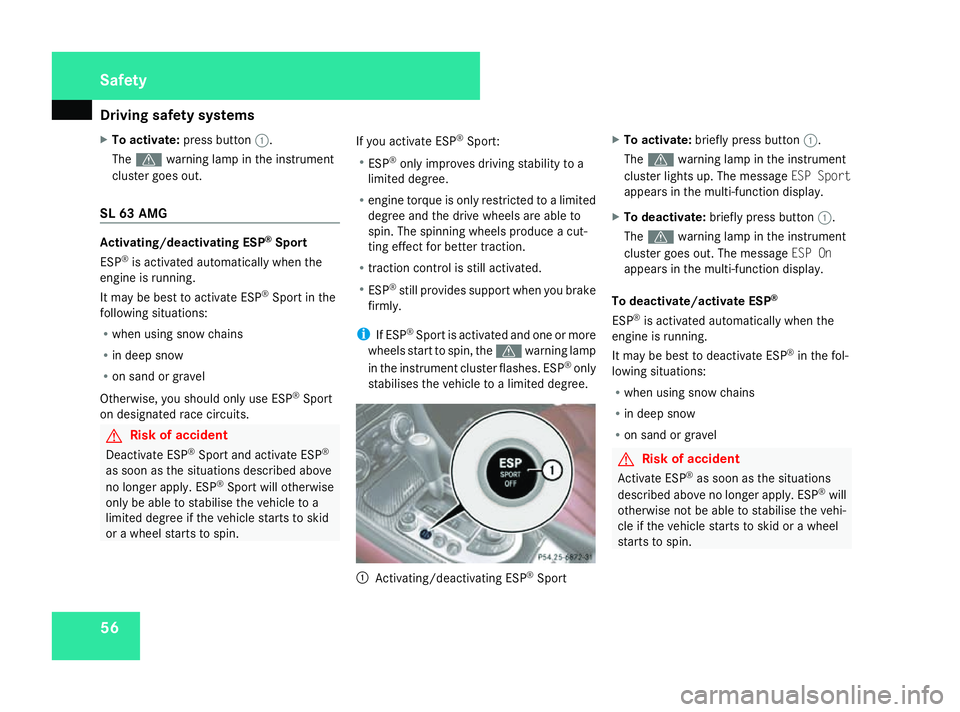
Activating/deactivating ESP ®
Sport X
To activate: brieflypress button 1.
The v warning lamp in the instrument
cluste rlight sup.Them essage ESP Sport
appear sinthe multi-functio ndisplay.
X To deactivate: brieflypress button 1.
The v warning lamp in the instrument
cluste rgoeso ut.T he message ESP On
appear sinthe multi-functio ndisplay.
To deactivate/activate ESP ®
ESP ®
is activate dautomaticall ywhent he
engine is running.
It ma ybeb esttod eactivate ESP ®
in the fol-
lowing situations:
R when using sno wchains
R in deep snow
R on sand or gravel G
Ris
kofa ccident
Activate ESP ®
as soon as the situations
describe dabove no longe rapply .ESP ®
will
otherwis enot be able to stabilise the vehi-
cle if the vehicl estarts to ski dorawheel
starts to spin. Safety
230_AKB; 5; 4, en-GB
bjanott,
Version: 2.9.6 2008-04-08T15:09:54+02:00-Seite 56 Dateiname: 6515_3089_02_buchblock.pdf; preflight
Page 60 of 317
Driving safet
ysystems 57
If yo
udeact ivate ESP ®
:
R ESP ®
no longe rimp roves driving stability.
R engine torque is no longe rlimit ed and the
drive wheels ar eabletos pin. Th espinning
wheels produce acutting effect for better
traction.
R tractio ncontrol is still activated.
R ESP ®
still provide ssuppo rt when yo ubrake
firmly.
i If ESP ®
is deactivate dand one or more
wheels start to spin, the vwarning lamp
in the instrumen tcluste rdoesn ot flash. In
such situations ESP ®
will not stabilise the
vehicle. 1
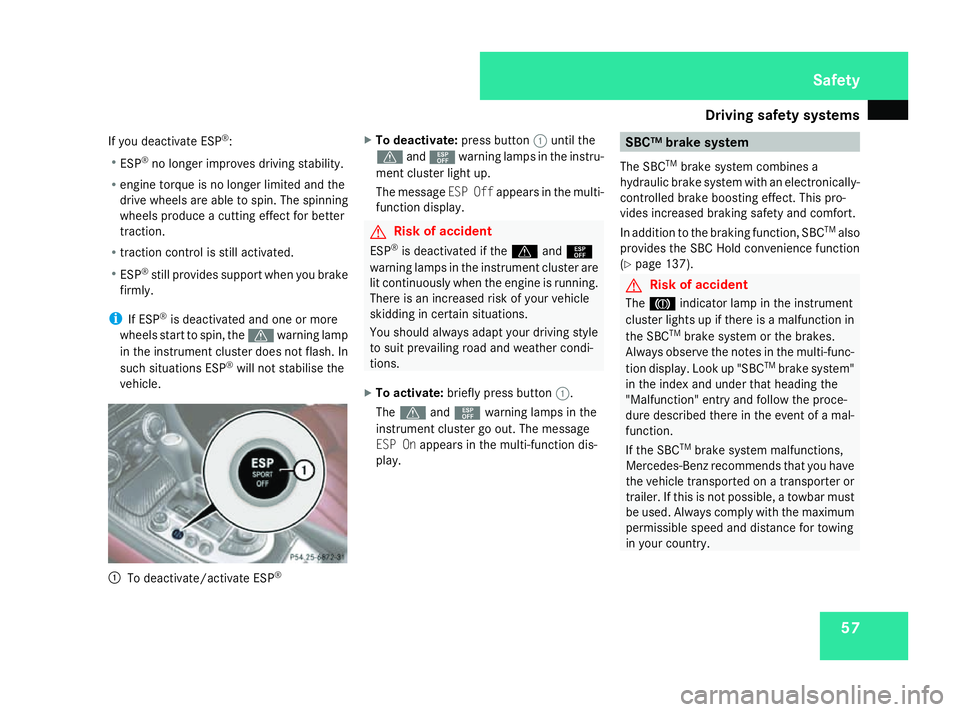
To deactivate/activat eESP® X
To deactivate: pressbutton 1untilt he
v and¯ warning lamp sinthe instr u-
ment cl usterlight up.
Th em essage ESPO ffappear sinthe multi-
function displa y. G
Risk of ac
cident
ESP ®
is deactivated if the vand¯
warning lamp sinthe instr umentclus tera re
li tc ontin uously when the engin eisrunning.
Ther eisani ncreased risk of yourvehicle
skiddin gincertain situations.
Yo us hould alwaysadap tyou rd riving style
to suit prevailing road an dweather condi-
tions.
X To activate: brieflypress button 1.
The v and¯ warning lamp sinthe
instr ument clus tergoo ut.T he message
ES POn appear sinthe multi-function dis-
play. SBC
™brake system
Th eS BCTM
brak esystemc ombines a
hydrauli cbrake syste mwithane lectronicall y-
controlled brak eboost inge ffec t. This pro-
vide sincreased brakin gsafet yand comfort.
In additio ntothe brakin gfun ction, SBC TM
also
provides the SBC Hold convenienc efunction
(Y page 137). G
Risk of ac
cident
The 3 indicator lamp in the instr ument
cl us terlight supift here isamalfun ction in
the SBC TM
brak esystemort he brakes.
Alwa ysobserve the note sinthe multi-func-
tio nd isplay. Lookup"SBC TM
brak esystem"
in the inde xand un dertha th eading the
"Malfunction" entry an dfollow the proce-
dure described there in the event of amal-
function.
If the SBC TM
brak esystemm alfun ctions,
Mercedes-Benz recommends tha tyou have
the vehicl etransported on atransporter or
trailer .Ifthisisn ot possible ,atowba rmust
be used. Alwayscompl ywitht he maxim um
permissible spee dand distance fo rtowing
in your country. Safety
230_AKB; 5; 4, en-GB
bjanott,
Version: 2.9.6
2008-04-08T15:09:54+02:00
-Seite 57 ZDateiname: 6515_3089_02_buchblock.pdf; preflight
Page 62 of 317
Anti-thef
tsyste ms 59G
Ris
kofa ccident
Make sure tha tyou do not endanger
other roa dusers when applying the
brakes.
R Yo us hould applythe brakes firml yfrom
tim etot imeatah ighv ehicle speedifthe
vehicle' sbrake syste mhasnot been sub-
jected to high load sfor alon gp erio dof
time. This improve sthe gri pofthe brake
pads/linings.
R Yo us hould brakefirml ya fter driving on a
we tors now-covere droads urface before
stopping the engine .The brak ediscs dr yas
the yarewarme dup,thu spreve nting cor-
rosion.
R For safety reasons ,Mercedes-Benz recom-
mends tha tyou onlyusecomponents ,e.g.
brak epads/li nings,which have been spe-
cially approve dbyMercedes-Benz for your
vehicle. Brake pads/linings whic hhaven ot
been approve dfor Mercedes-Benz could
affect your vehicle' sopera ting safety. Anti-theft systems
Immobiliser
Th eimm obiliser prevents your vehicl efrom
being starte dwithout the correct key.
Activating the immobiliser X
With the key: removethe key fro mthe
ignition lock.
X With KEYLES SGO*: pres sthe KEYLESS
GO button on the selector lever.
Th ee ngine switche soff.
Deactivating th eimmob iliser X
Wit hthe key: turn th ekeyto position 2in
th ei gnition lock.
X Wit hKEYLESS GO*: press theKEYLESS
GO butto nontheselecto rlever twic ewith-
out depressin gthe brake.
i The immobilise risalways deactivated
when you start th eengine. ATA (anti-thef
talarm system)
Av isual and audible alar mistriggere difthe
alar msystem is primed and you open:
R ad oor
R ad ooru sin gthe emergency ke yelement
R theb ootlid
R theb onnet
R theg love compartment
R thes towag espac eunder th earmrest
R as towag ecom partmen tintherear
The alar misnotswitched of fevenify ou close
an ope ndoora gain. 1
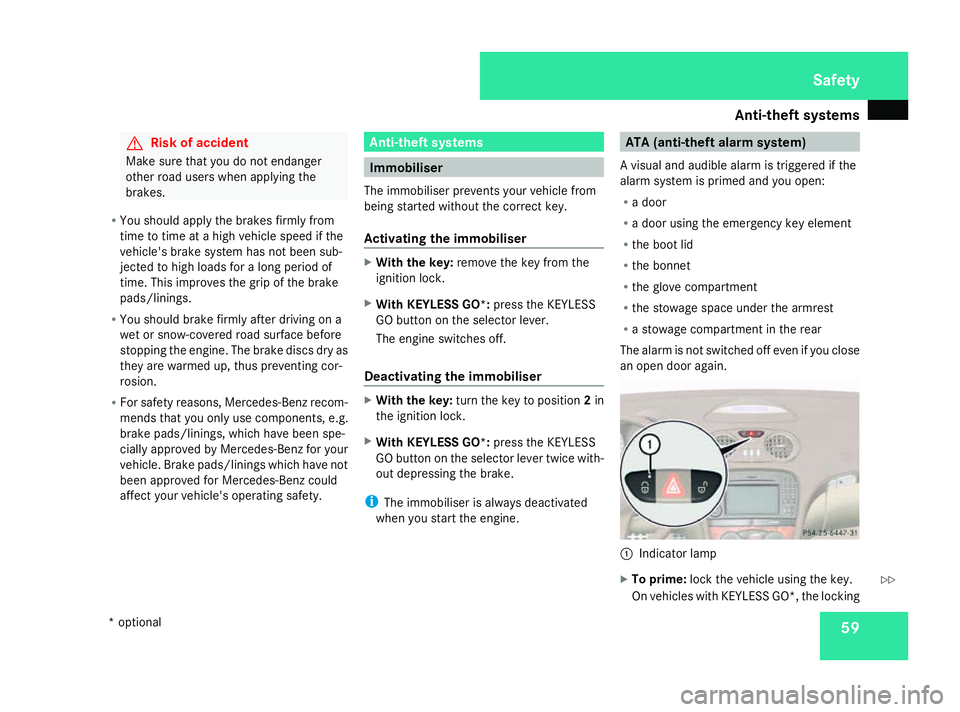
Indicator lamp
X To prime: lockthe vehicle usin gthe key.
On vehicles wit hKEYLESS GO* ,the locking Safety
*o ptional
230_AKB; 5; 4, en-GB
bjanott
,V ersion: 2.9.6
2008-04-08T15:09:54+02:00
-Seite 59 ZDateiname: 6515_3089_02_buchblock.pdf; preflight
Page 71 of 317
Opening and closing
68possible to close the door. Do not attempt
to forc
ethe door to close. You could oth-
erwise damage the door or the window. Locking/unlocking the vehicle from
the inside
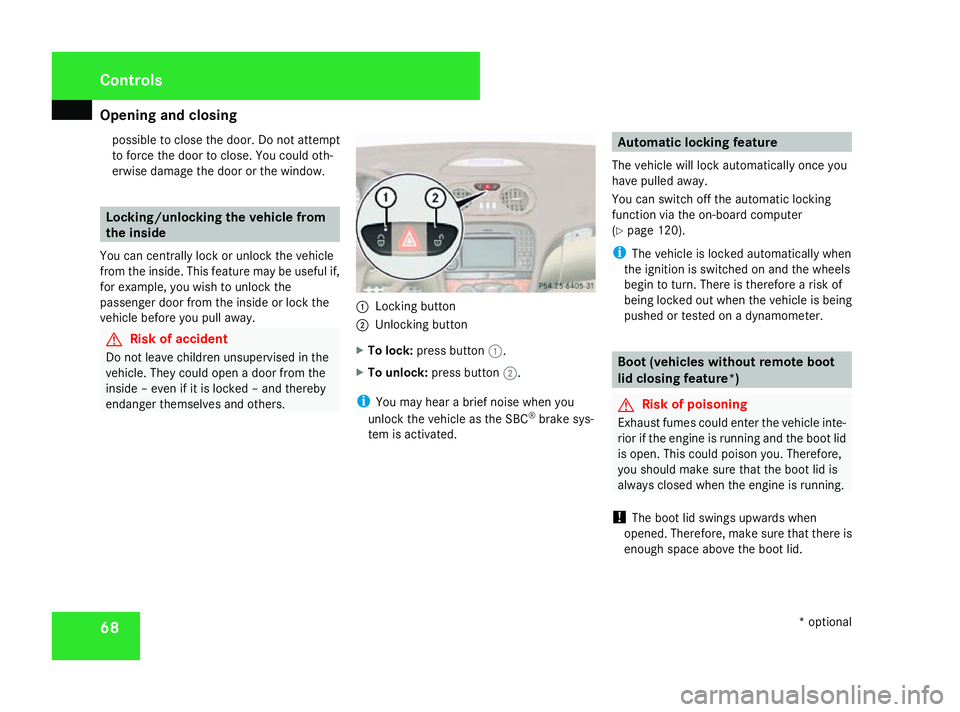
You can centrally lock or unlock the vehicle
from the inside. This feature may be useful if,
for example, you wish to unlock the
passenger door from the inside or lock the
vehicle before you pull away. G
Risk of accident
Do not leave children unsupervised in the
vehicle. They could open adoor from the
inside –even if it is locked –and thereby
endanger themselves and others. 1
Lockingb utton
2 Unlocking button
X To lock: press button 1.
X To unlock: press button 2.
i You may hear abrief noise when you
unlock the vehicle as the SBC ®
brake sys-
tem is activated. Automatic lockingf
eature
The vehicle will lock automatically once you
have pulleda way.
You can switch off the automatic locking
function via the on-board computer
(Y page 120).
i The vehicle is locked automatically when
the ignition is switched on and the wheels
begin to turn. There is therefore arisk of
being locked out when the vehicle is being
pushed or tested on adynamometer. Boot (vehicles without remote boot
lid closing feature*)
G
Risk of poisoning
Exhaust fumes could enter the vehicle inte-
rior if the engine is running and the boot lid
is open. This could poison you. Therefore,
you should make sure that the boot lid is
always closed when the engine is running.
! The boot lid swings upwards when
opened. Therefore, make sure that there is
enough space above the boot lid. Controls
*optional
230_AKB; 5; 4, en-GB
bjanott
,V ersion: 2.9.6
2008-04-08T15:09:54+02:00
-Seite 68 Dateiname: 6515_3089_02_buchblock.pdf; preflight
Page 73 of 317
Opening and closing
701
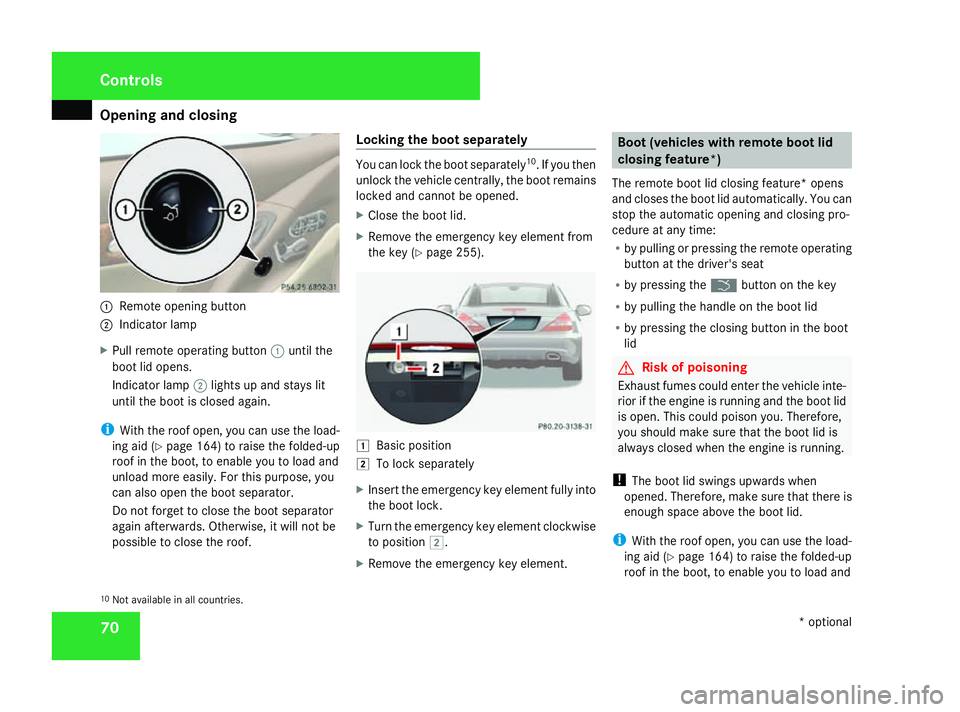
Remote opening button
2 Indicator lamp
X Pull remote operating button 1until the
boot lid opens.
Indicator lamp 2lights up and stays lit
until the boot is closed again.
i With the roof open, you can use the load-
ing aid (Y page 164) to raise the folded-up
roof in the boot, to enable you to load and
unload more easily.F or this purpose, you
can also open the boot separator.
Do not forget to close the boot separator
again afterwards. Otherwise, it will not be
possible to close the roof. Locking the boot separately You can lock the boot separately
10
.Ify ou then
unlock the vehicle centrally, the boot remains
locked and cannot be opened.
X Close the boot lid.
X Remove the emergency key element from
the key (Y page 255). $
Basic position
% To lock separately
X Insert the emergency key element fully into
the boot lock.
X Turn the emergency key element clockwise
to position %.
X Remove the emergency key element. Boot (vehicles with remote boot lid
closing feature*)
The remote boot lid closing feature* opens
and closes the boot lid automatically. You can
stop the automatic opening and closing pro-
cedure at any time:
R by pulling or pressing the remote operating
button at the driver's seat
R by pressing the ibutton on the key
R by pulling the handle on the boot lid
R by pressing the closing button in the boot
lid G
Risk of poisoning
Exhaust fumes could enter the vehicle inte-
rior if the engine is running and the boot lid
is open. This could poison you. Therefore,
you should make sure that the boot lid is
always closed when the engine is running.
! The boot lid swings upwards when
opened. Therefore, make sure that there is
enough space above the boot lid.
i With the roof open, you can use the load-
ing aid (Y page 164) to raise the folded-up
roof in the boot, to enable you to load and
10 Not availabl einall countries. Controls
*optional
230_AKB; 5; 4, en-GB
bjanott
,V ersion: 2.9.6
2008-04-08T15:09:54+02:00
-Seite 70 Dateiname: 6515_3089_02_buchblock.pdf; preflight
Page 76 of 317
Key positions
73Key positions
Key
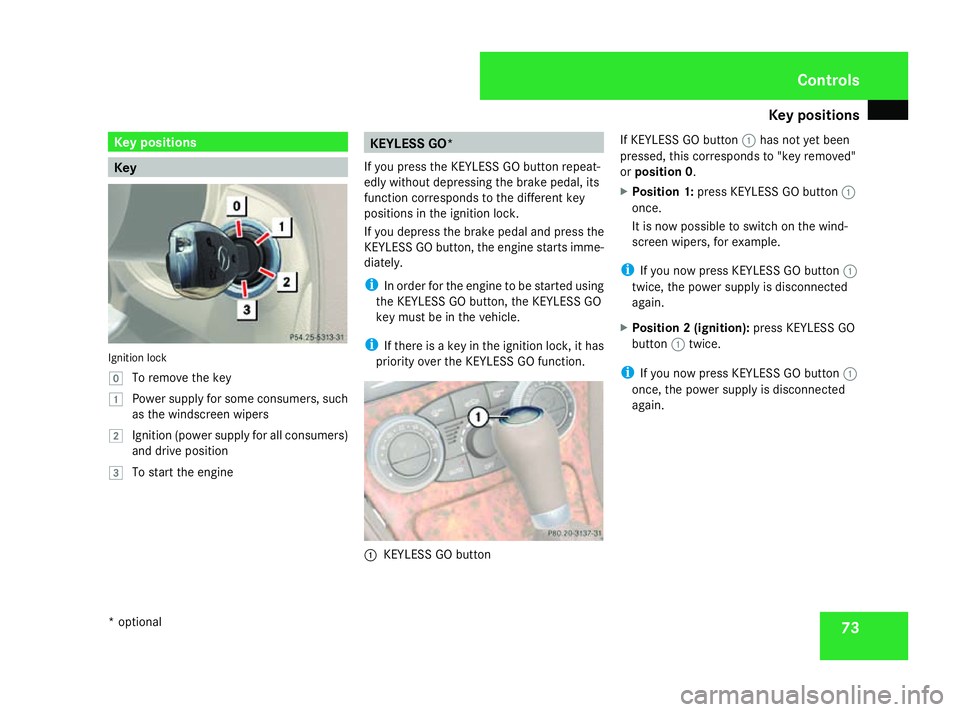
Ignition lock
}
To remove th ekey
$ Power supply for som econsumers, such
as th ewindscreen wipers
% Ignition (power supply for all consumers)
and driv eposition
& To start th eengine KEYLESS GO*
If you pres sthe KEYLESS GO button repeat-
edly without depressing th ebrak epedal, its
function corresponds to th edifferen tkey
position sintheignition lock.
If you depress th ebrak epedal and pres sthe
KEYLESS GO button ,the engine start simme-
diately.
i In orde rfor th eengine to be started using
th eK EYLESS GO button ,the KEYLESS GO
key must be in th evehicle.
i If there is akey in th eignition lock, it has
priorit yover th eKEYLESS GO function. 1
KEYLESS GO button If KEYLESS GO button
1has no tyet been
pressed, this corresponds to "key removed"
or position 0 .
X Position 1: pressKEYLESS GO button 1
once.
It is no wpossible to switch on th ewind-
screen wipers, for example.
i If you no wpressKEYLESS GO button 1
twice, th epower supply is disconnected
again.
X Position 2(ignition): pressKEYLESS GO
button 1twice.
i If you no wpressKEYLESS GO button 1
once, th epower supply is disconnected
again. Controls
*o ptional
230_AKB
;5;4,en-GB
bjanott ,V ersion: 2.9.6
2008-04-08T15:09:54+02:00
-Seite 73 ZDateiname: 6515_3089_02_buchblock.pdf; preflight
Page 88 of 317
Seat belts
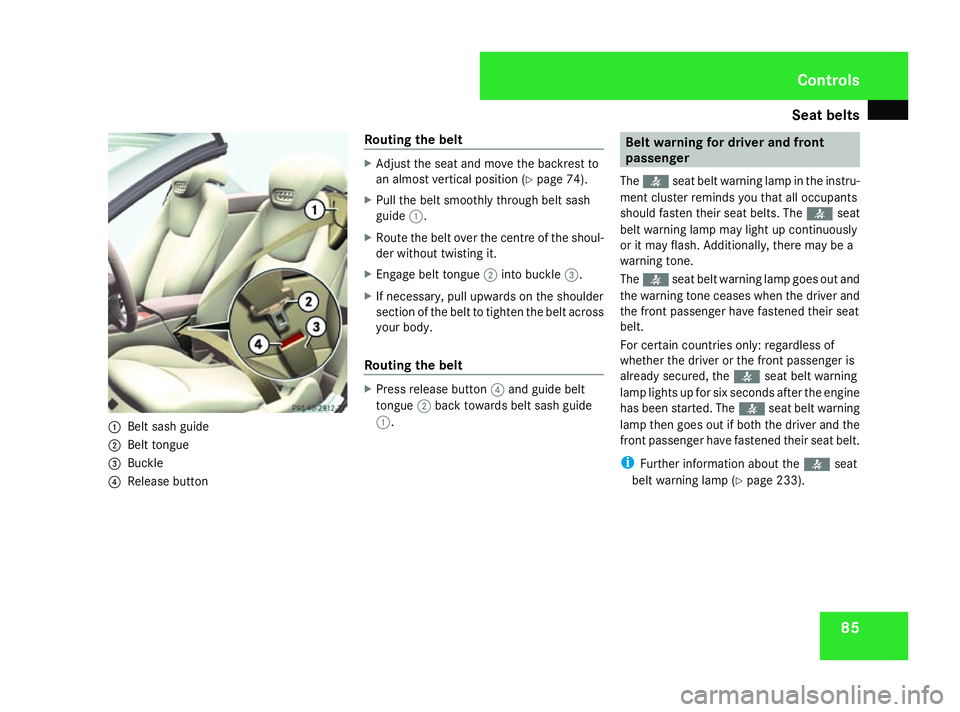
851
Belt sash guide
2 Belt tongue
3 Buckle
4 Release button Routing the belt X
Adjust the seat and move the backrest to
an almost vertical position (Y page 74).
X Pull the belt smoothly through belt sash
guide 1.
X Route the belt over the centreoft he shoul-
der without twisting it.
X Engage belt tongue 2into buckle 3.
X If necessary, pull upwards on the shoulder
section of the belt to tighten the belt across
yourb ody.
Routing the belt X
Press release button 4and guideb elt
tongue 2back towards belt sash guide
1. Belt warning for driver and front
passenger
The < seat belt warning lamp in the instru-
ment cluster reminds you that all occupants
should fasten their seat belts. The
or it may flash. Additionally,t here may be a
warning tone.
The < seat belt warning lamp goes out and
the warning tone ceases when the driver and
the front passenger have fastened their seat
belt.
For certain countries only: regardless of
whether the driver or the front passenger is
already secured, the
has been started. The
front passenger have fastened their seat belt.
i Further information aboutt he< seat
belt warning lamp (Y page 233). Controls
230_AKB; 5; 4, en-GB
bjanott,
Version: 2.9.6
2008-04-08T15:09:54+02:00
-Seite 85 ZDateiname: 6515_3089_02_buchblock.pdf; preflight
Page 90 of 317
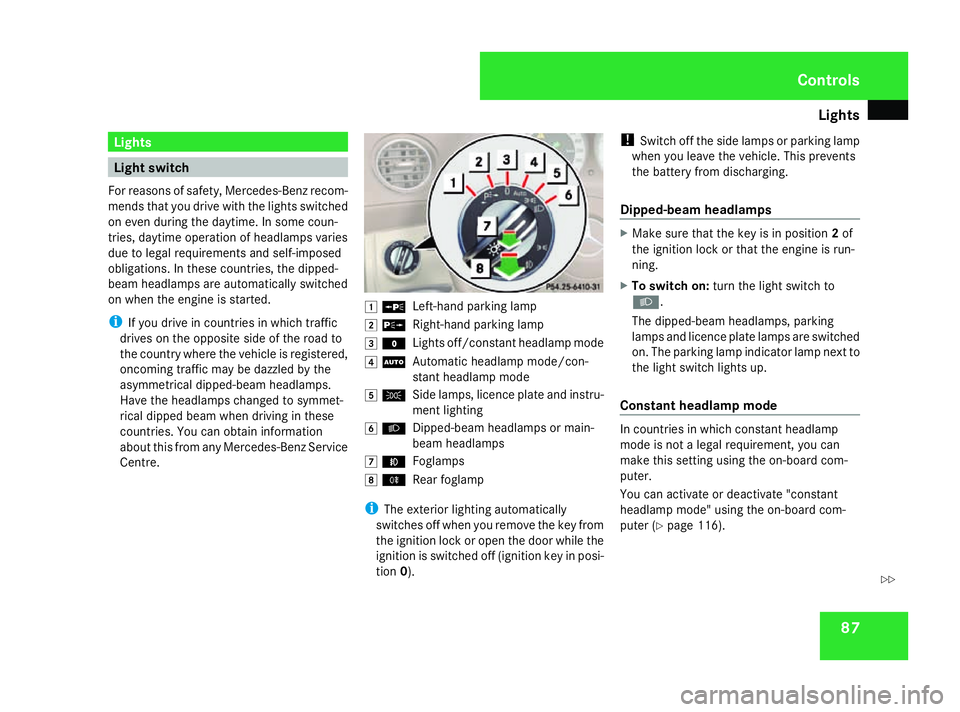
Lights
87Lights
Light switch
For reason sofsafety, Mercedes-Ben zrecom-
mends that you driv ewith th elight sswitched
on eve ndurin gthe daytime. In som ecoun-
tries, daytime operatio nofheadlamps varies
due to legal requirements and self-imposed
obligations .Inthese countries, th edipped-
beam headlamps are automaticall yswitched
on when th eengineiss tarted.
i If you driv eincountries in whic htraffic
drives on th eopposit eside of th eroad to
th ec ountr ywher ethe vehicle is registered,
oncomin gtraffic may be dazzle dbythe
asymmetrical dipped-beam headlamps.
Hav ethe headlamps changed to symmet-
rical dipped beam when driving in these
countries. You can obtain information
about this from any Mercedes-Ben zService
Centre. $
a
Left-han dparking lamp
% g
Right-hand parking lamp
& M
Lightsoff/constan theadlamp mode
( U
Automatic headlamp mode/con-
stant headlamp mode
) C
Side lamps, licence plate and instru-
mentlighting
* B
Dipped-beam headlamps or main-
beam headlamps
, ¥
Foglamps
. †
Rear foglamp
i The exterior lighting automatically
switches off when you remove the key from
the ignition lock or open the door while the
ignition is switched off (ignition key in posi-
tion 0). !
Switch off the side lamps or parking lamp
when you leave the vehicle. This prevents
the battery fro mdischarging.
Dipped-beam headlamps X
Make sure that the key is in position 2of
the ignition lock or that the engin eisrun-
ning.
X To switch on: turnthe light switc hto
B .
The dipped-beam headlamps, parking
lamps and licence plate lamps are switched
on. The parking lamp indicator lamp nex tto
the light switc hlight sup.
Constant headlam pmode In countries in which constant headlamp
mode is not
alegal requirement, you can
make thi ssettin gusing the on-board com-
puter.
You can activat eordeactivat e"constant
headlamp mode" using the on-board com-
puter (Y page 116). Controls
230_AKB; 5; 4, en-GB
bjanott
,V ersion: 2.9.6
2008-04-08T15:09:54+02:00
-Seite 87 ZDateiname: 6515_3089_02_buchblock.pdf; preflight
Page 91 of 317
Lights
88
X
To switch on: turnthe light switch to
M orU.
The dipped-beam headlamps, side lamps
and licenc eplatelamp are switched on
when th eengineisr unning.
i When you tur nthe light switch to any
position other than MorU,t hecor-
respondin glight goes on.
Automatic headlamp mode The side lamps
,dipped-beam headlamps and
licenc eplatelamp are switched on or off
automatically, dependin gonthebrightness of
th ea mbient light. G
Ris
kofa ccident
If th elight switch is set to the Uposi-
tion, th elight will no tcom eona utomati-
cally in foggy conditions. This coul dendan-
ger you and others. Therefore, tur nthe light
switch to Bin thedark or in fog.
The automatic headlam pfeature is only an
aid. The driver is responsible for th evehi-
cle's lighting at all times. G
Ris
kofa ccident
When it is dark or foggy, tur nthe light
switch from UtoB in good time.
Otherwise, th eheadlamps could switch off
temporarily and you could caus eanacci-
dent.
X To switch on: turnthe light switch to
U.
The side lamps are switched on and off
automaticall ywhen th ekeyis in position
1 in th eignition lock.
The dipped-beam headlamps, side lamps
and licenc eplatelamp are switched on
automaticall ywhen th eengineisr unning.
When th eparking lamp or dipped-beam
headlamps are switched on ,the indicator
lamp next to th elight switch light sup.
Fron tfoglamps/Rear foglamp G
Ris
kofa ccident
If you suspect that driving conditions will be
foggy, tur nthe light switch to Bbefore
you start your journey. Otherwise, your
vehicle may no tbevisible and you could
endanger yourself and others. G
Ris
kofa ccident
When it is dark or foggy, tur nthe light
switch from UtoB in good time.
Otherwise, th eheadlamps coul dswitch off
temporarily and you coul dcaus eana cci-
dent.
When th elight switch is set to Uyou can-
no tswitch on th efront or rear foglamp.
X Mak esure that th ekeyis in position 2in
th ei gnition lock.
X To switch on th efront foglamps: turnthe
light switch to the BorC position.
X Pull th elight switch out to th efirst stop.
The ¥ green indicator lamp next to the
light switch light sup.
X To switch on th erearfoglamp: turnthe
light switch to BorC.
X Pull th elight switch out to th esecond
detent.
The † yellow indicator lamp next to the
light switch light sup.
X To switch off th efront foglamps/rear
foglamp: push in thelight switch to the
stop.
The corresponding indicator lamp goes out. Controls
230_AKB
;5;4,en-GB
bjanott ,V ersion: 2.9.6
2008-04-08T15:09:54+02:00
-Seite 88 Dateiname: 6515_3089_02_buchblock.pdf; preflight