change language MERCEDES-BENZ SL ROADSTER 2012 Owners Manual
[x] Cancel search | Manufacturer: MERCEDES-BENZ, Model Year: 2012, Model line: SL ROADSTER, Model: MERCEDES-BENZ SL ROADSTER 2012Pages: 637, PDF Size: 20.68 MB
Page 1 of 637
Disclaimer
Das folgen de PDF -Doku ment für die ses Fahrze ugmodell be zieht sich in allen
Sprachver sionen nur auf die Fahrz euge, d ie fü r den deutsche n Markt best immt
sind und die den deutschen Vorschriften entsprechen. Bitte wenden Sie sich an
Ihr en autorisierten Mer cedes-Benz Services tützpunkt, um ein gedruckt es Exem plar
für andere Fahrzeugmodelle und Fahrzeugmodelljahre zu erhalten.
Dieses PDF -Dokume nt stellt die aktuelle Version dar . Mögliche Abweic hungen zu
Ihrem konkreten Fahrzeug könnten nicht berücksichtigt sein, da Mercedes-Benz
seine Fahrzeuge st ändig dem neuest en Stand d er Technik anp asst, so wie
Änderungen in Form und Ausstattung vornimmt. Bitte beachten Sie daher, dass
dieses PDF-Dokument in keinem Fall das gedruckte Exemplar ersetzt, das mit
dem Fahrzeug ausgeliefert wurde.
Internal use only
Disclaimer
All language versions of the following PD\f document for this vehicle model
relate solel\b to vehicles intended for sale on the German market and which
correspond to German regulations.
Please contact \bour authorised Mercedes-Benz Service Centre to obtain
a printed version for other vehicle models and vehicle model \bears. This PD\f
document is the latest version. Possible variations to \bour vehicle ma\b not
be taken into account as Mercedes-Benz constantl\b updates their vehicles to
the state of the art and introduces changes in design and e\Dquipment. Please
therefore note that this PD\f document in no wa\b replaces the printed version
which was delivered with \bour vehicle.
Internal use only
Disclaimer
The following version of the Owner‘s Manual describes all models, series and
special equipment of your vehicle. Country-specific language variations are
possible. Please note that your vehicle might not be equipped with all the
described functions. This also affects safety-relevant systems and functions.
Please contact your authorised Mercedes-Benz dealership if you would like
to receive a printed Owner‘s Manual for other vehicle models and vehicle
model years.
The online Owner‘s Manual is the current and valid version. It is possible that
deviations affecting your specific vehicle could not be taken into account
as Mercedes-Benz constantly adapts its vehicles according to the latest
technology and makes changes to the form and the equipment.
Please also read the printed Owner‘s Manual, supplementary documents and
the digital Owner‘s Manual in the vehicle.
Copyright
All rights reserved. All texts, images and graphics are subject to copyright
and other laws for the protection of intellectual property. They may not be
copied or changed for any commercial use or for the purpose of being passed
on nor used on other webistes.
Page 214 of 637
X
Stop the movement of the multifunction
steering wheel or steer yourself.
Active Parking Assist will be cancelled at
once. The Park Assist cancelled
Park Assist cancelled mes-
sage appears in the multifunction display.
or X Press the PARKTRONIC button on the
centre console (Y page 206).
PARKTRONIC is switched off and Active
Parking Assist is immediately cancelled.
The Park Assist cancelled Park Assist cancelled message
appears in the multifunction display.
Active Parking Assist is cancelled automati-
cally if:
R parking using Active Parking Assist is no
longer possible
R you are driving faster than 10 km/h
R a wheel spins and ESP ®
intervenes or fails.
The ÷ ESP®
warning lamp lights up in
the instrument cluster.
A warning tone sounds. The parking symbol
goes out and the Park Assist cancelled
Park Assist cancelled
message appears in the multifunction dis-
play.
When Active Parking Assist is cancelled, you
must steer again yourself. Reversing camera
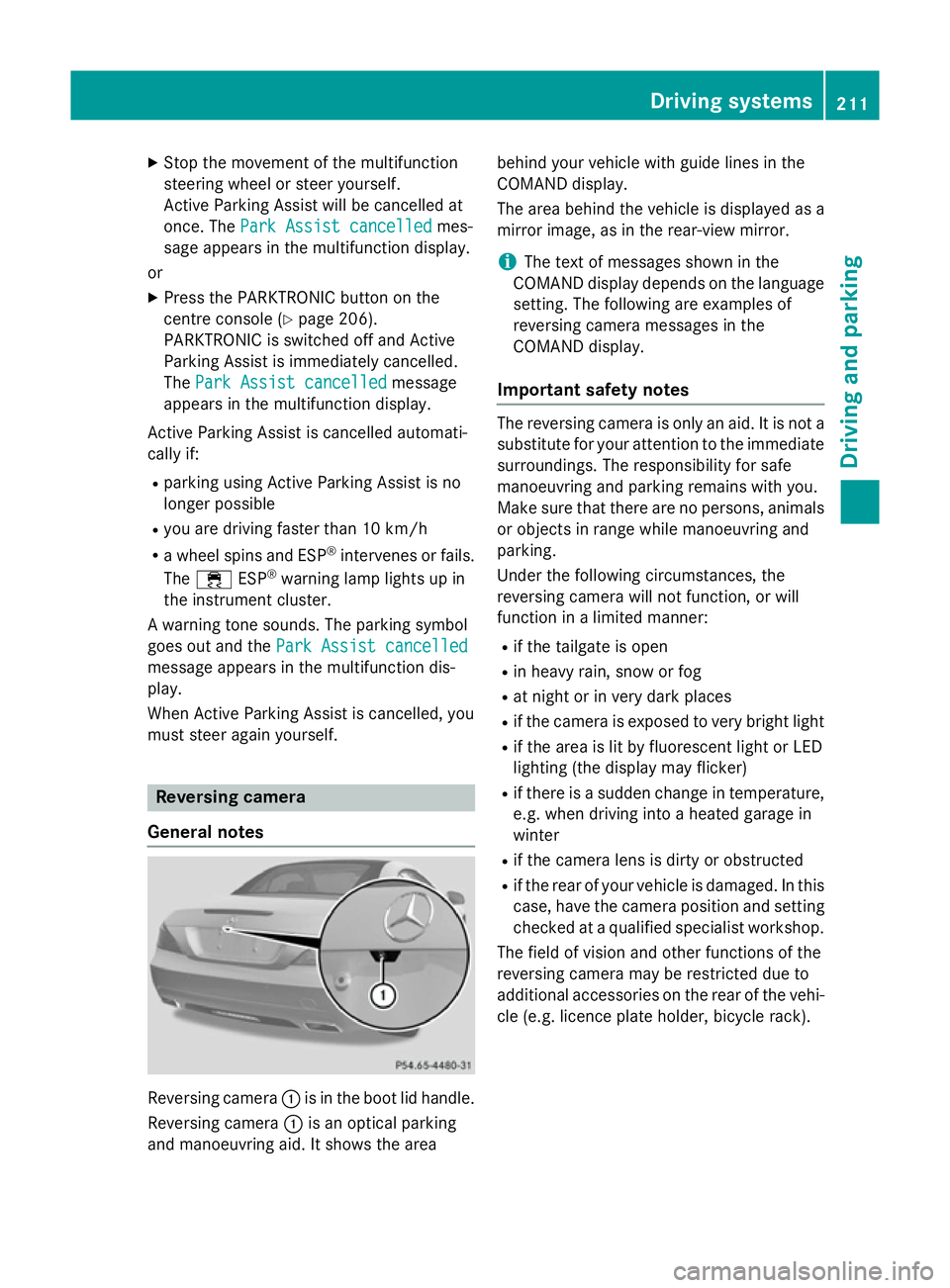
General notes Reversing camera
:is in the boot lid handle.
Reversing camera :is an optical parking
and manoeuvring aid. It shows the area behind your vehicle with guide lines in the
COMAND display.
The area behind the vehicle is displayed as a
mirror image, as in the rear-view mirror.
i The text of messages shown in the
COMAND display depends on the language
setting. The following are examples of
reversing camera messages in the
COMAND display.
Important safety notes The reversing camera is only an aid. It is not a
substitute for your attention to the immediate surroundings. The responsibility for safe
manoeuvring and parking remains with you.
Make sure that there are no persons, animals
or objects in range while manoeuvring and
parking.
Under the following circumstances, the
reversing camera will not function, or will
function in a limited manner:
R if the tailgate is open
R in heavy rain, snow or fog
R at night or in very dark places
R if the camera is exposed to very bright light
R if the area is lit by fluorescent light or LED
lighting (the display may flicker)
R if there is a sudden change in temperature,
e.g. when driving into a heated garage in
winter
R if the camera lens is dirty or obstructed
R if the rear of your vehicle is damaged. In this
case, have the camera position and setting checked at a qualified specialist workshop.
The field of vision and other functions of the
reversing camera may be restricted due to
additional accessories on the rear of the vehi-
cle (e.g. licence plate holder, bicycle rack). Driving systems
211Driving and parking Z
Page 295 of 637
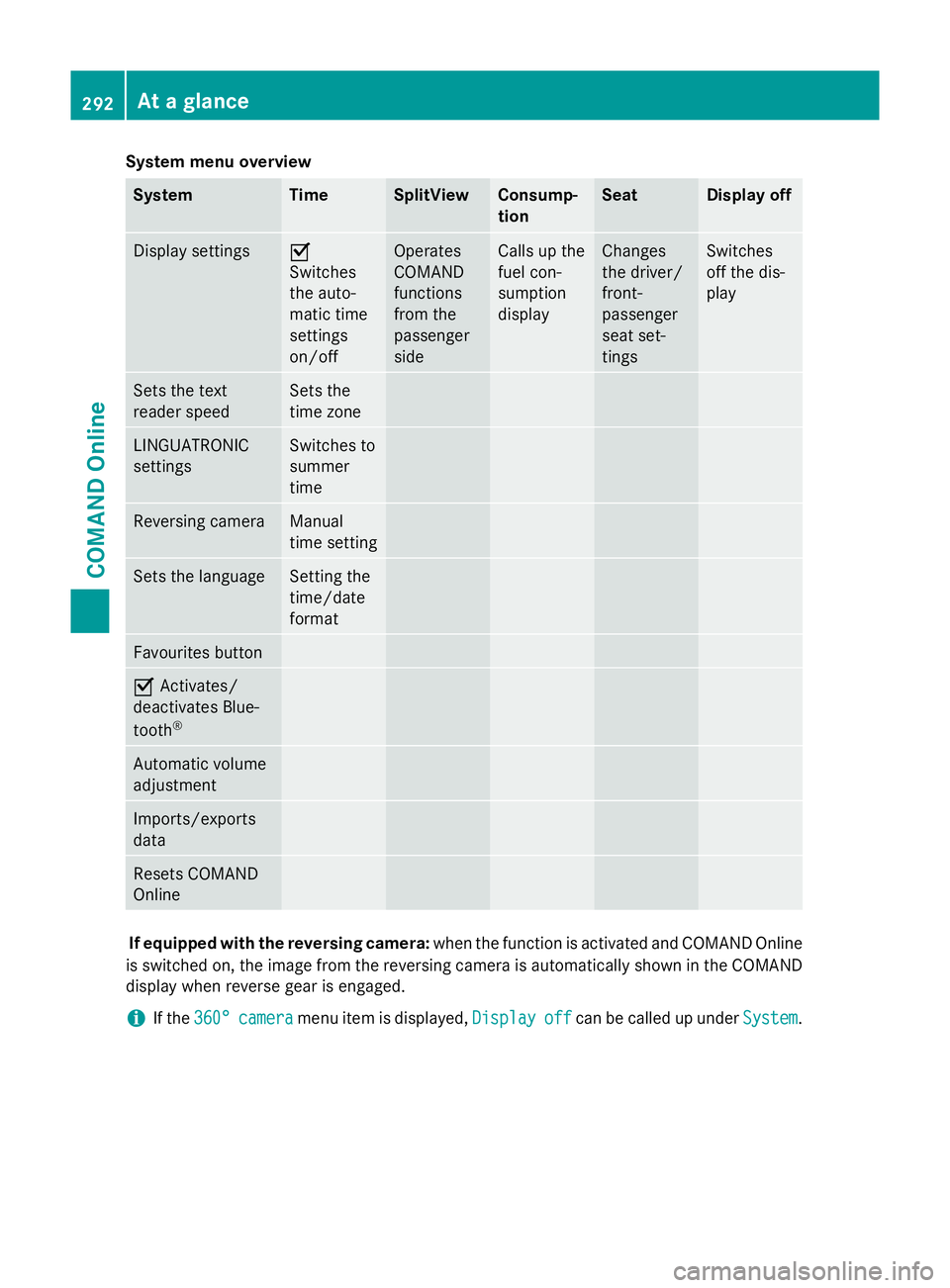
System menu overview
System Time SplitView Consump-
tion Seat Display off
Display settings O
Switches
the auto-
matic time
settings
on/off
Operates
COMAND
functions
from the
passenger
side Calls up the
fuel con-
sumption
display Changes
the driver/
front-
passenger
seat set-
tings Switches
off the dis-
play
Sets the text
reader speed Sets the
time zone
LINGUATRONIC
settings Switches to
summer
time
Reversing camera Manual
time setting
Sets the language Setting the
time/date
format
Favourites button
O
Activates/
deactivates Blue-
tooth ® Automatic volume
adjustment
Imports/exports
data
Resets COMAND
Online
If equipped with the reversing camera:
when the function is activated and COMAND Online
is switched on, the image from the reversing camera is automatically shown in the COMAND display when reverse gear is engaged.
i If the
360°
360° camera camera menu item is displayed, Display
Displayoff
offcan be called up under System
System.292
At a glanceCOMAND Online
Page 306 of 637
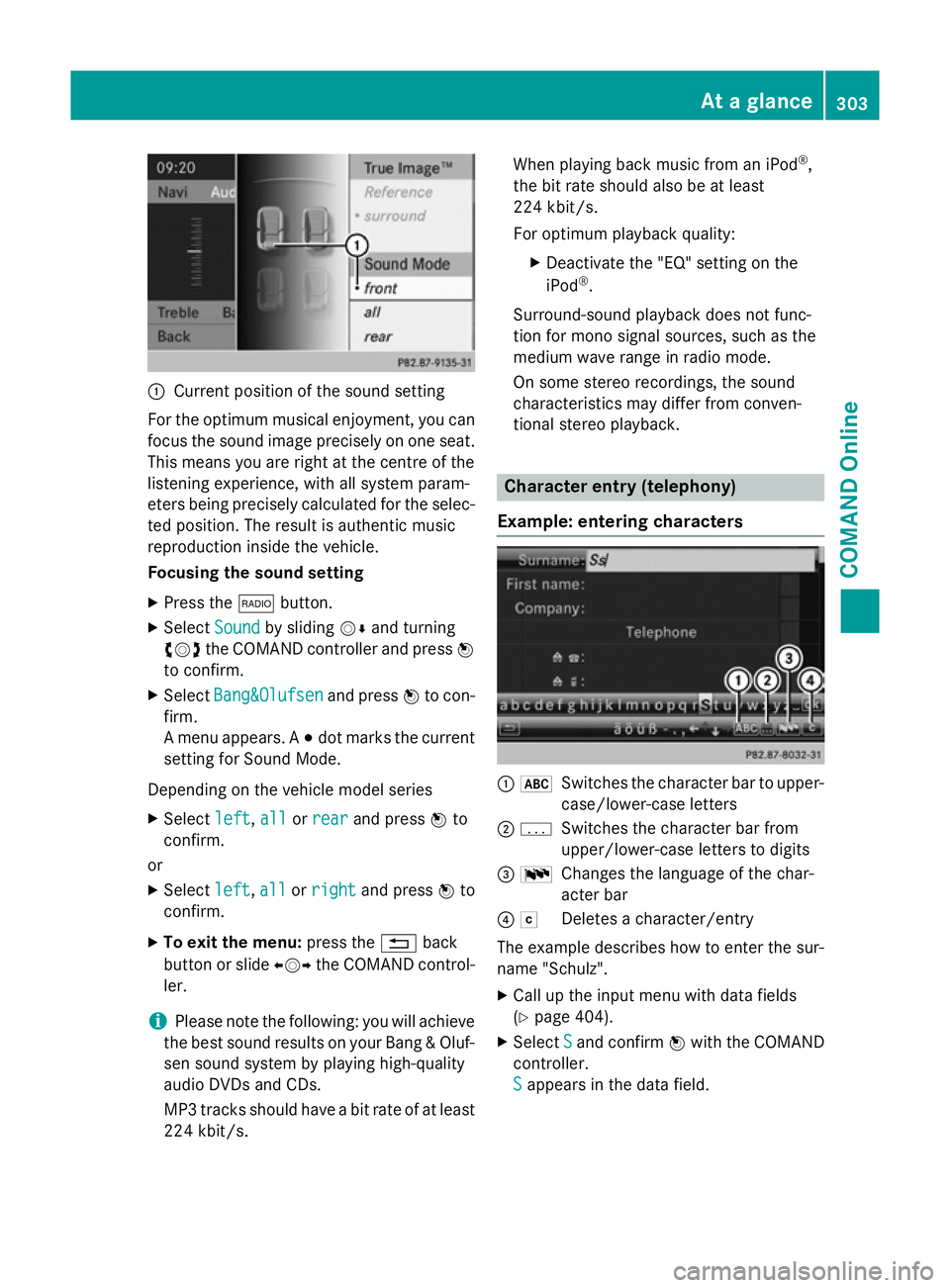
:
Current position of the sound setting
For the optimum musical enjoyment, you can
focus the sound image precisely on one seat. This means you are right at the centre of the
listening experience, with all system param-
eters being precisely calculated for the selec-
ted position. The result is authentic music
reproduction inside the vehicle.
Focusing the sound setting
X Press the $button.
X Select Sound Soundby sliding VÆand turning
cVd the COMAND controller and press W
to confirm.
X Select Bang&Olufsen
Bang&Olufsen and pressWto con-
firm.
A menu appears. A #dot marks the current
setting for Sound Mode.
Depending on the vehicle model series X Select left
left, all allorrear
rear and press Wto
confirm.
or
X Select left
left,all
allorright
right and press Wto
confirm.
X To exit the menu: press the%back
button or slide XVYthe COMAND control-
ler.
i Please note the following: you will achieve
the best sound results on your Bang & Oluf- sen sound system by playing high-quality
audio DVDs and CDs.
MP3 tracks should have a bit rate of at least
224 kbit/s. When playing back music from an iPod
®
,
the bit rate should also be at least
224 kbit/s.
For optimum playback quality:
XDeactivate the "EQ" setting on the
iPod ®
.
Surround-sound playback does not func-
tion for mono signal sources, such as the
medium wave range in radio mode.
On some stereo recordings, the sound
characteristics may differ from conven-
tional stereo playback. Character entry (telephony)
Example: entering characters :
*
Switches the character bar to upper-
case/lower-case letters
; p
Switches the character bar from
upper/lower-case letters to digits
= B
Changes the language of the char-
acter bar
? F
Deletes a character/entry
The example describes how to enter the sur-
name "Schulz".
X Call up the input menu with data fields
(Y page 404).
X Select S
S and confirm Wwith the COMAND
controller.
S S appears in the data field. At a glance
303COMAND Online Z
Page 316 of 637
improve voice recognition. See the separate
operating instructions. Bluetooth
®
settings
General information about Bluetooth ®Bluetooth
®
technology is a standard for
short-range wireless data transmissions up to
approximately 10 metres. Bluetooth ®
allows,
for example, the exchange of vCards. Bluetooth
®
is a registered trademark of Blue-
tooth Special Interest Group (SIG) Inc.
Activating/deactivating Bluetooth ®X
Press the Wbutton.
The system menu appears.
X Select System
System by turning cVdthe
COMAND controller and press Wto con-
firm.
X Select Activate
Activate Bluetooth
Bluetooth and pressW
to confirm.
This switches Bluetooth ®
on O or off ª. Setting the system language
This function allows you to determine the lan-
guage for the menu displays and the naviga-
tion announcements. The selected language
affects the characters available for entry.
The navigation announcements are not avail-
able in all languages. If a language is not avail- able, the navigation announcements will be in English.
If you change the system language, the lan-
guage for LINGUATRONIC will also be
changed. If the selected language is not sup- ported by LINGUATRONIC, English will be
selected.
X Press the Wbutton.
X Select System System by turning cVdthe
COMAND controller and press Wto con-
firm.
X Select Language
Language and pressWto confirm.
The list of languages appears. The #dot
indicates the current setting.
X Select the language by turning cVdthe
COMAND controller and press Wto con-
firm.
COMAND loads the selected language and
sets it.
i If you are using Arabic map data, the text
information can also be shown in Arabic on
the navigation map. To do this, select Eng‐ Eng‐
lish
lish (Arabic
(Arabic map)
map)as the language from
the list of languages. Navigation announce-
ments are then made in Arabic. Assigning a favourites button
X To assign a favourites button: press the
W button.
X Select System
System by turning cVdthe
COMAND controller and press Wto con-
firm.
X Select Assign as favourite
Assign as favourite and press
W to confirm.
The list of predefined functions appears.
The dot #indicates the currently selected
function.
X Select the function by turning cVdthe
COMAND controller and press Wto con-
firm.
The favourites button is assigned the selec-
ted function.
X Example: to call up a favourite: press the
g favourites button.
This calls up the predefined function. System settings
313COMAND Online Z
Page 413 of 637
Reading a text message (SMS)
X Call up the text message (SMS) inbox
(Y page 409)
X Select a text message in the text message
inbox by turning cVdthe COMAND con-
troller and press Wto confirm.
The text message appears.
X To scroll through the display or select
phone numbers in a text message: turn
cVd the COMAND controller.
The display scrolls up or down line by line,
or skips to the next or previous telephone
number and automatically highlights it.
X To return to the list: select the&sym-
bol and press Wto confirm or press the
% back button.
Text message read-aloud function
Settings for the read-aloud function:
R Language (Y page 313)
R Speed (Y page 312)
X Press Wwhile a text message is being dis-
played, select Read
Read aloud aloud and press Wto
confirm.
COMAND Online reads out the text mes-
sage.
X To cancel the read-aloud function: press
the 8 button.
or
X Press W, select Cancel read-aloud
Cancel read-aloud
function
function and pressWto confirm.
Sender or text display
You can switch between displaying the text
message sender or the text message content.
The sender display shows the sender of the
text message. If the sender is stored in the
COMAND phone book, the name is displayed.
The text display shows the first few words of a
text message.
X Select a text message in the text message
inbox by turning cVdthe COMAND con-
troller.
X To switch to the text display: select the
list symbol to the right of the text message by sliding
VYthe COMAND controller and
press Wto confirm.
X Select Display Display text textand press Wto con-
firm.
The view changes.
X To switch to the sender display: select
the list symbol to the right of the text mes-
sage by sliding VYthe COMAND controller
and press Wto confirm.
X Select Display sender
Display sender and pressWto
confirm.
The view changes.
X To return to the telephone basic menu:
press the %button.
Displaying details and phone numbers
COMAND Online can also show a shortened
sender display in full.
X Select a text message in the text message
inbox by turning cVdthe COMAND con-
troller.
X Select the list symbol to the right of the text
message by sliding VYthe COMAND con-
troller and press Wto confirm.
X Select Details Details and press Wto confirm.
The detailed display appears.
X To close the detailed display: slideXVY
the COMAND controller.
X To return to the telephone basic menu:
press the %button.
Managing text messages (SMS) Calling a text message (SMS) sender
X Press Wthe COMAND controller while the
text message is being displayed.
X Select Call sender
Call sender and pressWto con-
firm.
The telephone makes the call to the sender. 410
TelephoneCOMAND Online
Page 501 of 637
i
Reading:
if the media content of the con-
nected device is being read, this is indica-
ted on the upper right by a symbol. When
reading has ended, the categories Select
Select
by cover
by cover andKeyword Search Keyword Search are avail-
able.
Depending on the connected device and
the size of the media content, reading may
take several minutes. When the device is
next started or reconnected, the advanced
functions will be quickly available.
However, if you change the media content
on your iPod ®
/iPhone ®
, it has to be read
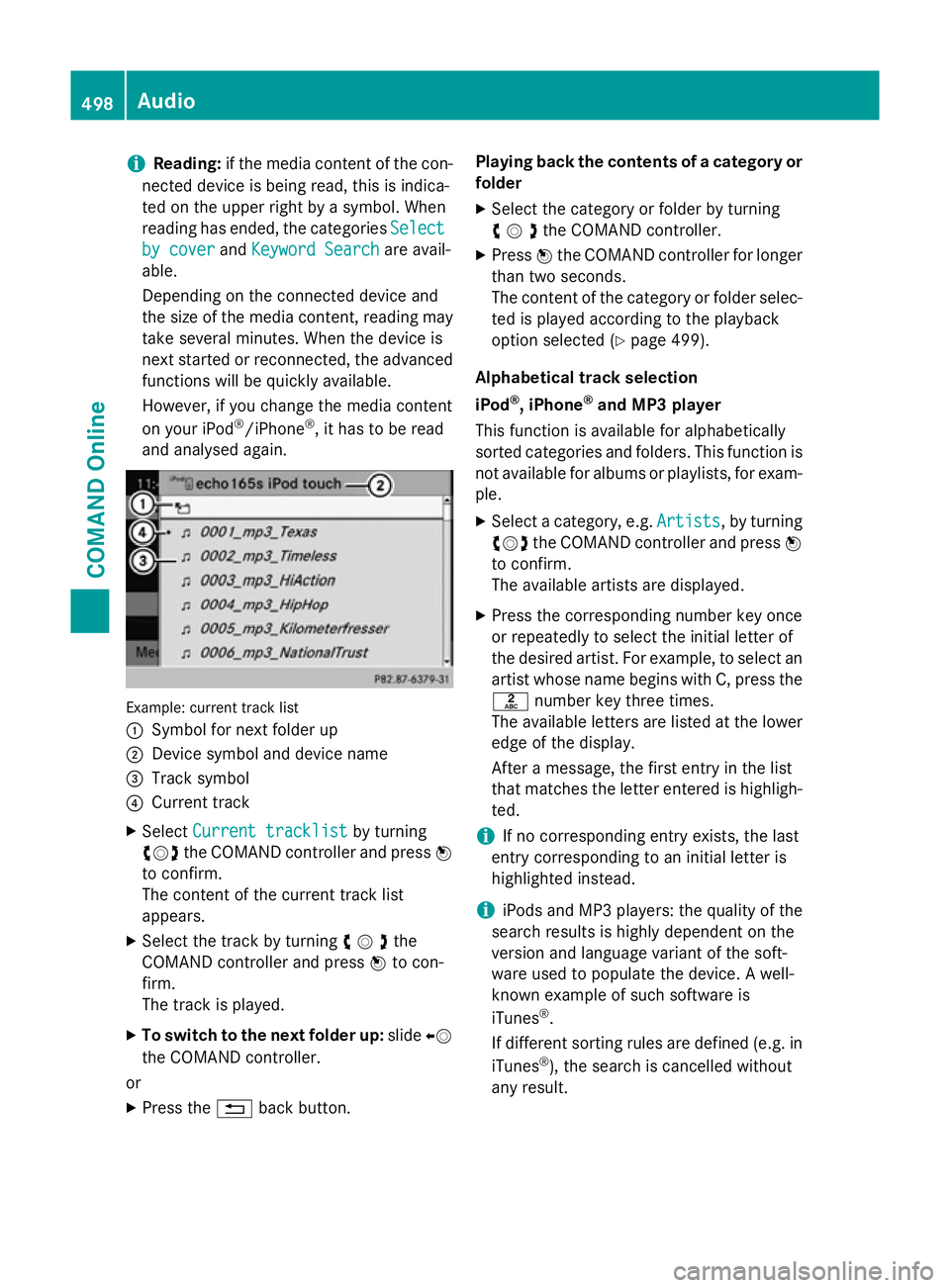
and analysed again. Example: current track list
:
Symbol for next folder up
; Device symbol and device name
= Track symbol
? Current track
X Select Current tracklist Current tracklist by turning
cVd the COMAND controller and press W
to confirm.
The content of the current track list
appears.
X Select the track by turning cVdthe
COMAND controller and press Wto con-
firm.
The track is played.
X To switch to the next folder up: slideXV
the COMAND controller.
or
X Press the %back button. Playing back the contents of a category or
folder
X Select the category or folder by turning
cVdthe COMAND controller.
X Press Wthe COMAND controller for longer
than two seconds.
The content of the category or folder selec-
ted is played according to the playback
option selected (Y page 499).
Alphabetical track selection
iPod ®
, iPhone ®
and MP3 player
This function is available for alphabetically
sorted categories and folders. This function is not available for albums or playlists, for exam-
ple.
X Select a category, e.g. Artists
Artists, by turning
cVd the COMAND controller and press W
to confirm.
The available artists are displayed.
X Press the corresponding number key once
or repeatedly to select the initial letter of
the desired artist. For example, to select an
artist whose name begins with C, press the l number key three times.
The available letters are listed at the lower
edge of the display.
After a message, the first entry in the list
that matches the letter entered is highligh-
ted.
i If no corresponding entry exists, the last
entry corresponding to an initial letter is
highlighted instead.
i iPods and MP3 players: the quality of the
search results is highly dependent on the
version and language variant of the soft-
ware used to populate the device. A well-
known example of such software is
iTunes ®
.
If different sorting rules are defined (e.g. in iTunes ®
), the search is cancelled without
any result. 498
AudioCOMAND Online
Page 517 of 637
X
On the multifunction steering wheel:
switch to video DVD mode in
COMAND Online (Y page 512).
X Use the =or; button to select the
Audio Audio menu.
X Press the 9or: button to select a
scene/chapter.
If you press and hold the 9or:
button for an extended period, rapid scroll-
ing begins.
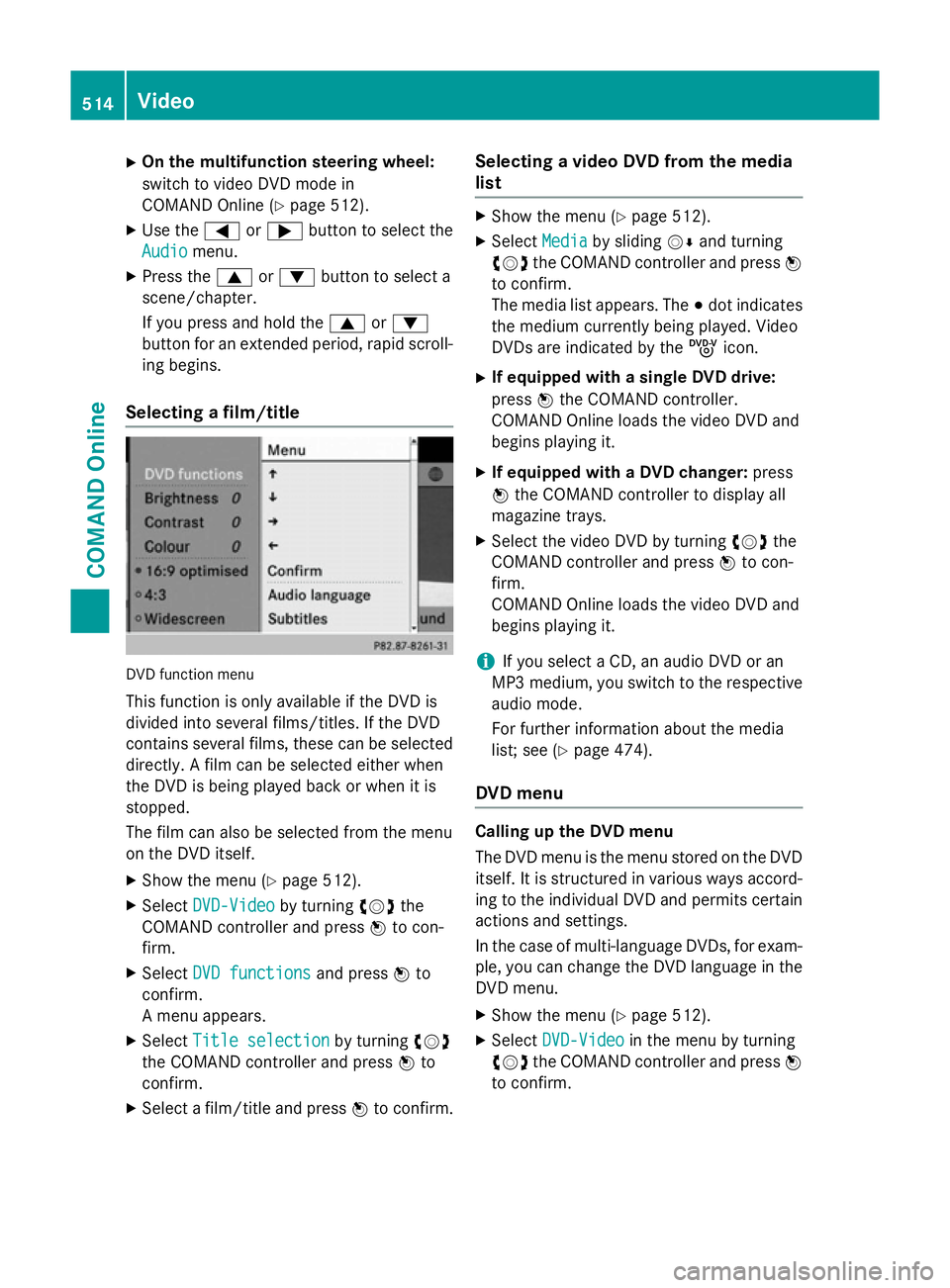
Selecting a film/title DVD function menu
This function is only available if the DVD is
divided into several films/titles. If the DVD
contains several films, these can be selected
directly. A film can be selected either when
the DVD is being played back or when it is
stopped.
The film can also be selected from the menu
on the DVD itself.
X Show the menu (Y page 512).
X Select DVD-Video DVD-Video by turningcVdthe
COMAND controller and press Wto con-
firm.
X Select DVD functions
DVD functions and pressWto
confirm.
A menu appears.
X Select Title selection
Title selection by turningcVd
the COMAND controller and press Wto
confirm.
X Select a film/title and press Wto confirm. Selecting a video DVD from the media
list X
Show the menu (Y page 512).
X Select Media Mediaby sliding VÆand turning
cVd the COMAND controller and press W
to confirm.
The media list appears. The #dot indicates
the medium currently being played. Video
DVDs are indicated by the ýicon.
X If equipped with a single DVD drive:
press Wthe COMAND controller.
COMAND Online loads the video DVD and
begins playing it.
X If equipped with a DVD changer: press
W the COMAND controller to display all
magazine trays.
X Select the video DVD by turning cVdthe
COMAND controller and press Wto con-
firm.
COMAND Online loads the video DVD and
begins playing it.
i If you select a CD, an audio DVD or an
MP3 medium, you switch to the respective
audio mode.
For further information about the media
list; see (Y page 474).
DVD menu Calling up the DVD menu
The DVD menu is the menu stored on the DVD
itself. It is structured in various ways accord-
ing to the individual DVD and permits certain actions and settings.
In the case of multi-language DVDs, for exam-
ple, you can change the DVD language in the DVD menu.
X Show the menu (Y page 512).
X Select DVD-Video DVD-Video in the menu by turning
cVd the COMAND controller and press W
to confirm. 514
VideoCOMAND Online
Page 529 of 637
Switching between operating modes
When you exit an operating mode (e.g. audio
CD mode), the current setting is saved. If youcall up this operating mode again later, there
are two possibilities:
R the operating mode has been changed on
the other screen.
R the operating mode has not been changed.
In the first case, the operating mode appears as it is on the other screen.
In the second case, the setting appears on the
screen as it was when you last exited the
operating mode.
Picture settings Overview
You can select the picture settings in TV,
video DVD and AUX mode (Y
page 541).
Adjusting the brightness, contrast and
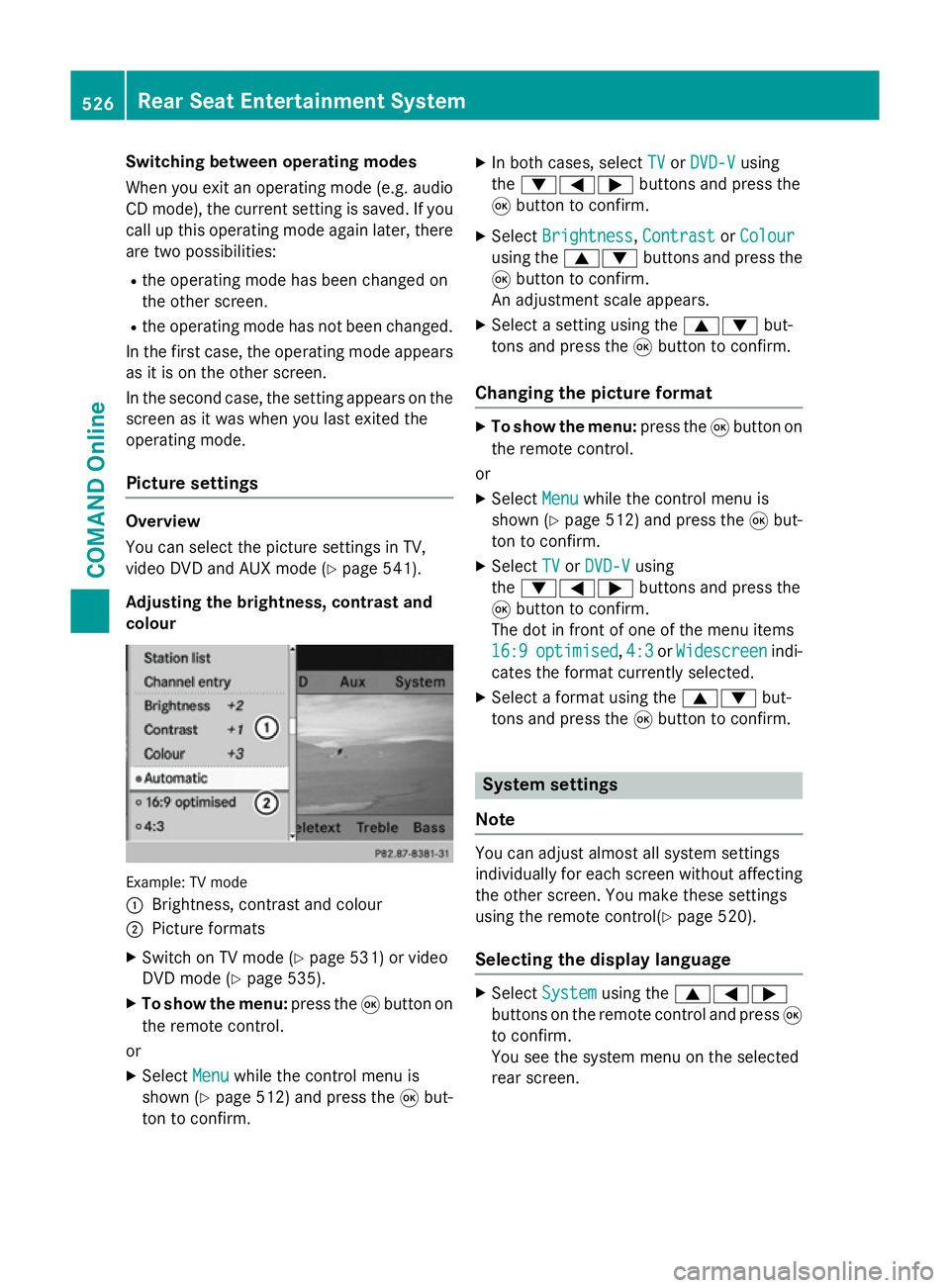
colour Example: TV mode
:
Brightness, contrast and colour
; Picture formats
X Switch on TV mode (Y page 531) or video
DVD mode (Y page 535).
X To show the menu: press the9button on
the remote control.
or
X Select Menu
Menu while the control menu is
shown (Y page 512) and press the 9but-
ton to confirm. X
In both cases, select TV TVorDVD-V DVD-V using
the :=; buttons and press the
9 button to confirm.
X Select Brightness
Brightness, Contrast
ContrastorColour
Colour
using the 9: buttons and press the
9 button to confirm.
An adjustment scale appears.
X Select a setting using the 9:but-
tons and press the 9button to confirm.
Changing the picture format X
To show the menu: press the9button on
the remote control.
or
X Select Menu
Menu while the control menu is
shown (Y page 512) and press the 9but-
ton to confirm.
X Select TV
TV orDVD-V
DVD-V using
the :=; buttons and press the
9 button to confirm.
The dot in front of one of the menu items
16:9 16:9 optimised
optimised, 4:3
4:3orWidescreen
Widescreen indi-
cates the format currently selected.
X Select a format using the 9:but-
tons and press the 9button to confirm. System settings
Note You can adjust almost all system settings
individually for each screen without affecting
the other screen. You make these settings
using the remote control(Y page 520).
Selecting the display language X
Select System System using the 9=;
buttons on the remote control and press 9
to confirm.
You see the system menu on the selected
rear screen. 526
Rear Seat Entertainment SystemCOMAND Online
Page 530 of 637
X
Select Settings
Settings using the:button
and press the 9button to confirm.
X Select Language
Language using the9: but-
tons and press the 9button to confirm.
The list of languages appears. A #dot indi-
cates the current setting.
X Select a language using the 9:but-
tons and press the 9button to confirm.
The Rear Seat Entertainment System acti-
vates the selected language.
Changing the display design X
Select Settings Settings in the system menu using
the : button on the remote control and
press the 9button to confirm.
X Select Day design
Day design ,Night design
Night design or
Automatic
Automatic using the9: buttons
and press the 9button to confirm.
The dot indicates the current setting. Design Explanation
Day design
Day design The display is set per-
manently to day
design.
Night design Night design The display is set per-
manently to night
design.
Automatic Automatic The display design
changes depending on
the vehicle instrument
cluster illumination.
Setting the brightness
X
Select Settings Settings in the system menu using
the : button on the remote control and
press the 9button to confirm.
X Select Brightness
Brightness using the9:
buttons and press the 9button to confirm.
A scale appears. X
Adjust the brightness using the 9:
buttons and press the 9button to confirm.
The brightness bar moves up or down. The picture becomes lighter or darker in
accordance with the scale.
Hiding/showing the picture X
To hide the picture: selectDisplay off Display off
in the system menu using the :;
buttons on the remote control and press
the 9button to confirm.
The picture is hidden.
X To display the picture: press the9but-
ton. Audio CD/DVD and MP3 mode
Important safety notes G
WARNING
The CD/DVD drive is a class 1 laser product. If you open the housing of the CD/DVD drive,
invisible laser beams may be released. These laser beams may damage your retina. There is
a risk of injury.
You must not open the casing. Always have
maintenance work and repairs carried out at a
qualified specialist workshop.
General notes You will find information on the following top-
ics in the Audio section:
R Notes on CDs/DVDs (Y page 480)
R Notes on MP3 mode (Y page 479)
R Notes on copyright (Y page 480) Rear Seat Entertainment System
527COMAND Online Z