check engine MERCEDES-BENZ SL ROADSTER 2016 Owner's Manual
[x] Cancel search | Manufacturer: MERCEDES-BENZ, Model Year: 2016, Model line: SL ROADSTER, Model: MERCEDES-BENZ SL ROADSTER 2016Pages: 333, PDF Size: 11.85 MB
Page 161 of 333
Limited braking performance on salt-
treated roads If you drive on salt-treated roads, a layer of salt
may form on the brake discs and pads. This can increase the braking distance considerably.
R In order to prevent any salt build-up, apply the
brakes occasionally while paying attention to the traffic conditions.
R Carefully depress the brake pedal at the end
of the journey and when starting the next
journey.
R Maintain a much greater distance to the vehi-
cle in front.
New brake pads/linings Brake pads/linings and discs that are either new
or have been replaced only achieve optimum
braking effect after several hundred kilometres
of driving. Compensate for the reduced braking effect by applying greater force to the brake
pedal.
For safety reasons, Mercedes-Benz recom-
mends that you only have brake pads/linings
fitted to your vehicle which have been approved
for Mercedes-Benz vehicles or which corre-
spond to an equivalent quality standard. Brake
pads/linings which have not been approved for Mercedes-Benz vehicles or which are not of an
equivalent quality could affect your vehicle's
operating safety.
High-performance and ceramic brake
system (Mercedes-AMG vehicle) The AMG brake systems are designed for heavy
loads. This may lead to noise when braking. This is dependent on:
R speed
R braking force
R ambient conditions, e.g. temperature and
humidity
The wear of individual components of the brake system, such as the brake pads/linings or brake discs, depends on the individual driving style
and operating conditions.
For this reason, it is impossible to state a mile-
age (service life) that will be valid under all cir-
cumstances. An aggressive driving style will
lead to high wear. You can obtain more infor-
mation on this from a qualified specialist work-
shop. Brake pads/linings and discs that are either new
or have been replaced only achieve optimum
braking effect after several hundred kilometres
of driving. Compensate for the reduced braking
effect by applying greater force to the brake
pedal. Always be aware of this and adapt your
driving and braking accordingly during the run-
ning-in period.
Excessive heavy braking results in correspond-
ingly high brake wear. Observe the brake system
warning lamp in the instrument cluster and note
any brake status messages in the multifunction
display. If you regularly drive at high speeds, it is particularly important to have the brake system
checked and maintained regularly. Driving on wet roads
Aquaplaning If water has accumulated to a certain depth on
the road surface, there is a danger of aquaplan-
ing occurring, even if:
R you are driving at low speeds
R the tyres have adequate tread depth
For this reason, drive in the following manner in
the event of heavy rain or in conditions in which aquaplaning can occur:
R lower your speed
R avoid tyre ruts
R avoid sudden steering movements
R brake carefully
Driving on flooded roads !
Bear in mind that vehicles travelling in front
or in the opposite direction create waves. This may cause the maximum permissible water
depth to be exceeded.
These notes must be observed under all cir-
cumstances. You could otherwise damage
the engine, the electronics or the transmis-
sion.
If you must drive on stretches of road on which
water has collected, please bear in mind that:
R in the case of standing water, the water level
must be no higher than the lower edge of the
vehicle body
R you should drive no faster than walking pace 158
Driving tipsDriving and parking
Page 166 of 333
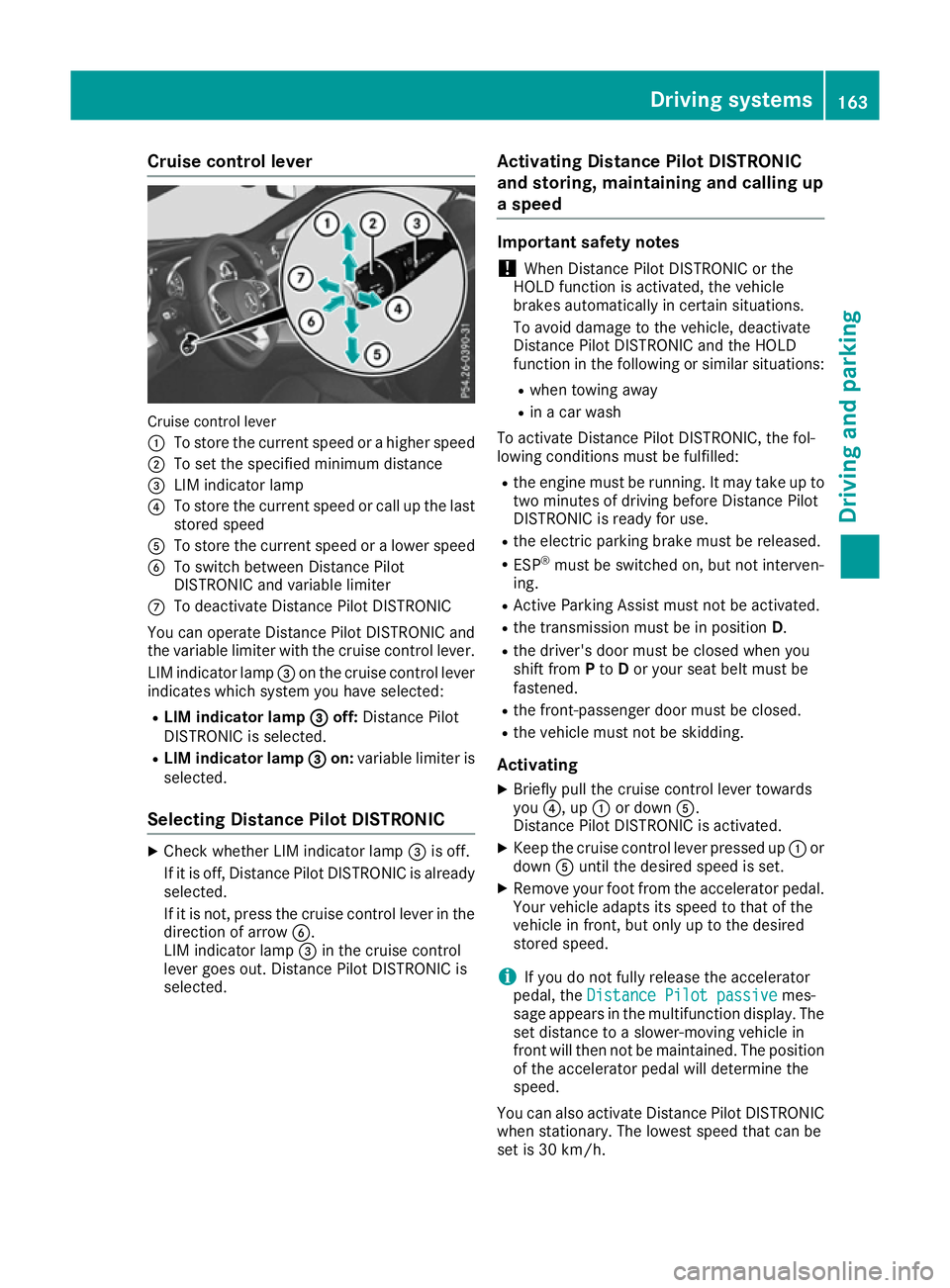
Cruise control lever
Cruise control lever
:
To store the current speed or a higher speed
; To set the specified minimum distance
= LIM indicator lamp
? To store the current speed or call up the last
stored speed
A To store the current speed or a lower speed
B To switch between Distance Pilot
DISTRONIC and variable limiter
C To deactivate Distance Pilot DISTRONIC
You can operate Distance Pilot DISTRONIC and
the variable limiter with the cruise control lever.
LIM indicator lamp =on the cruise control lever
indicates which system you have selected:
R LIM indicator lamp =
= off: Distance Pilot
DISTRONIC is selected.
R LIM indicator lamp = =on: variable limiter is
selected.
Selecting Distance Pilot DISTRONIC X
Check whether LIM indicator lamp =is off.
If it is off, Distance Pilot DISTRONIC is already selected.
If it is not, press the cruise control lever in the
direction of arrow B.
LIM indicator lamp =in the cruise control
lever goes out. Distance Pilot DISTRONIC is
selected. Activating Distance Pilot DISTRONIC
and storing, maintaining and calling up
a speed Important safety notes
! When Distance Pilot DISTRONIC or the
HOLD function is activated, the vehicle
brakes automatically in certain situations.
To avoid damage to the vehicle, deactivate
Distance Pilot DISTRONIC and the HOLD
function in the following or similar situations:
R when towing away
R in a car wash
To activate Distance Pilot DISTRONIC, the fol-
lowing conditions must be fulfilled:
R the engine must be running. It may take up to
two minutes of driving before Distance Pilot
DISTRONIC is ready for use.
R the electric parking brake must be released.
R ESP ®
must be switched on, but not interven-
ing.
R Active Parking Assist must not be activated.
R the transmission must be in position D.
R the driver's door must be closed when you
shift from Pto Dor your seat belt must be
fastened.
R the front-passenger door must be closed.
R the vehicle must not be skidding.
Activating
X Briefly pull the cruise control lever towards
you ?, up :or down A.
Distance Pilot DISTRONIC is activated.
X Keep the cruise control lever pressed up :or
down Auntil the desired speed is set.
X Remove your foot from the accelerator pedal.
Your vehicle adapts its speed to that of the
vehicle in front, but only up to the desired
stored speed.
i If you do not fully release the accelerator
pedal, the Distance Pilot passive Distance Pilot passive mes-
sage appears in the multifunction display. The
set distance to a slower-moving vehicle in
front will then not be maintained. The position of the accelerator pedal will determine the
speed.
You can also activate Distance Pilot DISTRONIC when stationary. The lowest speed that can be
set is 30 km/h. Driving systems
163Driving and parking Z
Page 174 of 333
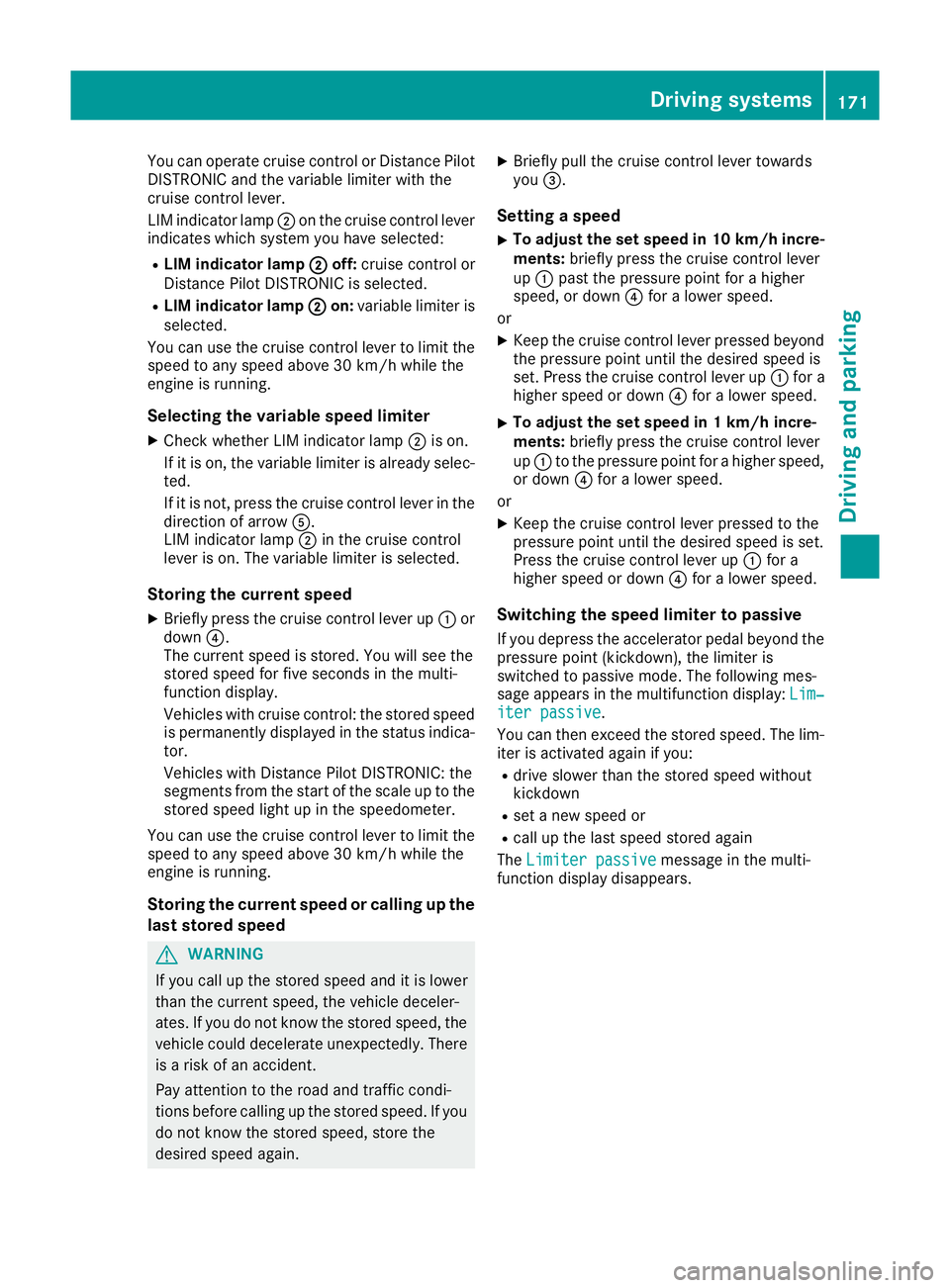
You can operate cruise control or Distance Pilot
DISTRONIC and the variable limiter with the
cruise control lever.
LIM indicator lamp ;on the cruise control lever
indicates which system you have selected:
R LIM indicator lamp ; ;off: cruise control or
Distance Pilot DISTRONIC is selected.
R LIM indicator lamp ;
; on: variable limiter is
selected.
You can use the cruise control lever to limit the
speed to any speed above 30 km/h while the
engine is running.
Selecting the variable speed limiter
X Check whether LIM indicator lamp ;is on.
If it is on, the variable limiter is already selec-
ted.
If it is not, press the cruise control lever in the
direction of arrow A.
LIM indicator lamp ;in the cruise control
lever is on. The variable limiter is selected.
Storing the current speed
X Briefly press the cruise control lever up :or
down ?.
The current speed is stored. You will see the
stored speed for five seconds in the multi-
function display.
Vehicles with cruise control: the stored speed
is permanently displayed in the status indica-
tor.
Vehicles with Distance Pilot DISTRONIC: the
segments from the start of the scale up to the
stored speed light up in the speedometer.
You can use the cruise control lever to limit the
speed to any speed above 30 km/h while the
engine is running.
Storing the current speed or calling up the
last stored speed G
WARNING
If you call up the stored speed and it is lower
than the current speed, the vehicle deceler-
ates. If you do not know the stored speed, the vehicle could decelerate unexpectedly. There
is a risk of an accident.
Pay attention to the road and traffic condi-
tions before calling up the stored speed. If you do not know the stored speed, store the
desired speed again. X
Briefly pull the cruise control lever towards
you =.
Setting a speed
X To adjust the set speed in 10 km/h incre-
ments: briefly press the cruise control lever
up : past the pressure point for a higher
speed, or down ?for a lower speed.
or
X Keep the cruise control lever pressed beyond
the pressure point until the desired speed is
set. Press the cruise control lever up :for a
higher speed or down ?for a lower speed.
X To adjust the set speed in 1 km/h incre-
ments:
briefly press the cruise control lever
up : to the pressure point for a higher speed,
or down ?for a lower speed.
or
X Keep the cruise control lever pressed to the
pressure point until the desired speed is set.
Press the cruise control lever up :for a
higher speed or down ?for a lower speed.
Switching the speed limiter to passive
If you depress the accelerator pedal beyond the pressure point (kickdown), the limiter is
switched to passive mode. The following mes-
sage appears in the multifunction display: Lim‐
Lim‐
iter passive iter passive.
You can then exceed the stored speed. The lim-
iter is activated again if you:
R drive slower than the stored speed without
kickdown
R set a new speed or
R call up the last speed stored again
The Limiter passive Limiter passive message in the multi-
function display disappears. Driving systems
171Driving and parking Z
Page 202 of 333
Important safety notes
G
WARNING
Operating the integrated information systems and communications equipment in the vehicle
while driving will distract you from traffic con-
ditions. You could then lose control of the
vehicle. There is a risk of an accident.
Only operate these devices if road traffic con-
ditions permit. If you are unsure about the
surrounding conditions, pull over to a safe
location and make entries only while the vehi-
cle is stationary.
You must observe the legal requirements for the country in which you are currently driving whenoperating the on-board computer. G
WARNING
If the instrument cluster has failed or mal-
functioned, you may not recognise function
restrictions relevant to safety. The operating
safety of your vehicle may be impaired. There is a risk of an accident.
Drive on carefully. Have the vehicle checked
at a qualified specialist workshop immedi-
ately.
The on-board computer only shows messages or warnings from certain systems in the multifunc-tion display. You should therefore make sure
your vehicle is operating safely at all times.
If the operating safety of your vehicle is
impaired, park the vehicle safely as soon as pos- sible. Contact a qualified specialist workshop.
For an overview, see the instrument cluster illus-
tration (Y page 32). Displays and operation
Instrument cluster lighting
The lighting in the instrument cluster, in the dis- plays and the controls in the vehicle interior can
be adjusted using the brightness control knob.
The brightness control knob is located on the
bottom left of the instrument cluster
(Y page 32). X
Turn the brightness control knob clockwise or
anti-clockwise.
If you turn the light switch (Y page 113) to the
Ã, TorL position, the brightness
will depend upon the brightness of the ambi-
ent light.
The light sensor in the instrument cluster
automatically controls the brightness of the
multifunction display. In daylight, the displays in the instrument cluster are not illuminated. Speedometer with segments
The segments in the speedometer indicate
which speed range is available.
R Cruise control activated (Y page 159):
The segments light up from the stored speed to the maximum speed.
R Variable speed limiter is activated
(Y page 170):
The segments light up from the start of the
scale to the selected limit speed.
R Distance Pilot DISTRONIC is activated
(Y page 161):
One or two segments in the set speed range
light up.
R Distance Pilot DISTRONIC detects a vehicle in
front moving more slowly than the stored
speed:
The segments between the speed of the vehi-
cle in front and the stored speed light up. Rev counter
! Do not drive in the overrevving range. Doing
so will damage the engine.
The red band in the rev counter indicates the
engine's overrevving range.
The fuel supply is interrupted to protect the
engine when the red band is reached. Outside temperature display
You should pay special attention to road condi-
tions when temperatures are around freezing
point.
Bear in mind that the outside temperature dis-
play indicates the measured air temperature
and not the road surface temperature. Displays and operation
199On-board computer and displays Z
Page 224 of 333
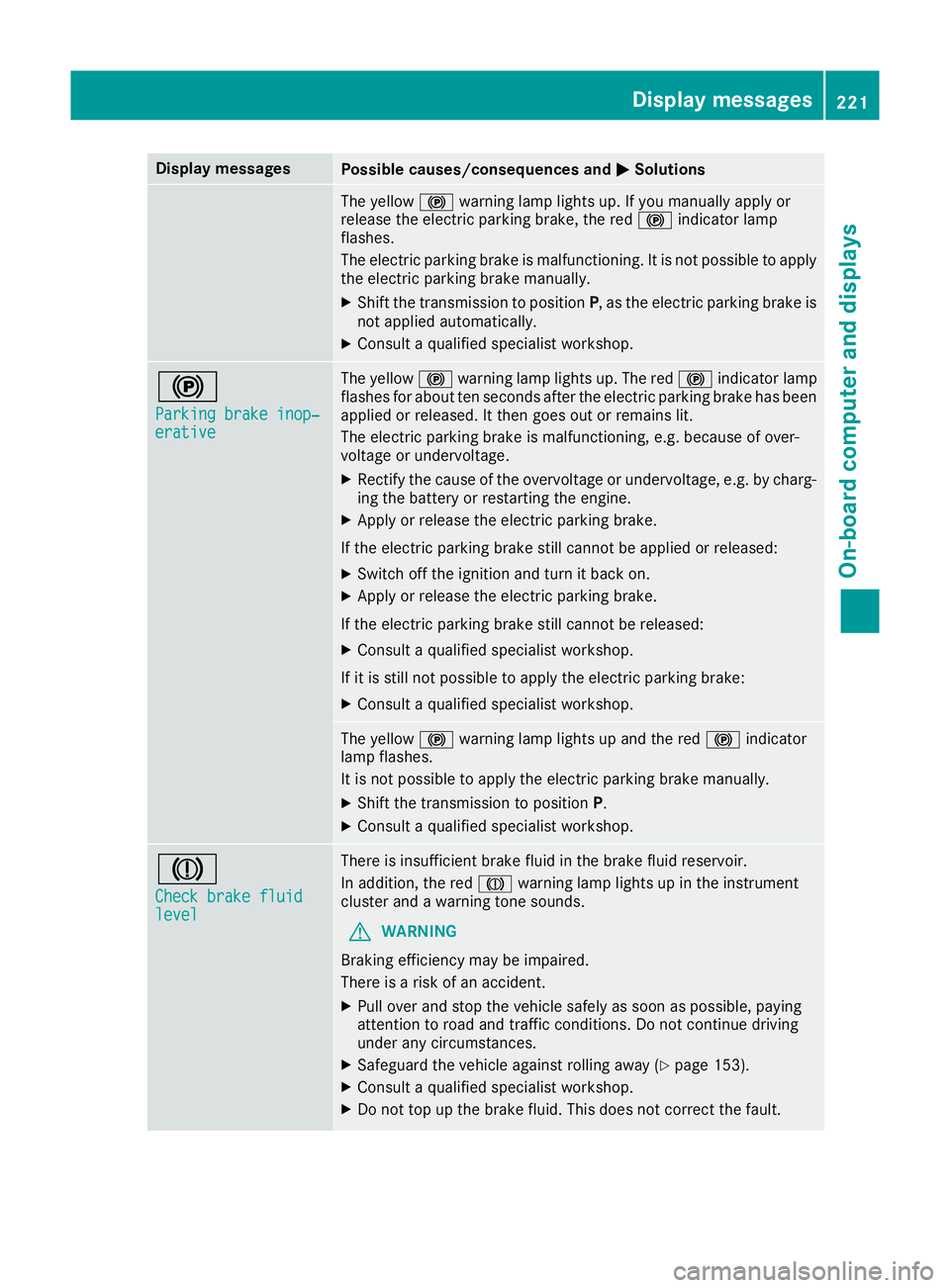
Display messages
Possible causes/consequences and
M
MSolutions The yellow
!warning lamp lights up. If you manually apply or
release the electric parking brake, the red !indicator lamp
flashes.
The electric parking brake is malfunctioning. It is not possible to apply
the electric parking brake manually.
X Shift the transmission to position P, as the electric parking brake is
not applied automatically.
X Consult a qualified specialist workshop. !
Parking brake inop‐ Parking brake inop‐
erative erative The yellow
!warning lamp lights up. The red !indicator lamp
flashes for about ten seconds after the electric parking brake has been applied or released. It then goes out or remains lit.
The electric parking brake is malfunctioning, e.g. because of over-
voltage or undervoltage.
X Rectify the cause of the overvoltage or undervoltage, e.g. by charg-
ing the battery or restarting the engine.
X Apply or release the electric parking brake.
If the electric parking brake still cannot be applied or released: X Switch off the ignition and turn it back on.
X Apply or release the electric parking brake.
If the electric parking brake still cannot be released: X Consult a qualified specialist workshop.
If it is still not possible to apply the electric parking brake:
X Consult a qualified specialist workshop. The yellow
!warning lamp lights up and the red !indicator
lamp flashes.
It is not possible to apply the electric parking brake manually.
X Shift the transmission to position P.
X Consult a qualified specialist workshop. J
Check brake fluid Check brake fluid
level level There is insufficient brake fluid in the brake fluid reservoir.
In addition, the red Jwarning lamp lights up in the instrument
cluster and a warning tone sounds.
G WARNING
Braking efficiency may be impaired.
There is a risk of an accident.
X Pull over and stop the vehicle safely as soon as possible, paying
attention to road and traffic conditions. Do not continue driving
under any circumstances.
X Safeguard the vehicle against rolling away (Y page 153).
X Consult a qualified specialist workshop.
X Do not top up the brake fluid. This does not correct the fault. Display
messages
221On-board computer and displays Z
Page 225 of 333
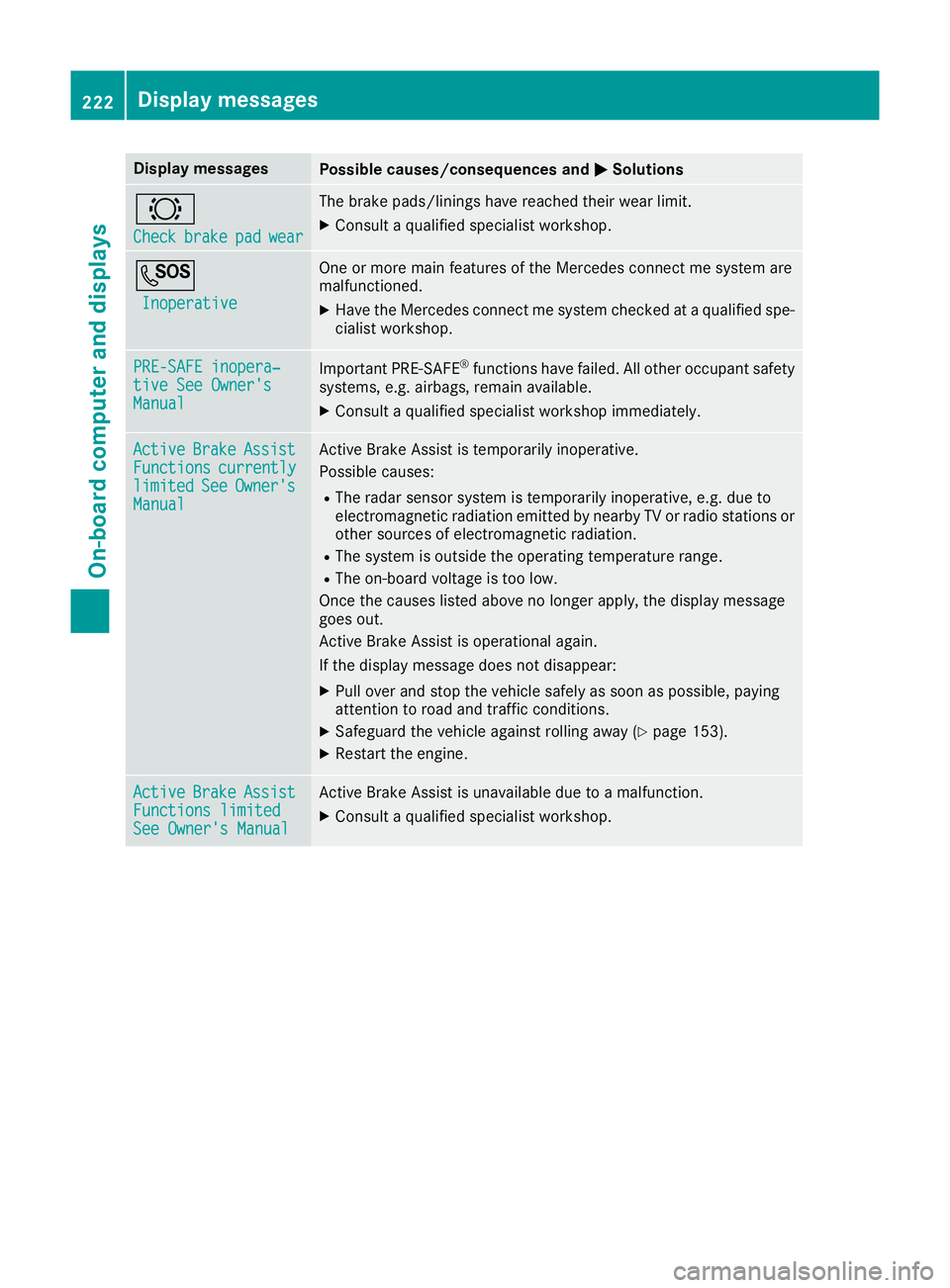
Display messages
Possible causes/consequences and
M
MSolutions #
Check Check
brake
brakepad
padwear
wear The brake pads/linings have reached their wear limit.
X Consult a qualified specialist workshop. G
Inoperative
Inoperative One or more main features of the Mercedes connect me system are
malfunctioned.
X Have the Mercedes connect me system checked at a qualified spe-
cialist workshop. PRE-SAFE inopera‐
PRE-SAFE inopera‐
tive See Owner's tive See Owner's
Manual Manual
Important PRE-SAFE
®
functions have failed. All other occupant safety
systems, e.g. airbags, remain available.
X Consult a qualified specialist workshop immediately. Active
Active
Brake
BrakeAssist
Assist
Functions
Functions currently
currently
limited
limited See
SeeOwner's
Owner's
Manual
Manual Active Brake Assist is temporarily inoperative.
Possible causes:
R The radar sensor system is temporarily inoperative, e.g. due to
electromagnetic radiation emitted by nearby TV or radio stations or other sources of electromagnetic radiation.
R The system is outside the operating temperature range.
R The on-board voltage is too low.
Once the causes listed above no longer apply, the display message
goes out.
Active Brake Assist is operational again.
If the display message does not disappear:
X Pull over and stop the vehicle safely as soon as possible, paying
attention to road and traffic conditions.
X Safeguard the vehicle against rolling away (Y page 153).
X Restart the engine. Active Active
Brake
BrakeAssist
Assist
Functions limited
Functions limited
See Owner's Manual See Owner's Manual Active Brake Assist is unavailable due to a malfunction.
X Consult a qualified specialist workshop. 222
Display
messagesOn-board computer and displays
Page 232 of 333
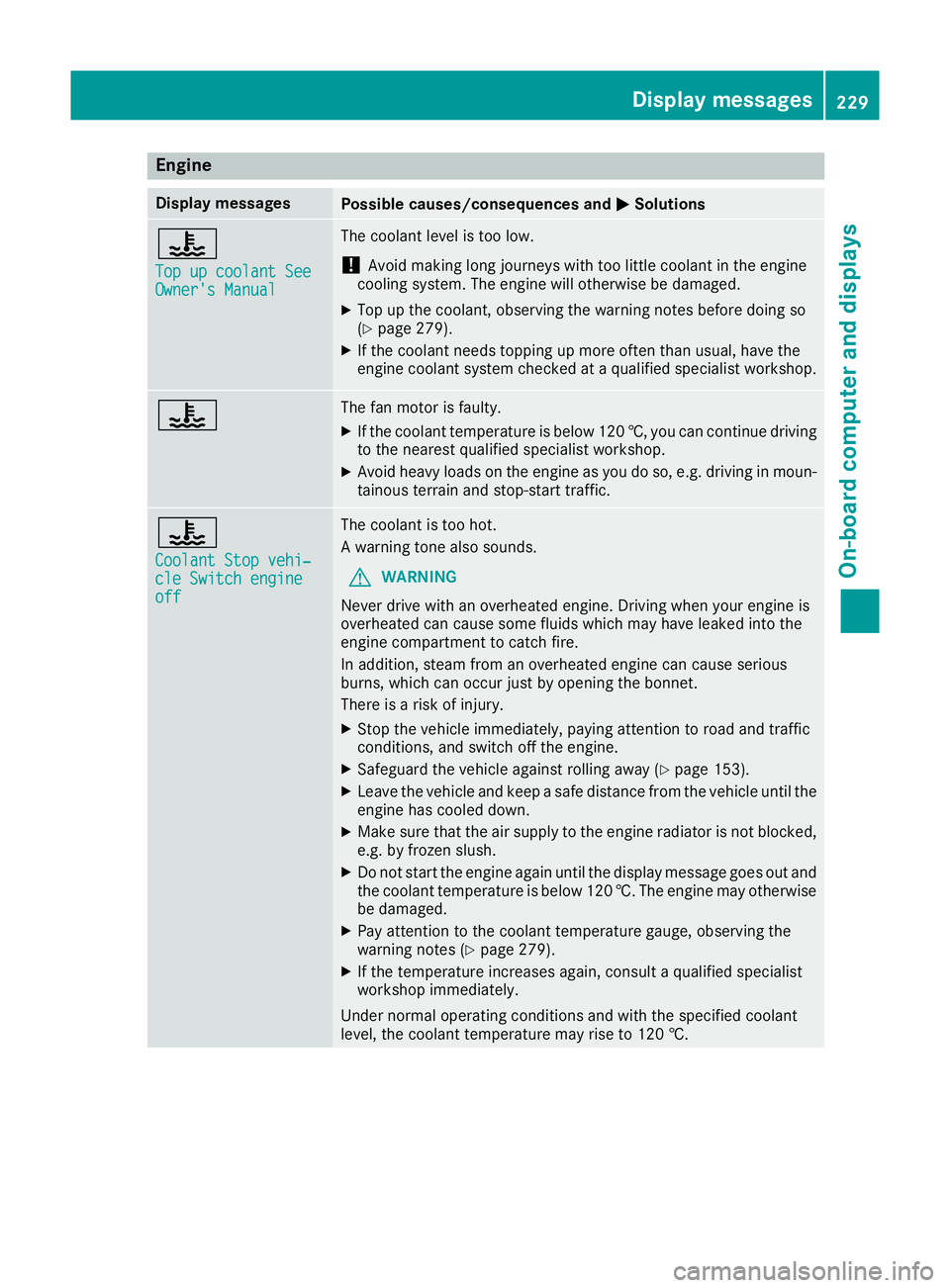
Engine
Display messages
Possible causes/consequences and
M
MSolutions ?
Top up coolant See Top up coolant See
Owner's Manual Owner's Manual The coolant level is too low.
! Avoid making long journeys with too little coolant in the engine
cooling system. The engine will otherwise be damaged.
X Top up the coolant, observing the warning notes before doing so
(Y page 279).
X If the coolant needs topping up more often than usual, have the
engine coolant system checked at a qualified specialist workshop. ? The fan motor is faulty.
X If the coolant temperature is below 120 †, you can continue driving
to the nearest qualified specialist workshop.
X Avoid heavy loads on the engine as you do so, e.g. driving in moun-
tainous terrain and stop-start traffic. ?
Coolant Stop vehi‐ Coolant Stop vehi‐
cle Switch engine cle Switch engine
off off The coolant is too hot.
A warning tone also sounds.
G WARNING
Never drive with an overheated engine. Driving when your engine is
overheated can cause some fluids which may have leaked into the
engine compartment to catch fire.
In addition, steam from an overheated engine can cause serious
burns, which can occur just by opening the bonnet.
There is a risk of injury.
X Stop the vehicle immediately, paying attention to road and traffic
conditions, and switch off the engine.
X Safeguard the vehicle against rolling away (Y page 153).
X Leave the vehicle and keep a safe distance from the vehicle until the
engine has cooled down.
X Make sure that the air supply to the engine radiator is not blocked,
e.g. by frozen slush.
X Do not start the engine again until the display message goes out and
the coolant temperature is below 120 †. The engine may otherwisebe damaged.
X Pay attention to the coolant temperature gauge, observing the
warning notes (Y page 279).
X If the temperature increases again, consult a qualified specialist
workshop immediately.
Under normal operating conditions and with the specified coolant
level, the coolant temperature may rise to 120 †. Display messages
229On-board computer and displays Z
Page 233 of 333
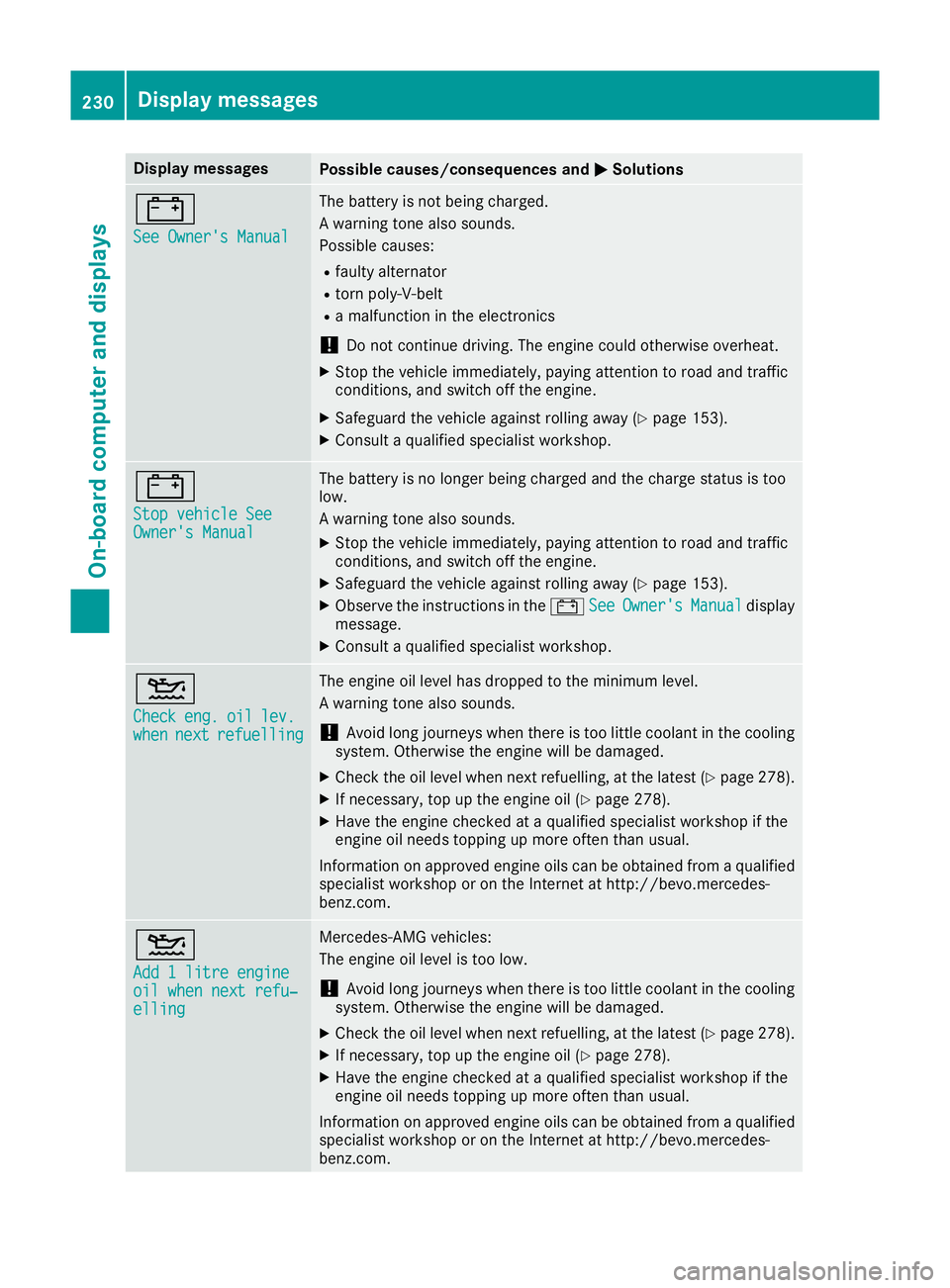
Display messages
Possible causes/consequences and
M
MSolutions #
See Owner's Manual See Owner's Manual The battery is not being charged.
A warning tone also sounds.
Possible causes:
R faulty alternator
R torn poly-V-belt
R a malfunction in the electronics
! Do not continue driving. The engine could otherwise overheat.
X Stop the vehicle immediately, paying attention to road and traffic
conditions, and switch off the engine.
X Safeguard the vehicle against rolling away (Y page 153).
X Consult a qualified specialist workshop. #
Stop vehicle See Stop vehicle See
Owner's Manual Owner's Manual The battery is no longer being charged and the charge status is too
low.
A warning tone also sounds.
X Stop the vehicle immediately, paying attention to road and traffic
conditions, and switch off the engine.
X Safeguard the vehicle against rolling away (Y page 153).
X Observe the instructions in the #See SeeOwner's
Owner's Manual
Manualdisplay
message.
X Consult a qualified specialist workshop. 4
Check Check
eng.
eng.oil
oillev.
lev.
when
when next
nextrefuelling
refuelling The engine oil level has dropped to the minimum level.
A warning tone also sounds.
! Avoid long journeys when there is too little coolant in the cooling
system. Otherwise the engine will be damaged.
X Check the oil level when next refuelling, at the latest (Y page 278).
X If necessary, top up the engine oil (Y page 278).
X Have the engine checked at a qualified specialist workshop if the
engine oil needs topping up more often than usual.
Information on approved engine oils can be obtained from a qualified
specialist workshop or on the Internet at http://bevo.mercedes-
benz.co m. 4
Add 1 litre engine Add 1 litre engine
oil when next refu‐ oil when next refu‐
elling elling Mercedes-AMG vehicles:
The engine oil level is too low.
! Avoid long journeys when there is too little coolant in the cooling
system. Otherwise the engine will be damaged.
X Check the oil level when next refuelling, at the latest (Y page 278).
X If necessary, top up the engine oil (Y page 278).
X Have the engine checked at a qualified specialist workshop if the
engine oil needs topping up more often than usual.
Information on approved engine oils can be obtained from a qualified
specialist workshop or on the Internet at http://bevo.mercedes-
benz.com. 230
Display messagesOn-board computer and displays
Page 234 of 333
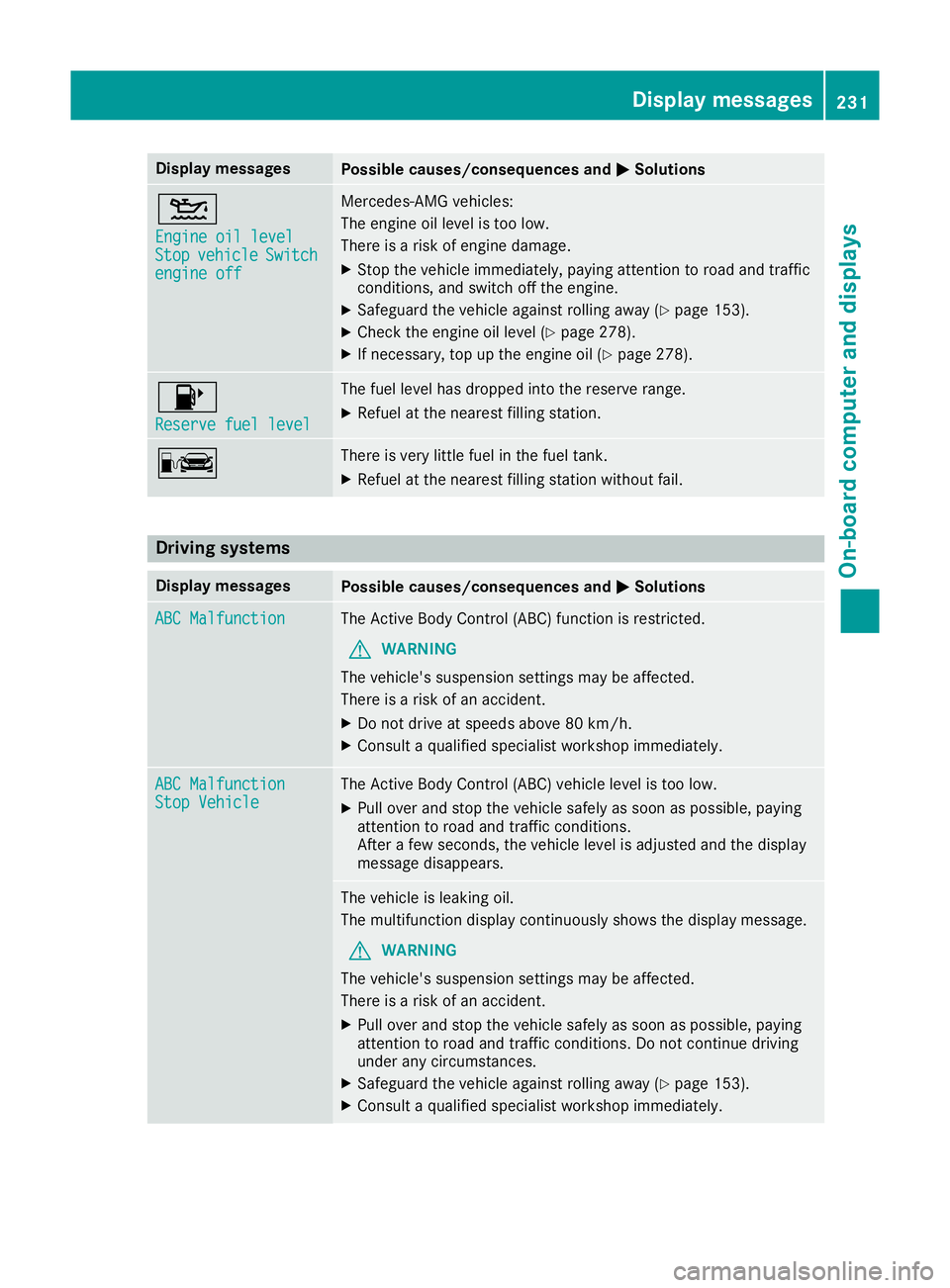
Display messages
Possible causes/consequences and
M
MSolutions 4
Engine oil level Engine oil level
Stop Stop
vehicle
vehicle Switch
Switch
engine off
engine off Mercedes-AMG vehicles:
The engine oil level is too low.
There is a risk of engine damage.
X Stop the vehicle immediately, paying attention to road and traffic
conditions, and switch off the engine.
X Safeguard the vehicle against rolling away (Y page 153).
X Check the engine oil level (Y page 278).
X If necessary, top up the engine oil (Y page 278).8
Reserve fuel level Reserve fuel level The fuel level has dropped into the reserve range.
X Refuel at the nearest filling station. C There is very little fuel in the fuel tank.
X Refuel at the nearest filling station without fail. Driving systems
Display messages
Possible causes/consequences and
M
MSolutions ABC Malfunction
ABC Malfunction The Active Body Control (ABC) function is restricted.
G WARNING
The vehicle's suspension settings may be affected.
There is a risk of an accident.
X Do not drive at speeds above 80 km/h.
X Consult a qualified specialist workshop immediately. ABC Malfunction ABC Malfunction
Stop Vehicle Stop Vehicle The Active Body Control (ABC) vehicle level is too low.
X Pull over and stop the vehicle safely as soon as possible, paying
attention to road and traffic conditions.
After a few seconds, the vehicle level is adjusted and the display
message disappears. The vehicle is leaking oil.
The multifunction display continuously shows the display message.
G WARNING
The vehicle's suspension settings may be affected.
There is a risk of an accident.
X Pull over and stop the vehicle safely as soon as possible, paying
attention to road and traffic conditions. Do not continue driving
under any circumstances.
X Safeguard the vehicle against rolling away (Y page 153).
X Consult a qualified specialist workshop immediately. Display
messages
231On-board computer and displays Z
Page 250 of 333

Warning/
indicator
lamp
N N
Signal type
Possible causes/consequences and M
MSolutions ÷
N
The yellow ESP ®
warning lamp flashes while the vehicle is in motion.
ESP ®
or traction control has intervened because there is a risk of skidding or at
least one wheel has started to spin.
Cruise control or Distance Pilot DISTRONIC is deactivated.
X Only depress the accelerator pedal as far as necessary when pulling away.
X Accelerate more gently while the vehicle is in motion.
X Adapt your driving style to suit the road and weather conditions.
X Do not deactivate ESP ®
.
In rare cases (Y page 70) it may be better to deactivate ESP ®
.
Observe the important safety notes on ESP ®
(Y page 67). ֌
N
The yellow ESP ®
and ESP ®
OFF warning lamps are lit while the engine is running.
ESP ®
is faulty.
Other driving and driving safety systems may also be faulty.
G WARNING
The brake system continues to function normally, but without the functions listed above.
The braking distance may thus increase in an emergency braking situation.
If ESP ®
is not operational, ESP ®
is unable to stabilise the vehicle.
There is an increased danger of skidding and risk of an accident.
X Observe the additional display messages in the multifunction display.
X Drive on carefully.
X Consult a qualified specialist workshop immediately. å
N
The yellow ESP ®
OFF warning lamp is lit while the engine is running or the ECO
start/stop function is activated.
ESP ®
is deactivated.
G WARNING
If ESP ®
is deactivated, ESP ®
is unable to stabilise the vehicle.
Further driving systems or driving safety systems are thus restricted, e.g. Active
Blind Spot Assist. The system does not perform course-correcting braking appli-
cations.
There is an increased danger of skidding and risk of an accident.
X Reactivate ESP ®
.
In rare cases (Y page 70) it may be better to deactivate ESP ®
.
Observe the important safety notes on ESP ®
(Y page 67).
X Adapt your driving style to suit the road and weather conditions.
If ESP ®
cannot be activated:
X Drive on carefully.
X Have ESP ®
checked at a qualified specialist workshop. Warning and indicator lamps
247On-board computer and displays Z