warning lights MERCEDES-BENZ SL ROADSTER 2016 Owners Manual
[x] Cancel search | Manufacturer: MERCEDES-BENZ, Model Year: 2016, Model line: SL ROADSTER, Model: MERCEDES-BENZ SL ROADSTER 2016Pages: 333, PDF Size: 11.85 MB
Page 6 of 333
1, 2, 3 ...
12 V socket see Sockets A
ABS (Anti-lock Braking System) Display message ............................ 217
Function/notes ................................ 62
Important safety notes .................... 62
Warning lamp .................................2 46
Accident
Automatic measures after an acci-
dent ................................................. 54
Activating media mode
General notes ................................ 260
Activating/deactivating air-recir-
culation mode ................................... .128
Activating/deactivating cooling
with air dehumidification ................. 124
Active Blind Spot Assist
Activating/deactivating (on-
board computer) ............................ 208
Display message ............................ 233
Function/notes ............................ .193
Active Body Control (ABC)
CURVE .......................................... .177
Vehicle level .................................. 175
Active Body Control (ABC) (except
Mercedes-AMG vehicles)
Comfort ......................................... 177
Driving dynamics displa y............... 177
Normal level .................................. 176
Operation/note s............................ 175
Raised level ................................... 176
Sport .............................................. 177
Sport Plus ...................................... 177
Vehicle level .................................. 175
Active Body Control (ABC)
(Mercedes-AMG vehicles)
Comfort ......................................... 179
Driving dynamics display ............... 180
Normal level .................................. 179
Operation/note s............................ 178
Raised level ................................... 178
Sport .............................................. 179
Vehicle level .................................. 178 Active Body Control (except
Mercedes-AMG Vehicles)
Display message ............................ 231
Active Body Control (Mercedes-
AMG Vehicles)
Display message ............................ 231
Active Brake Assist
Activating or deactivating .............. 207
Display message ............................ 222
Function/note s................................ 64
Active Brake Assist with cross-
traffic function
Activating or deactivating .............. 207
Display message ............................ 223
Function/note s................................ 72
Important safety notes .................... 72
Warning lamp ................................. 251
Active Driving Assistance package .. 193
Active Lane Keeping Assist
Activating/deactivating (on-
board computer) ............................ 208
Display message ............................ 233
Function/note s............................. 195
Active light function ......................... 116
Active Parking Assist
Detecting parking spaces .............. 184
Exiting a parking space .................. 186
Function/note s............................. 183
Important safety notes .................. 183
Parking .......................................... 185
Adaptive adjustable damping
Driving dynamics display ............... 175
ADAPTIVE BRAKE ................................. 72
Adaptive Brake Assist
Function/note s................................ 66
Adaptive brake lights .......................... 67
Adaptive Damping System
Function/note s............................. 174
Adaptive Highbeam Assist Plus
Display message ............................ 228
Function/note s............................. 116
Switching on/of f........................... 117
Additives (engine oil) ........................ 325
Address book
See also Digital Owner's Manua l... 253
Adjusting the volume
COMAND Online ............................ 254 Index
3
Page 10 of 333
Problems with cooling with air
dehumidification ............................1
25
Setting the air distribution ............. 126
Setting the air vents ..................... .129
Setting the airflow ......................... 126
Setting the climate mode (AIR
FLOW) ............................................ 125
Setting the temperature ................ 125
Switching air-recirculation mode
on/off ............................................ 128
Switching on/off ........................... 124
Switching residual heat on/off ...... 129
Switching the rear window heat-
ing on/off ...................................... 127
Switching the ZONE function on/
off ................................................. .126
THERMOTRONIC (2-zone) auto-
matic climate control ..................... 123
Cockpit
Overview .......................................... 30
see Instrument cluster
Collapsible emergency spare
wheel
see Emergency spare wheel
COMAND Online
Driving dynamics display (except
Mercedes-AMG vehicles) ....... 175, 177
Driving dynamics display
(Mercedes-AMG vehicles) .............. 180
Switching on/off ........................... 253
Combination switch .......................... 115
Connecting a USB device
See also Digital Owner's Manual ... 253
Consumption statistics (on-board
computer) .......................................... 202
Controller .......................................... .254
Convenience closing feature .............. 91
Convenience opening/closing (air-
recirculation mode) ........................... 128
Coolant (engine)
Checking the level ......................... 279
Display message ............................ 229
Important safety notes .................. 325
Temperature (on-board computer,Mercedes-AMG vehicles) .............. .213
Temperature gauge ........................ 200
Warning lamp ................................. 249 Cooling
see Climate control
Copyright ............................................. 29
Cornering light function
Display message ............................ 228
Function/notes ............................ .116
Cruise control
Cruise control lever ....................... 160
Deactivating ................................... 161
Display message ............................ 236
Driving system ............................... 159
Important safety notes .................. 159
LIM indicator lamp ......................... 160
Selecting ........................................ 160
Setting a speed .............................. 161
Storing and maintaining current
speed ............................................. 160
Cup holder
Centre console .............................. 266
Important safety notes .................. 266 D
Data see Technical data
Data carrier
Selecting ........................................ 205
Data modem mode
Telephone with Bluetooth ®
(SAP
profile) .......................................... .259
Daytime driving lights
Display message ............................ 228
Function/notes ............................ .113
Switching on/off (on-board com-
puter) ............................................. 209
Dealership
see Qualified specialist workshop
Declarations of conformity ................. 25
Delayed switch-off
Exterior lighting (on-board com-
puter) ............................................. 210
Interior lighting .............................. 211
Diagnostics connection ......................27
Digital Owner's Manual
Help ................................................ .22
Introduction .....................................22
Digital speedometer .........................203 Index
7
Page 11 of 333
Dipped-beam headlamps
Display message ............................ 228
Setting for driving abroad (sym-
metrical) ........................................ 113
Setting for driving on the right/
left ................................................ .210
Switching on/off ........................... 114
Display message
Driving systems ............................ .231
KEYLESS-GO .................................. 243
Display messages
ASSYST PLUS ................................ 280
Calling up (on-board computer) ..... 216
Engine ............................................ 229
General information ....................... 216
Hiding (on-board computer) ........... 216
Key ................................................ 243
Lights ............................................. 228
Safety systems .............................. 217
Tyres .............................................. 237
Vehicle .......................................... .239
Distance Pilot DISTRONIC
Activating ....................................... 163
Calling up the spee d...................... 164
Cruise control lever ....................... 163
Deactivating ................................... 167
Display Message ............................ 234
Displays in the multifunction dis-
play ................................................ 166
Driving tips .................................... 167
Function/note s............................. 161
Important safety notes .................. 162
Selecting ........................................ 163
Setting the specified minimum
distance ......................................... 165
Stopping ........................................ 165
Storing the speed .......................... 164
Warning lamp ................................. 251
Distance warning function
Function/note s................................ 65
Distance warning signal (warning
lamp) .................................................. 251
Door
Automatic locking (on-board com-
puter) ............................................. 211
Automatic locking (switch) ............... 84
Central locking/unlocking (key) ...... 77
Control panel ................................... 38 Display message ............................ 241
Emergency locking ........................... 84
Emergency unlocking ....................... 84
Important safety notes .................... 82
Opening (from the inside) ................ 83
Power closing .................................. 84
Doors
Overview .......................................... 82
Draught stop
Electrical draught stop ..................... 98
Manual draught stop ........................ 97
Drive program
Display ........................................... 142
Drive programs
Automatic transmission ................. 145
Driver's door
see Door
Driving abroad
Mercedes-Benz Service ................. 281
Symmetrical dipped beam ............. 113
Driving on flooded roads .................. 158
Driving safety system
Active Brake Assist .......................... 64
EBD (electronic brake force distri-bution) ............................................. 71
STEER CONTROL ............................. 74
Driving safety systems
ABS (Anti-lock Braking System) ....... 62
Active Brake Assist with cross-
traffic function ................................. 72
ADAPTIVE BRAK E............................. 72
Adaptive Brake Assist ...................... 66
Adaptive brake lights ....................... 67
BAS (Brake Assist System) .............. 62
Brake Assist with cross-traffic
function ........................................... 63
Distance warning function ............... 65
ESP ®
(Electronic Stability Pro-
gram) ............................................... 67
Important safety guidelines ............. 62
Overview .......................................... 61
Driving system
Active Body Control (ABC) (exceptMercedes-AMG vehicles) ............... 175
Active Body Control (ABC)
(Mercedes-AMG vehicles) .............. 178
Adaptive Damping System ............. 174 8
Index
Page 13 of 333
Removing ......................................
.318
Storage location ............................ 318
Technical data ............................... 318
Emergency unlocking
Vehicle ............................................. 84
Engine
Display message ............................ 229
ECO start/stop function ................ 135
Jump-starting ................................. 296
Running irregularl y......................... 138
Starting problems .......................... 138
Starting the engine with the key .... 134
Starting with KEYLESS GO ............. 134
Stopping ........................................ 153
Tow-starting (vehicle) ..................... 301
Warning lamp (engine diagnos-
tics) ............................................... 249
Engine electronics
Notes ............................................. 320
Problem (fault) ............................... 138
Engine oil
Additives ........................................ 325
Checking the oil level ..................... 277
Checking the oil level using the
dipstick .......................................... 278
Display message ............................ 230
Filling capacity ............................... 325
General notes ................................ 324
Notes about oil grade s................... 324
Notes on oil level/consumption .... 277
Temperature (on-board computer, Mercedes-AMG vehicles) ............... 213
Topping up ..................................... 278
Entering an address
See also Digital Owner's Manua l... 253
Environmental protection
Returning an end-of-life vehicle ....... 23
ESP ®
(Electronic Stability Pro-
gram)
AMG menu (on-board computer) ... 213
Characteristics ................................. 67
Deactivating/activating (button
in Mercedes-AMG vehicles) ............. 70
Deactivating/activating (except
Mercedes‑ AMG vehicles) ................. 69
Display message ............................ 217
Function/note s................................ 67
General notes .................................. 67 Important safety guidelines ............. 67
Warning lamp ................................. 246
ETS/4ETS (Electronic Traction Sys-
tem) ...................................................... 67
Exhaust pipe (cleaning instruc-
tions) .................................................. 285
Exterior lighting
Settings options ............................. 113
see Lights
Exterior mirrors
Adjusting ....................................... 108
Anti-dazzle mode (automatic) ........ 109
Folding in when locking (on-board computer) ...................................... 212
Folding in/out (automatically )....... 109
Folding in/out (electrically) ........... 109
Out of position (troubleshooting) ... 109
Parking position ............................. 110
Resetting ....................................... 109
Storing settings (memory func-
tion) ............................................... 111 F
Fault message see Display messages
Favourites
Overview ........................................ 254
Filler cap
see Fuel filler flap
Fire extinguisher ............................... 287
First-aid kit ......................................... 287
Fitting a wheel
Fitting a wheel ............................... 316
Lowering the vehicle ...................... 316
Preparing the vehicle ..................... 313
Raising the vehicle ......................... 313
Removing a wheel .......................... 315
Securing the vehicle against roll-
ing away ........................................ 313
Flat tyre
MOExtended tyre s......................... 289
Preparing the vehicle ..................... 289
TIREFIT kit ...................................... 290
see Emergency spare wheel
Floormat ............................................. 274
Foglamps
Extended rang e.............................. 116 10
Index
Page 16 of 333
Light sensor (display message)
.......2 28
Lighting
see Lights
Lights
Activating/deactivating the Intel-
ligent Light System ........................ 209
Activating/deactivating the inte-
rior lighting delayed switch-off ....... 211
Active light function ....................... 116
Adaptive Highbeam Assist PLUS .... 116
Automatic headlamp mode ............ 113
Cornering light function ................. 116
Dipped-beam headlamps .............. .114
Driving abroad ............................... 113
Foglamps (extended range) ........... 116
Hazard warning lamps ................... 115
Headlamp flasher ........................... 115
Light switch ................................... 113
Main-beam headlamps ................... 115
Motorway mode ............................ .116
Parking lamps ................................ 114
Rear foglamp ................................. 114
Setting the ambient lighting
brightness (on-board computer) .... 210
Setting the ambient lighting col-
our (on-board computer) ................ 210
Side lamps ..................................... 114
Switching the daytime driving
lights on/off (on-board com-
puter) ............................................. 209
Switching the exterior lighting
delayed switch-off on/off (on-
board computer) ............................ 210
Switching the surround lighting
on/off (on-board computer) .......... 210
Turn signals ................................... 115
see Interior lighting
see Replacing bulbs
LIM indicator lamp
Cruise control ................................ 160
Distance Pilot DISTRONIC ............. 163
Variable limiter .............................. 170
Limiter
Calling up the spee d...................... 171
Deactivating, variable .................... 172
Function/note s............................. 170
LIM indicator lamp ......................... 170
Permanent ..................................... 172 Setting a speed .............................. 171
Storing the current speed .............. 171
Switching to passive ...................... 171
Variabl
e......................................... 170
Limiting the speed
Speed limiter ................................. 170
LINGUATRONIC
see Separate operating instructions
Loading aid (boot)
Raising/lowering the roof .............. 264
Locking
see Central locking
Locking (doors)
Automatic ........................................ 84
Emergency locking ........................... 84
From inside (central locking but-
ton) .................................................. 83
Locking centrally
see Central locking
Locking verification signal (on-
board computer) ............................... 211
Luggage cover
see Boot separator M
M+S tyres ........................................... 306
MAGIC SKY CONTROL ......................... 98
Main-beam headlamps
Adaptive Highbeam Assist PLUS .... 116
Display message ............................ 228
Switching on/of f........................... 115
Matt finish (cleaning instructions) .. 283
Media Interface
see Separate operating instructions
Memory card (audio) ......................... 205
Memory function ............................... 111
Mercedes connect me
Display message ............................ 222
Mercedes-Benz Intelligent Drive
Active Blind Spot Assist ................. 193
Active Lane Keeping Assist ............ 195
Active Parking Assist ..................... 183
ATTENTION ASSIST ........................ 190
Distance Pilot DISTRONIC with
Steering Pilot and Stop&Go Pilot ... 168
PRE-SAFE ®
PLUS (anticipatory
occupant protection PLUS) .............. 53 Index
13
Page 19 of 333
R
RACE START important safety notes ................... 173
RACE START (Mercedes-AMG vehi-
cles) .................................................... 173
RACETIMER (on-board computer) .... 213
Radio
Selecting a station ......................... 204
see separate operating instructions
Radio mode
See also Digital Owner's Manua l... 253
Radio-based vehicle components
Declaration of conformity ................ 25
Reading lamp ..................................... 117
Rear foglamp
Display message ............................ 228
Switching on/of f........................... 114
Rear lamps
see Lights
Rear window heating
General notes ................................ 127
Problem (fault) ............................... 128
Switching on/of f........................... 127
Rear-view mirror
Anti-dazzle mode (automatic) ........ 109
Dipping (manual) ........................... 108
Refuelling
Fuel gaug e....................................... 32
Important safety notes .................. 151
Notes for Mercedes‑AMG vehi-
cles ................................................ 324
Refuelling process ......................... 152
see Fuel
Remote control
Programming (garage door
opener) .......................................... 270
Replacing bulbs
General notes ................................ 118
Rescue card ......................................... 28
Reserve (fuel tank)
see Fuel
Reserve fuel
Display message ............................ 231
Warning lamp ................................. 249
Residual heat (climate control) ........ 129
Restraint system
Display message ............................ 224 Introduction ..................................... 39
Warning lamp ................................. 248
Warning lamp (function) ................... 40
Rev counter ........................................ 199
Reverse gear (selector lever) ........... 143
Reversing camera
Cleaning instructions ..................... 285
Display in the multimedia system .. 187
Function/note s............................. 187
Switching on/of f........................... 187
Reversing feature
Side windows ................................... 90
Reversing function
Boot lid ............................................ 85
Reversing lamp (display message) .. 228
Roll bar
Display message ............................ 224
Operation ......................................... 50
Roller sunblind .................................... 98
Roof
Display message ............................ 242
Important safety notes .................... 93
Opening/closing (with key) .............. 95
Opening/closing (with roof
switch) ............................................. 94
Overview .......................................... 93
Problem (malfunction) ................... 100
Relocking ......................................... 95
Roof switch .......................................... 94
Route guidance
See also Digital Owner's Manua l... 253 S
Safety Children in the vehicle ..................... 54
see Occupant safety
Safety system
see Driving safety systems
SD memory card
Ejecting .......................................... 260
Inserting ........................................ 260
Inserting/removing ........................ 260
See also Digital Owner's Manua l... 253
Selecting ........................................ 205
Seat belt
Correct usage .................................. 42
Seat belt guide ............................... 103 16
Index
Page 21 of 333
SPORT handling mode
Deactivating/activating
(Mercedes-AMG vehicles) ................70
Warning lamp ................................. 248
Start/stop function
see ECO start/stop function
Starting (engine) ................................ 133
STEER CONTROL ..................................74
Steering
Display message ............................2 41
Steering Assist and Stop&Go Pilot
(DISTRONIC PLUS)
Activating/deactivating ................. 207
Steering assistant STEER CON-
TROL
see STEER CONTROL
Steering Pilot and Stop&Go Pilot
Display message ............................ 235
Steering wheel
Adjusting (electrically) ................... 106
Button overview ............................... 33
Buttons (on-board computer) ......... 200
Important safety notes .................. 106
Storing settings (memory func-
tion) ............................................... 111
Steering wheel gearshift paddles .... 147
Stopwatch (RACETIMER) ................... 213
Stowage areas ................................... 262
Stowage compartments
Armrest (under) ............................ .262
Centre console .............................. 263
Centre console (rear) ..................... 263
Cup holder ..................................... 266
Glove compartment ....................... 262
Important safety information ......... 262
Rear ............................................... 264
Spectacles compartment .............. .263
Stowage net ....................................... 264
Stowage space
Display message ............................ 241
Stowage net ................................... 264
Umbrella holder ............................ .263
Stowage well beneath the boot
floor .................................................... 266
Summer tyres ................................... .306
Sun visor ............................................ 267 Surround lighting (on-board com-
puter)
................................................. .210
Suspension settings
Active Body Control (ABC) (exceptMercedes-AMG vehicles) .............. .176
Active Body Control (ABC)
(Mercedes-AMG vehicles) .............. 179
SETUP (on-board computer) .......... 213
Switching on media mode
Via the device lis t.......................... 260 T
Tail lamps Display message ............................ 228
see Lights
Technical data
Capacities ...................................... 322
Emergency spare wheel ................. 318
Information .................................... 320
Tyres/wheels ................................. 317
Vehicle data ................................... 327
Telephone
Accepting a call (multifunction
steering wheel) .............................. 206
Authorising a mobile phone (con-
necting) ......................................... 256
Connecting a Mobile phone (gen-
eral information) ............................ 256
Display message ............................ 241
Menu (on-board computer) ............ 205
Number from the phone book ........ 206
Redialling ....................................... 206
Rejecting/ending a call ................. 206
See also Digital Owner's Manua l... 253
Switching between mobile
phones ........................................... 257
Telephone compartment ................ 262
Telephone module with Bluetooth ®
(SAP profile) Activating and connecting the
module ........................................... 258
Charging a mobile phone ............... 260
Connecting the mobile phone ........ 259
Connecting the module using a
USB cable ...................................... 258
Data modem mode ........................ 259
Installing the module ..................... 258 18
Index
Page 31 of 333
Inform Mercedes-Benz as soon as possible
about any change in address or vehicle owner-
ship. You can do this at a Mercedes-Benz Ser-
vice Centre, for example. Correct use
If you remove any warning stickers, you or oth-
ers could fail to recognise certain dangers.
Leave warning stickers in position.
Observe the following information when driving your vehicle:
R the safety notes in this manual
R the vehicle technical data
R traffic rules and regulations
R laws and safety standards pertaining to motor
vehicles Implied warranty
! Follow the instructions in this manual about
the proper operation of your vehicle as well as
about possible vehicle damage. Damage to
your vehicle that arises from culpable contra- ventions against these instructions are not
covered either by Mercedes-Benz implied
warranty or by the New or Used-Vehicle War-
ranty. QR code for rescue card
The QR code is secured in the fuel filler flap and
on the opposite side on the B-pillar. In the event
of an accident, rescue services can use the QR
code to quickly find the appropriate rescue card for your vehicle. The current rescue card con-
tains, in a compact form, the most important
information about your vehicle, e.g. the routing
of the electric cables.
You can find more information under http://
portal.aftersales.i.daimler.com/public/
content/asportal/en/communication/
informationen_fuer/QRCode.html. Data stored in the vehicle
A wide range of electronic components in your
vehicle contain data memories. These data memories temporarily or perma-
nently store technical information about:
R the vehicle's operating state
R events
R faults
In general, this technical information docu-
ments the state of a component, a module, a
system or the surroundings.
These include, for example:
R operating conditions of system components,
e.g. fluid levels
R the vehicle's status messages and those of its
individual components, e.g. number of wheelrevolutions/speed, deceleration in move-
ment, lateral acceleration, accelerator pedal
position
R malfunctions and defects in important system
components, e.g. lights, brakes
R vehicle reactions and operating conditions in
special driving situations, e.g. airbag deploy-
ment, intervention of stability control sys-
tems
R ambient conditions, e.g. outside temperature
This data is of an exclusively technical nature
and can be used to:
R assist in detecting and rectifying faults and
defects
R analyse vehicle functions, e.g. after an acci-
dent
R optimise vehicle functions
The data cannot be used to trace the vehicle's
movements.
When your vehicle is serviced, technical infor-
mation can be read from the event data memory and fault data memory.
Services include, for example:
R repair services
R service processes
R warranty events
R quality assurance
The vehicle is read out by employees of the ser-
vice network (including the manufacturer) using special diagnostic testers. You can obtain more
information there, if required.
After a fault has been rectified, the information
is deleted from the fault memory or is continu-
ally overwritten.
When operating the vehicle, situations are con-
ceivable in which this technical data, in connec- 28
Data stored in the vehicleIntroduction
Page 43 of 333
Mercedes-Benz recommends that you use a
Mercedes-Benz Service Centre. Restraint system warning lamp
The functions of the restraint system are
checked after the ignition is switched on and at
regular intervals while the engine is running.
Therefore, malfunctions can be detected in
good time.
The 6 restraint system warning lamp in the
instrument cluster lights up when the ignition is switched on. It goes out no later than a few sec-
onds after the vehicle is started. The compo-
nents of the restraint system are in operational
readiness.
A malfunction has occurred if the 6restraint
system warning lamp:
R does not light up after the ignition is switched
on
R does not go out after a few seconds with the
engine running
R lights up again while the engine is running G
WARNING
If the restraint system is malfunctioning,
restraint system components may be trig-
gered unintentionally or may not deploy as
intended during an accident. This may affect
the seat belt tensioner or airbag, for example. This poses an increased risk of injury or even
fatal injury.
Have the restraint system checked and
repaired immediately at a qualified specialist
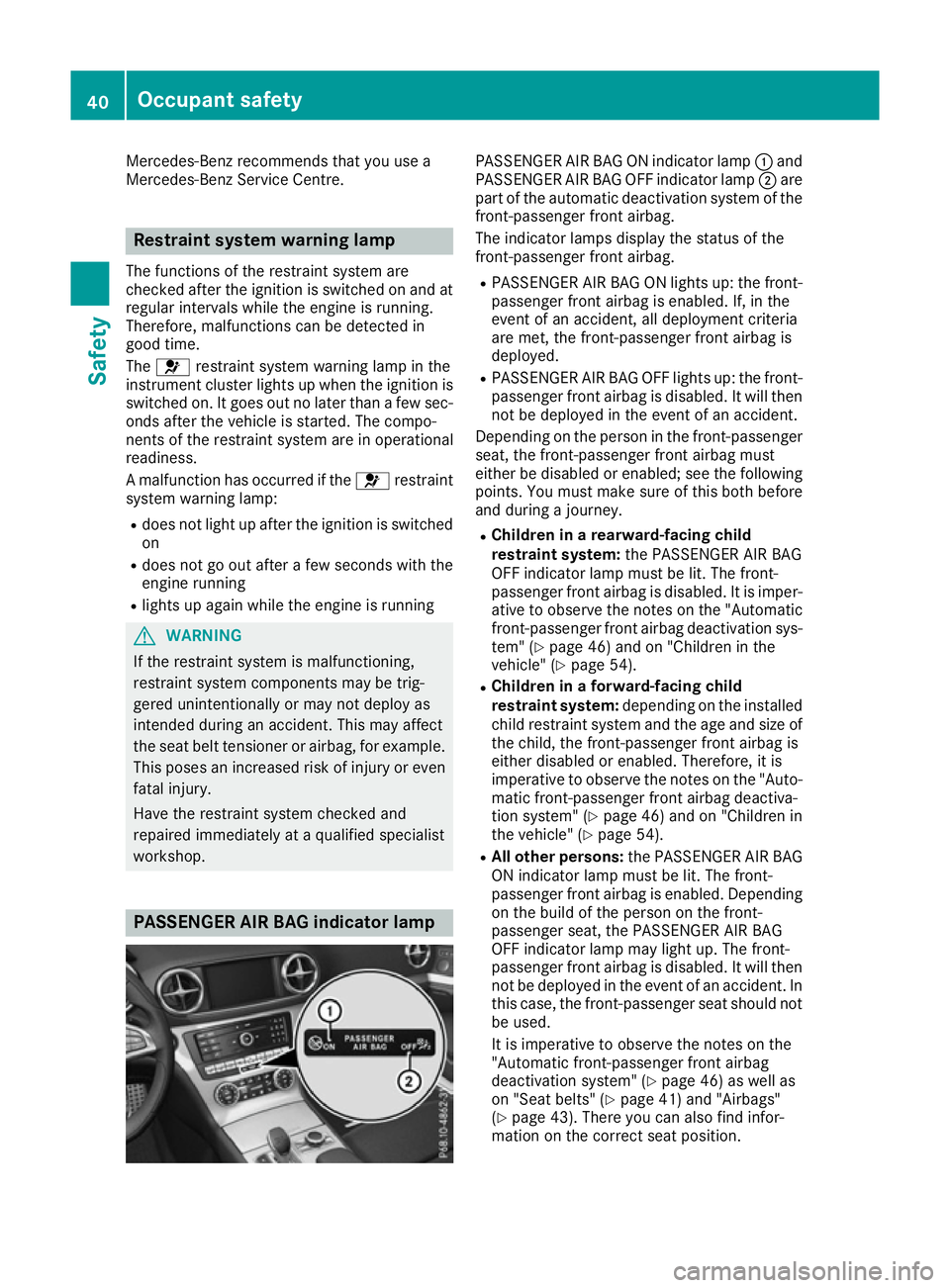
workshop. PASSENGER AIR BAG indicator lamp PASSENGER AIR BAG ON indicator lamp
:and
PASSENGER AIR BAG OFF indicator lamp ;are
part of the automatic deactivation system of the front-passenger front airbag.
The indicator lamps display the status of the
front-passenger front airbag.
R PASSENGER AIR BAG ON lights up: the front-
passenger front airbag is enabled. If, in the
event of an accident, all deployment criteria
are met, the front-passenger front airbag is
deployed.
R PASSENGER AIR BAG OFF lights up: the front-
passenger front airbag is disabled. It will then
not be deployed in the event of an accident.
Depending on the person in the front-passenger seat, the front-passenger front airbag must
either be disabled or enabled; see the following
points. You must make sure of this both before
and during a journey.
R Children in a rearward-facing child
restraint system: the PASSENGER AIR BAG
OFF indicator lamp must be lit. The front-
passenger front airbag is disabled. It is imper-
ative to observe the notes on the "Automatic front-passenger front airbag deactivation sys-
tem" (Y page 46) and on "Children in the
vehicle" (Y page 54).
R Children in a forward-facing child
restraint system: depending on the installed
child restraint system and the age and size of the child, the front-passenger front airbag is
either disabled or enabled. Therefore, it is
imperative to observe the notes on the "Auto-
matic front-passenger front airbag deactiva-
tion system" (Y page 46) and on "Children in
the vehicle" (Y page 54).
R All other persons: the PASSENGER AIR BAG
ON indicator lamp must be lit. The front-
passenger front airbag is enabled. Depending on the build of the person on the front-
passenger seat, the PASSENGER AIR BAG
OFF indicator lamp may light up. The front-
passenger front airbag is disabled. It will then
not be deployed in the event of an accident. In
this case, the front-passenger seat should not be used.
It is imperative to observe the notes on the
"Automatic front-passenger front airbag
deactivation system" (Y page 46) as well as
on "Seat belts" (Y page 41) and "Airbags"
(Y page 43). There you can also find infor-
mation on the correct seat position. 40
Occupant safetySafety
Page 50 of 333
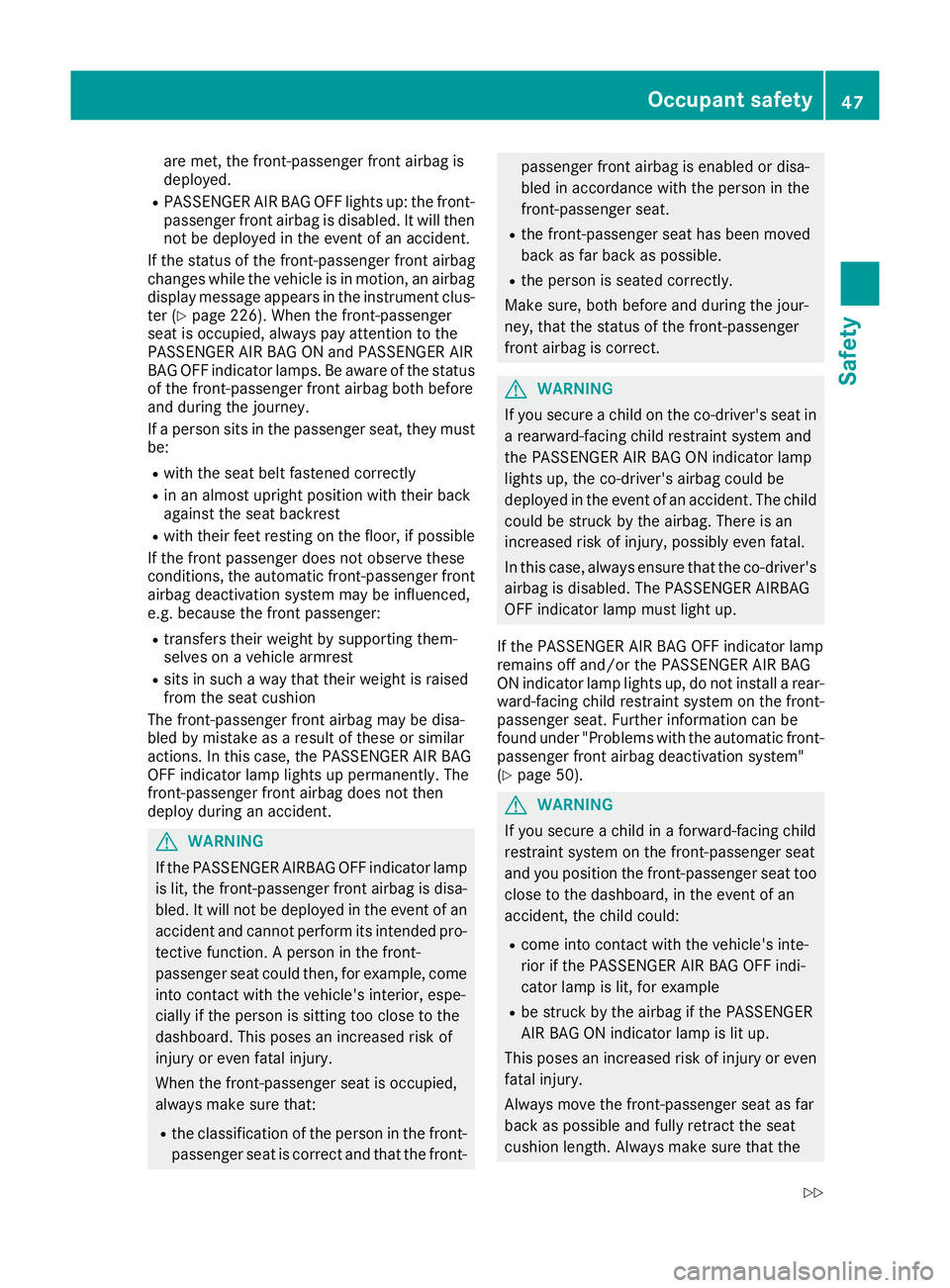
are met, the front-passenger front airbag is
deployed.
R PASSENGER AIR BAG OFF lights up: the front-
passenger front airbag is disabled. It will then
not be deployed in the event of an accident.
If the status of the front-passenger front airbag
changes while the vehicle is in motion, an airbag display message appears in the instrument clus-
ter (Y page 226). When the front-passenger
seat is occupied, always pay attention to the
PASSENGER AIR BAG ON and PASSENGER AIR
BAG OFF indicator lamps. Be aware of the status of the front-passenger front airbag both before
and during the journey.
If a person sits in the passenger seat, they must
be:
R with the seat belt fastened correctly
R in an almost upright position with their back
against the seat backrest
R with their feet resting on the floor, if possible
If the front passenger does not observe these
conditions, the automatic front-passenger front
airbag deactivation system may be influenced,
e.g. because the front passenger:
R transfers their weight by supporting them-
selves on a vehicle armrest
R sits in such a way that their weight is raised
from the seat cushion
The front-passenger front airbag may be disa-
bled by mistake as a result of these or similar
actions. In this case, the PASSENGER AIR BAG
OFF indicator lamp lights up permanently. The
front-passenger front airbag does not then
deploy during an accident. G
WARNING
If the PASSENGER AIRBAG OFF indicator lamp is lit, the front-passenger front airbag is disa-
bled. It will not be deployed in the event of an
accident and cannot perform its intended pro-
tective function. A person in the front-
passenger seat could then, for example, come
into contact with the vehicle's interior, espe-
cially if the person is sitting too close to the
dashboard. This poses an increased risk of
injury or even fatal injury.
When the front-passenger seat is occupied,
always make sure that:
R the classification of the person in the front-
passenger seat is correct and that the front- passenger front airbag is enabled or disa-
bled in accordance with the person in the
front-passenger seat.
R the front-passenger seat has been moved
back as far back as possible.
R the person is seated correctly.
Make sure, both before and during the jour-
ney, that the status of the front-passenger
front airbag is correct. G
WARNING
If you secure a child on the co-driver's seat in a rearward-facing child restraint system and
the PASSENGER AIR BAG ON indicator lamp
lights up, the co-driver's airbag could be
deployed in the event of an accident. The childcould be struck by the airbag. There is an
increased risk of injury, possibly even fatal.
In this case, always ensure that the co-driver's
airbag is disabled. The PASSENGER AIRBAG
OFF indicator lamp must light up.
If the PASSENGER AIR BAG OFF indicator lamp
remains off and/or the PASSENGER AIR BAG
ON indicator lamp lights up, do not install a rear- ward-facing child restraint system on the front-
passenger seat. Further information can be
found under "Problems with the automatic front-
passenger front airbag deactivation system"
(Y page 50). G
WARNING
If you secure a child in a forward-facing child
restraint system on the front-passenger seat
and you position the front-passenger seat too close to the dashboard, in the event of an
accident, the child could:
R come into contact with the vehicle's inte-
rior if the PASSENGER AIR BAG OFF indi-
cator lamp is lit, for example
R be struck by the airbag if the PASSENGER
AIR BAG ON indicator lamp is lit up.
This poses an increased risk of injury or even fatal injury.
Always move the front-passenger seat as far
back as possible and fully retract the seat
cushion length. Always make sure that the Occupant safety
47Safety
Z