ESP MERCEDES-BENZ SL ROADSTER 2018 Owner's Manual
[x] Cancel search | Manufacturer: MERCEDES-BENZ, Model Year: 2018, Model line: SL ROADSTER, Model: MERCEDES-BENZ SL ROADSTER 2018Pages: 322, PDF Size: 5.43 MB
Page 11 of 322
Overview .......................................... 78
Power closing ..................................80
Drinking and drivin g........................ .145
Drive program
Automatic transmission ................. 134
Display ...........................................1 31
SETUP (on-board computer,
Mercedes-AMG vehicles) ...............1 98
Driver's door
see Doors
Driving abroad
Mercedes-Benz Service ................. 263
Driving on flooded roads .................. 148
Driving safety system
Active Brake Assist .......................... 62
Driving safety systems
ABS (Anti-lock Braking System) ....... 60
Active Brake Assist with cross-
traffic function ................................. 69
ADAPTIVE BRAKE .............................6 9
Adaptive Brake Assist ...................... 64
Adaptive brake lights ....................... 65
BAS (Brake Assist System) .............. 60
Brake Assist with cross-traffic
function ........................................... 61
Distance warning function ............... 63
EBD (electronic brake force distri-
bution) ............................................. 69
ESP
®(Electronic Stability Pro-
gram) ............................................... 65
Important safety information ........... 60
Overview .......................................... 59
STEER CONTROL ............................. 71
Driving system
Active Body Control (ABC) (except
Mercedes-AMG vehicles) ............... 163
Active Body Control (ABC)
(Mercedes-AMG vehicles) .............. 165
Distance Pilot DISTRONIC with
Steering Pilot and Stop&Go Pilot ... 158
Parking Pilot .................................. 170
RACE START (Mercedes-AMG
vehicles) ........................................ 161
Driving systems
Active Blind Spot Assist ................. 179
Active Driving Assistance pack-
age ................................................. 179
Active Lane Keeping Assist ............ 181 Adaptive Damping System ............. 162
ATTENTION ASSIST ........................ 177
Cruise control ................................ 149
Disp
lay me
ssage ............................ 215
DISTRONIC PLUS ........................... 151
HOLD function ............................... 159
PARKTRONIC ................................. 167
Rear view camera .......................... 174
Driving tips
AMG ceramic brakes ..................... 148
Automatic transmission ................. 133
Brakes ........................................... 146
Break-in period .............................. 121
Distance Pilot DISTRONIC ............. 157
Downhill gradient ........................... 146
Drinking and driving ....................... 145
Driving in winter ............................. 148
Driving on flooded roads ................ 148
Driving on wet roads ...................... 148
Exhaust check ............................... 145
Fuel ................................................ 144
General .......................................... 144
Hydroplaning ................................. 148
Icy road surfaces ........................... 148
Limited braking efficiency on sal-
ted roads ....................................... 147
Snow chains .................................. 287
Subjecting brakes to a load ........... 147
Wet road surface ........................... 147
DVD video
Operating (on-board computer) ..... 191
see also Digital Operator's Man-
ual .................................................. 236
DYNAMIC SELECT button (all vehi-
cles except Mercedes-AMG vehi-
cles) .................................................... 128
DYNAMIC SELECT controller
(Mercedes-AMG vehicles) ................. 129
E
EASY-ENTRY feature
Activating/deactivating ................. 196
Function/notes ............................. 101
EASY-EXIT feature
Crash-responsive ........................... 102
Function/notes ............................. 101
Switching on/off ........................... 196
Index9
Page 12 of 322
EBD (electronic brake force distri-
bution)Display message ............................ 203
Function/notes ................................ 69
ECO display
Function/notes ............................ .145
On-board computer ....................... 188
ECO start/stop function
Automatic engine start .................. 126
Automatic engine switch-off .......... 125
Deactivating/activating ................. 126
General information ....................... 125
Important safety notes .................. 125
Introduction ................................... 125
Electronic Stability Program
see ESP
®(Electronic Stability Program)
Emergency
Automatic measures after an acci-
dent ................................................. 56
Emergency release
Driver's door ....................................8 0
Trunk ............................................... 85
Vehicle ............................................. 80
Emergency Tensioning Devices
Activation ......................................... 53
Emissions control
Service and warranty information ....2 5
Engine
Check Engine warning lamp .......... .232
Display message ............................ 213
ECO start/stop function ................ 125
Engine number ............................... 312
Irregular running ............................ 127
Jump-starting ................................. 278
Starting problems .......................... 127
Starting the engine with the
SmartKey ....................................... 124
Starting with KEYLESS-GO ............. 124
Switching off .................................. 142
Tow-starting (vehicle) ..................... 282
Engine electronics
Notes ............................................. 310
Problem (malfunction) ................... 127
Engine oil
Adding ...........................................2 59
Additives ........................................ 315
C
hecking the oil level ..................... 259 Checking the oil level using the
dipstick .......................................... 259
Display message ............................ 214
Filling capacity ............................... 315
General notes ................................ 314
Notes about oil grades ................... 314
Notes on oil level/consumption .... 259
Temperature (on-board computer,
Mercedes-AMG vehicles) ...............1
97
Entering an address
see also Digital Operator's Man-
ual ..................................................2 36
ESP
®(Electronic Stability Pro-
gram)
AMG menu (on-board computer) ... 198
Characteristics ................................. 66
Deactivating/activating (button
in Mercedes-AMG vehicles) ............. 67
Deactivating/activating (except
Mercedes‑ AMG vehicles) ................. 66
Display message ............................ 201
Function/notes ................................ 65
General notes .................................. 65
Important safety information ........... 65
Warning lamp ................................. 229
ETS/4ETS (Electronic Traction Sys-
tem) ...................................................... 65
Exhaust check ................................... 145
Exhaust pipe (cleaning instruc-
tions) ..................................................2 68
Exterior lighting
Setting options .............................. 106
see Lights
Exterior mirrors
Adjusting ....................................... 102
Dipping (automatic) ....................... 103
Folding in when locking (on-board
computer) ...................................... 197
Folding in/out (electrically) ........... 103
Out of position (troubleshooting) ... 103
Storing settings (memory func-
tion) ............................................... 105
Storing the parking position .......... 104
Eyeglasses compartment ................. 243
10Index
Page 23 of 322
Turn signalsDisplay message ............................ 212
Switching on/off ........................... 107
Two-way radio
Frequencies ................................... 310
Installation ..................................... 310
Transmission output (maximum) .... 310
Type identification plate
see Vehicle identification plate
U
Umbrella holder ................................. 243
Unlocking
Emergency unlocking ....................... 80
From inside the vehicle (central
unlocking button) ............................. 79
Upshift indicator (on-board com-
puter, Mercedes-AMG vehicles) ....... 197
USB devices
Connecting to the Media Inter-
face ...............................................2 41
V
Vehicle
Correct use ...................................... 28
Data acquisition ............................... 29
Display message ............................ 222
Electronics ..................................... 310
Equipment ....................................... 25
Individual settings .......................... 194
Limited Warranty .............................2 9
Loading .......................................... 295
Locking (in an emergency) ............... 80
Locking (SmartKey) .......................... 73
Lowering ........................................ 308
Maintenance .................................... 26
Parking for a long period ................ 144
Pulling away ................................... 124
Raising ........................................... 305
Reporting problems ......................... 28
Securing from rolling away ............ 305
Tow-starting ................................... 280
Towing away .................................. 280
Transporting .................................. 282
Unlocking (in an emergency) ........... 80
Unlocking (SmartKey) ...................... 73
Vehicle data ................................... 317 Vehicle battery
see Battery (vehicle)
Vehicle data ....................................... 317
Vehicle dimensions ........................... 317
Vehicle emergency locking ................ 80
Vehicle identification number
see VIN
Vehicle identification plate .............. 311
Vehicle level
Active Body Control (ABC) (except
Mercedes-AMG vehicles) ............... 163
Active Body Control (ABC)
(Mercedes-AMG vehicles) .............. 165
Display message ............................ 215
Vehicle tool kit .................................. 270
Video
Operating the DVD ......................... 191
see also Digital Operator's Man-
ual .................................................. 236
VIN
Seat ............................................... 312
Type plate ...................................... 311W
Warning and indicator lampsABS ................................................ 229
Active Brake Assist ........................ 234
Brake Assist ................................... 234
Brakes ........................................... 228
Check Engine ................................. 232
Coolant .......................................... 232
Distance Pilot DISTRONIC ............. 234
Distance warning ........................... 234
ESP
®.............................................. 229
ESP®OFF ....................................... 230
Fuel tank ........................................ 232
General notes ................................ 227
Parking brake ................................ 231
PASSENGER AIR BAG ...................... 41
Reserve fuel ................................... 232
Restraint system ............................ 231
Seat belt ........................................ 227
SPORT handling mode ................... 231
Tire pressure monitor .................... 235
Warning triangle ................................ 269
Warranty .............................................. 25
Index21
Page 26 of 322
Protecting the environment
General notes
HEnvironmental note
Daimler's declared policy is one of compre-
hensive environmental protection.
The objectives are for the natural resources
that form the basis of our existence on this
planet to be used sparingly and in a manner
that takes the requirements of both nature
and humanity into account.
You too can help to protect the environment
by operating your vehicle in an environmen-
tally responsible manner.
Fuel consumption and the rate of engine,
transmission, brake and tire wear are affected by these factors:
Roperating conditions of your vehicle
Ryour personal driving style
You can influence both factors. You should
bear the following in mind:
Operating conditions:
Ravoid short trips as these increase fuel con-
sumption.
Ralways make sure that the tire pressures
are correct.
Rdo not carry any unnecessary weight.
Rremove roof racks once you no longer need
them.
Ra regularly serviced vehicle will contribute
to environmental protection. You should
therefore adhere to the service intervals.
Ralways have service work carried out at a
qualified specialist workshop.
Personal driving style:
Rdo not depress the accelerator pedal when
starting the engine.
Rdo not warm up the engine when the vehicle
is stationary.
Rdrive carefully and maintain a safe distance
from the vehicle in front.
Ravoid frequent, sudden acceleration and
braking.
Rchange gear in good time and use each gear
only up to Ôof its maximum engine speed.
Rswitch off the engine in stationary traffic.
Rkeep an eye on the vehicle's fuel consump-
tion.
Environmental concerns and recom-
mendations
Wherever the operating instructions require you
to dispose of materials, first try to regenerate or
re-use them. Observe the relevant environmen-
tal rules and regulations when disposing of
materials. In this way you will help to protect the
environment.
Genuine Mercedes-Benz parts
HEnvironmental note
Daimler AG also supplies reconditioned major
assemblies and parts which are of the same
quality as new parts. They are covered by the
same Limited Warranty entitlements as new
parts.
!Air bags and Emergency Tensioning Devi-
ces, as well as control units and sensors for
these restraint systems, may be installed in
the following areas of your vehicle:
Rdoors
Rdoor pillars
Rdoor sills
Rseats
Rcockpit
Rinstrument cluster
Rcenter console
Do not install accessories such as audio sys-
tems in these areas. Do not carry out repairs or welding. You could impair the operating
efficiency of the restraint systems.
Have aftermarket accessories installed at a
qualified specialist workshop.
You could jeopardize the operating safety of
your vehicle if you use parts, tires and wheels as
well as accessories relevant to safety which
have not been approved by Mercedes-Benz. This
could lead to malfunctions in safety-relevant
24Genuine Mercedes-Benz parts
Introduction
Page 29 of 322
Operating safety
Important safety notes
GWARNING
If you do not have the prescribed service/
maintenance work or any required repairs
carried out, this can result in malfunctions or system failures. There is a risk of an accident.
Always have the prescribed service/mainte-
nance work as well as any required repairs
carried out at a qualified specialist workshop.
GWARNING
Flammable material such as leaves, grass or
twigs may ignite if they come into contact with
hot parts of the exhaust system. There is a risk of fire.
When driving off road or on unpaved roads,
check the vehicle's underside regularly. In
particular, remove parts of plants or other
flammable materials which have become
trapped. In the case of damage, contact a
qualified specialist workshop.
GWARNING
Modifications to electronic components, their software as well as wiring can impair their
function and/or the function of other net-
worked components. In particular, systems
relevant to safety could also be affected. As a
result, these may no longer function as inten-
ded and/or jeopardize the operating safety of
the vehicle. There is an increased risk of an
accident and injury.
Never tamper with the wiring as well as elec-
tronic components or their software. You
should have all work to electrical and elec-
tronic equipment carried out at a qualified
specialist workshop.
!There is a risk of damage to the vehicle if:
Rthe vehicle becomes stuck, e.g. on a high
curb or an unpaved road
Ryou drive too fast over an obstacle, e.g. a
curb, a speed bump or a pothole in the road
Ra heavy object strikes the underbody or
parts of the chassis
In situations like this, the body, the under-
body, chassis parts, wheels or tires could be
damaged without the damage being visible.
Components damaged in this way can unex-
pectedly fail or, in the case of an accident, no
longer withstand the loads they are designed
to.
If the underbody paneling is damaged, com-
bustible materials such as leaves, grass or
twigs can gather between the underbody and
the underbody paneling. If these materials
come in contact with hot parts of the exhaust system, they can catch fire.
In such situations, have the vehicle checked
and repaired immediately at a qualified spe-
cialist workshop. If on continuing your jour-
ney you notice that driving safety is impaired,
pull over and stop the vehicle immediately,
paying attention to road and traffic condi-
tions. In such cases, consult a qualified spe-
cialist workshop.
Declarations of conformity
Vehicle components which receive
and/or transmit radio waves
USA: "The wireless devices of this vehicle com-
ply with Part 15 of the FCC Rules. Operation is
subject to the two following two conditions: 1)
These devices may not cause harmful interfer-
ence, and 2) These devices must accept any
interference received, including interference
that may cause undesired operation. Changes
or modifications not expressly approved by the
party responsible for compliance could void the
user’s authority to operate the equipment."
Canada: "The wireless devices of this vehicle
comply with Industry Canada license-exempt
RSS standard(s). Operation is subject to the fol-
lowing two conditions: (1) These devices may
not cause interference, and (2) These devices
must accept any interference, including inter-
ference that may cause undesired operation of
the device."
Operating safety27
Introduction
Z
Page 30 of 322
Diagnostics connection
The diagnosticsconnection is only intended fo r
th econnection of diagnostic equipmen tat a
qualified specialis tworkshop .
GWARNING
If you connec tequipmen tto adiagnostic s
connection in th evehicle, it may affec tth e
operation of vehicle systems .As aresult ,th e
operatin gsafet yof th evehicle could be affec -
ted. There is aris kof an accident.
Only connec tequipmen tto adiagnostic scon-
nection in th evehicle, whic his approved fo r
your vehicle by Mercedes-Benz.
GWARNING
Objects in th edriver's footwell may restric t
th eclearanc earound th epedals or bloc k a
depressed pedal. Thi sjeopardizes th eoper-
atin gand road safet yof th evehicle. There is a
ris kof an accident.
Stow all objects securely in th evehicle so that
they do no tget into th edriver's footwell.
Whe nusin gfloormat sor carpets, mak esur e
that they are properly secure dso that they do
no tslip or obstruct th epedals. Do no tplac e
severa lfloormat sor carpet son to pof on e
another.
!If th eengin eis switched of fand equipmen t
on th ediagnostic sconnection is used ,th e
starter battery may discharge.
Connectin gequipmen tto th ediagnostic scon-
nection can lead to emission smonitorin ginfor-
mation bein greset ,fo rexample. Thi smay lead
to th evehicle failin gto mee tth erequirements of
th enext emission stest durin gth emain inspec-
tion .
Qualified specialist workshop
An authorized Mercedes-Ben zCente ris aquali-
fie dspecialis tworkshop .It has th enecessary
specialis tknowledge ,tools and qualification sto
correctl ycarry out th ewor krequire don your
vehicle. Thi sis especially th ecas efo rwor krel -
evant to safety.
Observ eth enote sin th eMaintenance Booklet .Always hav
eth efollowin gwor kcarrie dout at an
authorized Mercedes-Ben zCenter:
Rwor krelevant to safet y
Rserviceand maintenance wor k
Rrepair work
Ralterations, installation wor kand modifica-
tion s
Rworkon electronic component s
Correct use
If you remov eany warnin gstickers ,you or oth-
ers could fail to recogniz ecertain dangers.
Leave warnin gstickers in position .
Observ eth efollowin ginformation when drivin g
your vehicle:
Rth esafet ynote sin this manual
Rtechnical dat afo rth evehicle
Rtraffic rule sand regulation s
Rlaws and safetystandard spertainin gto moto r
vehicles
Problem swit hyou rvehicle
If you should experience aproblem wit hyour
vehicle, particularly on ethat you believe may
affec tit s saf eoperation ,we urg eyou to contact
an authorized Mercedes-Ben zCente rimmedi-
ately to hav eth eproblem diagnosed and recti -
fied. If th eproblem is no tresolved to your sat -
isfaction ,please discus sth eproblem again wit h
an authorized Mercedes-Ben zCente ror ,if nec-
essary, contact us at on eof th efollowin g
addresses.
In th eUSA
Customer Assistanc eCente r
Mercedes-Ben zUSA, LL C
3 Mercedes Drive
Montvale, NJ 07645-0350
In Canad a
Customer Relation sDepartmen t
Mercedes-Ben zCanada, Inc.
98 Vanderhoo fAvenue
Toronto ,Ontario M4 G4C9
Reporting safet ydefect s
USAonly:
28Operating safety
Introduction
Page 32 of 322
The vehicle is read out by employees of the ser-
vice network (including the manufacturer) using
special diagnostic testers. More detailed infor-
mation is obtained from it, if required.
After a malfunction has been rectified, the infor-
mation is deleted from the malfunction memory
or is continually overwritten.
When operating the vehicle, situations are con-
ceivable in which this technical data, in connec-
tion with other information (if necessary, under
consultation with an authorized expert), could
be traced to a person.
Examples include:
Raccident reports
Rdamage to the vehicle
Rwitness statements
Further additional functions that have been con-
tractually agreed upon with the customer allow
certain vehicle data to be conveyed by the vehi- cle as well. The additional functions include, for
example, vehicle location in case of an emer-
gency.
COMAND/mbrace (Canada: TELEAID)
If the vehicle is equipped with COMAND or
mbrace, additional data about the vehicle's
operation, the use of the vehicle in certain sit-
uations, and the location of the vehicle may be
compiled through COMAND or the mbrace sys-
tem.
For additional information please refer to the
COMAND User Manual or the Digital Operator's Manual and/or the mbrace Terms and Condi-
tions.
Event data recorders
This vehicle is equipped with an event data
recorder (EDR). This vehicle is equipped with an
event data recorder (EDR). The main purpose of
an EDR is to record, in certain crash or near
crash-like situations, such as an air bag deploy-
ment or hitting a road obstacle, data that will
assist in understanding how a vehicle's systems
performed. The EDR is designed to record data
related to vehicle dynamics and safety systems
for a short period of time, typically 30 seconds
or less. The EDR in this vehicle is designed to record
such data as:
RHow various systems in your vehicle were
operating
RWhether or not the driver and passenger
safety belts were buckled/fastened
RHow far (if at all) the driver was depressing the
accelerator and/or brake pedal and
RHow fast the vehicle was traveling.
These data can help provide a better under-
standing of the circumstances in which acci-
dents and injuries occur. NOTE: EDR data are
recorded by your vehicle only if a non-trivial
crash situation occurs; no data is recorded by
the EDR under normal driving conditions and no personal data (e.g. name, gender, age and acci-
dent location) are recorded. However, other par-ties, such as law enforcement could combine
EDR data with the type of personally identifying
data routinely acquired during a crash investi-
gation.
Access to the vehicle and/or the EDR is needed
to read data that is recorded by the EDR, and
special equipment is required. In addition to the
vehicle manufacturer, other parties that have
the special equipment, such as law enforce-
ment, can read the information by accessing the
vehicle or the EDR.
EDR data may be used in civil and criminal mat-
ters as a tool in accident reconstruction, acci-
dent claims and vehicle safety. Since the Crash
Data Retrieval CDR tool that is used to extract
data from the EDR is commercially available,
Mercedes-Benz USA, LLC ("MBUSA") expressly
disclaims any and all liability arising from the
extraction of this information by unauthorized
Mercedes-Benz personnel.
MBUSA will not share EDR data with others
without the consent of the vehicle owners or, if
t
he vehicle is leased, without the consent of the
lessee. Exceptions to this representation
include responses to subpoenas by law enforce- ment; by federal, state or local government; in
connection with or arising out of litigation involv-
ing MBUSA or its subsidiaries and affiliates; or,
as required by law.
Warning: The EDR is a component of the
Restraint System Module. Tampering with, alter-
ing, modifying or removing the EDR component
may result in a malfunction of the Restraint Sys-
tem Module and other systems.
State laws or regulations regarding EDRs that
conflict with federal regulation are pre-empted.
30Data stored in the vehicle
Introduction
Page 35 of 322
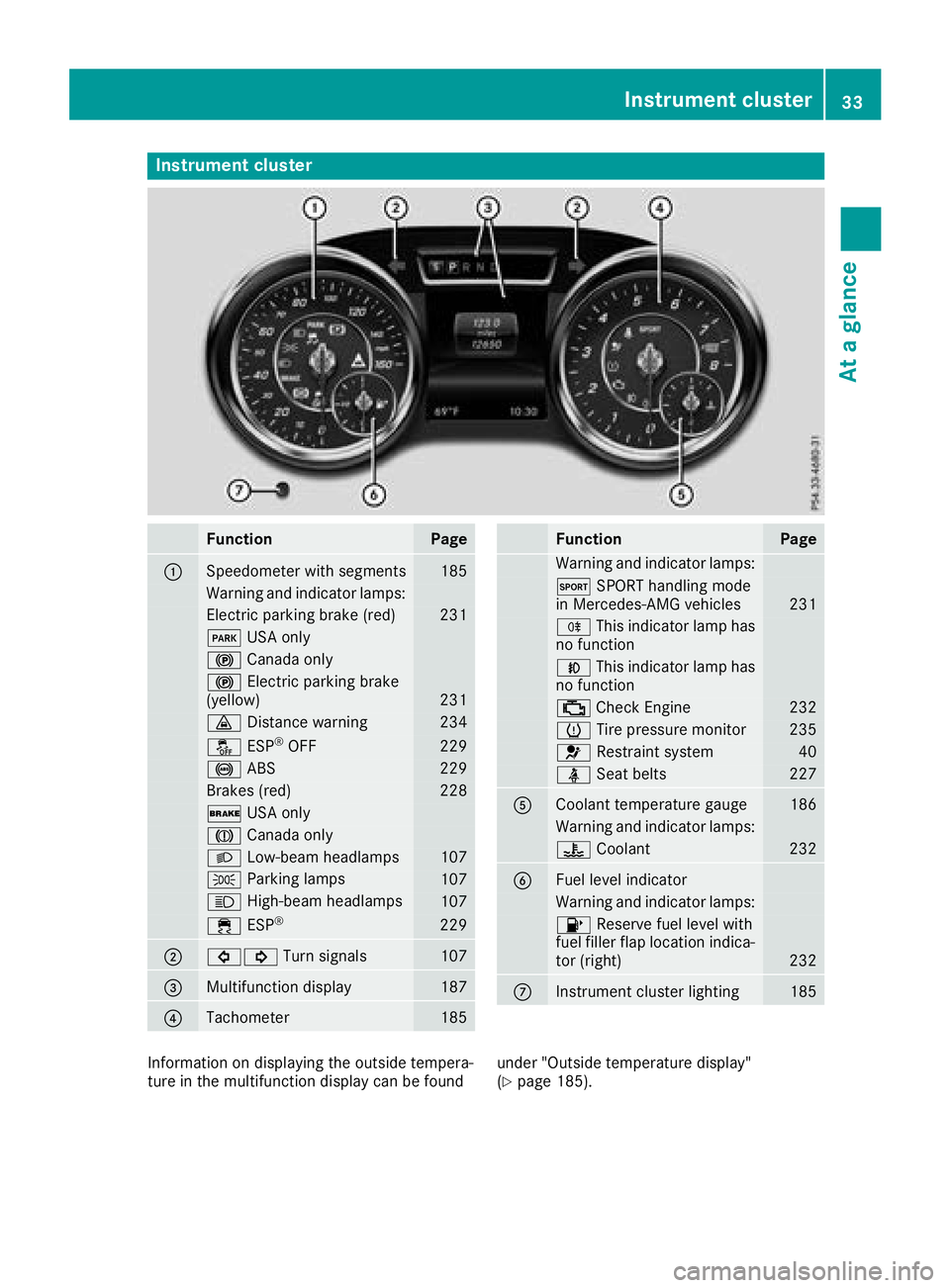
Instrument cluster
FunctionPage
:Speedometer wit hsegments18 5
Warning and indicator lamps:
Electric parking brak e(red)23 1
F USAonly
! Canad aonly
! Electric parking brak e
(yellow)23 1
· Distanc ewarning23 4
å ESP®OF F229
! ABS229
Brake s(red)22 8
$ USAonly
J Canad aonly
L Low-beam headlamps107
T Parking lamp s107
K High-beam headlamps107
÷ ESP®22 9
;#! Turn signals107
=Multifunction display187
?Tachometer185
FunctionPag e
Warning and indicator lamps:
M SPORT handlin gmod e
in Mercedes-AM Gvehicles23 1
R This indicator lamp has
no function
N This indicator lamp has
no function
; CheckEngin e232
h Tirepressur emonitor23 5
6 Restrain tsystem40
ü Seat belt s227
ACoolan ttemperature gauge18 6
Warning and indicator lamps:
? Coolan t232
BFue llevel indicator
Warning and indicator lamps:
8 Reserve fuel level wit h
fuel filler flap location indica-
to r(right )
232
CInstrumen tcluste rlighting18 5
Information on displayin gth eoutside tempera-
tur ein th emultifunction display can be foun dunder "Outside temperature display"
(Ypage 185).
Instrument cluster33
At a glance
Page 37 of 322
Center console
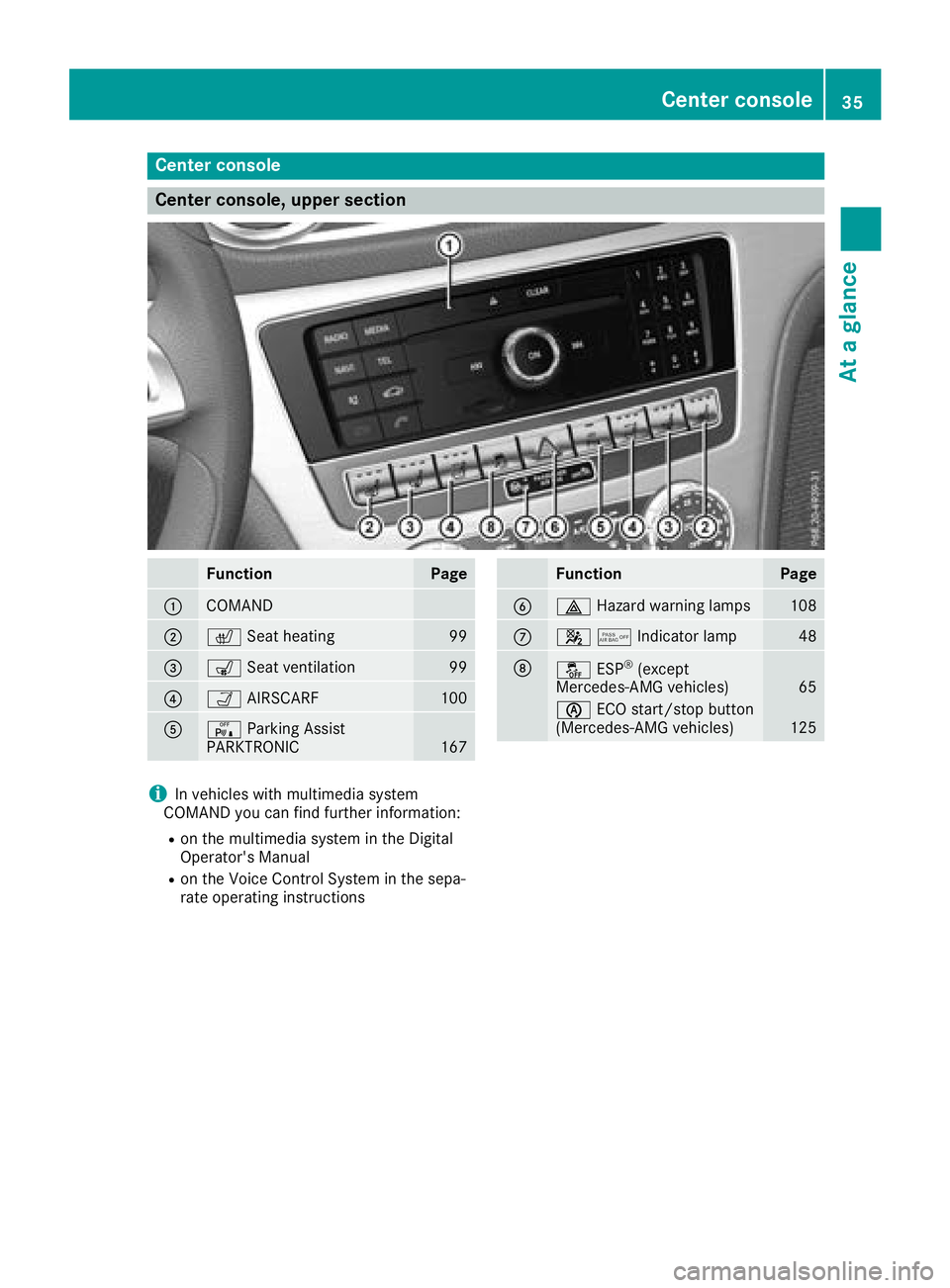
Center console, upper section
FunctionPage
:COMAND
;cSeat heating99
=sSeat ventilation99
?ÒAIRSCARF100
AcParking Assist
PARKTRONIC167
FunctionPage
B£ Hazard warning lamps108
C45Indicator lamp48
DåESP®(except
Mercedes-AMG vehicles)65
è ECO start/stop button
(Mercedes-AMG vehicles)125
iIn vehicles with multimedia system
COMAND you can find further information:
Ron the multimedia system in the Digital
Operator's Manual
Ron the Voice Control System in the sepa-
rate operating instructions
Center console35
At a glance
Page 39 of 322
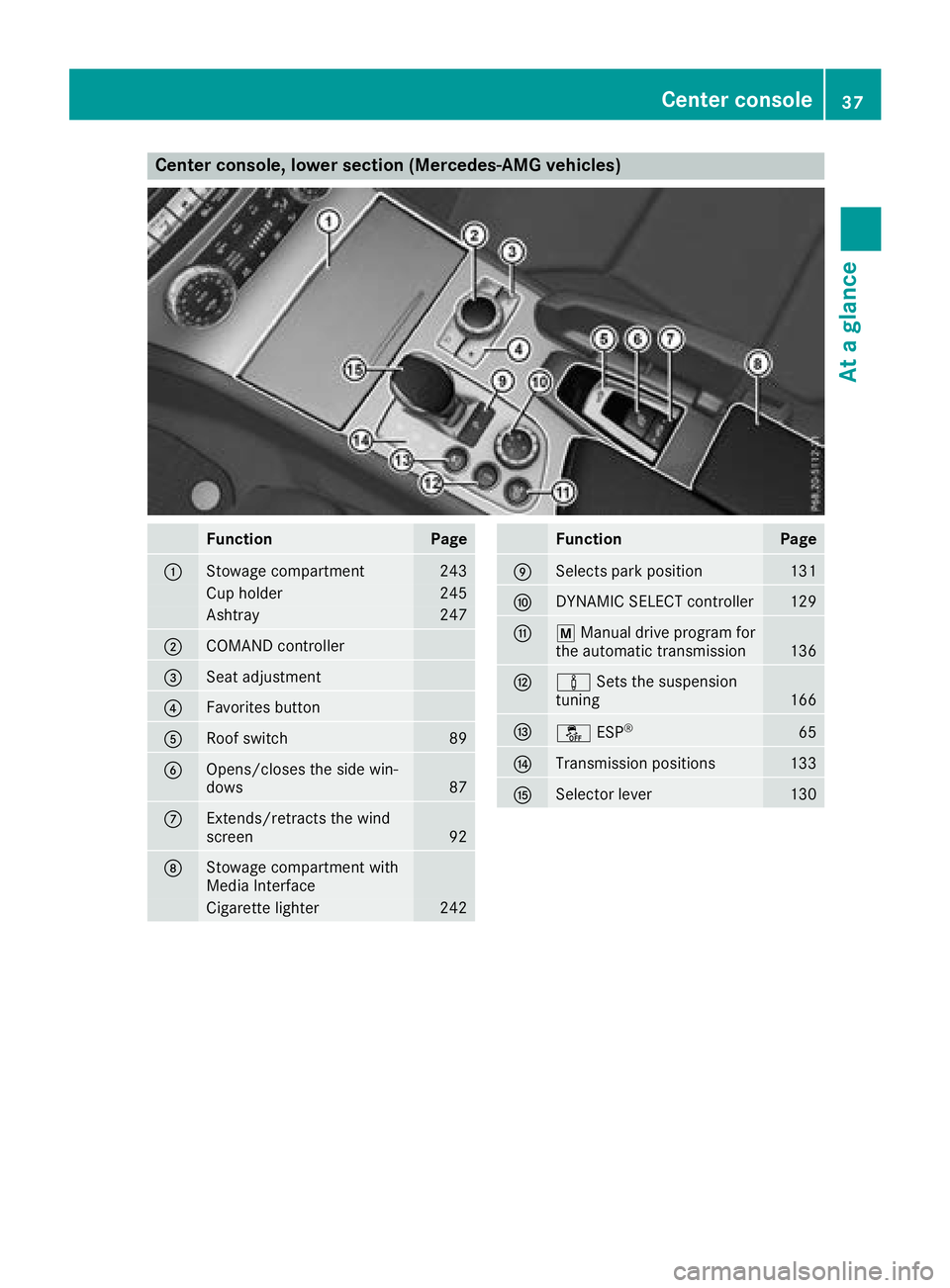
Center console, lower section (Mercedes-AMG vehicles)
FunctionPage
:Stowage compartment243
Cup holder245
Ashtray247
;COMAND controller
=Seat adjustment
?Favorites button
ARoof switch89
BOpens/closes the side win-
dows87
CExtends/retracts the wind
screen92
DStowage compartment with
Media Interface
Cigarette lighter242
FunctionPage
ESelects park position131
FDYNAMIC SELECT controller129
GpManual drive program for
the automatic transmission136
Hà Sets the suspension
tuning166
Iå ESP®65
JTransmission positions133
KSelector lever130
Center console37
At a glance