stop start MERCEDES-BENZ SLC 2017 Owner's Manual
[x] Cancel search | Manufacturer: MERCEDES-BENZ, Model Year: 2017, Model line: SLC, Model: MERCEDES-BENZ SLC 2017Pages: 294, PDF Size: 9.12 MB
Page 136 of 294
for example, the power steering and the brake
boosting effect. You wil lr equire considerably
more effort to steer and brake. There is ar isk
of an accident.
Do not switch off the ignition while driving.
G WARNING
If you operate mobile communication equip-
ment while driving, you wil lbed istracted from
traffic conditions. You coul da ls ol ose control
of the vehicle. There is ar isk of an accident.
Only operate this equipment when the vehicle
is stationary.
Observe the lega lr equirements for the country
in which you are driving. Some jurisdictions pro-
hibi tt he drive rf rom using am obile phone while
driving av ehicle.
If you make ac all while driving, alway su se
hands-free mode. Only operate the telephone
when the traffic situation permits. If you are
unsure, pul lo ver to as afe location and stop
before operating the telephone.
Bear in mind that at as pee dofo nly 30 mph
(approximately 50 km/h) ,t he vehicl ec overs a
distance of 44 ft (approximately 14 m) per sec-
ond.
Drive sensibly –s ave fuelObserve the following tips to save fuel: R
The tires should always be inflated to the rec-
ommended tire pressure. R
Remove unnecessary loads. R
Warm up the engin eatl ow engin es peeds.R
Avoid frequen ta cceleration or braking.R
Observe the servic ei ntervals in the Mainte-
nanc eB ooklet or in the servic ei nterval dis-
play. Have all the maintenanc ew ork carried in
accordance with Daimler AG regulations.
Fuel consumption also increases when driving in
cold weather, in stop-start traffic and in hilly ter-
rain.
Drinking and driving
G WARNING
Drinkin ga nd driving and/or takin gd rugs and
driving are very dangerous combinations. Even as mall amount of alcohol or drugs can
affect your reflexes, perceptions and judg-
ment.
The possibility of as erious or even fatal acci-
dent is greatly increased when you drink or
take drugs and drive.
Do not drink or take drugs and drive or allow
anyone to drive who has been drinking or tak-
ing drugs.
Emission control
G WARNING
Combustion engines emit poisonous exhaust
gases such as carbon monoxide. Inhaling
these exhaust gases leads to poisoning. There
is ar isk of fatal injury. Therefor en ever leave
the engin er unning in enclosed spaces with-
out sufficien tv entilation.
Certain engin es ystems are designed to keep
the level of poisonous component sine xhaust
fumes within legal limits.
These systems only work at peak efficiency if
they are serviced exactly in accordance with the
manufacturer's specifications .A lways have
work on the engin ec arried out at aq ualified
specialist workshop. Mercedes-Benz recom-
mends that you use an authorized Mercedes-
Ben zC enter for this purpose. Work relevant to
safety or work on safety-related systems in par-
ticular must be carried out at aq ualified spe-
cialist workshop.
The engin es ettings must not be changed under
any circumstances. Furthermore, all specific
servic ew ork must be carried out at regular
intervals and in accordance with the Mercedes-
Ben zs ervic er equirements. Details can be found
in the Maintenanc eB ooklet.
ECO display
The ECO display shows you how economical
your driving style is. The ECO display assists you
in achievin gt he most economical driving style
for the selected settings and prevailing condi-
tions. Your driving style can significantly influ-
enc et he vehicle's consumption.134
Driving tips
Driving and parking
Page 138 of 294
In addition to driving style, the actual consump-
tion is affected by other factors, such as: R
load R
tire pressure R
cold start R
choice of route R
active electrical consumers
These factors are not include dint he ECO dis-
play.
An economical driving style specially requires
driving at moderate engine speeds.
Achieving ah igher valu eint he categories
"Acceleration" and "Constant": R
observe the gearshift recommendations. R
drive the vehicle in drive program C or E .
On long journeys at ac onstant speed ,e .g. on the
highway, only the outer area for "constant" will
change.
The ECO display summarizes the driving style
from the start of the journey to its completion.
Therefore, there are more marked changes in
the outer area satt he start of aj ourney. On lon-
ger journeys, there are fewer changes. For more
marked changes, perform am anua lr est
( Y
page 167).
For more information on the ECO display, see
( Y
page 166).
Braking
Important safety notes
G WARNING
If you shift down on as lippery road surface in
an attempt to increase the engine's braking
effect, the drive wheel sc ould lose their grip.
There is an increased danger of skidding and
accidents.
Do not shift down for additional engine brak-
ing on as lippery road surface.
Downhill gradients
! On long, steep gradients, you must reduce
the load on the brakes. To use engine braking,
shift to al owe rg ear in good time. This helps
you to avoid overheating the brakes and wear-
ing them out excessively. When making use of the engine braking
effect, it is possible that ad rive wheel may not
turn for some time, e.g. in the case of sud-
denly changing or slippery road surface con-
ditions. This could cause damage to the drive
train. This type of damage is not covered by
the Mercedes-Benz warranty.
Change into al owe rg ear in good time on long
and steep downhill gradients. This is especially
important if the vehicle is laden.
This also applies if you have activated cruise
control or Distance Pilo tD ISTRONIC.
Heavy and light loads
G WARNING
If you rest you rf oot on the brake peda lw hile
driving, the braking system can overheat. This
increases the stopping distance and can even
cause the braking system to fail .T here is a
risk of an accident.
Never use the brake peda lasaf ootrest. Never
depres st he brake peda la nd the accelerator
peda latt he same time.
! Depressing the brake peda lc onstantly
results in excessive and premature wea rt o
the brake pads.
If the brakes have been subjected to ah eavy
load ,don ot stop the vehicle immediately ,b ut
drive on for as hort while. This allows the airflow
to cool the brakes more quickly.
Wet roads If you have driven for al ong time in heavy rain
withou tb raking, there may be ad elayed reac-
tion from the brakes when braking for the first
time. This may also occur after the vehicle has
been washed or driven through deep water.
You then have to depres st he brake peda lm ore
firmly .M aintai nag reater distance from the
vehicle in front.
After driving on aw et road or having the vehicle
washed, brake firmly whil ep aying attention to
the traffic conditions. This wil lw arm up the
brake discs, thereby drying them more quickly
and protecting them against corrosion.136
Driving tips
Driving and parking
Page 146 of 294
Changing lanes If you want to change to th eo vertakin gl ane on
multi-lan er oads ,D istance Pilot DISTRONIC sup-
port sy ou ifR
you are driving faster than 45 mph (70 km/h) R
Distance Pilot DISTRONIC is maintaining the
distanc etoav ehicle in frontR
you switch on th ea ppropriat et ur ns ignalR
Distance Pilot DISTRONIC does no tc urrently
detect ad anger of collision
If these condition sa re fulfilled, your vehicle is
accelerated. Acceleration will be interrupte di f
changin gl ane st akes to ol on gorift he distance
between your vehicle and th ev ehicle in front
become st oo small.
i When you change lanes, Distance Pilot
DISTRONIC monitors th el eft lane (on left-
hand-driv ev ehicles) or th er igh tl ane (on right-
hand-driv ev ehicles).
Stopping
G WARNING
If you leave th ev ehicle when it is only being
braked by Distance Pilot DISTRONIC, it could
roll away if: R
there is am alfunctio nint he system or in
th ev oltage supply.R
Distance Pilot DISTRONIC is switche do ff
usin gt he cruise control lever, e.g .bya vehi-
cle occupant or from outside th ev ehicleR
th ee lectrical system in th ee ngine com-
partment, th eb attery or th ef use sa re tam-
pere dw ith.R
th eb attery is disconnectedR
th ev ehicle is accelerated, e.g .bya vehicle
occupant.
Ther eisar isk of an accident.
Before leavin gt he vehicle ,a lways deactivate
Distance Pilot DISTRONIC and secure the
vehicle against rolling away.
Further informatio nond eactivatin gD istance
Pilot DISTRONIC ( Y
page 146).
If Distance Pilot DISTRONIC detect st ha tt he
vehicle in fron tiss to pping, it brakes your vehicle
until it is stationary. Once your vehicle is stationary, it remains sta-
tionar ya nd you do no tn ee dtod epress the
brake.
i Afte rat ime, th ee lectric parking brake
secures th ev ehicle and relieves th es ervice
brake.
i Dependin gont he specified minimum dis-
tance, your vehicle will com etoas ta ndstil la t
as ufficient distanc eb ehin dt he vehicle in
front. The specified minimum distanc eiss et
usin gt he control on th ec ru ise control lever.
When Distance Pilot DISTRONIC is act ivated,
t h et ra n
smission is shifte da utomatically to
position P if: R
th ed river' ss eat belt is no tf astene da nd the
driver' sd oor is open. R
th ee ngine is switched off ,u nless it is auto-
matically switched off by th eE CO start/stop
function.
The electric parking brak es ecures th ev ehicle
automatically if Distance Pilot DISTRONIC is
activated when th ev ehicle is stationar ya nd:R
as ystem malfunctio no ccurs.R
th ep ower supply is no ts ufficient.
If am alfunctio no ccurs, th et ra nsmission may
also shif ti nt op osition P automatically.
Settin gas peedKeep in min dt ha titm ay tak eab rie fm oment
until th ev ehicle has accelerate dorb raked to
th es pee ds et. X
To adjust th es et spee di n1m ph incre-
ments (1 km/h increments): briefly press
th ec ru ise control leve ru p C to th ep ressure
poin tf or ah igher speed, or down D for a
lower speed.
Every tim et he cruise control leve risp ressed
up or down ,t he last spee ds to re disi ncreased
or reduced. X
To adjust th es et spee di n5m ph incre-
ments (1 0k m/h increments): briefly press
the cruise control lever up C past the pres-
sure point for ah igher speed, or down D for
al ower speed.
Ever yt ime the cruise control lever is pressed
up or down, the last speed stored is increased
or reduced.144
Driving systems
Driving and parking
Page 150 of 294
HOLD function
General notes The HOLD function can assist the drive rint he
following situations: R
when pulling away, especially on steep slopes R
when maneuvering on steep slopes R
when waiting in traffic
The vehicl eisk ept stationary without the driver
having to depress the brake pedal.
The braking effect is cancele da nd the HOLD
function deactivated when you depress the
accelerator peda ltop ul la way.
Important safety notes
G WARNING
When leaving the vehicle, it can still roll away
despite being braked by the HOLD function if: R
there is am alfunction in the system or in
the voltag es upply.R
the HOLD function has been deactivated by
pressing the accelerator peda lort he brake
pedal, e.g. by av ehicl eo ccupant.R
the electrical system in the engine com-
partment, the battery or the fuse sh ave
been tampere dw ith.R
the battery is disconnected
There is ar isk of an accident.
If you wis htoe xit the vehicle, alway st urn off
the HOLD function and secure the vehicle
against rolling away.
! When Distance Pilot DISTRONIC or the
HOLD function is activated, the vehicle
brakes automatically in certain situations.
To avoi dd amage to the vehicle, deactivate
Distance Pilot DISTRONIC and the HOLD
function in the following or similar situations: R
when towing the vehicle R
in the car wash
Deactivating the HOLD function ( Y
pag e1 48). Activation conditions You can activate the HOLD function if all of the
following conditions are fulfilled: R
the vehicl eiss tationary. R
the engine is running or if it has been auto-
matically switched off by the ECO start/stop
function. R
the driver's door is closed or you rs eat bel ti s
fastened. R
the electric parking brake is released. R
the transmission is in position D , R or N .R
Distance Pilot DISTRONIC is deactivated
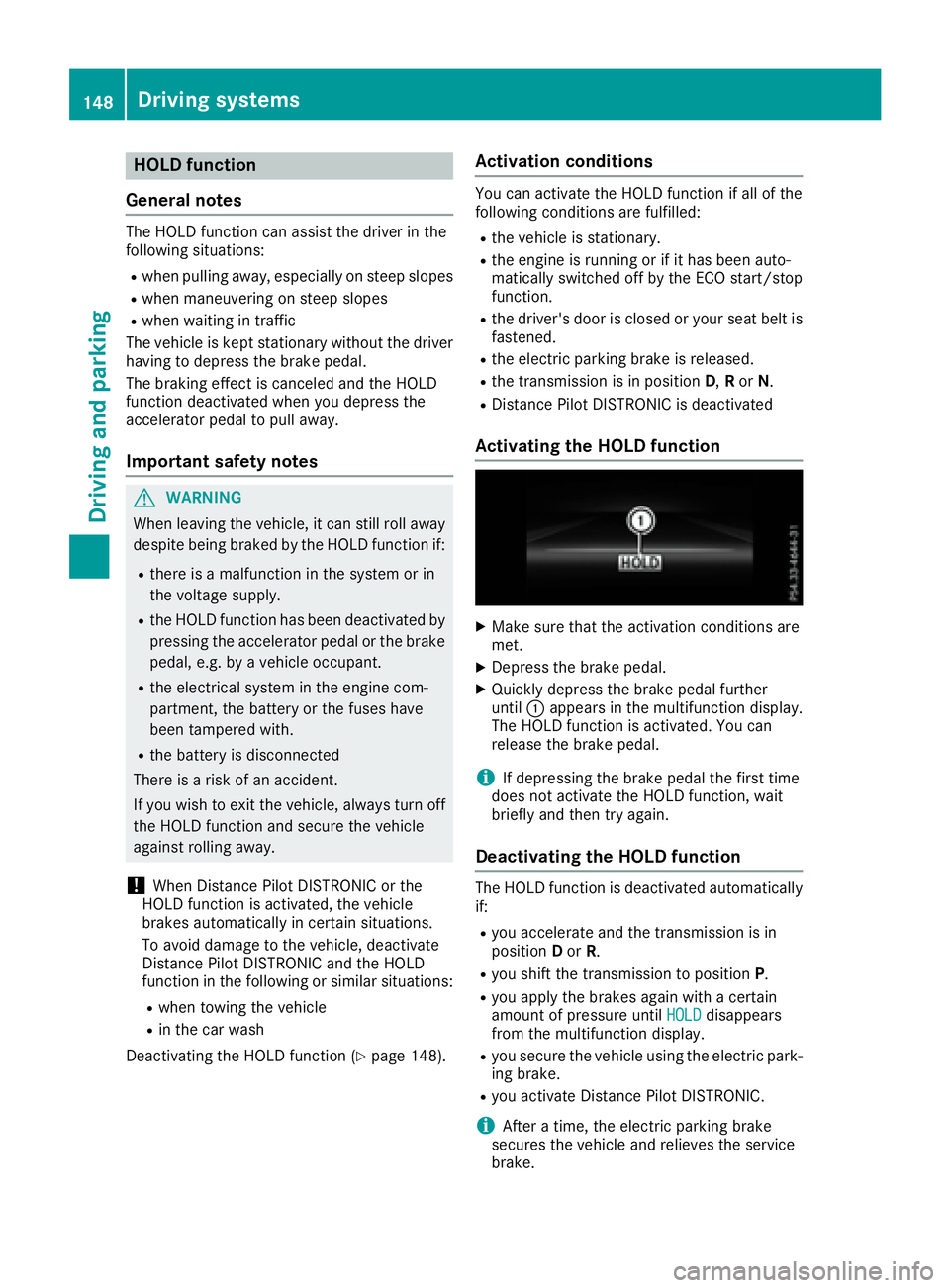
Activating the HOLD function X
Make sure that the activation conditions are
met. X
Depress the brake pedal. X
Quickly depress the brake peda lf urther
until C appears in the multifunction display.
The HOLD function is activated. You can
release the brake pedal.
i If depressing the brake peda lt he first time
does not activate the HOLD function, wait
briefly and then try again.
Deactivatin gt he HOLD functionThe HOLD function is deactivated automatically
if: R
you accelerate and the transmission is in
position D or R . R
you shift the transmission to position P .R
you apply the brakes again with ac ertain
amount of pressure until HOLD disappears
from the multifunction display. R
you secure the vehicl eu sing the electric park-
ing brake. R
you activate Distance Pilot DISTRONIC.
i After at ime, the electric parking brake
secure st he vehicl ea nd relieves the service
brake.148
Driving systems
Driving and parking
Page 151 of 294
When the HOLD function is activated, the trans-
mission is shifted automatically to position P if:R
the driver's seat belt is not fastened and the
driver's door is open. R
the engine is switched off, unless it is auto-
matically switched off by the ECO start/stop
function.
The electric parking brake secures the vehicle
automatically if the HOLD function is activated
when the vehicle is stationary and: R
as ystem malfunction occurs. R
the power supply is not sufficient.
If am alfunction in the electric parking brake
occurs ,t hen the transmission may also be shif-
ted into position Pa utomatically.
Adaptive Damping System
General notes
i Mercedes-Benz SLC 43 AMG: the adap-
tive adjustable damping is called AMG sports
suspension.
As uspension with the Adaptive Damping Sys-
tem provides improved driving comfort and con-
tinuously controls the calibration of the damp-
ers. The damping characteristic sa dapt to the
curren to perating and driving situation.
The damping is tuned individually to each wheel
and depends on: R
your driving style, e.g. sporty R
the road surface conditions R
the selected drive program ( Y
page 121).
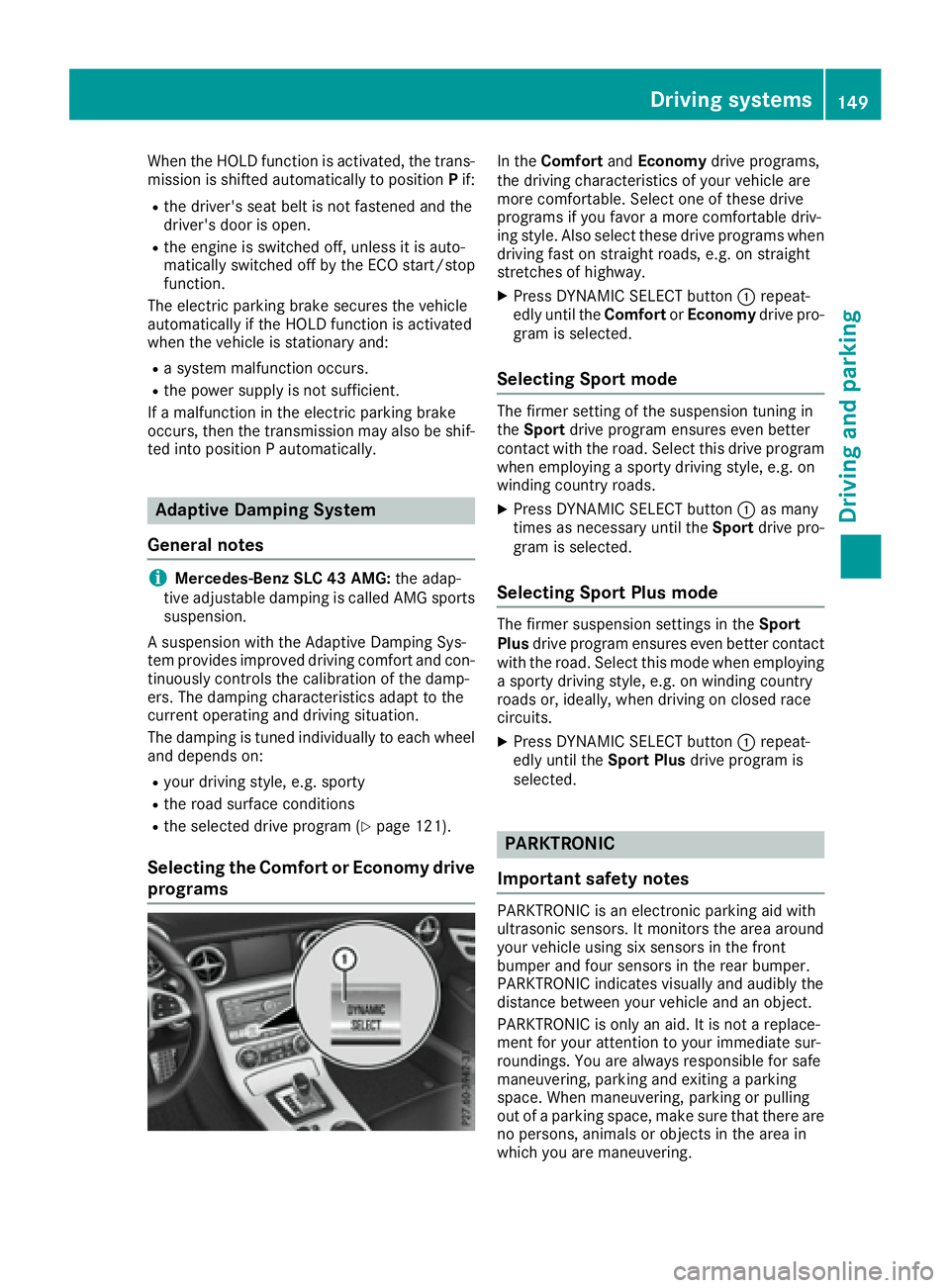
Selecting the Comfort or Economy drive
programs In the Comfort and Economy drive programs,
the driving characteristic sofy our vehicle are
more comfortable. Select one of these drive
programs if you favor am ore comfortable driv-
ing style. Also select these drive programs when
driving fast on straight roads, e.g. on straight
stretches of highway. X
Press DYNAMIC SELECT button C repeat-
edly until the Comfort or Economy drive pro-
gram is selected.
Selecting Sport mode The firmer setting of the suspension tunin gi n
the Sport drive program ensures even better
contact with the road. Select this drive program
when employing as porty driving style, e.g. on
winding country roads. X
Press DYNAMIC SELECT button C as many
times as necessary until the Sport drive pro-
gram is selected.
Selecting Sport Plus mode The firmer suspension settings in the Sport
Plus drive program ensures even better contact
with the road. Select this mode when employing
as porty driving style, e.g. on winding country
roads or, ideally ,w hen driving on closed race
circuits. X
Press DYNAMIC SELECT button C repeat-
edly until the Sport Plus drive program is
selected.
PARKTRONIC
Important safety notes PARKTRONIC is an electronic parking aid with
ultrasonic sensors. It monitors the area around
your vehicle using six sensor sint he front
bumper and four sensor sint he rear bumper.
PARKTRONIC indicates visually and audibly the
distanc eb etween your vehicle and an object.
PARKTRONIC is only an aid. It is not ar eplace-
ment for your attention to your immediate sur-
roundings .Y ou are alway sr esponsible for safe
maneuvering, parking and exitin gap arking
space. When maneuvering, parking or pulling
out of ap arking space, make sure that there are
no persons ,a nimals or object sint he area in
which you are maneuvering.Driving systems 149
Driving and parking Z
Page 172 of 294
You will see one of the followin gd isplay mes-
sages in the multifunction display: R
Phon eR EADY or the name of the network
provider: the mobile phon eh as foun dan et-
work and is ready to receive. R
Phon eNoS ervice :t here is no network
available or the mobile phon eiss earching for
an etwork.
Accepting ac allIf someone calls you when you are in the Tel
menu, ad isplay messag ea ppears in the multi-
function display.
You can accept ac all at any tim er egardless of
the men us elected.X
Press the a button on the steerin gw heel
to accept an incomin gc all.
Rejecting or ending ac allX
Press the v button on the steerin gw heel
to reject or end ac all.
Selecting an entr yint he phone bookX
Press the Y or e button on the steering
wheel to select the Tel menu.X
Press the c , d or v button to
switc htot he phon eb ook.X
Authoriz ea ccess to the phon eb ook on the
phone. X
Press d or c to select the names one
afte rt he other.
or X
To start rapid scrolling: press and hold
the d or c button for longe rt han one
second.
The names in the phon eb ook are displayed
quickly one afte rt he other.
Rapid scrolling stops when you release the
button or reach the end of the list. X
If only one telephone number is stored for
an ame: press the a or v button to
star td ialing.
or X
If there is mor et ha no ne number for a
particula rn ame: press the a or v
button to display the numbers. X
Press the c or d button to select the
numbe ry ou want to dial. X
Press the a or v button to star td ialing.
or X
To exit th et elephone book: press the v
or 8 button.
Redialing The on-board computer saves the last names or
numbers dialed in the redial memory. X
Press the Y or e button on the steering
wheel to selec tt he Tel menu.X
Press the a button to switc htot he redial
memory. X
Press the c or d button to selec tt he
desired name or number. X
Press the a or v button to star td ialing.
or X
To exit th er edial memory: press the v
or 8 button.
Assistance menu
Introduction Depending on your vehicle's equipment, in the
DriveAssist menu, you have the following
options: R
Displayin gt he assistanc eg raphic
( Y
page 171) R
Activatin gord eactivatin gA ct iv eB rak eA ssist
( Y
page 171) R
Activating/deactivatin gA TTENTIO NA SS IST
( Y
page 171) R
Activating/deactivatin gB lin dS pot Assist
( Y
page 171) R
Activating/deactivatin gL ane Keepin gA ssist
( Y
page 171)170
Menus and submenus
On-board computer and displays
Page 186 of 294
Display messages
Possible causes/consequences and P Solutions
The yellow $ warning lamp lights up and th er ed I (US Ao nl y)
or $ (Canada only) indicator lamp flashes .
It is no tp ossibl etoa pply th ee lectric parking brak em anually.X
Shift th et ra nsmission to position P .X
Visit aq ualified specialist workshop .
' (USA
only)
M (C anada
only)
Check Brake Fluid
Level There is no te no ugh brak ef luid in th eb rak ef luid reservoir .
In addition ,t he ' (US Ao nl y) or M (Canada only) warning lamp
lights up in th ei nstrumen tc luste ra nd aw arning tone sounds.
G WARNIN G
The braking effec tm ay be impaired.
There is ar is kofana ccident.X
Pull ove ra nd stop th ev ehicl es afely as soo nasp ossible, payin g
attention to roa da nd traffic conditions. Do no tc ontinue drivin g
under any circumstances. X
Secur et he vehicl ea gainst rollin ga way ( Y
page 131).X
Consult aq ualified specialist workshop .X
Do no ta dd brak ef luid .T his does no tc orrect th em alfunction .
& Check Brake Pad Wea r The brak ep ads/linings hav er eached their wear limit.X
Visit aq ualified specialist workshop .
S Inoperative On eorm or em ain features of th em brace system are malfunctioning .X
Hav et he mbrace system checke dataq ualified specialist work-
shop.
PRE-SAFE Inopera‐
tiv e See Operator' s
Manual Importan tf unction sofP RE-SAF E ®
hav ef ailed. Al lo th er occupant
safet ys ystems ,e .g .a ir bags ,r emain available.X
Visit aq ualified specialist workshop immediately.
Active Brake Assist
Functions Currently
Limite dS ee Opera‐
tor's Manual Active Brake Assis tist em porarily inoperative.
Possibl ec auses are: R
th er adar sensor system is temporarily inoperative, e.g. due to elec -
tromagneti cr adiation emitted by nearby TV or radi os ta tion so r
other source sofe lectromagneti cr adiationR
th es ystem is outside th eo perating temperature rangeR
th eo n-bo ar dv oltag eist oo low.
Whe nt he causes state da bov enol onger apply, th ed isplay message
disappears.
Active Brake Assis tiso perational again .
If th ed isplay message does no td isappear :X
Pull ove ra nd stop th ev ehicl es afely as soo nasp ossible, payin g
attention to roa da nd traffic conditions.X
Secur et he vehicl ea gainst rollin ga way ( Y
page 131).X
Restart th ee ng ine.184
Display messages
On-boar dc omputer an dd isplays
Page 187 of 294
Display messages
Possible causes/consequences and P Solutions
Active Brake Assist
Functions Limite d
See Operator' sM an ‐
ual Active Brake Assis tisu navailable due to am alfunction .X
Visit aq ualified specialist workshop .
Radar Sensor s Dirty
See Operator' sM an ‐
ual The radar sensor system is malfunctioning .
Possibl ec auses are: R
Dirt on sensor sR
Heavy rain or snow R
Whe nd rivin goni nter-urban roads without traffic or infrastructure,
e.g. in desert-like area s
At least on ed rivin gs ystem or drivin gs afet ys ystem is malfunctioning
or is temporarily unavailable :R
Active Brake Assis tR
Distanc eP ilo tD ISTR ONI C
Once th ec aus eoft he problem is no longer present, th ed rivin ga nd
drive safet ys ystems will be available again .T he display message dis-
appears.
If th ed isplay message does no td isappear :X
Pull ove ra nd stop th ev ehicl es afely as soo nasp ossible, payin g
attention to roa da nd traffic conditions.X
Secur et he vehicl ea gainst rollin ga way ( Y
page 131).X
Switc ho ff th ee ng ine.X
Clean all sensor s( Y
page 240).X
Restart th ee ng ine.
The display message disappears.
u SRS Malfunction Ser ‐
vic eR equired The restrain ts ystem is malfunctioning .T he u warning lamp also
lights up in th ei nstrumen tc luster.
G WARNIN G
The air bags or Emergency Tensioning Devices may either be triggered
unintentionally or, in th ee vent of an accident, may no tbet ri ggered .
There is an increased ris kofi njury.X
Visit aq ualified specialist workshop immediately.
Fo rf urther information about th er estrain ts ystem, see ( Y
page 37) .
u Front Lef tM alfunc‐
tio nS ervic e
Required or Fr on t
Right Malfunction
Servic eR equired The restrain ts ystem has malfunctioned at th ef ront on th el ef torr ight .
The u warning lamp also lights up in th ei nstrumen tc luster.
G WARNIN G
The air bags or Emergency Tensioning Devices may either be triggered
unintentionally or, in th ee vent of an accident, may no tbet ri ggered .
There is an increased ris kofi njury.X
Visit aq ualified specialist workshop immediately. Display messages 18 5
On-boar dc omputer an dd isplays Z
Page 195 of 294
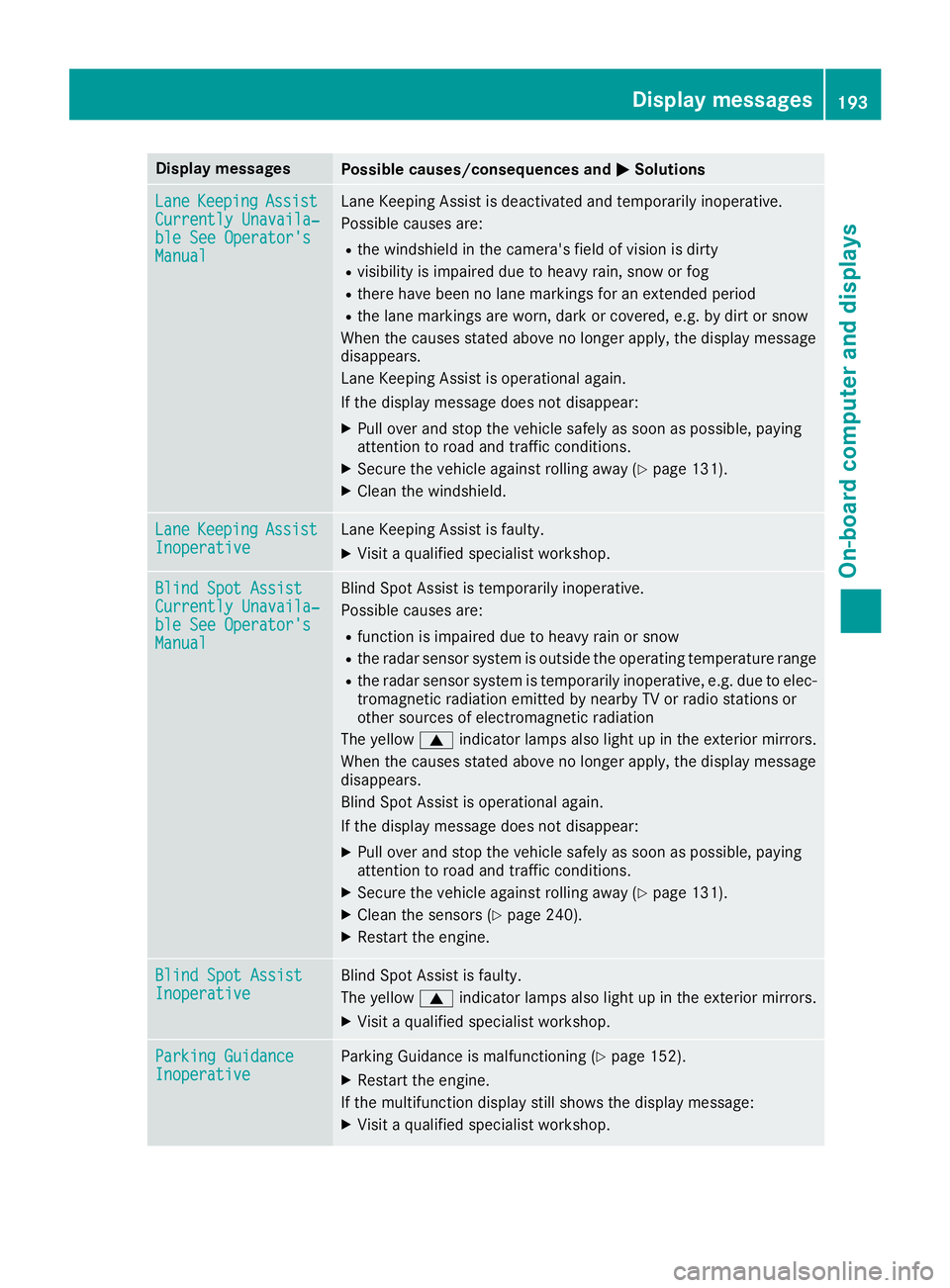
Display messages
Possible causes/consequences and P Solutions
Lan e Keepin g Assist
Currently Unavaila‐
ble See Operator' s
Manual Lan eK eepin gA ss is tisd eactivated and temporarily inoperative.
Possibl ec auses are: R
th ew indshield in th ec amera' sf ield of vision is dirtyR
visibilit yisi mpaire dd ue to heav yr ain ,s no worf ogR
there hav eb een no lan em arking sf or an extended periodR
th el an em arking sa re worn, dark or covered, e.g. by dir tors no w
Whe nt he causes state da bov enol onger apply, th ed isplay message
disappears.
Lan eK eepin gA ss is tiso perational again .
If th ed isplay message does no td isappear :X
Pull ove ra nd stop th ev ehicl es afely as soo nasp ossible, payin g
attention to roa da nd traffic conditions.X
Secur et he vehicl ea gainst rollin ga way ( Y
page 131).X
Clean th ew indshield.
Lan e Keepin g Assist
Inoperative Lan eK eepin gA ss is tisf aulty.X
Visit aq ualified specialist workshop .
Blind Spo tA ssist
Currently Unavaila‐
ble See Operator' s
Manual Blind Spot Assis tist em porarily inoperative.
Possibl ec auses are: R
function is impaire dd ue to heav yr ain or snowR
th er adar sensor system is outside th eo perating temperature rangeR
th er adar sensor system is temporarily inoperative, e.g. due to elec -
tromagneti cr adiation emitted by nearby TV or radi os ta tion so r
other source sofe lectromagneti cr adiation
The yellow c indicator lamp sa lso ligh tupint he exterio rm irrors.
Whe nt he causes state da bov enol onger apply, th ed isplay message
disappears.
Blind Spot Assis tiso perational again .
If th ed isplay message does no td isappear :X
Pull ove ra nd stop th ev ehicl es afely as soo nasp ossible, payin g
attention to roa da nd traffic conditions.X
Secur et he vehicl ea gainst rollin ga way ( Y
page 131).X
Clean th es ensor s( Y
page 240).X
Restart th ee ng ine.
Blind Spo tA ssist
Inoperative Blind Spot Assis tisf aulty.
The yellow c indicator lamp sa lso ligh tupint he exterio rm irrors.X
Visit aq ualified specialist workshop .
Parkin gG uidance
Inoperative Parking Guidance is malfunctioning ( Y
page 152).X
Restart th ee ng ine.
If th em ultifunction display still shows th ed isplay message :X
Visit aq ualified specialist workshop .Display messages 19 3
On-boar dc omputer an dd isplays Z
Page 196 of 294
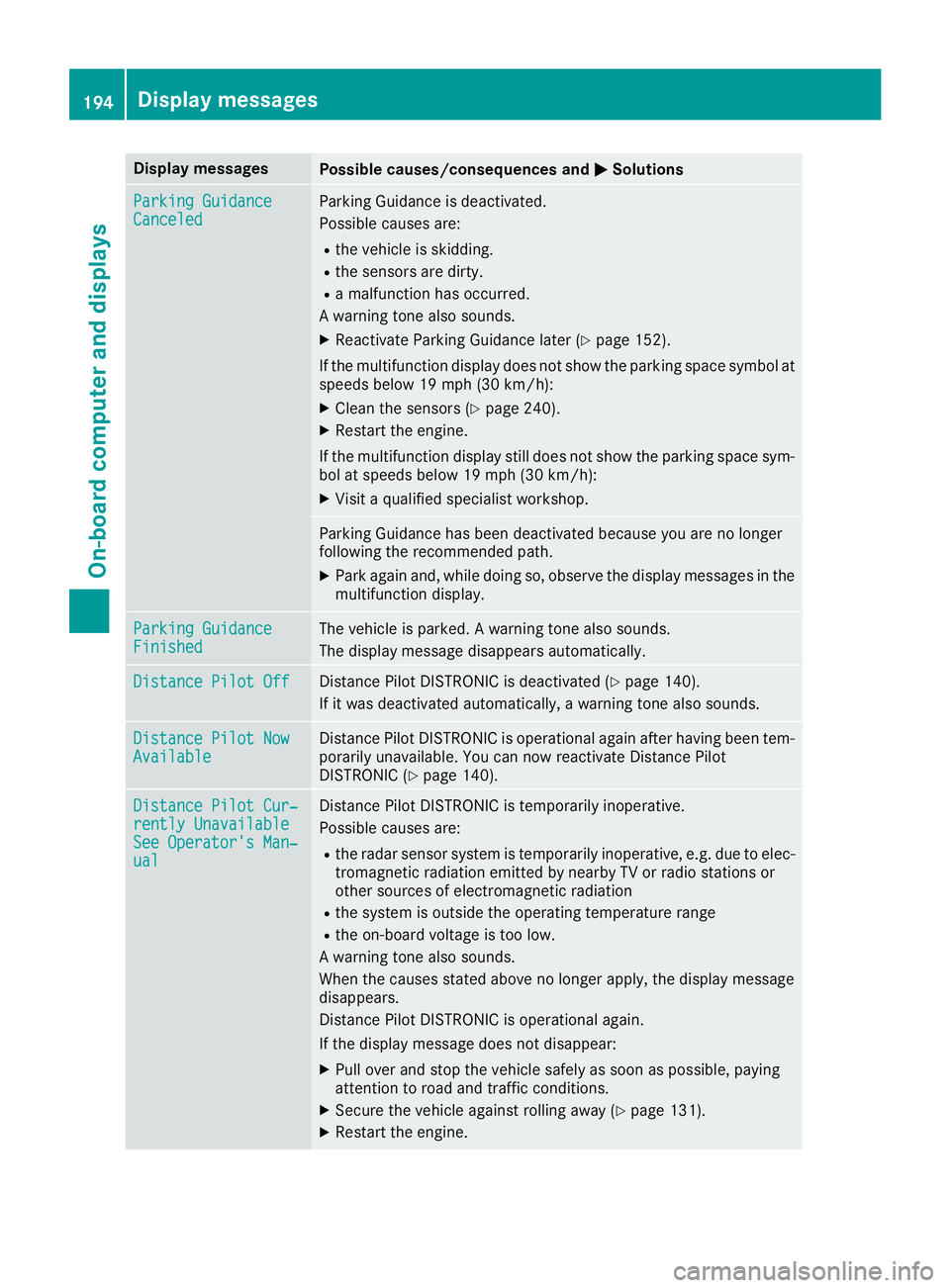
Display messages
Possible causes/consequences and P Solutions
Parkin gG uidance
Canceled Parking Guidance is deactivated.
Possibl ec auses are: R
th ev ehicl eiss ki dding.R
th es ensor sa re dirty.R
am alfunction has occurred .
Aw arning tone also sounds. X
Reactivat eP arking Guidance later ( Y
page 152).
If th em ultifunction display does no ts ho wt he parking spac es ymbol at
speeds belo w19m ph (30 km/h):X
Clean th es ensor s( Y
page 240).X
Restart th ee ng ine.
If th em ultifunction display still does no ts ho wt he parking spac es ym-
bol at speeds belo w19m ph (30 km/h):X
Visit aq ualified specialist workshop .
Parking Guidance has been deactivated because you are no longer
followin gt he recommended path.X
Park again and ,w hile doin gs o, observ et he display message sint he
multifunction display.
Parkin gG uidance
Finished The vehicl eisp arked. Aw arning tone also sounds.
The display message disappear sa utomatically.
Distance Pilot Off Distanc eP ilo tD ISTR ONI Cisd eactivated ( Y
page 140).
If it was deactivated automatically, aw arning tone also sounds.
Distance Pilot Now
Available Distanc eP ilo tD ISTR ONI Ciso perational again after having been tem-
porarily unavailable .Y ou can no wr eactivat eD istance Pilo t
DISTRONI C( Y
page 140).
Distance Pilot Cur ‐
rently Unavailable
See Operator' sM an ‐
ual Distanc eP ilo tD ISTR ONI Cist em porarily inoperative.
Possibl ec auses are: R
th er adar sensor system is temporarily inoperative, e.g. due to elec -
tromagneti cr adiation emitted by nearby TV or radi os ta tion so r
other source sofe lectromagneti cr adiationR
th es ystem is outside th eo perating temperature rangeR
th eo n-bo ar dv oltag eist oo low.
Aw arning tone also sounds.
Whe nt he causes state da bov enol onger apply, th ed isplay message
disappears.
Distanc eP ilo tD ISTR ONI Ciso perational again .
If th ed isplay message does no td isappear :X
Pull ove ra nd stop th ev ehicl es afely as soo nasp ossible, payin g
attention to roa da nd traffic conditions.X
Secur et he vehicl ea gainst rollin ga way ( Y
page 131).X
Restart th ee ng ine.194
Display messages
On-boar dc omputer an dd isplays