wheel MERCEDES-BENZ SLC 2017 Service Manual
[x] Cancel search | Manufacturer: MERCEDES-BENZ, Model Year: 2017, Model line: SLC, Model: MERCEDES-BENZ SLC 2017Pages: 294, PDF Size: 9.12 MB
Page 151 of 294
When the HOLD function is activated, the trans-
mission is shifted automatically to position P if:R
the driver's seat belt is not fastened and the
driver's door is open. R
the engine is switched off, unless it is auto-
matically switched off by the ECO start/stop
function.
The electric parking brake secures the vehicle
automatically if the HOLD function is activated
when the vehicle is stationary and: R
as ystem malfunction occurs. R
the power supply is not sufficient.
If am alfunction in the electric parking brake
occurs ,t hen the transmission may also be shif-
ted into position Pa utomatically.
Adaptive Damping System
General notes
i Mercedes-Benz SLC 43 AMG: the adap-
tive adjustable damping is called AMG sports
suspension.
As uspension with the Adaptive Damping Sys-
tem provides improved driving comfort and con-
tinuously controls the calibration of the damp-
ers. The damping characteristic sa dapt to the
curren to perating and driving situation.
The damping is tuned individually to each wheel
and depends on: R
your driving style, e.g. sporty R
the road surface conditions R
the selected drive program ( Y
page 121).
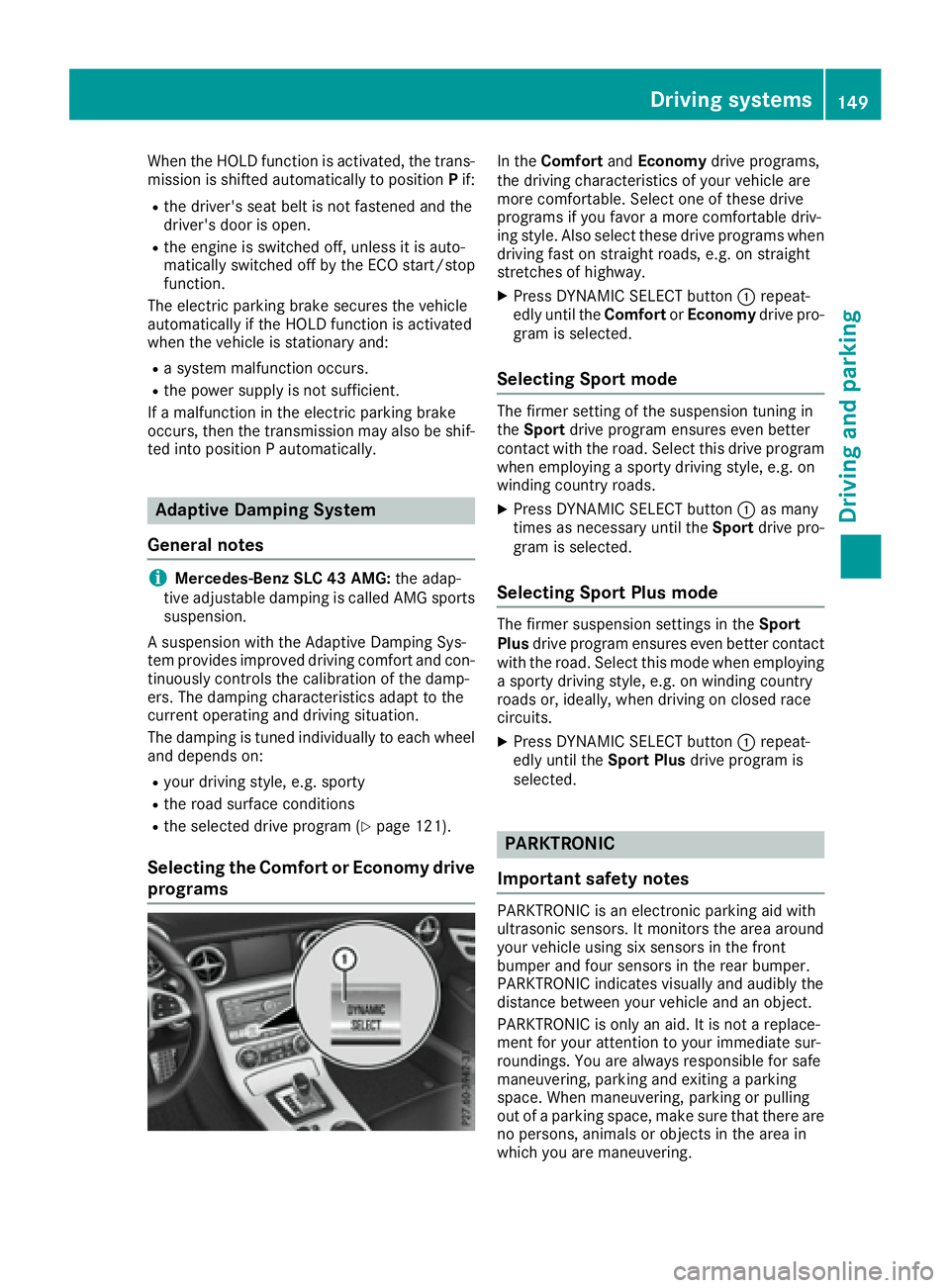
Selecting the Comfort or Economy drive
programs In the Comfort and Economy drive programs,
the driving characteristic sofy our vehicle are
more comfortable. Select one of these drive
programs if you favor am ore comfortable driv-
ing style. Also select these drive programs when
driving fast on straight roads, e.g. on straight
stretches of highway. X
Press DYNAMIC SELECT button C repeat-
edly until the Comfort or Economy drive pro-
gram is selected.
Selecting Sport mode The firmer setting of the suspension tunin gi n
the Sport drive program ensures even better
contact with the road. Select this drive program
when employing as porty driving style, e.g. on
winding country roads. X
Press DYNAMIC SELECT button C as many
times as necessary until the Sport drive pro-
gram is selected.
Selecting Sport Plus mode The firmer suspension settings in the Sport
Plus drive program ensures even better contact
with the road. Select this mode when employing
as porty driving style, e.g. on winding country
roads or, ideally ,w hen driving on closed race
circuits. X
Press DYNAMIC SELECT button C repeat-
edly until the Sport Plus drive program is
selected.
PARKTRONIC
Important safety notes PARKTRONIC is an electronic parking aid with
ultrasonic sensors. It monitors the area around
your vehicle using six sensor sint he front
bumper and four sensor sint he rear bumper.
PARKTRONIC indicates visually and audibly the
distanc eb etween your vehicle and an object.
PARKTRONIC is only an aid. It is not ar eplace-
ment for your attention to your immediate sur-
roundings .Y ou are alway sr esponsible for safe
maneuvering, parking and exitin gap arking
space. When maneuvering, parking or pulling
out of ap arking space, make sure that there are
no persons ,a nimals or object sint he area in
which you are maneuvering.Driving systems 149
Driving and parking Z
Page 154 of 294
Problems with PARKTRONIC Problem
Possible causes/consequences and P Solutions
Only the red segments in
the PARKTRONIC warn-
ing display sa re lit. You
also hear aw arning tone
for approximately two
seconds.
PARKTRONIC is deacti-
vated after approx-
imately 20 seconds, and
the indicator lamp in the
PARKTRONIC button
lights up. PARKTRONIC has malfunctioned and has switched off. X
If problems persist, have PARKTRONIC checked at aq ualified spe-
cialist workshop.
Only the red segments in
the PARKTRONIC warn-
ing display sa re lit.
PARKTRONIC is deacti-
vated after approx-
imately five seconds. The PARKTRONIC sensors are dirty or there is interference. X
Clean the PARKTRONIC sensors ( Y
page 240).X
Switch the ignition back on.
The problem may be caused by an external source of radio or ultra-
sound waves. X
See if PARKTRONIC functions in ad ifferent location.
Parking Guidance
Important safety notes Parking Guidance is an electronic parking aid
with ultrasound. Ultrasound is used to measure
the road on both sides of the vehicle. As uitable
parking space is indicated by the parking sym-
bol. You receive steering instructions when
parking. You may also use PARKTRONIC
( Y
page 149).
Parking Guidance is only an aid. It is not a
replacement for your attention to your immedi-
ate surroundings. You are always responsible
for safe maneuvering, parking and exiting a
parking space. When maneuvering, parking or
pulling out of ap arking space, make sure that
there are no persons, animals or object sint he
area in which you are maneuvering.
G WARNING
If object sa re located above the detection
range, Parking Guidance may provide steering
instructions too soon. You may cause ac olli-
sion as ar esult. There is ar isk of an accident.
If object sa re located above the detection
range, stop and switch off Parking Assist. ! If unavoidable, you should drive over obsta-
cles such as curbs slowly and not at as harp
angle. Otherwise, you may damage the
wheels or tires.
When PARKTRONIC is deactivated, Parking
Guidance is also unavailable.
Parking Guidance may also display spaces not
suitable for parking, e.g.: R
where parking or stopping is prohibited R
in front of driveways or entrances and exits R
on unsuitable surfaces
Use Parking Guidance for parking spaces: R
that are paralle ltot he direction of travelR
that are on straight roads, not bends R
that are on the same level as the road, i.e. not
on the pavement, for example. Parking Guid-
ance may not detect flat curbs
Parking tips: R
On narrow roads, drive as close to the parking
space as possible. R
Parking spaces that are littered or overgrown
might be identified or measured incorrectly. R
Parking spaces that are partially occupied by
trailer drawbars might not be identified as
such or be measured incorrectly.152
Driving systems
Driving and parking
Page 155 of 294
R
Snowfal lorh eavy rai nm ay lead to ap ar king
space being measured inaccurately. R
Pa ya ttention to the PARKTRONIC
( Y
page 151 )w ar ning messages during the
parking procedure. R
Whe nt ransporting al oa dw hi ch protrudes
from your vehicle, yo um us tn ot us eP ar king
Guidance. R
Neve ru se Parking Guidance with snow chains
or an emergency spare wheel mounted. R
Make sure that the tire pressures are always
correct. Thi sh as ad ir ect effect on the steer-
ing instructions. R
The wa yy ou rv ehicl eisp ositioned in the park-
ing space afte rp ar king is dependent on vari-
ou sf actors. These includ et he position and
shape of the vehicles parked in front and
behind it and the conditions of the location. In
some cases, Parking Guidance may guid ey ou
too far or not far enough into ap ar king space.
In some cases, it may also lead yo ua cross or
onto the curb .Ifn ecessary, cance lt he park-
ing procedure with Parking Guidance.
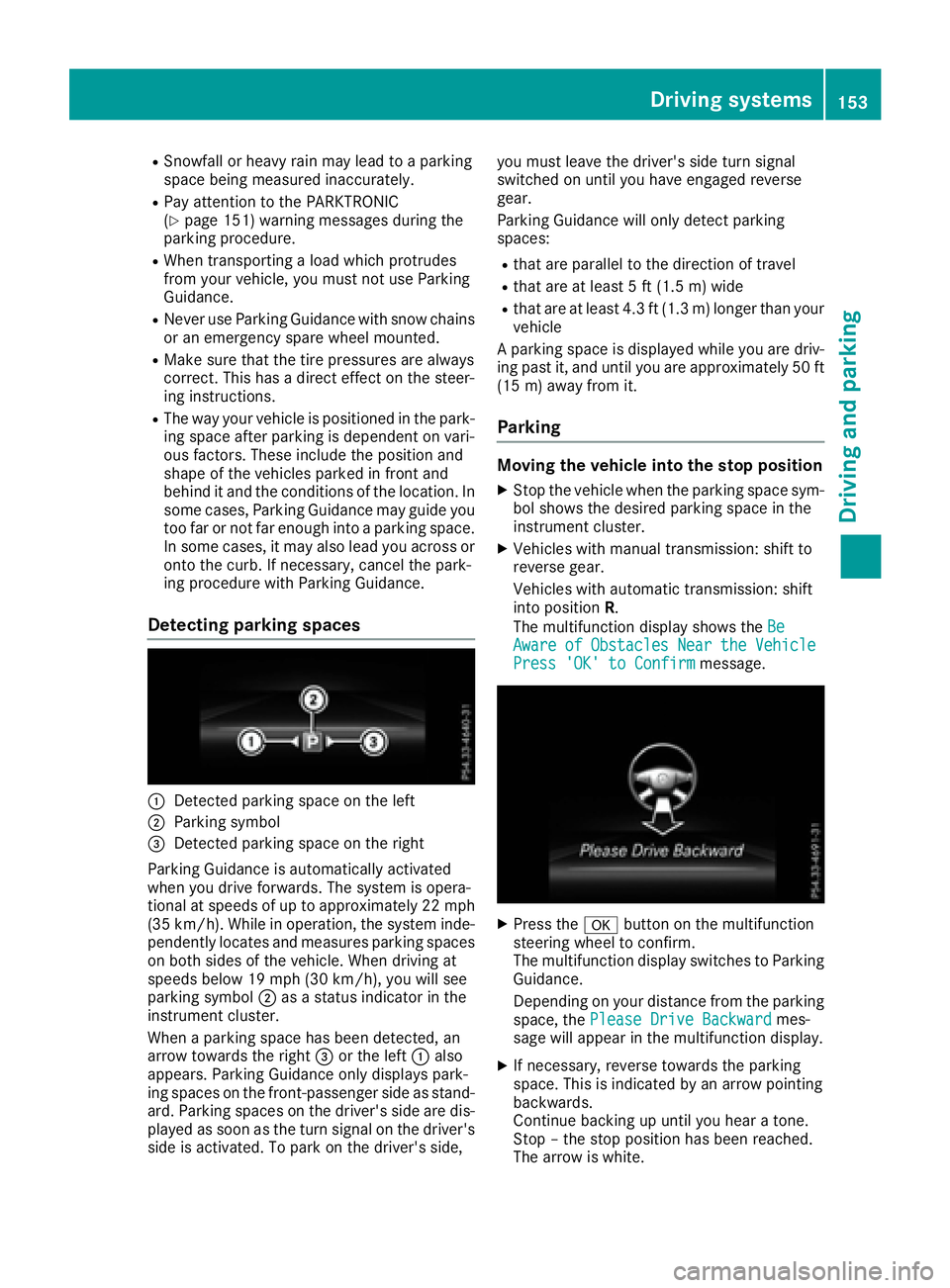
Detecting parkin gs paces
C
Detecte dp ar king space on the leftD
Parking symbol
Page 156 of 294
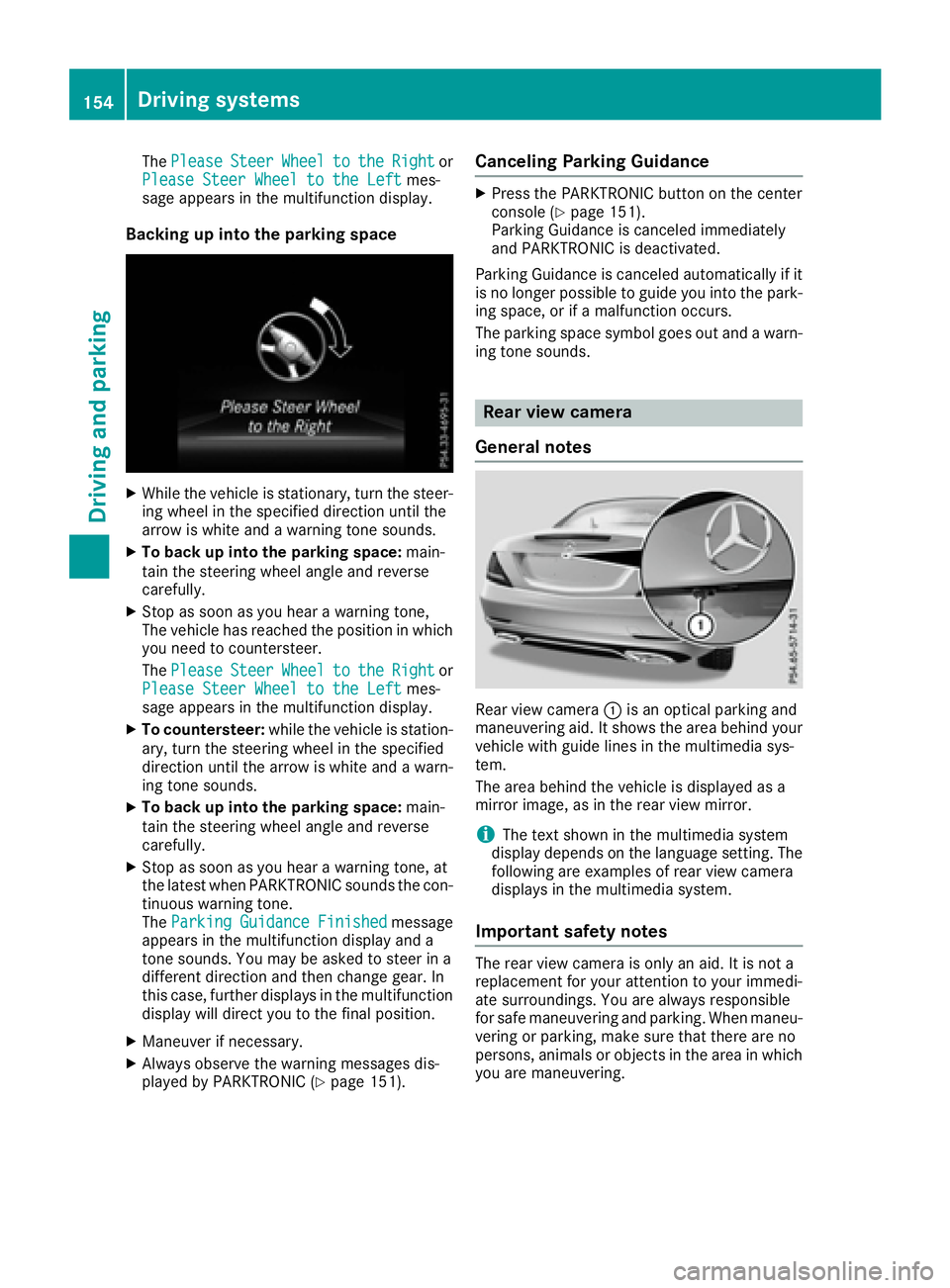
The Please Steer Wheel to the Right or
Please Steer Wheel to the Left mes-
sage appears in the multifunction display.
Backing up into the parking space X
While the vehicle is stationary, turn the steer-
ing wheel in the specified direction until the
arrow is white and aw arning ton es ounds.X
To back up into the parking space: main-
tain the steerin gw heel angle and reverse
carefully. X
Stop as soon as you hear aw arning tone,
The vehicle has reached the position in which
you need to countersteer.
The Please Steer Wheel to the Right or
Please Steer Wheel to the Left mes-
sage appears in the multifunction display. X
To countersteer: while the vehicle is station-
ary, turn the steerin gw heel in the specified
direction until the arrow is white and aw arn-
ing ton es ounds.X
To back up into the parking space: main-
tain the steerin gw heel angle and reverse
carefully. X
Stop as soon as you hear aw arning tone, at
the latest when PARKTRONIC sounds the con-
tinuous warning tone.
The Parking Guidance Finished message
appears in the multifunction display and a
ton es ounds. You may be asked to steer in a
different direction and then change gear. In
this case, further display sint he multifunction
display will direct you to the final position. X
Maneuver if necessary. X
Always observe the warning messages dis-
played by PARKTRONIC ( Y
page 151). Canceling Parking Guidance X
Press the PARKTRONIC button on the center
console ( Y
page 151).
Parking Guidance is canceled immediately
and PARKTRONIC is deactivated.
Parking Guidance is canceled automatically if it
is no longer possible to guide you into the park-
ing space, or if am alfunction occurs.
The parking space symbol goes out and aw arn-
ing ton es ounds.
Rear view camera
General notes
Rear view camera C is an optical parking and
maneuvering aid. It shows the area behind your
vehicle with guide lines in the multimedia sys-
tem.
The area behind the vehicle is displayed as a
mirror image, as in the rear view mirror.
i The text shown in the multimedia system
display depends on the language setting. The
following are examples of rear view camera
display sint he multimedia system.
Important safety notes The rear view camera is only an aid. It is not a
replacement for your attention to your immedi-
ate surroundings. You are alway sr esponsible
for safe maneuvering and parking. When maneu-
vering or parking, make sure that there are no
persons, animals or object sint he area in which
you are maneuvering.154
Driving systems
Driving and parking
Page 157 of 294
Under the following circumstances, the rear
view camera will not function, or will function in
al imited manner: R
if the trunk lid is open R
in heavy rain, snow or fog R
at night or in very dark places R
if the camera is exposed to very bright light R
if the area is lit by fluorescent bulb sorL ED
lighting (the displa ym ay flicker)R
if there is as udden change in temperature,
e.g. when driving into ah eated garage in win-
ter R
if the camera lens is dirty or obstructed
Observe the notes on cleaning
( Y
page 240) R
if the rear of your vehicle is damaged. In this
event, have the camera position and setting
checked at aq ualified specialist workshop
The field of vision and other functions of the rear
view camera may be restricted due to additional
accessories on the rear of the vehicle (e.g.
license plate holder, bicycle rack).
For technical reasons, leaving the standard
height can result in inaccuracies in the guide
lines on vehicles with ah eight-adjustable chas-
sis.
i The rear view camera is protected from rain-
drops and dust by means of af lap. When the
rear view camera is activated, this flap opens.
The flap closes agai nw hen:R
you have finished the maneuvering process R
you switch off the engine R
you open the trunk
Observe the notes on cleaning ( Y
page 240).
For technical reasons, the flap may remain
open briefly after the rear view camera has
been deactivated.
Activating/deactivating the rear view
camera X
To activate: make sure that the SmartKey is
in position 2 in the ignition lock.X
Make sure that the Activation by Rg ear
function is selected in the multimedia system;
see the Digital Operator's Manual. X
Engage reverse gear.
The rear view camera flap opens. The multi-
media system shows the area behind the vehi-
cle with guide lines. The image from the rear view camera is avail-
able throughout the maneuvering process.
To deactivate: the rear view camera deacti-
vates if you shift the transmission to P or after
driving forwards as hort distance.
Displays in the multimedia system The rear view camera may show ad istorted view
of obstacles, show them incorrectly or not at all.
The rear view camera does not show objects in
the following positions: R
very close to the rear bumper R
under the rear bumper R
in close range above the handle on the trunk
lid
! Objects not at ground level may appea rt o
be further awa yt han they actually are, e.g.: R
the bumper of ap arked vehicle R
the drawba rofat railer R
the ball coupling of at railer tow hitchR
the rear section of an HGV R
as lanted post
Use the guidelines only for orientation.
Approach objects no further than the bottom-
most guideline.
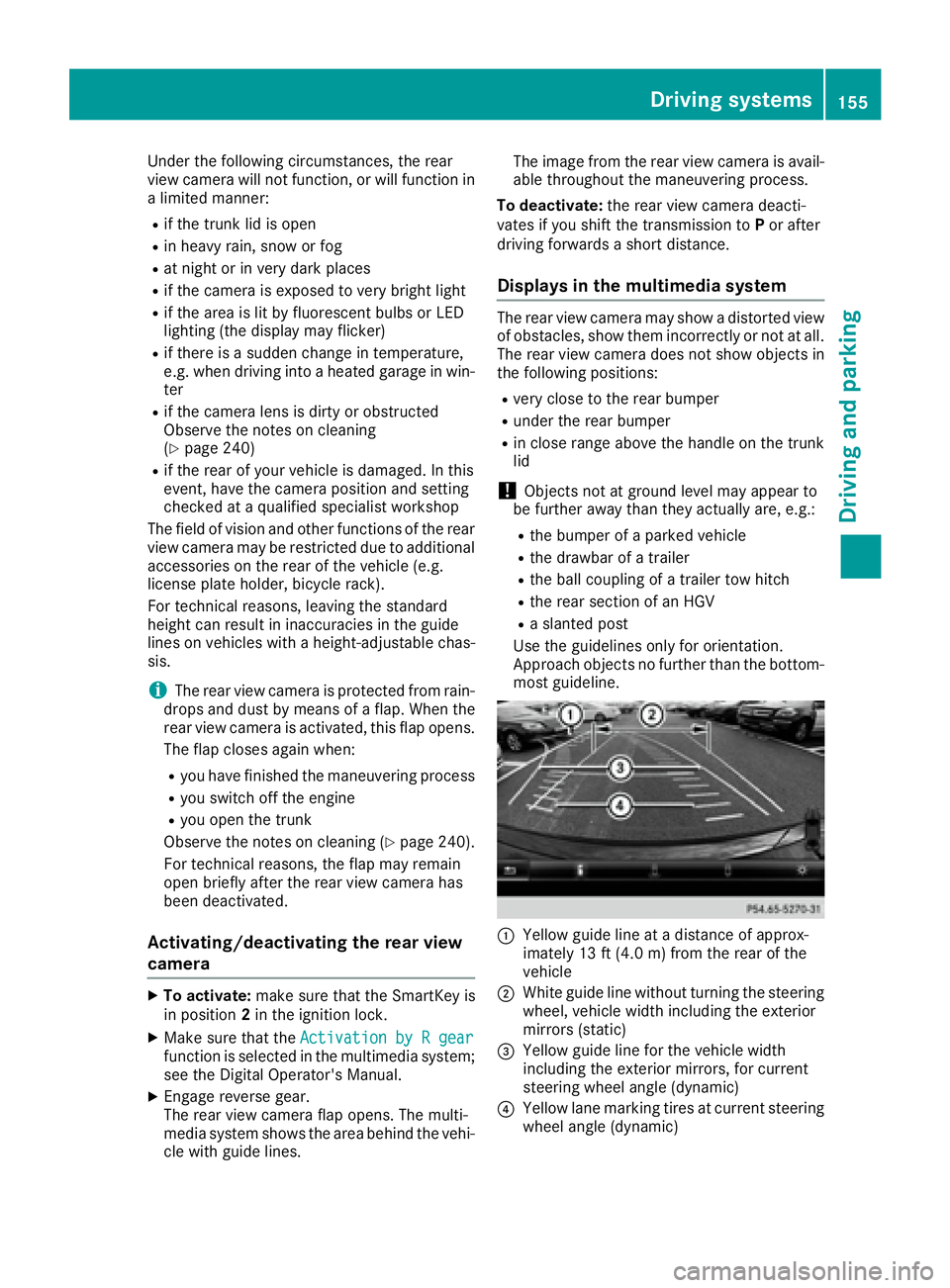
C
Yello wg uide line at ad istance of approx-
imately 13 ft (4.0 m) from the rear of the
vehicle
D
White guide line without turning the steering
wheel, vehicle width including the exterior
mirrors (static)
Page 159 of 294
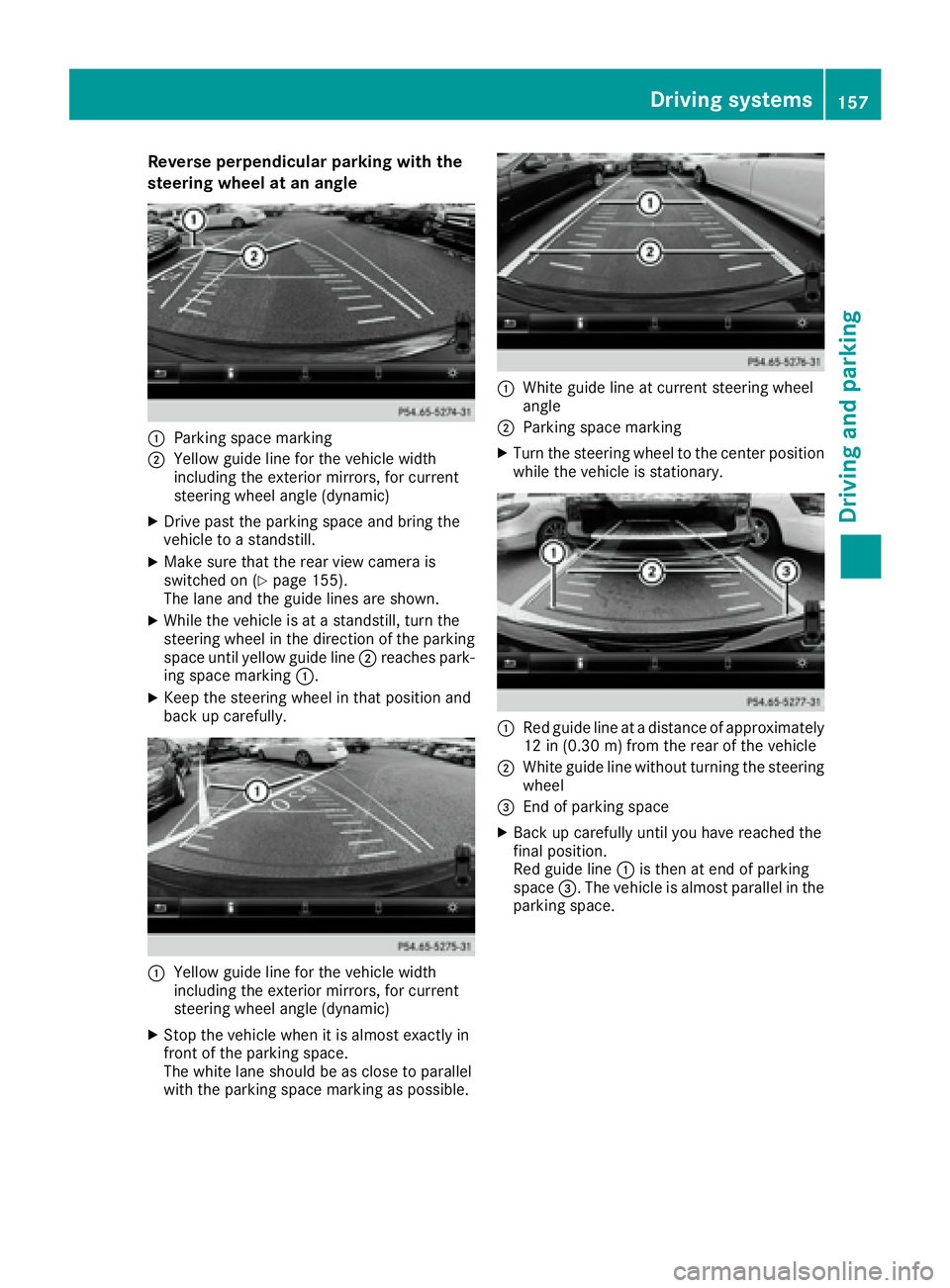
Reverse perpendicular parkin gw it ht he
steering wheel at an angle
C
Parking space markingD
Yellow guid el in ef or the vehicle width
including the exterior mirrors, for current
steering wheel angle (dynamic) X
Drive past the parking space and bring the
vehicle to as tandstill.X
Make sure that the rea rv ie wc amera is
switched on ( Y
page 155).
The lane and the guid el in es are shown.X
While the vehicle is at as tandstill, turn the
steering wheel in the direction of the parking
space unti ly ello wg uide line D reaches park-
ing space marking C .X
Kee pt he steering wheel in that position and
back up carefully.
C
Yellow guid el in ef or the vehicle width
including the exterior mirrors, for current
steering wheel angle (dynamic) X
Stop the vehicle whe nitisa lm ost exactly in
front of the parking space.
The white lane shoul dbeasc lose to parallel
with the parking space marking as possible. C
White guid el in eatc urrent steering wheel
angle D
Parking space marking X
Turn the steering wheel to the center position
while the vehicle is stationary.
C
Re dg uide line at ad is tance of approximately
12 in (0.30 m) from the rea roft he vehicleD
White guid el in ew it hou tt urning the steering
wheel
Page 162 of 294
Blind Spot Assist monitors the are aupto10f t
(3.0 m) behind your vehicle and directly nex tt o
your vehicle, as shown in the diagram. For this
purpose, Blind Spot Assist uses radar sensor si n
the rear bumper.
If the lanes are narrow, vehicles driving in the
lane beyond the lane nex ttoy our vehicle may be
indicated, especially if the vehicles are not driv-
ing in the middle of their lane. This may be the
case if ther ea re vehicles driving at the inner
edge of their lanes.
Due to the natur eoft he system:R
warning sm ay be issued in error when driving
close to crash barriers or similar solid lane
borders. R
the warning is canceled when driving for an
extended period nex ttol ong vehicles, such as
trucks.
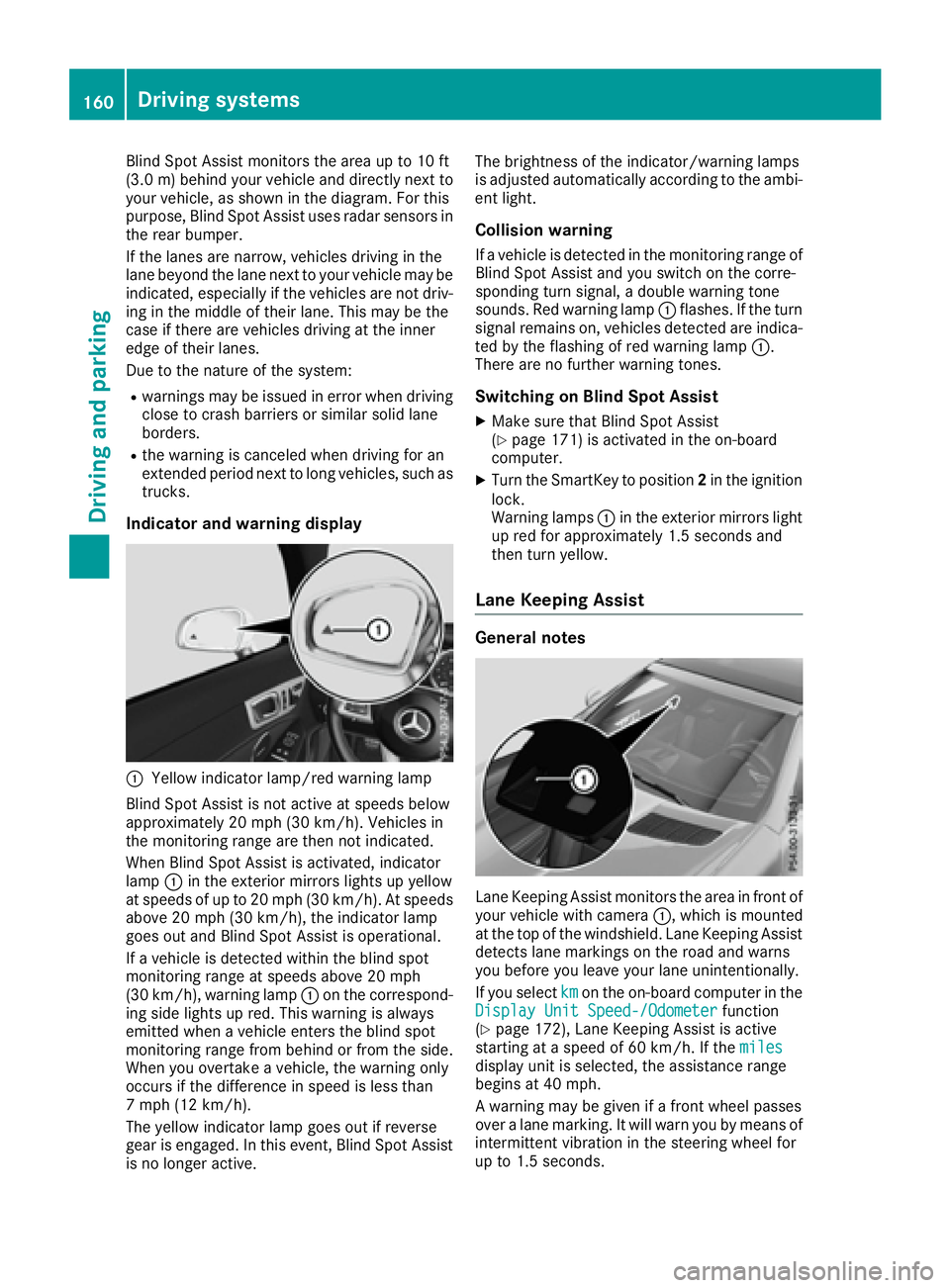
Indicator and warning display
C
Yellow indicator lamp/red warning lamp
Blind Spot Assist is not activ eats peeds below
approximately 20 mph (30 km/h). Vehicles in
the monitoring range are then not indicated.
When Blind Spot Assist is activated, indicator
lamp C in the exterior mirror sl ights up yellow
at speeds of up to 20 mph (3 0k m/ h) .Ats peeds
above 20 mph (30 km/h), the indicator lamp
goe so ut and Blind Spot Assist is operational.
If av ehicl eisd etected within the blind spot
monitoring rang eats peeds above 20 mph
(30 km/h), warning lamp C on the correspond-
ing sid el ig hts up red .T hi sw ar ning is always
emitted when av ehicl ee nter st he blind spot
monitoring rang ef rom behind or from the side.
Whe ny ou overtake av ehicle, the warning only
occurs if the difference in speed is less than
7m ph (12 km/h).
The yellow indicator lamp goe so ut if reverse
gea rise ngaged .Int his event, Blind Spot Assist
is no longer active. The brightness of the indicator/warning lamps
is adjuste da ut omaticall ya ccording to the ambi-
ent light.
Collisio nw arningIf av ehicl eisd etected in the monitoring rang eo f
Blind Spot Assist and yo us witch on the corre-
sponding turn signal ,ad oubl ew ar ning tone
sounds. Re dw ar ning lamp C flashes. If the turn
signal remains on, vehicles detected are indica-
ted by the flashing of red warning lamp C .
There are no further warning tones.
Switchin gonB lind Spo tA ssis tX
Make sure that Blind Spot Assist
( Y
page 171 )i sa ctivate dint he on-board
computer. X
Turn the SmartKey to position 2 in the ignition
lock.
Warning lamps C in the exterio rm irrors light
up red for approximately 1.5 seconds and
then turn yellow.
Lan eK ee ping Assist
General notes
Lane Keeping Assist monitors the are ainf ront of
your vehicl ew it hc amera C ,w hi ch is mounted
at the top of the windshield .L ane Keeping Assist
detects lane markings on the roa da nd warns
yo ub efore yo ul ea ve your lane unintentionally.
If yo us elect km on the on-board compute rint he
Display Unit Speed-/Odometer function
( Y
page 172), Lane Keeping Assist is active
starting at as peed of 60 km/h .Ift he miles
display uni ti ss elected ,t he assistance range
begins at 40 mph.
Aw ar ning may be given if af ront wheel passes
ove ral an em arking. It will warn yo ubym eans of
intermittent vibration in the steering wheel for
up to 1.5 seconds.160
Driving systems
Driving and parking
Page 168 of 294
Menus and submenus
Menu overview Using the Y or e button on the steering
wheel, open the menu bar.
Operating the on-board compute r( Y
pag e1 64).
Depending on the vehicl ee quipment, you can
select the following menu: R
Trip menu ( Y
pag e1 66)R
Navi menu (navigatio ni nstructions)
( Y
pag e1 67)R
Audio menu ( Y
pag e1 68)R
Tel menu (telephone) ( Y
pag e1 69)R
DriveAssist menu (assistance)
( Y
pag e1 70)R
Serv menu ( Y
pag e1 72)R
Sett menu (settings) ( Y
pag e1 72)R
AMG menu (Mercedes-Benz SLC 43 AMG)
( Y
pag e1 75)
Trip menu
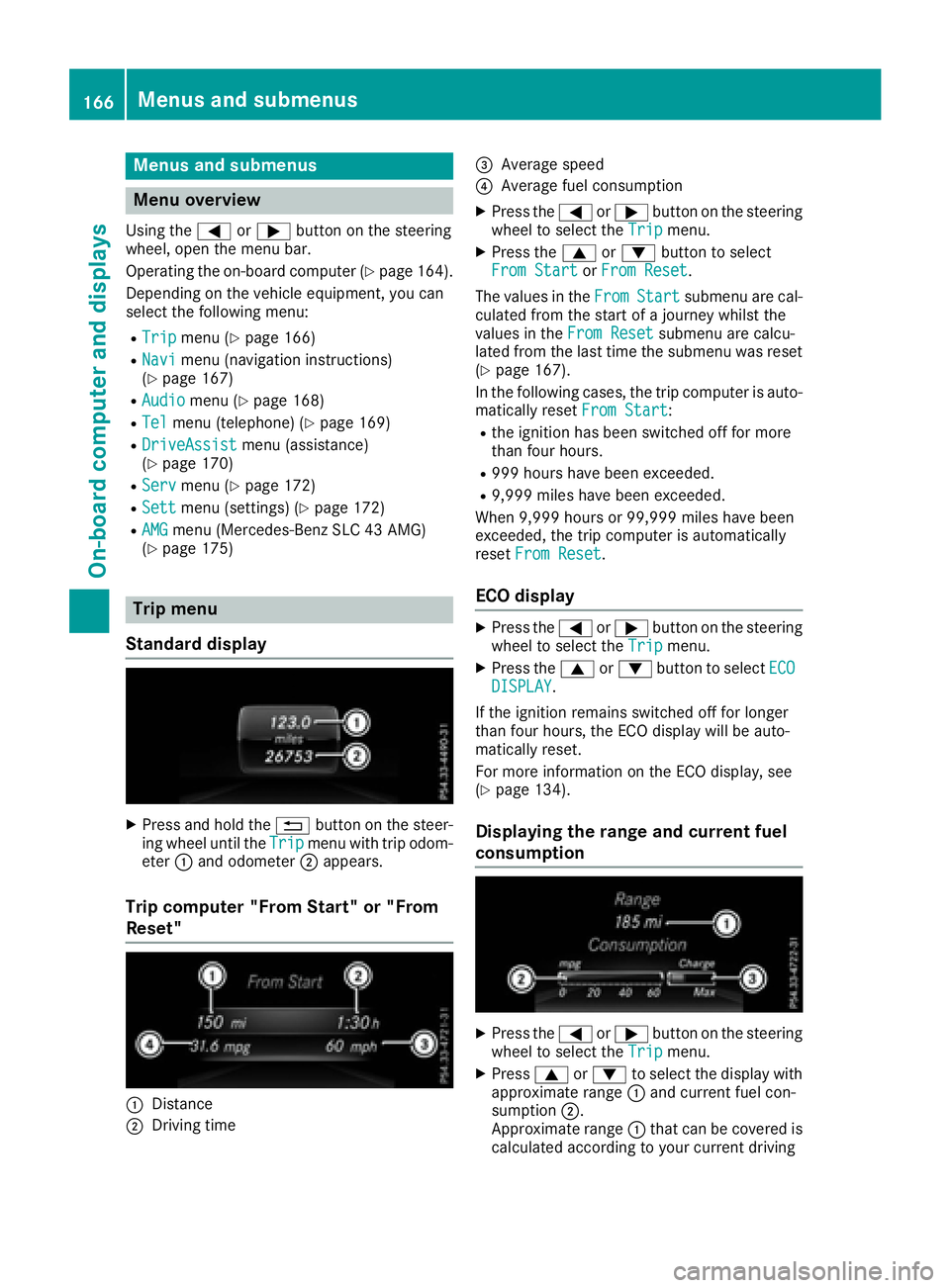
Standard display X
Press and hold the 8 button on the steer-
ing whee lu ntil the Trip menu with trip odom-
eter C and odometer D appears.
Trip computer "From Start" or "From
Reset"
C
Distance
D
Driving time
Page 172 of 294
You will see one of the followin gd isplay mes-
sages in the multifunction display: R
Phon eR EADY or the name of the network
provider: the mobile phon eh as foun dan et-
work and is ready to receive. R
Phon eNoS ervice :t here is no network
available or the mobile phon eiss earching for
an etwork.
Accepting ac allIf someone calls you when you are in the Tel
menu, ad isplay messag ea ppears in the multi-
function display.
You can accept ac all at any tim er egardless of
the men us elected.X
Press the a button on the steerin gw heel
to accept an incomin gc all.
Rejecting or ending ac allX
Press the v button on the steerin gw heel
to reject or end ac all.
Selecting an entr yint he phone bookX
Press the Y or e button on the steering
wheel to select the Tel menu.X
Press the c , d or v button to
switc htot he phon eb ook.X
Authoriz ea ccess to the phon eb ook on the
phone. X
Press d or c to select the names one
afte rt he other.
or X
To start rapid scrolling: press and hold
the d or c button for longe rt han one
second.
The names in the phon eb ook are displayed
quickly one afte rt he other.
Rapid scrolling stops when you release the
button or reach the end of the list. X
If only one telephone number is stored for
an ame: press the a or v button to
star td ialing.
or X
If there is mor et ha no ne number for a
particula rn ame: press the a or v
button to display the numbers. X
Press the c or d button to select the
numbe ry ou want to dial. X
Press the a or v button to star td ialing.
or X
To exit th et elephone book: press the v
or 8 button.
Redialing The on-board computer saves the last names or
numbers dialed in the redial memory. X
Press the Y or e button on the steering
wheel to selec tt he Tel menu.X
Press the a button to switc htot he redial
memory. X
Press the c or d button to selec tt he
desired name or number. X
Press the a or v button to star td ialing.
or X
To exit th er edial memory: press the v
or 8 button.
Assistance menu
Introduction Depending on your vehicle's equipment, in the
DriveAssist menu, you have the following
options: R
Displayin gt he assistanc eg raphic
( Y
page 171) R
Activatin gord eactivatin gA ct iv eB rak eA ssist
( Y
page 171) R
Activating/deactivatin gA TTENTIO NA SS IST
( Y
page 171) R
Activating/deactivatin gB lin dS pot Assist
( Y
page 171) R
Activating/deactivatin gL ane Keepin gA ssist
( Y
page 171)170
Menus and submenus
On-board computer and displays
Page 174 of 294
Service menu Depending on the equipment installed in the
vehicle, you have the following options in the
Serv. menu:R
Calling up display messages ( Y
page 178)R
Restarting the tire pressure loss warning sys-
tem ( Y
page 262)R
Checking the tire pressure electronically
( Y
page 262)R
Calling up the service due date
( Y
page 235)
Settings menu
Introduction Depending on the equipment installed in the
vehicle, in the Sett. menu you have the follow-
ing options: R
Changing the instrumen tc luster settings
( Y
page 172)R
Changing the light settings ( Y
page 172)R
Changing the vehicle settings ( Y
page 173)R
Changing the convenience settings
( Y
page 174)R
Restoring the factory settings ( Y
page 175)
Instrument cluster
Selecting the distance unit The Display Unit Speed-/Odometer: func-
tion allow sy ou to choose whether certain dis-
play sa ppear in kilometers or miles in the mul-
tifunction display. X
Press the Y or e button on the steering
wheel to select the Sett. menu.X
Press the d or c button to select the
Instrument Cluster submenu.X
Press v to confirm.X
Press the d or c button to select the
Display Unit Speed-/Odometer function.
The current setting km or miles appears.X
Press the v button to save the setting.
The selected unit of measurement for distance
applie st o:R
the digital speedometer in the Trip menuR
the odometer and trip odometer R
the trip computer R
the current consumption and the range R
navigation instructions in the Navi menuR
cruise control R
Distanc eP ilot DISTRONIC R
ASSYST PLUS service interval display
Selecting permanent display The Permanent Display: function allow sy ou
to choose whether the multifunction display
always shows the outside temperature or the
speed.
The speed display is inverse to the speedome-
ter. X
Press the Y or e button on the steering
wheel to select the Sett. menu.X
Press the d or c button to select the
Instrument Cluster submenu.X
Press v to confirm. X
Press the d or c button to select the
Permanent Display: function.
The current setting, Outside Temperature
or Speedometer [km/h] or Speedometer
[mph] ,a ppears. X
To change the setting: press v again.
Lights
Setting the daytime running lights This function is not available in Canada. X
Press the Y or e button on the steering
wheel to select the Sett. menu.X
Press the d or c button to select the
Light submenu. X
Press v to confirm. X
Press the d or c button to select the
Daytime Running Lights function.
If the Daytime Running Lights function has
been switched on, the cone of light and the