engine MERCEDES-BENZ SLC 2017 Workshop Manual
[x] Cancel search | Manufacturer: MERCEDES-BENZ, Model Year: 2017, Model line: SLC, Model: MERCEDES-BENZ SLC 2017Pages: 294, PDF Size: 9.12 MB
Page 150 of 294
HOLD function
General notes The HOLD function can assist the drive rint he
following situations: R
when pulling away, especially on steep slopes R
when maneuvering on steep slopes R
when waiting in traffic
The vehicl eisk ept stationary without the driver
having to depress the brake pedal.
The braking effect is cancele da nd the HOLD
function deactivated when you depress the
accelerator peda ltop ul la way.
Important safety notes
G WARNING
When leaving the vehicle, it can still roll away
despite being braked by the HOLD function if: R
there is am alfunction in the system or in
the voltag es upply.R
the HOLD function has been deactivated by
pressing the accelerator peda lort he brake
pedal, e.g. by av ehicl eo ccupant.R
the electrical system in the engine com-
partment, the battery or the fuse sh ave
been tampere dw ith.R
the battery is disconnected
There is ar isk of an accident.
If you wis htoe xit the vehicle, alway st urn off
the HOLD function and secure the vehicle
against rolling away.
! When Distance Pilot DISTRONIC or the
HOLD function is activated, the vehicle
brakes automatically in certain situations.
To avoi dd amage to the vehicle, deactivate
Distance Pilot DISTRONIC and the HOLD
function in the following or similar situations: R
when towing the vehicle R
in the car wash
Deactivating the HOLD function ( Y
pag e1 48). Activation conditions You can activate the HOLD function if all of the
following conditions are fulfilled: R
the vehicl eiss tationary. R
the engine is running or if it has been auto-
matically switched off by the ECO start/stop
function. R
the driver's door is closed or you rs eat bel ti s
fastened. R
the electric parking brake is released. R
the transmission is in position D , R or N .R
Distance Pilot DISTRONIC is deactivated
Activating the HOLD function X
Make sure that the activation conditions are
met. X
Depress the brake pedal. X
Quickly depress the brake peda lf urther
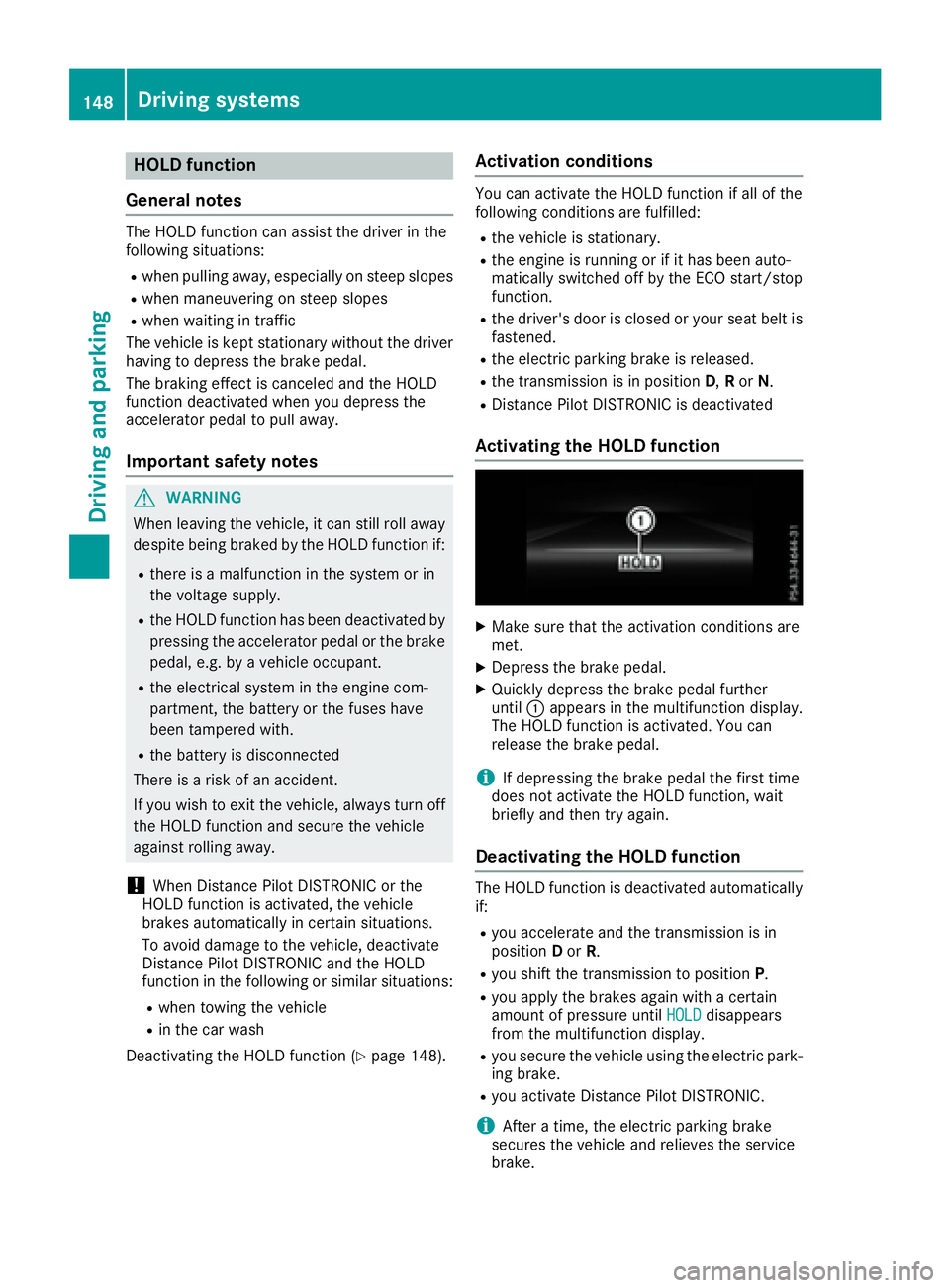
until C appears in the multifunction display.
The HOLD function is activated. You can
release the brake pedal.
i If depressing the brake peda lt he first time
does not activate the HOLD function, wait
briefly and then try again.
Deactivatin gt he HOLD functionThe HOLD function is deactivated automatically
if: R
you accelerate and the transmission is in
position D or R . R
you shift the transmission to position P .R
you apply the brakes again with ac ertain
amount of pressure until HOLD disappears
from the multifunction display. R
you secure the vehicl eu sing the electric park-
ing brake. R
you activate Distance Pilot DISTRONIC.
i After at ime, the electric parking brake
secure st he vehicl ea nd relieves the service
brake.148
Driving systems
Driving and parking
Page 151 of 294
When the HOLD function is activated, the trans-
mission is shifted automatically to position P if:R
the driver's seat belt is not fastened and the
driver's door is open. R
the engine is switched off, unless it is auto-
matically switched off by the ECO start/stop
function.
The electric parking brake secures the vehicle
automatically if the HOLD function is activated
when the vehicle is stationary and: R
as ystem malfunction occurs. R
the power supply is not sufficient.
If am alfunction in the electric parking brake
occurs ,t hen the transmission may also be shif-
ted into position Pa utomatically.
Adaptive Damping System
General notes
i Mercedes-Benz SLC 43 AMG: the adap-
tive adjustable damping is called AMG sports
suspension.
As uspension with the Adaptive Damping Sys-
tem provides improved driving comfort and con-
tinuously controls the calibration of the damp-
ers. The damping characteristic sa dapt to the
curren to perating and driving situation.
The damping is tuned individually to each wheel
and depends on: R
your driving style, e.g. sporty R
the road surface conditions R
the selected drive program ( Y
page 121).
Selecting the Comfort or Economy drive
programs In the Comfort and Economy drive programs,
the driving characteristic sofy our vehicle are
more comfortable. Select one of these drive
programs if you favor am ore comfortable driv-
ing style. Also select these drive programs when
driving fast on straight roads, e.g. on straight
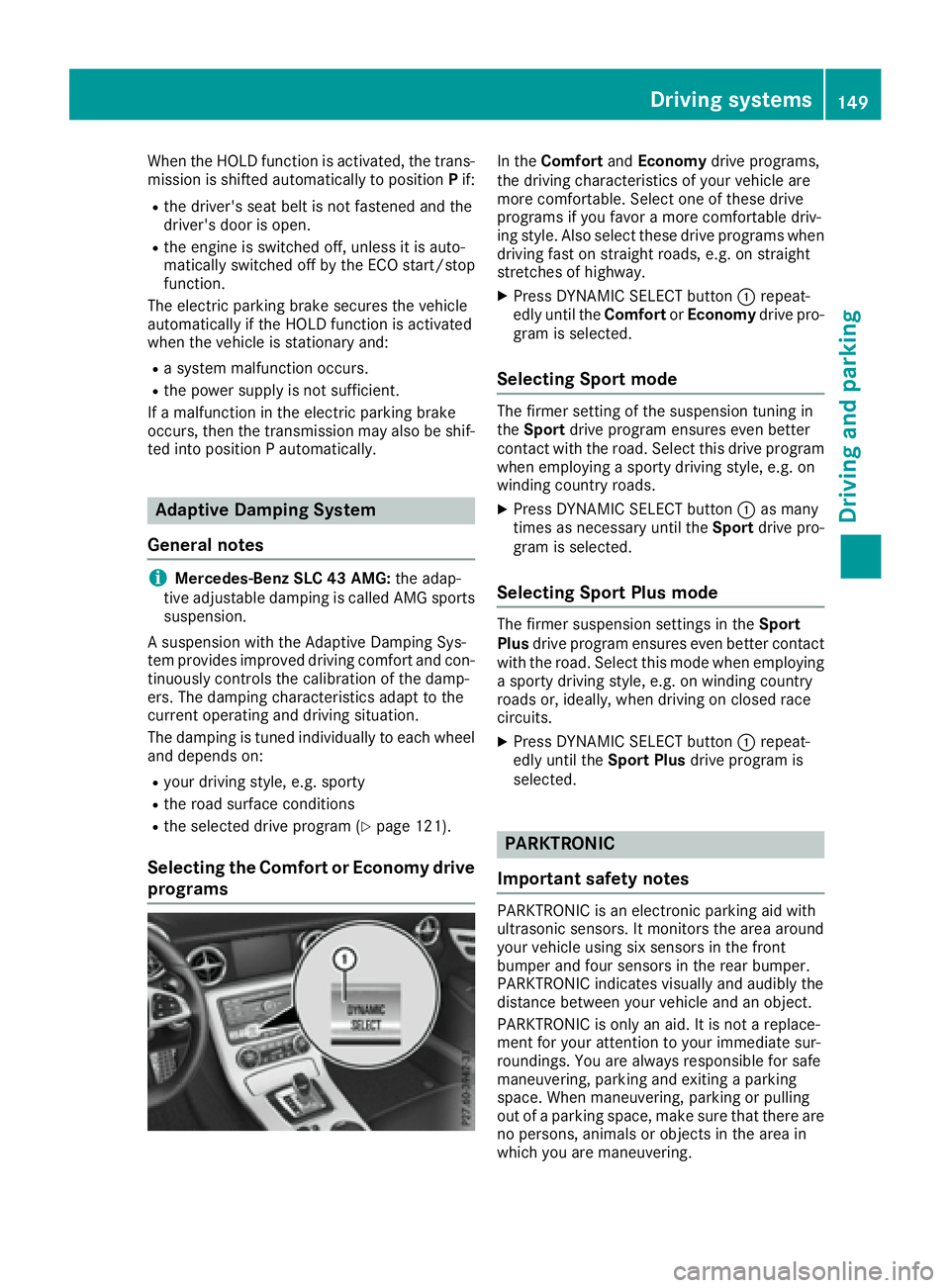
stretches of highway. X
Press DYNAMIC SELECT button C repeat-
edly until the Comfort or Economy drive pro-
gram is selected.
Selecting Sport mode The firmer setting of the suspension tunin gi n
the Sport drive program ensures even better
contact with the road. Select this drive program
when employing as porty driving style, e.g. on
winding country roads. X
Press DYNAMIC SELECT button C as many
times as necessary until the Sport drive pro-
gram is selected.
Selecting Sport Plus mode The firmer suspension settings in the Sport
Plus drive program ensures even better contact
with the road. Select this mode when employing
as porty driving style, e.g. on winding country
roads or, ideally ,w hen driving on closed race
circuits. X
Press DYNAMIC SELECT button C repeat-
edly until the Sport Plus drive program is
selected.
PARKTRONIC
Important safety notes PARKTRONIC is an electronic parking aid with
ultrasonic sensors. It monitors the area around
your vehicle using six sensor sint he front
bumper and four sensor sint he rear bumper.
PARKTRONIC indicates visually and audibly the
distanc eb etween your vehicle and an object.
PARKTRONIC is only an aid. It is not ar eplace-
ment for your attention to your immediate sur-
roundings .Y ou are alway sr esponsible for safe
maneuvering, parking and exitin gap arking
space. When maneuvering, parking or pulling
out of ap arking space, make sure that there are
no persons ,a nimals or object sint he area in
which you are maneuvering.Driving systems 149
Driving and parking Z
Page 157 of 294
Under the following circumstances, the rear
view camera will not function, or will function in
al imited manner: R
if the trunk lid is open R
in heavy rain, snow or fog R
at night or in very dark places R
if the camera is exposed to very bright light R
if the area is lit by fluorescent bulb sorL ED
lighting (the displa ym ay flicker)R
if there is as udden change in temperature,
e.g. when driving into ah eated garage in win-
ter R
if the camera lens is dirty or obstructed
Observe the notes on cleaning
( Y
page 240) R
if the rear of your vehicle is damaged. In this
event, have the camera position and setting
checked at aq ualified specialist workshop
The field of vision and other functions of the rear
view camera may be restricted due to additional
accessories on the rear of the vehicle (e.g.
license plate holder, bicycle rack).
For technical reasons, leaving the standard
height can result in inaccuracies in the guide
lines on vehicles with ah eight-adjustable chas-
sis.
i The rear view camera is protected from rain-
drops and dust by means of af lap. When the
rear view camera is activated, this flap opens.
The flap closes agai nw hen:R
you have finished the maneuvering process R
you switch off the engine R
you open the trunk
Observe the notes on cleaning ( Y
page 240).
For technical reasons, the flap may remain
open briefly after the rear view camera has
been deactivated.
Activating/deactivating the rear view
camera X
To activate: make sure that the SmartKey is
in position 2 in the ignition lock.X
Make sure that the Activation by Rg ear
function is selected in the multimedia system;
see the Digital Operator's Manual. X
Engage reverse gear.
The rear view camera flap opens. The multi-
media system shows the area behind the vehi-
cle with guide lines. The image from the rear view camera is avail-
able throughout the maneuvering process.
To deactivate: the rear view camera deacti-
vates if you shift the transmission to P or after
driving forwards as hort distance.
Displays in the multimedia system The rear view camera may show ad istorted view
of obstacles, show them incorrectly or not at all.
The rear view camera does not show objects in
the following positions: R
very close to the rear bumper R
under the rear bumper R
in close range above the handle on the trunk
lid
! Objects not at ground level may appea rt o
be further awa yt han they actually are, e.g.: R
the bumper of ap arked vehicle R
the drawba rofat railer R
the ball coupling of at railer tow hitchR
the rear section of an HGV R
as lanted post
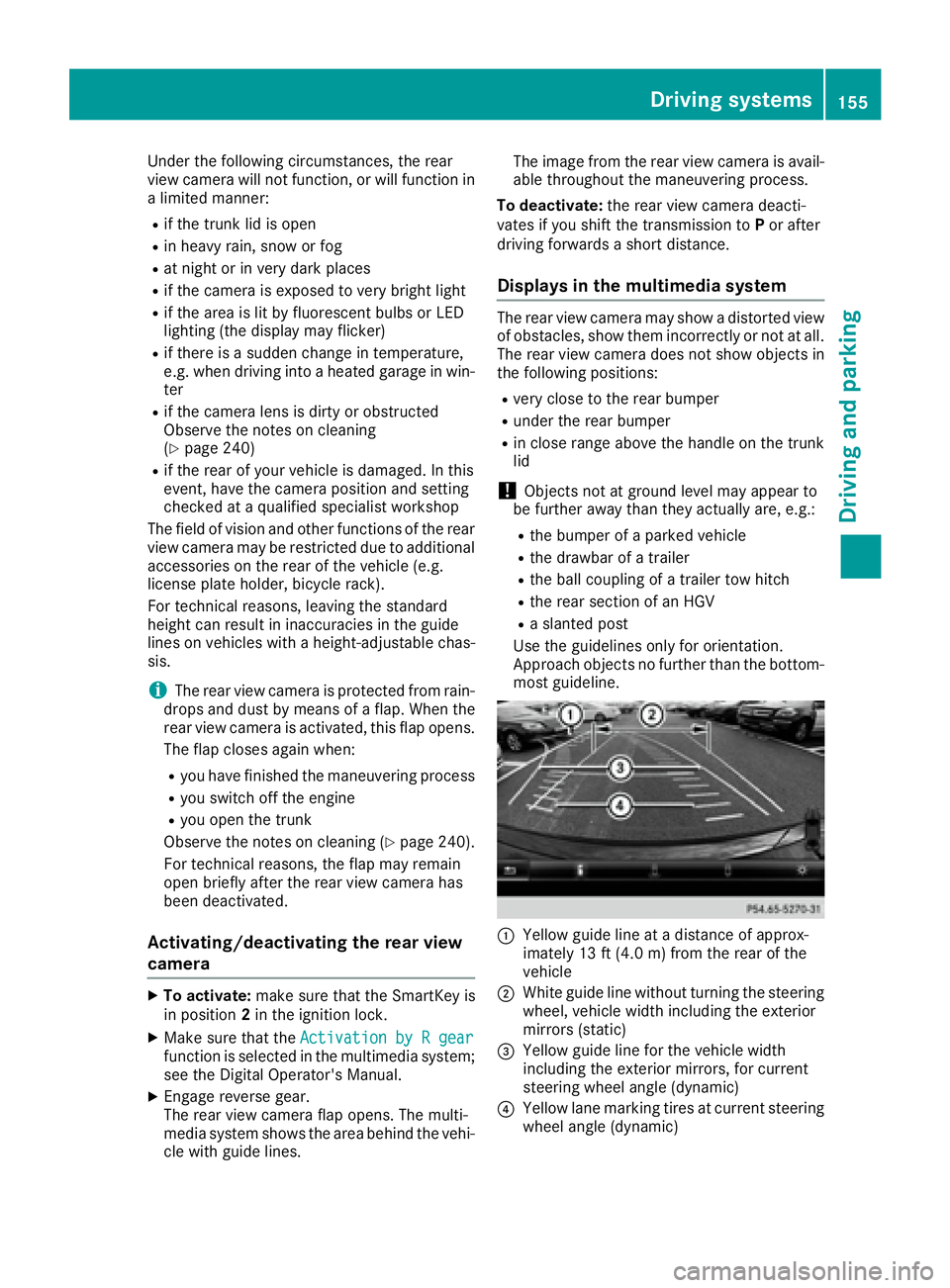
Use the guidelines only for orientation.
Approach objects no further than the bottom-
most guideline.
C
Yello wg uide line at ad istance of approx-
imately 13 ft (4.0 m) from the rear of the
vehicle
D
White guide line without turning the steering
wheel, vehicle width including the exterior
mirrors (static)
Page 165 of 294
Important safety notes
G WARNIN G
If you operate information systems and com-
munication equipmen ti ntegrate dint he vehi-
cle while driving ,y ou will be distracte df ro m
traffic conditions. You could also lose control
of th ev ehicle. Ther eisar is kofana ccident.
Only operate th ee quipmen tw hen th et ra ffic
situation permits. If you are no ts ur et ha tt hi s
is possible ,p ark th ev ehicl ep ayin ga ttention
to traffic condition sa nd operate th ee quip-
men tw hen th ev ehicl eiss ta tionary.
You must observ et he legal requirements for th e
country in whic hy ou are currentl yd riving when
operating th eo n-bo ard computer.
G WARNIN G
If th ei nstrumen tc luste rh as faile dorm al-
functioned, you may no tr ecognize function
restriction sins ystems relevan ttos afety. The
operating safet yofy our vehicl em ay be
impaired .T her eisar is kofana ccident.
Drive on carefully. Hav et he vehicl ec hecked
at aq ualified specialist workshop immedi-
ately.
The on-board computer only shows message so r
warning sf ro mc ertai ns ystems in th em ultifunc-
tion display. You should therefor em ak es ur e
your vehicl eiso perating safely at all times .
If th eo perating safet yofy our vehicl ei s
impaired ,p ull ove rass oo nasitiss af etodos o.
Contac taq ualified specialist workshop.
Fo rano verview, see th ei nstrumen tp anel illus-
tration ( Y
page 31).
Display sa nd operation
Instrumen tc luster lighting
The lighting in th ei nstrumen tc luster, in th ed is-
plays and th ec ontrols in th ev ehicl ei nterior can
be adjusted usin gt he brightness control knob.
The brightness control knob is locate dont he
botto ml ef toft he instrumen tc luste r
( Y
page 31). X
Turn th eb rightness control knob clockwise or
counter-clockwise.
If you tur nt he ligh ts witch ( Y
page 93 )t ot he
X , ` or X position ,t he brightness
will depend upon th eb rightness of th ea mbi -
en tl ight.
The ligh ts ensor in th ei nstrumen tc luste r
automatically control st he brightness of th e
multifunction display. In daylight, th ed isplays
in th ei nstrumen tc luste ra re no ti lluminated.
Speedometer with segments The segments in th es peedometer indicat e
whic hs pee dr ange is available. R
Cruis ec ontro la ctivated ( Y
page 138):
The segments ligh tupf ro mt he store ds pee d
to th em aximum speed. R
Distanc eP ilot DISTRONI Cisa ctivated
( Y
page 140):
On eort wo segments in th es et spee dr ange
ligh tu p. R
Distanc eP ilot DISTRONI Cd etects av ehicl ei n
fron tm oving mor es lowly than th es to re d
speed:
The segments between th es pee doft he vehi-
cle in fron ta nd th es to re ds pee dl igh tu p.
Tachometer
! Do no td riv eint he overrevving range, as this
could damag et he engine.
The red ban dint he tachometer indicates th e
engine's overrevving range.
The fuel suppl yisi nterrupted to protect th e
engin ew hen th er ed ban disr eached.
Outsid et emperatur ed isplayYou should pay special attention to road condi-
tion sw hen temperatures are aroun df re ezing
point.
Bea rinm in dt ha tt he outside temperature dis-
play indicates th et em perature measured and
does no tr ecord th er oad temperature.
The outside temperature display is in th em ulti-
function display ( Y
page 165).
Ac ha ng eint he outside temperature is shown in
th em ultifunction display after ad elay.Display sa nd operation 163
On-boar dc omputer and displays Z
Page 166 of 294
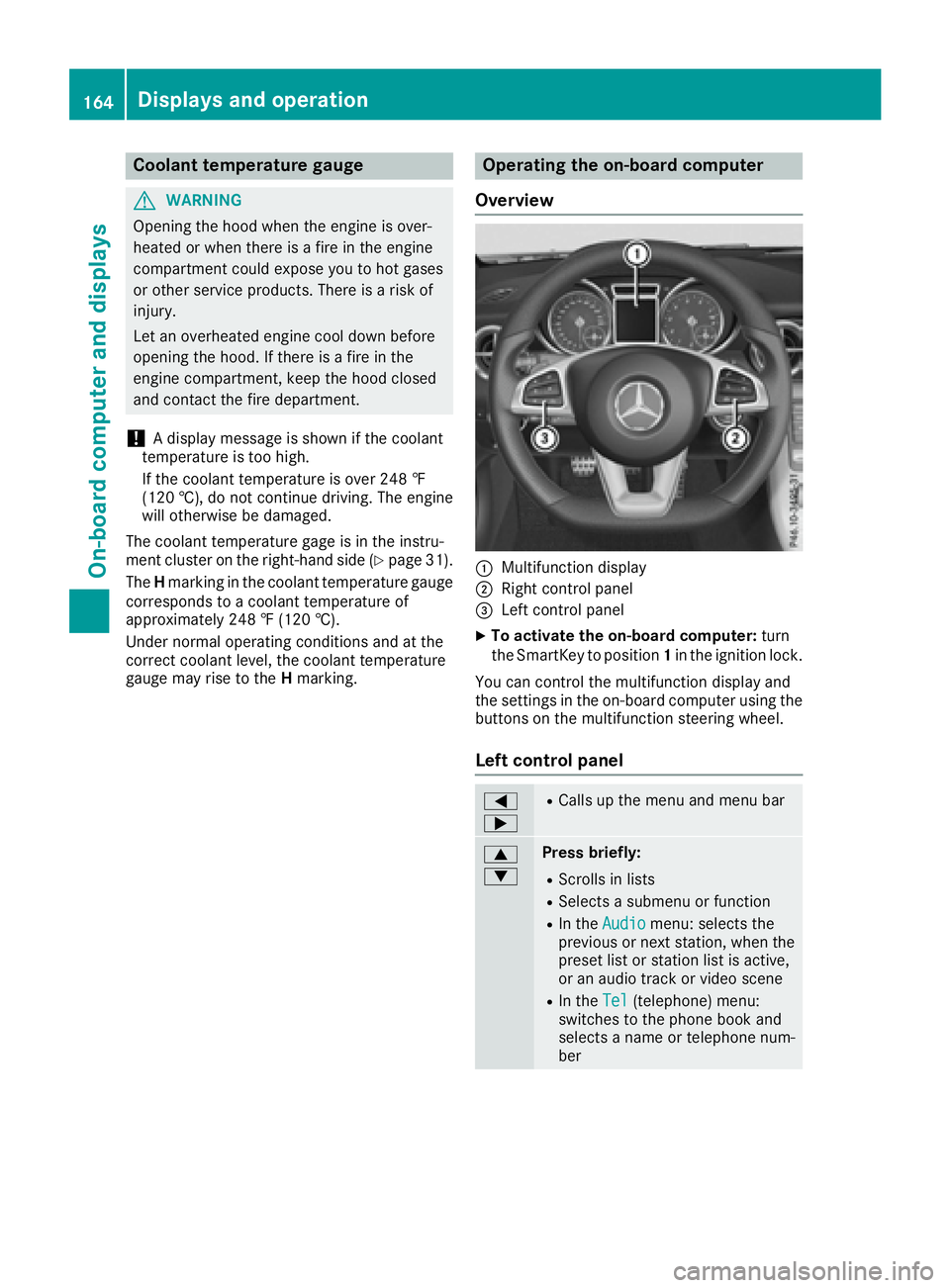
Coolan tt emperatur eg auge
G WARNING
Opening th eh ood when th ee ng in eiso ver-
heated or when there is af ir eint he engine
compartmen tc oul de xp ose you to hot gases
or other servic ep roducts. Ther eisar is ko f
injury.
Let an overheate de ng in ec oo ld own before
opening th eh ood .Ift he re is af ir eint he
engin ec ompartment, keep th eh ood closed
and contac tt he fir ed epartment.
! Ad isplay message is shown if th ec oolant
temperatur eist oo high.
If th ec oolant temperatur eiso ve r2 48 ‡
(12 0† ), do no tc ontinue driving .T he engine
will otherwise be damaged.
The coolant temperatur eg age is in th ei nstru-
men tc luste ront he right-han ds ide ( Y
page 31).
The H markin gint he coolant temperatur eg auge
corresponds to ac oolant temperatur eo f
approximately 24 8‡ (12 0† ).
Under normal operatin gc ondition sa nd at the
correc tc oolant level, th ec oolant temperature
gauge may ris etot he H marking. Operatin gt he on-boar dc omputer
Overview
C
Multifunction display D
Right control panel
Page 175 of 294
X
Press v to confirm.X
Press the d or c button to select the
Amb. Light +/- function.
The curren ts etting appears.X
Press v to confirm.X
Press the d or c button to adjust the
brightness to any level from Off to Level 5
(bright). X
Press the v or 8 button to save the
setting.
Setting the ambient lighting color X
Press the Y or e button on the steering
wheel to select the Sett. menu.X
Press the d or c button to select the
Light submenu.X
Press v to confirm.X
Press the d or c button to select the
Amb. Light Col. function.X
Press v to confirm.X
Press the d or c button to set the color
to SOLAR , SOLAR Orange or SOLAR Red .X
Press the v or 8 button to save the
setting.
Activating/deactivating surround light-
ing and exterior lighting delayed switch-
off X
Press the Y or e button on the steering
wheel to select the Sett. menu.X
Press the d or c button to select the
Light submenu.X
Press v to confirm.X
Press d or c to select the Surround
Lighting function.
If the Surround Lighting function is activa-
ted, the multifunction display shows the light
cone and the area around the vehicle in
orange. X
Press the v button to save the setting.
Deactivating delayed switch-off of the exterior
lighting temporarily: X
Before leaving the vehicle, turn the SmartKey
to position 0 in the ignition lock.X
Turn the SmartKey to position 2 in the ignition
lock.
The exterior lighting delayed switch-off is
deactivated.
Delayed switch-off of the exterior lighting is
reactivated the next time you start the engine. If you have activated the Surround lighting
function and you turn the light switch to X ,
the following functions are activated when it is
dark: R
surround lighting: the exterior lighting
remains lit for 40 seconds after unlocking
with the SmartKey. If you start the engine, the
surround lighting is switched off and auto-
matic headlamp mode is activated
( Y
page 93). R
exterior lighting delayed switch-off: the
exterior lighting remains lit for 60 seconds
after the engine is switched off. If you close all
the doors and the trunk lid, the exterior light-
ing goes off after 15 seconds.
Dependin gony our vehicle's equipment, when
the surround lighting and delayed switch-off
exterior lighting are on, the following light up: R
Parking lamps R
Low-beam headlamps R
Daytime runnin gl amps R
Side marker lamps R
Surround lighting in the exterior mirrors
Activating/deactivating the interior light-
ing delayed switch-off If you activat et he Interior Lighting Delay
function, the interior lighting remains on for
20 seconds after you remove the SmartKey from
the ignition lock. X
Press the Y or e button on the steering
wheel to select the Sett. menu.X
Press the d or c button to select the
Light submenu. X
Press v to confirm. X
Press the d or c button to select the
Interior Lighting Delay function.
When the Interior Lighting Delay func-
tion is activated, the vehicle interior is dis-
played in orange in the multifunction display. X
Press the v button to save the setting.
Vehicle
Activating/deactivating the automatic
door locking mechanism
If you activat et he Automatic Door Lock func-
tion, the vehicle is centrally locked above a
speed of approximately 9m ph (15 km/h).Menus and submenus 173
On-board computer and displays Z
Page 178 of 294
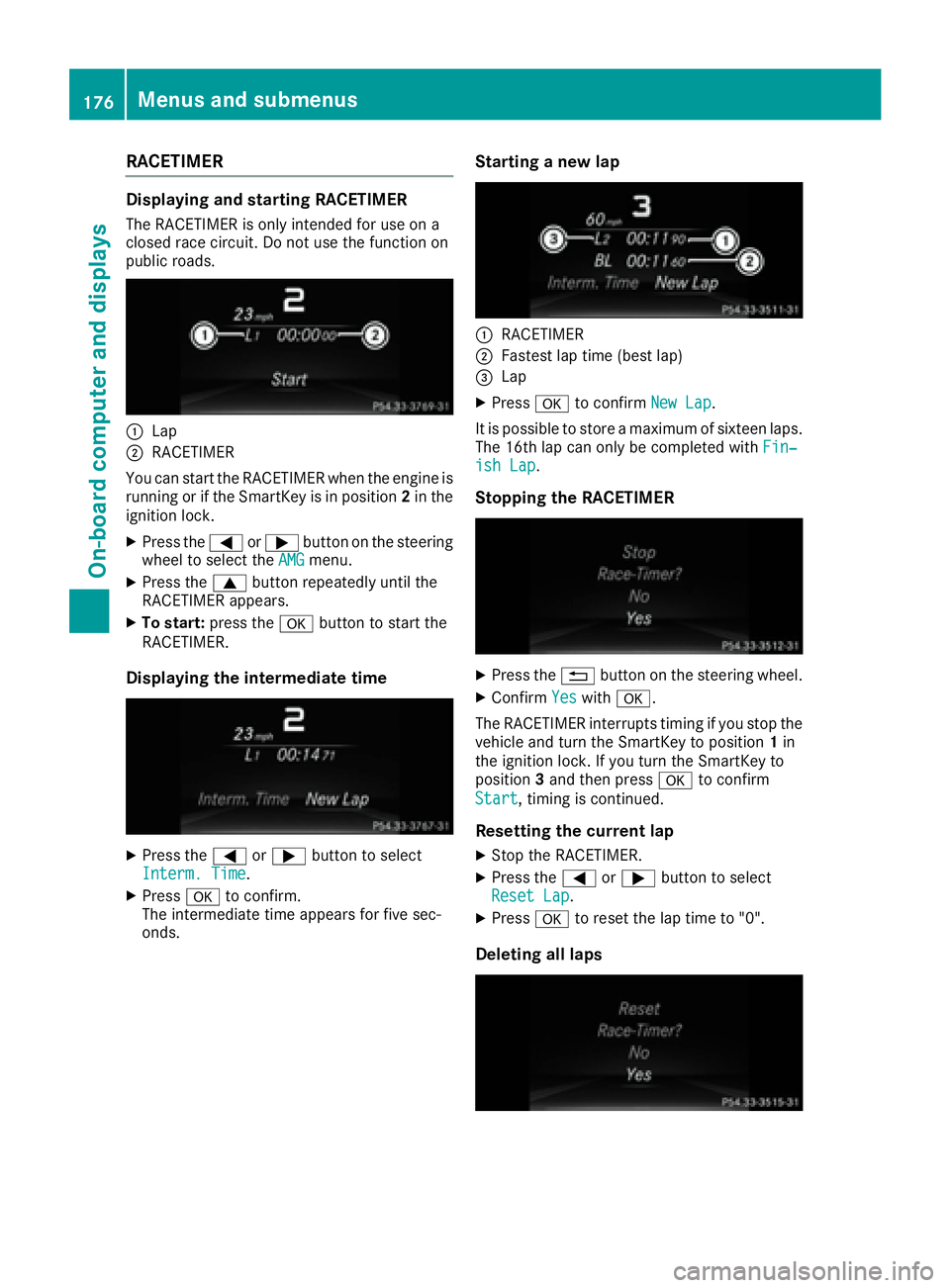
RACETIMER Displaying and startin gR ACETIMERThe RACETIMER is only intended for us eona
closed race circuit. Do not us et he function on
public roads.
C
LapD
RACETIMER
Yo uc an star tt he RACETIMER when the engine is
running or if the SmartKey is in position 2 in the
ignition lock. X
Press the Y or e button on the steering
wheel to select the AMG menu.X
Press the c button repeatedl yu nti lt he
RACETIMER appears. X
To start: press the v button to star tt he
RACETIMER.
Displaying the intermediate time
X
Press the Y or e button to select
Interm. Time .X
Press v to confirm.
The intermediate time appears for five sec-
onds. Startin gan ew lap
C
RACETIMER D
Fastest la pt ime (best lap)
Page 179 of 294
If you switch off the engine, the RACETIMER is
reset to "0" after 30 seconds. All lap sa re
deleted.
You cannot delete individual stored laps. If you
have stopped 16 laps, the current lap does not
have to be reset. X
Rese tt he current lap.X
Press v to confirm Reset .
Reset Race-Timer? appears in the multi-
function display. X
Press the d button to select Yes and press
the v button to confirm.
All lap sa re deleted.
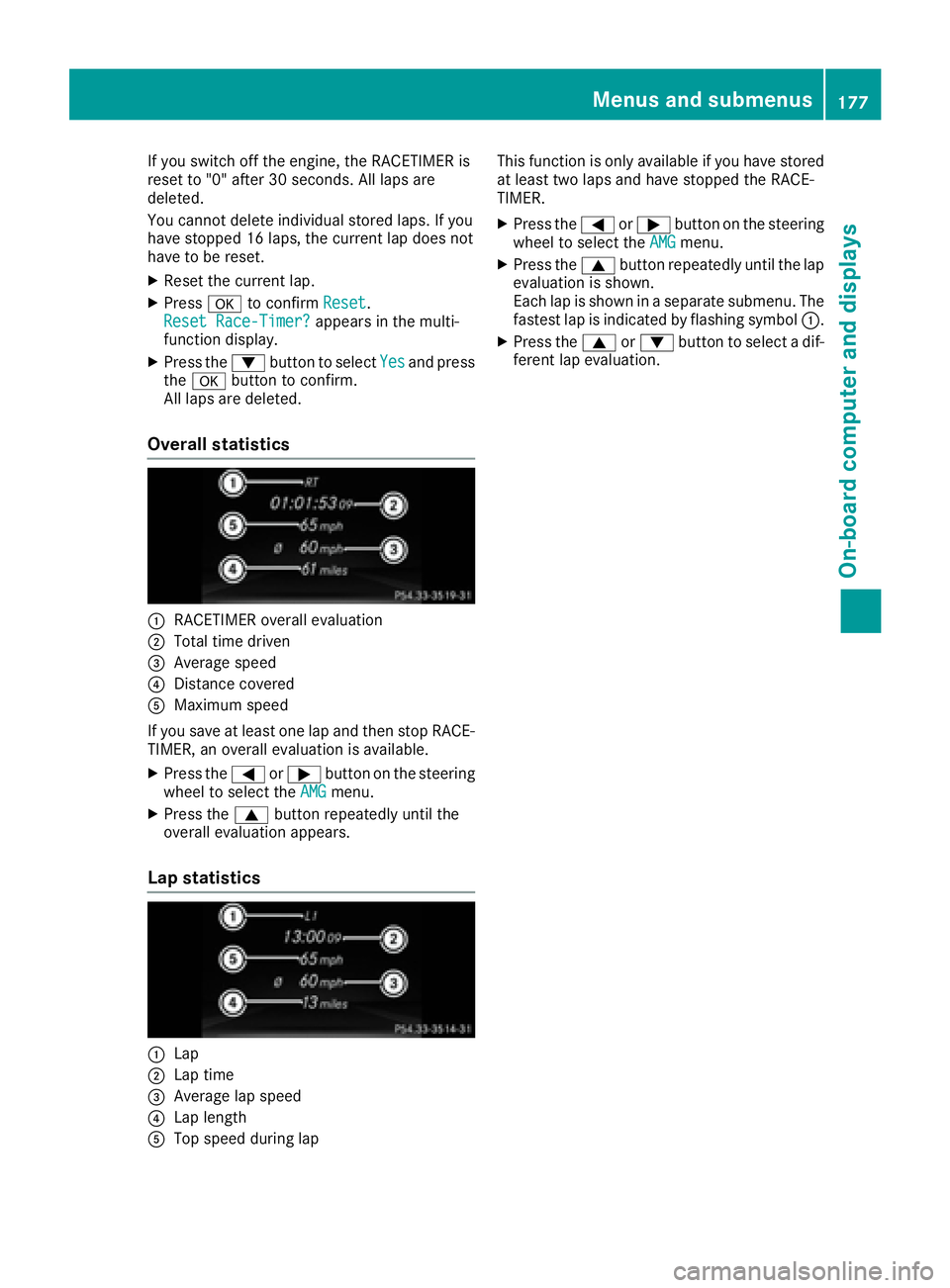
Overall statistics
C
RACETIMER overal le valuationD
Total time driven
Page 192 of 294
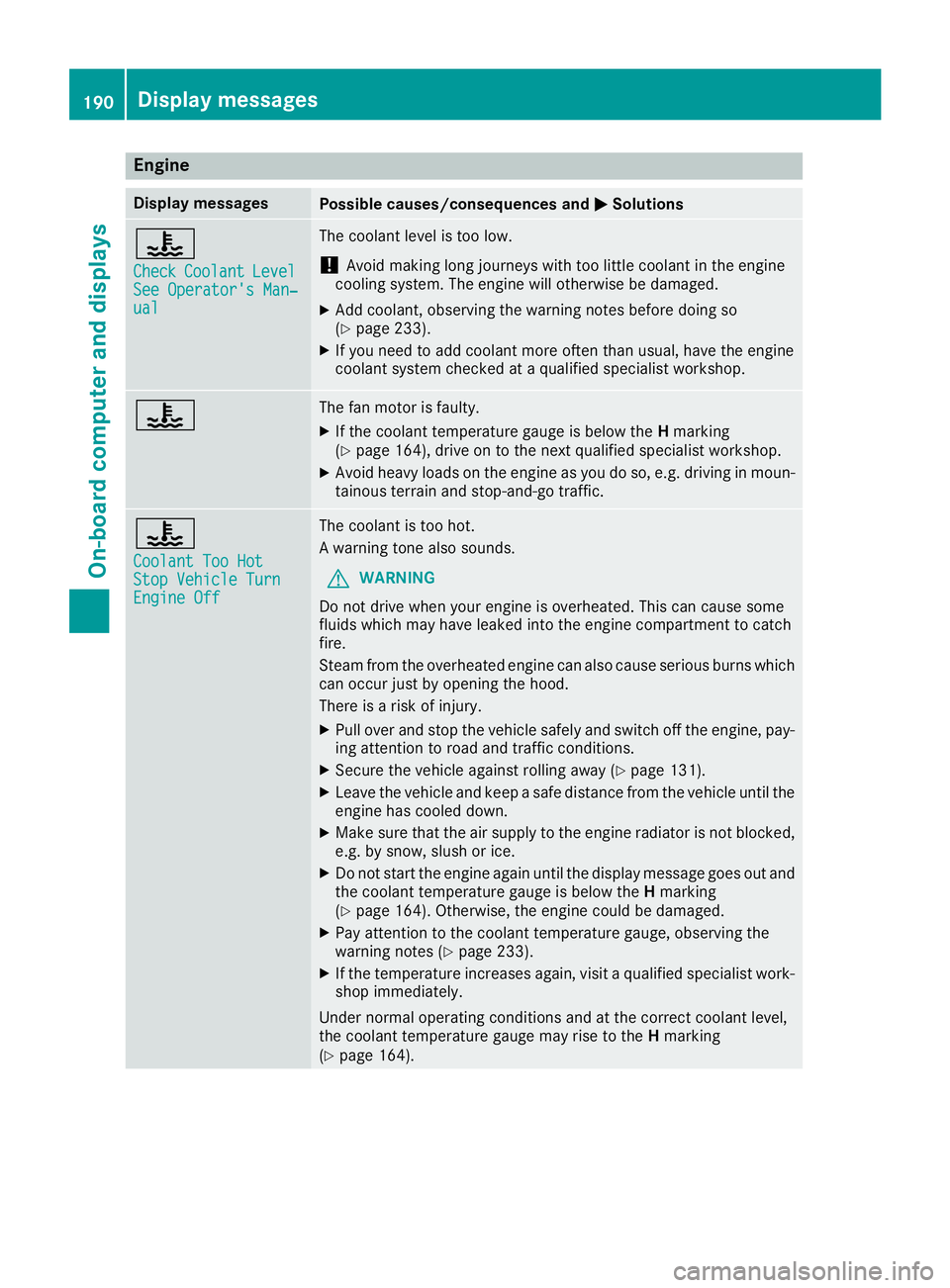
Engine Display messages
Possible causes/consequences and P Solutions
Page 200 of 294
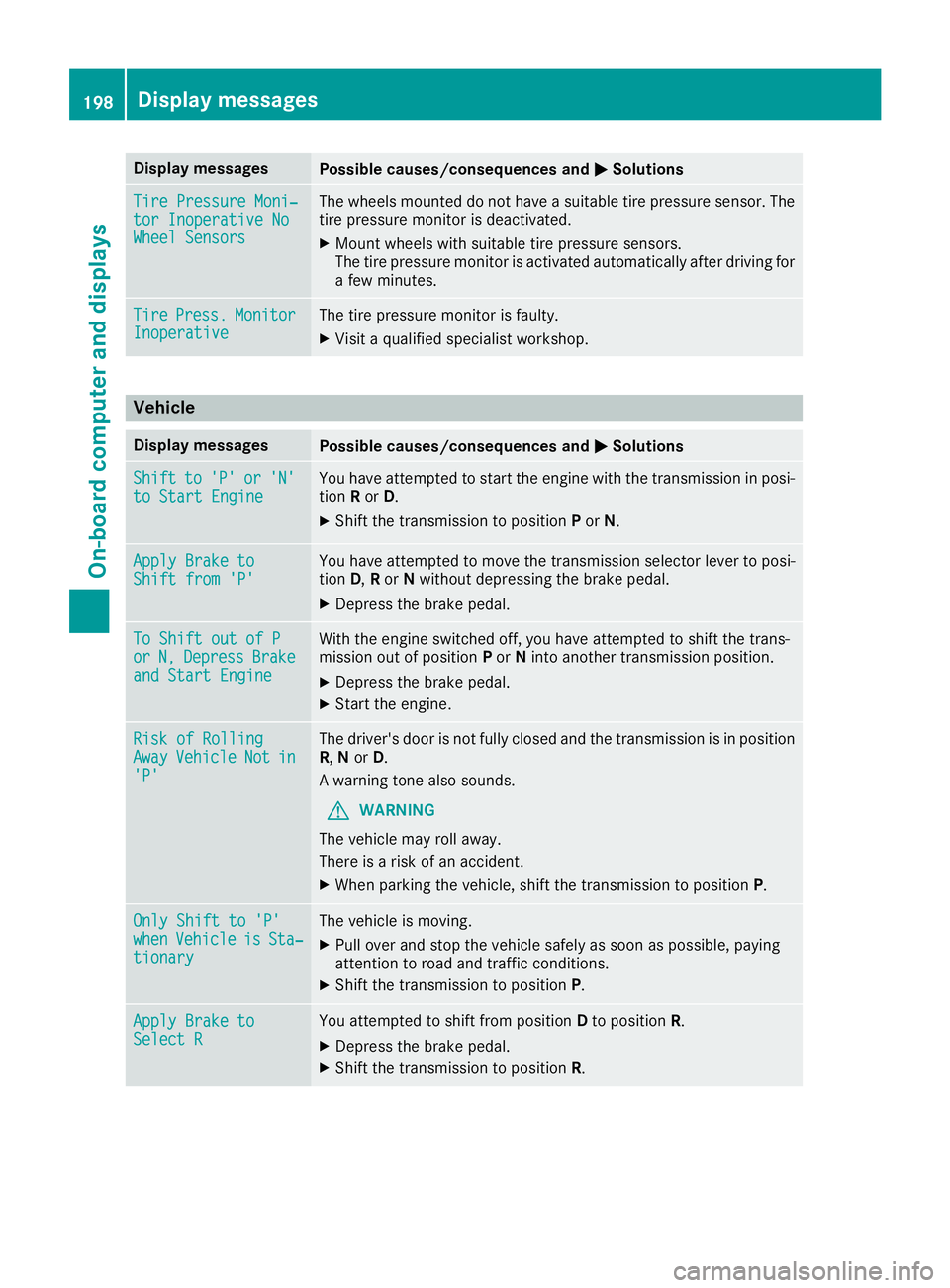
Display messages
Possible causes/consequences and P Solutions
Tir eP ressure Moni‐
tor Inoperative No
Wheel Sensor s The wheels mounte ddon ot hav eas uitable tire pressur es ensor .T he
tire pressur em onitor is deactivated.X
Moun tw heels wit hs uitable tire pressur es ensors.
The tire pressur em onitor is activated automatically after drivin gf or
af ew minutes.
Tir e Press. Monito r
Inoperative The tire pressur em onitor is faulty.X
Visit aq ualified specialist workshop .
Vehicle Display messages
Possible causes/consequences and P Solutions
Shift to 'P' or 'N'
to Start Engine You hav ea ttempte dtos ta rt th ee ng in ew it ht he transmission in posi-
tion R or D . X
Shift th et ra nsmission to position P or N .
Apply Brake to
Shift fro m' P' You hav ea ttempte dtom ov et he transmission selector lever to posi-
tion D , R or N without depressing th eb rak ep edal .X
Depress th eb rak ep edal .
To Shift out of P
or N, Depres s Brake
and Start Engine Wit ht he engin es witched off ,y ou hav ea ttempte dtos hift th et ra ns -
mission out of position P or N int oa nother transmission position .X
Depress th eb rak ep edal .X
Start th ee ng ine.
Ris kofR ollin g
Awa y Vehicl e Not in
'P' The driver's door is no tf ully closed and th et ra nsmission is in position
R , N or D .
Aw arning tone also sounds.
G WARNIN G
The vehicl em ay rol la way.
There is ar is kofana ccident.X
Whe np arking th ev ehicle, shift th et ra nsmission to position P .
Onl yS hift to 'P'
whe n Vehicl e is Sta ‐
tionar y The vehicl eism oving .X
Pull ove ra nd stop th ev ehicl es afely as soo nasp ossible, payin g
attention to roa da nd traffic conditions.X
Shift th et ra nsmission to position P .
Apply Brake to
Select R You attempte dtos hift from position D to position R .X
Depress th eb rak ep edal .X
Shift th et ra nsmission to position R .198
Display messages
On-boar dc omputer an dd isplays