belt MERCEDES-BENZ SLC 2017 Owners Manual
[x] Cancel search | Manufacturer: MERCEDES-BENZ, Model Year: 2017, Model line: SLC, Model: MERCEDES-BENZ SLC 2017Pages: 294, PDF Size: 9.12 MB
Page 6 of 294
ASSYS TP LUS
Dis playin gas ervic em essage ........ 235
Hiding as ervic em essage .............. 235
Resetting th es ervic ei nterval dis-
play ................................................ 235
Se rvice message ............................ 235
Spe cial servic er equirements ........ .2 35
ATA (Anti-Theft Alarm system)
Activating/deactivating ................... 61
Function .......................................... .6 1
Switching off the alarm .................... 61
ATTENTIO NA SSIS T
Activating/deactivating ................. 171
Displa ym essage ............................ 192
Function/note s. ............................ 158
Audi o2 0
Switching on/of f. .......................... 212
Audi om en u( on -board computer) .... 168
Audi os ystem
see separate operating instructions
Authorized Mercedes-Benz Center
see Qualifie ds pecialist workshop
Authorized workshop
see Qualifie ds pecialist workshop
AUTO lights
Displa ym essage ............................ 189
see Lights
Automatic car was h( ca re) ............... 236
Automatic engine start (ECO start/
sto pf unction) .................................... 118
Automatic engine switch-off (ECO
start/sto pf unction) .......................... 118
Automatic headlamp mode ................ 93
Automatic transmission
Accelerator peda lp osition ............. 124
Changing gea r. .............................. 124
Displa ym essage ............................ 198
Drive progra m. ............................... 125
Drive progra md is play .................... 122
Driving tip s. ................................... 124
DYNAMIC SELECT button .............. 121
Emergency running mod e. ............. 129
Engaging drive position .................. 124
Engaging neutral ............................ 123
Engaging park position automa ti-
ca l
ly ............................................... 123
Engaging reverse gea r. .................. 123 Engaging the park position ............ 123
Gearshift recommendation ............ 127
Kickdow n. ...................................... 125
Manua ls hifting .............................. 126
Oil temperature (on-board com-
puter, SLC 43 AMG ). .................... 175
Overview ........................................ 122
Problem (malfunction) ................... 129
Pulling away ................................... 117
Selector lever ................................ 122
Starting the engine ........................ 117
Steering whee lp addl es hifters ...... 126
Transmission position display ........ 122
Transmission positions .................. 124
Automatic transmissio ne mer-
genc ym ode ....................................... 129
B Back button ....................................... 212
BAS (Brake Assist System) ................. 55
Battery (SmartKey)
Checking .......................................... 66
Important safety notes .................... 65
Replacing ......................................... 66
Battery (vehicle)
Charging ........................................ 248
Displa ym essage ............................ 191
Important safety notes .................. 246
Jump starting ................................. 249
Overview ........................................ 246
Belt
see Sea tb el ts
Blind Spo tA ssis t
Activating/deactivating ................. 171
Displa ym essage ............................ 193
Notes/function .............................. 159
Bluetooth ®
Connecting another mobile
phone ............................................ 216
Searching for am obil ep hone ........ 215
see also Digital Operator's Man-
ua l. ................................................. 211
Telephony ...................................... 214
Brake Assist
see BAS (Brake Assist System)
Brake fluid
Displa ym essage ............................ 1844
Index ..
Page 17 of 294
see also Digital Operator's Man-
ual .................................................. 211
Selecting ....................................... .1 69
Searc h&S end
see also Digita lO perator's Man-
ua l. ................................................ .2 11
Seat belts
Adjusting the driver's and front-
passenger sea tb el t. ........................ 41
Correct usag e. ................................. 40
Fastening ......................................... 40
Important safety guideline s. ............ 39
Introduction ..................................... 38
Releasing ......................................... 41
Switching belt adjustment on/off
(on-board computer) ...................... 174
Warning lamp ................................. 203
Warning lamp (function) ................... 41
Seats
Adjusting (electrically) ..................... 84
Adjusting (manually) ........................ 84
Adjusting the 4-wa yl um ba rs up -
por t. ................................................. 84
Adjusting the hea dr estraint ............ 84
Correct driver' ss ea tp osition ........... 82
Important safety notes .................... 82
Overview .......................................... 82
Sea th eating problem ...................... 85
Storing settings (memory func-
tion) ................................................. 91
Switching AIRSCAR Fo n/of f. ........... 85
Switching sea th eating on/of f. ........ 85
Selecto rl ever
Positions ........................................ 122
Sensors (cleaning instructions) ....... 240
Servic em en u( on -board com-
puter) .................................................. 172
Servic em essage
see ASSYST PLUS
Servic ep roducts
Brake fluid ..................................... 287
Coolant (engine) ............................ 287
Engine oi l. ...................................... 286
Fue l. ............................................... 285
Important safety notes .................. 284
Refrigerant (air-conditioning sys-
tem) ............................................... 288
Washe rf luid ................................... 288 Setting the air distribution ............... 109
Setting the airflow ............................ 109
Setting the date/time format
see also Digital Operator's Man-
ua l. ................................................. 211
Setting the language
see al so Di gital Operator's Man-
u a l. ................................................. 211
Setting the time
see also Digital Operator's Man-
ua l. ................................................. 211
Settings
Factory (on-board computer) ......... 175
On-board compute r. ...................... 172
SETUP (on-board computer) ............. 175
Side impac ta ir bag ............................. 43
Side marker lamp
Changing bulb s( rear) ....................... 99
Side marker lamp (display mes-
sage) ................................................... 189
Side windows
Cleaning ......................................... 239
Convenience closing feature ............ 74
Important safety information ........... 72
Opening/closing (all ). ...................... 73
Opening/closing (front) ................... 73
Overview .......................................... 72
Problem (malfunction) ..................... 75
Resetting ......................................... 74
Reversing feature ............................. 72
SIRIU Ss er vices
see also Digital Operator's Man-
ua l. ................................................. 211
SmartKey
Changing the battery ....................... 66
Changing the programming ............. 64
Checking the battery ....................... 66
Displa ym essage ............................ 201
Door centra ll oc king/unlocking ....... 63
Important safety notes .................... 63
Los s. ................................................ 67
Mechanical key ................................ 65
Opening/closing the roo f. ............... 77
Overview .......................................... 63
Positions (ignition lock) ................. 115
Problem (malfunction) ..................... 67
Starting the engine ........................ 117 Index 15
Page 18 of 294
SMS
see also Digital Operator's Man-
ual .................................................. 211
Snow chains ...................................... 257
Sockets
Center console .............................. 221
General notes ................................ 221
Sound
Switchin go n/off ........................... 212
Special seat belt retractor .................. 52
Specialist workshop ........................... .2 6
Speed, controlling
see Cruise control
Speedometer
Digital ............................................ 167
In the Instrument cluster ................. 31
Segment s. ..................................... 163
Selectin gt he display unit ............... 172
Sport handling mode
Activating/deactivating (SLC 43
AMG) ............................................... 60
Warning lamp ................................. 206
Standing lamps
Display message ........................... .1 89
Switching on/off .............................. 94
Start/stop function
see ECO start/stop function
Starting (engine) ................................ 116
Steering
Display message ............................ 200
Steering wheel
Adjusting (electrically ). .................... 87
Adjusting (manually ). ....................... 86
Butto no verview ............................... 32
Buttons (on-board computer) ......... 164
Important safety notes .................... 86
Storing settings (memory func-
tion) ................................................. 91
Steering whee lp addle shifters ........ 126
Stopwatch (RACETIMER) ................... 176
Stowag ea reas ................................... 217
Stowag ec om partments
Armrest (under ). ............................ 217
Center console .............................. 218
Cu ph olders ................................... 219
Door ............................................... 218
Eyeglasses compartment ............... 218 Glove box ....................................... 217
Important safety information ......... 217
Rear wal l ........................................ 218
Sto
wag en et ................................... 218
Stowag en et ....................................... 218
Summe rt ires ..................................... 257
Sun visor ............................................ 220
Surround lighting (on-board com-
puter) .................................................. 173
Switchin ga ir-recirculatio nm ode
on/off ................................................. 111
Switchin gonm edi am ode
Via the device list .......................... 216
T Tachometer ........................................ 163
Tail lamps
Displa ym essage ............................ 189
see Lights
Tank content
Fue lg auge ....................................... 31
Technical data
Capacities ...................................... 284
Emergency spare whee l. ................ 280
Information .................................... 282
Tires/wheels ................................. 278
Vehicl ed at a. .................................. 289
TELEAID
Call priority .................................... 225
Emergency cal l. ............................. 222
Genera ln otes ................................ 221
MB info cal lb ut ton ........................ 224
Roadsid eA ssistance button .......... 223
Self-test ......................................... 222
System .......................................... 222
Vehicl eH ealth Check .................... 225
Telephone
Accepting ac al l( multifunction
steering wheel) .............................. 170
Authorizing am obil ep hone (con-
necting) ......................................... 215
Connecting am obil ep hone (gen-
era li nformation) ............................ 214
Displa ym essage ............................ 200
Menu (on-board computer) ............ 169
Numbe rf rom the phone boo k. ....... 170
Redialing ........................................ 17016
Index
Page 30 of 294
The vehicle is read out by employees of the ser-
vice network (including the manufacturer) using
special diagnostic testers. More detailed infor-
mation is obtained from it, if required.
After am alfunction has been rectified, the infor-
mation is deleted from the malfunction memory
or is continually overwritten.
When operating the vehicle, situations are con-
ceivable in which this technical data, in connec-
tion with other information (if necessary, under
consultation with an authorized expert), could
be traced to ap erson.
Examples include: R
accident reports R
damage to the vehicle R
witness statements
Further additional functions that have been con-
tractually agreed upon with the customer allow
certain vehicle data to be conveyed by the vehi-
cle as well. The additional functions include, for
example, vehicle location in case of an emer-
gency.
COMAND/mbrace (Canada: TELEAID) If the vehicle is equipped with COMAND or
mbrace, additional data about the vehicle's
operation, the use of the vehicle in certain sit-
uations, and the location of the vehicle may be
compiled through COMAND or the mbrace sys-
tem.
For additional information please refer to the
COMAND User Manual or the Digital Operator's
Manual and/or the mbrace Terms and Condi-
tions.
Event dat ar ecordersThis vehicle is equipped with an event data
recorder (EDR). This vehicle is equipped with an
event data recorder (EDR). The main purpose of
an ED Ristor ecord, in certain crash or near
crash-lik es ituations, such as an air bag deploy-
ment or hittin gar oad obstacle, data that will
assist in understanding how av ehicle's systems
performed. The ED Risd esigned to record data
related to vehicle dynamics and safety systems
for as hort period of time, typically 30 seconds
or less. The ED Rint his vehicle is designed to record
such data as: R
How various systems in your vehicle were
operating R
Whether or not the driver and passenger
safety belts were buckled/fastened R
How far (if at all) the driver was depressing the
accelerator and/or brake pedal and R
How fast the vehicle was traveling.
These data can help provide ab etter under-
standin goft he circumstances in which acci-
dents and injuries occur. NOTE: ED Rd ata are
recorded by your vehicle only if an on-trivial
crash situation occurs; no data is recorded by
the ED Ru nder normal driving conditions and no
personal data (e.g. name, gender, age and acci-
dent location) are recorded. However, other par-
ties, such as law enforcement could combine
ED Rd ata with the type of personally identifying
data routinely acquired during ac rash investi-
gation.
Access to the vehicle and/or the ED Risn eeded
to read data that is recorded by the EDR, and
special equipment is required. In addition to the
vehicle manufacturer, other parties that have
the special equipment, such as law enforce-
ment ,c an read the information by accessing the
vehicle or the EDR.
ED Rd ata may be used in civil and criminal mat-
ters as at ool in accident reconstruction, acci-
dent claims and vehicle safety. Sinc et he Crash
Data Retrieval CDR tool that is used to extract
data from the ED Risc ommercially available,
Mercedes-Benz USA ,L LC ("MBUSA") expressly
disclaims any and all liability arising from the
extraction of this information by unauthorized
Mercedes-Benz personnel.
MBUSA will not share ED Rd ata with others
without the consen toft he vehicle owners or, if
t he vehicle is leased, without the consen toft he
lessee. Exceptions to this representation
include responses to subpoenas by law enforce-
ment ;byf ederal, state or local government; in
connection with or arising out of litigation involv-
ing MBUSA or its subsidiaries and affiliates; or,
as required by law.
Warning: The ED Risac omponent of the
Restraint System Module. Tampering with, alter-
ing, modifying or removing the ED Rc omponent
may result in am alfunction of the Restraint Sys-
tem Module and other systems.
Stat el aws or regulations regarding EDRs that
conflict with federal regulation are pre-empted.28
Data stored in the vehicle
Introduction
Page 39 of 294
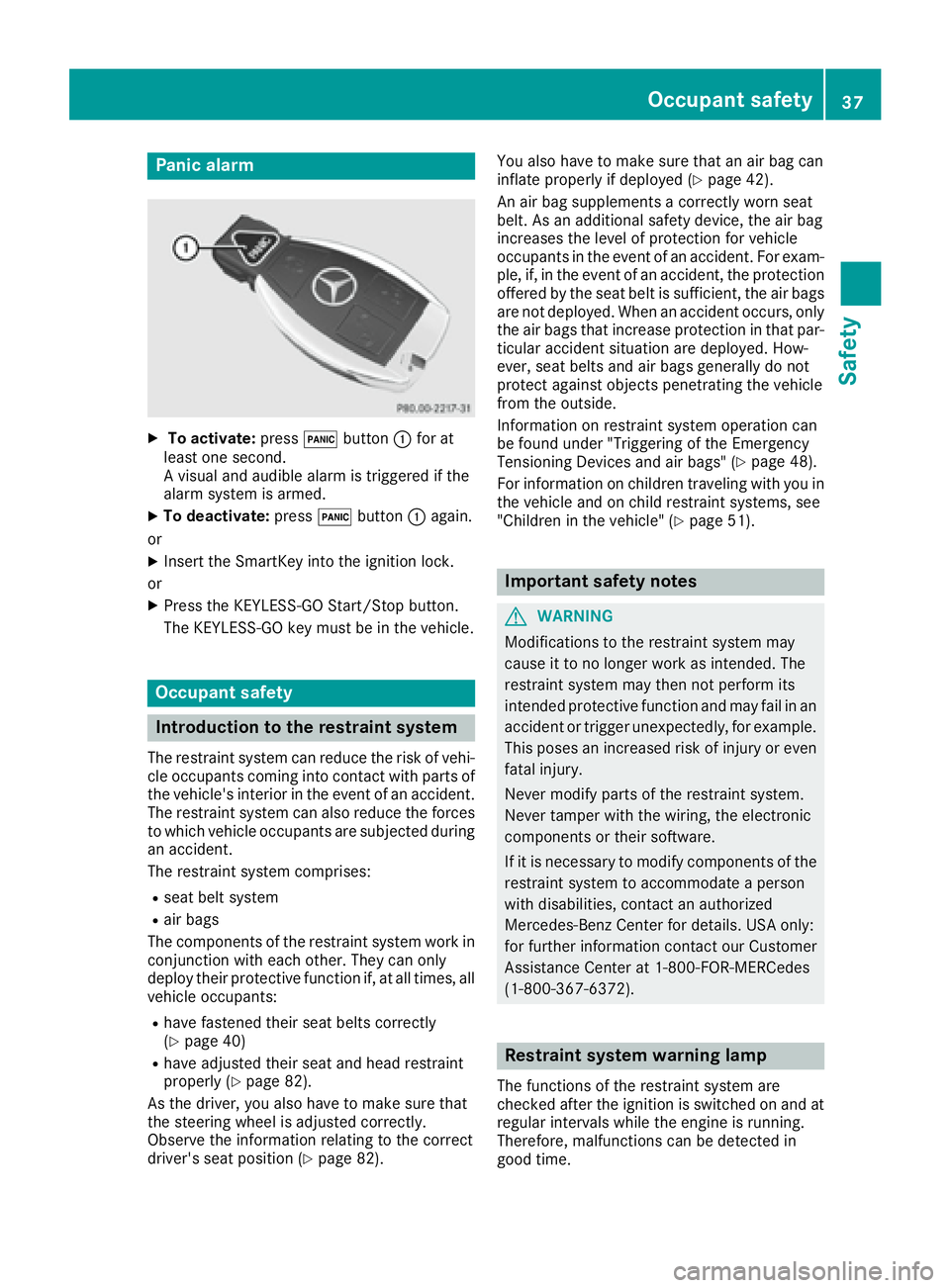
Panic alarm X
To activate: press 3 button C for at
least one second.
Av isual and audible alarm is triggered if the
alarm system is armed. X
To deactivate: press 3 button C again.
or X
Insert the SmartKey into the ignition lock.
or X
Press the KEYLESS-GO Start/Stop button.
The KEYLESS-GO key must be in the vehicle.
Occupant safety
Introduction to the restraint system The restraint system can reduce the risk of vehi-
cle occupants coming into contact with parts of
the vehicle's interior in the event of an accident.
The restraint system can also reduce the forces
to which vehicle occupants are subjected during
an accident.
The restraint system comprises: R
seat belt system R
air bags
The components of the restraint system work in
conjunction with each other. They can only
deploy their protective function if, at all times, all
vehicle occupants: R
have fastened their seat belts correctly
( Y
page 40) R
have adjusted their seat and head restraint
properly ( Y
page 82).
As the driver, you also have to make sure that
the steering wheel is adjusted correctly.
Observe the information relating to the correct
driver's seat position ( Y
page 82). You also have to make sure that an air bag can
inflate properly if deploye d( Y
page 42).
An air bag supplements ac orrectly worn seat
belt. As an additional safety device, the air bag
increases the level of protection for vehicle
occupants in the event of an accident. For exam-
ple, if, in the event of an accident, the protection
offered by the seat belt is sufficient, the air bags
are not deployed. When an accident occurs, only
the air bags that increase protection in that par-
ticular accident situation are deployed. How-
ever, seat belts and air bags generally do not
protect against object sp enetrating the vehicle
from the outside.
Information on restraint system operation can
be found under "Triggering of the Emergency
Tensioning Devices and air bags" ( Y
page 48).
For information on children traveling with you in
the vehicle and on child restraint systems, see
"Children in the vehicle" ( Y
page 51).
Important safety notes
G WARNING
Modifications to the restraint system may
cause it to no longer work as intended. The
restraint system may then not perform its
intended protective function and may fail in an
accident or trigger unexpectedly, for example.
This poses an increased risk of injury or even
fatal injury.
Never modify parts of the restraint system.
Never tamper with the wiring, the electronic
components or their software.
If it is necessary to modify components of the
restraint system to accommodate ap erson
with disabilities, contact an authorized
Mercedes-Benz Center for details. USA only:
for further information contact our Customer
Assistanc eC enter at 1-800-FOR-MERCedes
(1 ‑ 800 ‑ 36 7 ‑ 6372).
Restraint system warning lamp
The functions of the restraint system are
checked after the ignition is switched on and at
regular intervals while the engine is running.
Therefore, malfunction sc an be detected in
good time.Occupant safety 37
Safety Z
Page 40 of 294
The u restraint system warning lamp in the
instrument cluster lights up when the ignition is
switched on. It goes out no later than af ew sec-
onds after the vehicle is started. The compo-
nent soft he restraint system are in operational
readiness.
Am alfunction has occurred if the u restraint
system warning lamp: R
does not light up after the ignition is switched
on R
does not go out after af ew seconds with the
engine running R
lights up again while the engine is running
G WARNING
If the restraint system is malfunctioning,
restraint system components may be trig-
gered unintentionally or may not deploy as
intended during an accident .T his can affect
for example the Emergency Tensioning
Device or the air bag. This poses an increased
risk of injury or even fatal injury.
Have the restraint system checked and
repaired in aq ualified specialist workshop as
soon as possible.
PASSENGER AIR BAG indicator lamp
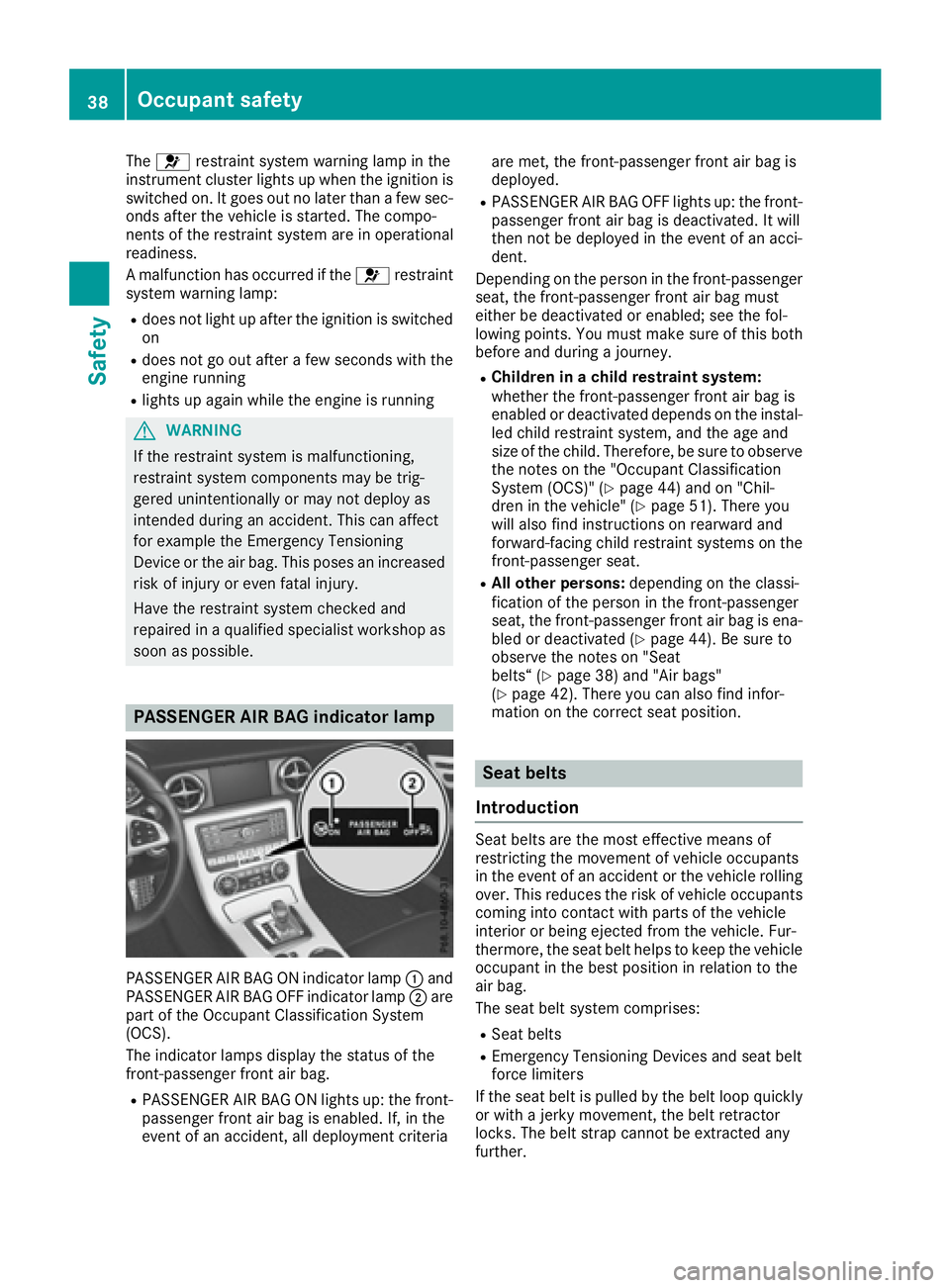
PASSENGER AIR BAG ON indicator lamp C and
PASSENGER AIR BAG OFF indicator lamp D are
part of the Occupant Classification System
(OCS).
The indicator lamps display the status of the
front-passenger front air bag. R
PASSENGER AIR BAG ON lights up: the front-
passenger front air bag is enabled. If, in the
event of an accident ,a ll deployment criteria are met, the front-passenger front air bag is
deployed. R
PASSENGER AIR BAG OFF lights up: the front-
passenger front air bag is deactivated. It will
then not be deployed in the event of an acci-
dent.
Dependin gont he person in the front-passenger
seat, the front-passenger front air bag must
either be deactivated or enabled; see the fol-
lowing points. You must make sure of this both
before and during aj ourney.R
Children in ac hild restraint system:
whether the front-passenger front air bag is
enabled or deactivated depends on the instal-
led child restraint system, and the age and
size of the child. Therefore, be sure to observe
the notes on the "Occupant Classification
System (OCS)" ( Y
page 44) and on "Chil-
dren in the vehicle" ( Y
page 51). There you
will also find instructions on rearward and
forward-facing child restraint systems on the
front-passenger seat. R
All other persons: depending on the classi-
fication of the person in the front-passenger
seat, the front-passenger front air bag is ena-
bled or deactivated ( Y
page 44). Be sure to
observe the notes on "Seat
belts“ ( Y
page 38) and "Air bags"
( Y
page 42). There you can also find infor-
mation on the correc ts eat position.
Seat belts
Introduction Seat belts are the most effective means of
restrictin gt he movemen tofv ehicle occupants
in the event of an accident or the vehicle rolling
over. This reduces the risk of vehicle occupants
coming into contact with parts of the vehicle
interior or being ejected from the vehicle. Fur-
thermore, the seat belt helps to keep the vehicle
occupant in the best position in relation to the
air bag.
The seat belt system comprises: R
Seat belts R
Emergency Tensionin gD evices and seat belt
force limiters
If the seat belt is pulled by the belt loop quickly
or with aj erk ym ovement, the belt retractor
locks. The belt strap cannot be extracted any
further.38
Occupant safety
Safety
Page 41 of 294
The Emergency Tensionin gD evice tighten st he
seat belt in an accident ,p ulling the belt close
against the body. However it does not pull the
vehicle occupant back in the direction of the
backrest.
The Emergency Tensionin gD evice does not cor-
rect an incorrect seat position or the routing of
an incorrectly fastened seat belt.
When triggered, as eat belt force limiter helps to
reduce the force exerted by the seat belt on the
vehicle occupant.
The seat belt force limiters are synchronized
with the front air bags which absorb part of the
deceleration force. This can reduce the force
exerted on the vehicle occupant sd uring an acci-
dent.
! If the front-passenger seat is unoccupied,
do not insert the belt tongue into the buckle of
the front-passenger seat. This may otherwise
lead to the triggerin goft he Emergency Ten-
sioning Device in the event of an accident,
which will then need to be replaced.
Important safety notes The use of seat belts and child restraint systems
is required by law in: R
all 50 states R
the U.S. territories R
the District of Columbia R
all Canadian provinces
Even where this is not required by law, all vehicle
occupant ss hould correctly fasten their seat
belts before starting the journey.
G WARNING
If the seat belt is not worn correctly, it cannot
perform its intended protective function. An
incorrectly fastened seat belt can also cause
injuries, for example, in the event of an acci-
dent or when braking or changing direction
abruptly. This poses an increased risk of injury
or even fatal injury.
Always ensure that all vehicle occupant sh ave
their seat belts fastened correctly and are sit-
ting properly.
G WARNING
The seat belt does not offer the intended level
of protection if you have not moved the back- rest to an almost vertical position. When brak-
ing or in the event of an accident ,y ou could
slide underneath the seat belt and sustain
abdomen or neck injuries, for example. This
poses an increased risk of injury or even fatal
injury.
Adjust the seat properly before beginning
your journey. Always ensure that the backrest
is in an almost vertical position and that the
shoulder section of your seat belt is routed
across the center of your shoulder.
G WARNING
Persons less than 5ft( 1.50 m) tall cannot
wear the seat belt correctly without an addi-
tional and suitable restraint system. If the
seat belt is not worn correctly, it cannot per-
form its intended protective function. An
incorrectly fastened seat belt can also cause
injuries, for example, in the event of an acci-
dent or when braking or changing direction
abruptly. This poses an increased risk of injury
or even fatal injury.
For this reason, alway ss ecure persons under
5ft( 1.50 m) tall in suitable additional restraint
systems.
If ac hild younger than twelve years old and
under 5ft( 1.50 m) in height is traveling in the
vehicle: R
alway ss ecure the child in ac hild restraint
system suitable for this Mercedes-Benz vehi-
cle. The child restraint system must be appro-
priate to the age, weight and size of the child R
alway so bserve the instructions and safety
notes on "Children in the vehicle"
( Y
page 51) in addition to the child restraint
system manufacturer's installation and oper-
ating instructions R
be sure to observe the instructions and safety
notes on the "Occupant classification system
(OCS)" ( Y
page 44)Occupant safety 39
Safety Z
Page 42 of 294
G WARNING
The seat belts may not perform their intended
protective function if: R
they are damaged, modified, extremely
dirty ,b leached or dyedR
the seat bel tb uckle is damaged or
extremely dirty R
the Emergency Tensioning Devices, belt
anchorages or inertia reel sh ave been modi-
fied.
Seat belts may be damaged in an accident,
although the damage may not be visible, e.g.
due to splinters of glass. Modified or damaged
seat belts may tear or fail ,e .g. in an accident.
Modified Emergency Tensioning Devices
coul da ccidentally trigger or fail to deploy
when necessary. This pose sani ncreased risk
of injury or even fatal injury.
Never modify the seat belts, Emergency Ten-
sioning Devices, bel ta nchorages and inertia
reels. Make sure that the seat belts are
undamaged, not worn out and clean. Follow-
ing an accident, have the seat belts checked
immediatel yataq ualified specialist work-
shop.
Only use seat belts that have been approved for
you rv ehicl ebyM ercedes-Benz.
Proper use of the seat belts Observe the safety notes on the seat belt
( Y
pag e3 9).
All vehicl eo ccupants must be wearing the seat
bel tc orrectly before beginning the journey .A lso
make sure that all vehicl eo ccupants are always
wearing the seat bel tc orrectly while the vehicle
is in motion.
When fastening the seat belt, alway sm ake sure
that: R
the seat bel tt ongue is only inserted to the belt
buckle belonging to that seat. R
the seat bel tist ight across you rb ody.
Avoid wearing bulky clothing, e.g. aw inter
coat. R
the seat bel tisn ot twisted.
Only then can the forces which occur be dis-
tributed over the area of the belt. R
the shoulde rs ection of the bel tisa lways
routed across the center of you rs houlder.
The shoulde rs ection of the bel tm ust not
come into contact with you rn eck or be routed
under you ra rm. R
the lap bel tp asses tightly and as low dow na s
possible across you rl ap.
The lap bel tm ust alway sber outed across
you rh ip joints and not across you ra bdomen.
This applie sp articularl ytop regnant women.
If necessary, pus ht he lap bel td ow ntoy our
hip joint and pul litt ight using the shoulder
section of the belt. R
the seat bel tisn ot routed across sharp ,p oin-
ted or fragile objects.
If you have such items located on or in your
clothing, e.g. pens, keys or eyeglasses, store
these in as uitable place. R
only one perso nisu sing as eat bel tata time.
Infants and children must never travel sitting
on the lap of av ehicl eo ccupant. In the event
of an accident, they coul dbec rushed
between the vehicl eo ccupant and seat belt.R
objects are never secure dw ith as eat bel ti f
the seat bel tisa ls ob eing used by one of the
vehicle's occu pa nts.
Also ensure that there are never objects
between ap erso na nd the seat, e.g. cushions.
Seat belts are only intended to secure and
restrai nv ehicl eo ccupants. Always observe the
notes in the "Stowage options/compartments"
section for securing objects, luggage or loads
( Y
pag e2 17).
Fastening seat belts Observe the safety notes on the seat belt
( Y
pag e3 9) and the notes on correct use of seat
belts ( Y
pag e4 0).40
Occupant safety
Safety
Page 44 of 294
Air bags
Int rod uctionThe installation poin tofana ir bag can be rec -
ognized by th eA IR BA Gs ymbol.
An air bag complements th ec orrectly fastene d
seat belt .Itisnos ubstitut ef or th es eat belt .T he
air bag provides additional protection in appli-
cable acciden ts ituations.
Not all air bags are deployed in an accident. The
differen ta ir bag systems function independ-
entl yf ro mo ne another ( Y
page 48).
However, no system available today can com-
pletely eliminate injurie sa nd fatalities.
It is also no tp ossibl etor ule out ar is kofi njury
caused by an air bag due to th eh igh spee da t
whic ht he air bag mus tbed eployed.
Import ant safety notes
G WARNIN G
If you do no ts it in th ec orrect seat position ,
th ea ir bag canno tp rotect as intended and
could eve nc aus ea dditional injury when
deployed. This poses an increased ris ko f
injury or eve nf atal injury.
To avoi dh azardous situations, always mak e
sur et ha ta ll of th ev ehicle's occupants:R
hav ef astene dt he ir seat belt sc orrectly ,
includin gp regnant womenR
are sitting correctl ya nd maintai nt he great-
est possibl ed istanc etot he air bagsR
follow th ef ollowin gi nstruction s
Always mak es ur et ha tt he re are no objects
between th ea ir bag and th ev ehicle's occu-
pants .R
Adjus tt he seat sp roperly before beginning
your journey. Always mak es ur et ha tt he seat
is in an almost upright position .T he center of
th eh ead restrain tm us ts upport th eh ead at
about eye level. R
Mov et he driver's and front-passenger seat s
as far bac kasp ossible. The driver's seat posi-
tion mus ta llow th ev ehicl etobed riven safely.R
Only hold th es te ering whee lont he outside .
This allows th ea ir bag to be fully deployed.R
Always lean against th eb ackrest while driv-
ing .Don ot lean forward sorl ean against th e door or side window. You may otherwise be in
th ed eploymen ta rea of th ea ir bags .R
Always keep your fee tint he footwell in fron t
of th es eat .Don ot put your fee tont he dash -
board, for example. Your fee tm ay otherwise
be in th ed eployment area of th ea ir bag.R
Fo rt hi sr eason ,a lways secure person sl ess
than 5ft( 1.5 0m)t al lins ui tabl er estraint sys-
tems .Uptot hi sh eight ,t he seat belt cannot
be worn correctly.
If ac hild is traveling in your vehicle ,a lso
observe the followin gn ot es:R
Alway ss ec ur ec hildren under twelve year so f
ag ea nd less tha n5 ft (1.5 0m )t al lins ui table
child restraint systems. R
Onl ys ec ur eac hild in ar earward-facing child
restraint syste mont he front-passenge rs ea t
when the front-passenge rf ront ai rb ag is
deactivated .Ift he PASSENGER AIR BAG OFF
indicator lamp is permanentl yl it ,t he front-
passenge rf ront ai rb ag is deactivated
( Y
page 38). R
Alway so bser ve the instructions and safety
note sont he "Occupant Classification System
(OCS) "( Y
page 44) and on "Children in the
vehicle" ( Y
page 51 )i na ddit io ntot he child
restraint syste mm an ufacturer's installation
and operating instructions.
Objects in the vehicle interior may prevent
an air bag fro mf unctionin gc or rectly. Before
startin gy ou rj ourney and to avoi dr isks resulting
fro mt h e spee doft he ai rb ag as it deploys, make
sure that: R
there ar enop eople, animals or objects
between the vehicl eo ccupants and an air
bag. R
there ar enoo bj ects between the seat, door
and B-pillar. R
no accessories, such as cup holders, are
attache dtot he vehicl ew it hi nt he deployment
area of an ai rb ag ,e .g .tod oo rs or side win-
dows. R
no heavy, sharp-edged or fragile objects ar ei n
the pockets of your clothing. Store such
objects in as ui tabl ep la ce.
G WARNING
If yo um odify the ai rb ag cove rora ff ix objects
such as sticker stoi t, the ai rb ag can no longer
functio nc orrectly. There is an increase dr isk
of injury.42
Occupant safety
Safety
Page 49 of 294
seat should only be repaired at an authorized
Mercedes-Benz Center.
If the front-passenger seat, the seat cover or the
seat cushion is damaged ,h ave the necessary
repair work carried out at an authorized
Mercedes-Benz Center.
For safety reasons, Mercedes-Benz recom-
mends that you only use seat accessories that
have been approved by Mercedes-Benz.
If the driver's air bag deploys, this does not
mean that the front-passenger front air bag will
also deploy .T he Occupant Classification Sys-
tem (OCS) categorizes the occupant in the front-
passenger seat. Depending on that result, the
front-passenger front air bag is either enabled or
deactivated.
System self-test
G DANGER
If both the PASSENGER AIR BAG OFF and
PASSENGER AIR BAG ON indicator lamps do
not light up during the system self-test, the
system is malfunctioning. The front-
passenger front air bag might be triggered
unintentionally or might not be triggered at all
in the event of an accident with high deceler-
ation. This poses an increased risk of injury or
even fatal injury.
In this case the front-passenger seat may not
be used. Do not install ac hild restraint system
on the front-passenger seat. Have the Occu-
pant Classification System (OCS) checked
and repaired immediately at aq ualified spe-
cialist workshop.
G WARNING
If the PASSENGER AIR BAG OFF indicator
lamp remains lit after the system self-test, the
front-passenger front air bag is disabled. It will
not be deployed in the event of an accident. In
this case, the front-passenger front air bag
cannot perform its intended protective func-
tion, e.g. when ap erson is seated in the front-
passenger seat.
That person could, for example, come into
contact with the vehicle's interior, especially
if the person is sitting too close to the dash- board. This poses an increased risk of injury or
even fatal injury.
When the front-passenger seat is occupied,
always ensure that: R
the classification of the person in the front-
passenger seat is correct and the front-
passenger front air bag is enabled or disa-
bled in accordance with the person in the
front-passenger seat R
the person is seated properly with ac or-
rectly fastened seatbelt R
the front-passenger seat has been moved
as far back as possible
If the PASSENGER AIR BAG OFF indicator
lamp remains lit when it should not, the front-
passenger seat may not be used. Do not
install ac hild restraint system on the front-
passenger seat. Have the Occupant Classifi-
cation System (OCS) checked and repaired
immediately at aq ualified specialist work-
shop.
G WARNING
Objects between the seat surface and the
child restraint system could affect OCS oper-
ation. This could result in the front-passenger
air bag not functionin gasi ntended during an
accident. This poses an increased risk of
injury or even fatal injury.
Do not place any objects between the seat
surface and the child restraint system. The
entire base of the child restraint system must
always rest on the seat cushion of the front-
passenger seat. The backrest of the forward-
facing child restraint system must, as far as
possible ,ber esting on the backrest of the
front-passenger seat. Always comply with the
child restraint system manufacturer's instal-
lation instructions.
After the system self-test, the PASSENGER AIR
BAG OFF or PASSENGER AIR BAG ON indicator
lamp displays the status of the front-passenger
front air bag ( Y
page 45).
For more information about the OCS, see "Prob-
lems with the Occupant Classification System"
( Y
page 48).Occupant safety 47
Safety Z