keyless MERCEDES-BENZ SLC 2019 User Guide
[x] Cancel search | Manufacturer: MERCEDES-BENZ, Model Year: 2019, Model line: SLC, Model: MERCEDES-BENZ SLC 2019Pages: 306, PDF Size: 15 MB
Page 76 of 306
The opening dimensions of the trunk lid can befound in the "Vehicle data" section(Ypage 303).
Do not leave the SmartKey in the trunk. Youcould otherwise lock yourself out.
The trunk lid can be:
Ropened/closed from outside
Ropened automatically from outside
Rlocked separately
Ropened with the emergency release button
Runlocked with the mechanical key
You should preferably place luggage or loadsin the trunk.
Opening/closing from outside
Opening
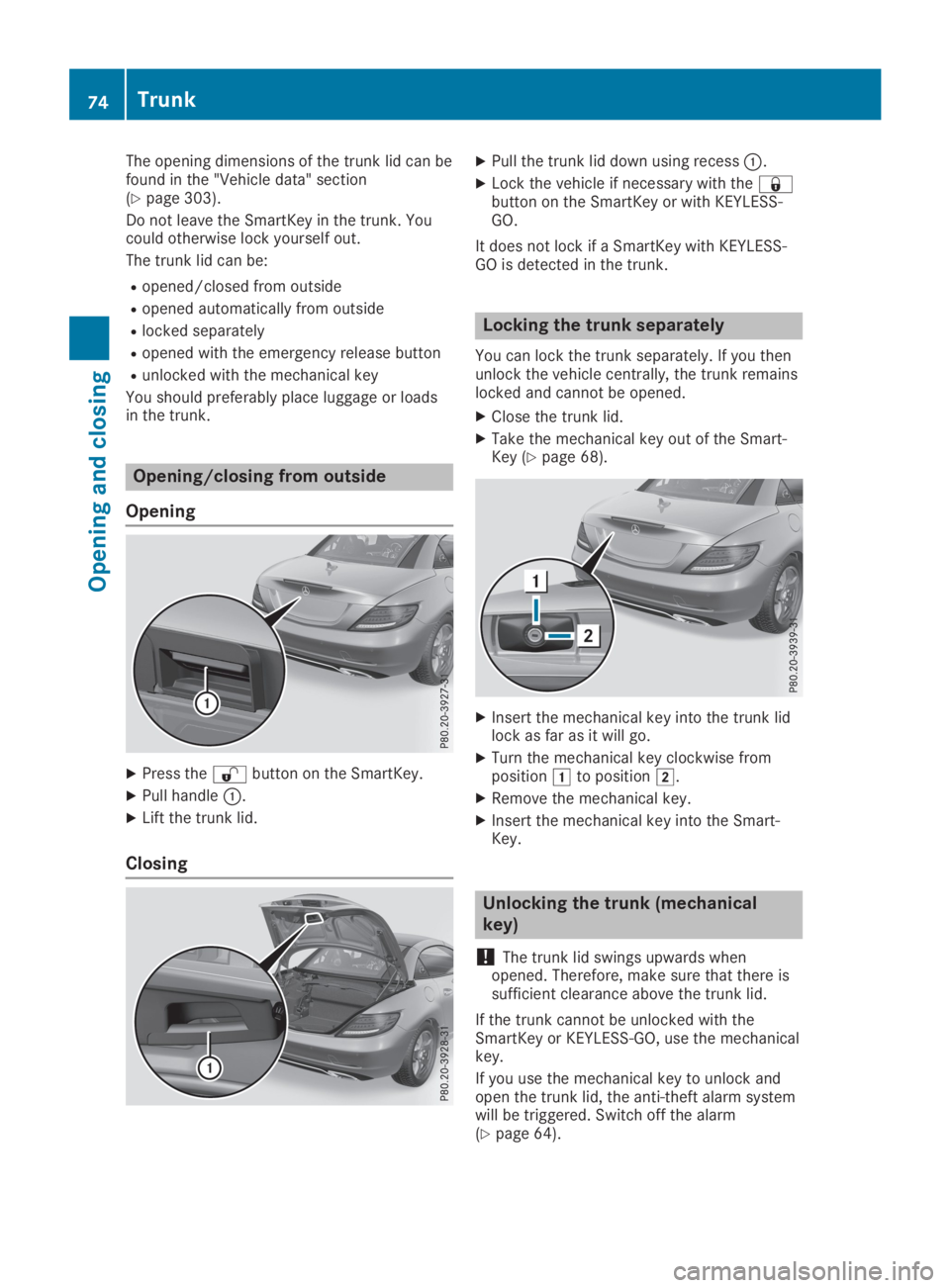
XPress the6button on the SmartKey.
XPull handleC.
XLift the trunk lid.
Closing
XPull the trunk lid down using recessC.
XLock the vehicle if necessary with the7button on the SmartKey or with KEYLESS-GO.
It does not lock if a SmartKey with KEYLESS-GO is detected in the trunk.
Locking the trunk separately
You can lock the trunk separately. If you thenunlock the vehicle centrally, the trunk remainslocked and cannot be opened.
XClose the trunk lid.
XTake the mechanical key out of the Smart-Key (Ypage 68).
XInsert the mechanical key into the trunk lidlock as far as it will go.
XTurn the mechanical key clockwise frompositionGto positionH.
XRemove the mechanical key.
XInsert the mechanical key into the Smart-Key.
Unlocking the trunk (mechanical
key)
!The trunk lid swings upwards whenopened. Therefore, make sure that there issufficient clearance above the trunk lid.
If the trunk cannot be unlocked with theSmartKey or KEYLESS-GO, use the mechanicalkey.
If you use the mechanical key to unlock andopen the trunk lid, the anti-theft alarm systemwill be triggered. Switch off the alarm(Ypage 64).
74Trunk
Opening and closing
Page 79 of 306
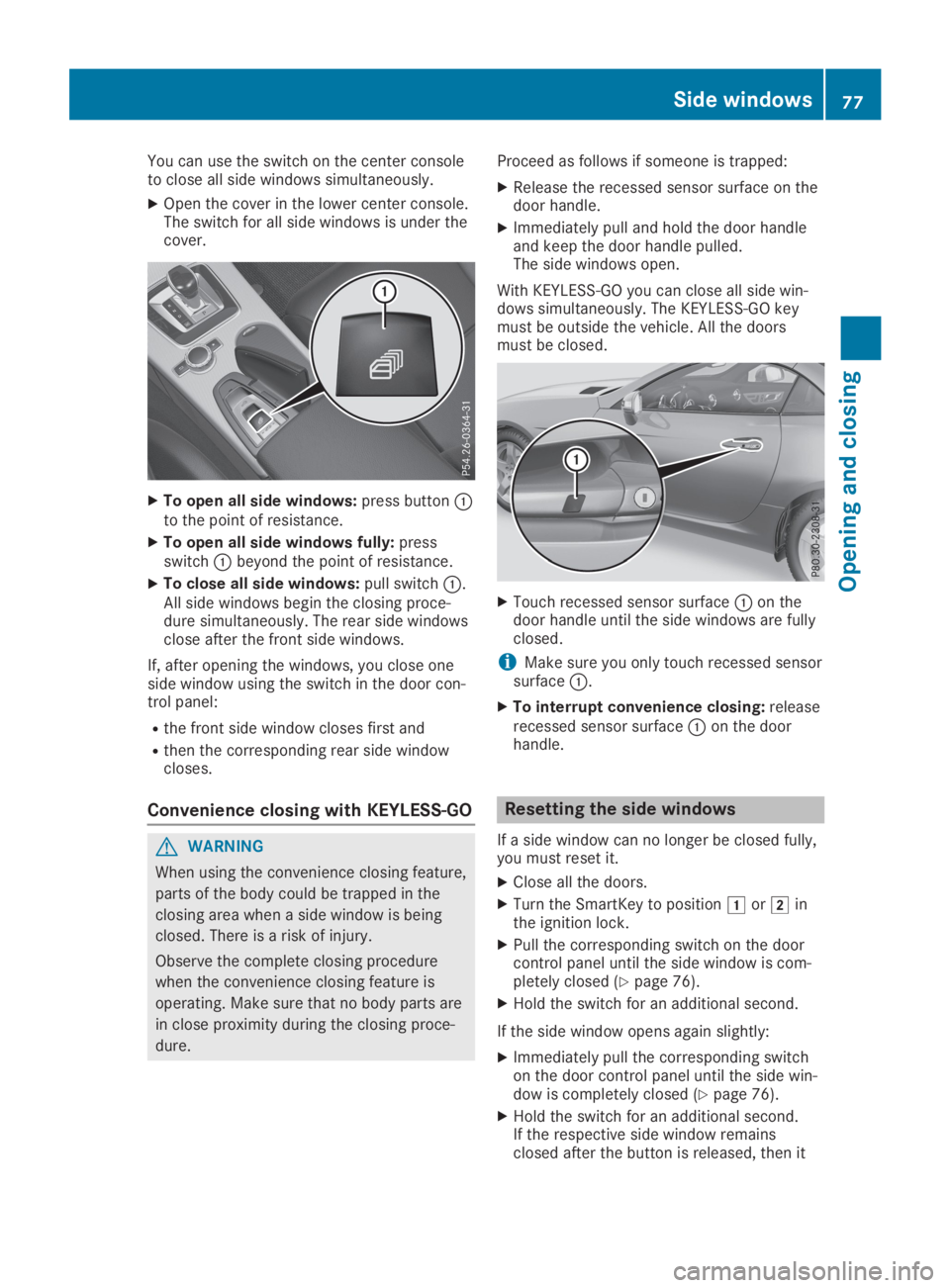
You can use the switch on the center consoleto close all side windows simultaneously.
XOpen the cover in the lower center console.The switch for all side windows is under thecover.
XTo open all side windows:press buttonCto the point of resistance.
XTo open all side windows fully:pressswitchCbeyond the point of resistance.
XTo close all side windows:pull switchC.All side windows begin the closing proce-dure simultaneously. The rear side windowsclose after the front side windows.
If, after opening the windows, you close oneside window using the switch in the door con-trol panel:
Rthe front side window closes first and
Rthen the corresponding rear side windowcloses.
Convenience closing with KEYLESS-GO
GWARNING
When using the convenience closing feature,
parts of the body could be trapped in the
closing area when a side window is being
closed. There is a risk of injury.
Observe the complete closing procedure
when the convenience closing feature is
operating. Make sure that no body parts are
in close proximity during the closing proce-
dure.
Proceed as follows if someone is trapped:
XRelease the recessed sensor surface on thedoor handle.
XImmediately pull and hold the door handleand keep the door handle pulled.The side windows open.
With KEYLESS-GO you can close all side win-dows simultaneously. The KEYLESS-GO keymust be outside the vehicle. All the doorsmust be closed.
XTouch recessed sensor surfaceCon thedoor handle until the side windows are fullyclosed.
iMake sure you only touch recessed sensorsurfaceC.
XTo interrupt convenience closing:releaserecessed sensor surfaceCon the doorhandle.
Resetting the side windows
If a side window can no longer be closed fully,you must reset it.
XClose all the doors.
XTurn the SmartKey to positionGorHinthe ignition lock.
XPull the corresponding switch on the doorcontrol panel until the side window is com-pletely closed (Ypage 76).
XHold the switch for an additional second.
If the side window opens again slightly:
XImmediately pull the corresponding switchon the door control panel until the side win-dow is completely closed (Ypage 76).
XHold the switch for an additional second.If the respective side window remainsclosed after the button is released, then it
Side windows77
Opening and closing
Z
Page 82 of 306
If you operate the roof switch and theTrunk Partition OpenTrunk Partition Openmessage appearsin the multifunction display, the trunk parti-tion is not closed correctly.
XClose the trunk partition.
XTo close:press and hold soft-top switchCuntil the soft top is fully closed.TheVario-Roof in OperationVario-Roof in Operationmessageappears in the multifunction display. Oncethe opening procedure is complete, themessage disappears and a tone sounds.
All of the side windows open.
XTo close all side windows, pull the switchunder the cover of the center console(Ypage 76).
Opening/closing using the SmartKey
Important safety notes
GWARNING
When opening or closing the roof, body
parts could be trapped by, for example, the
roof mechanism, trunk lid or side windows.
There is a risk of injury.
When raising or lowering the roof, make
sure that no body parts are in the vicinity of
moving components. If someone becomes
trapped, release the button.
Opening and closing
This function is only available on vehicles withKEYLESS-GO or with roof comfort operation.
XClose the trunk lid (Ypage 73).
XVehicles with comfort operation:pointthe tip of the SmartKey at the driver's doorhandle.
XVehicles with KEYLESS-GO:the SmartKeymust be within 6 ft (2 m) of the vehicle.
XTo open:press and hold the6button onthe SmartKey until the roof is fully opened.The roof and the rear side windows open.The front side windows close.
XTo interrupt the opening procedure:release the6button.
XTo open the front side windows:press the6button on the SmartKey again.
XTo close:press and hold the7buttonon the SmartKey until the roof is fullyclosed.The roof and the side windows close.
XTo interrupt the closing procedure:release the7button.
Locking the roof again
Important safety notes
GWARNING
If you do not fully open/close the soft top,
the soft-top hydraulics depressurize after a
short time. This causes the soft top to lower
unexpectedly and may cause you or others
to be trapped. There is a risk of injury.
Always open or close the soft top com-
pletely.
The roof is not locked if:
RtheYsymbol and theVario-Roof inVario-Roof inOperationOperationmessage appear in the multi-function display
RtheYsymbol and theOpen/CloseOpen/CloseVario-Roof CompletelyVario-Roof Completelymessage appearin the multifunction display and you hear awarning tone
Ryou hear a warning tone for up to ten sec-onds when pulling away or while driving
Locking
You can lock the roof again if it is not lockedfully.
XPull over and stop the vehicle safely as soonas possible, paying attention to road andtraffic conditions.
XEnsure that the SmartKey is in positionHin the ignition lock.
XPress the roof switch (Ypage 79).
Trunk partition
General notes
!To avoid damaging the roof or luggagewhen folding back the roof, you should:
80Roof
Opening and closing
Page 93 of 306
EASY-ENTRY/EXIT feature
Important safety notes
GWARNING
If you drive off while the EASY-ENTRY/EXIT
feature is making adjustments, you could
lose control of the vehicle. There is a risk of
an accident.
Always wait until the adjustment process is
complete before driving off.
GWARNING
When the EASY-ENTRY/EXIT feature adjusts
the steering wheel, you and other vehicle
occupants – particularly children – could
become trapped. There is a risk of injury.
While the EASY-ENTRY/EXIT feature is mak-
ing adjustments, make sure that no one has
any body parts in the sweep of the steering
wheel.
If somebody becomes trapped:
Rpress one of the memory function posi-
tion buttons, or
Rmove the switch for steering wheel
adjustment in the opposite direction to
that in which the steering wheel is mov-
ing.
The adjustment process is stopped.
GWARNING
When the EASY-ENTRY/EXIT feature adjusts
the steering wheel and the driver's seat, you
and other vehicle occupants – particularly
children – could become trapped. There is a
risk of injury.
While the EASY-ENTRY/EXIT feature is mak-
ing adjustments, make sure that no one has
any body parts in the sweep of the seat and
the steering wheel.
If somebody becomes trapped:
Rpress one of the memory function posi-
tion buttons, or
Rpress one of the memory function mem-
ory buttons, or
Rmove the switch for steering wheel
adjustment in the opposite direction to
that in which the steering wheel is moving
The adjustment process is stopped.
GWARNING
If you use openings in the bodywork or
detachable parts as steps, you could:
Rslip and/or fall
Rdamage the vehicle and cause yourself to
fall.
There is a risk of injury.
Always use secure climbing aids, e.g. a suit-
able ladder.
The EASY-ENTRY/EXIT feature makes gettingin and out of your vehicle easier.
You can activate and deactivate the EASY-ENTRY/EXIT feature in the on-board computer(Ypage 178).
Position of the steering wheel when
the EASY-ENTRY/EXIT feature is active
The steering wheel swings up when you:
Rremove the SmartKey from the ignition lock
Ropen the driver's door with KEYLESS-GO inposition1
Ropen the driver's door and the SmartKey isin position
Page 94 of 306
or
Ryou press the Start/Stop button once onvehicles with KEYLESS-GO
When you close the driver's door with the igni-tion switched on, the steering wheel is alsoautomatically moved to the previously setposition.
The last position of the steering column isstored when you switch off the ignition orwhen you store the setting with the memoryfunction (Ypage 95).
Crash-responsive EASY-EXIT feature
If the crash-responsive EASY-EXIT feature istriggered in an accident, the steering columnwill move upwards when the driver's door isopened. This occurs irrespective of the posi-tion of the SmartKey in the ignition lock. Thismakes it easier to exit the vehicle and rescuethe occupants.
The crash-responsive EASY-EXIT feature is onlyoperational if the EASY-EXIT/ENTRY feature isactivated in the on-board computer(Ypage 178).
Mirrors
Inside rearview mirror
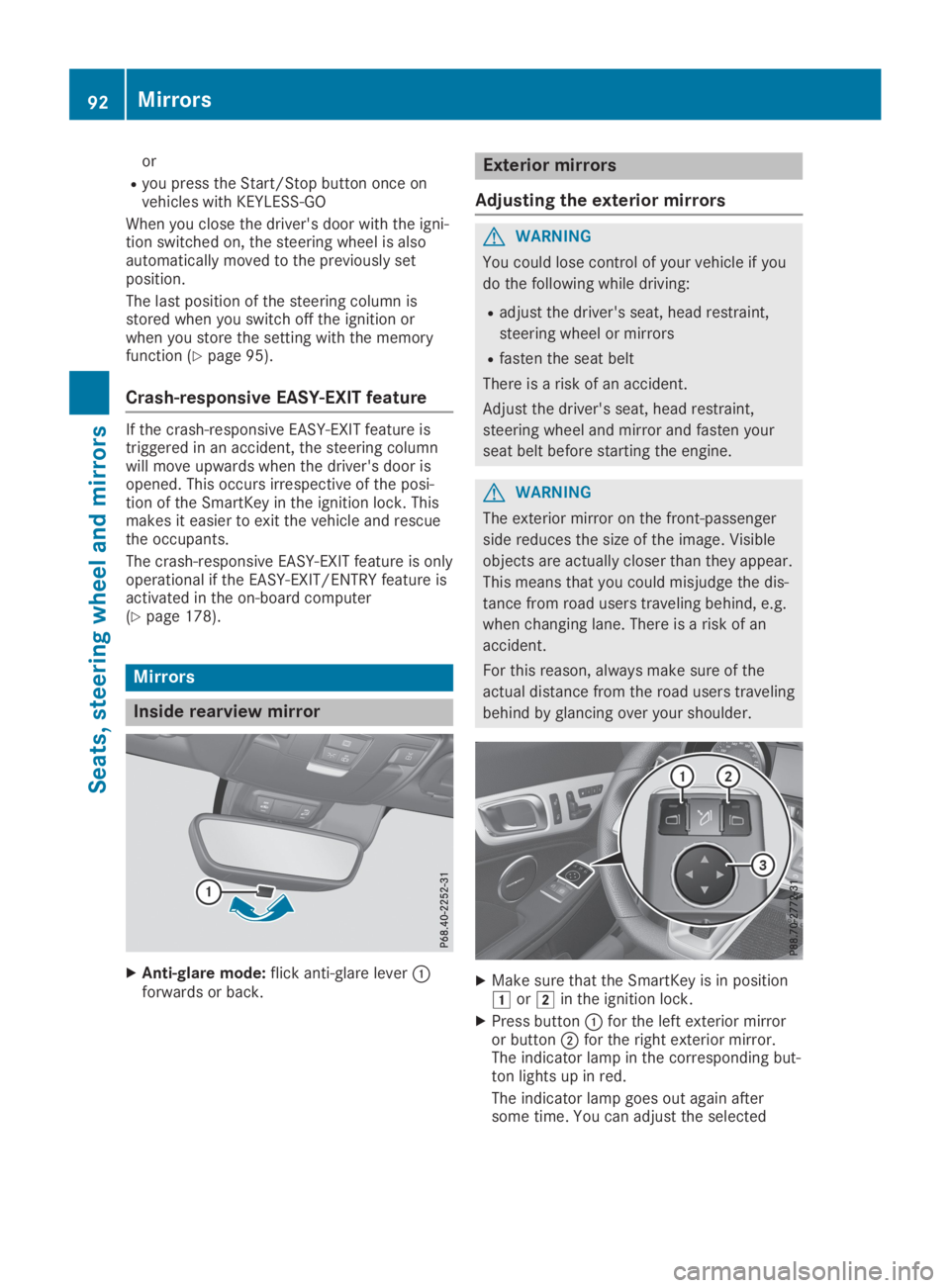
XAnti-glare mode:flick anti-glare leverCforwards or back.
Exterior mirrors
Adjusting the exterior mirrors
GWARNING
You could lose control of your vehicle if you
do the following while driving:
Radjust the driver's seat, head restraint,
steering wheel or mirrors
Rfasten the seat belt
There is a risk of an accident.
Adjust the driver's seat, head restraint,
steering wheel and mirror and fasten your
seat belt before starting the engine.
GWARNING
The exterior mirror on the front-passenger
side reduces the size of the image. Visible
objects are actually closer than they appear.
This means that you could misjudge the dis-
tance from road users traveling behind, e.g.
when changing lane. There is a risk of an
accident.
For this reason, always make sure of the
actual distance from the road users traveling
behind by glancing over your shoulder.
XMake sure that the SmartKey is in positionGorHin the ignition lock.
XPress buttonCfor the left exterior mirroror buttonDfor the right exterior mirror.The indicator lamp in the corresponding but-ton lights up in red.
The indicator lamp goes out again aftersome time. You can adjust the selected
92Mirrors
Seats, steering wheel and mirrors
Page 120 of 306
In vehicles with automatic transmission,engage positions P and R only when thevehicle is stationary.
Where possible, avoid spinning the drivewheels when pulling away on slippery roads.You could otherwise damage the drive train.
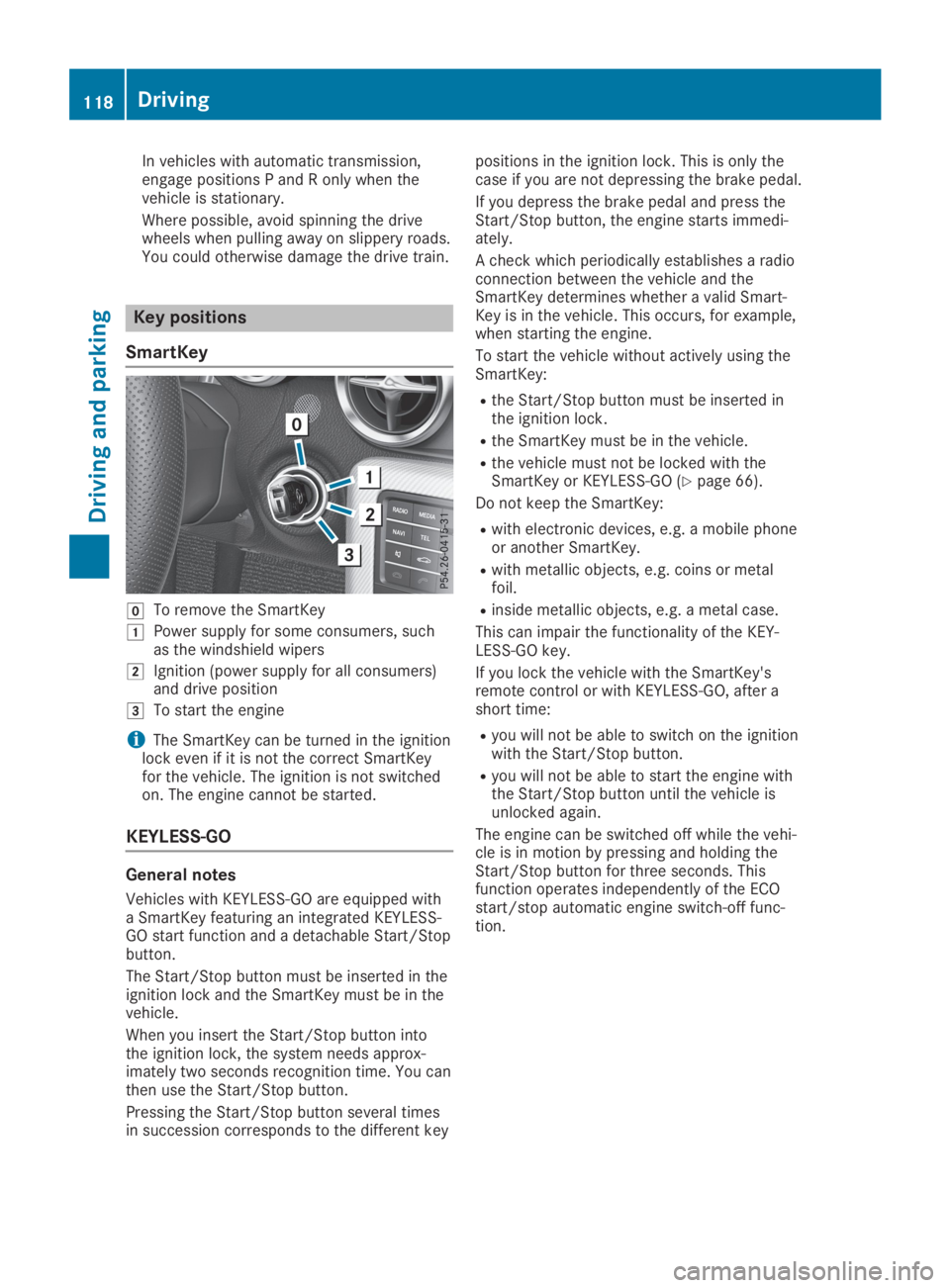
Key positions
SmartKey
ZTo remove the SmartKey
GPower supply for some consumers, suchas the windshield wipers
HIgnition (power supply for all consumers)and drive position
ITo start the engine
iThe SmartKey can be turned in the ignitionlock even if it is not the correct SmartKeyfor the vehicle. The ignition is not switchedon. The engine cannot be started.
KEYLESS-GO
General notes
Vehicles with KEYLESS-GO are equipped witha SmartKey featuring an integrated KEYLESS-GO start function and a detachable Start/Stopbutton.
The Start/Stop button must be inserted in theignition lock and the SmartKey must be in thevehicle.
When you insert the Start/Stop button intothe ignition lock, the system needs approx-imately two seconds recognition time. You canthen use the Start/Stop button.
Pressing the Start/Stop button several timesin succession corresponds to the different key
positions in the ignition lock. This is only thecase if you are not depressing the brake pedal.
If you depress the brake pedal and press theStart/Stop button, the engine starts immedi-ately.
A check which periodically establishes a radioconnection between the vehicle and theSmartKey determines whether a valid Smart-Key is in the vehicle. This occurs, for example,when starting the engine.
To start the vehicle without actively using theSmartKey:
Rthe Start/Stop button must be inserted inthe ignition lock.
Rthe SmartKey must be in the vehicle.
Rthe vehicle must not be locked with theSmartKey or KEYLESS-GO (Ypage 66).
Do not keep the SmartKey:
Rwith electronic devices, e.g. a mobile phoneor another SmartKey.
Rwith metallic objects, e.g. coins or metalfoil.
Rinside metallic objects, e.g. a metal case.
This can impair the functionality of the KEY-LESS-GO key.
If you lock the vehicle with the SmartKey'sremote control or with KEYLESS-GO, after ashort time:
Ryou will not be able to switch on the ignitionwith the Start/Stop button.
Ryou will not be able to start the engine withthe Start/Stop button until the vehicle isunlocked again.
The engine can be switched off while the vehi-cle is in motion by pressing and holding theStart/Stop button for three seconds. Thisfunction operates independently of the ECOstart/stop automatic engine switch-off func-tion.
118Driving
Driving and parking
Page 121 of 306
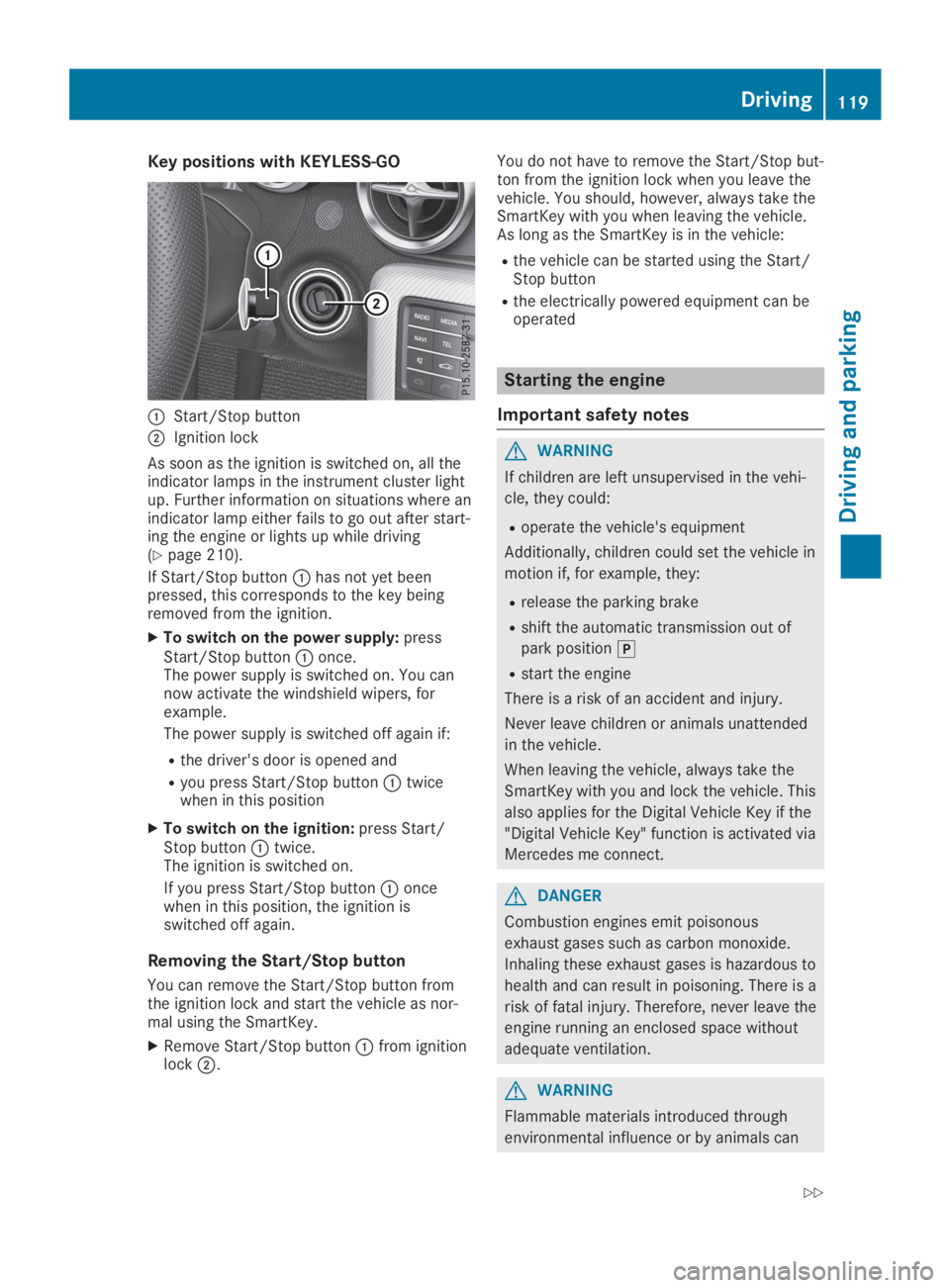
Key positions with KEYLESS-GO
CStart/Stop button
DIgnition lock
As soon as the ignition is switched on, all theindicator lamps in the instrument cluster lightup. Further information on situations where anindicator lamp either fails to go out after start-ing the engine or lights up while driving(Ypage 210).
If Start/Stop buttonChas not yet beenpressed, this corresponds to the key beingremoved from the ignition.
XTo switch on the power supply:pressStart/Stop buttonConce.The power supply is switched on. You cannow activate the windshield wipers, forexample.
The power supply is switched off again if:
Rthe driver's door is opened and
Ryou press Start/Stop buttonCtwicewhen in this position
XTo switch on the ignition:press Start/Stop buttonCtwice.The ignition is switched on.
If you press Start/Stop buttonConcewhen in this position, the ignition isswitched off again.
Removing the Start/Stop button
You can remove the Start/Stop button fromthe ignition lock and start the vehicle as nor-mal using the SmartKey.
XRemove Start/Stop buttonCfrom ignitionlockD.
You do not have to remove the Start/Stop but-ton from the ignition lock when you leave thevehicle. You should, however, always take theSmartKey with you when leaving the vehicle.As long as the SmartKey is in the vehicle:
Rthe vehicle can be started using the Start/Stop button
Rthe electrically powered equipment can beoperated
Starting the engine
Important safety notes
GWARNING
If children are left unsupervised in the vehi-
cle, they could:
Roperate the vehicle's equipment
Additionally, children could set the vehicle in
motion if, for example, they:
Rrelease the parking brake
Rshift the automatic transmission out of
park position]
Rstart the engine
There is a risk of an accident and injury.
Never leave children or animals unattended
in the vehicle.
When leaving the vehicle, always take the
SmartKey with you and lock the vehicle. This
also applies for the Digital Vehicle Key if the
"Digital Vehicle Key" function is activated via
Mercedes me connect.
GDANGER
Combustion engines emit poisonous
exhaust gases such as carbon monoxide.
Inhaling these exhaust gases is hazardous to
health and can result in poisoning. There is a
risk of fatal injury. Therefore, never leave the
engine running an enclosed space without
adequate ventilation.
GWARNING
Flammable materials introduced through
environmental influence or by animals can
Driving119
Driving and pa rking
Z
Page 122 of 306
ignite if in contact with the exhaust system
or parts of the engine that heat up. There is
a risk of fire.
Carry out regular checks to make sure that
there are no flammable foreign materials in
the engine compartment or in the exhaust
system.
During a cold start, the engine runs at higherspeeds to enable the catalytic converter toreach its operating temperature. The sound ofthe engine may change during this time.
Automatic transmission
XDepress the brake pedal and keep itdepressed.
XShift the transmission to position].Transmission position display]is shownin the multifunction display.
iYou can start the engine in transmissionposition]and\\.
Starting procedure with the SmartKey
To start the engine using the SmartKey insteadof KEYLESS-GO, pull the Start/Stop button outof the ignition lock.
XTurn the SmartKey to positionI(Ypage 118) in the ignition lock and releaseit as soon as the engine is running.
Using KEYLESS-GO to start the engine
The Start/Stop button can be used to start thevehicle manually without inserting the Smart-Key into the ignition lock. The Start/Stop but-ton must be inserted in the ignition lock andthe SmartKey must be in the vehicle. Thismode for starting the engine operates inde-pendently of the ECO start/stop automaticengine start function.
XDepress the brake pedal and keep itdepressed.
XPress the Start/Stop button once(Ypage 118).The engine starts.
Pulling away
General notes
GWARNING
If the engine speed is above the idling speed
and you engage transmission position:
orF, the vehicle could pull away sud-
denly. There is a risk of an accident.
When engaging transmission position:
orF, always firmly depress the brake
pedal and do not simultaneously accelerate.
!Change gear in good time and avoid spin-ning the wheels. You could otherwise dam-age the vehicle.
Depress the accelerator carefully when pullingaway.
The vehicle locks centrally once you havepulled away. The locking knobs in the doorsdrop down.
You can open the doors from the inside at anytime.
You can also deactivate the automatic lockingfeature (Ypage 178).
It is only possible to shift the transmissionfrom position]to the desired position if youdepress the brake pedal. Only then is the shiftlock released.
iUpshifts take place at higher enginespeeds after a cold start. This helps the cat-alytic converter to reach its operating tem-perature more quickly.
Information on the automatic release of theelectric parking brake (Ypage 136).
Hill start assist
Hill start assist helps you when pulling awayforward or in reverse on an uphill gradient. Itholds the vehicle for a short time after youhave removed your foot from the brake pedal.This gives you enough time to move your footfrom the brake pedal to the accelerator pedaland to depress it before the vehicle begins toroll.
120Driving
Driving and parking
Page 129 of 306
![MERCEDES-BENZ SLC 2019 User Guide With KEYLESS-GO:if you then open the driv-er's or front-passenger door, the automatictransmission shifts to]automatically.
If you want the automatic transmission toremain in neutral\\, e.g. when](/img/4/59131/w960_59131-128.png "MERCEDES-BENZ SLC 2019 User Guide With KEYLESS-GO:if you then open the driv-er's or front-passenger door, the automatictransmission shifts to]automatically.
If you want the automatic transmission toremain in neutral\\, e.g. when")
With KEYLESS-GO:if you then open the driv-er's or front-passenger door, the automatictransmission shifts to]automatically.
If you want the automatic transmission toremain in neutral\\, e.g. when having thevehicle cleaned in an automatic car wash witha towing system:
XVehicles with KEYLESS-GO:remove theStart/Stop button from the ignition lock.
XInsert the SmartKey into the ignition lock.
XAll vehicles:switch the ignition on.
XDepress the brake pedal and keep itdepressed.
XShift to neutral\\.
XRelease the brake pedal.
XRelease the electric parking brake.
XSwitch off the ignition and leave the Smart-Key in the ignition lock.
Engaging drive position D
XWhen the vehicle is stationary, depress thebrake pedal.
XPush the selector lever back past the firstpoint of resistance.
Transmission positions
EPark position
This prevents the vehicle from roll-ing away when stopped.
Only shift the transmission intopositionE(Ypage 125) whenthe vehicle is stationary. The park-ing lock should not be used as abrake when parking. Always applythe electronic parking brake in addi-tion to the parking lock in order tosecure the vehicle.
If the SmartKey is removed from theignition lock, the transmission islocked.
The automatic transmission shiftstoEautomatically:
Rwhen the SmartKey is removedfrom the ignition lock
Rwhen the engine is switched offwith the transmission in positionFor:and one of thedoors is opened
In the event of a malfunction of thevehicle's electronics, the transmis-sion may lock in positionE.Have the vehicle electronicschecked immediately at a qualifiedspecialist workshop.
FReverse gear
Only shift the transmission intopositionFwhen the vehicle isstationary.
Automatic transmission127
Driving and parking
Z
Page 135 of 306
Do not get into the vehicle again during therefueling process. Otherwise, electrostaticcharge could build up again.
!Do not use diesel to refuel vehicles with agasoline engine. Do not switch on the igni-tion if you accidentally refuel with the wrongfuel. Otherwise, the fuel will enter the fuelsystem. Even small amounts of the wrongfuel could result in damage to the fuel sys-tem and the engine. Notify a qualified spe-cialist workshop and have the fuel tank andfuel lines drained completely.
!Overfilling the fuel tank could damage thefuel system.
!Take care not to spill any fuel on paintedsurfaces. You could otherwise damage thepaintwork.
!Use a filter when adding fuel from a fuelcan. The fuel lines and/or the fuel injectionsystem could otherwise be blocked by parti-cles from the fuel can.
If you overfill the fuel tank, fuel could sprayout when the fuel pump nozzle is removed.
For further information on fuel and fuel quality(Ypage 299).
Refueling
General information
The fuel filler flap is unlocked or locked auto-matically when you unlock or lock the vehiclewith the SmartKey or using KEYLESS-GO.
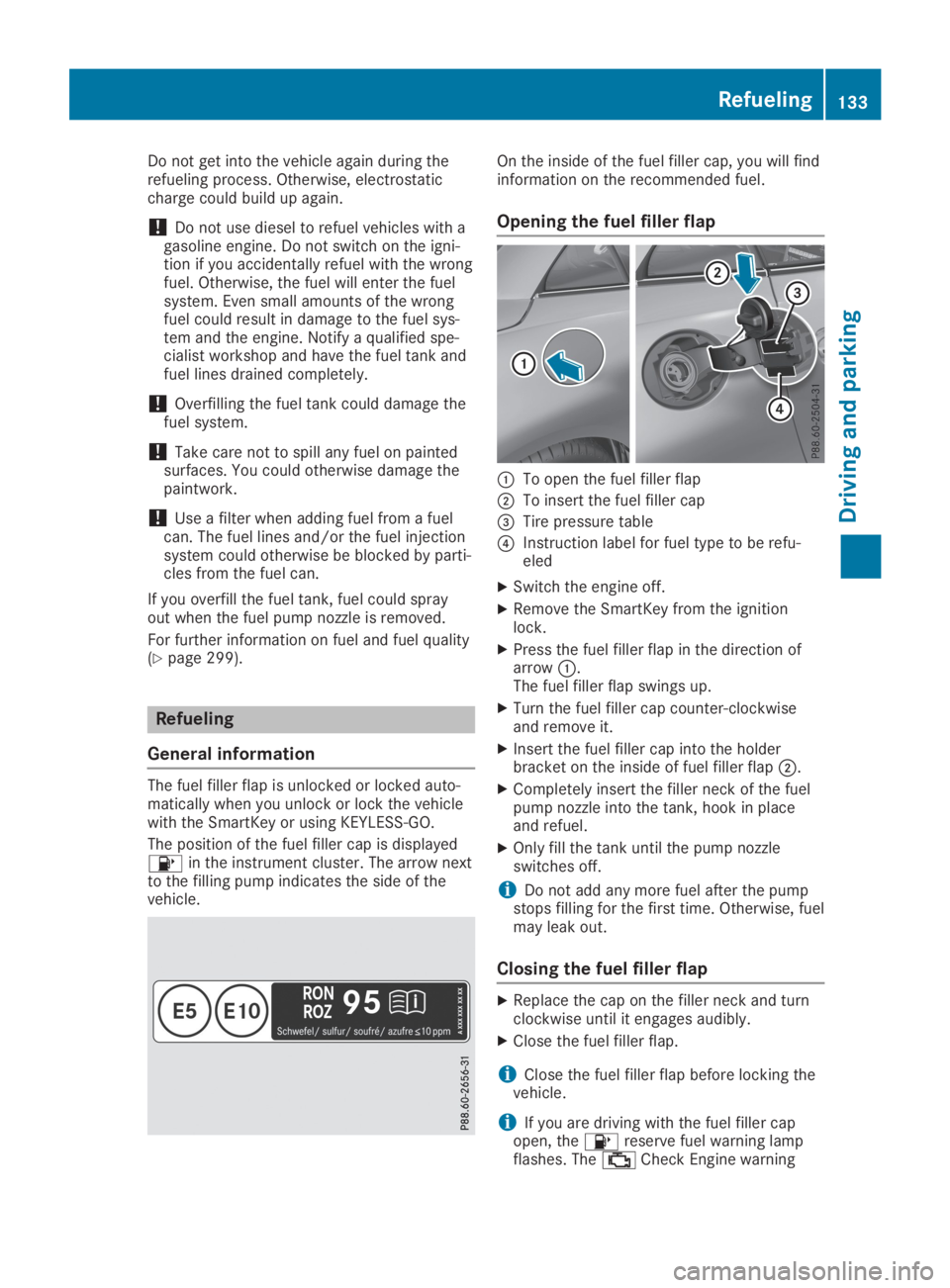
The position of the fuel filler cap is displayed