trunk MERCEDES-BENZ SLC 2019 User Guide
[x] Cancel search | Manufacturer: MERCEDES-BENZ, Model Year: 2019, Model line: SLC, Model: MERCEDES-BENZ SLC 2019Pages: 306, PDF Size: 15 MB
Page 75 of 306
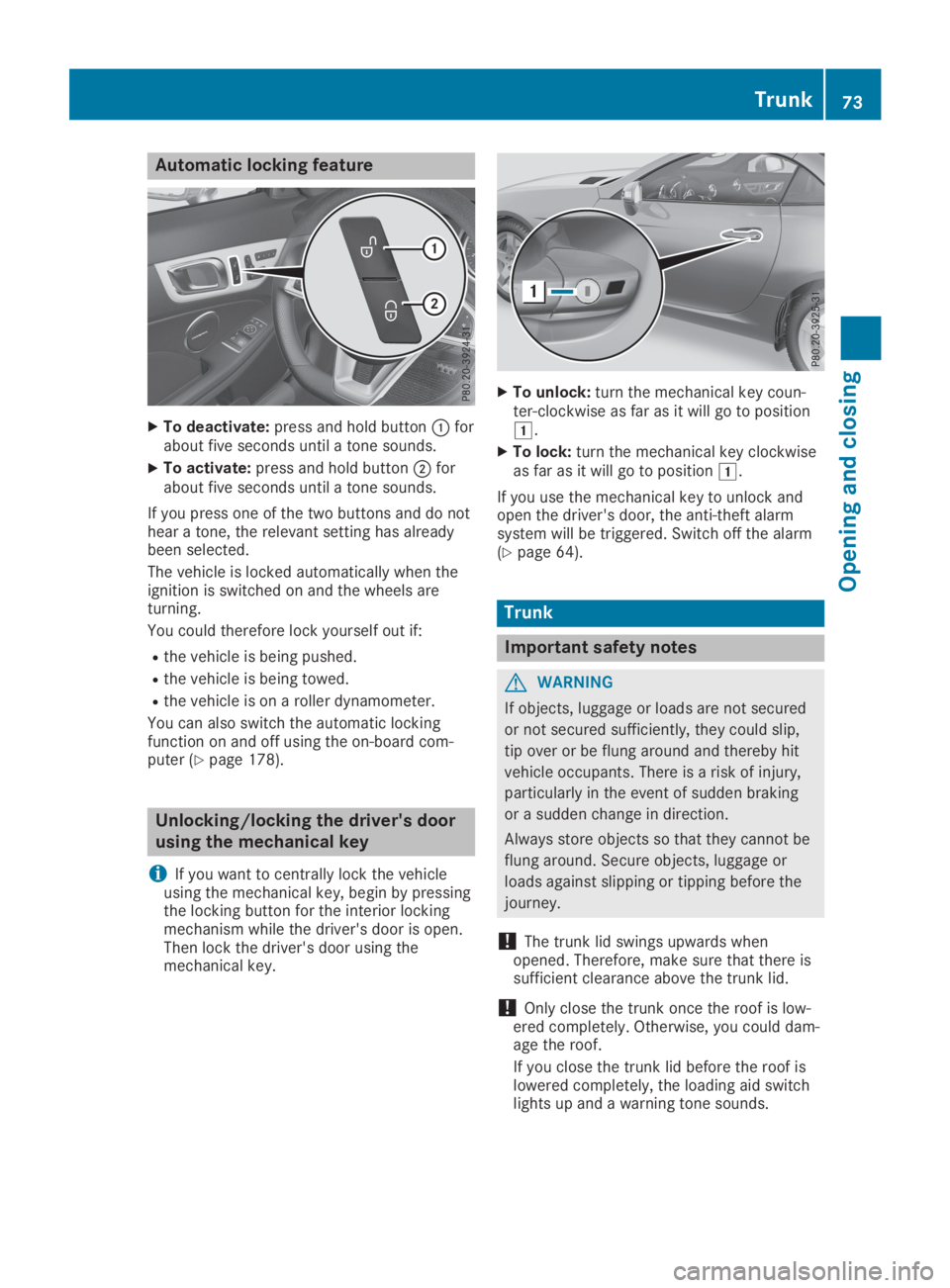
Automatic locking feature
XTo deactivate:press and hold buttonCforabout five seconds until a tone sounds.
XTo activate:press and hold buttonDforabout five seconds until a tone sounds.
If you press one of the two buttons and do nothear a tone, the relevant setting has alreadybeen selected.
The vehicle is locked automatically when theignition is switched on and the wheels areturning.
You could therefore lock yourself out if:
Rthe vehicle is being pushed.
Rthe vehicle is being towed.
Rthe vehicle is on a roller dynamometer.
You can also switch the automatic lockingfunction on and off using the on-board com-puter (Ypage 178).
Unlocking/locking the driver's door
using the mechanical key
iIf you want to centrally lock the vehicleusing the mechanical key, begin by pressingthe locking button for the interior lockingmechanism while the driver's door is open.Then lock the driver's door using themechanical key.
XTo unlock:turn the mechanical key coun-ter-clockwise as far as it will go to positionG.
XTo lock:turn the mechanical key clockwiseas far as it will go to positionG.
If you use the mechanical key to unlock andopen the driver's door, the anti-theft alarmsystem will be triggered. Switch off the alarm(Ypage 64).
Trunk
Important safety notes
GWARNING
If objects, luggage or loads are not secured
or not secured sufficiently, they could slip,
tip over or be flung around and thereby hit
vehicle occupants. There is a risk of injury,
particularly in the event of sudden braking
or a sudden change in direction.
Always store objects so that they cannot be
flung around. Secure objects, luggage or
loads against slipping or tipping before the
journey.
!The trunk lid swings upwards whenopened. Therefore, make sure that there issufficient clearance above the trunk lid.
!Only close the trunk once the roof is low-ered completely. Otherwise, you could dam-age the roof.
If you close the trunk lid before the roof islowered completely, the loading aid switchlights up and a warning tone sounds.
Trunk73
Opening and closing
Z
Page 76 of 306
The opening dimensions of the trunk lid can befound in the "Vehicle data" section(Ypage 303).
Do not leave the SmartKey in the trunk. Youcould otherwise lock yourself out.
The trunk lid can be:
Ropened/closed from outside
Ropened automatically from outside
Rlocked separately
Ropened with the emergency release button
Runlocked with the mechanical key
You should preferably place luggage or loadsin the trunk.
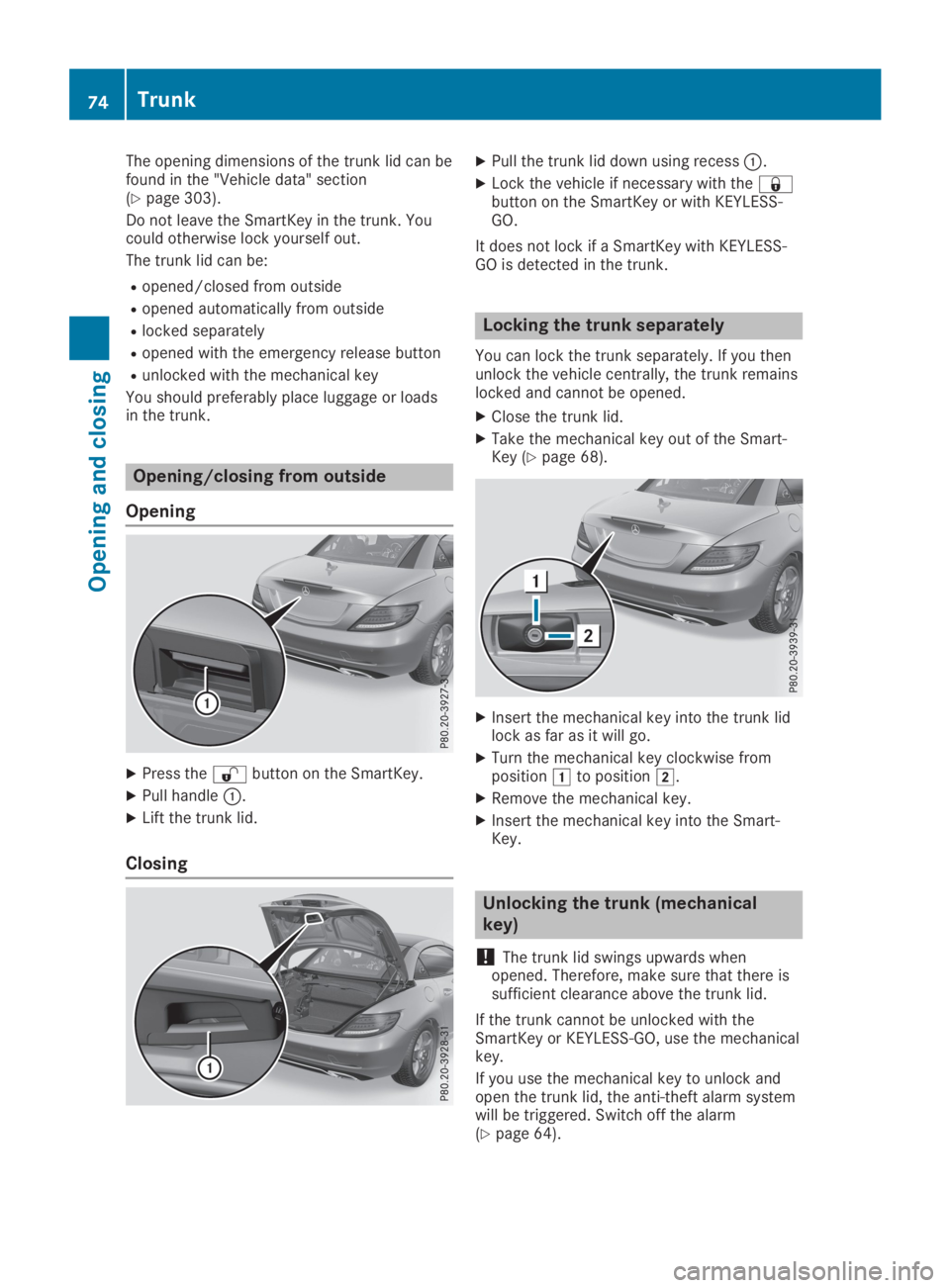
Opening/closing from outside
Opening
XPress the6button on the SmartKey.
XPull handleC.
XLift the trunk lid.
Closing
XPull the trunk lid down using recessC.
XLock the vehicle if necessary with the7button on the SmartKey or with KEYLESS-GO.
It does not lock if a SmartKey with KEYLESS-GO is detected in the trunk.
Locking the trunk separately
You can lock the trunk separately. If you thenunlock the vehicle centrally, the trunk remainslocked and cannot be opened.
XClose the trunk lid.
XTake the mechanical key out of the Smart-Key (Ypage 68).
XInsert the mechanical key into the trunk lidlock as far as it will go.
XTurn the mechanical key clockwise frompositionGto positionH.
XRemove the mechanical key.
XInsert the mechanical key into the Smart-Key.
Unlocking the trunk (mechanical
key)
!The trunk lid swings upwards whenopened. Therefore, make sure that there issufficient clearance above the trunk lid.
If the trunk cannot be unlocked with theSmartKey or KEYLESS-GO, use the mechanicalkey.
If you use the mechanical key to unlock andopen the trunk lid, the anti-theft alarm systemwill be triggered. Switch off the alarm(Ypage 64).
74Trunk
Opening and closing
Page 77 of 306
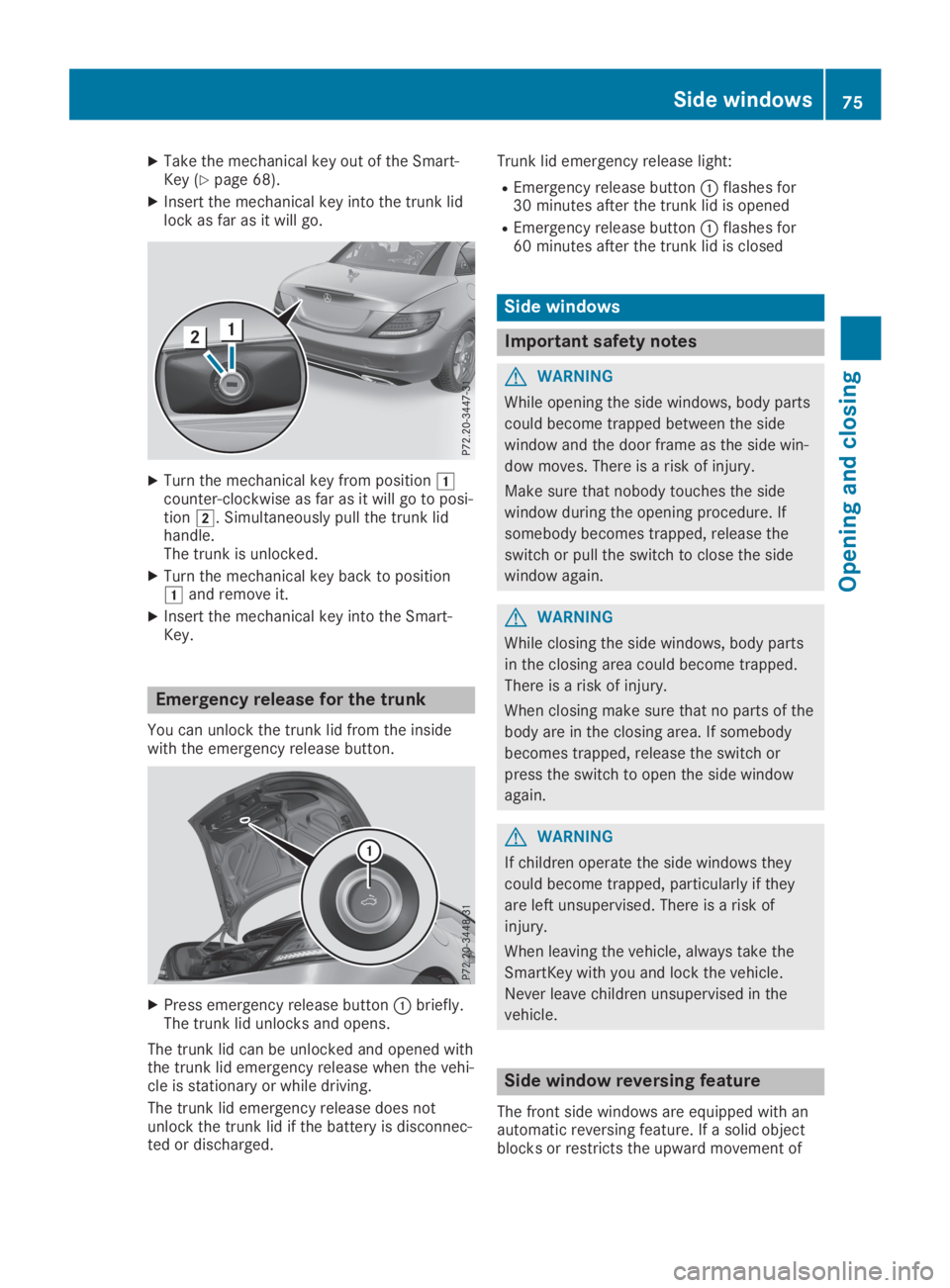
XTake the mechanical key out of the Smart-Key (Ypage 68).
XInsert the mechanical key into the trunk lidlock as far as it will go.
XTurn the mechanical key from positionGcounter-clockwise as far as it will go to posi-tionH. Simultaneously pull the trunk lidhandle.The trunk is unlocked.
XTurn the mechanical key back to positionGand remove it.
XInsert the mechanical key into the Smart-Key.
Emergency release for the trunk
You can unlock the trunk lid from the insidewith the emergency release button.
XPress emergency release buttonCbriefly.The trunk lid unlocks and opens.
The trunk lid can be unlocked and opened withthe trunk lid emergency release when the vehi-cle is stationary or while driving.
The trunk lid emergency release does notunlock the trunk lid if the battery is disconnec-ted or discharged.
Trunk lid emergency release light:
REmergency release buttonCflashes for30 minutes after the trunk lid is opened
REmergency release buttonCflashes for60 minutes after the trunk lid is closed
Side windows
Important safety notes
GWARNING
While opening the side windows, body parts
could become trapped between the side
window and the door frame as the side win-
dow moves. There is a risk of injury.
Make sure that nobody touches the side
window during the opening procedure. If
somebody becomes trapped, release the
switch or pull the switch to close the side
window again.
GWARNING
While closing the side windows, body parts
in the closing area could become trapped.
There is a risk of injury.
When closing make sure that no parts of the
body are in the closing area. If somebody
becomes trapped, release the switch or
press the switch to open the side window
again.
GWARNING
If children operate the side windows they
could become trapped, particularly if they
are left unsupervised. There is a risk of
injury.
When leaving the vehicle, always take the
SmartKey with you and lock the vehicle.
Never leave children unsupervised in the
vehicle.
Side window reversing feature
The front side windows are equipped with anautomatic reversing feature. If a solid objectblocks or restricts the upward movement of
Side windows75
Opening and closing
Z
Page 81 of 306
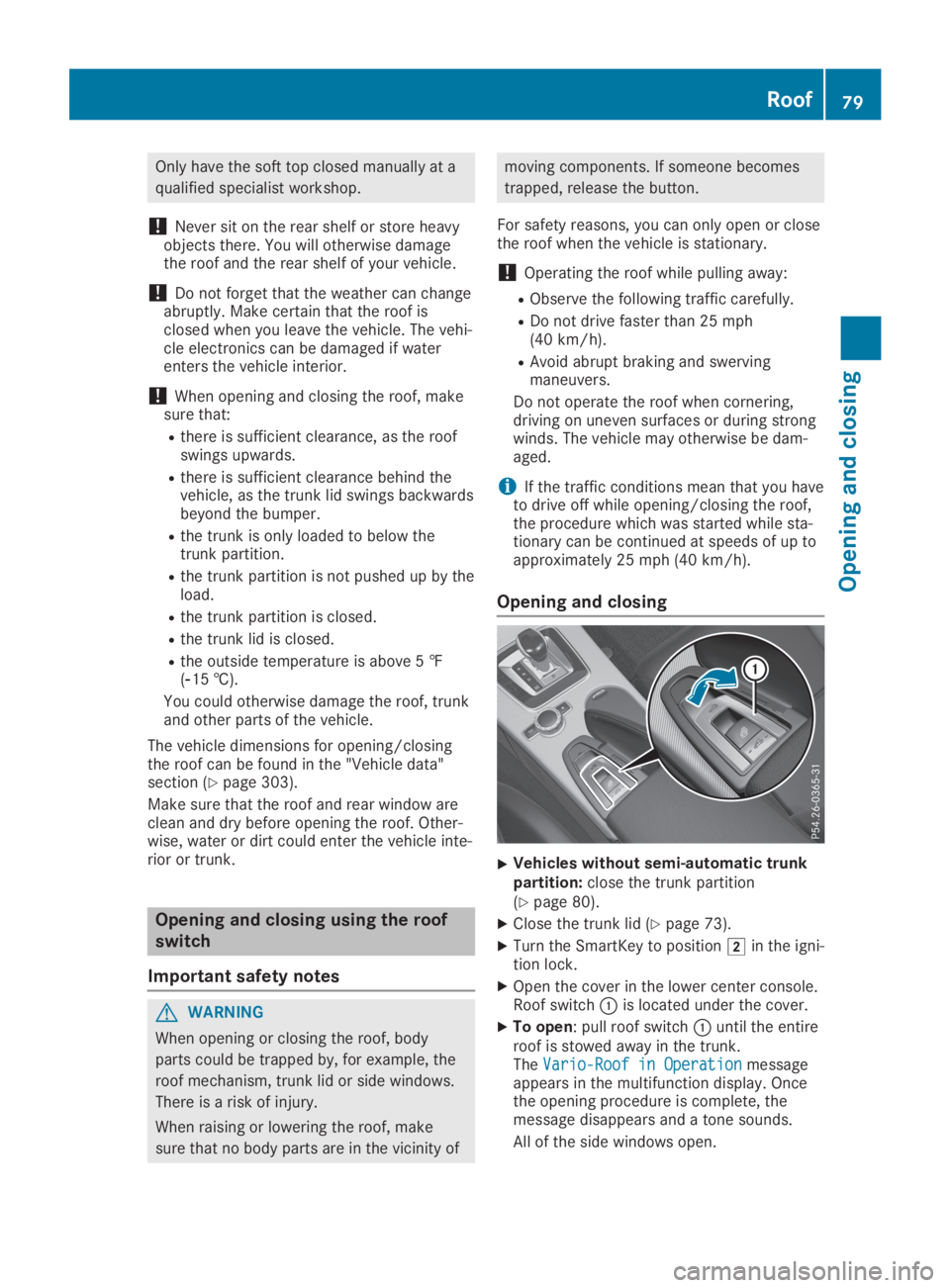
Only have the soft top closed manually at a
qualified specialist workshop.
!Never sit on the rear shelf or store heavyobjects there. You will otherwise damagethe roof and the rear shelf of your vehicle.
!Do not forget that the weather can changeabruptly. Make certain that the roof isclosed when you leave the vehicle. The vehi-cle electronics can be damaged if waterenters the vehicle interior.
!When opening and closing the roof, makesure that:
Rthere is sufficient clearance, as the roofswings upwards.
Rthere is sufficient clearance behind thevehicle, as the trunk lid swings backwardsbeyond the bumper.
Rthe trunk is only loaded to below thetrunk partition.
Rthe trunk partition is not pushed up by theload.
Rthe trunk partition is closed.
Rthe trunk lid is closed.
Rthe outside temperature is above 5 ‡(
Page 82 of 306
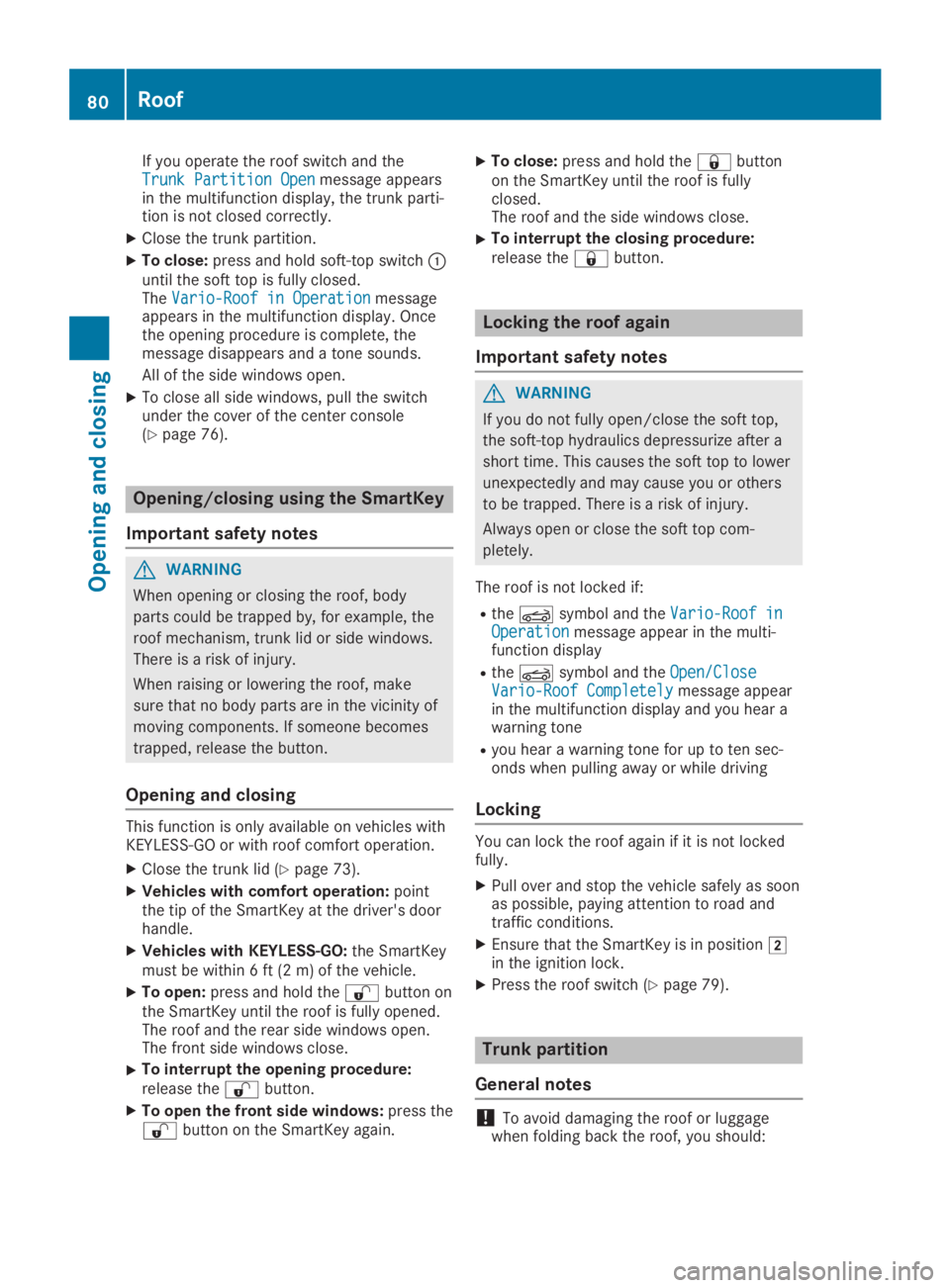
If you operate the roof switch and theTrunk Partition OpenTrunk Partition Openmessage appearsin the multifunction display, the trunk parti-tion is not closed correctly.
XClose the trunk partition.
XTo close:press and hold soft-top switchCuntil the soft top is fully closed.TheVario-Roof in OperationVario-Roof in Operationmessageappears in the multifunction display. Oncethe opening procedure is complete, themessage disappears and a tone sounds.
All of the side windows open.
XTo close all side windows, pull the switchunder the cover of the center console(Ypage 76).
Opening/closing using the SmartKey
Important safety notes
GWARNING
When opening or closing the roof, body
parts could be trapped by, for example, the
roof mechanism, trunk lid or side windows.
There is a risk of injury.
When raising or lowering the roof, make
sure that no body parts are in the vicinity of
moving components. If someone becomes
trapped, release the button.
Opening and closing
This function is only available on vehicles withKEYLESS-GO or with roof comfort operation.
XClose the trunk lid (Ypage 73).
XVehicles with comfort operation:pointthe tip of the SmartKey at the driver's doorhandle.
XVehicles with KEYLESS-GO:the SmartKeymust be within 6 ft (2 m) of the vehicle.
XTo open:press and hold the6button onthe SmartKey until the roof is fully opened.The roof and the rear side windows open.The front side windows close.
XTo interrupt the opening procedure:release the6button.
XTo open the front side windows:press the6button on the SmartKey again.
XTo close:press and hold the7buttonon the SmartKey until the roof is fullyclosed.The roof and the side windows close.
XTo interrupt the closing procedure:release the7button.
Locking the roof again
Important safety notes
GWARNING
If you do not fully open/close the soft top,
the soft-top hydraulics depressurize after a
short time. This causes the soft top to lower
unexpectedly and may cause you or others
to be trapped. There is a risk of injury.
Always open or close the soft top com-
pletely.
The roof is not locked if:
RtheYsymbol and theVario-Roof inVario-Roof inOperationOperationmessage appear in the multi-function display
RtheYsymbol and theOpen/CloseOpen/CloseVario-Roof CompletelyVario-Roof Completelymessage appearin the multifunction display and you hear awarning tone
Ryou hear a warning tone for up to ten sec-onds when pulling away or while driving
Locking
You can lock the roof again if it is not lockedfully.
XPull over and stop the vehicle safely as soonas possible, paying attention to road andtraffic conditions.
XEnsure that the SmartKey is in positionHin the ignition lock.
XPress the roof switch (Ypage 79).
Trunk partition
General notes
!To avoid damaging the roof or luggagewhen folding back the roof, you should:
80Roof
Opening and closing
Page 83 of 306
Ronly load the trunk to below the trunk par-tition
Rnot place any objects on or in front of thetrunk partition
Rnot place any objects on the cover behindthe roll bars
Rnot allow the cargo to push the trunk par-tition upwards
The trunk partition can be used to cover lug-gage and loads in the trunk.
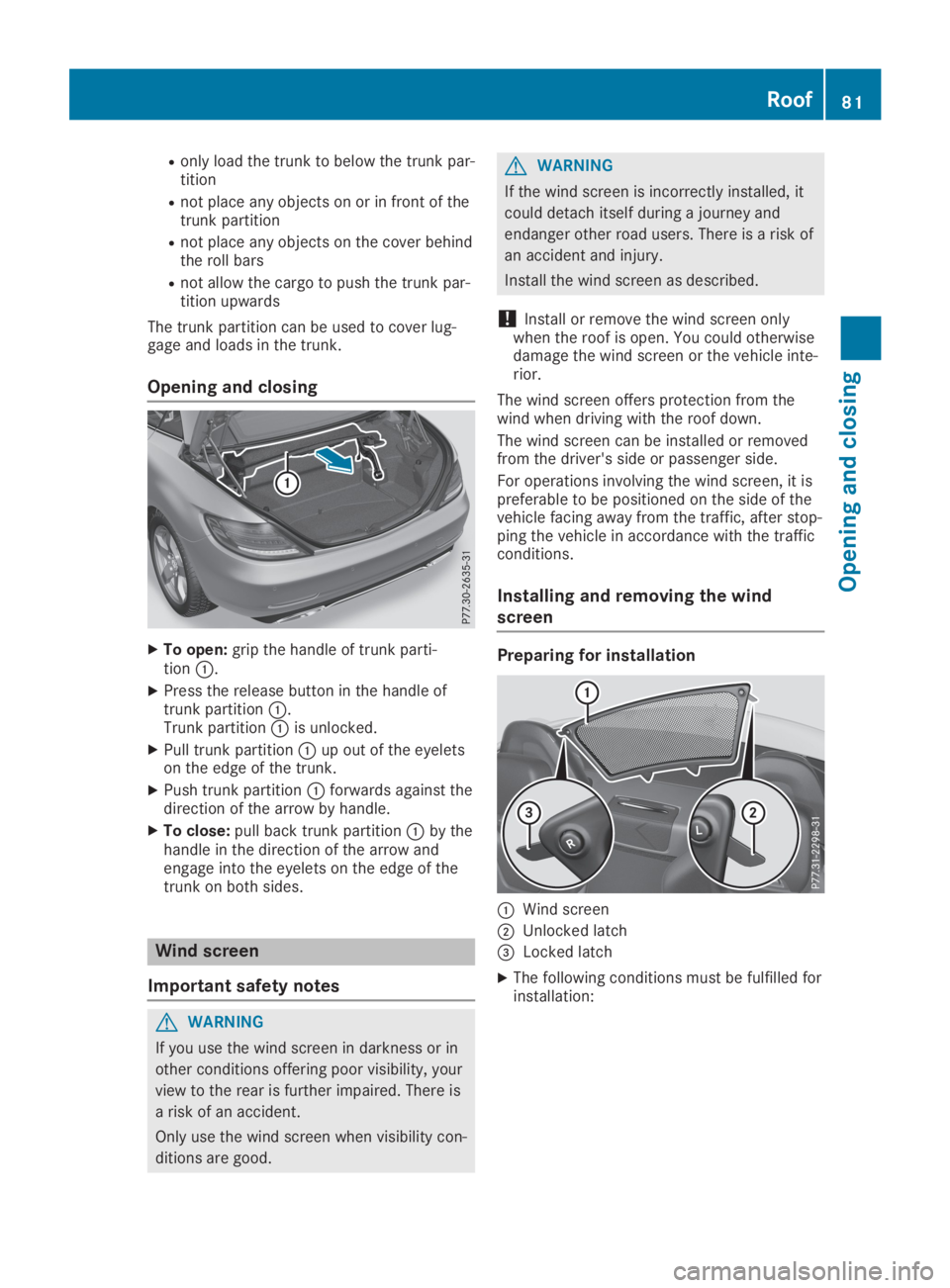
Opening and closing
XTo open:grip the handle of trunk parti-tionC.
XPress the release button in the handle oftrunk partitionC.Trunk partitionCis unlocked.
XPull trunk partitionCup out of the eyeletson the edge of the trunk.
XPush trunk partitionCforwards against thedirection of the arrow by handle.
XTo close:pull back trunk partitionCby thehandle in the direction of the arrow andengage into the eyelets on the edge of thetrunk on both sides.
Wind screen
Important safety notes
GWARNING
If you use the wind screen in darkness or in
other conditions offering poor visibility, your
view to the rear is further impaired. There is
a risk of an accident.
Only use the wind screen when visibility con-
ditions are good.
GWARNING
If the wind screen is incorrectly installed, it
could detach itself during a journey and
endanger other road users. There is a risk of
an accident and injury.
Install the wind screen as described.
!Install or remove the wind screen onlywhen the roof is open. You could otherwisedamage the wind screen or the vehicle inte-rior.
The wind screen offers protection from thewind when driving with the roof down.
The wind screen can be installed or removedfrom the driver's side or passenger side.
For operations involving the wind screen, it ispreferable to be positioned on the side of thevehicle facing away from the traffic, after stop-ping the vehicle in accordance with the trafficconditions.
Installing and removing the wind
screen
Preparing for installation
CWind screen
DUnlocked latch
Page 86 of 306
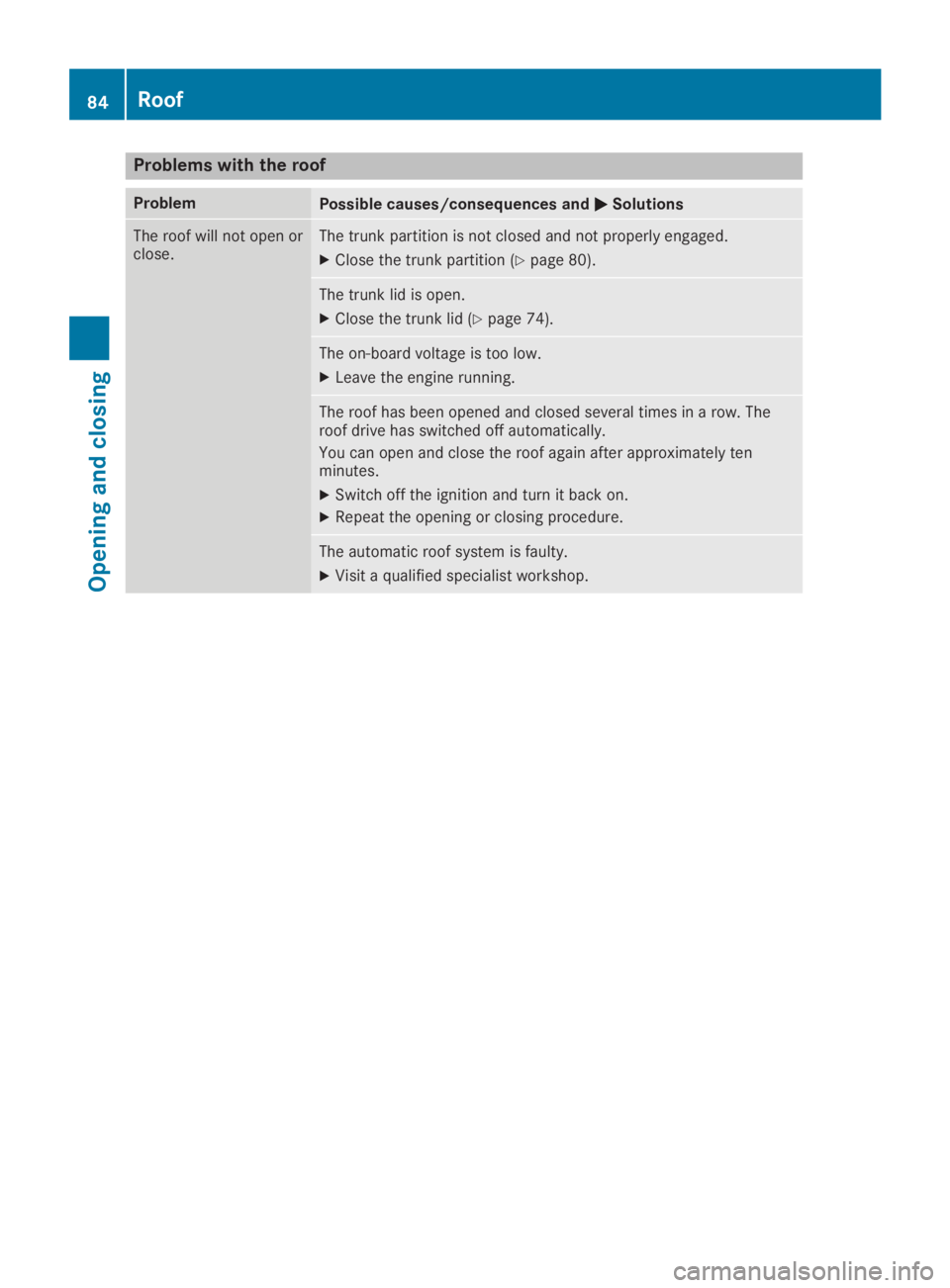
Problems with the roof
ProblemPossible causes/consequences andPPSolutions
The roof will not open orclose.The trunk partition is not closed and not properly engaged.
XClose the trunk partition (Ypage 80).
The trunk lid is open.
XClose the trunk lid (Ypage 74).
The on-board voltage is too low.
XLeave the engine running.
The roof has been opened and closed several times in a row. Theroof drive has switched off automatically.
You can open and close the roof again after approximately tenminutes.
XSwitch off the ignition and turn it back on.
XRepeat the opening or closing procedure.
The automatic roof system is faulty.
XVisit a qualified specialist workshop.
84Roof
Opening and closing
Page 138 of 306
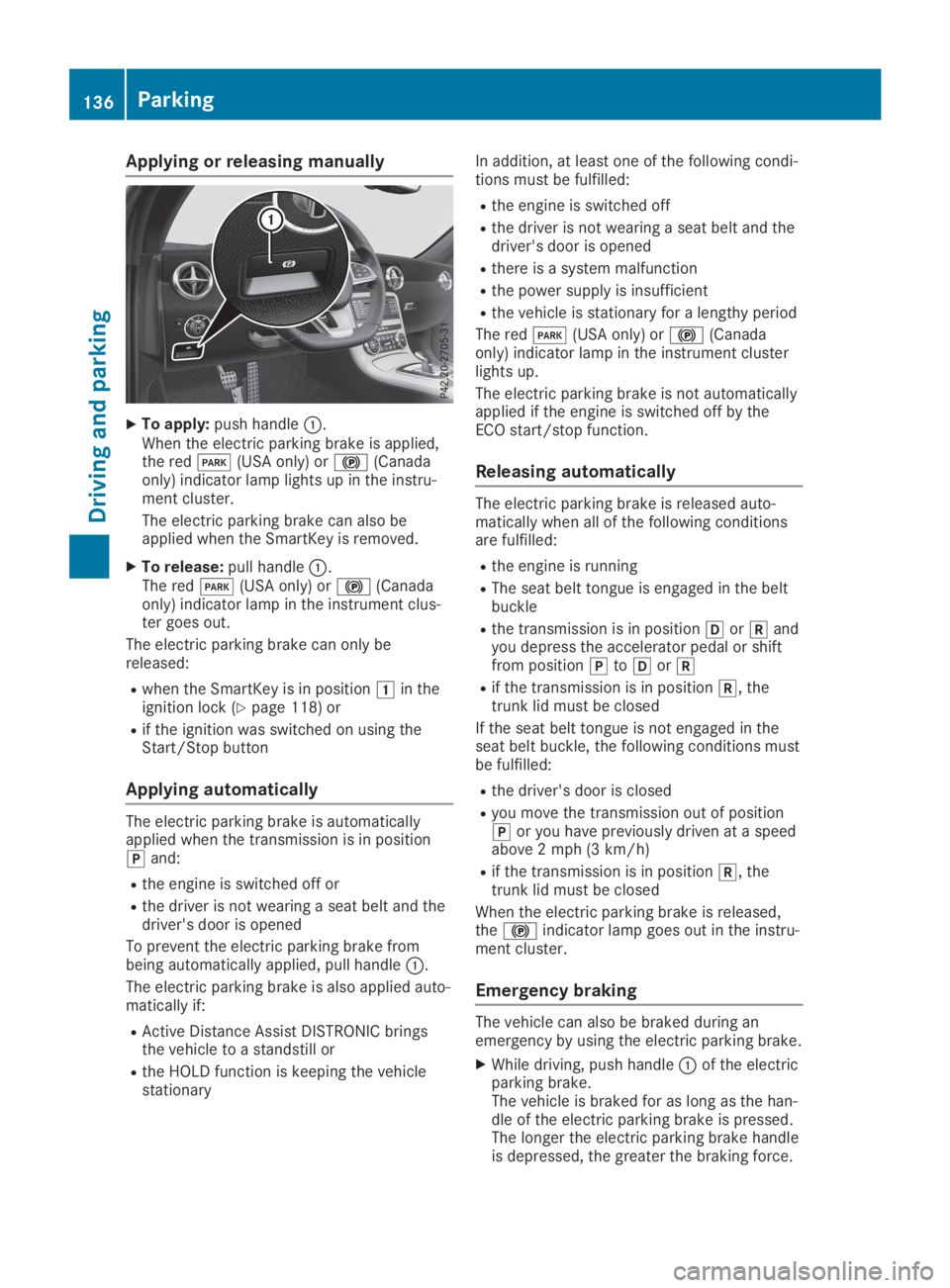
Applying or releasing manually
XTo apply:push handleC.When the electric parking brake is applied,the redI(USA only) or$(Canadaonly) indicator lamp lights up in the instru-ment cluster.
The electric parking brake can also beapplied when the SmartKey is removed.
XTo release:pull handleC.The redI(USA only) or$(Canadaonly) indicator lamp in the instrument clus-ter goes out.
The electric parking brake can only bereleased:
Rwhen the SmartKey is in positionGin theignition lock (Ypage 118) or
Rif the ignition was switched on using theStart/Stop button
Applying automatically
The electric parking brake is automaticallyapplied when the transmission is in position]and:
Rthe engine is switched off or
Rthe driver is not wearing a seat belt and thedriver's door is opened
To prevent the electric parking brake frombeing automatically applied, pull handleC.
The electric parking brake is also applied auto-matically if:
RActive Distance Assist DISTRONIC bringsthe vehicle to a standstill or
Rthe HOLD function is keeping the vehiclestationary
In addition, at least one of the following condi-tions must be fulfilled:
Rthe engine is switched off
Rthe driver is not wearing a seat belt and thedriver's door is opened
Rthere is a system malfunction
Rthe power supply is insufficient
Rthe vehicle is stationary for a lengthy period
The redI(USA only) or$(Canadaonly) indicator lamp in the instrument clusterlights up.
The electric parking brake is not automaticallyapplied if the engine is switched off by theECO start/stop function.
Releasing automatically
The electric parking brake is released auto-matically when all of the following conditionsare fulfilled:
Rthe engine is running
RThe seat belt tongue is engaged in the beltbuckle
Rthe transmission is in position[or^andyou depress the accelerator pedal or shiftfrom position]to[or^
Rif the transmission is in position^, thetrunk lid must be closed
If the seat belt tongue is not engaged in theseat belt buckle, the following conditions mustbe fulfilled:
Rthe driver's door is closed
Ryou move the transmission out of position]or you have previously driven at a speedabove 2 mph (3 km/h)
Rif the transmission is in position^, thetrunk lid must be closed
When the electric parking brake is released,the$indicator lamp goes out in the instru-ment cluster.
Emergency braking
The vehicle can also be braked during anemergency by using the electric parking brake.
XWhile driving, push handleCof the electricparking brake.The vehicle is braked for as long as the han-dle of the electric parking brake is pressed.The longer the electric parking brake handleis depressed, the greater the braking force.
136Parking
Driving and pa rking
Page 161 of 306
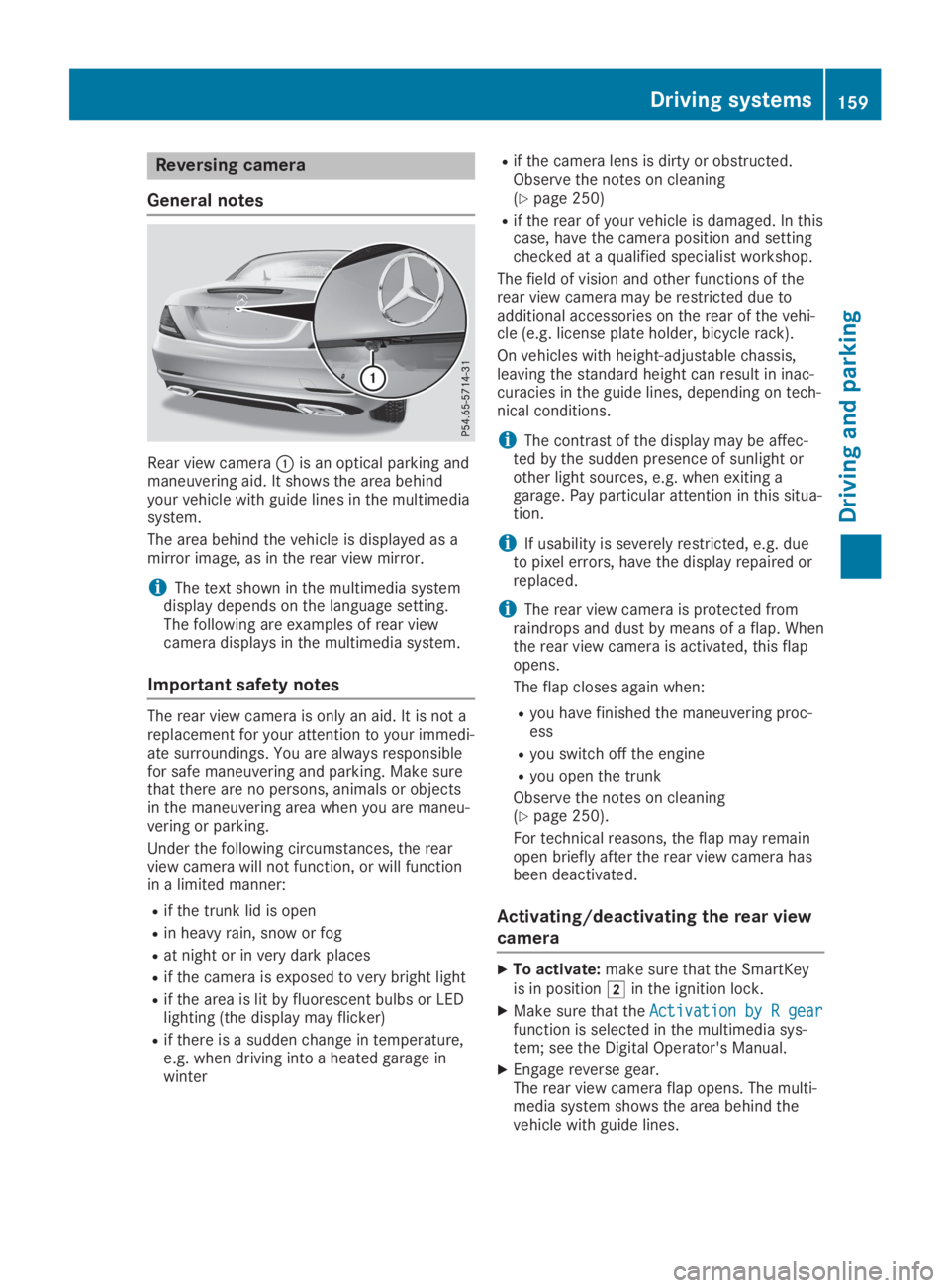
Reversing camera
General notes
Rear view cameraCis an optical parking andmaneuvering aid. It shows the area behindyour vehicle with guide lines in the multimediasystem.
The area behind the vehicle is displayed as amirror image, as in the rear view mirror.
iThe text shown in the multimedia systemdisplay depends on the language setting.The following are examples of rear viewcamera displays in the multimedia system.
Important safety notes
The rear view camera is only an aid. It is not areplacement for your attention to your immedi-ate surroundings. You are always responsiblefor safe maneuvering and parking. Make surethat there are no persons, animals or objectsin the maneuvering area when you are maneu-vering or parking.
Under the following circumstances, the rearview camera will not function, or will functionin a limited manner:
Rif the trunk lid is open
Rin heavy rain, snow or fog
Rat night or in very dark places
Rif the camera is exposed to very bright light
Rif the area is lit by fluorescent bulbs or LEDlighting (the display may flicker)
Rif there is a sudden change in temperature,e.g. when driving into a heated garage inwinter
Rif the camera lens is dirty or obstructed.Observe the notes on cleaning(Ypage 250)
Rif the rear of your vehicle is damaged. In thiscase, have the camera position and settingchecked at a qualified specialist workshop.
The field of vision and other functions of therear view camera may be restricted due toadditional accessories on the rear of the vehi-cle (e.g. license plate holder, bicycle rack).
On vehicles with height-adjustable chassis,leaving the standard height can result in inac-curacies in the guide lines, depending on tech-nical conditions.
iThe contrast of the display may be affec-ted by the sudden presence of sunlight orother light sources, e.g. when exiting agarage. Pay particular attention in this situa-tion.
iIf usability is severely restricted, e.g. dueto pixel errors, have the display repaired orreplaced.
iThe rear view camera is protected fromraindrops and dust by means of a flap. Whenthe rear view camera is activated, this flapopens.
The flap closes again when:
Ryou have finished the maneuvering proc-ess
Ryou switch off the engine
Ryou open the trunk
Observe the notes on cleaning(Ypage 250).
For technical reasons, the flap may remainopen briefly after the rear view camera hasbeen deactivated.
Activating/deactivating the rear view
camera
XTo activate:make sure that the SmartKeyis in positionHin the ignition lock.
XMake sure that theActivation by R gearActivation by R gearfunction is selected in the multimedia sys-tem; see the Digital Operator's Manual.
XEngage reverse gear.The rear view camera flap opens. The multi-media system shows the area behind thevehicle with guide lines.
Driving systems159
Driving and parking
Z
Page 162 of 306
![MERCEDES-BENZ SLC 2019 User Guide The image from the rear view camera isavailable throughout the maneuvering proc-ess.
To deactivate:the rear view camera deacti-vates if you shift the transmission to position], or after driving forwa](/img/4/59131/w960_59131-161.png "MERCEDES-BENZ SLC 2019 User Guide The image from the rear view camera isavailable throughout the maneuvering proc-ess.
To deactivate:the rear view camera deacti-vates if you shift the transmission to position], or after driving forwa")
The image from the rear view camera isavailable throughout the maneuvering proc-ess.
To deactivate:the rear view camera deacti-vates if you shift the transmission to position], or after driving forwards a short distance.
The inner segments of the warning indicatorare displayed in red if there is a complete sys-tem failure. The indicator lamp in thePARKTRONIC button lights up.
If the system fails at the rear of the vehicle:
Rthe rear segments are shown in red whenbacking up.
Rthe rear segments are hidden when drivingforwards.
Displays in the multimedia system
The rear view camera may show a distortedview of obstacles, show them incorrectly ornot at all. The rear view camera does not showobjects in the following positions:
Rvery close to the rear bumper
Runder the rear bumper
Rin close range above the handle on the trunklid
!Objects not at ground level may appear tobe further away than they actually are, e.g.:
Rthe bumper of a parked vehicle
Rthe drawbar of a trailer
Rthe ball coupling of a trailer tow hitch
Rthe rear section of an HGV
Ra slanted post
Use the guidelines only for orientation.Approach objects no further than the bot-tom-most guideline.
CYellow guide line at a distance of approx-imately 13 ft (4.0 m) from the rear area
DWhite guide line without steering input –vehicle width including the exterior mirrors(static)