start stop button MERCEDES-BENZ SLC 2019 Owner's Manual
[x] Cancel search | Manufacturer: MERCEDES-BENZ, Model Year: 2019, Model line: SLC, Model: MERCEDES-BENZ SLC 2019Pages: 306, PDF Size: 15 MB
Page 176 of 306
attention to traffic conditions and operate
the equipment when the vehicle is station-
ary.
When telephoning, you must observe the legalrequirements for the country in which you arecurrently driving.
XSwitch on the mobile phone (see the manu-facturer’s operating instructions).
XSwitch on the multimedia system (see theDigital Operator's Manual)
XEstablish a Bluetooth®connection to themultimedia system (Ypage 221).
XPress theYorebutton on the steer-ing wheel to select theTelTelmenu.
You will see one of the following display mes-sages in the multifunction display:
RPhone READYPhone READYor the name of the networkprovider: the mobile phone has found a net-work and is ready to receive.
RPhone No ServicePhone No Service: there is no networkavailable or the mobile phone is searchingfor a network.
Accepting a call
If someone calls you when you are in theTelTelmenu, a display message appears in the multi-function display.
You can accept a call at any time regardless ofthe menu selected.
XPress theabutton on the steering wheelto accept an incoming call.
Rejecting or ending a call
XPress thevbutton on the steering wheelto reject or end a call.
Selecting an entry in the phone book
XPress theYorebutton on the steer-ing wheel to select theTelTelmenu.
XPress thec,dorvbutton toswitch to the phone book.
XAuthorize access to the phone book on thephone.
XPressdorcto select the names oneafter the other.
or
XTo start rapid scrolling:press and holdthedorcbutton for longer than onesecond.The names in the phone book are displayedquickly one after the other.
Rapid scrolling stops when you release thebutton or reach the end of the list.
XIf only one telephone number is storedfor a name:press theaorvbuttonto start dialing.
or
XIf there is more than one number for aparticular name:press theaorvbutton to display the numbers.
XPress thecordbutton to select thenumber you want to dial.
XPress theaorvbutton to start dial-ing.
or
XTo exit the telephone book:press thevor8button.
Redialing
The on-board computer saves the last namesor numbers dialed in the redial memory.
XPress theYorebutton on the steer-ing wheel to select theTelTelmenu.
XPress theabutton to switch to theredial memory.
XPress thecordbutton to select thedesired name or number.
XPress theaorvbutton to start dial-ing.
or
XTo exit the redial memory:press thevor8button.
Assistance menu
Introduction
Depending on your vehicle's equipment, in theDriveAssistDriveAssistmenu, you have the followingoptions:
174Menus and submenus
On-board computer and displays
Page 183 of 306
XPress the8button on the steeringwheel.
XConfirmYesYeswithv.
The RACE TIMER interrupts timing if you stopthe vehicle and turn the SmartKey to positionGin the ignition lock. If you turn the Smart-Key to position3and then pressvto con-
firmStartStart, timing is continued.
Resetting the current lap
XStop the RACE TIMER.
XPress theYorebutton to selectReset LapReset Lap.
XPressvto reset the lap time to "0".
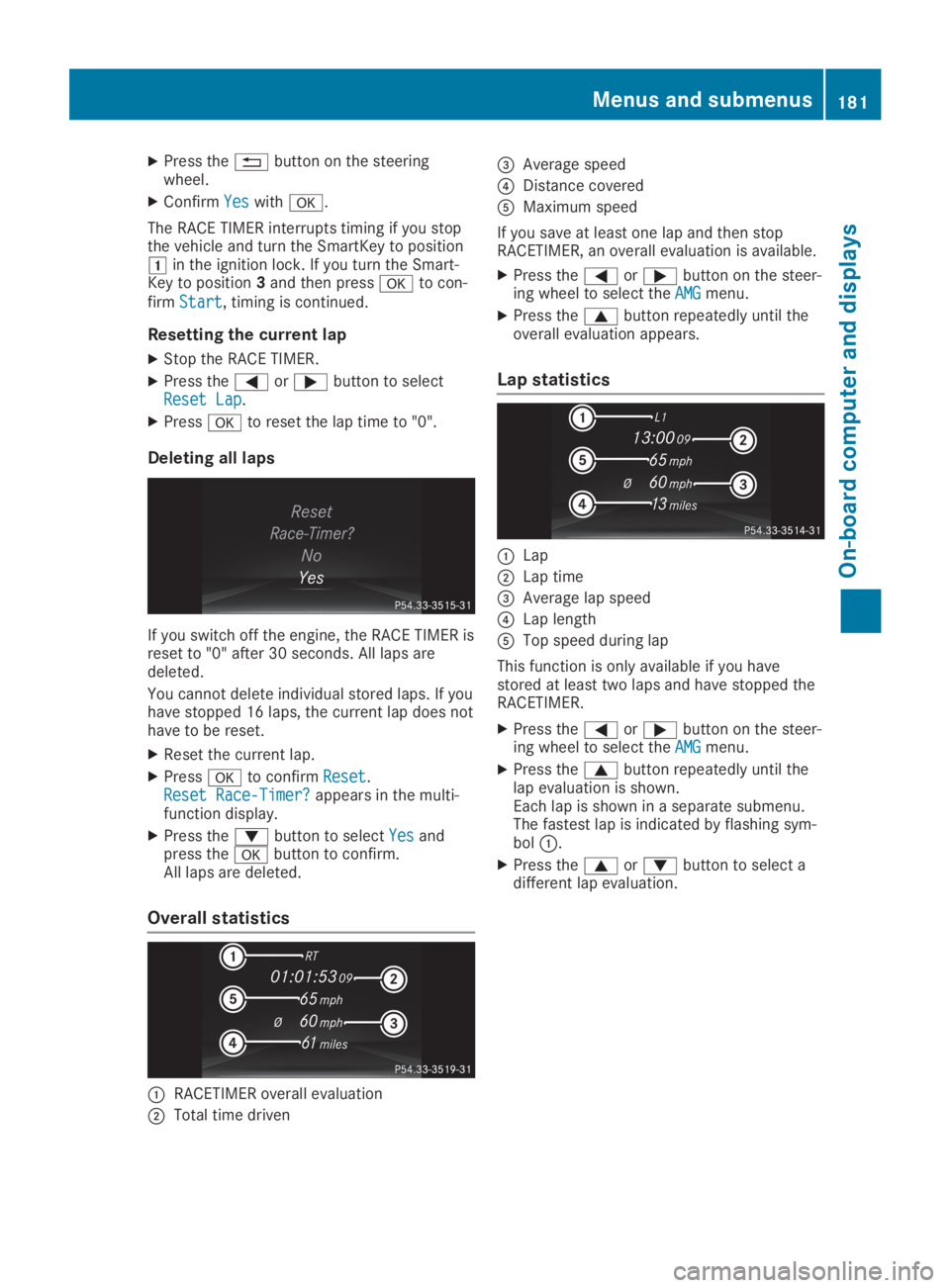
Deleting all laps
If you switch off the engine, the RACE TIMER isreset to "0" after 30 seconds. All laps aredeleted.
You cannot delete individual stored laps. If youhave stopped 16 laps, the current lap does nothave to be reset.
XReset the current lap.
XPressvto confirmResetReset.Reset Race-Timer?Reset Race-Timer?appears in the multi-function display.
XPress thedbutton to selectYesYesandpress thevbutton to confirm.All laps are deleted.
Overall statistics
CRACETIMER overall evaluation
DTotal time driven
Page 245 of 306
If you need to do any work inside the engine
compartment:
Rswitch off the ignition
Rnever reach into the area where there is a
risk of danger from moving components,
such as the fan rotation area
Rremove jewelry and watches
Rkeep items of clothing and hair, for exam-
ple, away from moving parts
GWARNING
The cooling system is pressurized, particu-
larly when the motor is warm. If you open
the cap, you could be scalded if hot coolant
sprays out. There is a risk of injury.
Let the engine cool down before you open
the cap. Wear protective gloves and protec-
tive eyewear when opening. Open the cap
slowly to release pressure.
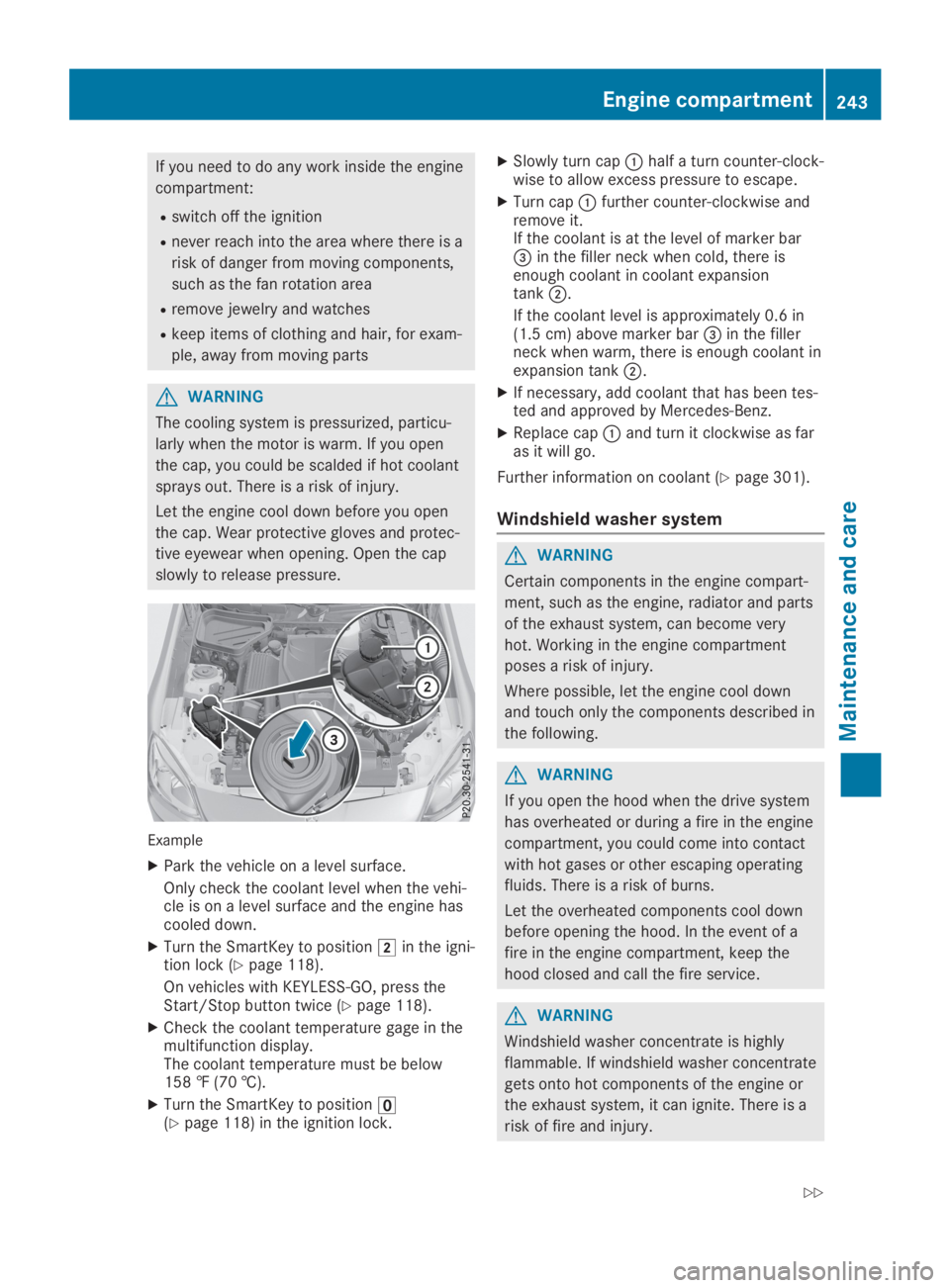
Example
XPark the vehicle on a level surface.
Only check the coolant level when the vehi-cle is on a level surface and the engine hascooled down.
XTurn the SmartKey to positionHin the igni-tion lock (Ypage 118).
On vehicles with KEYLESS-GO, press theStart/Stop button twice (Ypage 118).
XCheck the coolant temperature gage in themultifunction display.The coolant temperature must be below158 ‡ (70 †).
XTurn the SmartKey to position
Page 255 of 306
teristics, e.g. winter tires. A TIREFIT kit may beobtained from a qualified specialist workshop.
Information on changing and mounting wheels(Ypage 288).
XStop the vehicle on solid, non-slippery andlevel ground, as far away as possible fromtraffic.
XSwitch on the hazard warning lamps.
XSecure the vehicle against rolling away(Ypage 134).
XIf possible, bring the front wheels into thestraight-ahead position.
XSwitch off the engine.
XVehicles without KEYLESS-GO:removethe SmartKey from the ignition lock.
XVehicles with KEYLESS-GO:open the driv-er's door.The vehicle electronics are now in positionZ. This is the same as the SmartKey havingbeen removed.
XVehicles with KEYLESS-GO:remove theStart/Stop button from the ignition lock(Ypage 118).
XMake sure that the passengers are notendangered as they do so. Make sure thatno one is near the danger area while awheel is being changed. Anyone who is notdirectly assisting in the wheel changeshould, for example, stand behind the bar-rier.
XGet out of the vehicle. Pay attention to traf-fic conditions when doing so.
XClose the driver's door.
MOExtended tires (tires with run-flat
properties)
General notes
With MOExtended tires (tires with run flatcharacteristics), you can continue to drive yourvehicle even if there is a total loss of pressurein one or more tires. The affected tire must notshow any clearly visible damage.
You can recognize an MOExtended tire by theMOExtended marking which appears on thesidewall of the tire. You will find this markingnext to the tire size designation, the load-bear-ing capacity and the speed index(Ypage 283).
MOExtended tires may only be used in con-junction with an active tire pressure loss warn-ing system or with an active tire pressure mon-itor.
If a pressure loss warning messageappears in the multifunction display:
Robserve the instructions in the display mes-sages (Ypage 201)
Rcheck the tire for damage
Rif driving on, observe the following notes
The driving distance possible in run-flat modeis approximately 50 miles (80 kilometers)when the vehicle is partially laden and approx-imately 19 miles (30 kilometers) when thevehicle is fully laden.
In addition to the vehicle load, the driving dis-tance possible depends upon:
RVehicle speed
RRoad condition
ROutside temperature
The driving distance possible in run-flat modemay be reduced by extreme driving conditionsor maneuvers, or it can be increased through amoderate style of driving.
The driving distance possible in run-flat modeis counted from the moment the tire pressureloss warning appears in the multifunction dis-play.
You must not exceed a maximum designspeed of 50 mph (80 km/h).
When replacing one or all tires, please observethe following specifications for your vehicle'stires:
RSize
RType and
RThe "MOExtended" mark
If a tire has gone flat and cannot be replacedwith an MOExtended tire, a standard tire maybe used as a temporary measure. Make surethat you use the proper size and type (summeror winter tire).
Vehicles equipped with MOExtended tires arenot equipped with a TIREFIT kit at the factory.It is therefore recommended that you addition-ally equip your vehicle with a TIREFIT kit if youmount tires that do not feature run-flat charac-teristics, e.g. winter tires. A TIREFIT kit can beobtained from a qualified specialist workshop,for example.
Flat tire253
Breakdown assistance
Page 265 of 306
Towing and tow-starting
Important safety notes
GWARNING
When towing or tow-starting another vehicle
and its weight is greater than the permissi-
ble gross weight of your vehicle, the:
Rthe towing eye could detach itself
Rthe vehicle/trailer combination could roll-
over.
There is a risk of an accident.
When towing or tow-starting another vehi-
cle, its weight should not be greater than
the permissible gross weight of your vehicle.
Details on the permissible gross vehicle weightof your vehicle can be found on the vehicleidentification plate (Ypage 297).
!When Active Brake Assist, Active DistanceAssist DISTRONIC or the HOLD function isactivated, the vehicle brakes automaticallyin certain situations.
To avoid damage to the vehicle, deactivatethese systems in the following or similar sit-uations:
Rwhen towing the vehicle
Rin the car wash
!Only secure the tow rope or tow bar at thetowing eyes. Otherwise, the vehicle could bedamaged.
!Do not use the towing eye for recovery,this could damage the vehicle. If in doubt,recover the vehicle with a crane.
!When towing, pull away slowly andsmoothly. If the tractive power is too high,the vehicles could be damaged.
!Do not tow with sling-type equipment. Thiscould damage the vehicle.
!When towing away vehicles with KEYLESS-GO, use the key instead of the Start/Stopbutton. The automatic transmission mayotherwise shift to position]when youopen the driver's or front-passenger door,which could damage the transmission.
!Make sure that the electric parking brakeis released. If the electric parking brake isfaulty, visit a qualified specialist workshop.
!You may tow the vehicle for a maximumdistance of 30 miles (50 kilometers). A tow-ing speed of 30 mph (50 km/h) must not beexceeded.
For towing distances over 30 miles(50 kilometers), the entire vehicle must beraised and transported.
!When you are tow-starting or towinganother vehicle, its weight must not exceedthe maximum permissible gross weight ofyour vehicle.
It is better to have the vehicle transportedthan to have it towed away.
The automatic transmission must be in posi-tion\\when the vehicle is being towed away.
The battery must be connected and charged.Otherwise, you:
Rcannot turn the SmartKey to positionHinthe ignition lock
Rcannot shift the automatic transmission toposition\\
Deactivate the automatic locking featurebefore the vehicle is towed (Ypage 178). Youcould otherwise be locked out when pushingor towing the vehicle.
Installing/removing the towing eye
Installing the towing eye
GWARNING
The exhaust tail pipe may be very hot. There
is a risk of burns when removing the rear
cover.
Do not touch the exhaust pipe. Take particu-
lar care when removing the rear cover.
Towing and tow-starting263
Breakdown assistance
Z
Page 266 of 306
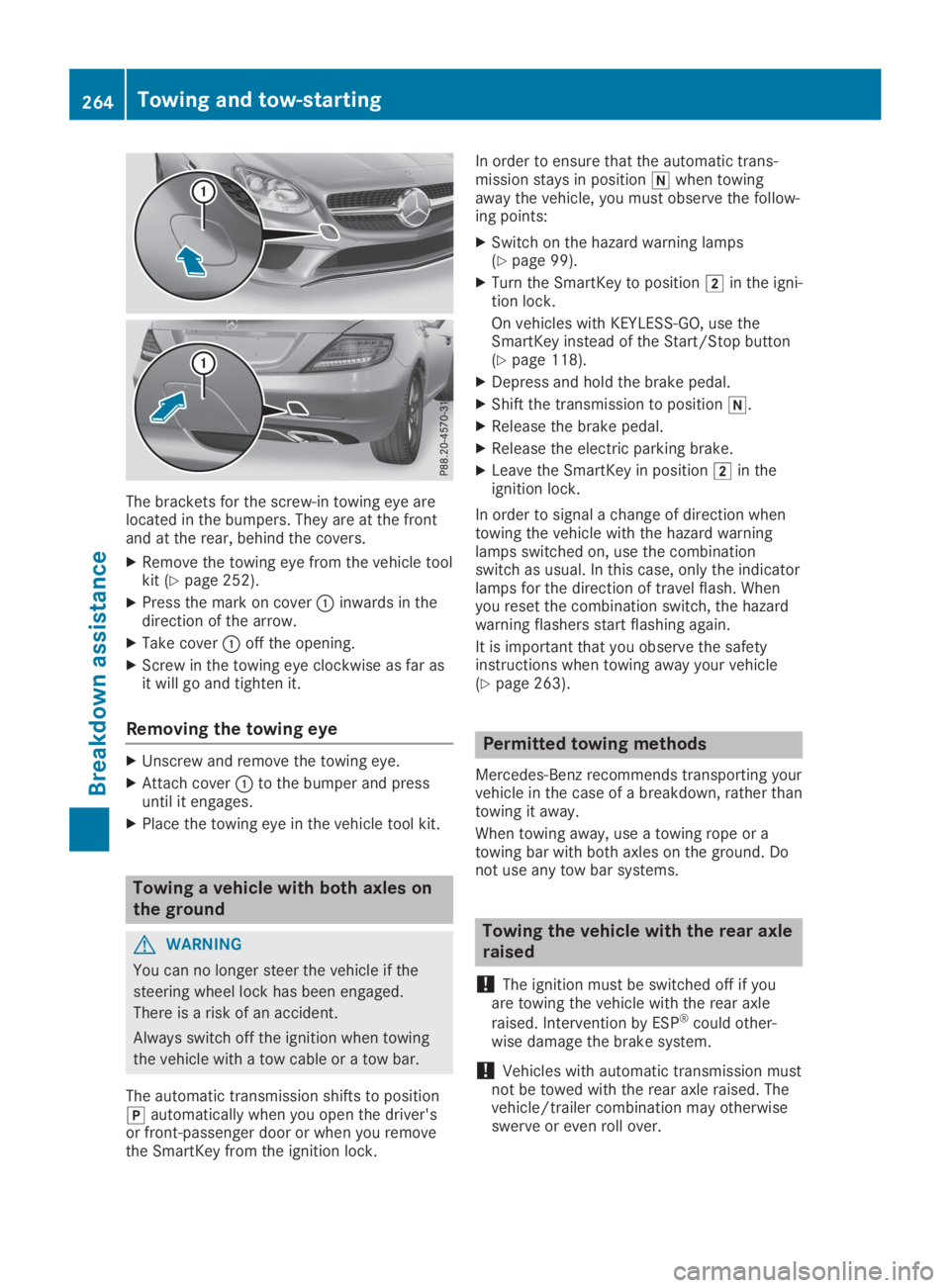
The brackets for the screw-in towing eye arelocated in the bumpers. They are at the frontand at the rear, behind the covers.
XRemove the towing eye from the vehicle toolkit (Ypage 252).
XPress the mark on coverCinwards in thedirection of the arrow.
XTake coverCoff the opening.
XScrew in the towing eye clockwise as far asit will go and tighten it.
Removing the towing eye
XUnscrew and remove the towing eye.
XAttach coverCto the bumper and pressuntil it engages.
XPlace the towing eye in the vehicle tool kit.
Towing a vehicle with both axles on
the ground
GWARNING
You can no longer steer the vehicle if the
steering wheel lock has been engaged.
There is a risk of an accident.
Always switch off the ignition when towing
the vehicle with a tow cable or a tow bar.
The automatic transmission shifts to position]automatically when you open the driver'sor front-passenger door or when you removethe SmartKey from the ignition lock.
In order to ensure that the automatic trans-mission stays in position\\when towingaway the vehicle, you must observe the follow-ing points:
XSwitch on the hazard warning lamps(Ypage 99).
XTurn the SmartKey to positionHin the igni-tion lock.
On vehicles with KEYLESS-GO, use theSmartKey instead of the Start/Stop button(Ypage 118).
XDepress and hold the brake pedal.
XShift the transmission to position\\.
XRelease the brake pedal.
XRelease the electric parking brake.
XLeave the SmartKey in positionHin theignition lock.
In order to signal a change of direction whentowing the vehicle with the hazard warninglamps switched on, use the combinationswitch as usual. In this case, only the indicatorlamps for the direction of travel flash. Whenyou reset the combination switch, the hazardwarning flashers start flashing again.
It is important that you observe the safetyinstructions when towing away your vehicle(Ypage 263).
Permitted towing methods
Mercedes-Benz recommends transporting yourvehicle in the case of a breakdown, rather thantowing it away.
When towing away, use a towing rope or atowing bar with both axles on the ground. Donot use any tow bar systems.
Towing the vehicle with the rear axle
raised
!The ignition must be switched off if youare towing the vehicle with the rear axle
raised. Intervention by ESP®could other-wise damage the brake system.
!Vehicles with automatic transmission mustnot be towed with the rear axle raised. Thevehicle/trailer combination may otherwiseswerve or even roll over.
264Towing and tow-starting
Breakdown assistance
Page 291 of 306
Clean the contact surfaces of the wheel andthe brake disc thoroughly every time a wheelis rotated. Check the tire pressure and, if nec-essary, restart the tire pressure loss warningsystem or the tire pressure monitor.
Direction of rotation
Tires with a specified direction of rotation haveadditional benefits, e.g. if there is a risk ofhydroplaning. These advantages can only begained if the tires are installed correspondingto the direction of rotation.
An arrow on the sidewall of the tire indicatesits correct direction of rotation.
Storing wheels
Store wheels that are not being used in a cool,dry and preferably dark place. Protect the tiresfrom oil, grease, gasoline and diesel.
Mounting a wheel
Preparing the vehicle
XStop the vehicle on solid, non-slippery andlevel ground.
XApply the electric parking brake manually.
XBring the front wheels into the straight-ahead position.
XShift the transmission to position].
XSwitch off the engine.
XVehicles without KEYLESS-GO:removethe SmartKey from the ignition lock.
XVehicles with KEYLESS-GO:open the driv-er's door.The vehicle electronics now have status0.This is the same as the SmartKey havingbeen removed.
XVehicles with KEYLESS-GO:remove theStart/Stop button from the ignition lock(Ypage 118).
XIf included in the vehicle equipment, removethe tire-change tool kit from the vehicle.
XSafeguard the vehicle against rolling away.
iDue to differences in vehicle equipment,not all vehicles are equipped with a tire-change tool kit. For information on which
tools are required to perform a wheelchange on your vehicle, consult an author-ized Mercedes-Benz Center.
Necessary tire-changing tools can include,for example:
RJack
RWheel chock
RLug wrench
Securing the vehicle to prevent it from
rolling away
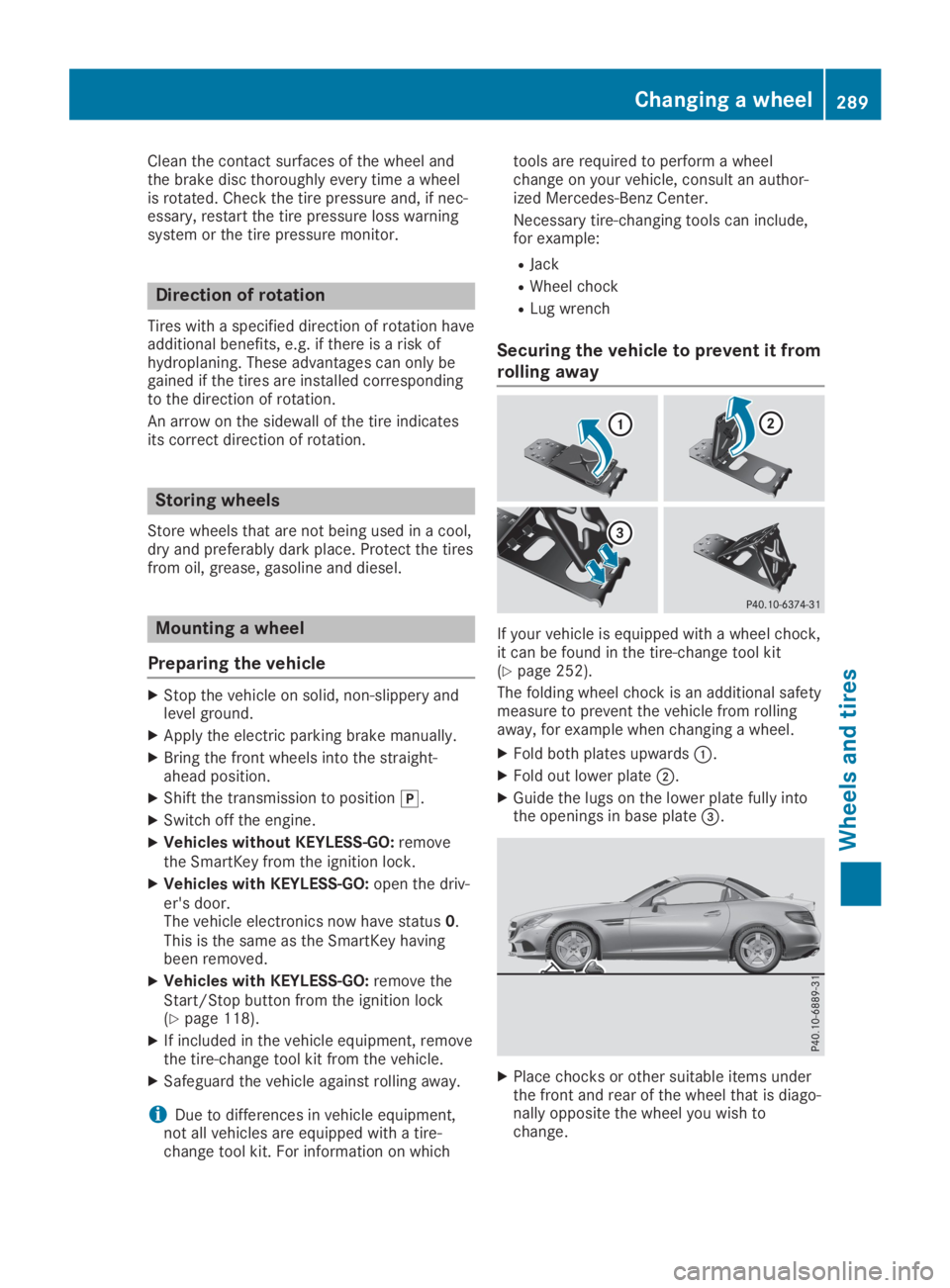
If your vehicle is equipped with a wheel chock,it can be found in the tire-change tool kit(Ypage 252).
The folding wheel chock is an additional safetymeasure to prevent the vehicle from rollingaway, for example when changing a wheel.
XFold both plates upwardsC.
XFold out lower plateD.
XGuide the lugs on the lower plate fully intothe openings in base plate