check engine MERCEDES-BENZ SLC 2019 Owners Manual
[x] Cancel search | Manufacturer: MERCEDES-BENZ, Model Year: 2019, Model line: SLC, Model: MERCEDES-BENZ SLC 2019Pages: 306, PDF Size: 15 MB
Page 7 of 306
Ambient lighting
Setting the brightness (on-board
computer) ...................................... 177
Setting the color (on-board com-
puter) .............................................177
AMG menu (on-board computer)..... 179
AMG sports suspension
(Mercedes-AMG SLC 43)
Function/notes .............................152
Anti-lock braking system
see ABS (Anti-lock Braking System)
Anti-skid chains
see Snow chains
Anti-theft alarm system
see ATA (Anti-Theft Alarm system)
Ashtray............................................... 229
Assistance display (on-board
computer).......................................... 175
Assistance menu (on-board com-
puter)..................................................174
ASSYST PLUS
Displaying a service message ........245
Hiding a service message .............. 245
Resetting the service interval dis-
play ................................................ 245
Service message ............................ 244
Special service requirements ......... 245
ATA (Anti-Theft Alarm system)
Activating/deactivating ................... 64
Function ...........................................64
Switching off the alarm .................... 64
ATTENTION ASSIST
Activating/deactivating ................. 175
Display message ............................ 197
Function/notes............................. 162
Audio menu (on-board computer).... 173
Audio system
see Digital Operator's Manual
Authorized Mercedes-Benz Center
see Qualified specialist workshop
Authorized workshop
see Qualified specialist workshop
AUTO lights
Display message ............................ 193
see Lights
Automatic car wash (care)............... 246
Automatic engine start (ECO
start/stop function).......................... 122
Automatic engine switch-off (ECO
start/stop function).......................... 121
Automatic headlamp mode................ 97
Automatic transmission
Accelerator pedal position ............. 128
Changing gear ............................... 128
Display message ............................ 203
Drive program ................................ 128
Drive program display .................... 125
Driving tips .................................... 128
DYNAMIC SELECT button .............. 124
Emergency running mode.............. 132
Engaging drive position .................. 127
Engaging neutral ............................ 126
Engaging park position automati-
cally ............................................... 126
Engaging reverse gear ................... 126
Engaging the park position ............ 126
Gearshift recommendation ............ 131
Kickdown ....................................... 128
Manual shifting .............................. 129
Oil temperature (on-board com-
puter, Mercedes-AMG SLC 43) ...... 179
Overview ........................................ 125
Problem (malfunction) ................... 132
Pulling away ................................... 120
Selector lever ................................ 125
Starting the engine ........................ 120
Steering wheel paddle shifters ...... 129
Transmission position display ........ 125
Transmission positions .................. 127
Automatic transmission emer-
gency mode....................................... 132
B
Back button....................................... 218
BAS (Brake Assist System)................. 57
Battery (SmartKey)
Checking .......................................... 69
Important safety notes .................... 68
Replacing ......................................... 69
Battery (vehicle)
Charging ........................................ 259
Display message ............................ 195
Important safety notes .................. 257
Index5
Page 9 of 306
Children
Special seat belt retractor ...............54
Children in the vehicle
Important safety notes .................... 53
Cigarette lighter................................ 229
Cleaning
Mirror turn signal ...........................250
Climate control
Air-conditioning system ................. 106
Automatic climate control (dual-
zone) .............................................. 108
Controlling automatically ...............111
Cooling with air dehumidification .. 110
Defrosting the windows ................. 113
Defrosting the windshield .............. 112
General notes ................................ 106
Indicator lamp ................................ 111
Information about using auto-
matic climate control ..................... 109
Maximum cooling .......................... 113
Notes on using the air-condition-
ing system ..................................... 107
Overview of systems ......................106
Problem with the rear window
defroster ........................................ 114
Problems with cooling with air
dehumidification ............................ 111
Refrigerant ..................................... 303
Refrigerant filling capacity ............. 303
Setting the air distribution ............. 112
Setting the air vents ......................115
Setting the airflow ......................... 112
Setting the temperature ................ 111
Switching air-recirculation mode
on/off ............................................ 114
Switching on/off ........................... 110
Switching residual heat on/off ...... 114
Switching the rear window
defroster on/off ............................ 113
Switching the ZONE function
on/off ............................................ 112
Cockpit
Overview .......................................... 31
see Instrument cluster
Collapsible spare wheel
Inflating ......................................... 295
see Emergency spare wheel
Combination switch............................ 99
Compass
Calibrating ..................................... 238
Calling up ....................................... 237
Setting ...........................................238
Connecting a USB device
see also Digital Operator's Man-
ual ..................................................217
Consumption statistics (on-board
computer).......................................... 170
Controller...........................................218
Convenience closing feature.............. 77
Coolant (engine)
Checking the level ......................... 242
Display message ............................ 194
Filling capacity ............................... 302
Important safety notes .................. 301
Temperature (on-board com-
puter, Mercedes-AMG SLC 43) ...... 179
Temperature gauge ........................ 168
Warning lamp ................................. 213
Cooling
see Climate control
Copyright............................................. 30
Cornering light function
Display message ............................ 193
Function/notes ................................ 99
Cruise control
Cruise control lever ....................... 142
Deactivating ................................... 143
Display message ............................ 200
Driving system ............................... 142
Function/notes .............................142
Important safety notes .................. 142
Setting a speed .............................. 143
Storing and maintaining current
speed ............................................. 142
Cup holder
Center console .............................. 228
Important safety notes .................. 227
Customer Assistance Center
(CAC)..................................................... 28
Customer Relations Department....... 28
D
Dashboard
see Instrument cluster
Index7
Page 11 of 306
Rear view camera .......................... 159
Driving tips
Active Distance Assist
DISTRONIC .................................... 150
Automatic transmission .................128
Brakes ...........................................139
Break-in period .............................. 117
Downhill gradient ........................... 139
Drinking and driving ....................... 137
Driving in winter .............................141
Driving on flooded roads ................ 141
Driving on wet roads ......................141
Exhaust check ............................... 138
Fuel ................................................ 137
General .......................................... 137
Hydroplaning ................................. 141
Icy road surfaces ........................... 141
Limited braking efficiency on sal-
ted roads ....................................... 140
Snow chains .................................. 270
Subjecting brakes to a load ........... 139
Wet road surface ........................... 139
DVD video
Operating (on-board computer) ..... 173
see also Digital Operator's Man-
ual ..................................................217
DYNAMIC SELECT button.................. 124
E
EASY-ENTRY feature
Activating/deactivating ................. 178
Function/notes ................................ 91
EASY-EXIT feature
Crash-responsive .............................92
Function/notes ................................ 91
Switching on/off ........................... 178
EBD (electronic brake force distri-
bution)
Display message............................ 185
Function/notes................................ 63
ECO display
Function/notes............................. 138
On-board computer ....................... 170
ECO start/stop function
Automatic engine start .................. 122
Automatic engine switch-off .......... 121
Deactivating/activating ................. 122
General information ....................... 121
Important safety notes .................. 121
Introduction ................................... 121
Electronic Stability Program
see ESP®(Electronic Stability Program)
Emergency
Automatic measures after an
accident ........................................... 53
Emergency release
Driver's door .................................... 73
Trunk ............................................... 75
Vehicle ............................................. 73
Emergency spare wheel
General notes ................................ 294
Important safety notes .................. 293
Removing ....................................... 294
Storage location ............................ 294
Stowing .......................................... 294
Technical data ............................... 294
Emergency Tensioning Devices
Activation ......................................... 50
Emissions control
Service and warranty information .... 24
Engine
Check Engine warning lamp ........... 213
Display message ............................ 194
ECO start/stop function ................ 121
Engine number ............................... 298
Irregular running ............................ 123
Jump-starting ................................. 260
Overview ........................................ 244
Starting problems .......................... 123
Starting the engine with the
SmartKey ....................................... 120
Starting with KEYLESS-GO ............. 120
Switching off .................................. 135
Tow-starting (vehicle) ..................... 265
Engine electronics
Notes ............................................. 296
Problem (malfunction) ................... 123
Engine oil
Adding ........................................... 241
Additives ........................................ 301
Checking the oil level ..................... 241
Checking the oil level using the
dipstick .......................................... 241
Display message ............................ 196
Filling capacity ............................... 301
Index9
Page 12 of 306
General notes ................................ 300
Notes about oil grades ...................300
Notes on oil level/consumption .... 241
Temperature (on-board com-
puter, Mercedes-AMG SLC 43) ...... 179
Entering an address
see also Digital Operator's Man-
ual ..................................................217
ESP®(Electronic Stability Pro-
gram)
AMG menu (on-board computer) ... 180
Characteristics ................................. 61
Deactivating/activating (except
SLC 43 AMG) ................................... 61
Deactivating/activating
(Mercedes-AMG SLC 43) ................. 62
Display message ............................ 183
Function/notes ................................ 60
General notes .................................. 60
Important safety information ........... 61
Warning lamp ................................. 211
ETS/4ETS (Electronic Traction
System)................................................ 61
Exhaust check................................... 138
Exhaust pipe (cleaning instruc-
tions)..................................................250
Exterior lighting
Setting options ................................ 97
see Lights
Exterior mirrors
Adjusting ......................................... 92
Dipping (automatic) ......................... 93
Folding in when locking (on-
board computer) ............................ 179
Folding in/out (automatically)......... 93
Folding in/out (electrically) ............. 93
Out of position (troubleshooting) ..... 93
Storing settings (memory func-
tion) ................................................. 95
Storing the parking position ............. 94
Eyeglasses compartment................. 226
F
Favorites
Overview ........................................ 219
Filler cap
see Refueling
Filling capacities (Technical data)... 298
Flat tire
MOExtended tires.......................... 253
Preparing the vehicle ..................... 252
TIREFIT kit ...................................... 254
see Emergency spare wheel
Floormats........................................... 238
Frequencies
Mobile phone ................................. 296
Two-way radio ................................ 296
Fuel
Additives ........................................ 300
Consumption statistics .................. 170
Displaying the current consump-
tion ................................................ 171
Displaying the range ...................... 171
Driving tips.................................... 137
Fuel gauge ....................................... 32
Grade (gasoline)............................ 299
Important safety notes .................. 299
Problem (malfunction) ................... 134
Refueling ........................................ 132
Tank content/reserve fuel............. 299
Fuel filler flap
Opening ......................................... 133
Fuel level
Calling up the range (on-board
computer) ...................................... 171
Fuel tank
Capacity ........................................ 299
Problem (malfunction) ................... 134
Fuse allocation chart (vehicle tool
kit)...................................................... 252
Fuses
Allocation chart ............................. 265
Before changing ............................. 265
Fuse box in the engine compart-
ment .............................................. 266
Fuse box in the trunk ..................... 266
Important safety notes .................. 265
G
Garage door opener
Clearing the memory ..................... 237
General notes ................................ 234
Important safety notes .................. 235
Opening/closing the garage door .. 237
10Index
Page 19 of 306
Important safety information ........... 75
Opening/closing (all) ....................... 76
Opening/closing (front) ................... 76
Overview .......................................... 75
Problem (malfunction) .....................78
Resetting .........................................77
Reversing feature .............................75
SIRIUS services
see also Digital Operator's Man-
ual .................................................. 217
SmartKey
Changing the battery ....................... 69
Changing the programming .............67
Checking the battery .......................69
Display message ............................ 206
Door central locking/unlocking ....... 66
Important safety notes.................... 66
Loss ................................................. 70
Mechanical key ................................ 68
Opening/closing the roof................ 80
Overview .......................................... 66
Positions (ignition lock) ................. 118
Problem (malfunction) ..................... 70
Starting the engine ........................ 120
SMS
see also Digital Operator's Man-
ual .................................................. 217
Snow chains...................................... 270
Sockets
Center console .............................. 230
General notes ................................ 229
Sound
Switching on/off........................... 218
Special seat belt retractor.................. 54
Specialist workshop............................ 27
Speed, controlling
see Cruise control
Speedometer
Digital ............................................ 171
In the Instrument cluster ................. 32
Segments ...................................... 167
Selecting the display unit............... 176
Sport handling mode
Activating/deactivating
(Mercedes-AMG SLC 43) ................. 62
Warning lamp ................................. 212
Standing lamps
Display message ............................ 193
Switching on/off.............................. 98
Start/stop function
see ECO start/stop function
Starting (engine)................................ 119
Steering
Display message ............................ 205
Steering wheel
Adjusting (electrically) ..................... 90
Adjusting (manually) ........................ 90
Button overview ............................... 33
Buttons (on-board computer) ......... 168
Important safety notes .................... 89
Storing settings (memory func-
tion) ................................................. 95
Steering wheel paddle shifters........ 129
Stopwatch (RACETIMER)................... 180
Stowage areas................................... 225
Stowage compartments
Armrest (under) ............................. 225
Center console .............................. 226
Cup holders ................................... 227
Door ............................................... 226
Eyeglasses compartment ............... 226
Glove box ....................................... 225
Important safety information ......... 225
Rear wall ........................................ 226
Stowage net ................................... 226
Stowage net....................................... 226
Summer tires..................................... 269
Sun visor............................................ 228
Surround lighting (on-board com-
puter).................................................. 177
SVHC (Substances of Very High
Concern)............................................... 27
Switching air-recirculation mode
on/off................................................. 114
Switching on media mode
Via the device list .......................... 223
T
Tachometer........................................ 167
Tail lamps
Display message ............................ 193
see Lights
Tank content
Fuel gauge ....................................... 32
Index17
Page 20 of 306
Technical data
Capacities ...................................... 298
Emergency spare wheel ................. 294
Information .................................... 296
Tires/wheels ................................. 292
Vehicle data ................................... 303
TELEAID
Call priority .................................... 233
Emergency call .............................. 231
General notes ................................ 230
MB info call button ........................233
Roadside Assistance button .......... 232
Self-test ......................................... 230
System .......................................... 230
Vehicle Health Check .................... 233
Telephone
Accepting a call (multifunction
steering wheel) .............................. 174
Authorizing a mobile phone (con-
necting) ......................................... 221
Authorizing a mobile phone via
the device manager (connecting) ... 222
Connecting a mobile phone
(device manager) ........................... 222
Connecting a mobile phone (gen-
eral information) ............................ 221
Display message ............................ 205
Menu (on-board computer) ............ 173
Number from the phone book ........174
Redialing ........................................ 174
Rejecting/ending a call ................. 174
see also Digital Operator's Man-
ual ..................................................217
Temperature
Coolant .......................................... 168
Coolant (on-board computer,
Mercedes-AMG SLC 43) ................ 179
Engine oil (on-board computer,
Mercedes-AMG SLC 43) ................ 179
Outside temperature ......................167
Setting (climate control) ................ 111
Transmission oil (on-board com-
puter, Mercedes-AMG SLC 43) ...... 179
Timing (RACETIMER)......................... 180
Tire pressure
Calling up (on-board computer) ..... 274
Checking manually ........................ 273
Display message ............................ 201
Maximum ....................................... 273
Not reached (TIREFIT) .................... 256
Notes ............................................. 272
Reached (TIREFIT) .......................... 256
Recommended ............................... 270
Tire pressure loss warning sys-
tem
General notes ................................ 273
Important safety notes .................. 274
Restarting ...................................... 274
Tire pressure monitor
Checking the tire pressure elec-
tronically ........................................ 276
Function/notes .............................274
General notes ................................ 274
Important safety notes .................. 275
Radio type approval for the tire
pressure monitor ........................... 278
Restarting ...................................... 277
Warning lamp ................................. 216
Warning message .......................... 276
Tire-change tool kit........................... 252
TIREFIT kit.......................................... 254
Important safety notes .................. 254
Storage location ............................ 252
Tire pressure not reached .............. 256
Tire pressure reached .................... 256
Tires
Aspect ratio (definition) ................. 287
Average weight of the vehicle
occupants (definition) .................... 286
Bar (definition) ............................... 286
Changing a wheel .......................... 288
Characteristics .............................. 286
Checking ........................................ 267
Curb weight (definition) ................. 287
Definition of terms ......................... 286
Direction of rotation...................... 289
Display message ............................ 201
Distribution of the vehicle occu-
pants (definition) ............................ 288
DOT (Department of Transporta-
tion) (definition) ............................. 286
DOT, Tire Identification Number
(TIN) ............................................... 285
GAWR (Gross Axle Weight Rat-
ing) (definition) .............................. 287
18Index
Page 22 of 306
Trunk partition
Display message ............................ 205
General notes .................................. 80
Opening/closing .............................. 81
Turn signals
Display message ............................ 193
Switching on/off .............................. 99
Two-way radio
Frequencies ................................... 296
Installation ..................................... 296
Transmission output (maximum) .... 296
Type identification plate
see Vehicle identification plate
U
Unlocking
Emergency unlocking ....................... 73
From inside the vehicle (central
unlocking button) ............................. 72
Upshift indicator
(on-board computer, Mercedes-
AMG SLC 43) ................................. 179
USB devices
Connecting to the Media Inter-
face ...............................................224
V
Vehicle
Correct use ...................................... 27
Data acquisition ............................... 28
Display message ............................ 203
Electronics ..................................... 296
Equipment ....................................... 24
Individual settings .......................... 176
Limited Warranty .............................28
Loading .......................................... 279
Locking (in an emergency) ............... 73
Locking (SmartKey) .......................... 66
Lowering ........................................ 292
Maintenance .................................... 25
Parking for a long period ................ 137
Pulling away................................... 120
Raising ........................................... 290
REACH Regulation ........................... 27
Reporting problems ......................... 28
Securing from rolling away ............ 289
Tow-starting ................................... 263
Towing away .................................. 263
Transporting .................................. 265
Unlocking (in an emergency) ........... 73
Unlocking (SmartKey)...................... 66
Vehicle data ................................... 303
Vehicle battery
see Battery (vehicle)
Vehicle data....................................... 303
Vehicle dimensions........................... 303
Vehicle emergency locking................ 73
Vehicle identification number
see VIN
Vehicle identification plate.............. 297
Vehicle tool kit.................................. 252
Video
Operating the DVD ......................... 173
see also Digital Operator's Man-
ual .................................................. 217
VIN
Seat ............................................... 298
Type plate ...................................... 297
W
Warning and indicator lamps
ABS ................................................ 210
Active Brake Assist ........................ 215
Brake Assist ................................... 215
Brakes ........................................... 210
Check Engine ................................. 213
Coolant .......................................... 213
Distance warning ........................... 215
ESP®.............................................. 211
ESP®OFF ....................................... 212
Fuel tank ........................................ 213
General notes ................................ 208
Parking brake ................................ 212
PASSENGER AIR BAG ...................... 39
Reserve fuel................................... 213
Restraint system ............................ 212
Seat belt ........................................ 208
SPORT handling mode................... 212
Tire pressure monitor .................... 216
Warranty.............................................. 24
Washer fluid
Display message ............................ 206
20Index
Page 41 of 306
Restraint system warning lamp
The functions of the restraint system arechecked after the ignition is switched on andat regular intervals while the engine is running.Therefore, malfunctions can be detected ingood time.
Theurestraint system warning lamp onthe instrument cluster lights up when the igni-tion is switched on. It goes out no later than afew seconds after the vehicle is started. Thecomponents of the restraint system are inoperational readiness.
A malfunction has occurred if theurestraint system warning lamp:
Rdoes not light up after the ignition isswitched on
Rdoes not go out after a few seconds with theengine running
Rlights up again while the engine is running
GWARNING
If the restraint system is malfunctioning,
restraint system components may be trig-
gered unintentionally or may not deploy as
intended during an accident. This can affect
for example the Emergency Tensioning
Device or the air bag. This poses an
increased risk of injury or even fatal injury.
Have the restraint system checked and
repaired in a qualified specialist workshop
as soon as possible.
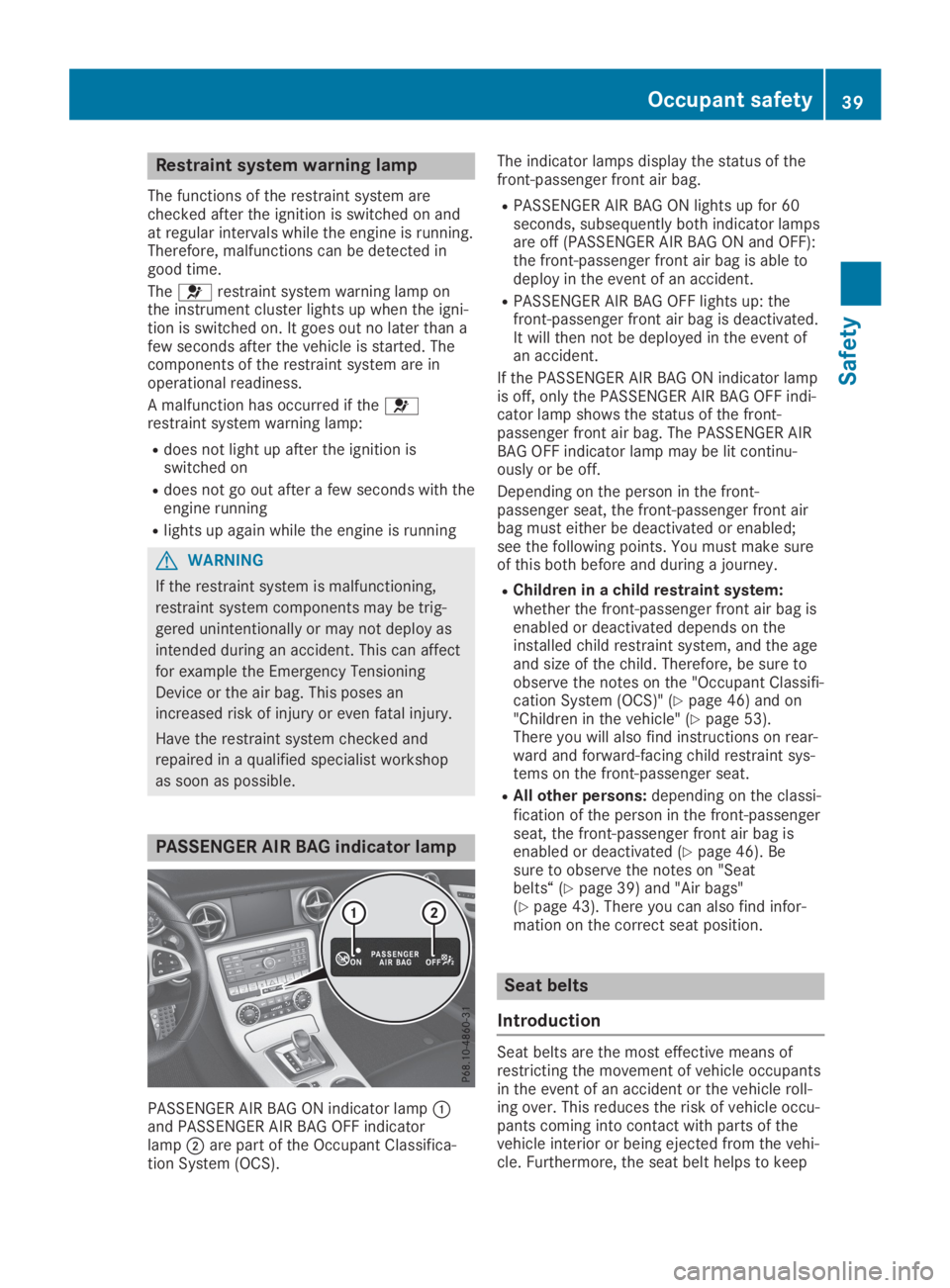
PASSENGER AIR BAG indicator lamp
PASSENGER AIR BAG ON indicator lampCand PASSENGER AIR BAG OFF indicatorlampDare part of the Occupant Classifica-tion System (OCS).
The indicator lamps display the status of thefront-passenger front air bag.
RPASSENGER AIR BAG ON lights up for 60seconds, subsequently both indicator lampsare off (PASSENGER AIR BAG ON and OFF):the front-passenger front air bag is able todeploy in the event of an accident.
RPASSENGER AIR BAG OFF lights up: thefront-passenger front air bag is deactivated.It will then not be deployed in the event ofan accident.
If the PASSENGER AIR BAG ON indicator lampis off, only the PASSENGER AIR BAG OFF indi-cator lamp shows the status of the front-passenger front air bag. The PASSENGER AIRBAG OFF indicator lamp may be lit continu-ously or be off.
Depending on the person in the front-passenger seat, the front-passenger front airbag must either be deactivated or enabled;see the following points. You must make sureof this both before and during a journey.
RChildren in a child restraint system:whether the front-passenger front air bag isenabled or deactivated depends on theinstalled child restraint system, and the ageand size of the child. Therefore, be sure toobserve the notes on the "Occupant Classifi-cation System (OCS)" (Ypage 46) and on"Children in the vehicle" (Ypage 53).There you will also find instructions on rear-ward and forward-facing child restraint sys-tems on the front-passenger seat.
RAll other persons:depending on the classi-fication of the person in the front-passengerseat, the front-passenger front air bag isenabled or deactivated (Ypage 46). Besure to observe the notes on "Seatbelts“ (Ypage 39) and "Air bags"(Ypage 43). There you can also find infor-mation on the correct seat position.
Seat belts
Introduction
Seat belts are the most effective means ofrestricting the movement of vehicle occupantsin the event of an accident or the vehicle roll-ing over. This reduces the risk of vehicle occu-pants coming into contact with parts of thevehicle interior or being ejected from the vehi-cle. Furthermore, the seat belt helps to keep
Occupant safety39
Safety
Z
Page 59 of 306
REBD (ElectronicBrake forceDistribution)(Ypage 63)
RADAPTIVE BRAKE (Ypage 64)
Important safety notes
If you fail to adapt your driving style or if youare inattentive, the driving safety systems canneither reduce the risk of an accident noroverride the laws of physics. Driving safetysystems are merely aids designed to assistdriving.
You are responsible for maintaining the dis-tance to the vehicle in front, for vehicle speed,for braking in good time, and for staying inlane. Always adapt your driving style to suitthe prevailing road and weather conditions andmaintain a safe distance from the vehicle infront. Drive carefully.
The driving safety systems described onlywork as effectively as possible when there isadequate contact between the tires and theroad surface. Pay particular attention to theinformation regarding tires, recommendedminimum tire tread depths etc. in the "Wheelsand tires" section (Ypage 267).
In wintry driving conditions, always use wintertires (M+S tires) and if necessary, snowchains. Only in this way will the driving safetysystems described in this section work aseffectively as possible.
ABS (Anti-lock Braking System)
General information
ABS regulates brake pressure in such a waythat the wheels do not lock when you brake.This allows you to continue steering the vehi-cle when braking.
The%ABS warning lamp in the instrumentcluster lights up when the ignition is switchedon. It goes out when the engine is running.
ABS works from a speed of about 5 mph(8 km/h), regardless of road-surface condi-tions. ABS works on slippery surfaces, evenwhen you only brake gently.
Important safety notes
iObserve the "Important safety notes" sec-tion (Ypage 57).
GWARNING
If ABS is malfunctioning, the wheels could
lock when braking. The steerability and
braking characteristics would be severely
affected. There is an increased danger of
skidding and accidents.
Drive on carefully. Have ABS checked imme-
diately at a qualified specialist workshop.
When ABS is malfunctioning, other systems,including driving safety systems, will alsobecome inoperative. Observe the informationon the ABS warning lamp (Ypage 210) anddisplay messages which may be shown in theinstrument cluster (Ypage 183).
Brakes
XIf ABS intervenes:continue to depress thebrake pedal vigorously until the braking sit-uation is over.
XTo make a full brake application:depressthe brake pedal with full force.
If ABS intervenes when braking, you will feel apulsing in the brake pedal.
The pulsating brake pedal can be an indicationof hazardous road conditions, and functions asa reminder to take extra care while driving.
BAS (Brake Assist System)
General information
BAS operates in emergency braking situations.If you depress the brake pedal quickly, BASautomatically boosts the braking force, thusshortening the stopping distance.
Important safety notes
iObserve the "Important safety notes" sec-tion (Ypage 57).
Driving safety systems57
Safety
Z
Page 66 of 306
tics. Have the brake system checked at a
qualified specialist workshop.
Observe information regarding indicator andwarning lamps (Ypage 210) as well as displaymessages (Ypage 185).
ADAPTIVE BRAKE
iObserve the "Important safety notes" sec-tion (Ypage 57).
ADAPTIVE BRAKE enhances braking safety andoffers increased braking comfort. In additionto the braking function, ADAPTIVE BRAKE alsohas the HOLD function (Ypage 151) and hillstart assist (Ypage 120).
Protection against theft
Immobilizer
XTo activate with the SmartKey:removethe SmartKey from the ignition lock.
XTo activate with KEYLESS-GO:switch theignition off and open the driver's door.
XTo deactivate:switch on the ignition.
The immobilizer prevents your vehicle frombeing started without the correct SmartKey.
When leaving the vehicle, always take theSmartKey with you and lock the vehicle. Theengine can be started by anyone with a validSmartKey that is left inside the vehicle.
iThe immobilizer is always deactivatedwhen you start the engine.
In the event that the engine cannot be star-ted (yet the vehicle's battery is charged),the system is not operational. Contact anauthorized Mercedes-Benz Center or call1-800-FOR-MERCedes (in the USA) or1-800-387-0100 (in Canada).
ATA (anti-theft alarm system)
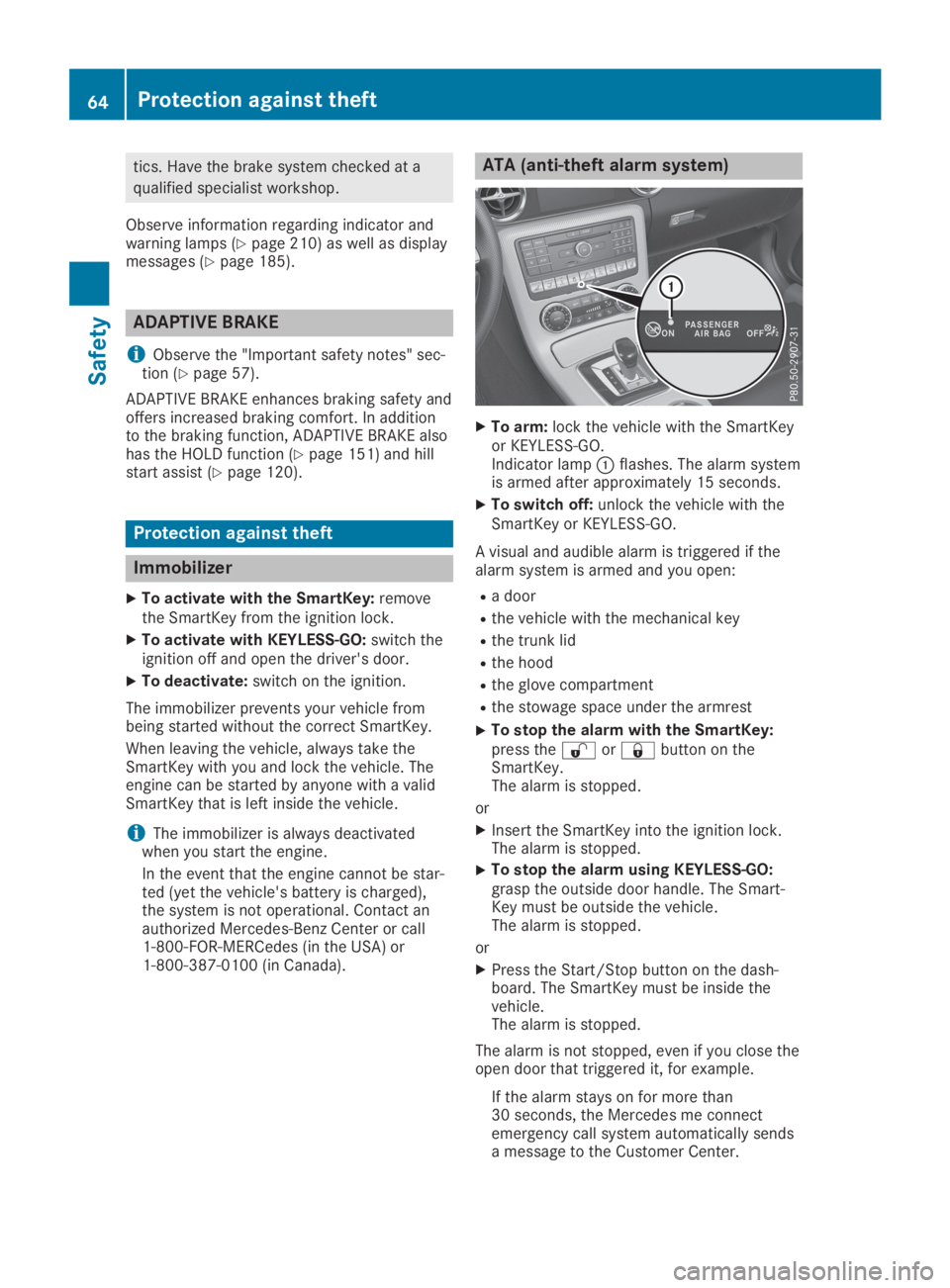
XTo arm:lock the vehicle with the SmartKeyor KEYLESS-GO.Indicator lampCflashes. The alarm systemis armed after approximately 15 seconds.
XTo switch off:unlock the vehicle with theSmartKey or KEYLESS-GO.
A visual and audible alarm is triggered if thealarm system is armed and you open:
Ra door
Rthe vehicle with the mechanical key
Rthe trunk lid
Rthe hood
Rthe glove compartment
Rthe stowage space under the armrest
XTo stop the alarm with the SmartKey:press the6or7button on theSmartKey.The alarm is stopped.
or
XInsert the SmartKey into the ignition lock.The alarm is stopped.
XTo stop the alarm using KEYLESS-GO:grasp the outside door handle. The Smart-Key must be outside the vehicle.The alarm is stopped.
or
XPress the Start/Stop button on the dash-board. The SmartKey must be inside thevehicle.The alarm is stopped.
The alarm is not stopped, even if you close theopen door that triggered it, for example.
If the alarm stays on for more than30 seconds, the Mercedes me connectemergency call system automatically sendsa message to the Customer Center.
64Protection against theft
Safety