phone MERCEDES-BENZ SLC 2020 User Guide
[x] Cancel search | Manufacturer: MERCEDES-BENZ, Model Year: 2020, Model line: SLC, Model: MERCEDES-BENZ SLC 2020Pages: 310, PDF Size: 16.05 MB
Page 171 of 310
Bea
rinm indthat theoutsid etempe raturedis-
pl ay indi cates thetempe raturemea suredand
doe snotrecor dthe roa dtempe rature.
The outsid etempe raturedispl ayisin the mul-
tifu nction displ ay(Y page 170 ).
Ac hang eint he outsid etempe ratureisshow n
in the multifunction displ ayafte rad elay . Co
olant temperature gage G
WARNI
NG
Ope ning thehoodwhent he engi neisover -
hea ted orwhe nthere isaf ire inthe engi ne
compa rtment couldexpo seyout oh otgases
or other serviceprod ucts. Thereisar isk of
inju ry.
Let anover heated engi necool downbefore
ope ning thehood.Ifthere isaf ire inthe
engi necompa rtment, keepthehoodclosed
and contact thefire departme nt.
! Ad
ispl ay mess ageiss how nifthe cool ant
tempe ratureistoo high.
If the cool anttempe ratureisover 248‡
(120 †),donot continu edriving. The
engi newillother wise be damag ed.
The coolanttempe raturegage isin the instru -
ment cluster onthe right-ha ndside
(Y page 32).
The Hmarki nginthe cool anttempe rature
ga ug ec orre sponds toac ool ant tempe rature
of approxi mate ly248 ‡(120 †).
Unde rnorma lope rati ngcondi tions andatthe
corre ctcool antlevel, the cool anttempe rature
ga ug em ayrise tothe Hmarki ng. Ope
rating theon-bo ard computer
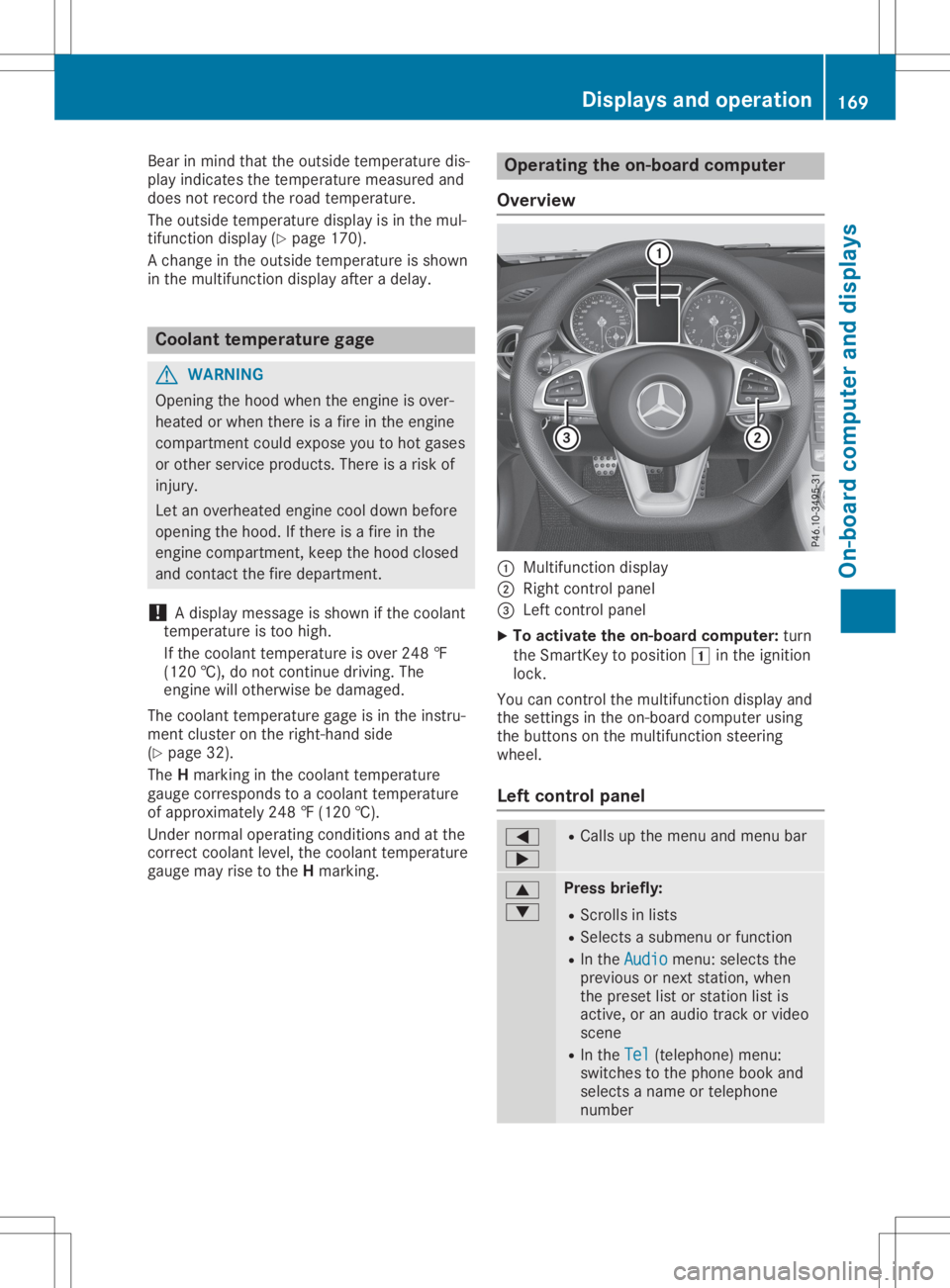
Ove rview 0043
Multifunctio ndispl ay
0044 Right control panel
0087 Left control panel
X To acti vate theon-bo ard computer: turn
the SmartKe ytop ositio n0047 inthe ignition
lock.
You cancontrol themultifunction displ ayand
the setting sint he on-bo ardcompu terusing
the buttons onthe multifunction steering
whe el.
Le ftco ntrol panel 0059
0065 R
Ca llsu pthe menu andmenu bar 0063
0064 Pres
sbriefly:
R Scrol lsin lists
R Sele ctsasubmenu orfuncti on
R In the Audi o Audi
omenu :selects the
pre vious ornext station,whe n
the preset list or stati onlist is
acti ve,oran audiot rack orvid eo
scene
R In the Tel Tel
(teleph one) menu :
swi tches tothe phoneboo kand
sel ects aname ortele pho ne
numb er Di
splay sand ope ration
169On-board computer anddispl ays Z
Page 172 of 310
0063
0064 Press
andhold:
R In the Audio Audio
menu: selects apre-
set listoras tation listinthe
desired frequency range,selects
an audio trackorvideo scene
using rapidscrolling
R In the Tel Tel
(Telephone) menu:
starts rapidscrolling ifthe phone
book isopen 0076 R
Confirms theselection ordisplay
message
R In the Tel Tel
(Telephone) menu:
switches tothe telephone book
and starts dialingthe selected
number 0038 Press
briefly:
R Back
R Switches offvoice-operated con-
trol fornavigation orthe Voice
Control System
R Hides display messages orcalls
up the last Trip Trip
menu function
used
R Exit sthe telephone book/redial
memory 0038 Press
andhold:
R Call supthe standard displayin
the Trip Trip
menu Right
control panel 0076 R
Rejects orends acall
R Exit sthe telephone book/redial
memory 0061 R
Makes oraccepts acall
R Switches tothe redial memory 0081
0082 R
Adjusts thevolume 0063 R
Mute 0059 R
Switches onvoice-operated con-
trol fornavigation orthe Voice
Control System You
canfind further information onvoice-oper-
ated controlfor navigation inthe manufactur- er's
operating instructionsinvehicles withan
Audio 20multimedia system.
Vehicles withtheCOMAND multimedia sys-
tem: youcan find further information onthe
Voice Control System inthe separate operat-
ing instruct ions. Multifunction
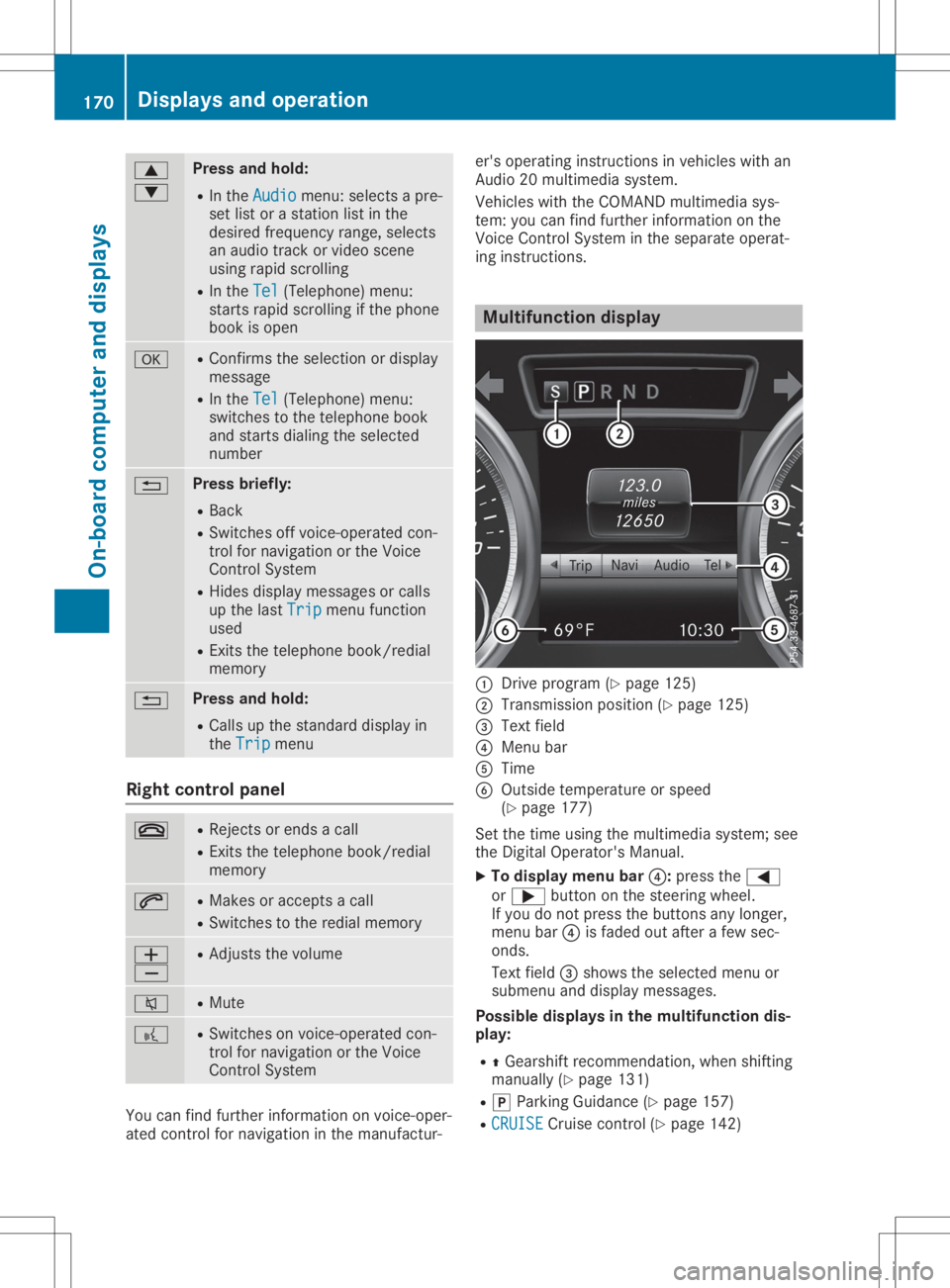
display 0043
Drive program (Ypage 125)
0044 Transmission position(Ypage 125)
0087 Text field
0085 Menu bar
0083 Time
0084 Outside temperature orspeed
(Y page 177)
Set thetime using themultimedia system;see
the Digital Operator's Manual.
X To display menubar0085:press the0059
or 0065 button onthe steering wheel.
If you donot press thebuttons anylonger,
menu bar0085isfaded outafter afew sec-
onds.
Text field 0087shows theselected menuor
submenu anddisplay messages.
Possible displaysinthe multifu nctiondis-
play:
R 0097Gearshift recommen dation,whenshifting
manually (Ypage 131)
R 005D Parking Guidance(Ypage 157)
R CRUISE CRUISE
Cruisecontrol(Ypage 142) 170
Displays
andoperat ionOn-board computerand displays
Page 177 of 310
att
ent ion totraff iccon dition sand oper ate
th ee quipm entwhen thev ehicle isstatio n-
ary.
When telepho ning,you must observet he legal
requi rementsfor thec oun tryi nw hichy ou are
cur ren tlydriv ing.
X Swit chon them obilephon e(see them anu-
fac turer’s oper atinginstruct ions).
X Swit chon them ultimed iasyst em(see the
Dig ital Oper ator'sMan ual)
X Estab lish aBluet ooth®
con nectiont ot he
mult imed iasyst em(Ypage 222).
X Pres sthe 0059 or0065 buttononthes teer-
ing wheel toselec tthe Tel Tel
men u.
You willsee oneo fthe followin gdisplay mes-
sages inthem ultifun ction display:
R Pho neREADY Pho
neREADYorthen am eo fthe net work
prov ider:the mobi lephon ehasfoun dan et-
work andisready torec eive .
R Pho neNoService Pho
neNoService:there isno net work
availabl eorthe mobi lephon eiss ear ching
for anetwork .
Accept ingacall If
som eonecalls you when youareintheTel Tel
men u,ad isplay message appear sint he mult i-
fun ction display.
You canaccept acallatany timeregardle ssof
th em enus elec ted.
X Pres sthe 0061 buttononthes teeri ng wheel
to acc ept anincomin gcall.
Rej ectin gorendi ngacall X
Pres sthe 0076 buttononthes teeri ng wheel
to reject orend acall.
Select inganent ryinthep hone book X
Pres sthe 0059 or0065 buttononthes teer-
ing wheel toselec tthe Tel Tel
men u.
X Pres sthe 0063 ,0064 or0076 buttonto
swit chtothep hon ebook .
X Aut horize acc ess tothep hon ebook onthe
phon e. X
Pres s0064 or0063 toselec tthe nam esone
aft ertheo ther.
or X To star tr ap idscr olling: pressand hold
th e0064 or0063 buttonfor longer than one
sec ond.
The nam esinthep hon ebook aredisplaye d
quick lyon ea fter theo ther.
Rapid scroll ing stops when yourelease the
butt onorreac hthe end ofthel ist .
X If
only onetelephone num berisstored
for anam e:pres sthe 0061 or0076 button
to start dialin g.
or X If
th ere ismor ethano nenum berfora
pa rticula rnam e:pres sthe 0061 or0076
butt ontodisplay then um bers .
X Pres sthe 0063 or0064 buttontoselec tthe
num beryou want todial.
X Pres sthe 0061 or0076 buttontostart dial-
ing .
or X To exit thet ele phone book: pressthe
0076 or0038 button.
Red ialin g The
on-bo ard com pute rsave sthe last nam es
or num bers dialed inther edi almem ory.
X Pres sthe 0059 or0065 buttononthes teer-
ing wheel toselec tthe Tel Tel
men u.
X Pres sthe 0061 buttontoswit chtothe
redi almem ory.
X Pres sthe 0063 or0064 buttontoselec tthe
desir ednam eornum ber.
X Pres sthe 0061 or0076 buttontostart dial-
ing .
or X To exit ther edial mem ory:pres sthe 0076
or 0038 button. Assist
ancemenu
Intr odu ction De
pen dingo nyour vehicle'sequipm ent,int he
Dri veAssist Dri
veAssistmen u,you have thef ollowin g
opt ions: Menu
sand subm enus
175On-boar dcomp uter and displa ys Z
Page 223 of 310
Notes
forroute types:
R Eco Route Eco
Route
R Dynamic TrafficRoute Dynamic
TrafficRoute
Traffic reports onthe route forthe route
guid ance aretaken intoaccount (notavaila-
ble inall countries).
R Dynamic TRF.Route AfterRequest Dynamic
TRF.Route AfterRequest
You candecide whether ornot current traf-
fic reports shouldbeincluded inthe route
calcul ation(notavailableina llcountries).
R Calculate Alternative Routes Calculate
Alternative Routes
Different routesarebeing calculated.In
order todo so, instead ofStart Start,s
electthe
menu itemContinue Continue.
X To avoid/use routeoptions: select
Avoid Options Avoid
Options.
X Select aroute option.
Notes forroute options:
R Use Toll Roads Use
Toll Roads
The route calculationincludes roadswhich
requi reyou topay ausag efee (toll).
R Number ofOccupants inthe Vehicle: Number
ofOccupants inthe Vehicle:
(only availableint he USA)
Prerequ isite:yourvehicle meets theaccess
conditions forcarpool lanes.
Carp oollanes willbeincluded ifthe carpool
lanes option isactivated.
Entering anaddr ess Multimed
iasystem:
X Select Navi Navi007BNavigation Navigation.
The map shows thevehicle's currentposi-
tion.
X Slide 6thecontroller.
X Select Destination Destination007BAddre
ssEntry Address
Entry.
Ent eran addre ss,e.g. asfollow s:
R city orZIP code, street, housenumber
R state/province, cityorZIP code
R city orZIP code, center
R street, cityorZIP code, intersection
X Select City City.
The cityinwhich thevehicle iscurrently
located (current vehicleposition) isat the
top. Below this,youwillsee locations for
which routeguidance hasalrea dybeen car-
ried out. X
Ent erthe city.
The 0043symbol :the location iscontained on
the digitalmap multipl etimes.
X To switc htothe list: slide 5thecontrol-
ler.
X Select thelocation.
If avai lable,the ZIPcode isshown. Ifthere
are different ZIPcodes availablefor the
location, thecorresponding digitsare dis-
play edwith anX X.
X Ent erthe street andhouse number.
The addre ssisin the menu.
Further options fordestination entry:
R search forakeyword
The keyword searchfindsdestinations using
fragments ofwords.
R select thelast destination
R select acontact
R select aPOI
You cansearch foraPOIby location, name
or telephone number.
R select destination onthe map
R enter intermediate destination
You canmap theroute tothe destination
you rself withuptofour intermediate desti-
nations.
R select destinations fromMercedes-Benz
Apps
R select geo-coordinates
Calc ulating theroute Prerequ
isite:theaddre sshas been entered
and isin the menu.
X Select Start Start
orContinue Continue.
The route iscalcul atedwiththeselected
route typeandtheselected routeoptions.
If route guidance hasalrea dybeen activa-
ted, aprompt willappe arasking whether
you wish toend thecurrent routeguidance.
X Select Cancel ActiveRouteGuidance Cancel
ActiveRouteGuidance or
Set asIntermediate Destination Set
asIntermediate Destination.
Cancel ActiveRouteGuidance Cancel
ActiveRouteGuidance cancels
the current routeguidance andstarts route
calcul ationtothe new destination.
Set asIntermediate Destination Set
asIntermediate Destinationadds
the new destination inaddi tion tothe exist-
ing destination andopens theintermediate
destinations list. Operating
system
221Multimedia system Z
Page 224 of 310
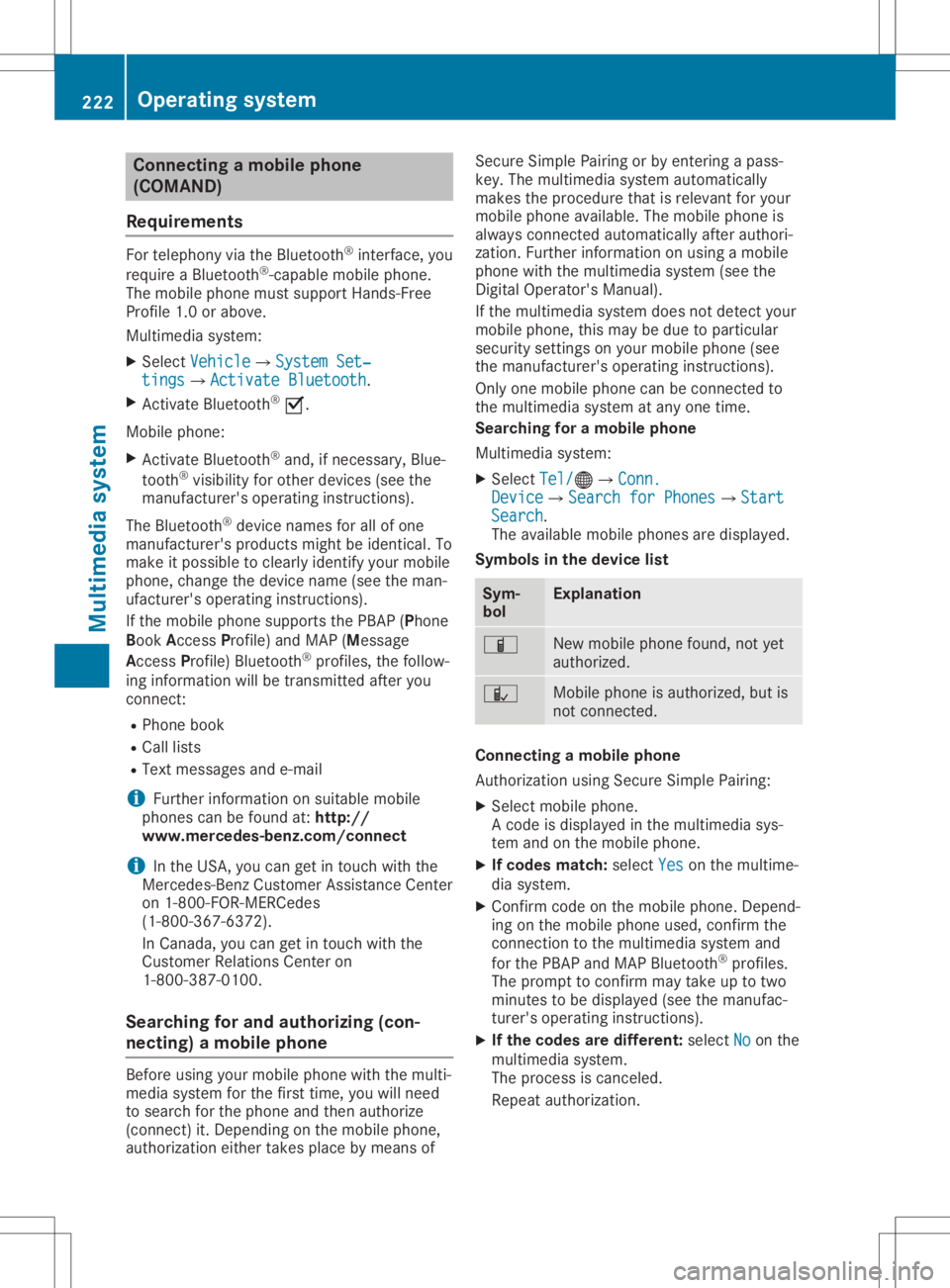
Connect
ingam obile phone
(COMAN D)
Req uiremen ts For
telepho nyvia theB luetoot h®
int erf ace, you
requi reaB luetooth®
-c apable mobilephon e.
The mob ilephon emustsuppo rtHan ds-Free
Pro file 1.0o rabov e.
Mult imed iasyst em:
X Sel ect Vehicle Veh
icle007BSy stem Set‐ Sys
tem Set‐
tin gs tin
gs007B ActivateBluetooth Act
ivateBluetooth.
X Ac tivate Blue tooth®
0073.
Mobil ephon e:
X Ac tivate Blue tooth®
and ,ifn ecessary, Blue-
to oth®
vis ibilit yfor other devi ces(see the
man ufacturer'so per atin ginstruct ions).
The Blue tooth®
devi cenam esfor allofone
man ufacturer'sp roduct smightbeiden tical. To
mak eitp oss ible tocle arly iden tifyy our mob ile
phon e,chang ethe devi cenam e(see them an-
ufac turer'so per atin ginstruct ions).
If th em obile phon esuppo rtst he PBA P(Pho ne
Book Access Profile)and MA P(Mes sage
Acc ess Profile)Blue tooth®
pro files,thef ollow-
ing inform ationwillbe trans mitteda fter you
con nect:
R Phon ebook
R Call lists
R Tex tmessages ande-mail
i Fur
ther inform ationonsuitable mobile
phon escan befoun dat:ht tp://
www.m ercedes-benz.com /connect
i In
theU SA,you can getintouch withthe
Mer cedes-Ben zCust ome rAssist anc eCenter
on 1-80 0-FO R-M ERCe des
(1- 800-36 7-63 72).
In Cana da,you can getintouch withthe
Cus tomer Relations Center on
1-800-3 87-0100 .
Searchin gfor and authorizing (con-
nec ting) amobile phone Before
usingyourmobil ephone withthemulti-
media system forthe first time, youwillneed
to search forthe phone andthen authori ze
(connect) it.Depending onthe mobil ephone,
authori zationeithertakesplacebymeans of Secure
SimplePairing orby entering apass-
key. Themultime diasystem automatically
makes theprocedu rethat isreleva ntfor you r
mobil ephone available. The mobil ephone is
alw ays connected automaticallyafterauthori -
zation. Further information onusing amobile
phone withthemultime diasystem (seethe
Digital Operator's Manual).
If the multime diasystem doesnotdetect your
mobil ephone, thismay bedue toparticul ar
security settings onyou rmobil ephone (see
the manufacture r'sopera tinginstructions).
Only onemobil ephone canbeconnected to
the multimed iasystem atany one time.
Searchin gfor am obile phone
Multime diasystem:
X Select Tel/ Tel/00A7007BConn. Conn.
Device Device007BSearc
hfor Phones Search
forPhones007BStart Start
Search Search.
The availablemobil ephones aredispl ayed.
Symbols inthe devic elist Sym-
bol Explanatio
n 00D3
New
mobil ephone found, notyet
authori zed. 00DC
Mobil
ephone isauthori zed,butis
not connected. Con
necting amobile phone
Authorization usingSecure SimplePairing:
X Select mobilephone.
Ac ode isdispl ayedint he multime diasys-
tem andonthe mobil ephone.
X Ifcode smatch: select Yes Yes
onthe multime -
dia system.
X Confirm codeonthe mobil ephone. Depend-
ing onthe mobil ephone used,confirm the
connection tothe multime diasystem and
for the PBAP andMAP Bluetooth ®
profil es.
The prompt toconfirm maytake uptotwo
minutes tobe displ ayed(see themanufac-
turer's operatinginstructions).
X Ifthe code saredifferent: selectNo No
on the
multime diasystem.
The process iscanceled.
Repe atauthori zation. 222
Operating
systemMultimedia system
Page 225 of 310
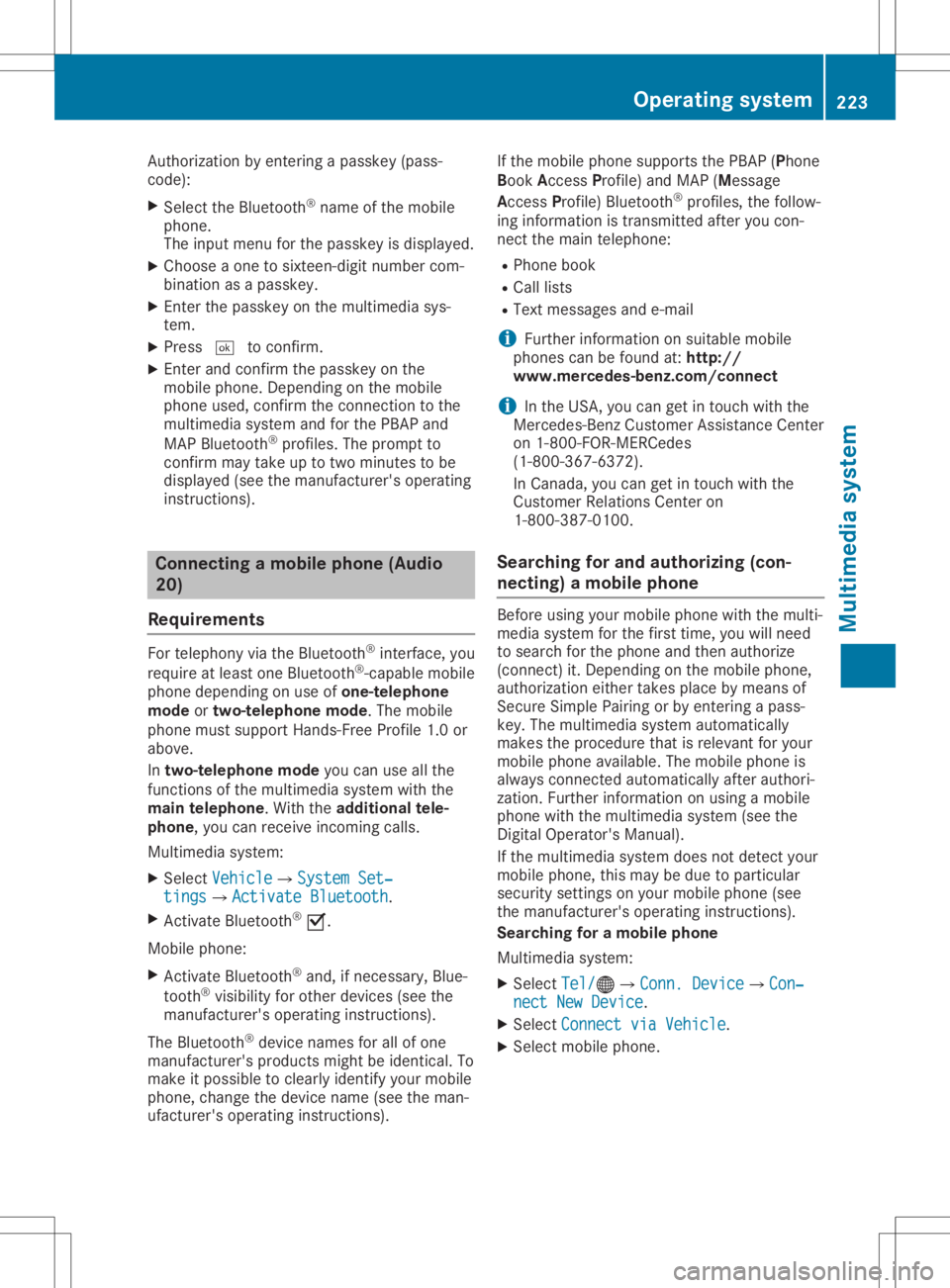
Auth
orizati onbyente ringapasske y(pa ss-
cod e):
X Sel ect the Bluetoo th®
nam eofthe mob ile
pho ne.
The inputmenu forthe passke yisd ispl ay ed .
X Ch oos eao netosixtee n-digitn um berc om-
bi nati onasap asske y.
X Enter thepasske yonthe mu ltimed iasys-
tem.
X Pre ss0054 toconfi rm.
X Enter andconfi rmthe passke yonthe
mob ilep hone. Dep endingonthe mob ile
pho neused ,confi rmthe conne ctiontot he
mu ltimed iasystem andforthe PBAP and
MAP Bluetoo th®
pro files. The prompt to
confi rmmaytake uptotwo minu testobe
di spl ayed (seethe ma nuf actu rer'sop era ting
ins truc tions) . Co
nnectin gam obilep hon e(Au dio
20 )
Requ iremen ts For
telephony viathe Bluetoo th®
inte rface, you
req uire atleas to ne Blu etoo th®
-cap ablemob ile
pho nedependi ng on useo fone-te lepho ne
mode ortwo -teleph onem ode.T hemob ile
pho nemu stsupp ort Hand s-FreeProfile1 .0or
ab ove .
In two -teleph onem ode youc an usea llthe
fu nctio nsofthe multimed iasystem with the
main teleph one.W itht he additi onaltel e-
pho ne,you can rece iveinco ming calls.
Mu ltimed iasystem :
X Sel ect Vehicle Veh
icle007BSy stem Set‐ Sys
tem Set‐
tin gs tin
gs007B ActivateBluetooth Act
ivateBluetooth.
X Activa teBlu etoo th®
0073.
Mob ilep hone:
X Activa teBlu etoo th®
and ,ifn ece ssary,B lue-
tooth ®
vis ibility for othe rdevice s(seet he
ma nuf actu rer'sop era ting instruc tions) .
The Bluetoo th®
de vice namesfor allo fo ne
ma nuf actu rer'spro ducts mig htbe identi cal.To
ma keitpo ssi blet oc lear ly identi fyyour mob ile
pho ne,change thedevice name(seet he ma n-
uf actu rer'sop era ting instruc tions) . If
the mob ilep hone supp orts thePBAP (Phone
Boo kAcce ssPro file) and MAP (Mess age
Acce ssPro file) Blu etoo th®
pro files, the follow-
ing info rma tionist rans mitte dafteryou con-
nect themaintel ephone :
R Pho nebook
R Ca lllists
R Te xt mes sages and e-ma il
i Fur
ther informa tiono nsuita blem obile
pho nes can befou ndat: http:/ /
ww w.me rcedes -benz.c om/ conn ect
i In
the USA, youc an getint ouch with the
Mer cedes-B enzCustom erAssi stance Center
on 1-800-FO R-MERC edes
(1-8 00-367 -6372).
In Ca nad a,youc an getint ouch with the
Cu stom erRelatio ns Center on
1-800-3 87-0100.
Searching forand auth orizing (con-
necting) amobile phone Before
usingyourmobile phonewiththemulti-
media system forthe first time, youwillneed
to search forthe phone andthen authorize
(conn ect)it.Depending onthe mobile phone,
authorization eithertakesplacebymeans of
Secure SimplePairing orby enterin gapass-
key. Themultimedia systemautomatically
makes theprocedure thatisrelevant foryour
mobile phoneavailable.Themobile phoneis
alwa ysconn ected automatically afterauthori-
zation. Further information onusing amobile
phone withthemultimedia system(seethe
Digital Operator's Manual).
If the multimedia systemdoesnotdetect your
mobile phone, thismay bedue toparticular
security settingson your mobile phone(see
the manufacturer's operatinginstructions).
Searching foram obile phone
Multimedia system:
X Select Tel/ Tel/00A7007BConn.
Device Conn.
Device007BCon‐ Con‐
nect NewDevice nect
NewDevice.
X Select Connect viaVehicle Connect
viaVehicle.
X Select mobile phone. Operat
ingsystem
223Multimediasystem Z
Page 226 of 310
Connect
ingam obile phone
X One- telep hone mode:selec tCon necta s Con
necta s
New MainP hone New
MainP hone.
X Two- telep hone mode:selec tCon necta s Con
necta s
Add itionalP hone Add
itionalP hone when amobilephon eis
already connected.
X Aut
horization usingSecur eSimple Pair -
ing:
Ac odeisd isplayed inthem ultimedi asys-
tem andonthem obilephon e.
X Conf irmcodeonthe mobi lephon e.Dep end-
ing onthem obilephon eused, confirmt he
con nectiont ot he mult imedi asyst em and
for theP BAPa nd MA PBluet ooth®
prof iles.
The prom pttocon firmm aytak euptotwo
min utes tobe displayed (seethem anufac -
tur er'so per atin ginstruct ions).
X Ifth ec odes are differen t:selec tNo No
on the
mult imedi asyst em.
The proc essiscan cele d.
Repeat authorizatio n.
or X Aut
horization byente ringap asskey
(pa sscod e):enterany one-tos ixtee n-digit
num bersequen cewhic hyou have chosen
yourse lfint ot he passk eyinput menu.
X Pres s0054 tocon firm.
X En ter and confirmt hepassk eyon the
mobi lephon e.Dep endingonthem obile
phon eused, confirmt hecon nectiont ot he
mult imedi asyst em and fortheP BAPa nd
MA PBluet ooth®
prof iles. Theprom ptto
con firmm aytak euptotwo min utes tobe
displayed (seethem anufac turer'so per atin g
ins truct ions).
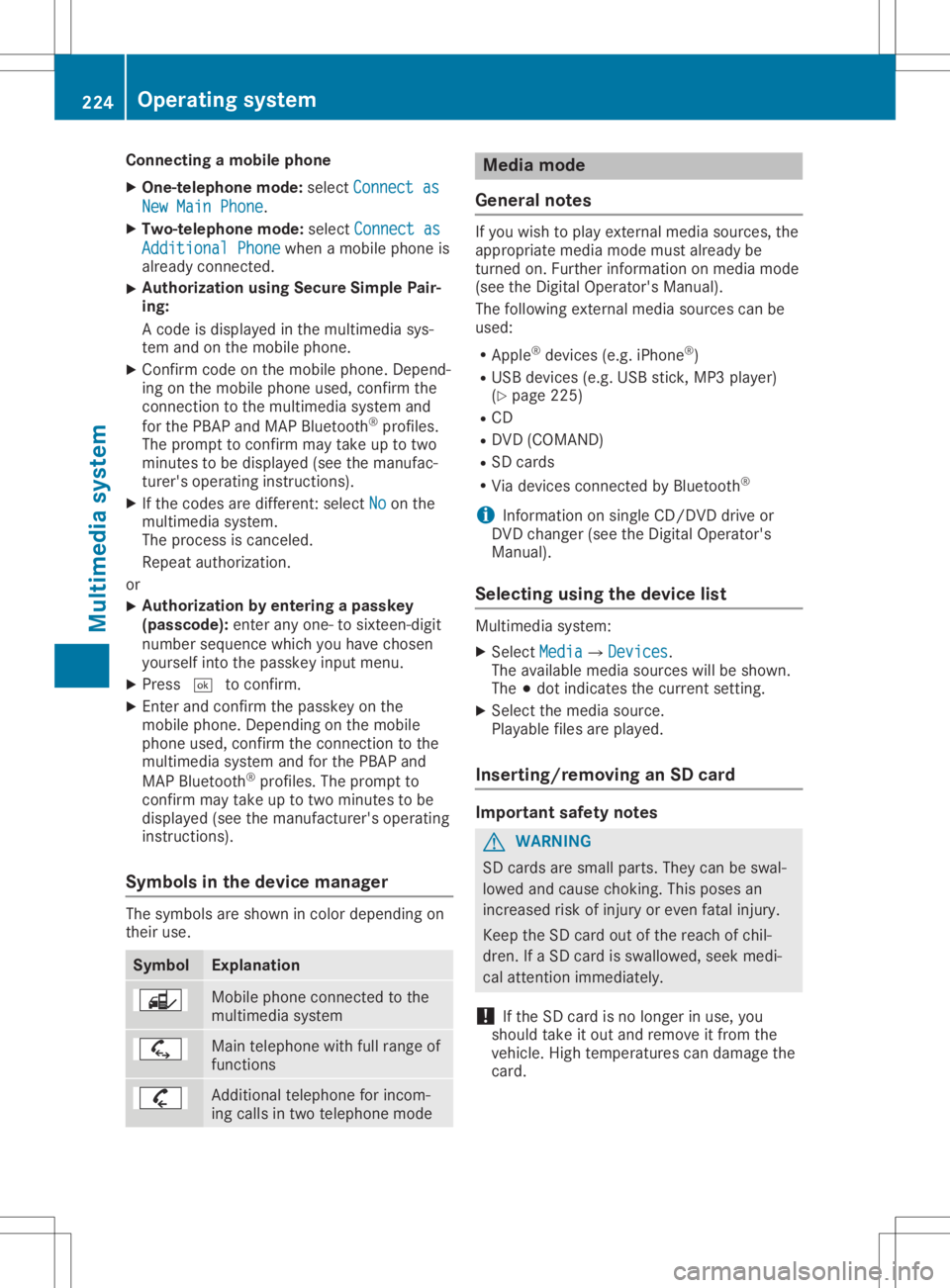
Sym bols inthed evice manager The
symbo lsare shown incolo rdepen dingon
th eir use. Sym
bol Expl
anation Mobile
phoneconnec ted tothe
mult imedi asyst em Main
telephon ewithfull rangeof
fun ction s Add
itional telephon efor inc om-
ing calls intwo telephon emode Med
iamod e
Gener alnotes If
you wish toplay extern almedia sources,the
appro priatemedia mode mustalready be
tur ned on.Further inform ationonm edia mode
(see theD igital Oper ator'sMan ual).
The follo wing extern almedia sourcescan be
used:
R App le®
devic es(e.g.iPhon e®
)
R US Bd evic es(e.g.US Bs tick ,M P3 player)
(Y page 225)
R CD
R DV D(COMA ND)
R SD cards
R Via devic escon nected byBluet ooth®
i In
for mat iononsingle CD/ DVDd riveo r
DV Dc han ger (see theD igital Oper ator's
Man ual).
Select ingusin gthe dev icelist Mult
imedi asyst em:
X Sele ctMed ia Med
ia007B Devices Dev
ices.
The available mediasourceswillbeshown .
The 003Bdot indicatesthec urren tsettin g.
X Sele ctthem edia source.
Playable filesareplayed.
Inser ting/rem ovinganSD card Imp
ortant safety notes G
WAR
NING
SD cardsare small parts.They canbeswal-
lowed andcause choking.This poses an
inc reas edrisk ofinjury oreven fatalinj ury.
Keep theS Dc ardo utofther eac hofchil-
dren .IfaS Dcardi ss wallowe d,seek medi-
cal attent ion imm ediat ely.
! If
th eS Dc ardi sn olon ger inuse, you
should takeito utand remove itfro mt he
veh icle.High tem perat urescandamage the
car d. 224
Oper
ating syst emMultim edia system
Page 228 of 310
Stowage
areas Stowage
spaces
Import antsafety notes G
WARNING
If object sint he passenger compartmen tare
stowed incorrec tly,they canslide orbe
thrown around andhitvehicle occupants. In
addition, cupholders, openstowage spaces
and mobile phonebrackets cannotalways
retain allobject sthey cont ain.There isa
risk ofinjury, particularly inthe event ofsud-
den braking oras udden change indirection.
R Always stowobject ssothat they cannot
be thrown around insuch situations.
R Always makesurethatobject sdon otpro-
trude fromstowage spaces,parcelnetsor
stowage nets.
R Close thelockable stowagespacesbefore
startin gajourney.
R Always stowandsecure heavy,hard,poin-
ted, sharp-edged, fragileorbulky object s
in the trunk .
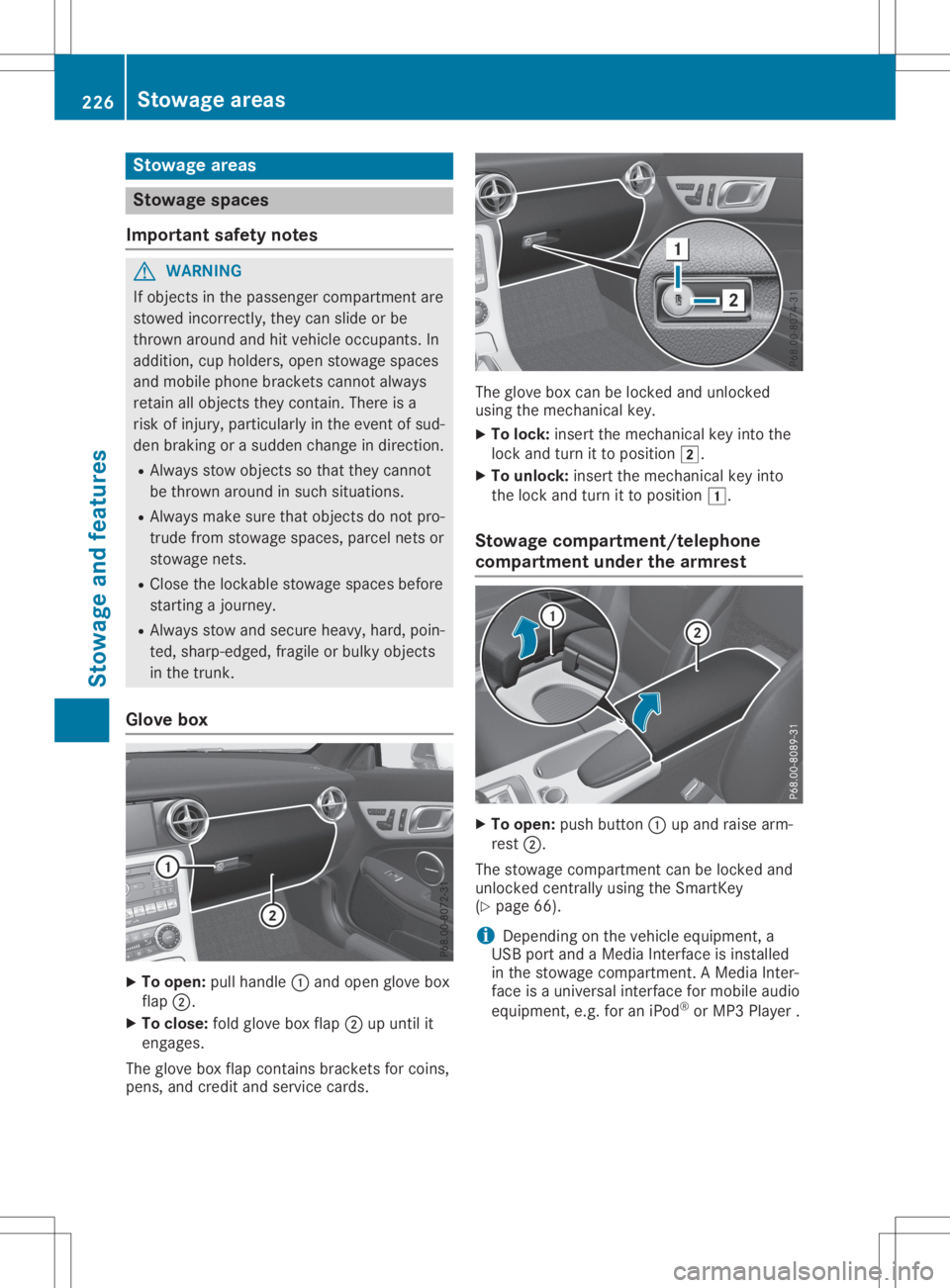
Glove box X
To open: pullhandle 0043and open glove box
flap 0044.
X To close :fold glove boxflap 0044upuntil it
engages.
The glove boxflap cont ains brackets forcoins,
pens, andcredit andservice cards. The
glove boxcanbelocked andunlocked
using themechanical key.
X To lock: insert themechanical keyinto the
lock andturn itto position 0048.
X To unlock: insertthemechanical keyinto
the lock andturn itto position 0047.
Stowage compartment/telephone
compar tment under thearm rest X
To open: pushbutton 0043upand raise arm-
rest 0044.
The stowage compartmen tcan be locked and
unlocked centrally using theSmartK ey
(Y page 66).
i Depending
onthe vehicle equipment, a
USB portandaMedia Interface isinstalled
in the stowage compartmen t.AM edia Inter-
face isau niversal interfaceformobile audio
equipment, e.g.foraniPod ®
or MP3 Playe r. 226
Stowage
areasStowage andfeatu res
Page 232 of 310
i
When
driving athigh speeds withtheside
window orroof open:
If you have insert edacarpark ticketinto
retainin gstrip 0087,m akesure thatitis not
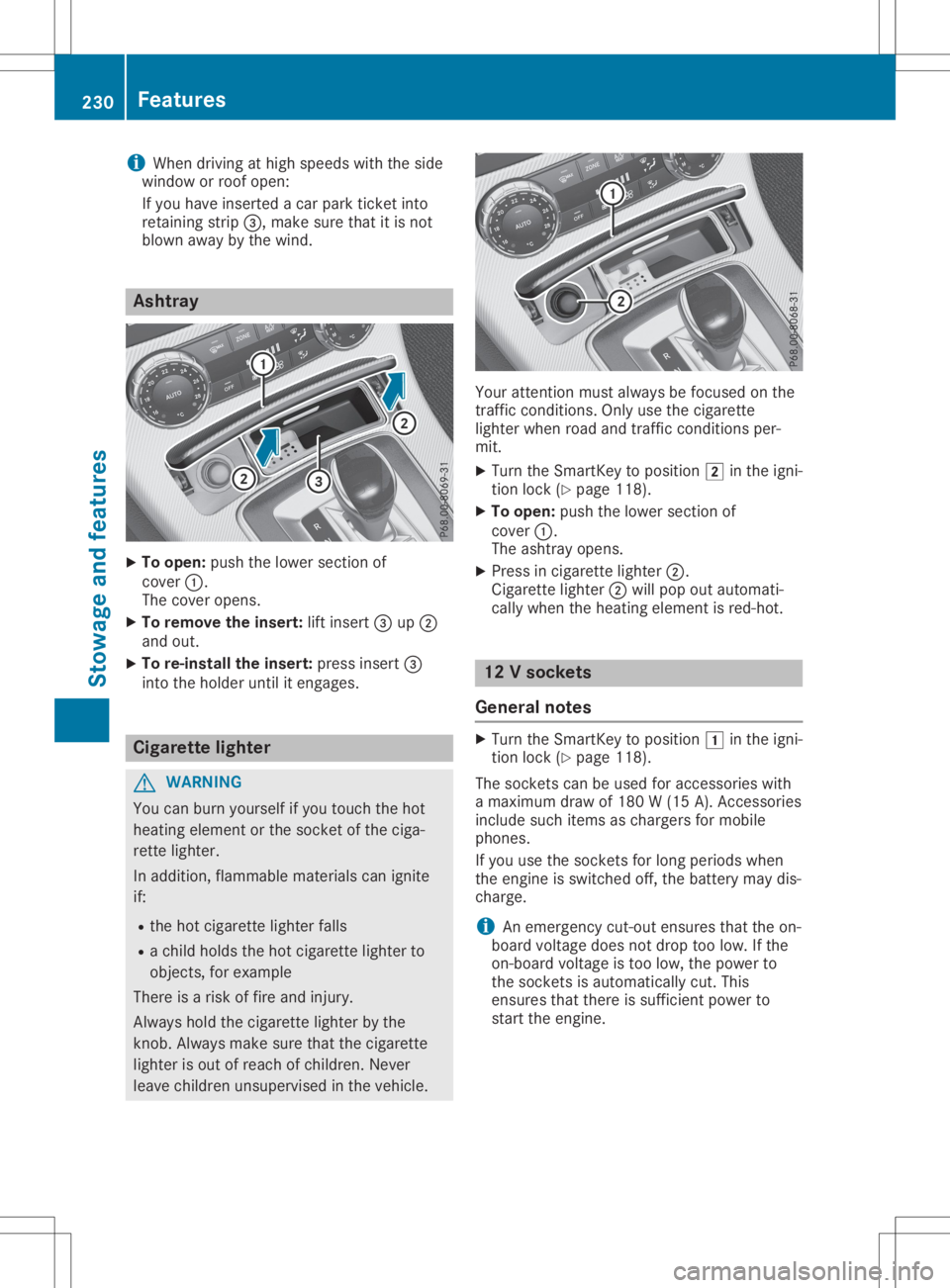
blown awaybythe wind. Ashtr
ay X
To open: pushthelower sectionof
cover 0043.
The cover opens.
X To remove theinsert: liftinsert 0087up0044
and out.
X To re-inst allthe insert: pressinsert 0087
into theholder untilitengages. Cigarett
elighter G
WARNIN
G
You canburn yourself ifyou touch thehot
heating element orthe sock etofthe ciga-
rett elighter.
In addition, flammable materialscanignite
if:
R the hot cigarett elighter falls
R ac hild holds thehot cigarett elighter to
object s,for example
There isar isk offire and injury.
Always holdthecigarett elighter bythe
kn ob. Always makesurethatthecigarett e
lighter isout ofreach ofchildren. Never
leave children unsupervised inthe vehicle. Your
attentionmust alway sbefocused onthe
traff iccondit ions.Onlyusethecigarett e
lighter whenroadandtrafficcondit ionsper-
mit.
X Turn theSmart Keytoposition 0048inthe igni-
tion lock (Ypage 118).
X To open: pushthelower sectionof
cover 0043.
The ashtray opens.
X Press incigarett elighter 0044.
Cigarette lighter0044will pop outautomati-
cally when theheating element isred-hot . 12
Vsockets
General notes X
Turn theSmart Keytoposition 0047inthe igni-
tion lock (Ypage 118).
The sock etscan beused foraccessor ieswith
am aximum drawof180 W(15 A). Acc essories
include suchitems aschargers formobile
phones.
If you usethesock etsforlong periods when
the engine isswitched off,thebatter ymaydis-
charge.
i An
emergen cycut- out ensures thattheon-
board voltage doesnotdrop toolow. Ifthe
on- board voltage istoo low, thepower to
the sock etsisautomatically cut.This
ensures thatthere issufficien tpower to
start theengine. 230
Featur
esStowage andfeatures
Page 233 of 310
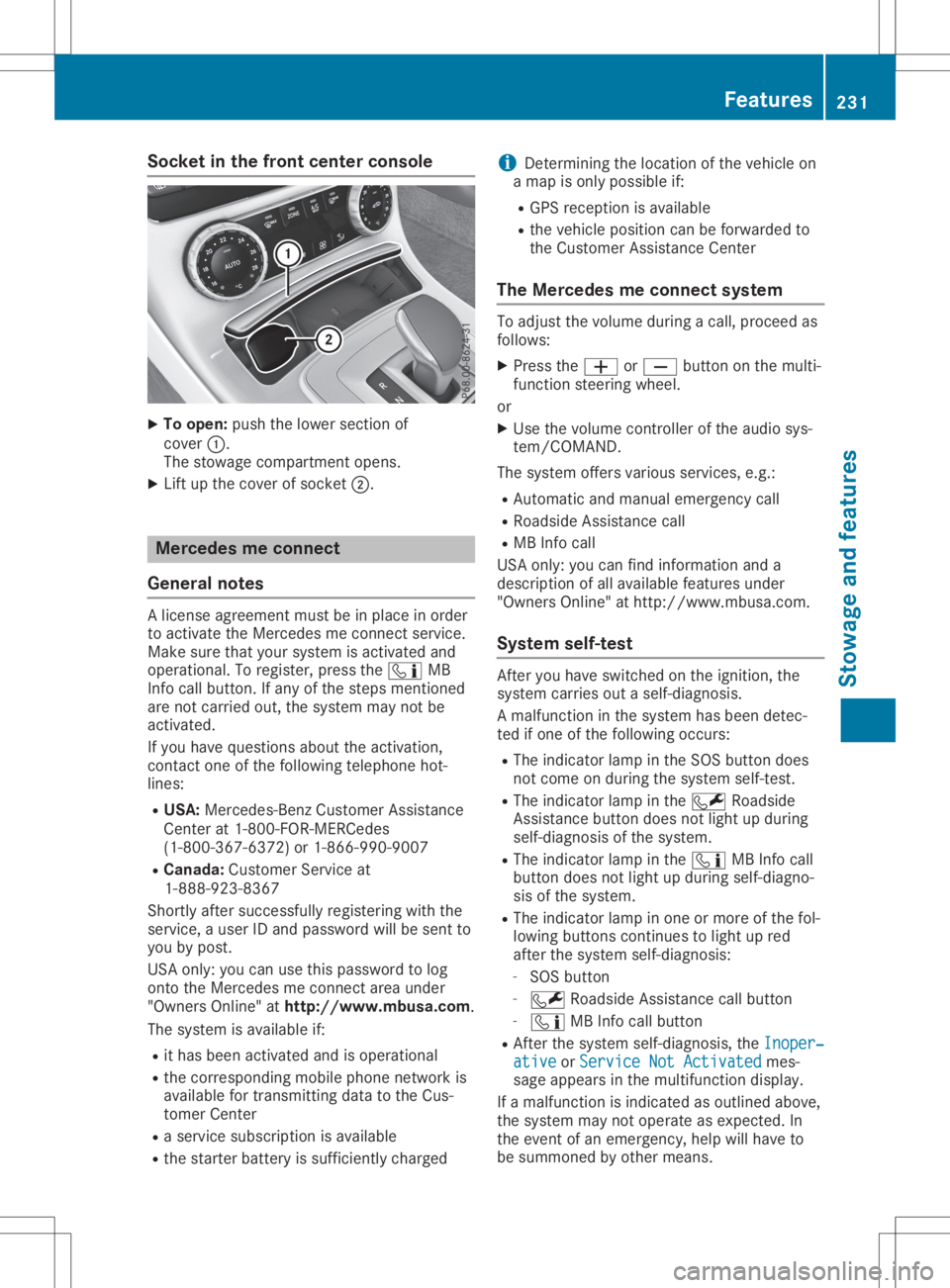
Socket
inthe front center console X
To open: pushthelower section of
cover 0043.
The stowage compartmen topens.
X Lift upthe cover ofsocket 0044. Mercedes
meconne ct
General notes Al
icense agreement mustbeinplace inorder
to activate theMercedes meconn ectservice.
Make surethatyour system isactivated and
operational. Toregister, pressthe00D9 MB
Info callbutton. Ifany ofthe steps mentioned
are not carried out,thesystem maynotbe
activated.
If you have questions abouttheactivation,
cont actone ofthe following telephone hot-
lines:
R USA: Mercedes-B enzCustomer Assistance
Center at1-80 0-FOR-MERCedes
(1-80 0-367-6372)or1-86 6-990-9007
R Canada: Customer Serviceat
1-88 8-92 3-8367
Short lyafter successfully registeringwiththe
service, auser IDand password willbesent to
you bypost.
USA only: youcan usethis password tolog
onto theMercedes meconn ectarea under
"Owners Online"athtt <0053001D00120012005A005A005A001100500045005800560044001100460052
0050>.
The system isavaila bleif:
R ithas been activated andisoperational
R the correspondin gmobile phone network is
availa blefortransm ittingdatatothe Cus-
tomer Center
R as ervice subscription isavaila ble
R the starter battery issufficiently charged i
Determ iningthelocation ofthe vehicle on
am apisonly possible if:
R GPS reception isavaila ble
R the vehicle position canbeforwarded to
the Customer AssistanceCenter
The Mercedes meconne ctsystem To
adjust thevolume duringacall, proceed as
follows:
X Press the0081 or0082 button onthe multi-
funct ionsteering wheel.
or X Use thevolume controller ofthe audio sys-
tem/COMA ND.
The system offersvarious services, e.g.:
R Automatic andmanual emergency call
R Roadsid eAssistanc ecall
R MB Info call
USA only: youcan find information anda
description ofall availa blefeatures under
"Owners Online"athttp: //www.mbusa.com.
System self-test Aft
eryou have switched onthe ignition, the
system carriesoutaself-diagnosis.
Am alfunction inthe system hasbeen detec-
ted ifone ofthe following occurs:
R The indicator lampinthe SOS button does
not come onduring thesystem self-test .
R The indicator lampinthe 0052 Roadsid e
Assistanc ebutton doesnotlight upduring
self-diagnosis ofthe system.
R The indicator lampinthe 00D9 MBInfo call
button doesnotlight upduring self-diagno-
sis ofthe system.
R The indicator lampinone ormore ofthe fol-
lowing buttons continues tolight upred
after thesystem self-diagnosis:
- SOS button
- 0052 Roadsid eAssistanc ecallbutton
- 00D9 MBInfo callbutton
R Aft erthe system self-diagnosis, theInoper‐ Inoper‐
ative ative
orService NotActivated Service
NotActivated mes-
sage appears inthe multifunct iondisplay .
If am alfunction isindicated asoutlined above,
the system maynotoperate asexpected. In
the event ofan emergency, helpwillhave to
be summoned byother means. Features
231Stowageandfeatu res Z