phone MERCEDES-BENZ SLC 2020 Owner's Manual
[x] Cancel search | Manufacturer: MERCEDES-BENZ, Model Year: 2020, Model line: SLC, Model: MERCEDES-BENZ SLC 2020Pages: 310, PDF Size: 16.05 MB
Page 235 of 310
Making
anemerge ncycall X
To
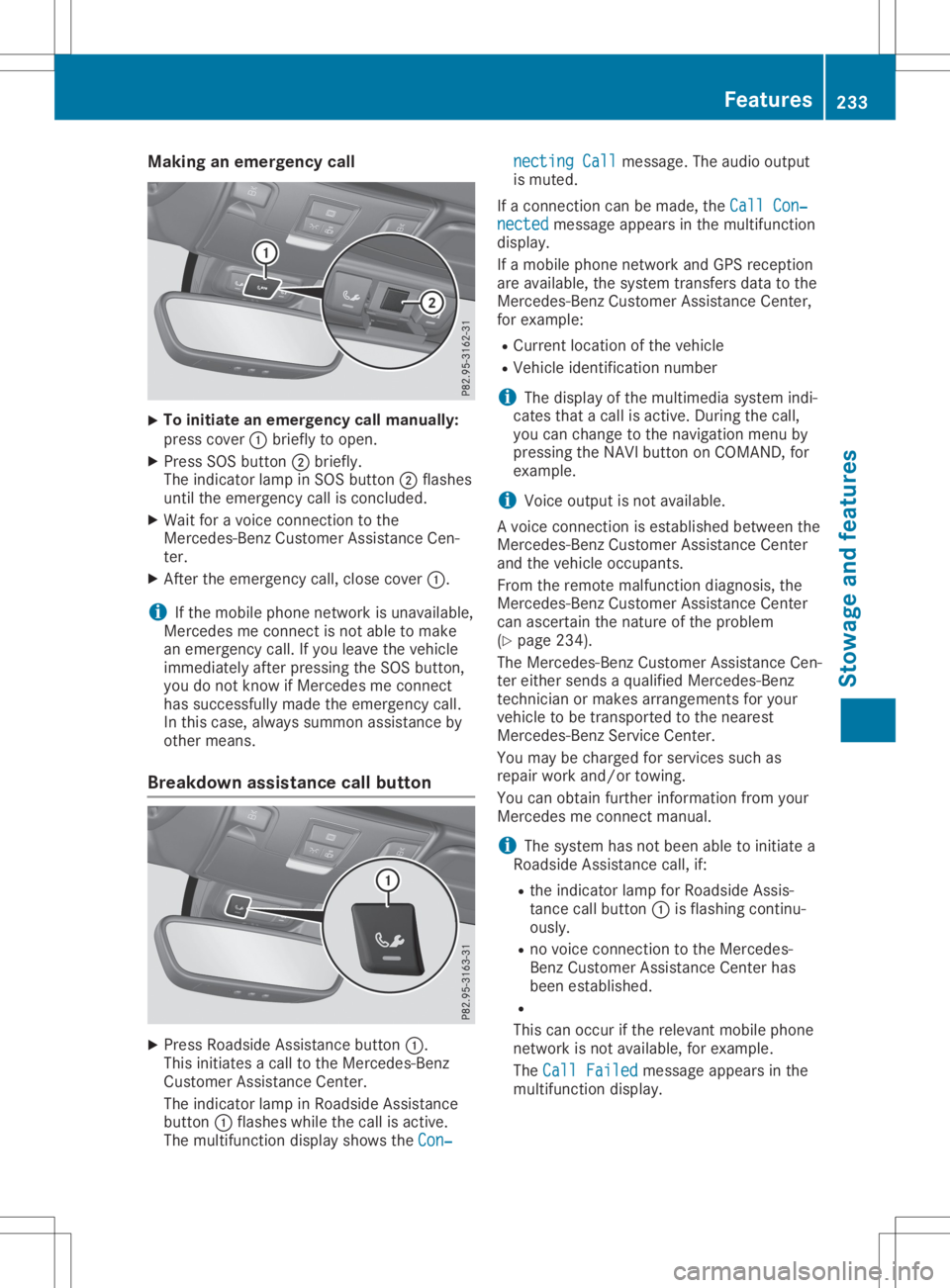
initiate anemerge ncycallmanually:
press cover 0043brie flytoopen.
X Press SOSbutton 0044brie fly.
The indica torlamp inSOS button 0044flas hes
until theemerge ncycallisconclude d.
X Wai tfor av oice connection tothe
Mercede s-BenzCustomer Assistance Cen-
ter.
X After theemerge ncycall,close cover 0043.
i If
the mobil ephone network isunava ilable ,
Mercede smeconnect isnot abletom ake
an emerge ncycall.Ify ou leavethe vehicl e
immed iatelyafter pressi ngthe SOS button,
you donot know ifMercede smeconnect
has successfu llymade theemerge ncycall.
In this case, alwayss ummon assistance by
other means.
Breakdown assistance callbutton X
Press Roadsid eAssistance button0043.
This initia tesacalltothe Mercede s-Benz
Cu stomer Assistance Center.
The indica torlamp inRoa dsid eAssistance
button 0043flas hes whilethe call isactive.
The multi function displayshow sthe Con‐ Con‐necting
Call necting
Callmessa ge.The audio outpu t
is muted.
If ac onnection canbemade ,the Call Con‐ Call
Con‐
nected nected
messageapp ears inthe multi function
disp lay.
If am obilephone network andGPS receptio n
are available ,the system transfers datatothe
Mercede s-BenzCustomer Assistance Center,
for exampl e:
R Cu rrent location ofthe vehicl e
R Vehicl eide ntificatio nnumber
i The
displayofthe multi mediasystem indi-
cates thatacallisactive. During thecall,
you can change tothe naviga tionmenu by
pressi ngthe NAVI button onCOMAND, for
exampl e.
i Voice
outputisn otava ilable .
Av oice connection isestabl ishedbetwe enthe
Mercede s-BenzCustomer Assistance Center
and thevehicl eoccupa nts.
From theremote malfunction diagnosis, the
Mercede s-BenzCustomer Assistance Center
can ascerta inthe nature ofthe probl em
(Y pag e234) .
The Mercede s-BenzCustomer Assistance Cen-
ter either sends aqualified Mercede s-Benz
technician ormakes arrangements foryou r
vehicl etob etransported tothe neares t
Mercede s-BenzService Center.
You may becharge dfor services suchas
repa irwork and/or towing.
You canobtai nfurther informati onfrom your
Mercede smeconnect manual.
i The system hasnotbeen abletoinitia tea
Roa dsid eAssistance call,if:
R the indica torlamp forRoa dsid eAssis-
tance callbutton 0043isflas hing continu-
ousl y.
R no voice connection tothe Mercede s-
Benz Customer Assistance Centerhas
been establ ished.
R
This canoccur ifthe relev antmobil ephone
network isnot available ,for exampl e.
The Call Failed Call
Failed messageapp ears inthe
multi function display. Fe
atures
233Stowageand features Z
Page 236 of 310
X
To endac all:pre ssthe 0076 button onthe
mu ltifunc tions tee ring wheel.
or X Pre ssthe corr espond ingmultimed iasystem
bu tton forend ingaphone call.
MB Info cal lbutto n X
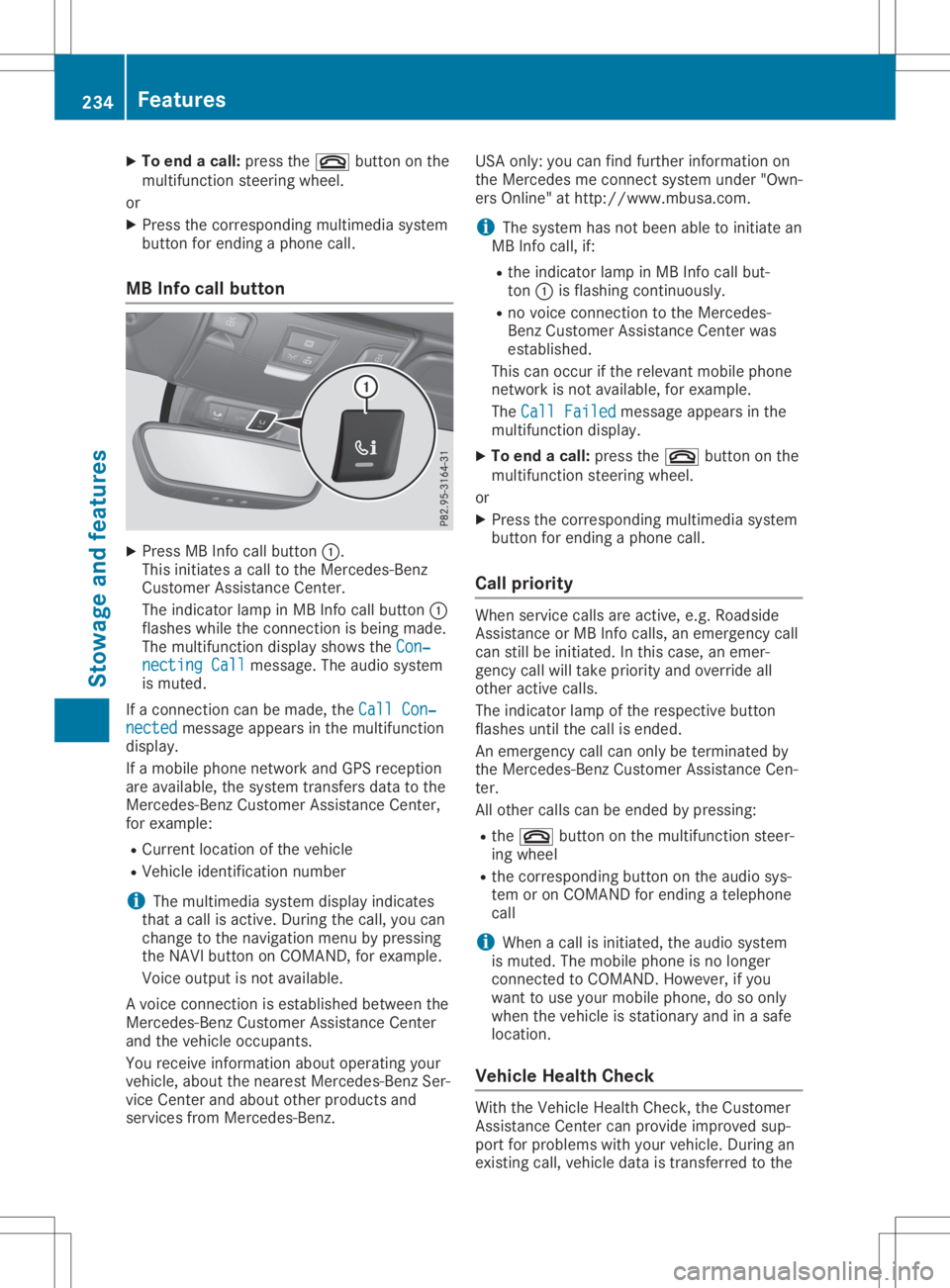
Pre ssMB Info callbutton 0043.
Thi sinitia tes acallt ot he Mer cedes-Be nz
Cu stom erAssi stance Center.
The indicator lamp inMB Info callbutton 0043
fla she swhile the conne ctionisb eing mad e.
The multifunc tiond ispl ay sho wsthe Con‐ Con
‐
nec tingCall nec
tingCallmes sage. The audios ystem
is mu ted .
If ac onne ctioncan be made,the Cal lCon‐ Cal
lCon‐
nec ted nec
ted message appe ars inthe multifunc tion
di spl ay.
If am obilep hone netw orkand GPSrece ption
are availab le,t he system transfersdata to the
Mer cedes-B enzCustom erAssi stance Center,
for exa mpl e:
R Cu rre ntlocati onofthe vehicle
R Veh iclei de nti fica tionn um ber
i The
multimed iasystem displ ayind icates
tha tac allisa ctive. Duri ngthe call,yo uc an
cha nge tothe navi gatio nm enu bypre ssing
the NAVI button onCOMAND, forexa mpl e.
Voi ceoutpu tisn otava ilab le.
Av oice conne ctionise sta blished betwe enthe
Mer cedes-B enzCustom erAssi stance Center
and thevehicleo ccu pants.
Yo ur ece iveinfo rma tiona bout opera ting your
veh icle, ab ou tthe nea restM erced es-Be nzSer-
vice Center andabou to the rprodu cts and
ser vice sfrom Mercedes-Be nz. USA
only:youc an find further informa tiono n
the Mer cedesme conne ctsystem under"Own-
ers Online"athttp:// www.mb usa.co m.
i Thes ystem hasn otbeen ableto initia te an
MB Info call,if:
R the indicator lamp inMB Info callbut-
ton 0043isfla shi ng conti nuously.
R no voice conne ctiontot he Mer cedes-
Benz Custom erAssi stance Center was
esta blished .
Thi scan occu rift he releva ntmob ilep hone
netw orkisnot availab le,f or exa mpl e.
The CallFailed Cal
lFailed message appe ars inthe
mu ltifunc tiond ispl ay .
X To endac all:pre ssthe 0076 button onthe
mu ltifunc tions tee ring wheel.
or X Pre ssthe corr espond ingmultimed iasystem
bu tton forend ingaphone call.
Cal lprio rity Whe
nservice callsare active,e.g.Roadside
Assi stance orMB Info calls,a ne me rge ncy call
can stillbeinitia ted .Int hisc ase, an eme r-
genc ycallw illt ake priorityand override all
othe ractive calls.
The indicator lamp ofthe respective button
fla she suntilthe callise nded.
An eme rgency callcan onlybetermi natedby
the Mer cedes-B enzCustom erAssi stance Cen-
ter.
All othe rcalls can beend edbypre ssing:
R the 0076 button onthe multifunc tions tee r-
ing wheel
R the corr espond ingbutton onthe audios ys-
tem oron COMAND forend ingatelep hone
cal l
i Whe
nac allisi nitia ted ,the audios ystem
is mu ted .The mob ilep hone isno longer
conne ctedtoCO MAND. However,ifyo u
wa ntto usey ourm obilep hone, dosoonl y
wh en the vehiclei ss tatio nary andinas afe
lo cati on.
Vehi cleH ealth Che ck Wi
th the VehicleH ealth Check, theCustom er
Assi stance Center canprovideimp rove dsup-
po rtfor problems with your veh icle. Duri ngan
exi sting call,veh icled atai st rans ferredtothe 23
4 Fe
aturesSto wag eand featur es
Page 237 of 310
Cust
omerAssist anc eCenter. The customer
ser vicerepres entat ive can usether eceive d
dat atod ecide what kindo fassis tanceis
req uired .You are then ,for example ,guided to
th en eares tM erced es-Ben zServic eC entero r
ar ecove ryveh icle iscalle d.
If veh icle dataneeds tobe trans ferred durin g
an MB Info call oraR oadsi deAssist anc ecall,
th is isini tiat edbytheC ustome rAssist anc e
Cen ter. You willsee theRoa dsideAssis‐ Roa
dsideAssis‐
tan ceConnected tan
ceConnected message intheC OMA ND
displ ay.Ifth eV ehicle Heal thChec kcan be
st art ed, theReq uestf orveh icled iagno ‐ Req
uestf orveh icled iagno ‐
sis received. Startvehicled iagno ‐ sis
received. Startvehicled iagno ‐
sis ? sis
?mes sage appear sint he displ ay.
X Con firmt hemes sage withYes Yes
.
X When theVeh icleD iagno sis:P lease Veh
icleD iagno sis:P lease
sta rtignition. sta
rtignition. message appear s,tur n
th eS martKey toposi tion0048 inthei gn ition
loc k(Ypage 118).
X When thePle ase follow theinstruc‐ Ple
ase follow theinstruc‐
tio nsreceivedbyphoneand move tio
nsreceivedbyphoneand move
you rv ehicl et oas afep ositi on you
rv ehicl et oas afep ositi onmes -
sage appear s,foll ow thec ustomer service
rep resentat ive' sins truct ions.
The message inthed ispl aydisapp ears.
If you selectCan cel Can
cel theV ehicle Heal th
Chec kisc ancel ed comple tely.
The vehicle oper atingstate check begin s.
You willsee theVeh icled iagno sis Veh
icled iagno sis
act ivated. act
ivated.mes sage.
When thec heck isco mple ted, theSen d Sen
d
veh icled iagno sticsdata( Voice con‐ veh
icled iagno sti csdata( Voice con‐
nec tionm aybe interruptedduring nec
tionm aybe interruptedduring
dat at ransf er) dat
at ransf er) message appear s.The vehi-
cle datacan nowb esenttot he Cust omer
As sist anc eCenter.
X Pre ssOK OK
toconfirm them essage.
The voiceconnec tionw itht he Cust omer
As sist anc eCenterist ermi nat ed.
You willsee theVeh icleD iagno sis: Veh
icleD iagno sis:
Tra nsferring data... Tra
nsferring data...mes sage.
The vehicle dataiss enttot he Cust omer
As sist anc eCenter.
De pen dingo nw hat thec ustomer servicerep-
res entat ive agre edwithyou, thev oic ec onnec -
tio nisr e-est ablish edafterthet rans fer isco m-
plet e.Ifne ces sary, youwillbecontact edata
late rtim eb yanother mean s,e.g .bye -mail or
phon e.
An other function oftheV ehicle Heal thChec k
is thet rans fer ofser viced atat ot he Cust omer As
sist anc eCenter. Ifas ervic eiso verdue, the
COMA NDdispl aysho wsam essage about vari-
ous spec ialoffers atyour workshop.
US Ao nly: this inf orm ationcan also becalle d
up unde r"Own ersOnline" athttp :/ /
www.m busa.com.
In fo rm atio nonthe dat astoredi nt he veh icle
(Y page 28).
In for mat iononRoadsid eAssist anc e
(Y page 25). Ga
rage door opener
Gener alnot es The
Hom eLink®
garag edoor open erintegr ated
in ther ear -view mirror allows youtooper ate
up tothree differen tdoor and gatesyst ems .
Use thei ntegr atedgarag edoor open eronlyon
garag edoor sthat:
R have safetystop and revers efeat ures and
R meet curren tU.S.fede ralsafe tystandar ds
On ce prog ramed,thei ntegr atedgarag edoor
open erinther ear -view mirror will assum ethe
fun ction oftheg arag edoor syst em'srem ote
con trol. Please alsoread theo per atin ginstruc-
tio ns for theg arag edoor syst em.
When programmingag aragedoor open er,
park thev ehicle outside theg arag e.Do not
run thee ngine while programming.
Cert aingarag edoor drivesare incompat ible
with thei ntegr atedgarag edoor open er.Ifyou
have difficult yprog ram ingthei ntegr ated
garag edoor open er,con tactana uth oriz ed
Mer cedes-Ben zCent er.
Alt ern ativ ely, you can callthef ollowin gtele-
phon eassis tanceser vices:
R USA: Mercedes-Ben zCust ome rAssist anc e
Cent erat1-80 0-FO R-M ERCed es
R Cana da:Cust omerServic ea t
1- 80 0-38 7-01 00
R Hom eLink®
hot line 1-80 0-35 5-35 15 (free of
ch arge )
Mor einform ationonH omeLin k®
and/ orcom -
pat ible prod uctsisa lso availabl eonline at
ht tp :/ /www. homelink.com.
Not eson thed eclarat ionofcon formit y
(Y page 27).
US A:FCC ID:C B2HMI HL4
Canada: IC:279B -HMIH L4 Feat
ures
235Stowage andfeatures Z
Page 279 of 310
vehicl
etoah altb yb raking carefully.A void
abru ptsteering movements.
The tirepressu remonitor hasayellow warni ng
lamp inthe instrument clusterforindica ting
pressu reloss oram alfunction. Whether the
warni nglamp flashes orlights upindica tes
whethe ratirepressu reistoo low orthe tire
pressu remonitor ismalfu nctioning:
R ifthe warni nglamp islit continuous ly,the
tire pressu reon one ormore tiresissignifi -
cantly toolow.The tire pressu remonitor is
not malfu nctioning.
R ifthe warni nglamp flashes forapp rox-
imatel yaminute andthen remai nslitcon-
stantly, thetire pressu remonitor ismalfu nc-
tioning.
In add ition tothe warni nglamp ,am essage
app ears inthe multi function display.O bserve
the information ondisp laymessa ges
(Y pag e202) .
It may take uptoten minutes foram alfunc-
tion ofthe tire pressu remonitor tobe indica -
ted. Amalfunction willbeindica tedbythe tire
pressu rewarni nglamp flashing forapp rox-
imatel yone minute andthen remai ninglit.
When themalfu nction hasbeen rectified ,the
tire pressu rewarni nglamp goesoutafter a
few minutes ofdrivi ng.
The tirepressu revalu esindica tedbythe on-
boa rdcomputer maydiffer fromthose meas-
ured atag asstation withapressu regage .The
tire pressu resshow nbythe on-board com-
puter refertothose measu redatsea level .At
high altitudes, thetire pressu revalu esindica -
ted byap ressu regage arehighe rthan those
show nbythe on-board computer. Inthis case,
do not redu cethe tire pressu res.
The opera tionofthe tire pressu remonitor can
be affected byinterference fromradiotrans-
mitting equipme nt(e.g. radiohead phones,
two-wa yradi os) that may bebeing operatedin
or near thevehicl e.
Chec kingthetire pressure electroni -
call y X
Make surethattheSmartKey isin posi tion
0048 (Ypag e118) inthe ignitio nlock.
X Press the0059 or0065 button onthe steer-
ing whee ltos ele ctthe Serv. Serv.
menu. X
Press the0063 or0064 button tosele ct
Tire Pressure Tire
Pressure .
X Press 0076.
The current tirepressu reofeach tireis
show nint he multi function display.
If the vehicl ehasbeen parked forover
20 minutes ,the Tire pressure willbe Tire
pressure willbe
displaye dafter driving afew minutes displaye
dafter driving afew minutes
messa geapp ears.
After ateach-in process, thetire pressu re
monitor automatical lydetects newwhee lsor
new sensors. Aslong asac learallocation of
the tire pressu revalu etot he indivi dualwhee ls
is not possi ble,theTire Pressure Monitor Tire
Pressure Monitor
Active Active
displaymessa geisshow ninstead of
the tire pressu redisp lay.The tire pressu res
are already being monitored.
If an emerge ncyspare wheelism ounted, the
system maycontinue toshow thetire pressu re
of the whee lthat has been removed forafew
minutes. Beawa rethat thevalu edisplayed for
the posi tion where theemerge ncyspare wheel
is fitted isnot thesame asthe current tire
pressu reofthe emerge ncyspare wheel.
Tire pressure monitorwarnin gmes-
sage s The
tirepressu remonitor detectsapressu re
loss inone ormore tires:
R Ifthe tire pressu remonitor detectsapres-
sure lossinone ormore tires,awarni ng
messa geisshow nint he multi function dis-
pla y.The yellow tirepressu rewarni nglamp
then lights up.
R Ifthe Please Correct TirePressure Please
Correct TirePressure
messa geapp ears inthe multi function dis-
pla y,the tire pressu reinat lea stone tireis
too low.The tire pressu remust becorrected
when theoppo rtunity arises.
R Ifthe Check Tires Check
Tiresmessageapp ears inthe
multi function display,the tire pressu reinat
lea stone tirehas dropp edsignifi cantly. The
tires must bechecked.
R Ifthe Warning TireMalfunct ion Warning
TireMalfunct ionmes-
sage appears inthe multi function display,
the tire pressu reinat lea stone tirehas
dropp edsudd enly.The tires must be
checked.
Observe theinstructions andsafety notesin
the disp laymessa gesinthe "Tires" section
(Y pag e202). Tire
pressure
277Wheelsand tires Z
Page 300 of 310
basic
wiring. Besure toobserve themanufac -
turer' sSupplemen twhen installing.
Deviat ionswith respect tofrequen cybands,
maximum transmission outputsoranten na
position smust beapproved byMercedes -
Ben z.
The maximum transmission output(PEAK)at
the base ofthe anten namust notexceed the
following values: Frequ
encyband Maxim
um
tr ansm ission
outp ut Shor
twave
3-5 4MHz 100
W 4mw
aveband
74 -88M Hz 30
W 2mw
aveband
144 -174 MHz 50
W Trunk
edradio system/
Tetra
380 -460 MHz 10
W 70
cm waveband
400 -460 MHz 35
W Mobile
communications
(2G/3G/ 4G) 10
W The
following canbeused inthe vehicle with-
out restrictions:
R RF tran smitt erswith amaximum transmis-
sion output ofup to100 mW
R RF tran smitt erswith transmitt erfrequen cies
in the 380 -410 MHz waveband andamaxi-
mum transmission outputofup to2W
(trun kedradio/Tet ra)
R Mobile phones (2G/3G/ 4G)
There isno rest riction foranten naposition son
the outside ofthe vehicle forthe following fre-
quency bands:
R Trunk edradio system/ Tetra
R 70 cm waveband
R 2G/3G/ 4G Identificat
ionplat es Vehicle
identification platewith
vehicle identification number(VIN) X
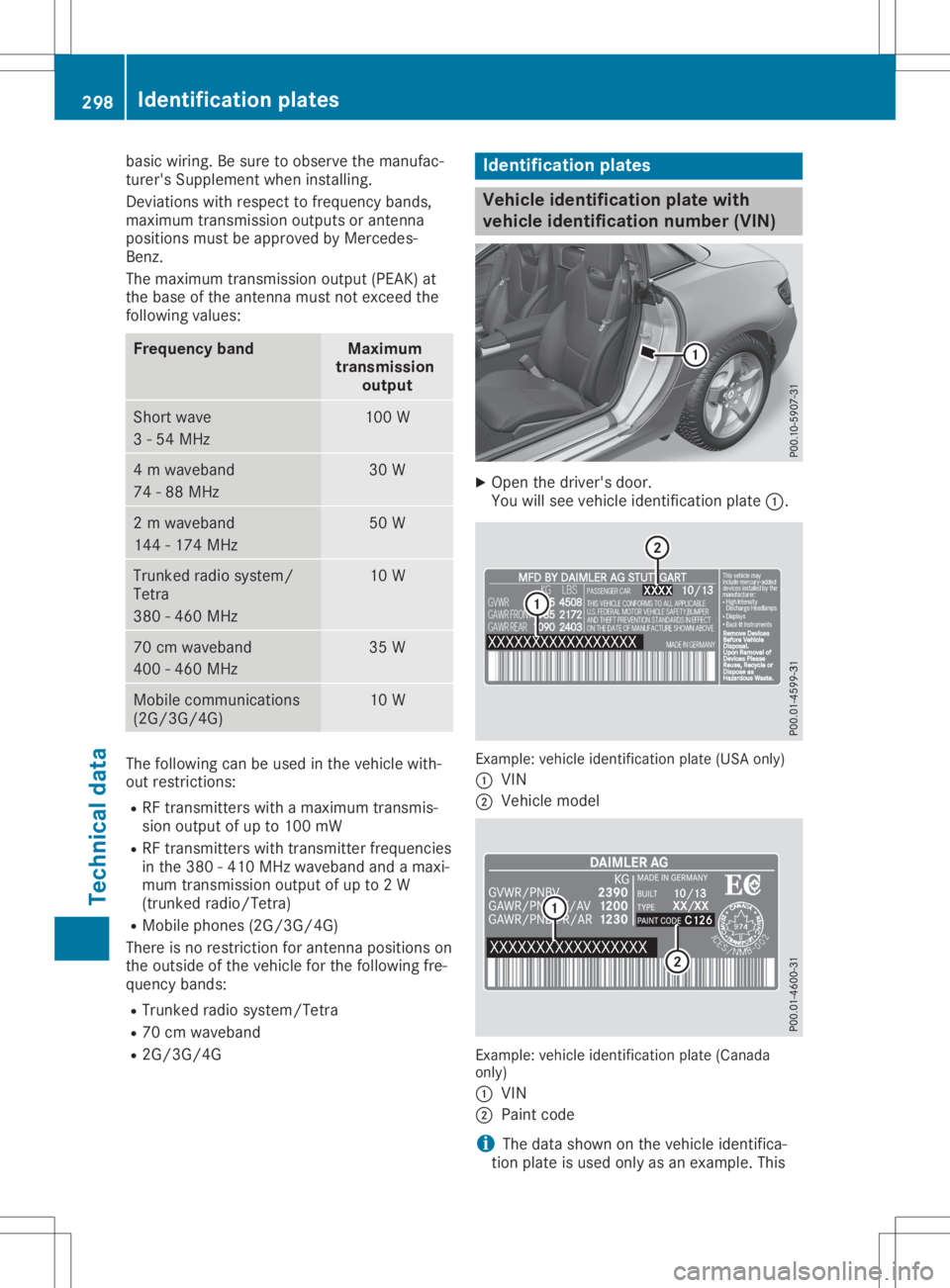
Open thedriver' sdoor.
You willsee vehicle identification plate0043. Ex
ample: vehicle identification plate(USA only)
0043 VIN
0044 Vehicle model Ex
ample: vehicle identification plate(Canada
only)
0043 VIN
0044 Paint code
i The
data shown onthe vehicle identifica-
tion plate isused onlyasan example. This 298
Identificat
ionplat esTechnical data