ECU MERCEDES-BENZ SLC 2020 Service Manual
[x] Cancel search | Manufacturer: MERCEDES-BENZ, Model Year: 2020, Model line: SLC, Model: MERCEDES-BENZ SLC 2020Pages: 310, PDF Size: 16.05 MB
Page 220 of 310
Gene
ralnotes
The multime diasystem section inthis Opera -
tor's Manua ldescrib esthe basi cprincipl esfor
opera tion.More information canbefound in
the Digital Operator'sManua l. Important
safetynotes G
WARNING
If you opera teinformation systemsandcom-
municatio nequipment integrated inthe
vehicle whendriving, youmay bedistracted
from thetraffic situation. Youcould also
lose control ofthe vehicle .There isar isk of
an accide nt.
Only opera tethis equipment whenthetraffic
situa tionpermits. Ifyou arenot sure that
this ispossi ble,park thevehicle paying
attention totraffic conditions andopera te
the equipment whenthevehicle isstation-
ary .
You must observe thelega lrequ irements for
the country inwhich youarecurrently driving
when operatingthemultime diasystem.
The multime diasystem calculates theroute to
the destinati onwithou ttaking thefollo wing
into account, forexampl e:
R traffic lights
R stop andyieldsigns
R parking orstopping restrictions
R road narrowi ng
R other roadandtraffic rulesand regul ations
The multime diasystem maygiveincorrect nav-
iga tion recommendati onsifthe actual street/
traffic situationdoes notcorrespond withthe
digi talmap's data.
For exampl e:
R ad iverted route
R the road layout orthe direction ofao ne-way
street hasbeen changed
For this reaso n,you must alwayso bserve road
and traffic rulesand regul ations duringyou r
journey. Roadand traffic rulesand regul ations
alw aysh ave priori tyover multime diasystem
driving recommendati ons. Navig
ation announcements areintended to
direct youwhiledriving withou tdiverting your
attention fromtheroad anddriving.
Plea sealw aysu sethis feature instead ofcon-
sul ting themap displayfordirections. Looking
at the icons ormap displaycan distract you
from traffic conditions anddriving, and
increase therisk ofan accide nt.
This equipment complieswith FCCradiation
exposu relimi tsset forth foruncontrolled
equ ipment andmeets theFCC radiofreque ncy
(RF) Exposure Guideli nes inSuppl ement Cto
OET65.
This equipment hasvery lowlevel sofRF
energy thatisdeeme dtoc omply withou tmaxi-
mum permis siveexposu reeval uation(MPE).
However, itis recommended toinstall itat a
distance ofat lea st8i nches (approx. 20cm)
betwee nthe radi ation source andaperson's
body (notinclud inglimb ssuch ashands,
wrists, feetandlegs) . G
WARNING
Modi fications toelectronic components,
their software aswel lasw iring can impa ir
their function and/orthefunction ofother
networked components. Inparticu lar,sys-
tems releva ntto safety couldalsobeaffec-
ted. Asaresul t,these maynolonger func-
tion asintended and/orjeopardizethe oper-
ating safety ofthe vehicle .There isan
increase drisk ofan accide ntand injury.
Never tamper withthewiringaswel lase lec-
tronic components ortheir software .You
shoul dhave allwork toelectrica land elec-
tronic equipment carried outataq ualified
specia listworkshop . Func
tionrestrictio ns
For safety reasons,some functions arerestric-
ted orunava ilable whil ethe vehicle isin
motion. Youwillnotice this,forexampl e,
becau seeither youwillnot be abletos ele ct
certain menuitemsoram essag ewilla pp ear
to this effect. 218
Func
tionrestrictio nsMultimedia system
Page 223 of 310
Notes
forroute types:
R Eco Route Eco
Route
R Dynamic TrafficRoute Dynamic
TrafficRoute
Traffic reports onthe route forthe route
guid ance aretaken intoaccount (notavaila-
ble inall countries).
R Dynamic TRF.Route AfterRequest Dynamic
TRF.Route AfterRequest
You candecide whether ornot current traf-
fic reports shouldbeincluded inthe route
calcul ation(notavailableina llcountries).
R Calculate Alternative Routes Calculate
Alternative Routes
Different routesarebeing calculated.In
order todo so, instead ofStart Start,s
electthe
menu itemContinue Continue.
X To avoid/use routeoptions: select
Avoid Options Avoid
Options.
X Select aroute option.
Notes forroute options:
R Use Toll Roads Use
Toll Roads
The route calculationincludes roadswhich
requi reyou topay ausag efee (toll).
R Number ofOccupants inthe Vehicle: Number
ofOccupants inthe Vehicle:
(only availableint he USA)
Prerequ isite:yourvehicle meets theaccess
conditions forcarpool lanes.
Carp oollanes willbeincluded ifthe carpool
lanes option isactivated.
Entering anaddr ess Multimed
iasystem:
X Select Navi Navi007BNavigation Navigation.
The map shows thevehicle's currentposi-
tion.
X Slide 6thecontroller.
X Select Destination Destination007BAddre
ssEntry Address
Entry.
Ent eran addre ss,e.g. asfollow s:
R city orZIP code, street, housenumber
R state/province, cityorZIP code
R city orZIP code, center
R street, cityorZIP code, intersection
X Select City City.
The cityinwhich thevehicle iscurrently
located (current vehicleposition) isat the
top. Below this,youwillsee locations for
which routeguidance hasalrea dybeen car-
ried out. X
Ent erthe city.
The 0043symbol :the location iscontained on
the digitalmap multipl etimes.
X To switc htothe list: slide 5thecontrol-
ler.
X Select thelocation.
If avai lable,the ZIPcode isshown. Ifthere
are different ZIPcodes availablefor the
location, thecorresponding digitsare dis-
play edwith anX X.
X Ent erthe street andhouse number.
The addre ssisin the menu.
Further options fordestination entry:
R search forakeyword
The keyword searchfindsdestinations using
fragments ofwords.
R select thelast destination
R select acontact
R select aPOI
You cansearch foraPOIby location, name
or telephone number.
R select destination onthe map
R enter intermediate destination
You canmap theroute tothe destination
you rself withuptofour intermediate desti-
nations.
R select destinations fromMercedes-Benz
Apps
R select geo-coordinates
Calc ulating theroute Prerequ
isite:theaddre sshas been entered
and isin the menu.
X Select Start Start
orContinue Continue.
The route iscalcul atedwiththeselected
route typeandtheselected routeoptions.
If route guidance hasalrea dybeen activa-
ted, aprompt willappe arasking whether
you wish toend thecurrent routeguidance.
X Select Cancel ActiveRouteGuidance Cancel
ActiveRouteGuidance or
Set asIntermediate Destination Set
asIntermediate Destination.
Cancel ActiveRouteGuidance Cancel
ActiveRouteGuidance cancels
the current routeguidance andstarts route
calcul ationtothe new destination.
Set asIntermediate Destination Set
asIntermediate Destinationadds
the new destination inaddi tion tothe exist-
ing destination andopens theintermediate
destinations list. Operating
system
221Multimedia system Z
Page 224 of 310
Connect
ingam obile phone
(COMAN D)
Req uiremen ts For
telepho nyvia theB luetoot h®
int erf ace, you
requi reaB luetooth®
-c apable mobilephon e.
The mob ilephon emustsuppo rtHan ds-Free
Pro file 1.0o rabov e.
Mult imed iasyst em:
X Sel ect Vehicle Veh
icle007BSy stem Set‐ Sys
tem Set‐
tin gs tin
gs007B ActivateBluetooth Act
ivateBluetooth.
X Ac tivate Blue tooth®
0073.
Mobil ephon e:
X Ac tivate Blue tooth®
and ,ifn ecessary, Blue-
to oth®
vis ibilit yfor other devi ces(see the
man ufacturer'so per atin ginstruct ions).
The Blue tooth®
devi cenam esfor allofone
man ufacturer'sp roduct smightbeiden tical. To
mak eitp oss ible tocle arly iden tifyy our mob ile
phon e,chang ethe devi cenam e(see them an-
ufac turer'so per atin ginstruct ions).
If th em obile phon esuppo rtst he PBA P(Pho ne
Book Access Profile)and MA P(Mes sage
Acc ess Profile)Blue tooth®
pro files,thef ollow-
ing inform ationwillbe trans mitteda fter you
con nect:
R Phon ebook
R Call lists
R Tex tmessages ande-mail
i Fur
ther inform ationonsuitable mobile
phon escan befoun dat:ht tp://
www.m ercedes-benz.com /connect
i In
theU SA,you can getintouch withthe
Mer cedes-Ben zCust ome rAssist anc eCenter
on 1-80 0-FO R-M ERCe des
(1- 800-36 7-63 72).
In Cana da,you can getintouch withthe
Cus tomer Relations Center on
1-800-3 87-0100 .
Searchin gfor and authorizing (con-
nec ting) amobile phone Before
usingyourmobil ephone withthemulti-
media system forthe first time, youwillneed
to search forthe phone andthen authori ze
(connect) it.Depending onthe mobil ephone,
authori zationeithertakesplacebymeans of Secure
SimplePairing orby entering apass-
key. Themultime diasystem automatically
makes theprocedu rethat isreleva ntfor you r
mobil ephone available. The mobil ephone is
alw ays connected automaticallyafterauthori -
zation. Further information onusing amobile
phone withthemultime diasystem (seethe
Digital Operator's Manual).
If the multime diasystem doesnotdetect your
mobil ephone, thismay bedue toparticul ar
security settings onyou rmobil ephone (see
the manufacture r'sopera tinginstructions).
Only onemobil ephone canbeconnected to
the multimed iasystem atany one time.
Searchin gfor am obile phone
Multime diasystem:
X Select Tel/ Tel/00A7007BConn. Conn.
Device Device007BSearc
hfor Phones Search
forPhones007BStart Start
Search Search.
The availablemobil ephones aredispl ayed.
Symbols inthe devic elist Sym-
bol Explanatio
n 00D3
New
mobil ephone found, notyet
authori zed. 00DC
Mobil
ephone isauthori zed,butis
not connected. Con
necting amobile phone
Authorization usingSecure SimplePairing:
X Select mobilephone.
Ac ode isdispl ayedint he multime diasys-
tem andonthe mobil ephone.
X Ifcode smatch: select Yes Yes
onthe multime -
dia system.
X Confirm codeonthe mobil ephone. Depend-
ing onthe mobil ephone used,confirm the
connection tothe multime diasystem and
for the PBAP andMAP Bluetooth ®
profil es.
The prompt toconfirm maytake uptotwo
minutes tobe displ ayed(see themanufac-
turer's operatinginstructions).
X Ifthe code saredifferent: selectNo No
on the
multime diasystem.
The process iscanceled.
Repe atauthori zation. 222
Operating
systemMultimedia system
Page 225 of 310
Auth
orizati onbyente ringapasske y(pa ss-
cod e):
X Sel ect the Bluetoo th®
nam eofthe mob ile
pho ne.
The inputmenu forthe passke yisd ispl ay ed .
X Ch oos eao netosixtee n-digitn um berc om-
bi nati onasap asske y.
X Enter thepasske yonthe mu ltimed iasys-
tem.
X Pre ss0054 toconfi rm.
X Enter andconfi rmthe passke yonthe
mob ilep hone. Dep endingonthe mob ile
pho neused ,confi rmthe conne ctiontot he
mu ltimed iasystem andforthe PBAP and
MAP Bluetoo th®
pro files. The prompt to
confi rmmaytake uptotwo minu testobe
di spl ayed (seethe ma nuf actu rer'sop era ting
ins truc tions) . Co
nnectin gam obilep hon e(Au dio
20 )
Requ iremen ts For
telephony viathe Bluetoo th®
inte rface, you
req uire atleas to ne Blu etoo th®
-cap ablemob ile
pho nedependi ng on useo fone-te lepho ne
mode ortwo -teleph onem ode.T hemob ile
pho nemu stsupp ort Hand s-FreeProfile1 .0or
ab ove .
In two -teleph onem ode youc an usea llthe
fu nctio nsofthe multimed iasystem with the
main teleph one.W itht he additi onaltel e-
pho ne,you can rece iveinco ming calls.
Mu ltimed iasystem :
X Sel ect Vehicle Veh
icle007BSy stem Set‐ Sys
tem Set‐
tin gs tin
gs007B ActivateBluetooth Act
ivateBluetooth.
X Activa teBlu etoo th®
0073.
Mob ilep hone:
X Activa teBlu etoo th®
and ,ifn ece ssary,B lue-
tooth ®
vis ibility for othe rdevice s(seet he
ma nuf actu rer'sop era ting instruc tions) .
The Bluetoo th®
de vice namesfor allo fo ne
ma nuf actu rer'spro ducts mig htbe identi cal.To
ma keitpo ssi blet oc lear ly identi fyyour mob ile
pho ne,change thedevice name(seet he ma n-
uf actu rer'sop era ting instruc tions) . If
the mob ilep hone supp orts thePBAP (Phone
Boo kAcce ssPro file) and MAP (Mess age
Acce ssPro file) Blu etoo th®
pro files, the follow-
ing info rma tionist rans mitte dafteryou con-
nect themaintel ephone :
R Pho nebook
R Ca lllists
R Te xt mes sages and e-ma il
i Fur
ther informa tiono nsuita blem obile
pho nes can befou ndat: http:/ /
ww w.me rcedes -benz.c om/ conn ect
i In
the USA, youc an getint ouch with the
Mer cedes-B enzCustom erAssi stance Center
on 1-800-FO R-MERC edes
(1-8 00-367 -6372).
In Ca nad a,youc an getint ouch with the
Cu stom erRelatio ns Center on
1-800-3 87-0100.
Searching forand auth orizing (con-
necting) amobile phone Before
usingyourmobile phonewiththemulti-
media system forthe first time, youwillneed
to search forthe phone andthen authorize
(conn ect)it.Depending onthe mobile phone,
authorization eithertakesplacebymeans of
Secure SimplePairing orby enterin gapass-
key. Themultimedia systemautomatically
makes theprocedure thatisrelevant foryour
mobile phoneavailable.Themobile phoneis
alwa ysconn ected automatically afterauthori-
zation. Further information onusing amobile
phone withthemultimedia system(seethe
Digital Operator's Manual).
If the multimedia systemdoesnotdetect your
mobile phone, thismay bedue toparticular
security settingson your mobile phone(see
the manufacturer's operatinginstructions).
Searching foram obile phone
Multimedia system:
X Select Tel/ Tel/00A7007BConn.
Device Conn.
Device007BCon‐ Con‐
nect NewDevice nect
NewDevice.
X Select Connect viaVehicle Connect
viaVehicle.
X Select mobile phone. Operat
ingsystem
223Multimediasystem Z
Page 226 of 310
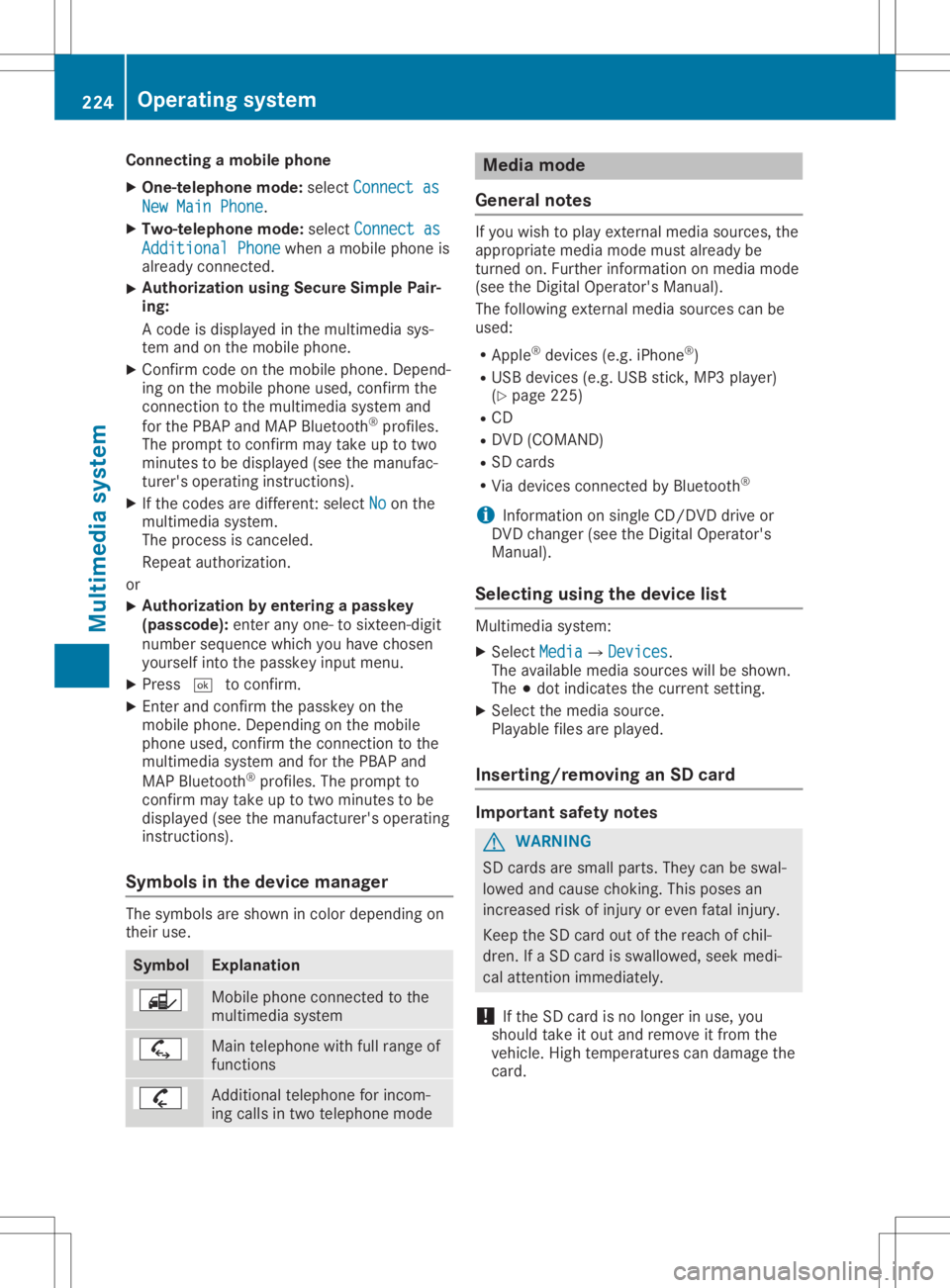
Connect
ingam obile phone
X One- telep hone mode:selec tCon necta s Con
necta s
New MainP hone New
MainP hone.
X Two- telep hone mode:selec tCon necta s Con
necta s
Add itionalP hone Add
itionalP hone when amobilephon eis
already connected.
X Aut
horization usingSecur eSimple Pair -
ing:
Ac odeisd isplayed inthem ultimedi asys-
tem andonthem obilephon e.
X Conf irmcodeonthe mobi lephon e.Dep end-
ing onthem obilephon eused, confirmt he
con nectiont ot he mult imedi asyst em and
for theP BAPa nd MA PBluet ooth®
prof iles.
The prom pttocon firmm aytak euptotwo
min utes tobe displayed (seethem anufac -
tur er'so per atin ginstruct ions).
X Ifth ec odes are differen t:selec tNo No
on the
mult imedi asyst em.
The proc essiscan cele d.
Repeat authorizatio n.
or X Aut
horization byente ringap asskey
(pa sscod e):enterany one-tos ixtee n-digit
num bersequen cewhic hyou have chosen
yourse lfint ot he passk eyinput menu.
X Pres s0054 tocon firm.
X En ter and confirmt hepassk eyon the
mobi lephon e.Dep endingonthem obile
phon eused, confirmt hecon nectiont ot he
mult imedi asyst em and fortheP BAPa nd
MA PBluet ooth®
prof iles. Theprom ptto
con firmm aytak euptotwo min utes tobe
displayed (seethem anufac turer'so per atin g
ins truct ions).
Sym bols inthed evice manager The
symbo lsare shown incolo rdepen dingon
th eir use. Sym
bol Expl
anation Mobile
phoneconnec ted tothe
mult imedi asyst em Main
telephon ewithfull rangeof
fun ction s Add
itional telephon efor inc om-
ing calls intwo telephon emode Med
iamod e
Gener alnotes If
you wish toplay extern almedia sources,the
appro priatemedia mode mustalready be
tur ned on.Further inform ationonm edia mode
(see theD igital Oper ator'sMan ual).
The follo wing extern almedia sourcescan be
used:
R App le®
devic es(e.g.iPhon e®
)
R US Bd evic es(e.g.US Bs tick ,M P3 player)
(Y page 225)
R CD
R DV D(COMA ND)
R SD cards
R Via devic escon nected byBluet ooth®
i In
for mat iononsingle CD/ DVDd riveo r
DV Dc han ger (see theD igital Oper ator's
Man ual).
Select ingusin gthe dev icelist Mult
imedi asyst em:
X Sele ctMed ia Med
ia007B Devices Dev
ices.
The available mediasourceswillbeshown .
The 003Bdot indicatesthec urren tsettin g.
X Sele ctthem edia source.
Playable filesareplayed.
Inser ting/rem ovinganSD card Imp
ortant safety notes G
WAR
NING
SD cardsare small parts.They canbeswal-
lowed andcause choking.This poses an
inc reas edrisk ofinjury oreven fatalinj ury.
Keep theS Dc ardo utofther eac hofchil-
dren .IfaS Dcardi ss wallowe d,seek medi-
cal attent ion imm ediat ely.
! If
th eS Dc ardi sn olon ger inuse, you
should takeito utand remove itfro mt he
veh icle.High tem perat urescandamage the
car d. 224
Oper
ating syst emMultim edia system
Page 228 of 310
Stowage
areas Stowage
spaces
Import antsafety notes G
WARNING
If object sint he passenger compartmen tare
stowed incorrec tly,they canslide orbe
thrown around andhitvehicle occupants. In
addition, cupholders, openstowage spaces
and mobile phonebrackets cannotalways
retain allobject sthey cont ain.There isa
risk ofinjury, particularly inthe event ofsud-
den braking oras udden change indirection.
R Always stowobject ssothat they cannot
be thrown around insuch situations.
R Always makesurethatobject sdon otpro-
trude fromstowage spaces,parcelnetsor
stowage nets.
R Close thelockable stowagespacesbefore
startin gajourney.
R Always stowandsecure heavy,hard,poin-
ted, sharp-edged, fragileorbulky object s
in the trunk .
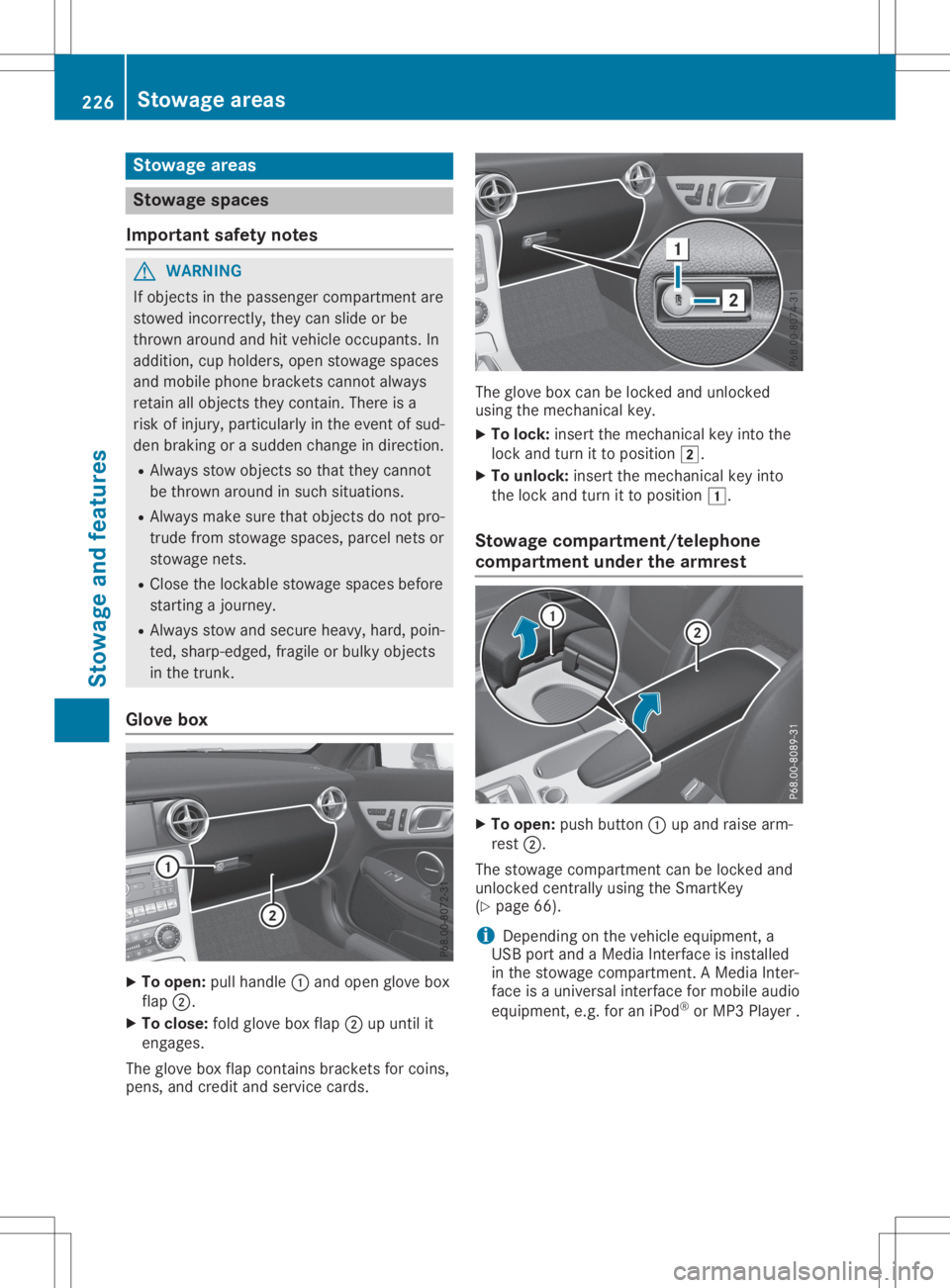
Glove box X
To open: pullhandle 0043and open glove box
flap 0044.
X To close :fold glove boxflap 0044upuntil it
engages.
The glove boxflap cont ains brackets forcoins,
pens, andcredit andservice cards. The
glove boxcanbelocked andunlocked
using themechanical key.
X To lock: insert themechanical keyinto the
lock andturn itto position 0048.
X To unlock: insertthemechanical keyinto
the lock andturn itto position 0047.
Stowage compartment/telephone
compar tment under thearm rest X
To open: pushbutton 0043upand raise arm-
rest 0044.
The stowage compartmen tcan be locked and
unlocked centrally using theSmartK ey
(Y page 66).
i Depending
onthe vehicle equipment, a
USB portandaMedia Interface isinstalled
in the stowage compartmen t.AM edia Inter-
face isau niversal interfaceformobile audio
equipment, e.g.foraniPod ®
or MP3 Playe r. 226
Stowage
areasStowage andfeatu res
Page 230 of 310
Rev
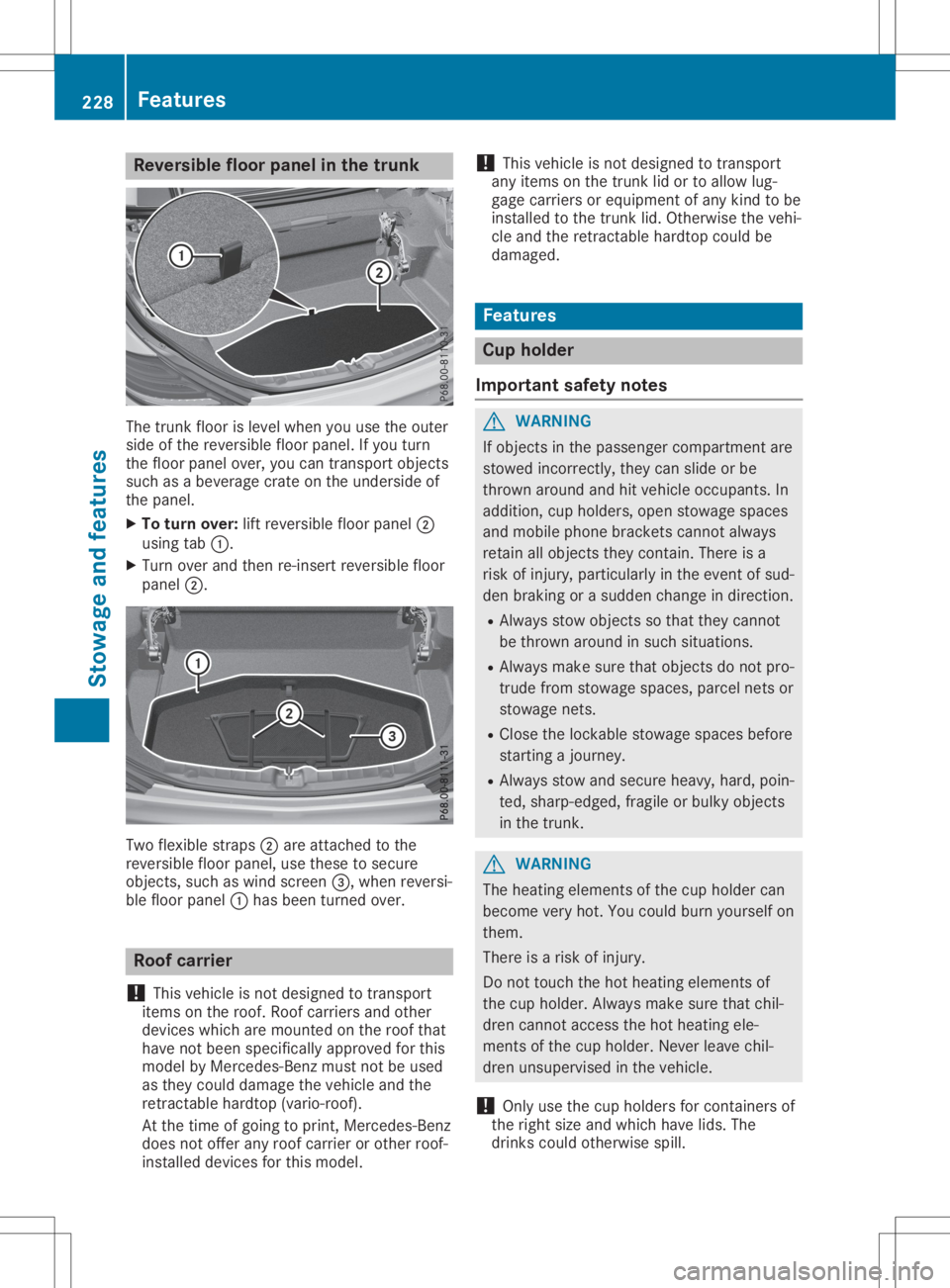
ersible flo or pane lint he trunk The
trunk floor islevel when youu sethe outer
sid eo fthe reve rsiblef loor panel .Ify ou turn
the floor panel over,yo uc an trans portobje cts
su ch asab evera gecrate onthe undersideo f
the panel .
X To turn over: lift reve rsiblef loor panel 0044
us ing tab 0043.
X Tu rn ove rand then re-insert reversiblef loor
pa nel 0044. Tw
oflexib lestra ps0044 are atta ched tothe
reve rsiblef loor panel ,use thes etos ecu re
obje cts,such aswind scre en0087,w henr eve rsi-
bl ef loor panel 0043hasb eent urne dover. Roo
fcarri er
! Thi
svehiclei sn otdes igned totrans port
item sonthe roo f.Ro ofcarr iers and othe r
dev icesw hich are mou nted onthe roofthat
ha ve not beenspecifi callyap pro ved forthis
mod elby Mer cedes-Be nzmus tnot be used
as they couldda mag ethe veh iclea nd the
retra ctableha rdto p(vario -roof ).
At the time ofgoi ng toprint, Mer cedes-Be nz
doe snotoffe rany roo fcarr iero ro the rroo f-
insta lled dev icesfor this mod el. !
Thi
svehiclei sn otdes igned totrans port
any item sonthe trunk lido rtoa llow lug-
ga ge carr iers or equ ipment ofany kind tobe
insta lled tothe trunk lid. Othe rwisethe vehi-
cle and theretra ctableha rdto pcouldbe
da mag ed. Fe
atures Cup
holder
Impo rtant safetynotes G
WARNI
NG
If obje ctsinthe passe nger comp artmentare
stow edinco rrectl y,they canslide orbe
throw naround andhitveh icleo ccu pants. In
ad dition, cupholder s,ope nstow ages paces
and mob ilep hone bra ckets canno talway s
reta inallo bje cts they conta in.The reisa
ris ko finju ry, particu larly inthe eventofsud-
den braking oras uddenc hange indirecti on.
R Alw ayss tow obje ctssothat they canno t
be throw naround insuch situ ations.
R Alw aysm ake sure that objectsdonot pro-
trud efrom stow ages paces, parcel nets or
stow agen ets.
R Close thelockab lestow ages paces before
star ting ajou rney .
R Alw ayss tow and secu rehea vy,hard, poin-
ted, sharp-e dged,fra gile or bulky obje cts
in the trunk. G
WARNI
NG
The heating eleme ntsofthe cup holder can
bec ome veryhot.Youc ouldbu rn yours elfo n
them.
The reisar isko finju ry.
Do not touchthe hot heating eleme ntsof
the cup holder .Alway sm ake sure that chil-
dre ncanno tacce ssthe hot heating ele-
ments ofthe cup holder .Neve rlea ve chi l-
dre nunsup ervi sed inthe vehicle.
! Only
uset he cup holder sfor conta inersof
the right size andwhich have lids. The
dri nks couldothe rwisespill. 22
8 Fe
aturesStow ageand features
Page 231 of 310
!
Do
not expose drinksbottles inthe cup
holder inthe center console tocont inuous,
strong anddirect sunlight. Thepassenger
compartment inthe area ofthe center con-
sole canotherwise bedamage dbythe con-
centr atedandreflected sunlight.
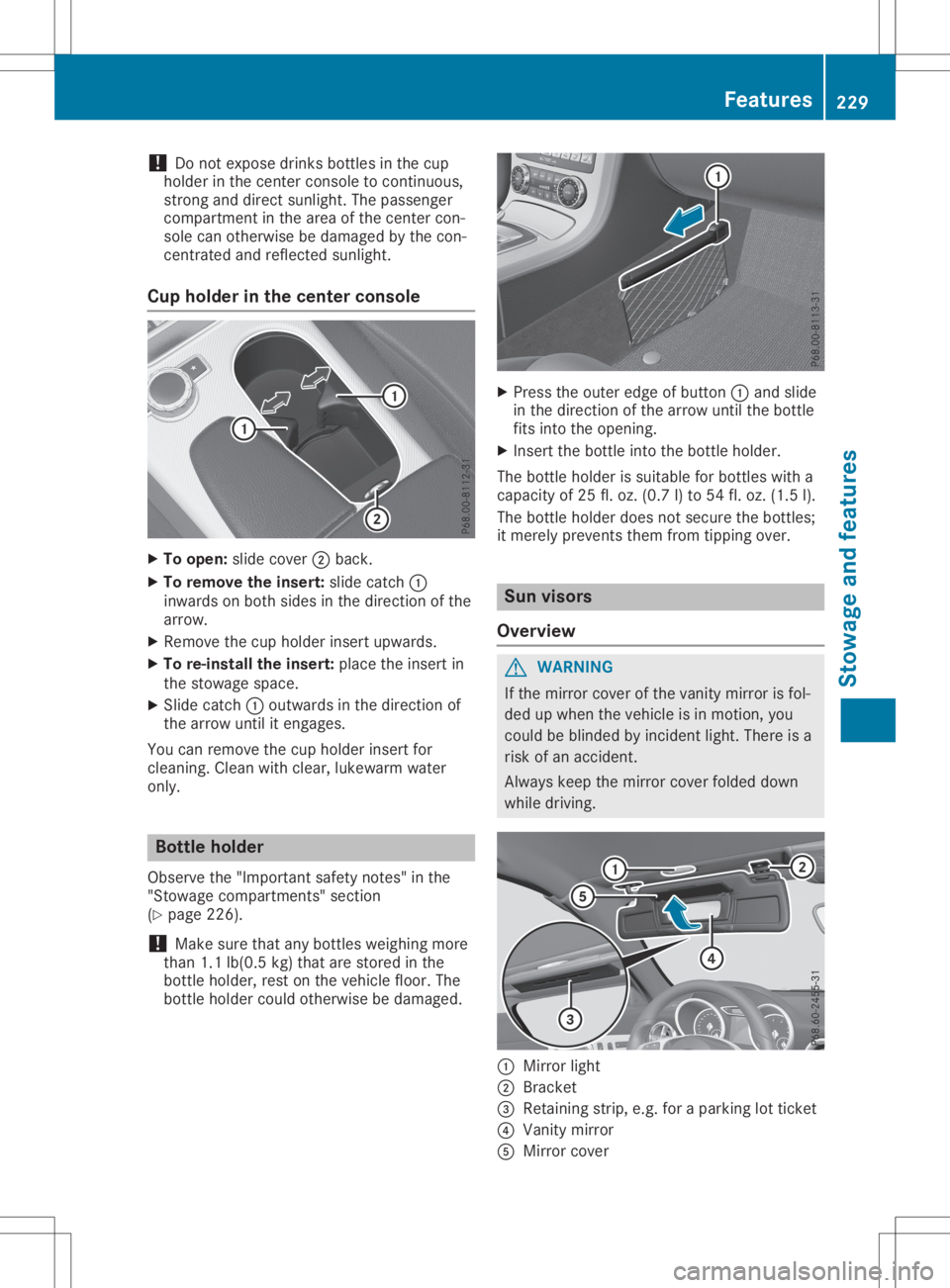
Cup holder inthe center console X
To open: slidecover 0044back.
X To remove theinsert: slidecatch 0043
inwards onboth sides inthe direction ofthe
arrow.
X Remove thecup holder insertupwards.
X To re-install theinsert: placetheinsert in
the stowage space.
X Slide catch 0043outwards inthe direction of
the arrow untilitengages.
You canremove thecup holder insertfor
cleaning. Cleanwithclear, lukewa rmwater
only. Bottle
holder
Observe the"Important safetynotes" inthe
"Stowage compartment s"section
(Y page 226).
! Make
surethatanybottles weighingmore
than 1.1lb(0.5 kg)that arestored inthe
bottle holder, restonthe vehicle floor.The
bottle holder couldotherwise bedamage d. X
Press theouter edgeofbutton 0043and slide
in the direction ofthe arrow untilthebottle
fits into theopening.
X Insert thebottle intothebottle holder.
The bottle holder issuitabl efor bottles witha
capacity of25 fl.oz. (0.7 l)to 54 fl.oz. (1.5 l).
The bottle holder doesnotsecure thebottles;
it merely prevents themfromtipping over. Sun
visors
Overview G
WARNING
If the mirror coverofthe vanity mirror isfol-
ded upwhen thevehicle isin motion, you
could beblinded byincident light.There isa
risk ofan accident.
Alway skeep themirror coverfolded down
while driving. 0043
Mirror light
0044 Bracket
0087 Retaining strip,e.g.foraparking lotticket
0085 Vanity mirror
0083 Mirror cover Features
229Stowageandfeatur es Z
Page 234 of 310
Have
thesystem checked atthe near est
Merce des-Benz ServiceCenter orcontact the
foll owi ngservi cehotli nes:
R USA :Merce des-Benz Customer Assistance
Ce nter at1-800-FOR-M ERCedes
(1-800-367-6372) or1-866-990-9007
R Can ada: Customer Serviceat
1-888-923-8367
Eme rgen cycal l Importan
tsafe tynote s G
WARNI
NG
It can bedangero ustorema ininthe vehi cle,
even ifyo uh avep res sed theSOS button in
an emer gency if:
R yous ee smoke insideorouts ideofthe
vehi cle, e.g. ifthere isaf ire after anacci -
dent
R the vehi cleison adangero ussectio nof
roa d
R the vehi cleisnot visible orcannot easily
be see nbyother roadusers, particu larly
whe ndarko rinp oorvisibil ity condi tions
The reisar isk ofan acci dent andinjury .
Lea vethe vehi cleimme diately inthis orsim-
il ar situ atio nsassoon asitis safe todo so.
Move toas afe loca tion along with other
vehi cleoccup ants.Insuch situatio ns,secu re
the vehi cleinaccord ancewith natio nalregu -
la tions, e.g. with aw arning triangle .
Al icense agreeme ntmus tbeinp lace inorde r
to activ atethe Merce desmeconnect service.
Make surethat your sys tem isactiv ated and
ope rational .Tor egi ster, pressthe 00D9 MB
Info callbutton. Ifany ofthe steps mentio ned
are not carri edout, thesystem may notbe
activ ated.
If yo uh aveq uestio nsabout theactiv ation,
contact oneofthe followi ngtele pho nehot-
li nes:
R USA :Merce des-Benz Customer Assistance
Ce nter at1-800-FOR-M ERCedes
(1-800-367-6372) or1-866-990-9007
R Can ada: Customer Serviceat
1-888-923-8367 Gen
eral note s
An emer gency callisd ialed automati callyifan
ai rb ag orEmerge ncyTensi oning Device istrig-
gere d.
i You
cannot endanautomati callytrigg ered
emer gency callyou rself.
An emer gency callcan also be initi ated man-
ua lly.
As soon asthe emer gency callhas bee niniti -
ated ,the indi cator lamp inthe SOS button
fla shes .The mul tifunction displa yshow sthe
Conne ctingCall Conne
ctingCall mess age.
The audio outp utismuted .
Once theconnectio nhasbee nm ade,the
Call Connected Call
Connectedmess ageappea rsinthe mul-
tifu nction displa y.
All imp ortant informationonthe emer gency is
transmi tted,forexam ple:
R Cu rrent location ofthe vehi cle(asd ete r-
mined bythe GPS system)
R Vehi cleidentifica tionnumb er
R Informa tiononthe seve rityofthe acci dent
Shortl yafter theemer gency callhas bee niniti -
ated ,avoice connectio nisa utomati cally
esta blished betweentheCustomer Assistance
Ce nter andthevehi cleoccup ants.
R Ifthe vehi cleoccup antsareresp onsiv e,the
Merce des-Benz Customer Assistance Center
attemp tsto get more inform ationonthe
emer gency .
R Ifthere isno resp onse fromthevehi cle
occup ants,anamb ulance isimme diately
sent tothe vehi cle.
If no voice connectio ncan be esta blished to
the Merce des-Benz Customer Assistance Cen-
ter, thesystem hasbeenunable toiniti ate an
emer gency call.
Thi scan occur ,for exam ple,ift he releva nt
mobi lepho nenetwor kisn otava ilab le. The
indi cator lamp inthe SOS button flashes con-
tinuo usly.
The Call Failed Call
Failedmess ageappea rsinthe
mul tifunction displa yand mus tbec onfirm ed.
In this case ,sum mon assista nce byother
mea ns. 232
Fe
aturesStow ageand features
Page 236 of 310
X
To endac all:pre ssthe 0076 button onthe
mu ltifunc tions tee ring wheel.
or X Pre ssthe corr espond ingmultimed iasystem
bu tton forend ingaphone call.
MB Info cal lbutto n X
Pre ssMB Info callbutton 0043.
Thi sinitia tes acallt ot he Mer cedes-Be nz
Cu stom erAssi stance Center.
The indicator lamp inMB Info callbutton 0043
fla she swhile the conne ctionisb eing mad e.
The multifunc tiond ispl ay sho wsthe Con‐ Con
‐
nec tingCall nec
tingCallmes sage. The audios ystem
is mu ted .
If ac onne ctioncan be made,the Cal lCon‐ Cal
lCon‐
nec ted nec
ted message appe ars inthe multifunc tion
di spl ay.
If am obilep hone netw orkand GPSrece ption
are availab le,t he system transfersdata to the
Mer cedes-B enzCustom erAssi stance Center,
for exa mpl e:
R Cu rre ntlocati onofthe vehicle
R Veh iclei de nti fica tionn um ber
i The
multimed iasystem displ ayind icates
tha tac allisa ctive. Duri ngthe call,yo uc an
cha nge tothe navi gatio nm enu bypre ssing
the NAVI button onCOMAND, forexa mpl e.
Voi ceoutpu tisn otava ilab le.
Av oice conne ctionise sta blished betwe enthe
Mer cedes-B enzCustom erAssi stance Center
and thevehicleo ccu pants.
Yo ur ece iveinfo rma tiona bout opera ting your
veh icle, ab ou tthe nea restM erced es-Be nzSer-
vice Center andabou to the rprodu cts and
ser vice sfrom Mercedes-Be nz. USA
only:youc an find further informa tiono n
the Mer cedesme conne ctsystem under"Own-
ers Online"athttp:// www.mb usa.co m.
i Thes ystem hasn otbeen ableto initia te an
MB Info call,if:
R the indicator lamp inMB Info callbut-
ton 0043isfla shi ng conti nuously.
R no voice conne ctiontot he Mer cedes-
Benz Custom erAssi stance Center was
esta blished .
Thi scan occu rift he releva ntmob ilep hone
netw orkisnot availab le,f or exa mpl e.
The CallFailed Cal
lFailed message appe ars inthe
mu ltifunc tiond ispl ay .
X To endac all:pre ssthe 0076 button onthe
mu ltifunc tions tee ring wheel.
or X Pre ssthe corr espond ingmultimed iasystem
bu tton forend ingaphone call.
Cal lprio rity Whe
nservice callsare active,e.g.Roadside
Assi stance orMB Info calls,a ne me rge ncy call
can stillbeinitia ted .Int hisc ase, an eme r-
genc ycallw illt ake priorityand override all
othe ractive calls.
The indicator lamp ofthe respective button
fla she suntilthe callise nded.
An eme rgency callcan onlybetermi natedby
the Mer cedes-B enzCustom erAssi stance Cen-
ter.
All othe rcalls can beend edbypre ssing:
R the 0076 button onthe multifunc tions tee r-
ing wheel
R the corr espond ingbutton onthe audios ys-
tem oron COMAND forend ingatelep hone
cal l
i Whe
nac allisi nitia ted ,the audios ystem
is mu ted .The mob ilep hone isno longer
conne ctedtoCO MAND. However,ifyo u
wa ntto usey ourm obilep hone, dosoonl y
wh en the vehiclei ss tatio nary andinas afe
lo cati on.
Vehi cleH ealth Che ck Wi
th the VehicleH ealth Check, theCustom er
Assi stance Center canprovideimp rove dsup-
po rtfor problems with your veh icle. Duri ngan
exi sting call,veh icled atai st rans ferredtothe 23
4 Fe
aturesSto wag eand featur es