display MERCEDES-BENZ SLC 2020 Repair Manual
[x] Cancel search | Manufacturer: MERCEDES-BENZ, Model Year: 2020, Model line: SLC, Model: MERCEDES-BENZ SLC 2020Pages: 310, PDF Size: 16.05 MB
Page 217 of 310
Warning/
indic ator
lamp 00510051
Sign altype
Poss iblec ause s/cons equen cesand 0050 0050
Sol utions 00AC
0051
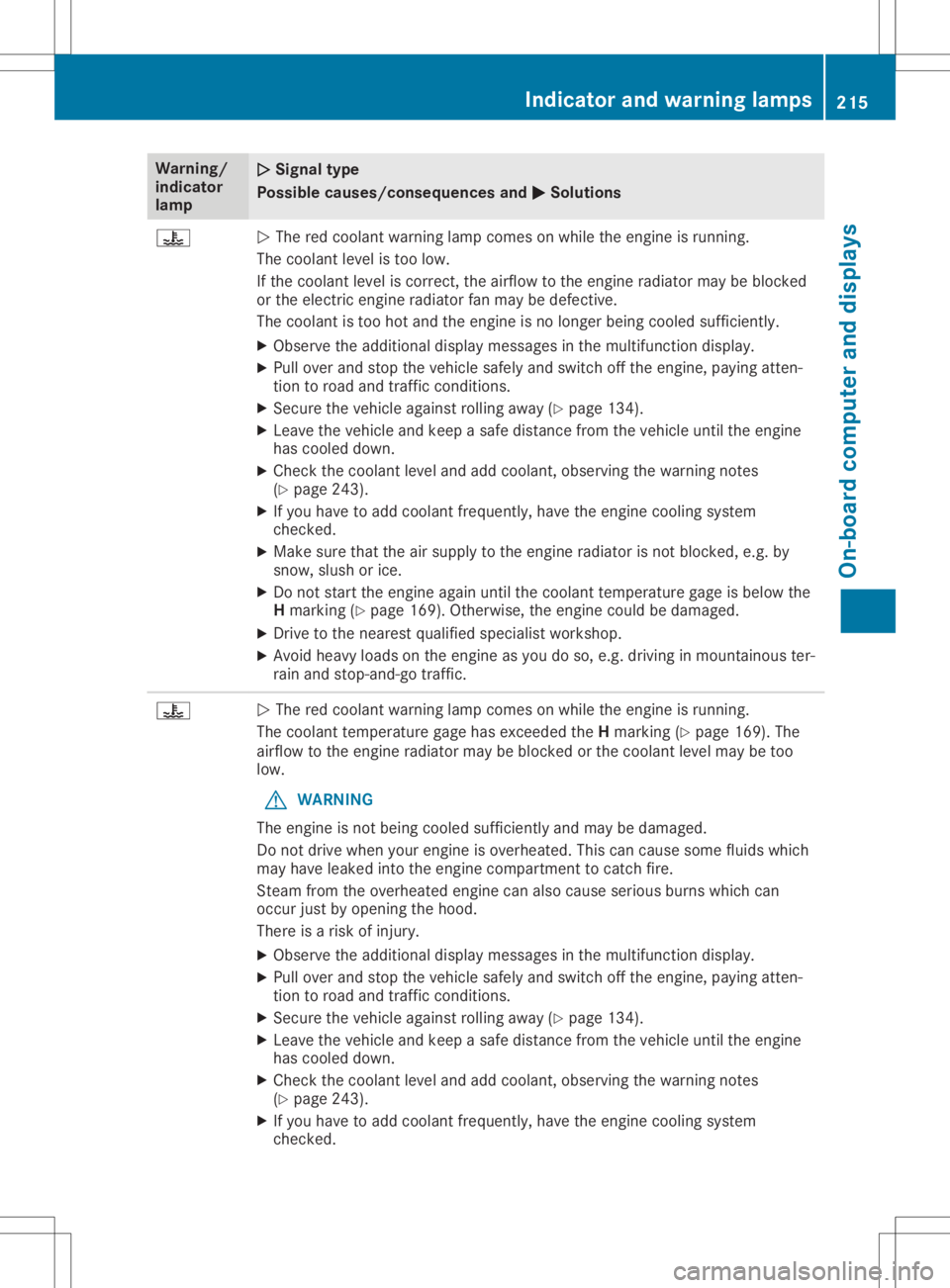
The redcoola ntwar ning lamp comes onwhi lethe engine isrunning.
The coola ntleve list oo low .
If the coola ntleve lisc orrect, theairflowtothe engine radiator may beblocked
or the electric engineradiator fanmay bedefective .
The coola ntistoo hotand theengine isno longer being coole dsuffi ciently .
X Observe theadditiona ldisp lay messa gesinthe multi function display.
X Pul lover and stop thevehicl esafel yand swi tch offthe engine, paying atten-
tion toroad andtraffic conditions.
X Secure thevehicl eagainst rolling awa y(Ypag e134).
X Leave thevehicl eand keep asafe dista ncefrom thevehicl euntil the engine
has coole ddown.
X Che ckthe coola ntleve land add coola nt,obser vingthewarni ngnotes
(Y pag e243) .
X Ifyou have toadd coola ntfrequ ently, havetheengine coolingsystem
checked.
X Make surethattheairsup plytothe engine radiator isnot blocked ,e.g. by
snow, slush orice.
X Do not start theengine againuntil thecoola nttempera turegage isbel ow the
H marking (Ypag e169) .Otherwi se,the engine couldbedama ged.
X Drive tothe neares tqualified speci alist worksho p.
X Avoid heavyloa dson the engine asyou doso, e.g. drivinginmountai nouster-
rain andstop-and-go traffic. 00AC
0051
The redcoola ntwar ning lamp comes onwhi lethe engine isrunning.
The coola nttempera turegage hasexceede dthe Hmarking (Ypag e169). The
airfl owtothe engine radiator may beblocked orthe coola ntleve lmaybe too
low .
G WARNING
The engine isnot being coole dsuffi ciently andmay bedama ged.
Do not drive when yourengine isoverhe ated.Thiscancaus esome fluidswhi ch
may have leaked into theengine compartment tocatch fire.
Steam fromtheoverhe atedengine canalsoc aus eserio usburns whichcan
occur justbyopeni ngthe hood.
There isar isk ofinjury .
X Observe theadditiona ldisp lay messa gesinthe multi function display.
X Pul lover and stop thevehicl esafel yand swi tch offthe engine, paying atten-
tion toroad andtraffic conditions.
X Secure thevehicl eagainst rolling awa y(Ypag e134) .
X Leave thevehicl eand keep asafe dista ncefrom thevehicl euntil the engine
has coole ddown.
X Che ckthe coola ntleve land add coola nt,obser vingthewarni ngnotes
(Y pag e243).
X Ifyou have toadd coola ntfrequ ently, havetheengine coolingsystem
checked. Indi
cator andwarnin glamps
215On-boardcomput erand displays Z
Page 218 of 310
Warning/
indic ator
lamp 00510051
Sign altype
Poss iblec ause s/cons equen cesand 0050 0050
Sol utions X
Make surethattheairsup plytothe engine radiator isnot blocked ,e.g. by
snow, slush orice.
X Ifthe coola nttempera turegage isbel ow the Hmarking (Ypag e169) ,drive
on tothe next qualified speci alist worksho p.
X Avoid heavyloa dson the engine asyou doso, e.g. drivinginmountai nouster-
rain andstop-and-go traffic. Drivi
ngsystems Warning/
indic ator
lamp 00510051
Sign altype
Poss iblec ause s/cons equen cesand 0050 0050
Sol utions 00BA
0051
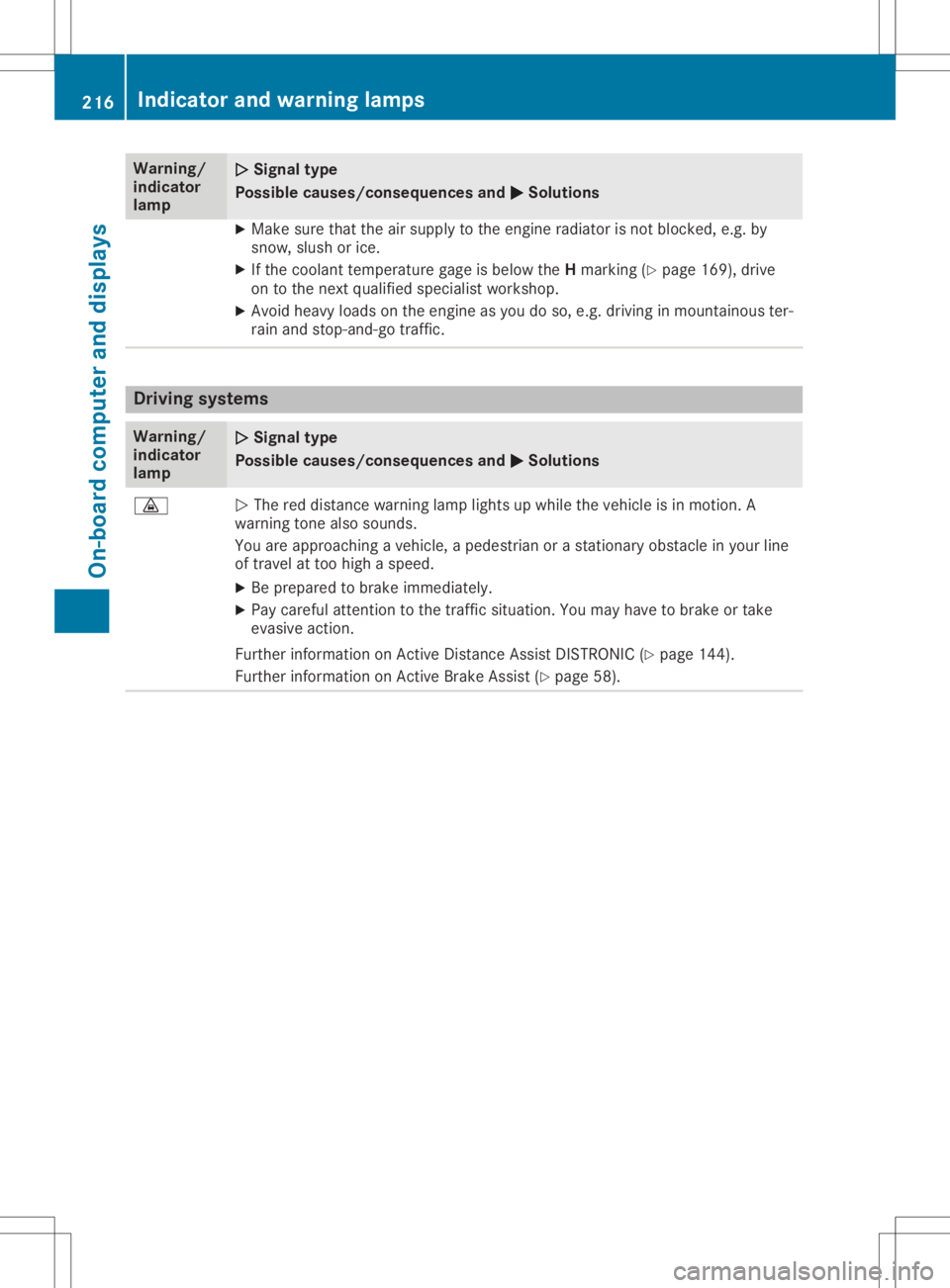
The reddista ncewarning lamp lights upwhi lethe vehicl eisinm otion. A
war ning tone alsos ound s.
You areapproachi ngavehicl e,ap ede strian oras tationa ryobstacl einy ourline
of travel attoo high aspee d.
X Be prepa redtobrake immed iately.
X Pay carefu lattention tothe traffic situation. Youmay have tobrake ortake
evasi veaction.
Further informati onon Active Distance AssistDISTRONIC (Ypag e144).
Further informati onon Active BrakeAssist (Ypag e58). 216
Indi
cator andwarni nglampsOn-bo ardcomput erand displays
Page 220 of 310
Gene
ralnotes
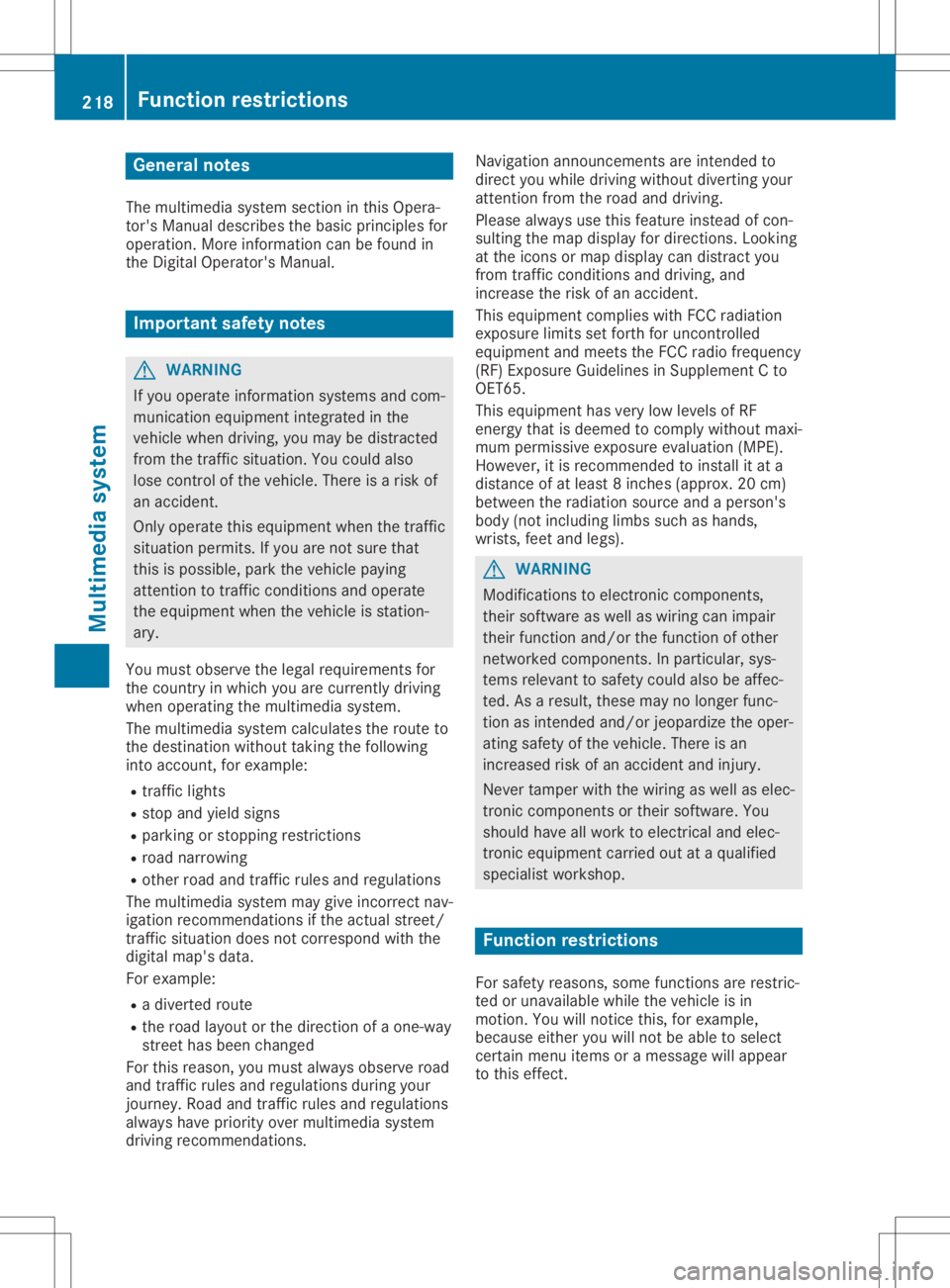
The multime diasystem section inthis Opera -
tor's Manua ldescrib esthe basi cprincipl esfor
opera tion.More information canbefound in
the Digital Operator'sManua l. Important
safetynotes G
WARNING
If you opera teinformation systemsandcom-
municatio nequipment integrated inthe
vehicle whendriving, youmay bedistracted
from thetraffic situation. Youcould also
lose control ofthe vehicle .There isar isk of
an accide nt.
Only opera tethis equipment whenthetraffic
situa tionpermits. Ifyou arenot sure that
this ispossi ble,park thevehicle paying
attention totraffic conditions andopera te
the equipment whenthevehicle isstation-
ary .
You must observe thelega lrequ irements for
the country inwhich youarecurrently driving
when operatingthemultime diasystem.
The multime diasystem calculates theroute to
the destinati onwithou ttaking thefollo wing
into account, forexampl e:
R traffic lights
R stop andyieldsigns
R parking orstopping restrictions
R road narrowi ng
R other roadandtraffic rulesand regul ations
The multime diasystem maygiveincorrect nav-
iga tion recommendati onsifthe actual street/
traffic situationdoes notcorrespond withthe
digi talmap's data.
For exampl e:
R ad iverted route
R the road layout orthe direction ofao ne-way
street hasbeen changed
For this reaso n,you must alwayso bserve road
and traffic rulesand regul ations duringyou r
journey. Roadand traffic rulesand regul ations
alw aysh ave priori tyover multime diasystem
driving recommendati ons. Navig
ation announcements areintended to
direct youwhiledriving withou tdiverting your
attention fromtheroad anddriving.
Plea sealw aysu sethis feature instead ofcon-
sul ting themap displayfordirections. Looking
at the icons ormap displaycan distract you
from traffic conditions anddriving, and
increase therisk ofan accide nt.
This equipment complieswith FCCradiation
exposu relimi tsset forth foruncontrolled
equ ipment andmeets theFCC radiofreque ncy
(RF) Exposure Guideli nes inSuppl ement Cto
OET65.
This equipment hasvery lowlevel sofRF
energy thatisdeeme dtoc omply withou tmaxi-
mum permis siveexposu reeval uation(MPE).
However, itis recommended toinstall itat a
distance ofat lea st8i nches (approx. 20cm)
betwee nthe radi ation source andaperson's
body (notinclud inglimb ssuch ashands,
wrists, feetandlegs) . G
WARNING
Modi fications toelectronic components,
their software aswel lasw iring can impa ir
their function and/orthefunction ofother
networked components. Inparticu lar,sys-
tems releva ntto safety couldalsobeaffec-
ted. Asaresul t,these maynolonger func-
tion asintended and/orjeopardizethe oper-
ating safety ofthe vehicle .There isan
increase drisk ofan accide ntand injury.
Never tamper withthewiringaswel lase lec-
tronic components ortheir software .You
shoul dhave allwork toelectrica land elec-
tronic equipment carried outataq ualified
specia listworkshop . Func
tionrestrictio ns
For safety reasons,some functions arerestric-
ted orunava ilable whil ethe vehicle isin
motion. Youwillnotice this,forexampl e,
becau seeither youwillnot be abletos ele ct
certain menuitemsoram essag ewilla pp ear
to this effect. 218
Func
tionrestrictio nsMultimedia system
Page 221 of 310
Opera
tingsystem Overview
General notes !
Do
not use thespace infron tofthe dis-
play forstor age. Objec tsplaced herecould
damage thedisplay orimpair itsfunc tion.
Avoid anydirect contact with thedisplay
surface. Pressure onthe display surface
may result inimpairment stot he display,
which couldbeirrever sible.
Wearing polarized sunglasses mayimpair your
ability toread thedisplay.
The display hasanautomatic temperature-
con trolled switch- offfeature. Thebrightn essis
automatic allyreduced ifthe temper atureis
too high. Thedisplay maytempor arilyswitch
off complet ely.
Cleaning instructions !
Do
not touch thedisplay. Thedisplay hasa
very sensit ivehigh-gloss surface;thereisa
risk ofscrat ching .Ify ou have toclean the
screen ,however, useamildcleanin gagent
and asoft,lint- free cloth .
The display mustbeswitched offand have
cooled downbefore youstart cleanin g.Do not
apply pressure tothe display surface when
cleanin git,as this could cause irreversible
damage tothe display.
Switching themult imedia system
on/off X
Press the0043con trol knob.
Adju sting thevolume X
Turn the0043con trol knob.
The volume isadjusted:
R for the curren tlyselect edmedia source
R during trafficor navigation announcements
R in hands- freemode during anactive call
Switching thesound onoroff X
Press the0063 button onthe control panel.
If the audio output isswitched off,thesta-
tus line willshow the0063 symbol. Ifyou switch
themedia source orset the volume,
the sound isautomatic allyswitched on.
i Navigation
announcementswill beheard
even ifthe sound ismuted.
Functions The
multimedia systemhasthefollowing func-
tion s:
R Radio mode
R Media modewithmedia search
R Sound systems
R Navigation system
COMAND :navigation viathe hard drive
Audio 20:navigation viaSD card
R Communicat ionfunc tions
R SIRIUS Weather (COMAND )
R Vehicle functionswithsystem settings
R Favorit esfunc tions
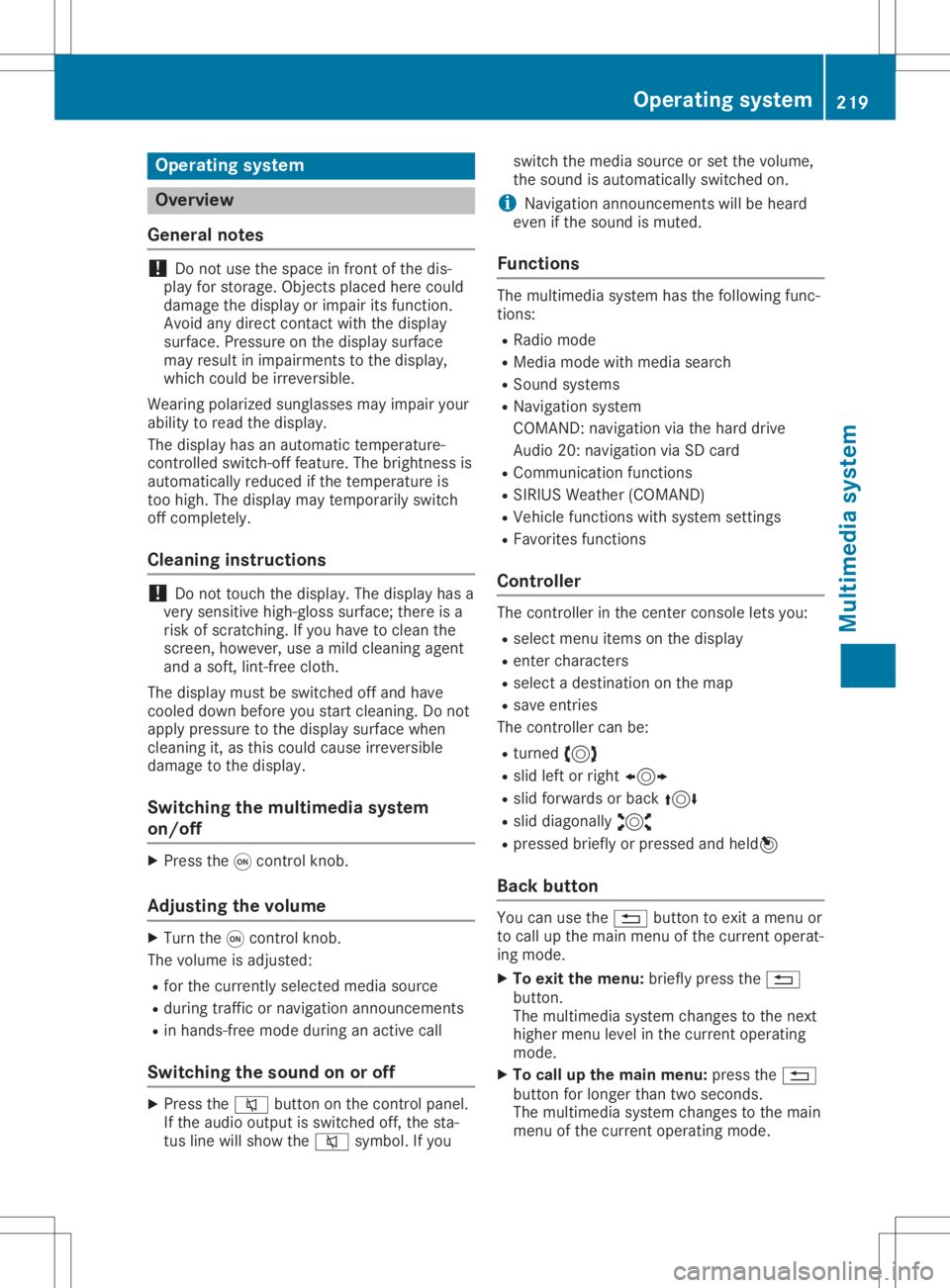
Controller The
controller inthe cent ercon sole letsyou:
R select menuitemsonthe display
R ent ercharact ers
R select adestin ation onthe map
R save entries
The controller canbe:
R turn ed3
R slid leftorright 1
R slid forwards orback 4
R slid diagonally 2
R pressed brieflyorpressed andheld7
Back button You
canusethe0038 button toexit amenu or
to call upthe main menu ofthe curren toperat-
ing mode.
X To exit themenu: brieflypressthe0038
button .
The multimedia systemchanges tothe next
higher menulevelinthe curren toperatin g
mode.
X To call upthe main menu: pressthe0038
button forlonger thantwosecon ds.
The multimedia systemchanges tothe main
menu ofthe curren toperatin gmode. Opera
tingsystem
219Multimedia system Z
Page 226 of 310
Connect
ingam obile phone
X One- telep hone mode:selec tCon necta s Con
necta s
New MainP hone New
MainP hone.
X Two- telep hone mode:selec tCon necta s Con
necta s
Add itionalP hone Add
itionalP hone when amobilephon eis
already connected.
X Aut
horization usingSecur eSimple Pair -
ing:
Ac odeisd isplayed inthem ultimedi asys-
tem andonthem obilephon e.
X Conf irmcodeonthe mobi lephon e.Dep end-
ing onthem obilephon eused, confirmt he
con nectiont ot he mult imedi asyst em and
for theP BAPa nd MA PBluet ooth®
prof iles.
The prom pttocon firmm aytak euptotwo
min utes tobe displayed (seethem anufac -
tur er'so per atin ginstruct ions).
X Ifth ec odes are differen t:selec tNo No
on the
mult imedi asyst em.
The proc essiscan cele d.
Repeat authorizatio n.
or X Aut
horization byente ringap asskey
(pa sscod e):enterany one-tos ixtee n-digit
num bersequen cewhic hyou have chosen
yourse lfint ot he passk eyinput menu.
X Pres s0054 tocon firm.
X En ter and confirmt hepassk eyon the
mobi lephon e.Dep endingonthem obile
phon eused, confirmt hecon nectiont ot he
mult imedi asyst em and fortheP BAPa nd
MA PBluet ooth®
prof iles. Theprom ptto
con firmm aytak euptotwo min utes tobe
displayed (seethem anufac turer'so per atin g
ins truct ions).
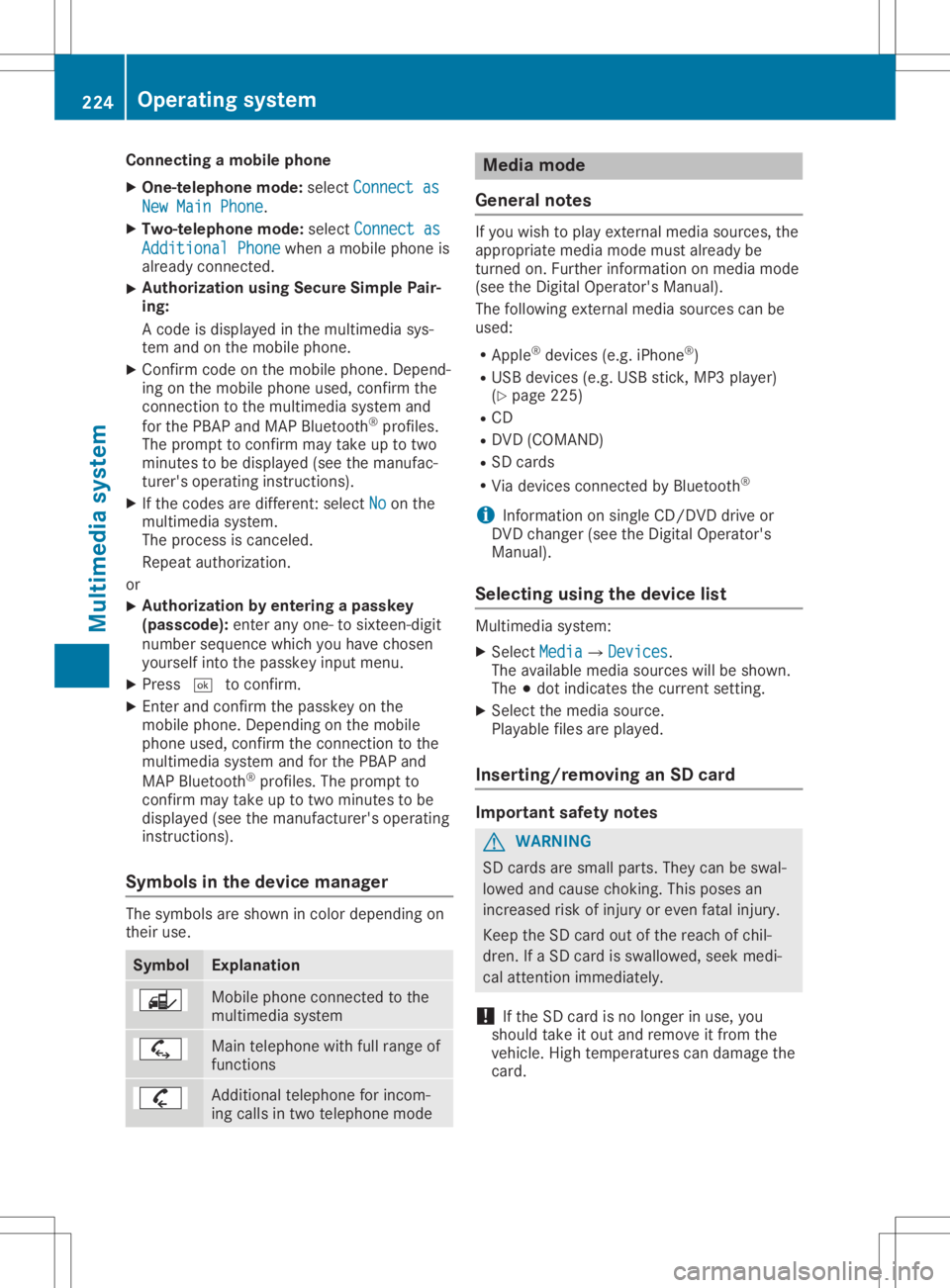
Sym bols inthed evice manager The
symbo lsare shown incolo rdepen dingon
th eir use. Sym
bol Expl
anation Mobile
phoneconnec ted tothe
mult imedi asyst em Main
telephon ewithfull rangeof
fun ction s Add
itional telephon efor inc om-
ing calls intwo telephon emode Med
iamod e
Gener alnotes If
you wish toplay extern almedia sources,the
appro priatemedia mode mustalready be
tur ned on.Further inform ationonm edia mode
(see theD igital Oper ator'sMan ual).
The follo wing extern almedia sourcescan be
used:
R App le®
devic es(e.g.iPhon e®
)
R US Bd evic es(e.g.US Bs tick ,M P3 player)
(Y page 225)
R CD
R DV D(COMA ND)
R SD cards
R Via devic escon nected byBluet ooth®
i In
for mat iononsingle CD/ DVDd riveo r
DV Dc han ger (see theD igital Oper ator's
Man ual).
Select ingusin gthe dev icelist Mult
imedi asyst em:
X Sele ctMed ia Med
ia007B Devices Dev
ices.
The available mediasourceswillbeshown .
The 003Bdot indicatesthec urren tsettin g.
X Sele ctthem edia source.
Playable filesareplayed.
Inser ting/rem ovinganSD card Imp
ortant safety notes G
WAR
NING
SD cardsare small parts.They canbeswal-
lowed andcause choking.This poses an
inc reas edrisk ofinjury oreven fatalinj ury.
Keep theS Dc ardo utofther eac hofchil-
dren .IfaS Dcardi ss wallowe d,seek medi-
cal attent ion imm ediat ely.
! If
th eS Dc ardi sn olon ger inuse, you
should takeito utand remove itfro mt he
veh icle.High tem perat urescandamage the
car d. 224
Oper
ating syst emMultim edia system
Page 233 of 310
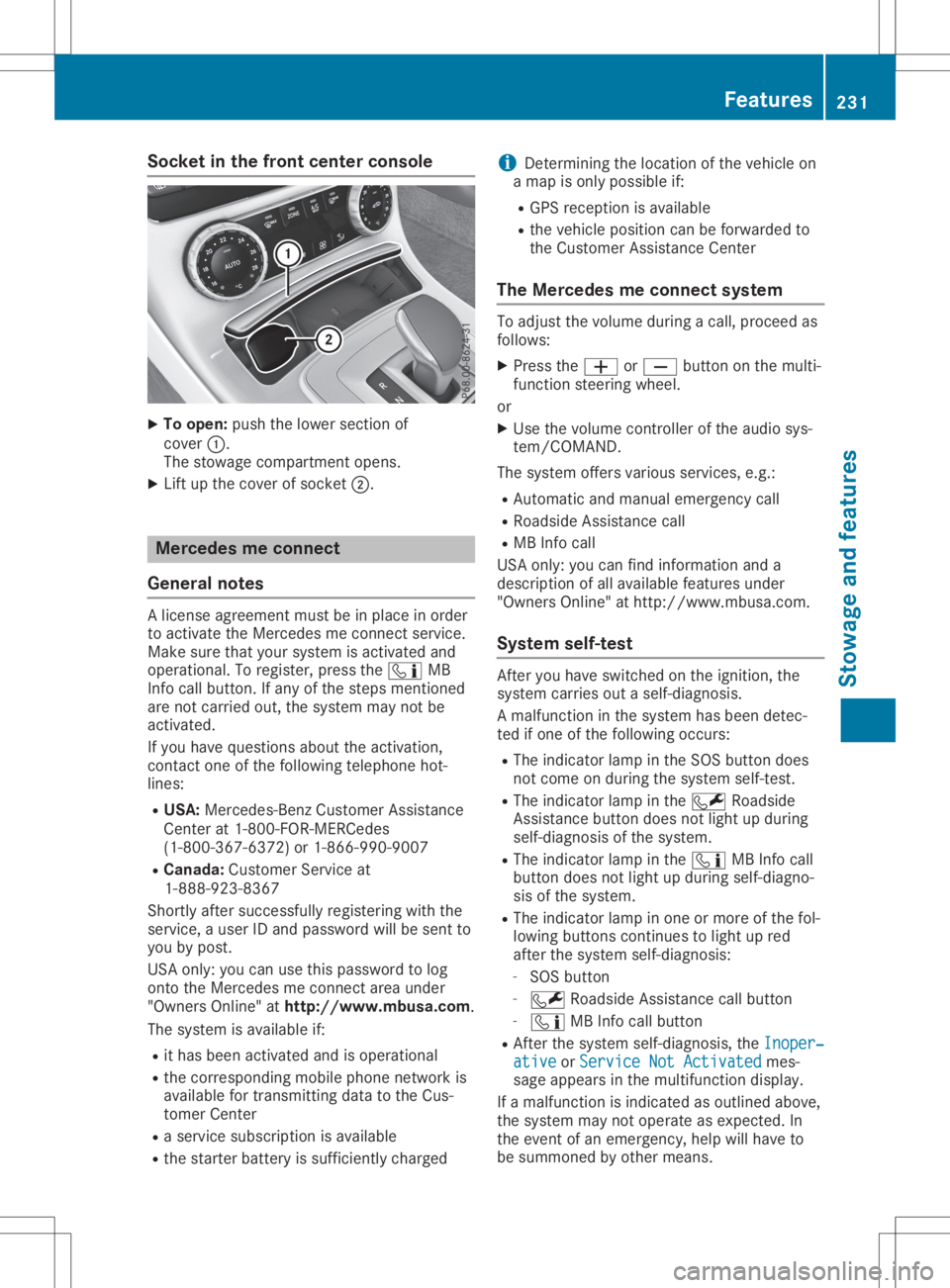
Socket
inthe front center console X
To open: pushthelower section of
cover 0043.
The stowage compartmen topens.
X Lift upthe cover ofsocket 0044. Mercedes
meconne ct
General notes Al
icense agreement mustbeinplace inorder
to activate theMercedes meconn ectservice.
Make surethatyour system isactivated and
operational. Toregister, pressthe00D9 MB
Info callbutton. Ifany ofthe steps mentioned
are not carried out,thesystem maynotbe
activated.
If you have questions abouttheactivation,
cont actone ofthe following telephone hot-
lines:
R USA: Mercedes-B enzCustomer Assistance
Center at1-80 0-FOR-MERCedes
(1-80 0-367-6372)or1-86 6-990-9007
R Canada: Customer Serviceat
1-88 8-92 3-8367
Short lyafter successfully registeringwiththe
service, auser IDand password willbesent to
you bypost.
USA only: youcan usethis password tolog
onto theMercedes meconn ectarea under
"Owners Online"athtt <0053001D00120012005A005A005A001100500045005800560044001100460052
0050>.
The system isavaila bleif:
R ithas been activated andisoperational
R the correspondin gmobile phone network is
availa blefortransm ittingdatatothe Cus-
tomer Center
R as ervice subscription isavaila ble
R the starter battery issufficiently charged i
Determ iningthelocation ofthe vehicle on
am apisonly possible if:
R GPS reception isavaila ble
R the vehicle position canbeforwarded to
the Customer AssistanceCenter
The Mercedes meconne ctsystem To
adjust thevolume duringacall, proceed as
follows:
X Press the0081 or0082 button onthe multi-
funct ionsteering wheel.
or X Use thevolume controller ofthe audio sys-
tem/COMA ND.
The system offersvarious services, e.g.:
R Automatic andmanual emergency call
R Roadsid eAssistanc ecall
R MB Info call
USA only: youcan find information anda
description ofall availa blefeatures under
"Owners Online"athttp: //www.mbusa.com.
System self-test Aft
eryou have switched onthe ignition, the
system carriesoutaself-diagnosis.
Am alfunction inthe system hasbeen detec-
ted ifone ofthe following occurs:
R The indicator lampinthe SOS button does
not come onduring thesystem self-test .
R The indicator lampinthe 0052 Roadsid e
Assistanc ebutton doesnotlight upduring
self-diagnosis ofthe system.
R The indicator lampinthe 00D9 MBInfo call
button doesnotlight upduring self-diagno-
sis ofthe system.
R The indicator lampinone ormore ofthe fol-
lowing buttons continues tolight upred
after thesystem self-diagnosis:
- SOS button
- 0052 Roadsid eAssistanc ecallbutton
- 00D9 MBInfo callbutton
R Aft erthe system self-diagnosis, theInoper‐ Inoper‐
ative ative
orService NotActivated Service
NotActivated mes-
sage appears inthe multifunct iondisplay .
If am alfunction isindicated asoutlined above,
the system maynotoperate asexpected. In
the event ofan emergency, helpwillhave to
be summoned byother means. Features
231Stowageandfeatu res Z
Page 235 of 310
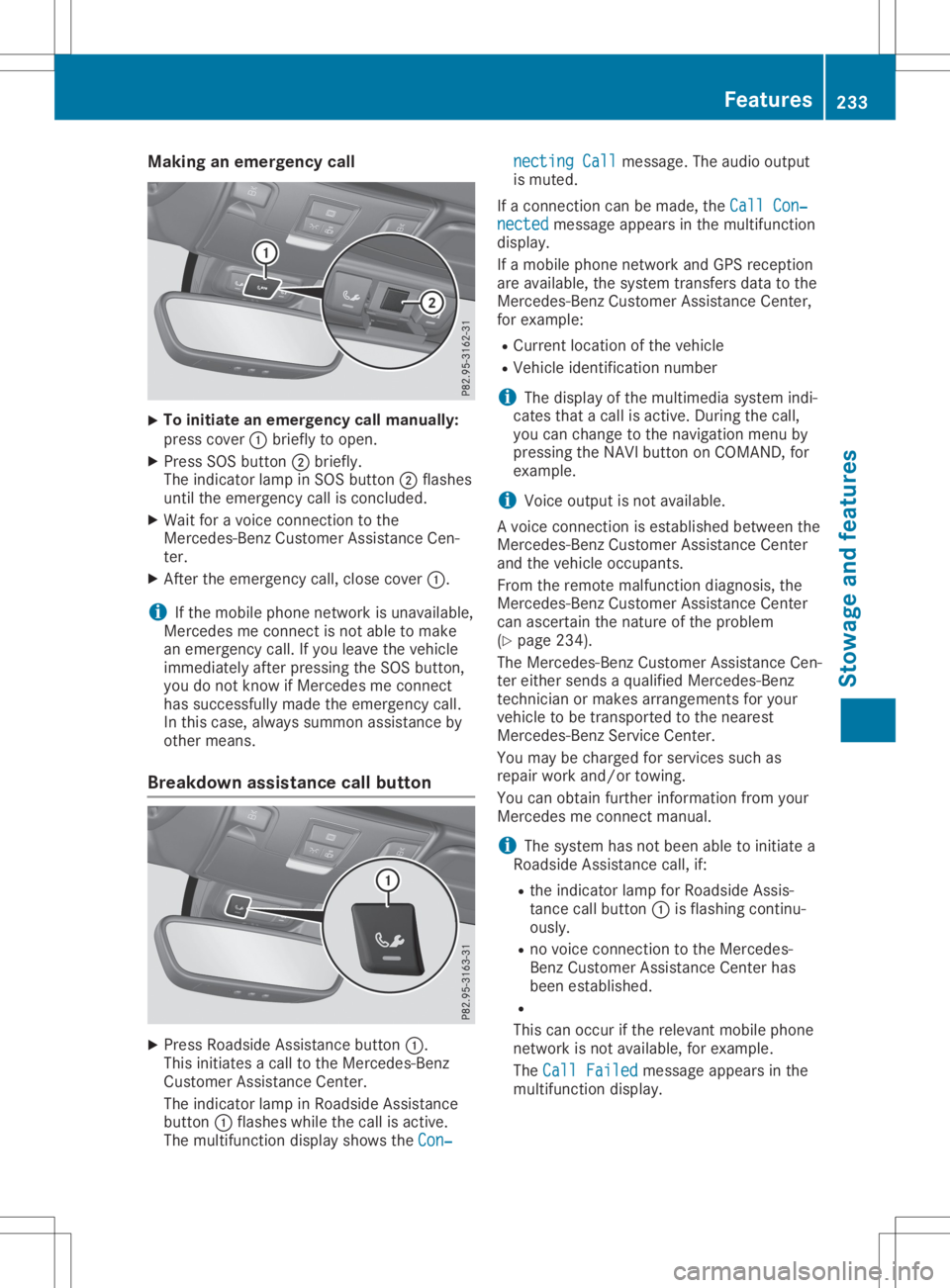
Making
anemerge ncycall X
To
initiate anemerge ncycallmanually:
press cover 0043brie flytoopen.
X Press SOSbutton 0044brie fly.
The indica torlamp inSOS button 0044flas hes
until theemerge ncycallisconclude d.
X Wai tfor av oice connection tothe
Mercede s-BenzCustomer Assistance Cen-
ter.
X After theemerge ncycall,close cover 0043.
i If
the mobil ephone network isunava ilable ,
Mercede smeconnect isnot abletom ake
an emerge ncycall.Ify ou leavethe vehicl e
immed iatelyafter pressi ngthe SOS button,
you donot know ifMercede smeconnect
has successfu llymade theemerge ncycall.
In this case, alwayss ummon assistance by
other means.
Breakdown assistance callbutton X
Press Roadsid eAssistance button0043.
This initia tesacalltothe Mercede s-Benz
Cu stomer Assistance Center.
The indica torlamp inRoa dsid eAssistance
button 0043flas hes whilethe call isactive.
The multi function displayshow sthe Con‐ Con‐necting
Call necting
Callmessa ge.The audio outpu t
is muted.
If ac onnection canbemade ,the Call Con‐ Call
Con‐
nected nected
messageapp ears inthe multi function
disp lay.
If am obilephone network andGPS receptio n
are available ,the system transfers datatothe
Mercede s-BenzCustomer Assistance Center,
for exampl e:
R Cu rrent location ofthe vehicl e
R Vehicl eide ntificatio nnumber
i The
displayofthe multi mediasystem indi-
cates thatacallisactive. During thecall,
you can change tothe naviga tionmenu by
pressi ngthe NAVI button onCOMAND, for
exampl e.
i Voice
outputisn otava ilable .
Av oice connection isestabl ishedbetwe enthe
Mercede s-BenzCustomer Assistance Center
and thevehicl eoccupa nts.
From theremote malfunction diagnosis, the
Mercede s-BenzCustomer Assistance Center
can ascerta inthe nature ofthe probl em
(Y pag e234) .
The Mercede s-BenzCustomer Assistance Cen-
ter either sends aqualified Mercede s-Benz
technician ormakes arrangements foryou r
vehicl etob etransported tothe neares t
Mercede s-BenzService Center.
You may becharge dfor services suchas
repa irwork and/or towing.
You canobtai nfurther informati onfrom your
Mercede smeconnect manual.
i The system hasnotbeen abletoinitia tea
Roa dsid eAssistance call,if:
R the indica torlamp forRoa dsid eAssis-
tance callbutton 0043isflas hing continu-
ousl y.
R no voice connection tothe Mercede s-
Benz Customer Assistance Centerhas
been establ ished.
R
This canoccur ifthe relev antmobil ephone
network isnot available ,for exampl e.
The Call Failed Call
Failed messageapp ears inthe
multi function display. Fe
atures
233Stowageand features Z
Page 240 of 310
make
surethatnew batterie shave been
install edingara gedoor drive remote control
0083.
R Note thatsome remote controls onlytrans-
mit foralimi ted amou ntoftime (theindica -
tor lamp onthe remote controlgoesout).
Press button 0084onremote control0083aga in
before transmissi onends.
R Align theantenna cableofthe gara gedoor
opener unit.Thiscanimprove signalrecep-
tion/transmissio n.
Openi ng/closing thegarage door After
ithas been progra mmed, theintegrated
gara gedoor opener performs thefunction of
the gara gedoor system remote control. Please
als oread theopera tinginstructions forthe
gara gedoor system.
X Turn theSmartKey toposi tion 0048inthe igni-
tion lock (Ypage 118).
X Press either button 0044,0087or0085 whi chyou
have progra mmed toopera tethe gara ge
door.
Gara gedoor system withafixed code: indi-
cator lamp0043ligh tsup green.
Gara gedoor system witharolli ng code: indi-
cator lamp0043flash esgreen.
The transmitter willtransmit asignal aslong
as the button ispresse d.The transmissi on
is hal ted after amaximu moften seconds
and indica torlamp 0043ligh tsup yellow .
X Press button 0044,0087or0085 aga inifneces-
sary .
Cle aring thememory Make
surethatyouclear thememory ofthe
integrated garagedoor opener beforeselling
the vehicl e.
X Turn theSmartKey toposi tion 0048inthe igni-
tion lock (Ypage 118).
X Press andhold buttons 0044and 0085.
The indica torlamp initiallyligh tsup yellow
and then green.
X Rel ease buttons 0044and 0085.
The memory ofthe integrated garagedoor
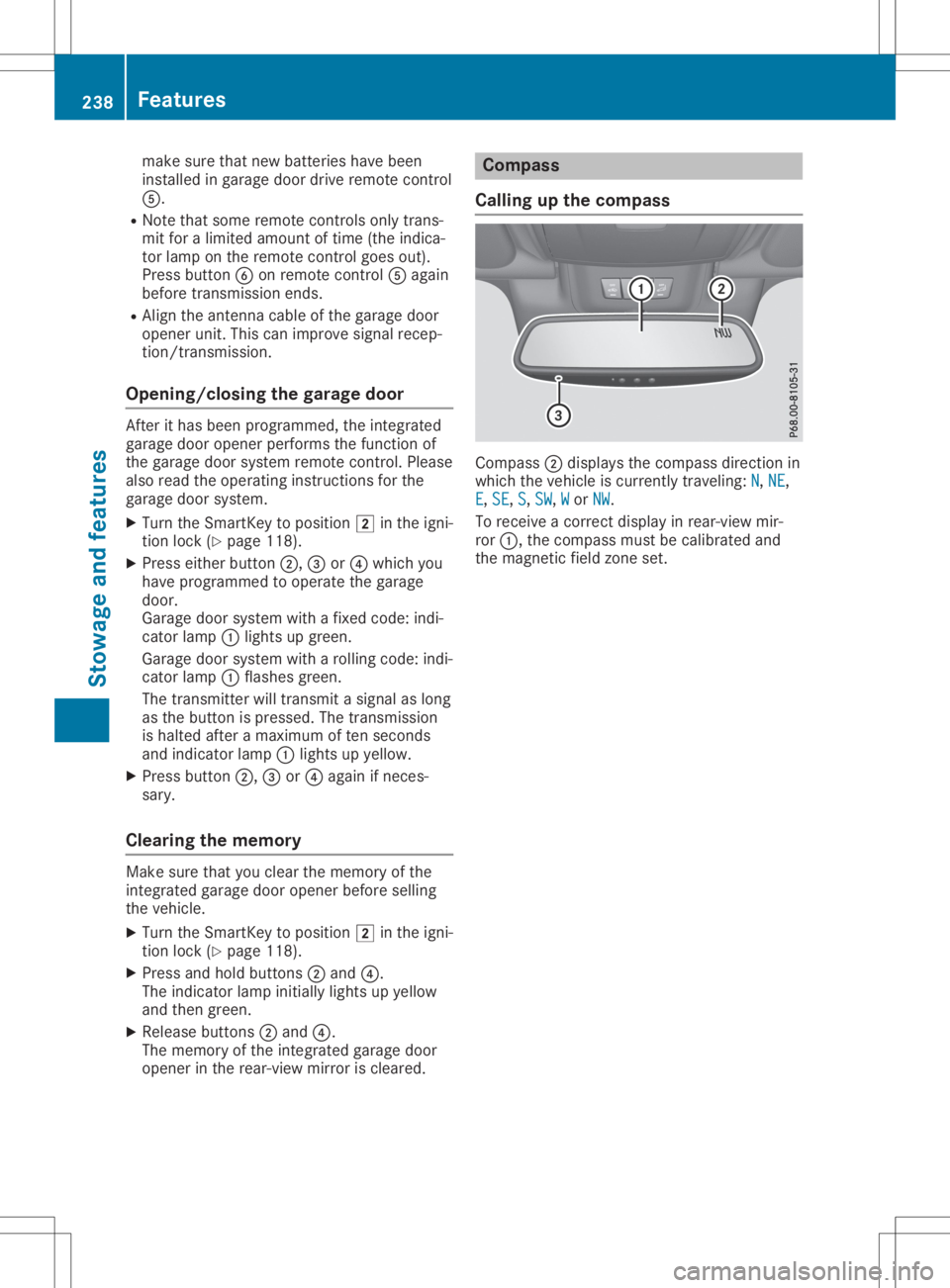
opener inthe rear-vie wmirror iscleare d. Compass
Call ingupthe compass Comp
ass0044disp laysthe compass directionin
which thevehicl eisc urrently traveling:N N,
NE NE,
E E,
SE SE,
S S,
SW SW,
W W
or NW NW.
To receive acorrect displayinrear-vie wmir-
ror 0043,t hecompass mustbecali brated and
the magnetic fieldzone set. 238
Fe
atur esStow ageand features
Page 241 of 310
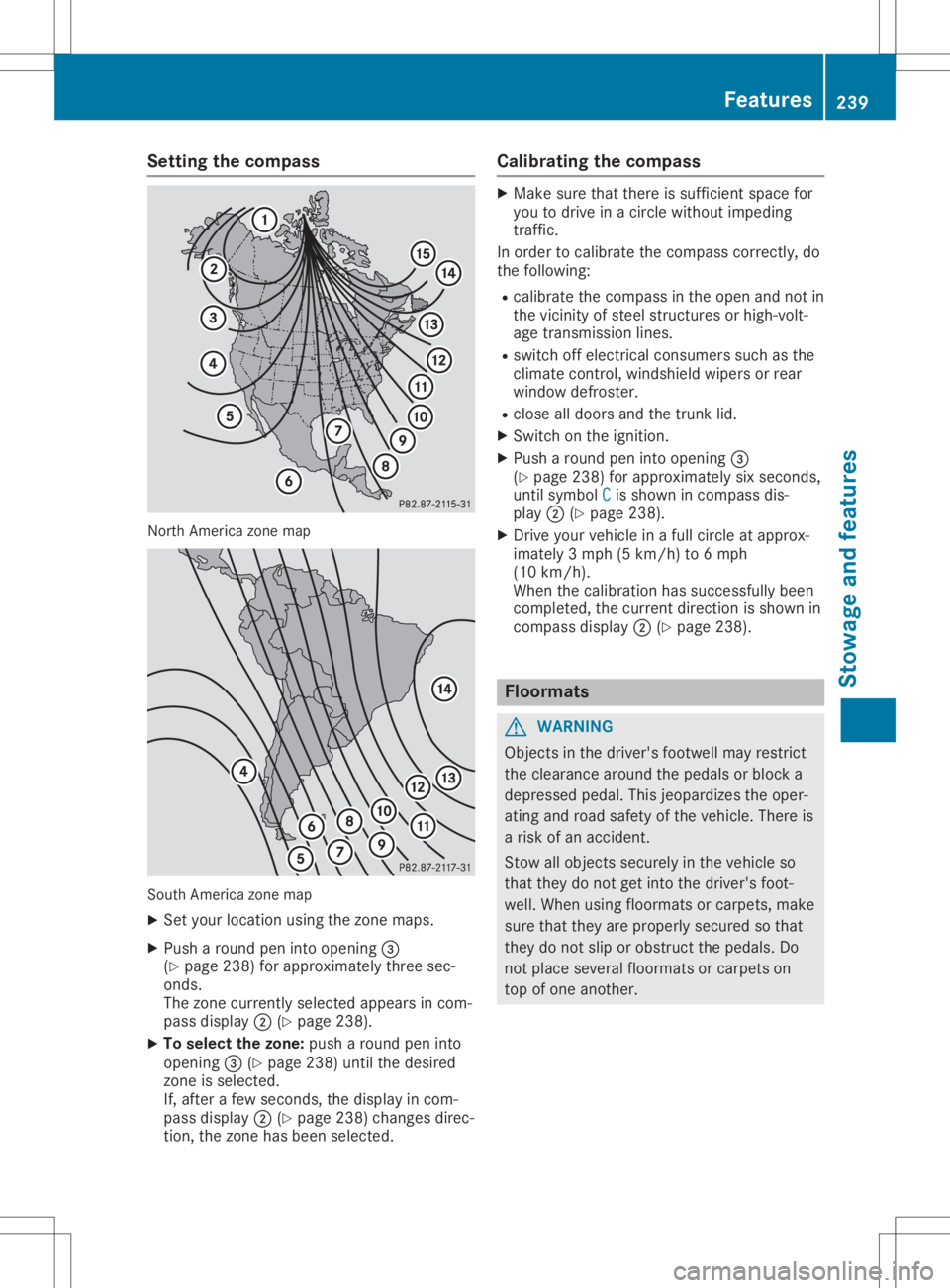
Setting
thecompass North
America zonemap South
America zonemap
X Set your location usingthezone maps.
X Push around peninto opening 0087
(Y page 238)forapproximately threesec-
onds.
The zone current lyselected appearsincom-
pass display 0044(Ypage 238).
X To selec tthe zone: pusharound peninto
opening 0087(Ypage 238)untilthedesired
zone isselected.
If, after afew seconds, thedisplay incom-
pass display 0044(Ypage 238)changes direc-
tion, thezone hasbeen selected. Calibrating
thecompass X
Make surethatthere issufficient spacefor
you todrive inac ircle without impeding
traffic.
In order tocalibrate thecompass correctly,do
the following:
R calibrate thecompass inthe open andnotin
the vicinity ofsteel struct uresorhigh-volt-
age transm issionlines.
R switch offelectrical consumers suchasthe
climate control,windshield wipersorrear
window defroster.
R close alldoors andthetrunk lid.
X Switch onthe ignition.
X Push around peninto opening 0087
(Y page 238)forapproximately sixseconds,
until symbol C C
is shown incompass dis-
play 0044(Ypage 238).
X Drive yourvehicle inaf ull circle atapprox-
imately 3mph(5km/h) to6m ph
(10 km/h).
When thecalibration hassuccessfully been
completed, thecurrent direction isshown in
compass display0044(Ypage 238). Floo
rmats G
WARNING
Object sint he driver's footwell mayrestrict
the clearance aroundthepedals orblock a
depressed pedal.Thisjeopardizes theoper-
ating androad safety ofthe vehicle. Thereis
ar isk ofan accident.
Stow allobject ssecurely inthe vehicle so
that they donot getinto thedriver's foot-
well. When usingfloormats orcarpets, make
sure thatthey areproperly securedsothat
they donot slip orobstruct thepedals. Do
not place several floormats orcarpets on
top ofone another. Features
239Stowageandfeatu res Z
Page 246 of 310
If
you need todo any work inside theengine
compartment:
R switch offthe ignition
R never reach intothearea where thereisa
risk ofdanger frommoving components,
such asthe fanrotation area
R remove jewelryandwatches
R keep items ofclothing andhair, forexam-
ple, awayfrom moving parts G
WARNING
The cooling systemispressu rized,particu-
larl yw hen themotor iswarm. Ifyou open
the cap, youcould bescalde difh ot coolant
spray sout. There isar isk ofinjury.
Let the engine cooldown before youopen
the cap. Wear protective glovesandprotec-
tive eyew earwhen opening. Openthecap
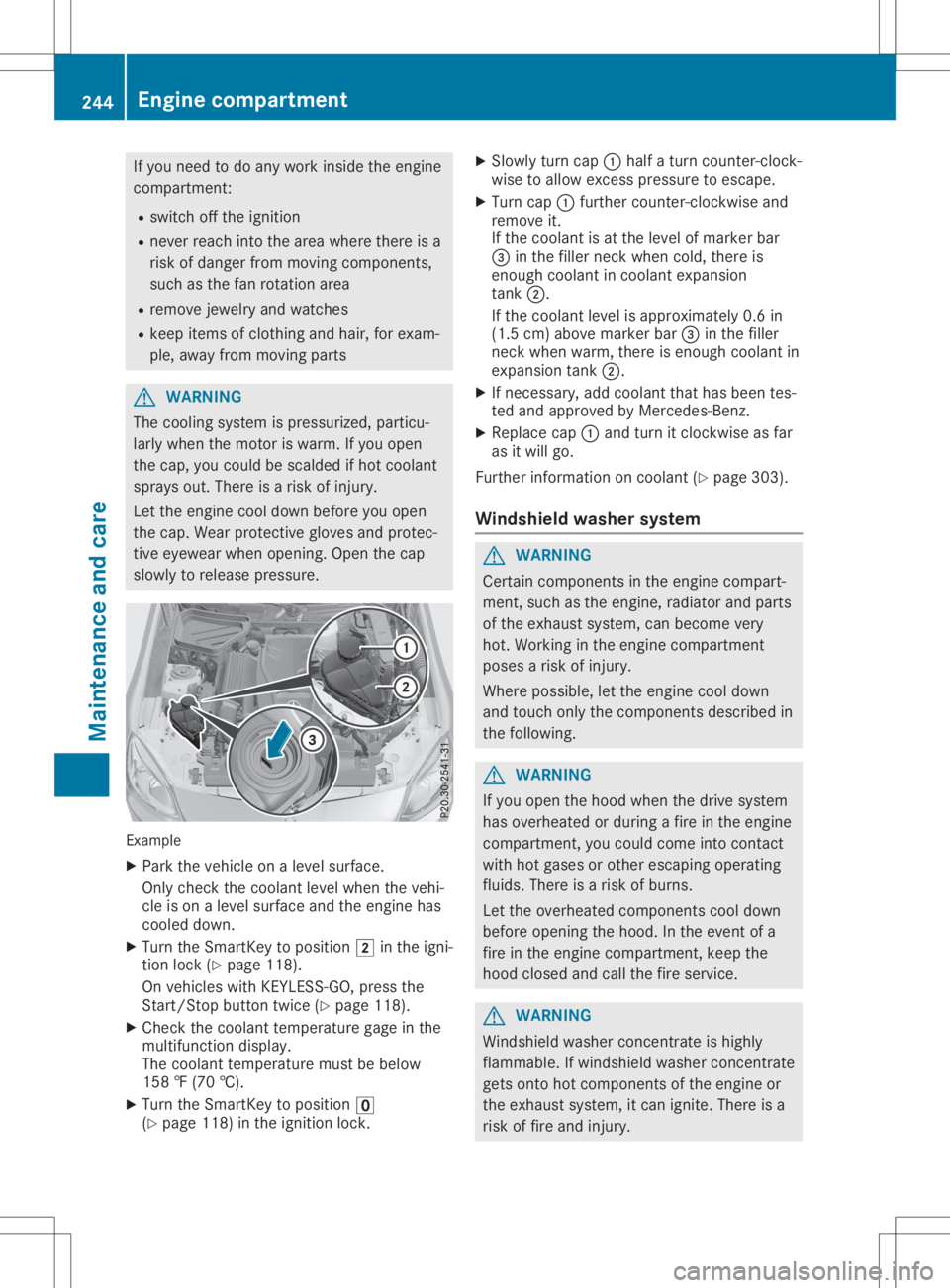
slow lyto relea sepressu re. Example
X Park thevehicle onalevel surface.
Only check thecoolant levelwhen thevehi-
cle ison alevel surface andtheengine has
cooled down.
X Turn theSmartKey topositio n0048 inthe igni-
tion lock (Ypage 118).
On vehicle swithKEYLESS- GO,press the
Start/St opbutton twice(Ypage 118).
X Check thecoolant temperature gageinthe
multifu nctiondisplay.
The coolant temperature mustbebelow
158 ‡(70 †).
X Turn theSmartKey topositio n0092
(Y page 118)inthe ignition lock. X
Slowl yturn cap 0043half aturn counter-clock-
wise toallow excess pressureto escape .
X Turn cap0043further <004600520058005100570048005500100046004F00520046004E005A004C0056
0048[ and
remove it.
If the coolant isat the level ofmarker bar
0087 inthe fillerneck when cold,there is
enough coolant incoolant expansion
tank 0044.
If the coolant levelisappro ximately 0.6in
(1.5 cm)above marker bar0087inthe filler
neck when warm, thereisenough coolant in
expansion tank0044.
X Ifnecessary ,add coolant thathasbeen tes-
ted and appro vedbyMercedes-Benz.
X Repl acecap 0043and turn itclockwise asfar
as itwil lgo.
Further information oncoolant (Ypage 303).
Windshie ldwashe rsystem G
WARNING
Certai ncomponents inthe engine compart-
ment, suchasthe engine, radiator andparts
of the exhau stsystem, canbecome very
hot. Working inthe engine compartment
poses arisk ofinjury.
Where possible,let the engine cooldown
and touch onlythecomponents describedin
the follow ing. G
WARNING
If you open thehood when thedrive system
has overhea tedorduri ngafire inthe engine
compartment, youcould come intocontact
with hotgases orother escapi ngopera ting
flui ds. There isar isk ofburns.
Let the overhea tedcomponents cooldown
before opening thehood. Inthe event ofa
fire inthe engine compartment, keepthe
hood closed andcallthefire service. G
WARNING
Windshi eldwash erconcentrate ishighl y
flamma ble.Ifwindshi eldwash erconcentrate
gets onto hotcomponents ofthe engine or
the exhau stsystem, itcan ignite. Thereisa
risk offire and injury. 244
Eng
inecompar tmentMaintenanc eand care