light MERCEDES-BENZ SLC 2020 Repair Manual
[x] Cancel search | Manufacturer: MERCEDES-BENZ, Model Year: 2020, Model line: SLC, Model: MERCEDES-BENZ SLC 2020Pages: 310, PDF Size: 16.05 MB
Page 140 of 310
Do
not drink ortake drugsand drive orallo w
any one todrive whoh asbeen drinking or
taki ngdru gs.
Emi ssionc ontro l G
DA
NGE R
Co mbu stion eng inesemitp oiso no us
exh aust gases such ascar bonm onoxide.
Inha ling the seexh aust gases isha zar dous to
he alth and canresulti np oiso ning. Thereisa
ris ko ffatal inju ry.T he ref ore ,neve rlea ve the
eng inerunning anencl osedspace withou t
ad eq uate venti latio n.
Ce rta ineng inesystem saredesigne dtok eep
the level ofpoisono uscomp onents inexh aust
fu mes withi nlegallimits .
The sesystem sonlyw orka tpeake ffici ency if
the yareser viced exa ctly inacc ordance with
the manuf actu rer'ssp eci ficati ons. Alwaysh ave
wo rkon the enginecarriedo utataq ualifi ed
sp eci alistw orksh op.M erced es-Benz recom-
mend sthaty ou usea na uthor izedM erced es-
Benz Center forthisp urpo se. Inpartic ular ,
wo rkreleva ntto safety oron safety -related
sy stem smustb ec arrie do utataq ualifi ed spe-
cia list wo rksh op.
The enginesetti ngsmustnot becha nge d
und erany circum stances .Furthe rmo re,all
sp eci fic ser vicew orkm ustb ec arrie do utat
reg ular inte rvalsand inacc ordance with the
Me rced es-Benz servicerequirem ents .Deta ils
can befou ndinthe Mainte nance Booklet. EC
Od isplay
The ECO disp lays hows youh ow eco nomi cal
yo ur drivin gs tyle is.T he ECO disp laya ssists
yo ui na chievin gthe mos teconomi caldrivin g
sty lefor the selecte dsetti ngs and prevailing
cond itions. Your drivin gs tyle can signi ficantl y
infl uence thevehicle's cons umption. 0043
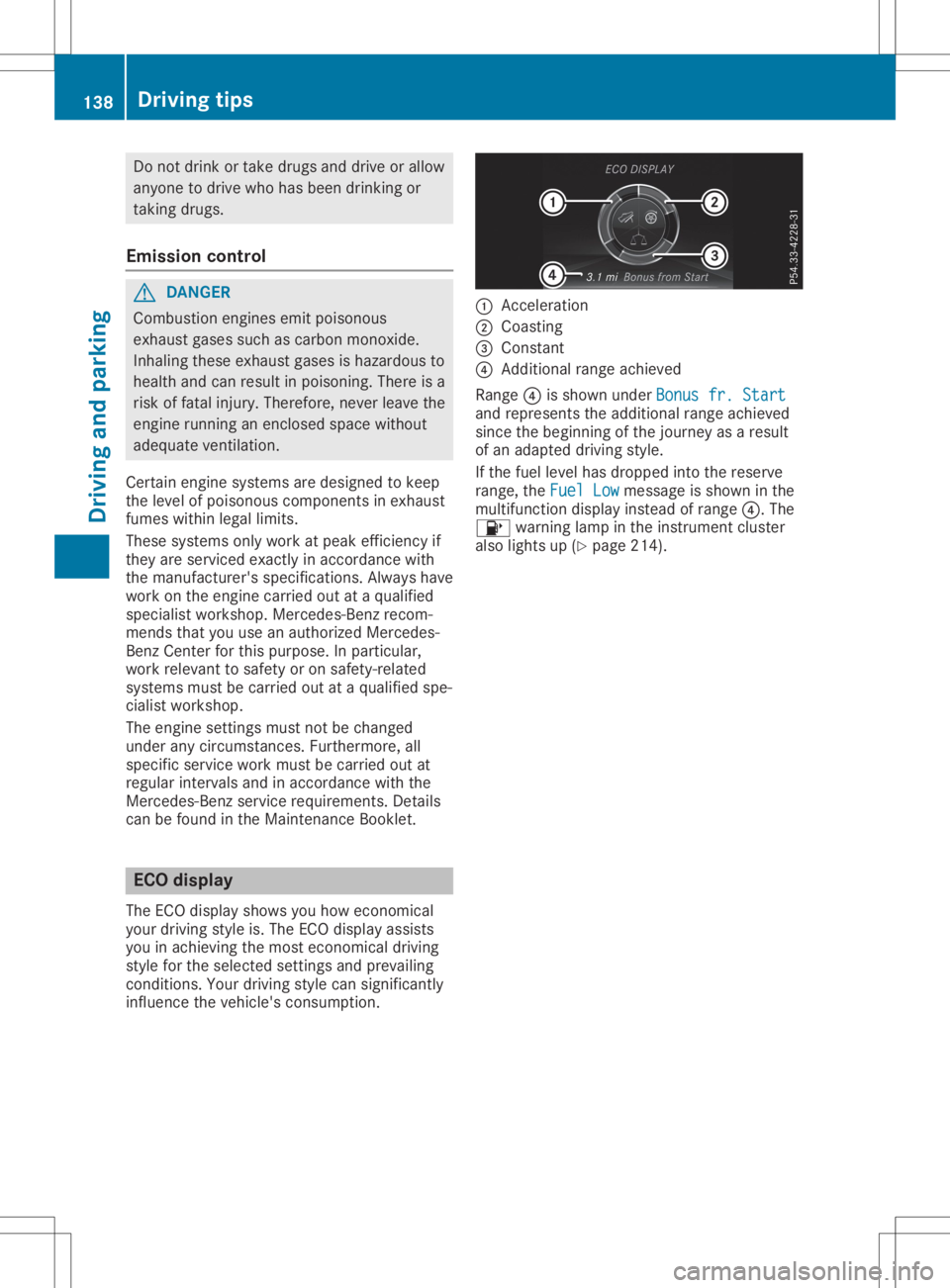
Accel eration
0044 Coasting
0087 Consta nt
0085 Add itiona lran ge ach ieved
Ra nge 0085issho wnund erBon usfr. Start Bon
usfr. Start
and represents theadditio nal range achieved
si nce thebeginning ofthe journey asaresult
of an adapted drivin gs tyle.
If the fuel level hasd ropp ed into thereserve
ra nge ,the Fue lLow Fue
lLowmes sage issho wninthe
mu ltifu nctio ndispl ay instea dofran ge 0085.T he
00B6 warning lamp inthe instrument cluster
al so lights up(Ypage 214 ). 13
8 Dr
ivi ng tipsDrivi ng andp arki ng
Page 141 of 310
The
ECO display consistsofthree section s,
with aninner andouter area.Thesection scor-
respond tothe following threecategories: 0043
Acce
leration (evaluation ofall
acceleration processes):
R the outer areafillsupand the
inner arealights upgreen: moder-
ate acceleration ,especially at
higher speeds
R the outer areaempties andthe
inner areaisgray: sporty acceler-
ation 0044
Coasting
(evaluation ofall deceler-
ation processes):
R the outer areafillsupand the
inner arealights upgreen: antici-
patory driving, keeping yourdis-
tanc eand early release ofthe
accelerator. Thevehicle can
coast without useofthe brakes.
R the outer areaempties andthe
inner areaisgray: frequent heavy
braking 0087
Constant
(continuous evaluation
over theentir ejourney):
R the outer areafillsupand the
inner arealights upgreen: con-
stant speed andavoidance of
unnecessary accelerationand
deceleration
R the outer areaempties andthe
inner areaisgray: fluctuations in
speed The
three innerareas display thecurrent driv-
ing style andlight upgreen asaresult ofap ar-
ticularly economicaldriving style.Dependin g
on the driving situation, uptotwo areas may
light upsimultaneously.
At the beginning ofthe journey, thethree
outer areas areempty andfillup asaresult of
econom icaldriving. Ahigher levelindicates a
more econom icaldriving style.Ifthe three
outer areas arecompletely filledatthe same
time, thedriver hasadopted themost eco-
nomical drivingstyleforthe selected settings
and prevailing conditions.TheECO display
border lightsup.
The ECO display doesnotindicate theactual
fuel consumpt ion.Theadditionally achieved range
display edunder Bonus fr.start Bonus
fr.start does
not indicate afixed consumpt ionreduction .
In addition todriving style,theactual con-
sumption isaffect edbyother factors,such as:
R load
R tire pressure
R cold start
R choice ofroute
R active electric alconsumer s
These factorsarenot included inthe ECO dis-
play.
An econom icaldriving stylespecially requires
driving atmoderate enginespeeds.
Achievin gahigher value inthe categories
"Accelerat ion"and"Constant ":
R observe thegearshift recommendations .
R drive thevehicle indrive program Cor E.
In urban trafficand stop- start traffic,drive pro-
gram Cis recomm ended.
On long journeys atac onst antspeed, e.g.on
the highway, onlytheouter areafor"const ant"
will change.
The ECO display summarizes thedriving style
from thestart ofthe journey toits completion .
Therefore, therearemore marked changes in
the outer areas atthe start ofajourney. On
longer journeys, therearefewer changes. For
more marked changes, performamanual rest
(Y page 172).
Further informationonthe ECO display
(Y page 171). Br
aking
Import antsafety notes G
WARNIN
G
If you shift down onaslippery roadsurface
in an attempt toincrease theengine's brak-
ing effect ,the drive wheels couldlosetheir
grip. There isan increased dangerofskid-
ding andaccident s.
Do not shift down foradditional enginebrak-
ing onaslippery roadsurface. Driving
tips
139Driving andparking Z
Page 142 of 310
Downh
illgrad ient s !
On
long,steep gradie nts, you mus tred uce
th el oad ontheb rake s.To use engin eb rak-
in g, shi ftto alowe rgear ingoo dtime. Thi s
hel psyou toavo idoverh eatingt he bra kes
and wear ingt hemo utexce ssi vel y.
Whe nmakingu seofthee ngineb raking
ef fect ,iti sp ossib lethat ad rive whee lmay
no tturnf or som etime,e.g. inthec aseo f
sudd enlych ang ingo rslipper yroads urfac e
co nd ition s.Thi scouldcau sedam agetothe
dri ve train .Thist ypeo fdam age isno tc ov-
ere dbythe Mer cedes -Ben zw arrant y.
Chan geinto alowe rgear ingoo dtimeo nlon g
and steep down hillgradie nts. Thi sise spec ially
imp ortant ifth ev ehicle islade n.
Thi salso appli esifyou haveactivat edcruise
co ntro lo rA ctiveD istan ceAssis tD ISTR ON IC.
Hea vyandligh tloa ds G
WAR
NING
If you restyour foot on theb rake peda l
whil edrivin g,theb raking sys temc anover-
heat .Thisi nc rea sest he stopp ingd ista nc e
and canevencause theb raking sys temt o
fail .The re isar isko fana cciden t.
Nev eruse theb rake peda lasaf ootre st.
Nev erdepr esstheb rake peda land the
acc eler ator peda latthe sam etime.
! De
pre ssing theb rake peda lcon stan tly
res ultsine xces sive and premat ure wear to
th eb rake pads .
If th eb rake sh aveb eens ubj ectedt oa heav y
load ,don otstop thev ehicle imm ediately, but
dri ve on foras hortwhil e.Thi sallow sthe air-
flo wt ocoolthe bra kesm oreq uickly.
Wet road s If
you havedriven foral ongt imeinh eav yrain
wit hout braking ,the re may beadelayed reac-
ti on from theb rake sw hen braking fort he first
ti me. Thism ayalso occur afterthev ehicle has
bee nwash edordriven thro ugh deepwater.
You then hav etod epr ess theb rake peda l
mo refirmly. Main tain ag reater dis tanc ef rom
th ev ehicle in fron t.
Af terd rivin go naw etroad orhav ingt he veh i-
cl ew ash ed, brakefirmly whilepayin gattenti on to
thet raffic co nd ition s.Thi sw illwarm upthe
bra kediscs,the reby dryi ngthem morequic kly
and protectingt hema gain stcorrosi on.
Lim ited brak ing performa nce onsalt-
tr eat edroad s If
you drive on salt edroads, alayer ofsalt resi-
due may form ontheb rake discsand brake
pads .Thisc an res ult inas igni fic ant lylon ger
bra king distanc e.
R In order topre ven tany salt build -up,apply
th eb rake so ccasion ally whilepayin gatten-
ti on tothet raffic co nd ition s.
R Care fullydepr ess theb rake peda land the
beg inning and endo faj ourney.
R Main tain ag reater dis tanc et ot he veh icle
ahea d.
Ser vici ngtheb rake s !
The
brakeflui dlevel may betool ow, if:
R ifth er ed bra kewarn ingl amp lightsup in
th ei nstru ment clust erand
R you hear awarningt onew hilet he engin e
is run ning
Obs erveaddit ionalwarn ingm essag esinthe
mult ifunction display.
The brakeflui dlevel may betool ow due to
bra kepad wear orleak ingb rake lines.
Hav ethe bra kesys temc hecked imm edi-
at ely. Consult aqualif iedspecialis twork-
sho ptoa rrang ethis.
! As
theE SP®
sys temo perat es aut omati-
cal ly,thee nginea nd thei gn ition mus tbe
swit ched off( theS martKey mustbeinp osi-
ti on 0092 or0047 inthei gn ition lock),ift he
elec tric par king bra keistested on abraking
dyn amo meter(ma ximum 10sec onds).
Br ak ingt rigg ere dautom atically byESP®
may causesev ere dam agetotheb rake sys -
te m.
Al lc he cksa nd main tenan cewor konthe bra ke
sys temm ustb ec arrie do utataq ualif iedspe-
ci alis tworks hop .
Hav ebrake pads inst alled andbrakeflui d
rep laced ataq ualif iedspecialis tworks hop .
If th eb rake sys temh asonlybee nsubj ectto
mo der atel oad s,you should test thef unction -
alit yofyour brakesa treg ular inte rvals.
In fo rm ation onBAS(Brak eA ssist) (Y page 57). 140
Dri
ving tipsDri ving andp ark ing
Page 145 of 310
When
youactivat ecruise control,the stored
speed isshown inthe multifunc tiondisplay for
five secon ds.The speed isthen permanen tly
displayed inthe status indicator togetherwith
the 00B2 symbol.
In vehicles withasegment circleinthe speed-
ometer ,the segment sbetween thecurren tly
stored speedandtheend ofthe segment cir-
cle light up.
Storing, maintaining andcalling upa
speed Storing
andmaint aining aspeed
X Acc elerate thevehicle tothe desired speed.
X Briefly pressthecruise controllever up0043
or down 0085.
X Remove yourfootfrom theaccelerat or
pedal.
Cruise controlisactivat ed.The vehicle auto-
matically maintainsthe stored speed.
You canstore thecurren tspeed ifyou are
driving fasterthan20mph (30km/ h).
i Cruise
controlmay beunable tomaintain
the stored speedonuphill gradients .The
stored speedisresumed whenthegradient
evens out.Cruise controlmaintain sthe
stored speedondownhill gradients byauto-
matically applyingthebrakes.
Storing orcalling upaspeed G
WARNIN
G
If you callupthe stored speedanditdiffers
from thecurren tspeed, thevehicle acceler-
ates ordecelerates. Ifyou donot know the
stored speed, thevehicle couldaccelerat e
or brake unexpec tedly.There isar isk ofan
accident .
Pay atten tiontothe road andtrafficcondi-
tions before callingupthe stored speed. If
you donot know the stored speed, storethe
desired speedagain.
X Briefly pullthecruise controllever towards
you 0087.
X Remove yourfootfrom theaccelerat or
pedal.
The first time cruise controlisactivat ed,it
stores thecurren tspeed orregulates the speed
ofthe vehicle tothe previously stored
speed.
Setting aspeed G
WARNIN
G
Keep inmind thatitmay take abrief
momen tuntil the vehicle hasmade thenec-
essary adjustmen ts.
Inc rease ordecrease thesetvehicle speed
to av alue thattheprevailing roadcondit ions
and legal speed limitspermit. Otherwise,
sudden andunexpec tedaccelerat ionor
deceleration ofthe vehicle couldcause an
accident and/orserious injurytoyou and
others .
X To
adj ust the setspeed in1m phincre-
ments (1km/h increments): brieflypress
the cruise controllever up0043 tothe pres-
sure point forahigher speed, ordown 0085
for alower speed.
Ever ytime thecruise controllever is
pressed upordown, thelast speed stored is
incr eased orreduced.
X To
adj ust the setspeed in5m phincre-
ments (10km/h increments): briefly
press thecruise controllever up0043 past the
pressure pointforahigher speed, or
down 0085for alower speed.
Ever ytime thecruise controllever is
pressed upordown, thelast speed stored is
incr eased orreduced.
i The
speed indicated inthe speedometer
may differ slightly fromthespeed stored.
i Cruise
controlisnot deactivat edifyou
depress theaccelerat orpedal. Forexample,
if you accelerat ebriefly toovert ake,cruise
cont roladjusts thevehicle's speedtothe
last speed stored afteryouhave finished
overt aking. Driving
systems
143Driving andparking Z
Page 146 of 310
Deact
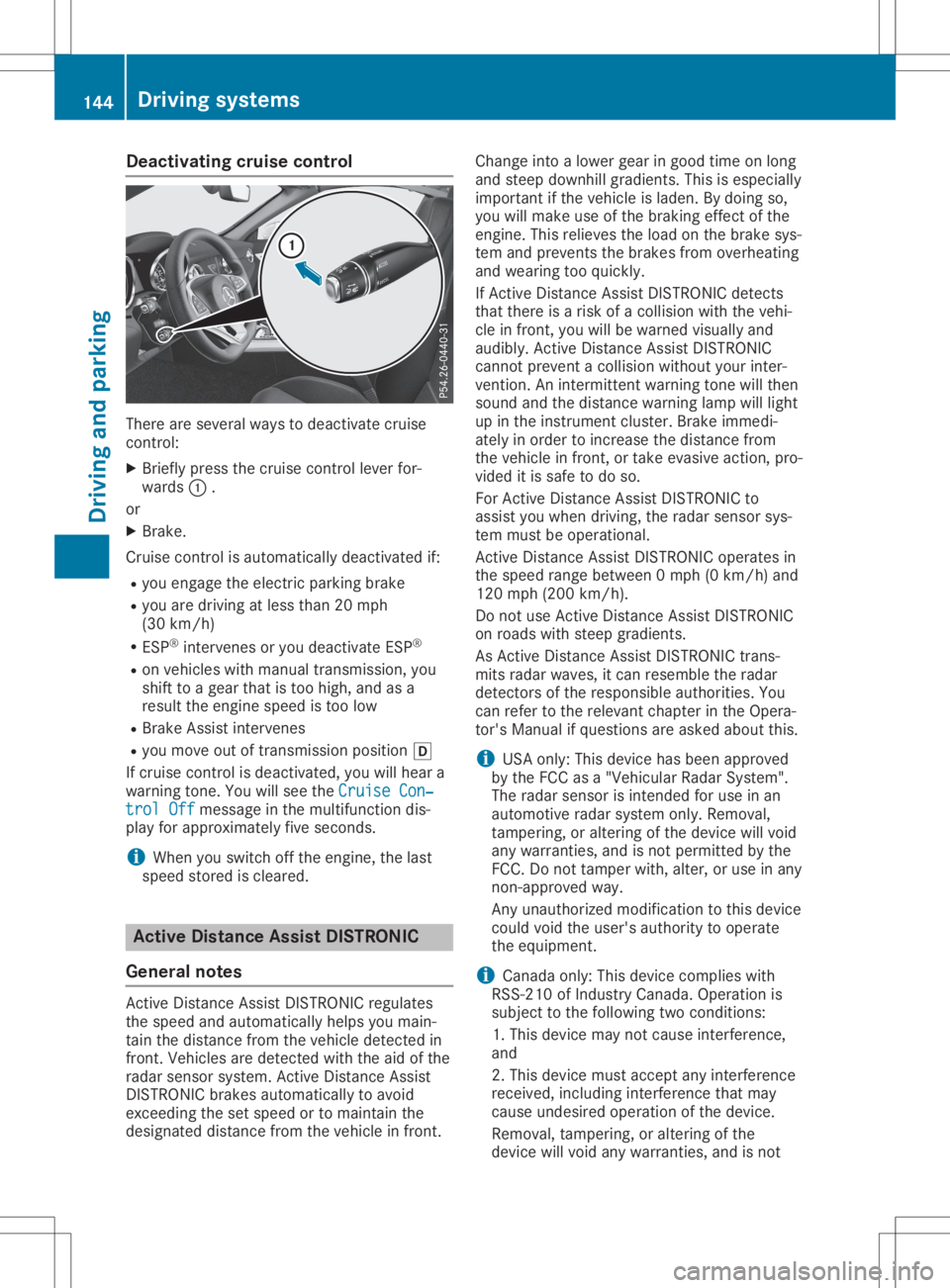
ivating cruis econt rol The
reare severalways todeac tivat ecruise
co ntro l:
X Brief lypre ssthec ruise contro llev er for-
ward s0043 .
or X Brak e.
Crui secontro lisa utom atically deac tivat ed if:
R you engage thee lectric par king bra ke
R you aredrivin ga tles st han2 0m ph
(30 km/h)
R ES P®
inte rven es oryou deac tivat eE SP®
R on veh icles withm anual trans mis sion,you
shi ftto ag ear that istooh igh, and asa
res ult thee ngines peed istool ow
R Brak eA ssisti nt erve nes
R you moveout oftrans mis sionp osition 005B
If cr uise contro lisd eac tivat ed, you willhear a
warn ingt one.You willsee theCru ise Con‐ Cru
ise Con‐
tro lO ff tro
lO ffmes sageint he mult ifunction dis-
play fora ppr oximat elyfives econ ds.
i Whe
nyou swit chofft he engin e,thel ast
spe edstor ed isclear ed. Act
ive Dist ance Assi stDIST RONIC
Gen eral not es Ac
tive Distanc eAssistD ISTR ON ICreg ulat es
th es peed and automatically helpsyou main -
ta in thed ista nc ef romt heveh icle det ectedi n
fr on t.Veh icles are detectedw itht he aid ofthe
rad arsen sor system. Active Distanc eAssist
DI ST RON ICbra kesa utom atically toavo id
ex ce edin gthe set speedortomain tain the
des ignated distanc ef romt heveh icle in fron t. Chan
geinto alowe rgear ingoo dtimeo nlon g
and steep down hillgradie nts. Thi sise spec ially
imp ortant ifth ev ehicle islade n.By doin gso,
you willmak euseoftheb raking effect of the
en gin e.Thi sreliev es thel oad ontheb rake sys -
te ma ndpre ven tstheb rake sf romo verheat ing
and wear ingt oo quic kly.
If Ac tive Distanc eAssistD ISTR ON ICdet ects
th at there isar isko fac ollis ion withthe veh i-
cl ei nf ront,y ou will bewarn edvisually and
audib ly.Active Distanc eAssistD ISTR ON IC
can notp reven tac ollis ion without yourinte r-
ven tion .A nintermi ttent warn ingt onew illthen
soun dand thed ista nc ew arningl amp willlight
up inthei nstru ment clust er. Brak ei mm edi-
at ely inorder toincr ease thed ista nc ef rom
th ev ehicle in fron t,or take eva sivea ction ,pro-
vid ed itis saf etod oso.
Fo rA ctiveD istan ceAssis tD ISTR ON ICto
ass istyou when drivin g,ther adar sen sor sys-
te mm ustb eo perat ion al.
Ac tive Distanc eAssistD ISTR ON ICope rates in
th es peed ran gebet ween 0mph(0km /h) and
12 0m ph(20 0km/ h).
Do not useA ctiv eDistance AssistDISTR ONIC
on roa dswith stee pgradients .
As Activ eDistance AssistDISTR ONICtrans-
mits rada rw aves ,itc an res emb lethe rada r
de tecto rsof the responsi blea uthor ities. You
can referto the releva ntcha pterint he Opera -
tor' sM anualifq uestions area sked abou tthis.
i USA
only:Thi sd eviceh asbeen appro ved
by the FCC asa"Vehicu larR adar Sys tem" .
The rada rs ensor isinte ndedfor usei na n
au tomo tiverada rs ystem only.Re mov al,
tam perin g,or alteri ngofthe devic ew illv oid
any warrantie s,and isnot permi tted bythe
FCC .Don ottam perw ith, alter, orusei na ny
non-a pprov edway.
Any unauthorized mod ificati ontothisd evice
cou ldvoi dthe user' sa uthor itytoopera te
the equipme nt.
i Ca
nad aonly: Thi sd evicec omp lies with
RSS -210 ofIndu stry Canad a.Op era tionis
su bje ctto the followi ng two cond itions:
1. Thi sd evicem aynot causeinte rferenc e,
and
2. Thi sd evicem usta ccep ta ny inte rferenc e
rece ived,incl uding inte rferenc ethatm ay
cau seund esired opera tiono fthe devic e.
Re mov al,t am perin g,or alteri ngofthe
de vic ew illv oida nywarrantie s,and isnot 14
4 Dr
ivi ng system sDrivi ng andp arki ng
Page 151 of 310
sure
point forahigher speed, ordown 0044
for alower speed.
Every timethecruise controllever is
pressed upordown, thelast speed stored is
increased orreduced.
X To
adju stthe setspeed in5m phincre-
ments (10km/h increments): briefly
press thecruise controllever up0043 past the
pressure pointforahigher speed, or
down 0044for alower speed.
Every timethecruise controllever is
pressed upordown, thelast speed stored is
increased orreduced.
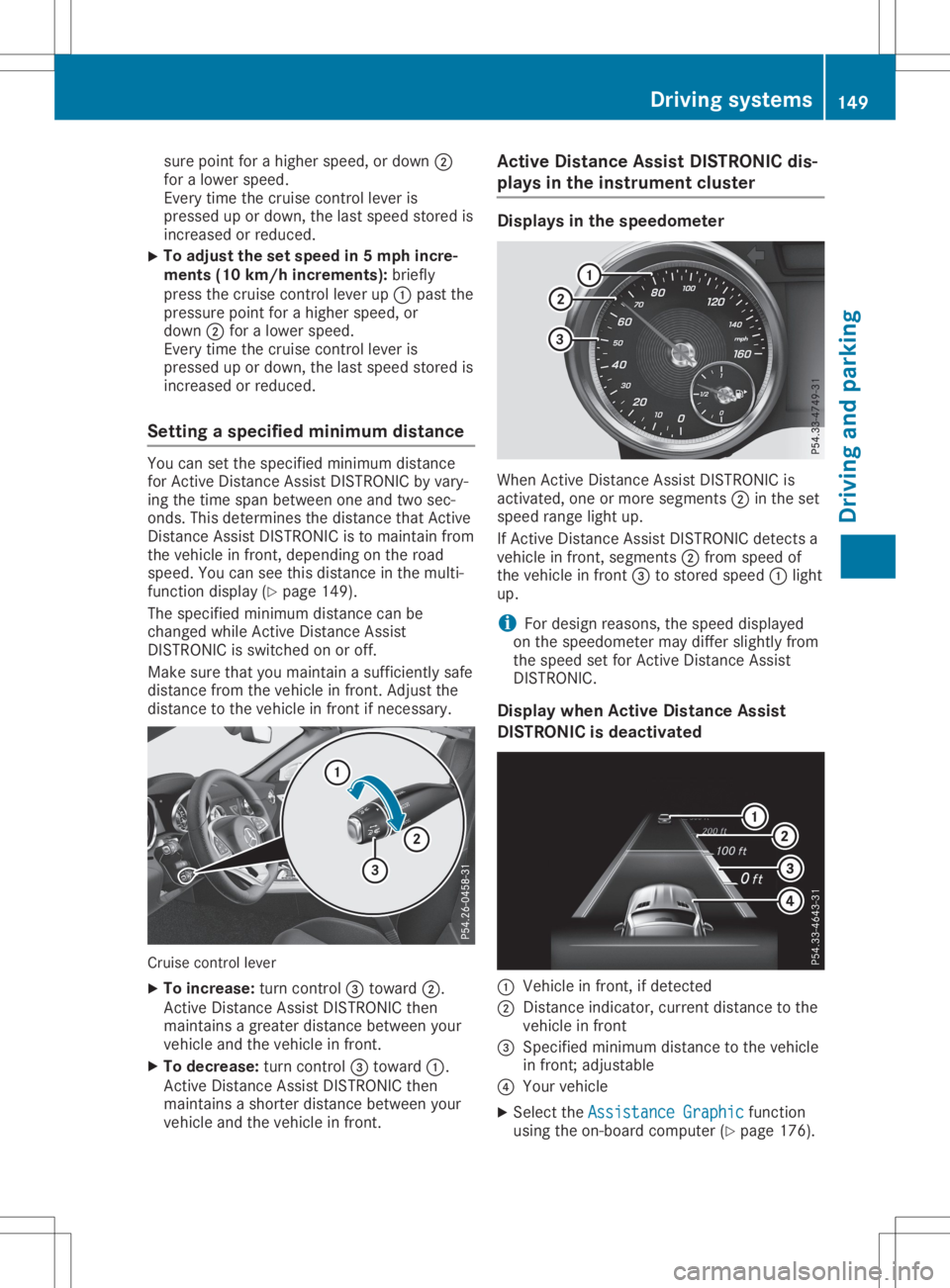
Setting aspecifie dminimum distance You
cansetthe specified minimum distance
for Active Distance AssistDISTRONIC byvary-
ing the time span between oneandtwosec-
onds. Thisdetermines thedistance thatActive
Distance AssistDISTRONIC isto maintain from
the vehicle infront ,depending onthe road
speed. Youcanseethis distance inthe multi-
function display(Ypage 149).
The specified minimum distancecanbe
changed whileActive Distance Assist
DISTRONIC isswitched onoroff.
Make surethatyoumaintain asufficiently safe
distance fromthevehicle infront .Adjust the
distance tothe vehicle infront ifnecessary. Cruise
controllever
X To increase: turncontrol0087 toward 0044.
Act ive Distance AssistDISTRONIC then
maintains agreater distance between your
vehicle andthevehicle infront .
X To decrease: turncontrol0087 toward 0043.
Act ive Distance AssistDISTRONIC then
maintains ashorter distance between your
vehicle andthevehicle infront . Active
Distance AssistDISTRONIC dis-
plays inthe instrum entcluster Displays
inthe speedometer When
Active Distance AssistDISTRONIC is
activated, oneormore segments 0044inthe set
speed rangelightup.
If Act ive Distance AssistDISTRONIC detectsa
vehicle infront ,segments 0044from speed of
the vehicle infront 0087tostored speed0043light
up.
i For
design reasons, thespeed displayed
on the speedometer maydiffer slightly from
the speed setforActive Distance Assist
DISTRONIC.
Display whenActive Distance Assist
DISTRONIC isdeactivated 0043
Vehicle infront ,ifd etected
0044 Distance indicator, currentdistance tothe
vehicle infront
0087 Specified minimum distancetothe vehicle
in front ;adjustable
0085 Your vehicle
X Select theAssistance Graphic Assistance
Graphicfunction
using theon-board computer (Ypage 176). Driving
systems
149Drivingandparking Z
Page 153 of 310
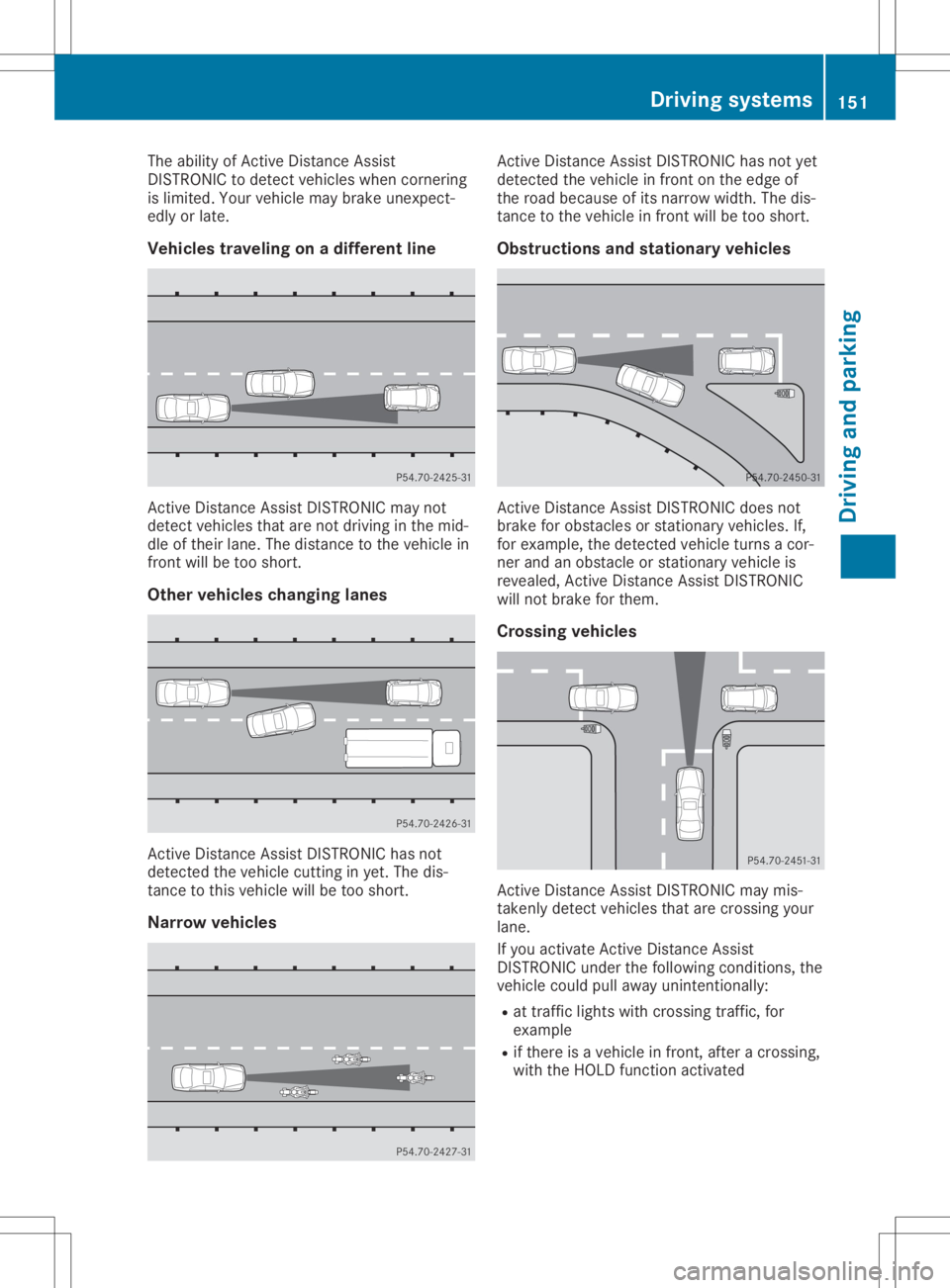
The
ability ofAct ive Distan ceAssist
DIS TRONIC todetect vehicles whencornering
is limited. Yourvehicle maybrake unexpect -
edly orlate.
Vehicles traveling onadiffer entline Act
ive Distan ceAssist DISTRONIC maynot
detect vehicles thatarenot driving inthe mid-
dle oftheir lane. Thedistance tothe vehicle in
front willbetoo short.
Other vehicles changing lanes Act
ive Distan ceAssist DISTRONIC hasnot
detect edthe vehicle cuttinginyet. Thedis-
tanc etot his vehicle willbetoo short.
Nar row vehicles Act
ive Distan ceAssist DISTRONIC hasnotyet
detect edthe vehicle infront onthe edge of
the road because ofits narrow width.Thedis-
tanc etot he vehicle infront willbetoo short.
Obstru ctionsandstationary vehicles Act
ive Distan ceAssist DISTRONIC doesnot
brake forobstacles orstation aryvehicles. If,
for example, thedetect edvehicle turnsacor-
ner and anobstacle orstation aryvehicle is
revealed, Active Distan ceAssist DISTRONIC
will notbrake forthem.
Crossing vehicles Act
ive Distan ceAssist DISTRONIC maymis-
taken lydetect vehicles thatarecrossin gyour
lane.
If you activate Active Distan ceAssist
DIS TRONIC underthefollowing conditions,the
vehicle couldpullaway unintention ally:
R at traff iclights withcrossin gtraff ic,for
example
R ifthere isav ehicle infront ,after acrossin g,
with theHOLD functionactivated Driving
systems
151Drivingandparking Z
Page 157 of 310
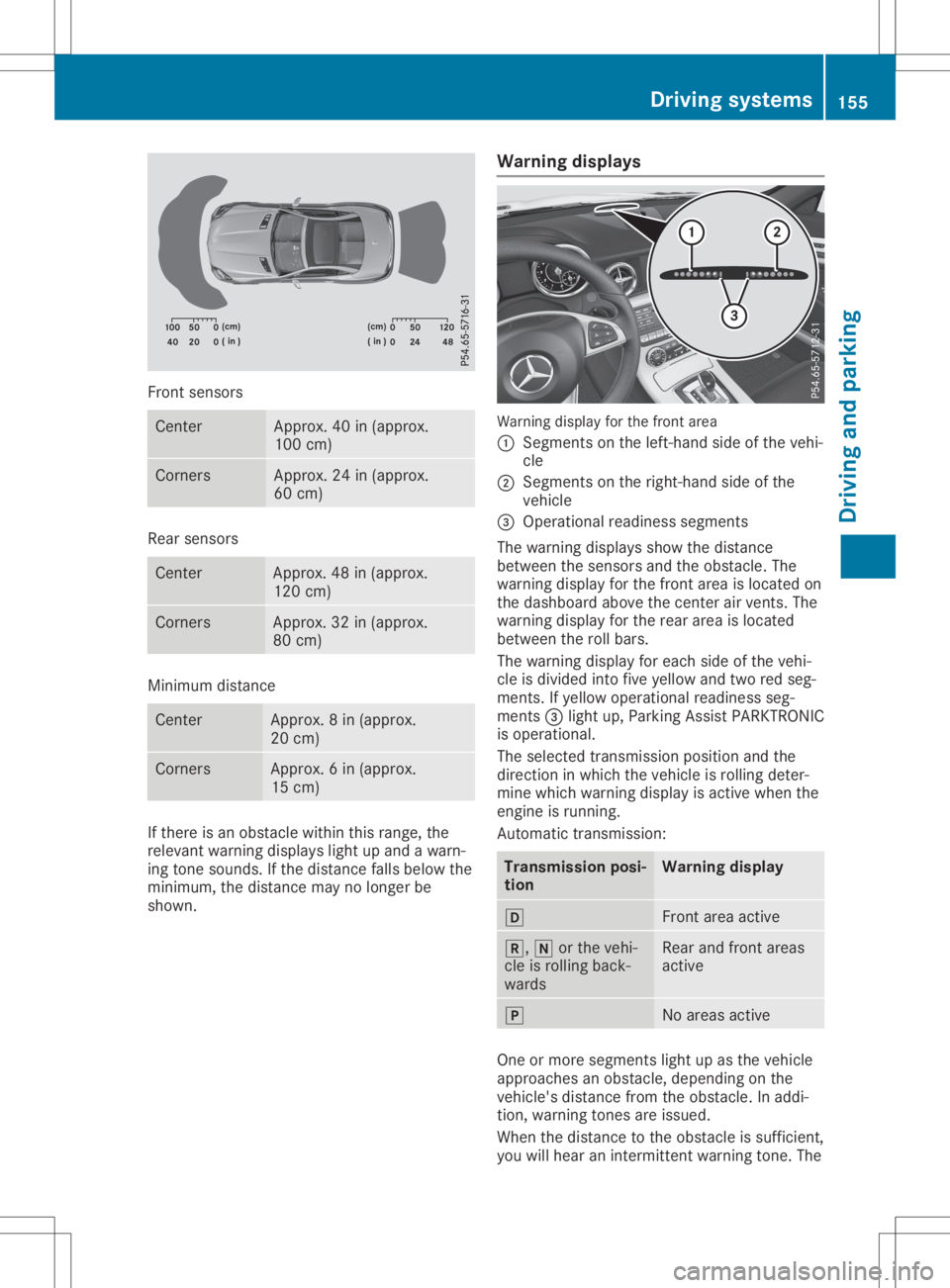
Front
sensors Ce
nter Appro
x.40 in(appr ox.
100 cm) Co
rners Appro
x.24 in(appr ox.
60 cm) Re
ar senso rs Ce
nter Appro
x.48 in(appr ox.
120 cm) Co
rners Appro
x.32 in(appr ox.
80 cm) Mini
mum distance Ce
nter Appro
x.8i n( approx.
20 cm) Co
rners Appro
x.6i n( approx.
15 cm) If
there isan obs tacl ewithin this rang e,the
rel eva ntwa rning displa yslight upand awarn-
ing tone sounds. Ifthe distance fallsbel ow the
mini mum, thedistance maynolong erbe
show n. Warnin
gdispl ays Wa
rning displa yfor the front area
0043 Segme ntsonthe left-hand sideo fthe vehi -
cle
0044 Segme ntsonthe right-ha ndsideo fthe
vehi cle
0087 Ope rational readine ssseg ments
The warning displa ysshow thedistance
betw eenthesenso rsand theobstacl e.The
wa rning displa yfor the front areaisloca ted on
the dashb oard above thecenter airv ents. The
wa rning displa yfor the rearareai sloca ted
betw eentherollbars.
The warning displa yfor each sideo fthe vehi -
cle isdiv ide dinto five yellow and tworedseg-
ments. Ifye llow ope rational readine ssseg -
ments 0087light up,P arking AssistPARK TRONIC
is ope rational .
The selected transmi ssion pos itionand the
dir ectio ninw hich the vehi cleisrol ling dete r-
mine whichwarning displa yisa ctive whe nthe
engi neisrunni ng.
Automa tictransmi ssion: Transmi
ssion posi -
tion Warnin
gdispl ay 005B
Front
areaactive 005E,
005Corthe vehi -
cle isrol ling back-
wa rds Re
ar and front areas
acti ve 005D
No
areasacti ve One
ormore segments light upasthe vehi cle
ap proa ches anobs tacl e,dep endi ngon the
vehi cle'sdistance fromtheobstacl e.In addi-
tion, warning tones areissued.
Whe nthe distance tothe obstacl eiss uffici ent,
yo uw illh eara nintermi ttentwarning tone. The Dri
vin gsystems
155Drivin gand parking Z
Page 158 of 310
shorter
thedistance tothe obstacle, the
shorter thefrequency ofthe intermitt entwarn-
ing tones becomes. Whentheminimum dis-
tance isreached, youhear acont inuous warn-
ing tone.
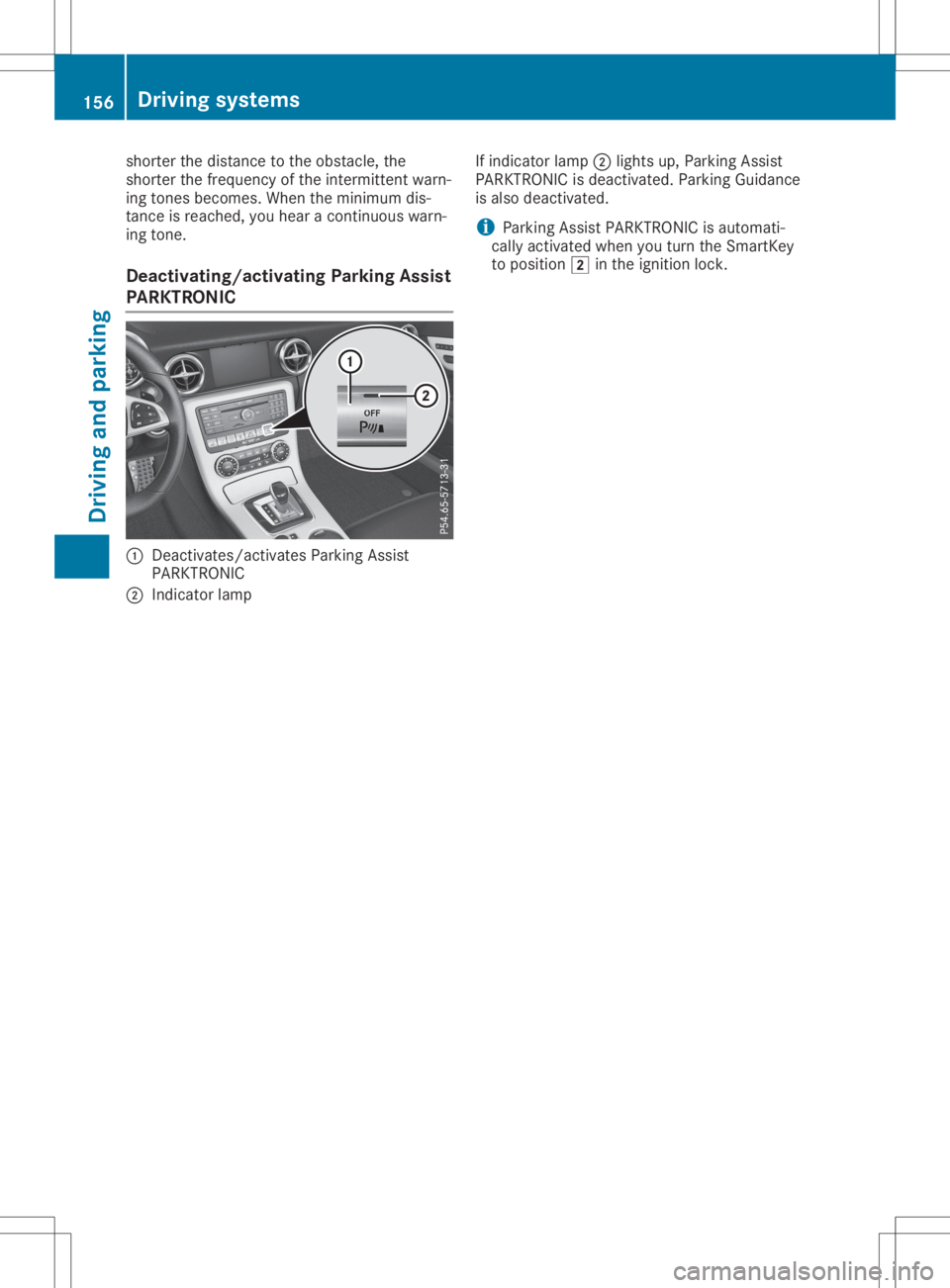
Deac <0057004C005900440057004C0051004A0012004400460057004C005900440057
004C0051004A> ParkingAssist
PARKTRONIC 0043
Deactivates/act ivatesParking Assist
PARKTRONIC
0044 Indicator lamp If
indicator lamp0044lights up,Parking Assist
PARKTRONIC isdeactivated. ParkingGuidance
is also deactivated.
i Parking
AssistPARKTRONIC isautomati-
cally activated whenyouturn theSmartKey
to position 0048inthe ignition lock. 156
Driving
systemsDriving andparking
Page 159 of 310
Problems
withParking AssistPARKTRONIC Problem
Possible
causes/co nsequences and0050 0050
Solutions Only
thered segments
in the Parking Assist
PARKTRONIC warning
display sarelit. You also
hear awarning tonefor
approximately twosec-
onds.
Parking Assist
PARKTRONIC isdeacti-
vated afterapprox-
imately 20seconds and
the indicator lampin
the Parking Assist
PARKTRONIC button
lights up. Parking
AssistPARKTRONIC hasmalfunction edand hasbeen deac-
tivated.
X Ifproblems persist,haveParking AssistPARKTRONIC checkedat
aq uali fied specialist workshop. Only
thered segments
in the Parking Assist
PARKTRONIC warning
display sarelit. Parking
Assist PARKTRONIC is
deactivated after
approximately fivesec-
onds. The
Parking AssistPARKTRONIC sensorsaredirty orthere isinter-
ferenc e.
X Clean theParking AssistPARKTRONIC sensors(Ypage 251).
X Switch theignition backon. The
problem maybecaused byan extern alsource ofradio orultra-
sound waves.
X Check tosee ifParking AssistPARKTRONIC worksatad ifferent
location. Parking
Guidance
Import antsafety notes Parking
Guidanceisan electron icparking aid
with ultrasound. Ultrasoundisused tomeas-
ure theroad onboth sides ofthe vehicle. A
suitable parkingspaceisindicated bythe
parking symbol. Youreceive steering instruc-
tions when parking. Youcanalso stilluse
Parking AssistPARKTRONIC (Ypage 154).
Parking Guidanceisonly anaid. Itis not a
replacement foryour atten tiontoyour immedi-
ate surroundings. Youarealwa ysresponsible
for safe maneuvering, parkingandexiting a
parking space.Makesurethatthere areno
persons, animalsorobject sint he maneuver-
ing area when youaremaneuvering orparking. G
WARNING
If object sarelocated abovethedetect ion
range, Parking Guidancemay provide steer- ing
instruct ionstoosoon. Youmay cause a
collision asaresult. There isar isk ofan
accident.
If object sarelocated abovethedetect ion
range, stopandswitch offParking Assist.
! If
they cannot beavoided, driveover
obstacles suchascurbs slowly andatan
obtuse angle.Otherwise, youmay damage
the wheels ortires.
When Parking AssistPARKTRONIC isswitched
off, Parking Guidanceisalso unavaila ble.
Parking Guidancemay alsodisplay spaces not
suitable forparking, e.g.:
R where parking orstopping isprohibited
R in front ofdriveways orentr ances andexits
R on unsuitable surfaces Driving
systems
157Drivingandparking Z