ESP MERCEDES-BENZ SLC 2020 Manual Online
[x] Cancel search | Manufacturer: MERCEDES-BENZ, Model Year: 2020, Model line: SLC, Model: MERCEDES-BENZ SLC 2020Pages: 310, PDF Size: 16.05 MB
Page 224 of 310
Connect
ingam obile phone
(COMAN D)
Req uiremen ts For
telepho nyvia theB luetoot h®
int erf ace, you
requi reaB luetooth®
-c apable mobilephon e.
The mob ilephon emustsuppo rtHan ds-Free
Pro file 1.0o rabov e.
Mult imed iasyst em:
X Sel ect Vehicle Veh
icle007BSy stem Set‐ Sys
tem Set‐
tin gs tin
gs007B ActivateBluetooth Act
ivateBluetooth.
X Ac tivate Blue tooth®
0073.
Mobil ephon e:
X Ac tivate Blue tooth®
and ,ifn ecessary, Blue-
to oth®
vis ibilit yfor other devi ces(see the
man ufacturer'so per atin ginstruct ions).
The Blue tooth®
devi cenam esfor allofone
man ufacturer'sp roduct smightbeiden tical. To
mak eitp oss ible tocle arly iden tifyy our mob ile
phon e,chang ethe devi cenam e(see them an-
ufac turer'so per atin ginstruct ions).
If th em obile phon esuppo rtst he PBA P(Pho ne
Book Access Profile)and MA P(Mes sage
Acc ess Profile)Blue tooth®
pro files,thef ollow-
ing inform ationwillbe trans mitteda fter you
con nect:
R Phon ebook
R Call lists
R Tex tmessages ande-mail
i Fur
ther inform ationonsuitable mobile
phon escan befoun dat:ht tp://
www.m ercedes-benz.com /connect
i In
theU SA,you can getintouch withthe
Mer cedes-Ben zCust ome rAssist anc eCenter
on 1-80 0-FO R-M ERCe des
(1- 800-36 7-63 72).
In Cana da,you can getintouch withthe
Cus tomer Relations Center on
1-800-3 87-0100 .
Searchin gfor and authorizing (con-
nec ting) amobile phone Before
usingyourmobil ephone withthemulti-
media system forthe first time, youwillneed
to search forthe phone andthen authori ze
(connect) it.Depending onthe mobil ephone,
authori zationeithertakesplacebymeans of Secure
SimplePairing orby entering apass-
key. Themultime diasystem automatically
makes theprocedu rethat isreleva ntfor you r
mobil ephone available. The mobil ephone is
alw ays connected automaticallyafterauthori -
zation. Further information onusing amobile
phone withthemultime diasystem (seethe
Digital Operator's Manual).
If the multime diasystem doesnotdetect your
mobil ephone, thismay bedue toparticul ar
security settings onyou rmobil ephone (see
the manufacture r'sopera tinginstructions).
Only onemobil ephone canbeconnected to
the multimed iasystem atany one time.
Searchin gfor am obile phone
Multime diasystem:
X Select Tel/ Tel/00A7007BConn. Conn.
Device Device007BSearc
hfor Phones Search
forPhones007BStart Start
Search Search.
The availablemobil ephones aredispl ayed.
Symbols inthe devic elist Sym-
bol Explanatio
n 00D3
New
mobil ephone found, notyet
authori zed. 00DC
Mobil
ephone isauthori zed,butis
not connected. Con
necting amobile phone
Authorization usingSecure SimplePairing:
X Select mobilephone.
Ac ode isdispl ayedint he multime diasys-
tem andonthe mobil ephone.
X Ifcode smatch: select Yes Yes
onthe multime -
dia system.
X Confirm codeonthe mobil ephone. Depend-
ing onthe mobil ephone used,confirm the
connection tothe multime diasystem and
for the PBAP andMAP Bluetooth ®
profil es.
The prompt toconfirm maytake uptotwo
minutes tobe displ ayed(see themanufac-
turer's operatinginstructions).
X Ifthe code saredifferent: selectNo No
on the
multime diasystem.
The process iscanceled.
Repe atauthori zation. 222
Operating
systemMultimedia system
Page 225 of 310
Auth
orizati onbyente ringapasske y(pa ss-
cod e):
X Sel ect the Bluetoo th®
nam eofthe mob ile
pho ne.
The inputmenu forthe passke yisd ispl ay ed .
X Ch oos eao netosixtee n-digitn um berc om-
bi nati onasap asske y.
X Enter thepasske yonthe mu ltimed iasys-
tem.
X Pre ss0054 toconfi rm.
X Enter andconfi rmthe passke yonthe
mob ilep hone. Dep endingonthe mob ile
pho neused ,confi rmthe conne ctiontot he
mu ltimed iasystem andforthe PBAP and
MAP Bluetoo th®
pro files. The prompt to
confi rmmaytake uptotwo minu testobe
di spl ayed (seethe ma nuf actu rer'sop era ting
ins truc tions) . Co
nnectin gam obilep hon e(Au dio
20 )
Requ iremen ts For
telephony viathe Bluetoo th®
inte rface, you
req uire atleas to ne Blu etoo th®
-cap ablemob ile
pho nedependi ng on useo fone-te lepho ne
mode ortwo -teleph onem ode.T hemob ile
pho nemu stsupp ort Hand s-FreeProfile1 .0or
ab ove .
In two -teleph onem ode youc an usea llthe
fu nctio nsofthe multimed iasystem with the
main teleph one.W itht he additi onaltel e-
pho ne,you can rece iveinco ming calls.
Mu ltimed iasystem :
X Sel ect Vehicle Veh
icle007BSy stem Set‐ Sys
tem Set‐
tin gs tin
gs007B ActivateBluetooth Act
ivateBluetooth.
X Activa teBlu etoo th®
0073.
Mob ilep hone:
X Activa teBlu etoo th®
and ,ifn ece ssary,B lue-
tooth ®
vis ibility for othe rdevice s(seet he
ma nuf actu rer'sop era ting instruc tions) .
The Bluetoo th®
de vice namesfor allo fo ne
ma nuf actu rer'spro ducts mig htbe identi cal.To
ma keitpo ssi blet oc lear ly identi fyyour mob ile
pho ne,change thedevice name(seet he ma n-
uf actu rer'sop era ting instruc tions) . If
the mob ilep hone supp orts thePBAP (Phone
Boo kAcce ssPro file) and MAP (Mess age
Acce ssPro file) Blu etoo th®
pro files, the follow-
ing info rma tionist rans mitte dafteryou con-
nect themaintel ephone :
R Pho nebook
R Ca lllists
R Te xt mes sages and e-ma il
i Fur
ther informa tiono nsuita blem obile
pho nes can befou ndat: http:/ /
ww w.me rcedes -benz.c om/ conn ect
i In
the USA, youc an getint ouch with the
Mer cedes-B enzCustom erAssi stance Center
on 1-800-FO R-MERC edes
(1-8 00-367 -6372).
In Ca nad a,youc an getint ouch with the
Cu stom erRelatio ns Center on
1-800-3 87-0100.
Searching forand auth orizing (con-
necting) amobile phone Before
usingyourmobile phonewiththemulti-
media system forthe first time, youwillneed
to search forthe phone andthen authorize
(conn ect)it.Depending onthe mobile phone,
authorization eithertakesplacebymeans of
Secure SimplePairing orby enterin gapass-
key. Themultimedia systemautomatically
makes theprocedure thatisrelevant foryour
mobile phoneavailable.Themobile phoneis
alwa ysconn ected automatically afterauthori-
zation. Further information onusing amobile
phone withthemultimedia system(seethe
Digital Operator's Manual).
If the multimedia systemdoesnotdetect your
mobile phone, thismay bedue toparticular
security settingson your mobile phone(see
the manufacturer's operatinginstructions).
Searching foram obile phone
Multimedia system:
X Select Tel/ Tel/00A7007BConn.
Device Conn.
Device007BCon‐ Con‐
nect NewDevice nect
NewDevice.
X Select Connect viaVehicle Connect
viaVehicle.
X Select mobile phone. Operat
ingsystem
223Multimediasystem Z
Page 228 of 310
Stowage
areas Stowage
spaces
Import antsafety notes G
WARNING
If object sint he passenger compartmen tare
stowed incorrec tly,they canslide orbe
thrown around andhitvehicle occupants. In
addition, cupholders, openstowage spaces
and mobile phonebrackets cannotalways
retain allobject sthey cont ain.There isa
risk ofinjury, particularly inthe event ofsud-
den braking oras udden change indirection.
R Always stowobject ssothat they cannot
be thrown around insuch situations.
R Always makesurethatobject sdon otpro-
trude fromstowage spaces,parcelnetsor
stowage nets.
R Close thelockable stowagespacesbefore
startin gajourney.
R Always stowandsecure heavy,hard,poin-
ted, sharp-edged, fragileorbulky object s
in the trunk .
Glove box X
To open: pullhandle 0043and open glove box
flap 0044.
X To close :fold glove boxflap 0044upuntil it
engages.
The glove boxflap cont ains brackets forcoins,
pens, andcredit andservice cards. The
glove boxcanbelocked andunlocked
using themechanical key.
X To lock: insert themechanical keyinto the
lock andturn itto position 0048.
X To unlock: insertthemechanical keyinto
the lock andturn itto position 0047.
Stowage compartment/telephone
compar tment under thearm rest X
To open: pushbutton 0043upand raise arm-
rest 0044.
The stowage compartmen tcan be locked and
unlocked centrally using theSmartK ey
(Y page 66).
i Depending
onthe vehicle equipment, a
USB portandaMedia Interface isinstalled
in the stowage compartmen t.AM edia Inter-
face isau niversal interfaceformobile audio
equipment, e.g.foraniPod ®
or MP3 Playe r. 226
Stowage
areasStowage andfeatu res
Page 230 of 310
Rev
ersible flo or pane lint he trunk The
trunk floor islevel when youu sethe outer
sid eo fthe reve rsiblef loor panel .Ify ou turn
the floor panel over,yo uc an trans portobje cts
su ch asab evera gecrate onthe undersideo f
the panel .
X To turn over: lift reve rsiblef loor panel 0044
us ing tab 0043.
X Tu rn ove rand then re-insert reversiblef loor
pa nel 0044. Tw
oflexib lestra ps0044 are atta ched tothe
reve rsiblef loor panel ,use thes etos ecu re
obje cts,such aswind scre en0087,w henr eve rsi-
bl ef loor panel 0043hasb eent urne dover. Roo
fcarri er
! Thi
svehiclei sn otdes igned totrans port
item sonthe roo f.Ro ofcarr iers and othe r
dev icesw hich are mou nted onthe roofthat
ha ve not beenspecifi callyap pro ved forthis
mod elby Mer cedes-Be nzmus tnot be used
as they couldda mag ethe veh iclea nd the
retra ctableha rdto p(vario -roof ).
At the time ofgoi ng toprint, Mer cedes-Be nz
doe snotoffe rany roo fcarr iero ro the rroo f-
insta lled dev icesfor this mod el. !
Thi
svehiclei sn otdes igned totrans port
any item sonthe trunk lido rtoa llow lug-
ga ge carr iers or equ ipment ofany kind tobe
insta lled tothe trunk lid. Othe rwisethe vehi-
cle and theretra ctableha rdto pcouldbe
da mag ed. Fe
atures Cup
holder
Impo rtant safetynotes G
WARNI
NG
If obje ctsinthe passe nger comp artmentare
stow edinco rrectl y,they canslide orbe
throw naround andhitveh icleo ccu pants. In
ad dition, cupholder s,ope nstow ages paces
and mob ilep hone bra ckets canno talway s
reta inallo bje cts they conta in.The reisa
ris ko finju ry, particu larly inthe eventofsud-
den braking oras uddenc hange indirecti on.
R Alw ayss tow obje ctssothat they canno t
be throw naround insuch situ ations.
R Alw aysm ake sure that objectsdonot pro-
trud efrom stow ages paces, parcel nets or
stow agen ets.
R Close thelockab lestow ages paces before
star ting ajou rney .
R Alw ayss tow and secu rehea vy,hard, poin-
ted, sharp-e dged,fra gile or bulky obje cts
in the trunk. G
WARNI
NG
The heating eleme ntsofthe cup holder can
bec ome veryhot.Youc ouldbu rn yours elfo n
them.
The reisar isko finju ry.
Do not touchthe hot heating eleme ntsof
the cup holder .Alway sm ake sure that chil-
dre ncanno tacce ssthe hot heating ele-
ments ofthe cup holder .Neve rlea ve chi l-
dre nunsup ervi sed inthe vehicle.
! Only
uset he cup holder sfor conta inersof
the right size andwhich have lids. The
dri nks couldothe rwisespill. 22
8 Fe
aturesStow ageand features
Page 233 of 310
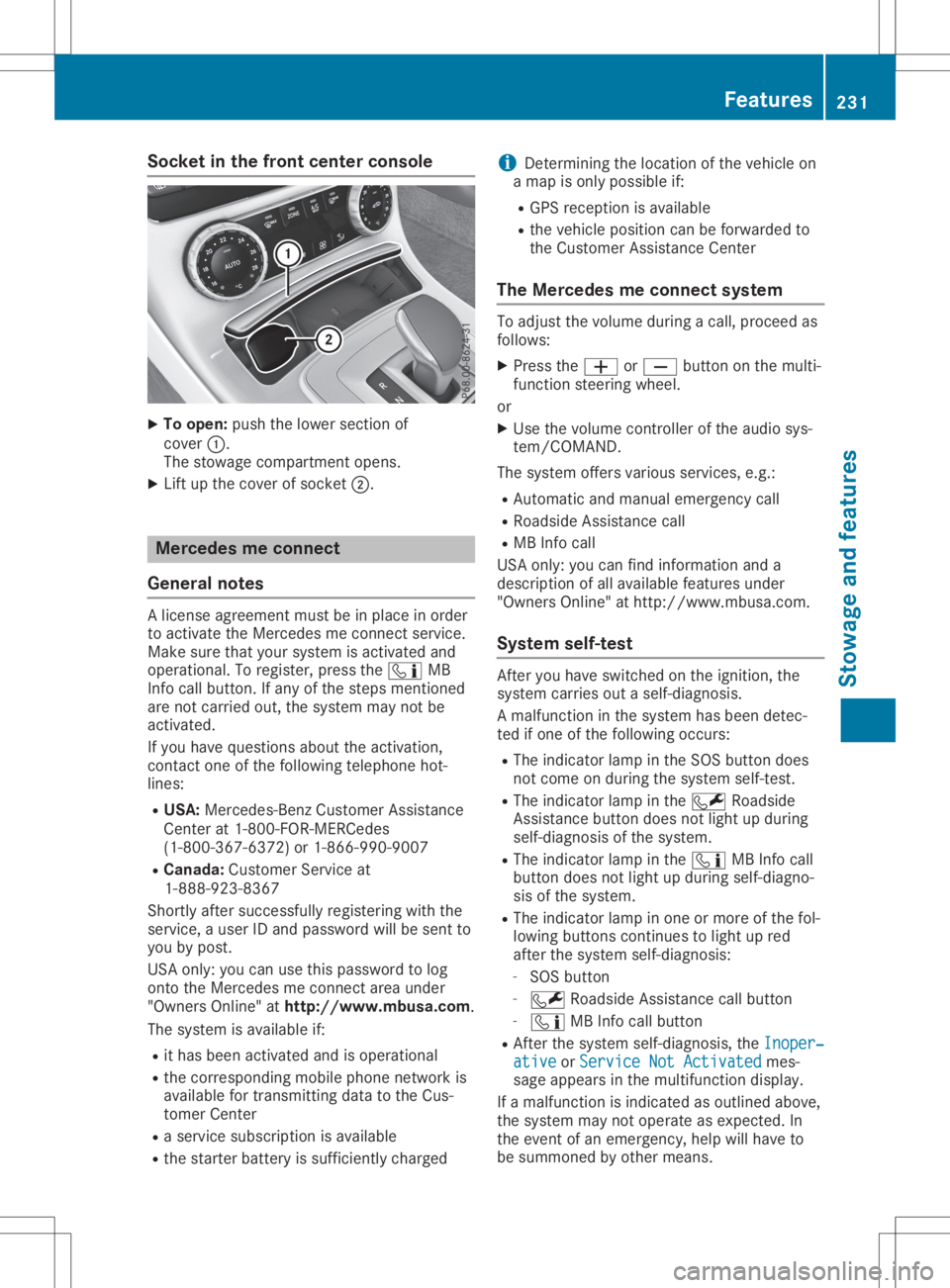
Socket
inthe front center console X
To open: pushthelower section of
cover 0043.
The stowage compartmen topens.
X Lift upthe cover ofsocket 0044. Mercedes
meconne ct
General notes Al
icense agreement mustbeinplace inorder
to activate theMercedes meconn ectservice.
Make surethatyour system isactivated and
operational. Toregister, pressthe00D9 MB
Info callbutton. Ifany ofthe steps mentioned
are not carried out,thesystem maynotbe
activated.
If you have questions abouttheactivation,
cont actone ofthe following telephone hot-
lines:
R USA: Mercedes-B enzCustomer Assistance
Center at1-80 0-FOR-MERCedes
(1-80 0-367-6372)or1-86 6-990-9007
R Canada: Customer Serviceat
1-88 8-92 3-8367
Short lyafter successfully registeringwiththe
service, auser IDand password willbesent to
you bypost.
USA only: youcan usethis password tolog
onto theMercedes meconn ectarea under
"Owners Online"athtt <0053001D00120012005A005A005A001100500045005800560044001100460052
0050>.
The system isavaila bleif:
R ithas been activated andisoperational
R the correspondin gmobile phone network is
availa blefortransm ittingdatatothe Cus-
tomer Center
R as ervice subscription isavaila ble
R the starter battery issufficiently charged i
Determ iningthelocation ofthe vehicle on
am apisonly possible if:
R GPS reception isavaila ble
R the vehicle position canbeforwarded to
the Customer AssistanceCenter
The Mercedes meconne ctsystem To
adjust thevolume duringacall, proceed as
follows:
X Press the0081 or0082 button onthe multi-
funct ionsteering wheel.
or X Use thevolume controller ofthe audio sys-
tem/COMA ND.
The system offersvarious services, e.g.:
R Automatic andmanual emergency call
R Roadsid eAssistanc ecall
R MB Info call
USA only: youcan find information anda
description ofall availa blefeatures under
"Owners Online"athttp: //www.mbusa.com.
System self-test Aft
eryou have switched onthe ignition, the
system carriesoutaself-diagnosis.
Am alfunction inthe system hasbeen detec-
ted ifone ofthe following occurs:
R The indicator lampinthe SOS button does
not come onduring thesystem self-test .
R The indicator lampinthe 0052 Roadsid e
Assistanc ebutton doesnotlight upduring
self-diagnosis ofthe system.
R The indicator lampinthe 00D9 MBInfo call
button doesnotlight upduring self-diagno-
sis ofthe system.
R The indicator lampinone ormore ofthe fol-
lowing buttons continues tolight upred
after thesystem self-diagnosis:
- SOS button
- 0052 Roadsid eAssistanc ecallbutton
- 00D9 MBInfo callbutton
R Aft erthe system self-diagnosis, theInoper‐ Inoper‐
ative ative
orService NotActivated Service
NotActivated mes-
sage appears inthe multifunct iondisplay .
If am alfunction isindicated asoutlined above,
the system maynotoperate asexpected. In
the event ofan emergency, helpwillhave to
be summoned byother means. Features
231Stowageandfeatu res Z
Page 234 of 310
Have
thesystem checked atthe near est
Merce des-Benz ServiceCenter orcontact the
foll owi ngservi cehotli nes:
R USA :Merce des-Benz Customer Assistance
Ce nter at1-800-FOR-M ERCedes
(1-800-367-6372) or1-866-990-9007
R Can ada: Customer Serviceat
1-888-923-8367
Eme rgen cycal l Importan
tsafe tynote s G
WARNI
NG
It can bedangero ustorema ininthe vehi cle,
even ifyo uh avep res sed theSOS button in
an emer gency if:
R yous ee smoke insideorouts ideofthe
vehi cle, e.g. ifthere isaf ire after anacci -
dent
R the vehi cleison adangero ussectio nof
roa d
R the vehi cleisnot visible orcannot easily
be see nbyother roadusers, particu larly
whe ndarko rinp oorvisibil ity condi tions
The reisar isk ofan acci dent andinjury .
Lea vethe vehi cleimme diately inthis orsim-
il ar situ atio nsassoon asitis safe todo so.
Move toas afe loca tion along with other
vehi cleoccup ants.Insuch situatio ns,secu re
the vehi cleinaccord ancewith natio nalregu -
la tions, e.g. with aw arning triangle .
Al icense agreeme ntmus tbeinp lace inorde r
to activ atethe Merce desmeconnect service.
Make surethat your sys tem isactiv ated and
ope rational .Tor egi ster, pressthe 00D9 MB
Info callbutton. Ifany ofthe steps mentio ned
are not carri edout, thesystem may notbe
activ ated.
If yo uh aveq uestio nsabout theactiv ation,
contact oneofthe followi ngtele pho nehot-
li nes:
R USA :Merce des-Benz Customer Assistance
Ce nter at1-800-FOR-M ERCedes
(1-800-367-6372) or1-866-990-9007
R Can ada: Customer Serviceat
1-888-923-8367 Gen
eral note s
An emer gency callisd ialed automati callyifan
ai rb ag orEmerge ncyTensi oning Device istrig-
gere d.
i You
cannot endanautomati callytrigg ered
emer gency callyou rself.
An emer gency callcan also be initi ated man-
ua lly.
As soon asthe emer gency callhas bee niniti -
ated ,the indi cator lamp inthe SOS button
fla shes .The mul tifunction displa yshow sthe
Conne ctingCall Conne
ctingCall mess age.
The audio outp utismuted .
Once theconnectio nhasbee nm ade,the
Call Connected Call
Connectedmess ageappea rsinthe mul-
tifu nction displa y.
All imp ortant informationonthe emer gency is
transmi tted,forexam ple:
R Cu rrent location ofthe vehi cle(asd ete r-
mined bythe GPS system)
R Vehi cleidentifica tionnumb er
R Informa tiononthe seve rityofthe acci dent
Shortl yafter theemer gency callhas bee niniti -
ated ,avoice connectio nisa utomati cally
esta blished betweentheCustomer Assistance
Ce nter andthevehi cleoccup ants.
R Ifthe vehi cleoccup antsareresp onsiv e,the
Merce des-Benz Customer Assistance Center
attemp tsto get more inform ationonthe
emer gency .
R Ifthere isno resp onse fromthevehi cle
occup ants,anamb ulance isimme diately
sent tothe vehi cle.
If no voice connectio ncan be esta blished to
the Merce des-Benz Customer Assistance Cen-
ter, thesystem hasbeenunable toiniti ate an
emer gency call.
Thi scan occur ,for exam ple,ift he releva nt
mobi lepho nenetwor kisn otava ilab le. The
indi cator lamp inthe SOS button flashes con-
tinuo usly.
The Call Failed Call
Failedmess ageappea rsinthe
mul tifunction displa yand mus tbec onfirm ed.
In this case ,sum mon assista nce byother
mea ns. 232
Fe
aturesStow ageand features
Page 236 of 310
X
To endac all:pre ssthe 0076 button onthe
mu ltifunc tions tee ring wheel.
or X Pre ssthe corr espond ingmultimed iasystem
bu tton forend ingaphone call.
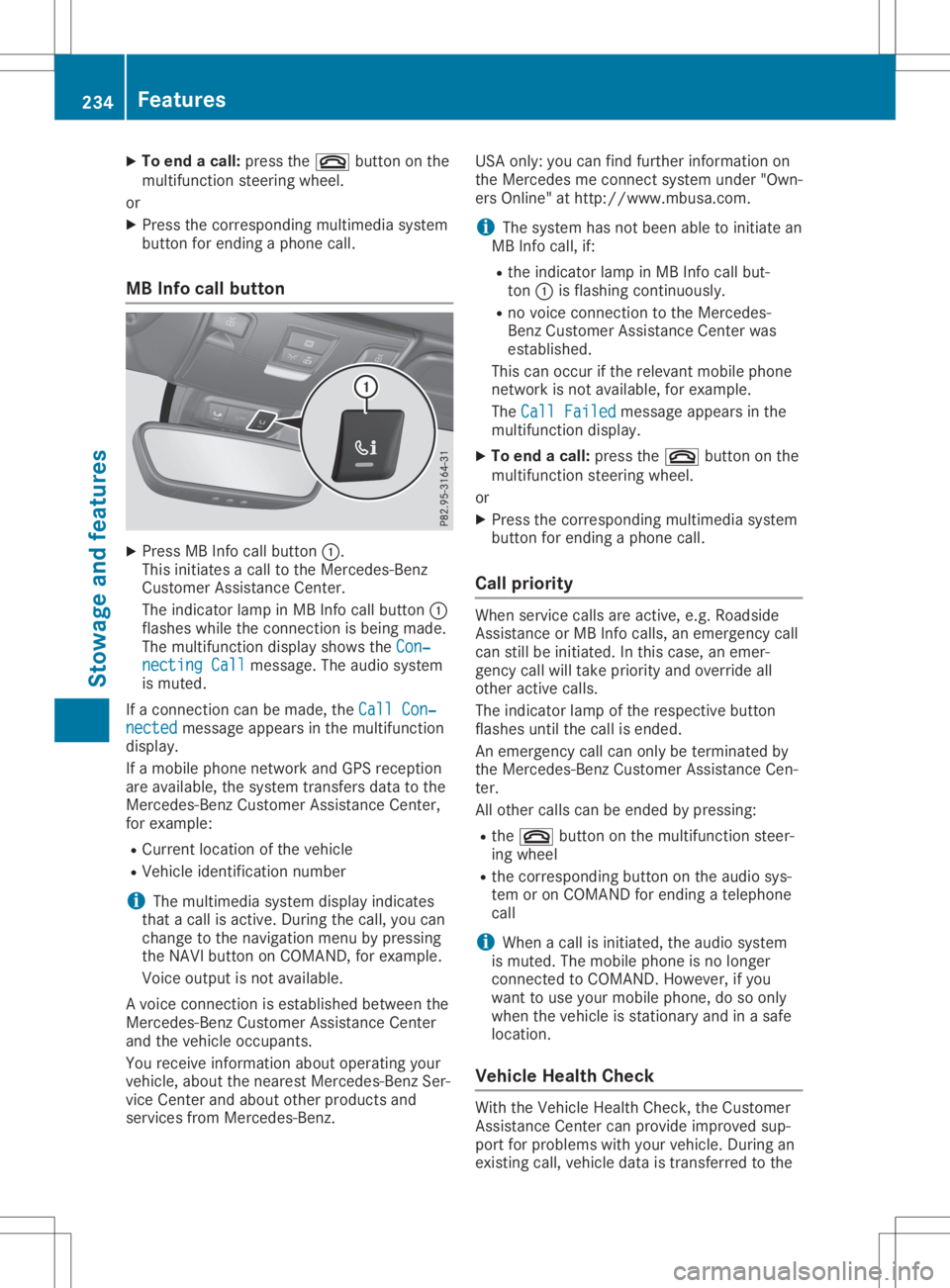
MB Info cal lbutto n X
Pre ssMB Info callbutton 0043.
Thi sinitia tes acallt ot he Mer cedes-Be nz
Cu stom erAssi stance Center.
The indicator lamp inMB Info callbutton 0043
fla she swhile the conne ctionisb eing mad e.
The multifunc tiond ispl ay sho wsthe Con‐ Con
‐
nec tingCall nec
tingCallmes sage. The audios ystem
is mu ted .
If ac onne ctioncan be made,the Cal lCon‐ Cal
lCon‐
nec ted nec
ted message appe ars inthe multifunc tion
di spl ay.
If am obilep hone netw orkand GPSrece ption
are availab le,t he system transfersdata to the
Mer cedes-B enzCustom erAssi stance Center,
for exa mpl e:
R Cu rre ntlocati onofthe vehicle
R Veh iclei de nti fica tionn um ber
i The
multimed iasystem displ ayind icates
tha tac allisa ctive. Duri ngthe call,yo uc an
cha nge tothe navi gatio nm enu bypre ssing
the NAVI button onCOMAND, forexa mpl e.
Voi ceoutpu tisn otava ilab le.
Av oice conne ctionise sta blished betwe enthe
Mer cedes-B enzCustom erAssi stance Center
and thevehicleo ccu pants.
Yo ur ece iveinfo rma tiona bout opera ting your
veh icle, ab ou tthe nea restM erced es-Be nzSer-
vice Center andabou to the rprodu cts and
ser vice sfrom Mercedes-Be nz. USA
only:youc an find further informa tiono n
the Mer cedesme conne ctsystem under"Own-
ers Online"athttp:// www.mb usa.co m.
i Thes ystem hasn otbeen ableto initia te an
MB Info call,if:
R the indicator lamp inMB Info callbut-
ton 0043isfla shi ng conti nuously.
R no voice conne ctiontot he Mer cedes-
Benz Custom erAssi stance Center was
esta blished .
Thi scan occu rift he releva ntmob ilep hone
netw orkisnot availab le,f or exa mpl e.
The CallFailed Cal
lFailed message appe ars inthe
mu ltifunc tiond ispl ay .
X To endac all:pre ssthe 0076 button onthe
mu ltifunc tions tee ring wheel.
or X Pre ssthe corr espond ingmultimed iasystem
bu tton forend ingaphone call.
Cal lprio rity Whe
nservice callsare active,e.g.Roadside
Assi stance orMB Info calls,a ne me rge ncy call
can stillbeinitia ted .Int hisc ase, an eme r-
genc ycallw illt ake priorityand override all
othe ractive calls.
The indicator lamp ofthe respective button
fla she suntilthe callise nded.
An eme rgency callcan onlybetermi natedby
the Mer cedes-B enzCustom erAssi stance Cen-
ter.
All othe rcalls can beend edbypre ssing:
R the 0076 button onthe multifunc tions tee r-
ing wheel
R the corr espond ingbutton onthe audios ys-
tem oron COMAND forend ingatelep hone
cal l
i Whe
nac allisi nitia ted ,the audios ystem
is mu ted .The mob ilep hone isno longer
conne ctedtoCO MAND. However,ifyo u
wa ntto usey ourm obilep hone, dosoonl y
wh en the vehiclei ss tatio nary andinas afe
lo cati on.
Vehi cleH ealth Che ck Wi
th the VehicleH ealth Check, theCustom er
Assi stance Center canprovideimp rove dsup-
po rtfor problems with your veh icle. Duri ngan
exi sting call,veh icled atai st rans ferredtothe 23
4 Fe
aturesSto wag eand featur es
Page 238 of 310
Imp
ortant safety notes G
WAR
NING
When youoper ateorpro gram thed oor with
th ei ntegr atedgara gedoor opener,per son s
in ther ange ofmov eme ntofthed oor may
bec ome trapped orbe struc kbythe door .
Ther eisar isko finjury.
When usingthe integr atedgara gedoor
open er,always makesuret hatn obody is
wit hin ther ange ofmov eme ntofthed oor . G
DANG
ER
Comb ustion engin esemit poisonous
ex haust gasessucha scarbon mon oxide.
In halin gthese exhaust gasesish azardo usto
healt hand can result inpois oning .Ther eisa
ris ko ffatal inj ury. Ther efore, never leav ethe
en gin erunnin gane nclosed spac ewithout
adequat eventilat ion .
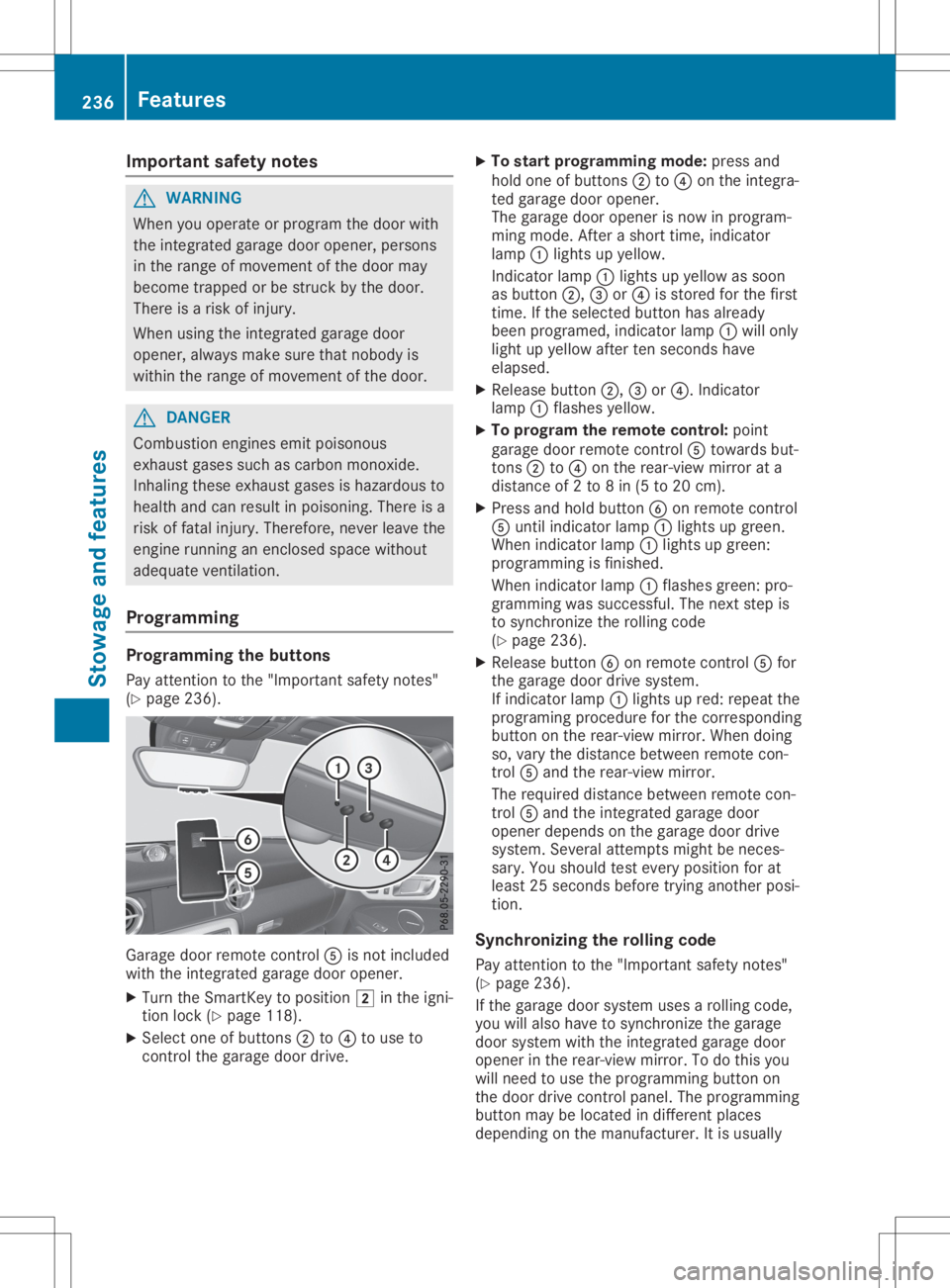
Pr ogr amming Pr
ogr amming theb utton s
Pay attention tothe" Impor tantsafet yn otes "
( Y page 236). Garag
edoor remotec ontro l0083 isno tinc luded
wit hthe integr atedgara gedoor opener.
X Turn theS martKey topos ition 0048inthei gn i-
ti on lock(Ypage 118).
X Se lec tone ofbut tons 0044 to0085 touse to
co ntrol theg ara gedoor drive. X
To star tp rogram ming mod e:pre ssand
hold oneo fbutto ns 0044 to0085 onthei ntegr a-
te dg ara gedoor opener.
The gara gedoor openerisno wi np rogram -
min gm ode.Afteras horttime, indicat or
lamp 0043ligh tsup yellow .
In dic ato rlamp 0043ligh tsup yellow assoo n
as but ton0044, 0087or0085 isstore dfor thef irst
ti me. Ifth es ele cted but tonh asalre ady
been program ed,indicat orlamp 0043will only
ligh tupy ellow aftertens econ ds hav e
elaps ed.
X Releas ebutto n0044, 0087or0085.I ndicato r
lamp 0043flas hes yellow .
X To progr am ther em ote cont rol:poin t
gara gedoor remotec ontro l0083 towards but-
to ns 0044 to0085 onther ear -view mirror ata
dist anceof2t o8in(5 to 20 cm).
X Pre ssand hold button0084 onrem otec ontro l
0083 untilind icat orlamp 0043ligh tsup gre en.
When indicat orlamp 0043ligh tsup gre en:
pro gram mingisf inishe d.
When indicat orlamp 0043flas hes green:p ro-
gram mingwassuc cessf ul. The next step is
to syn chron izet he rollingc ode
( Y page 236).
X Releas ebutto n0084 onrem otec ontro l0083 for
th eg ara gedoor drivesyst em.
If ind icat orlamp 0043ligh tsup red :rep eat the
pro gram ingprocedure forthec orrespo nding
but tono nthe rear -view mirror.W hen doing
so, varythe dist ancebetween remotec on-
tr ol 0083 and ther ear -view mirror.
The require ddistanc ebetween remotec on-
tr ol 0083 and thei ntegr atedgara gedoor
open erdepe ndso nthe gara gedoor drive
syst em. Sever alatt emp tsmig htbe neces-
sar y.You should test eve rypos ition forat
least 25sec onds bef ore trying another pos i-
ti on .
Syn chroniz ingther olling code
Pay attention tothe" Impor tantsafet yn otes "
( Y page 236).
If th eg ara gedoor systemuses arollin gc ode,
you willalso havetos ynch ron izet he gara ge
door systemwiththe integr atedgara gedoor
open erinther ear -view mirror.Tod othisy ou
will need touse thep rogram mingbutto no n
th ed oor drivecontro lpan el. The program ming
but tonm aybe locate dind iffer entp lac es
depe nding onthem anufac turer. Itis usually 236
Feat
uresSt owage andfeatures
Page 239 of 310
locat
edon the door drive unitonthe garage
ceilin g.
Familiar izeyourself withthegarage doordrive
operat inginst ruct ions ,e.g. under "Program-
min gaddition alremo tecon trols", befor ecarry-
ing out thefollowin gsteps.
Your vehic lemust bewithin reachofthe
garage doororgate openerdrive .Make sure
that neither your vehic lenor any perso ns/
obje ctsa represen twithin thesweep ofthe
door orgate.
X Turn theSmar tKey toposit ion0048inthe igni-
tion lock (Ypage 118).
X Get outofthe vehic le.
X Press theprogr ammin gbutton onthe door
drive unit.
Usually, younow have 30seco ndstoinit iate
the nextstep.
X Get intot he vehic le.
X Press previously programed button0044, 0087
or 0085 onthe integrat edgarage dooropener
repeat edlyuntilthe door closes.
The rollin gcode sync hronization isthe n
com plete .
Not eson progra mmingther em ote con-
tr ol
Canadian radiofrequenc ylaws require a
"break "(or interrupt ion)ofthe transm ission
sign alsafterbroadc astingfor afew seco nds.
There fore,the sesign alsmay notlast long
enoug hfor the integrat edgarage dooropener.
The signalisnot recogn ized durin gprogr am-
min g.Comparable withCanadian law,some
U.S .garage dooropenersalso feature a
"break ".
Proc eedasfollows:
R ifyou liveinCanada.
R ifyou have difficulties programmin gthe
garage dooropener(regar dlessofwhere
you live) when followin gthe progr ammin g
ste ps.
X Press andhold oneofbutt ons 0044to0085 on
the integrat edgarage dooropener.
Af ter ashor ttim e,indic atorlamp 0043light s
up yellow.
X Release thebutt on.
Ind icat orlamp 0043flashes yellow.
X Press button0084 ofgarage doorremotecon -
tr ol 0083 for two seco nds, thenrelease itfor
two seco nds. X
Press button0084 again fortwo seco nds.
X Repeat thissequen ceon butt on0084 of
remo tecon trol 0083 untilindic atorlamp 0043
light supg reen .
When indicatorlamp 0043light supg reen :
progr ammin gisf inished.
When indicatorlamp 0043flashes green:pro-
gramm ingwas succ essful.The nextstepi s
to sync hronizethe rollin gcode.
X Release button0084 ofremo tecon trol 0083 of
the garage doordrive.
When indicatorlamp 0043light supred:
repeat theprogr ammin gproc ess forthe cor-
respo ndingbutton onthe rear- view mirror.
When doingso,vary thedistancebetwee n
remo tecon trol 0083 and therear- view mirror.
The require ddistanc ebetwee nremo tecon -
tr ol 0083 and theintegrat edgarage door
open erdepen dson the garage doordrive
syst em. Several attempt smight benec es-
sary. Youshould testever yposit ion forat
least 25seco ndsbefor etrying anot herposi-
tion .
Problem swhen progra mming
If you areexper iencingproblem sprogr ammin g
the integrat edgarage dooropeneron the rear-
view mirror,takenoteo fthe followin ginst ruc-
tion s:
R Check thetransm itter freq uenc yused by
garage doordrive remotecon trol 0083 and
wheth eritis support ed.The transm itter fre-
quenc ycan usually befoun donthe back of
remo tecon trol 0083 for the garage doordrive.
The integrat edgarage dooropeneriscom -
patible withdevic esthat have unitswhich
operat eint he freq uenc yrang eof280 to
433 MHz.
R Replace thebatt eries ingarage doorremote
con trol 0083.T hisincreases thelikelih oodthat
garage doorremotecon trol 0083 will transm it
as trong andprec isesign alto the integrat ed
garage dooropener.
R When programmin g,hold remo tecon trol 0083
at varyin gdistanc esand angles fromb ut-
ton s0044 to0085 which youareprogr ammin g.
Try various anglesatad istanc ebetwee n
2and 8inches (5to2 0cm) oratthe same
angle butatvaryin gdistanc es.
R Ifaf urt her remo tecon trol 0083 isavailable for
the same garage doordrive,repeat the
same programmin gsteps with thisremo te
con trol 0083.B efore perf ormin gthese ste ps, Featu
res
237Stowage andfeatures Z
Page 248 of 310
Maintaining
thetime-dependent servicesched-
ule:
X Note down theservice duedate display edin
the multifunction displaybeforedisconnec t-
ing the battery.
or X Aft erreconn ectingthebattery, subtract the
battery disconnec tionperiods fromtheser-
vice date shown onthe display . Hiding
service displays
X Press the0076 or0038 button onthe steer-
ing wheel. Showing
servicedisplays
X Switch onthe ignition.
X Press 0059or0065 onthe steering wheel
to select theServ. Serv.
menu.
X Press 0063or0064 toselect theASSYST ASSYST
PLUS PLUS
submenu andconfirm bypressing the
0076 button.
The service duedate appears inthe multi-
funct iondisplay . Informat
ionabout Service
Resetting theASSYST PLUSservice
interval display !
If
the ASS YST PLUS service interval dis-
play hasbeen inadvertent lyreset, thisset-
ting canbecorrect edataq ualified special-
ist workshop.
Have service workcarried outasdescribed
in the Maintenanc eBooklet. Thismay other-
wise leadtoincreased wearanddamage to
the major assemblies orthe vehicle.
Aq ualified specialist workshop, e.g.anauthor-
ized Mercedes-Ben zCenter, willreset the
ASS YST PLUS service interval displayafterthe
service workhasbeen carried out.Youcan
also obtain further information onmainte-
nance work,forexample. Special
servicerequirements The
specified maintenanc einterval takesonly
the normal operation ofthe vehicle into
account. Serviceworkwillneed tobe per-
formed moreoften ifthe vehicle isoperated
under arduou scondition sorincreased loads.
The ASSYST PLUS service interval displayis
only anaid. Thedriver ofthe vehicle isrespon-
sible forwhether serviceworkwillneed tobe
performed morefrequently thanrequired asa
result ofthe actual operating conditions
and/or loads.
Examples ofarduou soperating condition s:
R regular citydriving withfrequent intermedi-
ate stops
R the vehicle isprimarily usedtotravel short
distances
R frequent useinmountainous terrainoron
poor roadsurfaces
R the engine isoften leftidling forlong peri-
ods
R particularly dustycondition s,or ifair-recir-
culation modeisfrequently used
In these orsimilar operating conditions,have
the interior filter,airfilter, engine oiland oilfil-
ter, forexample, changedmorefrequently.
Under arduou soperating condition s,the tires
must becheck edmore often. Further informa-
tion canbeobtained ataq ualified specialist
workshop.
Driving abroad An
exten siveMercedes-Ben zService network
is also availa bleinother countr ies.You can
obtain further information fromanyauthorized
Mercedes-Ben zService Center. Care
Notes
oncare H
Environmental
note
Dispose ofempty packaging andcleaning
cloths inan environm entallyresponsible
manner.
! When
cleaning yourcar,donot use:
R dry, coarse orhard cloths
R abrasive cleaningagents 246
CareMaintenance
andcare