ESP MERCEDES-BENZ SLC 2020 Manual PDF
[x] Cancel search | Manufacturer: MERCEDES-BENZ, Model Year: 2020, Model line: SLC, Model: MERCEDES-BENZ SLC 2020Pages: 310, PDF Size: 16.05 MB
Page 204 of 310
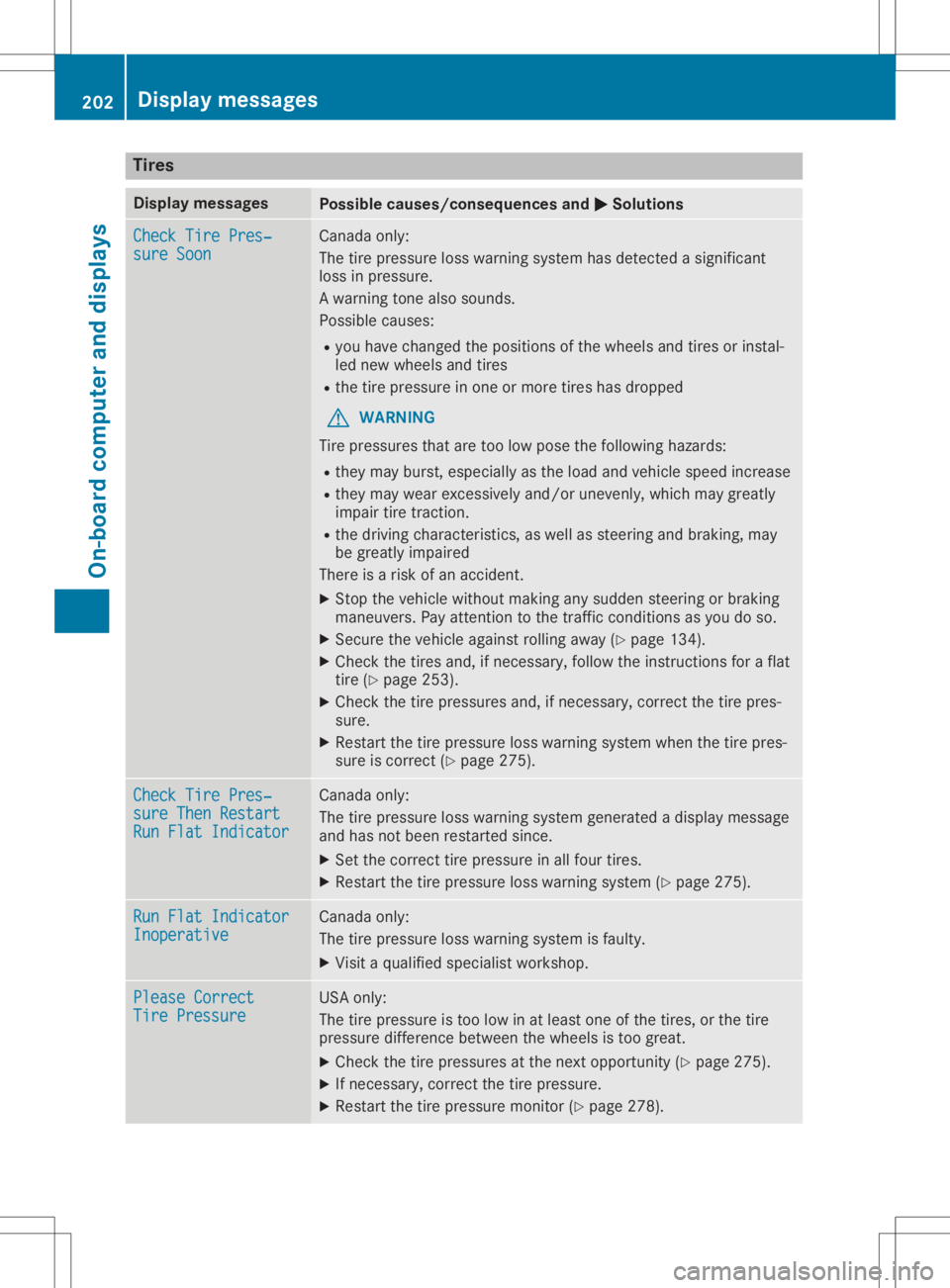
Tire
s Di
spl aymes sages Po
ssible cause s/consequ encesa nd 0050 0050
So luti ons Che
ckTirePres‐ Che
ckTirePres‐
sur eSoon sur
eSoon Ca
nad aonly:
The tirepressu reloss wa rning system hasd etecte das igni fic ant
lo ss inpre ssu re.
Aw arning tone also sou nds .
Po ssi blec auses :
R youh avec hange dthe positio ns ofthe wheelsand tiresorins tal -
le dn ew wheelsand tires
R the tire pressu reinone ormor etiresh asdro pped
G WA
RNING
Ti re pre ssu res thatare too lowp oset he followi ng hazar ds:
R the ym ayburst, especially as the load and vehicles peed incr ease
R the ym aywearexce ssivel ya nd/or unevenl y,wh ich maygreatl y
imp airt ire tractio n.
R the drivin gc haracteri stics, aswellas stee ringa nd bra king ,may
be gre atlyimp aired
The reisar isko fana ccident.
X Stop thevehiclew ithou tmaking any sudd en stee ringo rbraking
ma neu vers.Pa ya ttentio ntot he trafficc ond itions asyoud oso.
X Secu rethe vehiclea gainst rol ling away (Y page 134 ).
X Ch eck thetiresand,ifn ece ssary,f ollowt he instructio nsfor aflat
tire (Ypage 253 ).
X Ch eck thetire pressu res and,ifn ece ssary,c orr ect the tire pres-
su re.
X Re sta rtthe tire pressu reloss wa rning system when the tire pres-
su re iscorr ect(Ypage 275 ). Che
ckTirePres‐ Che
ckTirePres‐
sur eThenR estar t sur
eThenR estar t
Run FlatIndica tor Run
FlatIndica tor Ca
nad aonly:
The tirepressu reloss wa rning system genera tedadispl ay mes sage
and hasn otbeen res tarted since.
X Set thecorr ecttire pressu reinallf ou rtire s.
X Re sta rtthe tire pressu reloss wa rning system (Ypage 275 ). Run
FlatIndica tor Run
FlatIndica tor
Ino perative Ino
perative Ca
nad aonly:
The tirepressu reloss wa rning system isfaulty.
X Visitaq ualifi ed speci alistw orksh op. Ple
ase Correct Ple
ase Correct
Tir ePressu re Tir
ePressu re USA
only:
The tirepressu reistoo lowi na tlea st one ofthe tires,or the tire
pre ssu rediffe renc ebetwe en the wheelsistoo great.
X Ch eck thetire pressu res atthe next opportu nity (Ypage 275 ).
X Ifnece ssary,c orr ect the tire pressu re.
X Re sta rtthe tire pressu remoni tor(Ypage 278 ). 20
2 Disp
laym essage sOn -boar dcomp uter andd ispla ys
Page 205 of 310
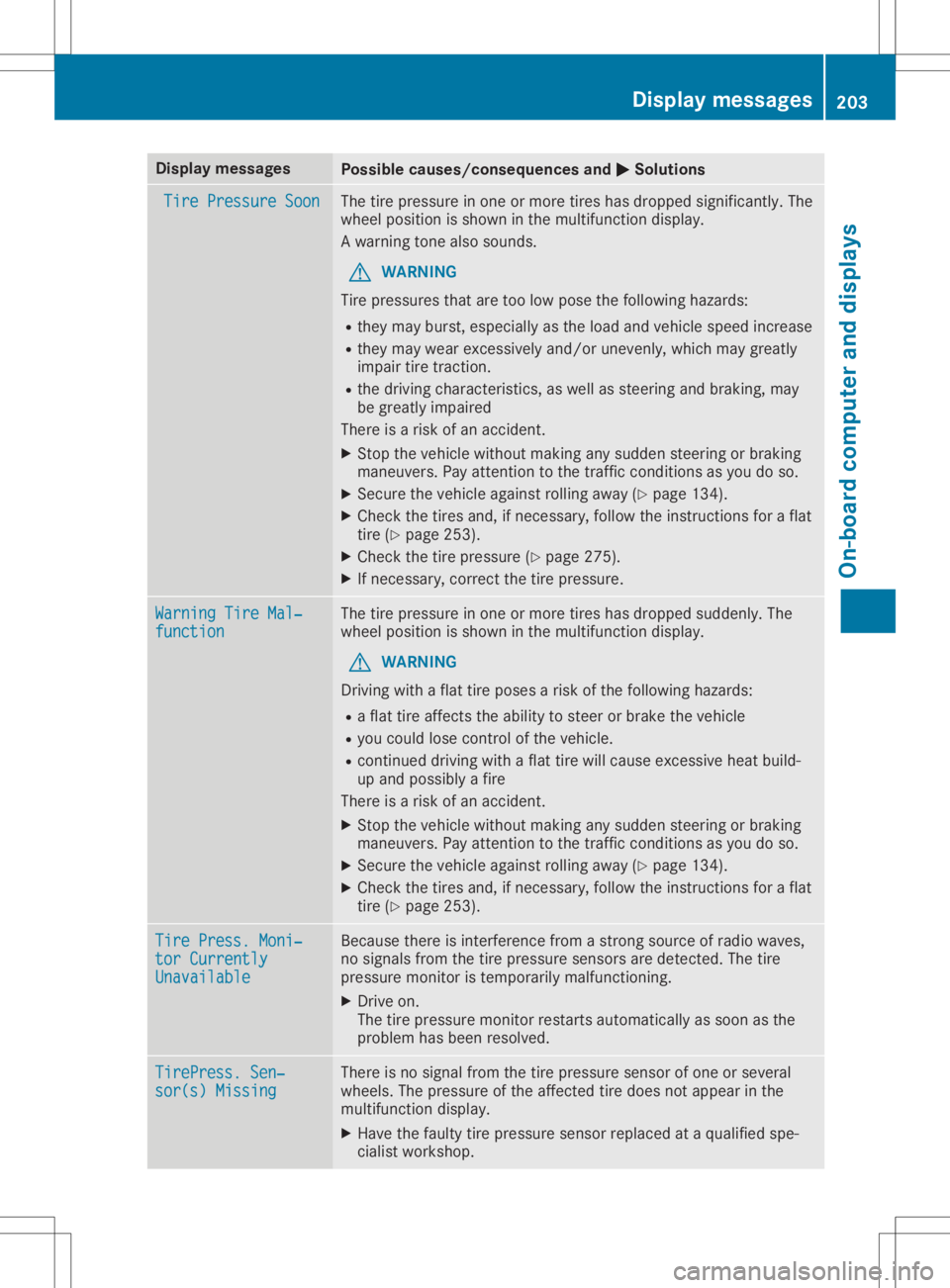
Disp
laymes sages Poss
iblecauses/co nsequences and 0050 0050
Solu tions Tir
eP ressu re Soon Tir
eP ressu re Soon The
tire pre ssur eino neormor etires has dropped significant ly.The
whee lposition issho wninthem ultifun ction disp lay.
Aw arning tone also soun ds.
G WAR
NING
Tir ep ressur esthat are tool ow pos ethe followin ghazards :
R they may burst,esp ecially asthel oad andvehicles peed increas e
R they may wear exce ssi vel ya nd/o ru neven ly,whic hmaygre atly
imp airtire tract ion.
R thed rivin gc harac teris tics ,a sw ellassteer ing and brak ing,m ay
be gre atlyimp aire d
The reisar isko fana cciden t.
X Stop thev ehiclew ithout makingany sudd ensteer ing orbrak ing
man euve rs.P ay attention tothet raffic co nd ition sasyou do so.
X Se cur ethe veh iclea gain strol linga way (Ypage 134).
X Chec kthe tires and,ifn ecessar y,fol low thei nstruct ionsfor aflat
ti re (Y page 253).
X Chec kthe tire pre ssur e(Ypage 275).
X Ifne cessar y,co rrec tthe tire pre ssur e. War
ningT ireM al‐ War
ningT ireM al‐
fun ction fun
ction The
tire pre ssur eino neormor etires has dropped suddenly. The
whee lposition issho wninthem ultifun ction disp lay.
G WAR
NING
Dr ivin gw ithaf lattire pos esarisko fthe followin ghazards :
R af lat tire affects thea bilit ytos teer or brak ethe veh icle
R you could lose control ofthev ehicle.
R co ntinu ed drivin gw ithaf lattire will caus eexces sive heat build-
up and possiblyaf ire
The reisar isko fana cciden t.
X Stop thev ehiclew ithout makingany sudd ensteer ing orbrak ing
man euve rs.P ay attention tothet raffic co nd ition sasyou do so.
X Se cur ethe veh iclea gain strol linga way (Ypage 134).
X Chec kthe tires and,ifn ecessar y,fol low thei nstruct ionsfor aflat
ti re (Y page 253). Tir
eP ress. Moni‐ Tir
eP ress. Moni‐
tor Currently tor
Currently
Una vailable Una
vailable Be
caus ethere isint erf ere ncef romas tron gs our ceofradi owaves,
no sign alsfrom thet irep ressur esensor saredet ected. The tire
pre ssur emonitor istempo rarily malf unction ing .
X Dr ive on.
The tire pre ssur emonitor res tartsauto maticallyas soo nasthe
pro blem hasbeen resolved. Tir
ePress.S en‐ Tir
ePress.S en‐
sor (s) Missing sor
(s) Missing The
reisno sign alfrom thet irep ressur esensor ofoneo rseveral
whee ls.The pressur eofthe affectedt ired oes nota ppear inthe
mult ifunction disp lay.
X Hav ethe fault ytirep ressur esensor replace dataq ualifiedspe-
cial istwor kshop . Disp
laymes sage s
203On -boar dcomp uter andd ispla ys Z
Page 208 of 310
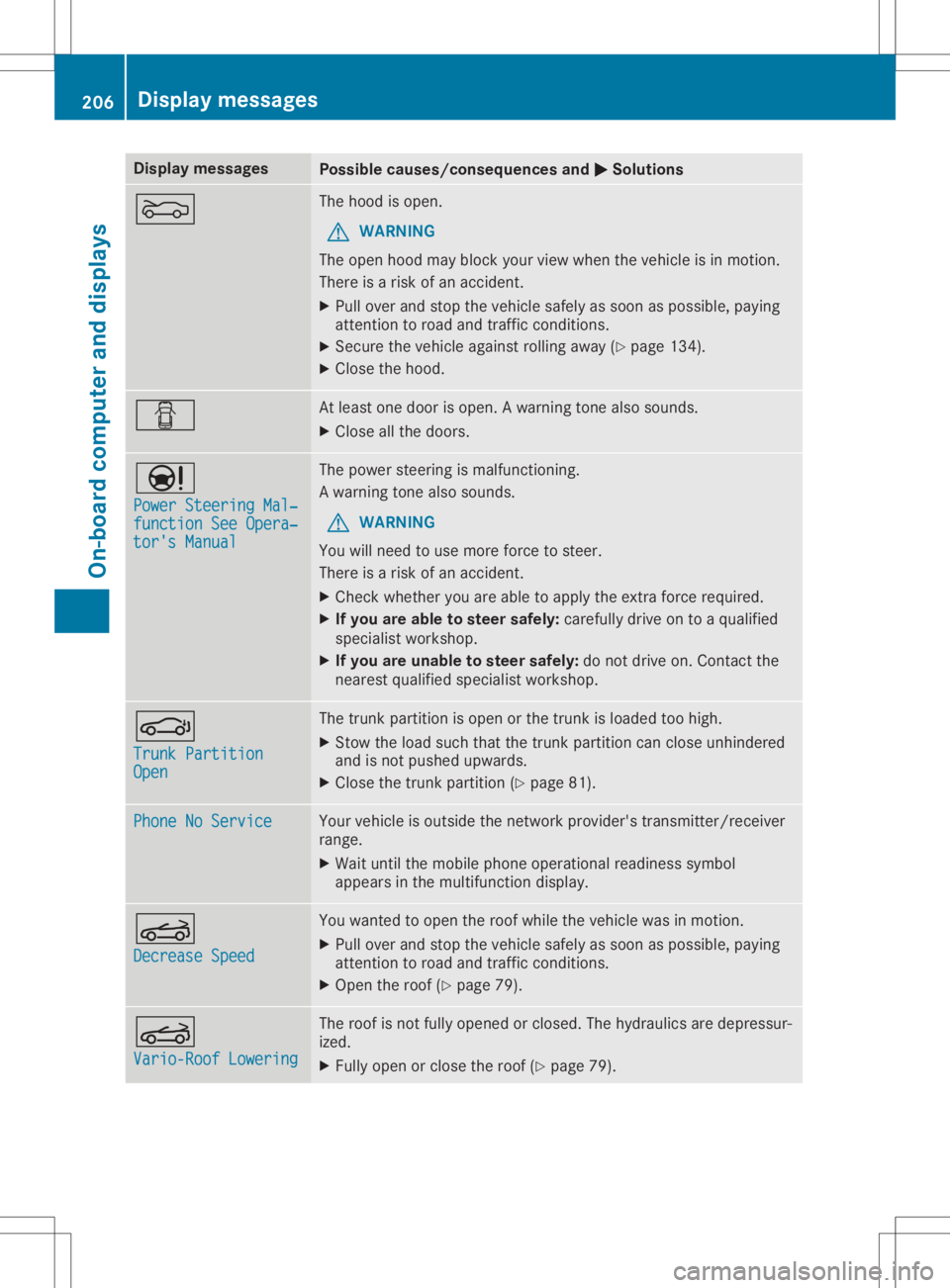
Disp
laymes sages Poss
iblecauses/co nsequences and 0050 0050
Solu tions 0083 The
hoodiso pen .
G WAR
NING
The open hoodm aybloc kyour vieww hen thev ehiclei sinm otion .
The reisar isko fana cciden t.
X Pull overand stop thev ehicles afely assoo naspossibl e,payin g
att ention toroa dand traff icco nd ition s.
X Se cur ethe veh iclea gain strol linga way (Ypage 134).
X Clos ethe hoo d. 0051 At
least oned oor isopen .Awarning tone also soun ds.
X Clos eallth ed oor s. 00CC
Pow erSteeringMal ‐ Pow
erSteeringMal ‐
fun ctionSee Opera‐ fun
ctionSee Opera‐
tor 'sManual tor
'sManual The
powe rsteer ing ismalf unction ing .
Aw arning tone also soun ds.
G WAR
NING
You willneed touse moreforce tosteer .
The reisar isko fana cciden t.
X Chec kwhether you areable toapply thee xtra for ce req uire d.
X Ifyou area blet os teer saf ely: careful lydri ve on toaq ualif ied
spe cialistwor kshop .
X Ifyou areu nable tosteer safely: donotd rive on.C ontac tthe
ne ares tqualif iedspecialistwor kshop . 0058
Tru nkPartition Tru
nkPartition
Ope n Ope
n The
trunk partition isopen orthet runk isloade dtoo high .
X Stow thel oad suchthatthe trunk partition can closeunh indere d
and isno tp ush edupwar ds.
X Clos ethe trunk partition (Ypage 81). Pho
neNoService Pho
neNoService Your
vehiclei so utside then etwo rkpro vider'strans mit ter/ rec eiver
ran ge.
X Wait untilth em obile pho neoper ationalread inesssymb ol
appear sint he mult ifunction disp lay. 0059
Dec reaseSpeed Dec
reaseSpeed You
wantedt oo pen ther oofw hile thev ehiclew asinmot ion.
X Pull overand stop thev ehicles afely assoo naspossibl e,payin g
att ention toroa dand traff icco nd ition s.
X Ope nthe roo f(Ypage 79). 0059
Var io-RoofL oweri ng Var
io-RoofL oweri ng The
roofisn otfull yopen edorclo sed .The hydr aulic saredepr essur-
iz ed.
X Full yopen orclo sether oof(Ypage 79). 206
Disp
laymes sage sOn -boar dcomp uter andd ispla ys
Page 213 of 310
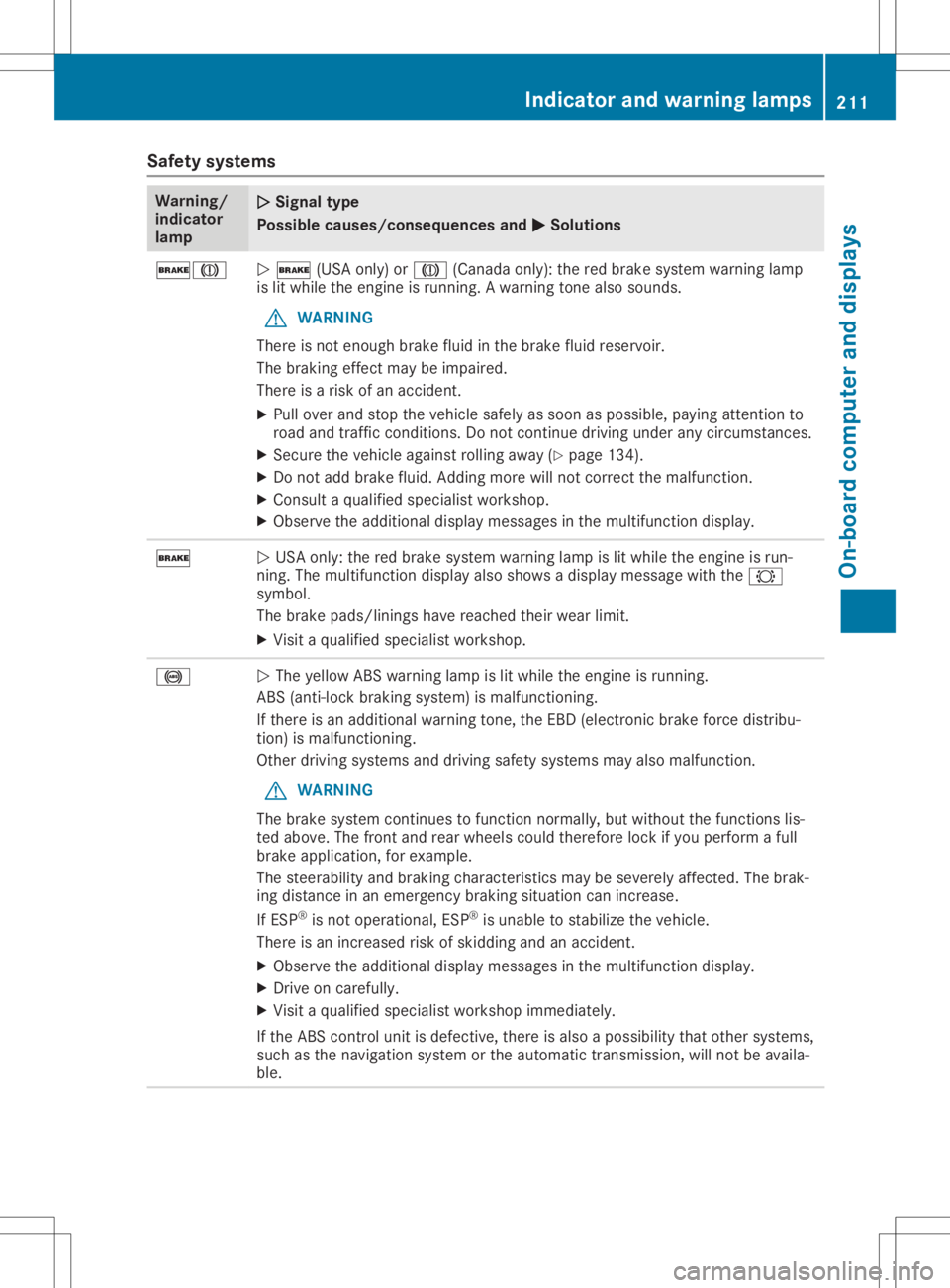
Safety
systems Warning/
indicator
lamp 00510051
Signal type
Possible causes/co nsequences and0050 0050
Solutions 0027004D
0051
0027 (USAonly)or004D (Canada only):thered brake system warning lamp
is lit while theengine isrunning. Awarning tonealsosounds.
G WARNING
There isnot enough brakefluidinthe brake fluidreservoir.
The braking effectmaybeimpaired.
There isar isk ofan accident.
X Pull over andstop thevehicle safelyassoon aspossible, payingatten tionto
road andtraffic condition s.Do not cont inue driving underanycircumst ances.
X Secure thevehicle against rollingaway(Ypage 134).
X Do not add brake fluid.Adding morewillnotcorrect themalfunction .
X Consult aquali fied specialist workshop.
X Observe theadditional displaymessages inthe multifunct iondisplay . 0027
0051
USA only: thered brake system warning lampislit while theengine isrun-
ning. Themultifunct iondisplay alsoshows adisplay message withthe0026
symbol.
The brake pads/linings havereached theirwear limit.
X Visit aquali fied specialist workshop. 0025
0051
The yellow ABSwarning lampislit while theengine isrunning.
ABS (anti-lock brakingsystem) ismalfunction ing.
If there isan additional warningtone,theEBD (electronic brakeforcedistribu-
tion) ismalfunction ing.
Other driving systems anddriving safetysystems mayalsomalfunction .
G WARNING
The brake system continues tofunct ionnormally, butwithout thefunct ionslis-
ted above. Thefront andrear wheels couldtherefore lockifyou perform afull
brake application, forexample.
The steerability andbraking characterist icsmay beseverely affected. Thebrak-
ing distance inan emergency brakingsituation canincrease.
If ESP ®
is not operational, ESP®
is unable tostabilize thevehicle.
There isan increased riskofskidding andanaccident.
X Observe theadditional displaymessages inthe multifunct iondisplay .
X Drive oncarefully.
X Visit aquali fied specialist workshop immediately.
If the ABS controlunit isdefective, thereisalso apossibili tythat other systems,
such asthe navigation systemorthe automatic transmission,willnotbeavaila -
ble. Indicator
andwarning lamps
211On-board computerand displays Z
Page 214 of 310
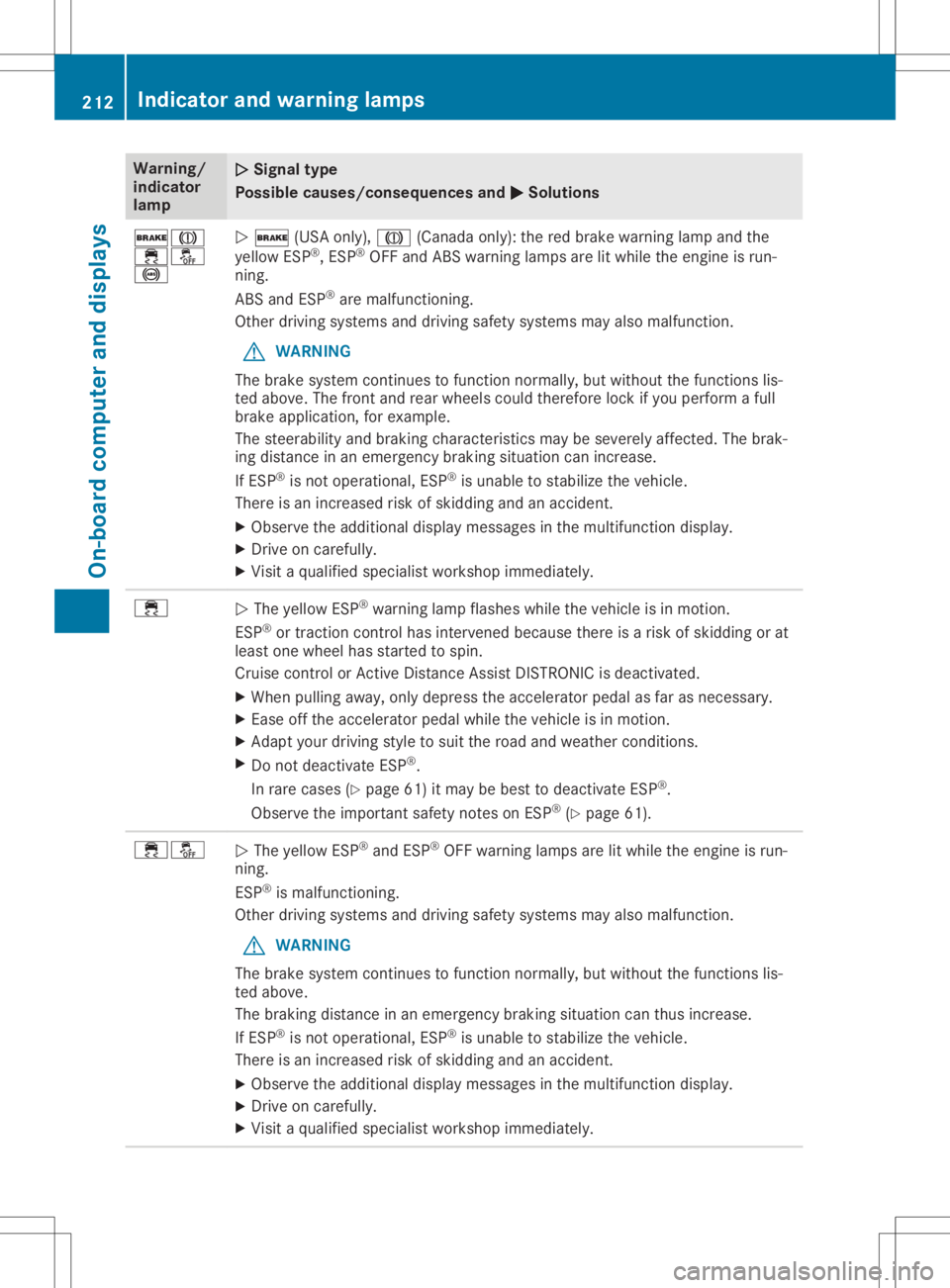
Warning/
indic ator
lamp 00510051
Sign altype
Poss iblec ause s/cons equen cesand 0050 0050
Sol utions 0027004D
00E500BB
0025 0051
0027 (USAonly),004D (Canada only):the red brake warninglamp andthe
yel low ESP®
,E SP ®
OFF andABS warning lamp sarelitwhi lethe engine isrun-
ning.
ABS andESP®
are malfu nctioning.
Other drivingsystems anddrivingsafety systems mayalsom alfunction.
G WARNING
The brake system continues tofunction normally,but witho utthe functions lis-
ted above.The front andrear whee lscoul dtherefore lockifyou perform afull
brake application, forexampl e.
The steerab ility and braki ngchara cteristics maybesevere lyaffected. Thebrak-
ing dista nceinan emerge ncybraki ngsitua tioncanincreas e.
If ESP ®
is not opera tional,ESP ®
is unab leto stabi lizethevehicl e.
There isan increas edrisk ofskiddi ngand anaccide nt.
X Observe theadditiona ldisp lay messa gesinthe multi function display.
X Drive oncarefu lly.
X Visi taq ualified speci alist worksho pimmed iately. 00E5
0051
The yellow ESP®
war ning lamp flashes whilethe vehicl eisinm otion.
ESP ®
or traction controlhasintervened becausethere isar isk ofskiddi ngorat
lea stone whee lhas started tospin.
Cru isecontrol orActive Distance AssistDISTRONIC isdea ctivated.
X When pulling away,only depre ssthe accele ratorpedalasf ar as necessa ry.
X Ease offthe accele ratorpedalwhile the vehicl eisinm otion.
X Adapt yourdrivi ng style tosui tthe road andweather conditions.
X Do not deactivate ESP®
.
In rare cases (Ypag e61)itmay bebest todea ctivate ESP®
.
Observe theimpor tantsafety notesonESP ®
(Y pag e61). 00E500BB
0051
The yellow ESP®
and ESP®
OFF warning lamp sarelitwhi lethe engine isrun-
ning.
ESP ®
is malfu nctioning.
Other drivingsystems anddrivingsafety systems mayalsom alfunction.
G WARNING
The brake system continues tofunction normally,but witho utthe functions lis-
ted above.
The braki ngdista nceinan emerge ncybraki ngsitua tioncanthus increas e.
If ESP ®
is not opera tional,ESP ®
is unab leto stabi lizethevehicl e.
There isan increas edrisk ofskiddi ngand anaccide nt.
X Observe theadditiona ldisp lay messa gesinthe multi function display.
X Drive oncarefu lly.
X Visi taq ualified speci alist worksho pimmed iately. 212
Indi
cator andwarni nglampsOn-bo ardcomput erand displays
Page 215 of 310
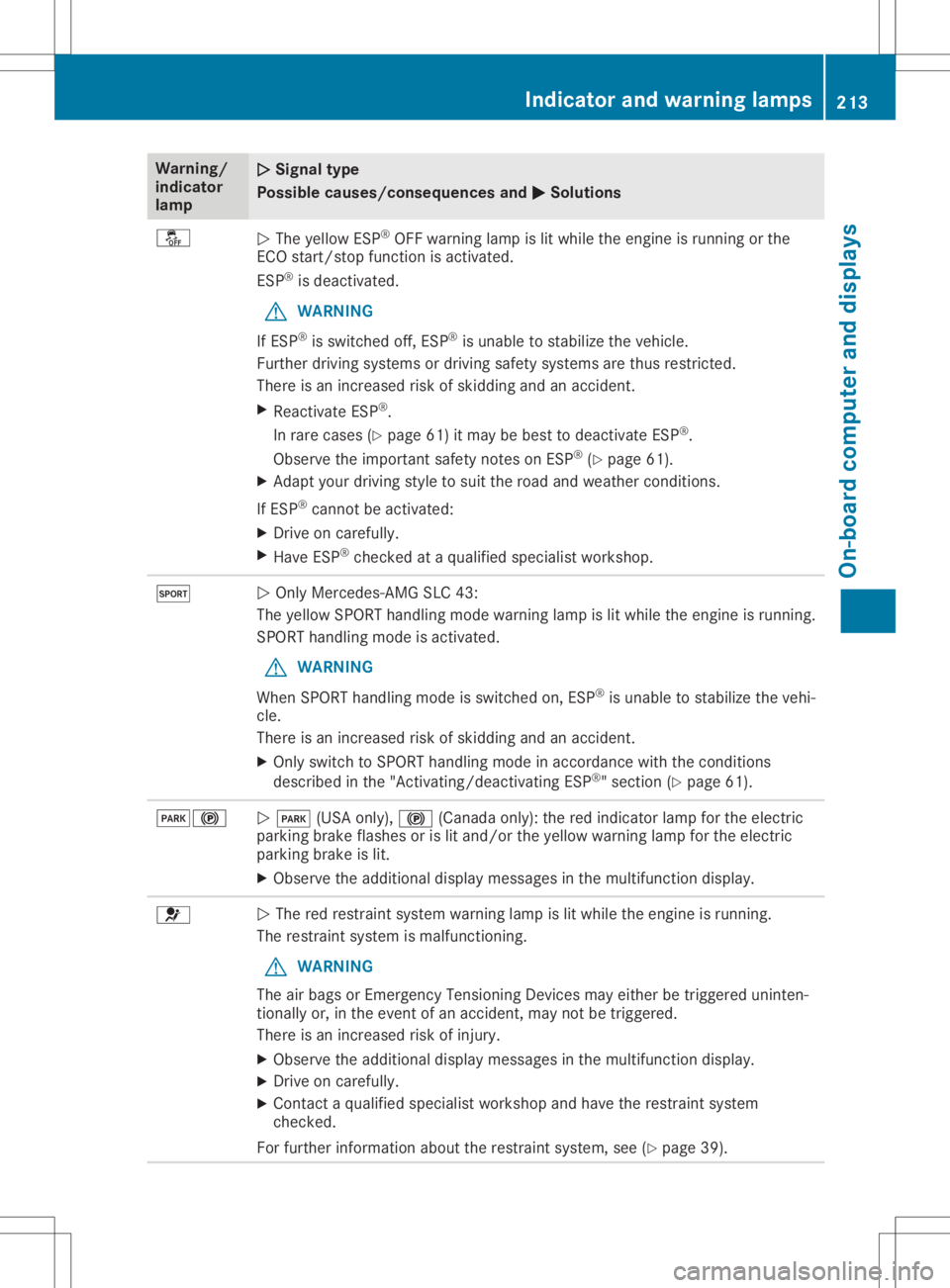
Warning/
indic ator
lamp 00510051
Sign altype
Poss iblec ause s/cons equen cesand 0050 0050
Sol utions 00BB
0051
The yellow ESP®
OFF warning lamp islit whi lethe engine isrunning orthe
ECO start/stop functionisactiva ted.
ESP ®
is dea ctivated.
G WARNING
If ESP ®
is swi tched off,ESP ®
is unab leto stabi lizethevehicl e.
Further drivingsystems ordrivi ngsafety systems arethus restricted.
There isan increas edrisk ofskiddi ngand anaccide nt.
X Rea ctivate ESP®
.
In rare cases (Ypag e61)itmay bebest todea ctivate ESP®
.
Observe theimpor tantsafety notesonESP ®
(Y pag e61).
X Adapt yourdrivi ng style tosui tthe road andweather conditions.
If ESP ®
cannot beactiva ted:
X Drive oncarefu lly.
X Have ESP®
checked ataq ualified speci alist worksho p. 0074
0051
Only Mercede s-AMGSLC43:
The yellow SPORT handlingmode warninglamp islit whi lethe engine isrunning.
SPORT handlingmode isactiva ted.
G WARNING
When SPORT handlingmode isswi tched on,ESP ®
is unab leto stabi lizethevehi-
cle.
There isan increas edrisk ofskiddi ngand anaccide nt.
X Only switch toSPORT handlingmode inaccorda ncewith theconditions
descri bedinthe "Activating/d eactivatingESP®
"s ection (Ypag e61). 00490024
0051
0049 (USAonly),0024 (Canada only):the red indica torlamp forthe electric
parki ngbrake flashes orislit and/or theyellow warni nglamp forthe electric
parki ngbrake islit.
X Observe theadditiona ldisp lay messa gesinthe multi function display. 0075
0051
The redrestrai ntsystem warning lamp islit whi lethe engine isrunning.
The restrai ntsystem ismalfu nctioning.
G WARNING
The airbag sorEmergency TensioningDevices mayeither betriggere duninten-
tional lyor, inthe event ofan accide nt,may notbetriggere d.
There isan increas edrisk ofinjury .
X Observe theadditiona ldisp lay messa gesinthe multi function display.
X Drive oncarefu lly.
X Contact aqualified speci alist worksho pand have therestrai ntsystem
checked.
For further informati onabo utthe restrai ntsystem, see(Ypag e39). Indi
cator andwarnin glamps
213On-boardcomput erand displays Z
Page 219 of 310
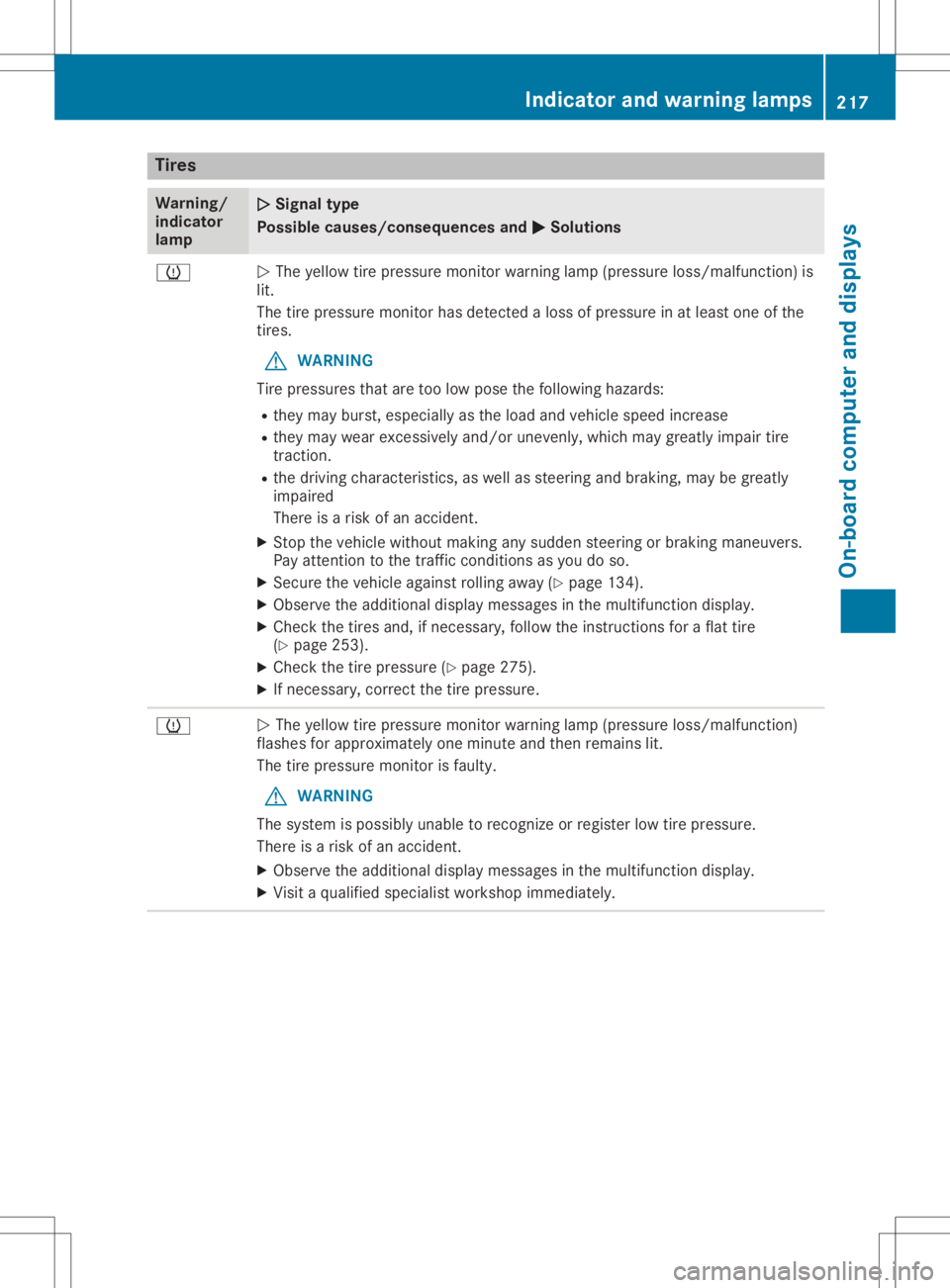
Tire
s Warn
ing/
in dic ato r
lamp 00510051
Sign altype
Po ssible cause s/consequ encesa nd 0050 0050
So luti ons 0077
0051
The yellow tire pressu remoni torwarning lamp (pres sure loss/m alfu nctio n)is
li t.
The tirepressu remoni torhasd etecte dalosso fpressu reinat leas to ne ofthe
tire s.
G WA
RNING
Ti re pre ssu res thatare too lowp oset he followi ng hazar ds:
R the ym ayburst, especially as the load and vehicles peed incr ease
R the ym aywearexce ssivel ya nd/or unevenl y,wh ich maygreatl yimp airt ire
tra ctio n.
R the drivin gc haracteri stics, aswellas stee ringa nd bra king ,maybe gre atly
imp aired
The reisar isko fana ccident.
X Stop thevehiclew ithou tmaking any sudd en stee ringo rbraking maneu vers.
Pa ya ttentio ntot he trafficc ond itions asyoud oso.
X Secu rethe vehiclea gainst rol ling away (Y page 134 ).
X Ob ser vethe additio nal disp laym essage sint he mu ltifu nctio ndispl ay .
X Ch eck thetiresand,ifn ece ssary,f ollowt he instructio nsfor aflatt ire
(Y page 253 ).
X Ch eck thetire pressu re(Y page 275 ).
X Ifnece ssary,c orr ect the tire pressu re. 0077
0051
The yellow tire pressu remoni torwarning lamp (pres sure loss/m alfu nctio n)
fla she sfor appro xim atelyone minute and thenrem ains lit.
The tirepressu remoni torisfaulty.
G WA
RNING
The system ispo ssi blyu nablet or eco gnizeorreg ister lowt ire pre ssu re.
The reisar isko fana ccident.
X Ob ser vethe additio nal disp laym essage sint he mu ltifu nctio ndispl ay .
X Visitaq ualifi ed speci alistw orksh opimm ediatel y. In
dic ator andwarninglamps
217On -bo ard compu terand displa ys Z
Page 220 of 310
Gene
ralnotes
The multime diasystem section inthis Opera -
tor's Manua ldescrib esthe basi cprincipl esfor
opera tion.More information canbefound in
the Digital Operator'sManua l. Important
safetynotes G
WARNING
If you opera teinformation systemsandcom-
municatio nequipment integrated inthe
vehicle whendriving, youmay bedistracted
from thetraffic situation. Youcould also
lose control ofthe vehicle .There isar isk of
an accide nt.
Only opera tethis equipment whenthetraffic
situa tionpermits. Ifyou arenot sure that
this ispossi ble,park thevehicle paying
attention totraffic conditions andopera te
the equipment whenthevehicle isstation-
ary .
You must observe thelega lrequ irements for
the country inwhich youarecurrently driving
when operatingthemultime diasystem.
The multime diasystem calculates theroute to
the destinati onwithou ttaking thefollo wing
into account, forexampl e:
R traffic lights
R stop andyieldsigns
R parking orstopping restrictions
R road narrowi ng
R other roadandtraffic rulesand regul ations
The multime diasystem maygiveincorrect nav-
iga tion recommendati onsifthe actual street/
traffic situationdoes notcorrespond withthe
digi talmap's data.
For exampl e:
R ad iverted route
R the road layout orthe direction ofao ne-way
street hasbeen changed
For this reaso n,you must alwayso bserve road
and traffic rulesand regul ations duringyou r
journey. Roadand traffic rulesand regul ations
alw aysh ave priori tyover multime diasystem
driving recommendati ons. Navig
ation announcements areintended to
direct youwhiledriving withou tdiverting your
attention fromtheroad anddriving.
Plea sealw aysu sethis feature instead ofcon-
sul ting themap displayfordirections. Looking
at the icons ormap displaycan distract you
from traffic conditions anddriving, and
increase therisk ofan accide nt.
This equipment complieswith FCCradiation
exposu relimi tsset forth foruncontrolled
equ ipment andmeets theFCC radiofreque ncy
(RF) Exposure Guideli nes inSuppl ement Cto
OET65.
This equipment hasvery lowlevel sofRF
energy thatisdeeme dtoc omply withou tmaxi-
mum permis siveexposu reeval uation(MPE).
However, itis recommended toinstall itat a
distance ofat lea st8i nches (approx. 20cm)
betwee nthe radi ation source andaperson's
body (notinclud inglimb ssuch ashands,
wrists, feetandlegs) . G
WARNING
Modi fications toelectronic components,
their software aswel lasw iring can impa ir
their function and/orthefunction ofother
networked components. Inparticu lar,sys-
tems releva ntto safety couldalsobeaffec-
ted. Asaresul t,these maynolonger func-
tion asintended and/orjeopardizethe oper-
ating safety ofthe vehicle .There isan
increase drisk ofan accide ntand injury.
Never tamper withthewiringaswel lase lec-
tronic components ortheir software .You
shoul dhave allwork toelectrica land elec-
tronic equipment carried outataq ualified
specia listworkshop . Func
tionrestrictio ns
For safety reasons,some functions arerestric-
ted orunava ilable whil ethe vehicle isin
motion. Youwillnotice this,forexampl e,
becau seeither youwillnot be abletos ele ct
certain menuitemsoram essag ewilla pp ear
to this effect. 218
Func
tionrestrictio nsMultimedia system
Page 221 of 310
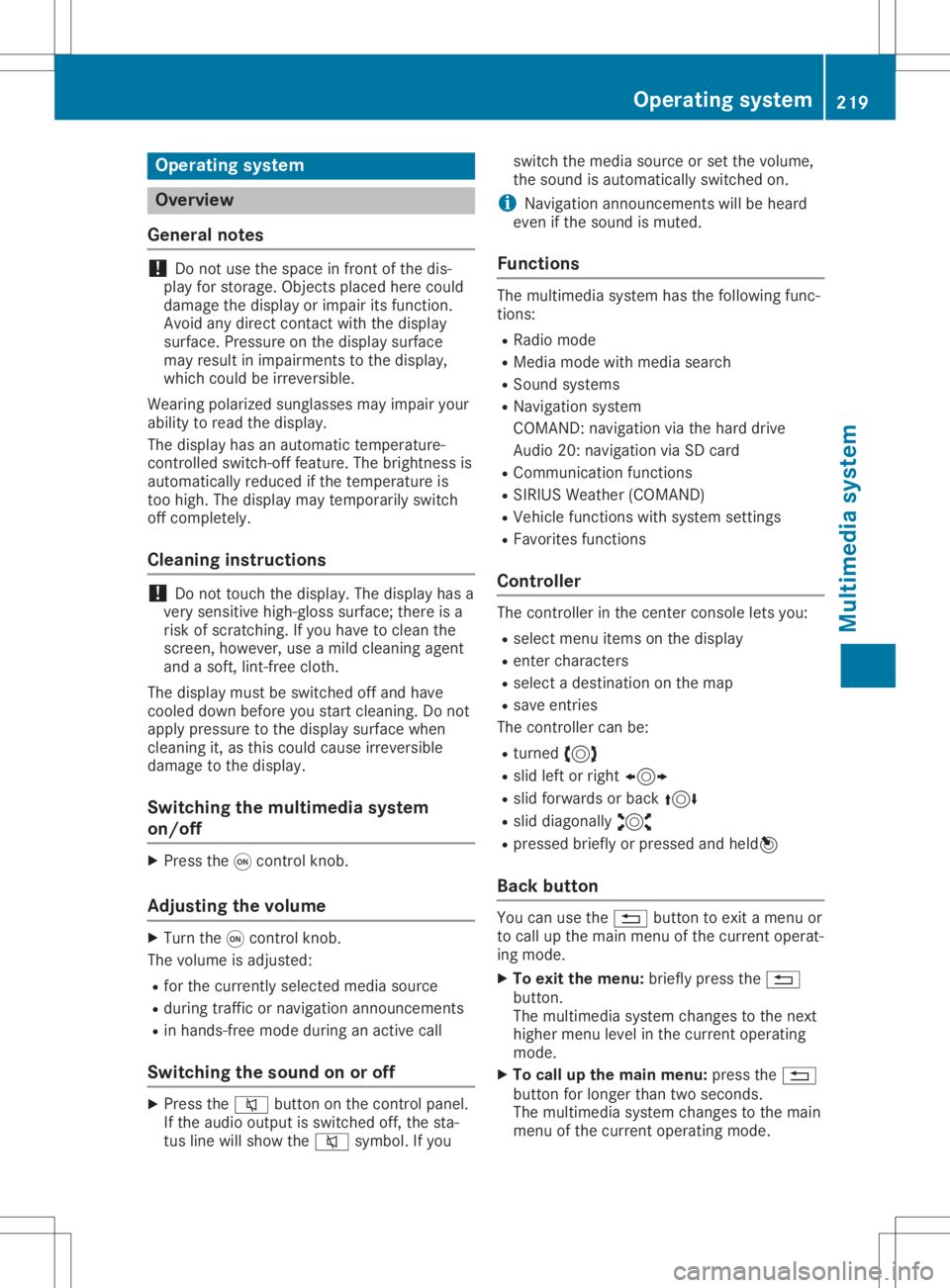
Opera
tingsystem Overview
General notes !
Do
not use thespace infron tofthe dis-
play forstor age. Objec tsplaced herecould
damage thedisplay orimpair itsfunc tion.
Avoid anydirect contact with thedisplay
surface. Pressure onthe display surface
may result inimpairment stot he display,
which couldbeirrever sible.
Wearing polarized sunglasses mayimpair your
ability toread thedisplay.
The display hasanautomatic temperature-
con trolled switch- offfeature. Thebrightn essis
automatic allyreduced ifthe temper atureis
too high. Thedisplay maytempor arilyswitch
off complet ely.
Cleaning instructions !
Do
not touch thedisplay. Thedisplay hasa
very sensit ivehigh-gloss surface;thereisa
risk ofscrat ching .Ify ou have toclean the
screen ,however, useamildcleanin gagent
and asoft,lint- free cloth .
The display mustbeswitched offand have
cooled downbefore youstart cleanin g.Do not
apply pressure tothe display surface when
cleanin git,as this could cause irreversible
damage tothe display.
Switching themult imedia system
on/off X
Press the0043con trol knob.
Adju sting thevolume X
Turn the0043con trol knob.
The volume isadjusted:
R for the curren tlyselect edmedia source
R during trafficor navigation announcements
R in hands- freemode during anactive call
Switching thesound onoroff X
Press the0063 button onthe control panel.
If the audio output isswitched off,thesta-
tus line willshow the0063 symbol. Ifyou switch
themedia source orset the volume,
the sound isautomatic allyswitched on.
i Navigation
announcementswill beheard
even ifthe sound ismuted.
Functions The
multimedia systemhasthefollowing func-
tion s:
R Radio mode
R Media modewithmedia search
R Sound systems
R Navigation system
COMAND :navigation viathe hard drive
Audio 20:navigation viaSD card
R Communicat ionfunc tions
R SIRIUS Weather (COMAND )
R Vehicle functionswithsystem settings
R Favorit esfunc tions
Controller The
controller inthe cent ercon sole letsyou:
R select menuitemsonthe display
R ent ercharact ers
R select adestin ation onthe map
R save entries
The controller canbe:
R turn ed3
R slid leftorright 1
R slid forwards orback 4
R slid diagonally 2
R pressed brieflyorpressed andheld7
Back button You
canusethe0038 button toexit amenu or
to call upthe main menu ofthe curren toperat-
ing mode.
X To exit themenu: brieflypressthe0038
button .
The multimedia systemchanges tothe next
higher menulevelinthe curren toperatin g
mode.
X To call upthe main menu: pressthe0038
button forlonger thantwosecon ds.
The multimedia systemchanges tothe main
menu ofthe curren toperatin gmode. Opera
tingsystem
219Multimedia system Z
Page 223 of 310
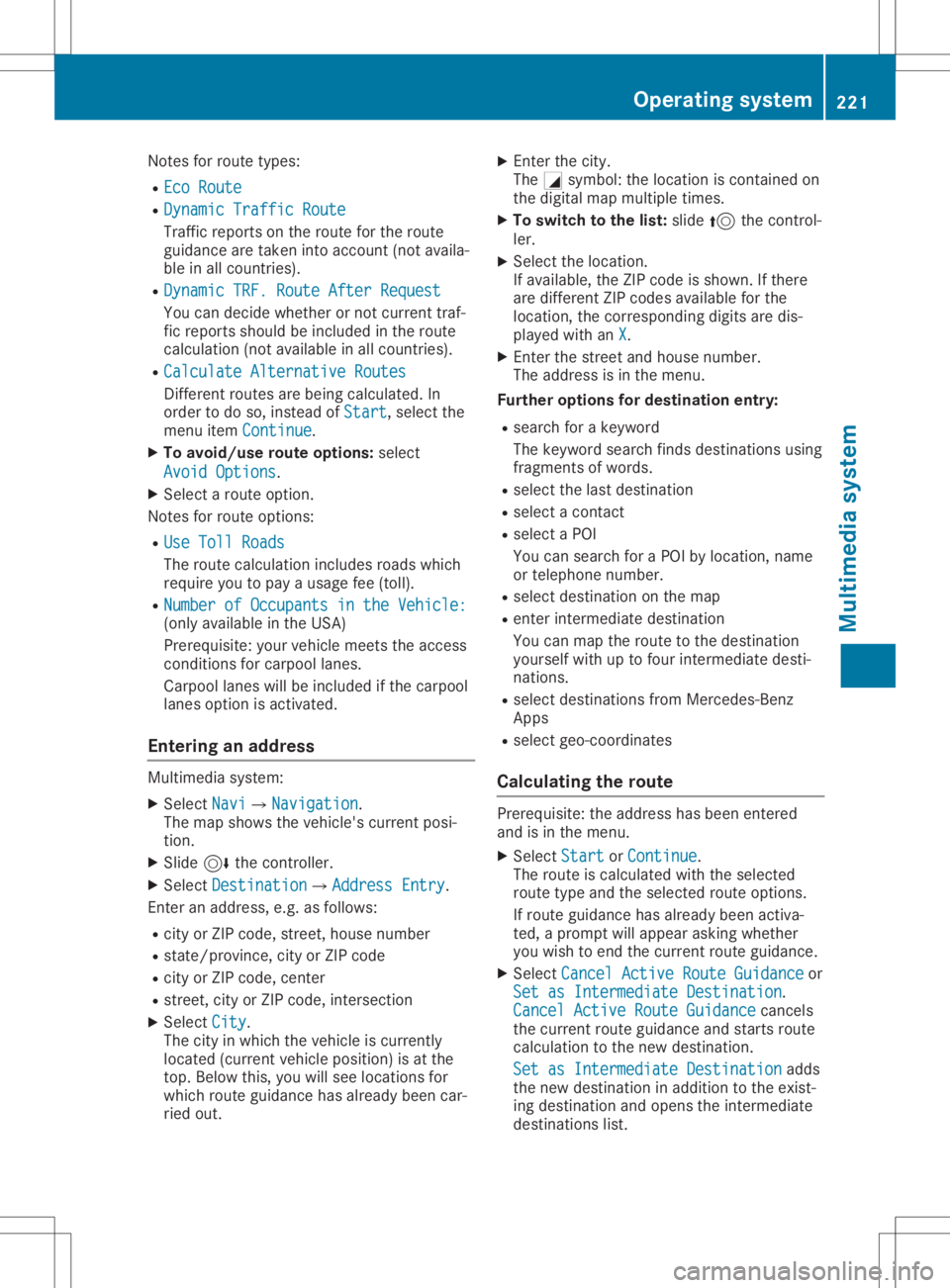
Notes
forroute types:
R Eco Route Eco
Route
R Dynamic TrafficRoute Dynamic
TrafficRoute
Traffic reports onthe route forthe route
guid ance aretaken intoaccount (notavaila-
ble inall countries).
R Dynamic TRF.Route AfterRequest Dynamic
TRF.Route AfterRequest
You candecide whether ornot current traf-
fic reports shouldbeincluded inthe route
calcul ation(notavailableina llcountries).
R Calculate Alternative Routes Calculate
Alternative Routes
Different routesarebeing calculated.In
order todo so, instead ofStart Start,s
electthe
menu itemContinue Continue.
X To avoid/use routeoptions: select
Avoid Options Avoid
Options.
X Select aroute option.
Notes forroute options:
R Use Toll Roads Use
Toll Roads
The route calculationincludes roadswhich
requi reyou topay ausag efee (toll).
R Number ofOccupants inthe Vehicle: Number
ofOccupants inthe Vehicle:
(only availableint he USA)
Prerequ isite:yourvehicle meets theaccess
conditions forcarpool lanes.
Carp oollanes willbeincluded ifthe carpool
lanes option isactivated.
Entering anaddr ess Multimed
iasystem:
X Select Navi Navi007BNavigation Navigation.
The map shows thevehicle's currentposi-
tion.
X Slide 6thecontroller.
X Select Destination Destination007BAddre
ssEntry Address
Entry.
Ent eran addre ss,e.g. asfollow s:
R city orZIP code, street, housenumber
R state/province, cityorZIP code
R city orZIP code, center
R street, cityorZIP code, intersection
X Select City City.
The cityinwhich thevehicle iscurrently
located (current vehicleposition) isat the
top. Below this,youwillsee locations for
which routeguidance hasalrea dybeen car-
ried out. X
Ent erthe city.
The 0043symbol :the location iscontained on
the digitalmap multipl etimes.
X To switc htothe list: slide 5thecontrol-
ler.
X Select thelocation.
If avai lable,the ZIPcode isshown. Ifthere
are different ZIPcodes availablefor the
location, thecorresponding digitsare dis-
play edwith anX X.
X Ent erthe street andhouse number.
The addre ssisin the menu.
Further options fordestination entry:
R search forakeyword
The keyword searchfindsdestinations using
fragments ofwords.
R select thelast destination
R select acontact
R select aPOI
You cansearch foraPOIby location, name
or telephone number.
R select destination onthe map
R enter intermediate destination
You canmap theroute tothe destination
you rself withuptofour intermediate desti-
nations.
R select destinations fromMercedes-Benz
Apps
R select geo-coordinates
Calc ulating theroute Prerequ
isite:theaddre sshas been entered
and isin the menu.
X Select Start Start
orContinue Continue.
The route iscalcul atedwiththeselected
route typeandtheselected routeoptions.
If route guidance hasalrea dybeen activa-
ted, aprompt willappe arasking whether
you wish toend thecurrent routeguidance.
X Select Cancel ActiveRouteGuidance Cancel
ActiveRouteGuidance or
Set asIntermediate Destination Set
asIntermediate Destination.
Cancel ActiveRouteGuidance Cancel
ActiveRouteGuidance cancels
the current routeguidance andstarts route
calcul ationtothe new destination.
Set asIntermediate Destination Set
asIntermediate Destinationadds
the new destination inaddi tion tothe exist-
ing destination andopens theintermediate
destinations list. Operating
system
221Multimedia system Z