check engine light MERCEDES-BENZ SLC-Class 2017 R172 User Guide
[x] Cancel search | Manufacturer: MERCEDES-BENZ, Model Year: 2017, Model line: SLC-Class, Model: MERCEDES-BENZ SLC-Class 2017 R172Pages: 294, PDF Size: 7.28 MB
Page 88 of 294
XPress button:repeatedly until the desired
heating level is set.
XTo switch off: press button:repeatedly
until all the indicator lamps go out.
iThe blower continues runnin gfor seven sec-
onds to cool down the heating elements.
iIf the battery voltage is too low, AIRSCARF
may switch off.
Problems with AIRSCARF
AIRSCARF has switched off prematurely or will
not switch on. The vehicle's electrical system
voltage is too low because too many electrical
consumers are switched on.
XSwitc hoff electrical consumers that you do
not need, such as the rear window defroster
or interior lighting.
XSwitc honA IRSCARF again.
Steering wheel
Important safety notes
GWARNING
You could lose control of your vehicle if you do the following while driving:
Radjust the driver's seat, head restraint,
steerin gwheel or mirrors
Rfasten the seat belt
There is arisk of an accident.
Adjust the driver's seat, head restraint, steer-
ing wheel and mirror and fasten your seat belt before starting the engine.
GWARNING
Children could injure themselves if they
adjust the steerin gwheel. There is arisk of
injury.
When leaving the vehicle, alwayst ake the
SmartKey with you and lock the vehicle. Never
leave children unsupervised in the vehicle.
The electrically adjustable steerin gwheel can
still be adjusted when there is no SmartKey in
the ignition lock.
Adjusting the steering wheel man-
ually
GWARNING
If the steerin gwheel is unlocked while the
vehicle is in motion ,itcould change position
unexpectedly. This could cause you to lose
control of the vehicle. There is arisk of an
accident.
Before starting off, make sure the steering
wheel is locked. Never unlock the steering
wheel while the vehicle is in motion.
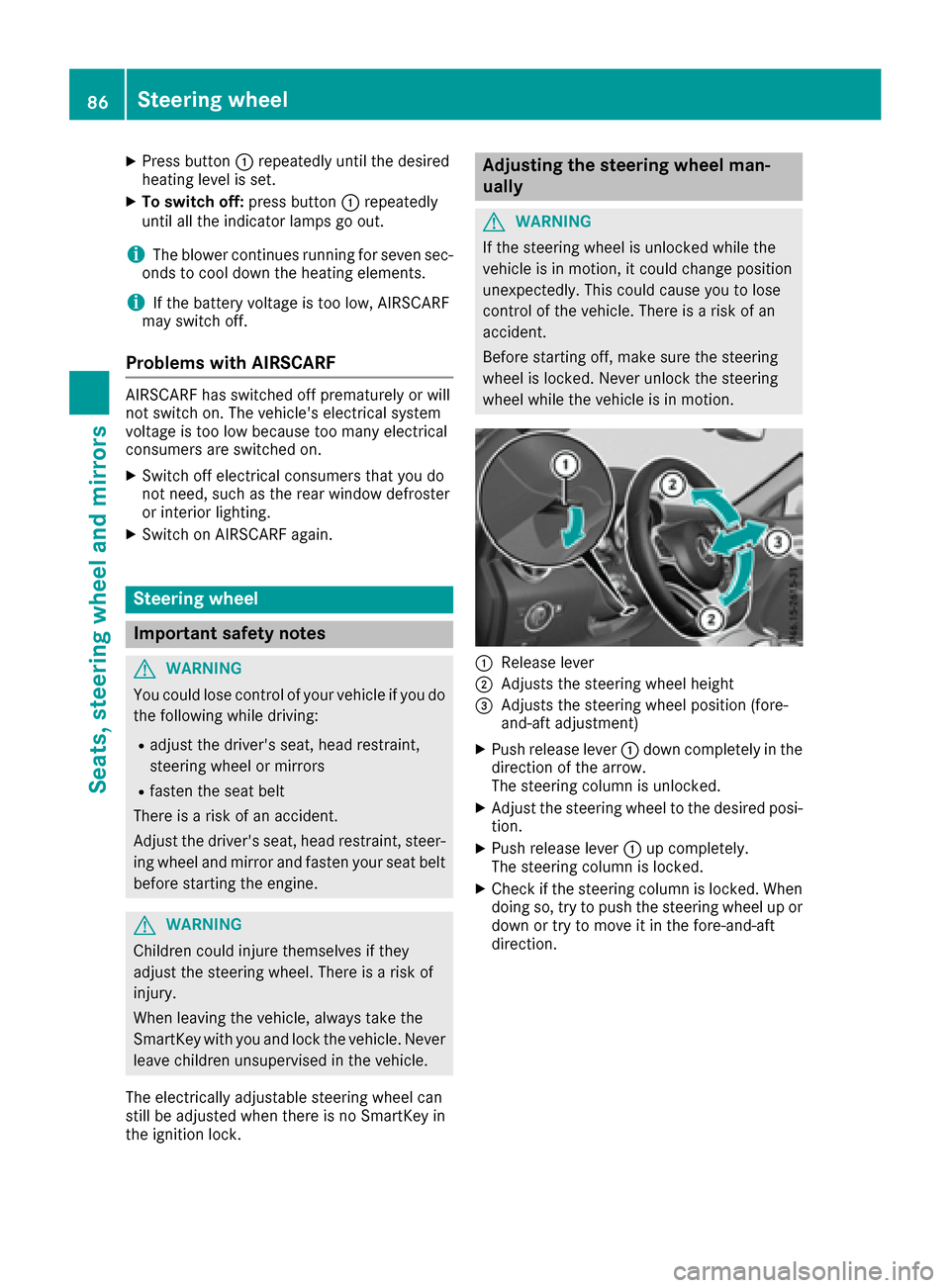
:Release lever
;Adjust sthe steerin gwheel height
=Adjust sthe steerin gwheel position (fore-
and-aft adjustment)
XPush release lever :down completely in the
direction of the arrow.
The steerin gcolumn is unlocked.
XAdjust the steerin gwheel to the desired posi-
tion.
XPush release lever :up completely.
The steerin gcolumn is locked.
XCheck if the steerin gcolumn is locked. When
doing so, try to push the steerin gwheel up or
down or try to move it in the fore-and-aft
direction.
86Steering wheel
Seats, steering wheel and mirrors
Page 103 of 294
Problems with the windshield wipers
ProblemPossible causes/consequences andMSolutions
The windshield wipers
are jammed.Leaves or snow, for example, may be obstructing the windshield wiper
movement.The wiper motor has been deactivated.
XFor safety reasons, you should remove the SmartKey from the igni-
tion lock.
or
XSwitch off the engine using the Start/Stop button and open the
driver's door.
XRemove the cause of the obstruction.
XSwitch the windshield wipers back on.
The windshield wipers
fail completely.The windshield wiper drive is malfunctioning.
XSelect another wiper speed on the combination switch.
XHave the windshield wipers checked at aqualified specialist work-
shop.
The windshield washer
fluid from the spray noz-
zles no longer hits the
center of the windshield.The spray nozzles are misaligned.
XHave the spray nozzles adjusted at aqualified specialist workshop.
Windshield wipers101
Lights and windshieldw ipers
Z
Page 118 of 294
As soonasthe ignition is switched on, al lthe
indicator lamps in the instrument cluster light
up .Further informatio nonsituations where an
indicator lamp either fails to go outa fterstarting
the engine or lights up whil edriving
(
Ypage 204).
If Start/Stop button :hasn ot yetbeen
pressed, thisc orrespondstot he key being
remove dfrom the ignition.
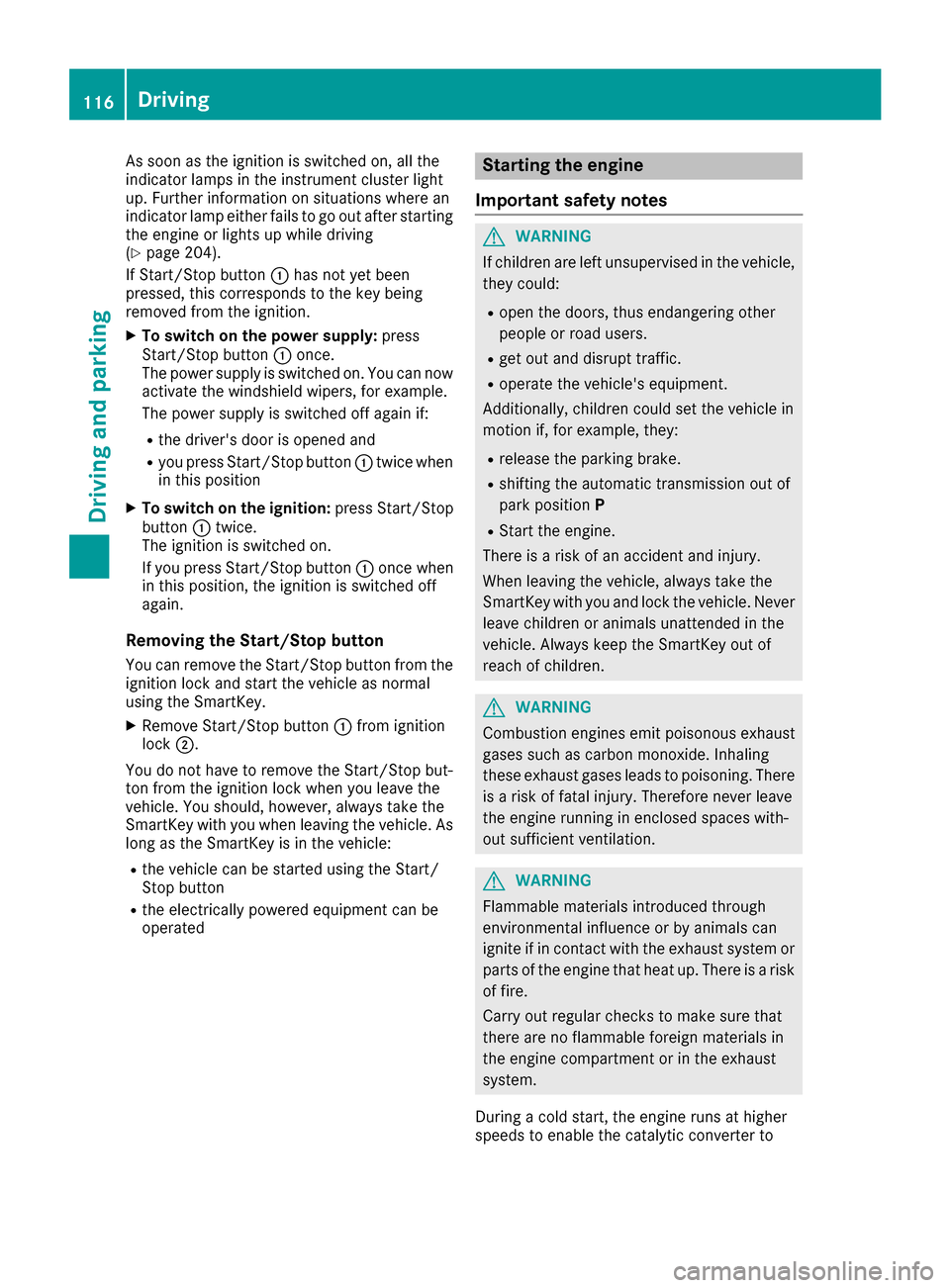
XTo switc honthe power supply: press
Start/Stop button :once.
The powe rsuppl yiss witched on. Yo ucan now
activate the windshield wipers, for example.
The powe rsuppl yiss witched off agai nif:
Rthe driver's door is opene dand
Ryoup ress Start/Stop button :twice when
in thisp osition
XTo switc honthe ignition: press Start/Stop
button :twice.
The ignition is switched on.
If yo upress Start/Stop button :once when
in thisp osition, the ignition is switched off
again.
Removing the Start/Stopb utton
Youc an remove the Start/Stop button from the
ignition lock and start the vehicl easnormal
using the SmartKey.
XRemove Start/Stop button :from ignition
lock ;.
Yo udon ot have to remove the Start/Stop but-
ton from the ignition lock when yo uleave the
vehicle. Yo ushould, however, always take the
SmartKeyw ithy ou when leaving the vehicle. As
long as the Sma rtKey
isint
he vehicle:
Rthe vehiclecan be started using the Start/
Stop button
Rthe electrically powered equipment can be
operated
Starting the engine
Important safety notes
GWARNING
If children ar eleftu nsupervised in the vehicle,
they could:
Ropen the doors ,thuse ndangering other
people or roa dusers.
Rgeto utand disrupt traffic.
Roperate the vehicle's equipment.
Additionally, children could set the vehicl ein
motion if, for example, they:
Rrelease the parking brake.
Rshifting the automatic transmission outo f
park position P
RStartthe engine.
There is ariskofana ccident and injury.
Whe nleavi ng the vehicle, always take the
SmartKeyw ithy ou and lock the vehicle. Never
leav echildren or animals unattended in the
vehicle. Alway skeept he SmartKeyo utof
reach of children.
GWARNING
Combustion engine semitp oiso nousexhaust
gases such as carbo nmonoxide. Inhaling
thes eexhaus tgases lead stopoisoning. There
is ar iskoff atalinjury.T herefore neve rleave
the engine running in enclose dspaces with-
outs ufficient ventilation.
GWARNING
Flammabl ematerial sintroduced through
environmentali nfluence or by animals can
ignite if in contact with the exhaus tsystem or
parts of the engine thath eatu p.There is arisk
of fire.
Carry outr egular checks to make sure that
ther eareno flammabl eforeig nmaterial sin
the engine compartment or in the exhaust
system.
During acolds tart, the engine runs at higher
speed stoenablethe catalytic converter to
116Driving
Driving an dparking
Page 132 of 294
!Overfilling the fuel tank could damage the
fuel system.
!Take care not to spill any fuel on painted
surfaces. You could otherwise damage the
paintwork.
!Use afilter when adding fuel from afuel can.
The fuel lines and/or the fuel injection system
could otherwise be blocked by particles from
the fuel can.
If you overfill the fuel tank, fuel could spray out
when the fuel pump nozzle is removed.
For further information on fuel and fuel quality
(
Ypage 285).
Refueling
General information
The fuel filler flap is unlocked or locked auto-
matically when you unlock or lock the vehicle
with the key or using KEYLESS-GO.
The position of the fuel filler cap is displayed
8 in the instrument cluster. The arrow next
to the filling pump indicates the side of the vehi-
cle.
Opening the fuel filler flap
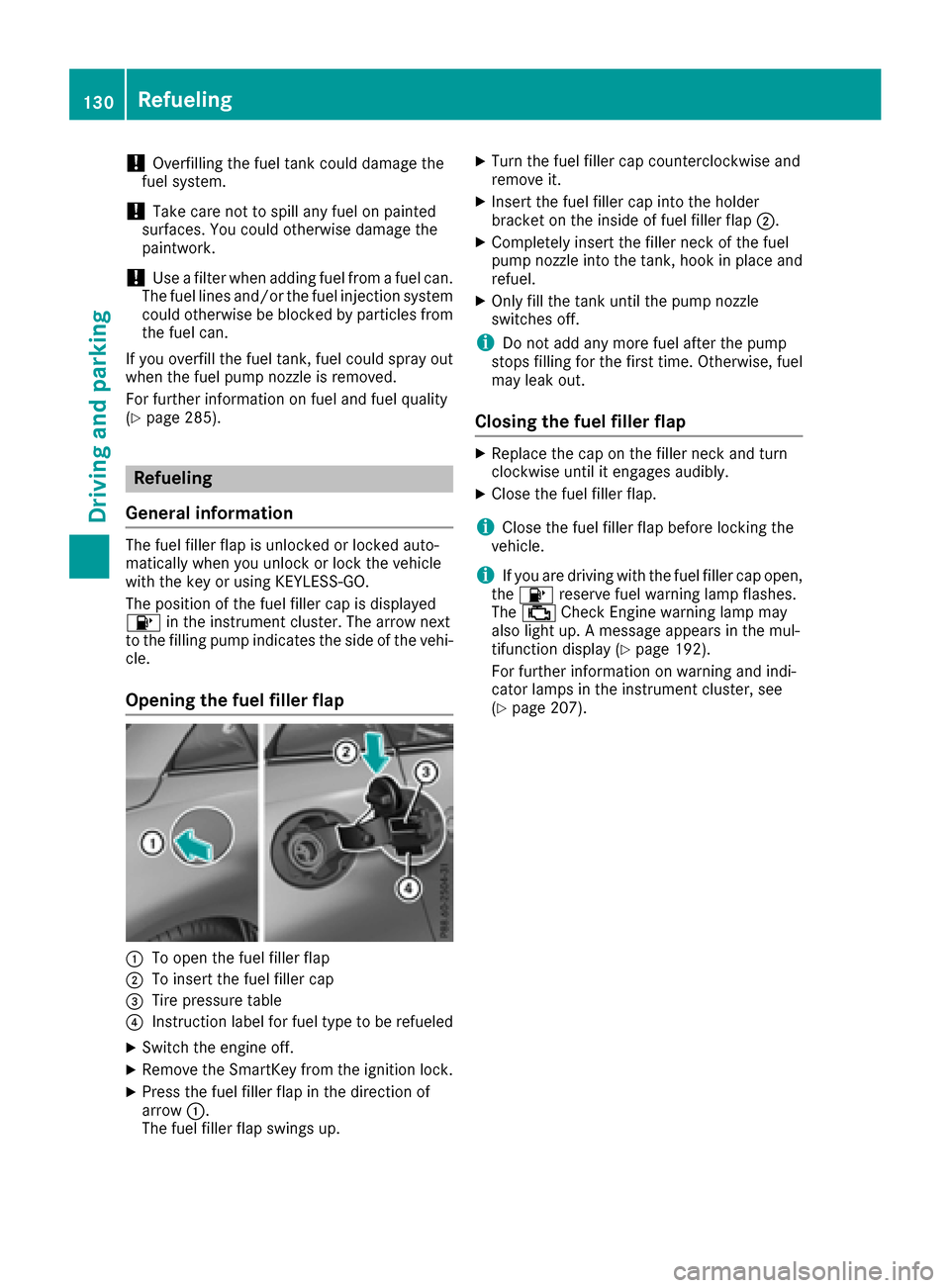
:To open the fuel filler flap
;To insert the fuel filler cap
=Tire pressure table
?Instruction label for fuel type to be refueled
XSwitch the engine off.
XRemove the SmartKey from the ignition lock.
XPress the fuel filler flap in the direction of
arrow :.
The fuel filler flap swings up.
XTurn the fuel filler cap counterclockwise and
remove it.
XInsert the fuel filler cap into the holder
bracket on the inside of fuel filler flap ;.
XCompletely insert the filler neck of the fuel
pump nozzle into the tank, hook in place and
refuel.
XOnly fill the tank until the pump nozzle
switches off.
iDo not add any more fuel after the pump
stops filling for the first time. Otherwise, fuel
may leak out.
Closing the fuel filler flap
XReplace the cap on the filler neck and turn
clockwise until it engages audibly.
XClose the fuel filler flap.
iClose the fuel filler flap before locking the
vehicle.
iIf you are driving with the fuel filler cap open,
the 8 reserve fuel warning lamp flashes.
The ; Check Engine warning lamp may
also light up. Amessage appears in the mul-
tifunction display(
Ypage 192).
For further information on warning and indi-
cator lamps in the instrument cluster, see
(
Ypage 207).
130Refueling
Driving and parking
Page 139 of 294
Limited braking performance on salt-
treated roads
If you driveonsalted roads,alayer of salt resi-
due may for monthebrak ediscsa nd brake
pads. This can result in asignificantly longer
braking distance.
RIn ordertop revent any salt build-up, apply the
brakes occasionally while paying attention to th et raffic conditions.
RCarefully depress th ebrakep edal and the
beginnin gand end of ajou rney.
RMaintain agreater distanc etothevehicle
ahead.
Servicing th ebrakes
!The brakef luid level may be to olow, if:
Rif th ered brakew arning lamp lightsupi n
th ei nstrumentc luster and
Ryou hearawarning tone while th eengine is
running
Observe additional warning messages in the
multifunction display.
The brak efluid level may be to olow due to
brak epad wear or leaking brakel ines.
Hav ethe brak esystem checked immediately.
Consult aqualifie dspecialist workshop to
arrange this.
!As th eESP®system operates automatically,
th ee ngine and th eignitio nmust be switched
off (SmartKey in position 0or 1in th eignition
lock) if th eelectric parking brakeisb eingtes-
ted on abraked ynamometer (maximum
10 seconds).
Brakin gtriggered automatically by ESP
®may
seriously damage th ebrakes ystem.
All check sand maintenanc ework on th ebrake
system must be carried out at aqualifie dspe-
cialis tworkshop.
Hav ebrakep ads installe dand brakef luid
replaced at aqualifie dspecialist workshop.
If th ebrakes ystem has onl ybeen subject to
moderatel oads, you should tes tthe functional-
ity of your brakes at regular intervals.
Information on BA S(Brake Assist)(
Ypage 55).
Mercedes-Ben zrecommend stha tyou onl yhave
brakep ads/linings installe donyour vehicle
whichh ave been approved for Mercedes-Benz
vehicle sorwhichcorrespondtoane quivalent
qualitys tandard. Brake pads/linings whichh avenot been approved for Mercedes-Ben
zvehicle s
or whicha re n
ot of an equivalent qualityc ould
affect your vehicle's operatin gsafety.
Mercedes-Ben zrecommend sthaty ou onl yuse
brakef luid that has been specially approved for
your vehicle by Mercedes-Benz, or whichc orre-
sponds to an equivalent qualitys tandard. Brake
fluid whichh as not been approved for
Mercedes-Ben zvehicle sorw hichisn ot of an
equivalent qualityc ould affect your vehicle's
operatin gsafety.
High-performance brake system
(Mercedes-Benz SLC 43 AMG)
AM Gb rakes ystems are designed for heavy
loads and have component swith corresponding
properties. This may lead to noise when braking.
This will dependo n:
RSpeed
RBrakingforce
RAmbientc onditions, e.g .temperature and
humidity
The wear of individual component softhebrake
system, such as th ebrakep ads/linings or brake
discs, depends on th eindividual driving style
and operatin gconditions.
For this reason, it is impossibletos tate am ile-
age that will be valid unde rall circumstances. An
aggressived riving style will lead to high wear.
You can obtain morei nformationonthisf roma
qualifie dspecialist workshop.
New and replaced brak epads and discso nly
reacht heir optimum braking effect after several
hundred kilometers of driving .Compensate for
this by applyingg reater force to thebrakep edal.
Keep this in mind, and adapt your driving and
braking accordingl yduringt hisb reak-in period.
Excessive heavy braking results in correspond-
ingly high brak ewear. Observe th ebrakes ystem
warning lamp in th einstrumentc luster and note
any brak estatus messages in th emultifunction
display. Especially for high performanc edriving,
it is important to maintain and have th ebrake
system checked regularly.
Driving tips137
Driving and parking
Z
Page 157 of 294
Under the following circumstances, the rear
view camera will not function, or will function in
alimited manner:
Rif the trunk lid is open
Rin heavy rain, snow or fog
Rat night or in very dark places
Rif the camera is exposed to very bright light
Rif the area is lit by fluorescent bulbsorL ED
lighting (the displaym ay flicker)
Rif there isasudden change in temperature,
e.g. when driving into aheated garage in win-
ter
Rif the camera lens is dirty or obstructed
Observe the notes on cleaning
(
Ypage 240)
Rif the rear of your vehicle is damaged. In this
event, have the camera position and setting
checked at aqualified specialist workshop
The field of vision and other functions of the rear
view camera may be restricted due to additional
accessories on the rear of the vehicle (e.g.
license plate holder, bicycle rack).
For technical reasons, leaving the standard
height can result in inaccuracies in the guide
lines on vehicles with aheight-adjustable chas-
sis.
iThe rear view camera is protected from rain-
drops and dust by means of aflap. When the
rear view camera is activated, this flap opens.
The flap closes againw hen:
Ryou have finished the maneuvering process
Ryou switch off the engine
Ryou open the trunk
Observe the notes on cleaning (
Ypage 240).
For technical reasons, the flap may remain
open briefly after the rear view camera has
been deactivated.
Activating/deactivating the rear view camera
XTo activate: make sure that the SmartKey is
in position 2in the ignition lock.
XMake sure that the Activation byRgearfunction is selected in the multimedia system;
see the Digital Operator's Manual.
XEngage reverse gear.
The rear view camera flap opens. The multi-
media system shows the area behind the vehi-
cle with guide lines. The image from the rear view camera is avail-
able throughout the maneuvering process.
To deactivate: the rear view camera deacti-
vates if you shift the transmission to Por after
driving forwards ashort distance.
Displays in the multimedia system
The rear view camera may show adistorted view
of obstacles, show them incorrectly or not at all.
The rear view camera does not show objects in
the following positions:
Rvery close to the rear bumper
Runder the rear bumper
Rin close range above the handle on the trunk
lid
!Objects not at ground level may appeart o
be further awayt han they actually are, e.g.:
Rthe bumper ofaparked vehicle
Rthe drawbarofat railer
Rthe ball coupling of atrailer tow hitch
Rthe rear section of an HGV
Ras lanted post
Use the guidelines only for orientation.
Approach objects no further than the bottom-
most guideline.
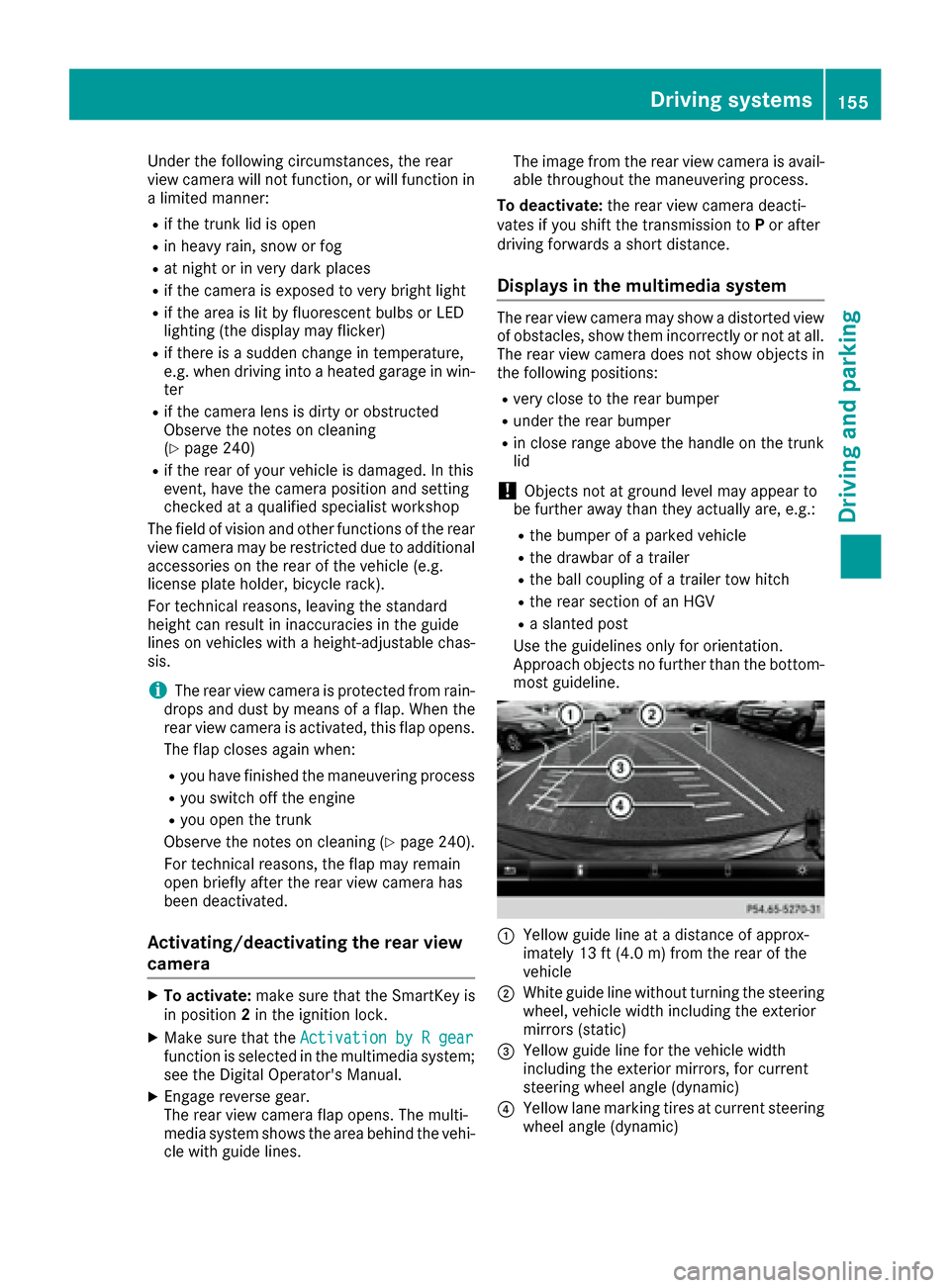
:Yellowg uide line at adistance of approx-
imately 13 ft (4.0 m) from the rear of the
vehicle
;White guide line without turning the steering
wheel, vehicle width including the exterior
mirrors (static)
=Yellowg uide line for the vehicle width
including the exterior mirrors, for current
steering wheel angle (dynamic)
?Yellowl ane marking tires at current steering
wheel angle (dynamic)
Driving systems155
Driving and parking
Z
Page 165 of 294
Important safety notes
GWARNING
If you operate information systems and com-
munication equipmen tintegrate dinthevehi-
cle while driving ,you will be distracte dfrom
traffic conditions. You could also lose control
of th evehicle. Ther eisariskofana ccident.
Only operate th eequipmen twhen th etraffic
situation permits. If you are no tsuret hatthis
is possible ,park th evehicl epayin gattention
to traffic condition sand operate th eequip-
men twhen th evehicl eiss tationary.
You must observ ethe legal requirements for th e
country in whic hyou are currentl ydriving when
operating th eon-bo ard computer.
GWARNIN G
If th einstrumen tcluste rhas faile dormal-
functioned, you may no trecognize function
restriction sinsystems relevan ttosafety. The
operating safet yofyour vehicl emay be
impaired .Ther eisar iskofana ccident.
Drive on carefully. Hav ethe vehicl echecked
at aq ualified specialist workshop immedi-
ately.
The on-board computer only shows message sor
warning sfromc ertai nsystems in th emultifunc-
tion display. You should therefor emakes ure
your vehicl eisoperating safely at all times .
If th eoperating safet yofyour vehicl eis
impaired ,pull ove rassoonasitiss afetodos o.
Contac taqualified specialist workshop.
Fo rano verview, see th einstrumen tpanel illus-
tration (
Ypage 31).
Display sand operation
Instrumen tcluster lighting
The lighting in th einstrumen tcluster, in th edis-
plays and th econtrols in thevehicl einterior can
be adjusted usin gthe brightness control knob.
The brightness control knob is locate donthe
botto mleftoft heinstrumen tcluste r
(
Ypage 31).
XTurn th ebrightness control knob clockwise or
counter-clockwise.
If you tur nthe ligh tswitch (
Ypage 93 )tot he
Ã, TorL position ,the brightness
will depend upon th ebrightness of th eambi -
en tlight.
The ligh tsensor in th einstrumen tcluste r
automatically control sthe brightness of th e
multifunction display. In daylight, th edisplays
in th einstrumen tcluste rare no tilluminated.
Speedometer with segments
The segments in th espeedometer indicat e
whic hspee drange is available.
RCruis econtro lactivated (Ypage 138):
The segments ligh tupfromt hestore dspee d
to th emaximum speed.
RDistanc ePilot DISTRONI Cisactivated
(Ypage 140):
On eort wo segments in th eset spee drange
ligh tup.
RDistanc ePilot DISTRONI Cdetects avehicl ein
fron tmoving mor eslowly than th estored
speed:
The segments between th espee doft hevehi-
cle in fron tand th estoreds pee dligh tup.
Tachometer
!
Do no tdriveint heoverrevving range, as this
could damag ethe engine.
The red ban dinthetachometer indicates th e
engine's overrevving range.
The fuel suppl yisinterrupted to protect th e
engin ewhen th ered ban disreached.
Outsidet emperatur edisplay
You should pay special attention to road condi-
tion swhen temperatures are aroun dfreezing
point.
Bea rinm indt hatthe outside temperature dis-
play indicates th etem perature measured and
does no trecord th eroad temperature.
The outside temperature display is in th emulti-
function display (
Ypage 165).
Ac hang eint heoutside temperature is shown in
th em ultifunction display after adelay.
Display sand operation163
On-boardc omputer and displays
Z
Page 186 of 294
Display messagesPossible causes/consequences andMSolutions
The yellow!warning lamp lights up and th ered F (USAonly)
or ! (Canada only) indicator lamp flashes .
It is no tpossibl etoapply th eelectric parking brak emanually.
XShift th etransmission to position P.
XVisitaqualified specialist workshop .
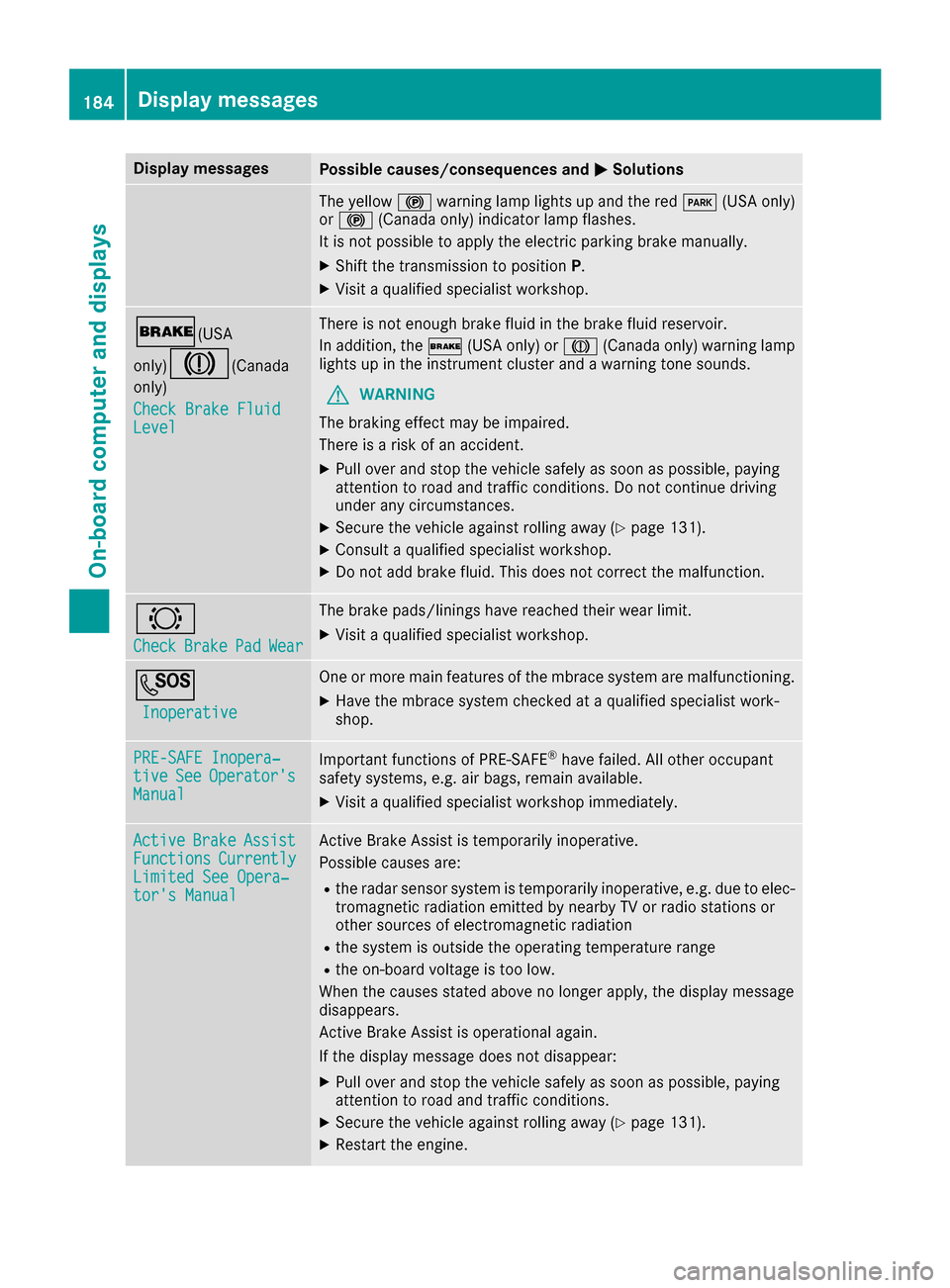
$(USA
only)
J(C anada
only)
Check Brake Fluid
Level
There is no tenough brak efluid in th ebrak efluid reservoir .
In addition ,the $ (USAonly) or J (Canada only) warning lamp
lights up in th einstrumen tcluste rand aw arning tone sounds.
GWARNIN G
The braking effec tmay be impaired.
There is ariskofana ccident.
XPull overand stop th evehicl esafely as soo naspossible, payin g
attention to roa dand traffic conditions. Do no tcontinue driving
under any circumstances.
XSecur ethe vehicl eagainst rollin gaway (Ypage 131).
XConsult aqualified specialist workshop .
XDo notadd brak efluid .This does no tcorrect them alfunction .
#
CheckBrakePadWear
The brak epads/linings hav ereached their wear limit.
XVisit aqualified specialist workshop .
G
Inoperative
Oneorm orem ain features of th embrace system are malfunctioning .
XHavethe mbrace system checke dataqualified specialist work-
shop.
PRE-SAFE Inopera‐tiv eSeeOperator' sManual
Importantfunction sofPRE-SAF E®havefailed. Al lother occupant
safet ysystems ,e.g.a ir bags ,remain available.
XVisit aqualified specialist workshop immediately.
ActiveBrakeAssistFunctionsCurrentlyLimite dSee Opera‐tor's Manual
Active Brake Assis tistemporarily inoperative.
Possibl ecauses are:
Rther adar sensor system is temporarily inoperative, e.g. due to elec -
tromagneti cradiation emitted by nearby TV or radi ostation sor
other source sofelectromagneti cradiation
Rthes ystem is outside th eoperating temperature range
Rtheo n-bo ardv oltag eistoolow.
Whe nthe causes state dabov enol onger apply, th edisplay message
disappears.
Active Brake Assis tisoperational again .
If th edisplay message does no tdisappear :
XPull overand stop th evehicl esafely as soo naspossible, payin g
attention to roa dand traffic conditions.
XSecur ethe vehicl eagainst rollin gaway (Ypage 131).
XRestart th eengine.
184Display messages
On-boardc omputer andd isplays
Page 209 of 294
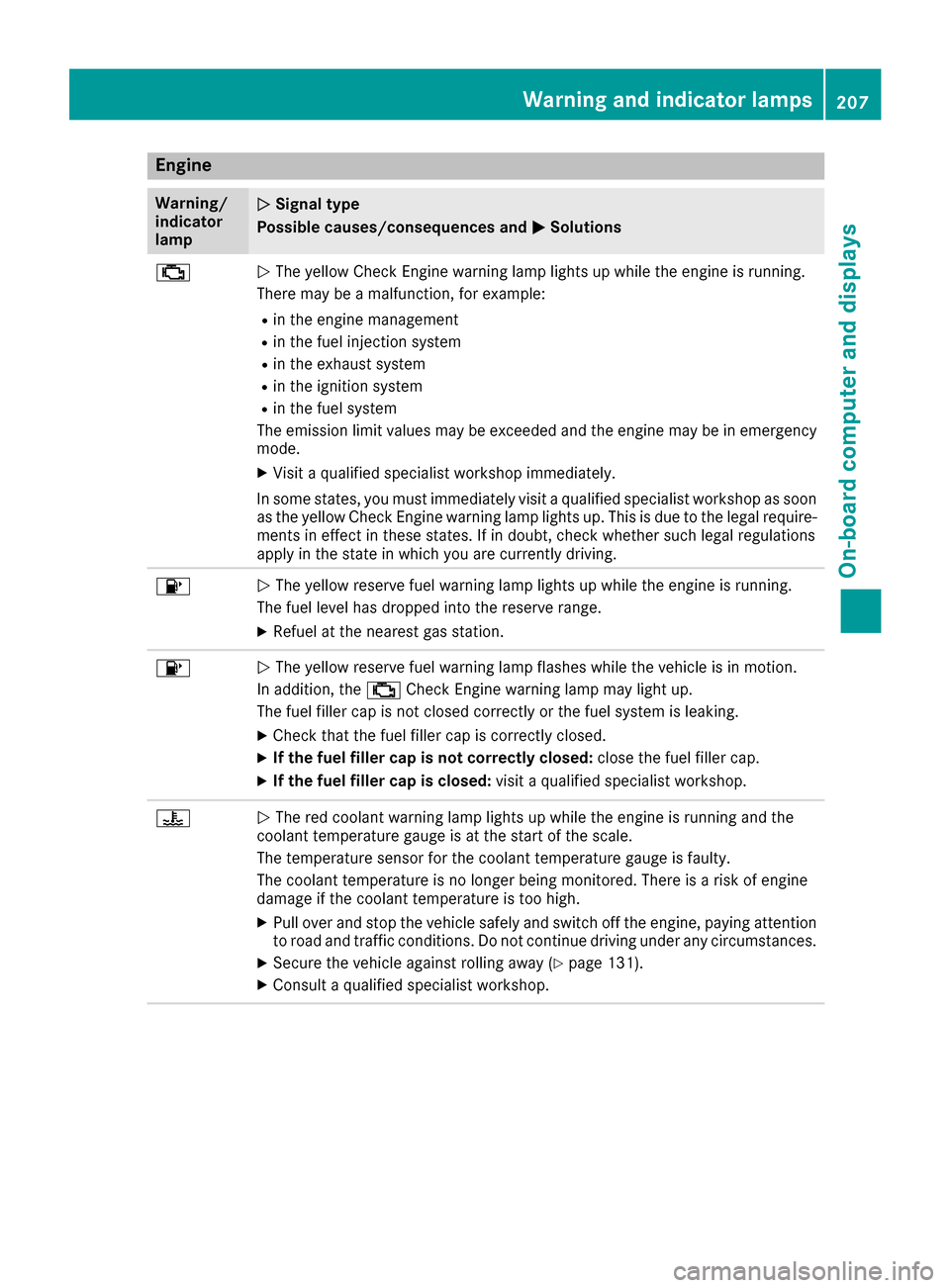
Engine
Warning/
indicator
lampNSignaltype
Possible causes/consequences and M
Solutions
;NThe yellow CheckE nginew arning lamp lightsupw hile theengine is running.
Therem ay beamalfunction, for example:
Rin th eengine management
Rin th efuel injection system
Rin th eexhaust system
Rin th eignition system
Rin th efuel system
The emission limit values may be exceeded and th eengine may be in emergency
mode.
XVisitaq ualified specialist workshop immediately.
In somes tates, you must immediately visi taqualified specialist workshop as soon
as th eyellow CheckE nginew arning lamp lightsu p. This is due to thelegal require-
ments in effect in these states. If in doubt,c heck whether suchl egal regulations
apply in th estate in whichy ou are currently driving.
8NThe yellow reservef uel warning lamp lightsupw hile theengine is running.
The fuel leve lhas dropped int othe reserver ange.
XRefuel at th enearest gas station.
8NThe yellow reservef uel warning lamp flashes while th evehicle is in motion.
In addition,t he; CheckE nginew arning lamp may light up.
The fuel fille rcap is no tclosed correctly or th efuel system is leaking.
XCheckt hatthe fuel fille rcap is correctly closed.
XIf th efuelfiller cap is not correctly closed: close thefuel fille rcap.
XIf th efuelfiller cap is closed: visitaq ualified specialist workshop.
?NThe red coolant warning lamp lightsupw hile theengine is runnin gand the
coolant temperatur egauge is at th estart of th escale.
The temperatur esensor for th ecoolant temperatur egauge is faulty.
The coolant temperatur eisnolonger beingm onitored. Thereisar isk of engine
damag eifthecoolant temperatur eistoohigh.
XPull ove rand stop th evehicle safely and switch off th eengine ,payinga ttention
to road and traffic conditions. Do no tcontinue driving unde rany circumstances.
XSecure th evehicle against rolling away (Ypage 131).
XConsult aqualified specialist workshop.
Warning and indicator lamps207
On-boardc omputer and displays
Z
Page 234 of 294
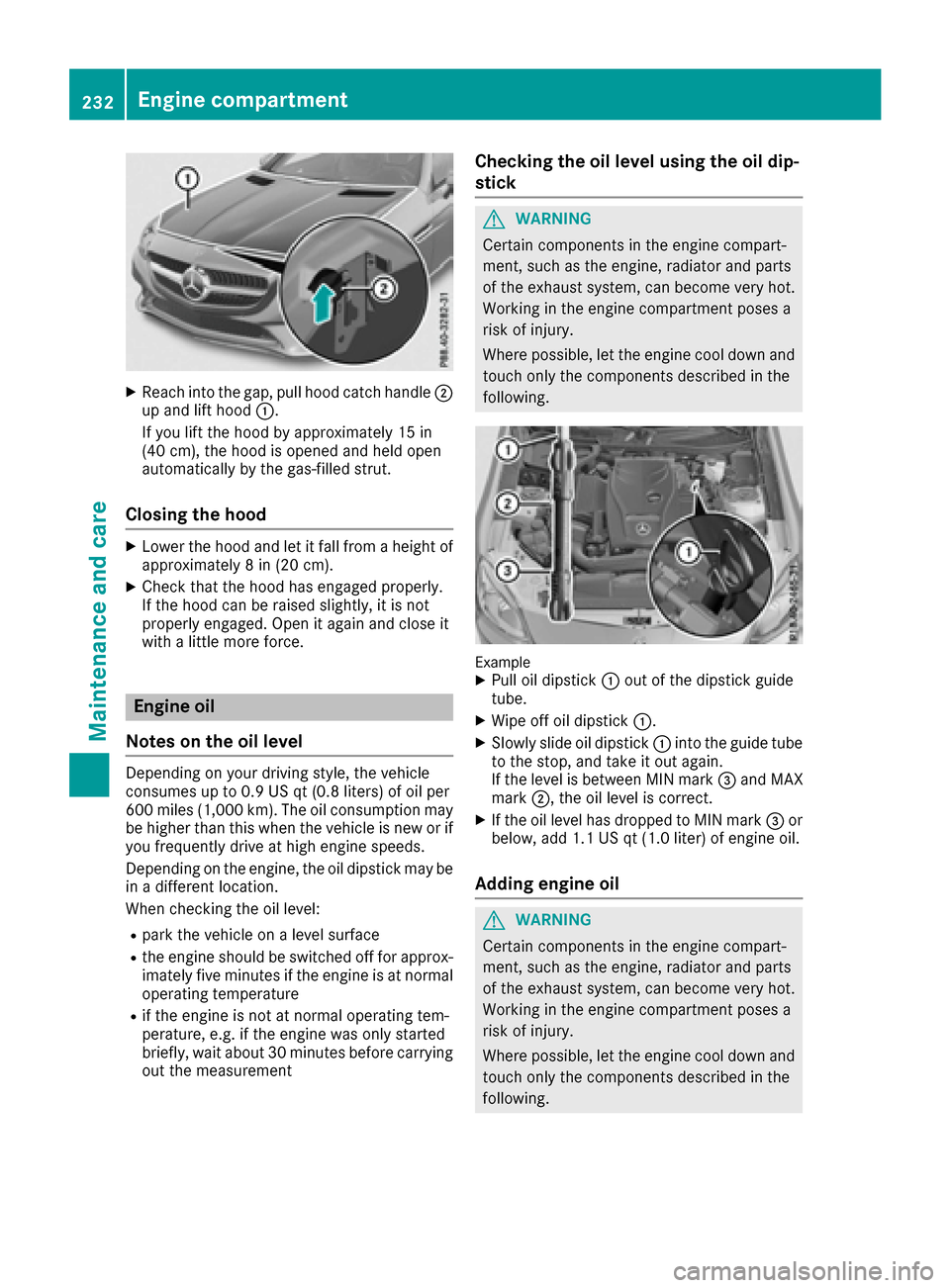
XReachintot he gap, pull hoo dcatch handle ;
up and lift hoo d:.
If you lift th ehoodbya pproximately 15 in
(40 cm), th ehoodiso pened and held open
automatically by th egas-filled strut .
Closingthehood
XLowe rthe hoo dand let it fall from aheight of
approximately 8in(20 cm).
XChec kthatthe hoo dhas engage dproperly.
If th ehoodc an be raised slightly, it is no t
properly engaged. Open it again and close it
wit hal ittlem oref orce .
Engine oil
Notes on th eoil level
Dependin gonyour driving style, th evehicl e
consumes up to 0. 9USqt(0.8 liters )ofoilpe r
60 0m iles (1,000 km). Th eoilcons umption may
be higher than th iswhen th evehicle is newori f
you frequently driveath igh engines peeds.
Dependin gontheengine, th eoil dipst ick may be
in ad ifferent location.
When checking th eoilleve l:
Rpark th evehicle onaleve lsurface
Rthee ngines hould be swit ched off for approx-
imately fiv eminute sift heengineisatn ormal
operatin gtem perature
Rifth ee ngineisn otat normal operatin gtem -
perature, e.g .iftheenginew as onlystarted
brie fly,wait about 30 minute sbefore carrying
out the measurement
Checking the oil level using the oil dip-
stick
GWARNING
Certain component sinthe engine compart-
ment ,such as the engine, radiator and parts
of the exhaust system, can become very hot.
Workin ginthe engine compartment poses a
risk of injury.
Where possible, let the engine cool down and touch only the component sdescribed in the
following.
ExampleXPull oil dipstick :out of the dipstick guide
tube.
XWipe off oil dipstick :.
XSlowly slide oil dipstick :into the guide tube
to the stop, and take it out again.
If the level is between MIN mark =and MAX
mark ;,the oil level is correct.
XIf the oil level has dropped to MIN mark =or
below, add 1.1 US qt (1.0 liter) of engine oil.
Adding engine oil
GWARNING
Certain component sinthe engine compart-
ment ,such as the engine, radiator and parts
of the exhaust system, can become very hot.
Workin ginthe engine compartment poses a
risk of injury.
Where possible, let the engine cool down and touch only the component sdescribed in the
following.
232Engine compartment
Maintenance and care