keyless MERCEDES-BENZ SLC-Class 2017 R172 User Guide
[x] Cancel search | Manufacturer: MERCEDES-BENZ, Model Year: 2017, Model line: SLC-Class, Model: MERCEDES-BENZ SLC-Class 2017 R172Pages: 294, PDF Size: 7.28 MB
Page 70 of 294
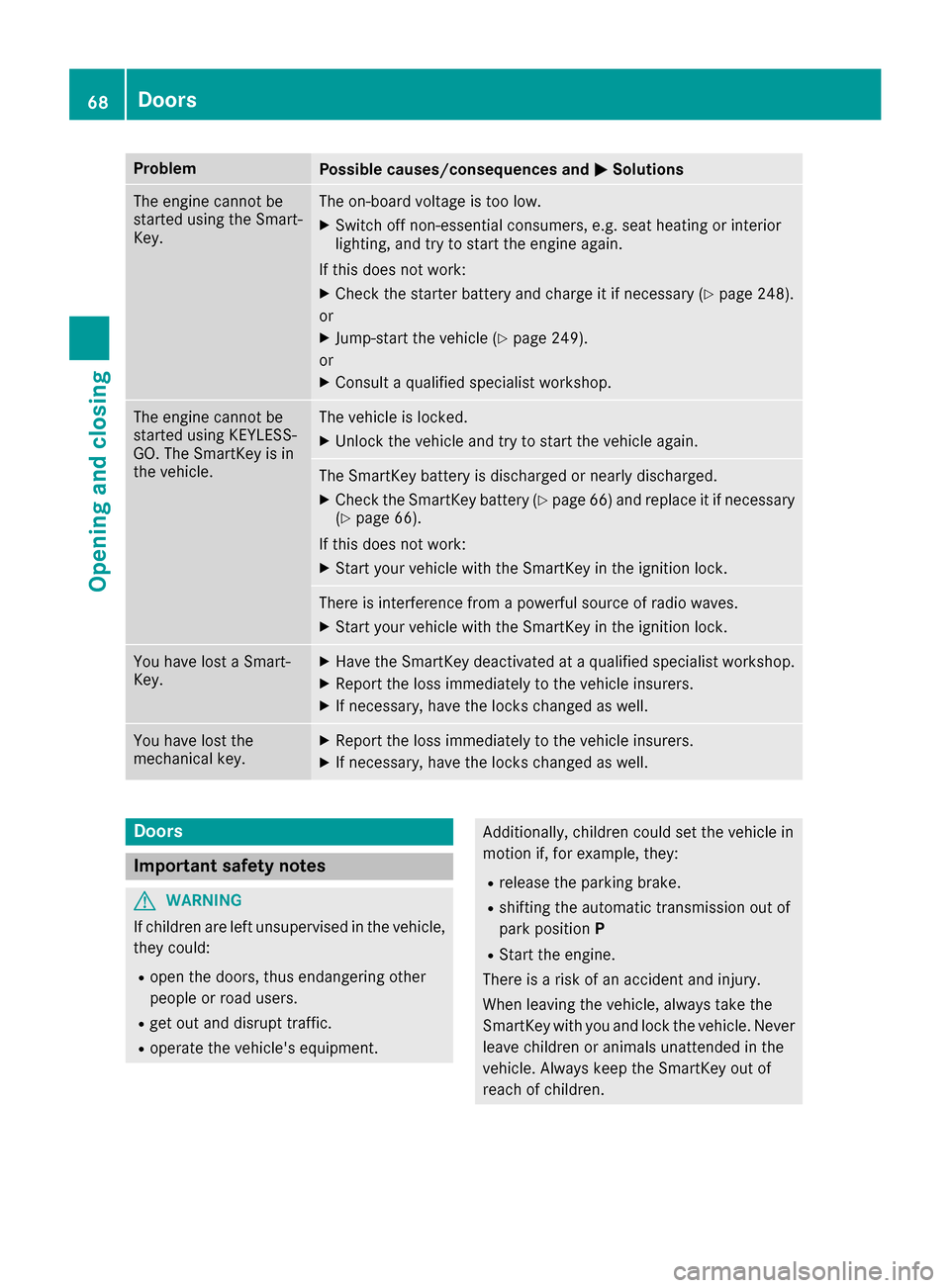
ProblemPossible causes/consequences andMSolutions
The engine cannot be
started using the Smart-
Key.The on-board voltage is too low.
XSwitch off non-essential consumers, e.g. seat heating or interior
lighting, and try to start the engine again.
If this does not work:
XCheck the starter battery and charge it if necessary (Ypage 248).
or
XJump-start the vehicle (Ypage 249).
or
XConsult aqualified specialist workshop.
The engine cannot be
started using KEYLESS-
GO. The SmartKey is in
the vehicle.The vehicle is locked.
XUnlock the vehicle and try to start the vehicle again.
The SmartKey battery is discharged or nearly discharged.
XCheck the SmartKey battery (Ypage 66) and replace it if necessary
(Ypage 66).
If this does not work:
XStart your vehicle with the SmartKey in the ignition lock.
There is interference from apowerful source of radio waves.
XStart your vehicle with the SmartKey in the ignition lock.
You have lost aSmart-
Key.XHave the SmartKey deactivated at aqualified specialist workshop.
XReport the loss immediately to the vehicle insurers.
XIf necessary, have the locks changed as well.
You have lost the
mechanical key.XReport the loss immediately to the vehicle insurers.
XIf necessary, have the locks changed as well.
Doors
Important safety notes
GWARNING
If children are left unsupervised in the vehicle,
they could:
Ropen the doors, thus endangering other
people or road users.
Rget out and disrupt traffic.
Roperate the vehicle's equipment.
Additionally, children could set the vehicle in
motion if, for example, they:
Rrelease the parking brake.
Rshifting the automatic transmission out of
park position P
RStart the engine.
There is arisk of an accident and injury.
When leaving the vehicle, always take the
SmartKey with you and lock the vehicle. Never
leave children or animals unattended in the
vehicle. Always keep the SmartKey out of
reach of children.
68Doors
Opening and closing
Page 71 of 294
Unlocking and opening doors from
the inside
!
The side windows will not open/close if the
battery is discharged or if the side windows
have iced up. It will then not be possible to
close the door. Do not attempt to forcet he
door closed. You could otherwise damage the
door or the side window.
You can open adoor from inside the vehicle
even if it has been locked.
If the vehicle has previously been locked from
the outside, openin gadoor from the inside will
trigger the anti-theft alarm system .Switc hoff
the alarm (
Ypage 61).
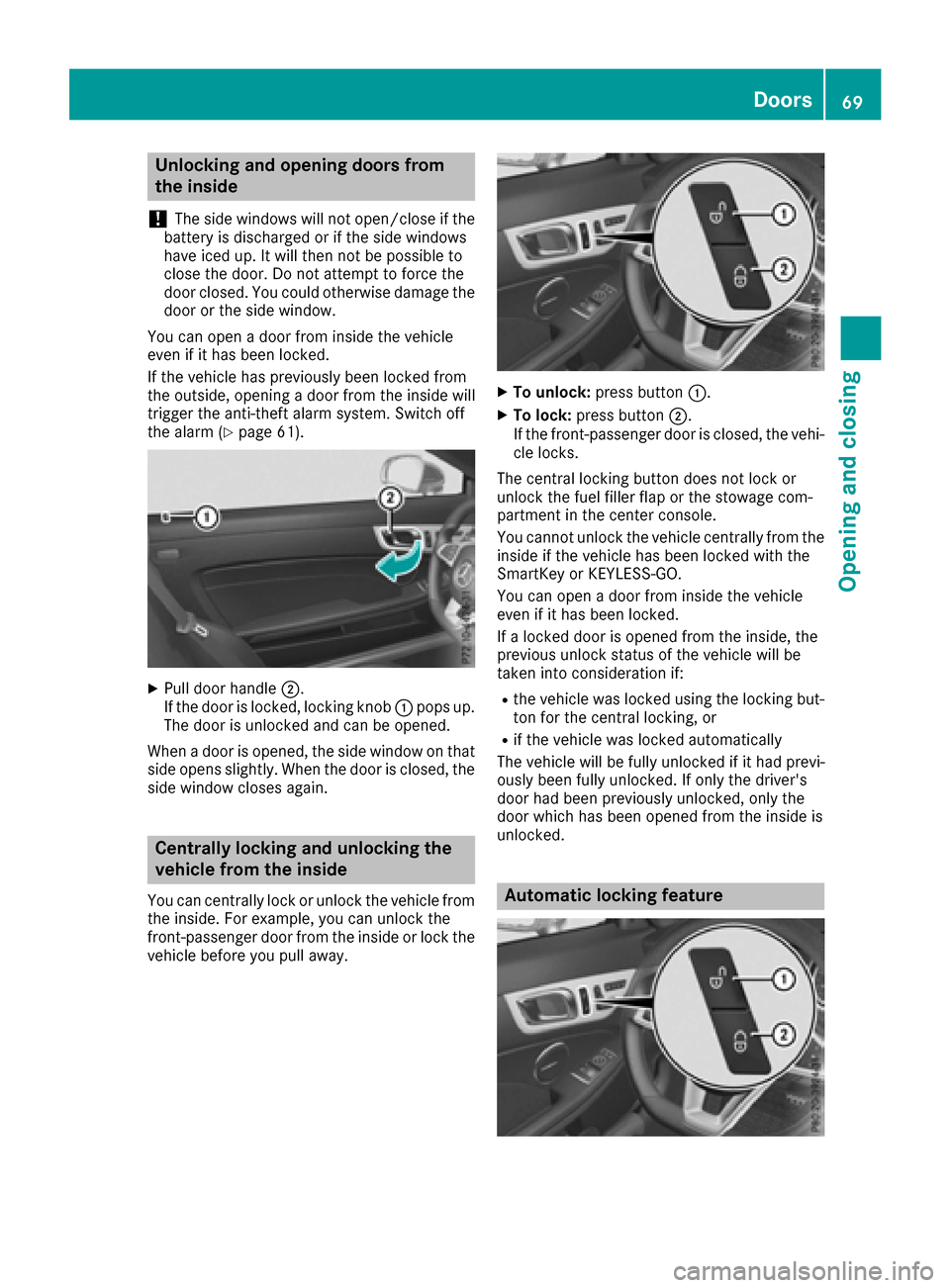
XPull door handle ;.
If the door is locked, locking knob :pops up.
The door is unlocked and can be opened.
When adoor is opened, the side window on that
side opens slightly. When the door is closed, the
side window closes again.
Centrally locking and unlocking the
vehicle from the inside
You can centrally lock or unlock the vehicle from
the inside. For example, you can unlock the
front-passenge rdoor from the inside or lock the
vehicle before you pull away.
XTo unlock: press button :.
XTo lock:press button ;.
If the front-passenge rdoor is closed, the vehi-
cle locks.
The central locking button does not lock or
unlock the fuel filler flap or the stowage com-
partment in the center console.
You cannot unlock the vehicle centrally from the
inside if the vehicle has been locked with the
SmartKey or KEYLESS-GO.
You can open adoor from inside the vehicle
even if it has been locked.
If al ocked door is opened from the inside, the
previous unlock status of the vehicle will be
taken int oconsideratio nif:
Rthe vehicle was locked using the locking but-
ton for the central locking, or
Rif the vehicle was locked automatically
The vehicle will be fully unlocked if it had previ-
ously been fully unlocked. If only the driver's
door had been previously unlocked, only the
door which has been opened from the inside is
unlocked.
Automatic locking feature
Doors69
Opening and closing
Z
Page 73 of 294
Opening/closing from outside
Opening
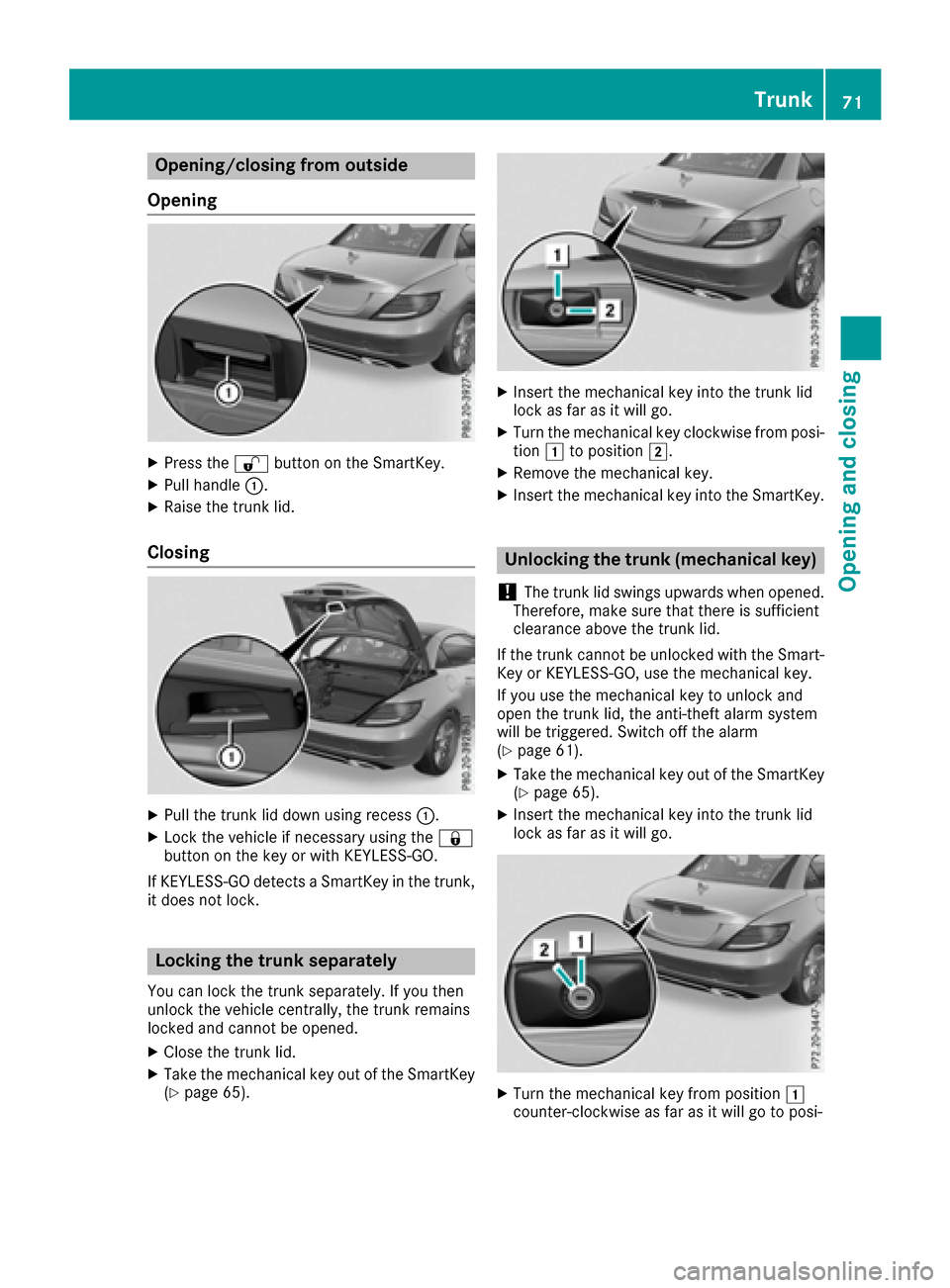
XPress the %button on the SmartKey.
XPull handle :.
XRaise the trun klid.
Closing
XPull the trun klid down using recess :.
XLock the vehicle if necessary using the &
button on the key or with KEYLESS-GO.
If KEYLESS-GO detects aSmartKey in the trunk,
it does not lock.
Locking the trunk separately
You can lock the trun kseparately. If you then
unlock the vehicle centrally, the trun kremains
locked and cannot be opened.
XClose the trun klid.
XTake the mechanical key out of the SmartKey
(Ypage 65).
XInser tthe mechanical key into the trun klid
lock as far as it will go.
XTurn the mechanical key clockwise from posi-
tion 1to position 2.
XRemove the mechanical key.
XInsertthe mechanical key into the SmartKey.
Unlocking the trunk (mechanical key)
!
The trun klid swings upwards when opened.
Therefore, make sure that there is sufficient
clearanc eabove the trun klid.
If the trun kcannot be unlocked with the Smart-
Key or KEYLESS-GO, use the mechanical key.
If you use the mechanical key to unlock and
open the trun klid, the anti-thef talarm system
will be triggered. Switc hoff the alarm
(
Ypage 61).
XTake the mechanical key out of the SmartKey
(Ypage 65).
XInser tthe mechanical key into the trun klid
lock as far as it will go.
XTurn the mechanical key from position 1
counter-clockwise as far as it will go to posi-
Trunk71
Opening and closing
Z
Page 76 of 294
Convenience closing with KEYLESS-GO
GWARNING
When usingt heconvenience closingf eature,
part soft hebody coul dbetrapped in th eclos-
ing area when aside window is beingc losed.
Thereisar iskofi njury.
Observ ethe completec losingprocedure
when th econvenience closingf eature is oper-
ating. Makes ure that no body partsa re in
close proximity durin gthe closingp rocedure.
Procee dasfollows if someoneist rapped:
XRelease th erecessed sensor surface on the
door handle.
XImmediately pull and hold th edoor handle
and keep th edoor handle pulled.
The side windows open.
WithK EYLESS-GO you can close all side win-
dows simultaneously. The KEYLESS-GO key
must be outside th evehicle .All th edoorsm ust
be closed.
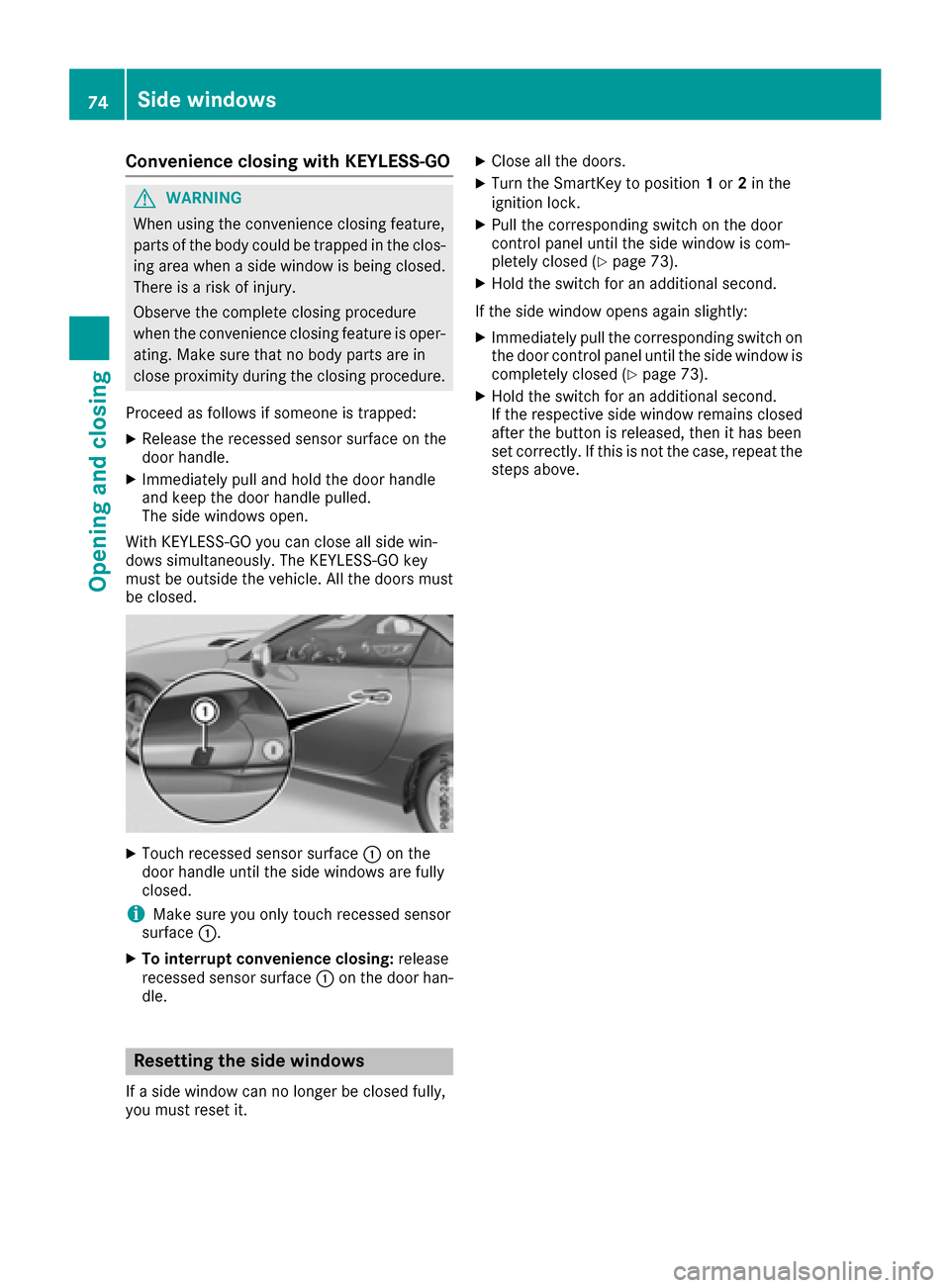
XTouchr ecessed sensor surface :on the
door handle until th eside windows are fully
closed.
iMakes ure you only touch recessed sensor
surface :.
XTo interrup tconvenience closing: release
recessed sensor surface :on th edoor han-
dle.
Resetting th esidew indows
Ifas ide window can no longer be closed fully,
you must reset it.
XClose all th edoors.
XTurn th eSmartKey to position 1or 2in the
ignition lock.
XPull th ecorrespondings witch on thedoor
control panel until th eside window is com-
pletely closed (
Ypage 73).
XHol dthe switch for an additional second.
If th eside window opensa gain slightly:
XImmediately pull thecorrespondings witch on
th ed oor control panel until th eside window is
completely closed (
Ypage 73).
XHol dthe switch for an additional second.
If th erespectiv eside window remains closed
after th ebutto nisr eleased, then it has been
set correctly. If this is no tthe case, repeat the
steps above.
74Sidew indows
Opening and closing
Page 79 of 294
Opening/closing using the SmartKey
Important safetyn otes
GWARNING
When opening or closing the roof, body parts
could be trapped by, for example, the roof
mechanism, trun klid or side windows. There
is ar isk of injury.
When raising or lowering the roof, make sure
that no body parts are in the vicinity of moving
components. If someoneb ecomes trapped,
release the button.
Opening and closing
This function is only available on vehicles with
KEYLESS-GO or with roof comfort operation.
XClose the trun klid (Ypage 70).
XVehicles with comfort operation: point the
tip of the SmartKey at the driver's door han-
dle.
XVehicles with KEYLESS-GO: the SmartKey
must be within 6ft(2m)ofthe vehicle.
XTo open: press and hold the %button on
the SmartKey until the roof is fully opened.
The roof and the rear side windows open. The
fronts ide windows close.
XTo interrupt the opening procedure:
release the %button.
XTo open the front side windows: press the
% button on the SmartKey again.
XTo close: press and hold the &button on
the SmartKey until the roof is fully closed.
The roof and the side windows close.
XTo interrupt the closing procedure: release
the & button.
Locking the roof again
Important safetyn otes
GWARNING
If you do not fully open/close the soft top, the
soft-top hydraulics depressurizea fterashort
time. This causes the soft top to lower unex-
pectedly and may cause you or other stobe
trapped. There is arisk of injury.
Always open or close the soft top completely.
The roof is not locked if:
Rthe K symbol and the Vario-Roof inOperationmessage appear in the multifunc-
tion display
Rthe K symbol and the Open/CloseVario-RoofCompletelymessage appear in
the multifunction display and you hear awarn-
ing tone
Ryou hear awarning ton efor up to ten seconds
when pulling away or while driving
Locking
You can lock the roof again if it is not locked
fully.
XPull over and stop the vehicle safely as soon
as possible, paying attention to road and traf-
fic conditions.
XMake sure that the SmartKey is in position 2
in the ignition lock.
XPress the roof switch (Ypage 76).
Trunk partition
General notes
!To avoid damaging the roof or luggage when
folding back the roof, you should:
Ronly load the trun ktobelow the trun kpar-
tition
Rnot place any objects on or in frontoft he
trun kpartition
Rnot place any objects on the cover behind
the roll bars
Rnot allow the cargo to push the trun kpar-
tition upwards
The trun kpartition can be used to cover luggage
and loads in the trunk.
Roof77
Opening and closing
Z
Page 90 of 294
Position of the steering wheel when the
EASY-ENTRY/EXIT featureisactive
The steering wheel swings upwards when you:
Rremove the SmartKey from the ignition lock
Ropen the driver's door with KEYLESS-GO in
position1
Ropen the driver's door and the SmartKey is in
position0or 1in the ignition lock
iThe steering wheel only moves upwards if it
has not already reached the upper end stop.
Position of the steering wheel for driv-
ing
The steering wheel is moved to the last selected
position when:
Rthe driver's door is closed
Ryou insert the SmartKey into the ignition lock
or
Ryou press the Start/Stop button once on vehi-
cles with KEYLESS-GO
When you close the driver's door with the igni-
tion switched on, the steering wheel is also
automatically moved to the previously set posi-
tion.
The last position of the steering wheel is stored
when you switch off the ignition or when you
store the settingw ith the memory function
(
Ypage 91).
Crash-responsive EASY-EXIT feature
If the crash-responsive EASY-EXIT feature is trig-
gered in an accident, the steering column will
move upwards when the driver's door is opened.
This occurs irrespective of the position of the
SmartKey in the ignition lock. This makes it eas- ier to exit the vehicle and rescue the occupants.
The crash-responsive EASY-EXIT feature is only
operational if the EASY-EXIT/ENTRY feature is
activated in the on-board computer
(
Ypage 174).
Mirrors
Rear-view mirror
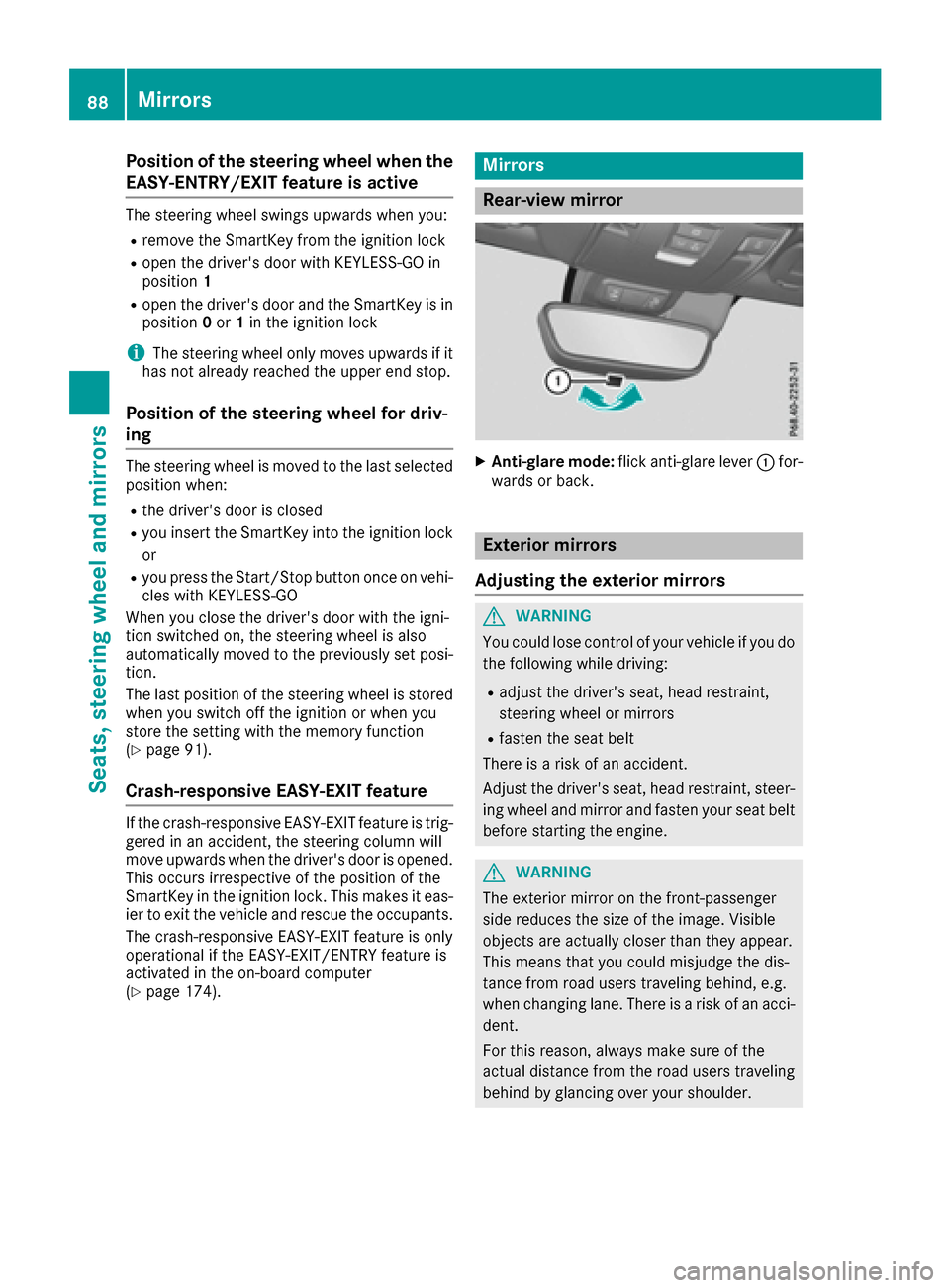
XAnti-glare mode: flick anti-glare lever :for-
wards or back.
Exterior mirrors
Adjusting the exterior mirrors
GWARNING
You could lose control of your vehicle if you do the following while driving:
Radjust the driver's seat, head restraint,
steering wheel or mirrors
Rfasten the seat belt
There is arisk of an accident.
Adjust the driver's seat, head restraint,s teer-
ing wheel and mirror and fasten your seat belt before startin gthe engine.
GWARNING
The exterior mirror on the front-passenger
side reduces the size of the image. Visible
object sare actually closer than they appear.
This means that you could misjudge the dis-
tance from road users traveling behind, e.g.
when changing lane. There is arisk of an acci-
dent.
For this reason, always make sure of the
actual distance from the road users traveling
behind by glancing over your shoulder.
88Mirrors
Seats, steering wheela nd mirrors
Page 117 of 294
Where possible, avoid spinningthe drive
wheels when pulling away on slippery roads.
You could otherwise damage the drive train.
SmartKey positions
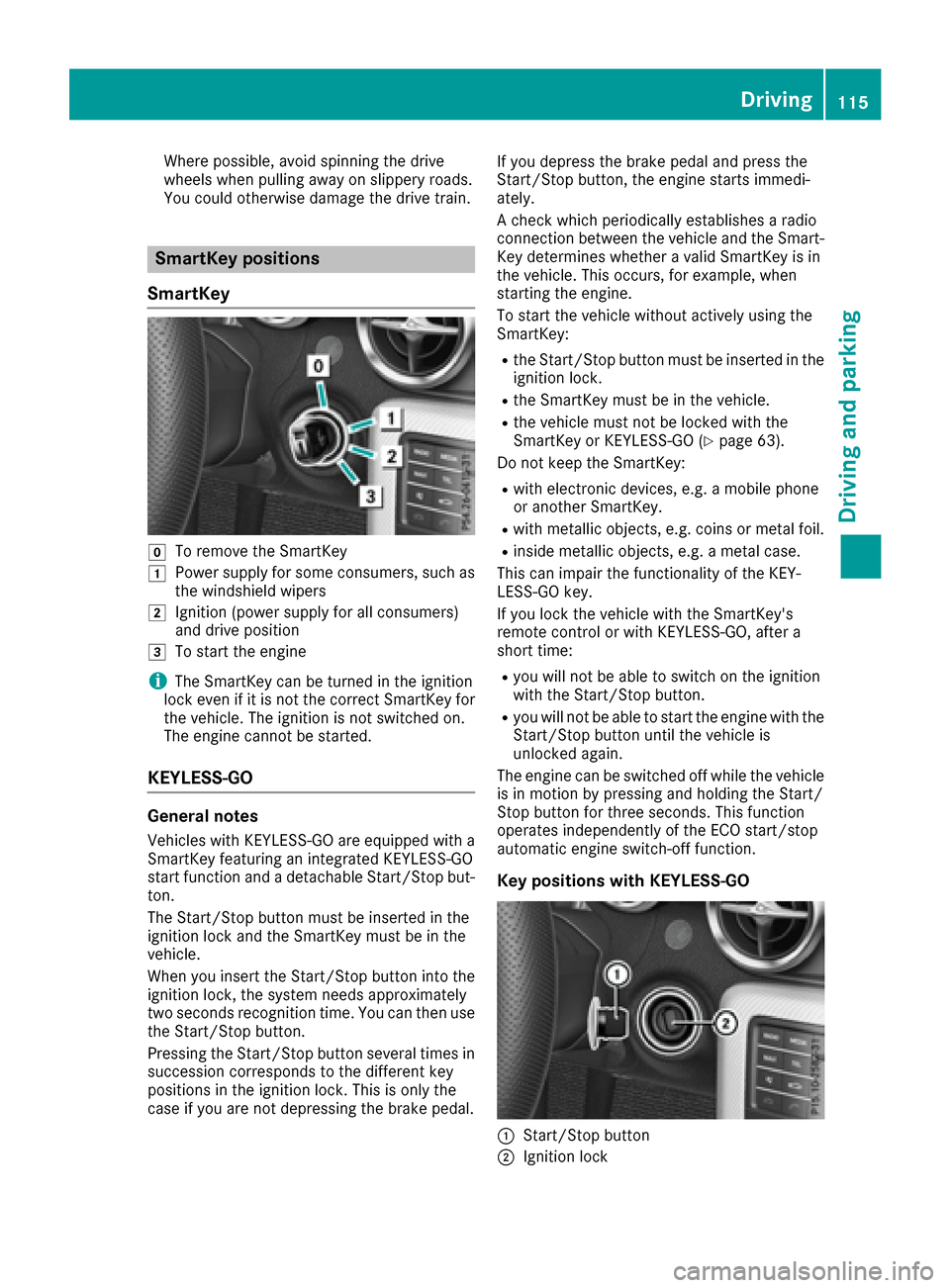
SmartKey
gTo remove the SmartKey
1Power supply for some consumers, such as
the windshield wipers
2Ignition (power supply for all consumers)
and drive position
3To start the engine
iThe SmartKey can be turned in the ignition
lock even if it is not the correct SmartKey for
the vehicle. The ignition is not switched on.
The engine cannot be started.
KEYLESS-GO
General notes
Vehicles with KEYLESS-GO are equipped with a
SmartKey featuring an integrated KEYLESS-GO
start function and adetachable Start/Stop but-
ton.
The Start/Stop button must be inserted in the
ignition lock and the SmartKey must be in the
vehicle.
When you insert the Start/Stop button into the
ignition lock, the system needs approximately
two seconds recognition time. You can then use
the Start/Stop button.
Pressing the Start/Stop button several times in
succession corresponds to the differentk ey
positions in the ignition lock. This is only the
case if you are not depressing the brake pedal. If you depress the brake pedal and press the
Start/Stop button
,the engine start simmedi-
ately.
Ac heck which periodically establishes aradio
connection between the vehicle and the Smart-
Key determines whether avalid SmartKey is in
the vehicle. This occurs,f or example, when
starting the engine.
To start the vehicle without actively using the
SmartKey:
Rthe Start/Stop button must be inserted in the
ignition lock.
Rthe SmartKey must be in the vehicle.
Rthe vehicle must not be locked with the
SmartKey or KEYLESS-GO (Ypage 63).
Do not keep the SmartKey:
Rwith electronic devices, e.g. amobile phone
or another SmartKey.
Rwith metallic objects, e.g. coins or metal foil.
Rinside metallic objects, e.g. ametal case.
This can impair the functionality of the KEY-
LESS-GO key.
If you lock the vehicle with the SmartKey's
remotec ontrol or with KEYLESS-GO, after a
short time:
Ryou will not be able to switch on the ignition
with the Start/Stop button.
Ryou will not be able to start the engine with the
Start/Stop button until the vehicle is
unlocked again.
The engine can be switched off while the vehicle
is in motion by pressing and holding the Start/
Stop button for three seconds. This function
operates independently of the ECO start/stop
automatic engine switch-off function.
Key positions with KEYLESS-GO
:Start/Stop button
;Ignition lock
Driving115
Driving and parking
Z
Page 119 of 294
reach its operating temperature. The sound of
the engine may change during this time.
Automatic transmission
XDepress the brake pedaland keep it
depressed.
XShift the transmission to position P.
Transmission position display Pis shown in
the multifunction display.
iYou can start the engine in transmission
position Pand N.
Starting procedure with the SmartKey
To start the engine using the SmartKey instead
of KEYLESS-GO, pul lthe Start/Stop button out
of the ignitio nlock.
XTurn the SmartKey to position 3in the ignition
lock (Ypag e115) and release it as soon as the
engine is running.
UsingK EYLESS-GO to start the engine
The Start/Stop button can be used to start the
vehicl emanually withou tinserting the SmartKey
into the ignitio nlock. The Start/Stop button
must be inserted in the ignitio nlock and the
SmartKey must be in the vehicle. This mode for
starting the engine operates independently of
the ECO start/stop automatic engine start func-
tion.
XDepress the brake pedala nd keep it
depressed.
XPress the Start/Stop button once
(Ypag e115).
The engine starts.
Pulling away
General notes
GWARNING
If the engine speedisa bove the idling speed
and you engage transmission position Dor R,
the vehicl ecould pul lawa ysuddenly.T here is
ar isk of an accident.
When engaging transmission position Dor R,
alway sfirmly depress the brake pedala nd do
not simultaneously accelerate.
!Change gearing ood time and avoi dspin-
ning the wheels. You could otherwise damage
the vehicle.
Depress the accelerator carefully when pulling
away.
The vehicl elocks centrally once you have pulled
away. The locking knobs in the doors drop down.
You can open the doors from the insid eatany
time.
You can als odeactivate the automatic locking
feature (
Ypag e173).
It is only possible to shift the transmission from
position Pto the desired position if you depress
the brake pedal. Only then is the shift lock
released.
iUpshifts take place at highere ngine speeds
after acold start. This help sthe catalytic con-
verter to reach its operating temperature
more quickly.
Information on the automatic release of the
electric parking brake (
Ypag e133).
Hill start assist
Hill start assist help syou when pulling awa yfor-
ward sorinr everse on an uphill gradient. It holds
the vehicl efor as hort time after you have
removed you rfoot from the brake pedal. This
gives you enoug htime to move you rfoot from
the brake pedaltot he accelerator pedala nd to
depress it before the vehicl ebegins to roll.
GWARNING
After ashort time, hill start assist wil lnolon-
ger brake you rvehicl eand it could roll away.
There is arisk of an accident and injury.
Therefore, quickly move you rfoot from the
brake pedaltot he accelerator pedal. Never
leave the vehicl ewhen it is held by hill start
assist.
Hill start assist is not active if:
Ryou are pulling awa yonalevel road or on a
downhill gradient.
Rthe transmission is in position N.
Rthe electric parking brake is applied.
RESP®is malfunctioning.
Driving117
Driving and parking
Z
Page 125 of 294
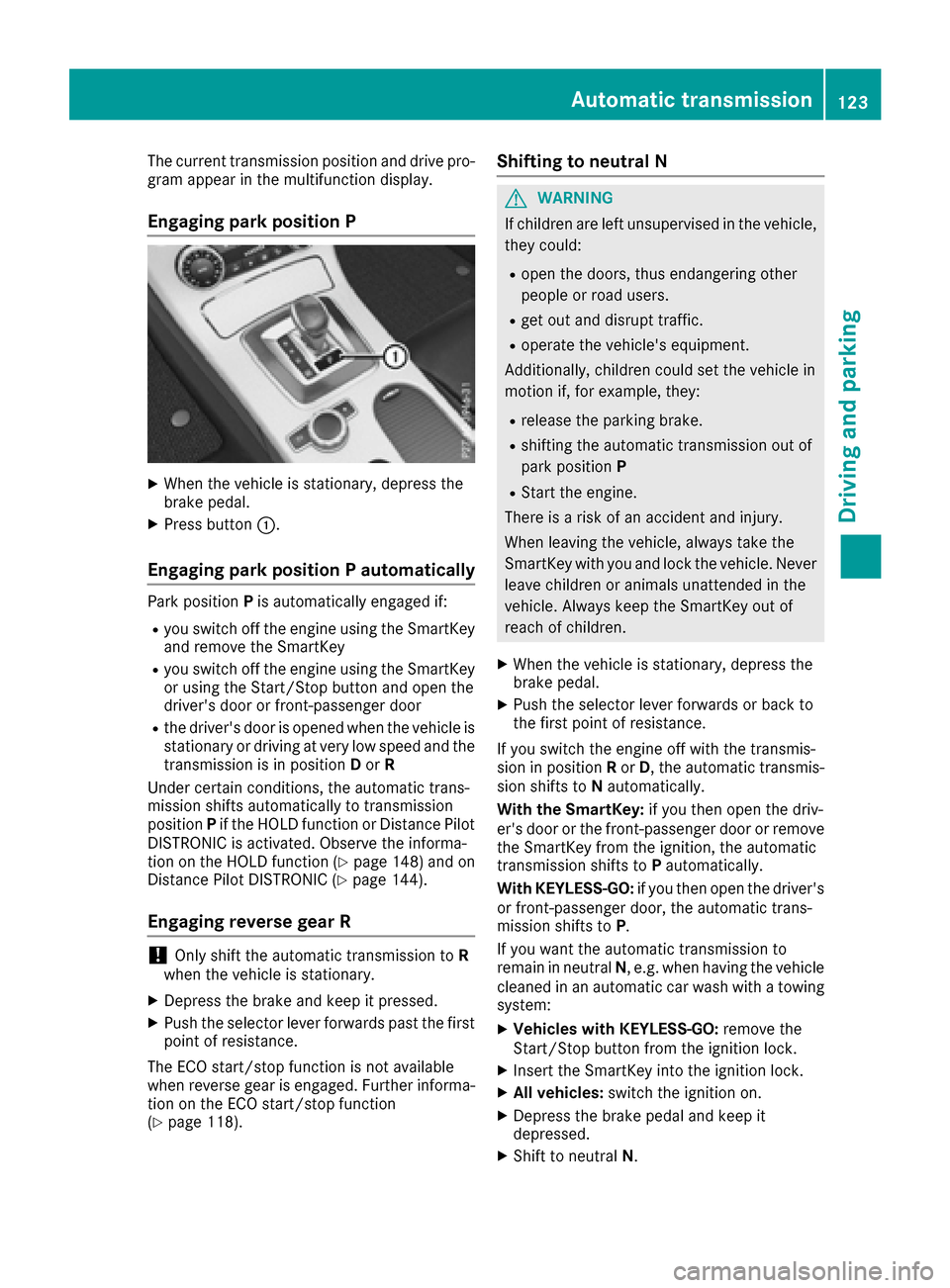
The current transmission position and drive pro-
gram appear in the multifunction display.
Engaging parkposition P
XWhen the vehicle is stationary, depress the
brake pedal.
XPress button:.
Engaging parkp ositionPautomatically
Park position Pis automatically engaged if:
Ryou switch off the engine using the SmartKey
and remove the SmartKey
Ryou switch off the engine using the SmartKey
or using the Start/Stop button and open the
driver's door or front-passenger door
Rthe driver's door is opened when the vehicle is
stationary or driving at very low speed and the
transmission is in position Dor R
Under certain conditions, the automatic trans-
mission shifts automatically to transmission
position Pif the HOLD function or Distance Pilot
DISTRONIC is activated. Observe the informa-
tion on the HOLD function (
Ypage 148) and on
Distance Pilot DISTRONIC (Ypage 144).
Engaging reverse gear R
!Only shift the automatic transmission to R
when the vehicle is stationary.
XDepress the brake and keep it pressed.
XPush the selector lever forwards past the first
point of resistance.
The ECO start/sto pfunction is not available
when reverse gear is engaged. Further informa-
tion on the ECO start/sto pfunction
(
Ypage 118).
Shifting to neutral N
GWARNING
If children are left unsupervised in the vehicle,
they could:
Ropen the doors, thus endangeringo ther
people or road users.
Rget out and disrupt traffic.
Roperate the vehicle's equipment.
Additionally, children could set the vehicle in
motion if, for example, they:
Rrelease the parking brake.
Rshiftin gthe automatic transmission out of
park position P
RStart the engine.
There is arisk of an accident and injury.
When leaving the vehicle, alwayst ake the
SmartKey with you and lock the vehicle. Never
leave children or animals unattended in the
vehicle. Always keep the SmartKey out of
reach of children.
XWhen the vehicle is stationary, depress the
brake pedal.
XPush the selector lever forwards or back to
the first point of resistance.
If you switch the engine off with the transmis-
sion in position Ror D,t he automatic transmis-
sion shifts to Nautomatically.
With the SmartKey: if you then open the driv-
er's door or the front-passenger door or remove
the SmartKey from the ignition, the automatic
transmission shifts to Pautomatically.
With KEYLESS-GO: if you then open the driver's
or front-passenger door, the automatic trans-
mission shifts to P.
If you want the automatic transmission to
remain in neutral N,e .g. when having the vehicle
cleaned in an automatic car wash with atowing
system:
XVehicles with KEYLESS-GO: remove the
Start/Stop button from the ignition lock.
XInsert the SmartKey into the ignition lock.
XAll vehicles: switch the ignition on.
XDepress the brake pedal and keep it
depressed.
XShift to neutral N.
Automatic transmission123
Driving and parking
Z
Page 132 of 294
!Overfilling the fuel tank could damage the
fuel system.
!Take care not to spill any fuel on painted
surfaces. You could otherwise damage the
paintwork.
!Use afilter when adding fuel from afuel can.
The fuel lines and/or the fuel injection system
could otherwise be blocked by particles from
the fuel can.
If you overfill the fuel tank, fuel could spray out
when the fuel pump nozzle is removed.
For further information on fuel and fuel quality
(
Ypage 285).
Refueling
General information
The fuel filler flap is unlocked or locked auto-
matically when you unlock or lock the vehicle
with the key or using KEYLESS-GO.
The position of the fuel filler cap is displayed
8 in the instrument cluster. The arrow next
to the filling pump indicates the side of the vehi-
cle.
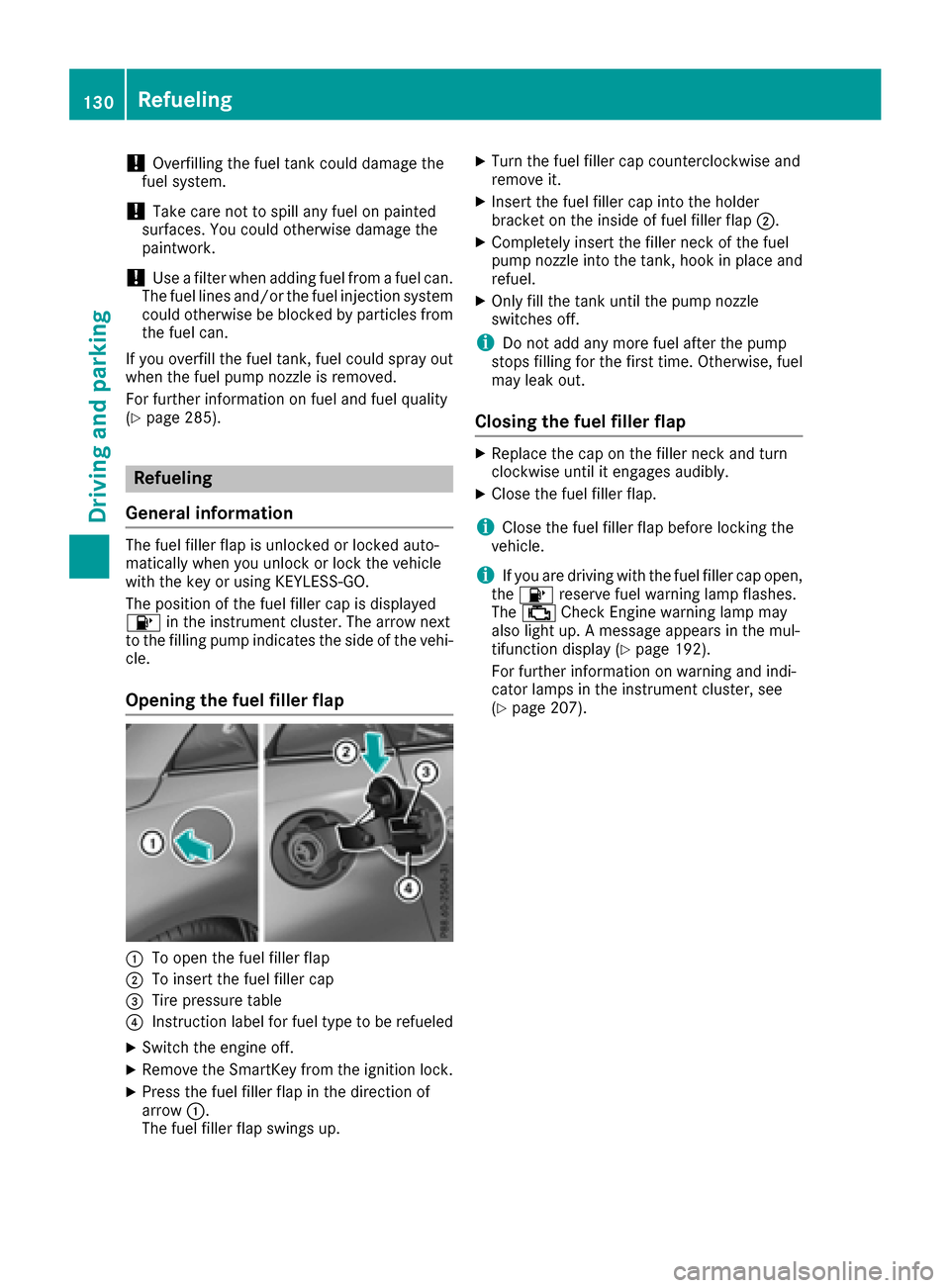
Opening the fuel filler flap
:To open the fuel filler flap
;To insert the fuel filler cap
=Tire pressure table
?Instruction label for fuel type to be refueled
XSwitch the engine off.
XRemove the SmartKey from the ignition lock.
XPress the fuel filler flap in the direction of
arrow :.
The fuel filler flap swings up.
XTurn the fuel filler cap counterclockwise and
remove it.
XInsert the fuel filler cap into the holder
bracket on the inside of fuel filler flap ;.
XCompletely insert the filler neck of the fuel
pump nozzle into the tank, hook in place and
refuel.
XOnly fill the tank until the pump nozzle
switches off.
iDo not add any more fuel after the pump
stops filling for the first time. Otherwise, fuel
may leak out.
Closing the fuel filler flap
XReplace the cap on the filler neck and turn
clockwise until it engages audibly.
XClose the fuel filler flap.
iClose the fuel filler flap before locking the
vehicle.
iIf you are driving with the fuel filler cap open,
the 8 reserve fuel warning lamp flashes.
The ; Check Engine warning lamp may
also light up. Amessage appears in the mul-
tifunction display(
Ypage 192).
For further information on warning and indi-
cator lamps in the instrument cluster, see
(
Ypage 207).
130Refueling
Driving and parking