keyless MERCEDES-BENZ SLC ROADSTER 2018 Owner's Manual
[x] Cancel search | Manufacturer: MERCEDES-BENZ, Model Year: 2018, Model line: SLC ROADSTER, Model: MERCEDES-BENZ SLC ROADSTER 2018Pages: 298, PDF Size: 5.26 MB
Page 10 of 298
Callingup( on-board computer) .... .178
Driving systems .............................1 93
Engine ............................................ 190
General notes ................................ 177
Hiding (on-board computer) ........... 178
KEYLESS-GO .................................. 202
Lights ............................................. 189
Safety systems .............................. 179
SmartKey ....................................... 201
Tires. .............................................. 196
Vehicle ...........................................1 98
DistanceP ilot DISTRONIC
Activating ....................................... 142
Calling up aspeed. ........................ 143
Cruise control lever ....................... 142
Displa yMessage ............................ 195
Displays in the instrument cluster .. 145
Driving tip s.................................... 146
Function/note s............................. 140
Important safety notes .................. 141
Setting the specified minimum
distance ......................................... 145
Stopping ........................................ 144
Storing aspeed .............................. 143
Switching off .................................. 146
Warning lamp ................................. 209
Distance recorder
see Odometer
see Tripo dometer
Distance warnin g(wa rning lamp) .... 209
Distance warnin gfunction
Function/note s................................ 58
Doors
Automati cloc king (on-board com-
puter) ............................................. 173
Automati cloc king (switch) ............... 71
Central locking/unlocking
(SmartKey). ...................................... 65
Control panel ................................... 37
Displa ymessage ............................ 200
Emergency locking ........................... 72
Emergency unlocking ....................... 72
Important safety notes .................... 70
Opening (fro minside )...................... 71
Overview .......................................... 70
Drinking and driving ......................... 134
Drive program
Automati ctransmissio n................. 125 Displa
y........................................... 122
SETUP (on-board computer,
Mercedes-AMGv ehicles) ............... 175
Driver's door
see Doors
Drivin gabroad
Mercedes-Benz Service ................. 238
Drivin gonfloo
de
droads .................. 138
Drivin gsafety system
Active Brake Assist .......................... 58
Drivin gsafety systems
ABS (Anti-lock Braking System) ....... 57
ADAPTIVEB RAKE............................. 63
Adaptive Brake Assist ...................... 59
Adaptive brake lights ....................... 60
BAS (Brake Assist System) .............. 57
Distance warning function ............... 58
EBD (electronicb rake force distri-
bution) ............................................. 63
ESP
®(Electronic Stability Pro-
gram) ............................................... 60
Important safety information ........... 56
Overview .......................................... 56
Drivin gsystem
AMG sports suspension
(Mercedes-AMGS LC 43) ............... 149
Drivin gsystems
Adaptive Damping System ............. 149
ATTENTIONA SSIST ........................ 158
Blind Spot Assist ............................ 159
Cruise control ................................ 138
Displa ymessage ............................ 193
DISTRONIC PLUS. .......................... 140
HOLD function ............................... 148
Lane Keeping Assist ...................... 161
Lane Tracking packag e.................. 159
Parking Guidance ........................... 152
PARKTRONIC ................................. 149
Rear vie wcamera .......................... 154
Drivin gtips
Automati ctransmission ................. 125
Brakes ........................................... 136
Break-in perio d.............................. 115
Distance Pilo tDISTRONIC ............. 146
Downhil lgradient ........................... 136
Drinking and driving ....................... 134
Driving in winter ............................. 138
Driving on floode droads ................ 138
8Index
Page 11 of 298
Driving on wetroads ...................... 138
Exhaus tcheck ............................... 134
Fuel ................................................ 134
Genera l.......................................... 134
Hydroplaning ................................. 138
Icy roa dsurfaces ........................... 138
Limited braking efficiency on sal-
ted roads ....................................... 137
Snow chains .................................. 262
Subjecting brakes to aloa d. .......... 136
We troa ds urface ........................... 136
DVD video
Operating (on-boar dcomputer) ..... 169
seea lsoD igita lOperator'sM an-
ua l.................................................. 211
DYNAMIC SELECT button .................. 121
E
EASY-ENTRY feature
Activating/deactivating ................. 174
Function/note s................................ 89
EASY-EXIT feature
Crash-responsiv e............................. 90
Function/note s................................ 89
Switching on/off. .......................... 174
EBD (electronicb rake forcedistri-
bution)
Displa ymessage ............................ 181
Function/note s................................ 63
EC Od isplay
Function/note s............................. 135
On-board compute r....................... 166
EC Os tart/stopf unction
Automati cengine start .................. 119
Automati cengine switch-off .......... 119
Deactivating/activating ................. 120
Genera linformation ....................... 119
Important safety notes .................. 119
Introduction ................................... 118
Electronic Stability Program
see ESP
®(Electronic Stability Program)
Emergency
Automati cmeasures afte ranacci-
dent ................................................. 53
Emergencyr elease
Driver's doo r.................................... 72
Trunk ............................................... 74 Vehicl
e............................................. 72
Emergencys pare wheel
Genera lnotes ................................ 286
Important safety notes .................. 285
Removing ....................................... 286
Storage location ............................ 286
Stowing .......................................... 286
Technical data ............................... 286
EmergencyT ensioningDevices
Activation ......................................... 50
Emission scontrol
Service and warranty information .... 24
Engine
Check Engine warning lamp ........... 207
Displa ymessage ............................ 190
ECO start/stop function ................ 118
Engine number ............................... 290
Irregula rrunning ............................ 120
Jump-starting ................................. 253
Starting problems .......................... 120
Starting the engine with the
SmartKey ....................................... 118
Starting with KEYLESS-GO ............. 118
Switching off .................................. 131
Tow-starting (vehicle )..................... 258
Engine electronics
Notes. ............................................ 288
Problem (malfunction) ................... 120
Engine oil
Adding ........................................... 235
Ad
ditives ........................................ 293
Checking the oill evel ..................... 234
Checking the oill evel using the
dipstick .......................................... 234
Displa ymessage ............................ 191
Filling capacity ............................... 293
Generaln otes ................................ 292
Notesa boutoilgrade s................... 292
Notesono illevel/consumption .... 234
Temperature (on-board computer,
Mercedes-AMGS LC 43) ................ 175
Entering an address
see also Digital Operator's Man-
ual.................................................. 211
ESP
®(ElectronicS tability Pro-
gram)
AMG menu (on-board computer) ... 175
Characteristics ................................. 61
Index9
Page 13 of 298
Google™ Local Searchsee alsoD igital Operator's Man-
ual. ................................................. 211
H
Hazard warning lamps
Displaym essage............................ 201
Switching on/off. ............................. 97
Hea dbags
Displa ymessage ............................ 186
Operation ......................................... 45
Hea dlevel heatin g(AIRSCARF) .......... 87
Hea drestraints
Adjusting ......................................... 86
see NECK-PROh eadrestraints
Headlamps
see Automati cheadlamp mode
Heating
see Climate control
Hig hbeamf lasher ............................... 96
High-beam headlamps
Displa ymessage ............................ 189
Replacing bulb s............................. 100
Switching on/off. ............................. 96
Hil lstart assist .................................. 118
HOLDf unction
Activating ....................................... 148
Activation conditions ..................... 148
Deactivating ................................... 148
Displa ymessage ............................ 193
Generaln otes ................................ 148
Home address
see also Digital Operator's Man-
ual.................................................. 211
Hood
Closing ........................................... 234
Displa ymessage ............................ 200
Important safety notes .................. 233
Opening ......................................... 233
Horn ...................................................... 31
Hydroplaning ..................................... 138
I
Ignitionlock
see Key positions
Immobilizer .......................................... 63 Indicator lamps
see Warning and indicator lamps
Indicators
see Turn signals
Instrument cluster
Overview .......................................... 32
Instrument clusterl ighting .............. 163
Interior lighting
Automati ccontrol ............................ 99
Delayed switch-off (on-board
computer) ...................................... 173
Overview .......................................... 99
Reading lamp ................................... 99
Setting the brightness of the
ambient lighting (on-board com-
puter) ............................................. 172
Setting the color of the ambient
lighting (on-board computer) ......... 173
iPod
®
see also Digital Operator's Man-
ua l.................................................. 211
J
Jack
Storage location ............................ 245
Using ............................................. 281
Jump starting (engine) ...................... 253
K
Keyp ositions
KEYLESS-GO .................................. 116
SmartKey ....................................... 116
KEYLESS-GO
Activating ......................................... 65
Convenience closing feature ............ 76
Deactivation ..................................... 65
Displa ymessage ............................ 202
Locking ............................................ 65
Removing the Start/Sto pbutton ... 117
Start/Sto pbutton .......................... 116
Starting the engine ........................ 118
Unlocking ......................................... 65
Kickdown
Driving tip s.................................... 125
Manua lgearshifting ....................... 128
Knee bag .............................................. 44
Index11
Page 40 of 298
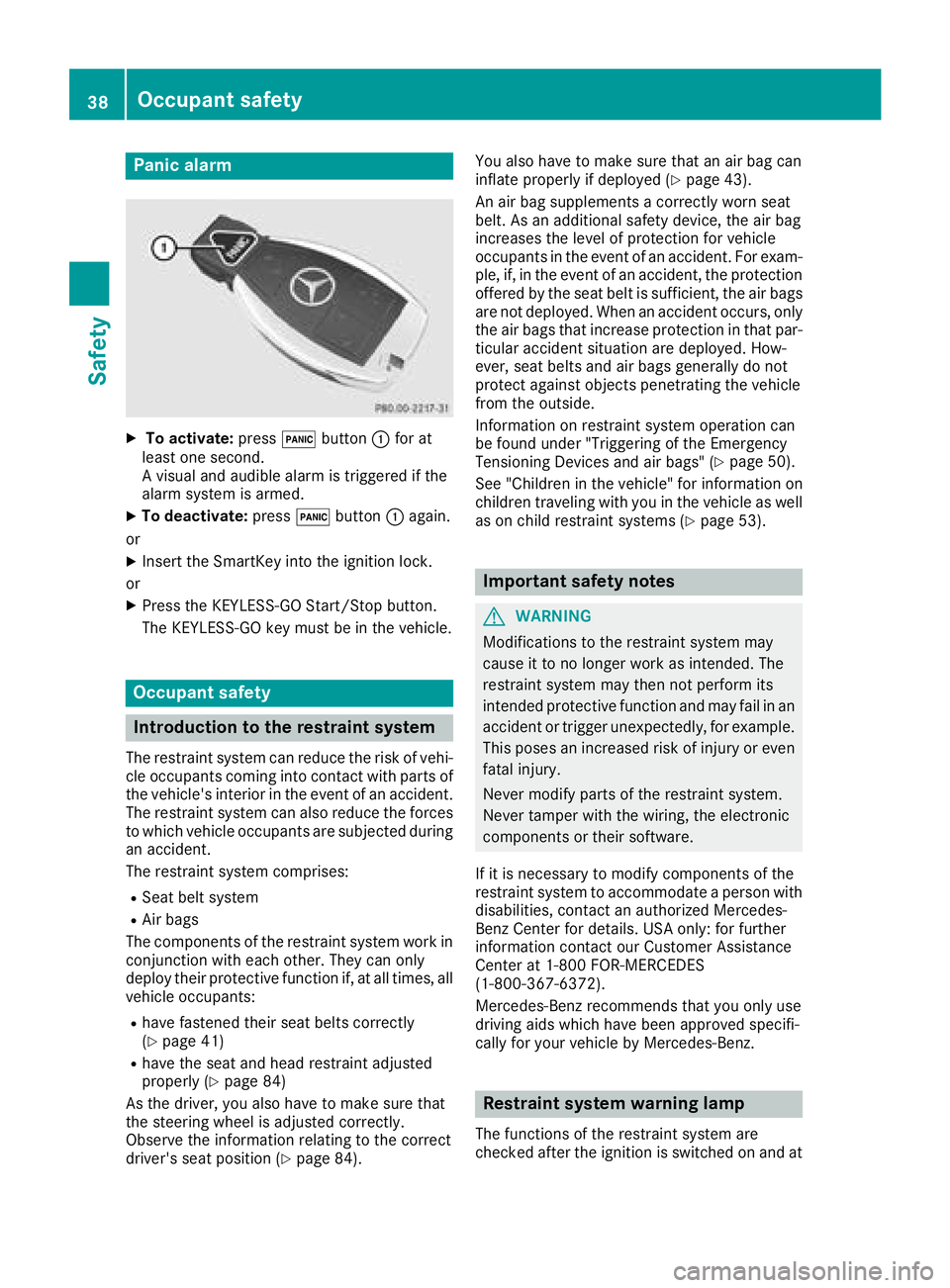
Panic alarm
XTo activate:press!button :for at
least one second.
Av isual and audible alarm is triggered if the
alarm system is armed.
XTo deactivate: press!button :again.
or
XInsert the SmartKey into the ignition lock.
or
XPress the KEYLESS-GO Start/Stop button.
The KEYLESS-GO key must be in the vehicle.
Occupant safety
Introduction to the restraint system
The restraint system can reduce the risk of vehi- cle occupants coming into contact with parts of
the vehicle's interior in the event of an accident.
The restraint system can also reduce the forces to which vehicle occupants are subjected during
an accident.
The restraint system comprises:
RSeat belt system
RAir bags
The components of the restraint system work in
conjunction with each other. They can only
deploy their protective function if, at all times, all vehicle occupants:
Rhave fastened their seat belts correctly
(Ypage 41)
Rhave the seat and head restraint adjusted
properly (Ypage 84)
As the driver, you also have to make sure that
the steering wheel is adjusted correctly.
Observe the information relating to the correct
driver's seat position (
Ypage 84). You also have to make sure that an air bag can
inflate properly if deployed(
Ypage 43).
An air bag supplements acorrectly worn seat
belt. As an additional safety device, the air bag
increases the level of protection for vehicle
occupants in the event of an accident. For exam-
ple, if, in the event of an accident, the protection
offered by the seat belt is sufficient, the air bags are not deployed. When an accident occurs, only
the air bags that increase protection in that par-ticular accident situation are deployed. How-
ever, seat belts and air bags generally do not
protect against object spenetrating the vehicle
from the outside.
Information on restraint system operation can
be found under "Triggering of the Emergency
Tensioning Devices and air bags" (
Ypage 50).
See "Children in the vehicle" for information on
children traveling with you in the vehicle as well
as on child restraint systems (
Ypage 53).
Important safety notes
GWARNING
Modifications to the restraint system may
cause it to no longer work as intended. The
restraint system may then not perform its
intended protective function and may fail in an
accident or trigger unexpectedly, for example.
This poses an increased risk of injury or even fatal injury.
Never modify parts of the restraint system.
Never tamper with the wiring, the electronic
components or their software.
If it is necessary to modify components of the
restraint system to accommodate aperson with
disabilities, contact an authorized Mercedes-
Benz Center for details. USA only: for further
information contact our Customer Assistance
Center at 1-800F OR-MERCEDES
(1‑800‑367‑6372).
Mercedes-Benz recommends that you only use
driving aids which have been approved specifi-
cally for your vehicle by Mercedes-Benz.
Restraint system warning lamp
The functions of the restraint system are
checked after the ignition is switched on and at
38Occupant safety
Safety
Page 65 of 298
XTo deactivate ESP®:press button :until
the å ESP®OFF warning lamp lights up in
the instrument cluster.
The ÷ OFF
message appears in the multi-
functio ndisplay.
XTo activate ESP®:briefl ypress button :.
The å ESP®OFF warning lamp in the
instrument cluster goe sout.T he ÷ ESP®
ONmessage appears in the multifunctio ndis-
play.
Characteristic sofactivatedS PORT han-
dling mode
If SPOR Thandling modeisa ctivatedand one or
more wheels start to spin, the ÷ESP®warn-
ing lamp in the instrument cluster flashes. ESP®
onlys tabilizes the vehicl etoalimite dd egree.
Whe nSPOR Thandling modeisa ctivated:
RESP®onlyimprovesd riving stability to alim i-
ted degree
Rtractio ncontroliss tilla ctivated
Rengine torque is no longer limite dand the
drive wheels are able to spin
RESP®stil lprovides support when yo ubrake
firmly
Characteristic swhenE SP®is deactivated
If ESP®is deactivate dand one or more wheels
start to spin, the ÷ESP®warning lamp in the
instrument cluster flashes. In such situations,
ESP
®will not stabilize the vehicle.
If yo udeactivate ESP®:
RESP®no longer improvesd riving stability
Rengine torque is no longer limite dand the
drive wheels are able to spin
Rtractio ncontroliss tilla ctivated
RActive Brake Assist is no longer available ;nor
is it activate difyoubrake firmly with assis-
tance from ESP
®
RPRE-SAFE®is no longer available ,nor is it
activate difyoubrake firmly and ESP®inter-
venes
RESP®stil lprovides support when yo ubrake
fi
rmly
EBD (electronicb rake forcedistribu-
tion)
General information
EBD monitors and controls the brake pressure
on the rearw heelstoi mprove driving stability
whil ebraking.
Important safety notes
iObserve the "Important safety notes "sec-
tio nfor driving safety systems(Ypage 56).
GWARNING
If EBD is malfunctioning ,the rearw heelscan
lock, e.g .under ful lbraking .Thisi ncreases the
ris kofs kidding and an accident.
Yo us houl dtherefore adap tyou rd riving style
to the different handling characteristics. Have
the brake system checked at aquali fied spe-
cialist workshop.
Observe informatio nregarding indicator and
warning lamps (
Ypage 204 )aswellasd isplay
messages (Ypage 181).
ADAPTIVE BRAKE
i
Observe the "Important safety notes "sec-
tio n(Ypage 56).
ADAPTIVE BRAK Eenhances braking safety and
offers increased braking comfort. In additio nto
the braking function, ADAPTIVE BRAK Ealsoh as
the HOLD functio n(
Ypage 148)and hill start
assist (Ypage 118).
Protectio nagainstt heft
Immobilizer
XTo activate with the SmartKey: remove the
SmartKey from the ignition lock.
XTo activate with KEYLESS-GO: switch the
ignition off and open the driver'sd oor.
XTo deactivate: switch on the ignition.
The immobilize rprevents your vehicl efrom
being started withou tthe correct SmartKey.
Whe nleaving the vehicle, always take the
SmartKey with yo uand lock the vehicle. The
Protectiona gainsttheft63
Safety
Z
Page 66 of 298
engine can be started by anyone withavalid
SmartKey that is left inside the vehicle.
iThe immobilizer is alwaysd eactivated when
you start the engine.
In the event that the engine cannot be started
(yet the vehicle's batter yischarged), the sys-
tem is not operational. Contac tanauthorized
Mercedes-Benz Center or call
1-800-FOR-MERCedes (in the USA)o r
1-800-387-0100 (in Canada).
ATA (anti-theft alarms ystem)
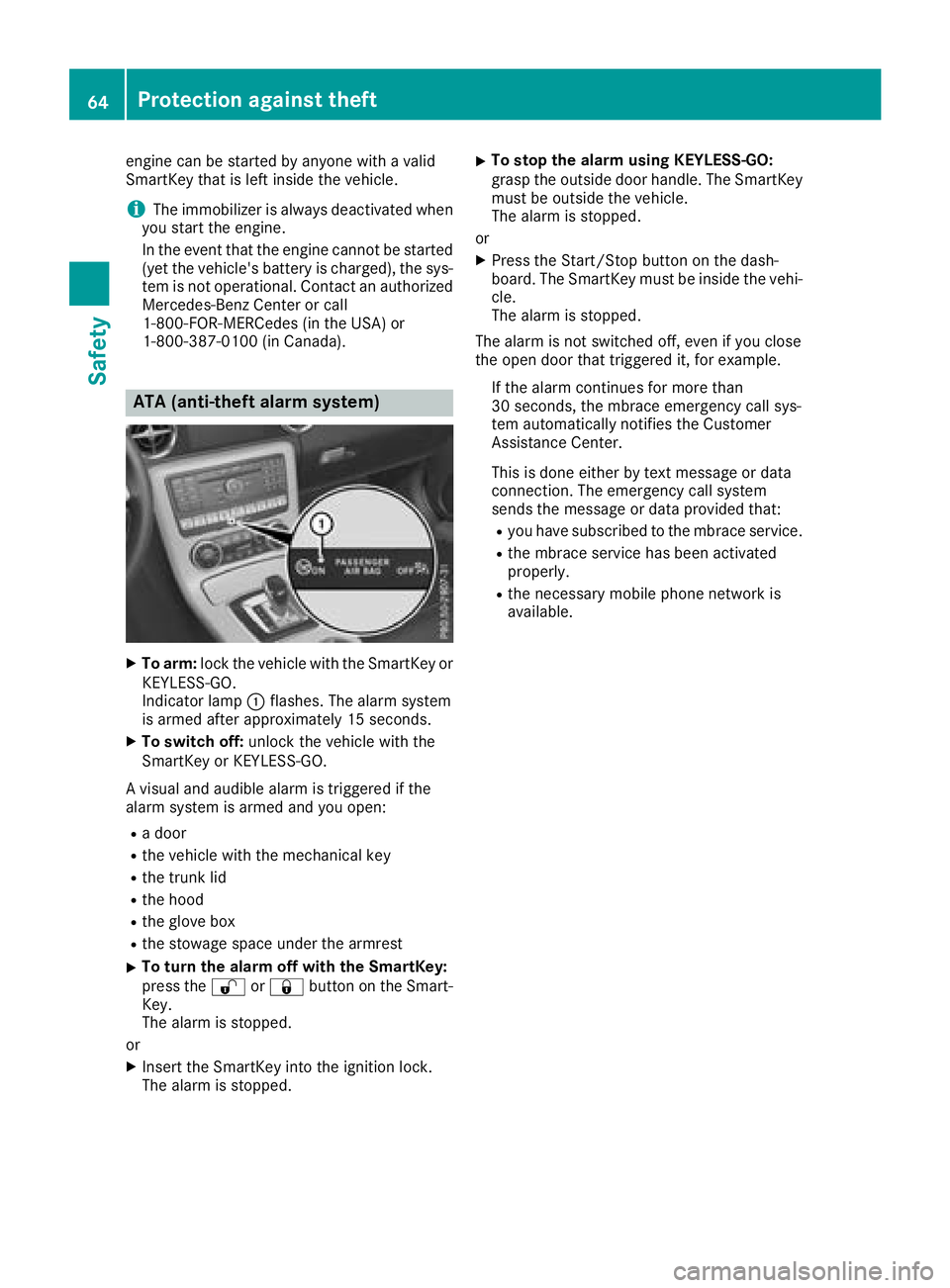
XTo arm:lock the vehicle with the SmartKey or
KEYLESS-GO.
Indicator lamp :flashes. The alarm system
is armed after approximately 15 seconds.
XTo switch off: unlock the vehicle with the
SmartKey or KEYLESS-GO.
Av isual and audible alarm is triggered if the
alarm system is armed and you open:
Rad oor
Rthe vehicle with the mechanical key
Rthe trun klid
Rthe hood
Rthe glove box
Rthe stowage space under the armrest
XTo tur nthe alarmo ff with the SmartKey:
press the %or& button on the Smart-
Key.
The alarm is stopped.
or
XInsertt he SmartKey into the ignition lock.
The alarm is stopped.
XTo stop the alarmu sing KEYLESS-GO:
grasp the outside door handle. The SmartKey
must be outside the vehicle.
The alarm is stopped.
or
XPress the Start/Stop button on the dash-
board. The SmartKey must be inside the vehi-
cle.
The alarm is stopped.
The alarm is not switched off, even if you close
the open door that triggered it, for example.
If the alarm continues for more than
30 seconds, the mbrace emergency call sys-
tem automatically notifies the Customer
Assistance Center.
This is done either by tex tmessage or data
connection. The emergency call system
sends the message or data provided that:
Ryou have subscribed to the mbrace service.
Rthe mbrace serviceh as been activated
properly.
Rthe necessary mobile phone network is
available.
64Protection against theft
Safety
Page 67 of 298
SmartKey
Important safety notes
GWARNING
If children are left unsupervised in the vehicle,
they could:
Roperate the vehicle's equipment.
Additionally, children could set the vehicle in
motion if, for example, they:
Rrelease the parking brake
Rshift the automatic transmission out of park
position P
Rstart the engine
There is arisk of an accident and injury.
Never leave children or animals unattended in
the vehicle.
When leaving the vehicle, always take the
SmartKey with you and lock the vehicle. This
also appliestom obile phones if the "Digital
Car Key in smartphone" function is activated
via the Mercedes me connect web app.
GWARNING
If you attach heavy or large object stothe
SmartKey, the SmartKey could be uninten-
tionally turned in the ignition lock. This could
cause the engine to be switched off. There is a risk of an accident.
Do not attach any heavy or large object stothe
SmartKey. Remove any bulky key rings before
insertingt he SmartKey into the ignition lock.
!Keep the SmartKey away from stron gmag-
netic fields. Otherwise, the remote control
function could be affected.
Strong magnetic fields can occur in the vicin-
ity of powerful electrical installations.
Do not keep the SmartKey:
Rwith electronic devices, e.g. amobile phone
or another SmartKey
Rwith metallic objects, e.g. coins or metal foil
Rinside metallic objects, e.g. ametal case
This can affect the functionality of the Smart- Key.
SmartKey functions
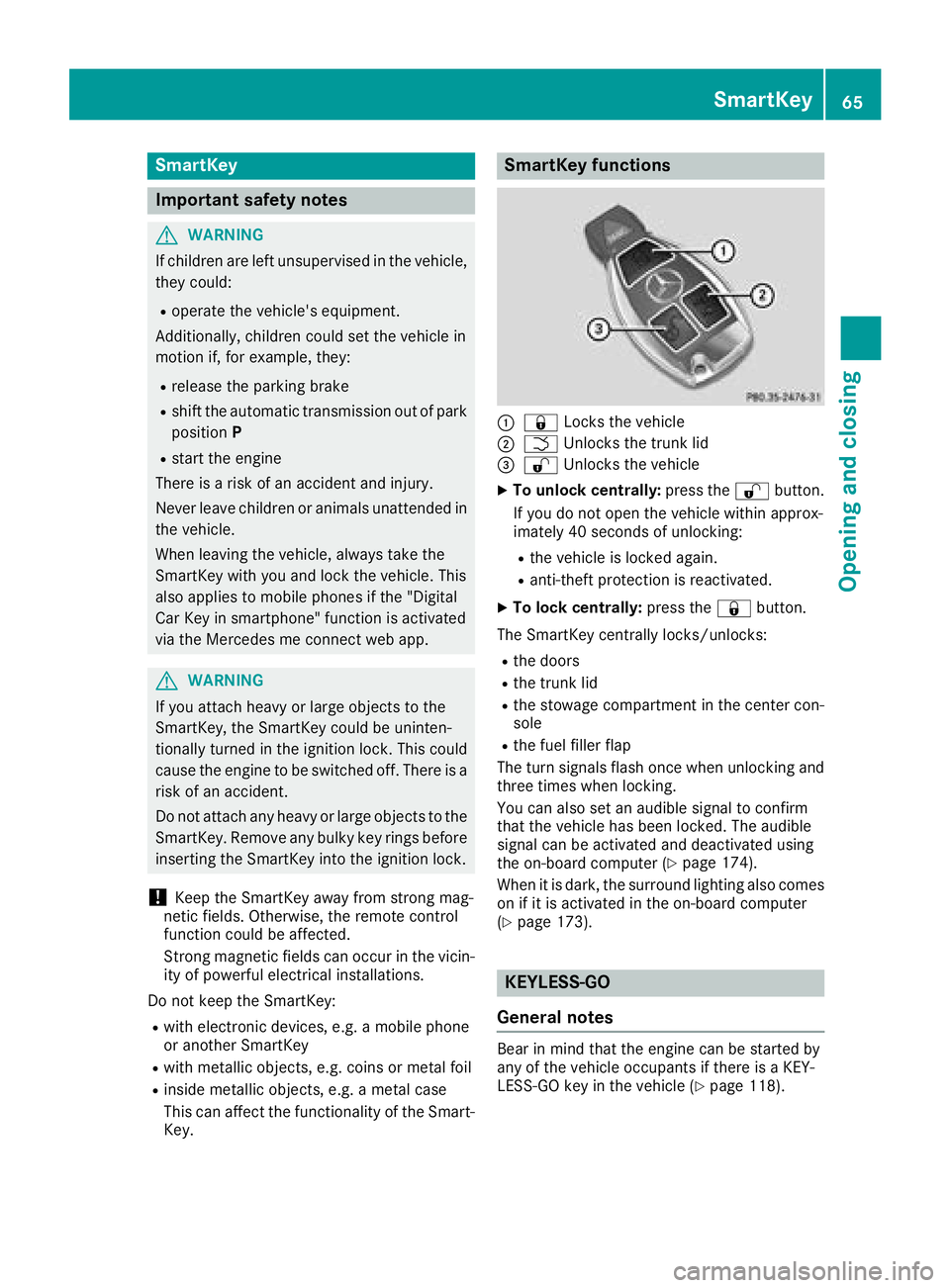
:& Locks the vehicle
;FUnlockst he trunk lid
=%Unlockst he vehicle
XTo unlock centrally: press the%button.
If you do not open the vehicle within approx-
imately 40 seconds of unlocking:
Rthe vehicle is locked again.
Ranti-theft protection is reactivated.
XTo lock centrally: press the&button.
The SmartKey centrally locks/unlocks:
Rthe doors
Rthe trunk lid
Rthe stowage compartmentint he center con-
sole
Rthe fuel filler flap
The turn signals flash once when unlocking and
three times when locking.
You can also set an audible signal to confirm
that the vehicle has been locked. The audible
signal can be activated and deactivated using
the on-board computer (
Ypage 174).
When it is dark, the surround lighting also comes
on if it is activated in the on-board computer
(
Ypage 173).
KEYLESS-GO
General notes
Bear in mind that the engine can be started by
any of the vehicle occupants if there is aKEY-
LESS-GO key in the vehicle (
Ypage 118).
SmartKey65
Opening and closing
Z
Page 68 of 298
Locking/unlockingcentrally
You can start,lockorunlock thevehicle using
KEYLESS-GO .Todothis, you onl yneedc arry the
SmartKey with you. You can combine th efunc-
tions of KEYLESS-GO with those of aconven-
tional SmartKey. Unlockt hevehicle by using
KEYLESS-GO ,for instance, and lockitu singthe
& button on th eSmartKey.
The driver' sdoor and th edoor at whicht hehan-
dle is used, must bothbec losed. The SmartKey
must be outside th evehicle .When locking or
unlocking with KEYLESS-GO ,the distance
between th ekey and th ecorresponding door
handle must not be greater than 3ft(1m).
Ac heck whichp eriodicallyestablishesar adio
connectio nbetween th evehicle and th eSmart-
Key determine swhether avalid SmartKey is in
th ev ehicle .This occurs, for example:
Rwhen starting th eengine
Rwhile driving
Rwhen th eexternal door handles are touched
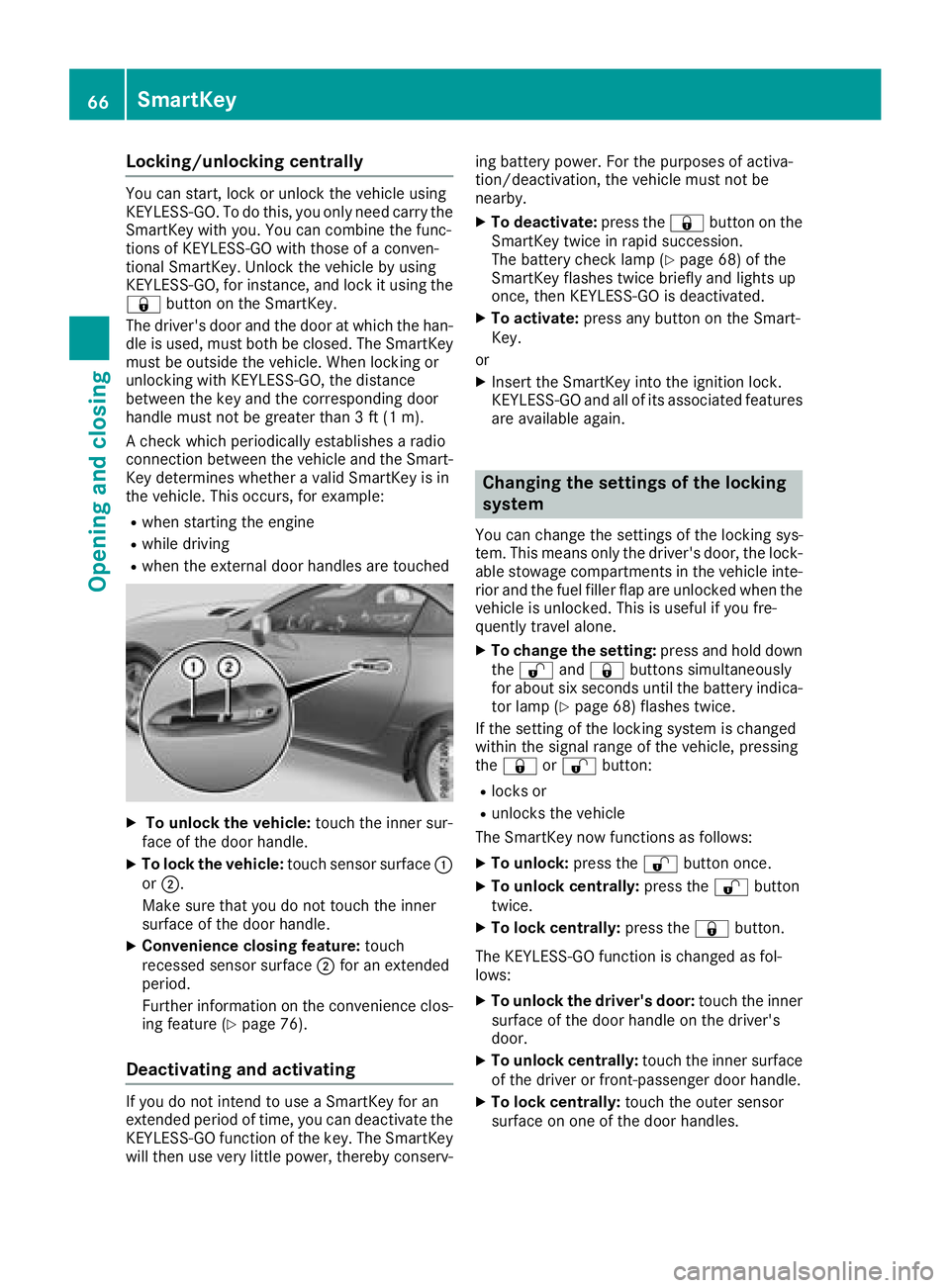
XTo unlock th evehicle: touch th einner sur-
fac eoft hedoor handle.
XTo lock th evehicle: touch sensor surface :
or ;.
Makes ure that you do not touch th einner
surface of th edoor handle.
XConvenience closing feature: touch
recesseds ensor surface ;for an extended
period.
Further informatio nontheconvenience clos-
ing feature (
Ypage 76).
Deactivating and activating
If you do not intend to use aSmartKey for an
extended perio doftime, you can deactivate the
KEYLESS-GO function of th ekey. The SmartKey
will then use veryl ittle power,therebyc onserv- ing battery power.F
or thepurposes of activa-
tion/deactivation, th evehicle must not be
nearby.
XTo deactivate: pressthe& button on the
SmartKey twic einrapid succession.
The battery check lamp (
Ypage 68 )ofthe
SmartKey flashes twic ebriefly and lightsu p
once, then KEYLESS-GO is deactivated.
XTo activate: pressany button on th eSmart-
Key.
or
XInsertt heSmartKey int othe ignitio nlock.
KEYLESS-GO and all of its associate dfeatures
are available again.
Changing th esettings of th elocking
system
You can change th esettings of th elockin gsys-
tem .This meanso nlyt he driver' sdoor,t helock-
able stowage compartments in th evehicle inte-
rior and th efuel filler flap are unlocked when the
vehicle is unlocked. This is useful if you fre-
quently travel alone.
XTo change th esetting: pressand hold down
the % and& buttons simultaneously
for about six second suntil th ebattery indica-
to rlamp (
Ypage 68 )flashes twice.
If th esettin goft helockin gsystem is changed
within th esignal range of th evehicle ,pressing
the & or% button:
Rlocks or
Runlock sthe vehicle
The SmartKey now functionsasf ollows:
XTo unlock:pressthe % button once.
XTo unlock centrally: pressthe % button
twice.
XTo lock centrally: pressthe& button.
The KEYLESS-GO function is changed as fol-
lows:
XTo unlock th edriver's door: touch theinner
surface of th edoor handle on th edriver's
door.
XTo unlock centrally: touch theinner surface
of th edriver or front-passenger door handle.
XTo lock centrally: touch theouter sensor
surface on one of th edoor handles.
66SmartKey
Opening and closing
Page 69 of 298
XTo restore the factory settings:press and
hol dd ownthe % and& buttons simul-
taneouslyf or approximatelys ixseconds until
the battery check lamp (
Ypage 68 )flashes
twice.
Mechanical key
General notes
If the vehicl ecan no longer be locked or
unlockedw itht he SmartKey or with KEYLESS-
GO ,use the mechanical key.
If yo uusethe mechanical key to unlock and
open the driver's door or the trunk lid, the anti-
thef talarm system will be triggered .Switch off
the alarm (
Ypage 64).
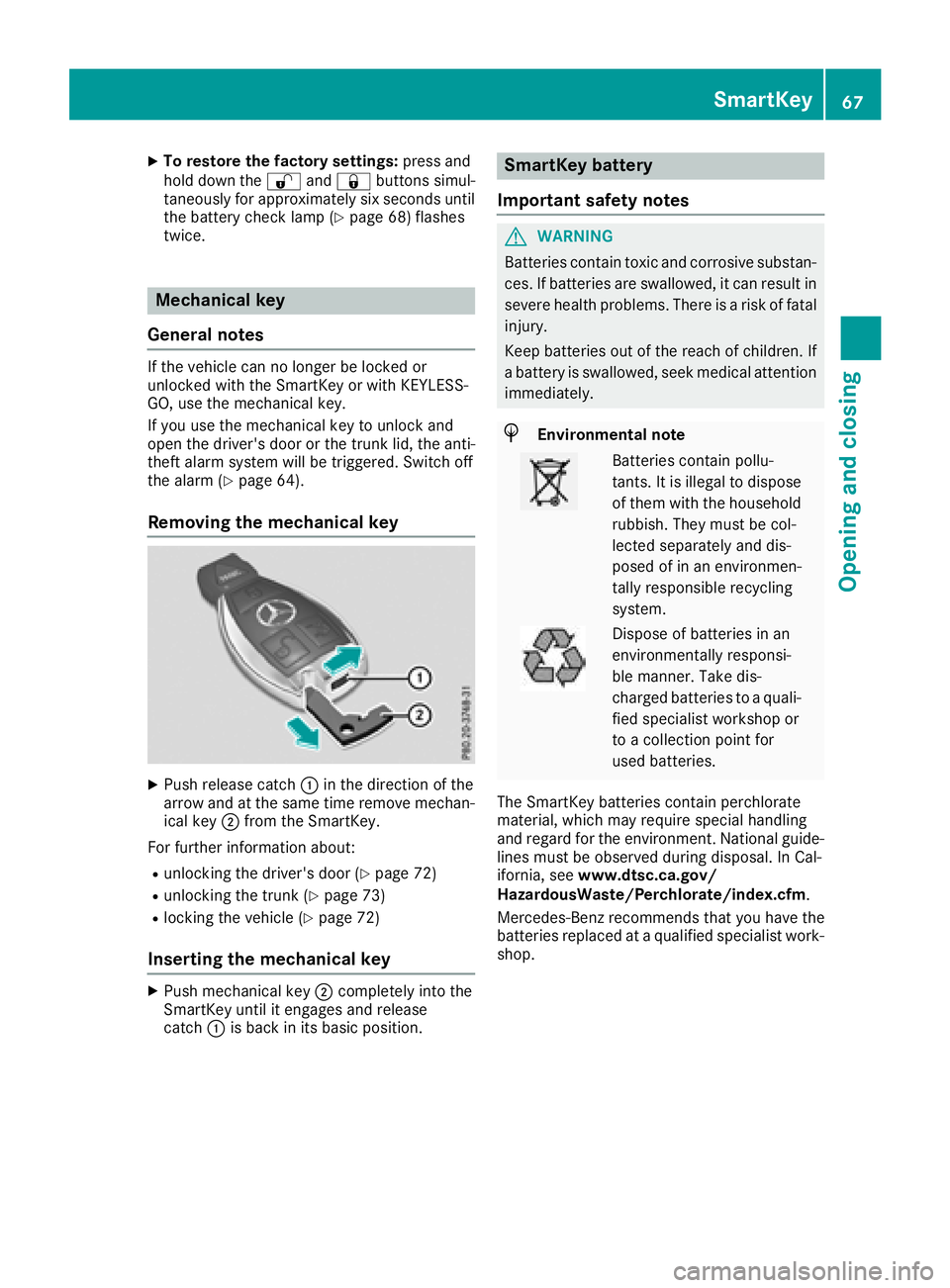
Removing the mechanical key
XPush release catch :in the direction of the
arrow and at the same time remove mechan- ica lkey ; from the SmartKey.
For further informatio nabout :
Runlocking the driver's door (Ypage 72)
Runlocking the trunk (Ypage 73)
Rlocking the vehicl e(Ypage 72)
Insertingthe mechanical key
XPush mechanical key ;completelyi nto the
SmartKey unti litengages and release
catch :is back in its basicp osition.
SmartKey battery
Important safety notes
GWARNING
Batterie scontain toxica nd corrosive substan-
ces. If batteries are swallowed, it can resul tin
severe health problems .There is ariskoff atal
injury.
Kee pbatteries outoft he reach of children. If
ab attery is swallowed, see kmedica lattention
immediately.
HEnvironmental note
Batterie scontain pollu-
tants .Itisi llegalto dispose
of them with the household
rubbish. The ymustbec ol-
lected separatelya nd dis-
posed of in an environmen-
tally responsibl erecycling
system.
Dispose of batteries in an
environmentally responsi-
bl em anner. Take dis-
chargedb atteries to aquali -
fie ds pecialist workshop or
to ac ollectio npoint for
used batteries.
The SmartKey batteries contain perchlorate
material ,which mayr equire specia lhan dling
and regard for the environment. National guide-
lines must be observed during disposal. In Cal-
ifornia ,see www.dtsc.ca.gov/
HazardousWaste/Perchlorate/index.cfm .
Mercedes-Benz recommends thaty ouhave the
batteries replaced at aquali fied specialist work-
shop.
SmartKey67
Opening and closing
Z
Page 71 of 298
Problems with the SmartKey
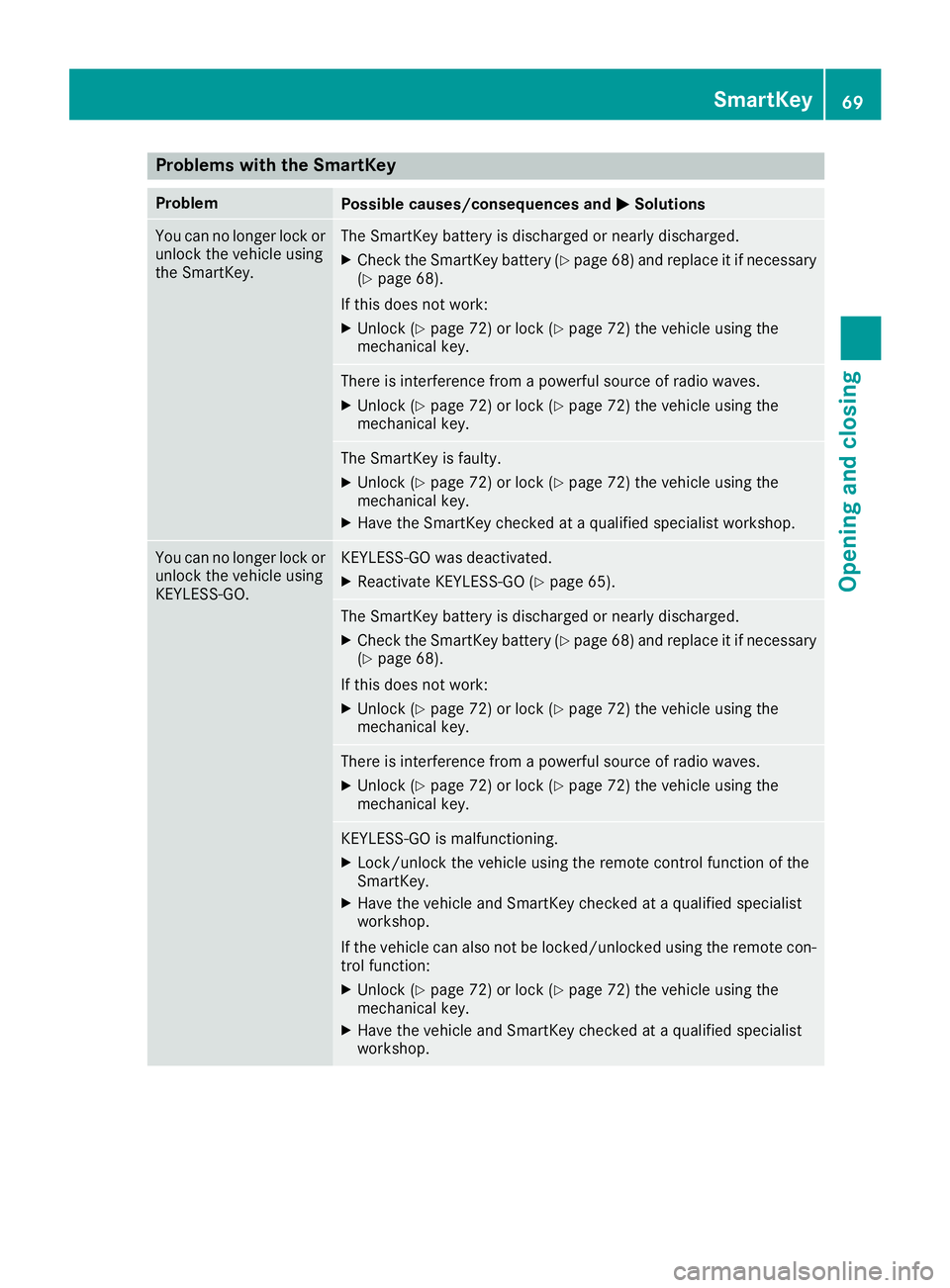
ProblemPossible causes/consequences andMSolutions
You can no longer lock or
unlock the vehicle using
the SmartKey.The SmartKey battery is discharged or nearly discharged.
XCheck the SmartKey battery (Ypage 68) and replace it if necessary
(Ypage 68).
If this does not work:
XUnlock (Ypage 72) or lock (Ypage 72) the vehicle using the
mechanical key.
There is interference from apowerful source of radio waves.
XUnlock (Ypage 72) or lock (Ypage 72) the vehicle using the
mechanical key.
The SmartKey is faulty.
XUnlock (Ypage 72) or lock (Ypage 72) the vehicle using the
mechanical key.
XHave the SmartKey checked at aqualified specialist workshop.
You can no longer lock or
unlock the vehicle using
KEYLESS-GO.KEYLESS-GO was deactivated.
XReactivate KEYLESS-GO (Ypage 65).
The SmartKey battery is discharged or nearly discharged.
XCheck the SmartKey battery (Ypage 68) and replace it if necessary
(Ypage 68).
If this does not work:
XUnlock (Ypage 72) or lock (Ypage 72) the vehicle using the
mechanical key.
There is interference from apowerful source of radio waves.
XUnlock (Ypage 72) or lock (Ypage 72) the vehicle using the
mechanical key.
KEYLESS-GO is malfunctioning.
XLock/unlock the vehicle using the remote control function of the
SmartKey.
XHave the vehicle and SmartKey checked at aqualified specialist
workshop.
If the vehicle can also not be locked/unlocked using the remote con-
trol function:
XUnlock (Ypage 72) or lock (Ypage 72) the vehicle using the
mechanical key.
XHave the vehicle and SmartKey checked at aqualified specialist
workshop.
SmartKey69
Opening and closing
Z