CD change MERCEDES-BENZ SLK-Class 2012 R172 Comand Manual
[x] Cancel search | Manufacturer: MERCEDES-BENZ, Model Year: 2012, Model line: SLK-Class, Model: MERCEDES-BENZ SLK-Class 2012 R172Pages: 234, PDF Size: 6.74 MB
Page 207 of 234

i
The symbol foratorn adic storm isalso
valid foracyclone (mesocyclone). Precipita
tiontype Color
scale Rain Seven
colorlevels
from light(light
green) toheavy (red) Mixed Light
(light violet) to
heavy (violet) Snow Light
(light
turquoise) toheavy
(turquoise) Time
stamp The
time stamp shows whentheweather data
was created bythe weather station.
X Display themenu onthe weather map
(Y page 200).
X Select Layers by
turnin gcVd the
COMAND controller andpress Wto
conf irm.
X Select Timestamp and
press Wto
conf irm. The
time stamps correspon dto the time at
the vehicle's currentposition. Thechange
over from summer timetostandard timeis
performed automatically.
Changing tothe informa tionchart X
Display themenu onthe weather map
(Y page 200).
X Select Display Weather and
press Wto
conf irm. SIRIUS
Weather
205Weath erservices
Page 216 of 234
i
The headphones' volumesettingdoes not
affect themain loudspeakers. Adjust
ingthe sound settings
You canselect thesound settings inthe audio
CD/D VD/MP3, video DVDandAUX modes.
X Switc hon anoperating mode(e.g.audio
CD mode) (Ypage 217).
X Select Treble or
Bass using
the :=; buttonson the remote
cont roland press the9button toconf irm.
An adjustmen tscal eap pea rs.
X Sel ect asetti ngusing the 9:
bu ttons andpressthe 9button toconfi rm. Multi
pleusers
Simul taneoususeofthe rear-
co mpartment discdrive The
two rear-comp artmentscree nscan be
ope rate dalmost entirelyind epe ndentl yfrom
one another. However,there canbeaconfl ict
in some menusif the two scree nsare used
sim ultaneo usly.
If the rear-comp artmentdisc drive isbei ng
us ed for both scree nssim ultaneo usly,
sel ecting certainmenu sor setti ngsonone of
the scree nsalso affe ctsthe othe rscree n.
The followi ng functi onsaffectboth scree ns:
R cha nging play ba ck opti ons
R sel ecting atrack (fromatra cklist or folder)
R us ing the play ,pa useand stopfu nctio ns
R fast for wa rding/r ewind ing orscro lling
R cal ling up the DVD menu andnavigati ng
wi thi nit
R setting thelangua ge,subtitles andcamera
angle
R calling upinteract iveDVD content The
followi ngfunction saffect onlyone
screen:
R audi oand video function sas well aspicture
settings
R switching betweenfullscreen andthe
menu
Switching betweenoperating modes When
youexit anoperating mode(e.g.audio
CD mode), thecurrent settingissaved. Ifyou
call upthis operating modeagainlate r,th ere
are two poss ibilities:
R theoper atingmod ehas been chang edon
th eot her scree n.
R theoper atingmod ehas notb een changed.
In the first case, theoperatin gmode appears
as itis on the other screen .
In the secon dcase, thesett ingappears onthe
screen asitwas when youlast exitedthe
operatin gmode. Pictur
esettings
Overview You
canselect thesesettings invideo DVD
and AUX mode. Instruct ions forAUX mode
are detailed later(Y page 228).
Adju sting thebright ness,contra stand
color X
Switc hon video DVDmode (Ypage 221).
X To show themenu: pressthe9button
on the remot econ trol.
or
X Select (Ypage 188)Menu while
the
navigation menuisshown andpress the
9 button tocon firm.
X Select DVD-Vid eo using
the :=; buttonsand press the
9 button tocon firm. 214
Ba
sic functionsRear SeatEntert ainment System
Page 222 of 234
X
To paus eplay back:sel ect Ë using
the :=; buttons onthe rem ote
contro land pressthe 9button toconfi rm.
The Ë displ aycha nge sto Ì.
X To conti nue playback:sel ect Ì and
pre ssthe 9button toconfi rm.
The Ì displ aycha nge sto Ë. Sto
pfuncti on
This function isonly available inaudio DVD
mode.
X To inte rrupt playbac k:sele ctÉ using
the :=; buttonsonthe remote
control andpress the9button toconfirm.
The Ë displaychange sto Ì.
X To continue playbac k:sele ctÌ and
press the9button toconfirm.
Pla yback continues fromthepointwhe reit
wa sinterrup ted.
X To stop playbac k:whi lepla yback is
interrup ted,selectÉ againand press
the 9button toconfirm.
Pla yback stops andreturns tothe
begi nning ofthe DVD. Ì ishigh lighted.
X To restart playbac k:sele ctÌ and
press the9button toconfirm.
Pla yback starts fromthebegi nning ofthe
DVD. Settin
gthe audio format
Further informationonaudio formats is
ava ilable inthe "Aud io"section
(Y pag e163).
X Select DVD-A usi
ng the :=;
buttons onthe remote controlle rand pre ss
9 toconfi rm.
X Sel ect Group us
ing the 9: buttons
and pressthe 9button toconfi rm.
The list of availabl eau dioform atsappe ars.
The #dotind icates the form atcur rentl y
sel ecte d. X
Sel ect anaudio form atusing the
9: buttons andpressthe 9button
to confi rm.
X To exitthe men u:pre ssthe =
or ; button. Pl
ayb acko ptio ns
Fur ther informa tion onplay ba ck opti ons is
ava ilab lein the "Audio" secti on
(Y page 163) .
X Sel ect CD ,
DVD -A or
MP3 us
ing
the :=; buttons onthe remo te
control andpressthe 9button toconfi rm.
The options list appe ars .The # dot
indicates theoption current lyselected.
X Select Normal Track Sequence ,
Random Tracks or
Random Folder using
the
9: buttonsandpress the9button
to confirm .
The option isswitched on.For alloptions
except Normal TrackSequence ,
you will
see acorresponding displayin the displa y/
selection window.
i Ifyou change thedisc, theNormal Track
Sequence option
isactivated
automatically .Ifa no ption isselect ed,it
remains selectedafter theRear Seat
En tert ainmen tSyst emisswitc hedonor
off. Switching
track inform ationon/off
(MP3 mode only)
If the func tionisswitc hedon,folder andtrack
names aredisplayed.
If the func tion isswitc hedoff,disc andfile
names aredisplayed.
X Select MP3 using
the:=;
butt ons onthe remot econ troller and press
the 9butt ontocon firm. 220
Audio
CD/DVDand MP3 modeRear SeatEntert ainmentSyst em
Page 224 of 234
?
Track time
A Toshow themenu Showing/hiding
themenu
X To show: pressthe9button onthe
remot econt rol.
or
X Select Menu while
thenavigation menuis
shown andpress the9button toconf irm.
X To hide: press the9 button ,select
Full Screen and
press the9button to
conf irm. Menu
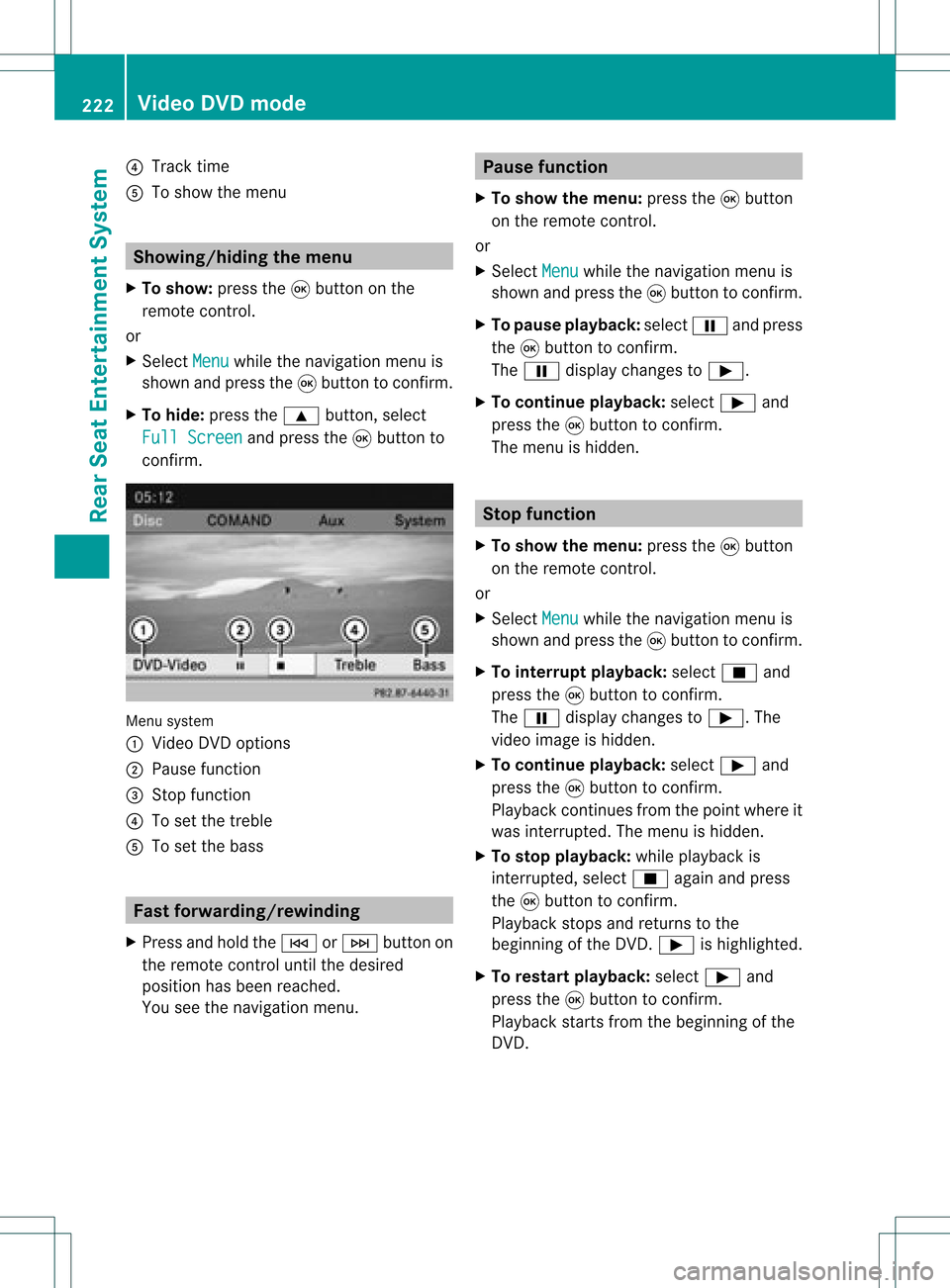
system
: Video DVDoptions
; Pause function
= Stop funct ion
? Toset the treble
A Toset the bass Fast
forwar ding/rewinding
X Press andhold theE orF button on
the remote controluntil thedesired
position hasbeen reached.
You seethenavigation menu. Pause
function
X To show themenu: pressthe9button
on the remote control.
or
X Select Menu while
thenavigation menuis
shown andpress the9button toconf irm.
X To pause playback: selectËandpress
the 9button toconf irm.
The Ë display changes toÌ.
X To continue playback: selectÌand
press the9button toconf irm.
The menu ishidden. Stop
function
X To show themenu: pressthe9button
on the remote control.
or
X Select Menu while
thenavigation menuis
shown andpress the9button toconf irm.
X To interr uptplayback: selectÉand
press the9button toconf irm.
The Ë display changes toÌ.T he
video image ishidden.
X To continue playback: selectÌand
press the9button toconfirm .
Play back continues fromthepoint where it
was interrupted. Themenu ishidden.
X To stop playback: whileplayback is
interrupted, selectÉagain andpress
the 9button toconfirm .
Play back stops andreturns tothe
beginning ofthe DVD .Ì ishighlighted.
X To restar tplayback: selectÌand
press the9button toconfirm .
Play back starts fromthebeginning ofthe
DVD . 222
Video
DVDmodeRear SeatEnterta inment System