key battery MERCEDES-BENZ SLK-CLASS ROADSTER 2014 Owners Manual
[x] Cancel search | Manufacturer: MERCEDES-BENZ, Model Year: 2014, Model line: SLK-CLASS ROADSTER, Model: MERCEDES-BENZ SLK-CLASS ROADSTER 2014Pages: 356, PDF Size: 48.94 MB
Page 7 of 356
Automatic engine switch-off (ECO
start/stop function)
..........................144
Automatic headlamp mode ..............109
Automatic transmission Accelerator pedal position .............150
Automatic drive program ...............152
Changing gea r............................... 150
Display message ............................ 235
Driving tips .................................... 150
Emergency running mode ..............156
Kickdown ....................................... 151
Manual drive program ....................152
Manual drive program (vehicles
with Sports package AMG) ............153
Overview ........................................ 149
Problem (malfunction) ...................156
Program selector button ................151
Pulling away ................................... 142
Releasing the parking lock
manually ........................................ 156
Selector lever ................................ 149
Starting the engine ........................142
Steering wheel paddle shifters ......152
Transmission position displa y........ 149
Transmission positions ..................150
Automatic transmission
emergency mode ............................... 156 B
Backup lamp Changing bulbs .............................. 117
BAS (Brake Assist System) .................60
BAS PLUS (Brake Assist System
PLUS) .................................................... 60
Battery (SmartKey) Checking .......................................... 73
Important safety notes ....................73
Replacing ......................................... 73
Battery (vehicle)
Charging ........................................ 296
Display message ............................ 226
Important safety notes ..................294
Jump starting ................................. 298
Overview ........................................ 294Blind Spot Assist
Activating/deactivating .................201
Display message ............................ 229
Notes/function .............................. 187
Bottle holder ...................................... 257
Brake Assist see BAS (Brake Assist System)
Brake fluid
Display message ............................ 216
Notes ............................................. 347
Brake lamps
Display message ............................ 222
Brakes
ABS .................................................. 59
BAS .................................................. 60
BAS PLUS ........................................ 60
Brake fluid (notes) .........................347
Display message ............................ 211
Driving tips .................................... 164
High-performance brake system ....165
Important safety notes ..................164
Maintenance .................................. 165
Parking brake ................................ 160
Warning lamp ................................. 242
Breakdown
see Flat tire
see Towing away
Bulbs
see Replacing bulbs C
California Important notice for retail
customers and lessees ....................22
Calling up a malfunction
see Display messages
Car
see Vehicle
Care
Carpets .......................................... 285
Car wash ........................................ 280
Display ........................................... 284
Exhaust pipe .................................. 283
Exterior lights ................................ 283
Gear or selector lever ....................284
Interior ........................................... 284
Matte finish ................................... 282 Index
5
Page 17 of 356
Seat belts
Adjusting the driver's and front-
passenger seat belt .........................53
Belt force limiters ............................ 55
Cleaning ......................................... 285
Correct usage .................................. 52
Emergency Tensioning Devices ....... .55
Fastening ......................................... 53
Important safety guidelines .............51
Releasing ......................................... 54
Safety guidelines ............................. 39
Switching belt adjustment on/off
(on-board computer) ......................206
Warning lamp ................................. 240
Warning lamp (function) ................... 54
Seats
Adjusting (electrically) .....................98
Adjusting (manually). .......................98
Adjusting the 4-way lumbar
support ............................................ 99
Adjusting the head restraint ............99
Cleaning the cover .........................285
Correct driver's seat position ........... 96
Important safety notes ....................97
Overview .......................................... 97
Seat heating problem ....................100
Storing settings (memory function) 105
Switching AIRSCARF on/off ..........100
Switching seat heating on/off .........99
Selector lever
Cleaning ......................................... 284
Sensors (cleaning instructions) .......283
Service menu (on-board computer) .201
Service products Brake fluid ..................................... 347
Coolant (engine) ............................ 347
Engine oil ....................................... 346
Fuel ................................................ 344
Important safety notes ..................344
Refrigerant (air-conditioning
system) .......................................... 349
Washer fluid .................................. .348
Settings
Factory (on-board computer) .........202
On-board computer .......................202
Setting the air distribution ...............130
Setting the airflow ............................130
SETUP (on-board computer) .............207Side impact air bag
.............................43
Side marker lamp Changing bulbs (rear) ....................116
Side marker lamp (display
message) ............................................ 223
Side windows Cleaning ......................................... 282
Convenience closing feature ............84
Important safety information ...........82
Opening/closing (all) .......................83
Opening/closing (front) ...................82
Overview .......................................... 82
Problem (malfunction) .....................86
Resetting ......................................... 84
SmartKey
Changing the battery .......................73
Changing the programming .............71
Checking the battery .......................73
Convenience opening feature ..........83
Display message ............................ 238
Door central locking/unlocking .......70
Important safety notes ....................70
Loss ................................................. 75
Mechanical key ................................ 72
Opening/closing the roof ................88
Overview .......................................... 70
Positions (ignition lock) .................139
Problem (malfunction) .....................75
Starting the engine ........................142
Snow chains ...................................... 309
Sockets Center console .............................. 259
General notes ................................ 258
Under the armrest .........................259
Spare wheel
Stowing .......................................... 338
see Emergency spare wheel
Specialist workshop ............................ 24
Special seat belt retractor .................. 58
Speed, controlling see Cruise control
Speedometer
Activating/deactivating the
additional speedometer .................203
Digital ............................................ 196
In the Instrument cluster .................29
Segments ...................................... 193
Selecting the unit of measurement 202 Index
15
Page 21 of 356
Unlocking (SmartKey)
......................70
Vehicle data ................................... 350
Vehicle battery
see Battery (vehicle)
Vehicle data ....................................... 350
Vehicle dimensions ...........................350
Vehicle emergency locking ................78
Vehicle identification number see VIN
Vehicle identification plate ..............342
Vehicle tool kit .................................. 289
Video Operating the DVD ......................... 199
VIN ...................................................... 342W
Warning and indicator lamps ABS ................................................ 242
Brakes ........................................... 242
Check Engine ................................. 248
Coolant .......................................... 248
Distance warning ........................... 250
DISTRONIC PLUS ........................... 250
ESP ®
.............................................. 244
ESP ®
OFF ....................................... 245
Fuel tank ........................................ 248
Overview .......................................... 30
PASSENGER AIRBAG OFF ................45
Reserve fuel ................................... 248
Seat belt ........................................ 240
SPORT handling mode ...................245
SRS ................................................ 247
Tire pressure monitor ....................251
Warning triangle ................................ 288
Warranty ............................................ 342
Washer fluid Display message ............................ 238
Wheel bolt tightening torque ...........332
Wheel chock ...................................... 329
Wheels Changing a wheel .......................... 328
Checking ........................................ 307
Cleaning ......................................... 282
Cleaning (warning) .........................329
Emergency spare wheel .................337
Important safety notes ..................306
Interchanging/changing ................328Mounting a new wheel
...................332
Mounting a wheel .......................... 329
Overview ........................................ 306
Removing a wheel ..........................331
Storing ........................................... 329
Tightening torque ........................... 332
Wheel size/tire size .......................333
Windows
see Side windows
Wind screen
Inserting and removing ....................89
Preparing for installation .................. 89
see AIRGUIDE
Windshield
Defrosting ...................................... 131
Windshield washer fluid
see Windshield washer system
Windshield washer system
Adding washer fluid .......................277
Notes ............................................. 348
Windshield wipers
Display message ............................ 238
Problem (malfunction) ...................120
Replacing the wiper blades ............118
Switching on/off ........................... 117
Winter driving
Important safety notes ..................308
Slippery road surfaces ...................167
Snow chains .................................. 309
Winter operation
Overview ........................................ 308
Winter tires
M+S tires ....................................... 308
Wiper blades
Cleaning ......................................... 282
Important safety notes ..................118
Replacing ....................................... 118
Wooden trim (cleaning instructions) 284
Workshops see Qualified specialist workshop Z
ZONE function Switching on/off ........................... 130 Index
19
Page 69 of 356
You can prevent the intervention of the PRE-
SAFE ®
Brake at any time by:
R depressing the accelerator pedal further.
R activating kickdown.
R releasing the brake pedal.
The braking action of PRE-SAFE ®
Brake is
ended automatically if:
R you maneuver to avoid the obstacle.
R there is no longer any danger of a collision.
R there is no longer an obstacle detected in
front of your vehicle. Theft deterrent locking system
Immobilizer
X To activate with the SmartKey: remove
the SmartKey from the ignition lock.
X To activate with KEYLESS-GO: switch the
ignition off and open the driver's door.
X To deactivate: switch on the ignition.
The immobilizer prevents your vehicle from
being started without the correct SmartKey.
When leaving the vehicle, always take the
SmartKey with you and lock the vehicle. The
engine can be started by anyone with a valid
SmartKey that is left inside the vehicle.
i The immobilizer is always deactivated
when you start the engine.
In the event that the engine cannot be
started when the starter battery is fully
charged, the immobilizer may be faulty.
Contact an authorized Mercedes-Benz
Center or call 1-800-FOR-MERCedes (in
USA) or 1-800-387-010 0(in Canada). ATA (anti-theft alarm system)
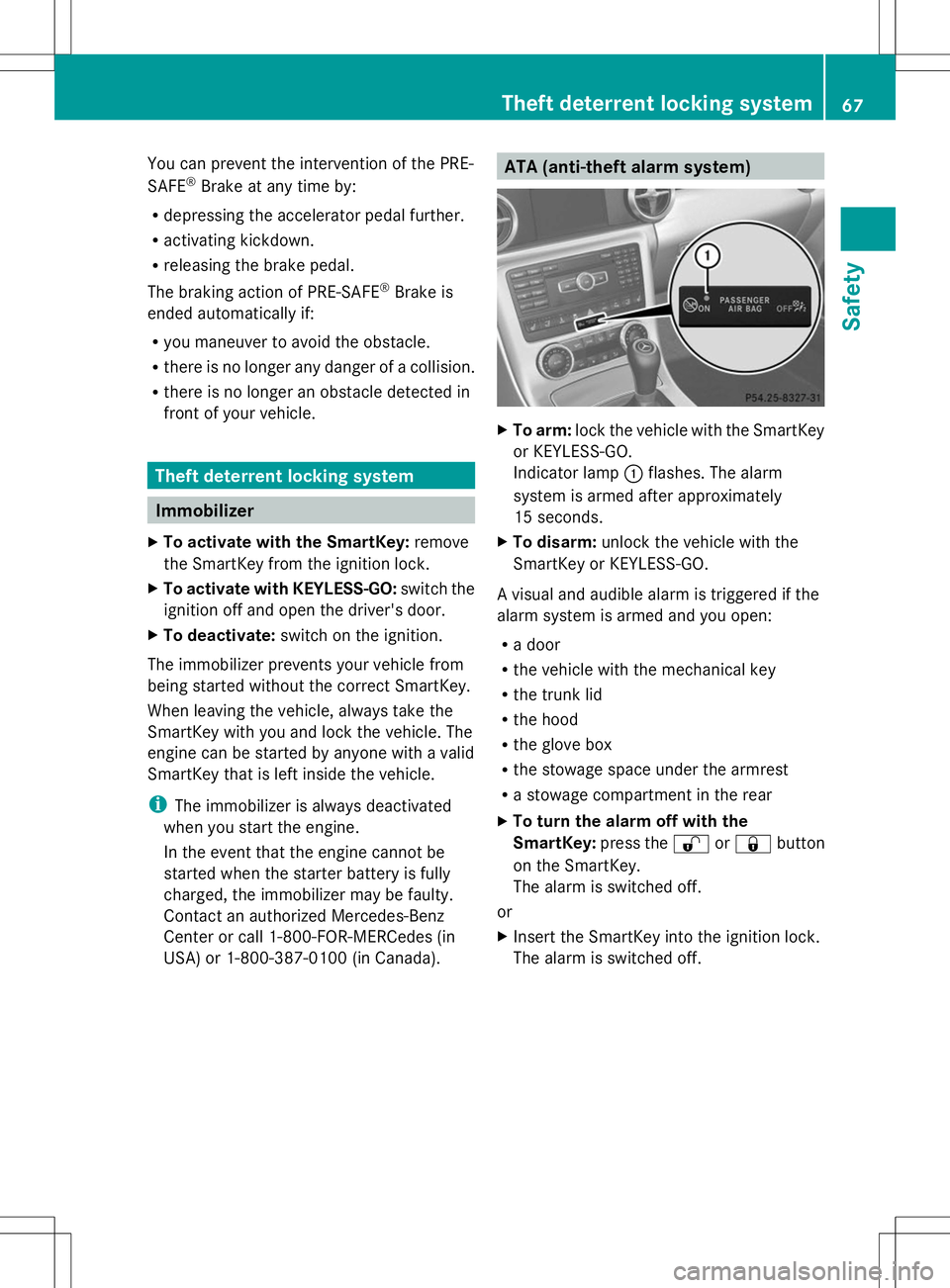
X
To arm: lock the vehicle with the SmartKey
or KEYLESS-GO.
Indicator lamp :flashes. The alarm
system is armed after approximately
15 seconds.
X To disarm: unlock the vehicle with the
SmartKey or KEYLESS-GO.
A visual and audible alarm is triggered if the
alarm system is armed and you open:
R a door
R the vehicle with the mechanical key
R the trunk lid
R the hood
R the glove box
R the stowage space under the armrest
R a stowage compartment in the rear
X To turn the alarm off with the
SmartKey: press the%or& button
on the SmartKey.
The alarm is switched off.
or
X Insert the SmartKey into the ignition lock.
The alarm is switched off. Theft deterrent locking system
67Safety Z
Page 74 of 356
X
To change the setting: press and hold
down the %and& buttons
simultaneously for approximately six
seconds until the battery check lamp
flashes twice (Y page 73).
i If the setting of the locking system is
changed within the signal range of the
vehicle, pressing the &or% button:
R locks or
R unlocks the vehicle
The SmartKey now functions as follows:
X To unlock the driver's door: press the
% button once.
X To unlock centrally: press the%
button twice.
X To lock centrally: press the&button.
The KEYLESS-GO function is changed as
follows:
X To unlock the driver's door: touch the
inner surface of the door handle on the
driver's door.
X To unlock centrally: touch the inner
surface of the front-passenger door handle.
X To lock centrally: touch the outer sensor
surface on one of the door handles.
X To restore the factory settings: press
and hold down the %and& buttons
simultaneously for approximately six
seconds until the battery check lamp
flashes twice (Y page 73). Mechanical key
General notes If the vehicle can no longer be locked or
unlocked with the SmartKey, use the
mechanical key.
If you use the mechanical key to unlock and
open the driver's door or the trunk lid, the
anti-theft alarm system will be triggered
(Y page 67). There are several ways to turn off the alarm:
X
To turn the alarm off with the
SmartKey: press the%or& button
on the SmartKey.
or
X Insert the SmartKey into the ignition lock.
or
X To disarm the alarm with KEYLESS-GO:
press the Start/Stop button in the ignition
lock. The SmartKey must be in the vehicle.
or
X Lock or unlock the vehicle using KEYLESS-
GO. The SmartKey must be outside the
vehicle.
If you unlock the vehicle using the mechanical
key, the fuel filler flap will not be unlocked
automatically.
X To unlock the fuel filler flap: insert the
SmartKey into the ignition lock.
Removing the mechanical key X
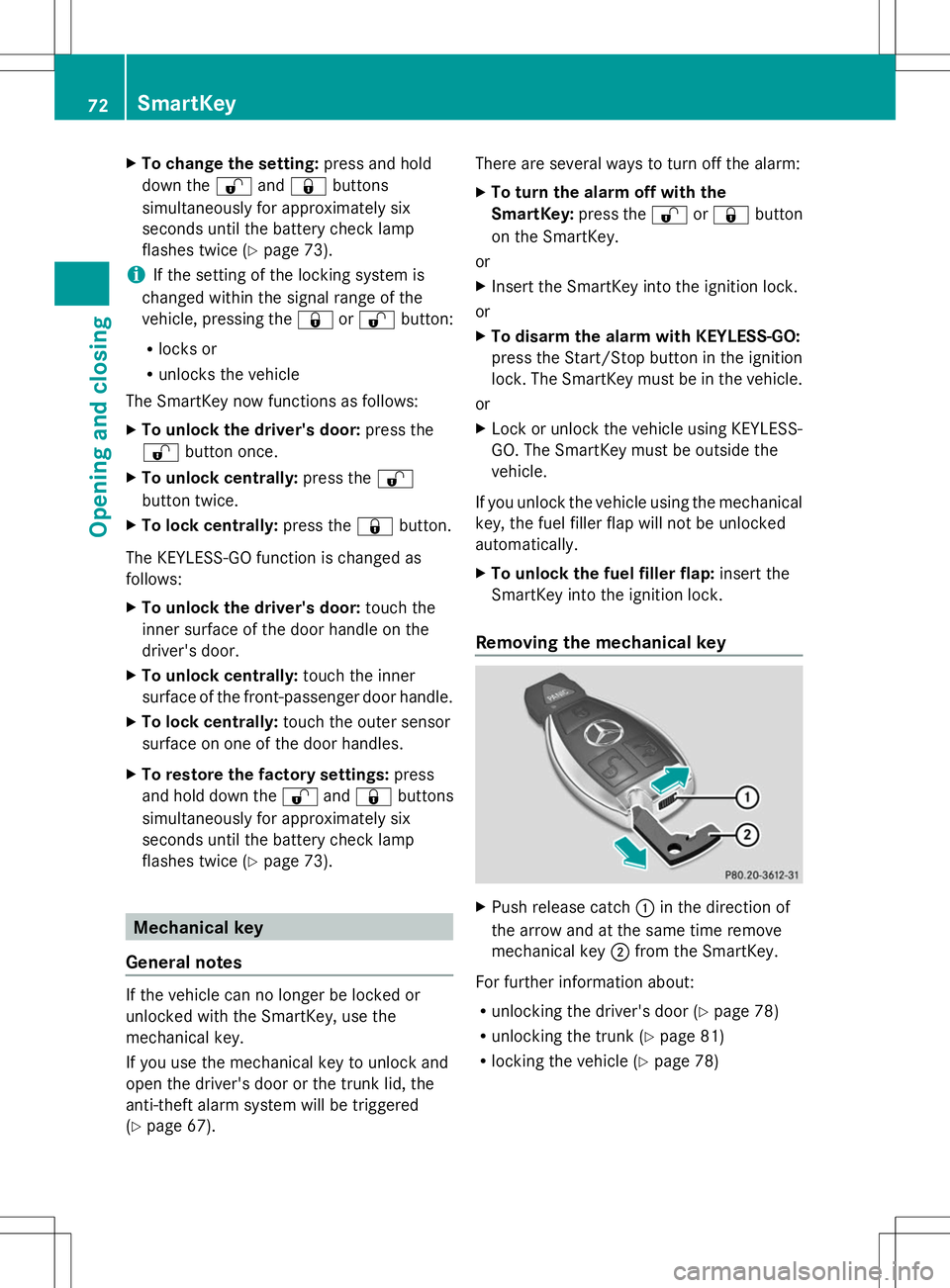
Push release catch :in the direction of
the arrow and at the same time remove
mechanical key ;from the SmartKey.
For further information about:
R unlocking the driver's door (Y page 78)
R unlocking the trunk ( Ypage 81)
R locking the vehicle (Y page 78)72
SmartKeyOpening and closing
Page 75 of 356
SmartKey battery
Important safety notes G
WARNING
Batteries contain toxic and corrosive
substances. If batteries are swallowed, it can
result in severe health problems. There is a
risk of fatal injury.
Keep batteries out of the reach of children. If
a battery is swallowed, seek medical attention
immediately.
Mercedes-Benz recommends that you have
the batteries replaced at a qualified specialist
workshop.
The SmartKey batteries contain perchlorate
material, which may require special handling
and regard for the environment. National
guidelines must be observed during disposal.
Checking the battery X
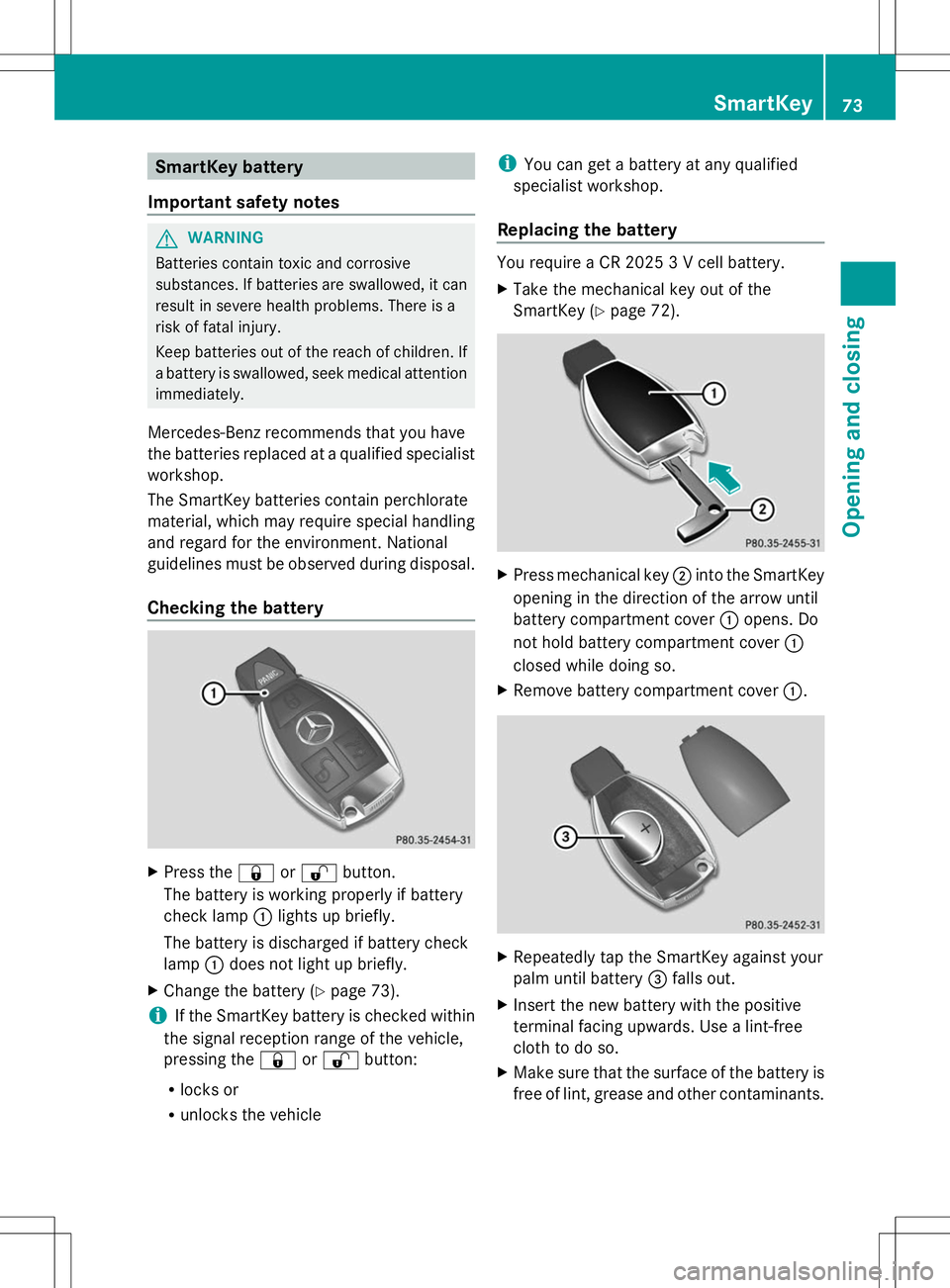
Press the &or% button.
The battery is working properly if battery
check lamp :lights up briefly.
The battery is discharged if battery check
lamp :does not light up briefly.
X Change the battery (Y page 73).
i If the SmartKey battery is checked within
the signal reception range of the vehicle,
pressing the &or% button:
R locks or
R unlocks the vehicle i
You can get a battery at any qualified
specialist workshop.
Replacing the battery You require a CR 2025 3 V cell battery.
X
Take the mechanical key out of the
SmartKey (Y page 72). X
Press mechanical key ;into the SmartKey
opening in the direction of the arrow until
battery compartment cover :opens. Do
not hold battery compartment cover :
closed while doing so.
X Remove battery compartment cover :. X
Repeatedly tap the SmartKey against your
palm until battery =falls out.
X Insert the new battery with the positive
terminal facing upwards. Use a lint-free
cloth to do so.
X Make sure that the surface of the battery is
free of lint, grease and other contaminants. SmartKey
73Opening and closing Z
Page 76 of 356
X
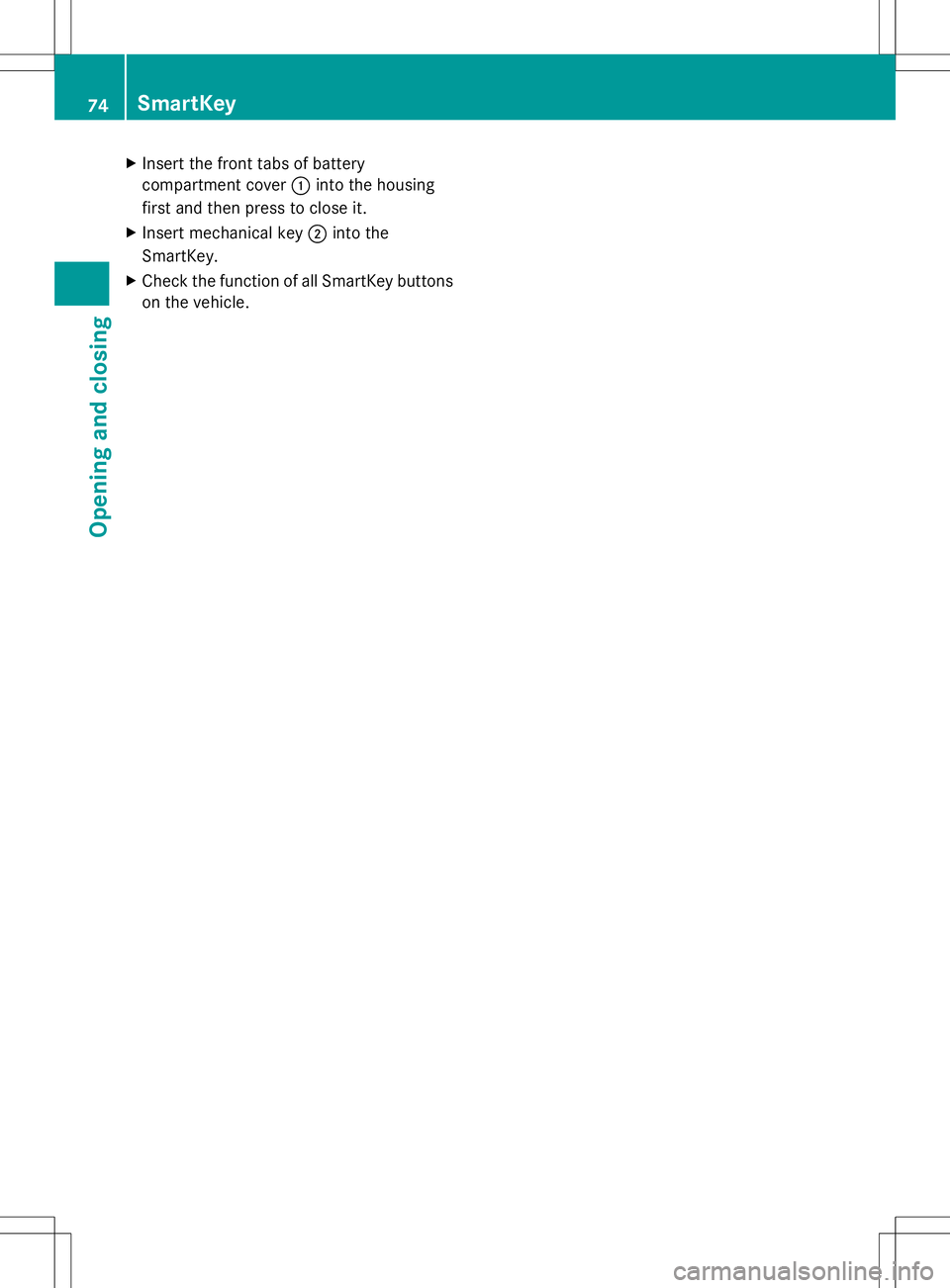
Insert the front tabs of battery
compartment cover :into the housing
first and then press to close it.
X Insert mechanical key ;into the
SmartKey.
X Check the function of all SmartKey buttons
on the vehicle. 74
SmartKeyOpening and closing
Page 77 of 356
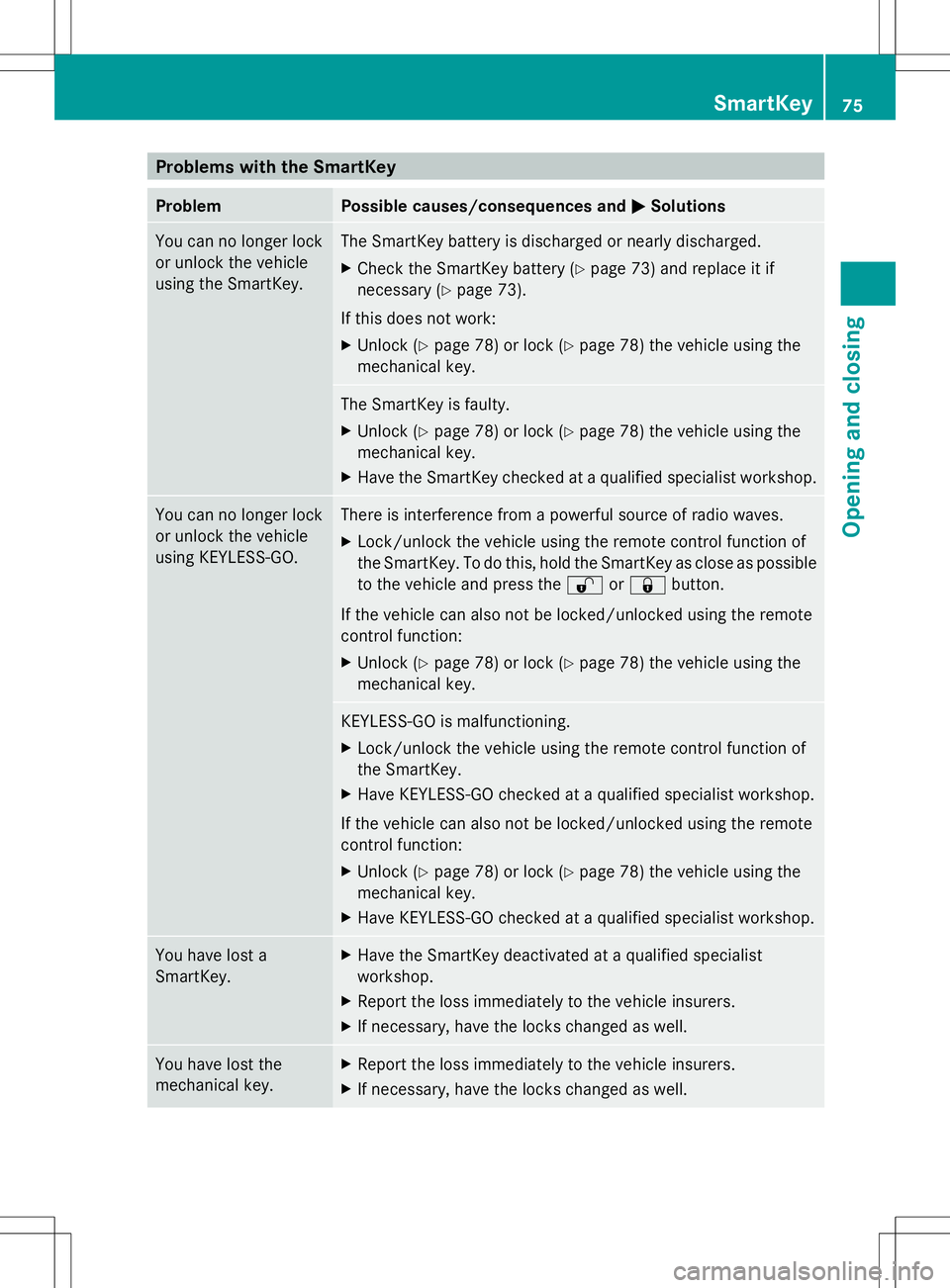
Problems with the SmartKey
Problem Possible causes/consequences and
M
MSolutions You can no longer lock
or unlock the vehicle
using the SmartKey. The SmartKey battery is discharged or nearly discharged.
X
Check the SmartKey battery (Y page 73) and replace it if
necessary (Y page 73).
If this does not work:
X Unlock (Y page 78) or lock (Y page 78) the vehicle using the
mechanical key. The SmartKey is faulty.
X
Unlock (Y page 78) or lock (Y page 78) the vehicle using the
mechanical key.
X Have the SmartKey checked at a qualified specialist workshop. You can no longer lock
or unlock the vehicle
using KEYLESS-GO. There is interference from a powerful source of radio waves.
X
Lock/unlock the vehicle using the remote control function of
the SmartKey. To do this, hold the SmartKey as close as possible
to the vehicle and press the %or& button.
If the vehicle can also not be locked/unlocked using the remote
control function:
X Unlock (Y page 78) or lock (Y page 78) the vehicle using the
mechanical key. KEYLESS-GO is malfunctioning.
X
Lock/unlock the vehicle using the remote control function of
the SmartKey.
X Have KEYLESS-GO checked at a qualified specialist workshop.
If the vehicle can also not be locked/unlocked using the remote
control function:
X Unlock (Y page 78) or lock (Y page 78) the vehicle using the
mechanical key.
X Have KEYLESS-GO checked at a qualified specialist workshop. You have lost a
SmartKey. X
Have the SmartKey deactivated at a qualified specialist
workshop.
X Report the loss immediately to the vehicle insurers.
X If necessary, have the locks changed as well. You have lost the
mechanical key. X
Report the loss immediately to the vehicle insurers.
X If necessary, have the locks changed as well. SmartKey
75Opening and closing Z
Page 78 of 356
Problem Possible causes/consequences and
M
MSolutions The engine can no
longer be started using
the SmartKey. The on-board voltage is too low.
X
Switch off non-essential consumers, e.g. seat heating or interior
lighting, and try to start the engine again.
If this does not work:
X Check the starter battery and charge it if necessary
(Y page 296).
or
X Jump-start the vehicle (Y page 298).
or
X Consult a qualified specialist workshop. The engine can no
longer be started using
KEYLESS-GO. The
SmartKey is in the
vehicle. The vehicle is locked.
X
Unlock the vehicle and try to start the vehicle again. There is interference from a powerful source of radio waves.
X
Start your vehicle with the SmartKey in the ignition lock. Doors
Important safety notes
G
WARNING
If children are left unsupervised in the vehicle,
they could:
R open the doors, thus endangering other
people or road users.
R get out and disrupt traffic.
R operate the vehicle's equipment.
Additionally, children could set the vehicle in
motion if, for example, they:
R release the parking brake.
R shift the automatic transmission out of
parking position P.
R shift the manual transmission into neutral.
R starting the engine.
There is a risk of an accident and injury.
When leaving the vehicle, always take the
SmartKey with you and lock the vehicle. Never
leave children or animals unattended in the
vehicle. Always keep the SmartKey out of
reach of children. G
WARNING
If children are left unsupervised in the vehicle,
they could:
R open the doors, thus endangering other
people or road users.
R get out and disrupt traffic.
R operate the vehicle's equipment.
Additionally, children could set the vehicle in
motion if, for example, they:
R release the parking brake.
R shifting the automatic transmission out of
park position P
R Start the engine.
There is a risk of an accident and injury.
When leaving the vehicle, always take the
SmartKey with you and lock the vehicle. Never
leave children or animals unattended in the
vehicle. Always keep the SmartKey out of
reach of children. 76
DoorsOpening and closing
Page 79 of 356
G
WARNING
If children are left unsupervised in the vehicle,
they could:
R open the doors, thus endangering other
people or road users.
R get out and disrupt traffic.
R operate the vehicle's equipment.
Additionally, children could set the vehicle in
motion if, for example, they:
R release the parking brake.
R shifting the automatic transmission out of
park position P
R Start the engine.
There is a risk of an accident and injury.
When leaving the vehicle, always take the
SmartKey with you and lock the vehicle. Never
leave children or animals unattended in the
vehicle. Always keep the SmartKey out of
reach of children. G
WARNING
If persons, particularly children are subjected
to prolonged exposure to extreme heat or
cold, there is a risk of injury, possibly even
fatal. Never leave children unattended in the
vehicle. Unlocking and opening doors from
the inside
! The side windows will not open/close if
the battery is discharged or if the side
windows have iced up. It will then not be
possible to close the door. Do not attempt
to force the door closed. You could
otherwise damage the door or the side
window.
You can open a door from inside the vehicle
even if it has been locked.
If the vehicle was previously locked with the
SmartKey or with KEYLESS-GO, opening the
vehicle from the inside will activate the anti-
theft alarm system. Switch off the alarm
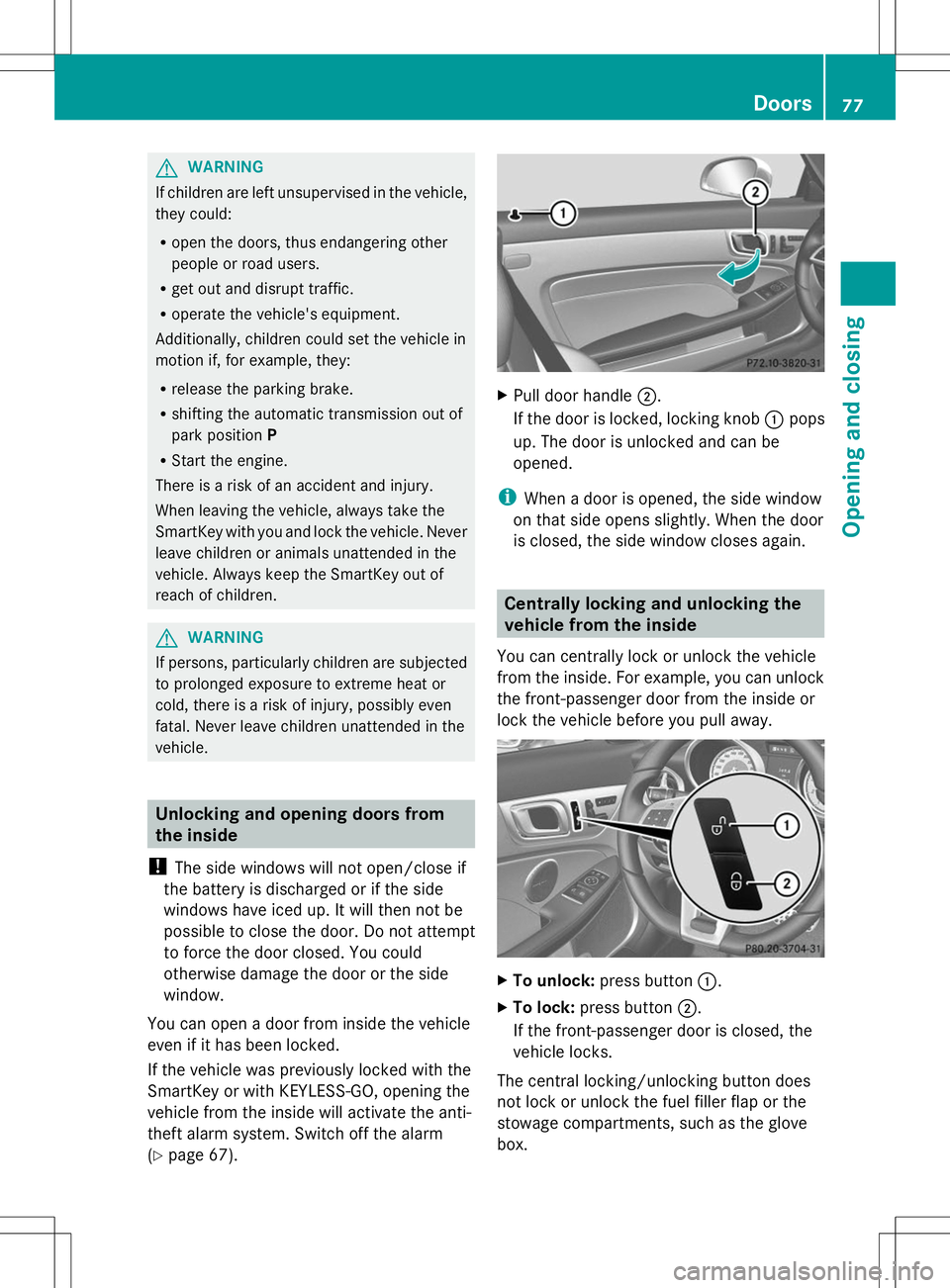
(Y page 67). X
Pull door handle ;.
If the door is locked, locking knob :pops
up. The door is unlocked and can be
opened.
i When a door is opened, the side window
on that side opens slightly. When the door
is closed, the side window closes again. Centrally locking and unlocking the
vehicle from the inside
You can centrally lock or unlock the vehicle
from the inside. For example, you can unlock
the front-passenger door from the inside or
lock the vehicle before you pull away. X
To unlock: press button :.
X To lock: press button ;.
If the front-passenger door is closed, the
vehicle locks.
The central locking/unlocking button does
not lock or unlock the fuel filler flap or the
stowage compartments, such as the glove
box. Doors
77Opening and closing Z