sensor MERCEDES-BENZ SLK ROADSTER 2008 Owners Manual
[x] Cancel search | Manufacturer: MERCEDES-BENZ, Model Year: 2008, Model line: SLK ROADSTER, Model: MERCEDES-BENZ SLK ROADSTER 2008Pages: 273, PDF Size: 4.42 MB
Page 10 of 273
7
Frequencies . . . . . . . . . . . . . . . . .
.262
Programming the remote control . .144
Gear indicator (on-board computer) .96
Gearshift program Manua l.. . . . . . . . . . . . . . . . . . . . . .88
Genuine Mercedes-Benz parts . . . ..240
Glove compartment . . . . . . . . . . . . ..138
Golf bag Storage location . . . . . . . . . . . . . . .138
Gross vehicle weight, maximum
permissible . . . . . . . . . . . . . . . . . . . . .253 H
Handbrake Display message . . . . . . . . . . . . . .181
Head/thorax airbags . . . . . . . . . . . . ..43
Headlamp Misting up . . . . . . . . . . . . . . . . . . .205
Headlamp mode (automatic ). . . . . . .74
Headlamps Cleaning . . . . . . . . . . . . . . . . . . . . .168
Cleaning system . . . . . . . . . . . . . . . .76
Headlamps delayed switch-off
see Exterior lighting delayed switch-off
Head restraint
Adjusting (front) . . . . . . . . . . . . .60, 61
Heatin g
see Air conditioning
High-pressure cleaners . . . . . . . . . ..167 HomeLink
®
see Garage door opener I
Immobiliser . . . . . . . . . . . . . . . . . . . . .52
Indicator and warning lam p
Brakes (red) . . . . . . . . . . . . . . . . . .194
Engine diagnostic . . . . . . . . . . . . . .195
ESP ®
. . . . . . . . . . . . . . . . . . . .51, 194
PASSENGER AIRBAG OFF . . . .46, 191
Reserve fuel . . . . . . . . . . . . . . . . . .197
Seat belt . . . . . . . . . . . . . . . . . . . . .195
SRS . . . . . . . . . . . . . . . . . . . . .39, 194
Indicator and warning lamps . . . . ..193
Indicator lamp see Indicator and warning lamp
Instrument cluster . . . . . . . . . . . . . ..90
Overview . . . . . . . . . . . . . . . . . . . . .24
Selecting the language (on-board
computer) . . . . . . . . . . . . . . . . . . .102
Instrument lighting . . . . . . . . . . . . . ..90
Interior lightin g. . . . . . . . . . . . . . . . . .77
Automatic contro l.. . . . . . . . . . . . .77
Delayed switch-off (on-boar d
computer) . . . . . . . . . . . . . . . . . . .105
Emergency lighting . . . . . . . . . . . . . .77
Manual control . . . . . . . . . . . . . . . . .78
Reading lamp . . . . . . . . . . . . . . . . . .78
Interior motion sensor . . . . . . . . . . ..54 Intermittent wipe
Windscreen wiper s.. . . . . . . . . . . . .79 J
Jack Operation . . . . . . . . . . . . . . . . . . . .225
Storage location . . . . . . . . . . . . . . .172
Jump-starting . . . . . . . . . . . . . . . . . . .233
Jump leads . . . . . . . . . . . . . . . . . . .233 K
Key . . . . . . . . . . . . . . . . . . . . . . . . . . . .56
Changing the battery . . . . . . . . . . .212
Checking the battery . . . . . . . . . . .212
Closing the roof . . . . . . . . . . . . . . .134
Display message . . . . . . . . . .184, 187
Factory setting . . . . . . . . . . . . . .56, 57
Loss . . . . . . . . . . . . . . . . . . . . . . . .207
Malfunction . . . . . . . . . . . . . . . . . .207
Modifying the programming . . . . . . .56
Opening the roof . . . . . . . . . . . . . .134
Key position s
Key . . . . . . . . . . . . . . . . . . . . . . . . . .59
Kickdown . . . . . . . . . . . . . . . . . . . .87, 89 Index
171_AKB; 3; 4, en-GB
vpfaff7,
2007-11-13T10:50:25+01:00 - Seite
7
Page 12 of 273
9N
Navigation . . . . . . . . . . . . . . . . . . . . .100
Navigation menu (on-board com-
puter) . . . . . . . . . . . . . . . . . . . . . . .100 O
Oil topping up . . . . . . . . . . . . . . . . . . .153
On-board computer . . . . . . . . . . . . . ..91
AMG menu . . . . . . . . . . . . . . . . . . . .96
Audio menu . . . . . . . . . . . . . . . . . . .98
Display message . . . . . . . . . . . . . .174
DVD menu . . . . . . . . . . . . . . . . . . . .99
Factory setting s.. . . . . . . . . . . . . .101
Instrument cluster submenu . . . . .102
Lighting submenu . . . . . . . . . . . . .102
Message memory menu . . . . . . . . .100
Navigation menu . . . . . . . . . . . . . .100
Settings menu . . . . . . . . . . . . . . . .101
Standard display menu . . . . . . . . . .95
Telephone menu . . . . . . . . . . . . . .108
Trip computer menu . . . . . . . . . . . .107
Vehicle submenu . . . . . . . . . . . . . .102
On-board computer language . . . ..102
One-touch gearshiftin g. . . . . . . . . . . .86
Operating system see On-board computer
Outside temperature
Display (on-board computer) . . .91, 96 Overhead control panel
Overview . . . . . . . . . . . . . . . . . . . . .32
Own number sending (mobile
phone) . . . . . . . . . . . . . . . . . . . . . . . . .143 P
Paint code number . . . . . . . . . . . . ..242
Parking . . . . . . . . . . . . . . . . . . . . . . . . .83
Parking aid . . . . . . . . . . . . . . . . . . . . . .67
Parktronic . . . . . . . . . . . . . . . . . . .115
Parking brake
Display message . . . . . . . . . . . . . .181
Parking lamps
Display message . . . . . . . . . . . . . .185
Parking loc k
Releasing manually (automati c
transmission) . . . . . . . . . . . . . . . . .212
Parking position
Exterior mirror . . . . . . . . . . . . . . . . .67
Parktronic . . . . . . . . . . . . . . . . . . . . . .115
Activating/deactivating . . . . . . . . .117
Malfunction . . . . . . . . . . . . . . . . . .204
Range of the sensors . . . . . . . . . . .115
Warning display . . . . . . . . . . . . . . .116
PASSENGER AIRBAG OFF warning
lamp . . . . . . . . . . . . . . . . . . . . . . .46, 191
Performance . . . . . . . . . . . . . . . . . . .245
Permanent Speedtronic . . . . . . . . ..114 Petrol
Minimum grad e.. . . . . . . . . . . . . .149
Plastic trim
Cleaning . . . . . . . . . . . . . . . . . . . . .168
Power window s
see Side window
Program selector button
Automatic transmission . . . . . . . . . .87
Pulling away . . . . . . . . . . . . . . . . . . . . .82 R
RACETIMER (on-board computer) . ..9 7
Radio Changing a station (on-board
computer) . . . . . . . . . . . . . . . . . . . .99
see separate operating instructions
Rain sensor
Windscreen wipers . . . . . . . . . . . . . .79
Range (on-board computer) . . . . . ..107
R button see Reset button
Rear foglamp
Display message . . . . . . . . . . . . . .185
Rear-view mirror
Adjusting . . . . . . . . . . . . . . . . . . . . .65
Anti-dazzle (manual) . . . . . . . . . . . . .65
Anti-dazzle mode (automatic) . . . . .67
Rear windo w
Cleaning . . . . . . . . . . . . . . . . . . . . .168 Index
171_AKB; 3; 4, en-GB
vpfaff7,
2007-11-13T10:50:25+01:00 - Seite
9
Page 34 of 273
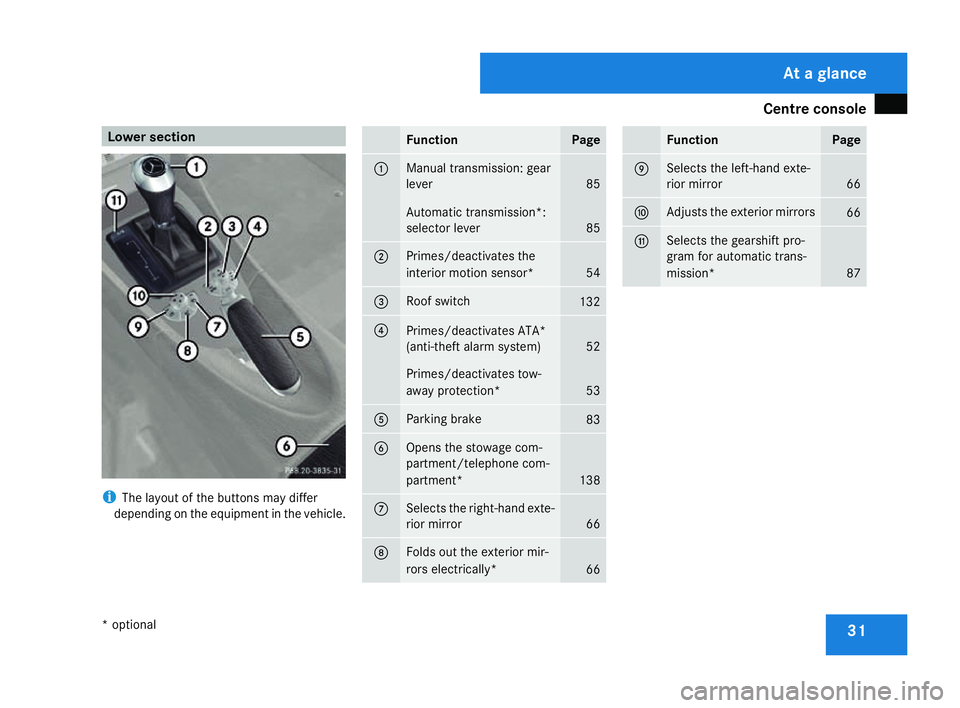
Centre console
31Lower section
i
The layout of the buttons may differ
depending on the equipment in the vehicle. Function Page
1 Manual transmission: gear
lever
85
Automatic transmission*
:
selector lever 85
2 Primes/deactivates the
interior motion sensor*
54
3 Roof switch
132
4
Primes/deactivates ATA*
(anti-theft alarm system)
52
Primes/deactivates tow-
away protection*
53
5 Parking brake
83
6 Opens the stowage com-
partment/telephone com-
partment*
138
7 Selects the right-hand exte
-
rior mirro r 66
8 Folds out the exterior mir-
rors electrically
* 66 Function Pag
e 9 Selects the left-hand exte
-
rior mirro r 66
a Adjusts the exterior mirrors
66
b Selects the gearshift pro-
gram for automatic trans-
mission*
87At a glance
* optiona l
171_AKB; 3; 4, en-GB
vpfaff7,
2007-11-13T10:50:25+01:00 - Seite 31
Page 42 of 273
Occupant safet
y 39In particular, work relevant to safety or on
safety-related systems must be carried out
at a qualified specialist workshop. If this
work is not carried out correctly, the oper-
ating safety of your vehicle may be affec -
ted. There is a risk of an accident and injury .SRS (Supplemental Restraint System)
The SRS reduces the risk of occupants com-
ing into contact with the vehicle's interior in
the event of an accident. It can also reduce
the forces to which occupants are exposed
during an accident.
The SRS consists of:
R 1 warning lamp
R belt tensioner s
R belt force limiters
R Airbag s
11 warning lam p The SRS functions are checked regularly
when you turn on the ignition and when the
engine is running. Malfunctions can therefore
be detected in good time. The
1 warning lamp in the instrumen t
cluster lights up when the ignition is switched
on. It goes out no later than a few seconds
after the engine is started. G
Risk of injury
If SRS is malfunctioning, individual systems
may be activated unintentionally or not be
triggered in the event of an accident with
heavy braking.
A malfunction has occurred if the 1
warning lamp:
R does not light up when you switch on the
ignition
R does not go out after the engine has been
running for a few seconds
R lights up again once the engine is running
In this case, have SRS checked immedi-
ately at a qualified specialist workshop.
Triggering of belt tensioners, belt force
limiters and airbags In the event of a collision, the sensor in the
airbag control unit evaluates important phys-
ical data such as duration, direction and force
of the vehicle deceleration or acceleration.
Based on the evaluation of this data anddepending on the vehicle's rate of longitudi-
nal deceleration in a collision, in the firs
t
stage the airbag control unit pre-emptively
triggers the belt tensioners.
i The belt tensioners can only be triggered
if the belt tongue is correctly engaged in the
seat belt buckle.
The front airbags are only deployed if there is
an even higher rate of vehicle deceleration in
a longitudinal direction .
Vehicles fitted with adaptive, dual-stage front
airbags: when the first deployment threshold
is reached, the front airbag is filled with
enough gas to reduce the risk of injuries. The
front airbag is only fully inflated if a second
threshold is reached within a few millisec-
onds due to the control unit having detected
further deceleration.
Criteria for triggering belt tensioners and
airbags
In the first stage of a collision, the airbag con-
trol unit evaluates the duration and direction
of vehicle acceleration or deceleration in
order to determine whether it is necessary to
trigger the belt tensioner and/or airbag.
The belt tensioner and airbag triggering
thresholds are variable and are adapted to the
rate of deceleration of the vehicle. This proc- Safety
171_AKB; 3; 4, en-GB
vpfaff7,
2007-11-13T10:50:25+01:00 - Seite 39 Z
Page 43 of 273
Occupant safet
y40
ess is pre-emptive in nature as the airbag
must be deployed during – and not at the end
of – the collision
.
i Airbags are not deployed in all types of
accidents. They are controlled by comple x
sensor technology and evaluation logic.
This process is pre-emptive in nature as
airbag deployment must take place during
the impact and must be adapted to provide
calculated, additional protection for the
vehicle occupants. Not all airbags are
deployed in an accident.
The different airbag systems work inde-
pendently of each other. However, each
individual system depends on the type of
accident determined by the control system
in the first stages of the collision (head-on
collision, side impact, rear-end collision
and overturn) and the extent of the acci-
dent (in particular, the vehicle's rate of
deceleration or acceleration).
The rate of vehicle deceleration or accelera-
tion and the direction of the force are basi-
cally determined by:
R the distribution of forces during the colli -
sion
R the collision angle R
the deformation characteristics of the vehi-
cle
R the characteristics of the object with which
the vehicle has collided, e.g. the other vehi-
cle
Factors which can only be seen and measured
after the collision has taken place do not play
a decisive role in the deployment of an airbag,
nor do they provide an indication of it.
The vehicle may be deformed significantly ,
e. g. on the bonnet or the wing, without an
airbag being deployed. This happens if only
parts which are relatively easily deformed are
affected and the necessary deceleration does
not occur. Conversely, airbags may be
deployed even though the vehicle suffers only
minor deformations. This is the case if, for
example, very rigid vehicle parts such as lon-
gitudinal body members are affected and suf-
ficient deceleration occurs as a result.
Belt tensioners, belt force limiter s The seat belts are fitted with belt tensioners.
!
Do not engage the seat belt tongue in the
buckle on the front-passenger seat if the
seat is not occupied. Otherwise the belt
tensioner could be activated in an emer-
gency. If the seat belt is also equipped with a belt
force limiter, the force exerted by the seat
belt on the seat occupant is reduced.
Belt tensioners tighten the seat belts in an
accident, pulling them close against the body.
i
Belt tensioners do not correct incorrect
seat positions or incorrectly fastened sea t
belts.
Belt tensioners do not pull occupants back
towards the backrest.
The belt force limiters are synchronised with
the front airbags, which spread the forces
exerted by the belt force limiters on the occu-
pant over a greater area.
When the ignition is switched on, the belt ten -
sioner is triggered:
R only if the restraint systems are operational
(the 1 warning lamp lights up after th e
ignition is switched on and goes out onc e
the engine is running)( Ypage 39)
R for each three-point seat belt in the front of
the vehicle when the belt tongue is
engaged in the buckle
R In the event of a head-on or rear-end colli-
sion if the vehicle decelerates or acceler-
ates rapidly in a longitudinal direction
during the initial stages of the collision Safety
171_AKB; 3; 4, en-GB
vpfaff7,
2007-11-13T10:50:25+01:00 - Seite 40
Page 49 of 273
Occupant safet
y46 board as well as on both sides of the sun
visor on the front-passenger side.
Information about recommended child
restraint systems is available at any
Mercedes-Benz Service Centre.
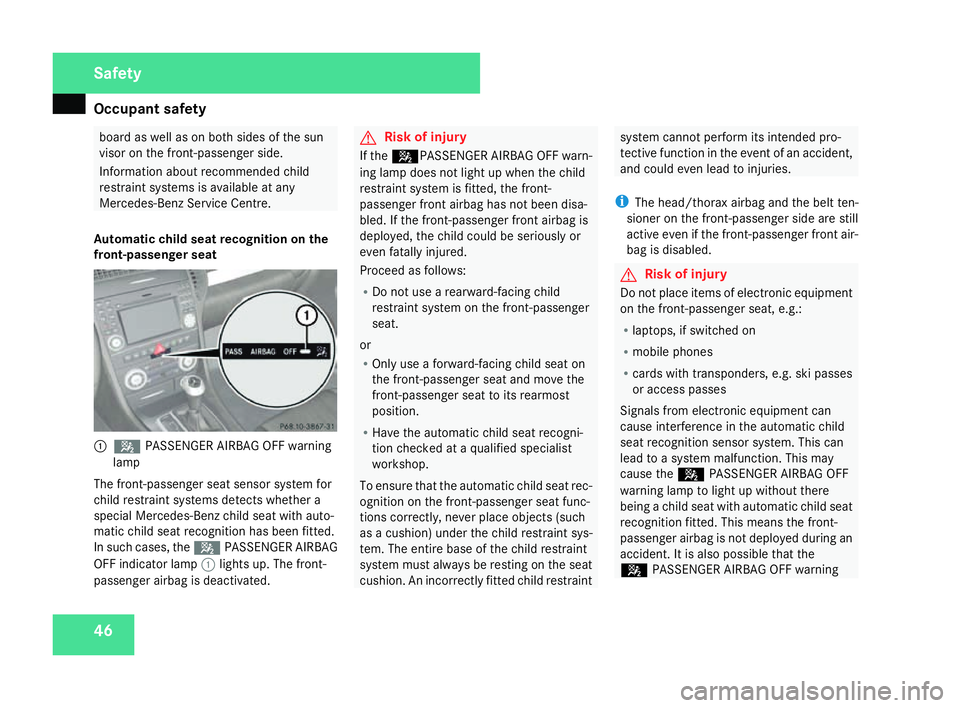
Automatic child seat recognition on the
front-passenger seat 1
5 PASSENGER AIRBAG OFF warning
lamp
The front-passenger seat sensor system for
child restraint systems detects whether a
special Mercedes-Benz child seat with auto-
matic child seat recognition has been fitted.
In such cases, the 5PASSENGER AIRBA G
OFF indicator lamp 1lights up. The front -
passenger airbag is deactivated. G
Risk of injury
If the 5PASSENGER AIRBAG OFF warn-
ing lamp does not light up when the child
restraint system is fitted, the front-
passenger front airbag has not been disa-
bled. If the front-passenger front airbag is
deployed, the child could be seriously or
even fatally injured.
Proceed as follows:
R Do not use a rearward-facing child
restraint system on the front-passenge r
seat.
or
R Only use a forward-facing child seat on
the front-passenger seat and move the
front-passenger seat to its rearmost
position.
R Have the automatic child seat recogni-
tion checked at a qualified specialist
workshop .
To ensure that the automatic child seat rec-
ognition on the front-passenger seat func-
tions correctly, never place objects (such
as a cushion) under the child restraint sys-
tem. The entire base of the child restraint
system must always be resting on the seat
cushion. An incorrectly fitted child restraint system cannot perform its intended pro-
tective function in the event of an accident
,
and could even lead to injuries .
i The head/thorax airbag and the belt ten-
sioner on the front-passenger side are still
active even if the front-passenger front air-
bag is disabled. G
Risk of injury
Do not place items of electronic equipment
on the front-passenger seat, e.g.:
R laptops, if switched on
R mobile phones
R cards with transponders, e.g. ski passe s
or access passes
Signals from electronic equipment can
cause interference in the automatic child
seat recognition sensor system. This can
lead to a system malfunction. This may
cause the 5PASSENGER AIRBAG OFF
warning lamp to light up without there
being a child seat with automatic child seat
recognition fitted. This means the front-
passenger airbag is not deployed during an
accident. It is also possible that the
5 PASSENGER AIRBAG OFF warning Safety
171_AKB; 3; 4, en-GB
vpfaff7
, 2007-11-13T10:50:25+01:00 - Seite 46
Page 57 of 273
Anti-theft syste
ms54 Interior motion sensor*
If the interior motion sensor is primed, a vis-
ual and audible alarm is triggered if move-
ment is detected in the vehicle interior whil e
the vehicle is locked. This occurs, for exam-
ple, if someone breaks the side windows of
your vehicle or reaches into the vehicle's inte -
rior.
Priming the interior motion sensor X
Make sure that:
R
the side windows are close d
R the stowage compartment under the
armrest is closed.
R there are no objects, e.g. mascots, hang-
ing on the rear-view mirror or on the
grasp handles on the roof trim.
This will prevent false alarms.
X Make sure that the roof is closed.
The interior motion sensor can only be
primed when the roof is closed (with the
exception of vehicles for the Netherlands).
Vehicles for the Netherlands: the interior
motion sensor is primed even when the
roof is open. However, the roof should be
closed so as to prevent a false alarm. X
Make sure that the boot lid is closed.
Only then can the interior motion sensor be
primed.
X Lock the vehicle using the key.
The interior motion sensor is primed after
approximately 30 seconds.
To deactivate the interior motion sen-
sor To prevent a false alarm, deactivate the inte-
rior motion sensor if you lock your vehicle and
R
people remain in the vehicle
R animals remain in the vehicle
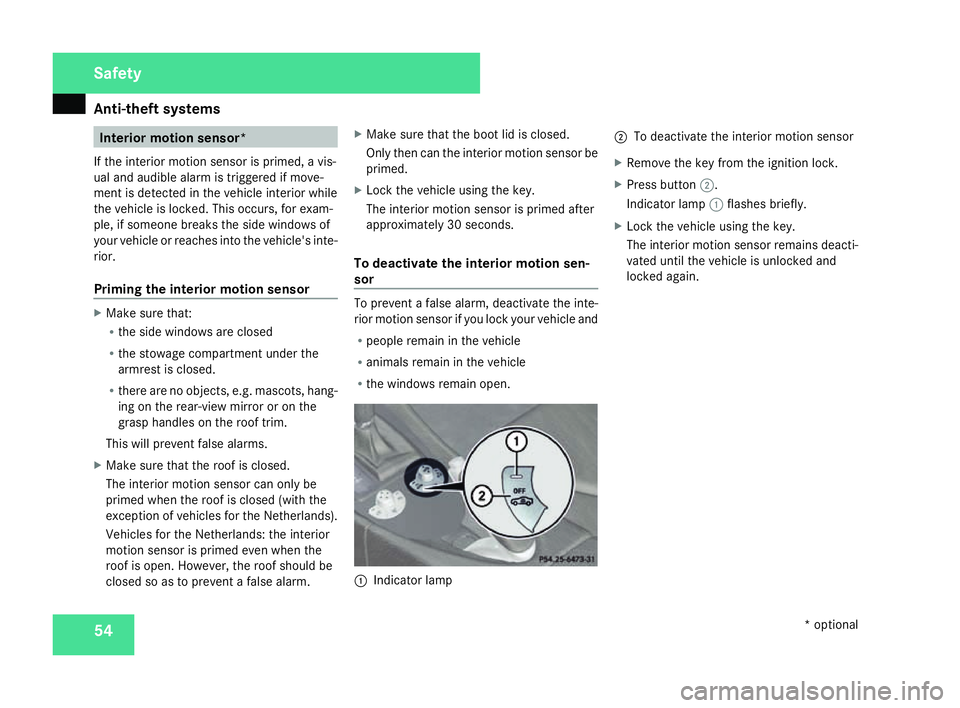
R the windows remain open. 1
Indicator lamp 2
To deactivate the interior motion sensor
X Remove the key from the ignition lock.
X Press button 2.
Indicator lamp 1flashes briefly .
X Lock the vehicle using the key.
The interior motion sensor remains deacti-
vated until the vehicle is unlocked and
locked again. Safety
* optional
171_AKB; 3; 4, en-GB
vpfaff7,
2007-11-13T10:50:25+01:00 - Seite 54
Page 81 of 273

Windscreen wipers
78
Manual control
Interior lighting
X
To switch on/off: press theðbutton.
Reading lamps
X To switch on/off: press theXbutton.
Depending on the equipment, the reading
lamps are in the overhead control panel or,
for vehicles equipped with the light pack-
age*, at the bottom of the rear-view mirror . Windscreen wipers
Combination switch
1
To switch on the windscreen wipers
2 Single wipe/to wipe the windscreen using
washer fluid
Settings: 0 Windscreen wipers off
I Intermittent wipe
II Continuous wipe, slow
III Continuous wipe, fast
!
Vehicles with a rain sensor*: If the windscreen becomes dirty in dry
weather conditions, the windscreen wiper
s
may be activated inadvertently. This could
then damage the windscreen wiper blades
or scratch the windscreen.
For this reason, you should always switch
off the windscreen wipers in dry weather.
X Make sure that the key is in position 1or
2 in the ignition lock .
The various wiper settings can be selected
as follows: Single wipe
X Briefly press the combination switch to the
pressure point in the direction of arrow
2 . Cont
rols
* optional
171_AKB; 3; 4, en-GB
vpfaff7,
2007-11-13T10:50:25+01:00 - Seite 78
Page 82 of 273
Side windows
79Wiping with washer fluid
X Press the combination switch beyond the
pressure point in the direction of arrow
2 . Intermittent wipe/rain sensor*
X Turn the combination switch in the direc-
tion of arrow 1to position I.
The windscreen wipers will wipe at regular
intervals. On vehicles with a rain sensor*
the appropriate wiping frequency is set
automatically according to the intensity of
the rain. Continuous wipe
X Depending on the intensity of the rain, tur n
the combination switch in the direction of
arrow 1to position IIor III. Switching off the windscreen wipers
X Turn the combination switch to position 0. Side windows
Opening/closing the side windows
G
Risk of injury
Make sure that nobody can become trap -
ped between the side window and the door
frame as a side window is opened. Do not
touch or lean against the side window dur-
ing the opening procedure. You could
become trapped between the side window
and the door frame as the window moves
down. If danger threatens, release the
switch or pull the switch upwards to close
the side window again. G
Risk of injury
Make sure that nobody can become trap -
ped as you close a side window. If danger
threatens, release the switch or press the
switch a second time to open the side win-
dow again. G
Risk of injury
Never leave children unsupervised in the
vehicle. Always take the key with you when
leaving the vehicle, even if you only leave it
for a short time . G
Risk of injury
Do not leave children unsupervised in the
vehicle, even if they are secured in a chil d
restraint system. The children could:
R be seriously or even fatally injured on
parts of the vehicle
R be seriously or even fatally injured by
prolonged exposure to extremely high or
extremely low temperatures
If children open a door, they could:
R seriously or even fatally injure other peo-
ple
R get out of the vehicle, thereby injuring
themselves or be seriously or even fatally
injured by a passing vehicle
The switches for all side windows are located
on the driver's door. There is also a switch for Controls
* optional
171_AKB; 3; 4, en-GB
vpfaff7,
2007-11-13T10:50:25+01:00 - Seite 79
Page 118 of 273
Driving sys
tems 11
5
X
Press the æorç button to select the
Vehicl esubmenu.
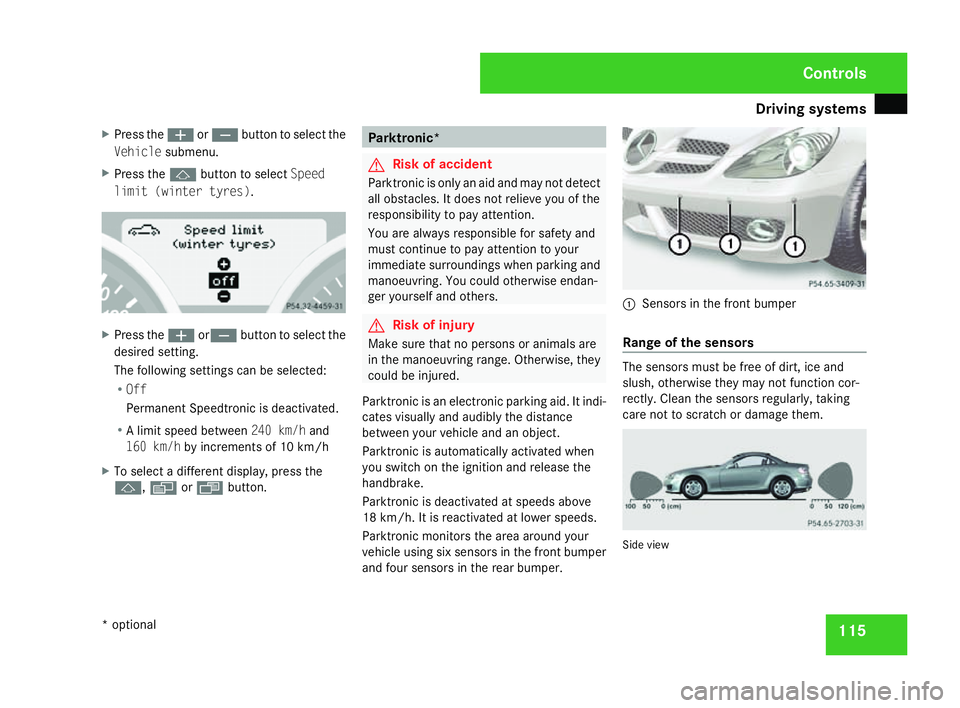
X Press the jbutton to select Speed
limit (winter tyres) .X
Press the æorç button to select the
desired setting.
The following settings can be selected:
R Off
Permanent Speedtronic is deactivated.
R A limit speed between 240 km/hand
160 km/h by increments of 10 km/h
X To select a different display, press the
j ,è orÿ button . Parktronic*
G
Risk of acciden
t
Parktronic is only an aid and may not detect
all obstacles. It does not relieve you of the
responsibility to pay attention.
You are always responsible for safety and
must continue to pay attention to your
immediate surroundings when parking and
manoeuvring. You could otherwise endan-
ger yourself and others. G
Risk of injury
Make sure that no persons or animals ar e
in the manoeuvring range. Otherwise, they
could be injured.
Parktronic is an electronic parking aid. It indi-
cates visually and audibly the distance
between your vehicle and an object.
Parktronic is automatically activated when
you switch on the ignition and release the
handbrake.
Parktronic is deactivated at speeds above
18 km/h. It is reactivated at lower speeds.
Parktronic monitors the area around your
vehicle using six sensors in the front bumper
and four sensors in the rear bumper. 1
Sensors in the front bumpe r
Range of the sensors The sensors must be free of dirt, ice and
slush, otherwise they may not function cor-
rectly. Clean the sensors regularly, taking
care not to scratch or damage them
. Side vie
w Controls
* optional
171_AKB; 3; 4, en-GB
vpfaff7,
2007-11-13T10:50:25+01:00 - Seite 11
5