radio MERCEDES-BENZ SLK ROADSTER 2012 User Guide
[x] Cancel search | Manufacturer: MERCEDES-BENZ, Model Year: 2012, Model line: SLK ROADSTER, Model: MERCEDES-BENZ SLK ROADSTER 2012Pages: 321, PDF Size: 6.9 MB
Page 160 of 321
Otherwise, you may fail to recognise dangers
in time, cause an accident and injure yourself
and others.
The radar sensor system is automatically
deactivated near radio telescope facilities
(Y page 312).
If you want DISTRONIC PLUS to assist you,
the radar sensor system must be activated
(Y page 194) and operational.
If there is no vehicle in front, DISTRONIC
PLUS operates in the same way as cruise
control in the speed range between
30 km/h and 200 km/h. If avehicle is driving
in front of you, DISTRONIC operates in the
speed range between 0km/h and
200 km/h.
Do not use DISTRONIC PLUS on roads with
steep gradients. G
WARNING
DISTRONIC PLUS brakes yourv ehicle up to a
maximum of 4 m/s 2
depending on its speed.
This corresponds to approximately 40% of
your vehicle's maximum braking power. You
must also apply the brakes yourself if this
braking power is not sufficient.
If DISTRONIC PLUS detects a risk of collision
with avehicle in front, an intermittent warning
tone sounds. In addition, the ·distance
warning lamp in the instrument cluster lights
up. Brake to avoid a collision.
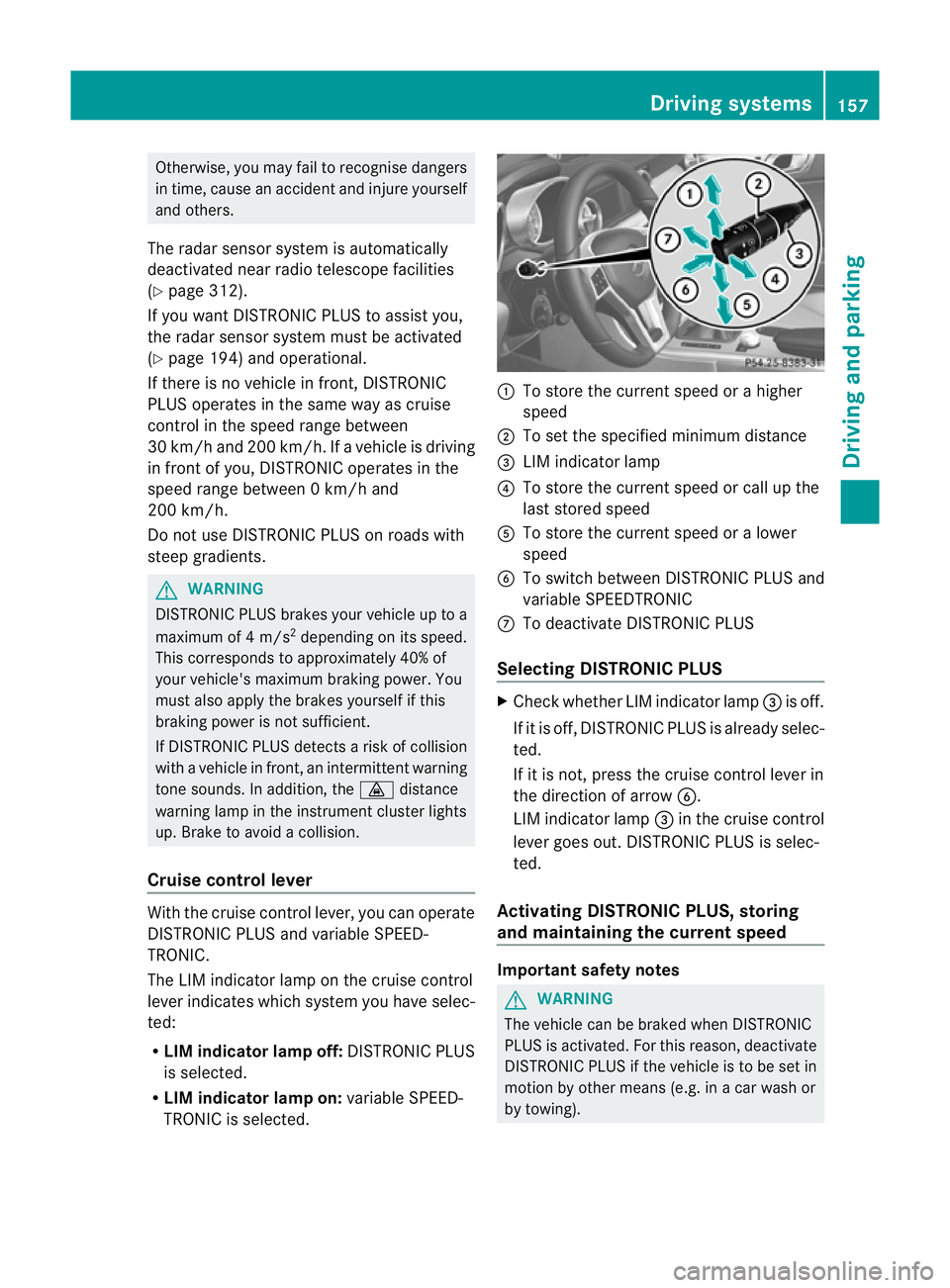
Cruise control lever With the cruise control lever, you can operate
DISTRONIC PLUS and variable SPEED-
TRONIC.
The LIM indicator lamp on the cruise control
lever indicates which system you have selec-
ted:
R LIM indicator lamp off: DISTRONIC PLUS
is selected.
R LIM indicator lamp on: variable SPEED-
TRONIC is selected. :
To store the curren tspeed or a higher
speed
; To set the specified minimum distance
= LIM indicator lamp
? To store the curren tspeed or call up the
last stored speed
A To store the curren tspeed or a lower
speed
B To switch between DISTRONIC PLUS and
variable SPEEDTRONIC
C To deactivate DISTRONIC PLUS
Selecting DISTRONIC PLUS X
Check whether LIM indicator lamp =is off.
If it is off, DISTRONIC PLUS is already selec-
ted.
If it is not, press the cruise control lever in
the direction of arrow B.
LIM indicator lamp =in the cruise control
lever goes out. DISTRONIC PLUS is selec-
ted.
Activating DISTRONIC PLUS, storing
and maintaining the current speed Important safety notes
G
WARNING
The vehicle can be braked when DISTRONIC
PLUS is activated. For this reason, deactivate
DISTRONIC PLUS if the vehicle is to be set in
motion by other means (e.g. in a car wash or
by towing). Driving systems
157Driving and parking Z
Page 166 of 321
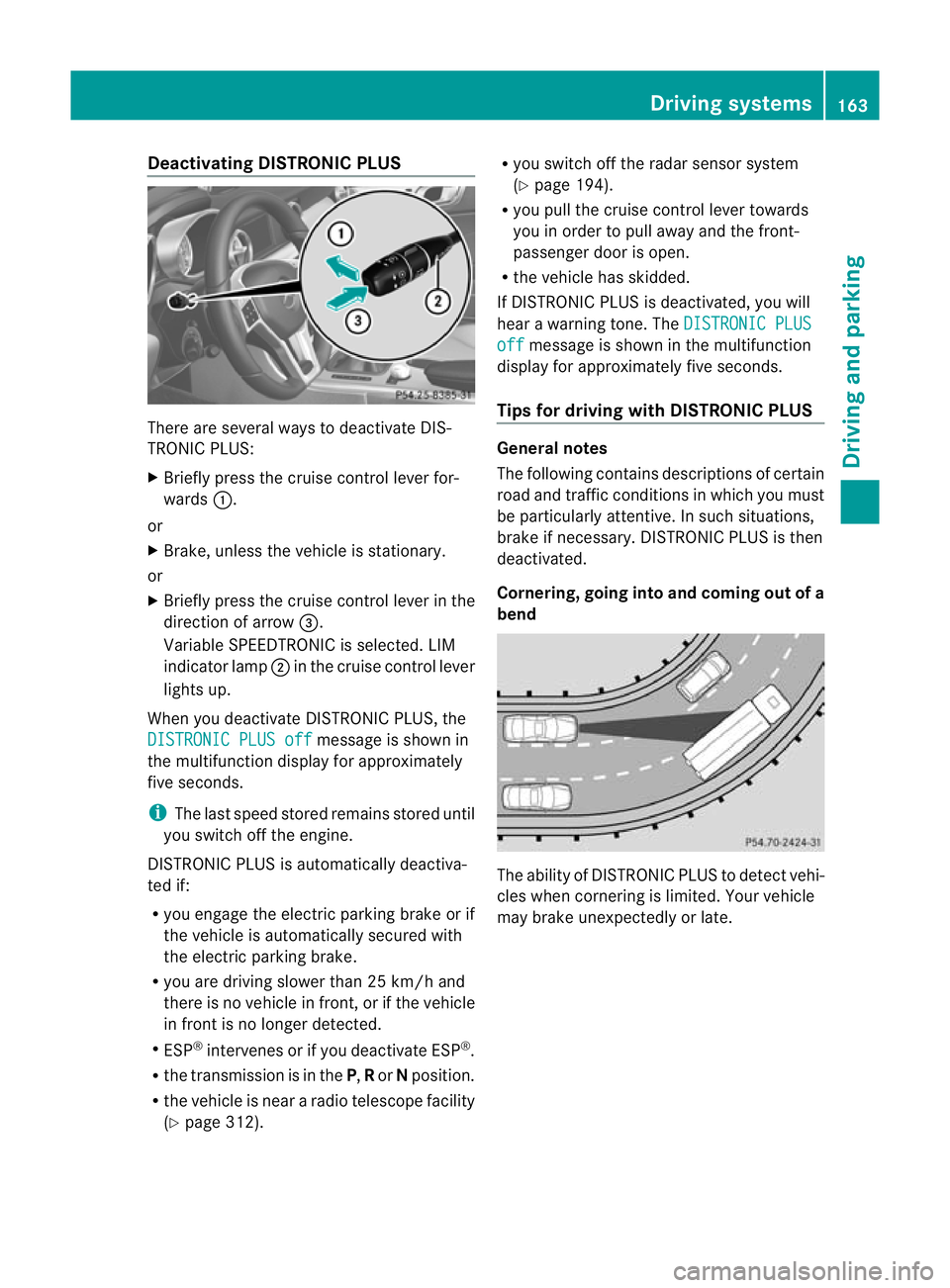
Deactivating DISTRONIC PLUS
There are several ways to deactivate DIS-
TRONIC PLUS:
X Briefly press the cruise control lever for-
wards :.
or
X Brake, unless the vehicle is stationary.
or
X Briefly press the cruise control lever in the
direction of arrow =.
Variable SPEEDTRONIC is selected. LIM
indicator lamp ;in the cruise contro llever
lights up.
When you deactivate DISTRONIC PLUS, the
DISTRONIC PLUS off message is shown in
the multifunction display for approximately
five seconds.
i The last speed stored remains stored until
you switch off the engine.
DISTRONIC PLUS is automatically deactiva-
ted if:
R you engage the electric parking brake or if
the vehicle is automatically secured with
the electric parking brake.
R you are driving slower than 25 km/h and
there is no vehicle in front, or if the vehicle
in front is no longer detected.
R ESP ®
intervenes or if you deactivate ESP ®
.
R the transmission is in the P,Ror Nposition.
R the vehicle is near a radio telescope facility
(Y page 312). R
you switch off the radar sensor system
(Y page 194).
R you pull the cruise control lever towards
you in order to pull away and the front-
passenger door is open.
R the vehicle has skidded.
If DISTRONIC PLUS is deactivated, you will
hear a warning tone. The DISTRONIC PLUS off message is shown in the multifunction
display for approximately five seconds.
Tips for driving with DISTRONIC PLUS General notes
The following contains descriptions of certain
road and traffic conditions in which you must
be particularly attentive. In such situations,
brake if necessary. DISTRONIC PLUS is then
deactivated.
Cornering, going into and coming out of a
bend
The ability of DISTRONIC PLUS to detec
tvehi-
cles when cornering is limited. Your vehicle
may brake unexpectedly or late. Driving systems
163Driving and parking Z
Page 173 of 321
Problems with PARKTRONIC
Problem Possible causes/consequences and
M Solutions
Only the red segments
in the PARKTRONIC
warning displays are lit.
You also hear a warning
tone for approximately
two seconds.
PARKTRONIC is deacti-
vated after approx-
imately 20 seconds,
and the indicator lamp
in the PARKTRONIC
button lights up. PARKTRONIC has malfunctioned and has switched off.
X
If problems persist, have PARKTRONIC checked at a qualified
specialist workshop. Only the red segments
in the PARKTRONIC
warning displays are lit.
PARKTRONIC is deacti-
vated after approx-
imately 20 seconds. The PARKTRONIC sensors are dirty or there is interference.
X
Cleant he PARKTRONIC sensors (Y page 257).
X Switch the ignition back on. The problem may be caused by an external source of radio or
ultrasound waves.
X
See if PARKTRONIC functions in a different location. Parking Guidance
Important safety notes Parking Guidance is an electronic parking aid
with ultrasound. Ultrasound is used to meas-
ure the road on both sides of the vehicle. A
suitable parking space is indicated by the
parking symbol. You receive steering instruc-
tions when parking. You may also use PARK-
TRONIC (Y
page 167). G
WARNING
Parking Guidance is merely an aid and may
recommend parking spaces that are not suit-
able for parking. For example, these might be
spaces where parking is prohibited, drive-
ways, unsuitable surfaces, etc.
Parking Guidance measures the parking
space as you drive past it. Any later changes
to the parking space are not taken into
account. For instance, this may be the case when the vehicle parked in front of or behind
the space changes its position or when an
obstacle is moved into the parking space.
Parking Guidance does not relieve you of the
responsibility for paying attention. If you rely
solely on Parking Guidance, you could cause
an accident and injure yourself and others.
You are always responsible for safety and
must continue to pay attention to your imme-
diate surroundings when parking and
manoeuvring. G
WARNING
Objects located above the height range of
Parking Guidance will not be detected when
the parking space is measured. These are not
taken into account when the parking proce-
dure is calculated, e.g. overhanging loads, tail
sections or loading ramps of goods vehicles.
In some circumstances, Parking Guidance 170
Driving systemsDriving and parking
Page 189 of 321
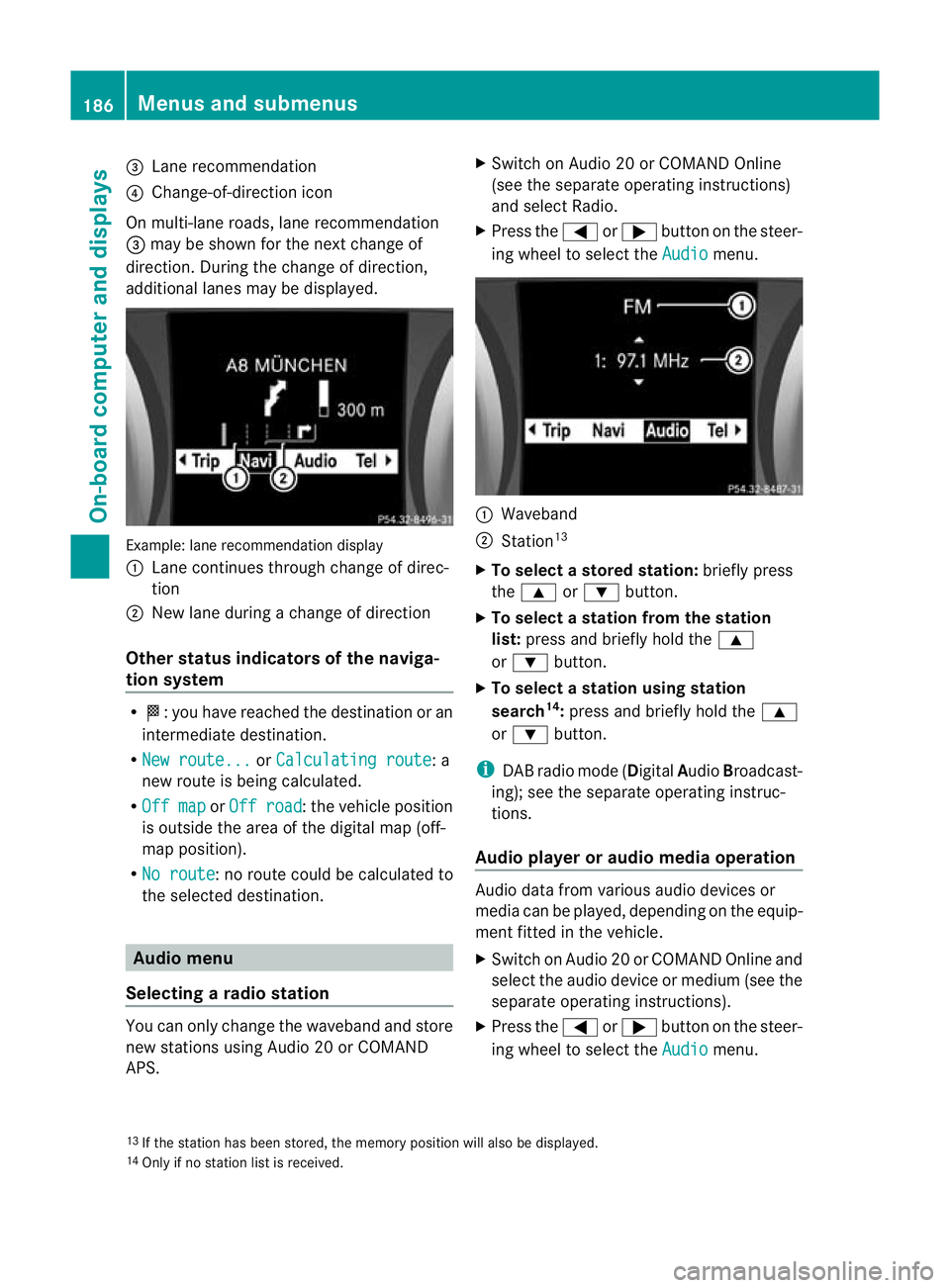
=
Lane recommendation
? Change-of-direction icon
On multi-lane roads, lane recommendation
= may be shown for the next change of
direction. During the change of direction,
additional lanes may be displayed. Example: lane recommendatio
ndisplay
: Lane continues through change of direc-
tion
; New lane during a change of direction
Other status indicators of the naviga-
tion system R
O:y ou have reached the destination or an
intermediate destination.
R New route... or
Calculating route : a
new route is being calculated.
R Off map or
Off road :t
he vehicle position
is outside the area of the digital map (off-
map position).
R No route :n
o route could be calculated to
the selected destination. Audio menu
Selecting aradio station You can only change the waveband and store
new stations using Audio 20 or COMAND
APS. X
Switch on Audio 20 or COMAND Online
(see the separate operating instructions)
and select Radio.
X Press the =or; button on the steer-
ing wheel to select the Audio menu.
:
Waveband
; Station 13
X To selectas toredstation: briefly press
the 9 or: button.
X To select a station from the station
list: press and briefly hold the 9
or : button.
X To select astation using station
search 14
:press and briefly hold the 9
or : button.
i DAB radio mode ( DigitalAudioBroadcast-
ing); see the separate operating instruc-
tions.
Audio player or audio media operation Audio data from various audi
odevices or
media can be played, depending on the equip-
ment fitted in the vehicle.
X Switch on Audio 20 or COMAND Online and
select the audio device or medium (see the
separate operating instructions).
X Press the =or; button on the steer-
ing wheel to select the Audio menu.
13 If the station has been stored, the memory position will also be displayed.
14 Only if no station list is received. 186
Menus and submenusOn-board computer and displays
Page 197 of 321
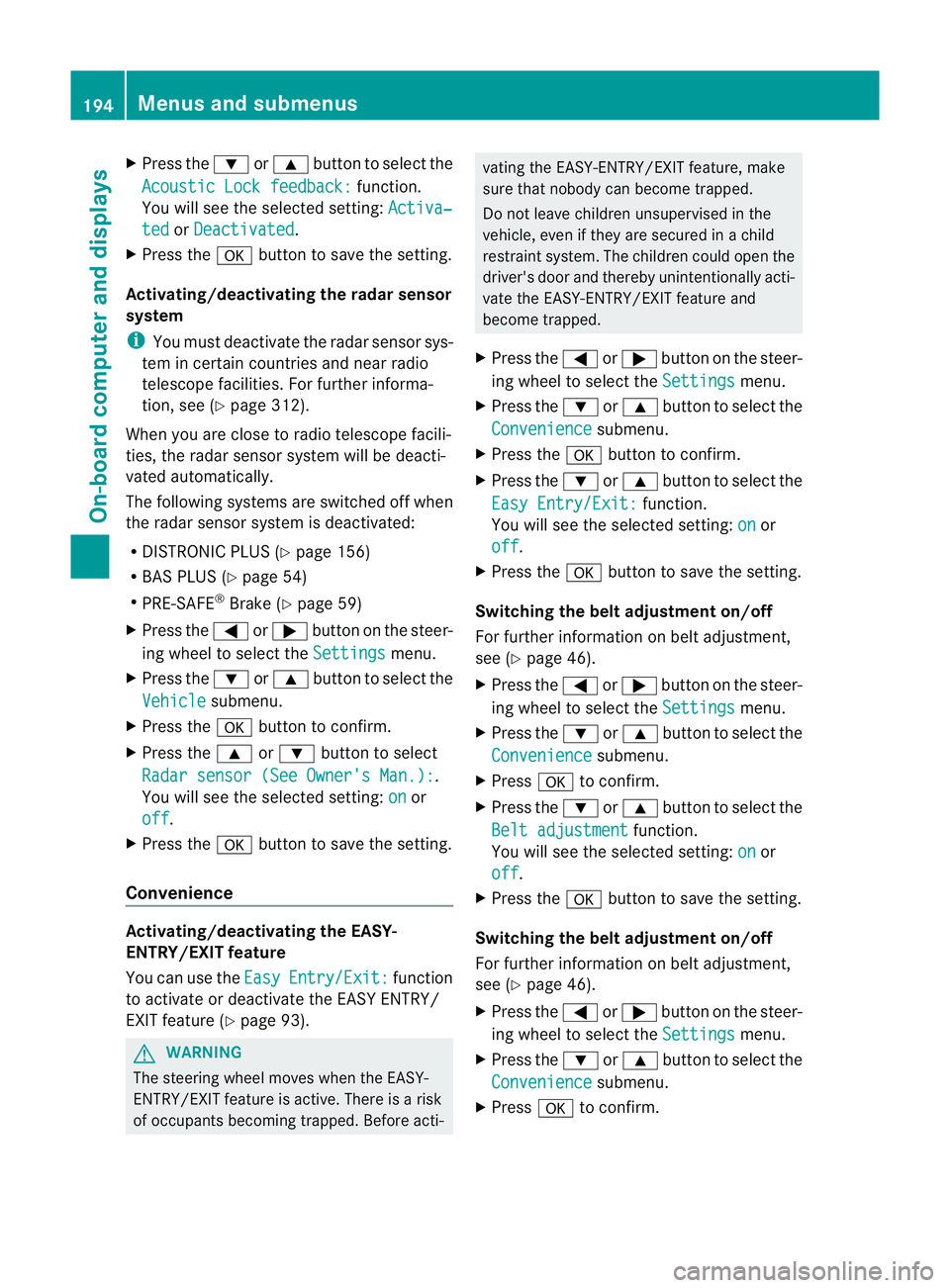
X
Press the :or9 button to select the
Acoustic Lock feedback: function.
You will see the selected setting: Activa‐ted or
Deactivated .
X Press the abutton to save the setting.
Activating/deactivating the radar sensor
system
i You must deactivate the radar sensor sys-
tem in certain countries and near radio
telescope facilities. For further informa-
tion, see (Y page 312).
When you are close to radio telescope facili-
ties, the radar sensor system will be deacti-
vated automatically.
The following systems are switched off when
the radar sensor system is deactivated:
R DISTRONIC PLUS (Y page 156)
R BAS PLUS (Y page 54)
R PRE-SAFE ®
Brake (Y page 59)
X Press the =or; button on the steer-
ing wheel to select the Settings menu.
X Press the :or9 button to select the
Vehicle submenu.
X Press the abutton to confirm.
X Press the 9or: button to select
Radar sensor (See Owner's Man.): .
You will see the selected setting: on or
off .
X Press the abutton to save the setting.
Convenience Activating/deactivating the EASY-
ENTRY/EXIT feature
You can use the
Easy Entry/Exit: function
to activate or deactivate the EASY ENTRY/
EXIT feature (Y page 93). G
WARNING
The steering wheel moves when the EASY-
ENTRY/EXIT feature is active. There is a risk
of occupants becoming trapped. Before acti- vating the EASY-ENTRY/EXIT feature, make
sure that nobody can become trapped.
Do not leave children unsupervised in the
vehicle, even if they are secured in a child
restraint system. The children could open the
driver's door and thereby unintentionally acti-
vate the EASY-ENTRY/EXIT feature and
become trapped.
X Press the =or; button on the steer-
ing wheel to select the Settings menu.
X Press the :or9 button to select the
Convenience submenu.
X Press the abutton to confirm.
X Press the :or9 button to select the
Easy Entry/Exit: function.
You will see the selected setting: on or
off .
X Press the abutton to save the setting.
Switching the belt adjustment on/off
For further information on belt adjustment,
see (Y page 46).
X Press the =or; button on the steer-
ing wheel to select the Settings menu.
X Press the :or9 button to select the
Convenience submenu.
X Press ato confirm.
X Press the :or9 button to select the
Belt adjustment function.
You will see the selected setting: on or
off .
X Press the abutton to save the setting.
Switching the belt adjustment on/off
For further information on belt adjustment,
see (Y page 46).
X Press the =or; button on the steer-
ing wheel to select the Settings menu.
X Press the :or9 button to select the
Convenience submenu.
X Press ato confirm. 194
Menus and submenusOn-board computer and displays
Page 210 of 321
Display messages Possible causes/consequences and
M Solutions
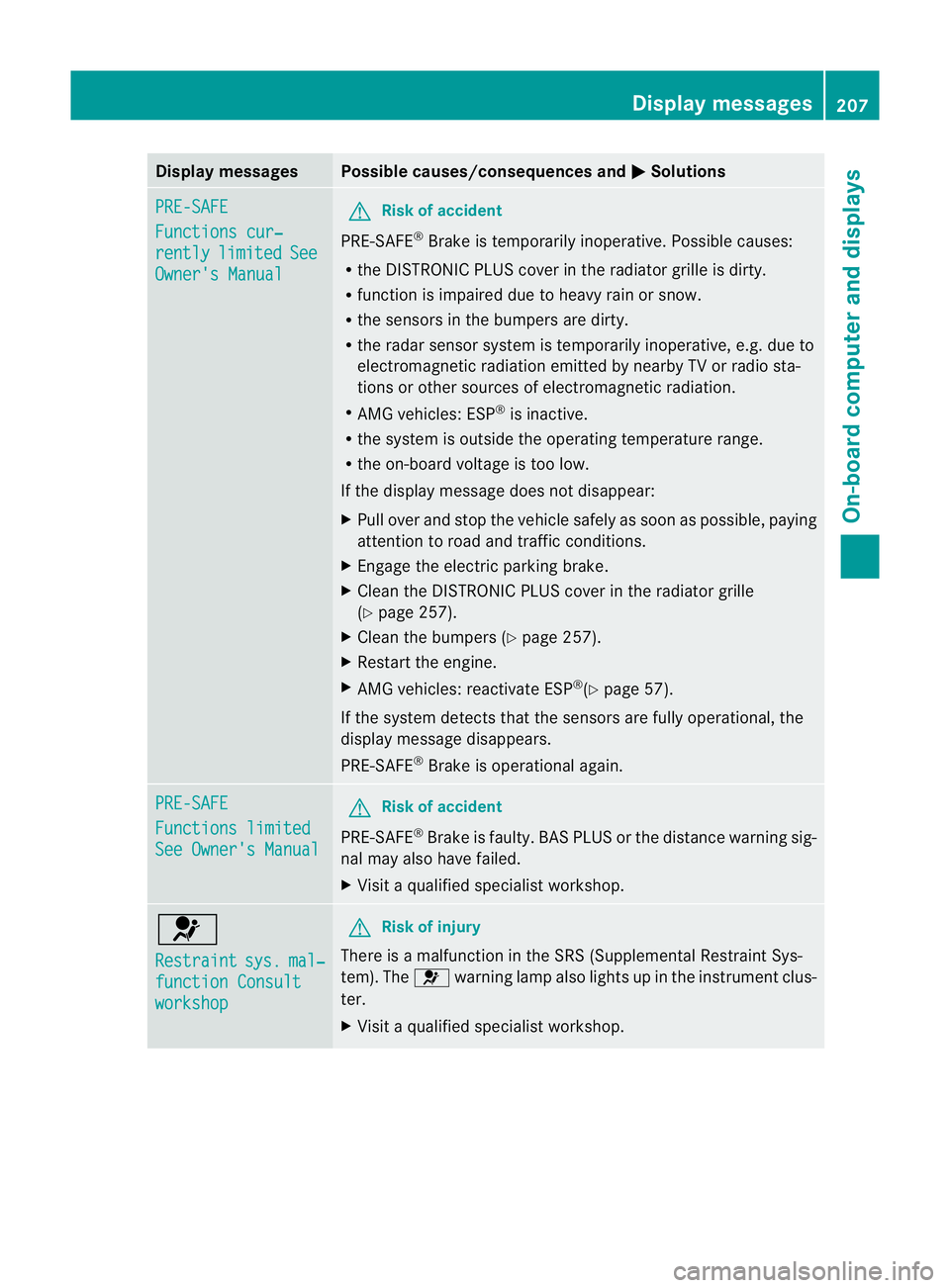
PRE-SAFE
Functions cur‐
rently limited See
Owner's Manual G
Risk of accident
PRE-SAFE ®
Brake is temporarily inoperative. Possible causes:
R the DISTRONIC PLUS cover in the radiator grille is dirty.
R function is impaired due to heavy rain or snow.
R the sensors in the bumpers are dirty.
R the rada rsensor system is temporarily inoperative, e.g. due to
electromagnetic radiation emitted by nearby TV or radio sta-
tions or other sources of electromagnetic radiation.
R AMG vehicles: ESP ®
is inactive.
R the system is outside the operating temperature range.
R the on-board voltage is too low.
If the display message does not disappear:
X Pull over and stop the vehicle safely as soon as possible, paying
attention to road and traffic conditions.
X Engage the electric parking brake.
X Clean the DISTRONIC PLUS cover in the radiator grille
(Y page 257).
X Clean the bumpers (Y page 257).
X Restart the engine.
X AMG vehicles: reactivate ESP ®
(Y page 57).
If the system detects that the sensors are fully operational, the
display message disappears.
PRE-SAFE ®
Brake is operational again. PRE-SAFE
Functions limited
See Owner's Manual G
Risk of accident
PRE-SAFE ®
Brake is faulty. BASP LUS or the distance warning sig-
nal may also have failed.
X Visit a qualified specialist workshop. 6
Restraint
sys. mal‐
function Consult
workshop G
Risk of injury
There is a malfunction in the SRS (Supplemental Restraint Sys-
tem). The 6warning lamp also lights up in the instrument clus-
ter.
X Visit a qualified specialist workshop. Display messages
207On-board computer and displays Z
Page 217 of 321
Display messages Possible causes/consequences and
M Solutions
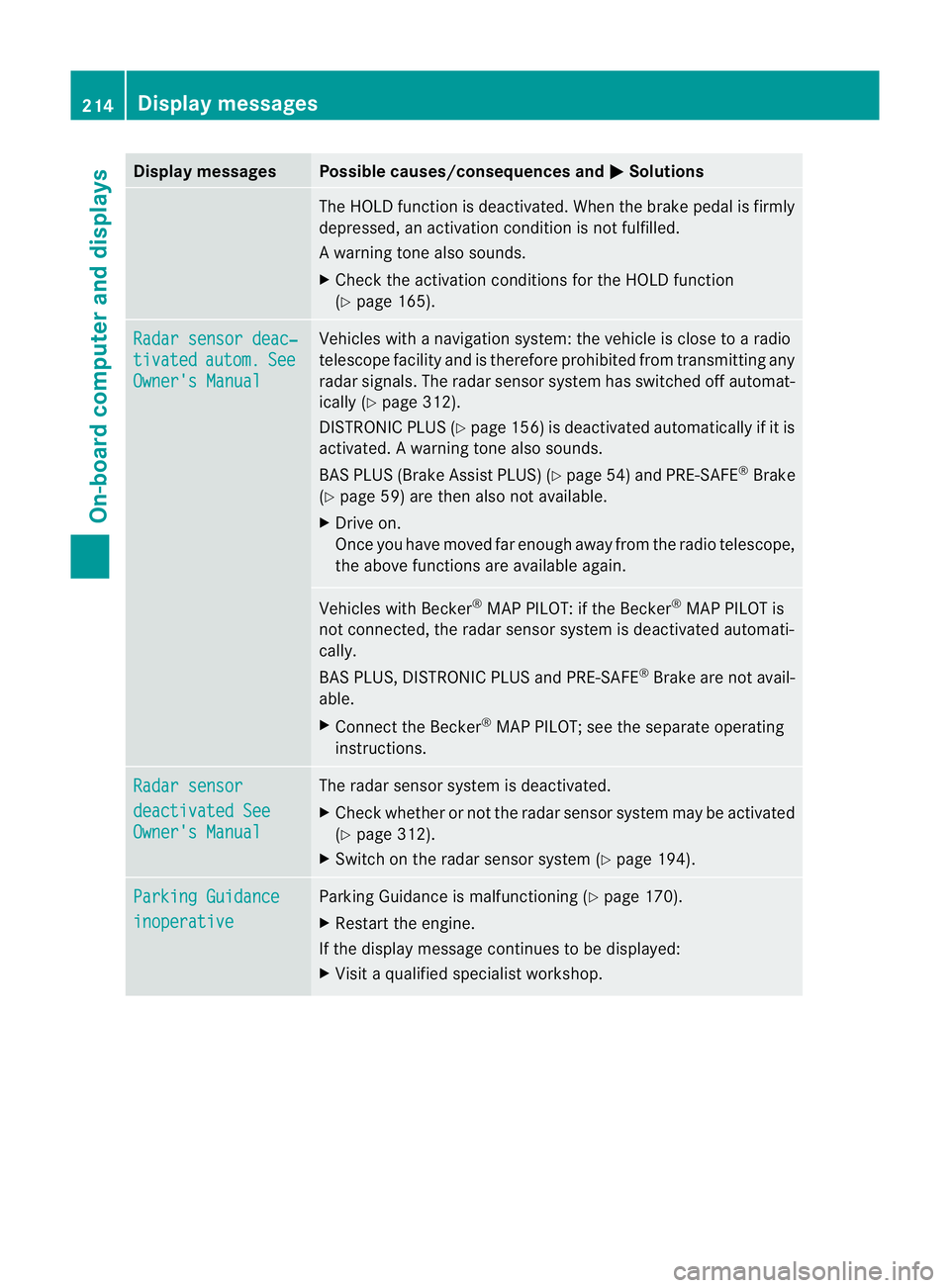
The HOLD function is deactivated. Whe
nthe brake pedal is firmly
depressed, an activation condition is not fulfilled.
Aw arning tone also sounds.
X Check the activation conditions for the HOLD function
(Y page 165). Radar sensor deac‐
tivated autom. See
Owner's Manual Vehicles with a navigation system: the vehicle is close to a radio
telescope facility and is therefore prohibited from transmitting any
radar signals. The radar sensor system has switched off automat-
ically (Y
page 312).
DISTRONI CPLUS (Y page 156) is deactivated automatically if it is
activated. Awarning tone also sounds.
BAS PLUS (Brake Assist PLUS) (Y page 54)and PRE-SAFE ®
Brake
(Y page 59) are then also not available.
X Drive on.
Once you have moved fa renough away from the radio telescope,
the above functions are available again. Vehicles with Becker
®
MAP PILOT: if the Becker ®
MAP PILOT is
not connected, the rada rsensor system is deactivated automati-
cally.
BAS PLUS, DISTRONIC PLUS and PRE-SAFE ®
Brake are not avail-
able.
X Connect the Becker ®
MAP PILOT; see the separate operating
instructions. Radar sensor
deactivated See
Owner's Manual The radar sensor system is deactivated.
X
Check whether or not the radar sensor system may be activated
(Y page 312).
X Switch on the radar sensor system (Y page 194).Parking Guidance
inoperative Parking Guidance is malfunctioning (
Ypage 170).
X Restart the engine.
If the display message continues to be displayed:
X Visit a qualified specialist workshop. 214
Display messagesOn-board computer and displays
Page 219 of 321
Display messages Possible causes/consequences and
M Solutions
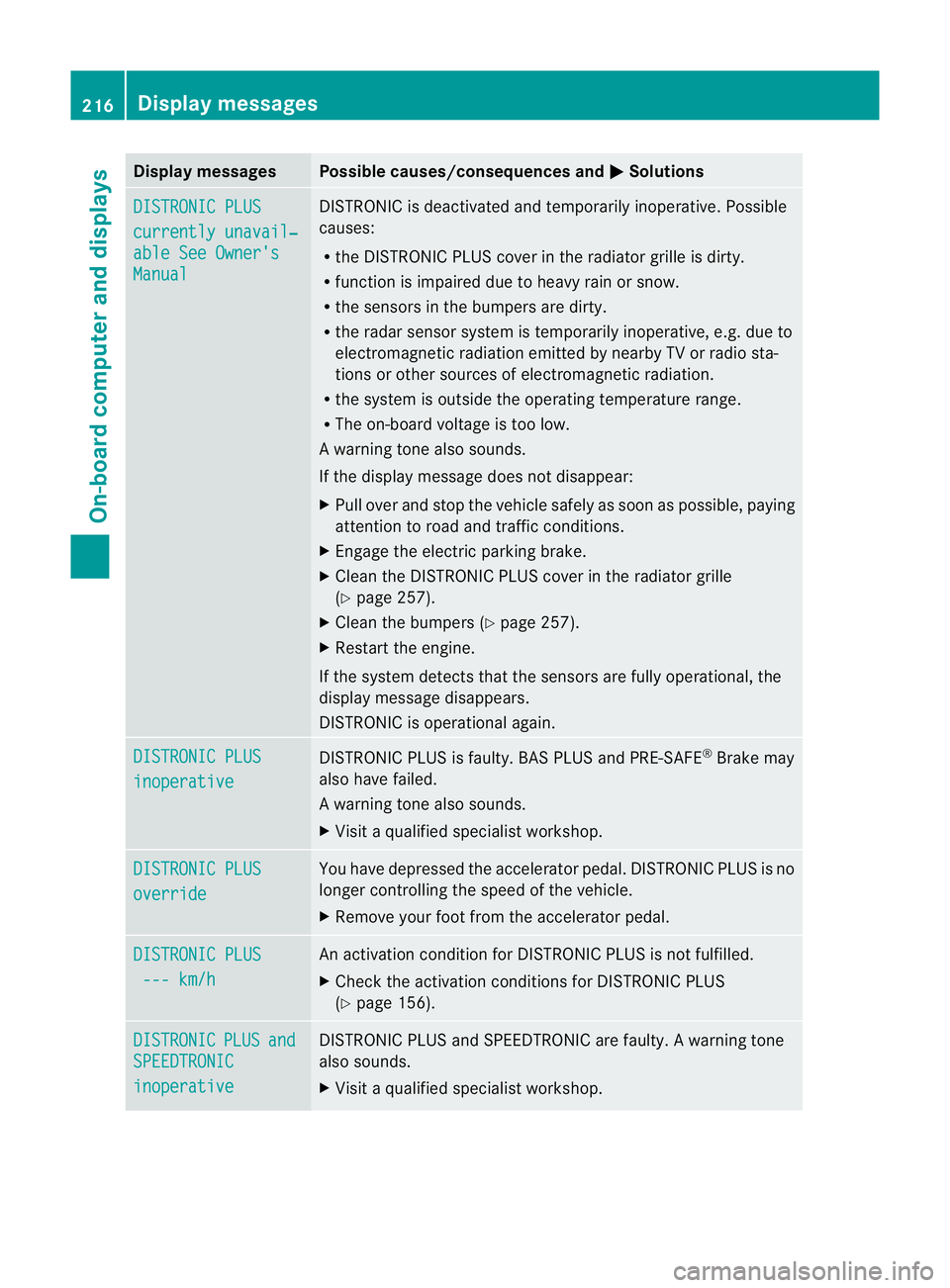
DISTRONIC PLUS
currently unavail‐
able See Owner's
Manual DISTRONIC is deactivated and temporarily inoperative. Possible
causes:
R
the DISTRONIC PLUS cover in the radiator grille is dirty.
R function is impaired due to heavy rain or snow.
R the sensors in the bumpers are dirty.
R the rada rsensor system is temporarily inoperative, e.g. due to
electromagnetic radiation emitted by nearby TV or radio sta-
tions or other sources of electromagnetic radiation.
R the system is outside the operating temperature range.
R The on-board voltage is too low.
Aw arning tone also sounds.
If the display message does no tdisappear:
X Pull over and stop the vehicle safely as soon as possible, paying
attention to road and traffic conditions.
X Engage the electric parking brake.
X Clean the DISTRONIC PLUS cover in the radiator grille
(Y page 257).
X Clean the bumpers (Y page 257).
X Restar tthe engine.
If the system detects that the sensors are fully operational, the
display message disappears.
DISTRONIC is operational again. DISTRONIC PLUS
inoperative DISTRONIC PLUS is faulty. BAS PLUS and PRE-SAFE
®
Brake may
also have failed.
Aw arning tone also sounds.
X Visi taqualified specialist workshop. DISTRONIC PLUS
override You have depressed the accelerator pedal. DISTRONIC PLUS is no
longer controlling the speed of the vehicle.
X
Remove your foot from the accelerator pedal. DISTRONIC PLUS
--- km/h An activation condition for DISTRONIC PLUS is not fulfilled.
X
Check the activation conditions for DISTRONIC PLUS
(Y page 156). DISTRONIC PLUS and
SPEEDTRONIC
inoperative DISTRONIC PLUS and SPEEDTRONIC are faulty. A warning tone
also sounds.
X
Visit a qualified specialist workshop. 216
Display messagesOn-board computer and displays
Page 222 of 321
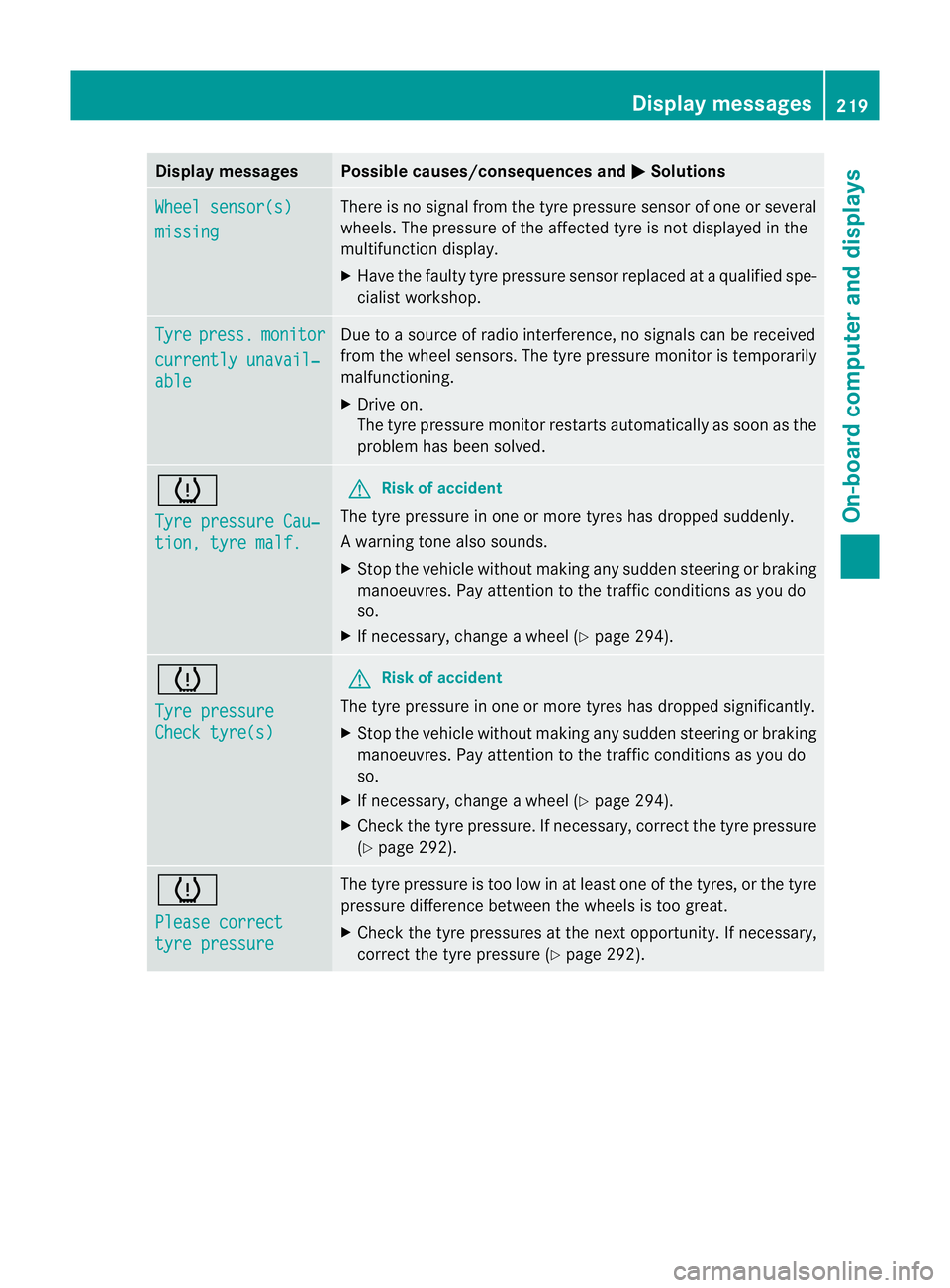
Display messages Possible causes/consequences and
M Solutions
Wheel sensor(s)
missing There is no signal from the tyre pressure sensor of one or several
wheels. The pressure of the affected tyre is no
tdisplayed in the
multifunction display.
X Have the faulty tyre pressure sensor replaced at a qualified spe-
cialist workshop. Tyre press. monitor
currently unavail‐
able Due to a source of radio interference, no signals can be received
fro
mt he wheel sensors. The tyre pressure monitor is temporarily
malfunctioning.
X Drive on.
The tyre pressure monitor restarts automatically as soon as the
problem has been solved. h
Tyre pressure Cau‐
tion, tyre malf. G
Risk of accident
The tyre pressure in one or more tyres has dropped suddenly.
Aw arning tone also sounds.
X Stop the vehicle without making any sudde nsteering or braking
manoeuvres .Pay attentio nto the traffic conditions as you do
so.
X If necessary, change a wheel (Y page 294).h
Tyre pressure
Check tyre(s) G
Risk of accident
The tyre pressure in one or more tyres has dropped significantly.
X Stop the vehicle without making any sudden steering or braking
manoeuvres. Pay attention to the traffic conditions as you do
so.
X If necessary, change a wheel (Y page 294).
X Check the tyre pressure. If necessary, correc tthe tyre pressure
(Y page 292). h
Please correct
tyre pressure The tyre pressure is too low in at least one of the tyres, or the tyre
pressure difference between the wheels is too great.
X
Check the tyre pressures at the next opportunity. If necessary,
correct the tyre pressure (Y page 292). Display messages
219On-board computer and displays Z
Page 226 of 321
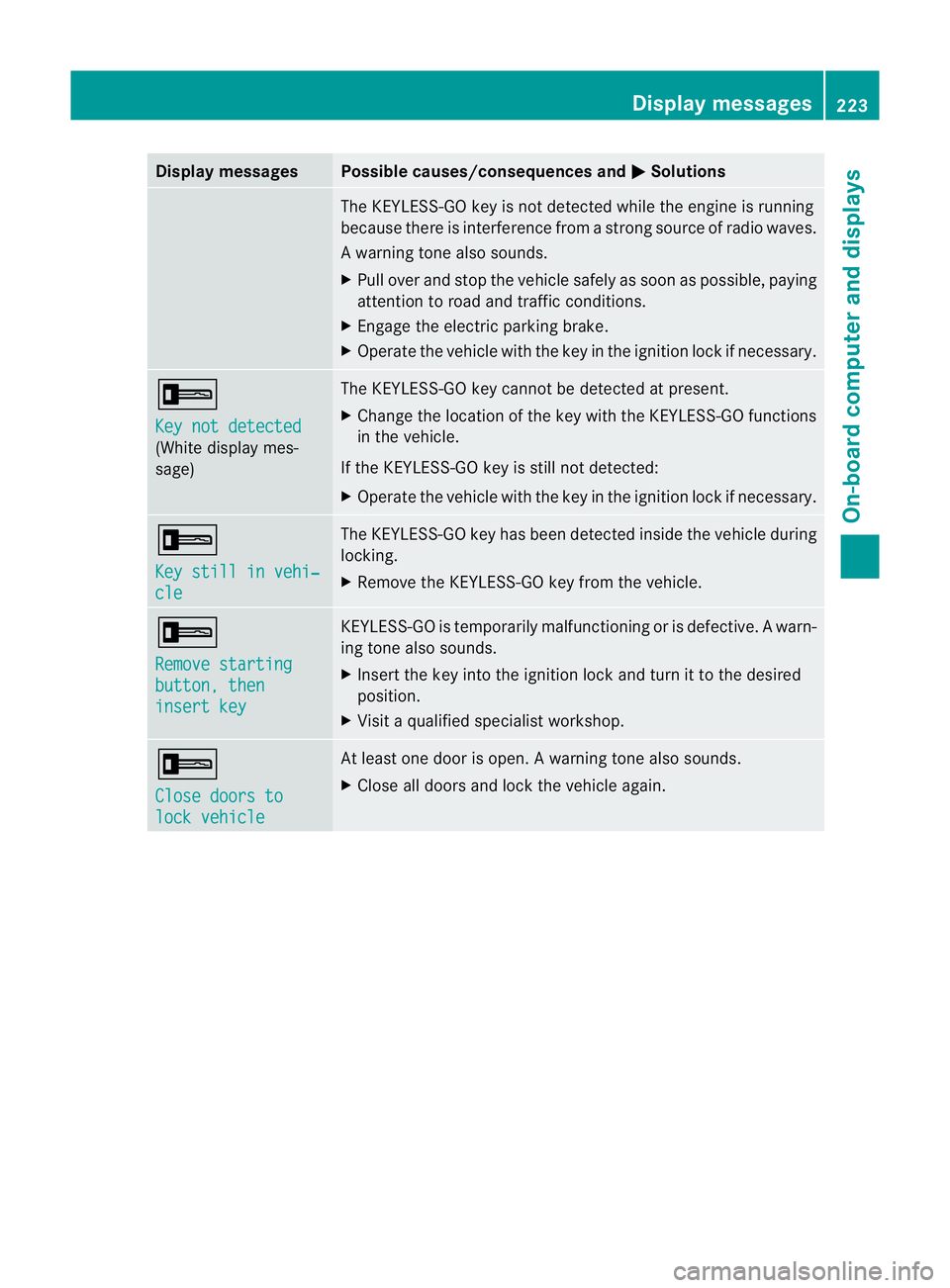
Display messages Possible causes/consequences and
M Solutions
The KEYLESS-GO key is no
tdetected while the engine is running
because there is interference from a strong source of radio waves.
Aw arning tone also sounds.
X Pull ove rand stop the vehicle safely as soo nas possible, paying
attention to road and traffic conditions.
X Engage the electric parking brake.
X Operate the vehicle with the key in the ignition lock if necessary. +
Key not detected
(White display mes-
sage) The KEYLESS-GO key cannot be detected at present.
X
Change the location of the key with the KEYLESS-GO functions
in the vehicle.
If the KEYLESS-GO key is still not detected:
X Operate the vehicle with the key in the ignition lock if necessary. +
Key still in vehi‐
cle The KEYLESS-GO key has been detected inside the vehicle during
locking.
X
Remove the KEYLESS-GO key from the vehicle. +
Remove starting
button, then
insert key KEYLESS-GO is temporarily malfunctioning or is defective.
Awarn-
ing tone also sounds.
X Insert the key into the ignition lock and turn it to the desired
position.
X Visi taqualified specialist workshop. +
Close doors to
lock vehicle At least one door is open.
Awarning tone also sounds.
X Close all doors and loc kthe vehicle again. Display messages
223On-board computer and displays Z