maintenance reset MERCEDES-BENZ SLK ROADSTER 2012 Owners Manual
[x] Cancel search | Manufacturer: MERCEDES-BENZ, Model Year: 2012, Model line: SLK ROADSTER, Model: MERCEDES-BENZ SLK ROADSTER 2012Pages: 321, PDF Size: 6.9 MB
Page 16 of 321
Main-beam headlamps
Changing bulbs .............................. 108
Display message ............................ 209
Switching on/off ........................... 103
Maintenance
see ASSYST PLUS service interval
display
Manual transmission
Engaging revers egear ................... 136
Gea rlever ...................................... 135
Pulling away ................................... 129
Shifting to neutra l.......................... 136
Shift recommendatio n................... 136
Starting the engine ........................129
Matt finish (cleaning instructions) ..255
Memory card (audio) .........................186
Memory function ................................. 96
Mercedes-Benz Service Centre see Qualified specialist workshop
Message memory (on-board com-
puter) ................................................. .199
Messages see Display messages
Mirrors
see Exterior mirrors
see Rear-view mirror
see Vanity mirror
Mobile phone
Frequencies ................................... 301
Installatio n..................................... 301
Menu (on-board computer) ............187
Notes/placing in the bracket ......... 242
Transmission output (maximum) .... 301
see Telephone
Modifying the programming (key) .....67
MOExtended run-flat system ...........272
Motorway mode ................................ 104
MP3 Operating ...................................... .186
see Separate operating instructions
Multifunction display
Function/notes ............................. 180
Permanent displa y......................... 191
Multifunction steering wheel
Operating the on-board computer .179
Overview .......................................... 31 N
Navigation Menu (on-board computer) ............184
On-board computer .......................184
see separate operating instructions
Neck level heating
see AIRSCARF
NECK-PRO head restraints
Operation ........................................ .43
Resetting after being triggered ........44
Notes on running in anew vehicle ..126 O
Occupant safety Childre ninthe vehicle ..................... 47
Important safety notes ....................38
Odometer ........................................... 183
see Total distance recorder
see Trip meter
Oil
see Engine oil
On-board computer
AMG menu ..................................... 195
Assistance menu ........................... 189
Audi omenu ................................... 186
Convenience submenu ..................194
Displaying a service message ........253
Display messages ..........................199
DISTRONI CPLUS ........................... 162
Factory setting submenu ...............195
Important safety notes ..................178
Instrument cluster submenu ..........190
Ligh tsubmenu ............................... 191
Menu overview .............................. 182
Message memory .......................... 199
Navigation menu ............................ 184
Operating vide oDVD ..................... 187
Operation ....................................... 179
RACETIMER ................................... 196
Service menu ................................. 190
Settings menu ............................... 190
Standard displa y............................ 183
Telephone menu ............................ 187
Trip menu ...................................... 183
Vehicle submenu ........................... 193 Index
13
Page 25 of 321
ponents and interference to your compo-
nents caused by other electrical/electronic
components can be largely prevented. Diagnostics connection
G
WARNING
If you connect equipment to the diagnostics
connection, it can affect the operation of the
vehicle systems. This can impair the operating
safety of your vehicle while driving. There is a
risk of accident.
Do not connect any equipment to the diag-
nostics connection. G
WARNING
Loose equipment or equipment cables that
are connected to the diagnostics connection
can obstruct the area around the pedals. The
equipment or the cables could get between
the pedals in the event of sudden braking or
acceleration. As a result, the movement of the
pedals may be impaired. There is a risk of
accident.
Do not attach any equipment or cables in the
driver footwell.
! If the engine is switched off and equip-
ment on the diagnostics connection is
used, the starter battery may discharge.
The diagnostics connection is only intended
for the connection of diagnostic equipment at
a qualified specialist workshop.
Connecting equipment to the diagnostics
connection can, for example, lead to emis-
sions monitoring information being reset.
This may lead to the vehicle failing to meet
the requirements of the nex temissions test
during the main inspection. Qualified specialist workshop
Aq ualified specialist workshop has the nec-
essary specialist knowledge, tools and quali-
fications to correctl ycarry out the work required on your vehicle
.This is especially the
case for work relevant to safety.
Observe the information in the Service Book-
let.
Always have the following work carried out at
a qualified specialist workshop:
R work relevant to safety
R service and maintenance work
R repair work
R alterations, installation work and modifica-
tions
R work on electronic components
Mercedes-Ben zrecommends that you use a
Mercedes-Benz Service Centre. Vehicle registration
Mercedes-Benz may ask its Service Centres
to carry out technical inspections on certain
vehicles to improve their quality or safety.
If you did not purchase your vehicle from an
authorised specialist dealer and your vehicle
has never been inspected at a Mercedes-
BenzS ervice Centre, it is possible that your
vehicle is not registered in your name with
Mercedes-Benz. Mercedes-Benz can only
infor myou about vehicle checks if it has your
registration data.
It is advisable to register your vehicle with a
Mercedes-Benz Service Centre.
InformM ercedes-Benza s soon as possible
abouta ny change in address or vehicle own-
ership. Correc
tuse G
WARNING
Various warning stickers are affixed to your
vehicle. Their purpose is to draw your atten-
tion, and the attention of others, to various
dangers. Therefore, do not remove any warn-
ing stickers unless the sticker clearly states
that you may do so. 22
Introduction
Page 251 of 321
Useful information
i This Owner's Manual describes all models
and all standard and optional equipment
available to your vehicle at the time of pub-
lication of the Owner's Manual. Country-
specific deviations are possible. Please
note that your vehicle may not be equipped
with all features described. This also
applies to safety-relevan tsystems and
functions.
i Please read the information on qualified
specialist workshops (Y page 22).Engine compartment
Bonnet
Active bonnet (pedestrian protection) Operating principle
The active bonne tcan reduce the ris kofinjury
to pedestrians in certain accident situations.
Raising the active bonnet increases the clear-
ance to hard components, such as the engine.
If the active bonnet has been triggered, it will
be raised in the area of the bonnet hinges by
approximatel y85 mm. The active bonnet is
triggered by pyrotechnics.
! An active bonnet that had bee ntriggered
must be repaired at a qualified specialist
workshop. The active bonnet function will
then be available again. The additional
pedestrian protection provided by the
active bonnet will then be restored.
For the drive to the workshop, reset the trig-
gered active bonnet yourself. If the active
bonnet has been triggered, pedestrian pro-
tection may be limited.
Resetting G
WARNING
There is a risk of injury if the bonnet is open,
even if the engine is not running. Some engine components can become very
hot.
To avoid the risk of burns, only touch those
components described in the Owner's Manual
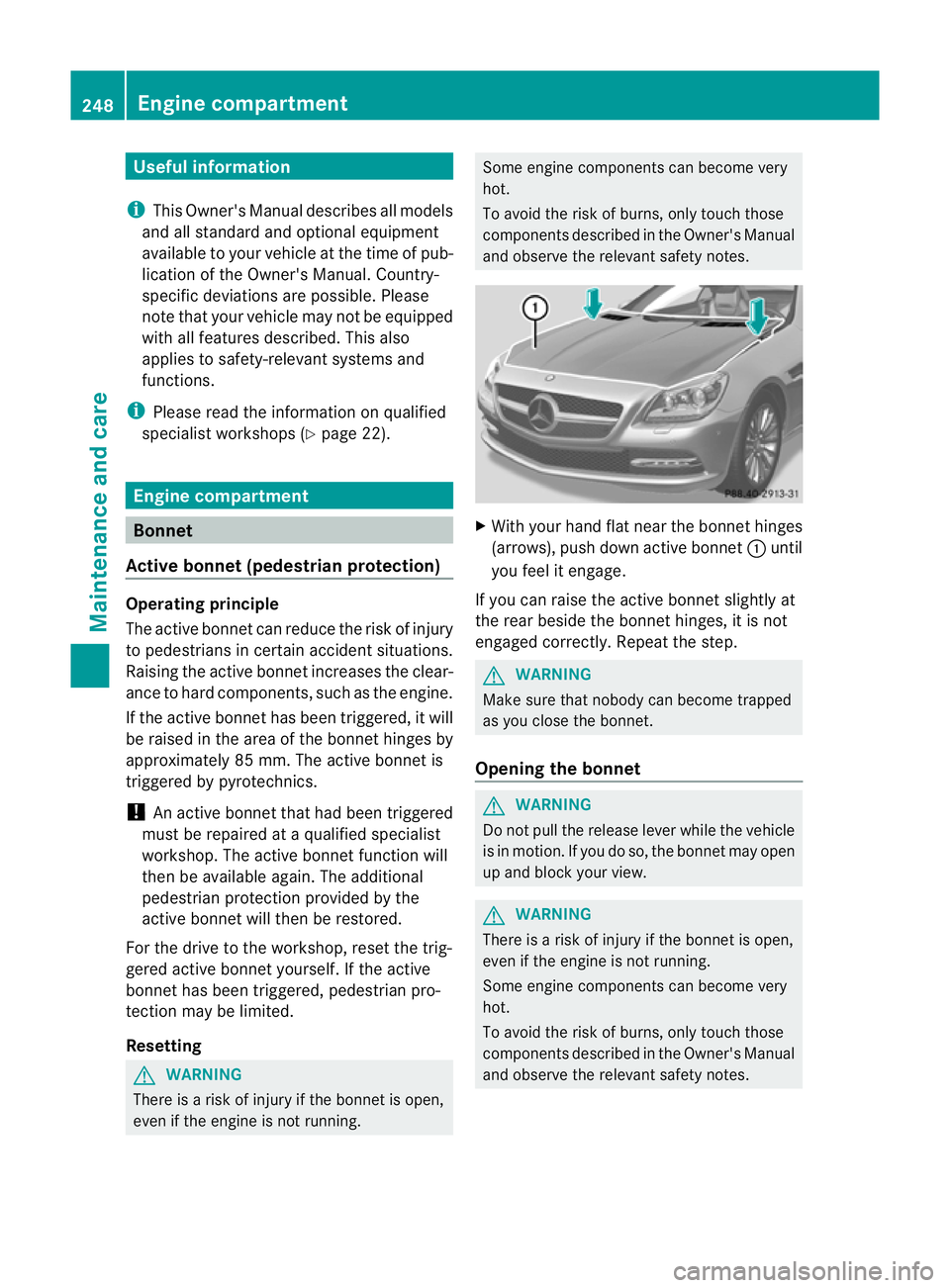
and observe the relevant safety notes. X
With yourh and flat near the bonne thinges
(arrows), push down active bonnet :until
you feel it engage.
If you can raise the active bonnet slightly at
the rear beside the bonnet hinges, it is not
engaged correctly. Repeat the step. G
WARNING
Make sure that nobody can become trapped
as you close the bonnet.
Opening the bonnet G
WARNING
Do not pull the release lever while the vehicle
is in motion. If you do so, the bonnet may open
up and block your view. G
WARNING
There is a risk of injury if the bonnet is open,
even if the engine is not running.
Some engine components can become very
hot.
To avoid the risk of burns, only touch those
components described in the Owner's Manual
and observe the relevant safety notes. 248
Engine compartmentMaintenance and care
Page 256 of 321
Maintaining the time-dependent service
schedule:
X
Note down the service due date displayed
in the multifunction display before discon-
necting the battery.
or
X Subtract the battery disconnection periods
from the service date shown on the display
after reconnecting the battery.
Hiding aservice message X
Press the %ora button on the steer-
ing wheel.
Displaying service messages X
Switch on the ignition.
X Press =or; on the steering wheel
to selec tthe Serv. menu.
X Press 9or: to select the ASSYST PLUS submenu and press
ato confirm.
The service due date appears in the multi-
function display.
Points to remember Resetting the ASSYST PLUS service inter-
val display
Aq ualified specialist workshop, e.g. a
Mercedes-Ben zService Centre, will reset the
ASSYST PLUS service interval display after
the necessary service work has been carried
out.
You can obtain further information, e.g.
regarding service work, from a Mercedes-
Benz Service Centre or directly from
Mercedes-Benz.
! If the ASSYST PLUS service interval dis-
play has been inadvertently reset, this set-
ting can be corrected at a Mercedes-Benz
Service Centre.
Have service work carried out as described
in the Service Booklet. This may otherwise lead to increased wear and damage to the
major assemblies or the vehicle.
Driving abroad
An extensive Mercedes-Benz Service network
is also available in other countries. The
Service Hotline's curren ttelephone numbers
for use when you are abroad are to be found
in the "Mercedes-BenzS ervice24h" section
of the Service Booklet. Care
Notes on care
Regular care of your vehicle is a condition for
retaining the quality in the long term.
Use care products and cleaning agents rec-
ommended and approved by Mercedes-Benz.
! For cleaning your vehicle, do not use any
of the following:
R dry, rough or hard cloths
R abrasive cleaning agents
R solvents
R cleaning agents containing solvents
Do not scrub.
Do not touch the surfaces or protective
films with hard objects, e.g. a ring or ice
scraper. You could otherwise scratch or
damage the surfaces and protective film. H
Environmental note
Dispose of empty packaging and cleaning
cloths in an environmentally responsible man-
ner.
! Do not park up the vehicle for an extended
period straight after cleaning it, particularly
after having cleaned the wheels with wheel
cleaner. Wheel cleaners could cause
increased corrosion of the brake discs and
brake pads/linings. For this reason, you
should drive for a few minutes after clean-
ing. Braking heats the brake discs and the
brake pads/linings, thus drying them. The
vehicle can then be parked up. Care
253Maintenance and care Z