check engine MERCEDES-BENZ SLK ROADSTER 2014 Owner's Manual
[x] Cancel search | Manufacturer: MERCEDES-BENZ, Model Year: 2014, Model line: SLK ROADSTER, Model: MERCEDES-BENZ SLK ROADSTER 2014Pages: 357, PDF Size: 10.22 MB
Page 184 of 357
dent nor override the laws of physics. SPEED-
TRONIC cannot take into account road,
weather or traffic conditions. SPEEDTRONIC
is only an aid. You are responsible for the dis-
tance to the vehicle in front, for vehicle speed,
for braking in good time, and for staying cor-
rectly in lane.
If there is a change of drivers, advise the new driver of the speed stored.
Variable SPEEDTRONIC Cruise control lever
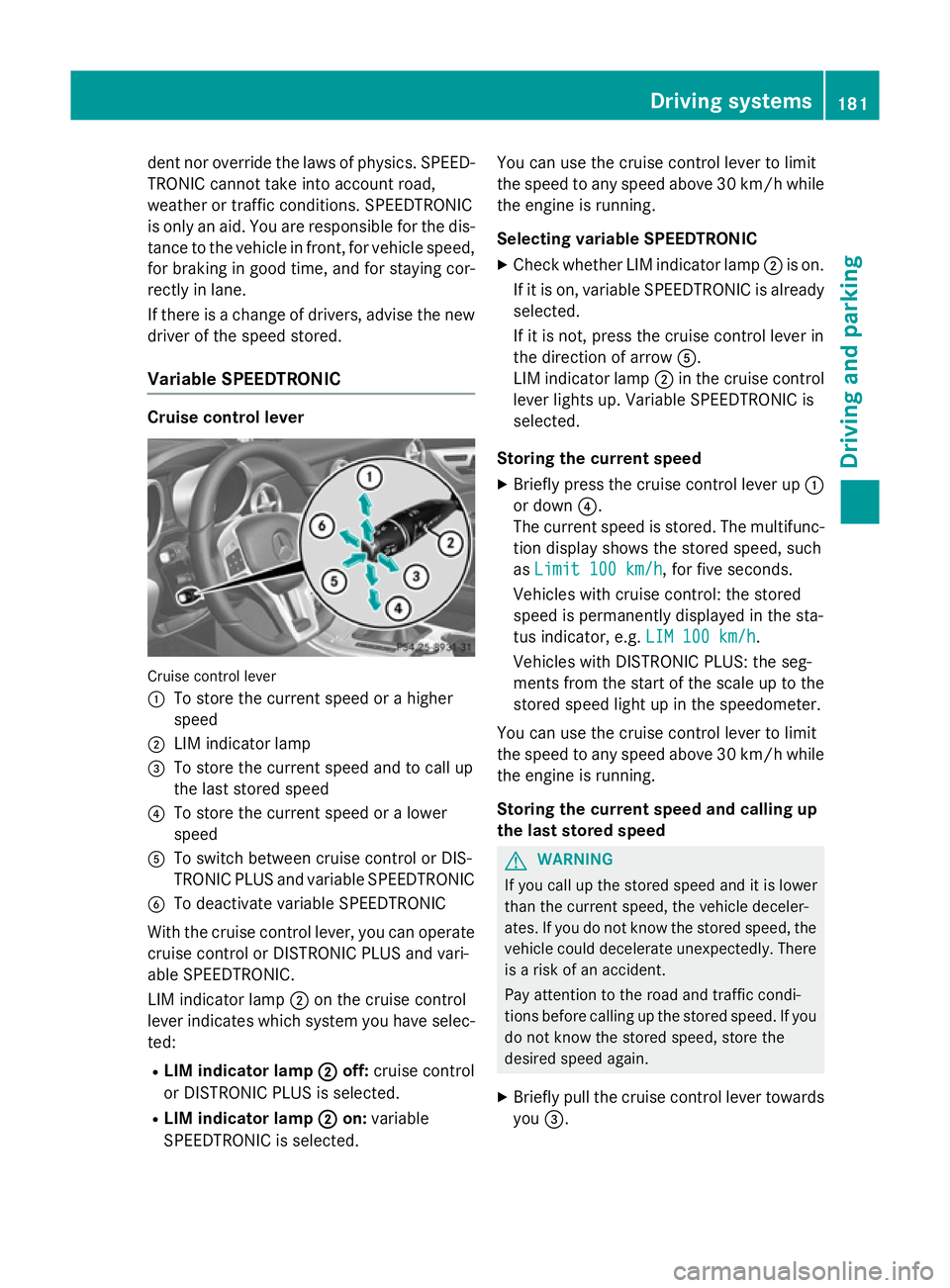
Cruise control lever
:
To store the current speed or a higher
speed
; LIM indicator lamp
= To store the current speed and to call up
the last stored speed
? To store the current speed or a lower
speed
A To switch between cruise control or DIS-
TRONIC PLUS and variable SPEEDTRONIC
B To deactivate variable SPEEDTRONIC
With the cruise control lever, you can operate
cruise control or DISTRONIC PLUS and vari-
able SPEEDTRONIC.
LIM indicator lamp ;on the cruise control
lever indicates which system you have selec-
ted:
R LIM indicator lamp ; ;off: cruise control
or DISTRONIC PLUS is selected.
R LIM indicator lamp ;
;on: variable
SPEEDTRONIC is selected. You can use the cruise control lever to limit
the speed to any speed above 30 km/
hwhile
the engine is running.
Selecting variable SPEEDTRONIC
X Check whether LIM indicator lamp ;is on.
If it is on, variable SPEEDTRONIC is already
selected.
If it is not, press the cruise control lever in
the direction of arrow A.
LIM indicator lamp ;in the cruise control
lever lights up. Variable SPEEDTRONIC is
selected.
Storing the current speed X Briefly press the cruise control lever up :
or down ?.
The current speed is stored. The multifunc-
tion display shows the stored speed, such
as Limit 100 km/h
Limit 100 km/h, for five seconds.
Vehicles with cruise control: the stored
speed is permanently displayed in the sta-
tus indicator, e.g. LIM 100 km/h LIM 100 km/h.
Vehicles with DISTRONIC PLUS: the seg-
ments from the start of the scale up to the
stored speed light up in the speedometer.
You can use the cruise control lever to limit
the speed to any speed above 30 km/h while
the engine is running.
Storing the current speed and calling up
the last stored speed G
WARNING
If you call up the stored speed and it is lower
than the current speed, the vehicle deceler-
ates. If you do not know the stored speed, the vehicle could decelerate unexpectedly. There
is a risk of an accident.
Pay attention to the road and traffic condi-
tions before calling up the stored speed. If you do not know the stored speed, store the
desired speed again.
X Briefly pull the cruise control lever towards
you =. Driving systems
181Driving and parking Z
Page 203 of 357
Useful information
i This Owner's Manual describes all mod-
els, series and optional equipment for your
vehicle that were available at the time of
going to press. National variations are pos- sible. Note that your vehicle may not be
equipped with all of the functions descri-
bed. This is also the case for systems and
functions relevant to safety.
i Read the information on qualified special-
ist workshops: (Y page 24). Important safety notes
G
WARNING
Operating the integrated information systems and communications equipment in the vehicle
while driving will distract you from traffic con-
ditions. You could then lose control of the
vehicle. There is a risk of an accident.
Only operate these devices if road traffic con-
ditions permit. If you are unsure about the
surrounding conditions, pull over to a safe
location and make entries only while the vehi-
cle is stationary.
You must observe the legal requirements for
the country in which you are currently driving when operating the on-board computer. G
WARNING
If the instrument cluster has failed or mal-
functioned, you may not recognise function
restrictions relevant to safety. The operating
safety of your vehicle may be impaired. There is a risk of an accident.
Drive on carefully. Have the vehicle checked
at a qualified specialist workshop immedi-
ately.
The on-board computer only shows messages
or warnings from certain systems in the mul- tifunction display. You should therefore make
sure your vehicle is operating safely at all times. Otherwise, a vehicle that is not oper-
ating safely may cause an accident.
If the operating safety of your vehicle is
impaired, park the vehicle safely as soon as
possible. Consult a qualified specialist work-
shop.
For an overview, see the instrument panel
illustration (Y
page 30). Displays and operation
Instrument cluster lighting
The lighting in the instrument cluster, in the
displays and the controls in the vehicle inte-
rior can be adjusted using the brightness con-
trol knob.
The brightness control knob is on the bottom left of the instrument cluster (Y page 30).
X Turn the brightness control knob anti-
clockwise or clockwise.
If the light switch is set to Ã,Tor
L, the brightness is dependant upon
the brightness of the ambient light.
i The light sensor in the instrument cluster
automatically controls the brightness of
the multifunction display.
In daylight, the displays in the instrument
cluster are not lit. Coolant temperature gauge
G
WARNING
If you open the bonnet while the engine is
overheating or while there is a fire in the
engine compartment, you could come into
contact with hot gases or other leaking ser-
vice products. There is a danger of injury.
Allow an overheating engine to cool down
before opening the bonnet. If there is a fire in the engine compartment, leave the bonnet
closed and notify the fire brigade. 200
Displays and operationOn-board computer and displays
Page 232 of 357
Display messages
Possible causes/consequences and
M
MSolutions The yellow
!warning lamp lights up and the red !indicator
lamp flashes.
It is not possible to apply the electric parking brake manually.
X Vehicles with manual transmission: engage first gear.
X Vehicles with automatic transmission: shift the transmission
to P.
X Visit a qualified specialist workshop. !
Turn on the igni‐ Turn on the igni‐
tion to release tion to release
the parking brake the parking brake The red
!indicator lamp lights up.
You attempted to release the electric parking brake while the igni-
tion was switched off.
X Key: turn the key to position 1in the ignition lock.
X KEYLESS-GO: switch on the ignition. J
Check brake fluid Check brake fluid
level level There is insufficient brake fluid in the brake fluid reservoir.
In addition, the red Jwarning lamp lights up in the instrument
cluster and a warning tone sounds.
G WARNING
Braking efficiency may be impaired.
There is a risk of an accident. X Pull over and stop the vehicle safely as soon as possible, paying
attention to road and traffic conditions. Do not continue driving
under any circumstances.
X Secure the vehicle against rolling away (Y page 162).
X Consult a qualified specialist workshop.
X Do not top up the brake fluid. This does not correct the fault. J
Brake immediately Brake immediately A fault has occurred while the HOLD function or DISTRONIC PLUS
is active.
A tone may also sound at regular intervals. If you attempt to lock the vehicle, the tone becomes louder.
You cannot start the engine.
X Paying attention to the traffic situation, immediately depress the
brake pedal firmly and hold until the display message disap-
pears.
X Secure the vehicle against rolling away (Y page 162).
You can restart the engine. #
Check brake pad Check brake pad
wear wear The brake pads/linings have reached their wear limit.
X Visit a qualified specialist workshop. Display
messages
229On-board computer and displays Z
Page 237 of 357
Display messages
Possible causes/consequences and
M
MSolutions Adaptive
Adaptive
Main-beam
Main-beam
Assist inoperative
Assist inoperative Adaptive Highbeam Assist is faulty.
X
Visit a qualified specialist workshop. Adaptive Adaptive
Main-beam
Main-beam
Assist currently
Assist currently
unavailable See unavailable See
Owner's Manual Owner's Manual Adaptive Highbeam Assist is deactivated and temporarily inoper-
ative. Possible causes:
R the windscreen is dirty in the camera's field of vision
R visibility is impaired due to heavy rain, snow or fog
X Clean the windscreen.
If the system detects that the camera is fully operational again, the
Adaptive Main-beam Assist available again
Adaptive Main-beam Assist available again message is
displayed.
Adaptive Highbeam Assist is operational again. Engine
Display messages
Possible causes/consequences and
M MSolutions +
Top Top
up
upcoolant
coolant See
See
Owner's Manual
Owner's Manual The coolant level is too low.
! Avoid making long journeys with too little coolant in the engine
cooling system. The engine will otherwise be damaged.
X Top up the coolant, observing the warning notes before doing so
(Y page 283).
X If the coolant needs topping up more often than usual, have the
engine coolant system checked at a qualified specialist work-
shop. ? The fan motor is faulty.
X If the coolant temperature is below 120 †, you can continue
driving to the nearest qualified specialist workshop.
X Avoid putting the engine under heavy load as you do so, e.g.
driving in mountainous terrain and stop-start traffic. 234
Display
messagesOn-board computer and displays
Page 239 of 357
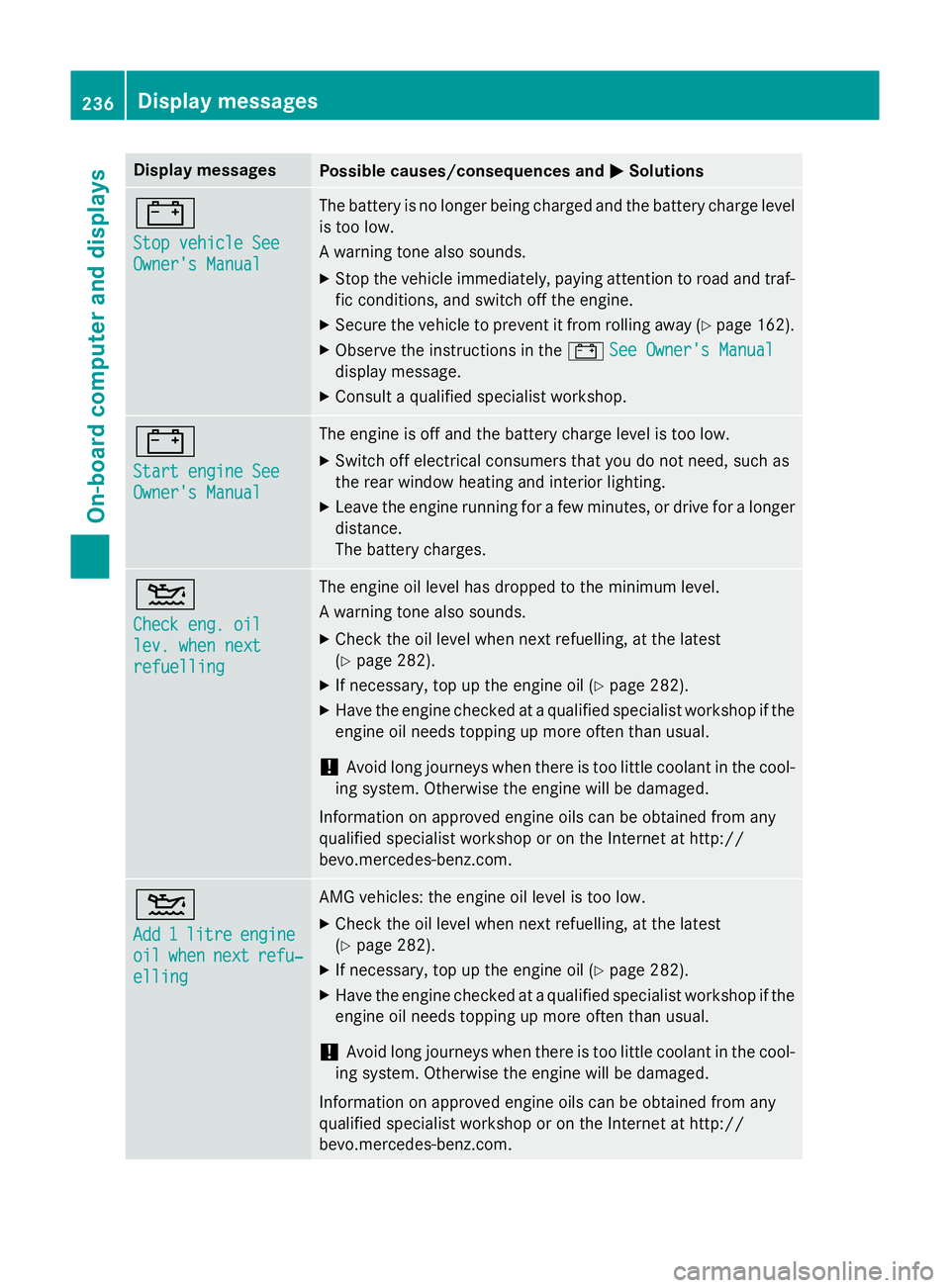
Display messages
Possible causes/consequences and
M
MSolutions #
Stop vehicle See Stop vehicle See
Owner's Manual Owner's Manual The battery is no longer being charged and the battery charge level
is too low.
A warning tone also sounds.
X Stop the vehicle immediately, paying attention to road and traf-
fic conditions, and switch off the engine.
X Secure the vehicle to prevent it from rolling away (Y page 162).
X Observe the instructions in the #See Owner's Manual See Owner's Manual
display message.
X Consult a qualified specialist workshop. #
Start engine See Start engine See
Owner's Manual Owner's Manual The engine is off and the battery charge level is too low.
X Switch off electrical consumers that you do not need, such as
the rear window heating and interior lighting.
X Leave the engine running for a few minutes, or drive for a longer
distance.
The battery charges. 4
Check eng. oil Check eng. oil
lev. when next lev. when next
refuelling refuelling The engine oil level has dropped to the minimum level.
A warning tone also sounds.
X Check the oil level when next refuelling, at the latest
(Y page 282).
X If necessary, top up the engine oil (Y page 282).
X Have the engine checked at a qualified specialist workshop if the
engine oil needs topping up more often than usual.
! Avoid long journeys when there is too little coolant in the cool-
ing system. Otherwise the engine will be damaged.
Information on approved engine oils can be obtained from any
qualified specialist workshop or on the Internet at http://
bevo.mercedes-benz.co m.4
Add Add
1
1litre
litre engine
engine
oil
oil when
when next
next refu‐
refu‐
elling
elling AMG vehicles: the engine oil level is too low.
X Check the oil level when next refuelling, at the latest
(Y page 282).
X If necessary, top up the engine oil (Y page 282).
X Have the engine checked at a qualified specialist workshop if the
engine oil needs topping up more often than usual.
! Avoid long journeys when there is too little coolant in the cool-
ing system. Otherwise the engine will be damaged.
Information on approved engine oils can be obtained from any
qualified specialist workshop or on the Internet at http://
bevo.mercedes-benz.com. 236
Display messagesOn-board computer and displays
Page 244 of 357
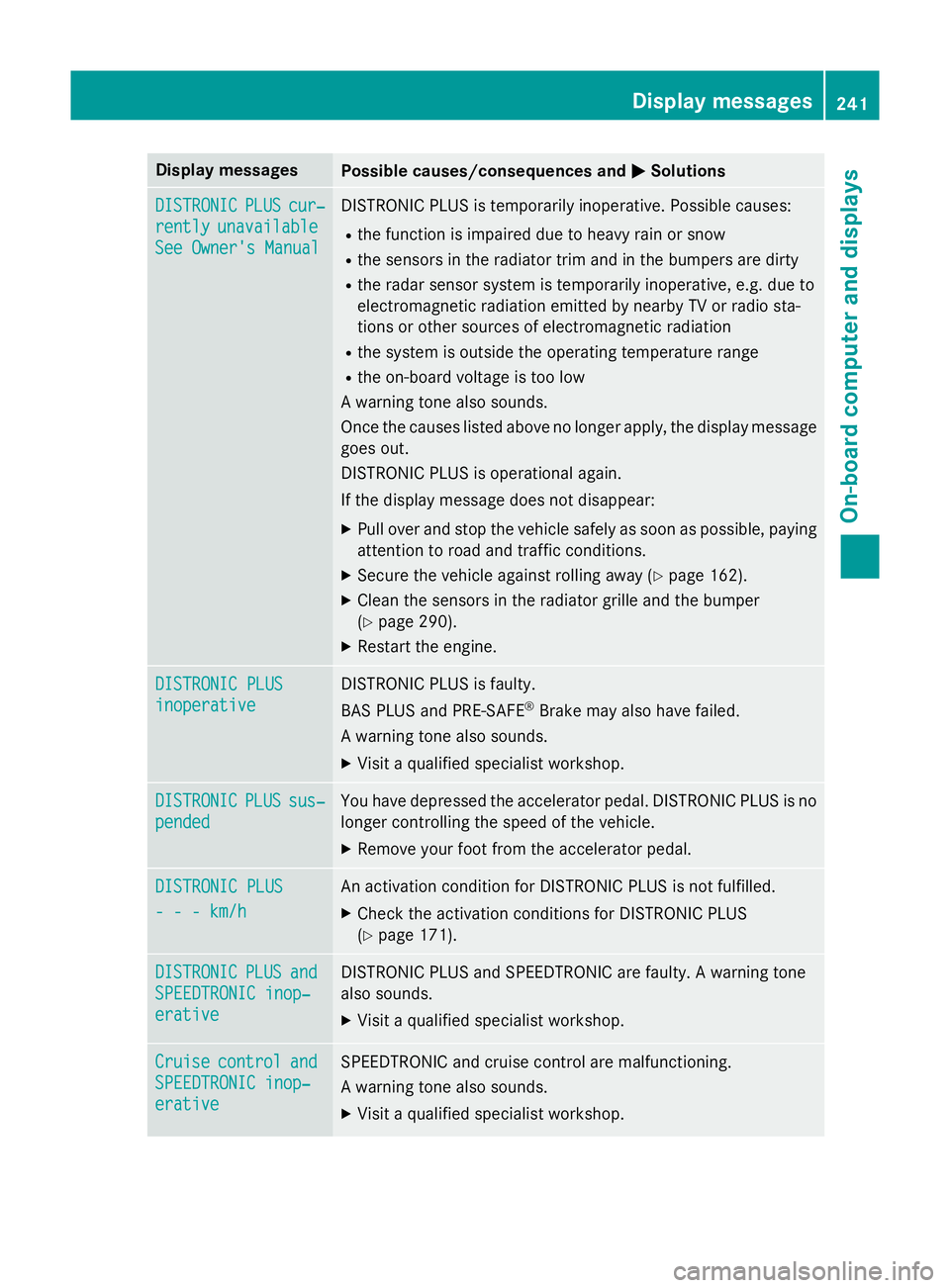
Display messages
Possible causes/consequences and
M
MSolutions DISTRONIC
DISTRONIC
PLUS
PLUScur‐
cur‐
rently
rently unavailable
unavailable
See Owner's Manual
See Owner's Manual DISTRONIC PLUS is temporarily inoperative. Possible causes:
R the function is impaired due to heavy rain or snow
R the sensors in the radiator trim and in the bumpers are dirty
R the radar sensor system is temporarily inoperative, e.g. due to
electromagnetic radiation emitted by nearby TV or radio sta-
tions or other sources of electromagnetic radiation
R the system is outside the operating temperature range
R the on-board voltage is too low
A warning tone also sounds.
Once the causes listed above no longer apply, the display message
goes out.
DISTRONIC PLUS is operational again.
If the display message does not disappear:
X Pull over and stop the vehicle safely as soon as possible, paying
attention to road and traffic conditions.
X Secure the vehicle against rolling away (Y page 162).
X Clean the sensors in the radiator grille and the bumper
(Y page 290).
X Restart the engine. DISTRONIC PLUS DISTRONIC PLUS
inoperative inoperative DISTRONIC PLUS is faulty.
BAS PLUS and PRE‑SAFE
®
Brake may also have failed.
A warning tone also sounds.
X Visit a qualified specialist workshop. DISTRONIC DISTRONIC
PLUS
PLUSsus‐
sus‐
pended
pended You have depressed the accelerator pedal. DISTRONIC PLUS is no
longer controlling the speed of the vehicle.
X Remove your foot from the accelerator pedal. DISTRONIC PLUS
DISTRONIC PLUS
- - - km/h - - - km/h An activation condition for DISTRONIC PLUS is not fulfilled.
X Check the activation conditions for DISTRONIC PLUS
(Y page 171). DISTRONIC
DISTRONIC
PLUS
PLUSand
and
SPEEDTRONIC inop‐
SPEEDTRONIC inop‐
erative erative DISTRONIC PLUS and SPEEDTRONIC are faulty. A warning tone
also sounds.
X Visit a qualified specialist workshop. Cruise Cruise
control
control and
and
SPEEDTRONIC inop‐
SPEEDTRONIC inop‐
erative erative SPEEDTRONIC and cruise control are malfunctioning.
A warning tone also sounds.
X Visit a qualified specialist workshop. Display
messages
241On-board computer and displays Z
Page 258 of 357
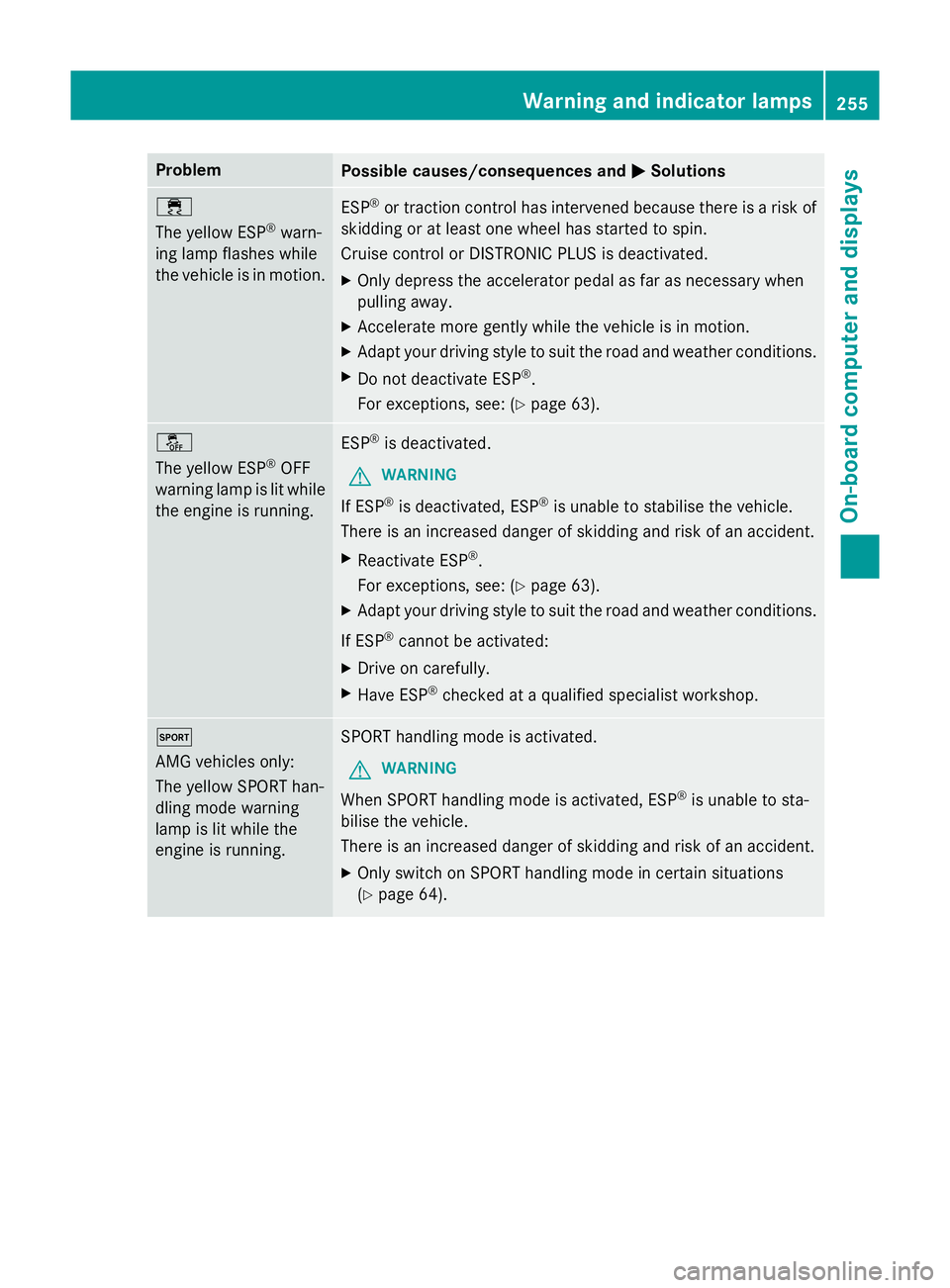
Problem
Possible causes/consequences and
M
MSolutions ÷
The yellow ESP
®
warn-
ing lamp flashes while
the vehicle is in motion. ESP
®
or traction control has intervened because there is a risk of
skidding or at least one wheel has started to spin.
Cruise control or DISTRONIC PLUS is deactivated.
X Only depress the accelerator pedal as far as necessary when
pulling away.
X Accelerate more gently while the vehicle is in motion.
X Adapt your driving style to suit the road and weather conditions.
X Do not deactivate ESP ®
.
For exceptions, see: (Y page 63).å
The yellow ESP
®
OFF
warning lamp is lit while the engine is running. ESP
®
is deactivated.
G WARNING
If ESP ®
is deactivated, ESP ®
is unable to stabilise the vehicle.
There is an increased danger of skidding and risk of an accident.
X Reactivate ESP ®
.
For exceptions, see: (Y page 63).
X Adapt your driving style to suit the road and weather conditions.
If ESP ®
cannot be activated:
X Drive on carefully.
X Have ESP ®
checked at a qualified specialist workshop. M
AMG vehicles only:
The yellow SPORT han-
dling mode warning
lamp is lit while the
engine is running.
SPORT handling mode is activated.
G WARNING
When SPORT handling mode is activated, ESP ®
is unable to sta-
bilise the vehicle.
There is an increased danger of skidding and risk of an accident.
X Only switch on SPORT handling mode in certain situations
(Y page 64). Warning and indicator lamps
255On-board computer and displays Z
Page 260 of 357
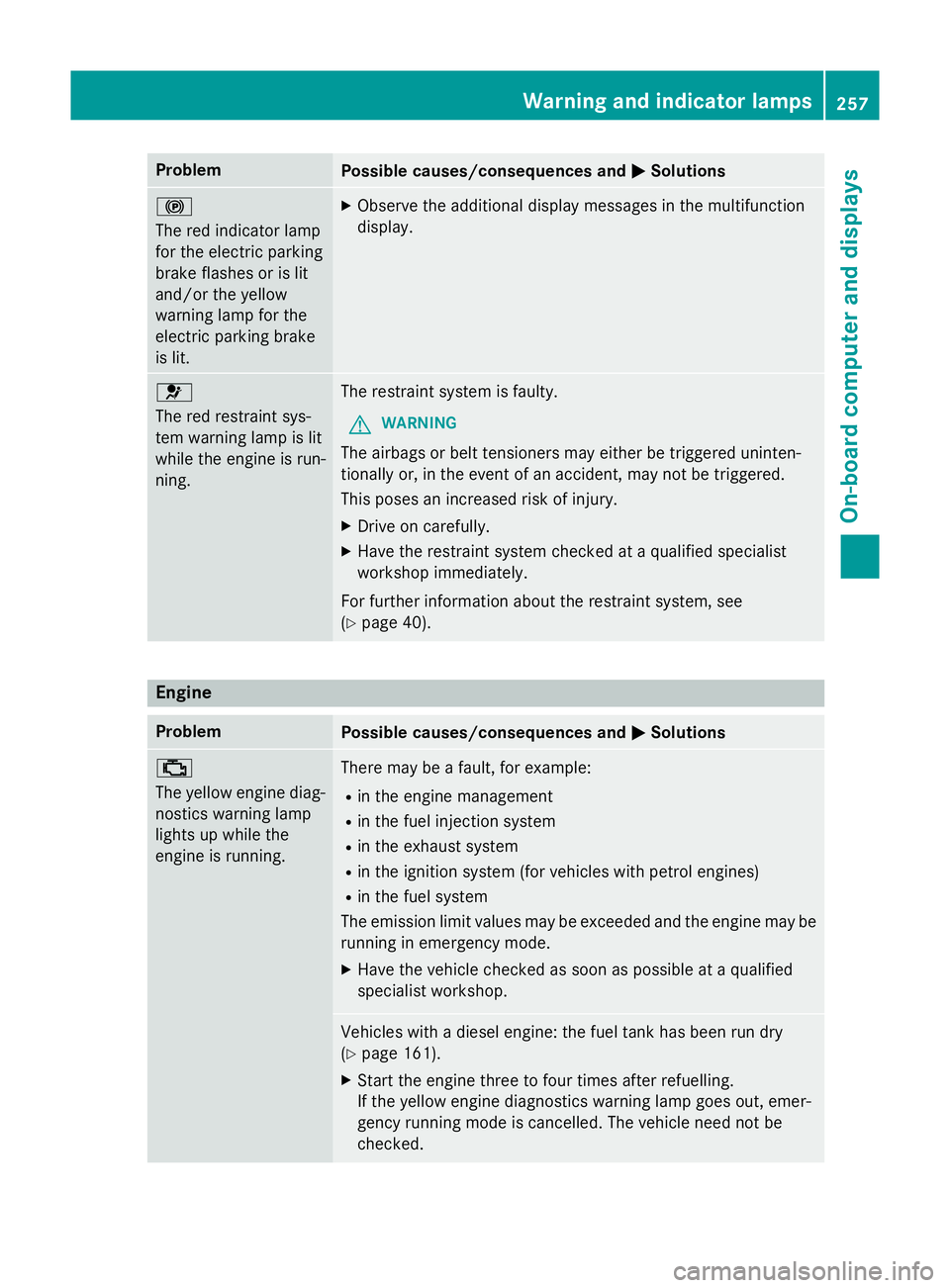
Problem
Possible causes/consequences and
M
MSolutions !
The red indicator lamp
for the electric parking
brake flashes or is lit
and/or the yellow
warning lamp for the
electric parking brake
is lit. X
Observe the additional display messages in the multifunction
display. 6
The red restraint sys-
tem warning lamp is lit
while the engine is run-
ning.
The restraint system is faulty.
G WARNING
The airbags or belt tensioners may either be triggered uninten-
tionally or, in the event of an accident, may not be triggered.
This poses an increased risk of injury. X Drive on carefully.
X Have the restraint system checked at a qualified specialist
workshop immediately.
For further information about the restraint system, see
(Y page 40). Engine
Problem
Possible causes/consequences and
M MSolutions ;
The yellow engine diag-
nostics warning lamp
lights up while the
engine is running. There may be a fault, for example:
R in the engine management
R in the fuel injection system
R in the exhaust system
R in the ignition system (for vehicles with petrol engines)
R in the fuel system
The emission limit values may be exceeded and the engine may be running in emergency mode.
X Have the vehicle checked as soon as possible at a qualified
specialist workshop. Vehicles with a diesel engine: the fuel tank has been run dry
(Y
page 161).
X Start the engine three to four times after refuelling.
If the yellow engine diagnostics warning lamp goes out, emer-
gency running mode is cancelled. The vehicle need not be
checked. Warning and indicator lamps
257On-board computer and displays Z
Page 262 of 357
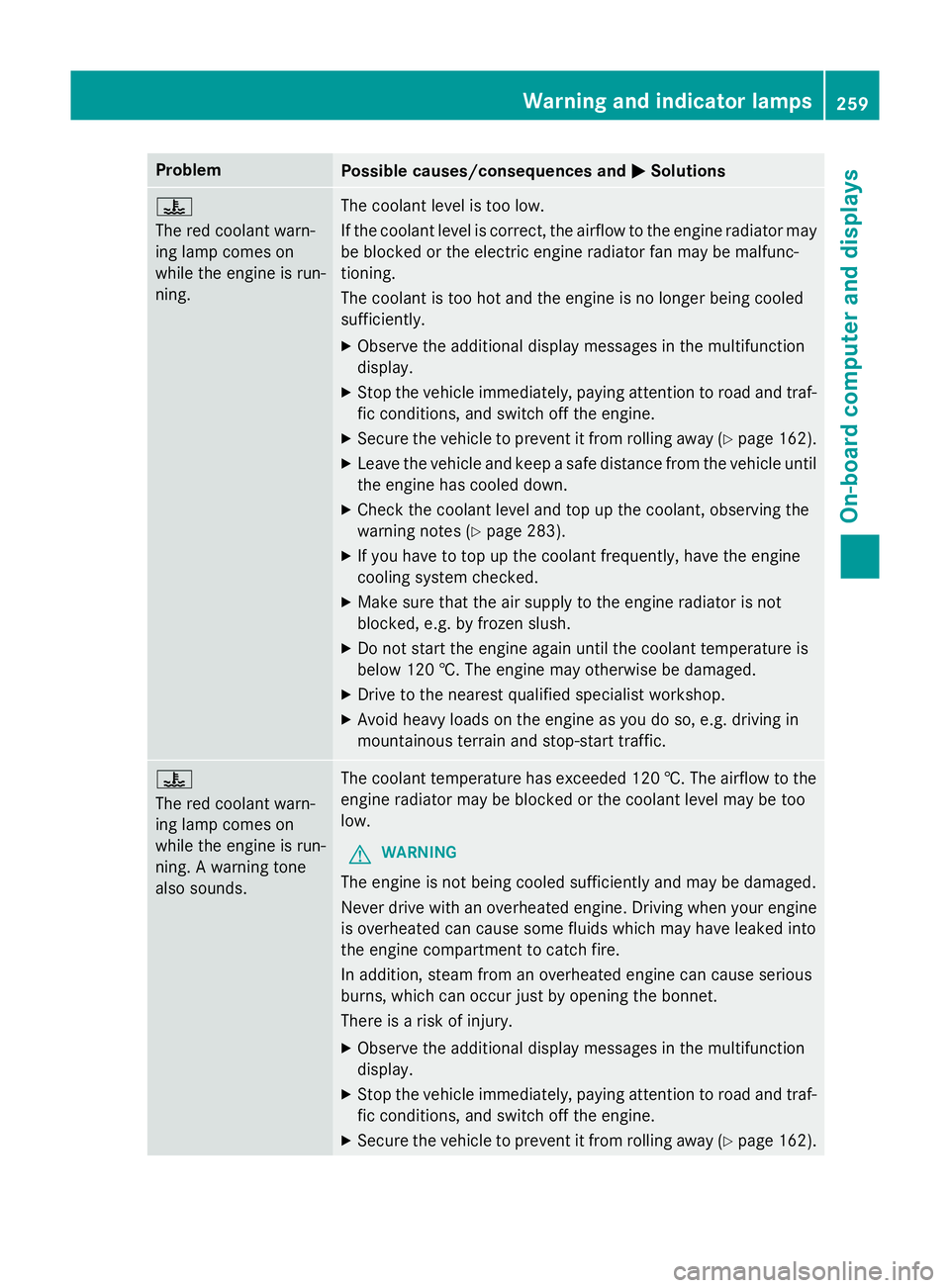
Problem
Possible causes/consequences and
M
MSolutions ?
The red coolant warn-
ing lamp comes on
while the engine is run-
ning.
The coolant level is too low.
If the coolant level is correct, the airflow to the engine radiator may
be blocked or the electric engine radiator fan may be malfunc-
tioning.
The coolant is too hot and the engine is no longer being cooled
sufficiently.
X Observe the additional display messages in the multifunction
display.
X Stop the vehicle immediately, paying attention to road and traf-
fic conditions, and switch off the engine.
X Secure the vehicle to prevent it from rolling away (Y page 162).
X Leave the vehicle and keep a safe distance from the vehicle until
the engine has cooled down.
X Check the coolant level and top up the coolant, observing the
warning notes (Y page 283).
X If you have to top up the coolant frequently, have the engine
cooling system checked.
X Make sure that the air supply to the engine radiator is not
blocked, e.g. by frozen slush.
X Do not start the engine again until the coolant temperature is
below 120 †. The engine may otherwise be damaged.
X Drive to the nearest qualified specialist workshop.
X Avoid heavy loads on the engine as you do so, e.g. driving in
mountainous terrain and stop-start traffic. ?
The red coolant warn-
ing lamp comes on
while the engine is run-
ning. A warning tone
also sounds.
The coolant temperature has exceeded 120 †. The airflow to the
engine radiator may be blocked or the coolant level may be too
low.
G WARNING
The engine is not being cooled sufficiently and may be damaged.
Never drive with an overheated engine. Driving when your engine is overheated can cause some fluids which may have leaked into
the engine compartment to catch fire.
In addition, steam from an overheated engine can cause serious
burns, which can occur just by opening the bonnet.
There is a risk of injury.
X Observe the additional display messages in the multifunction
display.
X Stop the vehicle immediately, paying attention to road and traf-
fic conditions, and switch off the engine.
X Secure the vehicle to prevent it from rolling away (Y page 162). Warning and indicator lamps
259On-board computer and displays Z
Page 263 of 357
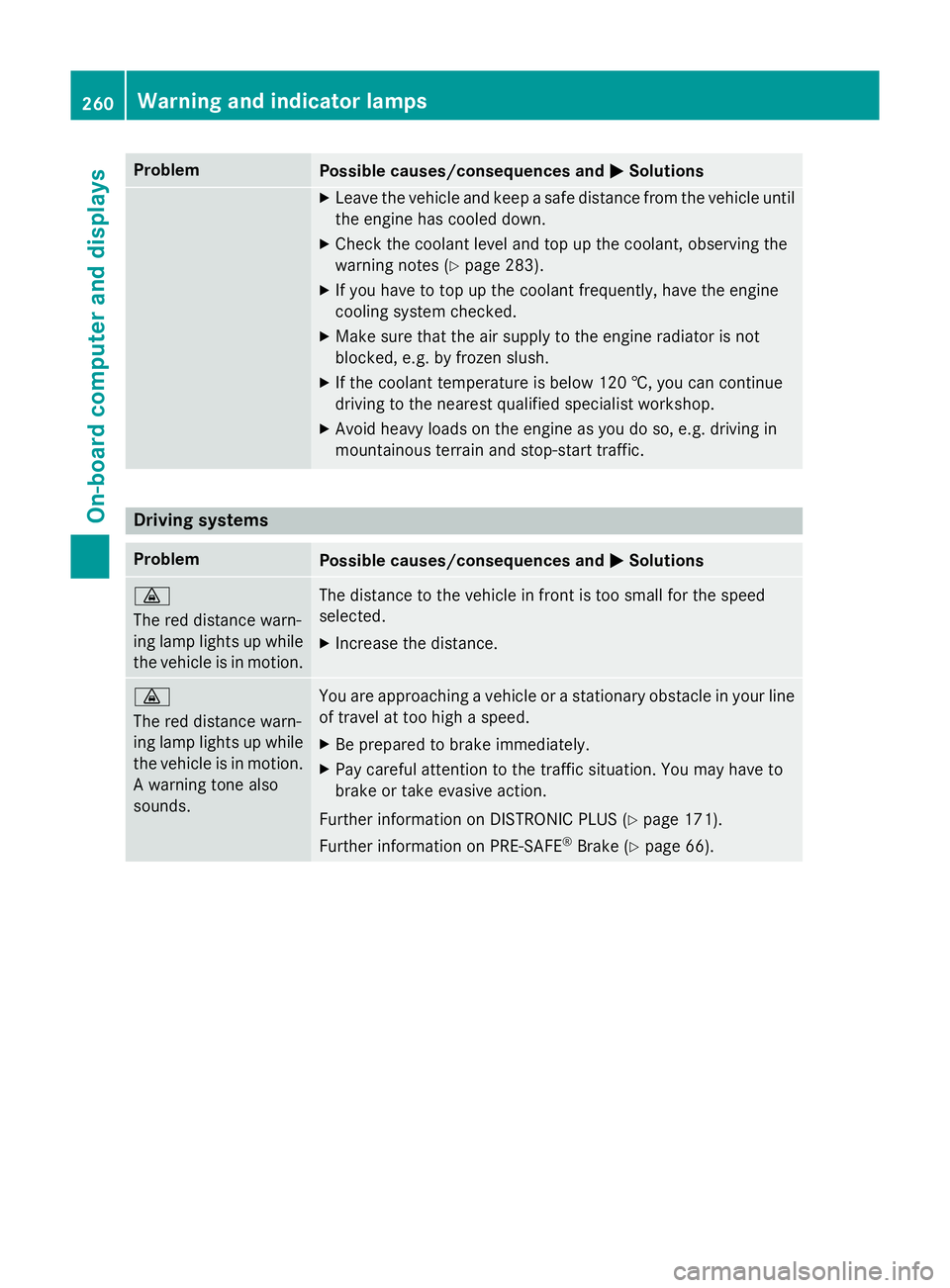
Problem
Possible causes/consequences and
M
MSolutions X
Leave the vehicle and keep a safe distance from the vehicle until
the engine has cooled down.
X Check the coolant level and top up the coolant, observing the
warning notes (Y page 283).
X If you have to top up the coolant frequently, have the engine
cooling system checked.
X Make sure that the air supply to the engine radiator is not
blocked, e.g. by frozen slush.
X If the coolant temperature is below 120 †, you can continue
driving to the nearest qualified specialist workshop.
X Avoid heavy loads on the engine as you do so, e.g. driving in
mountainous terrain and stop-start traffic. Driving systems
Problem
Possible causes/consequences and
M MSolutions ·
The red distance warn-
ing lamp lights up while
the vehicle is in motion. The distance to the vehicle in front is too small for the speed
selected.
X Increase the distance. ·
The red distance warn-
ing lamp lights up while
the vehicle is in motion. A warning tone also
sounds. You are approaching a vehicle or a stationary obstacle in your line
of travel at too high a speed.
X Be prepared to brake immediately.
X Pay careful attention to the traffic situation. You may have to
brake or take evasive action.
Further information on DISTRONIC PLUS (Y page 171).
Further information on PRE‑ SAFE®
Brake (Y page 66). 260
Warning and indicator lampsOn-board computer and displays