instrument cluster MERCEDES-BENZ SLS 2011 C197 User Guide
[x] Cancel search | Manufacturer: MERCEDES-BENZ, Model Year: 2011, Model line: SLS, Model: MERCEDES-BENZ SLS 2011 C197Pages: 436, PDF Size: 20.86 MB
Page 58 of 436
more snugly against the body. Seat belt force
limiters, when activated, are employed to
help reduce the peak force exerted by the
seat belts on occupants during a crash.
iThe ETDs do not correct an incorrect seat
position or incorrectly worn seat belts.
The ETDs do not pull occupants back
toward the seat backrest.
GWarning!
Pyrotechnic ETDs that were activated must be
replaced.
For your safety, when disposing of the
pyrotechnic ETDs always follow our safety
instructions. These are available at any
authorized Mercedes-Benz Center.
Correct driver seat adjustment
GWarning!
In order to avoid possible loss of vehicle
control the following must be done before the
vehicle is put into motion:
Rseat adjustment
Rsteering wheel adjustment
Rrear view mirror adjustment
Rfastening of seat belts
Steering wheel
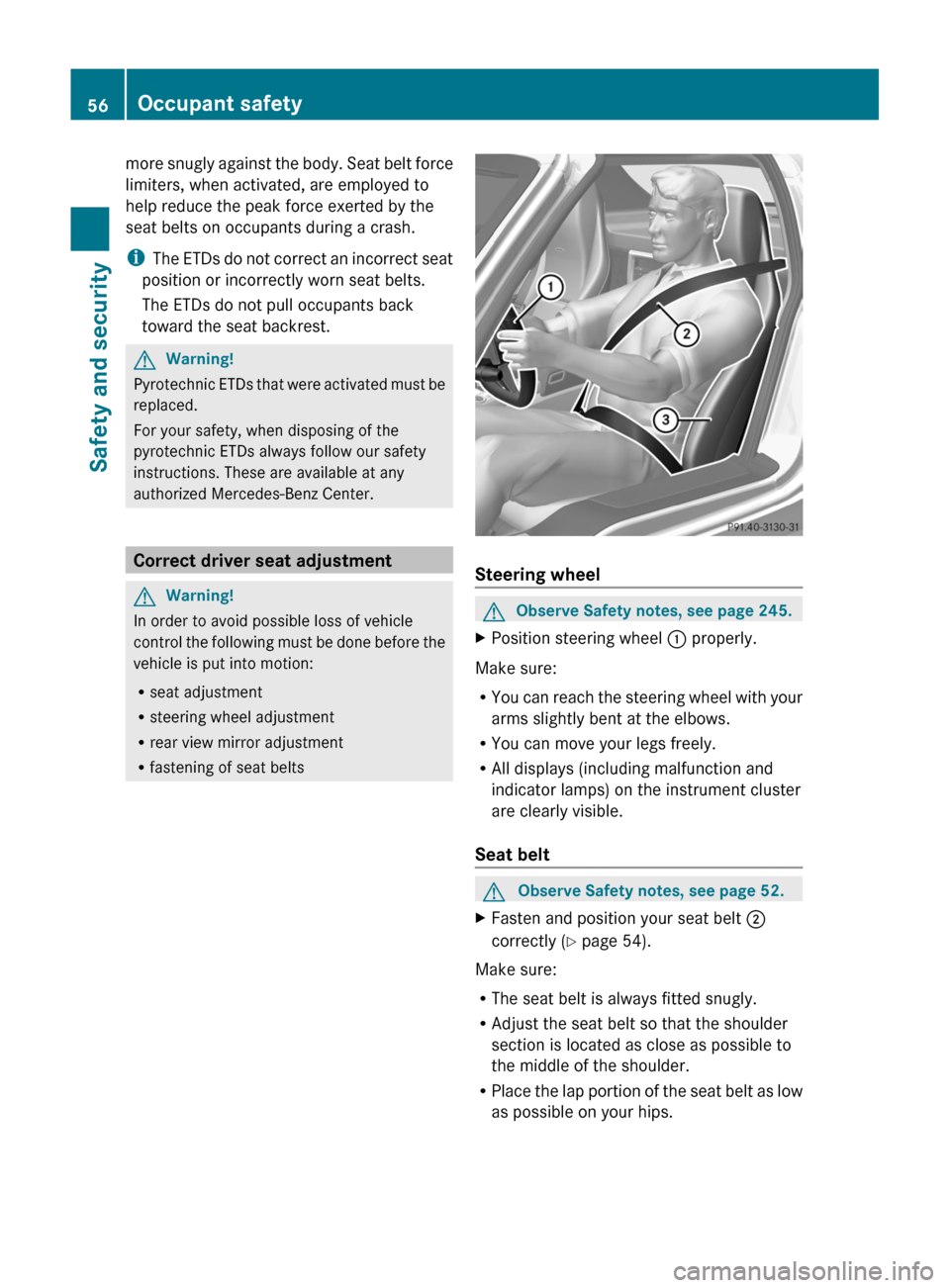
GObserve Safety notes, see page 245.XPosition steering wheel : properly.
Make sure:
RYou can reach the steering wheel with your
arms slightly bent at the elbows.
RYou can move your legs freely.
RAll displays (including malfunction and
indicator lamps) on the instrument cluster
are clearly visible.
Seat belt
GObserve Safety notes, see page 52.XFasten and position your seat belt ;
correctly (Y page 54).
Make sure:
RThe seat belt is always fitted snugly.
RAdjust the seat belt so that the shoulder
section is located as close as possible to
the middle of the shoulder.
RPlace the lap portion of the seat belt as low
as possible on your hips.
56Occupant safetySafety and security
BA 197 USA, CA Edition A 2011; 1; 27, en-UShereepeVersion: 3.0.3.52010-03-24T15:31:10+01:00 - Seite 56
Page 63 of 436
Driving safety systems
Introduction
This section contains information about the
following driving safety systems:
R ABS ( Antilock Brake System)
R Adaptive Brake
R BAS ( Brake Assist System)
R EBP ( Electronic Brake Proportioning)
R ESC ( Electronic Stability Control)
R Trunk Wing
Safety notes
GWarning!
The following factors increase the risk of
accidents:
R Excessive speed, especially in turns
R Wet and slippery road surfaces
R Following another vehicle too closely
The driving safety systems described in this
section cannot reduce these risks or prevent
the natural laws of physics from acting on the
vehicle. They cannot increase braking or
steering efficiency beyond that afforded by
the condition of the vehicle brakes and tires
or the traction afforded.
Only a safe, attentive, and skillful driver can
prevent accidents.
The capabilities of a vehicle equipped with the
driving safety systems described in this
section must never be exploited in a reckless
or dangerous manner which could jeopardize
the user’s safety or the safety of others.
Always adjust your driving style to the
prevailing road and weather conditions and
keep a safe distance from other road users
and objects on the street.
If a driving system malfunctions, other driving
safety systems may also switch off. Observe
indicator and warning lamps that may come
on as well as messages in the multifunction
display that may appear.
i In winter operation, the maximum
effectiveness of most of the driving
systems described in this section is only
achieved with winter tires, or snow chains
as required.
ABS
GObserve Safety notes, see page 61.GWarning!
Do not pump the brake pedal. Use firm, steady
brake pedal pressure instead. Pumping the
brake pedal defeats the purpose of the ABS
and significantly reduces braking
effectiveness.
The Antilock Brake System (ABS) regulates
the brake pressure so that the wheels do not
lock during braking. This allows you to
maintain the ability to steer your vehicle.
The ABS is functional above a speed of
approximately 5 mph (8 km/h) independent
of road surface conditions.
On slippery road surfaces, the ABS will
respond even to light brake pressure.
The ABS indicator lamp ! in the
instrument cluster comes on when you switch
on the ignition. It goes out when the engine
is running.
Braking
At the instant one of the wheels is about to
lock up, a slight pulsation can be felt in the
brake pedal. The pulsation indicates that the
ABS is in the regulating mode.
XKeep firm and steady pressure on the brake
pedal while you feel the pulsation.
Continuous, steady brake pedal pressure
yields the advantages provided by the ABS,
namely braking power and the ability to steer
the vehicle.
The pulsating brake pedal can be an
indication of hazardous road conditions and
Driving safety systems61Safety and securityBA 197 USA, CA Edition A 2011; 1; 27, en-UShereepeVersion: 3.0.3.52010-03-24T15:31:10+01:00 - Seite 61Z
Page 64 of 436
functions as a reminder to take extra care
while driving.
Emergency brake maneuverXKeep continuous full pressure on the brake
pedal.GWarning!
If the ABS malfunctions, other driving safety
systems such as the BAS or the ESC are also
switched off. Observe indicator and warning
lamps that may come on as well as messages
in the multifunction display that may appear.
If the ABS malfunctions, the wheels may lock
during hard braking, reducing steering
capability and extending the braking distance.
BAS
GObserve Safety notes, see page 61.
The Brake Assist System (BAS) operates in
emergency situations. If you apply the brakes
very quickly, the BAS provides full brake
boost automatically, thereby potentially
reducing the braking distance.
XApply continuous full braking pressure until
the emergency braking situation is over.
The ABS will prevent the wheels from
locking.
When you release the brake pedal, the brakes
function again as normal. The BAS is then
deactivated.
GWarning!
If the BAS malfunctions, the brake system still
functions, but without the additional brake
boost available that the BAS would normally
provide in an emergency braking maneuver.
Therefore, the braking distance may increase.
ESC
GObserve Safety notes, see page 61.
The Electronic Stability Control (ESC) is
operational as soon as the engine is running.
It monitors the vehicle’s traction (force of
adhesive friction between the tires and the
road surface) and handling.
The ESC recognizes that the vehicle deviates
from the direction of travel as intended by the
driver. By applying brakes to individual
wheels and by limiting the engine output, the
ESC works to stabilize the vehicle. The ESC is
especially useful while driving off and on wet
or slippery road surfaces. The ESC also
stabilizes the vehicle during braking and
steering maneuvers.
The ESC warning lamp ÷ in the instrument
cluster comes on when you switch on the
ignition. It goes out when the engine is
running.GWarning!
Never switch off the ESC when you see the
ESC warning lamp ÷ flashing in the
instrument cluster. In this case proceed as
follows:
R When driving off, apply as little throttle as
possible.
R While driving, ease up on the accelerator
pedal.
R Adapt your speed and driving style to the
prevailing road conditions.
Failure to observe these guidelines could
cause the vehicle to skid. The ESC cannot
prevent accidents resulting from excessive
speed.
! Because the ESC operates automatically,
the engine and ignition must be shut off
(KEYLESS-GO start/stop button in position
0 or 1, or SmartKey in starter switch
position 0 or 1) when the electronic parking
brake is being tested on a brake test
dynamometer or when the vehicle is being
towed with the rear axle raised.
Active braking action through the ESC may
otherwise seriously damage the brake
system which is not covered by the
Mercedes-Benz Limited Warranty.
62Driving safety systemsSafety and security
BA 197 USA, CA Edition A 2011; 1; 27, en-UShereepeVersion: 3.0.3.52010-03-24T15:31:10+01:00 - Seite 62
Page 65 of 436
! The ESC will only function properly if you
use wheels of the recommended tire size
as specified in the “Technical data” section
of this Operator’s Manual.
i The cruise control switches off
automatically when the ESC engages.
Electronic Traction System (ETS) GObserve Safety notes, see page 61.
The ETS (Electronic Traction System) is a
component of the ESC. The ETS improves the
vehicle’s ability to utilize available traction,
especially under slippery road conditions by
applying the brakes to a spinning wheel.
When you switch off the ESC, the ETS is still
enabled.
Switching ESC SPORT on or off
GWarning!
ESC SPORT should not be switched on during
normal driving.
Switching ESC SPORT on will result in the
following:
R no restriction to engine torque
R system-supported traction control is
limited
ESC SPORT is designed for driving on closed
tracks when the vehicle’s natural oversteer
and understeer characteristics are desired
and requires a highly skilled and experienced
driver able to handle these critical driving
situations.
You could lose control of your vehicle and
cause an accident.
Please be aware of these limits when you
switch on ESC SPORT.
Do not switch on ESC SPORT when a spare
wheel is mounted.
To improve the vehicle’s traction, switch on
ESC SPORT. This allows the drive wheels to
spin and thus cut into surfaces for better grip,
for example
R when driving with snow chains
R in deep snow
R in sand or gravelGWarning!
Switch off ESC SPORT and switch on the ESC
immediately if the aforementioned
circumstances do not apply anymore.
Otherwise ESC SPORT will only stabilize the
vehicle to a limited extent when it is starting
to skid or a wheel is spinning.
When you switch on ESC SPORT
R the ESC stabilizes the vehicle only to a
limited extent
R the engine output is limited, but only to the
extent that allows the drive wheels to spin
and thus cut into surfaces for better grip
R the ETS will still apply the brakes to a
spinning wheel
R the ESC continues to operate when you are
braking hard
R the cruise control cannot be activated
R the cruise control switches off if activated
i When ESC SPORT is switched on and one
or more drive wheels are spinning, the ESC
warning lamp ÷ in the instrument
cluster flashes. However, the ESC will then
stabilize the vehicle only to a limited extent.
Driving safety systems63Safety and securityBA 197 USA, CA Edition A 2011; 1; 27, en-UShereepeVersion: 3.0.3.52010-03-24T15:31:10+01:00 - Seite 63Z
Page 66 of 436
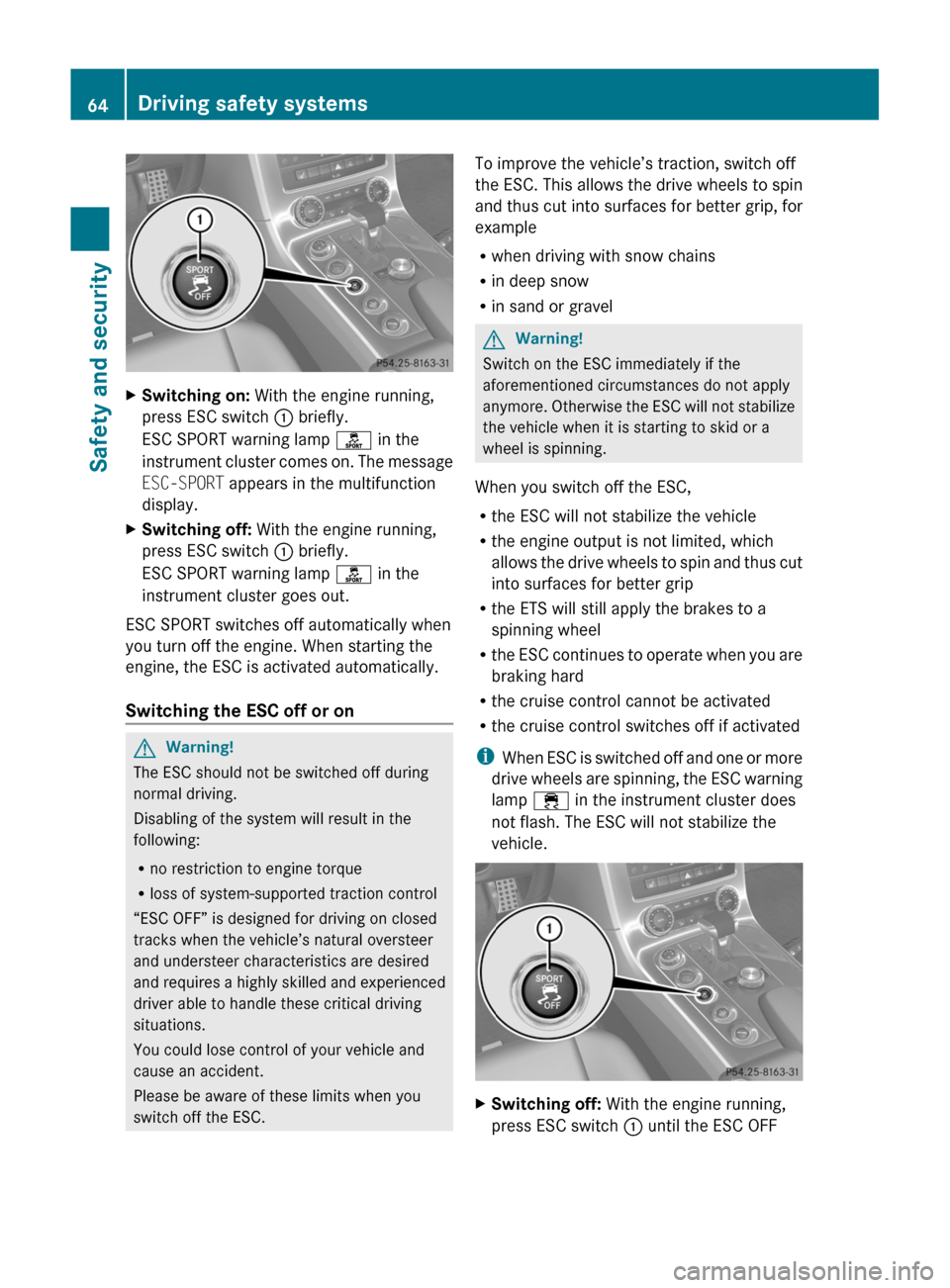
XSwitching on: With the engine running,
press ESC switch : briefly.
ESC SPORT warning lamp ì in the
instrument cluster comes on. The message
ESC-SPORT appears in the multifunction
display.
XSwitching off: With the engine running,
press ESC switch : briefly.
ESC SPORT warning lamp ì in the
instrument cluster goes out.
ESC SPORT switches off automatically when
you turn off the engine. When starting the
engine, the ESC is activated automatically.
Switching the ESC off or on
GWarning!
The ESC should not be switched off during
normal driving.
Disabling of the system will result in the
following:
Rno restriction to engine torque
Rloss of system-supported traction control
“ESC OFF” is designed for driving on closed
tracks when the vehicle’s natural oversteer
and understeer characteristics are desired
and requires a highly skilled and experienced
driver able to handle these critical driving
situations.
You could lose control of your vehicle and
cause an accident.
Please be aware of these limits when you
switch off the ESC.
To improve the vehicle’s traction, switch off
the ESC. This allows the drive wheels to spin
and thus cut into surfaces for better grip, for
example
Rwhen driving with snow chains
Rin deep snow
Rin sand or gravel
GWarning!
Switch on the ESC immediately if the
aforementioned circumstances do not apply
anymore. Otherwise the ESC will not stabilize
the vehicle when it is starting to skid or a
wheel is spinning.
When you switch off the ESC,
Rthe ESC will not stabilize the vehicle
Rthe engine output is not limited, which
allows the drive wheels to spin and thus cut
into surfaces for better grip
Rthe ETS will still apply the brakes to a
spinning wheel
Rthe ESC continues to operate when you are
braking hard
Rthe cruise control cannot be activated
Rthe cruise control switches off if activated
iWhen ESC is switched off and one or more
drive wheels are spinning, the ESC warning
lamp ÷ in the instrument cluster does
not flash. The ESC will not stabilize the
vehicle.
XSwitching off: With the engine running,
press ESC switch : until the ESC OFF
64Driving safety systemsSafety and security
BA 197 USA, CA Edition A 2011; 1; 27, en-UShereepeVersion: 3.0.3.52010-03-24T15:31:10+01:00 - Seite 64
Page 67 of 436
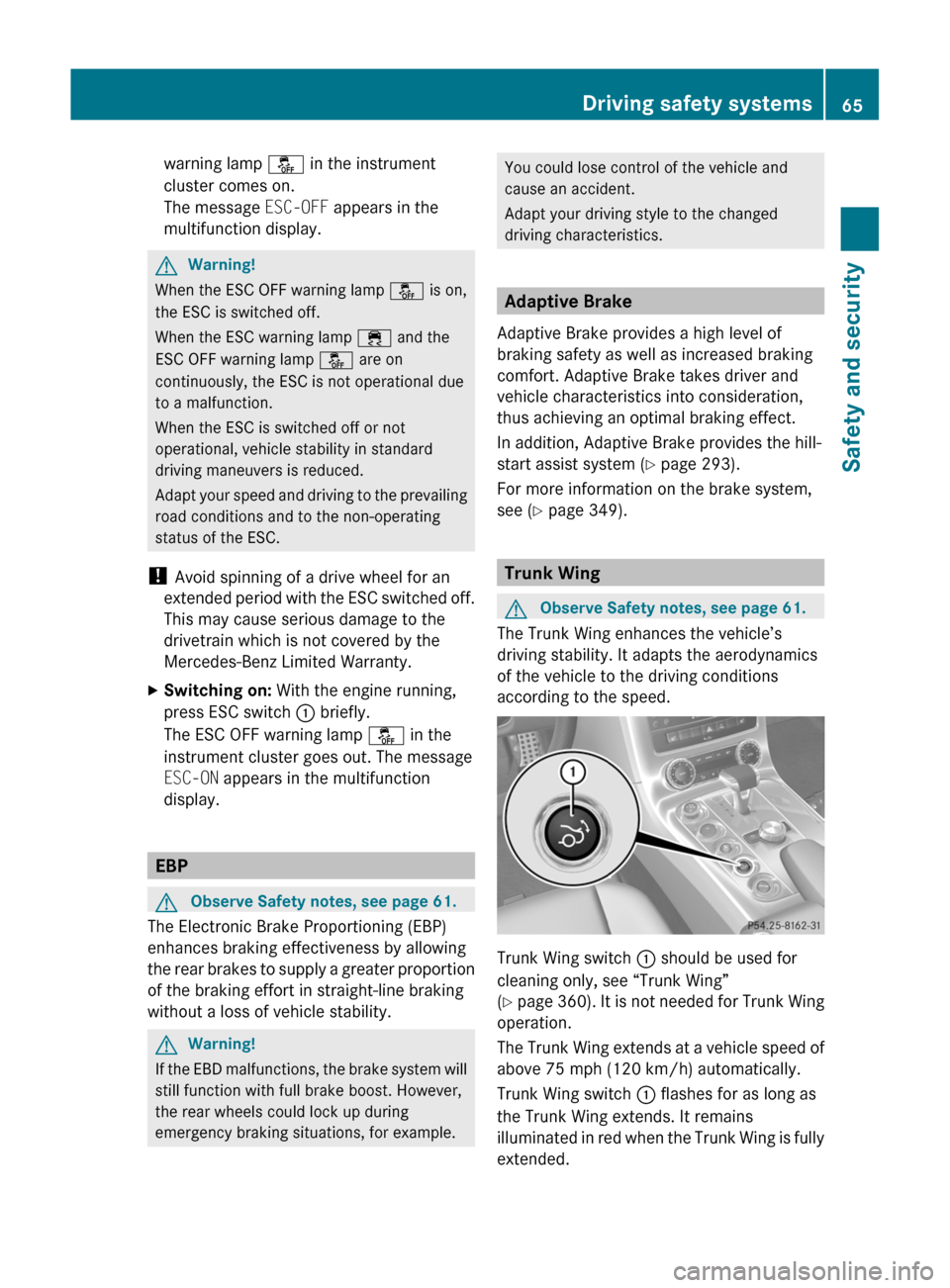
warning lamp å in the instrument
cluster comes on.
The message ESC-OFF appears in the
multifunction display.
GWarning!
When the ESC OFF warning lamp å is on,
the ESC is switched off.
When the ESC warning lamp ÷ and the
ESC OFF warning lamp å are on
continuously, the ESC is not operational due
to a malfunction.
When the ESC is switched off or not
operational, vehicle stability in standard
driving maneuvers is reduced.
Adapt your speed and driving to the prevailing
road conditions and to the non-operating
status of the ESC.
! Avoid spinning of a drive wheel for an
extended period with the ESC switched off.
This may cause serious damage to the
drivetrain which is not covered by the
Mercedes-Benz Limited Warranty.
XSwitching on: With the engine running,
press ESC switch : briefly.
The ESC OFF warning lamp å in the
instrument cluster goes out. The message
ESC-ON appears in the multifunction
display.
EBP
GObserve Safety notes, see page 61.
The Electronic Brake Proportioning (EBP)
enhances braking effectiveness by allowing
the rear brakes to supply a greater proportion
of the braking effort in straight-line braking
without a loss of vehicle stability.
GWarning!
If the EBD malfunctions, the brake system will
still function with full brake boost. However,
the rear wheels could lock up during
emergency braking situations, for example.
You could lose control of the vehicle and
cause an accident.
Adapt your driving style to the changed
driving characteristics.
Adaptive Brake
Adaptive Brake provides a high level of
braking safety as well as increased braking
comfort. Adaptive Brake takes driver and
vehicle characteristics into consideration,
thus achieving an optimal braking effect.
In addition, Adaptive Brake provides the hill-
start assist system (Y page 293).
For more information on the brake system,
see (Y page 349).
Trunk Wing
GObserve Safety notes, see page 61.
The Trunk Wing enhances the vehicle’s
driving stability. It adapts the aerodynamics
of the vehicle to the driving conditions
according to the speed.
Trunk Wing switch : should be used for
cleaning only, see “Trunk Wing”
(Y page 360). It is not needed for Trunk Wing
operation.
The Trunk Wing extends at a vehicle speed of
above 75 mph (120 km/h) automatically.
Trunk Wing switch : flashes for as long as
the Trunk Wing extends. It remains
illuminated in red when the Trunk Wing is fully
extended.
Driving safety systems65Safety and securityBA 197 USA, CA Edition A 2011; 1; 27, en-UShereepeVersion: 3.0.3.52010-03-24T15:31:10+01:00 - Seite 65Z
Page 105 of 436
operation. As a result, you may have to drive
for some time until precise route guidance
takes place.
GPS Reception
The correct functioning of the navigation
system is also dependent on the GPS
reception. In certain situations, the GPS
reception may be impaired, distorted or even
impossible, e.g. in tunnels, multi-storey car
parks or due to snow on the GPS antenna. If
there is snow on the GPS antenna, you should
remove it. The GPS antenna is at the rear on
the vehicle's roof.
Route Guidance after Vehicle Transport
After vehicle transport (e.g. by ferry, car train
or by towing) COMAND must determine the
vehicle location again.
Position finding takes place automatically
when the vehicle is driven off again, even if
COMAND is switched off. The actual length of
time may vary from case to case.
While the vehicle is determining its position,
route guidance is subject to the following
restrictions:
R Navigation announcements, route
guidance displays and displayed street
names do not match the actual location.
R COMAND does not issue any navigation
announcements.
R The message Off Mapped Road and a
direction arrow are displayed instead of the
route guidance displays. The arrow
indicates the direction of the destination.
i Direction arrow accuracy is also
dependent on correct vehicle position
and/or direction.
Once the position finding operation has been
completed, route guidance takes place again
via navigation announcements and route
guidance displays.
Interrupting Journey during Route
Guidance
i An interruption in the journey means
parking the vehicle and switching off the
vehicle.
The continuation of the journey means
switching the vehicle on again and
continuing to drive.
If you interrupt the journey during route
guidance and continue it later, the following
applies:
R If you continue the journey within 2 hours,
COMAND automatically continues route
guidance.
R If you continue the journey after 2 hours,
route guidance is canceled. You will have
to continue the canceled route guidance
again manually ( Y page 137).
Measurement Units
The measurement units displayed in
navigation mode are identical to those set in
the instrument cluster.
Menu Overview
NaviSetting route calculation modeSelecting map orientationSelecting POI symbols on mapSelecting traffic information on mapSelecting text information on mapSwitching topographic map display on/offSwitching highway information on/offSwitching the automatic reading of traffic
messages on/offSwitching Audio Fadeout on/offNavigation (Introduction)103COMAND APSBA 197 USA, CA Edition A 2011; 1; 27, en-UShereepeVersion: 3.0.3.52010-03-24T15:31:10+01:00 - Seite 103Z
Page 158 of 436
made during phone mode when a mobile
phone is connected to COMAND.
The particular menu item can only be
selected if calls have already been received
or made from COMAND.
The display of missed calls in the COMAND
display is not possible with all mobile
phones.
iThe menu item Call lists is not active
if no mobile phone is connected to
COMAND.
iIf the mobile phone does not support
PBAP, COMAND automatically deletes the
call lists if a mobile phone other than the
last used is connected.
iThe instrument cluster control system
displays a list of the last dialed calls.
iFor many operating functions you can
also use the buttons on the multifunction
steering wheel, e.g. the =, ;,
9, :, a, 6 or ~ buttons,
for selecting a menu, scrolling through lists
or initiating or ending a call (Y page 84).
Calling up the List
XIn the phone main menu select Call
Lists.
A menu appears.
XSelect Calls Received or Calls
Dialed.
The appropriate list appears.
or
XWhen the main telephone menu is
displayed, press the K button on
COMAND or the 6 button on the multi-
function steering wheel.
A list of the last dialed calls appears.
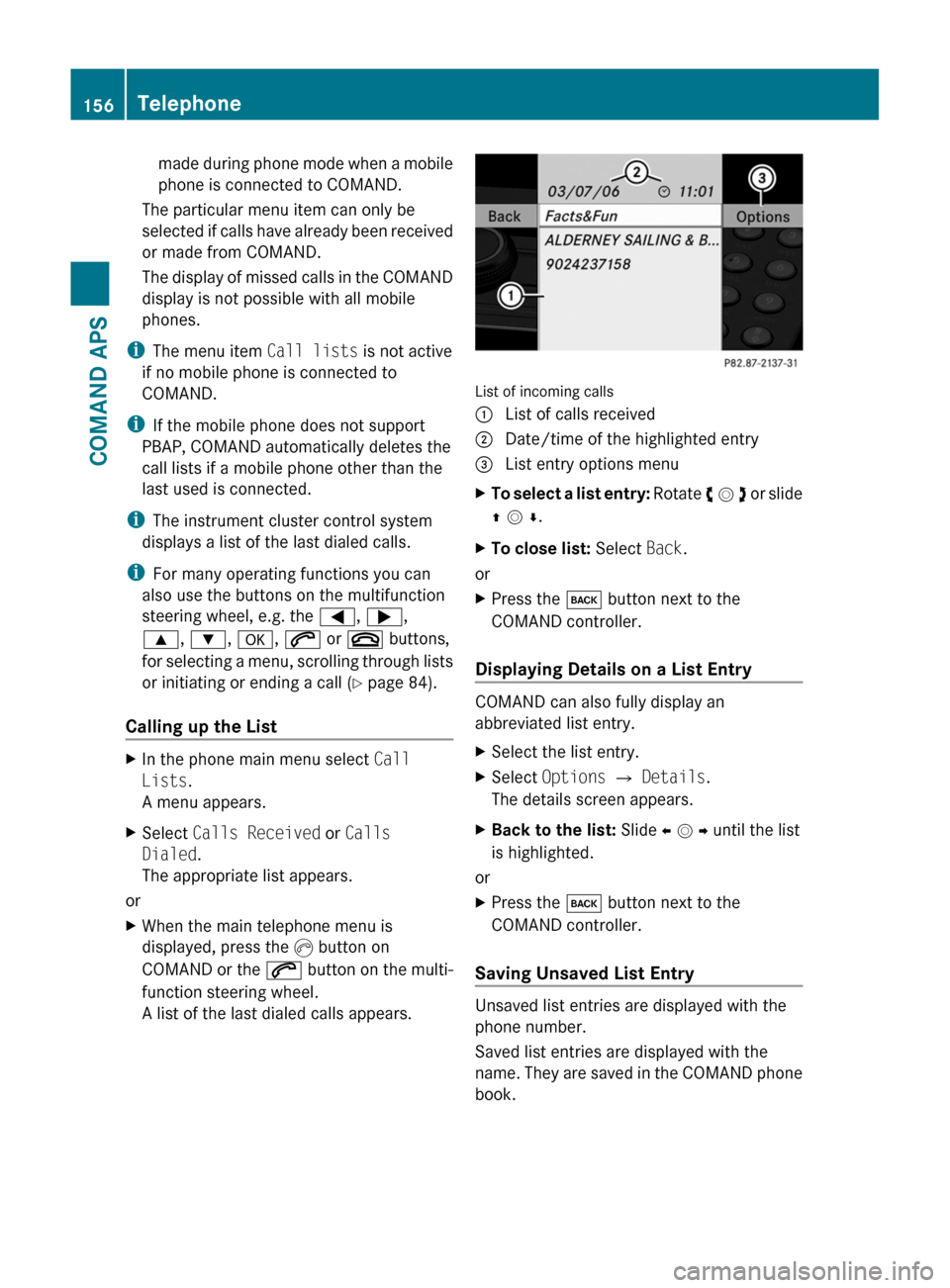
List of incoming calls
1 List of calls received2 Date/time of the highlighted entry3 List entry options menuXTo select a list entry: Rotate y m z or slide
q m r.
XTo close list: Select Back.
or
XPress the k button next to the
COMAND controller.
Displaying Details on a List Entry
COMAND can also fully display an
abbreviated list entry.
XSelect the list entry.XSelect Options £ Details.
The details screen appears.
XBack to the list: Slide o m p until the list
is highlighted.
or
XPress the k button next to the
COMAND controller.
Saving Unsaved List Entry
Unsaved list entries are displayed with the
phone number.
Saved list entries are displayed with the
name. They are saved in the COMAND phone
book.
156TelephoneCOMAND APS
BA 197 USA, CA Edition A 2011; 1; 27, en-UShereepeVersion: 3.0.3.52010-03-24T15:31:10+01:00 - Seite 156
Page 237 of 436
Vehicle equipment ............................236
Locking and unlocking .....................236
Starter switch positions ...................241
Seats .................................................. 243
Multifunction steering wheel ..........245
Mirrors ............................................... 246
Memory function .............................. 249
Lighting .............................................. 249
Wipers ................................................ 253
Power windows ................................. 255
Driving and parking ..........................257
AMG SPEEDSHIFT DCT 7-SPEED
Transmission ..................................... 263
Instrument cluster ............................271
Control system .................................. 272
Driving systems ................................ 290
Climate control system ....................298
Rear window defroster .....................304
Loading and storing ..........................304
Useful features ................................. 306235Controls in detailBA 197 USA, CA Edition A 2011; 1; 27, en-UShereepeVersion: 3.0.3.52010-03-24T15:31:10+01:00 - Seite 235
Page 244 of 436
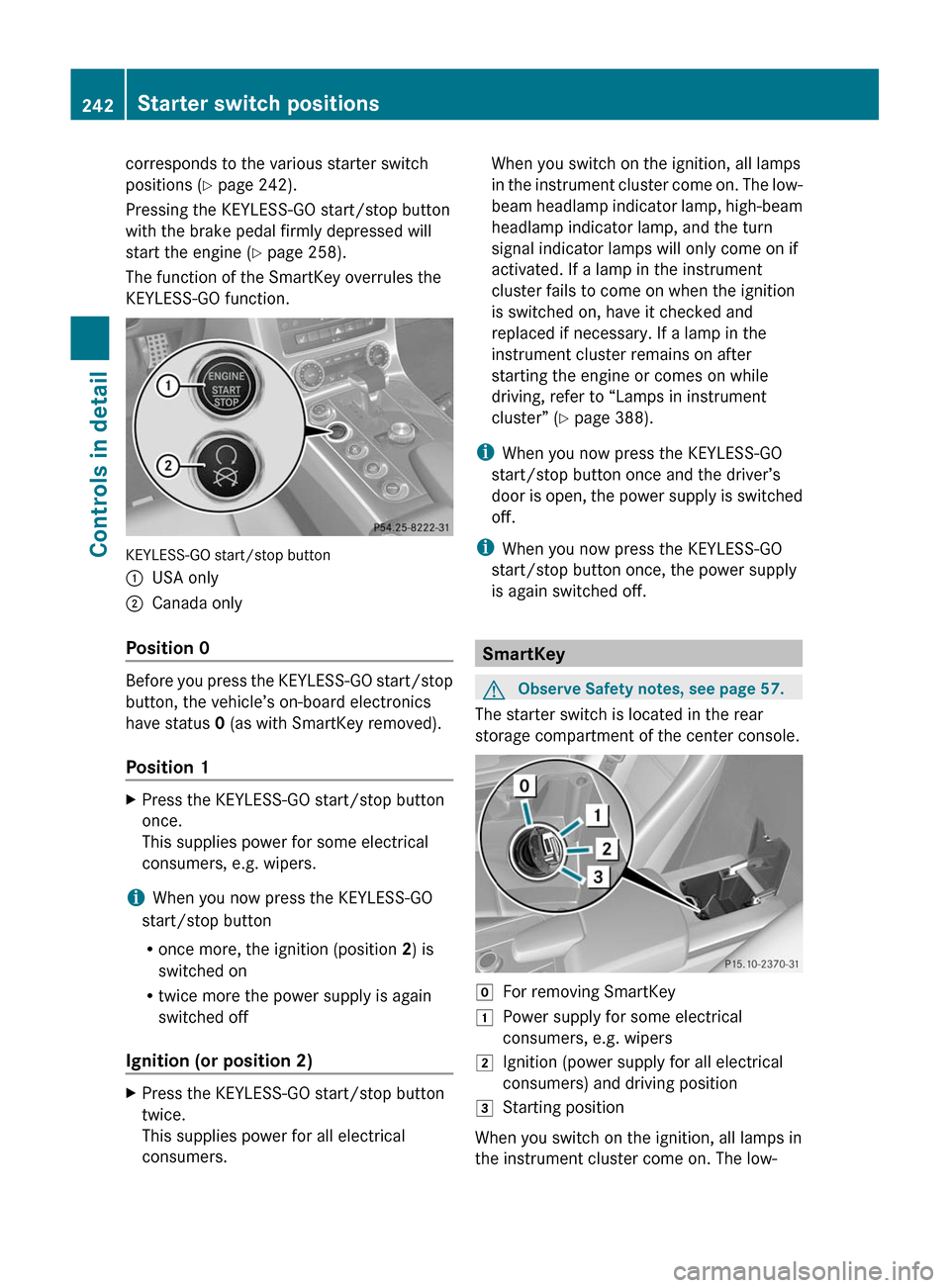
corresponds to the various starter switch
positions (Y page 242).
Pressing the KEYLESS-GO start/stop button
with the brake pedal firmly depressed will
start the engine (Y page 258).
The function of the SmartKey overrules the
KEYLESS-GO function.
KEYLESS-GO start/stop button
:USA only;Canada only
Position 0
Before you press the KEYLESS-GO start/stop
button, the vehicle’s on-board electronics
have status 0 (as with SmartKey removed).
Position 1
XPress the KEYLESS-GO start/stop button
once.
This supplies power for some electrical
consumers, e.g. wipers.
iWhen you now press the KEYLESS-GO
start/stop button
Ronce more, the ignition (position 2) is
switched on
Rtwice more the power supply is again
switched off
Ignition (or position 2)
XPress the KEYLESS-GO start/stop button
twice.
This supplies power for all electrical
consumers.
When you switch on the ignition, all lamps
in the instrument cluster come on. The low-
beam headlamp indicator lamp, high-beam
headlamp indicator lamp, and the turn
signal indicator lamps will only come on if
activated. If a lamp in the instrument
cluster fails to come on when the ignition
is switched on, have it checked and
replaced if necessary. If a lamp in the
instrument cluster remains on after
starting the engine or comes on while
driving, refer to “Lamps in instrument
cluster” (Y page 388).
iWhen you now press the KEYLESS-GO
start/stop button once and the driver’s
door is open, the power supply is switched
off.
iWhen you now press the KEYLESS-GO
start/stop button once, the power supply
is again switched off.
SmartKey
GObserve Safety notes, see page 57.
The starter switch is located in the rear
storage compartment of the center console.
gFor removing SmartKey1Power supply for some electrical
consumers, e.g. wipers
2Ignition (power supply for all electrical
consumers) and driving position
3Starting position
When you switch on the ignition, all lamps in
the instrument cluster come on. The low-
242Starter switch positionsControls in detail
BA 197 USA, CA Edition A 2011; 1; 27, en-UShereepeVersion: 3.0.3.52010-03-24T15:31:10+01:00 - Seite 242