center console MERCEDES-BENZ SLS 2011 C197 Owner's Manual
[x] Cancel search | Manufacturer: MERCEDES-BENZ, Model Year: 2011, Model line: SLS, Model: MERCEDES-BENZ SLS 2011 C197Pages: 436, PDF Size: 20.86 MB
Page 9 of 436
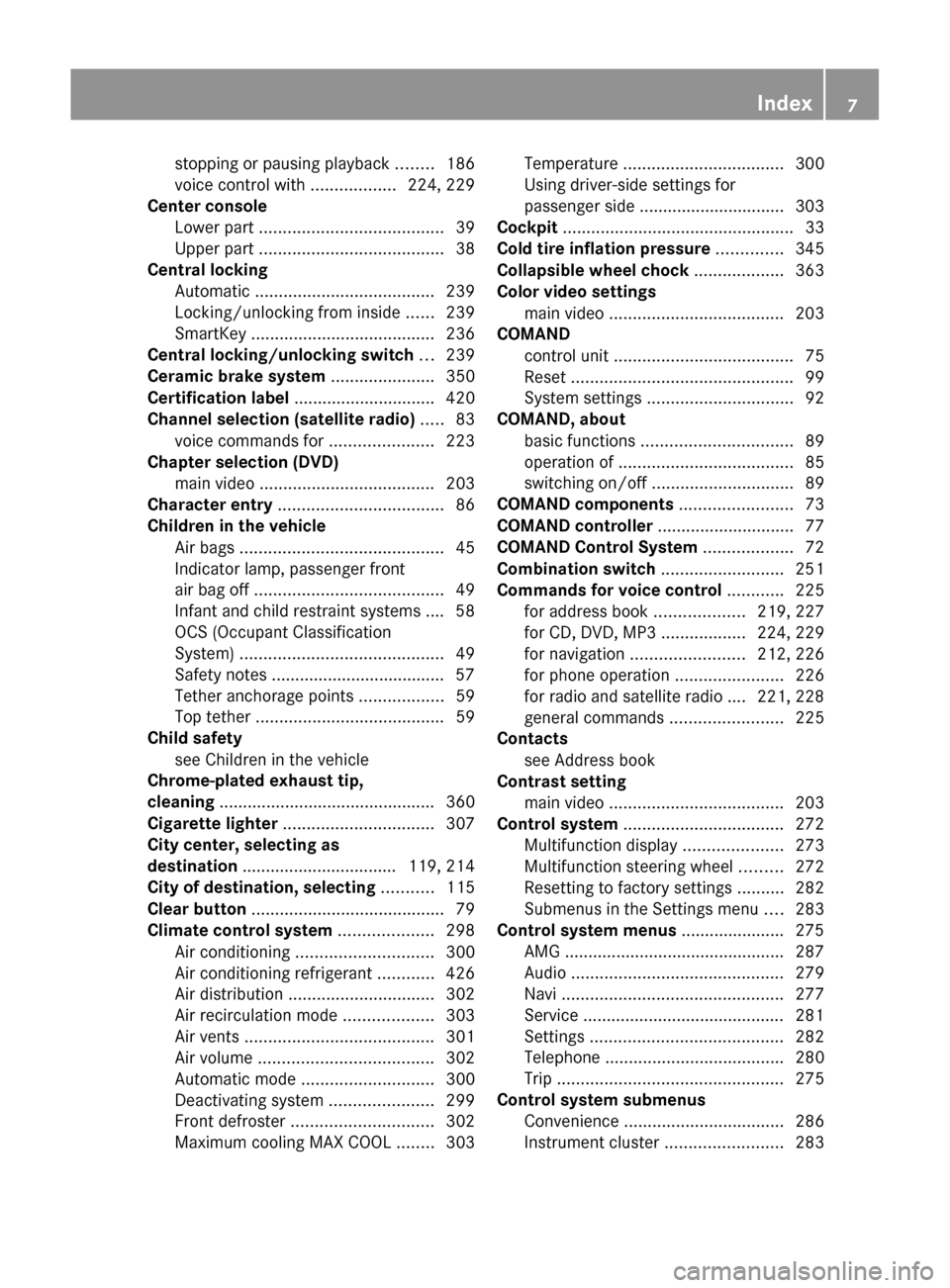
stopping or pausing playback ........186
voice control with ..................224, 229
Center console
Lower part ....................................... 39
Upper part ....................................... 38
Central locking
Automatic ...................................... 239
Locking/unlocking from inside ......239
SmartKey ....................................... 236
Central locking/unlocking switch ... 239
Ceramic brake system ...................... 350
Certification label .............................. 420
Channel selection (satellite radio) ..... 83
voice commands for ......................223
Chapter selection (DVD)
main video ..................................... 203
Character entry ................................... 86
Children in the vehicle Air bags ........................................... 45
Indicator lamp, passenger front
air bag off ........................................ 49
Infant and child restraint systems .... 58
OCS (Occupant Classification
System) ........................................... 49
Safety notes ..................................... 57
Tether anchorage points ..................59
Top tether ........................................ 59
Child safety
see Children in the vehicle
Chrome-plated exhaust tip,
cleaning .............................................. 360
Cigarette lighter ................................ 307
City center, selecting as
destination ................................. 119, 214
City of destination, selecting ........... 115
Clear button ......................................... 79
Climate control system .................... 298
Air conditioning ............................. 300
Air conditioning refrigerant ............426
Air distribution ............................... 302
Air recirculation mode ...................303
Air vents ........................................ 301
Air volume ..................................... 302
Automatic mode ............................ 300
Deactivating system ......................299
Front defroster .............................. 302
Maximum cooling MAX COOL ........303Temperature .................................. 300
Using driver-side settings for
passenger side ............................... 303
Cockpit ................................................. 33
Cold tire inflation pressure .............. 345
Collapsible wheel chock ................... 363
Color video settings main video ..................................... 203
COMAND
control unit ...................................... 75
Reset ............................................... 99
System settings ............................... 92
COMAND, about
basic functions ................................ 89
operation of ..................................... 85
switching on/off .............................. 89
COMAND components ........................ 73
COMAND controller ............................. 77
COMAND Control System ................... 72
Combination switch .......................... 251
Commands for voice control ............ 225
for address book ...................219, 227
for CD, DVD, MP3 ..................224, 229
for navigation ........................ 212, 226
for phone operation .......................226
for radio and satellite radio .... 221, 228
general commands ........................225
Contacts
see Address book
Contrast setting
main video ..................................... 203
Control system .................................. 272
Multifunction display .....................273
Multifunction steering wheel .........272
Resetting to factory settings ..........282
Submenus in the Settings menu ....283
Control system menus ...................... 275
AMG ............................................... 287
Audio ............................................. 279
Navi ............................................... 277
Service ........................................... 281
Settings ......................................... 282
Telephone ...................................... 280
Trip ................................................ 275
Control system submenus
Convenience .................................. 286
Instrument cluster .........................283Index7BA 197 USA, CA Edition A 2011; 1; 27, en-UShereepeVersion: 3.0.3.52010-03-24T15:31:10+01:00 - Seite 7
Page 15 of 436
iPod®
devices ..................................... 192
connecting to ................................. 192
playback options ............................ 197
playlists and folders .......................195
selecting tracks ............................. 195
J
Jack ..................................................... 363
Jump starting ..................................... 413
K
Key, Mechanical Loss of ........................................... 237
Replacing ....................................... 238
Unlocking/locking manually ..........397
Valet locking .................................. 241
Key, SmartKey
Battery check lamp ........................237
Checking battery ........................... 237
Closing the windows ......................257
Factory setting ............................... 237
Global locking (SmartKey) .............237
Global unlocking
(SmartKey) ..................................... 237
Locking/unlocking ........................236
Loss of ........................................... 237
Messages in the multifunction
display ........................................... 379
Opening, trunk ............................... 239
Opening and closing the windows . 256
Remote control .............................. 236
Replacing ....................................... 238
Replacing battery ........................... 399
Restoring to factory setting ...........237
Selective setting ............................ 237
Starter switch positions .................242
KEYLESS-GO
Starter switch positions .................241
Keypad, entering characters with ..... 87
Kickdown ........................................... 266
Kickdown (manual shift program) ... 270
Kilopascal (air pressure unit) ........... 345
Knee bags ............................................ 48
L
Labels Certification ................................... 420
Emission control information .........421
Tire and Loading Information
placard ........................................... 334
Lamps, exterior
Exterior lamp switch ......................250
Messages in the multifunction
display ........................................... 384
Switching on/off ........................... 250
Lamps, indicator and warning
ABS .......................................... 35, 389
Brakes ........................................... 389
Center console ................................ 38
Engine malfunction ........................394
Engine oil temperature ..................394
ESC .......................................... 35, 393
Fuel tank reserve ........................... 394
High-beam headlamps .............35, 252
Instrument cluster .........................388
Low-beam headlamps ..............35, 250
Low tire pressure/TPMS
malfunction telltale ........................395
Passenger front air bag off ......49, 396
Seat belt telltale ................35, 55, 391
SRS .......................................... 44, 392
Turn signals ..................................... 35
Lane recommendations .................... 135
Language Setting ............................................. 99
Language settings
DVD Video ..................................... 205
Last Destinations .............................. 147
adding stopover destination ..........124
adding to memory .......................... 145
choosing destination from .............123
deleting destination from ...............147
saving current vehicle
position ................................. 106, 147
voice control for ............................ 216
License plate lamps
Messages in the multifunction
display ........................................... 385
Light alloy wheels, cleaning ............. 358
Lighter see Cigarette lighter Index13BA 197 USA, CA Edition A 2011; 1; 27, en-UShereepeVersion: 3.0.3.52010-03-24T15:31:10+01:00 - Seite 13
Page 33 of 436
Exterior view ....................................... 32
Cockpit ................................................. 33
Instrument cluster ..............................34
Multifunction steering wheel .............36
Center console .................................... 38
Overhead control panel ......................40
Door control panel .............................. 4131At a glanceBA 197 USA, CA Edition A 2011; 1; 27, en-UShereepeVersion: 3.0.3.52010-03-24T15:31:10+01:00 - Seite 31
Page 35 of 436
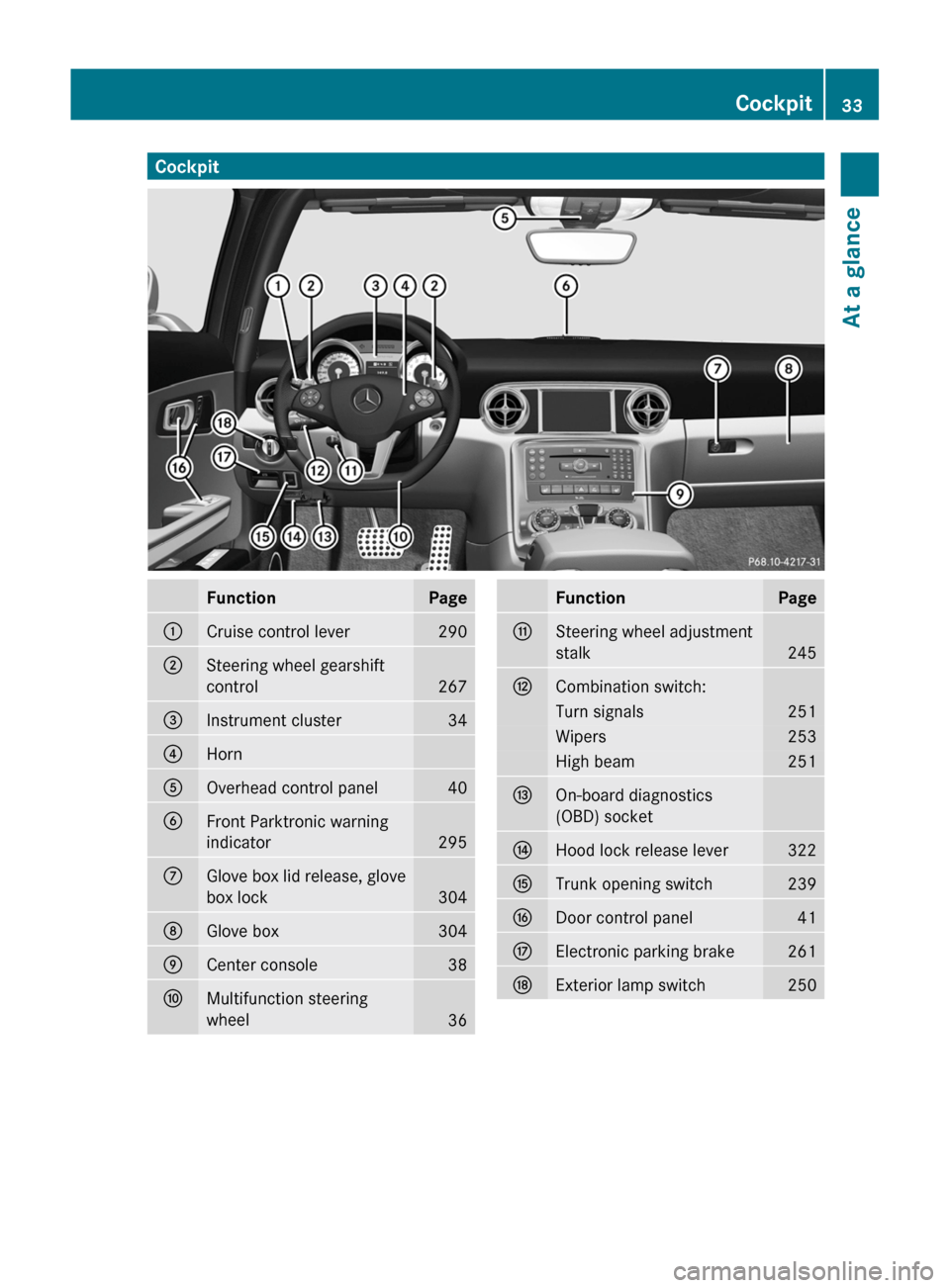
CockpitFunctionPage:Cruise control lever290;Steering wheel gearshift
control
267
=Instrument cluster34?HornAOverhead control panel40BFront Parktronic warning
indicator
295
CGlove box lid release, glove
box lock
304
DGlove box304ECenter console38FMultifunction steering
wheel
36
FunctionPageGSteering wheel adjustment
stalk
245
HCombination switch:Turn signals251Wipers253High beam251IOn-board diagnostics
(OBD) socketJHood lock release lever322KTrunk opening switch239LDoor control panel41MElectronic parking brake261NExterior lamp switch250Cockpit33At a glanceBA 197 USA, CA Edition A 2011; 1; 27, en-UShereepeVersion: 3.0.3.52010-03-24T15:31:10+01:00 - Seite 33
Page 40 of 436
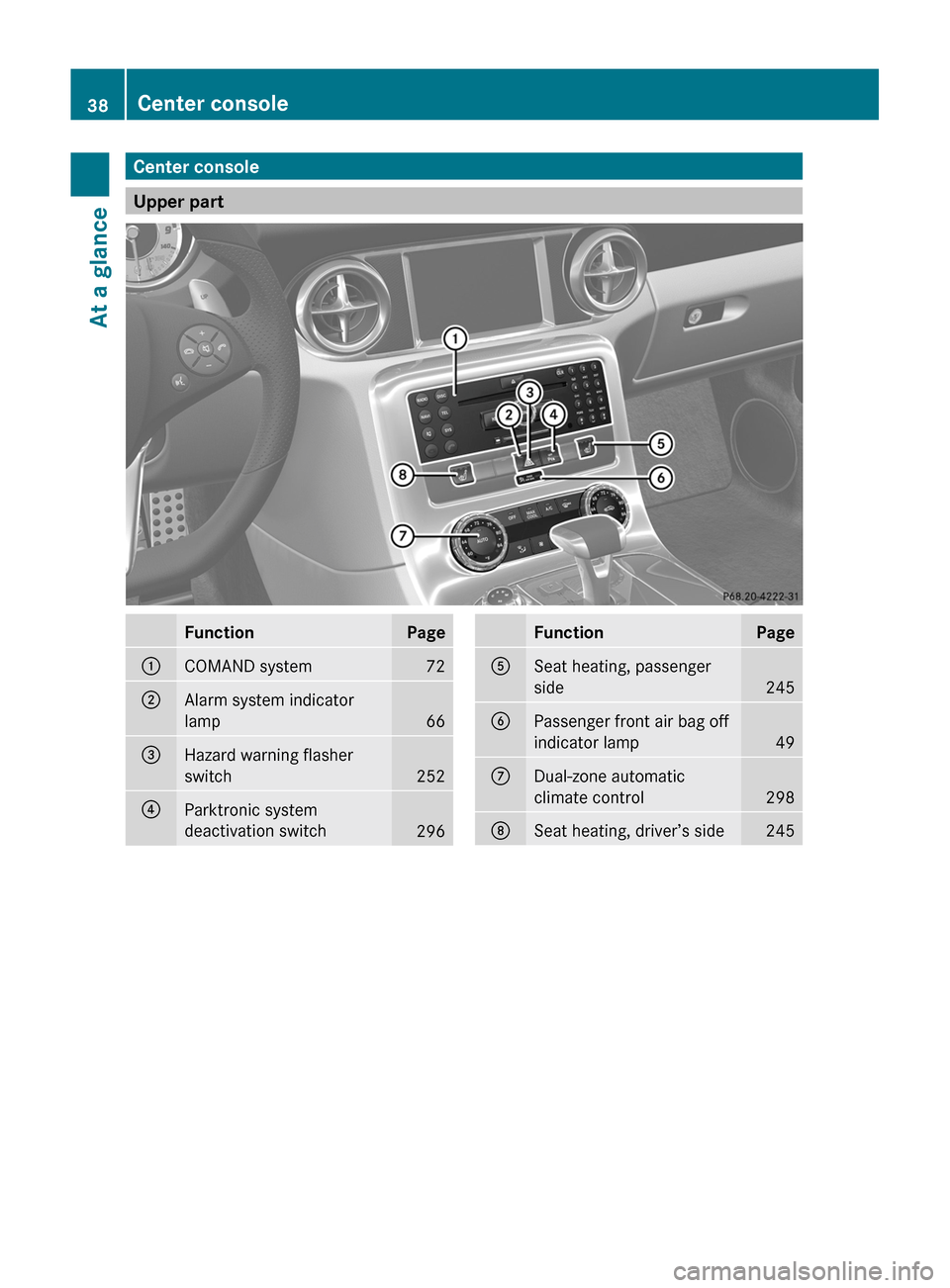
Center console
Upper part
FunctionPage:COMAND system72;Alarm system indicator
lamp
66
=Hazard warning flasher
switch
252
?Parktronic system
deactivation switch
296
FunctionPageASeat heating, passenger
side
245
BPassenger front air bag off
indicator lamp
49
CDual-zone automatic
climate control
298
DSeat heating, driver’s side24538Center consoleAt a glance
BA 197 USA, CA Edition A 2011; 1; 27, en-UShereepeVersion: 3.0.3.52010-03-24T15:31:10+01:00 - Seite 38
Page 41 of 436
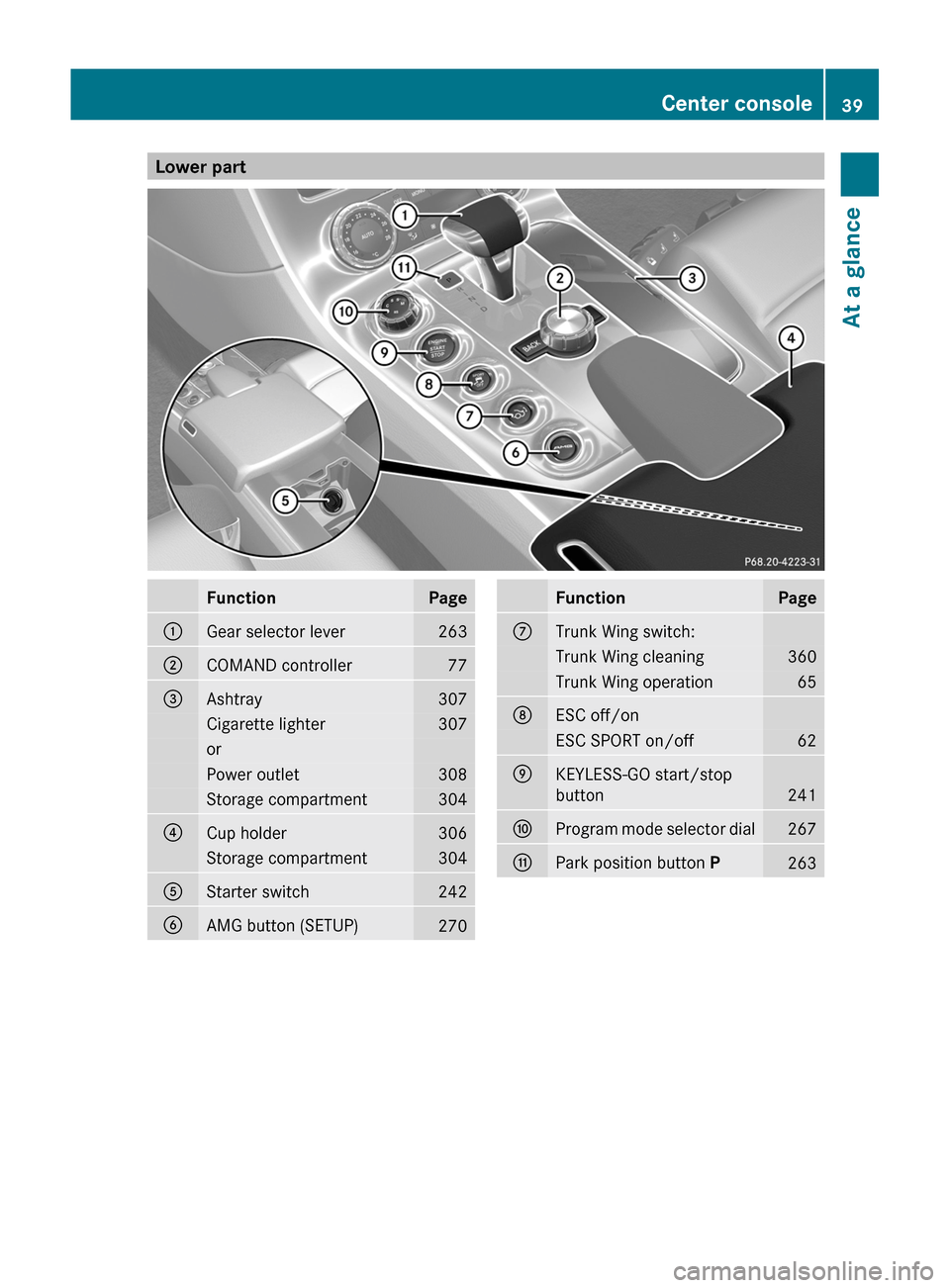
Lower partFunctionPage:Gear selector lever263;COMAND controller77=Ashtray307Cigarette lighter307orPower outlet308Storage compartment304?Cup holder306Storage compartment304AStarter switch242BAMG button (SETUP)270FunctionPageCTrunk Wing switch:Trunk Wing cleaning360Trunk Wing operation65DESC off/onESC SPORT on/off62EKEYLESS-GO start/stop
button
241
FProgram mode selector dial267GPark position button P263Center console39At a glanceBA 197 USA, CA Edition A 2011; 1; 27, en-UShereepeVersion: 3.0.3.52010-03-24T15:31:10+01:00 - Seite 39
Page 50 of 436
weight category as identified by the Occupant
Classification System (OCS) (Y page 49).
The lighter the passenger-side occupant, the
higher the vehicle deceleration rate required
for second stage inflation of the passenger
front air bag.
The air bags will not deploy in impacts which
do not exceed the system’s preset
deployment thresholds. You will then be
protected by the fastened seat belts.
The front air bags will not deploy in the event
of a rollover unless the vehicle’s rate of
longitudinal deceleration or acceleration
exceeds the preset deployment threshold for
the front air bags.
The passenger air bag will only be deployed if
Rthe system, based on OCS weight sensor
readings, detects that the passenger seat
is occupied
Rthe 4 5 indicator lamp in the center
console is not lit
Rthe impact exceeds a preset deployment
threshold
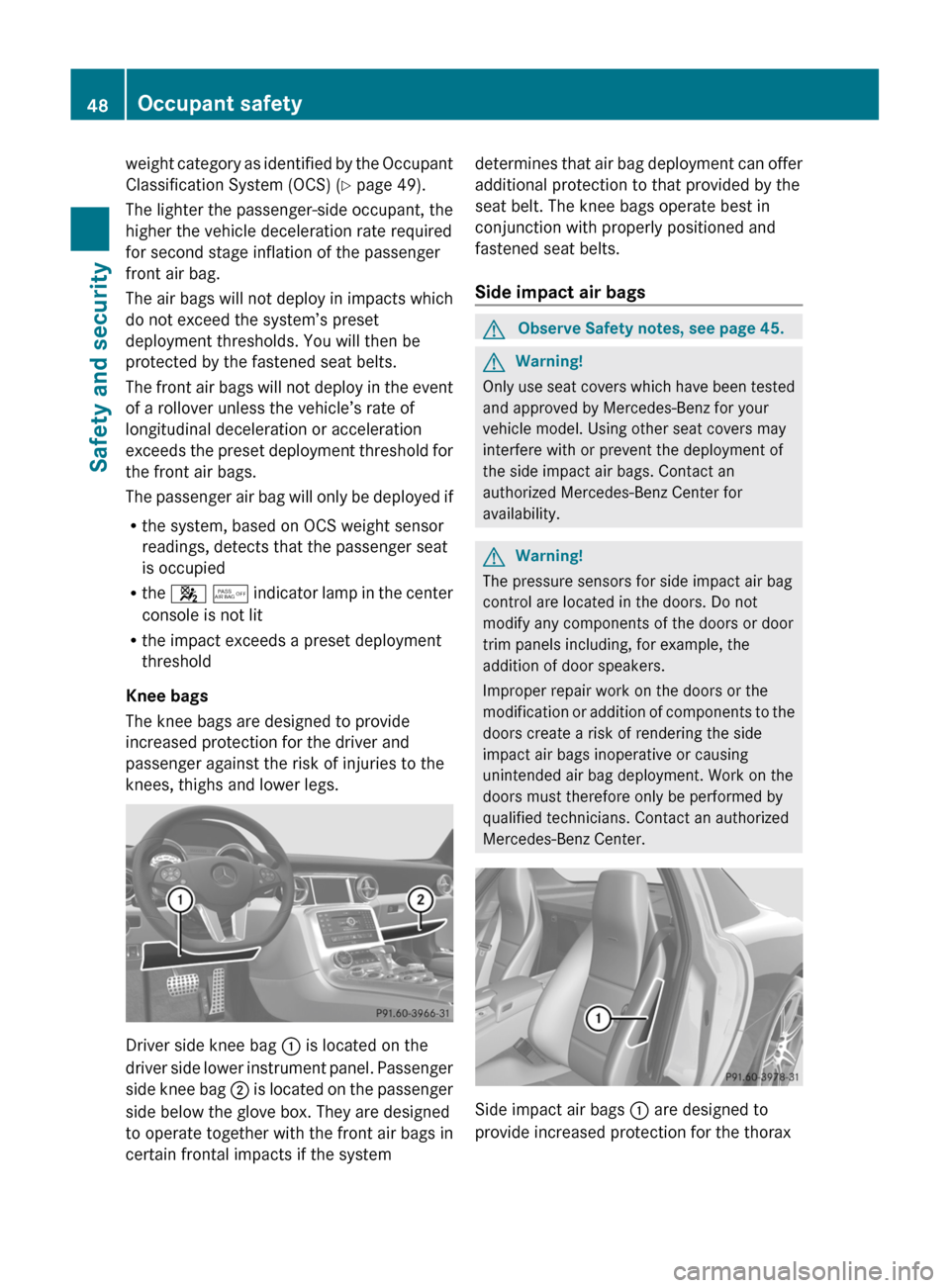
Knee bags
The knee bags are designed to provide
increased protection for the driver and
passenger against the risk of injuries to the
knees, thighs and lower legs.
Driver side knee bag : is located on the
driver side lower instrument panel. Passenger
side knee bag ; is located on the passenger
side below the glove box. They are designed
to operate together with the front air bags in
certain frontal impacts if the system
determines that air bag deployment can offer
additional protection to that provided by the
seat belt. The knee bags operate best in
conjunction with properly positioned and
fastened seat belts.
Side impact air bags
GObserve Safety notes, see page 45.GWarning!
Only use seat covers which have been tested
and approved by Mercedes-Benz for your
vehicle model. Using other seat covers may
interfere with or prevent the deployment of
the side impact air bags. Contact an
authorized Mercedes-Benz Center for
availability.
GWarning!
The pressure sensors for side impact air bag
control are located in the doors. Do not
modify any components of the doors or door
trim panels including, for example, the
addition of door speakers.
Improper repair work on the doors or the
modification or addition of components to the
doors create a risk of rendering the side
impact air bags inoperative or causing
unintended air bag deployment. Work on the
doors must therefore only be performed by
qualified technicians. Contact an authorized
Mercedes-Benz Center.
Side impact air bags : are designed to
provide increased protection for the thorax
48Occupant safetySafety and security
BA 197 USA, CA Edition A 2011; 1; 27, en-UShereepeVersion: 3.0.3.52010-03-24T15:31:10+01:00 - Seite 48
Page 243 of 436
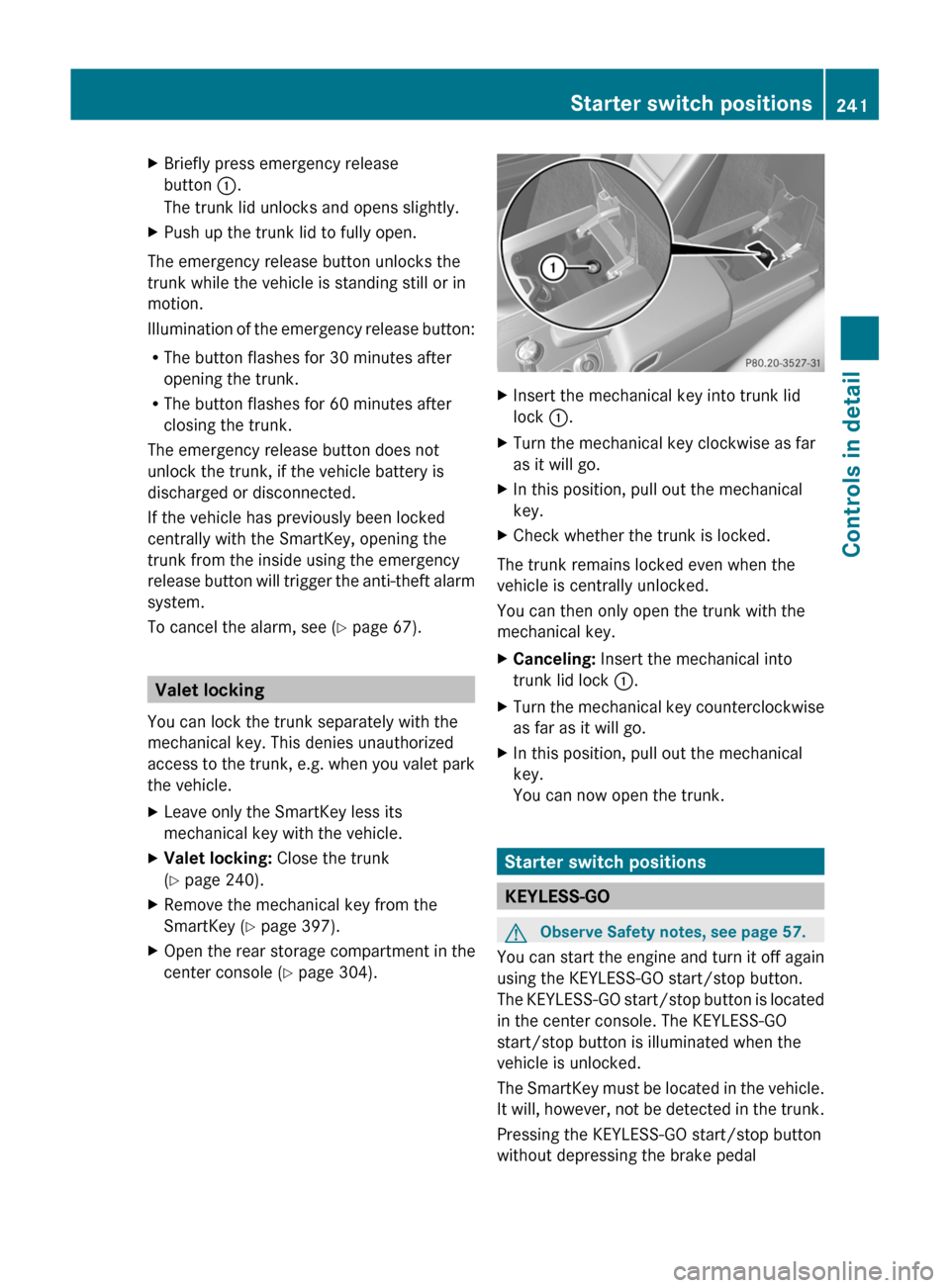
XBriefly press emergency release
button :.
The trunk lid unlocks and opens slightly.
XPush up the trunk lid to fully open.
The emergency release button unlocks the
trunk while the vehicle is standing still or in
motion.
Illumination of the emergency release button:
RThe button flashes for 30 minutes after
opening the trunk.
RThe button flashes for 60 minutes after
closing the trunk.
The emergency release button does not
unlock the trunk, if the vehicle battery is
discharged or disconnected.
If the vehicle has previously been locked
centrally with the SmartKey, opening the
trunk from the inside using the emergency
release button will trigger the anti-theft alarm
system.
To cancel the alarm, see (Y page 67).
Valet locking
You can lock the trunk separately with the
mechanical key. This denies unauthorized
access to the trunk, e.g. when you valet park
the vehicle.
XLeave only the SmartKey less its
mechanical key with the vehicle.
XValet locking: Close the trunk
(Y page 240).
XRemove the mechanical key from the
SmartKey (Y page 397).
XOpen the rear storage compartment in the
center console (Y page 304).
XInsert the mechanical key into trunk lid
lock :.
XTurn the mechanical key clockwise as far
as it will go.
XIn this position, pull out the mechanical
key.
XCheck whether the trunk is locked.
The trunk remains locked even when the
vehicle is centrally unlocked.
You can then only open the trunk with the
mechanical key.
XCanceling: Insert the mechanical into
trunk lid lock :.
XTurn the mechanical key counterclockwise
as far as it will go.
XIn this position, pull out the mechanical
key.
You can now open the trunk.
Starter switch positions
KEYLESS-GO
GObserve Safety notes, see page 57.
You can start the engine and turn it off again
using the KEYLESS-GO start/stop button.
The KEYLESS-GO start/stop button is located
in the center console. The KEYLESS-GO
start/stop button is illuminated when the
vehicle is unlocked.
The SmartKey must be located in the vehicle.
It will, however, not be detected in the trunk.
Pressing the KEYLESS-GO start/stop button
without depressing the brake pedal
Starter switch positions241Controls in detailBA 197 USA, CA Edition A 2011; 1; 27, en-UShereepeVersion: 3.0.3.52010-03-24T15:31:10+01:00 - Seite 241Z
Page 244 of 436
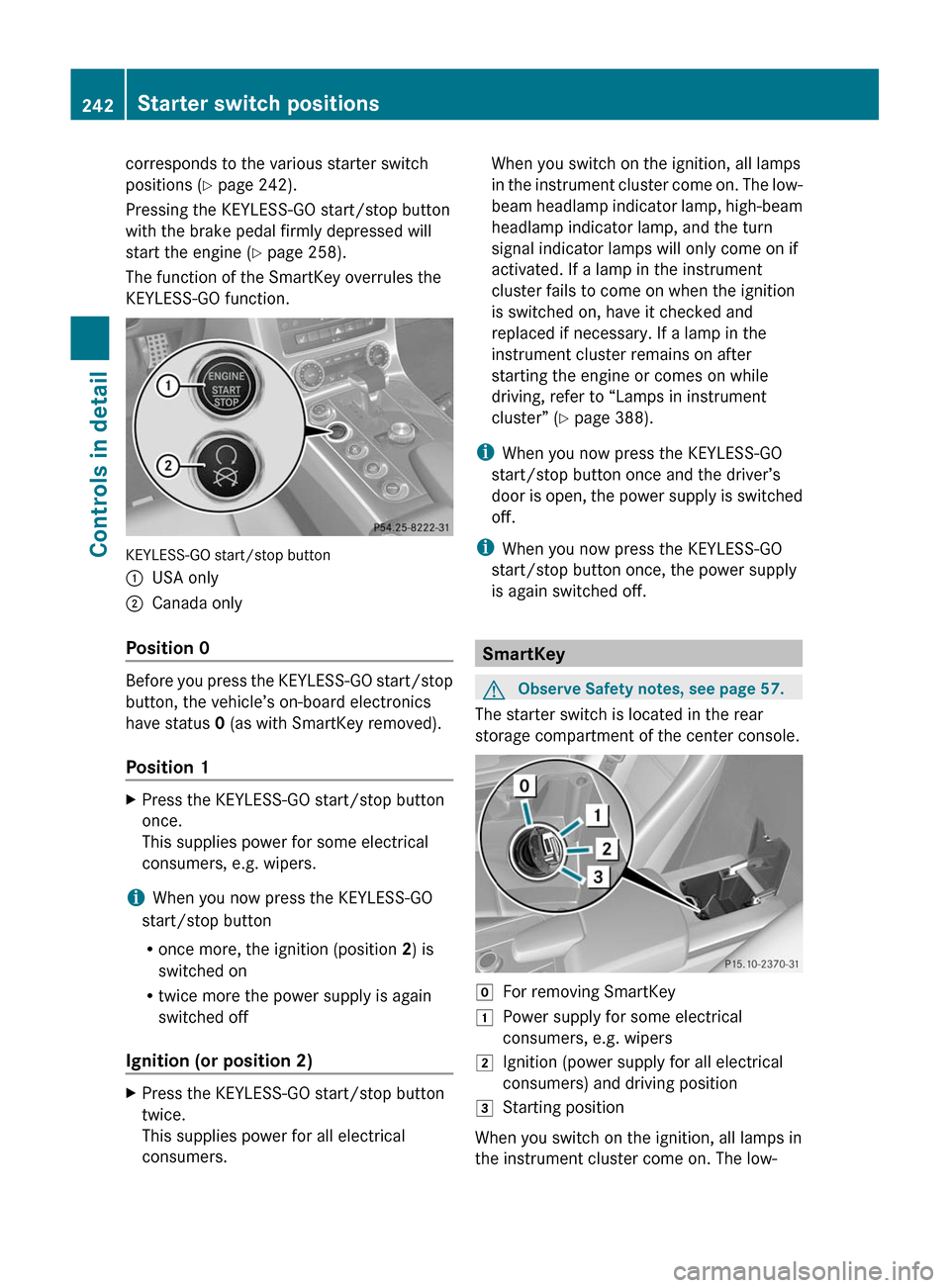
corresponds to the various starter switch
positions (Y page 242).
Pressing the KEYLESS-GO start/stop button
with the brake pedal firmly depressed will
start the engine (Y page 258).
The function of the SmartKey overrules the
KEYLESS-GO function.
KEYLESS-GO start/stop button
:USA only;Canada only
Position 0
Before you press the KEYLESS-GO start/stop
button, the vehicle’s on-board electronics
have status 0 (as with SmartKey removed).
Position 1
XPress the KEYLESS-GO start/stop button
once.
This supplies power for some electrical
consumers, e.g. wipers.
iWhen you now press the KEYLESS-GO
start/stop button
Ronce more, the ignition (position 2) is
switched on
Rtwice more the power supply is again
switched off
Ignition (or position 2)
XPress the KEYLESS-GO start/stop button
twice.
This supplies power for all electrical
consumers.
When you switch on the ignition, all lamps
in the instrument cluster come on. The low-
beam headlamp indicator lamp, high-beam
headlamp indicator lamp, and the turn
signal indicator lamps will only come on if
activated. If a lamp in the instrument
cluster fails to come on when the ignition
is switched on, have it checked and
replaced if necessary. If a lamp in the
instrument cluster remains on after
starting the engine or comes on while
driving, refer to “Lamps in instrument
cluster” (Y page 388).
iWhen you now press the KEYLESS-GO
start/stop button once and the driver’s
door is open, the power supply is switched
off.
iWhen you now press the KEYLESS-GO
start/stop button once, the power supply
is again switched off.
SmartKey
GObserve Safety notes, see page 57.
The starter switch is located in the rear
storage compartment of the center console.
gFor removing SmartKey1Power supply for some electrical
consumers, e.g. wipers
2Ignition (power supply for all electrical
consumers) and driving position
3Starting position
When you switch on the ignition, all lamps in
the instrument cluster come on. The low-
242Starter switch positionsControls in detail
BA 197 USA, CA Edition A 2011; 1; 27, en-UShereepeVersion: 3.0.3.52010-03-24T15:31:10+01:00 - Seite 242
Page 290 of 436
176‡ (80†). During this time, avoid driving
at full engine speed.
Use buttons : or 9 to select the
following functions in the AMG menu:
R SETUP ( Y page 288)
R RACETIMER ( Y page 288)
R Overall analysis ( Y page 289)
R Lap analysis ( Y page 289)
SETUP
SETUP indicates the current driving program
mode and the ESC mode.
XPress button = or ; to select the
AMG menu.XPress button 9 to select SETUP.
or
XTap the AMG button on the center console
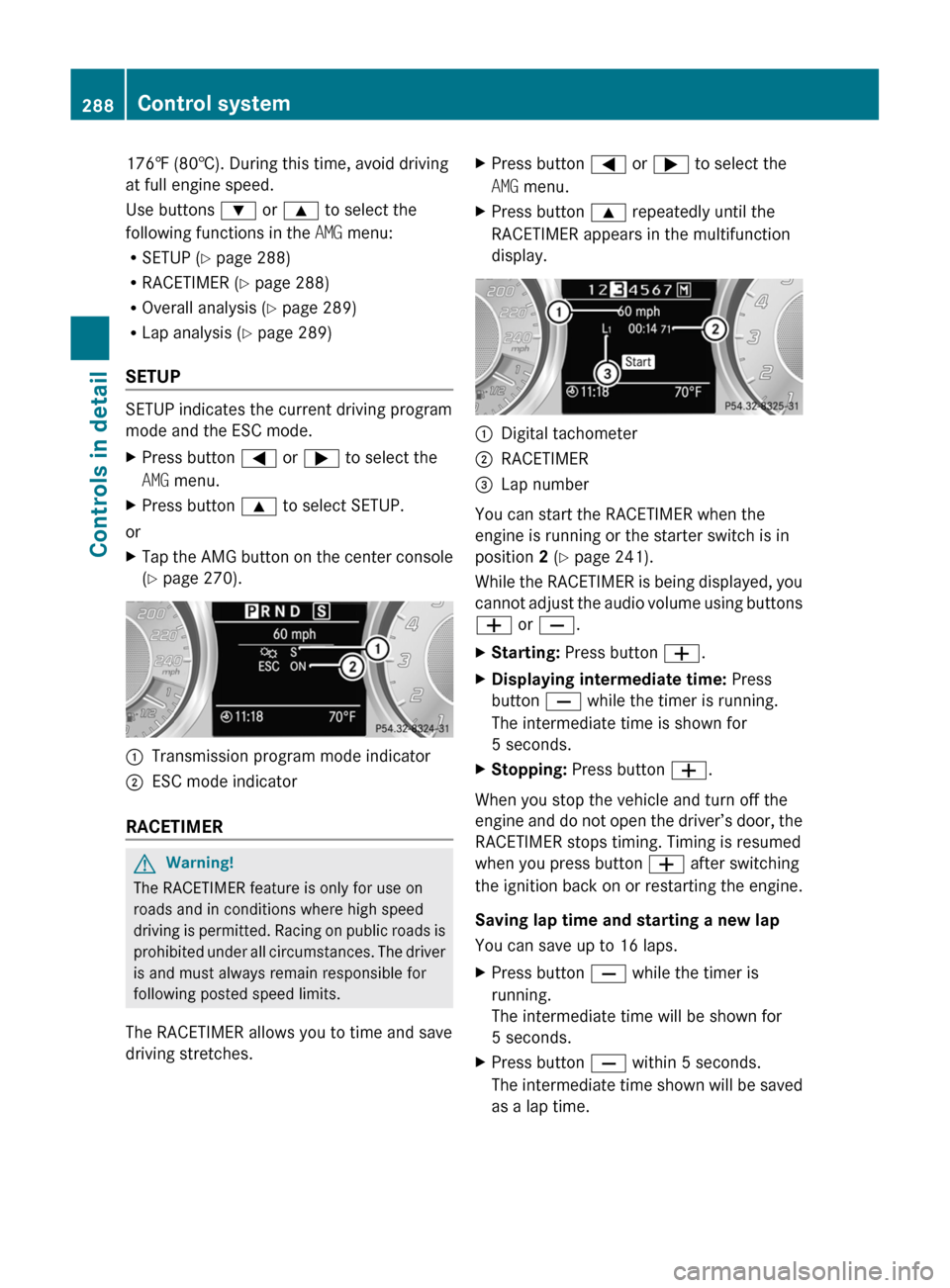
( Y page 270).:Transmission program mode indicator;ESC mode indicator
RACETIMER
GWarning!
The RACETIMER feature is only for use on
roads and in conditions where high speed
driving is permitted. Racing on public roads is
prohibited under all circumstances. The driver
is and must always remain responsible for
following posted speed limits.
The RACETIMER allows you to time and save
driving stretches.
XPress button = or ; to select the
AMG menu.XPress button 9 repeatedly until the
RACETIMER appears in the multifunction
display.:Digital tachometer;RACETIMER=Lap number
You can start the RACETIMER when the
engine is running or the starter switch is in
position 2 (Y page 241).
While the RACETIMER is being displayed, you
cannot adjust the audio volume using buttons
W or X .
XStarting: Press button W.XDisplaying intermediate time: Press
button X while the timer is running.
The intermediate time is shown for
5 seconds.XStopping: Press button W.
When you stop the vehicle and turn off the
engine and do not open the driver’s door, the
RACETIMER stops timing. Timing is resumed
when you press button W after switching
the ignition back on or restarting the engine.
Saving lap time and starting a new lap
You can save up to 16 laps.
XPress button X while the timer is
running.
The intermediate time will be shown for
5 seconds.XPress button X within 5 seconds.
The intermediate time shown will be saved
as a lap time.288Control systemControls in detail
BA 197 USA, CA Edition A 2011; 1; 27, en-UShereepeVersion: 3.0.3.52010-03-24T15:31:10+01:00 - Seite 288