change wheel MERCEDES-BENZ SLS AMG ROADSTER 2012 User Guide
[x] Cancel search | Manufacturer: MERCEDES-BENZ, Model Year: 2012, Model line: SLS AMG ROADSTER, Model: MERCEDES-BENZ SLS AMG ROADSTER 2012Pages: 288, PDF Size: 18.46 MB
Page 135 of 288
Do not turn off the engine while the vehicle is
in motion.
Exhaust checkGWARNING
Inhalation of exhaust gas is hazardous to your
health. All exhaust gas contains carbon
monoxide (CO), and inhaling it can cause
unconsciousness and possible death.
Do not run the engine in confined areas (such
as a garage) which are not properly ventilated.
If you think that exhaust gas fumes are
entering the vehicle while driving, have the
cause determined and corrected
immediately. If you must drive under these
conditions, drive only with at least one
window fully open at all times.
Certain engine systems are designed to keep
the level of poisonous components in exhaust
fumes within legal limits.
These systems only work at peak efficiency if
they are serviced exactly in accordance with
the manufacturer's specifications. For this
reason, all work on the engine may only be
carried out by qualified and authorized
Mercedes-Benz technicians.
The engine settings must not be changed
under any circumstances. Furthermore, all
specific service work must be carried out at
regular intervals and in accordance with the
Mercedes-Benz service requirements. Details
can be found in the Maintenance Booklet.
Brakes
Important safety notes
GWARNING
On slippery road surfaces, never downshift in
order to obtain braking action. This could
result in drive wheel slip and reduced vehicle
control. Your vehicle's ABS will not prevent
this type of loss of control.
GWARNING
Make sure that you do not endanger other
road users when you apply the brakes.
Downhill gradients
! On long and steep gradients, you must
reduce the load on the brakes by shifting
early to a lower gear. This allows you to take
advantage of the engine braking effect and
helps avoid overheating and excessive
wear of the brakes.
When you take advantage of the engine
braking effect, a drive wheel may not turn
for some time, e.g. on a slippery road
surface. This could cause damage to the
drive train. This type of damage is not
covered by the Mercedes-Benz warranty.
Heavy and light loads
GWARNING
Depressing the brake pedal constantly results
in excessive and premature wear to the brake
pads.
It may also cause the brakes to overheat,
seriously impairing their effectiveness. It may
then not be possible to stop the vehicle in
sufficient time to avoid an accident.
If the brakes have been subjected to a heavy
load, do not stop the vehicle immediately, but
drive on for a short while. This allows the
airflow to cool the brakes more quickly.
Wet roads
GWARNING
After driving in heavy rain for some time
without applying the brakes or through water
deep enough to wet brake components, the
first braking action may be somewhat
reduced. You have to depress the brake pedal
more firmly. Maintain a safe distance from
vehicles in front.
After driving on a wet road or having the
vehicle washed, brake firmly while paying
Driving tips133Driving and parkingZ
Page 138 of 288
Summer tires
Observe the notes in the "Winter operation"
section ( Y page 252).
Slippery road surfaces
GWARNING
The outside temperature indicator is not
designed to serve as an ice-warning device
and is therefore unsuitable for that purpose.
Indicated temperatures just above the
freezing point do not guarantee that the road
surface is free of ice. The road may still be icy,
especially in wooded areas or on bridges.
GWARNING
On slippery road surfaces, never downshift in
order to obtain braking action. This could
result in drive wheel slip and reduced vehicle
control. Your vehicle's ABS will not prevent
this type of loss of control.
Drive particularly carefully on slippery road
surfaces. Avoid sudden acceleration, steering
and braking maneuvers. Do not use cruise
control.
If the vehicle threatens to skid or cannot be
stopped when moving at low speed:
XShift the transmission to position N.
i
For more information on driving with
snow chains, see ( Y page 252).
GWARNING
Make sure that you do not endanger other
road users when you apply the brakes.
Driving systems
Cruise control
Important safety notes
Cruise control maintains a constant road
speed for you. It brakes automatically in order
to avoid exceeding the set speed. On long and
steep downhill gradients, especially if the
vehicle is laden, you must select shift range
1 , 2 or 3 in good time. By doing so, you will
make use of the braking effect of the engine,
which relieves the load on the brake system
and prevents the brakes from overheating
and wearing too quickly.
Use cruise control only if road and traffic
conditions make it appropriate to maintain a
steady speed for a prolonged period. You can
set any road speed above 20 mph
(30 km/h).GWARNING
The cruise control is a convenience system
designed to assist the driver during vehicle
operation. The driver is and must always
remain responsible for the vehicle's speed
and for safe brake operation.
Only use the cruise control if the road, traffic,
and weather conditions make it advisable to
travel at a constant speed.
R The use of the cruise control can be
dangerous on winding roads or in heavy
traffic because conditions do not allow safe
driving at a constant speed.
R The use of the cruise control can be
dangerous on slippery roads. Rapid
changes in tire traction can result in wheel
spin and loss of control.
R Deactivate the cruise control when driving
in fog.
The "Resume" function should only be
operated if the driver is fully aware of the
previously set speed and wishes to resume
this particular preset speed.
GWARNING
The cruise control brakes automatically so
that the set speed is not exceeded.
136Driving systemsDriving and parking
Page 151 of 288
Outside temperature displayGWARNING
The outside temperature indicator is not
designed to serve as an ice-warning device
and is therefore unsuitable for that purpose.
Indicated temperatures just above the
freezing point do not guarantee that the road
surface is free of ice. The road may still be icy,
especially in wooded areas or on bridges.
The outside temperature display is in the
multifunction display ( Y page 149).
Changes in the outside temperature are
displayed after a short delay.
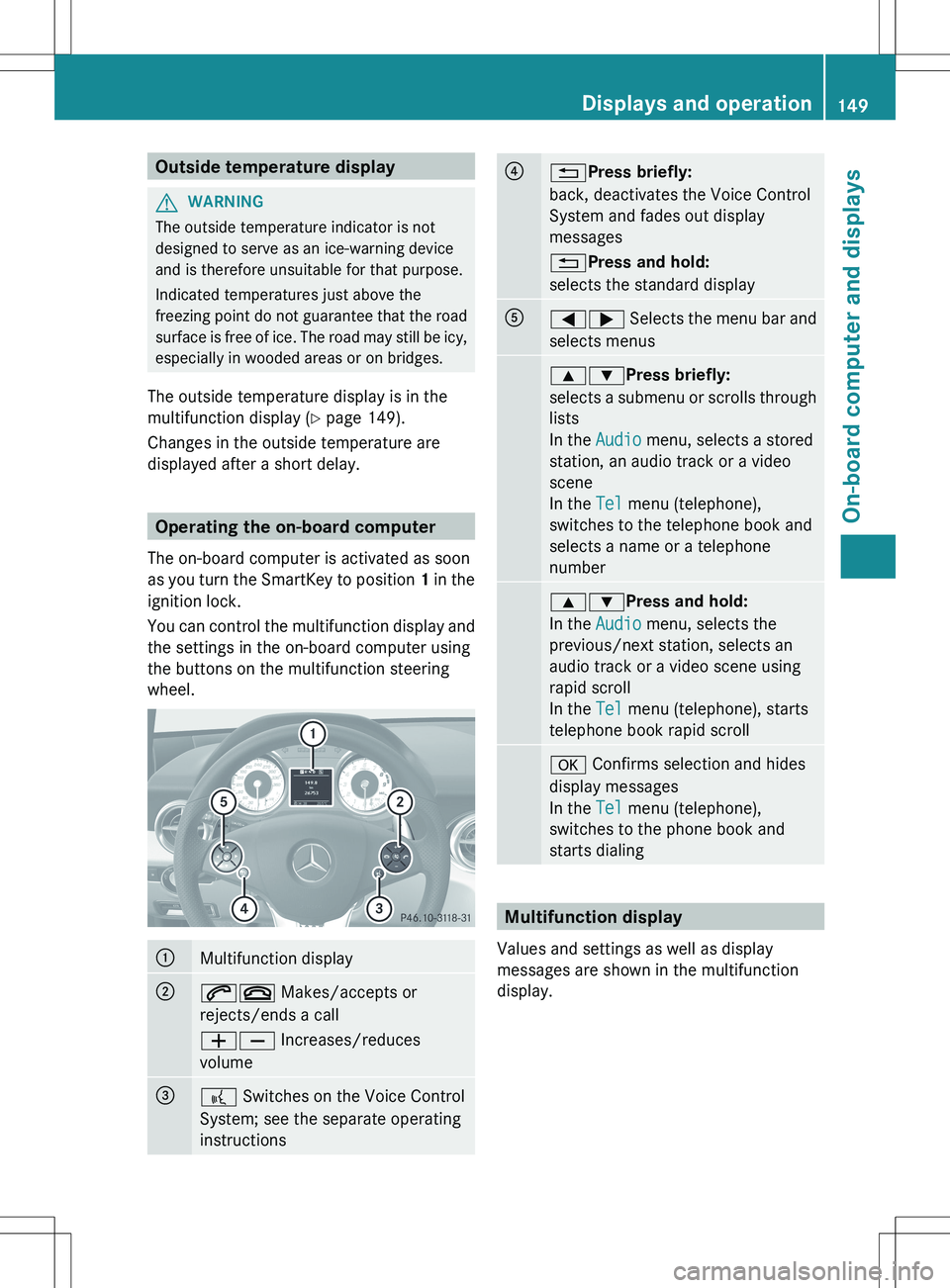
Operating the on-board computer
The on-board computer is activated as soon
as you turn the SmartKey to position 1 in the
ignition lock.
You can control the multifunction display and
the settings in the on-board computer using
the buttons on the multifunction steering
wheel.
:Multifunction display;6~ Makes/accepts or
rejects/ends a call
WX Increases/reduces
volume=? Switches on the Voice Control
System; see the separate operating
instructions?% Press briefly:
back, deactivates the Voice Control
System and fades out display
messages
% Press and hold:
selects the standard displayA=; Selects the menu bar and
selects menus9: Press briefly:
selects a submenu or scrolls through
lists
In the Audio menu, selects a stored
station, an audio track or a video
scene
In the Tel menu (telephone),
switches to the telephone book and
selects a name or a telephone
number9: Press and hold:
In the Audio menu, selects the
previous/next station, selects an
audio track or a video scene using
rapid scroll
In the Tel menu (telephone), starts
telephone book rapid scrolla Confirms selection and hides
display messages
In the Tel menu (telephone),
switches to the phone book and
starts dialing
Multifunction display
Values and settings as well as display
messages are shown in the multifunction
display.
Displays and operation149On-board computer and displaysZ
Page 155 of 288
XPress the = or ; button to select the
Trip menu.XPress the 9 or : button to select the
function that you wish to reset.XPress a.
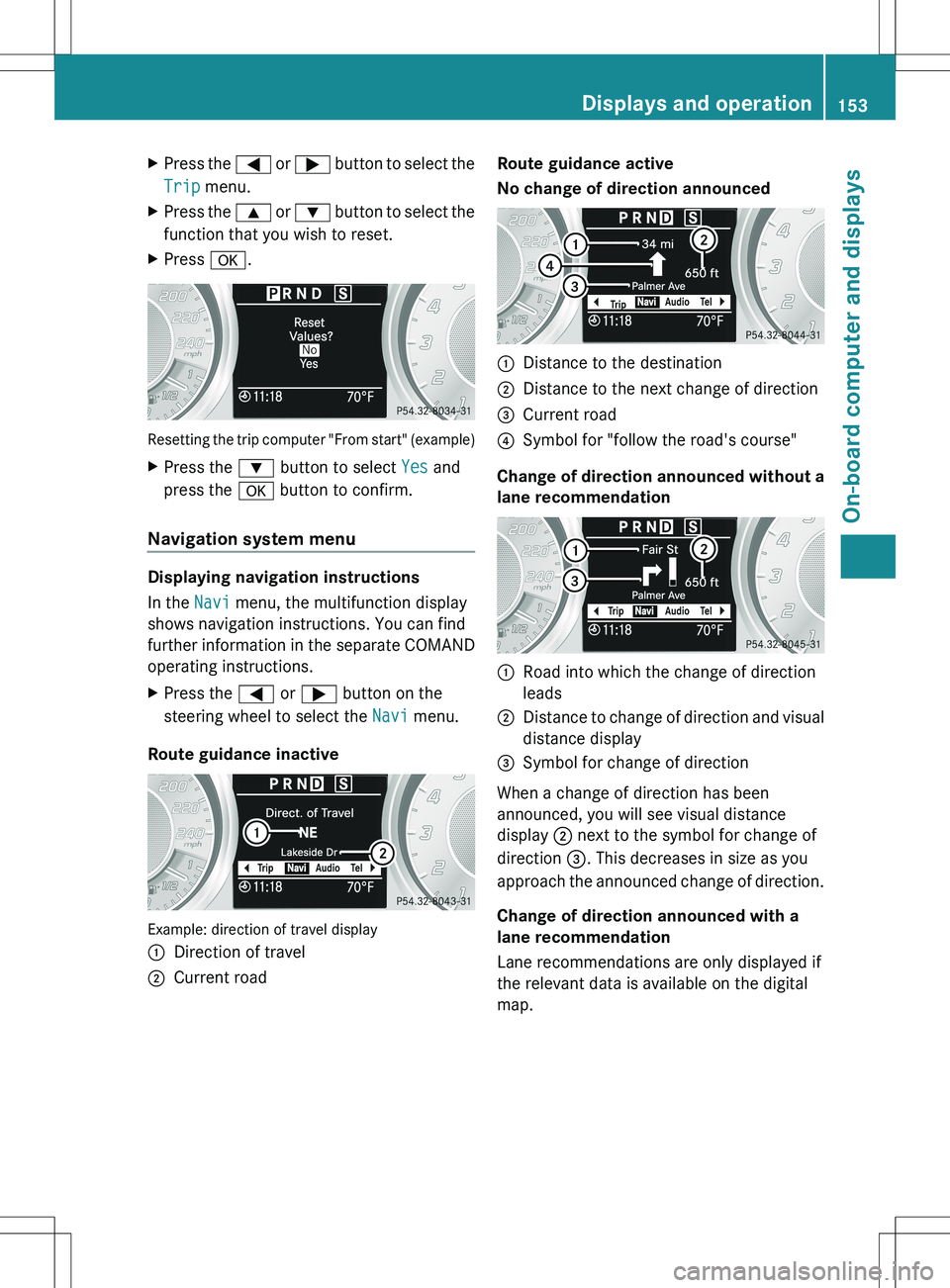
Resetting the trip computer "From start" (example)
XPress the : button to select Yes and
press the a button to confirm.
Navigation system menu
Displaying navigation instructions
In the Navi menu, the multifunction display
shows navigation instructions. You can find
further information in the separate COMAND
operating instructions.
XPress the = or ; button on the
steering wheel to select the Navi menu.
Route guidance inactive
Example: direction of travel display
:Direction of travel;Current roadRoute guidance active
No change of direction announced:Distance to the destination;Distance to the next change of direction=Current road?Symbol for "follow the road's course"
Change of direction announced without a
lane recommendation
:Road into which the change of direction
leads;Distance to change of direction and visual
distance display=Symbol for change of direction
When a change of direction has been
announced, you will see visual distance
display ; next to the symbol for change of
direction =. This decreases in size as you
approach the announced change of direction.
Change of direction announced with a
lane recommendation
Lane recommendations are only displayed if
the relevant data is available on the digital
map.
Displays and operation153On-board computer and displaysZ
Page 156 of 288
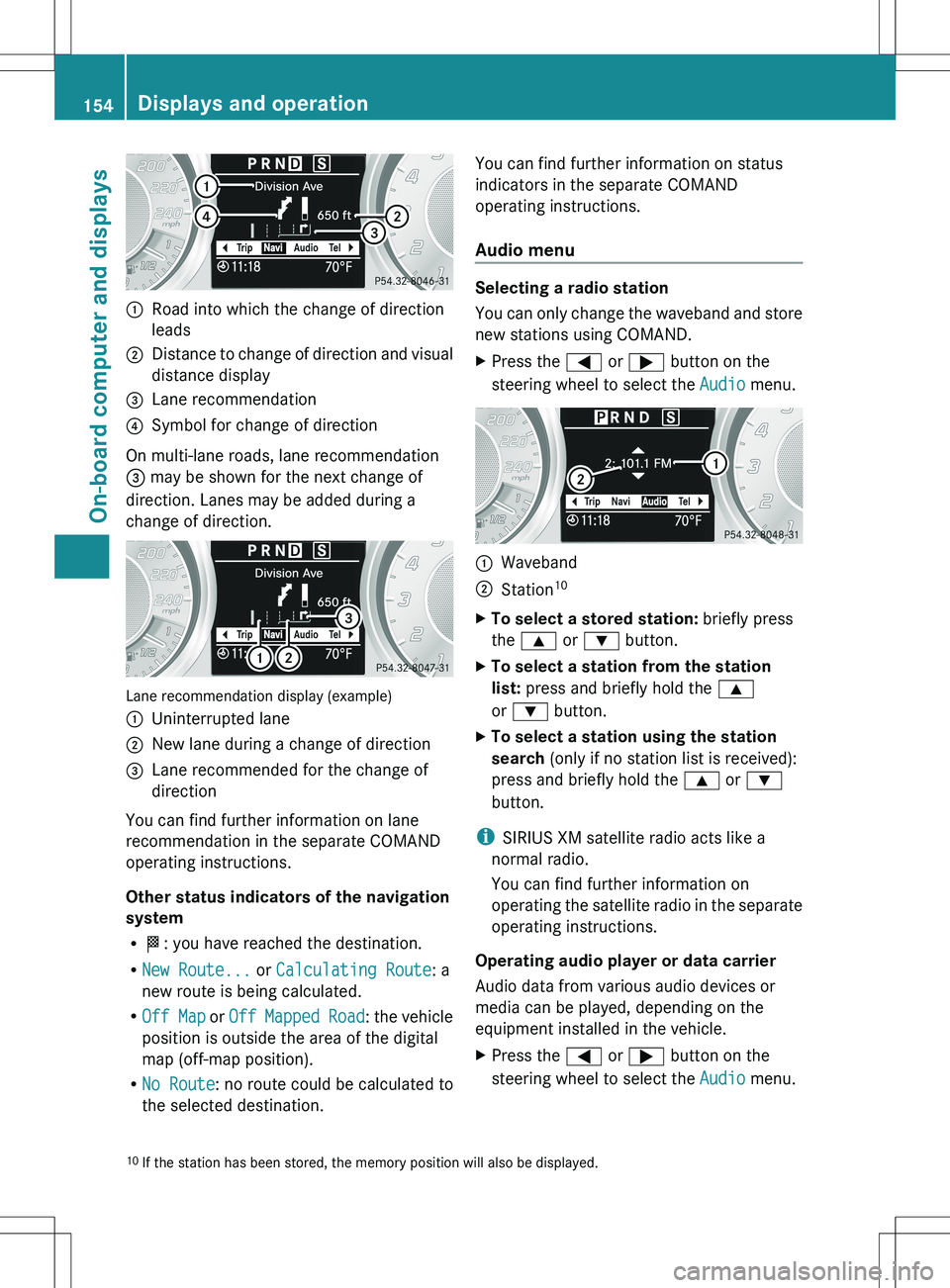
:Road into which the change of direction
leads;Distance to change of direction and visual
distance display=Lane recommendation?Symbol for change of direction
On multi-lane roads, lane recommendation
= may be shown for the next change of
direction. Lanes may be added during a
change of direction.
Lane recommendation display (example)
:Uninterrupted lane;New lane during a change of direction=Lane recommended for the change of
direction
You can find further information on lane
recommendation in the separate COMAND
operating instructions.
Other status indicators of the navigation
system
R O : you have reached the destination.
R New Route... or Calculating Route : a
new route is being calculated.
R Off Map or Off Mapped Road : the vehicle
position is outside the area of the digital
map (off-map position).
R No Route : no route could be calculated to
the selected destination.
You can find further information on status
indicators in the separate COMAND
operating instructions.
Audio menu
Selecting a radio station
You can only change the waveband and store
new stations using COMAND.
XPress the = or ; button on the
steering wheel to select the Audio menu.:Waveband;Station 10XTo select a stored station:
briefly press
the 9 or : button.XTo select a station from the station
list: press and briefly hold the 9
or : button.XTo select a station using the station
search (only if no station list is received):
press and briefly hold the 9 or :
button.
i SIRIUS XM satellite radio acts like a
normal radio.
You can find further information on
operating the satellite radio in the separate
operating instructions.
Operating audio player or data carrier
Audio data from various audio devices or
media can be played, depending on the
equipment installed in the vehicle.
XPress the = or ; button on the
steering wheel to select the Audio menu.10
If the station has been stored, the memory position will also be displayed.154Displays and operationOn-board computer and displays
Page 159 of 288
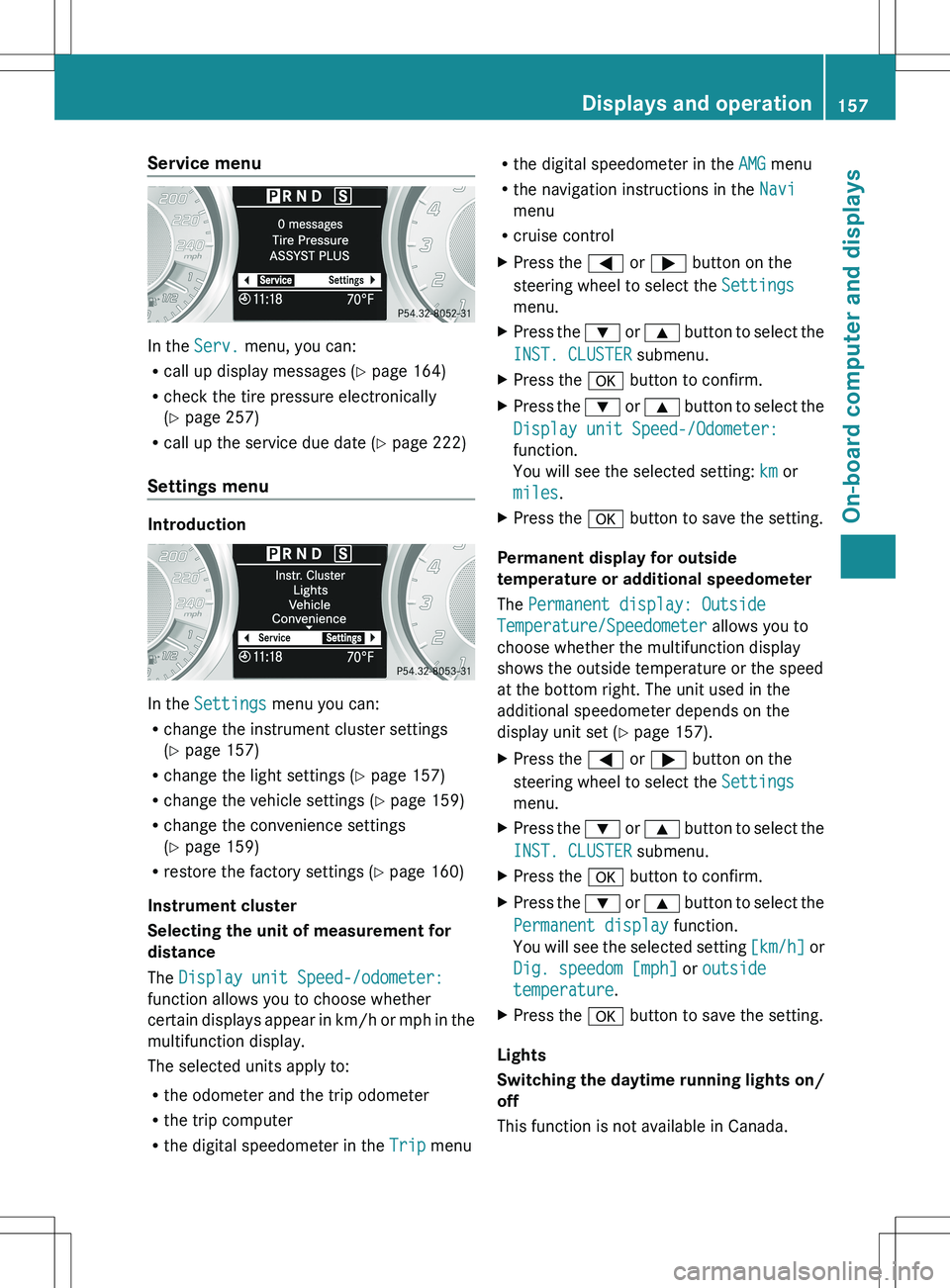
Service menu
In the Serv. menu, you can:
R call up display messages ( Y page 164)
R check the tire pressure electronically
( Y page 257)
R call up the service due date ( Y page 222)
Settings menu
Introduction
In the Settings menu you can:
R change the instrument cluster settings
( Y page 157)
R change the light settings ( Y page 157)
R change the vehicle settings ( Y page 159)
R change the convenience settings
( Y page 159)
R restore the factory settings ( Y page 160)
Instrument cluster
Selecting the unit of measurement for
distance
The Display unit Speed-/odometer:
function allows you to choose whether
certain displays appear in km/h or mph in the
multifunction display.
The selected units apply to:
R the odometer and the trip odometer
R the trip computer
R the digital speedometer in the Trip menu
R
the digital speedometer in the AMG menu
R the navigation instructions in the Navi
menu
R cruise controlXPress the = or ; button on the
steering wheel to select the Settings
menu.XPress the : or 9 button to select the
INST. CLUSTER submenu.XPress the a button to confirm.XPress the : or 9 button to select the
Display unit Speed-/Odometer:
function.
You will see the selected setting: km or
miles .XPress the a button to save the setting.
Permanent display for outside
temperature or additional speedometer
The Permanent display: Outside
Temperature/Speedometer allows you to
choose whether the multifunction display
shows the outside temperature or the speed
at the bottom right. The unit used in the
additional speedometer depends on the
display unit set ( Y page 157).
XPress the = or ; button on the
steering wheel to select the Settings
menu.XPress the : or 9 button to select the
INST. CLUSTER submenu.XPress the a button to confirm.XPress the : or 9 button to select the
Permanent display function.
You will see the selected setting [km/h] or
Dig. speedom [mph] or outside
temperature .XPress the a button to save the setting.
Lights
Switching the daytime running lights on/
off
This function is not available in Canada.
Displays and operation157On-board computer and displaysZ
Page 184 of 288
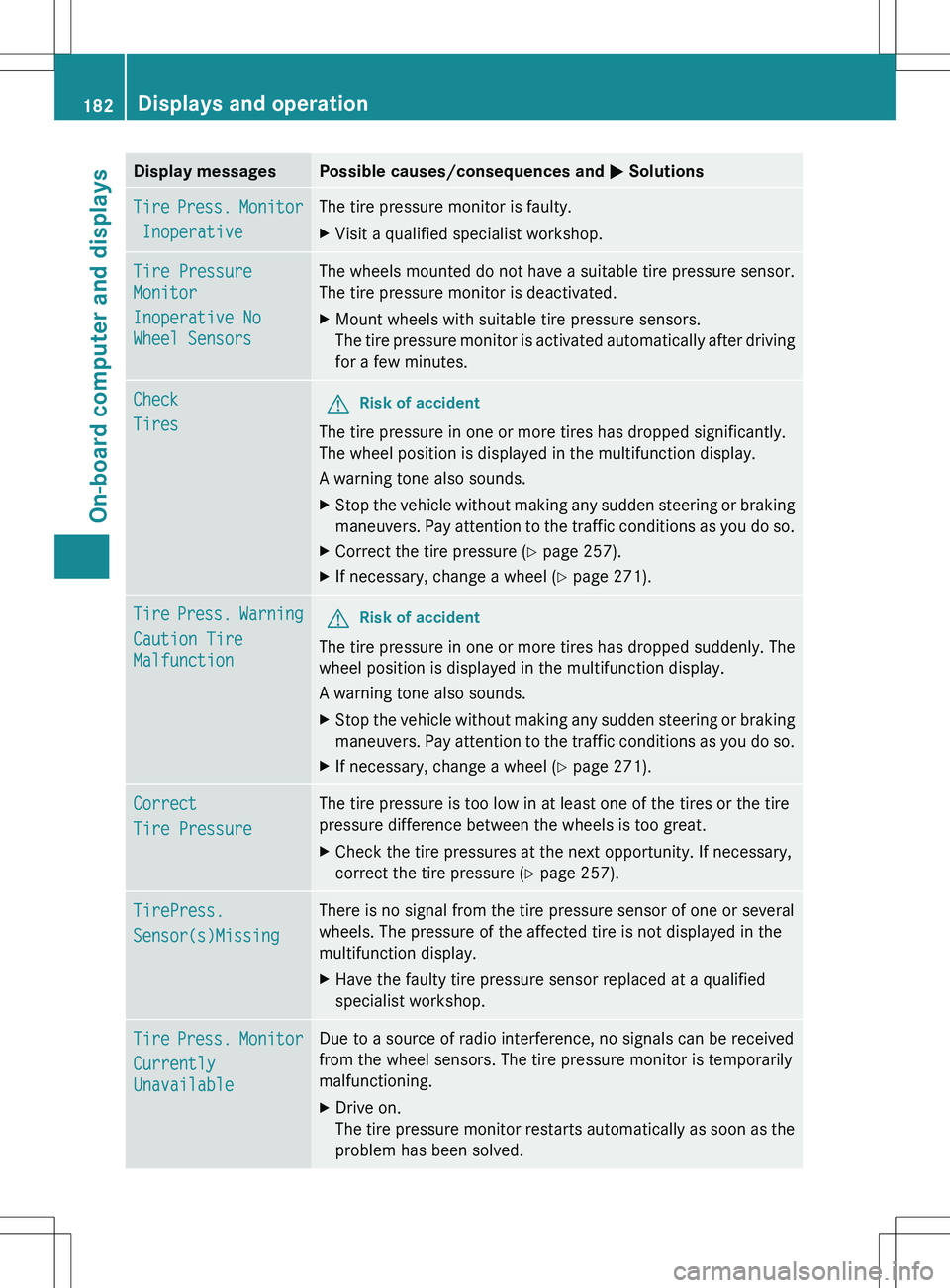
Display messagesPossible causes/consequences and M SolutionsTire Press. Monitor
InoperativeThe tire pressure monitor is faulty.XVisit a qualified specialist workshop.Tire Pressure
Monitor
Inoperative No
Wheel SensorsThe wheels mounted do not have a suitable tire pressure sensor.
The tire pressure monitor is deactivated.XMount wheels with suitable tire pressure sensors.
The tire pressure monitor is activated automatically after driving
for a few minutes.Check
TiresGRisk of accident
The tire pressure in one or more tires has dropped significantly.
The wheel position is displayed in the multifunction display.
A warning tone also sounds.
XStop the vehicle without making any sudden steering or braking
maneuvers. Pay attention to the traffic conditions as you do so.XCorrect the tire pressure ( Y page 257).XIf necessary, change a wheel ( Y page 271).Tire Press. Warning
Caution Tire
MalfunctionGRisk of accident
The tire pressure in one or more tires has dropped suddenly. The
wheel position is displayed in the multifunction display.
A warning tone also sounds.
XStop the vehicle without making any sudden steering or braking
maneuvers. Pay attention to the traffic conditions as you do so.XIf necessary, change a wheel ( Y page 271).Correct
Tire PressureThe tire pressure is too low in at least one of the tires or the tire
pressure difference between the wheels is too great.XCheck the tire pressures at the next opportunity. If necessary,
correct the tire pressure ( Y page 257).TirePress.
Sensor(s)MissingThere is no signal from the tire pressure sensor of one or several
wheels. The pressure of the affected tire is not displayed in the
multifunction display.XHave the faulty tire pressure sensor replaced at a qualified
specialist workshop.Tire Press. Monitor
Currently
UnavailableDue to a source of radio interference, no signals can be received
from the wheel sensors. The tire pressure monitor is temporarily
malfunctioning.XDrive on.
The tire pressure monitor restarts automatically as soon as the
problem has been solved.182Displays and operationOn-board computer and displays
Page 185 of 288
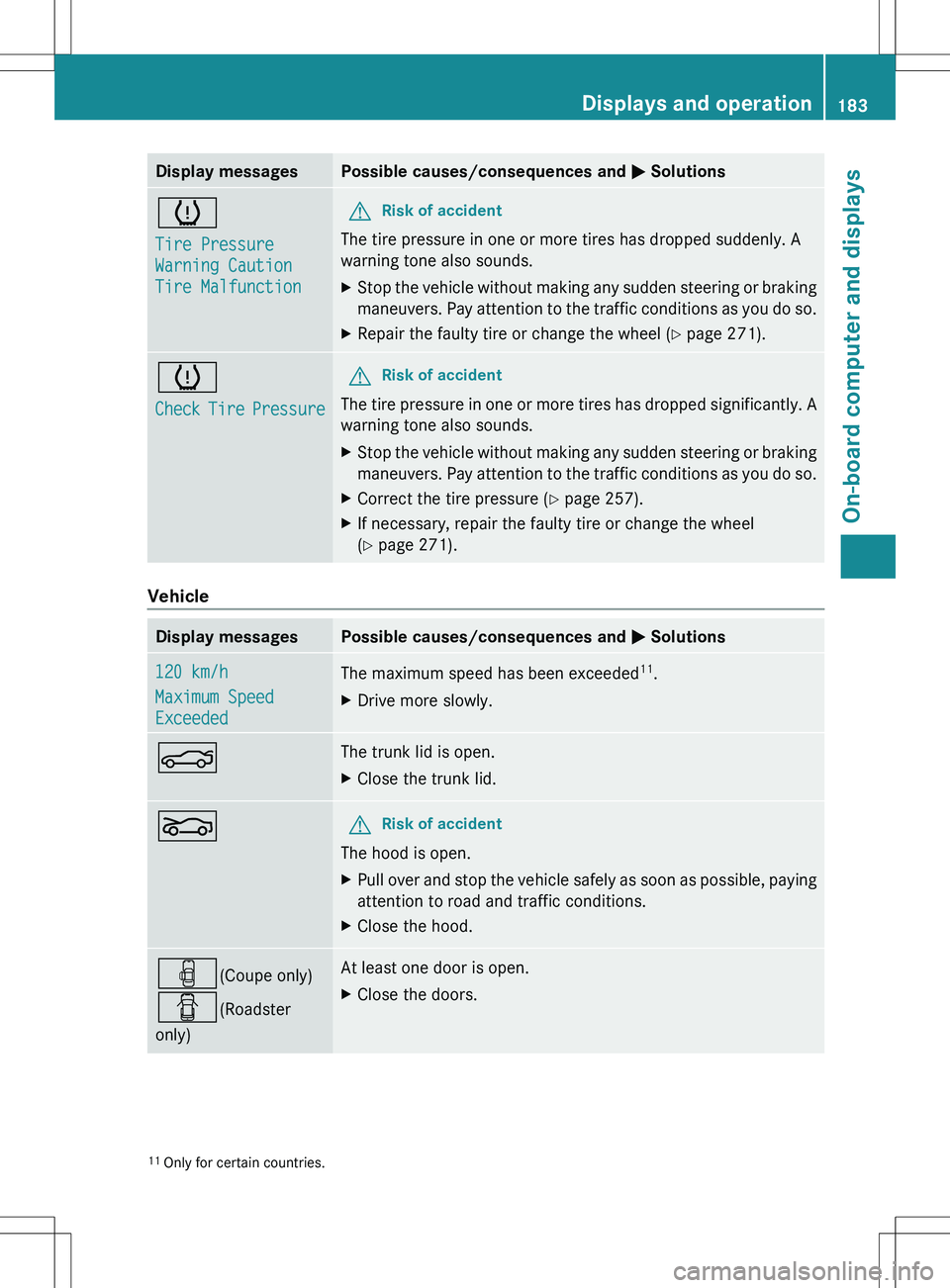
Display messagesPossible causes/consequences and M Solutionsh
Tire Pressure
Warning Caution
Tire MalfunctionGRisk of accident
The tire pressure in one or more tires has dropped suddenly. A
warning tone also sounds.
XStop the vehicle without making any sudden steering or braking
maneuvers. Pay attention to the traffic conditions as you do so.XRepair the faulty tire or change the wheel ( Y page 271).h
Check Tire PressureGRisk of accident
The tire pressure in one or more tires has dropped significantly. A
warning tone also sounds.
XStop the vehicle without making any sudden steering or braking
maneuvers. Pay attention to the traffic conditions as you do so.XCorrect the tire pressure ( Y page 257).XIf necessary, repair the faulty tire or change the wheel
( Y page 271).
Vehicle
Display messagesPossible causes/consequences and M Solutions120 km/h
Maximum Speed
ExceededThe maximum speed has been exceeded 11
.XDrive more slowly.NThe trunk lid is open.XClose the trunk lid.LGRisk of accident
The hood is open.
XPull over and stop the vehicle safely as soon as possible, paying
attention to road and traffic conditions.XClose the hood.´ (Coupe only)
C (Roadster
only)At least one door is open.XClose the doors.11 Only for certain countries.Displays and operation183On-board computer and displaysZ
Page 198 of 288
TiresProblemPossible causes/consequences and M Solutionsh
USA only:
The yellow tire pressure
monitor warning lamp
(pressure loss/
malfunction) is lit.
Canada only:
The yellow tire pressure
monitor warning lamp
(pressure loss) is lit.GRisk of accident
The tire pressure monitor has detected a loss of pressure in at
least one of the tires.
XStop the vehicle without making any sudden steering or braking
maneuvers. Pay attention to the traffic conditions as you do so.XObserve the additional display messages in the multifunction
display.XCheck the tire pressure. If necessary, correct the tire pressure
( Y page 257).XIf necessary, change a wheel ( Y page 271).h
USA only:
The yellow tire pressure
monitor warning lamp
(pressure loss/
malfunction) flashes for
60 seconds and then
remains lit.The tire pressure monitor is faulty.XObserve the additional display messages in the multifunction
display.XVisit a qualified specialist workshop.GWARNING
Each tire, including the spare (if provided), should be checked at least every two weeks when
cold and inflated to the pressure recommended by the vehicle manufacturer on the Tire and
Loading Information placard on the driver's door B-pillar or, if available, the tire pressure label
on the inside of the fuel filler flap. If your vehicle has tires of a different size than the size indicated
on the Tire and Loading Information placard or the tire pressure label, you should determine the
proper tire pressure for those tires.
As an added safety feature, your vehicle has been equipped with a tire pressure monitoring
system (TPMS) that illuminates a low tire pressure telltale when one or more of your tires are
significantly underinflated. Accordingly, when the low tire pressure telltale illuminates, you should
stop and check your tires as soon as possible, and inflate them to the proper pressure. Driving
on a significantly underinflated tire causes the tire to overheat and can lead to tire failure.
Underinflation also reduces fuel efficiency and tire tread life, and may affect the vehicle's handling
and stopping ability. Please note that the TPMS is not a substitute for proper tire maintenance,
and it is the driver's responsibility to maintain correct tire pressure, even if underinflation has
not reached the level to trigger illumination of the TPMS low tire pressure telltale.
USA only:
Your vehicle has also been equipped with a TPMS malfunction indicator to indicate when the
system is not operating properly. The TPMS malfunction indicator is combined with the low tire
pressure telltale. When the system detects a malfunction, the telltale will flash for approximately
1 minute and then remain continuously illuminated. This sequence will be repeated every time
196Displays and operationOn-board computer and displays
Page 210 of 288
A voice connection is established between
the Mercedes-Benz Customer Assistance
Center and the vehicle occupants.XDescribe the type of assistance needed.
The Mercedes-Benz Customer Assistance
Center either sends a qualified Mercedes-
Benz technician or organizes for your vehicle
to be transported to the nearest authorized
Mercedes-Benz Center. You may be charged
for services such as repair work and/or
towing. Further details are available in your
mbrace manual.
i The mbrace system failed to initiate a
Roadside Assistance call if:
R the indicator lamp in Roadside
Assistance button : is flashing
continuously.
R no voice connection to the Mercedes-
Benz Customer Assistance Center was
established.
This may be because the corresponding
mobile phone network is not available.
The Call Failed message appears on the
multifunction display.
XTo end a call: press the ~ button on the
multifunction steering wheel.
or
XPress the corresponding button for ending
a phone call on COMAND.
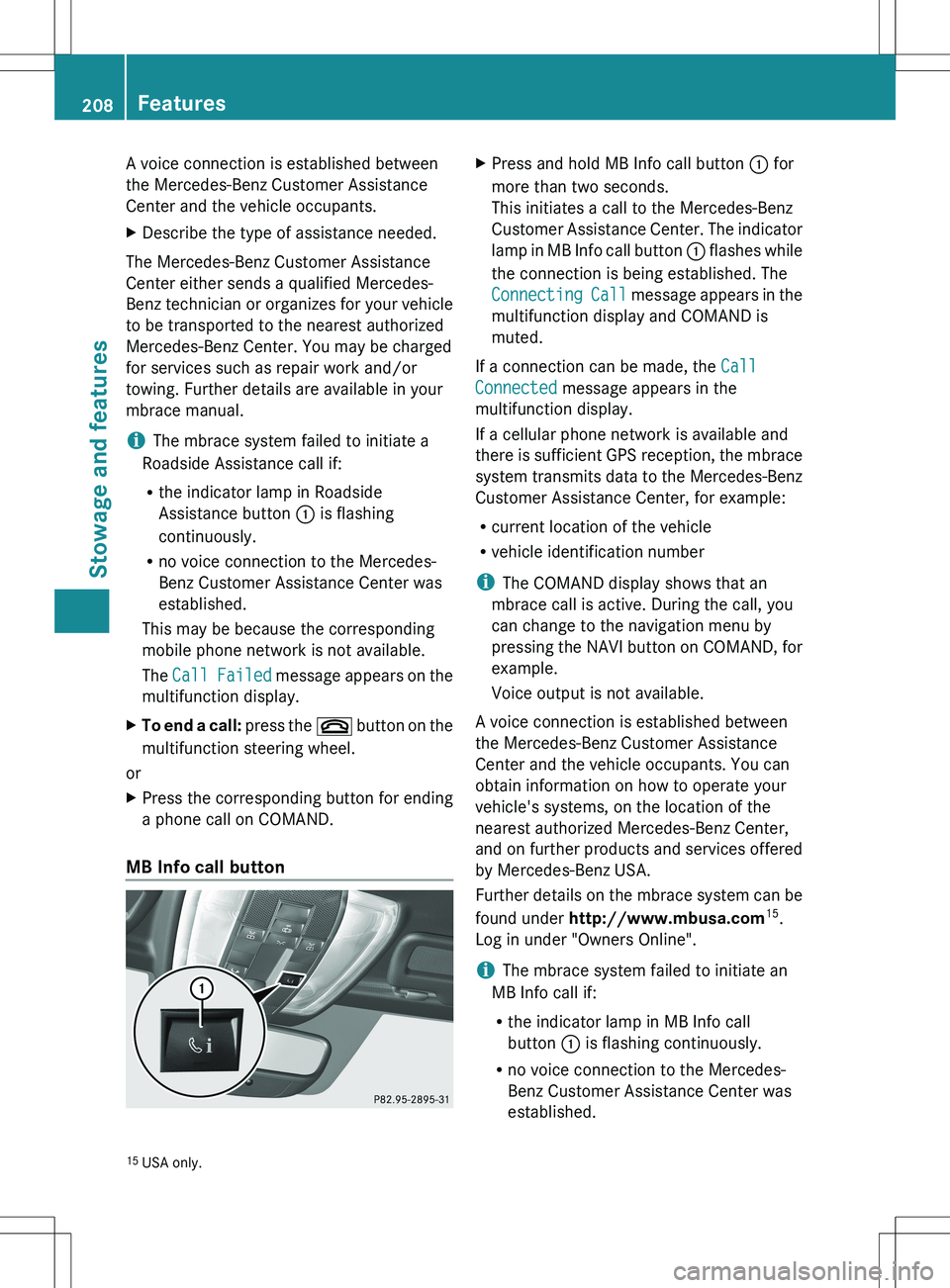
MB Info call button
XPress and hold MB Info call button : for
more than two seconds.
This initiates a call to the Mercedes-Benz
Customer Assistance Center. The indicator
lamp in MB Info call button : flashes while
the connection is being established. The
Connecting Call message appears in the
multifunction display and COMAND is
muted.
If a connection can be made, the Call
Connected message appears in the
multifunction display.
If a cellular phone network is available and
there is sufficient GPS reception, the mbrace
system transmits data to the Mercedes-Benz
Customer Assistance Center, for example:
R current location of the vehicle
R vehicle identification number
i The COMAND display shows that an
mbrace call is active. During the call, you
can change to the navigation menu by
pressing the NAVI button on COMAND, for
example.
Voice output is not available.
A voice connection is established between
the Mercedes-Benz Customer Assistance
Center and the vehicle occupants. You can
obtain information on how to operate your
vehicle's systems, on the location of the
nearest authorized Mercedes-Benz Center,
and on further products and services offered
by Mercedes-Benz USA.
Further details on the mbrace system can be
found under http://www.mbusa.com 15
.
Log in under "Owners Online".
i The mbrace system failed to initiate an
MB Info call if:
R the indicator lamp in MB Info call
button : is flashing continuously.
R no voice connection to the Mercedes-
Benz Customer Assistance Center was
established.
15 USA only.208FeaturesStowage and features