steering MERCEDES-BENZ SLS-CLASS 2013 Owner's Manual
[x] Cancel search | Manufacturer: MERCEDES-BENZ, Model Year: 2013, Model line: SLS-CLASS, Model: MERCEDES-BENZ SLS-CLASS 2013Pages: 286, PDF Size: 3.6 MB
Page 88 of 286
i
If the battery voltage is too low, AIRSCARF
may switch off. Steering wheel
Important safety notes
G
WARNING
Do not adjust the steering wheel while driving.
Adjusting the steering wheel while driving
could cause the driver to lose control of the
vehicle.
The electrical steering wheel adjustment
feature can be operated at any time.
Therefore, do not leave children unattended
in the vehicle, or with access to an unlocked
vehicle. A child's unsupervised access to a
vehicle could result in an accident and/or
serious personal injury. Adjusting the steering wheel
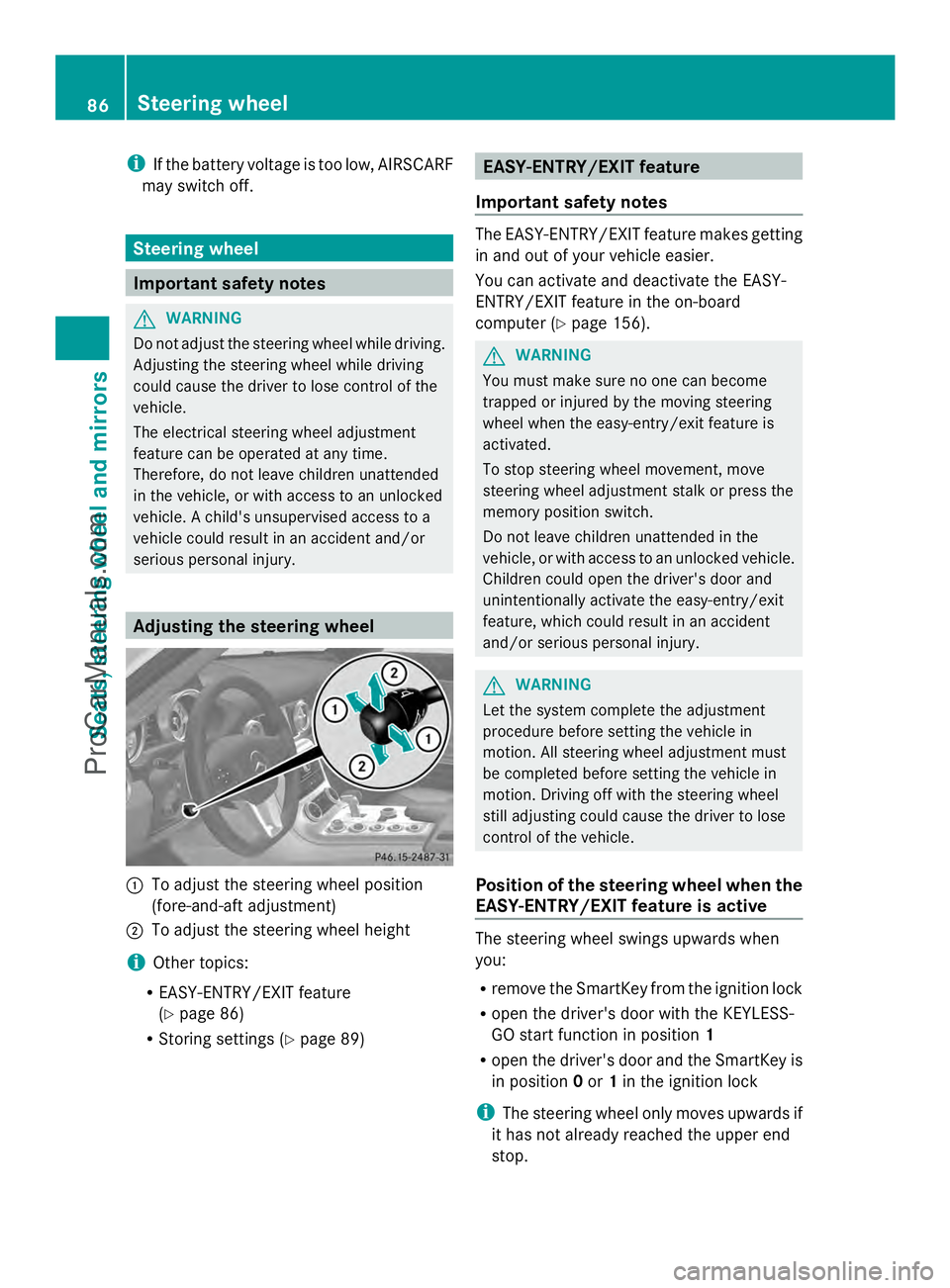
:
To adjust the steering wheel position
(fore-and-aft adjustment)
; To adjust the steering wheel height
i Other topics:
R EASY-ENTRY/EXIT feature
(Y page 86)
R Storing settings (Y page 89) EASY-ENTRY/EXIT feature
Important safety notes The EASY-ENTRY/EXIT feature makes getting
in and out of your vehicle easier.
You can activate and deactivate the EASY-
ENTRY/EXIT feature in the on-board
computer (Y
page 156). G
WARNING
You must make sure no one can become
trapped or injured by the moving steering
wheel when the easy-entry/exit feature is
activated.
To stop steering wheel movement, move
steering wheel adjustment stalk or press the
memory position switch.
Do not leave children unattended in the
vehicle, or with access to an unlocked vehicle.
Children could open the driver's door and
unintentionally activate the easy-entry/exit
feature, which could result in an accident
and/or serious personal injury. G
WARNING
Let the system complete the adjustment
procedure before setting the vehicle in
motion. All steering wheel adjustment must
be completed before setting the vehicle in
motion. Driving off with the steering wheel
still adjusting could cause the driver to lose
control of the vehicle.
Position of the steering wheel when the
EASY-ENTRY/EXIT feature is active The steering wheel swings upwards when
you:
R
remove the SmartKey from the ignition lock
R open the driver's door with the KEYLESS-
GO start function in position 1
R open the driver's door and the SmartKey is
in position 0or 1in the ignition lock
i The steering wheel only moves upwards if
it has not already reached the upper end
stop. 86
Steering wheelSeats, steering wheel and mirrors
ProCarManuals.com
Page 89 of 286
Position of the steering wheel for
driving The steering wheel is moved to the last
selected position when:
R the driver's door is closed.
R you press the Start/Stop button once.
When you close the driver's door with the
ignition switched on, the steering wheel is
also automatically moved to the previously
set position.
The last position of the steering wheel is
stored after each manual setting or when you
store the setting with the memory function
(Y page 89).
Crash-responsive EASY-EXIT feature If the crash-responsive EASY-EXIT feature is
triggered in an accident, the steering column
will move upwards when the driver's door is
opened. This occurs irrespective of the
position of the SmartKey in the ignition lock.
This makes it easier to exit the vehicle and
rescue the occupants.
The crash-responsive EASY-EXIT feature is
only operational if the EASY-EXIT/ENTRY
feature is activated in the on-board computer. Mirrors
Rear-view mirror
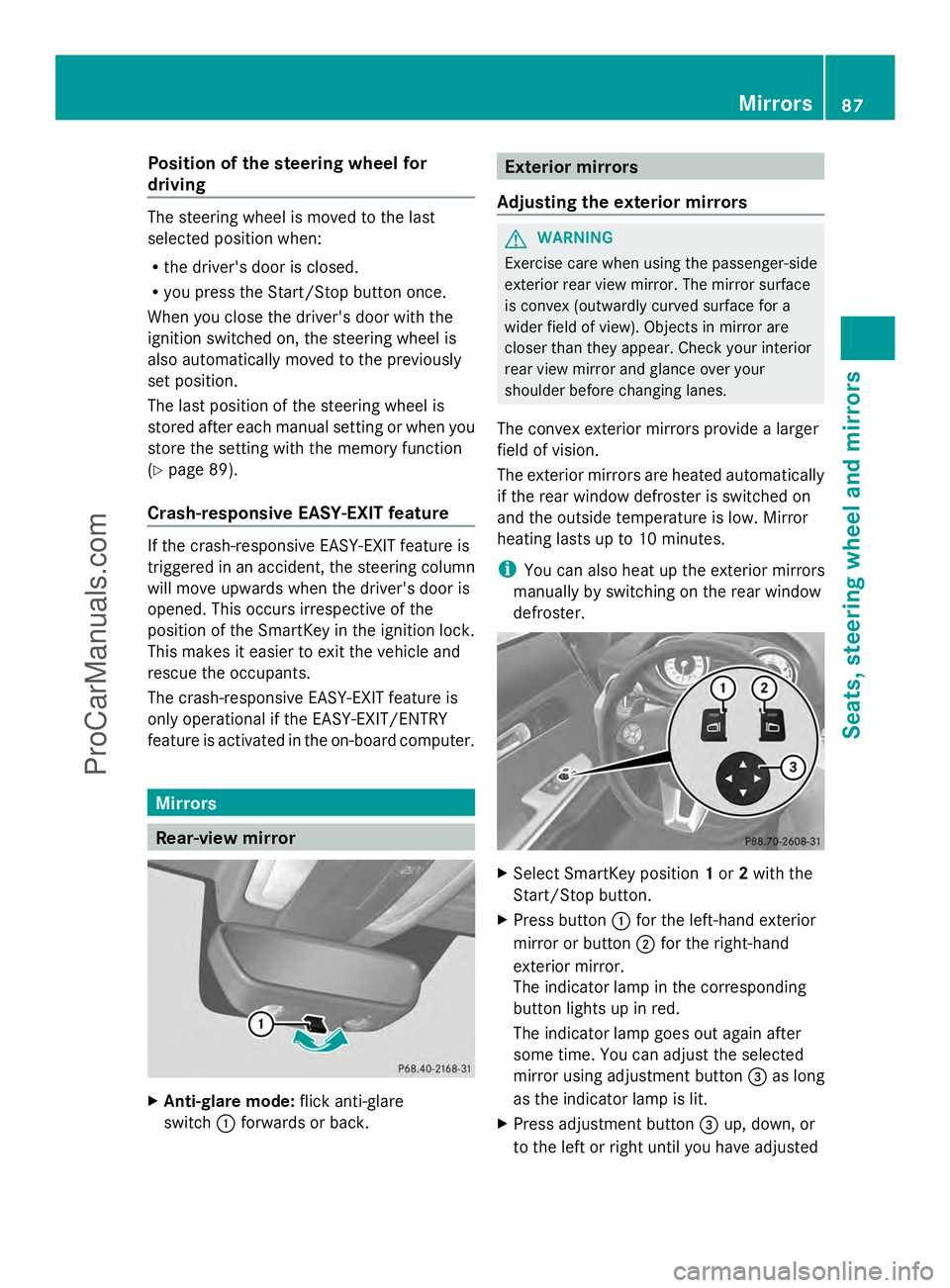
X
Anti-glare mode: flick anti-glare
switch :forwards or back. Exterior mirrors
Adjusting the exterior mirrors G
WARNING
Exercise care when using the passenger-side
exterior rear view mirror. The mirror surface
is convex (outwardly curved surface for a
wider field of view). Objects in mirror are
closer than they appear. Check your interior
rear view mirror and glance over your
shoulder before changing lanes.
The convex exterior mirrors provide a larger
field of vision.
The exterior mirrors are heated automatically
if the rear window defroster is switched on
and the outside temperature is low. Mirror
heating lasts up to 10 minutes.
i You can also heat up the exterior mirrors
manually by switching on the rear window
defroster. X
Select SmartKey position 1or 2with the
Start/Stop button.
X Press button :for the left-hand exterior
mirror or button ;for the right-hand
exterior mirror.
The indicator lamp in the corresponding
button lights up in red.
The indicator lamp goes out again after
some time. You can adjust the selected
mirror using adjustment button =as long
as the indicator lamp is lit.
X Press adjustment button =up, down, or
to the left or right until you have adjusted Mirrors
87Seats, steering wheel and mirrors Z
ProCarManuals.com
Page 90 of 286
the exterior mirror to the desired position.
You should have a good overview of traffic
conditions.
Folding the exterior mirrors in or out
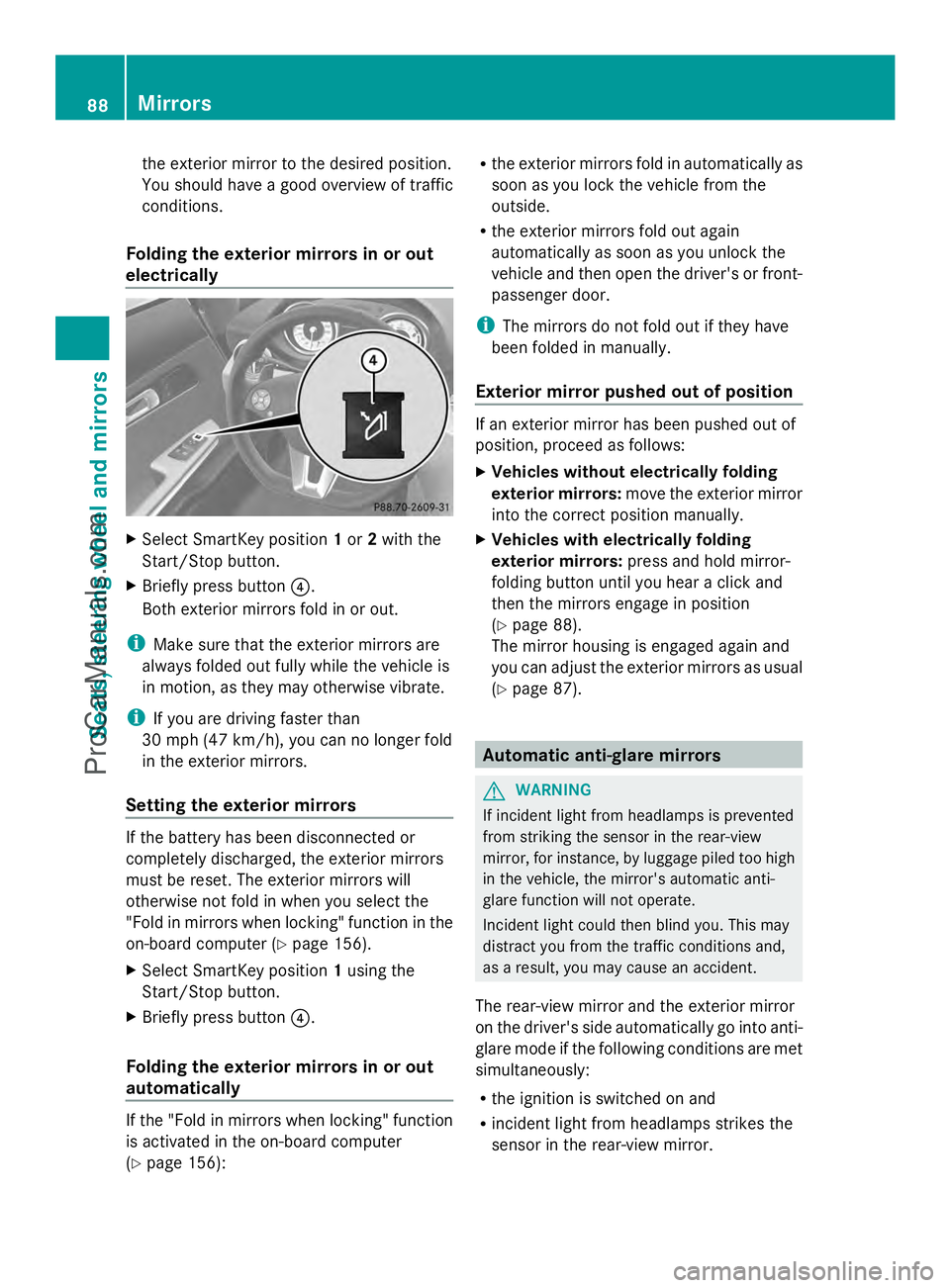
electrically X
Select SmartKey position 1or 2with the
Start/Stop button.
X Briefly press button ?.
Both exterior mirrors fold in or out.
i Make sure that the exterior mirrors are
always folded out fully while the vehicle is
in motion, as they may otherwise vibrate.
i If you are driving faster than
30 mph (47 km/h ), youcan no longer fold
in the exterior mirrors.
Setting the exterior mirrors If the battery has been disconnected or
completely discharged, the exterior mirrors
must be reset. The exterior mirrors will
otherwise not fold in when you select the
"Fold in mirrors when locking" function in the
on-board computer (Y page 156).
X Select SmartKey position 1using the
Start/Stop button.
X Briefly press button ?.
Folding the exterior mirrors in or out
automatically If the "Fold in mirrors when locking" function
is activated in the on-board computer
(Y page 156): R
the exterior mirrors fold in automatically as
soon as you lock the vehicle from the
outside.
R the exterior mirrors fold out again
automatically as soon as you unlock the
vehicle and then open the driver's or front-
passenger door.
i The mirrors do not fold out if they have
been folded in manually.
Exterior mirror pushed out of position If an exterior mirror has been pushed out of
position, proceed as follows:
X
Vehicles without electrically folding
exterior mirrors: move the exterior mirror
into the correct position manually.
X Vehicles with electrically folding
exterior mirrors: press and hold mirror-
folding button until you hear a click and
then the mirrors engage in position
(Y page 88).
The mirror housing is engaged again and
you can adjust the exterior mirrors as usual
(Y page 87). Automatic anti-glare mirrors
G
WARNING
If incident light from headlamps is prevented
from striking the sensor in the rear-view
mirror, for instance, by luggage piled too high
in the vehicle, the mirror's automatic anti-
glare function will not operate.
Incident light could then blind you. This may
distract you from the traffic conditions and,
as a result, you may cause an accident.
The rear-view mirror and the exterior mirror
on the driver's side automatically go into anti-
glare mode if the following conditions are met
simultaneously:
R the ignition is switched on and
R incident light from headlamps strikes the
sensor in the rear-view mirror. 88
MirrorsSeats, steering wheel and mirrors
ProCarManuals.com
Page 91 of 286
The mirrors do not go into anti-glare mode if
reverse gear is engaged. Parking position for the exterior
mirror on the front-passenger side
Setting and storing the parking position You can position the front-passenger side
exterior mirror in such a way that you can see
the rear wheel on that side as soon as you
engage reverse gear. You can store this
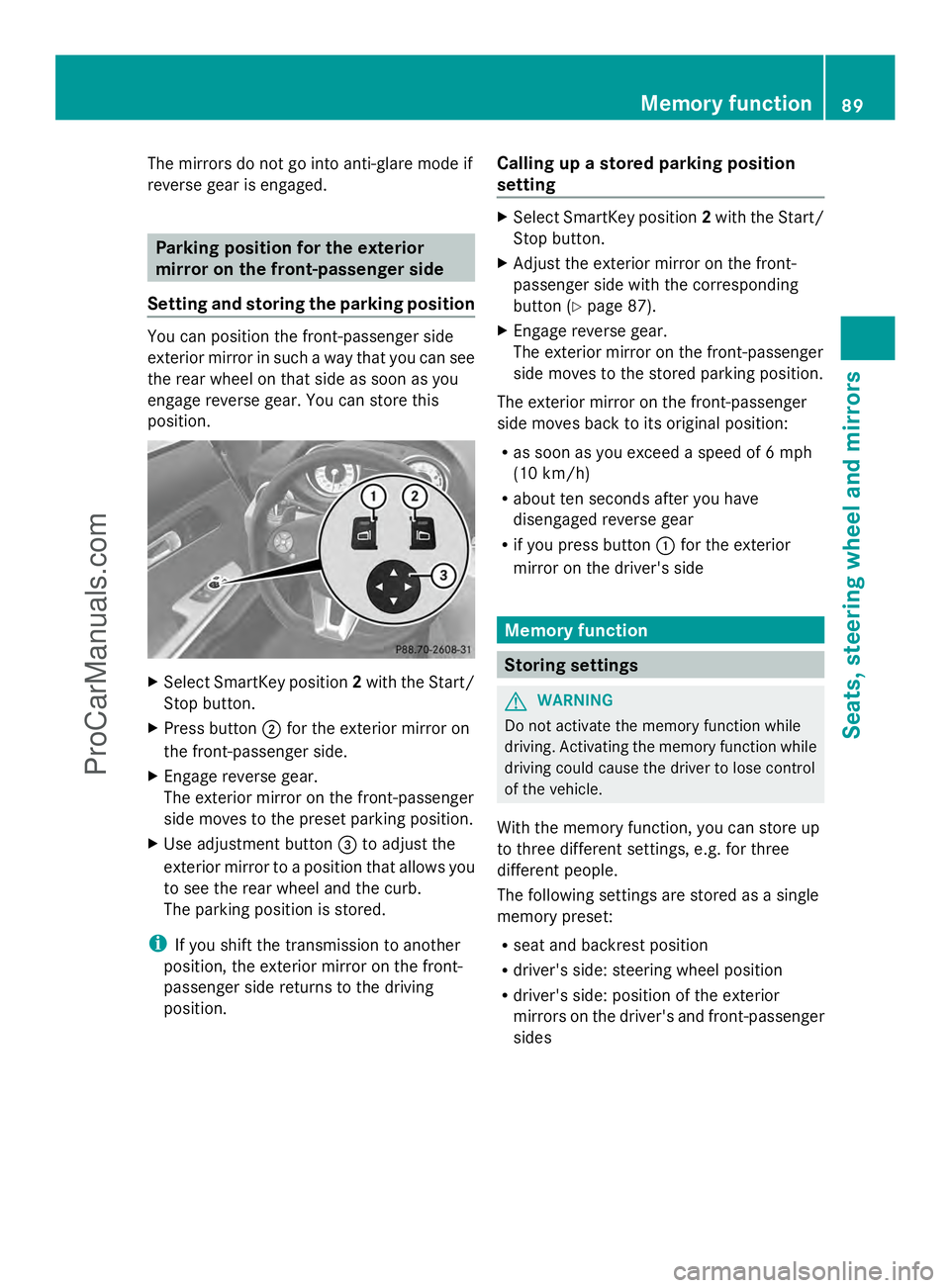
position. X
Select SmartKey position 2with the Start/
Stop button.
X Press button ;for the exterior mirror on
the front-passenger side.
X Engage reverse gear.
The exterior mirror on the front-passenger
side moves to the preset parking position.
X Use adjustment button =to adjust the
exterior mirror to a position that allows you
to see the rear wheel and the curb.
The parking position is stored.
i If you shift the transmission to another
position, the exterior mirror on the front-
passenger side returns to the driving
position. Calling up a stored parking position
setting X
Select SmartKey position 2with the Start/
Stop button.
X Adjust the exterior mirror on the front-
passenger side with the corresponding
button (Y page 87).
X Engage reverse gear.
The exterior mirror on the front-passenger
side moves to the stored parking position.
The exterior mirror on the front-passenger
side moves back to its original position:
R as soon as you exceed a speed of 6 mph
(10 km/h)
R about ten seconds after you have
disengaged reverse gear
R if you press button :for the exterior
mirror on the driver's side Memory function
Storing settings
G
WARNING
Do not activate the memory function while
driving. Activating the memory function while
driving could cause the driver to lose control
of the vehicle.
With the memory function, you can store up
to three different settings, e.g. for three
different people.
The following settings are stored as a single
memory preset:
R seat and backrest position
R driver's side: steering wheel position
R driver's side: position of the exterior
mirrors on the driver's and front-passenger
sides Memory function
89Seats, steering wheel and mirrors Z
ProCarManuals.com
Page 92 of 286
X
Select SmartKey position 2with the Start/
Stop button.
X Adjust the seat ( Ypage 84).
X On the driver's side, adjust the steering
wheel (Y page 86) and the exterior mirrors
(Y page 87).
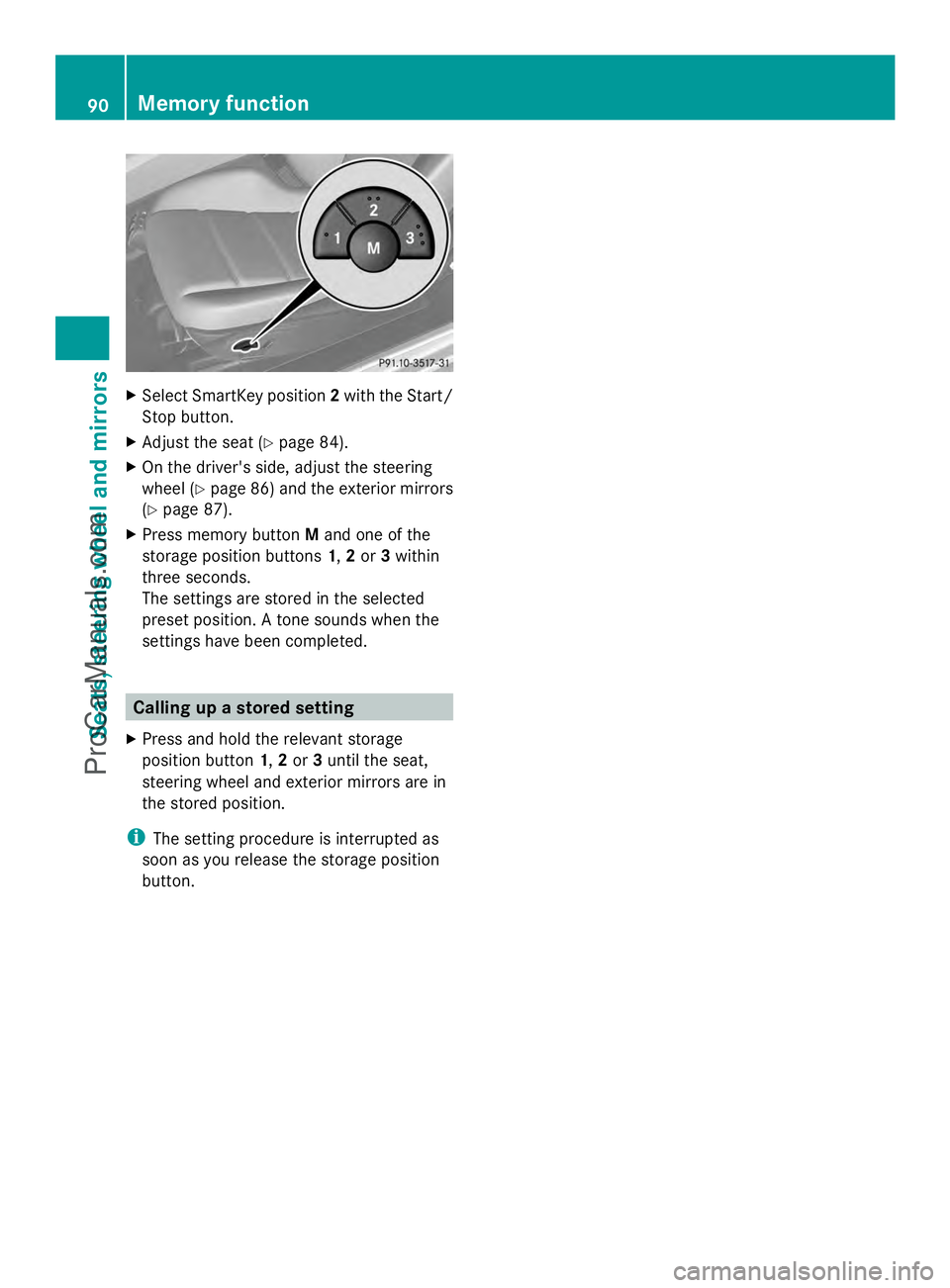
X Press memory button Mand one of the
storage position buttons 1,2or 3within
three seconds.
The settings are stored in the selected
preset position. A tone sounds when the
settings have been completed. Calling up a stored setting
X Press and hold the relevant storage
position button 1,2or 3until the seat,
steering wheel and exterior mirrors are in
the stored position.
i The setting procedure is interrupted as
soon as you release the storage position
button. 90
Memory functionSeats, steering wheel and mirrors
ProCarManuals.com
Page 114 of 286
Useful information
i This Operator's Manual describes all
models and all standard and optional
equipment of your vehicle available at the
time of publication of the Operator's
Manual. Country-specific differences are
possible. Please note that your vehicle may
not be equipped with all features
described. This also applies to safety-
related systems and functions.
i Please read the information on qualified
specialist workshops (Y page 22).Notes on breaking-in a new vehicle
Important safety notes
New brake pads/linings only reach their
optimum braking effect after several hundred
kilometers of driving. Until that time, you may
need to use increased brake pedal pressure
while braking. This also applies after the
brake discs or the brake pads/linings have
been replaced. The first 1,000miles (1,500 km)
The more you look after the engine when it is
new, the more satisfied you will be with its
performance in the future.
R You should therefore drive at varying
vehicle and engine speeds for the first
1,000 miles (1,500 km).
R For the first 1,000 miles (1,500 km), do not
drive faster than 85 mph (140 km/h).
R Only allow the engine to reach a maximum
engine speed of 4,500 rpm briefly.
R Avoid heavy loads, e.g. driving at full
throttle, during this period. Do not exceed
Ô of the maximum permitted engine speed
for each gear.
R Select the manual drive program Min good
time.
R Do not carry out a RACE START. R
Do not manually shift to a lower gear to
brake the vehicle.
R If possible, do not depress the accelerator
pedal past the point of resistance
(kickdown).
R Only select the shift range limits 3,2or 1
when driving slowly, e.g. in mountainous
terrain.
After 1,000 miles (1,500km), you can
increase the engine speed gradually and bring
the vehicle up to full speed.
i You should also observe these breaking-
in notes if your vehicle's engine or
transmission has been replaced.
i Always observe the respective speed
limits. Driving
Important safety notes
G
WARNING
Objects in the driver's footwell can restrict the
pedal travel or obstruct a depressed pedal.
The operating and road safety of the vehicle
is jeopardized. There is a risk of an accident.
Make sure that all objects in the vehicle are
stowed correctly, and that they cannot enter
the driver's footwell. Install the floormats
securely and as specified in order to ensure
sufficient clearance for the pedals. Do not use
loose floormats. G
WARNING
If you switch off the ignition while driving,
safety-relevant functions are only available
with limitations, or not at all. This could affect,
for example, the power steering and the brake
boosting effect. You will require considerably
more effort to steer and brake. There is a risk
of an accident.
Do not switch off the ignition while driving.
! Warm up the engine quickly. Do not use
the engine's full performance until it has 112
DrivingDriving and parking
ProCarManuals.com
Page 123 of 286
Drive
program Characteristic
Driving mode
RS
RACE
START Optimal vehicle
acceleration from a
standstill
X
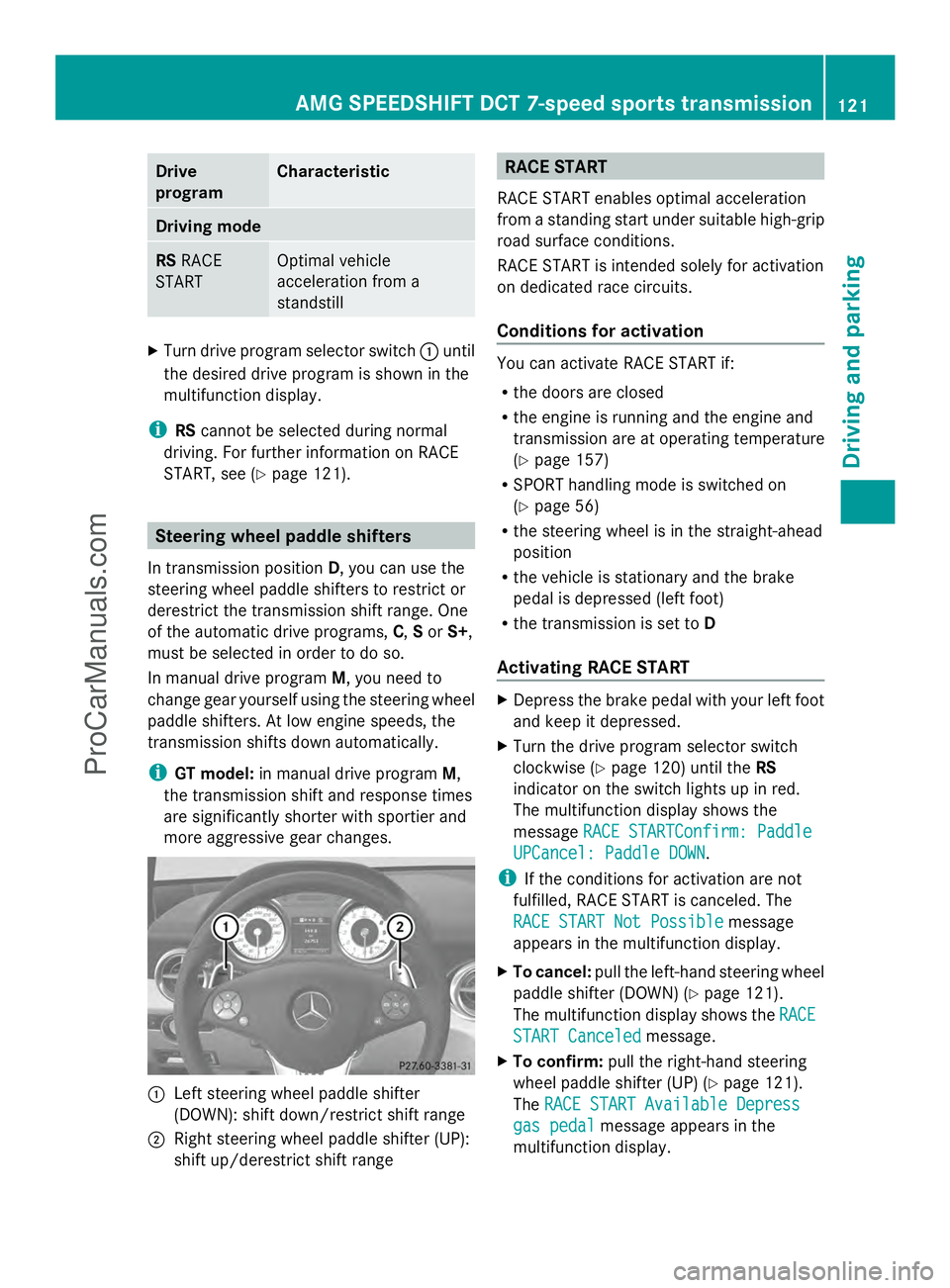
Turn drive program selector switch :until
the desired drive program is shown in the
multifunction display.
i RScannot be selected during normal
driving. For further information on RACE
START, see (Y page 121). Steering wheel paddle shifters
In transmission position D, you can use the
steering wheel paddle shifters to restrict or
derestrict the transmission shift range. One
of the automatic drive programs, C,Sor S+,
must be selected in order to do so.
In manual drive program M, you need to
change gear yourself using the steering wheel
paddle shifters. At low engine speeds, the
transmission shifts down automatically.
i GT model: in manual drive program M,
the transmission shift and response times
are significantly shorter with sportier and
more aggressive gear changes. :
Left steering wheel paddle shifter
(DOWN): shift down/restrict shift range
; Right steering wheel paddle shifter (UP):
shift up/derestrict shift range RACE START
RACE START enables optimal acceleration
from a standing start under suitable high-grip
road surface conditions.
RACE START is intended solely for activation
on dedicated race circuits.
Conditions for activation You can activate RACE START if:
R
the doors are closed
R the engine is running and the engine and
transmission are at operating temperature
(Y page 157)
R SPORT handling mode is switched on
(Y page 56)
R the steering wheel is in the straight-ahead
position
R the vehicle is stationary and the brake
pedal is depressed (left foot)
R the transmission is set to D
Activating RACE START X
Depress the brake pedal with your left foot
and keep it depressed.
X Turn the drive program selector switch
clockwise (Y page 120) until the RS
indicator on the switch lights up in red.
The multifunction display shows the
message RACE STARTConfirm: Paddle RACE STARTConfirm: Paddle
UPCancel: Paddle DOWN
UPCancel: Paddle DOWN.
i If the conditions for activation are not
fulfilled, RACE START is canceled. The
RACE START Not Possible RACE START Not Possible message
appears in the multifunction display.
X To cancel: pull the left-hand steering wheel
paddle shifter (DOWN) (Y page 121).
The multifunction display shows the RACE
RACE
START Canceled
START Canceled message.
X To confirm: pull the right-hand steering
wheel paddle shifter (UP) ( Ypage 121).
The RACE START Available Depress
RACE START Available Depress
gas pedal
gas pedal message appears in the
multifunction display. AMG SPEEDSHIFT DCT 7-speed sports transmission
121Driving and parking Z
ProCarManuals.com
Page 125 of 286
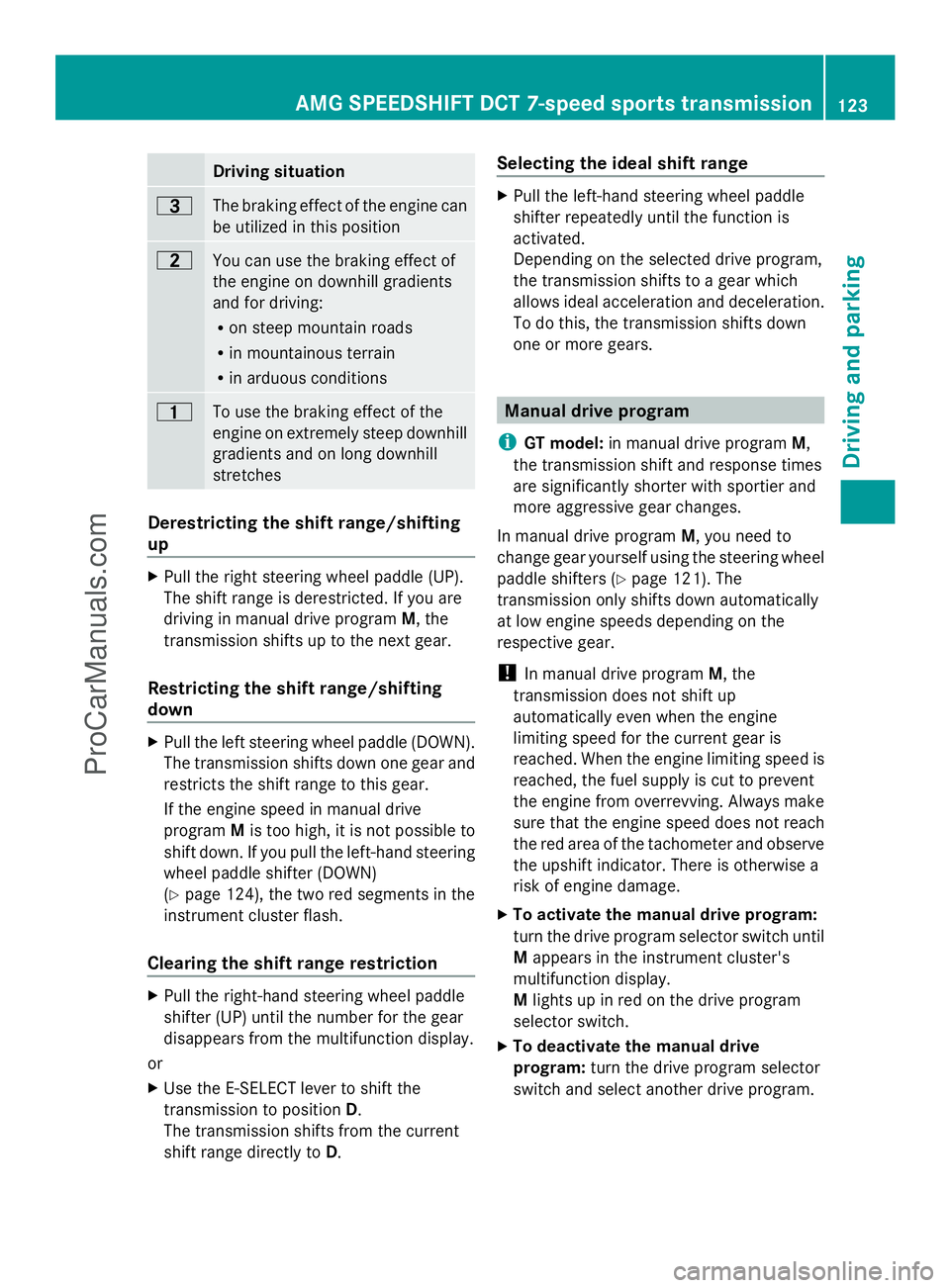
Driving situation
=
The braking effect of the engine can
be utilized in this position
5
You can use the braking effect of
the engine on downhill gradients
and for driving:
R
on steep mountain roads
R in mountainous terrain
R in arduous conditions 4
To use the braking effect of the
engine on extremely steep downhill
gradients and on long downhill
stretches Derestricting the shift range/shifting
up
X
Pull the right steering wheel paddle (UP).
The shift range is derestricted. If you are
driving in manual drive program M, the
transmission shifts up to the next gear.
Restricting the shift range/shifting
down X
Pull the left steering wheel paddle (DOWN).
The transmission shifts down one gear and
restricts the shift range to this gear.
If the engine speed in manual drive
program Mis too high, it is not possible to
shift down. If you pull the left-hand steering
wheel paddle shifter (DOWN)
(Y page 124), the two red segments in the
instrument cluster flash.
Clearing the shift range restriction X
Pull the right-hand steering wheel paddle
shifter (UP) until the number for the gear
disappears from the multifunction display.
or
X Use the E-SELECT lever to shift the
transmission to position D.
The transmission shifts from the current
shift range directly to D. Selecting the ideal shift range X
Pull the left-hand steering wheel paddle
shifter repeatedly until the function is
activated.
Depending on the selected drive program,
the transmission shifts to a gear which
allows ideal acceleration and deceleration.
To do this, the transmission shifts down
one or more gears. Manual drive program
i GT model: in manual drive program M,
the transmission shift and response times
are significantly shorter with sportier and
more aggressive gear changes.
In manual drive program M, you need to
change gear yourself using the steering wheel
paddle shifters (Y page 121). The
transmission only shifts down automatically
at low engine speeds depending on the
respective gear.
! In manual drive program M, the
transmission does not shift up
automatically even when the engine
limiting speed for the current gear is
reached. When the engine limiting speed is
reached, the fuel supply is cut to prevent
the engine from overrevving. Always make
sure that the engine speed does not reach
the red area of the tachometer and observe
the upshift indicator. There is otherwise a
risk of engine damage.
X To activate the manual drive program:
turn the drive program selector switch until
M appears in the instrument cluster's
multifunction display.
M lights up in red on the drive program
selector switch.
X To deactivate the manual drive
program: turn the drive program selector
switch and select another drive program. AMG SPEEDSHIFT DCT 7-speed sports transmission
123Driving and parking Z
ProCarManuals.com
Page 126 of 286
Upshift indicator
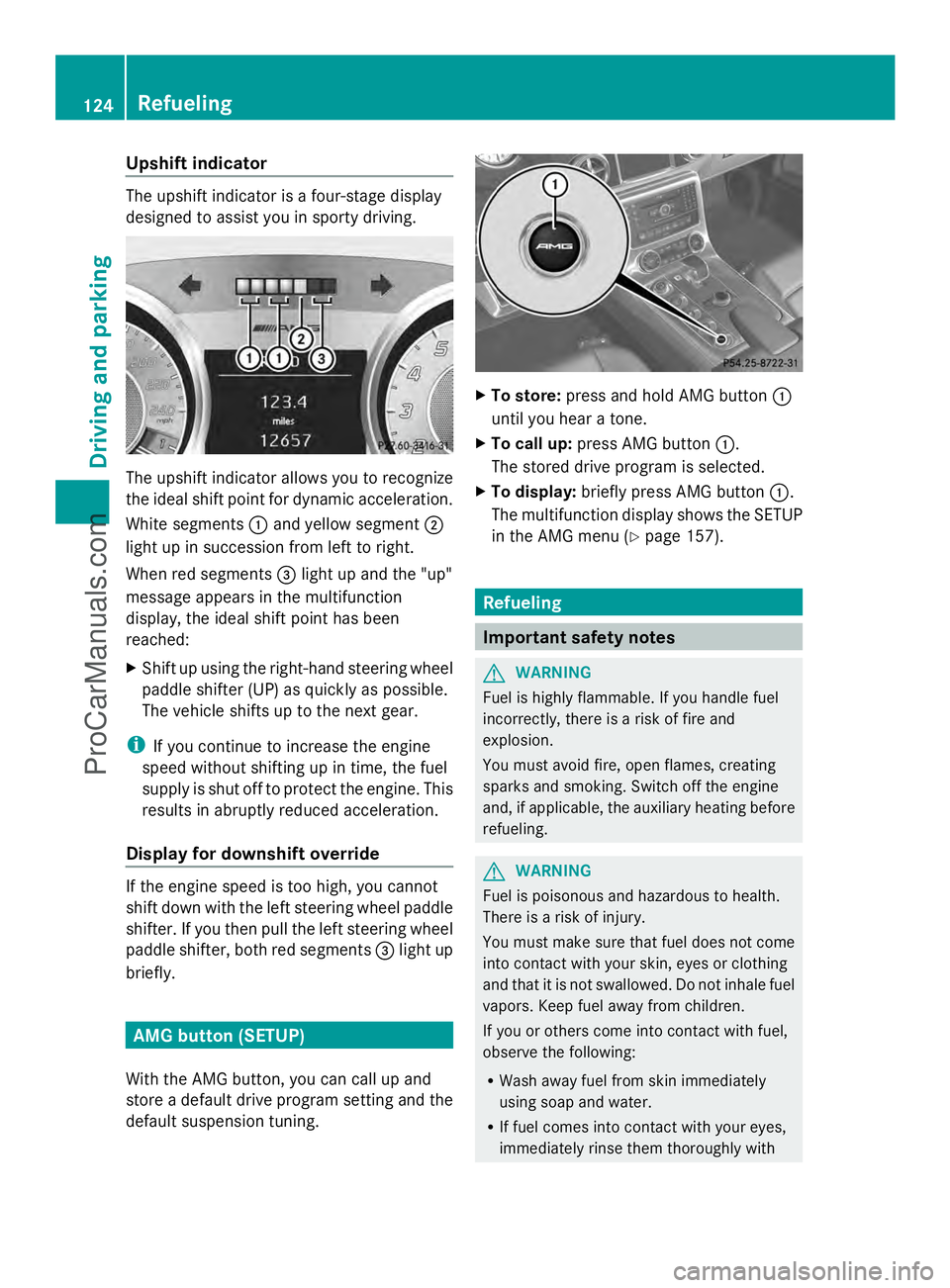
The upshift indicator is a four-stage display
designed to assist you in sporty driving. The upshift indicator allows you to recognize
the ideal shift point for dynamic acceleration.
White segments :and yellow segment ;
light up in succession from left to right.
When red segments =light up and the "up"
message appears in the multifunction
display, the ideal shift point has been
reached:
X Shift up using the right-hand steering wheel
paddle shifter (UP) as quickly as possible.
The vehicle shifts up to the next gear.
i If you continue to increase the engine
speed without shifting up in time, the fuel
supply is shut off to protect the engine. This
results in abruptly reduced acceleration.
Display for downshift override If the engine speed is too high, you cannot
shift down with the left steering wheel paddle
shifter. If you then pull the left steering wheel
paddle shifter, both red segments =light up
briefly. AMG button (SETUP)
With the AMG button, you can call up and
store a default drive program setting and the
default suspension tuning. X
To store: press and hold AMG button :
until you hear a tone.
X To call up: press AMG button :.
The stored drive program is selected.
X To display: briefly press AMG button :.
The multifunction display shows the SETUP
in the AMG menu (Y page 157). Refueling
Important safety notes
G
WARNING
Fuel is highly flammable. If you handle fuel
incorrectly, there is a risk of fire and
explosion.
You must avoid fire, open flames, creating
sparks and smoking. Switch off the engine
and, if applicable, the auxiliary heating before
refueling. G
WARNING
Fuel is poisonous and hazardous to health.
There is a risk of injury.
You must make sure that fuel does not come
into contact with your skin, eyes or clothing
and that it is not swallowed. Do not inhale fuel
vapors. Keep fuel away from children.
If you or others come into contact with fuel,
observe the following:
R Wash away fuel from skin immediately
using soap and water.
R If fuel comes into contact with your eyes,
immediately rinse them thoroughly with 124
RefuelingDriving and parking
ProCarManuals.com
Page 132 of 286
X
While driving, push handle :of the electric
parking brake (Y page 129).
i The vehicle is braked as long as you keep
the handle of the electric parking brake
pressed. The longer the electric parking
brake handle is depressed, the greater the
braking force.
During braking:
R a warning tone sounds.
R the Release Parking Brake
Release Parking Brake message
appears
R the red F(USA only) or !(Canada
only) indicator lamp in the instrument
cluster appears.
When the vehicle has been braked to a
standstill, the electric parking brake is
engaged. Parking the vehicle for a long period
If you leave the vehicle parked for longer than
four weeks, the battery may be damaged by
exhaustive discharging.
If you leave the vehicle parked up for longer
than six weeks, the vehicle may suffer
damage as a result of lack of use.
X Visit a qualified specialist workshop and
seek advice.
i You can obtain information about trickle
chargers from a qualified specialist
workshop. Driving tips
General driving tips
Important safety notes G
WARNING
If you switch off the ignition while driving,
safety-relevant functions are only available
with limitations, or not at all. This could affect, for example, the power steering and the brake
boosting effect. You will require considerably
more effort to steer and brake. There is a risk
of an accident.
Do not switch off the ignition while driving. G
WARNING
Please do not forget that your primary
responsibility is to drive the vehicle. A driver's
attention to the road must always be his/her
primary focus when driving. For your safety
and the safety of others, we recommend that
you pull over to a safe location and stop
before placing or taking a telephone call.
If you choose to use the telephone 5
while
driving, please use the hands-free device and
only use the telephone when road, weather
and traffic conditions permit. Some
jurisdictions prohibit the driver from using a
mobile telephone while driving a vehicle.
Only operate the COMAND 5
(Cockpit
Management and Data System) if road,
weather and traffic conditions permit.
Otherwise, you may not be able to observe
traffic conditions and could endanger yourself
and others.
Bear in mind that at a speed of just 30 mph
(approximately 50 km/h), your vehicle is
covering a distance of 44 feet (approximately
14 m) every second.
Drive sensibly – save fuel Observe the following tips to save fuel:
X
The tires should always be inflated to the
recommended tire pressure.
X Remove unnecessary loads.
X Warm up the engine at low engine speeds.
X Avoid frequent acceleration or braking.
X Have all maintenance work carried out
according to the service intervals listed in
the Maintenance Booklet or the service
interval display.
5 Observe all legal requirements. 130
Driving tipsDriving and parking
ProCarManuals.com