ignition MERCEDES-BENZ SLS-CLASS 2013 Service Manual
[x] Cancel search | Manufacturer: MERCEDES-BENZ, Model Year: 2013, Model line: SLS-CLASS, Model: MERCEDES-BENZ SLS-CLASS 2013Pages: 286, PDF Size: 3.6 MB
Page 130 of 286
To ensure that the vehicle is secured against
rolling away unintentionally:
R the electric parking brake must be applied.
R the transmission must be in position P.
R the SmartKey must be in position 0in the
ignition lock and then removed from the
ignition lock, or the Start/Stop button must
be pressed.
R on steep uphill or downhill gradients, turn
the front wheels towards the curb.
R on steep uphill or downhill gradients, the
front axle of an empty vehicle must be
secured, for example with a wheel chock.
R on steep uphill or downhill gradients, the
rear axle of a laden vehicle must be
additionally secured, for example with a
wheel chock. Switching off the engine
Important safety notes G
WARNING
When the engine is switched off, the
transmission shifts into neutral position N.
The vehicle may roll away. There is a risk of
an accident.
After switching off the engine, always switch
to parking position P. Prevent the parked
vehicle from rolling away by applying the
parking brake.
! Do not open the driver's door while the
vehicle is in motion. At low speeds in
transmission position Dor R, park position
P is otherwise engaged automatically. This
can damage the transmission.
i Observe the display messages in the
instrument cluster.
AMG SPEEDSHIFT DCT 7-speed sports
transmission X
Shift the transmission to Pwith the button
in the center console. Using the Start/Stop button
X
Press the Start/Stop button (Y page 113).
The engine stops and all the indicator
lamps in the instrument cluster go out.
X Apply the electric parking brake.
i If you switch the engine off with the
transmission in position Ror D, the
transmission automatically shifts to N.
If you move the E-SELECT lever to Nbefore
switching off the engine, the transmission
remains for approximately 30 minutes
in N.
If you open the driver's or front-passenger
door during this period, the transmission
automatically shifts to P.
i The engine can be turned off while the
vehicle is in motion by pressing and holding
the Start/Stop button for about three
seconds.
Using the SmartKey
! Do not remove the SmartKey while the
vehicle is in motion. At low speeds, park
position Pwill otherwise be engaged
automatically.
Do not open the driver's door while the
vehicle is in motion. At low speeds,
transmission position Pis engaged
automatically.
This can damage the transmission.
X Turn the SmartKey to position 0in the
ignition lock and remove it.
The parking lock is activated.
X Apply the electric parking brake.
i If you move the E-SELECT lever to N
before switching off the engine, the
transmission remains for approximately
30 minutes in N. If you open the driver's or
front-passenger door during this period,
the transmission automatically shifts to P.128
ParkingDriving and parking
ProCarManuals.com
Page 131 of 286
The transmission remains in
Nif:
R the SmartKey is in the ignition lock and
R you use the E-SELECT lever to shift the
transmission to Nbefore switching the
engine off
This still applies if you open the driver's or
front-passenger door.
Further information on transmission
position Nwhen operating with a SmartKey
is available in the "Car wash" section
(Y page 219). Electric parking brake
General notes G
WARNING
If you leave children unsupervised in the
vehicle, they could set it in motion by, for
example:
R releasing the parking brake
R shifting the automatic transmission out of
the parking position P
R starting the engine.
They could also operate the vehicle's
equipment. There is a risk of an accident and
injury.
When leaving the vehicle, always take the
SmartKey with you and lock the vehicle. Never
leave children unsupervised in the vehicle. Applying/releasing manually
X
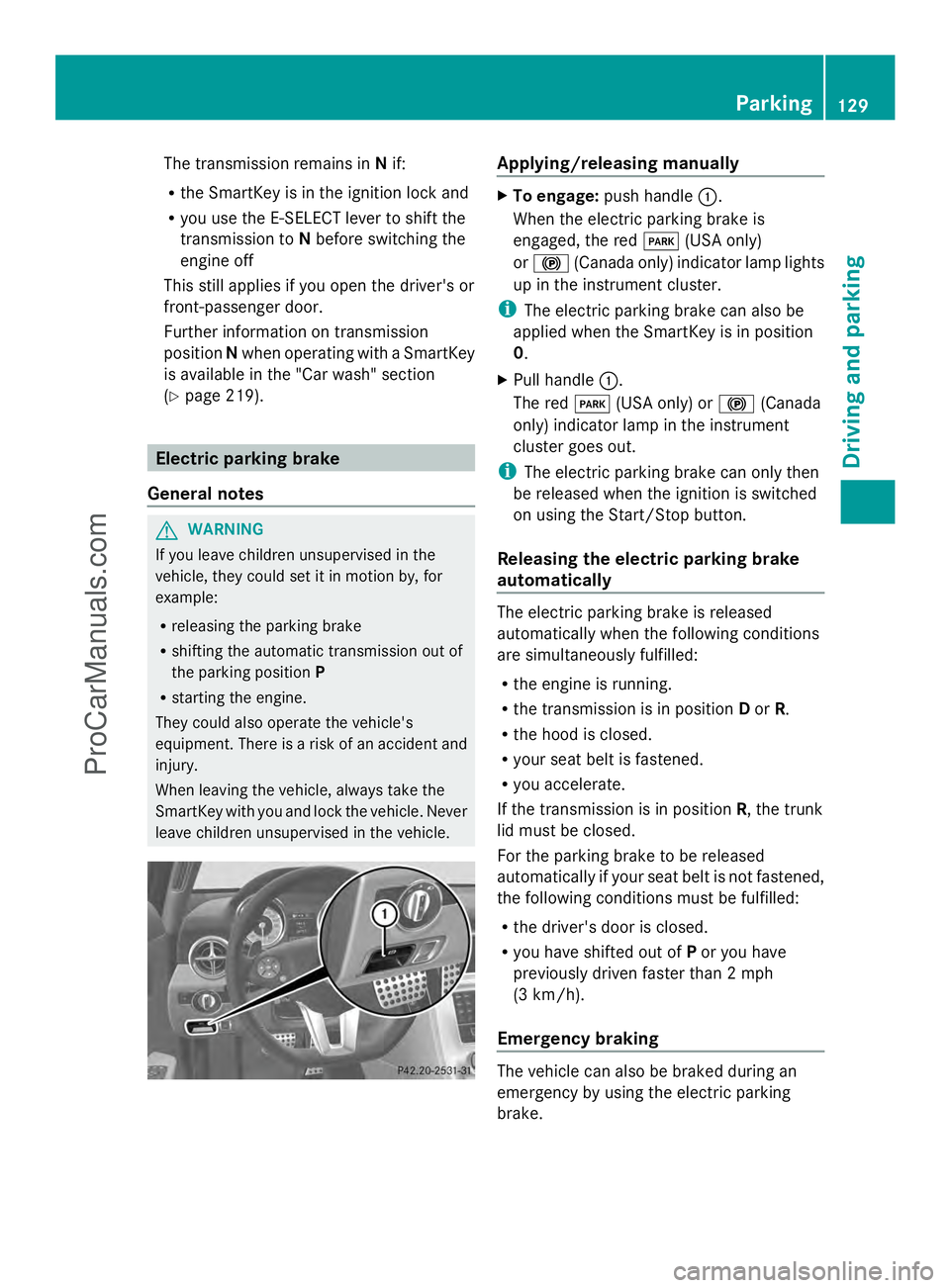
To engage: push handle :.
When the electric parking brake is
engaged, the red F(USA only)
or ! (Canada only) indicator lamp lights
up in the instrument cluster.
i The electric parking brake can also be
applied when the SmartKey is in position
0.
X Pull handle :.
The red F(USA only) or !(Canada
only) indicator lamp in the instrument
cluster goes out.
i The electric parking brake can only then
be released when the ignition is switched
on using the Start/Stop button.
Releasing the electric parking brake
automatically The electric parking brake is released
automatically when the following conditions
are simultaneously fulfilled:
R
the engine is running.
R the transmission is in position Dor R.
R the hood is closed.
R your seat belt is fastened.
R you accelerate.
If the transmission is in position R, the trunk
lid must be closed.
For the parking brake to be released
automatically if your seat belt is not fastened,
the following conditions must be fulfilled:
R the driver's door is closed.
R you have shifted out of Por you have
previously driven faster than 2 mph
(3 km/h).
Emergency braking The vehicle can also be braked during an
emergency by using the electric parking
brake. Parking
129Driving and parking Z
ProCarManuals.com
Page 132 of 286
X
While driving, push handle :of the electric
parking brake (Y page 129).
i The vehicle is braked as long as you keep
the handle of the electric parking brake
pressed. The longer the electric parking
brake handle is depressed, the greater the
braking force.
During braking:
R a warning tone sounds.
R the Release Parking Brake
Release Parking Brake message
appears
R the red F(USA only) or !(Canada
only) indicator lamp in the instrument
cluster appears.
When the vehicle has been braked to a
standstill, the electric parking brake is
engaged. Parking the vehicle for a long period
If you leave the vehicle parked for longer than
four weeks, the battery may be damaged by
exhaustive discharging.
If you leave the vehicle parked up for longer
than six weeks, the vehicle may suffer
damage as a result of lack of use.
X Visit a qualified specialist workshop and
seek advice.
i You can obtain information about trickle
chargers from a qualified specialist
workshop. Driving tips
General driving tips
Important safety notes G
WARNING
If you switch off the ignition while driving,
safety-relevant functions are only available
with limitations, or not at all. This could affect, for example, the power steering and the brake
boosting effect. You will require considerably
more effort to steer and brake. There is a risk
of an accident.
Do not switch off the ignition while driving. G
WARNING
Please do not forget that your primary
responsibility is to drive the vehicle. A driver's
attention to the road must always be his/her
primary focus when driving. For your safety
and the safety of others, we recommend that
you pull over to a safe location and stop
before placing or taking a telephone call.
If you choose to use the telephone 5
while
driving, please use the hands-free device and
only use the telephone when road, weather
and traffic conditions permit. Some
jurisdictions prohibit the driver from using a
mobile telephone while driving a vehicle.
Only operate the COMAND 5
(Cockpit
Management and Data System) if road,
weather and traffic conditions permit.
Otherwise, you may not be able to observe
traffic conditions and could endanger yourself
and others.
Bear in mind that at a speed of just 30 mph
(approximately 50 km/h), your vehicle is
covering a distance of 44 feet (approximately
14 m) every second.
Drive sensibly – save fuel Observe the following tips to save fuel:
X
The tires should always be inflated to the
recommended tire pressure.
X Remove unnecessary loads.
X Warm up the engine at low engine speeds.
X Avoid frequent acceleration or braking.
X Have all maintenance work carried out
according to the service intervals listed in
the Maintenance Booklet or the service
interval display.
5 Observe all legal requirements. 130
Driving tipsDriving and parking
ProCarManuals.com
Page 134 of 286
Wet roads
If you have driven for a long time in heavy rain
without braking, there may be a delayed
reaction from the brakes when braking for the
first time. This may also occur after the
vehicle has been washed or driven through
deep water.
You have to depress the brake pedal more
firmly. Maintain a greater distance from the
vehicle in front.
After driving on a wet road or having the
vehicle washed, brake firmly while paying
attention to the traffic conditions. This will
warm up the brake discs, thereby drying them
more quickly and protecting them against
corrosion.
Limited braking performance on salt-
treated roads If you drive on salted roads, a layer of salt
residue may form on the brake discs and
brake pads. This can result in a significantly
longer braking distance.
R Brake occasionally to remove any possible
salt residue. Make sure that you do not
endanger other road users when doing so.
R Carefully depress the brake pedal and the
beginning and end of a journey.
R Maintain a greater distance to the vehicle
ahead.
Servicing the brakes !
If the red brake warning lamp lights up in
the instrument cluster and you hear a
warning tone while the engine is running,
the brake fluid level may be too low.
Observe additional warning messages in
the multifunction display.
The brake fluid level may be too low due to
brake pad wear or leaking brake lines.
Have the brake system checked
immediately. This work should be carried
out at an authorized Mercedes-Benz
Center. !
As the ESP ®
system operates
automatically, the engine and the ignition
must be switched off (the SmartKey must
be in position 0or 1in the ignition lock or
the Start/Stop button must be in position
0 or 1) if:
R the electric parking brake is tested using
a brake dynamometer.
R the vehicle is towed with one axle raised.
Braking triggered automatically by ESP ®
may seriously damage the brake system.
All checks and maintenance work on the
brake system must be carried out at a
qualified specialist workshop. Have this work
carried out at an authorized Mercedes-Benz
Center.
Have the brake pads replaced and the brake
fluid renewed at a qualified specialist
workshop, e.g. an authorized Mercedes-Benz
Center.
If the brake system has only been subject to
moderate loads, you should test the
functionality of your brakes at regular
intervals. To do so, press firmly on the brake
pedal when driving at a high speed. This
improves the grip of the brake pads.
You can find a description of Brake Assist
(BAS) on ( Ypage 55).
Mercedes-Benz recommends that you only
have brake pads/linings installed on your
vehicle which have been approved for
Mercedes-Benz vehicles or which correspond
to an equivalent quality standard. Brake
pads/linings which have not been approved
for Mercedes-Benz vehicles or which are not
of an equivalent quality could affect your
vehicle's operating safety.
Mercedes-Benz recommends that you only
use brake fluid that has been specially
approved for your vehicle by Mercedes-Benz,
or which corresponds to an equivalent quality
standard. Brake fluid which has not been
approved for Mercedes-Benz vehicles or
which is not of an equivalent quality could
affect your vehicle's operating safety. 132
Driving tipsDriving and parking
ProCarManuals.com
Page 139 of 286
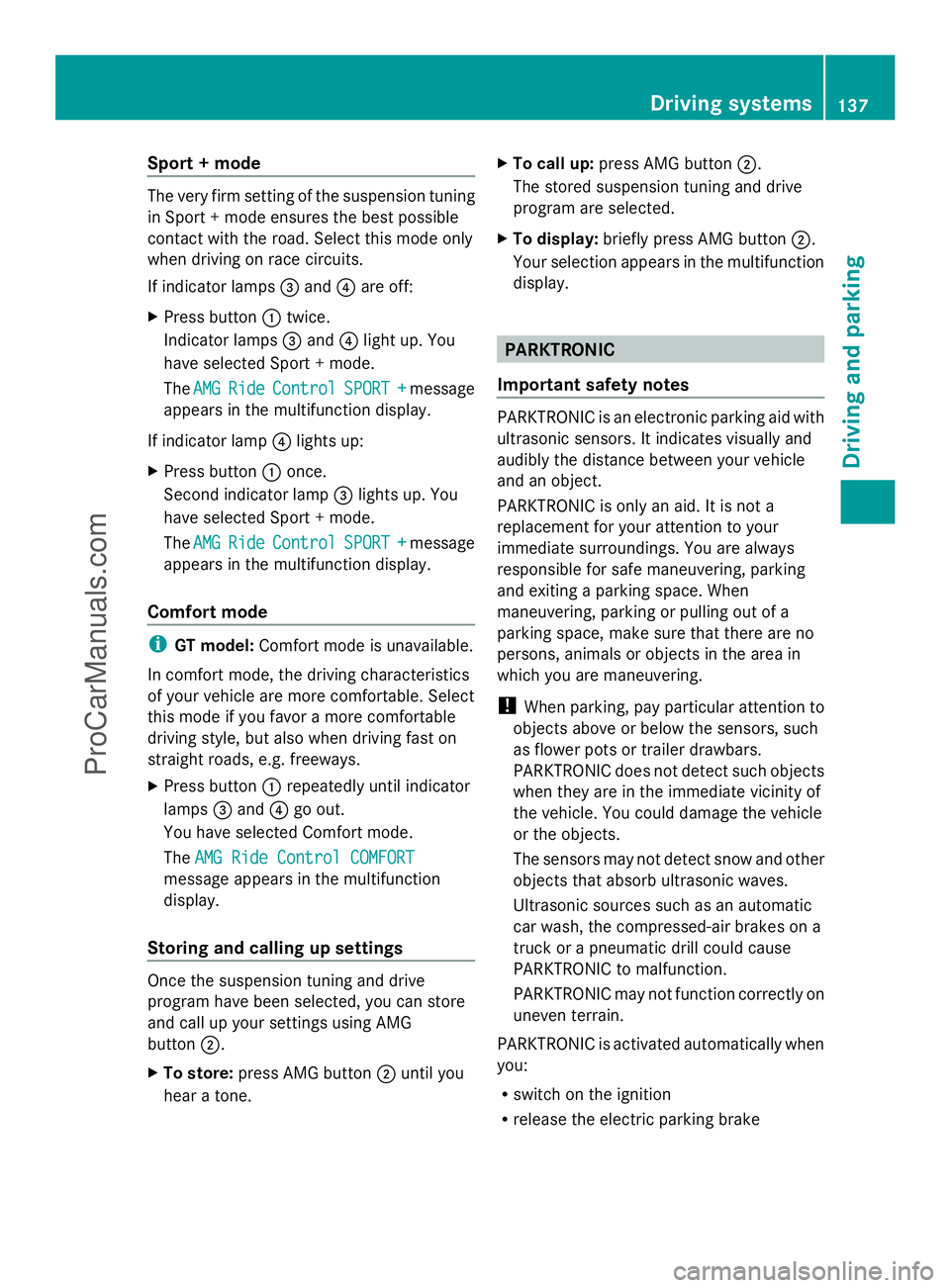
Sport + mode
The very firm setting of the suspension tuning
in Sport + mode ensures the best possible
contact with the road. Select this mode only
when driving on race circuits.
If indicator lamps =and ?are off:
X Press button :twice.
Indicator lamps =and ?light up. You
have selected Sport + mode.
The AMG
AMG Ride Ride Control
Control SPORT +
SPORT +message
appears in the multifunction display.
If indicator lamp ?lights up:
X Press button :once.
Second indicator lamp =lights up. You
have selected Sport + mode.
The AMG
AMG Ride Ride Control
Control SPORT +
SPORT +message
appears in the multifunction display.
Comfort mode i
GT model: Comfort mode is unavailable.
In comfort mode, the driving characteristics
of your vehicle are more comfortable. Select
this mode if you favor a more comfortable
driving style, but also when driving fast on
straight roads, e.g. freeways.
X Press button :repeatedly until indicator
lamps =and ?go out.
You have selected Comfort mode.
The AMG Ride Control COMFORT AMG Ride Control COMFORT
message appears in the multifunction
display.
Storing and calling up settings Once the suspension tuning and drive
program have been selected, you can store
and call up your settings using AMG
button ;.
X To store: press AMG button ;until you
hear a tone. X
To call up: press AMG button ;.
The stored suspension tuning and drive
program are selected.
X To display: briefly press AMG button ;.
Your selection appears in the multifunction
display. PARKTRONIC
Important safety notes PARKTRONIC is an electronic parking aid with
ultrasonic sensors. It indicates visually and
audibly the distance between your vehicle
and an object.
PARKTRONIC is only an aid. It is not a
replacement for your attention to your
immediate surroundings. You are always
responsible for safe maneuvering, parking
and exiting a parking space. When
maneuvering, parking or pulling out of a
parking space, make sure that there are no
persons, animals or objects in the area in
which you are maneuvering.
!
When parking, pay particular attention to
objects above or below the sensors, such
as flower pots or trailer drawbars.
PARKTRONIC does not detect such objects
when they are in the immediate vicinity of
the vehicle. You could damage the vehicle
or the objects.
The sensors may not detect snow and other
objects that absorb ultrasonic waves.
Ultrasonic sources such as an automatic
car wash, the compressed-air brakes on a
truck or a pneumatic drill could cause
PARKTRONIC to malfunction.
PARKTRONIC may not function correctly on
uneven terrain.
PARKTRONIC is activated automatically when
you:
R switch on the ignition
R release the electric parking brake Driving systems
137Driving and parking Z
ProCarManuals.com
Page 141 of 286
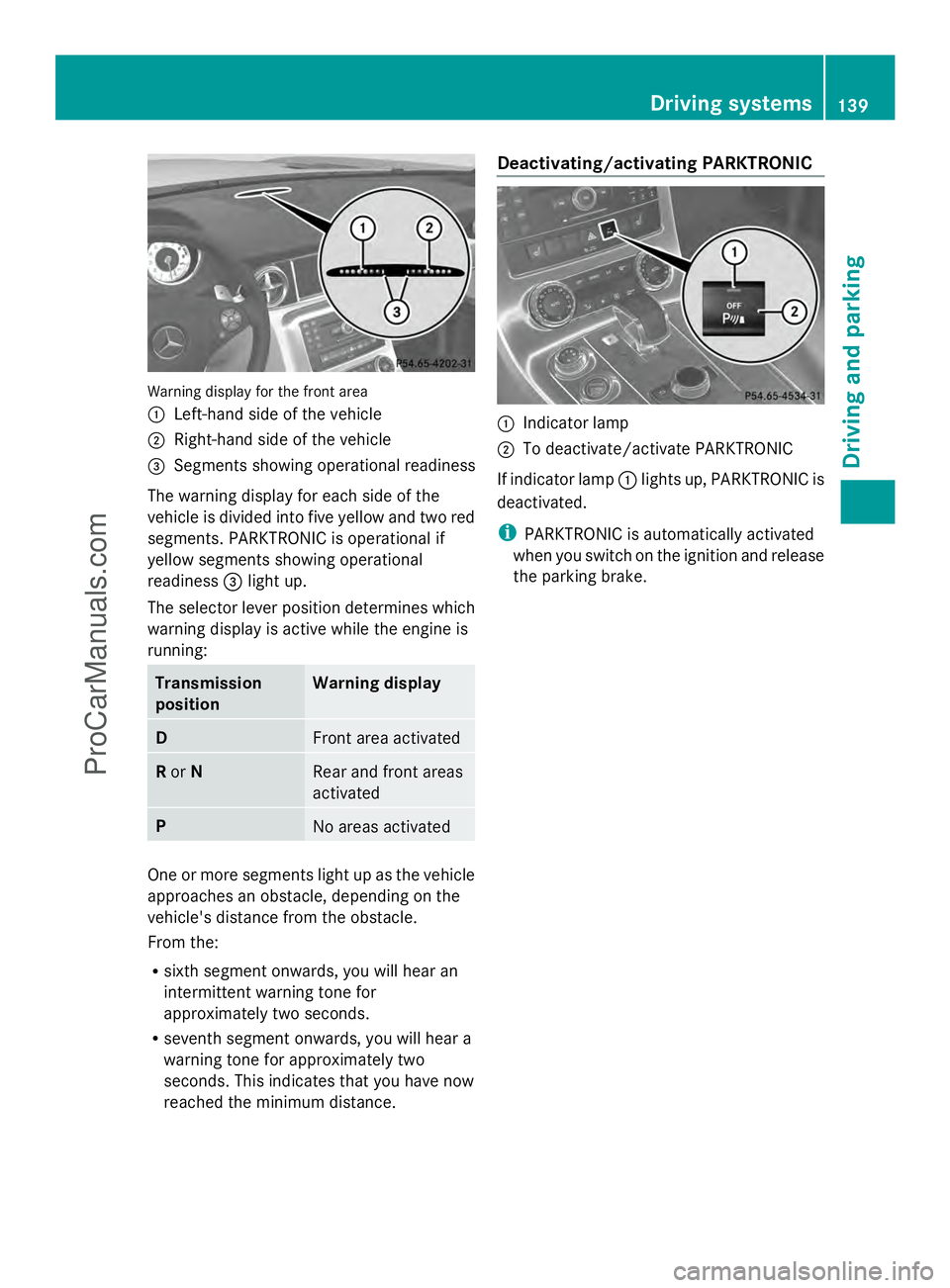
Warning display for the front area
:
Left-hand side of the vehicle
; Right-hand side of the vehicle
= Segments showing operational readiness
The warning display for each side of the
vehicle is divided into five yellow and two red
segments. PARKTRONIC is operational if
yellow segments showing operational
readiness =light up.
The selector lever position determines which
warning display is active while the engine is
running: Transmission
position Warning display
D
Front area activated
R
or N Rear and front areas
activated
P
No areas activated
One or more segments light up as the vehicle
approaches an obstacle, depending on the
vehicle's distance from the obstacle.
From the:
R sixth segment onwards, you will hear an
intermittent warning tone for
approximately two seconds.
R seventh segment onwards, you will hear a
warning tone for approximately two
seconds. This indicates that you have now
reached the minimum distance. Deactivating/activating PARKTRONIC
:
Indicator lamp
; To deactivate/activate PARKTRONIC
If indicator lamp :lights up, PARKTRONIC is
deactivated.
i PARKTRONIC is automatically activated
when you switch on the ignition and release
the parking brake. Driving systems
139Driving and parking Z
ProCarManuals.com
Page 142 of 286
Problems with PARKTRONIC
Problem Possible causes/consequences and
M
MSolutions Only the red segments
in the PARKTRONIC
warning displays are lit.
You also hear a warning
tone for approximately
two seconds.
PARKTRONIC is
deactivated after
approximately
20 seconds, and the
indicator lamp in the
PARKTRONIC button
lights up. PARKTRONIC has malfunctioned and has switched off.
X
If problems persist, have PARKTRONIC checked at a qualified
specialist workshop. Only the red segments
in the PARKTRONIC
warning displays are lit.
PARKTRONIC is
deactivated after
approximately 20
seconds. The PARKTRONIC sensors are dirty or there is interference.
X
Clean the PARKTRONIC sensors (Y page 224).
X Switch the ignition back on. The problem may be caused by an external source of radio or
ultrasound waves.
X
See if PARKTRONIC functions in a different location. Rear view camera
Important safety notes The rear view camera is only an aid. It is not
a replacement for your attention to your
immediate surroundings. You are always
responsible for safe maneuvering and
parking. When maneuvering or parking, make
sure that there are no persons, animals or
objects in the area in which you are
maneuvering.
Under the following circumstances, the rear
view camera will not function, or will function
in a limited manner:
R if the trunk lid is open
R in heavy rain, snow or fog
R at night or in very dark places
R if the camera is exposed to very bright light R
if the area is lit by fluorescent light or LED
lighting (the display may flicker)
R if there is a sudden change in temperature,
e.g. when driving into a heated garage in
winter
R if the camera lens is dirty or obstructed
R if the rear of your vehicle is damaged. In
this event, have the camera position and
setting checked at a qualified specialist
workshop.
General notes Rear view camera
:is an optical parking aid.
It shows the area behind your vehicle in the
COMAND display. 140
Driving systemsDriving and parking
ProCarManuals.com
Page 149 of 286
Outside temperature display
G
WARNING
The outside temperature indicator is not
designed to serve as an ice-warning device
and is therefore unsuitable for that purpose.
Indicated temperatures just above the
freezing point do not guarantee that the road
surface is free of ice. The road may still be icy,
especially in wooded areas or on bridges.
The outside temperature display is in the
multifunction display (Y page 147).
Changes in the outside temperature are
displayed after a short delay. Operating the on-board computer
The on-board computer is activated as soon
as you turn the SmartKey to position 1in the
ignition lock.
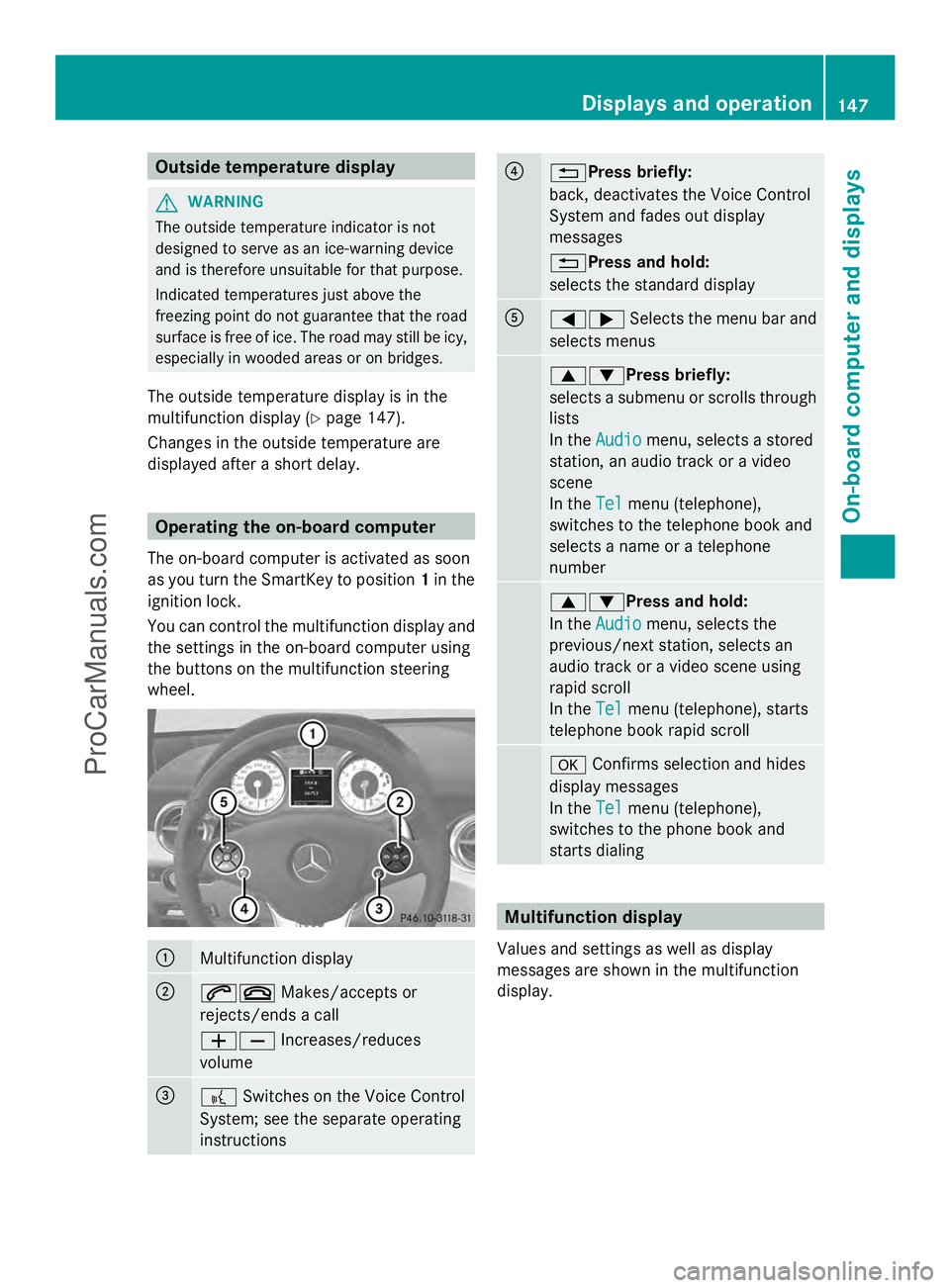
You can control the multifunction display and
the settings in the on-board computer using
the buttons on the multifunction steering
wheel. :
Multifunction display
;
6~
Makes/accepts or
rejects/ends a call
WX Increases/reduces
volume =
?
Switches on the Voice Control
System; see the separate operating
instructions ?
%Press briefly:
back, deactivates the Voice Control
System and fades out display
messages
%Press and hold:
selects the standard display
A
=;
Selects the menu bar and
selects menus 9:Press briefly:
selects a submenu or scrolls through
lists
In the
Audio Audio menu, selects a stored
station, an audio track or a video
scene
In the Tel Telmenu (telephone),
switches to the telephone book and
selects a name or a telephone
number 9:Press and hold:
In the
Audio Audio menu, selects the
previous/next station, selects an
audio track or a video scene using
rapid scroll
In the Tel Telmenu (telephone), starts
telephone book rapid scroll a
Confirms selection and hides
display messages
In the Tel
Tel menu (telephone),
switches to the phone book and
starts dialing Multifunction display
Values and settings as well as display
messages are shown in the multifunction
display. Displays and operation
147On-board computer and displays Z
ProCarManuals.com
Page 150 of 286
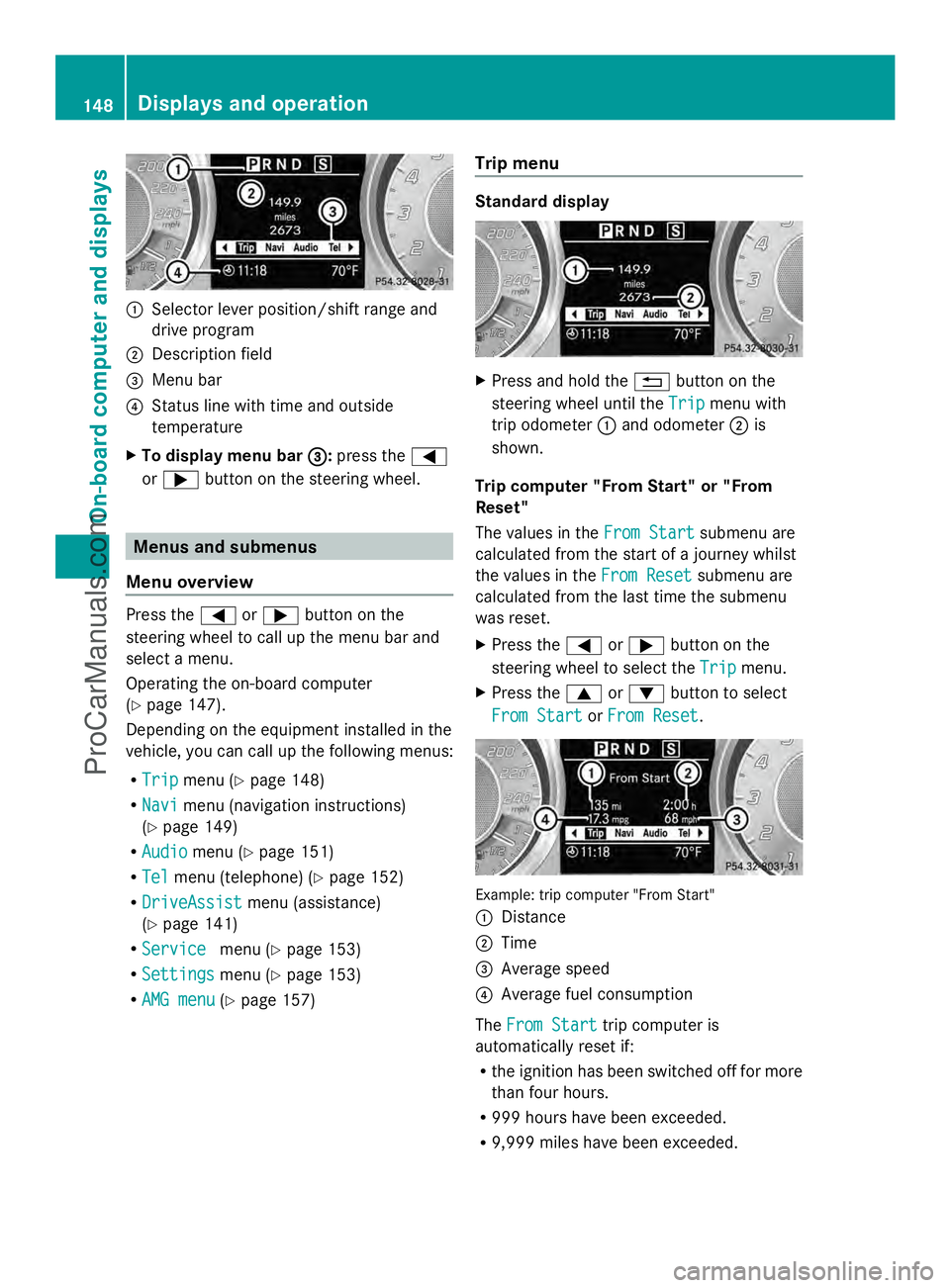
:
Selector lever position/shift range and
drive program
; Description field
= Menu bar
? Status line with time and outside
temperature
X To display menu bar = =:press the =
or ; button on the steering wheel. Menus and submenus
Menu overview Press the
=or; button on the
steering wheel to call up the menu bar and
select a menu.
Operating the on-board computer
(Y page 147).
Depending on the equipment installed in the
vehicle, you can call up the following menus:
R Trip Trip menu (Y page 148)
R Navi
Navi menu (navigation instructions)
(Y page 149)
R Audio Audio menu (Y page 151)
R Tel Tel menu (telephone) (Y page 152)
R DriveAssist
DriveAssist menu (assistance)
(Y page 141)
R Service
Service menu (Ypage 153)
R Settings Settings menu (Ypage 153)
R AMG menu AMG menu (Ypage 157) Trip menu Standard display
X
Press and hold the %button on the
steering wheel until the Trip
Tripmenu with
trip odometer :and odometer ;is
shown.
Trip computer "From Start" or "From
Reset"
The values in the From Start From Startsubmenu are
calculated from the start of a journey whilst
the values in the From Reset
From Reset submenu are
calculated from the last time the submenu
was reset.
X Press the =or; button on the
steering wheel to select the Trip Tripmenu.
X Press the 9or: button to select
From Start
From Start orFrom Reset
From Reset . Example: trip computer "From Start"
:
Distance
; Time
= Average speed
? Average fuel consumption
The From Start From Start trip computer is
automatically reset if:
R the ignition has been switched off for more
than four hours.
R 999 hours have been exceeded.
R 9,999 miles have been exceeded. 148
Displays and operationOn-board computer and displays
ProCarManuals.com
Page 162 of 286
Display messages
Hiding display messages G
WARNING
All categories of messages contain important information which should be taken note of and,
where a malfunction is indicated, addressed as soon as possible at an authorized Mercedes-Benz
Center.
Failure to repair the condition noted may cause damage not covered by the Mercedes-Benz
Limited Warranty, or result in property damage or personal injury.
Display messages appear in the multifunction display.
X Press the aor% button on the steering wheel to hide the display message.
The display message is cleared.
The multifunction display shows high-priority display messages in red.
You cannot hide display messages of the highest priority. The multifunction display shows
these messages continuously until the causes for the messages have been remedied.
Certain display messages are accompanied by an audible warning tone or a continuous tone.
Please respond in accordance with the display messages and follow the additional notes in
this Operator's Manual.
Message memory The on-board computer saves certain display messages. You can call up the display messages
in the message memory .
X Press =or; on the steering wheel to select the Serv.
Serv. menu.
If there are display messages, the multifunction display shows 2 Messages
2 Messages , for example.
X Press the 9or: button to select the entry, e.g. 2 Messages
2 Messages .
X Confirm with a.
X Press the 9or: button to scroll through the display messages.
When the ignition is switched off, all display messages are deleted apart from some high-
priority display messages. Once the causes of the high-priority display messages have been
rectified, the corresponding display messages are also deleted. 160
Displays and ope
rationOn-board computer and displays
ProCarManuals.com