sensor MERCEDES-BENZ SLS COUPE 2010 User Guide
[x] Cancel search | Manufacturer: MERCEDES-BENZ, Model Year: 2010, Model line: SLS COUPE, Model: MERCEDES-BENZ SLS COUPE 2010Pages: 361, PDF Size: 6.32 MB
Page 54 of 361
X
Using the Start/Stop button, set to key
position 0.
or
X Remove the key from the ignition lock.
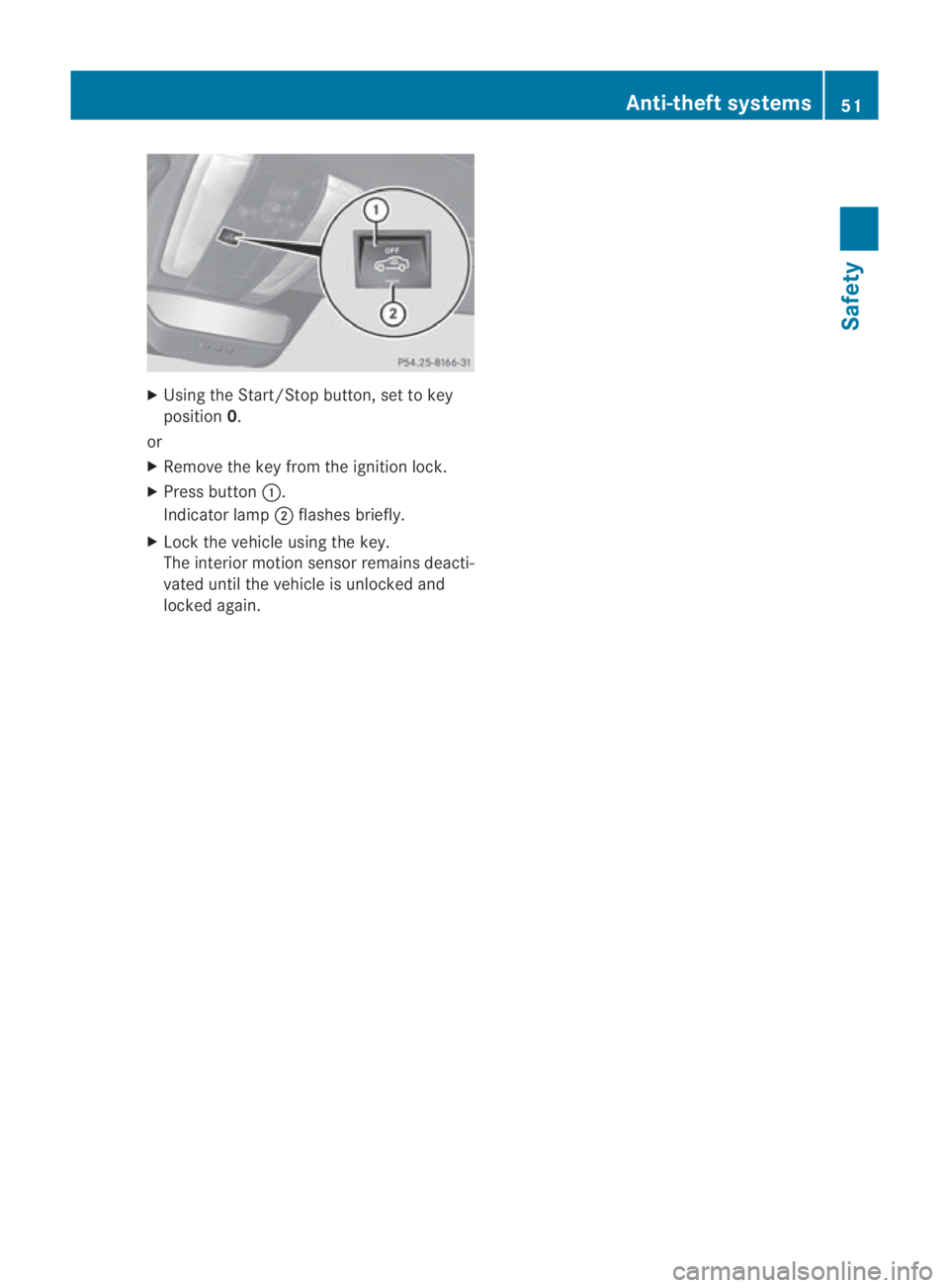
X Press button 0001.
Indicator lamp 0002flashes briefly.
X Lock the vehicle using the key.
The interior motion sensor remains deacti-
vated until the vehicle is unlocked and
locked again. Anti-theft systems
51Safety
BA 197 ECE RE 2010/6a; 1; 2, en-GB
sabbaeu Version: 3.0.3.6 2010-05-07T14:19:43+02:00 - Seite 51 Z
Page 75 of 361
Display settings
Setting the brightness i
The brightness detected by the COMAND
ligh tsensor affects the setting options for
this function.
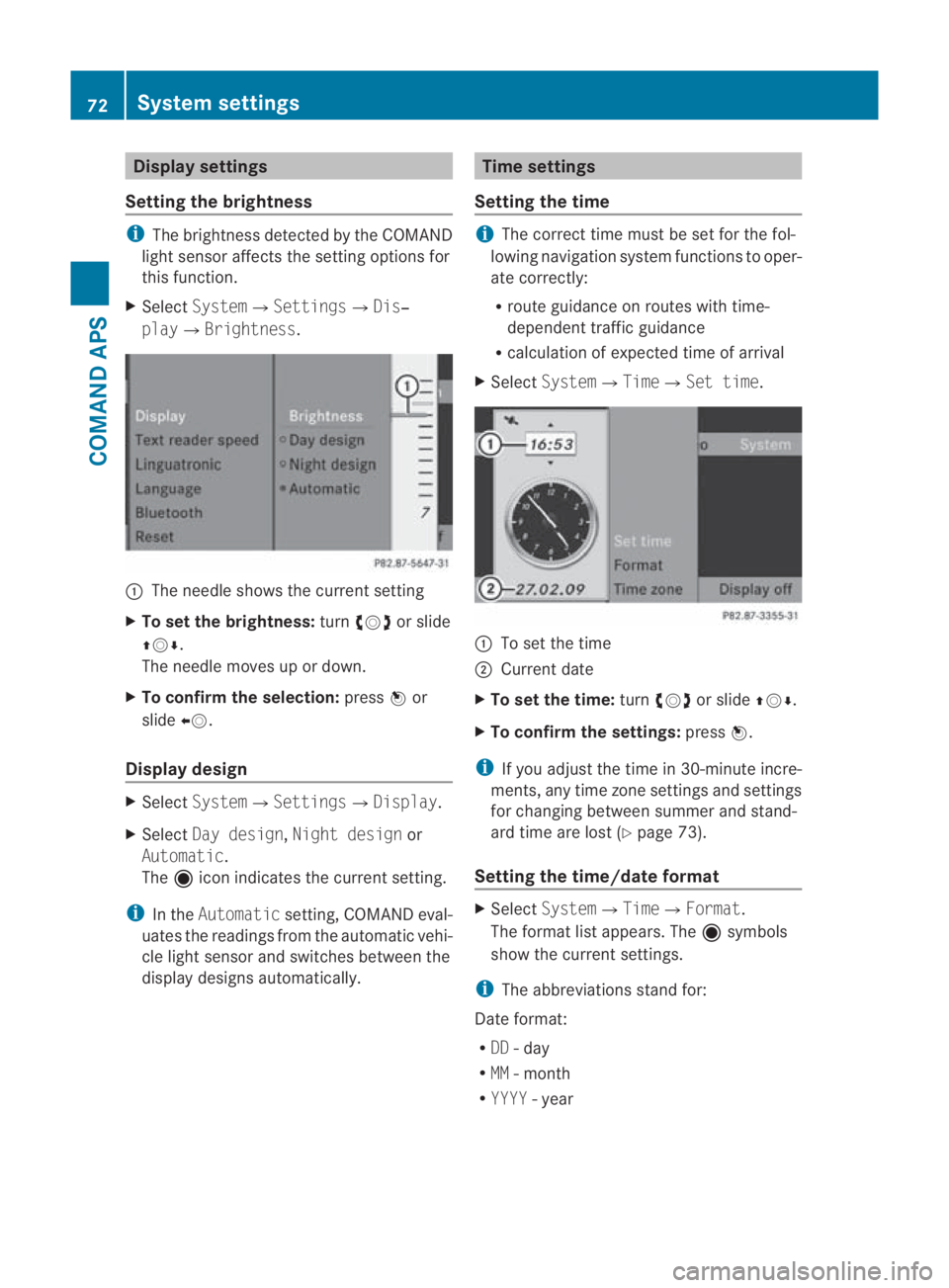
X Select System0004 Settings0004Dis‐
play0004Brightness. 0001
The needle shows the curren tsetting
X To set the brightness: turn002800130029 or slide
001F0013000D.
The needle moves up or down.
X To confirm the selection: press0017or
slide 002B0013.
Display design X
Select System0004 Settings0004Display.
X Select Day design, Night design or
Automatic.
The äicon indicates the current setting.
i In the Automatic setting, COMAND eval-
uates the readings from the automatic vehi-
cle light sensor and switches between the
display designs automatically. Time settings
Setting the time i
The correct time must be set for the fol-
lowing navigation system functions to oper-
ate correctly:
R route guidance on routes with time-
dependen ttraffic guidance
R calculation of expected time of arrival
X Select System0004Time0004Set time. 0001
To set the time
0002 Current date
X To set the time: turn002800130029 or slide 001F0013000D.
X To confirm the settings: press0017.
i If you adjust the time in 30-minute incre-
ments, any time zone settings and settings
for changing between summe rand stand-
ard time are lost (Y page 73).
Setting the time/date format X
Select System 0004Time0004 Format.
The format list appears. The äsymbols
show the current settings.
i The abbreviations stand for:
Date format:
R DD - day
R MM - month
R YYYY -year 72
System settingsCOMAND APS
BA 197 ECE RE 2010/6a; 1; 2, en-GB
sabbaeu
Version: 3.0.3.6 2010-05-07T14:19:43+02:00 - Seite 72
Page 122 of 361
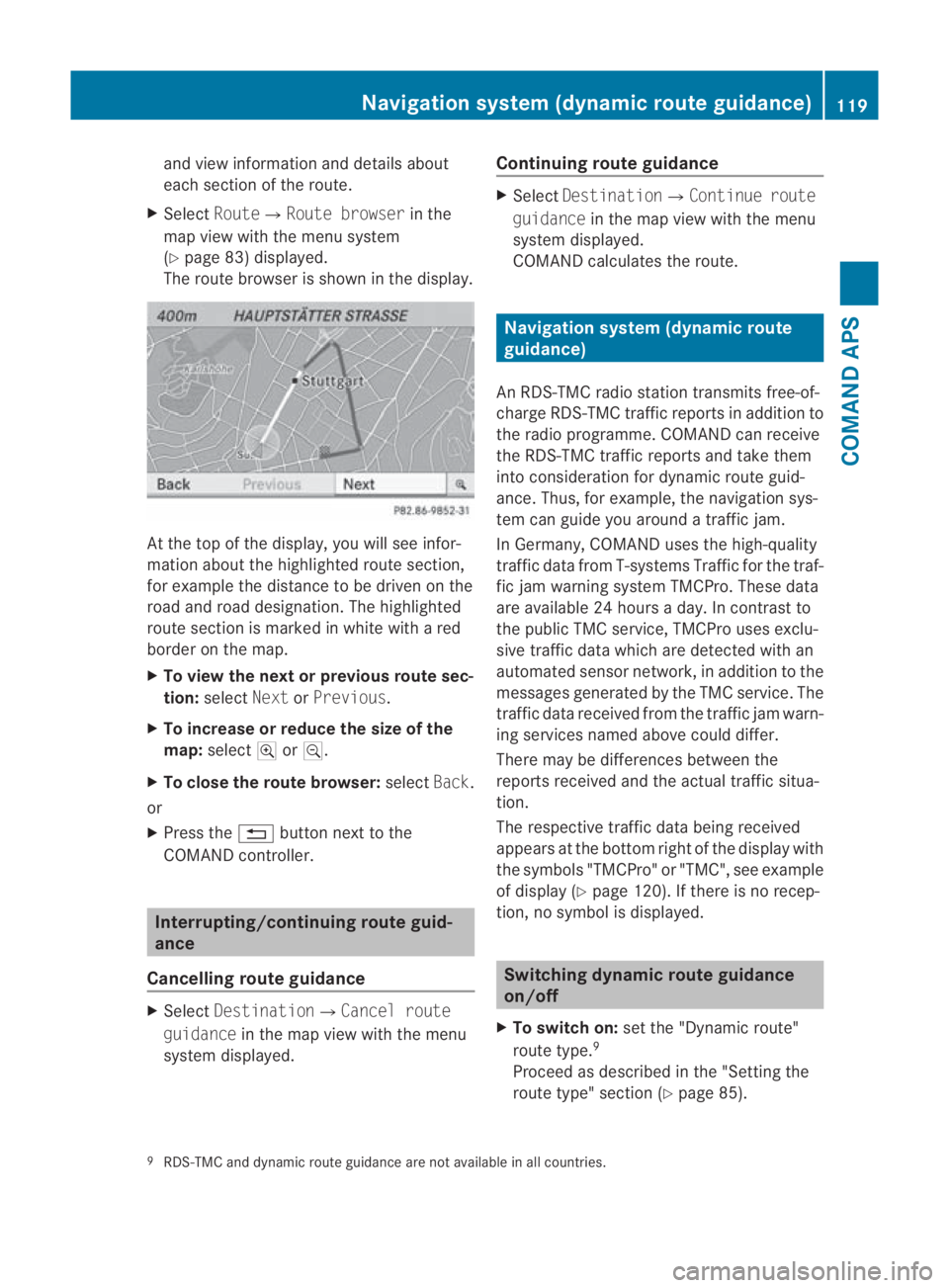
and view informatio
nand details about
each sectio nofthe route.
X Select Route0004Route browser in the
map view with the menu system
(Y page 83) displayed.
The route browser is shown in the display. At the top of the display, you will see infor-
mation about the highlighted route section,
for example the distance to be driven on the
road and road designation. The highlighted
route section is marked in white with a red
border on the map.
X To view the next or previous route sec-
tion: select NextorPrevious.
X To increase or reduce the size of the
map: select 000Aor0009.
X To close the route browser: selectBack.
or
X Press the 0001button next to the
COMAND controller. Interrupting/continuing route guid-
ance
Cancelling route guidance X
Select Destination0004Cancel route
guidance in the map view with the menu
system displayed. Continuing route guidance X
Select Destination0004Continue route
guidance in the map view with the menu
system displayed.
COMAND calculates the route. Navigation system (dynamic route
guidance)
An RDS-TMC radio station transmits free-of-
charge RDS-TMC traffic reports in addition to
the radio programme. COMAND can receive
the RDS-TMC traffic reports and take them
into consideration for dynamic route guid-
ance. Thus, for example, the navigation sys-
tem can guide you around a traffic jam.
In Germany, COMAND uses the high-quality
traffic data from T-systems Traffic for the traf-
fic jam warning system TMCPro. These data
are available 24 hours a day. In contrast to
the publicT MC service, TMCPro uses exclu-
sive traffic data which are detected with an
automated sensor network, in addition to the
messages generated by the TMC service. The
traffic data received from the traffic jam warn-
ing services named above could differ.
There may be differences between the
reports received and the actual traffic situa-
tion.
The respective traffic data being received
appears at the bottom right of the display with
the symbols "TMCPro" or "TMC", see example
of display (Y page 120). If there is no recep-
tion, no symbol is displayed. Switching dynamic route guidance
on/off
X To switch on: set the "Dynamic route"
route type. 9
Proceed as described in the "Setting the
route type" section (Y page 85).
9 RDS-TMC and dynamic route guidance are not available in all countries. Navigation system (dynamic route guidance)
119COMAND APS
BA 197 ECE RE 2010/6a; 1; 2, en-GB
sabbaeu Version: 3.0.3.6 2010-05-07T14:19:43+02:00 - Seite 119 Z
Page 212 of 361
i
If you are driving faster than 47 km/h, you
can no longer fold in the exterior mirrors.
Make sure that the exterior mirrors are
always folded out fully while the vehicle is
in motion, as they may otherwise vibrate.
Resetting the exterio rmirrors If the battery has been disconnected or com-
pletely discharged, the exterior mirrors must
be reset .The exterior mirrors will otherwise
not fold in when you select the "Fold in mir-
rors when locking" function in the on-board
computer (Y page 240).
X Select key position 1with the Start/Stop
button.
X Briefly press button 0014.
Folding the exterior mirrors in/out
automatically* If the "Fold in mirrors when locking" function
is activated in the on-board computer
(Y
page 240):
R the exterior mirrors fold in automatically as
soon as you lock the vehicle from the out-
side.
R the exterior mirrors fold out again automat-
ically as soon as you unlock the vehicle and
then open the driver's or front-passenger
door.
i If you have activated this function and fold
in the exterior mirrors using button 0014, they
will not be folded out automatically .You
can then only fold out the exterior mirrors
using button 0014. Automatic anti-dazzle mirrors*
The rear-view mirror and the exterior mirror
on the driver's side automatically go into anti-
dazzle mode if the ignition is switched on and
incident light from headlamps strikes the sen-
sor in the rear-view mirror.
The mirrors do not go into anti-dazzle mode if
reverse gear is engaged. G
Risk of accident
If incident light from headlamps is prevented
from striking the sensor in the rear-view mir-
ror, for instance, by luggage piled too high in
the vehicle, the mirror's automatic anti-dazzle
function will not operate.
Incident light could then dazzle you. This may
distract you from the traffic conditions, and
as a result, you may cause an accident .Inthis
case, adjust the rear-view mirror manually. Parking position for the exterior mir-
ror on the front-passenger side
To make it easier to park, you can set and
store the front-passenger side exterior mirror
position in such a way that you can see the
rear wheel on that side as soon as you engage
reverse gear.
Setting and storing the parking position X
Select key position 2with the Start/Stop
button (Y page 202).
X Engage reverse gear.
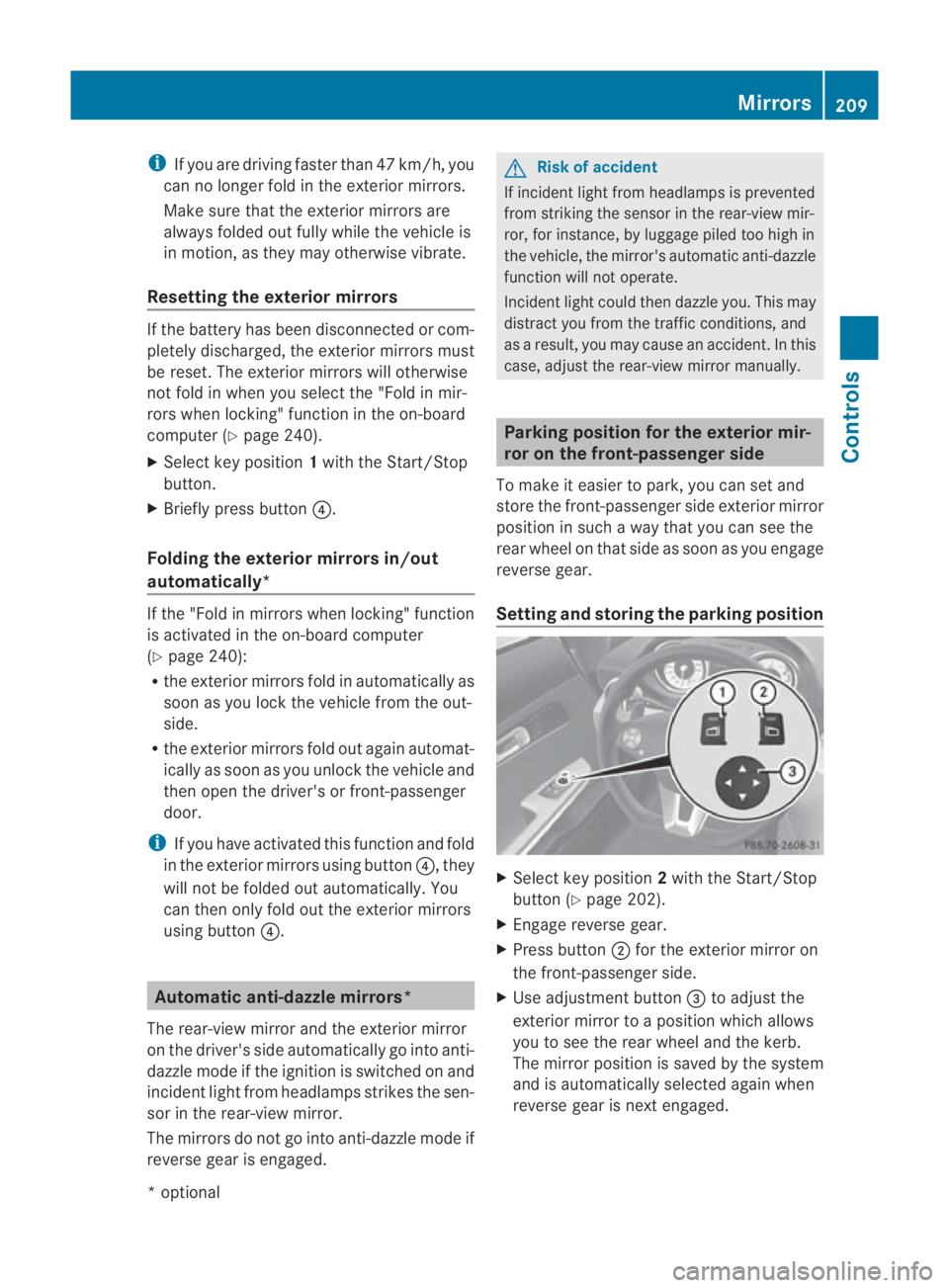
X Press button 0002for the exterior mirror on
the front-passenger side.
X Use adjustment button 0015to adjust the
exterior mirror to a position which allows
you to see the rear wheel and the kerb.
The mirror position is saved by the system
and is automatically selected again when
reverse gear is next engaged. Mirrors
209Controls
*optional
BA 197 ECE RE 2010/6a; 1; 2, en-GB
sabbaeu
Version: 3.0.3.6 2010-05-07T14:19:43+02:00 - Seite 209 Z
Page 220 of 361
combination switch beyond the pressure
point in the direction of arrow 000Bor
000D(Y page 215).
The indicator lamp on the corresponding
side of the vehicle flashes.
The hazard warning lamps switch off auto-
matically afte rfull brak eapplication if the
vehicle reaches a speed of over 10 km/h
again. Headlamp cleaning system
The headlamps are cleaned automatically if
the "Wipe with washer fluid" function is oper-
ated 10 times while the lights are on and the
engine is running. The headlamps are cleaned
again every tenth time the windscreen is
wiped with washer fluid. When you switch off
the ignition, the automatic headlamp cleaning
system is reset and counting is resumed from
0. Interior lighting
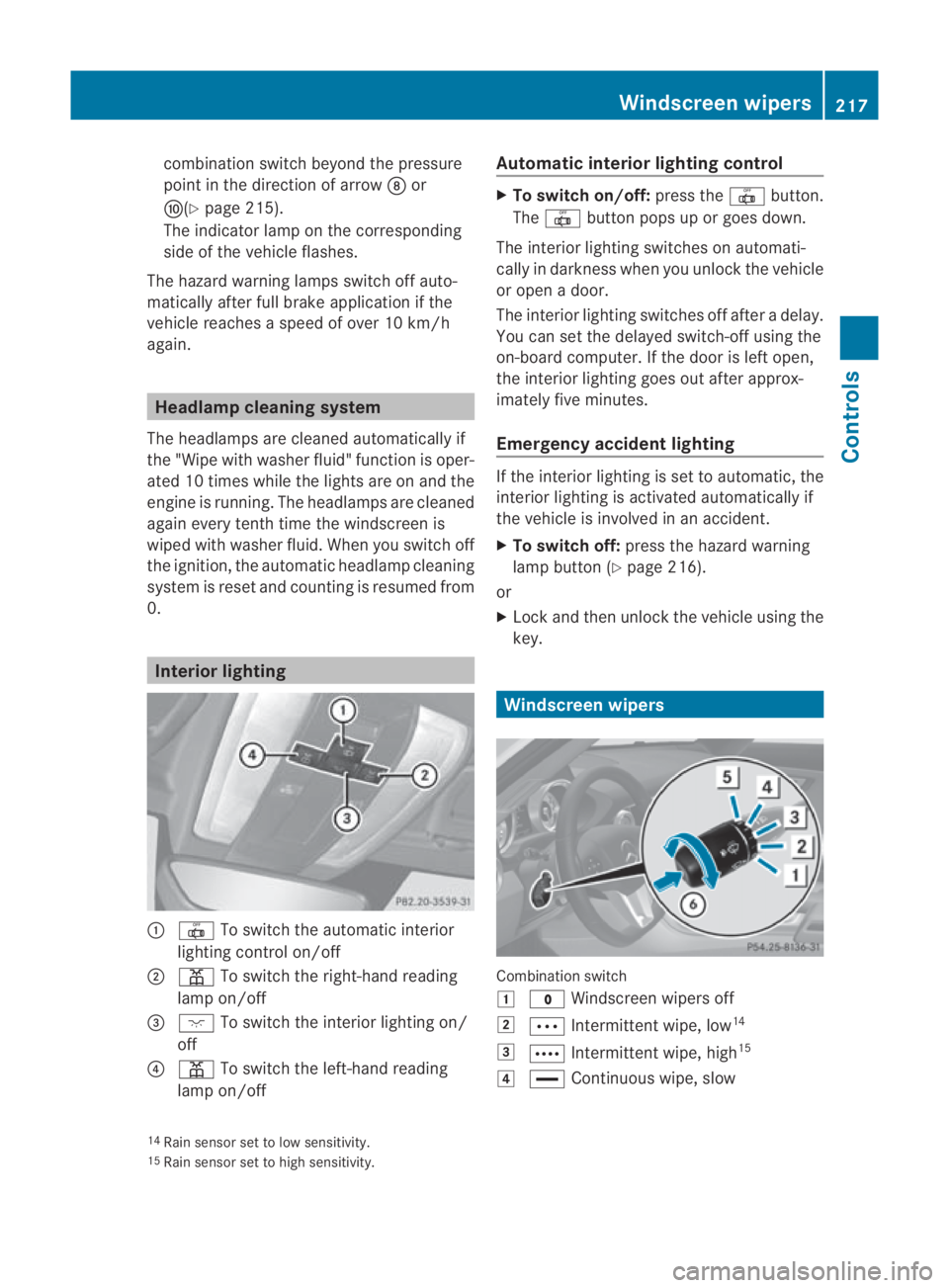
0001
0015 To switch the automatic interior
lighting control on/off
0002 0002 To switch the right-han dreading
lamp on/off
0015 0007 To switch the interior lighting on/
off
0014 0002 To switch the left-hand reading
lamp on/off Automatic interior lighting control X
To switch on/off: press the0015button.
The 0015 button pops up or goes down.
The interior lighting switches on automati-
cally in darkness when you unlock the vehicle
or open a door.
The interior lighting switches off after a delay.
You can set the delayed switch-off using the
on-board computer. If the door is left open,
the interior lighting goes out after approx-
imately five minutes.
Emergency accident lighting If the interior lighting is set to automatic, the
interior lighting is activated automatically if
the vehicle is involved in an accident.
X
To switch off: press the hazard warning
lamp button (Y page 216).
or
X Lock and then unlock the vehicle using the
key. Windscreen wipers
Combination switch
0003
0010 Windscreen wipers off
0004 000A Intermittent wipe, low 14
0005 000C Intermittent wipe, high 15
0006 0014 Continuous wipe, slow
14 Rain sensor set to low sensitivity.
15 Rain sensor set to high sensitivity. Windscreen wipers
217Controls
BA 197 ECE RE 2010/6a; 1; 2, en-GB
sabbaeu Version: 3.0.3.6 2010-05-07T14:19:43+02:00 - Seite 217 Z
Page 221 of 361
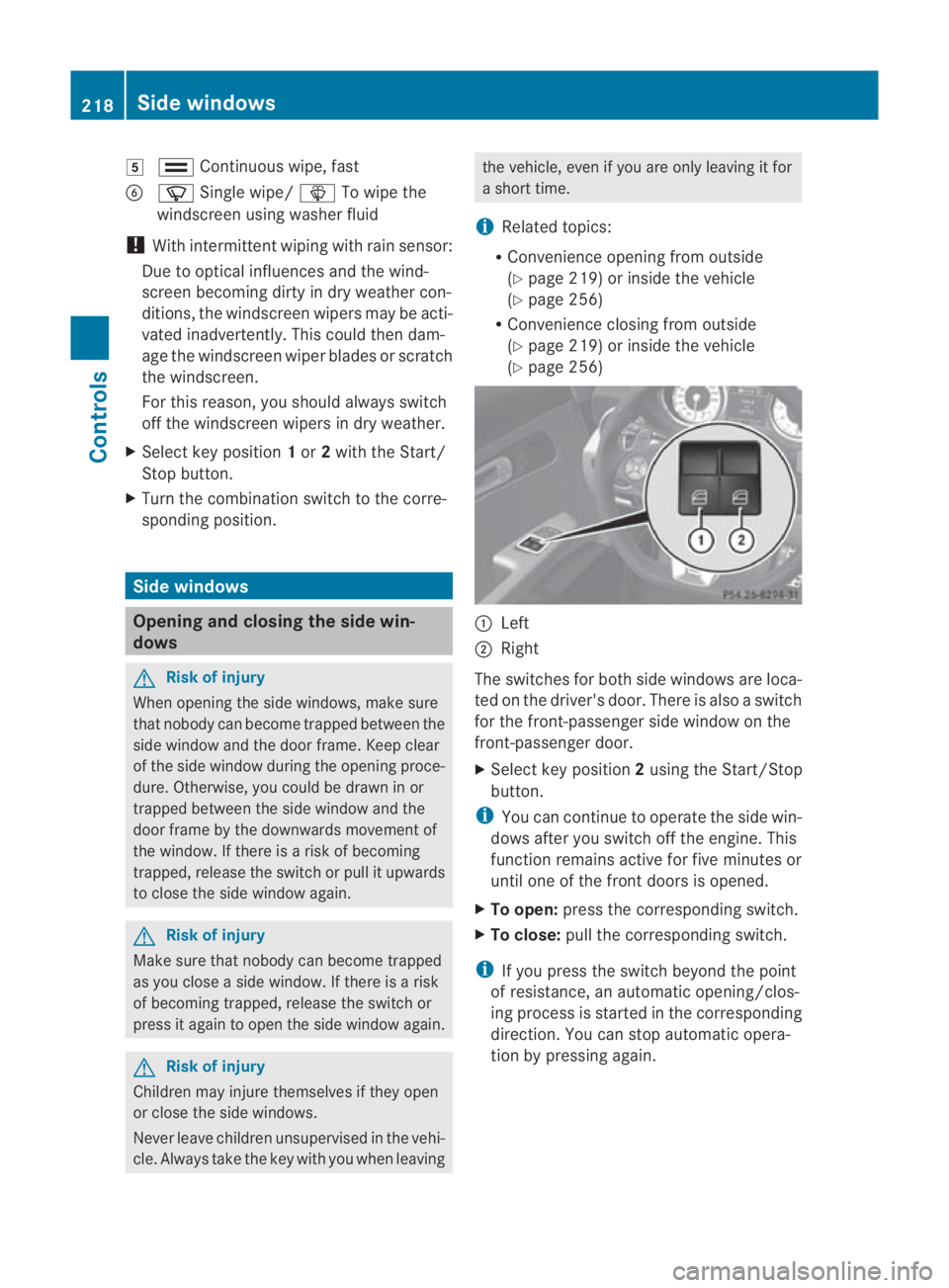
0007
000F Continuous wipe, fast
0013 000C Single wipe/ 0008To wipe the
windscree nusing washer fluid
! With intermittent wiping with rain sensor:
Due to optical influences and the wind-
screen becoming dirty in dry weather con-
ditions, the windscreen wipers may be acti-
vated inadvertently. This could then dam-
age the windscreen wiper blades or scratch
the windscreen.
For this reason, you should always switch
off the windscreen wipers in dry weather.
X Select key position 1or 2with the Start/
Stop button.
X Turn the combination switch to the corre-
sponding position. Side windows
Opening and closing the side win-
dows G
Risk of injury
When opening the side windows, make sure
that nobody can become trapped between the
side window and the door frame. Keep clear
of the side window during the opening proce-
dure. Otherwise, you could be drawn in or
trapped between the side window and the
door frame by the downwards movement of
the window. If there is a risk of becoming
trapped, release the switch or pull it upwards
to close the side window again. G
Risk of injury
Make sure that nobody can become trapped
as you close a side window. If there is a risk
of becoming trapped, release the switch or
press it againt o open the side window again. G
Risk of injury
Children may injure themselves if they open
or close the side windows.
Never leave children unsupervised in the vehi-
cle. Always take the key with you when leaving the vehicle, even if you are only leaving it for
a short time.
i Related topics:
R Convenience opening from outside
(Y page 219) or inside the vehicle
(Y page 256)
R Convenience closing from outside
(Y page 219) or inside the vehicle
(Y page 256) 0001
Left
0002 Right
The switches for both side windows are loca-
ted on the driver's door. There is also a switch
for the front-passenger side window on the
front-passenger door.
X Select key position 2using the Start/Stop
button.
i You can continue to operate the side win-
dows after you switch off the engine. This
function remains active for five minutes or
until one of the front doors is opened.
X To open: press the corresponding switch.
X To close: pull the corresponding switch.
i If you press the switch beyond the point
of resistance, an automatic opening/clos-
ing process is started in the corresponding
direction .You can stop automatic opera-
tion by pressing again. 218
Side windowsControls
BA 197 ECE RE 2010/6a; 1; 2, en-GB
sabbaeu
Version: 3.0.3.6 2010-05-07T14:19:43+02:00 - Seite 218
Page 251 of 361
Shortly before the store
dspeed is reached, it
appears in the multifunction display.
You cannot exceed the stored limit speed,
even if you depress the accelerator pedal
beyond the pressure point (kickdown).
Setting permanent SPEEDTRONIC
X Press the 0008or000E button to select the
Settings menu.
X Press 000Cor000F to highlight the Vehi‐
cle submenu and select with 000A.
X Press 000Cor000F to select the Limit
speed (winter tyres): function.
You can see the current setting.
X To change the setting, press 000A.X
Press the 000Cor000F button to set per-
manent SPEEDTRONIC in increment sof ten
(240 km/h to 160 km/h). Permanent
SPEEDTRONIC is deactivated with the Off
setting.
X Press 000Ato save the entry. PARKTRONIC
G
Risk of accident
PARKTRONIC is only an aid and may not
detect all obstacles. This syste mdoes not
relieve you of the need to pay attention.
You are always responsible for safety and
must continue to pay attention to your imme-
diate surroundings when parking and
manoeuvring. You could otherwise endanger
yourself and others. G
Risk of injury
Make sure that no persons or animals are in
the manoeuvring range. Otherwise, they
could be injured.
PARKTRONIC is an electronic parking aid with
ultrasonic sensors. It indicates visually and
audibly the distance between your vehicle
and an object.
PARKTRONIC is automatically activated when
you switch on the ignition and release the
handbrake.
PARKTRONIC is deactivated at speeds above
18 km/h. It is reactivated at lower speeds.
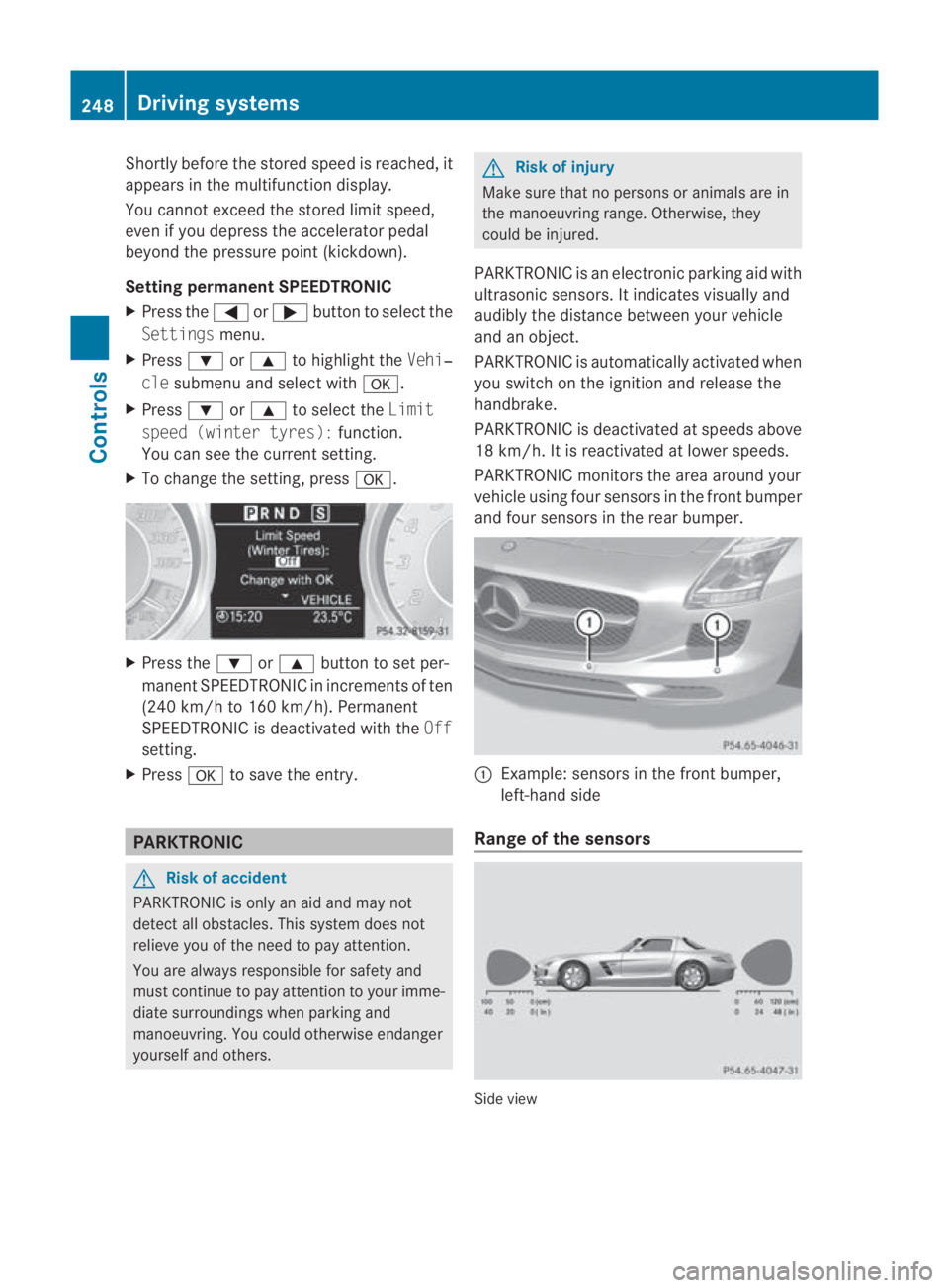
PARKTRONIC monitors the area around your
vehicle using four sensors in the front bumper
and four sensors in the rear bumper. 0001
Example: sensors in the front bumper,
left-hand side
Range of the sensors Side view248
Driving systemsControls
BA 197 ECE RE 2010/6a; 1; 2, en-GB
sabbaeu
Version: 3.0.3.6 2010-05-07T14:19:43+02:00 - Seite 248
Page 252 of 361
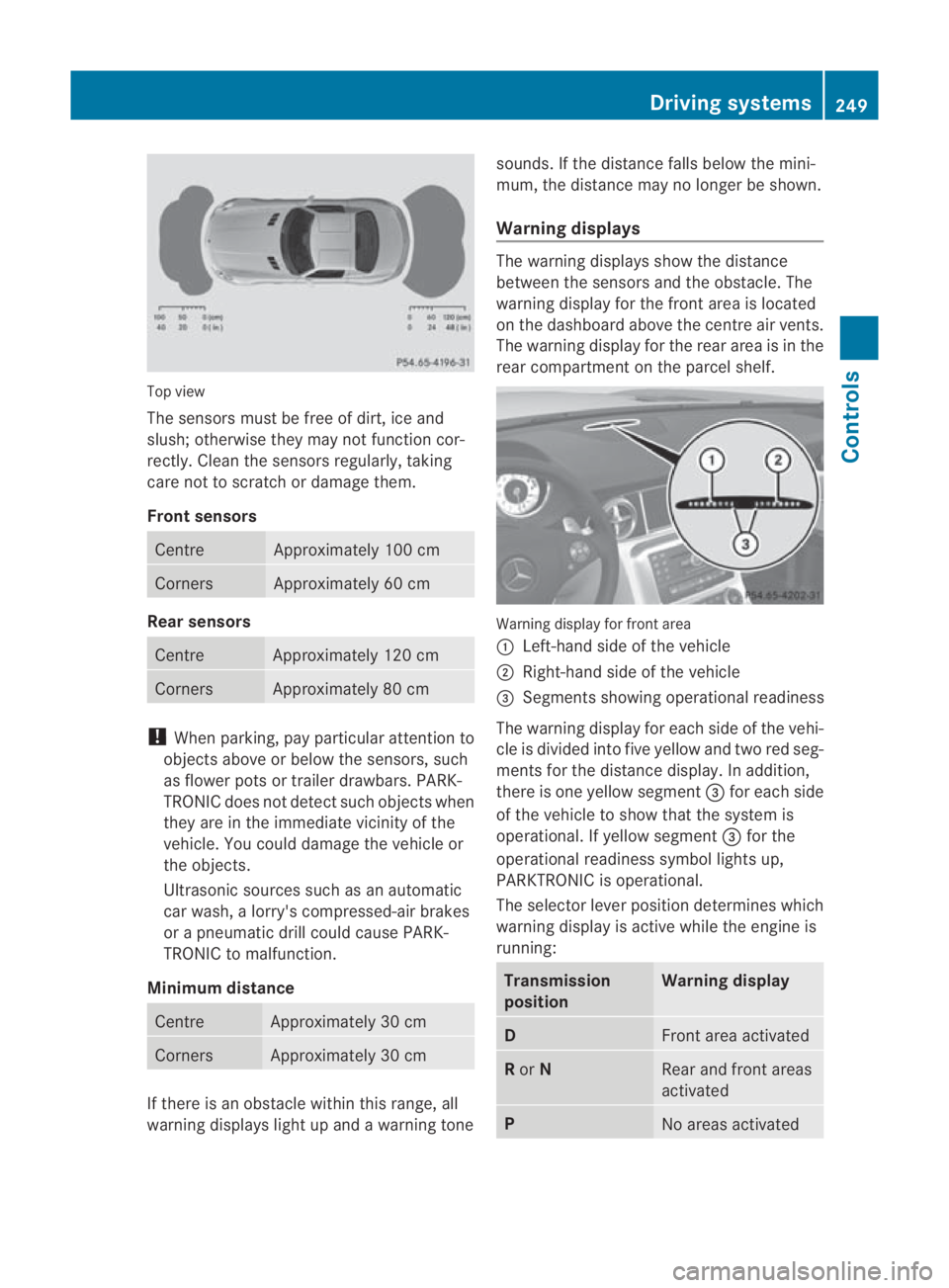
Top view
The sensors must be free of dirt, ice and
slush; otherwise they may not function cor-
rectly. Clean the sensors regularly, taking
care not to scratch or damage them.
Front sensors Centre Approximately 100 cm
Corners Approximately 60 cm
Rear sensors
Centre Approximately 120 cm
Corners Approximately 80 cm
!
When parking, pay particular attention to
objects above or below the sensors, such
as flower pots or trailer drawbars. PARK-
TRONIC does not detect such objects when
they are in the immediate vicinity of the
vehicle. You could damage the vehicle or
the objects.
Ultrasonic sources such as an automatic
car wash, a lorry's compressed-air brakes
or a pneumatic drill could cause PARK-
TRONIC to malfunction.
Minimum distance Centre Approximately 30 cm
Corners Approximately 30 cm
If there is an obstacle within this range, all
warning displays light up and a warning tone sounds. If the distance falls below the mini-
mum, the distance may no longer be shown.
Warning displays The warning displays show the distance
between the sensors and the obstacle. The
warning display for the front area is located
on the dashboard above the centre air vents.
The warning display for the rear area is in the
rear compartment on the parcel shelf.
Warning display for front area
0001
Left-hand side of the vehicle
0002 Right-hand side of the vehicle
0015 Segments showing operational readiness
The warning display for each side of the vehi-
cle is divided into five yellow and two red seg-
ments for the distance display .Inaddition,
there is one yellow segment 0015for each side
of the vehicle to show that the system is
operational. If yellow segment 0015for the
operational readiness symbol lights up,
PARKTRONIC is operational.
The selector lever position determines which
warning display is active while the engine is
running: Transmission
position Warning display
D
Front area activated
R
or N Rear and front areas
activated
P
No areas activatedDriving systems
249Controls
BA 197 ECE RE 2010/6a; 1; 2, en-GB
sabbaeu Version: 3.0.3.6 2010-05-07T14:19:43+02:00 - Seite 249 Z
Page 276 of 361
G
Risk of accident
Do not fit anything else to the tyre valve other
than the standard valve cap .Inparticular, ret-
rofitted tyre pressure monitors which are
screwed on to the valve may overload it and
cause it to fail. Due to their design, the valve
is kept open continuously, which may lead to
air loss. G
Ris
kofa ccident
Should the tyre pressure drop repeatedly:
R check the tyre for foreign bodies.
R check whether the wheel is losing air or the
valve is leaking.
R make sure that only a valve cap approved
by Mercedes-Ben zhas been fitted on the
tyre valve.
Tyre pressures that are to olow have a nega-
tive effect on vehicle safety, which could lead
to your causing an accident.
If possible, you should only correc ttyre pres-
sures when the tyres are cold. Depending on
the ambien ttemperature, the speed you are
driving at and the load on the tyres, the tyre
temperature and thus the tyre pressure may
change by approximately 0.1 bar per 10 †.
Take this into account when checking the
pressure of warm tyres and only correct it if
it is too low for the current operating condi-
tions.
Driving with tyre pressure that is too high or
too low can:
R shorten the service life of the tyres
R cause increased tyre damage
R have a negative effec tonhandling charac-
teristics and thus the driving safety (e.g. by
causing aquaplaning) H
Environmental note
Chec kthe tyre pressure regularly, at least
every 14 days. Tyre pressure monitor
If a tyre pressure monitor system is fitted, the
vehicle's wheels have sensors fitted that
monitor the tyre pressures in all four tyres.
The tyre pressure monitor warns you when
the pressure drops in one or more of the
tyres. The tyre pressure monitor only func-
tions if the correct wheel electronics units are
fitted to all wheels. G
Risk of accident
The tyre pressure monitor does not warn you
of an incorrectly set tyre pressure. The table
on the inside of the fuel filler flap will help you
decide whether the tyre pressures should be
corrected.
The tyre pressure monitor is not able to warn
you of a sudden loss of pressure, e.g. if the
tyre is penetrated by a foreign object. In the
event of a sudden loss of pressure, bring the
vehicle to a halt by braking carefully. Do not
make any sudden steering movements when
doing so.
i The operation of the tyre pressure moni-
tor can be affected by interference from
radio transmitting equipment (e.g. radio
headphones, two-way radios) that may be
being operated in or near the vehicle.
Checking tyre pressure electronically X
Select key position 2with the Start/Stop
button (Y page 202).
X Press the 0008or000E button to select the
Service menu.
X Press the 000For000C button to select
Tyre pressure.
X Press the 000Abutton.
The current tyre pressure for each wheel will
be displayed in the multifunction display.
If the vehicle has been parked for longer than
20 minutes or if you have not driven faster
than 25 km/h since starting the vehicle, the
following message appears: Tyres and wheels
273Operation
BA 197 ECE RE 2010/6a; 1; 2, en-GB
sabbaeu Version: 3.0.3.6 2010-05-07T14:19:43+02:00 - Seite 273 Z
Page 277 of 361
Tyre pressures will be displayed
after a few minutes of driving
i
The tyre pressure values indicated by the
on-board computer may differ from those
measured at a filling station with a pressure
gauge.T he tyre pressures shown by the on-
board computer refer to those measured at
sea level. At high altitudes, the tyre pres-
sure values indicated by a pressure gauge
are higher than those shown by the on-
board computer. In this case, do not reduce
the tyre pressures.
i After a teach-in period, the tyre pressure
monitor automatically recognises new
wheels or new sensors. As long as a clear
allocation of the tyre pressure values to the
individual wheels is not possible, the Tyre
press. monitor active display message
is shown instead of the tyre pressure dis-
play.T he tyre pressures are already being
monitored.
Restarting the tyre pressure monitor When you restart the tyre pressure monitor,
all existing warning messages are deleted and
the warning lamps go out. The monitor uses
the currently set tyre pressures as the speci-
fied values for monitoring.
In most cases, the tyre pressure monitor will
automatically detect the new reference val-
ues, e.g. if you have:
R changed the tyre pressure
R changed the wheels or tyres
R fitted new wheels or tyres
i For an overview of the menus, see
(Y page 232).
If you wish to define the new reference values
manually:
X Use the table on the inside of the fuel filler
flap to ensure that the tyre pressure is set
correctly in all four tyres for the current
operating conditions. Also observe the notes in the section on
tyre pressures (Y
page 272).
X Select key position 2with the Start/Stop
button.
X Press the 0008or000E button to select the
Service menu.
X Press the 000For000C button to select
Tyre pressure.
X Press the 000Abutton.
The current pressure in each individual tyre
is displayed, or the following message
appears:
Tyre pressures will be displayed
after a few minutes of driving
X Press the 000Cbutton.
The following message appears in the mul-
tifunction display:
Use current pressures as new ref‐
erence values
X Press the 000Abutton.
The following message appears in the mul-
tifunction display:
Tyre press. monitor restarted
After a few minutes of driving, the current
pressures are adopted as the new monitor-
ing values.
Cancelling the restart X
Press the 0001button.
or
X Press the 000Fbutton to leave the menu.
Other messages in the multifunction
display If the following message appears in the mul-
tifunction display:
Please correct tyre pressure
X
Check the tyre pressure on all four wheels
and correct it if necessary.
i If the wheel positions on the vehicle are
interchanged, the tyre pressures may be
displayed for the wrong positions for a 274
Tyres and wheelsOperation
BA 197 ECE RE 2010/6a; 1; 2, en-GB
sabbaeu
Version: 3.0.3.6 2010-05-07T14:19:43+02:00 - Seite 274