keyless MERCEDES-BENZ SLS COUPE 2010 Owners Manual
[x] Cancel search | Manufacturer: MERCEDES-BENZ, Model Year: 2010, Model line: SLS COUPE, Model: MERCEDES-BENZ SLS COUPE 2010Pages: 361, PDF Size: 6.32 MB
Page 11 of 361
DVD
Copy protection ............................. 167
Disc ............................................... 167
Selecting atrack ............................ 176
DVD audio
Operation (on-board computer) .....235
DVD playbac kconditions ................. 191
DVD video Operating (on-board computer) .....236
Dynamic route guidance ................... 119
Switching on/off ........................... 119
TMC/TMCPro ................................ 119E
EASY-ENTRY feature .........................207
Activating/deactivating (on-
board computer) ............................ 240
EASY-EXIT feature ............................. 207
Crash-responsive ........................... 207
EBD
Display message ............................ 299
EBV (electronic brake force distri-
bution) .................................................. 49
Electronic brake force distribution See EBV ........................................... 49
Electronic Stability Program
see ESP ®
Electronic Traction Support see ETS
Emergency call 999 or 112 ..............129
Emergency key element ...................321
Lost ............................................... 320
Emergency spare wheel
Inflating ......................................... 333
Stowing .......................................... 334
Technical data ............................... 355
Emergency unlocking
Boot ............................................... 322
Vehicle .......................................... .322
Engine
Running irregularl y......................... 315
Starting .................................. 202, 220
Starting problems ..........................315
Starting the engine with the key ....220
Starting with KEYLESS GO .............220
Starting with the key ..................... .220
Stopping ........................................ 222Engine diagnostics warning lamp
....310
Engine electronics .............................346
Malfunction ................................... .315
Engine number .................................. 349
Engine oil ........................................... 350
Capacities ...................................... 269
Checking the oil level (dipstick) .....269
Consumption ................................. 269
Display mes-
sag e....................................... 302, 303
Filler neck ...................................... 269
Temperature display (on-board
computer) ...................................... 241
Temperature gauge ........................ 229
Topping up ..................................... 269
Ensemble ........................................... 161
ESP ®
(Electronic Stability Pro-
gram) .................................................... 47
Activating/deactivating .............47, 48
AMG menu (on-board computer) ...241
Warning lamp ..................47, 308, 309
ETS (Electronic Traction Support) ...... 48
Example of operation ..........................66
Exterior lighting Delayed switch-off (on-board
computer) ...................................... 239
Exterior mirrors
Adjusting ....................................... 208
Anti-dazzle mode (automatic) ........209
Folding in/ou t(automatically) .......209
Folding in/ou t(electrically) ...........208
Folding in whe nlocking (on-board
computer) ...................................... 240
Malfunction ................................... .318
Parking position ............................. 209
Resetting ....................................... 209
Storing settings ............................. 210
Exterior view
Overview .......................................... 22
External authorisation ........................77
External data Deleting (convenience telephone) .137
Importing (convenience tele-
phone )................................... 136, 155
External devices (Media Interface)
Connecting .................................... 1848
Index BA 197 ECE RE 2010/6a; 1; 2, en-GB
sabbae uV ersion: 3.0.3.6
2010-05-07T14:19:43+02:00 - Seite 8
Page 13 of 361
PASSENGER AIRBAG OFF
........42, 307
Reserve fuel ................................... 312
Seat bel t........................................ 311
SRS .......................................... 35, 309
THERMOTRONIC (malfunction) ......307
Indicator lamps
see Warning and indicator lamps ...308
Input restriction
Navigation ........................................ 80
Instrument cluster ............................229
On-board computer .......................238
Overview .......................................... 25
Instrument lighting ...........................239
Interior lighting Automatic control system ..............217
Delayed switch-off (on-board
computer) ...................................... 239
Emergency lighting ........................217
Manual control ............................... 217
Reading lamp ................................. 217
Interior motion sensor ........................50
Intermediate stop Deleting ......................................... 105
Entering ......................................... 104
iPod ®
Alphabetic track selection .............188
Connecting to Media Interface ......185
Device variants .............................. 184
Selecting a category/playlis t......... 187 J
Jack .................................................... .288
Operation ....................................... 329
Jump-starting ..................................... 338
Jump leads ..................................... 338
Junction
Entering ......................................... 100K
Key ...................................................... 200
Changing the battery .....................323
Checking the battery .....................323
Convenience closing feature .......... 219
Convenience opening feature ........219
Display message ............................ 303
Emergency key element ................. 321 Loss
............................................... 320
Malfunction ................................... .319
Modifying the programming ...........200
Unlocking/locking vehicle .............200
KEYLESS-GO
Changing the battery .....................323
Display message ............................ 303
Malfunction ................................... .319
Starting the engine ........................220
Keyp ositions
Key ................................................ 203
KEYLESS GO .................................. 202
Kickdown ........................................... 224 L
Lamps see Warning and indicator lamps ...308
Lane recommendations ....................113
Explanation .................................... 114
Licence plate lighting
Display message ............................ 301
Lighting
see Lights
Lights
Automatic headlamp mode ............215
Combination switch .......................214
Daytime driving lights ....................215
Dipped-bea mheadlamps ............... 215
Hazard warning lamps ...................216
Headlamp flasher ........................... 215
Ligh tswitc h................................... 214
Main-beam headlamps ................... 216
Parking lamps ................................ 215
Rea rfoglamp ................................. 216
Side lamps ..................................... 215
Switching surround lighting on/
off (on-board computer) ................. 239
Switching the daytime driving
lights on/off (on-board computer) .238
Switching the exterio rlighting
delayed switch-off on/off (on-
board computer )............................ 239
Turn signals ................................... 216
LIM indicator lamp
Cruise control ................................ 244
Variabl eSPEEDTRONIC .................24610
Index BA 197 ECE RE 2010/6a; 1; 2, en-GB
sabbae uV ersion: 3.0.3.6
2010-05-07T14:19:43+02:00 - Seite 10
Page 205 of 361
X
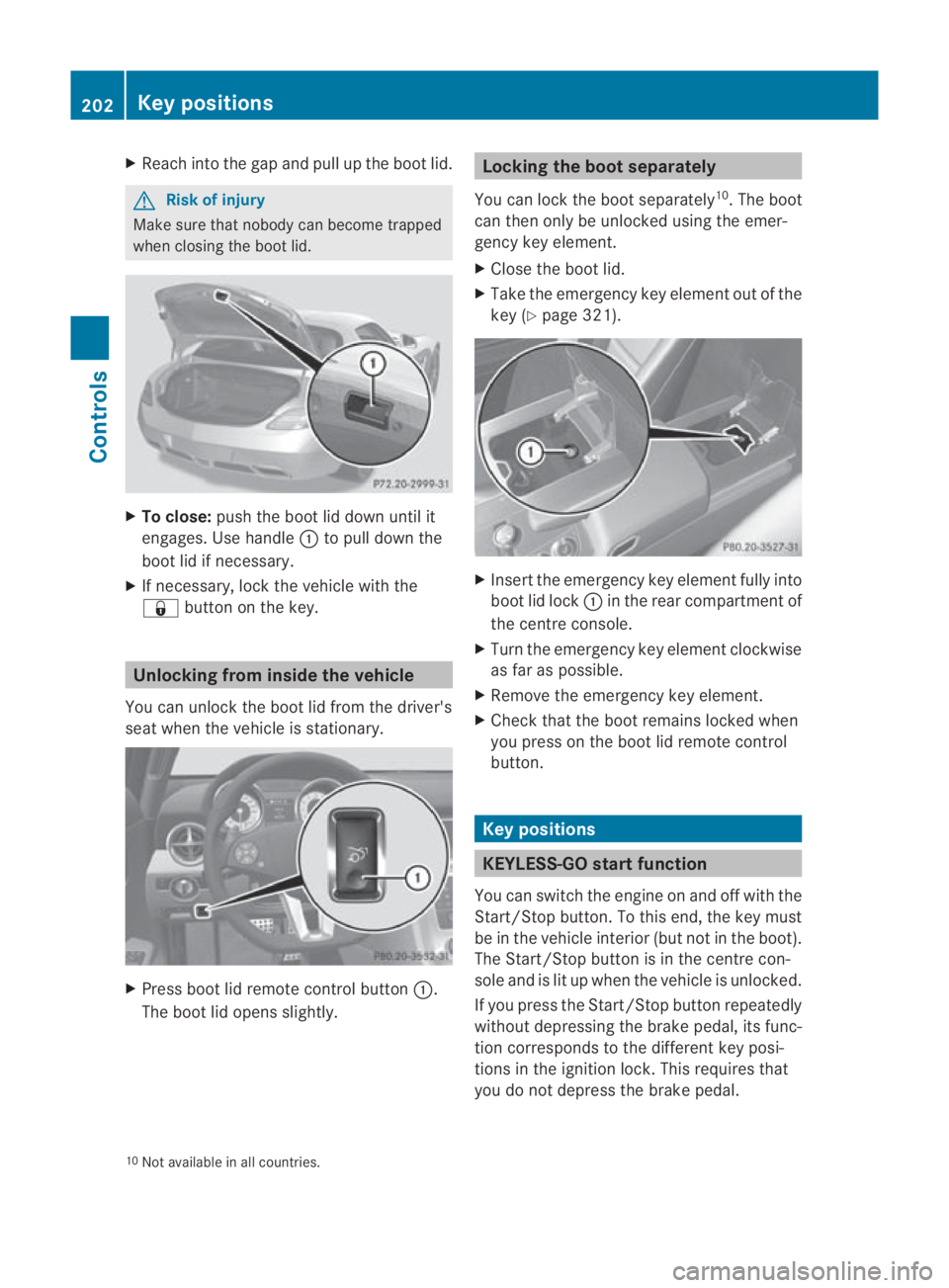
Reach into the gap and pull up the boo tlid. G
Risk of injury
Make sure that nobody can become trapped
when closing the boot lid. X
To close: push the boot lid down until it
engages. Use handle 0001to pull down the
boot lid if necessary.
X If necessary, lock the vehicle with the
0009 button on the key. Unlocking from inside the vehicle
You can unlock the boot lid from the driver's
seat when the vehicle is stationary. X
Press boot lid remote control button 0001.
The boot lid opens slightly. Locking the boot separately
You can lock the boot separately 10
.T he boot
can then only be unlocked using the emer-
gency key element.
X Close the boot lid.
X Take the emergency key element out of the
key (Y page 321). X
Insert the emergency key element fully into
boot lid lock 0001in the rear compartment of
the centre console.
X Turn the emergency key element clockwise
as far as possible.
X Remove the emergency key element.
X Check that the boot remains locked when
you press on the boot lid remote control
button. Key positions
KEYLESS-GO startf
unction
You can switch the engine on and off with the
Start/Stop button. To this end, the key must
be in the vehicle interio r(but not in the boot).
The Start/Stop button is in the centre con-
sole and is lit up when the vehicle is unlocked.
If you press the Start/Stop button repeatedly
without depressing the brake pedal, its func-
tion corresponds to the differen tkey posi-
tions in the ignition lock. This requires that
you do not depress the brake pedal.
10 Not available in all countries. 202
Key positionsControls
BA 197 ECE RE 2010/6a; 1; 2, en-GB
sabbaeu
Version: 3.0.3.6 2010-05-07T14:19:43+02:00 - Seite 202
Page 206 of 361
If you depress the brake pedal and press the
Start/Stop button, the engine starts immedi-
ately.
If there is a key in the ignition lock, it has pri-
ority over the KEYLESS-GO start function. X
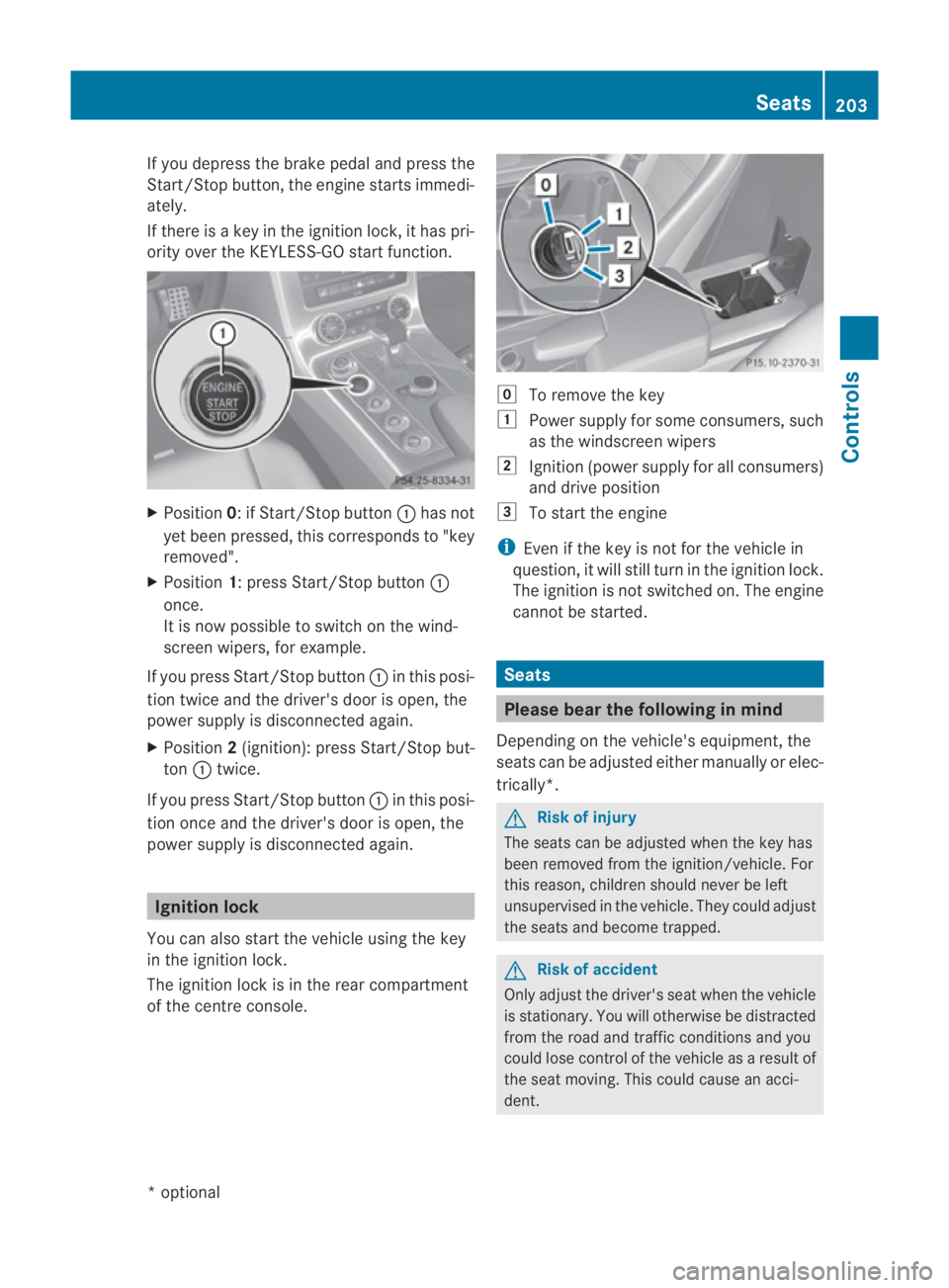
Position 0: if Start/Stop button 0001has not
yet been pressed, this corresponds to "key
removed".
X Position 1: press Start/Stop button 0001
once.
It is now possible to switch on the wind-
screen wipers, for example.
If you press Start/Stop button 0001in this posi-
tion twice and the driver's door is open, the
powers upply is disconnected again.
X Position 2(ignition): press Start/Stop but-
ton 0001twice.
If you press Start/Stop button 0001in this posi-
tion once and the driver's door is open, the
power supply is disconnected again. Ignition lock
You can also start the vehicle using the key
in the ignition lock.
The ignition lock is in the rear compartment
of the centre console. 0008
To remove the key
0003 Power supply for some consumers, such
as the windscree nwipers
0004 Ignition (power supply for all consumers)
and drive position
0005 To start the engine
i Even if the key is not for the vehicle in
question, it will still tur ninthe ignition lock.
The ignition is not switched on. The engine
cannot be started. Seats
Please bear the following in mind
Depending on the vehicle's equipment, the
seats can be adjusted either manually or elec-
trically*. G
Risk of injury
The seats can be adjusted when the key has
been removed from the ignition/vehicle. For
this reason, children should never be left
unsupervised in the vehicle. They could adjust
the seats and become trapped. G
Risk of accident
Only adjust the driver's seat when the vehicle
is stationary. You will otherwise be distracted
from the road and traffic conditions and you
could lose control of the vehicle as a result of
the seat moving. This could cause an acci-
dent. Seats
203Controls
*optional
BA 197 ECE RE 2010/6a; 1; 2, en-GB
sabbaeu
Version: 3.0.3.6 2010-05-07T14:19:43+02:00 - Seite 203 Z
Page 210 of 361
X
Push release lever 0001down completely.
The steering column is unlocked.
X Adjust the steering wheel to the desired
position.
X Push release lever 0001up completely.
The steering column is locked.
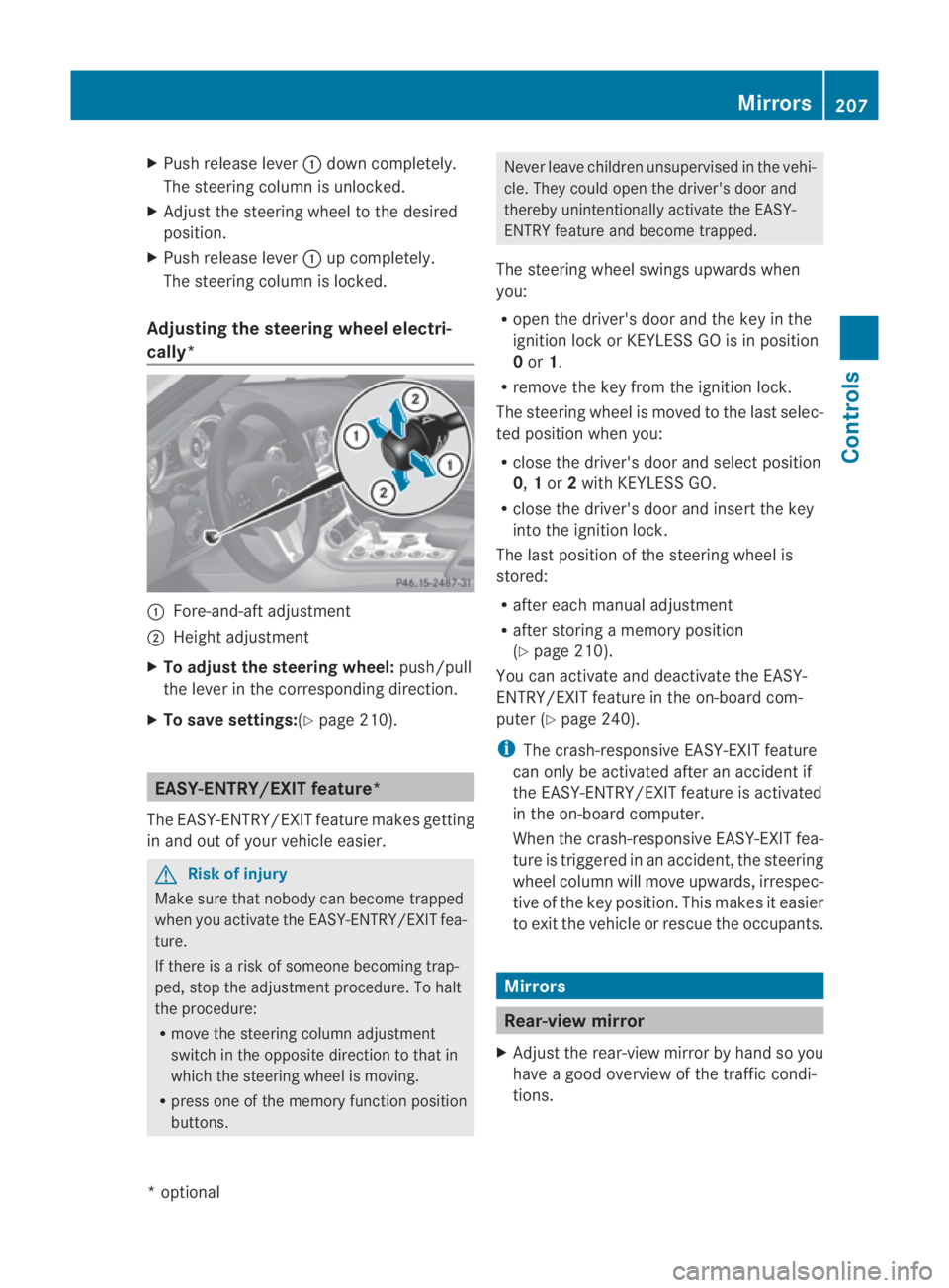
Adjusting the steering wheel electri-
cally* 0001
Fore-and-aft adjustment
0002 Height adjustment
X To adjust the steering wheel: push/pull
the lever in the corresponding direction.
X To save settings: (Ypage 210). EASY-ENTRY/EXIT feature*
The EASY-ENTRY/EXIT feature makes getting
in and out of your vehicle easier. G
Risk of injury
Make sure that nobody can become trapped
when you activate the EASY-ENTRY/EXIT fea-
ture.
If there is a risk of someone becoming trap-
ped, stop the adjustmen tprocedure. To halt
the procedure:
R move the steering column adjustment
switch in the opposite directio nto that in
which the steering wheel is moving.
R press one of the memory function position
buttons. Never leave children unsupervised in the vehi-
cle. They could open the driver's door and
thereby unintentionally activate the EASY-
ENTRY feature and become trapped.
The steering wheel swings upwards when
you:
R open the driver's door and the key in the
ignition lock or KEYLESS GO is in position
0or 1.
R remove the key from the ignition lock.
The steering wheel is moved to the last selec-
ted position when you:
R close the driver's door and select position
0, 1or 2with KEYLESS GO.
R close the driver's door and insert the key
into the ignition lock.
The last position of the steering wheel is
stored:
R after each manual adjustment
R after storing a memory position
(Y page 210).
You can activate and deactivate the EASY-
ENTRY/EXIT feature in the on-board com-
puter (Y page 240).
i The crash-responsive EASY-EXIT feature
can only be activated after an accident if
the EASY-ENTRY/EXIT feature is activated
in the on-board computer.
When the crash-responsive EASY-EXIT fea-
ture is triggered in an accident, the steering
wheel column will move upwards, irrespec-
tive of the key position. This makes it easier
to exit the vehicle or rescue the occupants. Mirrors
Rear-view mirror
X Adjust the rear-view mirror by hand so you
have a good overview of the traffic condi-
tions. Mirrors
207Controls
*optional
BA 197 ECE RE 2010/6a; 1; 2, en-GB
sabbaeu
Version: 3.0.3.6 2010-05-07T14:19:43+02:00 - Seite 207 Z
Page 218 of 361
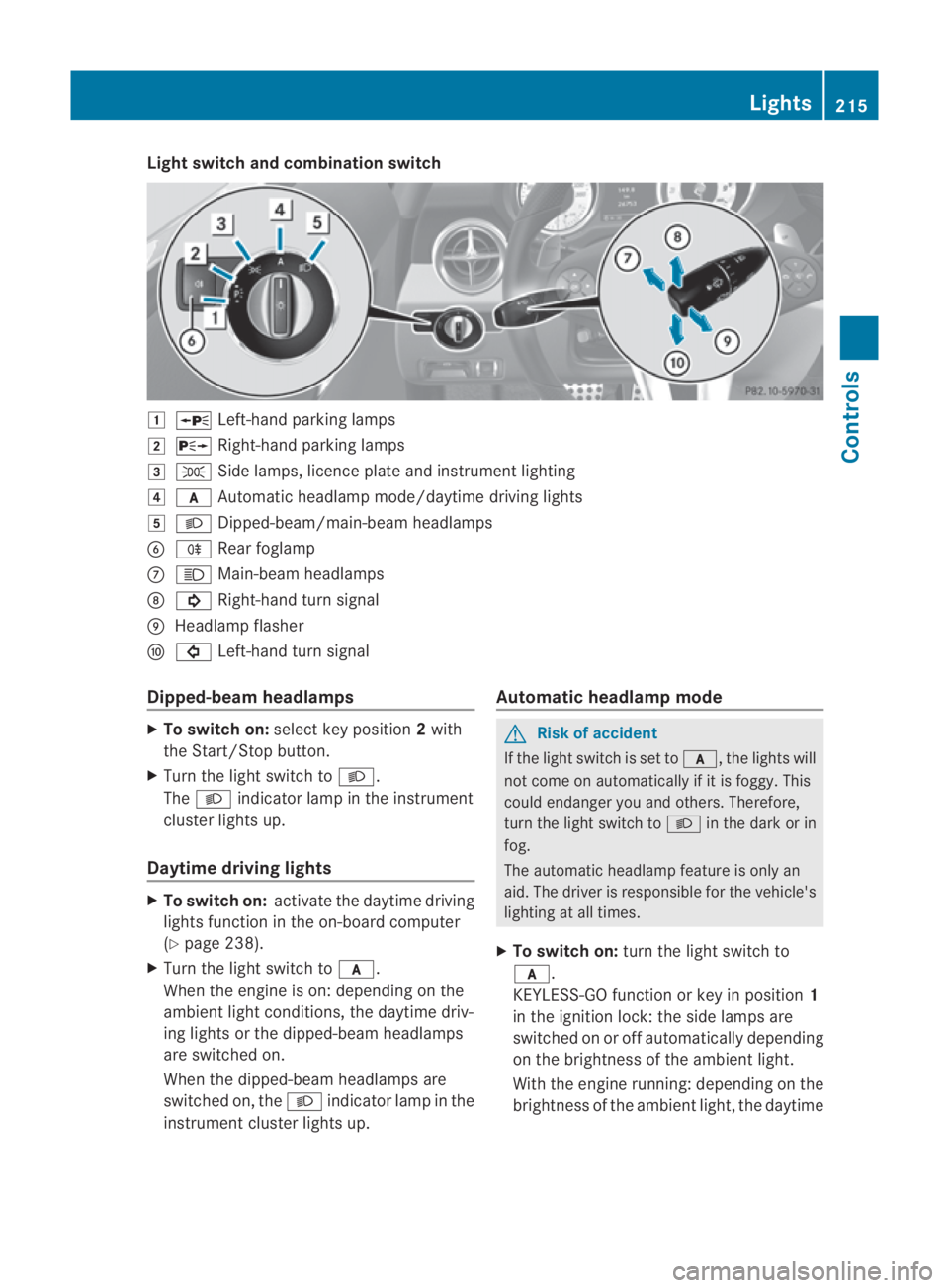
Light switch and combination switch
0003
0010 Left-hand parking lamps
0004 0013 Right-hand parking lamps
0005 000E Side lamps, licence plate and instrumen tlighting
0006 000D Automatic headlamp mode/daytime driving lights
0007 000B Dipped-beam/main-beam headlamps
0013 000D Rear foglamp
000A 0009 Main-beam headlamps
000B 000B Right-hand tur nsignal
000C Headlamp flasher
000D 0007 Left-hand turn signal
Dipped-beam headlamps X
To switch on: selectkey position 2with
the Start/Stop button.
X Turn the light switch to 000B.
The 000B indicator lamp in the instrument
cluster lights up.
Daytime driving lights X
To switch on: activate the daytime driving
lights function in the on-board computer
(Y page 238).
X Turn the light switch to 000D.
When the engine is on: depending on the
ambient light conditions, the daytime driv-
ing lights or the dipped-beam headlamps
are switched on.
When the dipped-beam headlamps are
switched on, the 000Bindicator lamp in the
instrument cluster lights up. Automatic headlamp mode G
Risk of accident
If the light switch is set to 000D, the lights will
not come on automatically if it is foggy. This
could endanger you and others. Therefore,
turn the light switch to 000Bin the dark or in
fog.
The automatic headlamp feature is only an
aid. The driver is responsible for the vehicle's
lighting at all times.
X To switch on: turn the light switch to
000D.
KEYLESS-GO function or key in position 1
in the ignition lock: the side lamps are
switched on or off automatically depending
on the brightness of the ambient light.
With the engine running: depending on the
brightness of the ambient light, the daytime Lights
215Controls
BA 197 ECE RE 2010/6a; 1; 2, en-GB
sabbaeu Version: 3.0.3.6 2010-05-07T14:19:43+02:00 - Seite 215 Z
Page 219 of 361
driving lights
12
or the dipped-beam head-
lamps (in addition to the side lamps) are
switched on or off automatically.
When the dipped-beam headlamps are
switched on, the 000Bindicator lamp in the
instrument cluster lights up.
Rear foglamps i
If you switch off the engine (KEYLESS-GO
function or key in position 1in the ignition
lock) and then restart the engine, the pre-
vious settings for the rear foglamp take
effec tagain.
X Select key position 2with the Start/Stop
button or start the engine.
X Turn the light switch to 000Bor000D 13
.
X To switch on: press the000Dbutton.
The yellow 000Dindicator lamp in the
instrument cluster lights up.
X To switch off: press the000Dbutton.
The yellow 000Dindicator lamp in the
instrument cluster goes out.
Main-beam headlamps X
Select key position 2with the Start/Stop
button or start the engine.
X To switch on: turn the light switch to
000B.
X Press the combination switch beyond the
pressure point in the direction of arrow
000A(Y page 215).
The 0009 indicator lamp in the instrument
cluster lights up.
X To deactivate: move the combination
switch back to its normal position.
The 0009 indicator lamp in the instrument
cluster goes out. Turn signals X
Select key position 2with the Start/Stop
button.
X To indicate briefly: press the combination
switch briefly in the direction of arrow 000B
or 000D(Y page 215).
The corresponding turn signal flashes three
times.
X To indicate: push the combination switch
beyond the pressure point in the direction
of arrow 000Bor000D(Y page 215).
The corresponding turn signal indicator
lamp (000B or0007) flashes in the instru-
ment cluster.
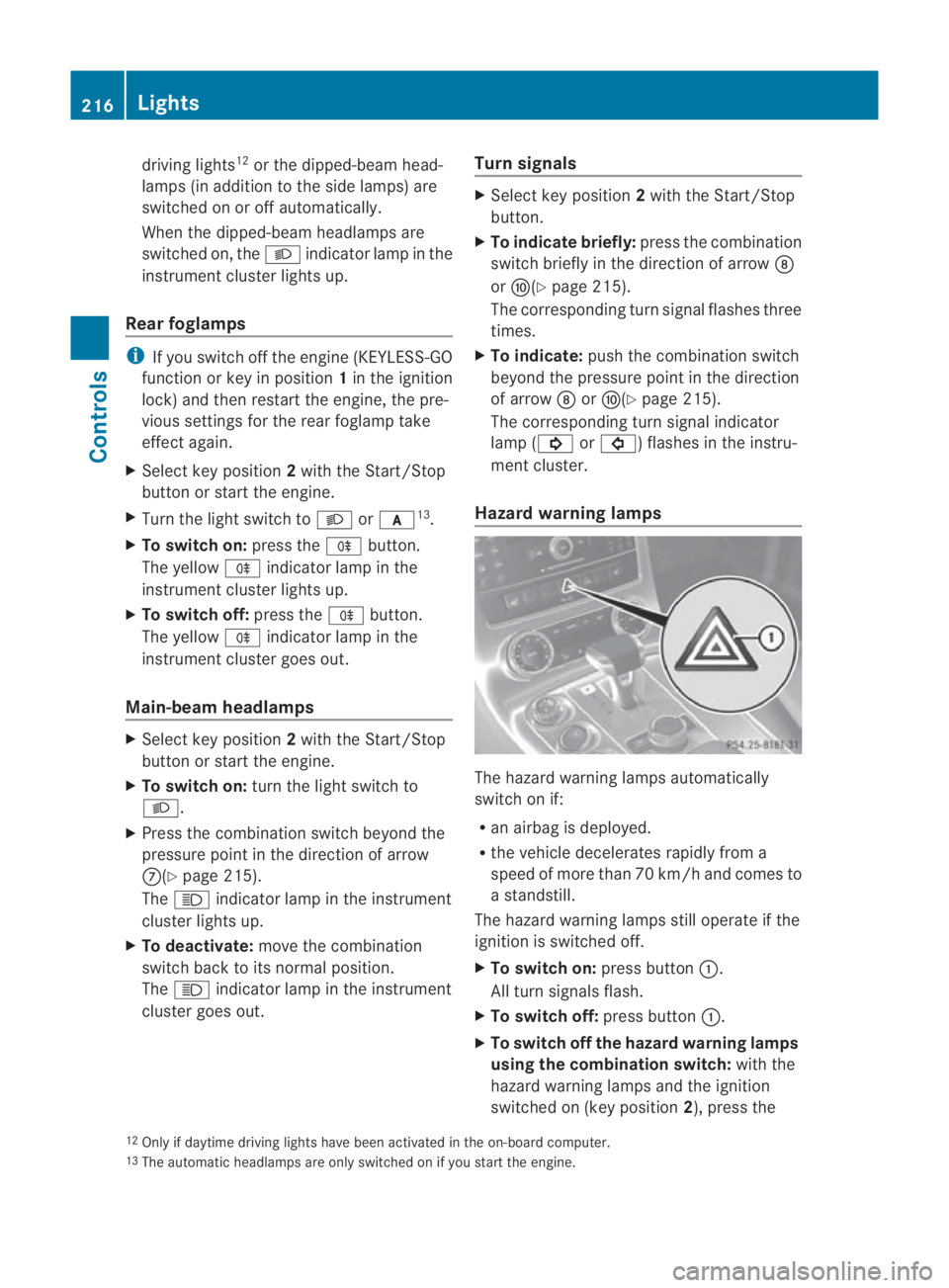
Hazard warning lamps The hazard warning lamps automatically
switch on if:
R
an airbag is deployed.
R the vehicle decelerates rapidly from a
speed of more than 70 km/ha nd comes to
a standstill.
The hazard warning lamps still operate if the
ignition is switched off.
X To switc hon:press button 0001.
All turn signals flash.
X To switch off: press button0001.
X To switch off the hazard warning lamps
using the combination switch: with the
hazard warning lamps and the ignition
switched on (key position 2), press the
12 Only if daytime driving lights have been activated in the on-board computer.
13 The automatic headlamps are only switched on if you start the engine. 216
LightsControls
BA 197 ECE RE 2010/6a; 1; 2, en-GB
sabbaeu
Version: 3.0.3.6 2010-05-07T14:19:43+02:00 - Seite 216
Page 223 of 361
Driving an
dparking Starting the engine
G
Risk of accident
Do not place any objects in the driver's foot-
well. If you use a floormat or carpet in the
driver's footwell, make sure that it is correctly
secured and that there is sufficient clearance
for the pedals.
Do not place several floormats on top of one
another.
Loose objects or the floormats could other-
wise get caught between the pedals if you
accelerate or brake suddenly. You will then
not be able to brake, declutch or accelerate
as intended .This could lead to accidents and
injury. G
Risk of poisoning
Never leave the engine running in enclosed
spaces. The exhaust gases contain carbon
monoxide. Inhaling exhaust fumes consti-
tutes a health hazard and could lead to loss
of consciousness or even death.
i Do not depress the accelerator pedal
when starting the engine.
KEYLESS-GO starting function G
Risk of injury
Your vehicle can be started using a valid KEY-
LESS GO key. For this reason, children should
never be left unsupervised in the vehicle.
Always take the KEYLESS GO key with you
when leaving the vehicle, even if you are only
leaving it for a short time.
i The Start/Stop button can be used to
start the vehicle without inserting the key
in the ignition lock. You merely need to
carry the key on your person.
When starting the engine and while the vehi-
cle is in motion, KEYLESS-GO regularly
checks whether a valid key is located in the
vehicle interior by means of brief radio con- nections. The boot is not covered by the
checks.
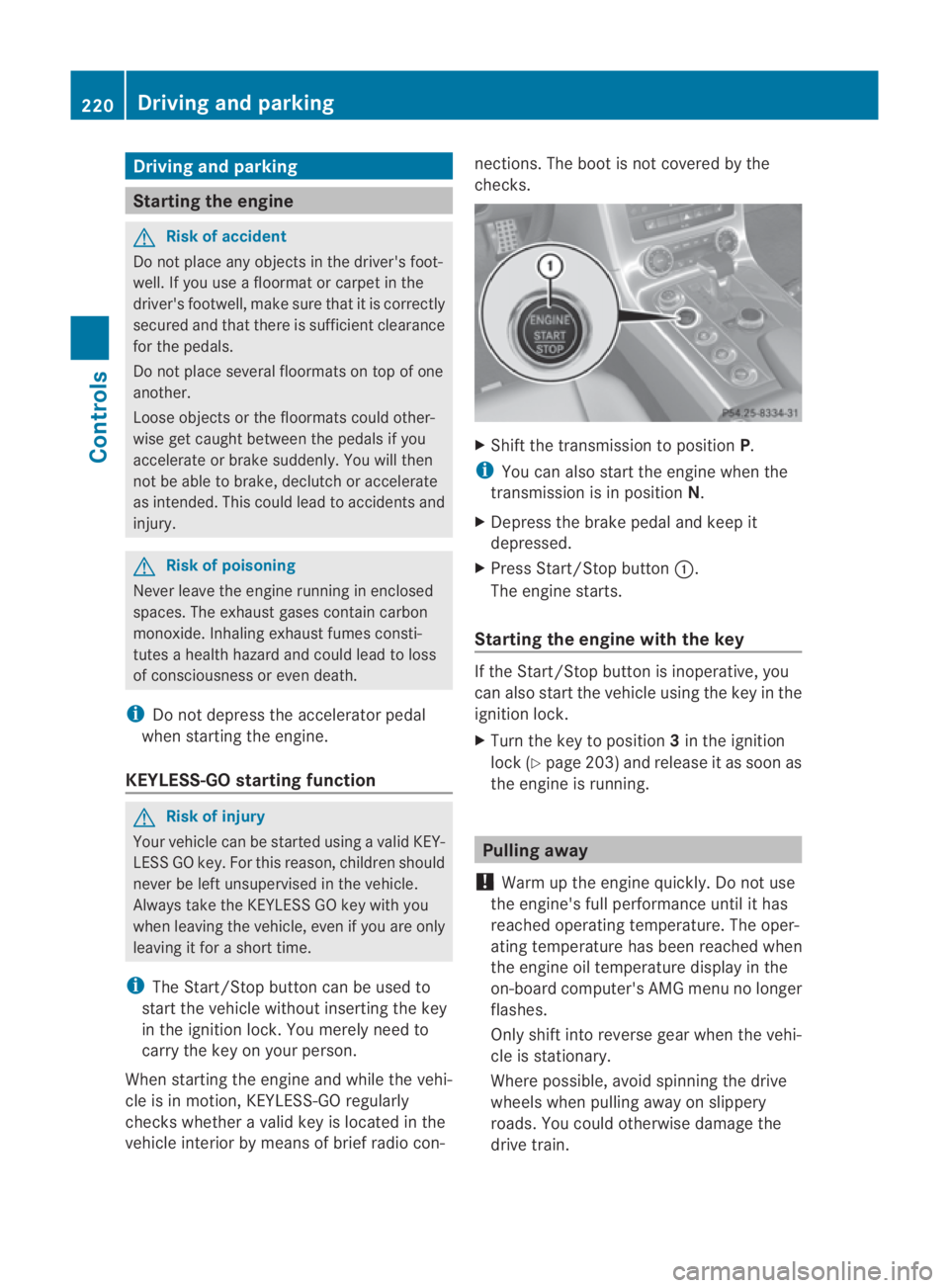
X
Shift the transmission to position P.
i You can also start the engine when the
transmission is in position N.
X Depress the brake pedal and keep it
depressed.
X Press Start/Stop button 0001.
The engine starts.
Starting the engine with the key If the Start/Stop button is inoperative, you
can also start the vehicle using the key in the
ignition lock.
X
Turn the key to position 3in the ignition
lock (Y page 203) and release it as soon as
the engine is running. Pulling away
! Warm up the engine quickly. Do not use
the engine's full performance until it has
reached operating temperature. The oper-
ating temperature has been reached when
the engine oil temperature display in the
on-board computer's AMG menu no longer
flashes.
Only shift into reverse gear when the vehi-
cle is stationary.
Where possible, avoid spinning the drive
wheels when pulling away on slippery
roads. You could otherwise damage the
drive train. 220
Driving and parkingControls
BA 197 ECE RE 2010/6a; 1; 2, en-GB
sabbaeu
Version: 3.0.3.6 2010-05-07T14:19:43+02:00 - Seite 220
Page 225 of 361
Applying the electric parking brake
X Push handle 0001.
The red 0009indicator lamp in the instru-
men tcluster lights up.
i The electric parking brake can also be
applied when the key is in position 0.
Releasing the electric parking brake man-
ually
X Pull handle 0001.
The red 0009indicator lamp in the instru-
men tcluster goes out.
The electric parking brake can only be
released when the ignition is switched on
using the Start/Stop button (Y page 202).
Releasing the electric parking brake auto-
matically
The electric parking brake is released auto-
matically when the following conditions are
simultaneously fulfilled:
R the engine is running.
R the transmission is in position Dor R.
R the bonnet is closed.
R your seat belt is fastened.
R you depress the accelerator pedal.
If the transmission is in position R, the boot
lid must be closed.
For the parking brake to be released auto-
matically if your seat belt is not fastened, the
following conditions must be fulfilled:
R the driver's door is closed.
R you shift out of Por you have previously
driven faster than 3 km/h.
Emergency braking with the electric park-
ing brake
The vehicle can also be braked during an
emergency using the electric parking brake.
X While driving, push the handle of the elec-
tric parking brake (Y page 221).
i The vehicle is braked as long as you keep
the handle of the electric parking brake
pressed. The longer the electric parking brake handle is depressed, the greater the
braking force.
The red 0009indicator lamp flashes in the
instrument cluster during braking. The
Release parking brake message appears
in the multifunction display and a warning
tone sounds.
When the vehicle has been braked to a stand-
still, the electric parking brake is engaged. Switching off the engine
G
Risk of accident
If the engine is not running, there is no power
assistance for the steerin gand brakes. Steer-
ing and braking then requires significantly
greater effort.
As a result, you might lose control of the vehi-
cle, cause an accident and injure yoursel fand
others.
Therefore, do not switch off the engine while
you are driving.
! Do not open the doors until the vehicle
has come to a standstill .Atlow speeds,
park position Pwill otherwise be engaged
automatically. This can damage the trans-
mission.
i Observe the display messages in the
instrument cluster.
Using KEYLESS-GO X
Use the button on the centre console to
shift the transmission to P.
X Press the Start/Stop button (Y page 202).
The engine stops and all the indicator
lamps in the instrument cluster go out
(Y page 229).
i If you switch the engine off with the trans-
mission in position Ror D, the transmission
automatically shifts to N.
If you set the selector lever to Nbefore
switching off the engine, the transmission
remains in Nfor approximately 30 minutes. 222
Driving and parkingControls
BA 197 ECE RE 2010/6a; 1; 2, en-GB
sabbaeu
Version: 3.0.3.6 2010-05-07T14:19:43+02:00 - Seite 222
Page 260 of 361
X
Convenience closing feature: press and
hold the 0010button until the side win-
dows are closed.
The indicator lamp in the 0010button lights
up. Air-recirculation mode is activated.
X Convenience opening: press and hold the
0010 button until the side windows have
returned to their original position.
The indicator lamp in the 0010button goes
out .Air-recirculation mode is deactivated.
i If you open the side windows manually
after closing with the convenience closing
feature, they will remain in this position
when opened using the convenience open-
ing feature. Loading and stowing
Stowage compartments
G
Risk of injury
The stowage compartments must be closed
when items are stored in them. Luggage nets
are not designed to secure heavy items of
luggage.
You or other vehicle occupants could be
injured by objects being thrown around if you:
R brake sharply
R change direction suddenly
R are involved in an accident
Sharp-edged and fragile objects must not be
placed in the luggage net.
Glove compartment In the glove compartment, you will find:
R an AUX IN connection or a Media Inter-
face *(universal interface for mobile audio
devices, e.g. for an iPod ®
or USB device)
R a 12 V power socket X
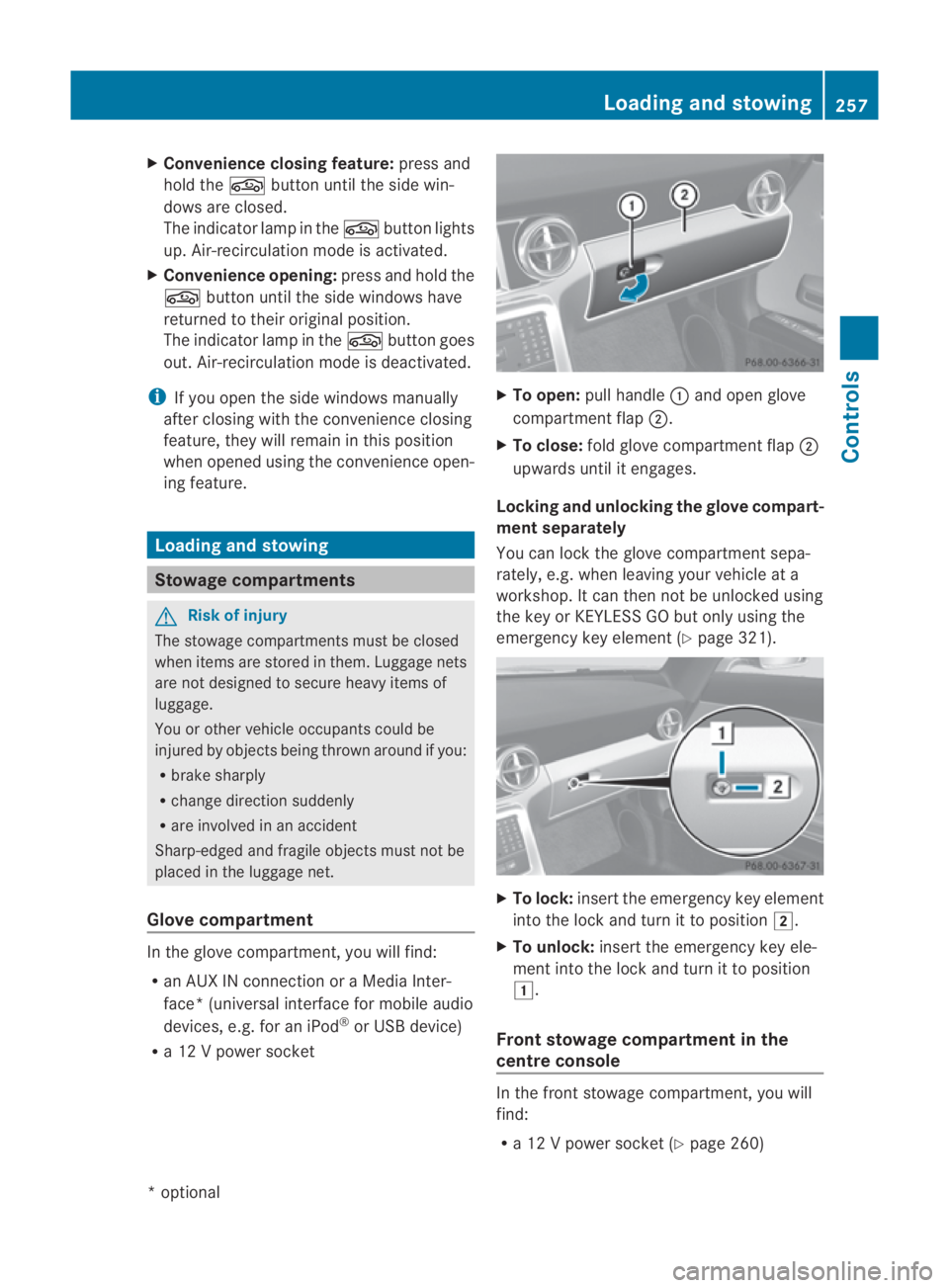
To open: pull handle 0001and open glove
compartment flap 0002.
X To close: fold glove compartmen tflap 0002
upwards until it engages.
Locking and unlocking the glove compart-
ment separately
You can lock the glove compartmen tsepa-
rately, e.g. when leaving your vehicle at a
workshop. It can then not be unlocked using
the key or KEYLESS GO but only using the
emergency key element (Y page 321). X
To lock: insert the emergency key element
into the lock and turn it to position 0004.
X To unlock: insert the emergency key ele-
ment into the lock and turn it to position
0003.
Front stowage compartment in the
centre console In the front stowage compartment, you will
find:
R
a 12 V power socket (Y page 260) Loading and stowing
257Controls
*optional
BA 197 ECE RE 2010/6a; 1; 2, en-GB
sabbaeu
Version: 3.0.3.6 2010-05-07T14:19:43+02:00 - Seite 257 Z