radio controls MERCEDES-BENZ SLS COUPE 2010 Owners Manual
[x] Cancel search | Manufacturer: MERCEDES-BENZ, Model Year: 2010, Model line: SLS COUPE, Model: MERCEDES-BENZ SLS COUPE 2010Pages: 361, PDF Size: 6.32 MB
Page 131 of 361
COMAND from your Mercedes-Benz Service
Centre or on the Internet ( http://
www.mercedes-benz.com/connect ).
Safety notes G
Ris
kofa ccident
You must observe the legal requirements for
the country in which you are currently driving
when operating mobile communications
equipment in the vehicle.
If it is permitted to operate communications
equipment while the vehicle is in motion, you
may only operate such equipment when road
and traffic conditions permit. You may other-
wise be distracted from the traffic conditions,
cause an acciden tand injure yoursel fand oth-
ers.
Two-way radios or fax machines withou tlow-
reflection exterior aerials may interfere with
the vehicle electronics and thereby compro-
mise the operational safety of the vehicle and
your safety. Therefore, only use these if they
are properly connected to a separate, low-
reflection exterior aerial. G
Risk of injury
Excessive electromagnetic radiation may con-
stitute a health hazard to yourself and others.
Use of an exterior aerial gives consideration
to the current scientific discussion surround-
ing the possible health risk posed by electro-
magnetic fields.
General notes Call disconnection while the vehicle is in
motion
Ac all may be disconnected if:
R there is insufficient GSM network coverage
in certain areas.
R you move from one GSM transmitter/
receive rarea (GSM cell) into another and
no channels are free. R
you use a SIM card which is not compatible
with the available network.
R when using a mobile phone with "Twin-
card", the second SIM card is registered on
the network at the same time.
Operating options
You can operate the phone with the following
controls:
R COMAND controller
Turn 002800130029
Slide 002B0013002C or001F0013000D
Press 0017
R the 0016or the 0014button and the telephone
keypad on the COMAND control panel
R Multifunction steering wheel
Unless stated otherwise, the descriptions and
illustrations in this section refer to COMAND.
i Operation with a mobile phone or LIN-
GUATRONIC is described in separate oper-
ating instructions.
Function restrictions
You will not be able to use the telephone, will
no longer be able to use the telephone, or you
may have to wait before using it, in the fol-
lowing situations:
R if the mobile phone is not switched on
R if the "Bluetooth ®
" function on COMAND or
(when telephoning via the Bluetooth ®
inter-
face) on the mobile phone is switched off
R if the mobile phone is not logged into a
mobile phone network
The telephone automatically tries to log
into a network. If no network is available,
you will not be able to make a "112" emer-
gency call. If you attempt to make an out-
going call, the No servicemessage will
appear for a short while.
R if you switch COMAND off during a call in
hands-free mode, the call will be termina-
ted. You can prevent this as follows:
Bluetooth ®
interface telephony: switch
the mobile phone to "Private mode" before 128
TelephoneCOMAND APS
BA 197 ECE RE 2010/6a; 1; 2, en-GB
sabbaeu
Version: 3.0.3.6
2010-05-07T14:19:43+02:00 - Seite 128
Page 223 of 361
Driving an
dparking Starting the engine
G
Risk of accident
Do not place any objects in the driver's foot-
well. If you use a floormat or carpet in the
driver's footwell, make sure that it is correctly
secured and that there is sufficient clearance
for the pedals.
Do not place several floormats on top of one
another.
Loose objects or the floormats could other-
wise get caught between the pedals if you
accelerate or brake suddenly. You will then
not be able to brake, declutch or accelerate
as intended .This could lead to accidents and
injury. G
Risk of poisoning
Never leave the engine running in enclosed
spaces. The exhaust gases contain carbon
monoxide. Inhaling exhaust fumes consti-
tutes a health hazard and could lead to loss
of consciousness or even death.
i Do not depress the accelerator pedal
when starting the engine.
KEYLESS-GO starting function G
Risk of injury
Your vehicle can be started using a valid KEY-
LESS GO key. For this reason, children should
never be left unsupervised in the vehicle.
Always take the KEYLESS GO key with you
when leaving the vehicle, even if you are only
leaving it for a short time.
i The Start/Stop button can be used to
start the vehicle without inserting the key
in the ignition lock. You merely need to
carry the key on your person.
When starting the engine and while the vehi-
cle is in motion, KEYLESS-GO regularly
checks whether a valid key is located in the
vehicle interior by means of brief radio con- nections. The boot is not covered by the
checks.
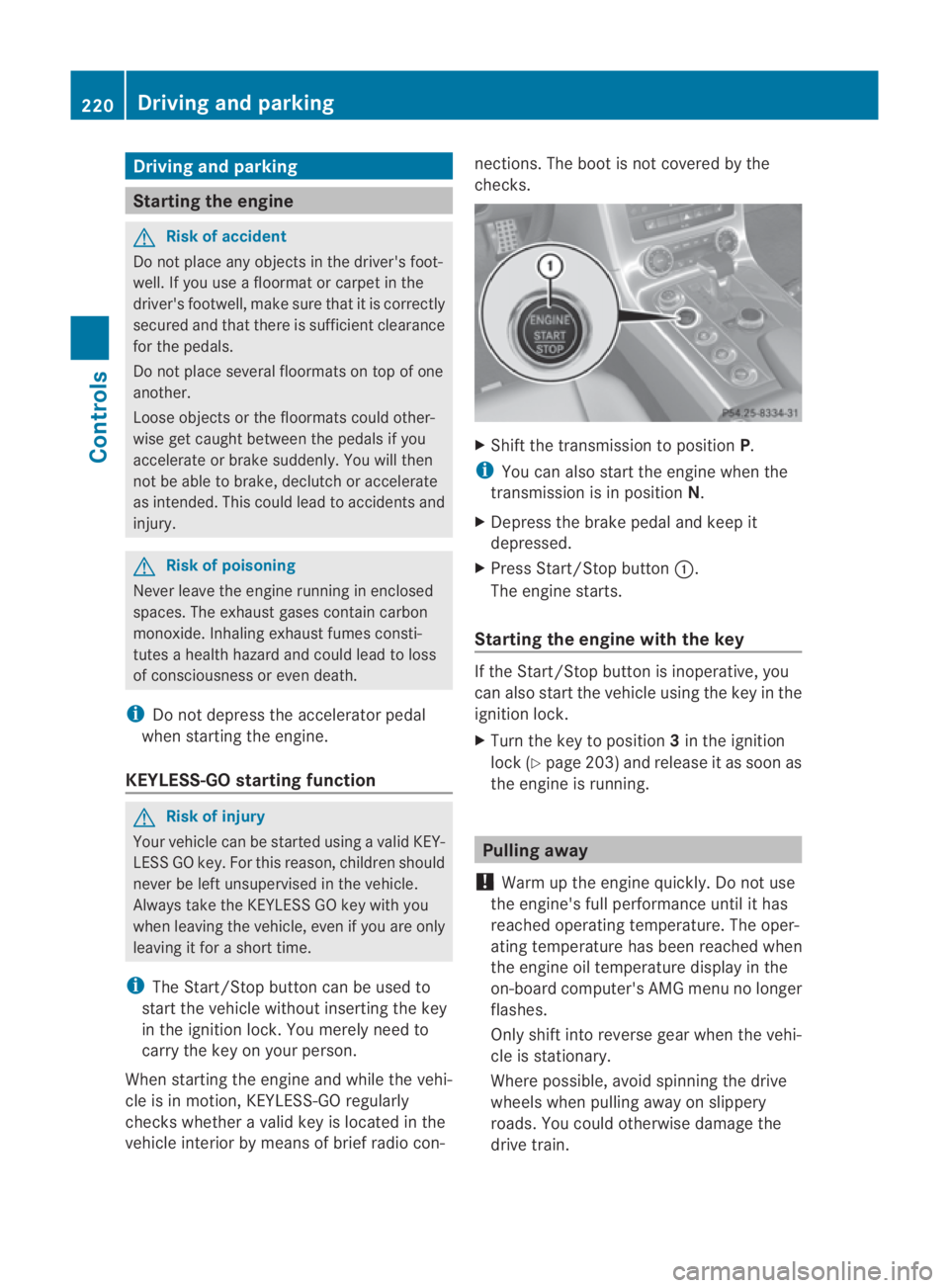
X
Shift the transmission to position P.
i You can also start the engine when the
transmission is in position N.
X Depress the brake pedal and keep it
depressed.
X Press Start/Stop button 0001.
The engine starts.
Starting the engine with the key If the Start/Stop button is inoperative, you
can also start the vehicle using the key in the
ignition lock.
X
Turn the key to position 3in the ignition
lock (Y page 203) and release it as soon as
the engine is running. Pulling away
! Warm up the engine quickly. Do not use
the engine's full performance until it has
reached operating temperature. The oper-
ating temperature has been reached when
the engine oil temperature display in the
on-board computer's AMG menu no longer
flashes.
Only shift into reverse gear when the vehi-
cle is stationary.
Where possible, avoid spinning the drive
wheels when pulling away on slippery
roads. You could otherwise damage the
drive train. 220
Driving and parkingControls
BA 197 ECE RE 2010/6a; 1; 2, en-GB
sabbaeu
Version: 3.0.3.6 2010-05-07T14:19:43+02:00 - Seite 220
Page 238 of 361
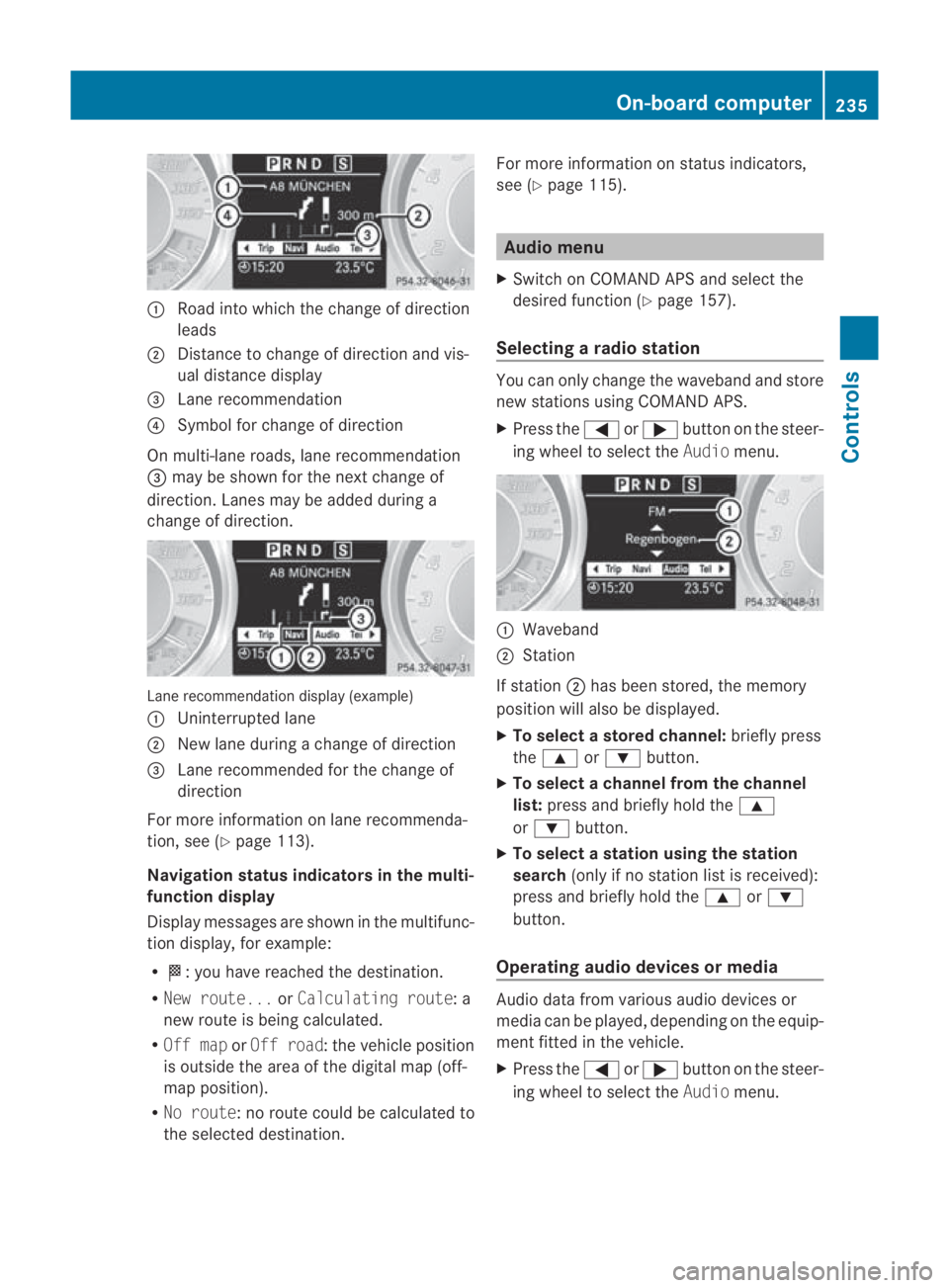
0001
Road into which the change of direction
leads
0002 Distance to change of direction and vis-
ual distance display
0015 Lane recommendation
0014 Symbol for change of direction
On multi-lane roads, lane recommendation
0015 may be shown for the next change of
direction .Lanes may be added during a
change of direction. Lane recommendation display (example)
0001 Uninterrupted lane
0002 New lane during a change of direction
0015 Lane recommended for the change of
direction
For more information on lane recommenda-
tion, see (Y page 113).
Navigation status indicators in the multi-
function display
Display messages are shown in the multifunc-
tio nd isplay, for example:
R 000B:y ou have reached the destination.
R New route... orCalculating route: a
new route is being calculated.
R Off map orOff road :the vehicle position
is outside the area of the digital map (off-
map position).
R No route :no route could be calculated to
the selected destination. For more information on status indicators,
see (Y page 115). Audio menu
X Switch on COMAND APS and select the
desired function (Y page 157).
Selecting aradio station You can only change the waveband and store
new stations using COMAND APS.
X
Press the 0008or000E button on the steer-
ing wheel to select the Audiomenu. 0001
Waveband
0002 Station
If station 0002has bee nstored, the memory
positio nwill also be displayed.
X To select astore dchannel: briefly press
the 000F or000C button.
X To selectac hannel from the channel
list: press and briefly hold the 000F
or 000C button.
X To selectas tation using the station
search (only if no statio nlist is received):
press and briefly hold the 000For000C
button.
Operating audio devices or media Audio data fro
mvarious audio devices or
media can be played, depending on the equip-
ment fitted in the vehicle.
X Press the 0008or000E buttononthe steer-
ing wheel to select the Audiomenu. On-board computer
235Controls
BA 197 ECE RE 2010/6a; 1; 2, en-GB
sabbaeu Version: 3.0.3.6 2010-05-07T14:19:43+02:00 - Seite 235 Z
Page 263 of 361
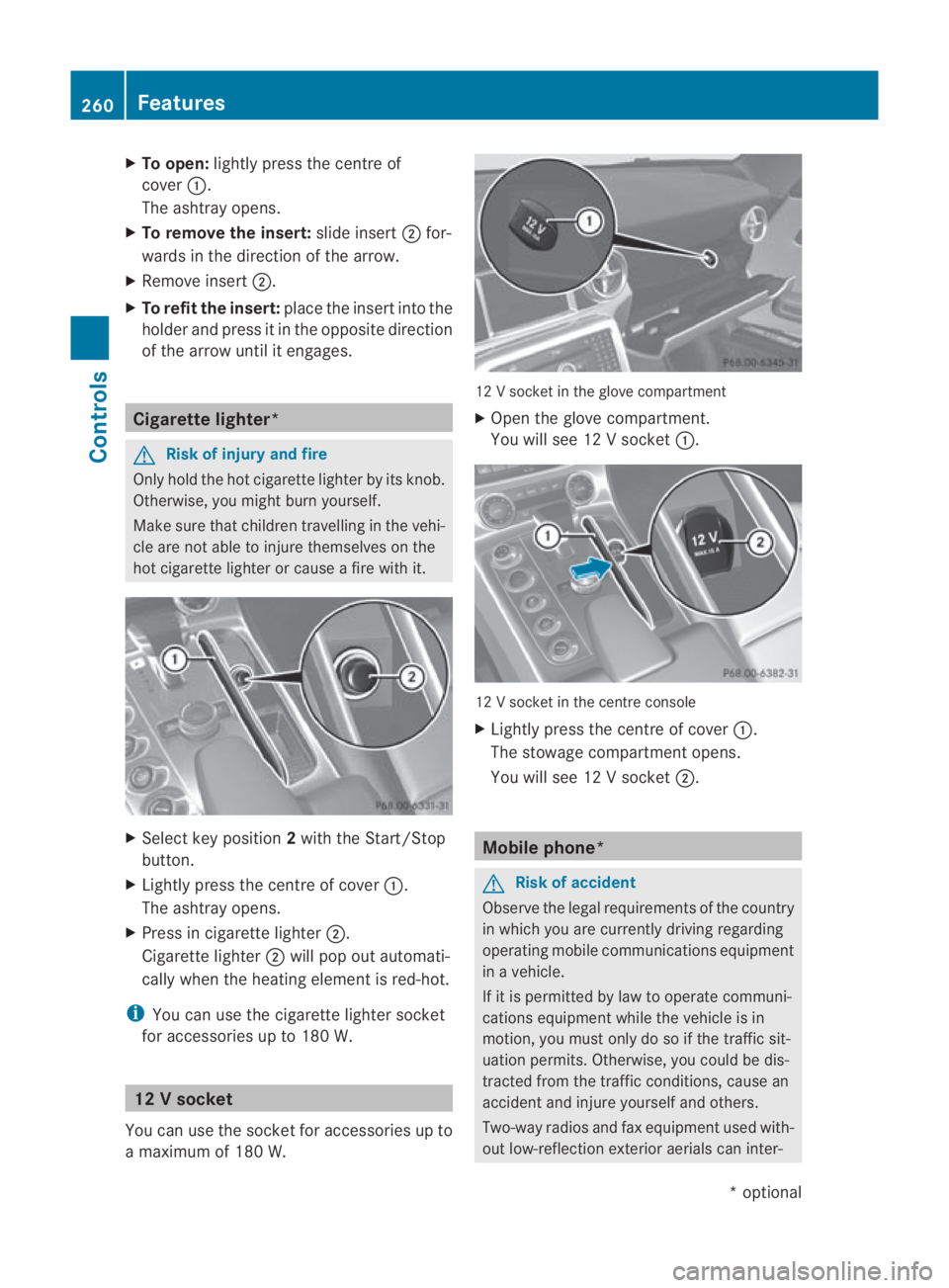
X
To open: lightly press the centre of
cover 0001.
The ashtray opens.
X To remove the insert: slide insert0002for-
wards in the direction of the arrow.
X Remove insert 0002.
X To refi tthe insert: place the insert into the
holder and press it in the opposite direction
of the arrow until it engages. Cigarette lighter*
G
Risk of injury and fire
Only hold the hot cigarette lighter by its knob.
Otherwise, you might burn yourself.
Make sure that children travelling in the vehi-
cle are not able to injure themselves on the
hot cigarette lighter or cause a fire with it. X
Select key position 2with the Start/Stop
button.
X Lightly press the centre of cover 0001.
The ashtray opens.
X Press in cigarette lighter 0002.
Cigarette lighter 0002will pop out automati-
cally whe nthe heating element is red-hot.
i You can use the cigarette lighter socket
for accessories up to 180 W. 12
Vsocket
You can use the socket for accessories up to
a maximum of 180 W. 12 V socket in the glove compartment
X
Open the glove compartment.
You will see 12 Vsocket 0001. 12 V socket in the centre console
X
Lightly press the centre of cover 0001.
The stowage compartment opens.
You will see 12 Vsocket 0002. Mobile phone*
G
Risk of accident
Observe the legal requirements of the country
in which you are currently driving regarding
operating mobile communications equipment
in a vehicle.
If it is permitted by law to operate communi-
cations equipment while the vehicle is in
motion, you must only do so if the traffic sit-
uation permits. Otherwise, you could be dis-
tracted from the traffic conditions, cause an
accident and injure yourself and others.
Two-way radios and fax equipment used with-
out low-reflection exterior aerials can inter- 260
FeaturesControls
*o
ptional
BA 197 ECE RE 2010/6a; 1; 2, en-GB
sabbaeu
Version: 3.0.3.6 2010-05-07T14:19:43+02:00 - Seite 260