trip computer MERCEDES-BENZ SLS COUPE 2010 Owners Manual
[x] Cancel search | Manufacturer: MERCEDES-BENZ, Model Year: 2010, Model line: SLS COUPE, Model: MERCEDES-BENZ SLS COUPE 2010Pages: 361, PDF Size: 6.32 MB
Page 9 of 361
Trim strips
..................................... 285
Windows ........................................ 283
Wiper blades .................................. 283
Care products .................................... 280
CD Cop yprotection ............................. 167
Disc ............................................... 167
General information .......................167
Multisession .................................. 166
Playback options ........................... 178
Selecting amedium ....................... 175
Selecting atrack ............................ 176
CD/DVD
Ejecting .......................................... 170
Loading .......................................... 168
CD player/CD changer
Operating (on-board computer) .....235
Central locking
Key ................................................ 200
Central unlocking
Key ................................................ 200
Centre
Entering ........................................... 98
Centre console
Lowe rsection .................................. 30
Uppe rsection .................................. 29
Changing awheel
see Flat tyre
Changing bulbs
Headlamps .................................... .323
Tai llamp ........................................ 324
Changing direction ............................112
Announcement phase ....................112
Change of direction phase .............112
Preparation phase .........................112
Character entry ................................... 64
Charge maintenance socket ............264
Children In the vehicle ................................... 40
Restraint system .............................. 41
Child seat
Automatic recognition .....................42
Automatic recognition (malfunc-
tion) ............................................... 307
Child sea tlock ................................. 45
Display message ............................ 291Recommendations
...........................45
Suitable positions ............................ 44
Child seat lock ..................................... 45
Cigarette lighter ................................ 260
Cleaning agents ................................. 280
Cockpit Overview .......................................... 23
COMAND
Basi cfunction s................................ 67
Components .................................... 55
Switching on/off .............................. 67
COMAND controller .............................59
COMAND control panel .......................57
COMAND display ................................. 55
Cleaning ......................................... 284
Cleaning instructions .......................57
Setting ............................................. 72
COMAND operating system ................ 55
Constant headlamp mode see Daytime driving lights ..............238
Control menu
Showing/hiding ............................. 193
Convenience closing feature ............219
Convenience opening feature ..........219
Coolant Checking the leve l......................... 269
Display message ............................ 299
Mixture ratio .................................. 351
Copy protection (CD/DVD) ...............167
Country Selecting .......................................... 93
Crosshair
Hiding .............................................. 84
Crosshair position
Saving ...................................... 84, 127
Cruise control .................................... 243
Display message ............................ 293
Cup holder ......................................... 258
Current fuel consumption (on-
board computer) ............................... 233 D
DAB Sub-programme ............................. 165
DAB radio mode
Switching to ................................... 1586
Index BA 197 ECE RE 2010/6a; 1; 2, en-GB
sabbae uV ersion: 3.0.3.6
2010-05-07T14:19:43+02:00 - Seite 6
Page 14 of 361
LINGUATRONIC
Individualisatio n............................... 74
Settings ........................................... 73
Luggage net
Front-passenger footwell ...............259 M
Main-beam headlamps Display message ............................ 301
Maintenance
Battery ........................................... 334
Manual drive program ......................229
Map Adjusting the map scal e.................. 83
Arrival time/distance to destina-
tion .................................................. 88
Calling up ....................................... 103
Centring on vehicle or destination
position ............................................ 84
Information on map .........................88
Map displa y..................................... 84
Moving ............................................. 83
RDS-TMC displays .........................120
Showing geo-coordinates ................89
Showing road names .......................89
Map orientation ................................... 84
Setting ............................................. 84
Map scale
Setting ............................................. 83
Matt paintwork
Cleaning ......................................... 282
Media Interface
Metadata ....................................... 187
MP3 player. ................................... 184
Media Interface mode .......................183
Connectio noption s....................... 183
Media Interface operation
Basi cmenu .................................... 186
Select file ....................................... 186
Switching ....................................... 185
Media list ........................................... 175
Memory card (on-board computer) .235
Memory function ............................... 210
Menu Menu overview .............................. 232
Menu (on-board computer) ...............232
AMG ............................................... 241 Audi
o............................................. 235
Navigation ..................................... 234
Service .......................................... .237
Settings ......................................... 238
Telephone ...................................... 236
Trip ................................................ 232
Menu item
Selecting .......................................... 64
Menu overview
Address book ................................. 151
Bluetooth ®
telephony .................... 133
CD/DVD audio and MP3 mode ...... 172
Convenience telephony .................135
DAB radio mode ............................ .160
MUSIC REGISTER ........................... 180
Navigation ........................................ 81
Radio mode ................................... 160
Video DVD ..................................... 193
Menu system
Showing/hiding .......................83, 194
Mercedes-Benz Contact ....................156
Message see Display message .....................289
see Warning and indicator lamps ...308
Mirrors
Sun visor ........................................ 259
see Exterior mirrors or Rear-view mirror
Mobile phone ..................................... 260
Authorisation ................................. 129
Connecting (Bluetooth ®
interface) .129
Connecting (convenience teleph-
ony) ............................................... 133
De-authorisation ............................ 131
External authorisation ....................131
Installatio n..................................... 347
Telephone menu (on-board com-
puter) ............................................. 236
Modifying the programming
Key ................................................ 200
Motorway information ........................89
MP3 Bit/sampling rates ......................... 166
Copyright ....................................... 167
Disc ............................................... 166
File systems ................................... 166
Formats ......................................... 166 Index
11 BA 197 ECE RE 2010/6a; 1; 2, en-GB
sabbaeu Version: 3.0.3.6 2010-05-07T14:19:43+02:00 - Seite 11
Page 15 of 361
Operating (on-board computer)
.....235
Selecting amedium ....................... 175
Multifunction display ..........................62
Multifunction steering wheel .....62, 230
Overview .......................................... 28
Multisession CDs ............................... 166
Music Register .................................. .178
Copying musi cdata ....................... 181
MUSIC REGISTER
Deleting allm usic files................... 182
My address ........................................ 123N
Navigation Basi csettings .................................. 84
On-board computer .......................234
Navigation announcements .............116
Switching off .................................. 116
Switching on .................................. 116
North up orientation ...........................84
Notes on running in anew vehicle ..266 O
Odometer see Total distance recorde r........... 233
see Trip meter ....................... 233, 234
Off-map .............................................. 115
Off-road .............................................. 115
Oil Consumption ................................. 269
Topping up ..................................... 269
Oil level
Checking (dipstick) ........................269
On-board computer ...........................230
AMG menu ..................................... 241
Audi omenu ................................... 235
Convenience submenu ..................240
Display messages ..........................289
Factory settings ............................. 240
Instrument cluster submenu ..........238
Ligh tsubmenu ............................... 238
Navigation menu ............................ 234
Overview ........................................ 232
Service menu ................................. 237
Settings menu ............................... 238
Standard display submenu ............233 Telephone menu
............................ 236
Trip menu ...................................... 232
Vehicle submenu ........................... 240
Opening and closing .........................200
Acoustic confirmation ....................240
Operating system
see On-board computer
Orientation in direction of travel .......84
Outside temperature indicator ........230 P
Pain tcode .......................................... 348
Paintwork Cleaning ......................................... 283
Parking ............................................... 221
Parking aid Exterior mirror on the front-
passenger side ............................... 209
PARKTRONI C................................. 248
Parking brake
Display message ............................ 296
Electric parking brake ....................221
Parking position
Exterior mirror on the front-
passenger side ............................... 209
PARKTRONIC ...................................... 248
Activating/deactivating .................250
Malfunction ................................... .316
Range of the sensors .....................248
Warning displa y............................. 249
PASSENGE RAIRBAG OFF warning
lamp ............................................. 42, 307
PCMCIA memory card Ejecting .......................................... 171
Loading .......................................... 169
Permanent Speedtronic ....................247
Petrol Minimum grade .............................. 267
see Fuel
Phone book
Adding a numbe rto an address
book entry. .................................... 141
Calling up ....................................... 137
Creating anew entry ..................... 14012
Index BA 197 ECE RE 2010/6a; 1; 2, en-GB
sabbae uV ersion: 3.0.3.6
2010-05-07T14:19:43+02:00 - Seite 12
Page 19 of 361
Tone settings
Trebl eand bass ............................... 68
Total distance recorder ....................233
Tow-away protection ..........................49
Towing ........................................ 339, 341
Towing eye Fitting ............................................ 341
Removing ....................................... 341
Town
Entering ........................................... 94
Traffic announcements on ...............164
Traffic jam function ........................... 117
Traffic Programme Switching traffic announcements
on/off ............................................ 164
Transferring acall (convenience
telephone) .......................................... 146
Transmission oil Temperature gauge (on-board
computer) ...................................... 241
Transmission output (maximum)
Telephone/two-way radio ..............347
Transport (vehicle) ............................341
Trim strips Cleaning ......................................... 285
Trip computer
On-board computer .......................232
Trip meter .......................................... 233
Resetting (on-board computer) ......234
True Image™ ........................................ 68
Turn signal Display message ............................ 300
Two-way radio
Installatio n..................................... 347
Type identification plate
see Vehicle identification plate ......348
Tyre grip ............................................. 278
Tyre pressure ..................................... 272
Calling up (on-board computer) .....273
Display message ............................ 304
Tyre pressure monitor
Warning lamp ................................. 311
Tyres
Direction of rotatio n...................... 272
General notes ................................ 270
Technical data ............................... 354
Tyre tread .......................................... .272 U
Unladen weight ................................. 352
Unlocking Emergency unlocking ..................... 322
Updating
Map software ................................... 89
Upshift indicator ............................... 229
USB devices Connecting to the Media Inter-
face ............................................... 184
Folders and playlists ......................187
Using the telephone ..........................144
Multi-function steering wheel ..........62 V
Variable Speedtronic ........................246
vCards Receiving ....................................... 137
Vehicle
Emergency unlocking ..................... 322
Individual settings (on-board com-
puter) ............................................. 238
Leaving parked up .........................321
Towing ........................................... 341
Transporting .................................. 341
Unlocking (key ).............................. 200
Vehicle battery .................................. 334
Vehicle dimensions ...........................352
Vehicle electronics ...........................346
Vehicle identification number
(VIN) ................................................... 348
Vehicle identification plate ..............348
Vehicle position Saving ...................................... 83, 127
Vehicle tool kit .................................. 288
Vehicle weights ................................. 352
Video DVD Fast forward/rewind ..................... .194
Operation ....................................... 190
Pause function ............................... 195
Picture settings .............................. 195
Selecting a film/title ..................... .195
Selecting a scene/chapter ............195
Stop function ................................. 194
Video mode
Automatic picture shutoff ..............190 16
Index BA 197 ECE RE 2010/6a; 1; 2, en-GB
sabbae uV ersion: 3.0.3.6
2010-05-07T14:19:43+02:00 - Seite 16
Page 235 of 361
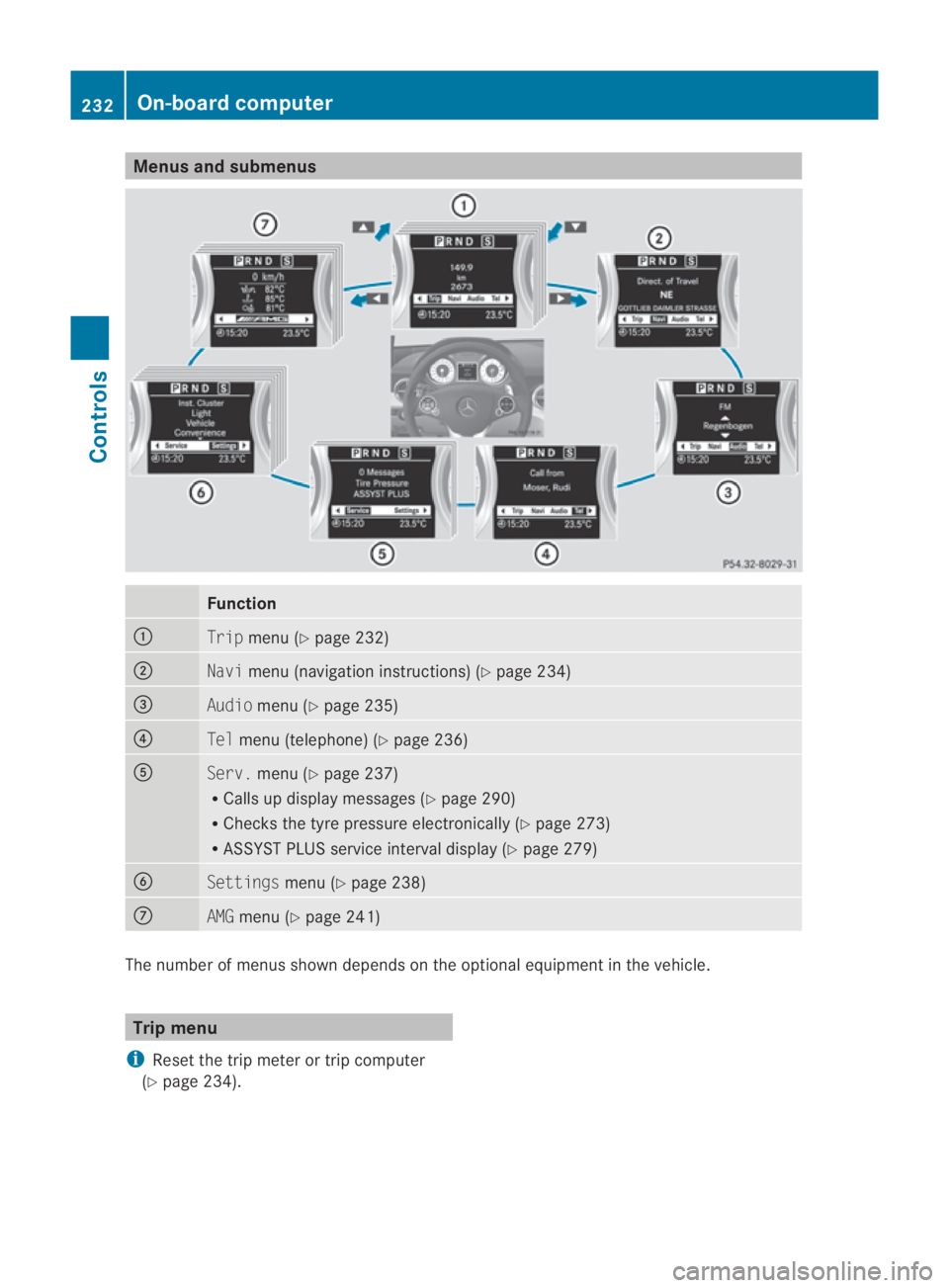
Menus and submenus
Function
0001
Trip
menu (Y page 232) 0002
Navi
menu (navigatio ninstructions) (Y page 234) 0015
Audio
menu (Y page 235) 0014
Tel
menu (telephone) (Y page 236)0012
Serv.
menu (Y page 237)
R Calls up display messages (Y page 290)
R Checks the tyre pressure electronically (Y page 273)
R ASSYST PLUS service interval display (Y page 279)0013
Settings
menu (Ypage 238) 000A
AMG
menu (Y page 241) The numbe
rofmenus shown depends on the optional equipment in the vehicle. Trip menu
i Reset the trip meter or trip computer
(Y page 234). 232
On-board computerControls
BA 197 ECE RE 2010/6a; 1; 2, en-GB
sabbaeu
Version: 3.0.3.6 2010-05-07T14:19:43+02:00 - Seite 232
Page 236 of 361
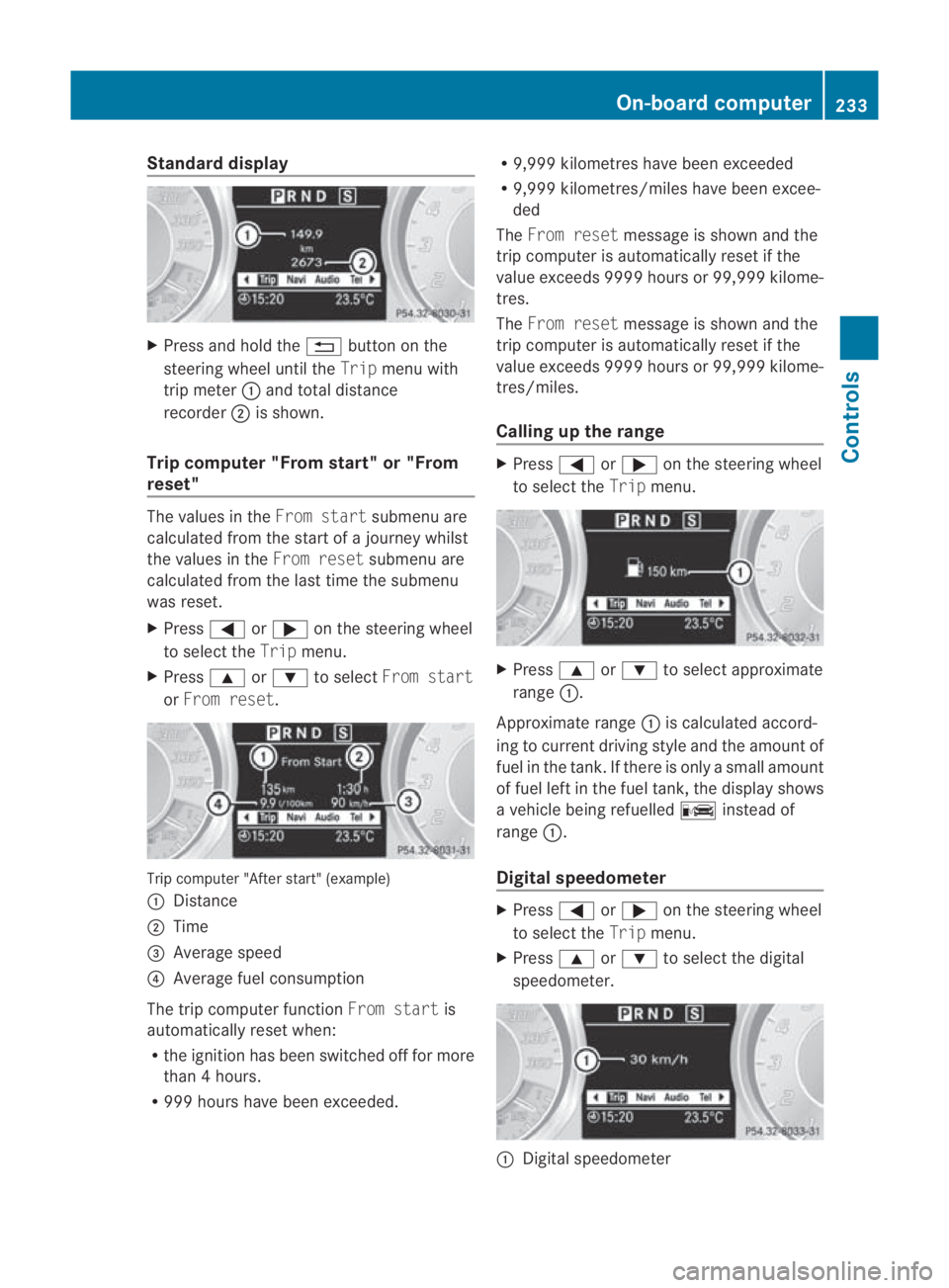
Standard display
X
Press and hold the 0001button on the
steering wheel until the Tripmenu with
trip meter 0001and total distance
recorder 0002is shown.
Trip computer "From start" or "From
reset" The values in the
From startsubmenu are
calculated from the start of a journey whilst
the values in the From resetsubmenu are
calculated from the last time the submenu
was reset.
X Press 0008or000E on the steering wheel
to select the Tripmenu.
X Press 000For000C to select From start
or From reset. Trip computer "After start" (example)
0001
Distance
0002 Time
0015 Average speed
0014 Average fuel consumption
The trip computer function From startis
automatically reset when:
R the ignition has been switched off for more
than 4hours.
R 999 hours have been exceeded. R
9,999 kilometres have been exceeded
R 9,999 kilometres/miles have been excee-
ded
The From reset message is shown and the
trip computer is automatically reset if the
value exceeds 9999 hours or 99,999 kilome-
tres.
The From reset message is shown and the
trip computer is automatically reset if the
value exceeds 9999 hours or 99,999 kilome-
tres/miles.
Calling up the range X
Press 0008or000E on the steering wheel
to select the Tripmenu. X
Press 000For000C to select approximate
range 0001.
Approximate range 0001is calculated accord-
ing to current driving style and the amount of
fuel in the tank.Ift here is only a small amount
of fuel left in the fuel tank, the display shows
a vehicle being refuelled 000Cinstead of
range 0001.
Digital speedometer X
Press 0008or000E on the steering wheel
to select the Tripmenu.
X Press 000For000C to select the digital
speedometer. 0001
Digital speedometer On-board computer
233Controls
BA 197 ECE RE 2010/6a; 1; 2, en-GB
sabbaeu Version: 3.0.3.6 2010-05-07T14:19:43+02:00 - Seite 233 Z
Page 237 of 361
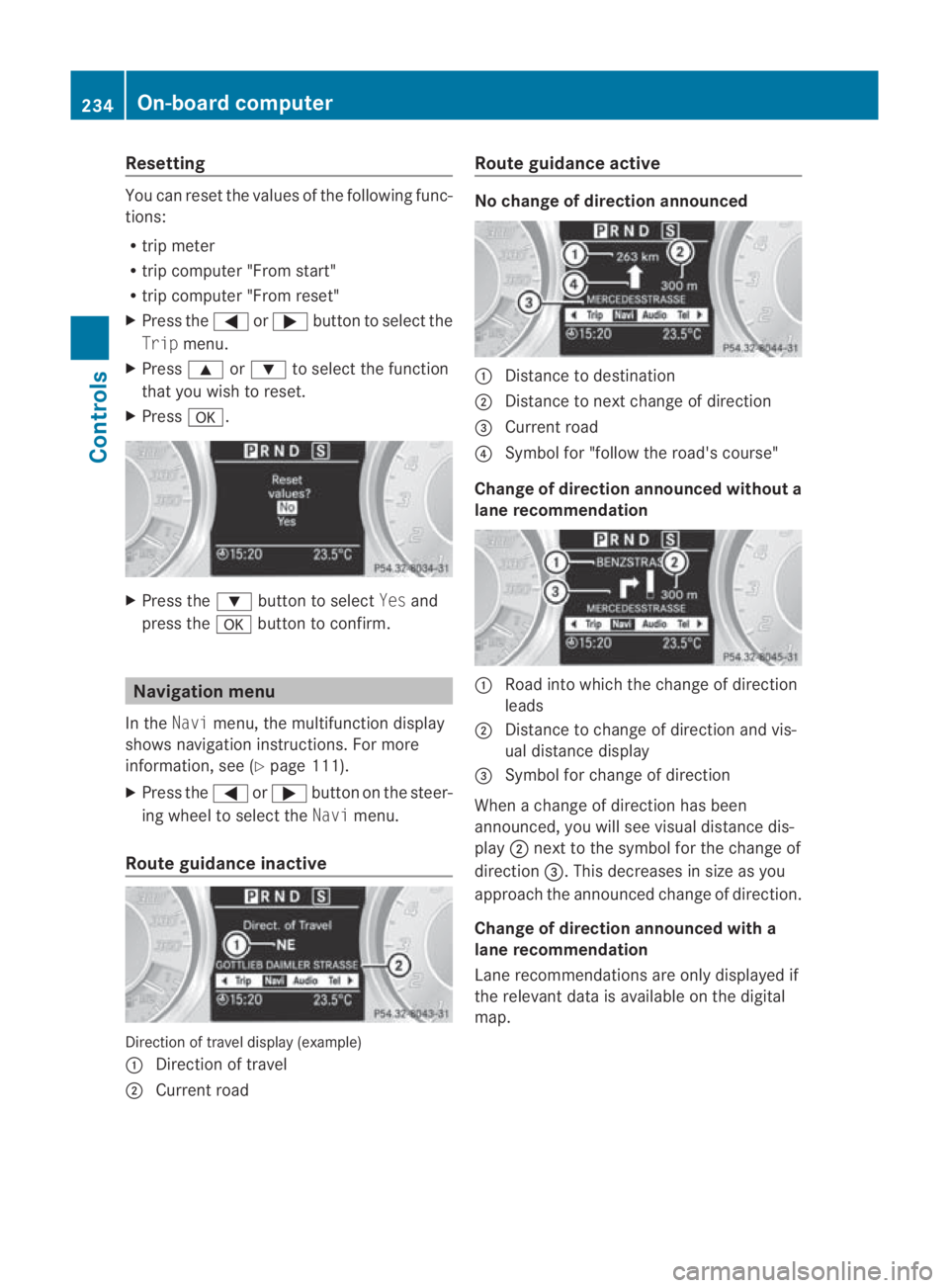
Resetting
You can reset the values of the following func-
tions:
R trip meter
R trip computer "From start"
R trip computer "From reset"
X Press the 0008or000E button to select the
Trip menu.
X Press 000For000C to select the function
that you wish to reset.
X Press 000A. X
Press the 000Cbutton to select Yesand
press the 000Abutton to confirm. Navigation menu
In the Navimenu, the multifunction display
shows navigation instructions .For more
information, see (Y page 111).
X Press the 0008or000E button on the steer-
ing wheel to select the Navimenu.
Route guidance inactive Direction of travel display (example)
0001
Direction of travel
0002 Current road Route guidance active No change of direction announced
0001
Distance to destination
0002 Distance to next change of direction
0015 Current road
0014 Symbol for "follow the road's course"
Change of direction announced without a
lane recommendation 0001
Road into which the change of direction
leads
0002 Distance to change of direction and vis-
ual distance display
0015 Symbol for change of direction
When a change of direction has been
announced, you will see visual distance dis-
play 0002next to the symbol for the change of
direction 0015.This decreases in size as you
approach the announced change of direction.
Change of direction announced with a
lane recommendation
Lane recommendations are only displayed if
the relevant data is available on the digital
map. 234
On-board computerControls
BA 197 ECE RE 2010/6a; 1; 2, en-GB
sabbaeu
Version: 3.0.3.6 2010-05-07T14:19:43+02:00 - Seite 234
Page 241 of 361
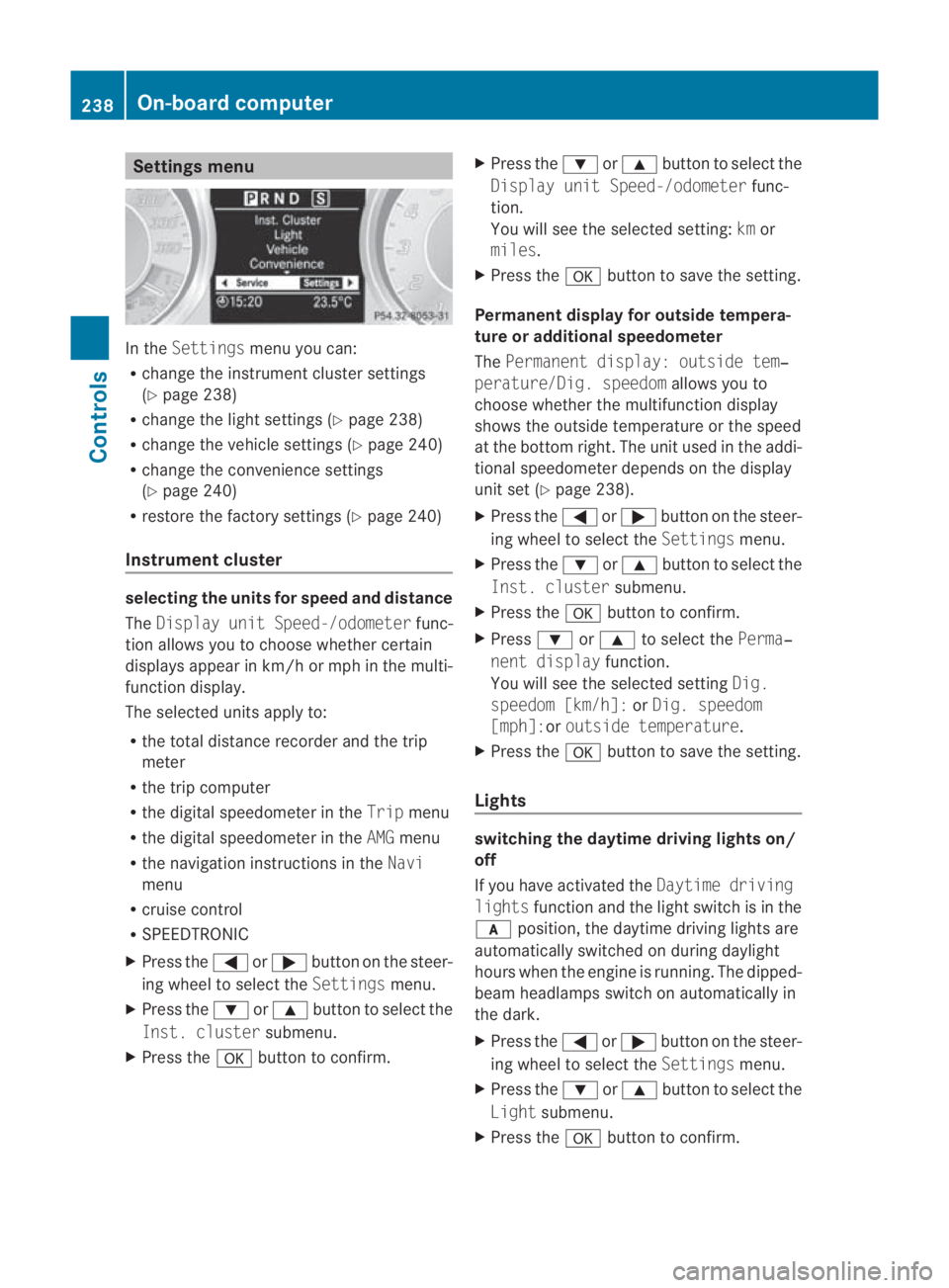
Settings menu
In the
Settings menu you can:
R change the instrument cluster settings
(Y page 238)
R change the light settings (Y page 238)
R change the vehicle settings (Y page 240)
R change the convenience settings
(Y page 240)
R restore the factory settings (Y page 240)
Instrument cluster selecting the units for speed and distance
The Display unit Speed-/odometer func-
tion allows you to choose whether certain
displays appear in km/h or mph in the multi-
function display.
The selected units apply to:
R the total distance recorder and the trip
meter
R the trip computer
R the digital speedometer in the Tripmenu
R the digital speedometer in the AMGmenu
R the navigation instructions in the Navi
menu
R cruise control
R SPEEDTRONIC
X Press the 0008or000E button on the steer-
ing wheel to select the Settingsmenu.
X Press the 000Cor000F button to select the
Inst. cluster submenu.
X Press the 000Abutton to confirm. X
Press the 000Cor000F button to select the
Display unit Speed-/odometer func-
tion.
You will see the selected setting: kmor
miles.
X Press the 000Abutton to save the setting.
Permanent display for outside tempera-
ture or additional speedometer
The Permanent display: outside tem‐
perature/Dig. speedom allows you to
choose whether the multifunction display
shows the outside temperature or the speed
at the bottom right. The unit used in the addi-
tional speedometer depends on the display
unit set (Y page 238).
X Press the 0008or000E button on the steer-
ing wheel to select the Settingsmenu.
X Press the 000Cor000F button to select the
Inst. cluster submenu.
X Press the 000Abutton to confirm.
X Press 000Cor000F to select the Perma‐
nent display function.
You will see the selected setting Dig.
speedom [km/h]: orDig. speedom
[mph]:or outside temperature.
X Press the 000Abutton to save the setting.
Lights switching the daytime driving lights on/
off
If you have activated the
Daytime driving
lights function and the light switch is in the
000D position, the daytime driving lights are
automatically switched on during daylight
hours when the engine is running. The dipped-
beam headlamps switch on automatically in
the dark.
X Press the 0008or000E button on the steer-
ing wheel to select the Settingsmenu.
X Press the 000Cor000F button to select the
Light submenu.
X Press the 000Abutton to confirm. 238
On-board computerControls
BA 197 ECE RE 2010/6a; 1; 2, en-GB
sabbaeu Version: 3.0.3.6 2010-05-07T14:19:43+02:00 - Seite 238
Page 275 of 361
the standard valve cap or other valve caps
approved by Mercedes-Benz for your vehi-
cle.
R You should regularly check the pressure of
all your tyres, particularly prior to long trips,
and correct the pressure as necessary
(Y page 272).
Notes on driving R
While driving, pay attentio nto vibrations,
noises and unusual handling characteris-
tics, e.g. pulling to one side. This may indi-
cate that the wheels or tyres are damaged.
If you suspect that a tyre is defective,
reduce your speed immediately. Stop the
vehicle as soon as possible to check the
wheels and tyres for damage. Hidden tyre
damage could also be causing the unusual
handling characteristics. If you find no
signs of damage, have the wheels and tyres
examined at a specialist workshop, for
example at a Mercedes-Benz Service
Centre.
R When parking your vehicle, make sure that
the tyres do not get deformed by the kerb
or other obstacles. If it is necessary to drive
over kerbs, speed humps or similar eleva-
tions, try to do so slowly and at an obtuse
angle. Otherwise, the tyres, particularly the
sidewalls, can get damaged. Direction of rotation
Tyres with a specified direction of rotation
have additional benefits, e.g. if there is a risk
of aquaplaning. You will only gain these ben-
efits if the correct direction of rotation is
observed.
An arrow on the tyre wall indicates its correct
direction of rotation. Tyre tread
G
Risk of accident
Bear in mind that:
R tyre grip decreases rapidly on wet roads
when the tread depth is less than 3mm.
Thus, you should replace tyres that have
insufficient tread.
R winter tyres should be replaced when the
tread depth is 4mmorless as they will no
longer provide adequate grip.
R the tread on a tyre may not wear evenly.
Thus, you should regularly check the tread
depth and the condition of the tread across
the entire width of all tyres. If necessary,
turn the steering wheel so that you can see
the tyre tread more easily.
You could otherwise lose control of the vehi-
cle and cause an acciden tdue to the reduced
grip of the tyres on the road. Tyre pressures
i You will find a table of tyre pressures for
various operating conditions on the inside
of your vehicle's fuel fille rflap.
The value specified in the technical data is
valid for the collapsible emergency spare
wheel* 18
. G
Risk of accident
Tyre pressure that is either too high or too low
has a negative effect on vehicle safety, which
could lead you to cause an accident .There-
fore, you should regularly check the pressure
of all the tyres, particularly prior to long trips,
and correct the pressure as necessary.
Use a suitable tyre pressure gauge to do this.
The outer appearance of a tyre does not per-
mit any reliable conclusion about the tyre
pressure. You can also check the tyre pres-
sure using the on-board computer.
18 Only for certain countries. 272
Tyres and wheelsOperation
*o
ptional
BA 197 ECE RE 2010/6a; 1; 2, en-GB
sabbaeu
Version: 3.0.3.6 2010-05-07T14:19:43+02:00 - Seite 272