lock MERCEDES-BENZ SPRINTER 2006 Service Manual
[x] Cancel search | Manufacturer: MERCEDES-BENZ, Model Year: 2006, Model line: SPRINTER, Model: MERCEDES-BENZ SPRINTER 2006Pages: 2305, PDF Size: 48.12 MB
Page 2007 of 2305
(9) Install instrument panel top cover and screws.
(Fig. 15)
(10) Install right outer and inner air nozzles. (Fig.
13)
(11) Install right side cover and screws.
(12) Wrap protective mat around connectors
behind instrument cluster.
(13) Install left outer and inner air nozzles.
(14) Install left side cover and screws.
(15) Install passenger side air nozzle cover and
bracket and install the screws. (Fig. 12)
(16) Position Power Distribution Center (PDC) in
vehicle and connect electrical connectors. (Fig. 11)
(17) Install PDC and install bolt and nut. (Fig. 10)
(18) Install PDC ground cable and nut.
(19) Install steering column shroud and install the
two screws and one nut. (Fig. 9)
(20) Install PDC cover and twist lock 1/4 turn to
secure in place. (Fig. 8)
(21) Connect electrical connectors and cables to air
conditioning push-button module and install. (Fig. 7)
(22) Install center bezel. (Refer to 23 - BODY/IN-
STRUMENT PANEL/INSTRUMENT PANEL CEN-
TER BEZEL - INSTALLATION)
(23) Install left and right speakers. (Refer to 8 -
ELECTRICAL/AUDIO/SPEAKER - INSTALLATION)
(24) Install passenger airbag. (Refer to 8 - ELEC-
TRICAL/RESTRAINTS/PASSENGER AIRBAG -
INSTALLATION)
(25) Install instrument cluster. (Refer to 8 - ELEC-
TRICAL/INSTRUMENT CLUSTER - INSTALLA-
TION)
(26) Install cup holder. (Refer to 23 - BODY/IN-
STRUMENT PANEL/CUP HOLDER - INSTALLA-
TION)
(27) Install glove compartment. (Refer to 23 -
BODY/INSTRUMENT PANEL/GLOVE BOX -
INSTALLATION)
(28) Install radio. (Refer to 8 - ELECTRICAL/AU-
DIO/RADIO - INSTALLATION)
(29) Connect battery negative cable.
TOP COVER - CLUSTER
REMOVAL
WARNING: ON VEHICLES EQUIPPED WITH AIR-
BAGS, DISABLE THE AIRBAG SYSTEM BEFORE
ATTEMPTING ANY STEERING WHEEL, STEERING
COLUMN, SEAT BELT TENSIONER, OR INSTRU-
MENT PANEL COMPONENT DIAGNOSIS OR SER-
VICE. DISCONNECT AND ISOLATE THE BATTERY
NEGATIVE (GROUND) CABLE, THEN WAIT TWO
MINUTES FOR THE AIRBAG SYSTEM CAPACITOR
TO DISCHARGE BEFORE PERFORMING FURTHER
DIAGNOSIS OR SERVICE. THIS IS THE ONLY SURE
WAY TO DISABLE THE AIRBAG SYSTEM. FAILURETO TAKE THE PROPER PRECAUTIONS COULD
RESULT IN ACCIDENTAL AIRBAG DEPLOYMENT
AND POSSIBLE PERSONAL INJURY.
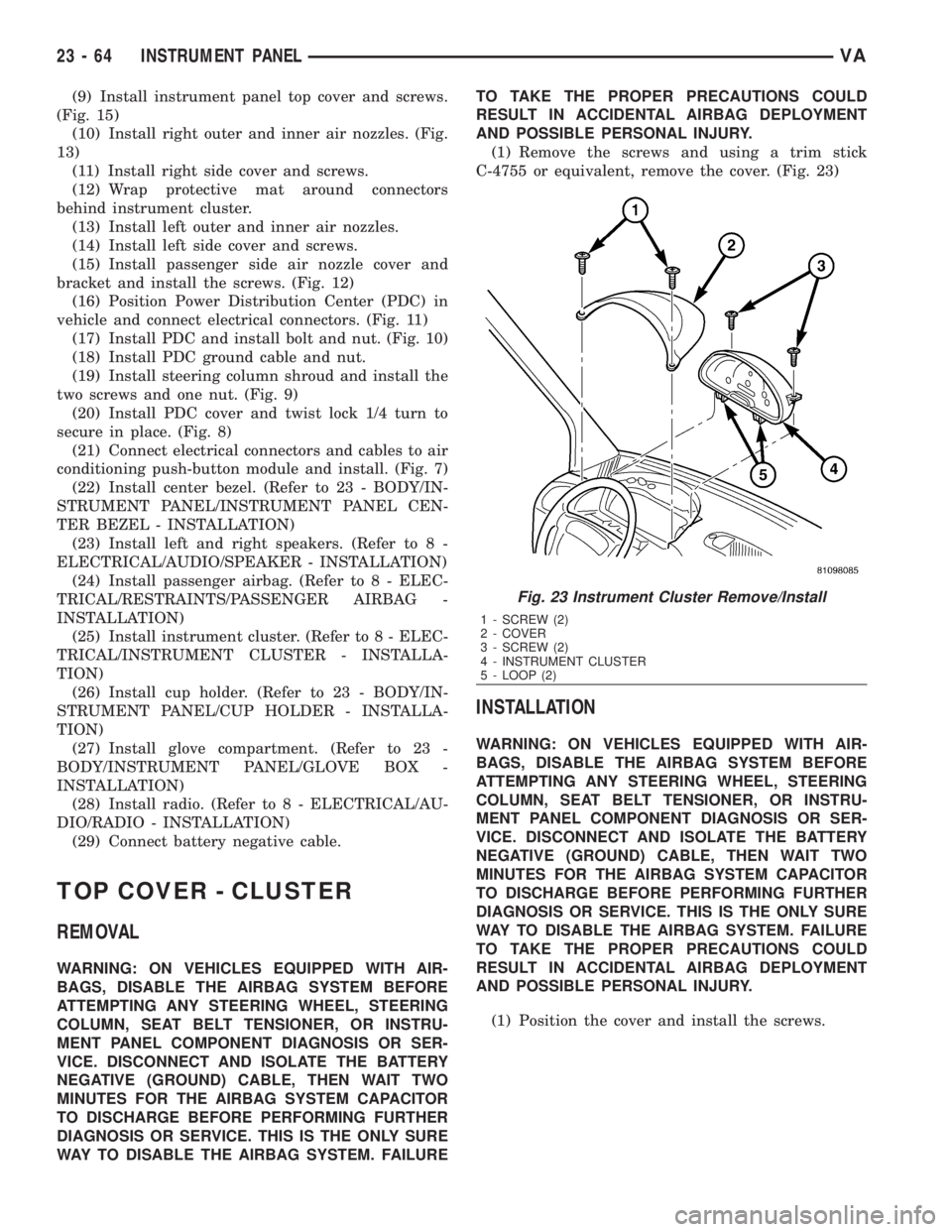
(1) Remove the screws and using a trim stick
C-4755 or equivalent, remove the cover. (Fig. 23)
INSTALLATION
WARNING: ON VEHICLES EQUIPPED WITH AIR-
BAGS, DISABLE THE AIRBAG SYSTEM BEFORE
ATTEMPTING ANY STEERING WHEEL, STEERING
COLUMN, SEAT BELT TENSIONER, OR INSTRU-
MENT PANEL COMPONENT DIAGNOSIS OR SER-
VICE. DISCONNECT AND ISOLATE THE BATTERY
NEGATIVE (GROUND) CABLE, THEN WAIT TWO
MINUTES FOR THE AIRBAG SYSTEM CAPACITOR
TO DISCHARGE BEFORE PERFORMING FURTHER
DIAGNOSIS OR SERVICE. THIS IS THE ONLY SURE
WAY TO DISABLE THE AIRBAG SYSTEM. FAILURE
TO TAKE THE PROPER PRECAUTIONS COULD
RESULT IN ACCIDENTAL AIRBAG DEPLOYMENT
AND POSSIBLE PERSONAL INJURY.
(1) Position the cover and install the screws.
Fig. 23 Instrument Cluster Remove/Install
1 - SCREW (2)
2 - COVER
3 - SCREW (2)
4 - INSTRUMENT CLUSTER
5 - LOOP (2)
23 - 64 INSTRUMENT PANELVA
Page 2012 of 2305
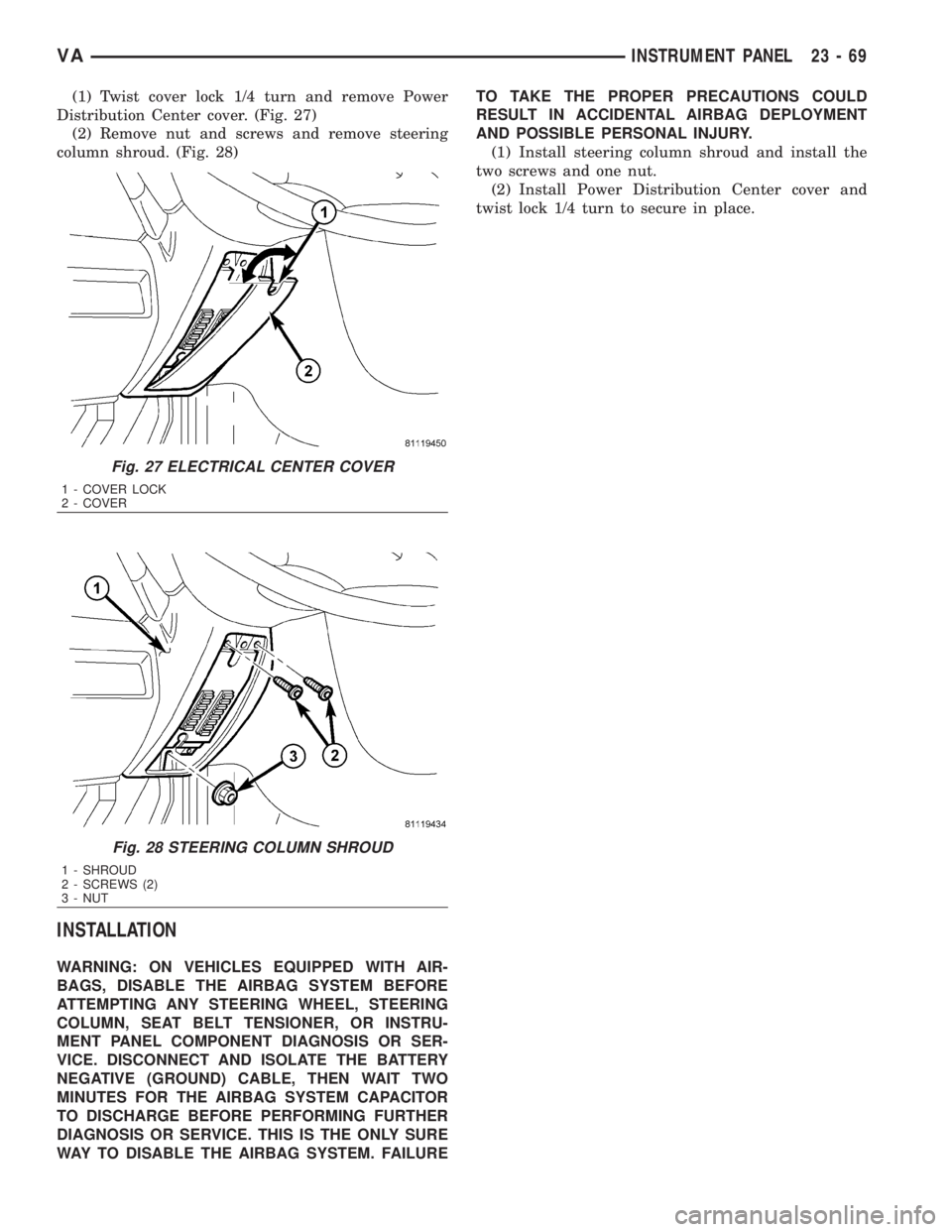
(1) Twist cover lock 1/4 turn and remove Power
Distribution Center cover. (Fig. 27)
(2) Remove nut and screws and remove steering
column shroud. (Fig. 28)
INSTALLATION
WARNING: ON VEHICLES EQUIPPED WITH AIR-
BAGS, DISABLE THE AIRBAG SYSTEM BEFORE
ATTEMPTING ANY STEERING WHEEL, STEERING
COLUMN, SEAT BELT TENSIONER, OR INSTRU-
MENT PANEL COMPONENT DIAGNOSIS OR SER-
VICE. DISCONNECT AND ISOLATE THE BATTERY
NEGATIVE (GROUND) CABLE, THEN WAIT TWO
MINUTES FOR THE AIRBAG SYSTEM CAPACITOR
TO DISCHARGE BEFORE PERFORMING FURTHER
DIAGNOSIS OR SERVICE. THIS IS THE ONLY SURE
WAY TO DISABLE THE AIRBAG SYSTEM. FAILURETO TAKE THE PROPER PRECAUTIONS COULD
RESULT IN ACCIDENTAL AIRBAG DEPLOYMENT
AND POSSIBLE PERSONAL INJURY.
(1) Install steering column shroud and install the
two screws and one nut.
(2) Install Power Distribution Center cover and
twist lock 1/4 turn to secure in place.
Fig. 27 ELECTRICAL CENTER COVER
1 - COVER LOCK
2 - COVER
Fig. 28 STEERING COLUMN SHROUD
1 - SHROUD
2 - SCREWS (2)
3 - NUT
VAINSTRUMENT PANEL 23 - 69
Page 2023 of 2305

(4) Disconnect the electrical connectors, if
equipped.
INSTALLATION
(1) Position seat in vehicle and connect the electri-
cal connectors, if equipped.
(2) Install the mounting bolts and tighten to 25
N´m (18 ft. lbs.).
(3) Install the seat belt anchor and bolt.
(4) Tighten anchor bolt to 35 N´m (26 ft. lbs.).
(5) Connect battery negative cable.
SEAT BACK - FRONT
REMOVAL
(1) Disconnect and isolate battery negative cable.
(2) Remove seat cushion. (Refer to 23 - BODY/
SEATS/SEAT CUSHION - FRONT - REMOVAL)
(3) Verify that seat back is in full upright position.
(4) Disconnect lumbar support hose, if equipped.
(Fig. 3)
(5) Remove seat back bolts and remove seat
back.
INSTALLATION
(1) Remove stop screw.
(2) Install seat back locking spline side first.
NOTE: For better centering of seat back in the
mounting bore during installation, operate the seat
back release lever once.
(3) Install the spline side seat back bolt.
(4) Install remaining seat back side.
NOTE: It may be necessary to press the guide tabs
apart slightly.
(5) Install the remaining seat back bolt.
(6) Tighten the seat back bolts to 20 N´m (15 ft.
lbs.).
(7) Place seat back in the foremost position until
the hold down spring latches audibly.
(8) Install stop bolt and tighten to 20 N´m (15 ft.
lbs.).
(9) Connect the lumbar support hose, if equipped.
(10) Check seat back operation.
(11) Install the seat cushion. (Refer to 23 - BODY/
SEATS/SEAT CUSHION - FRONT - INSTALLA-
TION)
SEAT CUSHION - FRONT
REMOVAL
(1) Disconnect and isolate battery negative cable.
(2) Move seat to the foremost position.
(3) On standard cushion equipped vehicles, remove
the front two screws. (Fig. 4)
Fig. 2 FRONT SEAT
1 - SEAT BELT ANCHOR BOLT
2 - BOLTS (6)
Fig. 3 FRONT SEAT BACK
1 - SEAT BACK
2 - STOP BOLT
3 - LUMBAR SUPPORT HOSE
4 - GUIDE TAB
5 - RELEASE LEVER
6 - SEAT BACK BOLTS (2)
23 - 80 SEATSVA
Page 2038 of 2305
HEATING & AIR CONDITIONING
TABLE OF CONTENTS
page page
HEATING & AIR CONDITIONING
DESCRIPTION..........................1
OPERATION............................2
DIAGNOSIS AND TESTING
A/C PERFORMANCE....................3
HEATER PERFORMANCE TEST...........5
ATC FUNCTION TEST...................6
SPECIFICATIONS
HEATING-A/C SYSTEM..................6CONTROLS-FRONT........................8
CONTROLS - REAR......................24
DISTRIBUTION - FRONT...................45
DISTRIBUTION - REAR....................52
PLUMBING.............................60
CABIN HEATER.........................104
HEATING & AIR CONDITION-
ING
DESCRIPTION
An automatic temperature control (ATC) single
zone type heating-A/C system is standard equipment
on this model.
To maintain the performance level of the heating,
ventilation and air conditioning (HVAC) system, the
engine cooling system must be properly maintained.
The use of a bug screen is not recommended. Any
obstructions in front of the radiator or A/C condenser
will reduce the performance of the A/C and engine
cooling systems.
The engine cooling system includes the radiator,
thermostat, radiator hoses and the engine coolant
pump. Refer to 7 - Cooling for more information
before opening or attempting any service to the
engine cooling system.
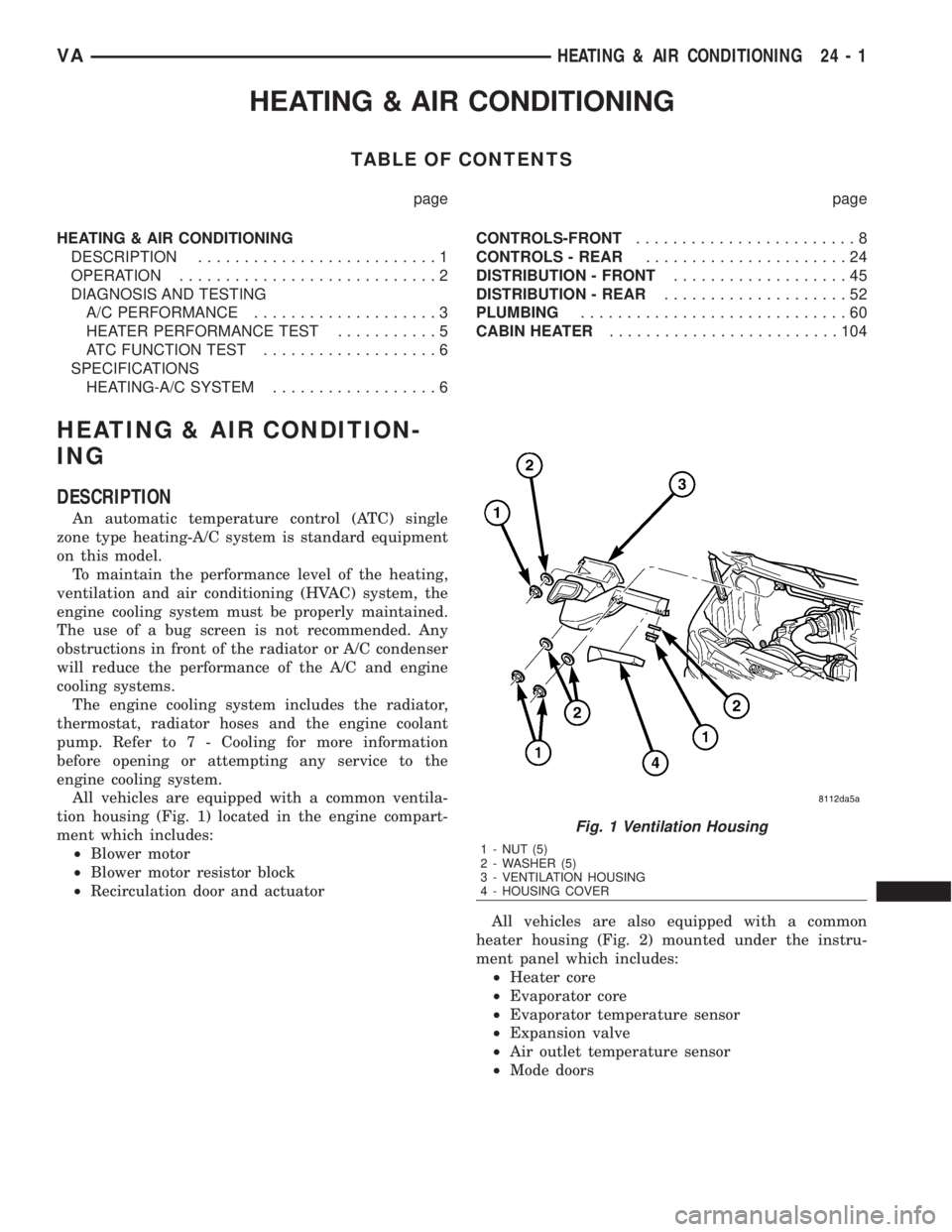
All vehicles are equipped with a common ventila-
tion housing (Fig. 1) located in the engine compart-
ment which includes:
²Blower motor
²Blower motor resistor block
²Recirculation door and actuator
All vehicles are also equipped with a common
heater housing (Fig. 2) mounted under the instru-
ment panel which includes:
²Heater core
²Evaporator core
²Evaporator temperature sensor
²Expansion valve
²Air outlet temperature sensor
²Mode doors
Fig. 1 Ventilation Housing
1 - NUT (5)
2 - WASHER (5)
3 - VENTILATION HOUSING
4 - HOUSING COVER
VAHEATING & AIR CONDITIONING 24 - 1
Page 2041 of 2305
(4) With the A/C compressor clutch engaged, duct
temperature should not be less than 2É C (35É F) or
more than 12É C (54É F). The compressor clutch may
cycle, depending upon the ambient temperature and
humidity. If the clutch cycles, use the readings
obtained before the clutch disengaged.
(5) If the A/C compressor clutch has not cycled off
and the duct temperature is less than 2É C (35É F),
check the evaporator temperature sensor and circuitby performing the ATC Function Test (Refer to 24 -
HEATING & AIR CONDITIONING - DIAGNOSIS
AND TESTING - ATC FUNCTION TEST).
(6) If the air outlet temperature fails to meet the
specifications, refer to the A/C System Diagnosis
chart.
A/C SYSTEM DIAGNOSIS
Condition Possible Causes Correction
Rapid A/C compressor clutch
cycling (ten or more cycles
per minute).Very low refrigerant system
charge.See Refrigerant System Leaks in this group.
Test the refrigerant system for leaks. Repair,
evacuate and charge the refrigerant system, if
required.
Equal pressures, but the
compressor clutch does not
engage.1. No refrigerant in the refrig-
erant system.1. See Refrigerant System Leaks in this
group. Test the refrigerant system for leaks.
Repair, evacuate and charge the refrigerant
system, if required.
2. Faulty fuse. 2. Check the fuses in the Power distribution
block and junction block. Repair the shorted
circuit or component and replace the fuses, if
required. Refer to Group 8.
3. Faulty A/C compressor
clutch coil.3. See A/C Compressor Clutch Coil in this
group. Test the compressor clutch coil and
replace, if required.
4. Improperly installed or faulty
evaporator temperature sensor.4. See Evaporator Temperature Sensor in this
group. Test the sensor and replace, if re-
quired.
5. Faulty A/C pressure trans-
ducer.5. See A/C Pressure Transducer in this
group. Test the sensor and replace, if re-
quired.
6. Faulty engine Control Mod-
ule (ECM).6. Refer to Group 9 - Engine Electrical Diag-
nostics for testing of the ECM. Test the ECM
and replace, if required.
Normal pressures, but A/C
Performance Test air temper-
atures at center panel outlet
are too high.1. Excessive refrigerant oil in
system.1. See Refrigerant Oil Level in this group.
Recover the refrigerant from the refrigerant
system and inspect the refrigerant oil content.
Restore the refrigerant oil to the proper level,
if required.
2. Blend door cable improperly
installed or faulty.2. See Mode Door Cables in this group. In-
spect the cable for proper operation and re-
place, if required.
3. Blend-air door(s) inoperative
or sealing improperly.3. See HVAC Housing in this group. Inspect
the blend-air door(s) for proper operation and
sealing. Repair if required.
24 - 4 HEATING & AIR CONDITIONINGVA
Page 2046 of 2305
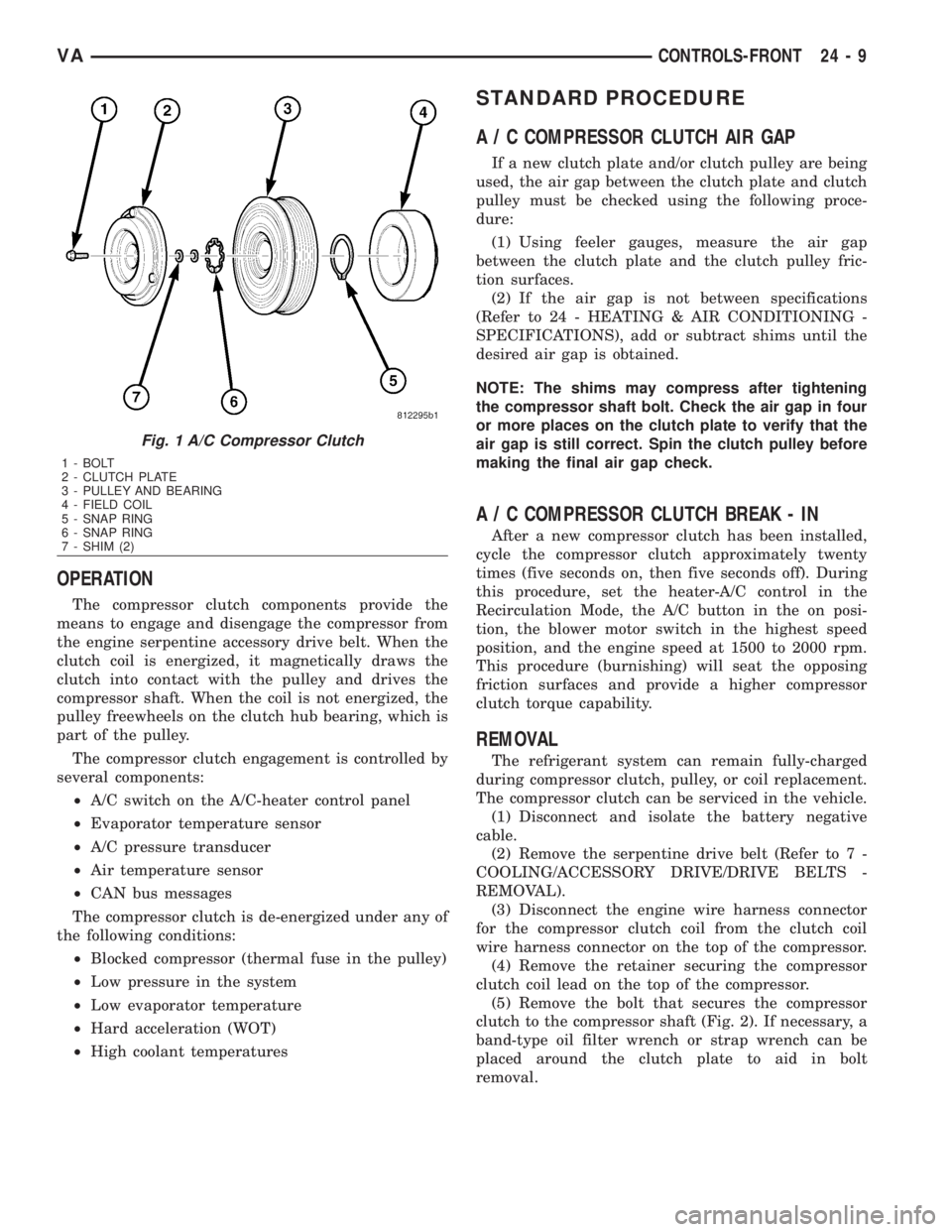
OPERATION
The compressor clutch components provide the
means to engage and disengage the compressor from
the engine serpentine accessory drive belt. When the
clutch coil is energized, it magnetically draws the
clutch into contact with the pulley and drives the
compressor shaft. When the coil is not energized, the
pulley freewheels on the clutch hub bearing, which is
part of the pulley.
The compressor clutch engagement is controlled by
several components:
²A/C switch on the A/C-heater control panel
²Evaporator temperature sensor
²A/C pressure transducer
²Air temperature sensor
²CAN bus messages
The compressor clutch is de-energized under any of
the following conditions:
²Blocked compressor (thermal fuse in the pulley)
²Low pressure in the system
²Low evaporator temperature
²Hard acceleration (WOT)
²High coolant temperatures
STANDARD PROCEDURE
A / C COMPRESSOR CLUTCH AIR GAP
If a new clutch plate and/or clutch pulley are being
used, the air gap between the clutch plate and clutch
pulley must be checked using the following proce-
dure:
(1) Using feeler gauges, measure the air gap
between the clutch plate and the clutch pulley fric-
tion surfaces.
(2) If the air gap is not between specifications
(Refer to 24 - HEATING & AIR CONDITIONING -
SPECIFICATIONS), add or subtract shims until the
desired air gap is obtained.
NOTE: The shims may compress after tightening
the compressor shaft bolt. Check the air gap in four
or more places on the clutch plate to verify that the
air gap is still correct. Spin the clutch pulley before
making the final air gap check.
A / C COMPRESSOR CLUTCH BREAK - IN
After a new compressor clutch has been installed,
cycle the compressor clutch approximately twenty
times (five seconds on, then five seconds off). During
this procedure, set the heater-A/C control in the
Recirculation Mode, the A/C button in the on posi-
tion, the blower motor switch in the highest speed
position, and the engine speed at 1500 to 2000 rpm.
This procedure (burnishing) will seat the opposing
friction surfaces and provide a higher compressor
clutch torque capability.
REMOVAL
The refrigerant system can remain fully-charged
during compressor clutch, pulley, or coil replacement.
The compressor clutch can be serviced in the vehicle.
(1) Disconnect and isolate the battery negative
cable.
(2) Remove the serpentine drive belt (Refer to 7 -
COOLING/ACCESSORY DRIVE/DRIVE BELTS -
REMOVAL).
(3) Disconnect the engine wire harness connector
for the compressor clutch coil from the clutch coil
wire harness connector on the top of the compressor.
(4) Remove the retainer securing the compressor
clutch coil lead on the top of the compressor.
(5) Remove the bolt that secures the compressor
clutch to the compressor shaft (Fig. 2). If necessary, a
band-type oil filter wrench or strap wrench can be
placed around the clutch plate to aid in bolt
removal.
Fig. 1 A/C Compressor Clutch
1 - BOLT
2 - CLUTCH PLATE
3 - PULLEY AND BEARING
4 - FIELD COIL
5 - SNAP RING
6 - SNAP RING
7 - SHIM (2)
VACONTROLS-FRONT 24 - 9
Page 2048 of 2305
INSPECTION
Compressor clutch components should always be
inspected closely before they are reinstalled. The
clutch plate and clutch pulley are mated at the fac-
tory using a burnishing operation. No attempt should
be made to separately replace the compressor clutch
pulley or clutch plate. The clutch coil may be serviced
separately.
(1) Examine the friction surfaces of the clutch pul-
ley and the clutch plate for wear. The clutch pulley
and clutch plate should be replaced if there is exces-
sive wear or scoring.
(2) Examine the friction surfaces of the clutch pul-
ley and the clutch plate for oil contamination. If the
friction surfaces are oily, the clutch pulley and clutch
plate should be replaced. Also inspect the shaft and
nose area of the compressor for oil. Remove the felt
packing from around the compressor shaft in the
compressor front cover. If the felt is saturated with
oil, the compressor front shaft seal is leaking and the
compressor will also have to be replaced.
(3) Check the clutch pulley bearing for roughness
or excessive leakage of grease. Replace the clutch
pulley and clutch plate if the bearing is faulty.
INSTALLATION
(1) Align the dowel pin on the back of the clutch
field coil with the hole in the compressor front cover,
and position the clutch coil onto the compressor. Be
certain that the cluch coil wire harness leads are
properly oriented and routed so that they are notpinched between the compressor front cover and the
clutch coil.
NOTE: A new snap ring must be used to secure the
clutch coil to the compressor. The bevel side of the
snap ring must face outward.
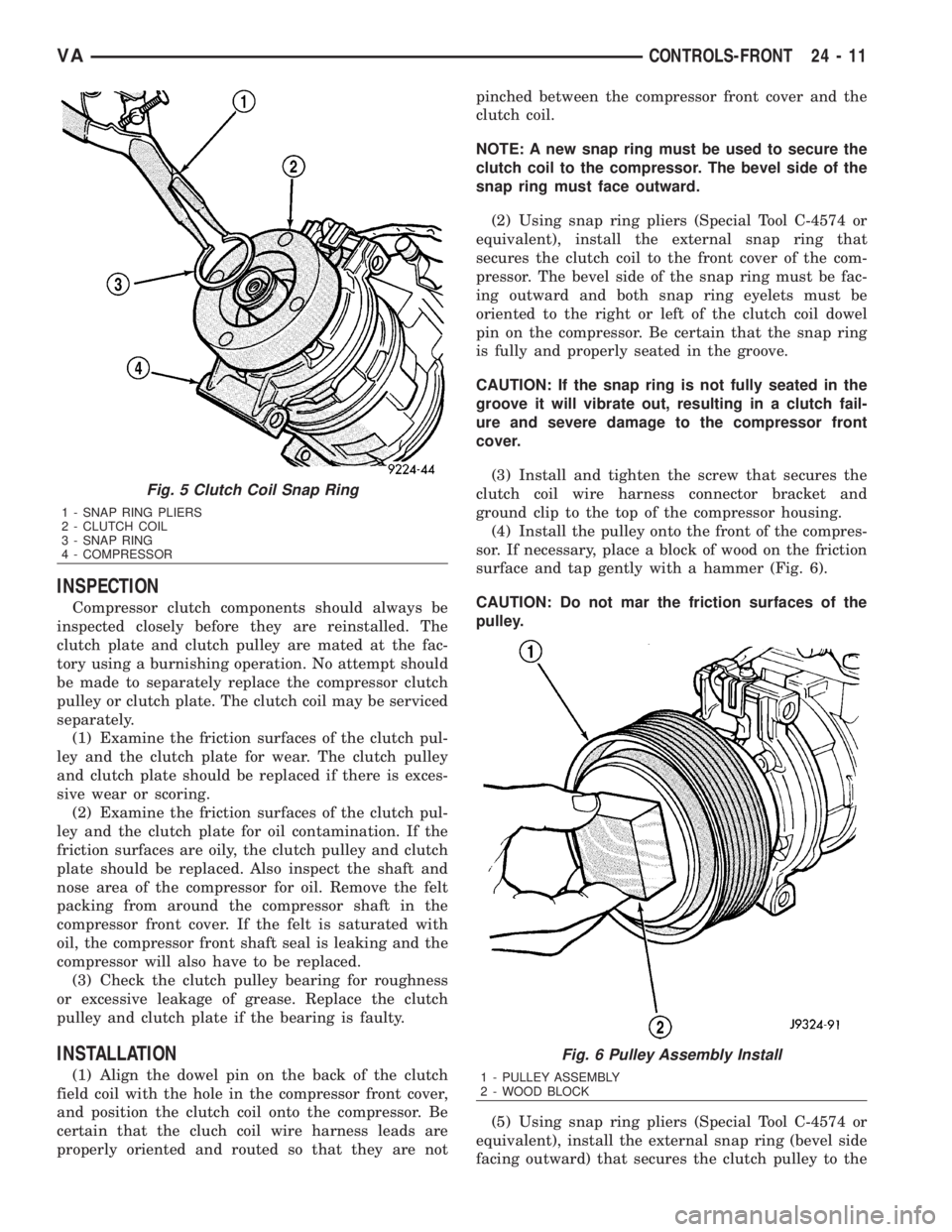
(2) Using snap ring pliers (Special Tool C-4574 or
equivalent), install the external snap ring that
secures the clutch coil to the front cover of the com-
pressor. The bevel side of the snap ring must be fac-
ing outward and both snap ring eyelets must be
oriented to the right or left of the clutch coil dowel
pin on the compressor. Be certain that the snap ring
is fully and properly seated in the groove.
CAUTION: If the snap ring is not fully seated in the
groove it will vibrate out, resulting in a clutch fail-
ure and severe damage to the compressor front
cover.
(3) Install and tighten the screw that secures the
clutch coil wire harness connector bracket and
ground clip to the top of the compressor housing.
(4) Install the pulley onto the front of the compres-
sor. If necessary, place a block of wood on the friction
surface and tap gently with a hammer (Fig. 6).
CAUTION: Do not mar the friction surfaces of the
pulley.
(5) Using snap ring pliers (Special Tool C-4574 or
equivalent), install the external snap ring (bevel side
facing outward) that secures the clutch pulley to the
Fig. 5 Clutch Coil Snap Ring
1 - SNAP RING PLIERS
2 - CLUTCH COIL
3 - SNAP RING
4 - COMPRESSOR
Fig. 6 Pulley Assembly Install
1 - PULLEY ASSEMBLY
2 - WOOD BLOCK
VACONTROLS-FRONT 24 - 11
Page 2055 of 2305
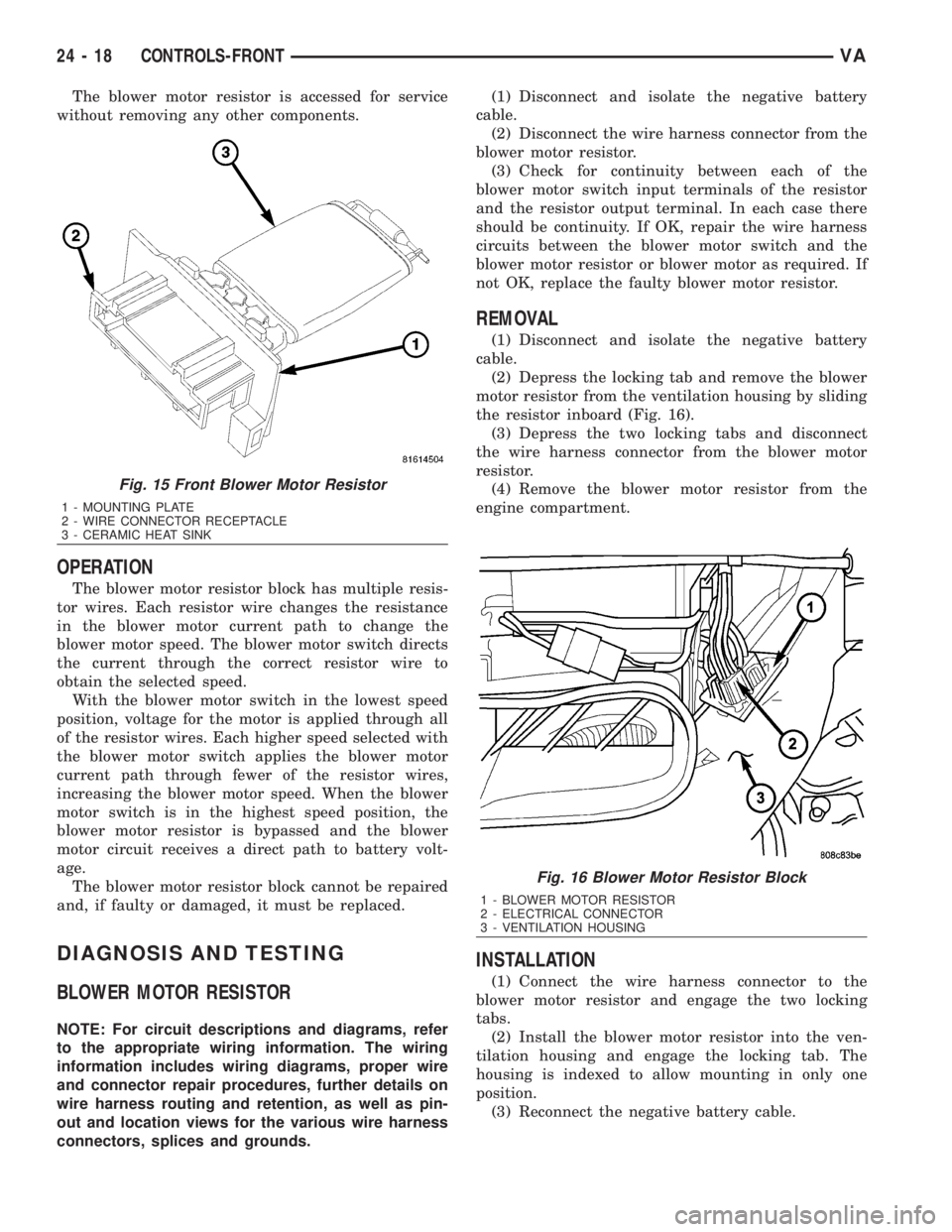
The blower motor resistor is accessed for service
without removing any other components.
OPERATION
The blower motor resistor block has multiple resis-
tor wires. Each resistor wire changes the resistance
in the blower motor current path to change the
blower motor speed. The blower motor switch directs
the current through the correct resistor wire to
obtain the selected speed.
With the blower motor switch in the lowest speed
position, voltage for the motor is applied through all
of the resistor wires. Each higher speed selected with
the blower motor switch applies the blower motor
current path through fewer of the resistor wires,
increasing the blower motor speed. When the blower
motor switch is in the highest speed position, the
blower motor resistor is bypassed and the blower
motor circuit receives a direct path to battery volt-
age.
The blower motor resistor block cannot be repaired
and, if faulty or damaged, it must be replaced.
DIAGNOSIS AND TESTING
BLOWER MOTOR RESISTOR
NOTE: For circuit descriptions and diagrams, refer
to the appropriate wiring information. The wiring
information includes wiring diagrams, proper wire
and connector repair procedures, further details on
wire harness routing and retention, as well as pin-
out and location views for the various wire harness
connectors, splices and grounds.(1) Disconnect and isolate the negative battery
cable.
(2) Disconnect the wire harness connector from the
blower motor resistor.
(3) Check for continuity between each of the
blower motor switch input terminals of the resistor
and the resistor output terminal. In each case there
should be continuity. If OK, repair the wire harness
circuits between the blower motor switch and the
blower motor resistor or blower motor as required. If
not OK, replace the faulty blower motor resistor.
REMOVAL
(1) Disconnect and isolate the negative battery
cable.
(2) Depress the locking tab and remove the blower
motor resistor from the ventilation housing by sliding
the resistor inboard (Fig. 16).
(3) Depress the two locking tabs and disconnect
the wire harness connector from the blower motor
resistor.
(4) Remove the blower motor resistor from the
engine compartment.
INSTALLATION
(1) Connect the wire harness connector to the
blower motor resistor and engage the two locking
tabs.
(2) Install the blower motor resistor into the ven-
tilation housing and engage the locking tab. The
housing is indexed to allow mounting in only one
position.
(3) Reconnect the negative battery cable.
Fig. 15 Front Blower Motor Resistor
1 - MOUNTING PLATE
2 - WIRE CONNECTOR RECEPTACLE
3 - CERAMIC HEAT SINK
Fig. 16 Blower Motor Resistor Block
1 - BLOWER MOTOR RESISTOR
2 - ELECTRICAL CONNECTOR
3 - VENTILATION HOUSING
24 - 18 CONTROLS-FRONTVA
Page 2056 of 2305
BLOWER MOTOR SWITCH
DESCRIPTION
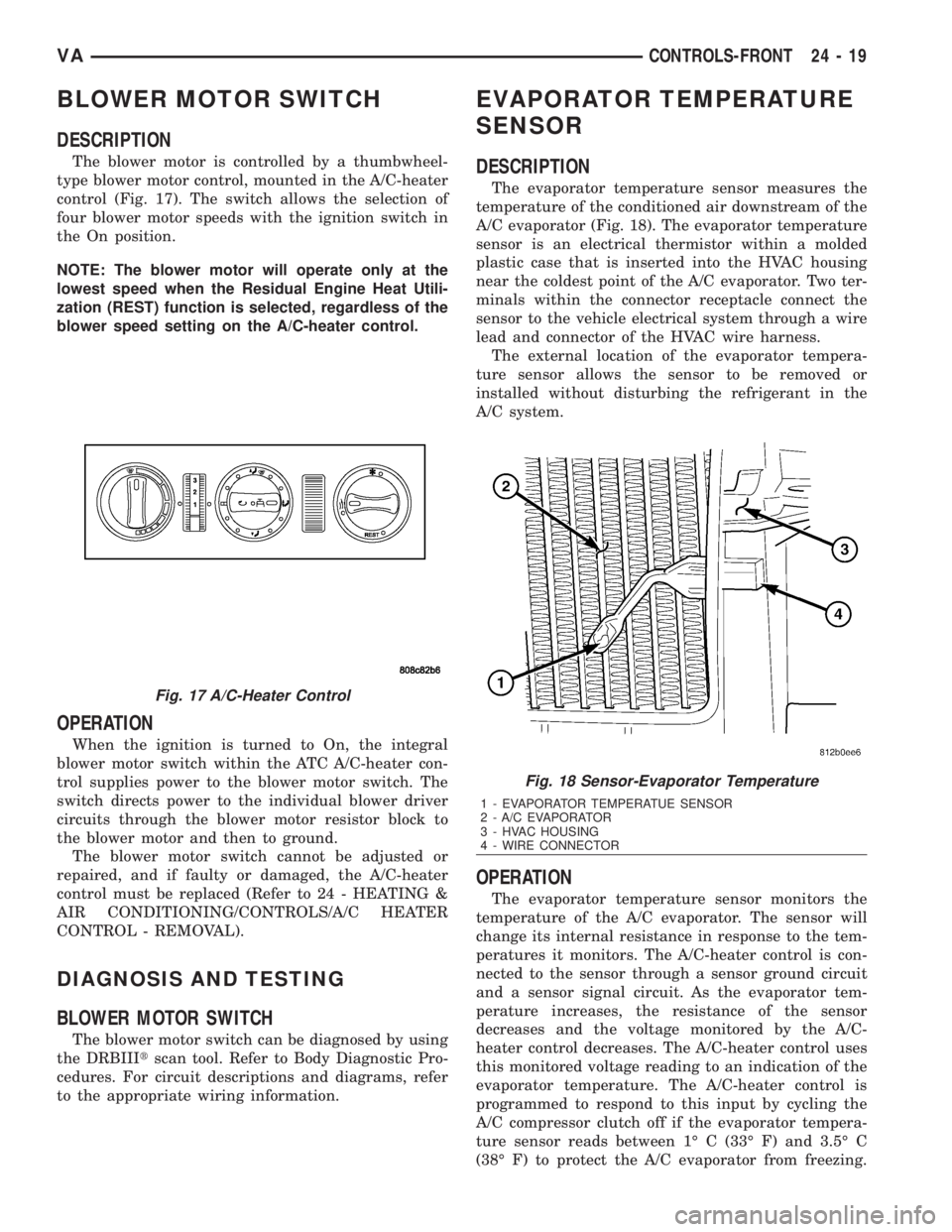
The blower motor is controlled by a thumbwheel-
type blower motor control, mounted in the A/C-heater
control (Fig. 17). The switch allows the selection of
four blower motor speeds with the ignition switch in
the On position.
NOTE: The blower motor will operate only at the
lowest speed when the Residual Engine Heat Utili-
zation (REST) function is selected, regardless of the
blower speed setting on the A/C-heater control.
OPERATION
When the ignition is turned to On, the integral
blower motor switch within the ATC A/C-heater con-
trol supplies power to the blower motor switch. The
switch directs power to the individual blower driver
circuits through the blower motor resistor block to
the blower motor and then to ground.
The blower motor switch cannot be adjusted or
repaired, and if faulty or damaged, the A/C-heater
control must be replaced (Refer to 24 - HEATING &
AIR CONDITIONING/CONTROLS/A/C HEATER
CONTROL - REMOVAL).
DIAGNOSIS AND TESTING
BLOWER MOTOR SWITCH
The blower motor switch can be diagnosed by using
the DRBIIItscan tool. Refer to Body Diagnostic Pro-
cedures. For circuit descriptions and diagrams, refer
to the appropriate wiring information.
EVAPORATOR TEMPERATURE
SENSOR
DESCRIPTION
The evaporator temperature sensor measures the
temperature of the conditioned air downstream of the
A/C evaporator (Fig. 18). The evaporator temperature
sensor is an electrical thermistor within a molded
plastic case that is inserted into the HVAC housing
near the coldest point of the A/C evaporator. Two ter-
minals within the connector receptacle connect the
sensor to the vehicle electrical system through a wire
lead and connector of the HVAC wire harness.
The external location of the evaporator tempera-
ture sensor allows the sensor to be removed or
installed without disturbing the refrigerant in the
A/C system.
OPERATION
The evaporator temperature sensor monitors the
temperature of the A/C evaporator. The sensor will
change its internal resistance in response to the tem-
peratures it monitors. The A/C-heater control is con-
nected to the sensor through a sensor ground circuit
and a sensor signal circuit. As the evaporator tem-
perature increases, the resistance of the sensor
decreases and the voltage monitored by the A/C-
heater control decreases. The A/C-heater control uses
this monitored voltage reading to an indication of the
evaporator temperature. The A/C-heater control is
programmed to respond to this input by cycling the
A/C compressor clutch off if the evaporator tempera-
ture sensor reads between 1É C (33É F) and 3.5É C
(38É F) to protect the A/C evaporator from freezing.
Fig. 17 A/C-Heater Control
Fig. 18 Sensor-Evaporator Temperature
1 - EVAPORATOR TEMPERATUE SENSOR
2 - A/C EVAPORATOR
3 - HVAC HOUSING
4 - WIRE CONNECTOR
VACONTROLS-FRONT 24 - 19
Page 2059 of 2305
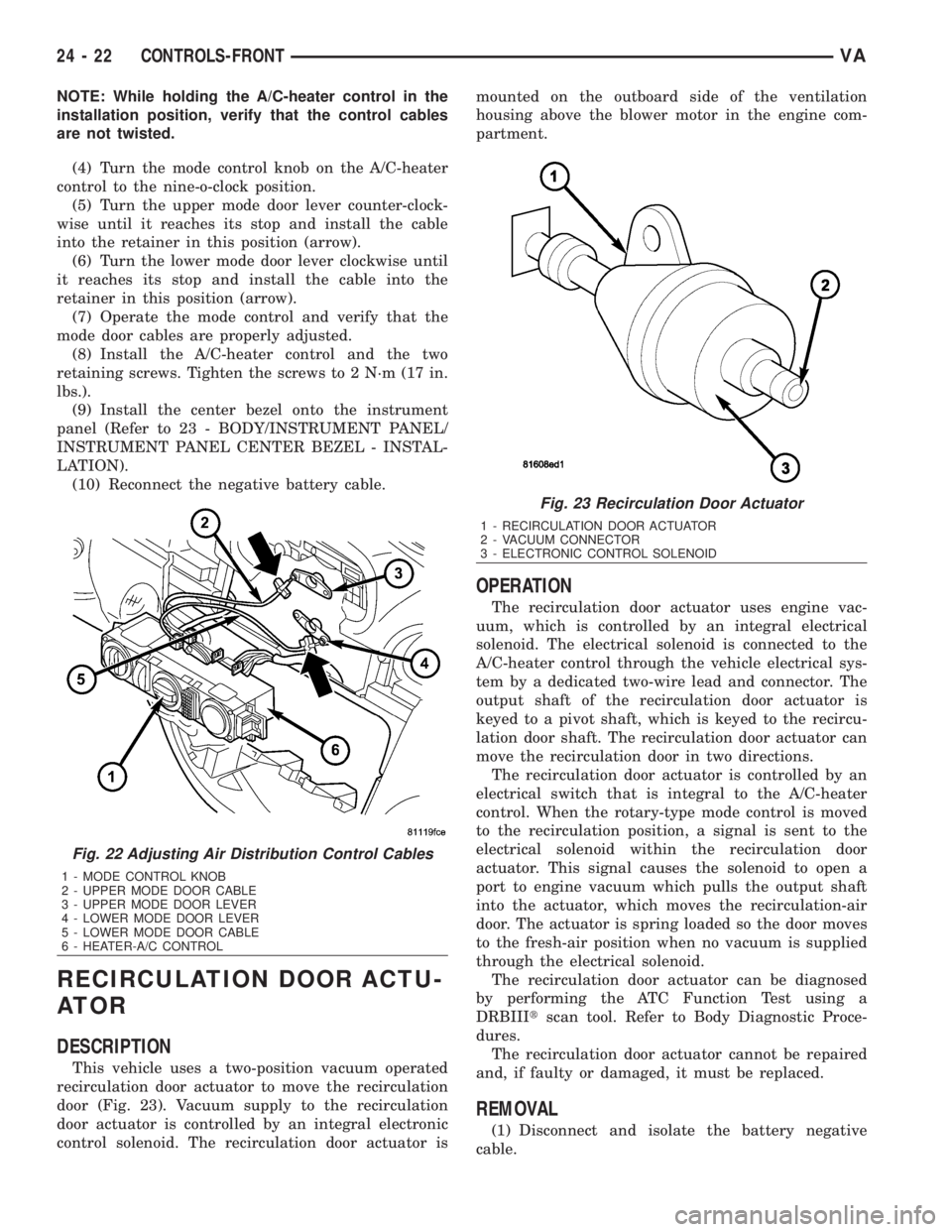
NOTE: While holding the A/C-heater control in the
installation position, verify that the control cables
are not twisted.
(4) Turn the mode control knob on the A/C-heater
control to the nine-o-clock position.
(5) Turn the upper mode door lever counter-clock-
wise until it reaches its stop and install the cable
into the retainer in this position (arrow).
(6) Turn the lower mode door lever clockwise until
it reaches its stop and install the cable into the
retainer in this position (arrow).
(7) Operate the mode control and verify that the
mode door cables are properly adjusted.
(8) Install the A/C-heater control and the two
retaining screws. Tighten the screws to 2 N´m (17 in.
lbs.).
(9) Install the center bezel onto the instrument
panel (Refer to 23 - BODY/INSTRUMENT PANEL/
INSTRUMENT PANEL CENTER BEZEL - INSTAL-
LATION).
(10) Reconnect the negative battery cable.
RECIRCULATION DOOR ACTU-
ATOR
DESCRIPTION
This vehicle uses a two-position vacuum operated
recirculation door actuator to move the recirculation
door (Fig. 23). Vacuum supply to the recirculation
door actuator is controlled by an integral electronic
control solenoid. The recirculation door actuator ismounted on the outboard side of the ventilation
housing above the blower motor in the engine com-
partment.
OPERATION
The recirculation door actuator uses engine vac-
uum, which is controlled by an integral electrical
solenoid. The electrical solenoid is connected to the
A/C-heater control through the vehicle electrical sys-
tem by a dedicated two-wire lead and connector. The
output shaft of the recirculation door actuator is
keyed to a pivot shaft, which is keyed to the recircu-
lation door shaft. The recirculation door actuator can
move the recirculation door in two directions.
The recirculation door actuator is controlled by an
electrical switch that is integral to the A/C-heater
control. When the rotary-type mode control is moved
to the recirculation position, a signal is sent to the
electrical solenoid within the recirculation door
actuator. This signal causes the solenoid to open a
port to engine vacuum which pulls the output shaft
into the actuator, which moves the recirculation-air
door. The actuator is spring loaded so the door moves
to the fresh-air position when no vacuum is supplied
through the electrical solenoid.
The recirculation door actuator can be diagnosed
by performing the ATC Function Test using a
DRBIIItscan tool. Refer to Body Diagnostic Proce-
dures.
The recirculation door actuator cannot be repaired
and, if faulty or damaged, it must be replaced.
REMOVAL
(1) Disconnect and isolate the battery negative
cable.
Fig. 22 Adjusting Air Distribution Control Cables
1 - MODE CONTROL KNOB
2 - UPPER MODE DOOR CABLE
3 - UPPER MODE DOOR LEVER
4 - LOWER MODE DOOR LEVER
5 - LOWER MODE DOOR CABLE
6 - HEATER-A/C CONTROL
Fig. 23 Recirculation Door Actuator
1 - RECIRCULATION DOOR ACTUATOR
2 - VACUUM CONNECTOR
3 - ELECTRONIC CONTROL SOLENOID
24 - 22 CONTROLS-FRONTVA