door lock MERCEDES-BENZ SPRINTER 2012 MY12 Operator’s Manual
[x] Cancel search | Manufacturer: MERCEDES-BENZ, Model Year: 2012, Model line: SPRINTER, Model: MERCEDES-BENZ SPRINTER 2012Pages: 292, PDF Size: 6.75 MB
Page 67 of 292
Swiveling front seats
G
Warning
Do not start the engine unless the driver's and
co-driver's seats are facing in the direction of
travel and are locked in position. Only adjust
the seats when the vehicle is stationary and
the parking brake is applied. You could
otherwise lose control of the vehicle as a
result of sudden seat movements and thereby
cause an accident.
The safety systems only work when the
driver's and co-driver's seats are facing in the
direction of travel.
The driver's seat and co-driver's seat can be
rotated through 180°.
The seats engage when facing in the direction
of travel as well as when facing in the opposite
direction and also engage at an angle of 50°
to the door.
! When rotating the seats, make sure that
there is sufficient space to do so.
Move the seat forward or back first. This
will help to avoid contact with other parts
of the interior.
Push the handbrake lever down to the stop.
The parking brake or handbrake lever could
otherwise be damaged.
i Always slide the co-driver's seat forwards
before rotating it (Y page 64).
X Make sure that the parking brake has been
engaged and that the handbrake lever has
been pushed down to the stop
(Y page 112).
X Adjust the steering wheel to provide the
necessary space to rotate and adjust the
driver's seat ( Y
page 69). G
Warning
When releasing and rotating the seats, make
sure that you do not trap yourself or others.
Never place your hands under the seat or in
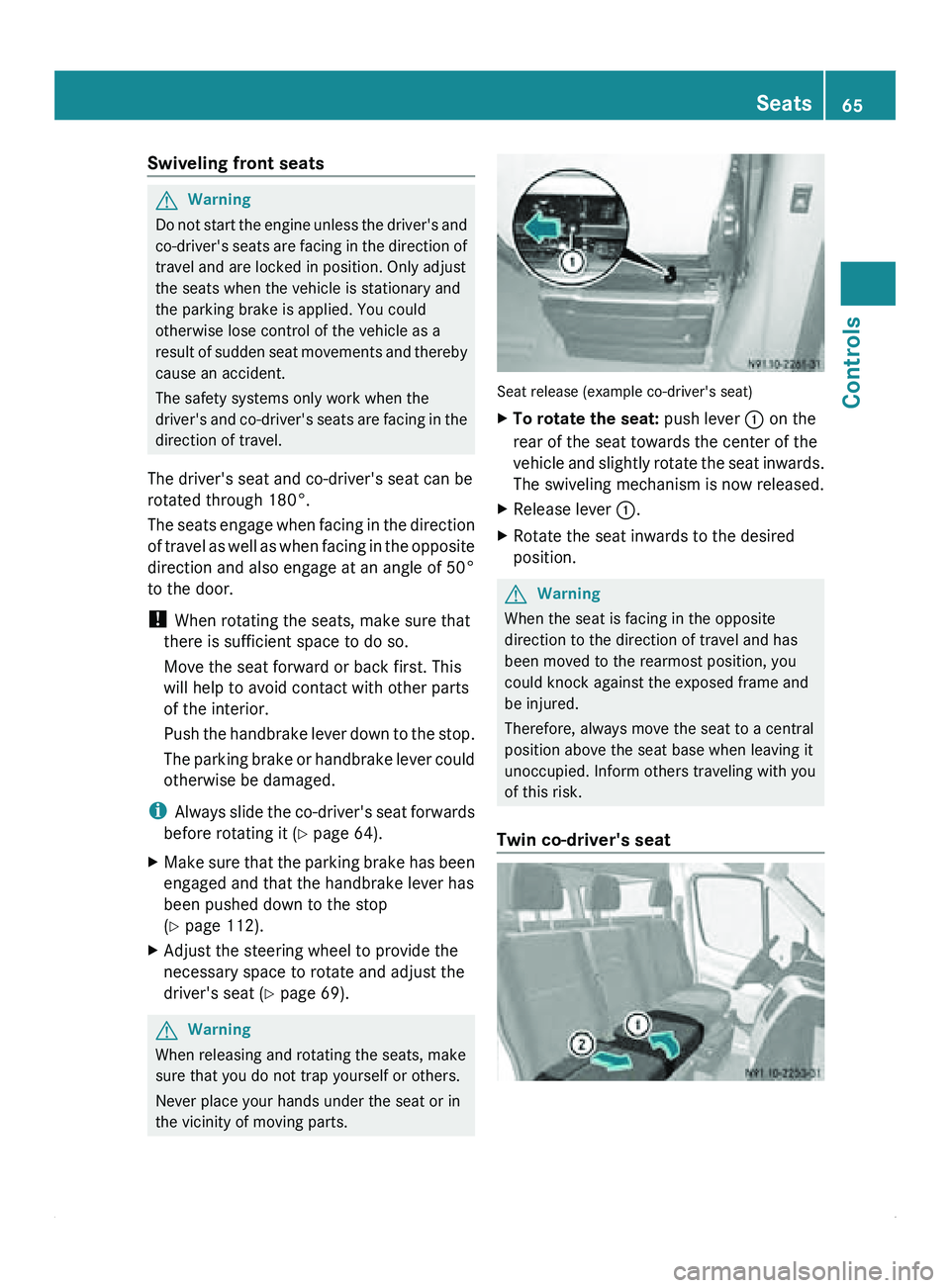
the vicinity of moving parts. Seat release (example co-driver's seat)
X
To rotate the seat: push lever 0046 on the
rear of the seat towards the center of the
vehicle and
slightly rotate the seat inwards.
The swiveling mechanism is now released.
X Release lever 0046.
X Rotate the seat inwards to the desired
position. G
Warning
When the seat is facing in the opposite
direction to the direction of travel and has
been moved to the rearmost position, you
could knock against the exposed frame and
be injured.
Therefore, always move the seat to a central
position above the seat base when leaving it
unoccupied. Inform others traveling with you
of this risk.
Twin co-driver's seat Seats
65Controls Z
Page 69 of 292
Installing two-seat or three-seat rear
benches
X
Observe the prescribed installation
position of the bench seat.
Install the two-seat rear bench only on the
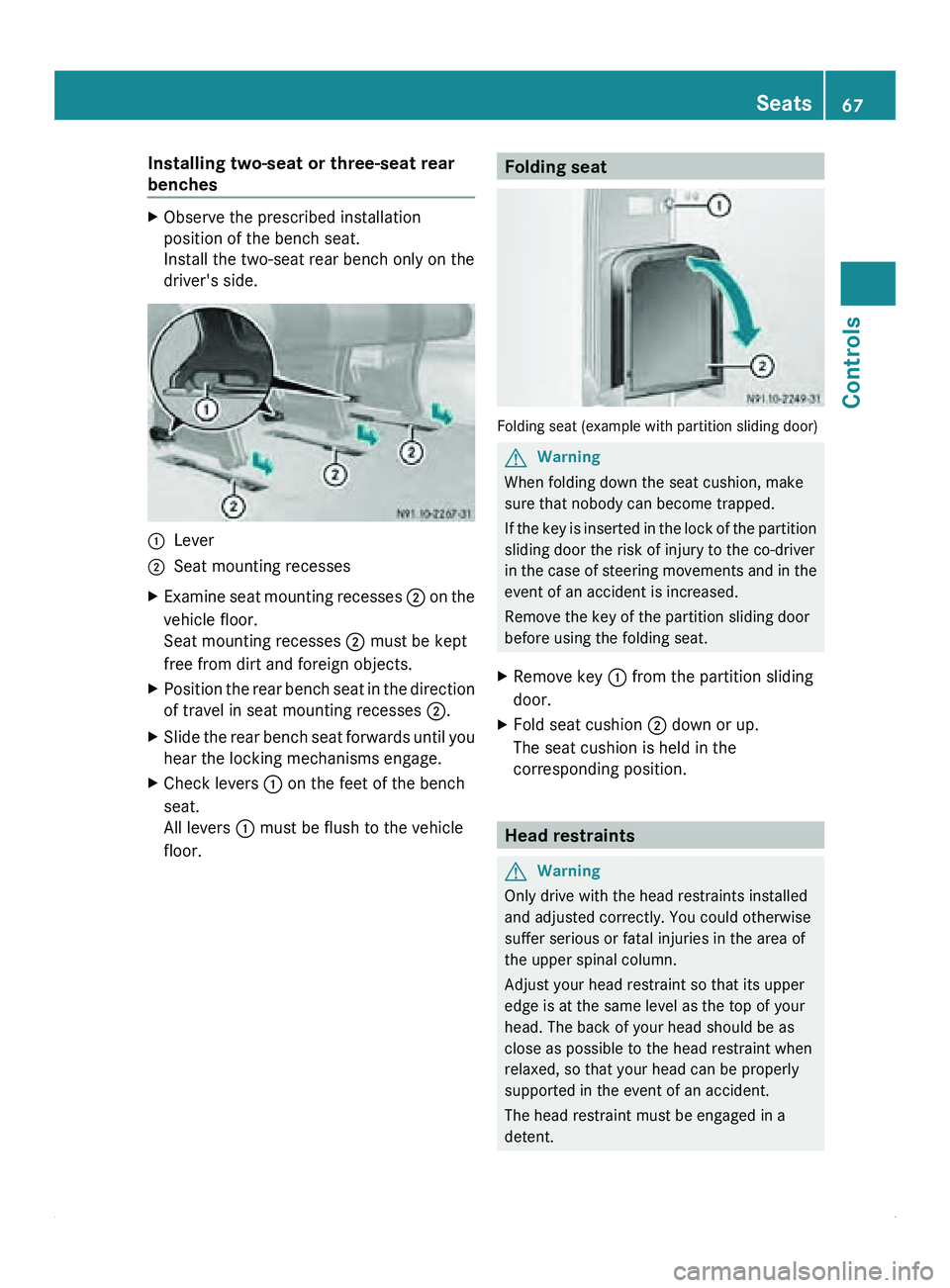
driver's side. 0046
Lever
0047 Seat mounting recesses
X Examine seat mounting recesses 0047 on
the
vehicle floor.
Seat mounting recesses 0047
must be kept
free from dirt and foreign objects.
X Position the rear bench seat in the direction
of travel in seat mounting recesses 0047.
X Slide the rear bench seat forwards until you
hear the locking mechanisms engage.
X Check levers 0046 on the feet of the bench
seat.
All levers 0046 must be flush to the vehicle
floor. Folding seat
Folding seat (example with partition sliding door)
G
Warning
When folding down the seat cushion, make
sure that nobody can become trapped.
If the key
is inserted in the lock of the partition
sliding door the risk of injury to the co-driver
in the case of steering movements and in the
event of an accident is increased.
Remove the key of the partition sliding door
before using the folding seat.
X Remove key 0046 from the partition sliding
door.
X Fold seat cushion 0047 down or up.
The seat cushion is held in the
corresponding position. Head restraints
G
Warning
Only drive with the head restraints installed
and adjusted correctly. You could otherwise
suffer serious or fatal injuries in the area of
the upper spinal column.
Adjust your head restraint so that its upper
edge is at the same level as the top of your
head. The back of your head should be as
close as possible to the head restraint when
relaxed, so that your head can be properly
supported in the event of an accident.
The head restraint must be engaged in a
detent. Seats
67
Controls Z
Page 73 of 292
The display in the instrument cluster is
activated when you:
R
open the driver's door
R turn the key
to position 2 in the ignition lock
R press the 0048 reset button
R switch on the lights
The display switches off automatically after
approximately 30 seconds if:
R the vehicle lighting is not switched on.
R the key is in position 0 in the ignition lock.G
Warning
No messages can be displayed if the
instrument cluster and/or the display fails.
You will then not be able to see information
about the vehicle status, such as speed and
outside temperature, warning/indicator
lamps and display messages or the failure of
systems. Handling characteristics may be
affected. Adapt your speed and driving style
accordingly.
Immediately consult a qualified specialist
workshop. The qualified specialist workshop
must have the necessary specialist
knowledge and tools to carry out the work
required. We recommend an authorized
Sprinter Dealer for
this purpose. In particular,
all work relevant to safety or on safety-related
systems must be carried out at a qualified
specialist workshop. G
Warning
Only use the adjustment buttons on the
instrument cluster when
the traffic conditions
permit. You would otherwise be too distracted
and could cause an accident.
Do not reach through the steering wheel to
operate the adjustment buttons. The
movement of the steering wheel would be
significantly impeded. Your attention would
also be diverted from road and traffic
conditions. This could cause you to lose
control of the vehicle, and lead to an accident. Do not rest your head or chest on the steering
wheel or dashboard when operating the
adjustment buttons.
You will find page references for further
information in the index under "Air bag".
Speedometer
i In some countries, a warning sounds
when the vehicle reaches the maximum
speed limit, e.g. at 75 mph (120 km/h).
The speed can also be shown in the display.
You can find information on the digital
speedometer for vehicles without steering
wheel buttons under ( Y page 73) and for
vehicles with steering wheel buttons under
(Y page 77). Tachometer
The red band
in the tachometer indicates the
engine's overrevving range.
To protect the engine, the fuel supply is
interrupted when the red band is reached.
! Do not drive in the overrevving range, as
this could damage the engine.
0040Environmental information
Avoid driving at high engine revs. This driving
style causes an unnecessary increase in
vehicle fuel consumption and, therefore,
damage to the
environment due to increased
emission of pollution. Instrument cluster
71
Controls Z
Page 85 of 292
X
Press 005A or 005B to select the
Lighting submenu.
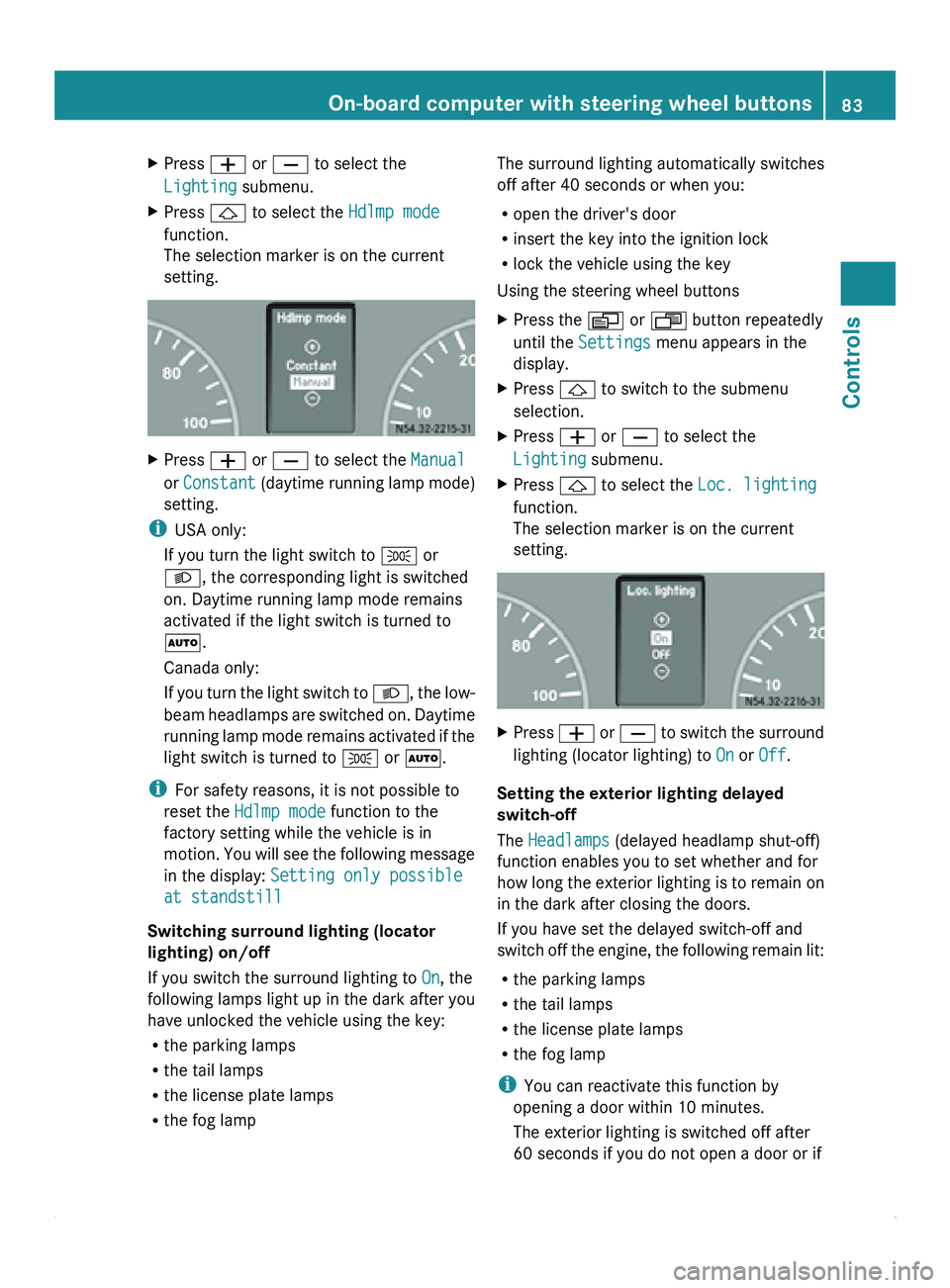
X Press 0029 to select the Hdlmp mode
function.
The selection marker is on the current
setting. X
Press 005A or 005B to select the Manual
or Constant (daytime running
lamp mode)
setting.
i USA only:
If you turn the light switch to 006C or
0064, the corresponding light is switched
on. Daytime running lamp mode remains
activated if the light switch is turned to
005A.
Canada only:
If you turn
the light switch to 0064, the low-
beam headlamps are switched on. Daytime
running lamp mode remains activated if the
light switch is turned to 006C or 005A.
i For safety reasons, it is not possible to
reset the Hdlmp mode function to the
factory setting while the vehicle is in
motion. You will see the following message
in the display: Setting only possible
at standstill
Switching surround lighting (locator
lighting) on/off
If you switch the surround lighting to On, the
following lamps light up in the dark after you
have unlocked the vehicle using the key:
R the parking lamps
R the tail lamps
R the license plate lamps
R the fog lamp The surround lighting automatically switches
off after 40 seconds or when you:
R
open the driver's door
R insert the key into the ignition lock
R lock the vehicle using the key
Using the steering wheel buttons
X Press the 0059 or 0058 button repeatedly
until the Settings menu appears in the
display.
X Press 0029 to switch to the submenu
selection.
X Press 005A or 005B to select the
Lighting submenu.
X Press 0029 to select the Loc. lighting
function.
The selection marker is on the current
setting. X
Press 005A
or 005B
to switch the surround
lighting (locator lighting) to On or Off.
Setting the exterior lighting delayed
switch-off
The Headlamps (delayed headlamp shut-off)
function enables you to set whether and for
how long
the
exterior lighting is to remain on
in the dark after closing the doors.
If you have set the delayed switch-off and
switch off the engine, the following remain lit:
R the parking lamps
R the tail lamps
R the license plate lamps
R the fog lamp
i You can reactivate this function by
opening a door within 10 minutes.
The exterior lighting is switched off after
60 seconds if you do not open a door or if On-board computer with steering wheel buttons
83
Controls Z
Page 91 of 292
Lamp failure indicator
The bulb failure indicator monitors all lamps
of the exterior lighting with the exception of
the front position lamps and the trailer
lighting. If a bulb fails, either the
0055( Y page
197)
indicator lamp lights up or
a corresponding message is shown in the
display ( Y page 209).
i Depending on the equipment, the bulb
failure indicator can be omitted for all
lamps with the exception of the turn signal
lamps. G
Warning
The bulb failure indicator is only an aid. You
are responsible for the proper functioning of
the vehicle lighting. Insufficient or non-
functioning vehicle lighting
puts the operating
safety of the vehicle at risk. You could cause
an accident and injure yourself or others.
Therefore, check the lighting equipment of
the vehicle before each journey and, if
necessary, check the operation and condition
of the trailer lighting equipment. Light switch
Configuration You can switch the vehicle lighting on or off
using the light switch.
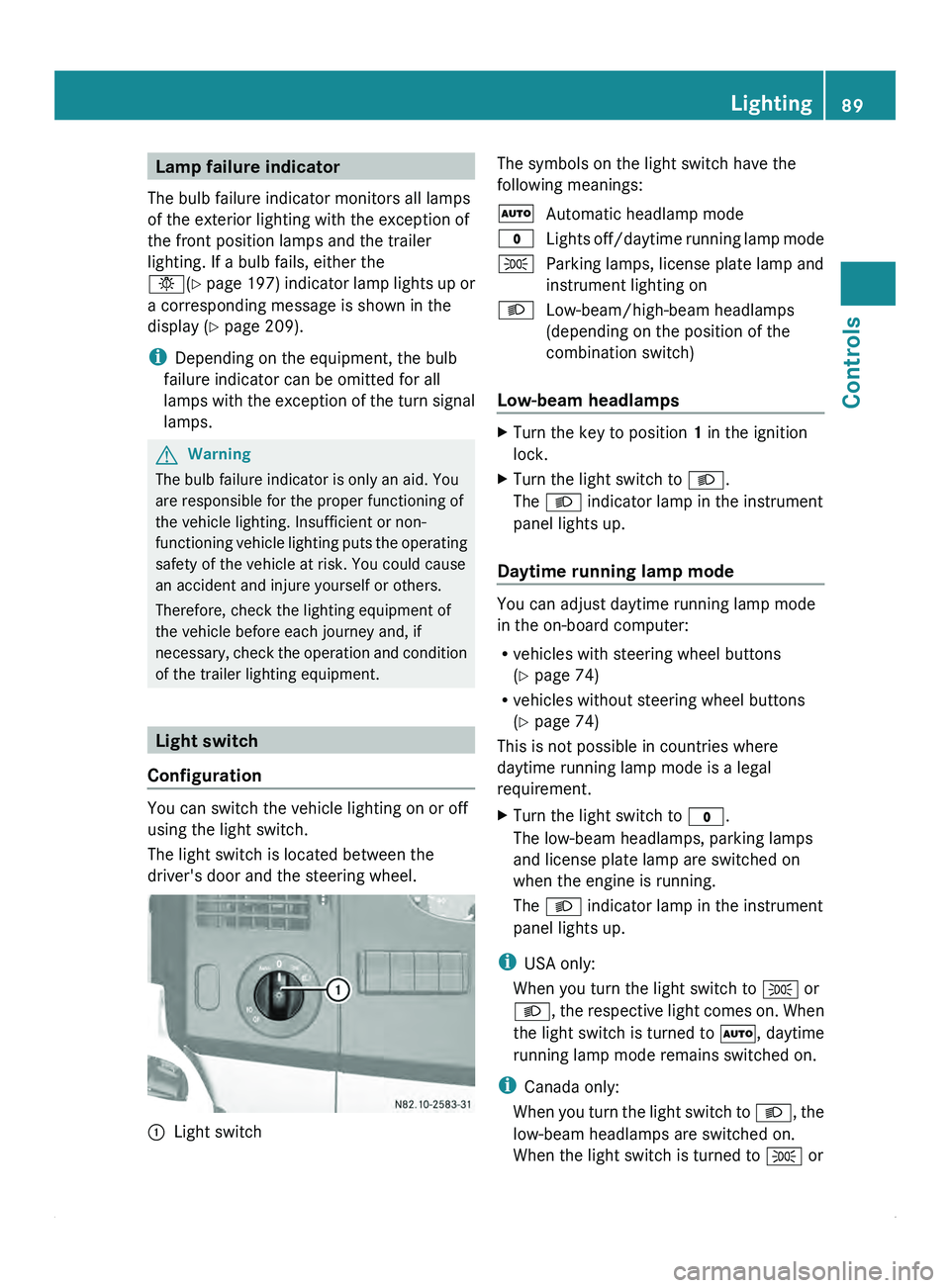
The light switch is located between the
driver's door and the steering wheel.
0046
Light switch The symbols on the light switch have the
following meanings:
005A
Automatic headlamp mode
0027 Lights off/daytime
running lamp mode
006C Parking lamps, license plate lamp and
instrument lighting on
0064 Low-beam/high-beam headlamps
(depending on the position of the
combination switch)
Low-beam headlamps X
Turn the key to position 1 in the ignition
lock.
X Turn the light switch to 0064.
The 0064 indicator lamp in the instrument
panel lights up.
Daytime running lamp mode You can adjust daytime running lamp mode
in the on-board computer:
R
vehicles with steering wheel buttons
(Y page 74)
R vehicles without steering wheel buttons
(Y page 74)
This is not possible in countries where
daytime running lamp mode is a legal
requirement.
X Turn the light switch to 0027.
The low-beam headlamps, parking lamps
and license plate lamp are switched on
when the engine is running.
The 0064 indicator lamp in the instrument
panel lights up.
i USA only:
When you turn the light switch to 006C or
0064, the respective
light comes on. When
the light switch is turned to 005A, daytime
running lamp mode remains switched on.
i Canada only:
When you turn the light switch to 0064, the
low-beam headlamps are switched on.
When the light switch is turned to 006C or Lighting
89
Controls Z
Page 94 of 292
Front interior lighting
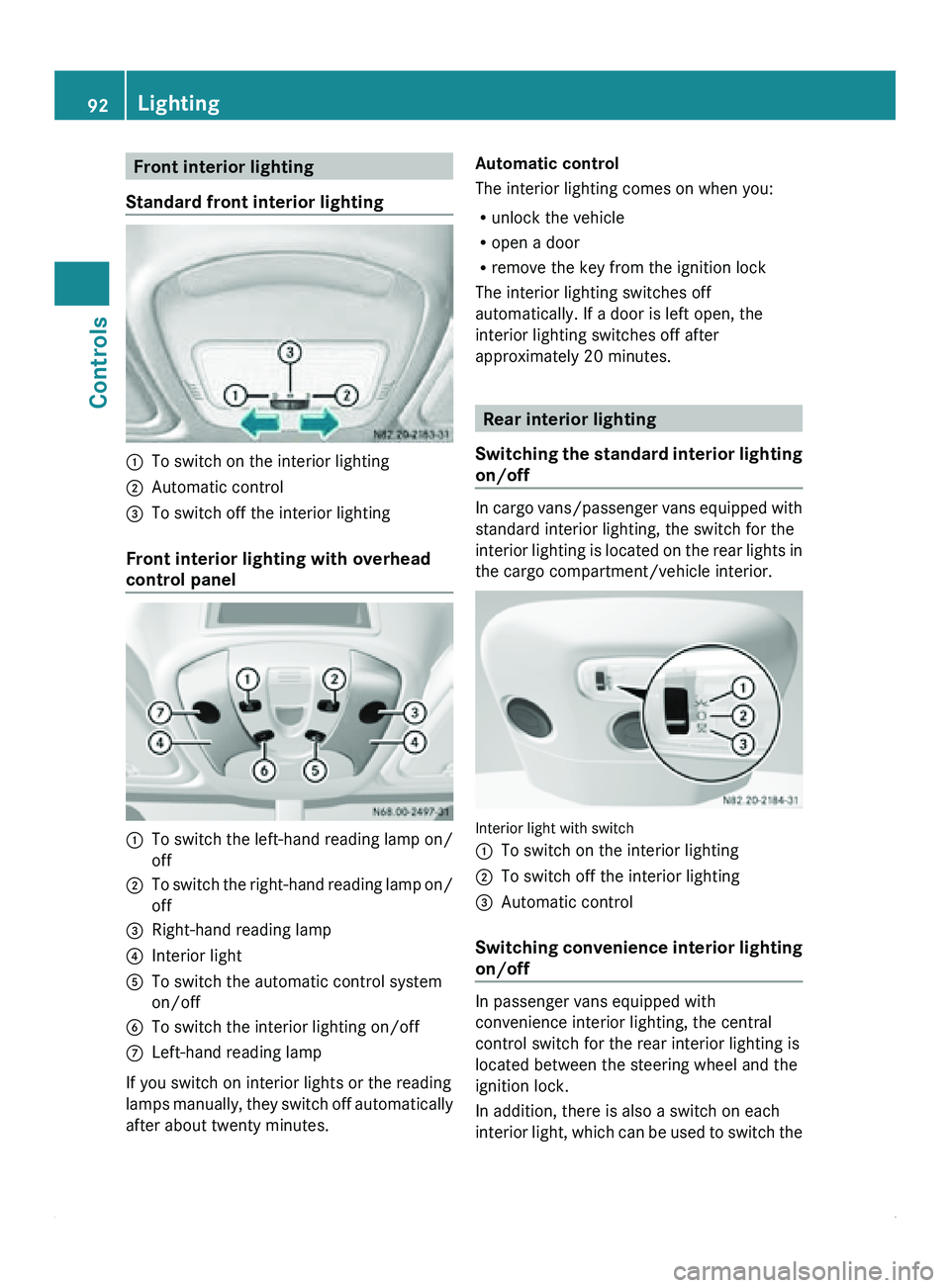
Standard front interior lighting 0046
To switch on the interior lighting
0047 Automatic control
008A To switch off the interior lighting
Front interior lighting with overhead
control panel 0046
To switch the left-hand reading lamp on/
off
0047 To switch the right-hand reading lamp on/
off
008A Right-hand reading lamp
0088 Interior light
0086 To switch the automatic control system
on/off
0087 To switch the interior lighting on/off
006E Left-hand reading lamp
If you switch on interior lights or the reading
lamps manually,
they
switch off automatically
after about twenty minutes. Automatic control
The interior lighting comes on when you:
R
unlock the vehicle
R open a door
R remove the key from the ignition lock
The interior lighting switches off
automatically. If a door is left open, the
interior lighting switches off after
approximately 20 minutes. Rear interior lighting
Switching the standard
interior lighting
on/off In cargo
vans/passenger vans equipped with
standard interior lighting, the switch for the
interior lighting is
located on the rear lights in
the cargo compartment/vehicle interior. Interior light with switch
0046
To switch on the interior lighting
0047 To switch off the interior lighting
008A Automatic control
Switching convenience
interior lighting
on/off In passenger vans equipped with
convenience interior lighting, the central
control switch for the rear interior lighting is
located between the steering wheel and the
ignition lock.
In addition, there is also a switch on each
interior light,
which
can be used to switch the92
Lighting
Controls
Page 95 of 292
lights on/off separately, depending on the
position of the central control switch.
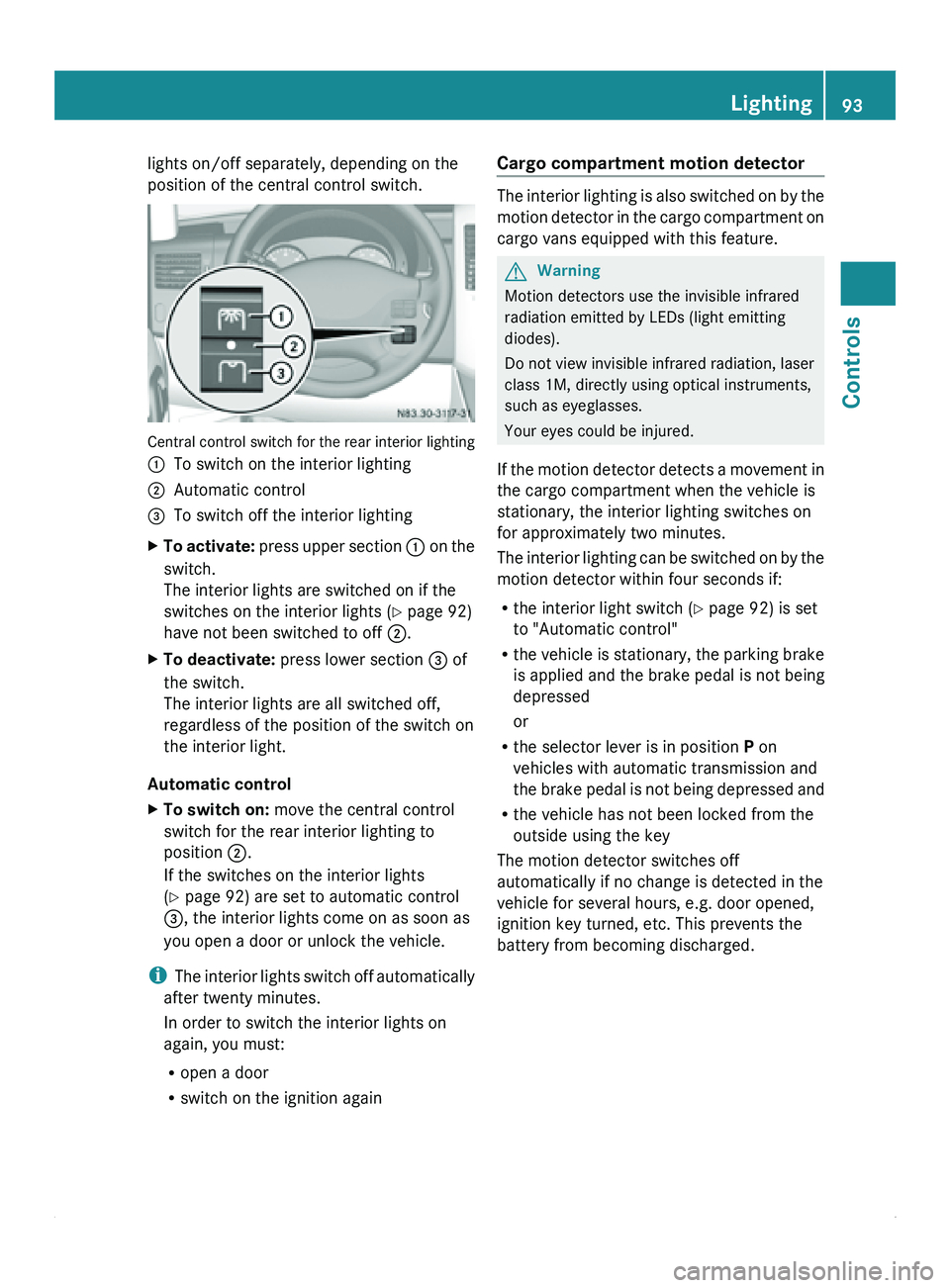
Central control switch for the rear interior lighting
0046
To switch on the interior lighting
0047 Automatic control
008A To switch off the interior lighting
X To activate: press
upper section 0046 on the
switch.
The interior lights are switched on if the
switches on the interior lights (Y page 92)
have not been switched to off 0047.
X To deactivate: press lower section 008A of
the switch.
The interior lights are all switched off,
regardless of the position of the switch on
the interior light.
Automatic control
X To switch on: move the central control
switch for the rear interior lighting to
position 0047.
If the switches on the interior lights
(Y page 92) are set to automatic control
008A, the interior lights come on as soon as
you open a door or unlock the vehicle.
i The interior
lights
switch off automatically
after twenty minutes.
In order to switch the interior lights on
again, you must:
R open a door
R switch on the ignition again Cargo compartment motion detector The interior lighting is also switched on by the
motion detector
in
the cargo compartment on
cargo vans equipped with this feature. G
Warning
Motion detectors use the invisible infrared
radiation emitted by LEDs (light emitting
diodes).
Do not view invisible infrared radiation, laser
class 1M, directly using optical instruments,
such as eyeglasses.
Your eyes could be injured.
If
the motion detector detects a movement in
the cargo compartment when the vehicle is
stationary, the interior lighting switches on
for approximately two minutes.
The interior lighting can be switched on by the
motion detector within four seconds if:
R the interior light switch (Y page 92) is set
to "Automatic control"
R the vehicle is stationary, the parking brake
is applied and the brake pedal is not being
depressed
or
R the selector lever is in position P on
vehicles with automatic transmission and
the brake pedal is not being depressed and
R the vehicle has not been locked from the
outside using the key
The motion detector switches off
automatically if no change is detected in the
vehicle for several hours, e.g. door opened,
ignition key turned, etc. This prevents the
battery from becoming discharged. Lighting
93
Controls Z
Page 110 of 292
Roof ventilator in the cargo
compartment
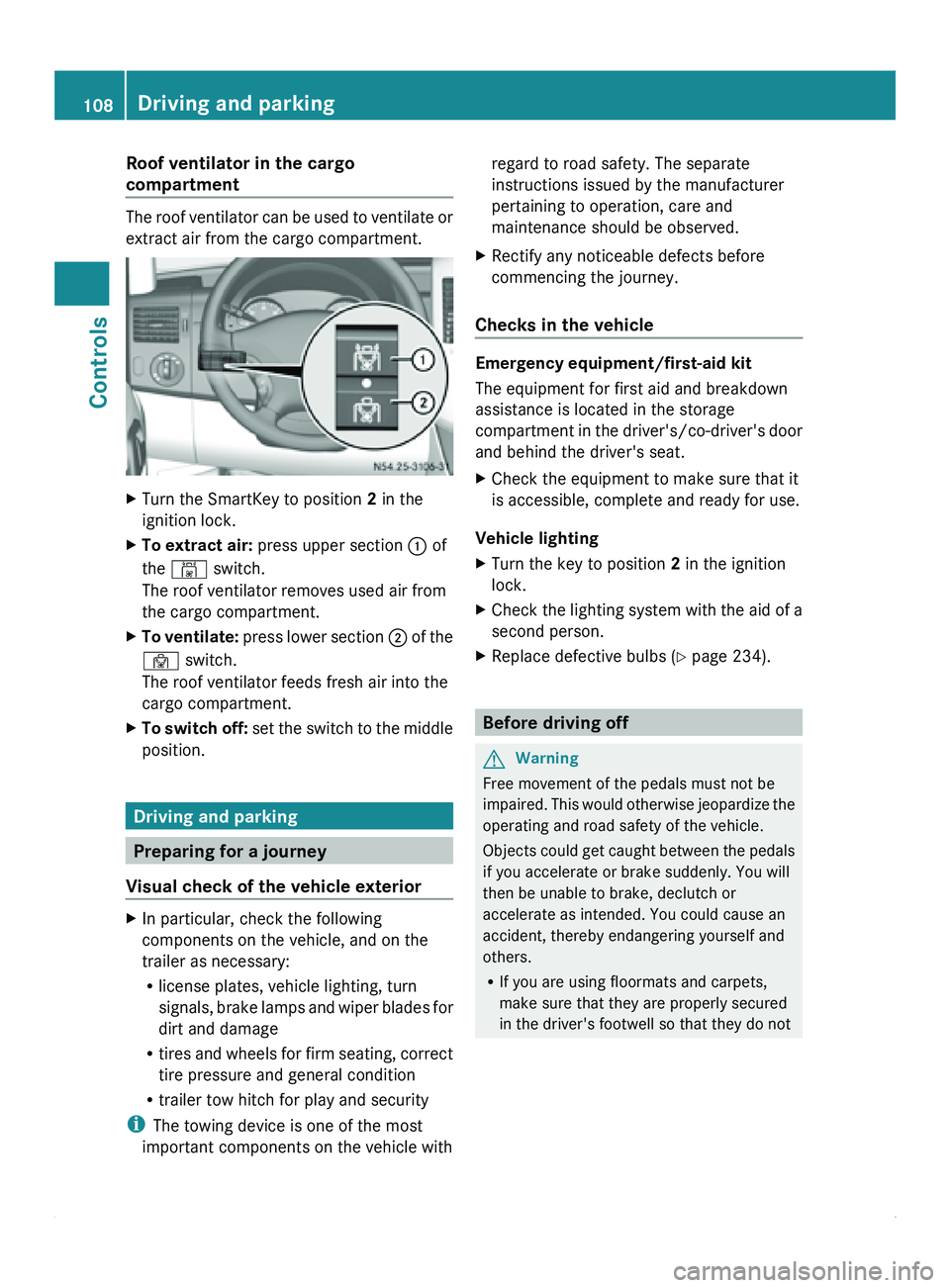
The roof ventilator can be used to ventilate or
extract air from the cargo compartment.
X
Turn the SmartKey to position 2 in the
ignition lock.
X To extract air: press upper section 0046 of
the 00B4 switch.
The roof ventilator removes used air from
the cargo compartment.
X To ventilate: press lower section 0047 of the
00B3 switch.
The roof ventilator feeds fresh air into the
cargo compartment.
X To switch off: set the
switch to the middle
position. Driving and parking
Preparing for a journey
Visual check of the vehicle exterior X
In particular, check the following
components on the vehicle, and on the
trailer as necessary:
R
license plates, vehicle lighting, turn
signals, brake lamps
and wiper blades for
dirt and damage
R tires and wheels for firm seating, correct
tire pressure and general condition
R trailer tow hitch for play and security
i The towing device is one of the most
important components on the vehicle with regard to road safety. The separate
instructions issued by the manufacturer
pertaining to operation, care and
maintenance should be observed.
X Rectify any noticeable defects before
commencing the journey.
Checks in the vehicle Emergency equipment/first-aid kit
The equipment for first aid and breakdown
assistance is located in the storage
compartment in
the
driver's/co-driver's door
and behind the driver's seat.
X Check the equipment to make sure that it
is accessible, complete and ready for use.
Vehicle lighting
X Turn the key to position 2 in the ignition
lock.
X Check the lighting system with the aid of a
second person.
X Replace defective bulbs ( Y page 234). Before driving off
G
Warning
Free movement of the pedals must not be
impaired. This would
otherwise jeopardize the
operating and road safety of the vehicle.
Objects could get caught between the pedals
if you accelerate or brake suddenly. You will
then be unable to brake, declutch or
accelerate as intended. You could cause an
accident, thereby endangering yourself and
others.
R If you are using floormats and carpets,
make sure that they are properly secured
in the driver's footwell so that they do not108
Driving and parking
Controls
Page 111 of 292
slip or obstruct the pedals. Do not place
floormats on top of one another.
R Do not put any objects in the driver's
footwell.
R Stow and secure
all loose objects in such a
way that they cannot get into the driver's
footwell while the vehicle is in motion. G
Warning
If they are not properly closed, the doors
could open while
the vehicle is in motion. This
may, for example, cause you to lose your load
and injure passengers or endanger other road
users.
For this reason, please make sure that all the
doors are properly closed and can be locked
before starting your journey.
X Close all doors.
X Secure the load according to the loading
guidelines ( Y page 144).
X Make sure that the floormats and carpets
are properly secured so that they cannot
slip and obstruct the pedals. Starting the engine
G
Warning
Do not place any objects in the driver's
footwell. If you
use a floormat or carpet in the
driver's footwell, make sure that it is correctly
secured and that there is sufficient clearance
for the pedals.
Do not place several floormats on top of one
another.
Loose objects or the floormats could
otherwise get caught between the pedals if
you accelerate or brake suddenly. You will
then not be able to brake or accelerate as
intended. This could lead to accidents and
injury. G
Warning
Never leave the engine running in enclosed
spaces. The exhaust gases contain toxic carbon monoxide.
Breathing in exhaust fumes
is a health hazard and can lead to
unconsciousness or death.
! Do not depress the accelerator pedal
when starting the engine.
i If you depress the brake pedal when
starting the engine,
the pedal travel is short
and the pedal resistance is high.
Pedal travel and resistance return to
normal when you depress the brake pedal
again.
X Before starting the engine, make sure that:
R
all the doors are closed.
R all the vehicle occupants are wearing
their seat belts correctly.
R the parking brake is applied.
R the selector lever is in position P.
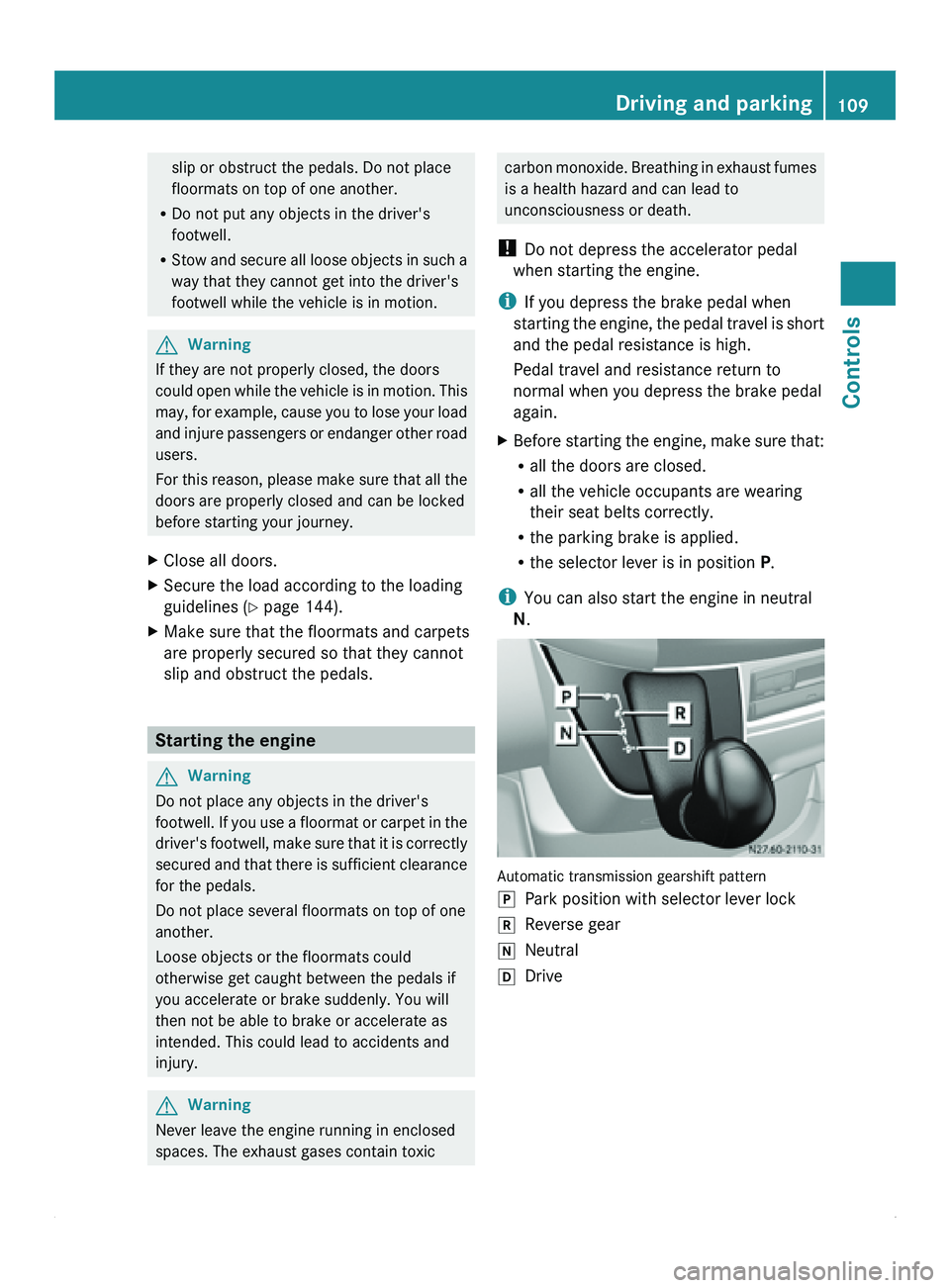
i You can also start the engine in neutral
N. Automatic transmission gearshift pattern
0060
Park position with selector lever lock
0061 Reverse gear
005F Neutral
005E Drive Driving and parking
109
Controls Z
Page 112 of 292
Starting the engine
X
Turn the key to position 2 in the ignition
lock.
The 0028 preglow indicator lamp in the
instrument cluster lights up.
X When the 0028 preglow indicator lamp
goes out, turn the key to position 3 in the
ignition lock and release it as soon as the
engine is running.
i You can start
the engine without preglow
when the engine is warm.
i Depending on the equipment installed,
the vehicle either automatically locks
centrally after switching on the ignition or
after pulling away. The locking knobs in the
doors drop down.
You can open the doors from the inside at
any time.
Automatic door locking can be deactivated
(Y page 55). Driving off
G
Warning
Do not downshift for additional engine
braking on a
slippery road surface. This could
cause the drive wheels to lose their grip and
the vehicle could skid. You could lose control
of the vehicle and cause an accident.
i After pulling away or switching on the
ignition, the vehicle automatically locks
centrally. The locking knobs in the doors
drop down.
You can open the doors from the inside at
any time.
Automatic door locking can be deactivated
(Y page 55). X
Depress the brake pedal and keep it
depressed.
The selector lever lock is released.
X Release the parking brake ( Y page 112).
The 0066 indicator lamp in the instrument
cluster goes out.
X Move the selector lever to position D or R.
i On vehicles with a reverse warning
feature, a warning signal sounds when
reverse gear is
engaged to alert other road
users.
! Only shift into reverse gear when the
vehicle is stationary. You could otherwise
damage the transmission.
X Release the brake pedal.
X Carefully depress the accelerator pedal. General driving tips
Steering G
Warning
Do not switch off the engine while the vehicle
is in motion.
There is no
power assistance for the steering
or the service brake when the engine is not
running.
Steering and braking require significantly
more effort and you could lose control of the
vehicle and cause an accident as a result.
! Do not hold the steering wheel at full
steering angle for a long time, e.g. when
turning or maneuvering.
The hydraulic pump could be damaged if
the hydraulic fluid temperature increases.
Overrun cut-off If you take your foot off the accelerator pedal,
the diesel fuel supply is cut off in overrun
mode when the
engine speed is out of the idle
speed control range. 110
Driving and parking
Controls